Project 16: UART Receiver
Receive UART frames using oversampling and framing checks.
Quick Reference
| Attribute | Value |
|---|---|
| Difficulty | Advanced |
| Time Estimate | 1 week |
| Main Programming Language | Verilog (Alternatives: VHDL, SystemVerilog) |
| Alternative Programming Languages | VHDL, SystemVerilog |
| Coolness Level | High |
| Business Potential | Medium |
| Prerequisites | UART framing, Counters |
| Key Topics | Oversampling, Framing errors |
1. Learning Objectives
- Detect start bits reliably
- Sample in the middle of bit cells
- Flag framing errors
2. All Theory Needed (Per-Concept Breakdown)
UART Sampling and Oversampling
Description/Expanded Explanation of the concept
UART RX must sample asynchronous data. Oversampling (8x or 16x) provides margin against jitter and clock mismatch. Sampling in the center of the bit cell reduces error.
Definitions & Key Terms
- Oversampling -> multiple samples per bit
- Framing error -> missing/invalid stop bit
- False start -> noise that mimics a start bit
Mental Model Diagram (ASCII)
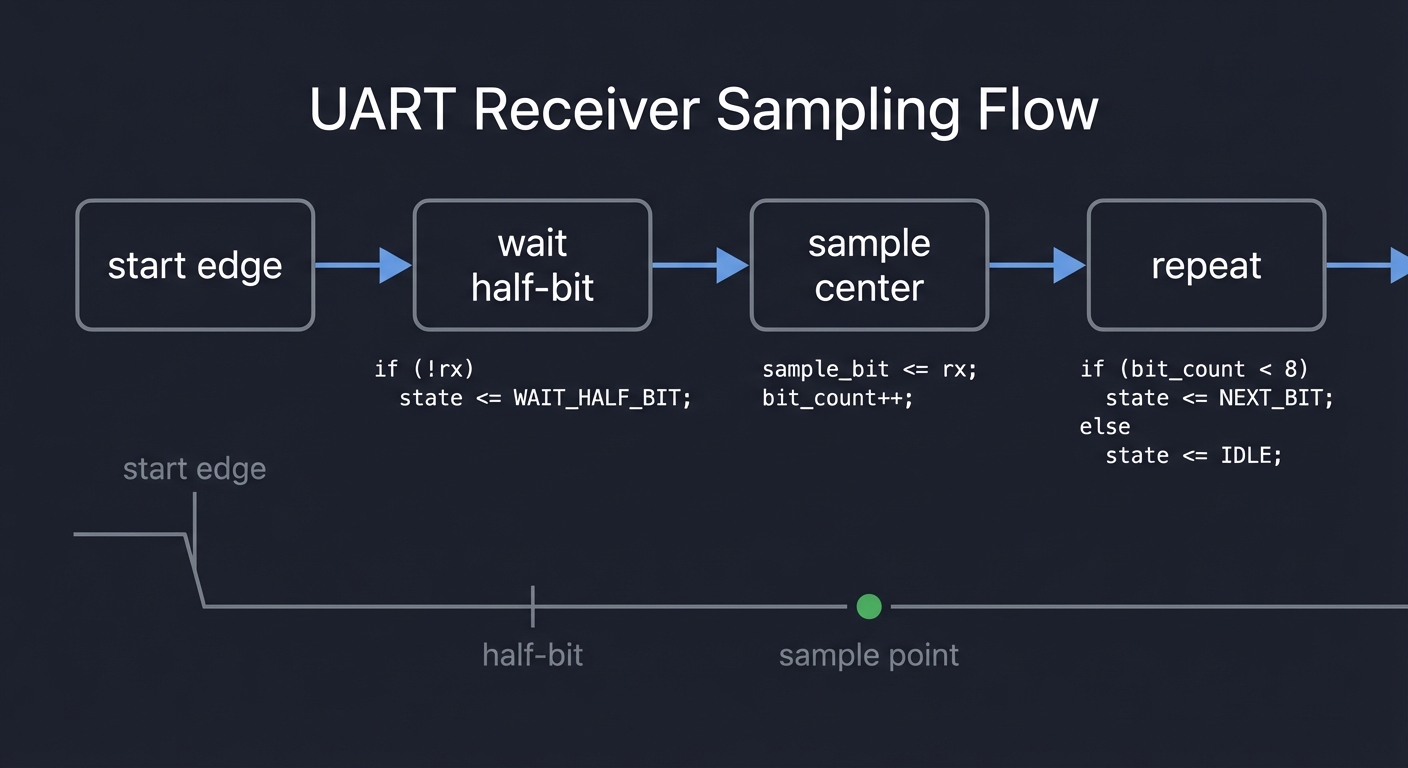
start edge -> wait half-bit -> sample center -> repeat
How It Works (Step-by-Step)
- Detect falling edge for start bit.
- Wait half a bit time.
- Sample each bit at center intervals.
- Check stop bit validity.
Minimal Concrete Example
if (start_edge) sample_cnt <= HALF_BIT;
if (sample_cnt == 0) data <= rx;
Common Misconceptions
- “Sampling on edges is ok.” -> Center sampling is safer.
- “Noise doesn’t matter at low baud.” -> It still can.
Check-Your-Understanding Questions
- Why does oversampling improve reliability?
- How do you detect a framing error?
- What happens if baud clocks drift?
Where You’ll Apply It
- This project: used in Section 3.2 and Section 6
- Also used in: P15-uart-transmitter.md (for loopback testing)
UART Framing and Baud Generation
Description/Expanded Explanation of the concept
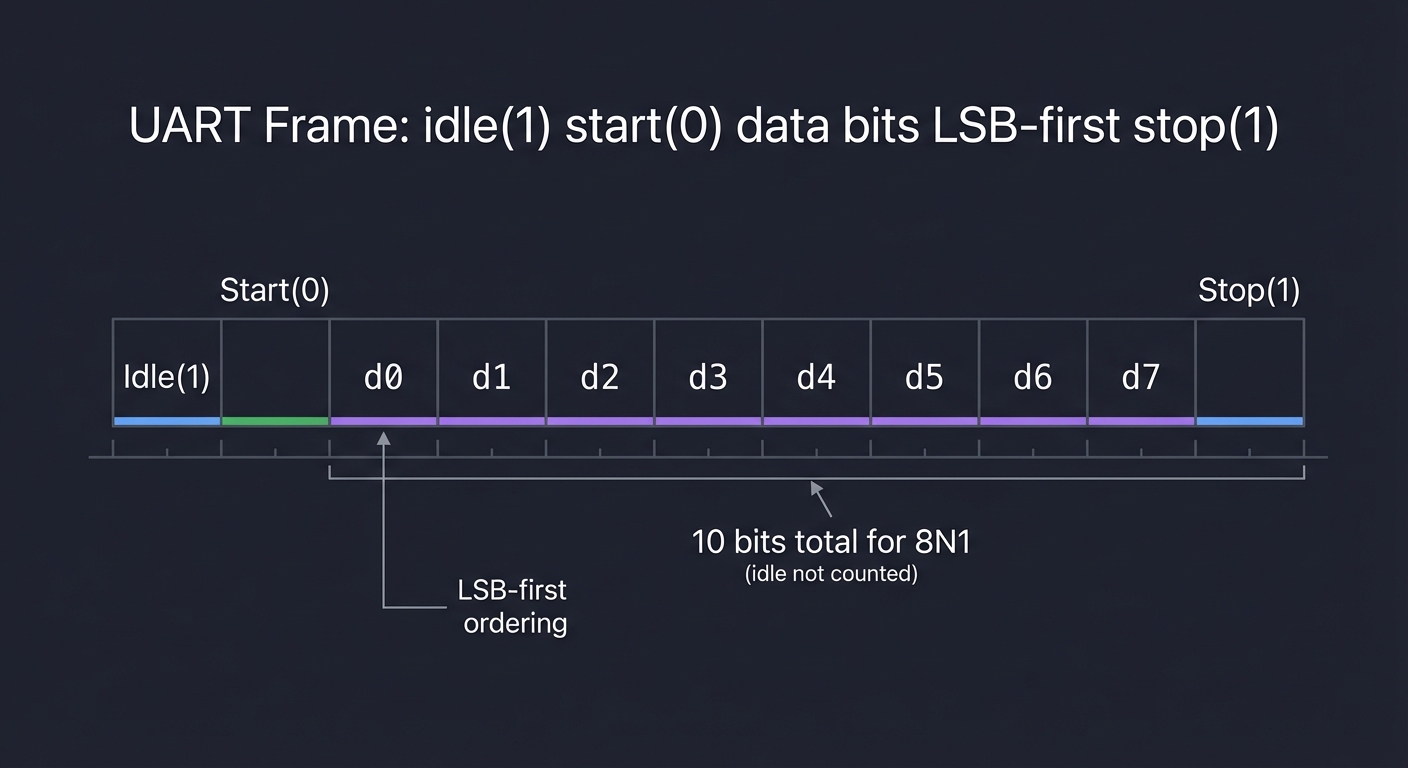
UART is asynchronous serial communication. Each byte is framed with a start bit, data bits, optional parity, and stop bit. A baud generator creates a tick to advance the TX or RX state.
Definitions & Key Terms
- Baud -> symbols per second
- Start bit -> logic 0 indicating frame start
- Stop bit -> logic 1 indicating frame end
Mental Model Diagram (ASCII)
idle(1) start(0) d0 d1 d2 d3 d4 d5 d6 d7 stop(1)
How It Works (Step-by-Step)
- Compute divisor from clock to target baud.
- Generate a baud tick.
- Shift out bits at each tick.
Minimal Concrete Example
if (baud_tick) begin
  tx <= shift[0];
  shift <= {1'b1, shift[9:1]};
end
Common Misconceptions
- “UART is clocked.” -> It is asynchronous.
- “Baud doesn’t need to be exact.” -> Too much error breaks framing.
Check-Your-Understanding Questions
- What does 8N1 mean?
- How do you compute a baud divider?
- Why is idle high?
Where You’ll Apply It
- This project: used in Section 3.2 and Section 5
- Also used in: P16-uart-receiver.md
Verification with Testbenches and Waveforms
Description/Expanded Explanation of the concept
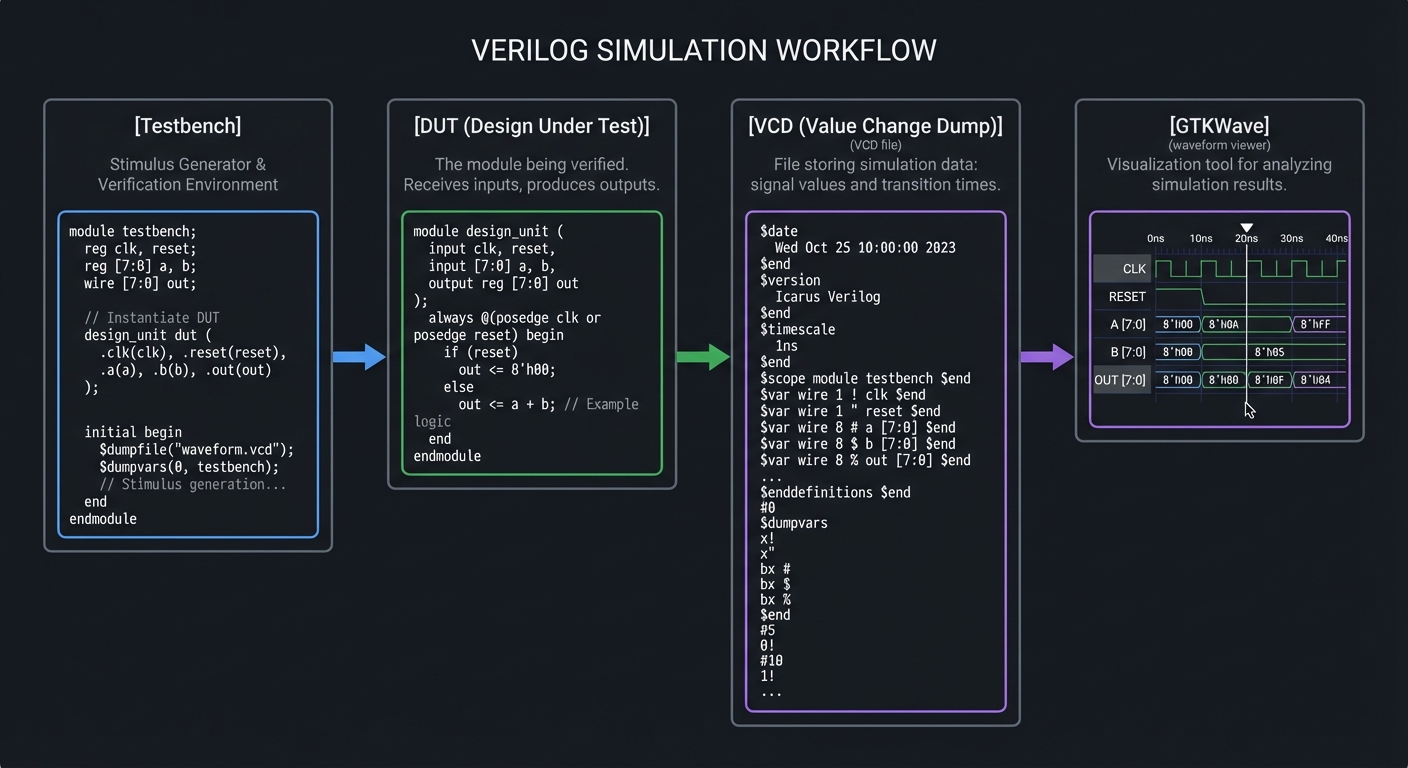
Testbenches are simulation-only modules that apply stimulus and check outputs. Waveforms (VCD) are the hardware engineer’s microscope; they reveal timing, glitches, and ordering problems. A good testbench is deterministic and covers edge cases.
Definitions & Key Terms
- Testbench -> a non-synthesizable module that drives a DUT
- VCD -> Value Change Dump waveform file
- Deterministic test -> same inputs produce same outputs every run
Mental Model Diagram (ASCII)
[Testbench] -> [DUT] -> [VCD] -> [GTKWave]
How It Works (Step-by-Step)
- Initialize inputs to known values.
- Apply stimulus over time.
- Dump waveforms and check outputs.
- Add assertions or PASS/FAIL messages.
Minimal Concrete Example
initial begin
  $dumpfile("wave.vcd");
  $dumpvars(0, tb);
  a = 0; b = 1; #10;
  $finish;
end
Common Misconceptions
- “If it simulates once, it’s correct.” -> Cover all relevant cases.
- “Waveforms are optional.” -> They are often the only way to debug timing.
Check-Your-Understanding Questions
- Why keep testbench and DUT separate?
- What is the purpose of
$dumpvars? - How do you make a testbench deterministic?
Where You’ll Apply It
- This project: used throughout Section 6 (testing)
- Also used in: all other projects in this folder
3. Project Specification
3.1 What You Will Build
A UART RX module with oversampling and valid pulse output.
3.2 Functional Requirements
- Requirement 1: Detect start bit and align sampling
- Requirement 2: Sample 8 data bits
- Requirement 3: Validate stop bit and flag errors
3.3 Non-Functional Requirements
- Performance: Stable operation at the target clock and interfaces.
- Reliability: Deterministic outputs on all defined inputs.
- Usability: Clear ports and documented behavior.
3.4 Example Usage / Output
{p['example_usage']}
3.5 Data Formats / Schemas / Protocols
{p[‘data_format’]}
3.6 Edge Cases
- Noise causing false start
- Missing stop bit
3.7 Real World Outcome
3.7.1 How to Run (Copy/Paste)
vvp uart_rx_tb
3.7.2 Golden Path Demo (Deterministic)
Run the demo command above with the provided testbench and confirm the outputs match the golden transcript.
3.7.3 CLI Transcript
RX frame -> byte=0x55 valid=1
3.7.4 Failure Demo (Expected)
# Example failure case
ERROR: Output mismatch at vector 3
Expected: 0x0A, Got: 0x0B
EXIT CODE: 1
Notes:
- Exit code 0 indicates all tests passed
- Exit code 1 indicates a test failure
4. Solution Architecture
4.1 High-Level Design
[inputs] -> [core logic] -> [outputs]
4.2 Key Components
| Component | Responsibility |
|---|---|
| rx_fsm | Sampling and bit collection |
| oversample | Sample counter |
4.3 Data Structures (No Full Code)
// Example signals (adapt to your design)
reg [7:0] state_reg;
reg [7:0] data_reg;
4.4 Algorithm Overview
Key Algorithm: Core control flow
- Initialize state/reset conditions.
- Apply inputs and compute outputs.
- Update state on clock edges (if sequential).
Complexity Analysis:
- Time: O(1) per cycle
- Space: O(N) for registers and logic
5. Implementation Guide
5.1 Development Environment Setup
iverilog -v
# Ensure GTKWave is installed for waveform viewing
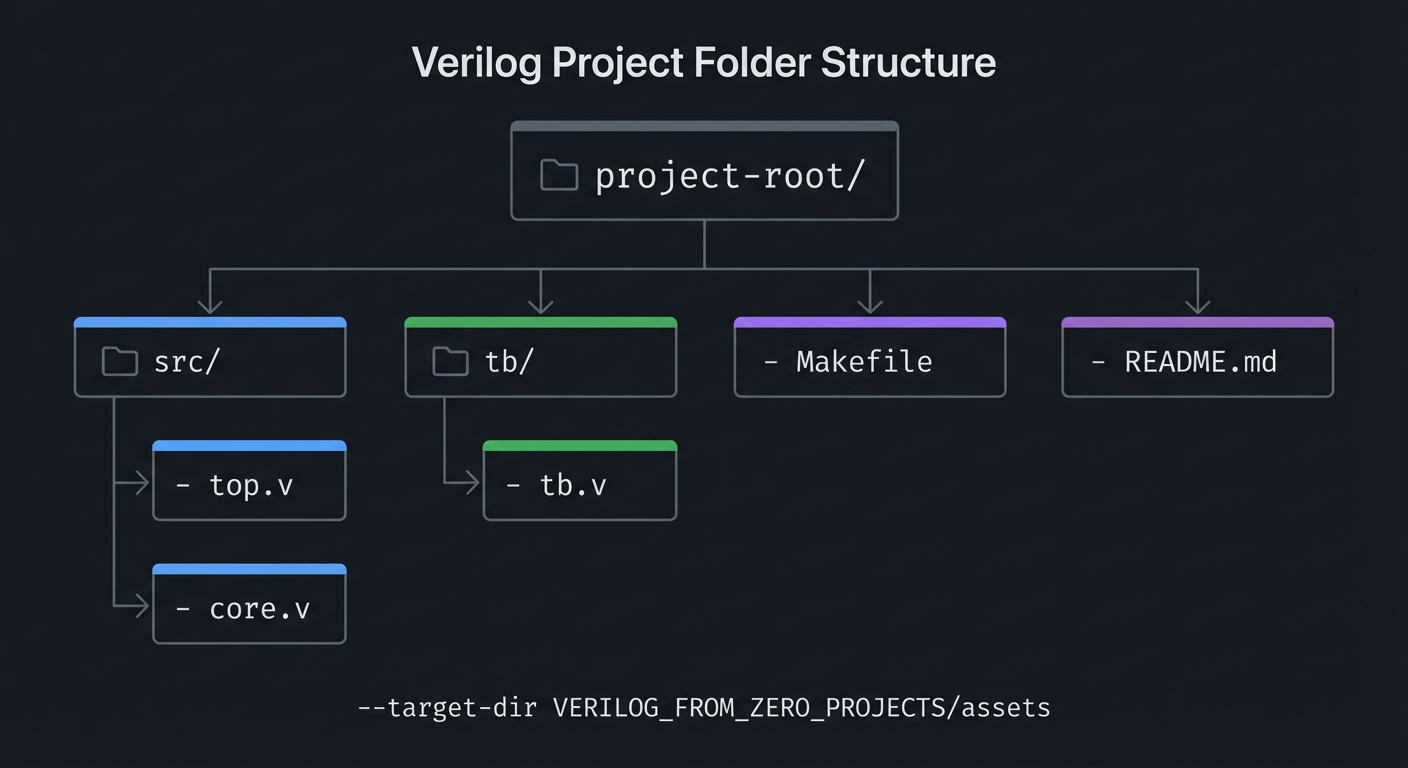
5.2 Project Structure
project-root/
|-- src/
|   |-- top.v
|   |-- core.v
|-- tb/
|   |-- tb.v
|-- Makefile
|-- README.md
5.3 The Core Question You’re Answering
“How do you sample asynchronous data reliably?”
5.4 Concepts You Must Understand First
- UART framing
- Counters
5.5 Questions to Guide Your Design
- 8x or 16x oversampling?
- How will you detect false start?
5.6 Thinking Exercise
Calculate sample times for 16x oversampling.
5.7 The Interview Questions They’ll Ask
- Why sample at the center of the bit?
- What causes framing errors?
5.8 Hints in Layers
- Use oversampling to align to bit centers.
- Verify stop bit after data bits.
5.9 Books That Will Help
| Topic | Book | Chapter |
|---|---|---|
| Serial protocols | Making Embedded Systems | Ch. 8 |
5.10 Implementation Phases
Phase 1: Foundation
Goals:
- Establish core module structure
- Implement minimal behavior
Tasks:
- Scaffold module ports and internal signals
- Write a minimal testbench that compiles
Checkpoint: Simulation runs without errors
Phase 2: Core Functionality
Goals:
- Implement full logic
- Verify edge cases
Tasks:
- Complete core logic
- Add directed tests for edge cases
Checkpoint: All tests pass and waveforms match expectations
Phase 3: Polish & Edge Cases
Goals:
- Improve readability
- Document behavior
Tasks:
- Add comments and README notes
- Expand tests for unusual inputs
Checkpoint: Design is deterministic and documented
5.11 Key Implementation Decisions
| Decision | Options | Recommendation | Rationale |
|---|---|---|---|
| Reset strategy | Sync / Async | Sync | Simpler timing closure |
| Test coverage | Directed / Exhaustive | Exhaustive for small logic | Prevents missed cases |
6. Testing Strategy
6.1 Test Categories
| Category | Purpose | Examples |
|---|---|---|
| Unit Tests | Test core logic | Small vectors |
| Integration Tests | Test modules together | Full system |
| Edge Case Tests | Boundary conditions | Max/min values |
6.2 Critical Test Cases
- Test 1: Good frame reception
- Test 2: Bad stop bit triggers error
6.3 Test Data
Use deterministic vectors and document expected outputs.
7. Common Pitfalls & Debugging
7.1 Frequent Mistakes
| Pitfall | Symptom | Solution |
|---|---|---|
| Bit misalignment | Received bytes are rotated | Fix sample timing |
7.2 Debugging Strategies
- Inspect waveforms at key internal signals
- Add temporary debug outputs to verify state
- Reduce testcases to the smallest failing case
7.3 Performance Traps
- Overly wide counters or combinational paths can reduce max clock
8. Extensions & Challenges
8.1 Beginner Extensions
- Add parameterization for widths
- Add optional features (enable, reset)
8.2 Intermediate Extensions
- Add configuration registers
- Build a simple driver or demo program
8.3 Advanced Extensions
- Integrate with another project in this series
- Implement a hardware demo on FPGA
9. Real-World Connections
9.1 Industry Applications
- Digital control systems and embedded peripherals
- FPGA prototyping and validation
9.2 Related Open Source Projects
- Yosys / nextpnr toolchain for open-source FPGA flow
- Example HDL projects in the FPGA community
9.3 Interview Relevance
- Demonstrates RTL thinking and verification skills
10. Resources
10.1 Essential Reading
- Making Embedded Systems - Focus on Ch. 8
10.2 Video Resources
- Search for project-specific HDL walkthroughs and waveforms
10.3 Tools & Documentation
- Icarus Verilog
- GTKWave
10.4 Related Projects in This Series
- See adjacent projects in
VERILOG_FROM_ZERO_PROJECTS/
11. Self-Assessment Checklist
11.1 Understanding
- I can explain the core concept without notes
- I can predict waveform behavior for basic inputs
11.2 Implementation
- All functional requirements are met
- All tests pass
- Edge cases are documented
11.3 Growth
- I can explain this project in an interview
- I documented at least one lesson learned
12. Submission / Completion Criteria
Minimum Viable Completion:
- Functional requirements implemented
- Testbench passes
- Waveforms inspected
Full Completion:
- All minimum criteria plus
- Edge cases covered and documented
Excellence (Going Above & Beyond):
- Hardware demo on FPGA
- Clear write-up of lessons learned
Appendix A: Deep Dive Walkthrough
A.1 Signal Map and Timing Contract
- Inputs:
clk,reset,rx - Outputs:
rx_data[7:0],rx_valid,rx_framing_err
Invariant: rx_valid pulses once per good frame; rx_framing_err pulses on bad stop bit.
A.2 Oversampling Plan (16x)
- Detect start bit falling edge.
- Wait 8 ticks (half bit) to align to center.
- Sample every 16 ticks thereafter.
A.3 Deterministic Test Vectors
- Send 0x55 and 0xA5 with perfect timing -> expect valid bytes.
- Send a frame with stop bit low -> expect framing error.
A.4 Debugging Tip
If bytes are shifted, your sampling point is likely too early or too late. Inspect the rx waveform with tick markers.
13. Deep Dive Appendix
13.1 Timing and Resource Budget
- Use 16x oversampling to place samples near the middle of each bit.
- Sample at half a bit time after the start edge, then every full bit.
- Allow 2-3% baud mismatch before framing errors become likely.
13.2 Waveform Interpretation Guide
- Verify start bit detection at a falling edge.
- Check that sample point is mid-bit and not drifting.
- Confirm valid pulse asserts exactly once per byte.
Example sample points:
start edge -> wait 8 ticks -> sample bit0 -> wait 16 ticks -> sample bit1...
13.3 Hardware Bring-Up Notes
- Connect RX to a USB-serial adapter or another FPGA.
- Add a framing error LED so you can see incorrect stop bits.
- If bytes are off by one bit, adjust the sampling offset.
13.4 Alternate Implementations and Trade-offs
- Majority vote across 3 samples for each bit.
- Auto-baud by measuring the start bit width.
- Add parity checking and error reporting.
13.5 Additional Exercises
- Implement break detection (long low).
- Add a receive FIFO to handle bursts.
- Support 7E1 or other frame formats.