Project 10: POSIX Semaphore Connection Pool
Implement a POSIX semaphore-based connection pool.
Quick Reference
| Attribute | Value |
|---|---|
| Difficulty | Level 3 (Advanced) |
| Time Estimate | 1 Week |
| Main Programming Language | C (Alternatives: ) |
| Alternative Programming Languages | N/A |
| Coolness Level | Level 3 (Genuinely Clever) |
| Business Potential | Level 3 (Service & Support) |
| Prerequisites | C programming, basic IPC familiarity, Linux tools (strace/ipcs) |
| Key Topics | semaphores, resource pools, named semaphores |
1. Learning Objectives
By completing this project, you will:
- Build a working IPC-based system aligned with Stevens Vol. 2 concepts.
- Implement robust lifecycle management for IPC objects.
- Handle errors and edge cases deterministically.
- Document and justify design trade-offs.
- Benchmark or validate correctness under load.
2. All Theory Needed (Per-Concept Breakdown)
Semaphores and Barriers (POSIX and System V)
Fundamentals
A semaphore is a kernel-managed counter used for synchronization. A sem_wait() decrements the counter and blocks if it would go negative; sem_post() increments the counter and wakes waiters. Counting semaphores represent available resources (e.g., connection slots). Binary semaphores behave like mutexes. Semaphores are especially useful when multiple processes must coordinate without shared memory or threads.
Barriers are synchronization points where N participants wait until all have arrived. Semaphores can be used to implement barriers by counting arrivals and releasing a group when the count reaches N.
Deep Dive into the Concept
POSIX semaphores come in named and unnamed variants. Named semaphores (sem_open) live in a filesystem namespace (often /dev/shm) and can be shared between processes. Unnamed semaphores (sem_init) can be placed in shared memory for interprocess use. System V semaphores use semget, semop, and semctl and are grouped into sets. They are persistent until removed with IPC_RMID.
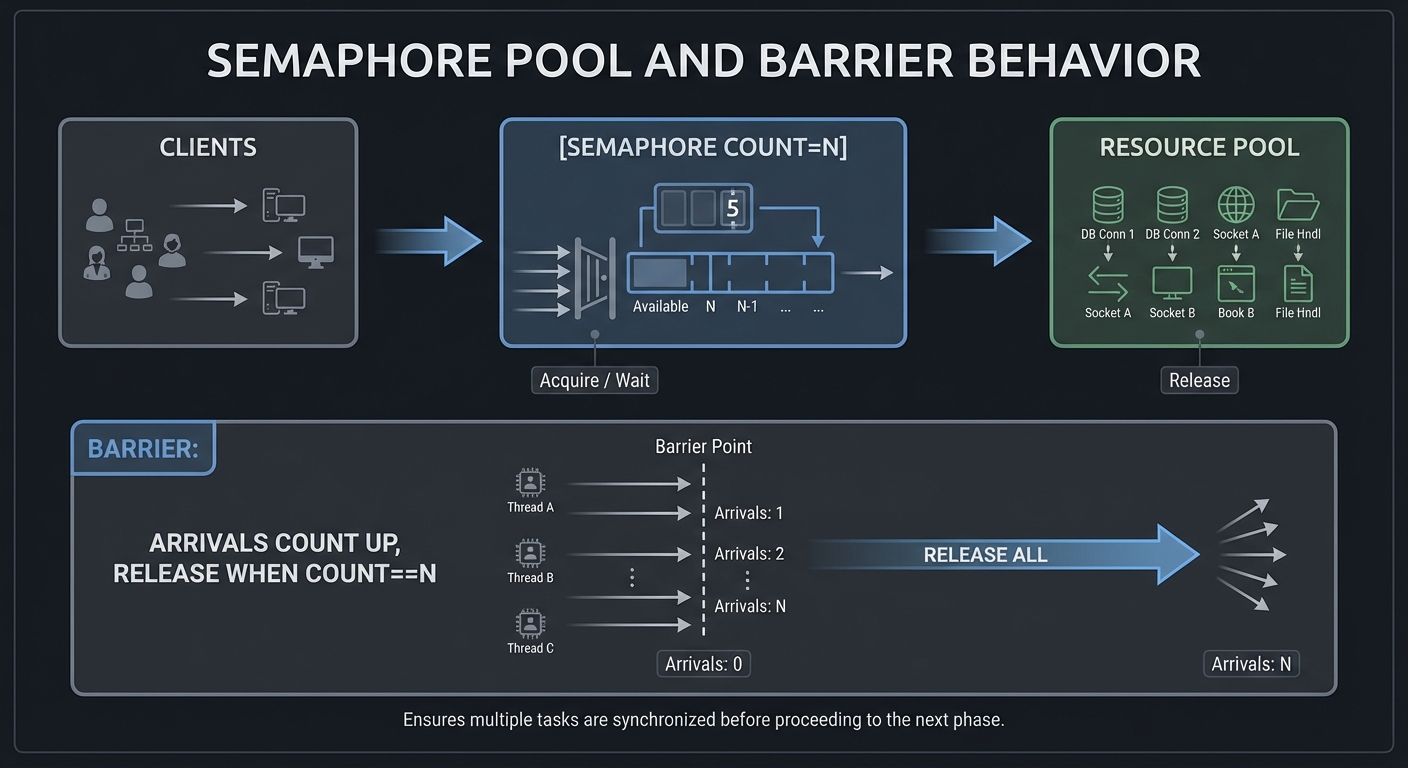
Semaphores enforce ordering in concurrent systems. For a connection pool, the semaphore count is the number of available connections. Each client sem_wait() to acquire a slot, then sem_post() to release. For barriers, a common pattern is two semaphores: one counting arrivals and another releasing all participants once the count reaches N. The tricky part is resetting the barrier for reuse. A reusable barrier often uses a sense-reversing algorithm or two-phase semaphore pattern (arrival phase and release phase).
System V semaphores have additional complexity: operations can be grouped atomically, and semop can adjust multiple counters at once. This is powerful but error-prone. You must also handle SEM_UNDO if you want automatic rollback when a process exits unexpectedly.
How this fits on projects
Semaphores are used to implement a connection pool and a barrier. Understanding both POSIX and System V variants helps you choose the right tool for a given IPC design.
Definitions & key terms
- Semaphore -> Integer counter with blocking decrement.
- Binary semaphore -> Semaphore with max value 1.
- Barrier -> Synchronization point for N participants.
- SEM_UNDO -> System V option to undo on process exit.
Mental model diagram (ASCII)
Clients -> [Semaphore count=N] -> Resource pool
Barrier: arrivals count up, release when count==N
How it works (step-by-step, with invariants and failure modes)
- Initialize semaphore with count N.
- Each client waits (decrement) before entering critical section.
- Client posts (increment) on exit.
- For barrier, last arrival signals all waiting processes.
Failure modes: missing post causes deadlock, incorrect barrier reset causes early release.
Minimal concrete example
sem_t *sem = sem_open("/pool", O_CREAT, 0600, 4);
sem_wait(sem); // acquire
// use resource
sem_post(sem); // release
**Common misconceptions**

- "Semaphore = mutex." -> Mutexes enforce ownership; semaphores count resources.
- "Barriers are trivial." -> Reusable barriers require careful reset logic.
- "System V semaphores clean up automatically." -> They persist until removed.

**Check-your-understanding questions**

1. Why would you use a semaphore instead of a mutex?
2. How can a barrier be made reusable?
3. What happens if a process dies while holding a semaphore?

**Check-your-understanding answers**

1. To model multiple identical resources, not just mutual exclusion.
2. Use a two-phase or sense-reversing algorithm.
3. POSIX semaphores do not auto-release; System V can use SEM_UNDO.

**Real-world applications**

- Limiting concurrent connections.
- Coordinating multi-process pipelines.

**Where you’ll apply it**

- In this project: §3.2 Functional Requirements, §5.10 Phase 2.
- Also used in: [P12-shm-ringbuffer.md](P12-shm-ringbuffer.md).

**References**

- Stevens, "UNP Vol 2" Ch. 10.
- `man 7 sem_overview`, `man 2 semop`.

**Key insights**

- Semaphores are counters, not locks; treat them as resource budgets.

**Summary**

Semaphores provide simple, robust coordination primitives, but correct usage requires attention to lifecycle and failure handling.

**Homework/Exercises to practice the concept**

1. Build a 3-slot semaphore pool and 10 clients.
2. Implement a reusable barrier with semaphores.
3. Demonstrate SEM_UNDO in System V semaphores.

**Solutions to the homework/exercises**

1. Track entry/exit and verify no more than 3 clients enter simultaneously.
2. Use two semaphores: one for arrival, one for release.
3. Create a semaphore with SEM_UNDO and kill a process holding it.


---

## 3. Project Specification

### 3.1 What You Will Build

Implement a POSIX semaphore-based connection pool.

### 3.2 Functional Requirements

1. **Requirement 1**: Semaphore tracks available slots
2. **Requirement 2**: Clients acquire/release slots
3. **Requirement 3**: Timeout or non-blocking option

### 3.3 Non-Functional Requirements

- **Performance**: Must handle at least 10,000 messages/operations without failure.
- **Reliability**: IPC objects are cleaned up on shutdown or crash detection.
- **Usability**: CLI output is readable with clear error codes.

### 3.4 Example Usage / Output

```text
./pool_server --size 4 &
./pool_client --hold 2
### 3.5 Data Formats / Schemas / Protocols

Pool metadata in shared memory: {size, in_use}.

### 3.6 Edge Cases

- Leak when client crashes
- Starvation
- Semaphore unlink

### 3.7 Real World Outcome

You will have a working IPC subsystem that can be run, traced, and tested in a reproducible way.

#### 3.7.1 How to Run (Copy/Paste)

```bash
make
./run_demo.sh
#### 3.7.2 Golden Path Demo (Deterministic)

```bash
./run_demo.sh --mode=golden
Expected output includes deterministic counts and a final success line:

```text
OK: golden scenario completed
#### 3.7.3 Failure Demo (Deterministic)

```bash
./run_demo.sh --mode=failure
Expected output:

```text
ERROR: invalid input or unavailable IPC resource
exit=2
---

## 4. Solution Architecture

### 4.1 High-Level Design
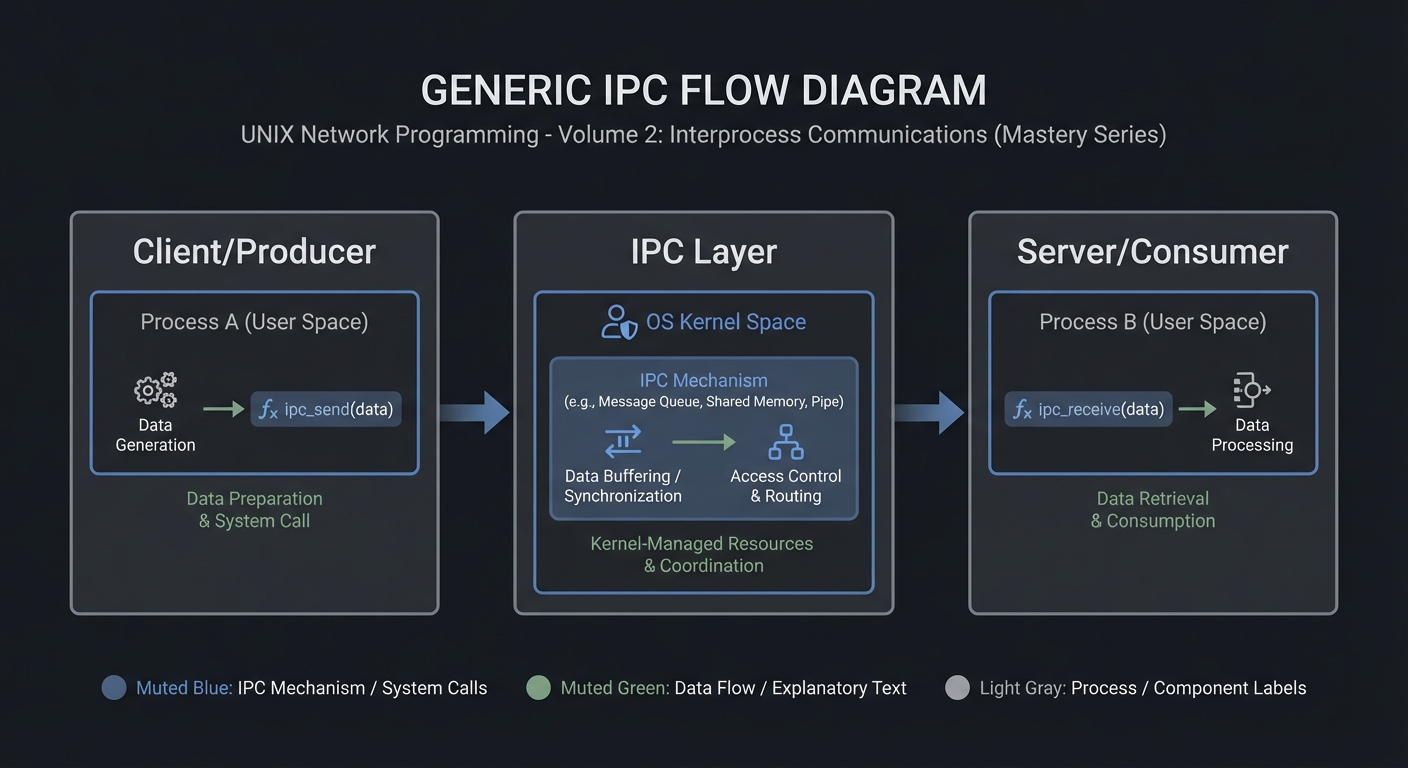
Client/Producer -> IPC Layer -> Server/Consumer
4.2 Key Components
| Component | Responsibility | Key Decisions |
|---|---|---|
| IPC Setup | Create/open IPC objects | POSIX vs System V choices |
| Worker Loop | Send/receive messages | Blocking vs non-blocking |
| Cleanup | Unlink/remove IPC objects | Crash safety |
4.3 Data Structures (No Full Code)
struct message {
  int id;
  int len;
  char payload[256];
};
### 4.4 Algorithm Overview

**Key Algorithm: IPC Request/Response**
1. Initialize IPC resources.
2. Client sends request.
3. Server processes and responds.
4. Cleanup on exit.

**Complexity Analysis:**
- Time: O(n) in number of messages.
- Space: O(1) per message plus IPC buffer.

---

## 5. Implementation Guide

### 5.1 Development Environment Setup

```bash
sudo apt-get install build-essential
### 5.2 Project Structure
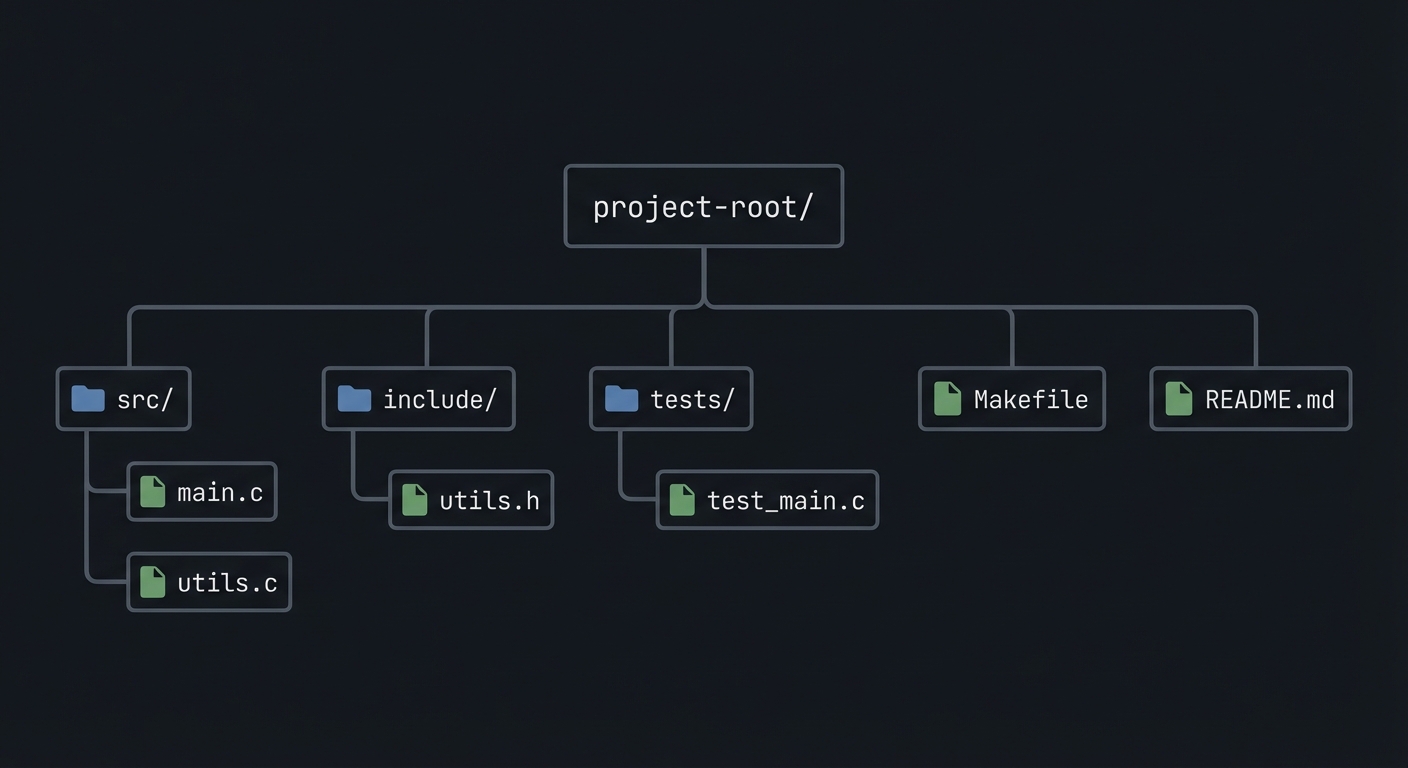
project-root/
├── src/
├── include/
├── tests/
├── Makefile
└── README.md
5.3 The Core Question You’re Answering
“How do you enforce a hard limit on concurrent access?”
5.4 Concepts You Must Understand First
- IPC object lifecycle (create/open/unlink)
- Blocking vs non-blocking operations
- Error handling with errno
5.5 Questions to Guide Your Design
- What invariants guarantee correctness in this IPC flow?
- How will you prevent resource leaks across crashes?
- How will you make the system observable for debugging?
5.6 Thinking Exercise
Before coding, sketch the IPC lifecycle and identify where deadlock could occur.
5.7 The Interview Questions They’ll Ask
- Why choose this IPC mechanism over alternatives?
- What are the lifecycle pitfalls?
- How do you test IPC code reliably?
5.8 Hints in Layers
Hint 1: Start with a single producer and consumer.
Hint 2: Add logging around every IPC call.
Hint 3: Use strace or ipcs to verify resources.
5.9 Books That Will Help
| Topic | Book | Chapter |
|---|---|---|
| IPC fundamentals | Stevens, UNP Vol 2 | Relevant chapters |
| System calls | APUE | Ch. 15 |
5.10 Implementation Phases
Phase 1: Foundation (2-4 hours)
Goals:
- Create IPC objects.
- Implement a minimal send/receive loop.
Tasks:
- Initialize IPC resources.
- Implement basic client and server.
Checkpoint: Single request/response works.
Phase 2: Core Functionality (4-8 hours)
Goals:
- Add error handling and cleanup.
- Support multiple clients or concurrent operations.
Tasks:
- Add structured message format.
- Implement cleanup on shutdown.
Checkpoint: System runs under load without leaks.
Phase 3: Polish & Edge Cases (2-4 hours)
Goals:
- Add deterministic tests.
- Document behaviors.
Tasks:
- Add golden and failure scenarios.
- Document limitations.
Checkpoint: Tests pass, behavior documented.
5.11 Key Implementation Decisions
| Decision | Options | Recommendation | Rationale |
|---|---|---|---|
| Blocking mode | blocking vs non-blocking | blocking | Simpler for first version |
| Cleanup | manual vs automated | explicit cleanup | Avoid stale IPC objects |
6. Testing Strategy
6.1 Test Categories
| Category | Purpose | Examples |
|---|---|---|
| Unit Tests | Validate helpers | message encode/decode |
| Integration Tests | IPC flow | client-server round trip |
| Edge Case Tests | Failure modes | missing queue, full buffer |
6.2 Critical Test Cases
- Single client request/response works.
- Multiple requests do not corrupt state.
- Failure case returns exit code 2.
6.3 Test Data
Input: “hello” Expected: “hello”
7. Common Pitfalls & Debugging
7.1 Frequent Mistakes
| Pitfall | Symptom | Solution |
|---|---|---|
| Not cleaning IPC objects | Next run fails | Add cleanup on exit |
| Blocking forever | Program hangs | Add timeouts or non-blocking mode |
| Incorrect message framing | Corrupted data | Add length prefix and validate |
7.2 Debugging Strategies
- Use
strace -fto see IPC syscalls. - Use
ipcsor/dev/mqueueto inspect objects.
7.3 Performance Traps
- Small queue sizes cause frequent blocking.
8. Extensions & Challenges
8.1 Beginner Extensions
- Add verbose logging.
- Add a CLI flag to toggle non-blocking mode.
8.2 Intermediate Extensions
- Add request timeouts.
- Add a metrics report.
8.3 Advanced Extensions
- Implement load testing with multiple clients.
- Add crash recovery logic.
9. Real-World Connections
9.1 Industry Applications
- IPC services in local daemons.
- Message-based coordination in legacy systems.
9.2 Related Open Source Projects
- nfs-utils - Uses RPC and IPC extensively.
- systemd - Uses multiple IPC mechanisms.
9.3 Interview Relevance
- Demonstrates system call knowledge and concurrency reasoning.
10. Resources
10.1 Essential Reading
- Stevens, “UNP Vol 2”.
- Kerrisk, “The Linux Programming Interface”.
10.2 Video Resources
- Unix IPC lectures from OS courses.
10.3 Tools & Documentation
man 7 ipc,man 2for each syscall.
10.4 Related Projects in This Series
11. Self-Assessment Checklist
11.1 Understanding
- I can describe IPC object lifecycle.
- I can explain blocking vs non-blocking behavior.
- I can reason about failure modes.
11.2 Implementation
- All functional requirements are met.
- Tests pass.
- IPC objects are cleaned up.
11.3 Growth
- I can explain design trade-offs.
- I can explain this project in an interview.
12. Submission / Completion Criteria
Minimum Viable Completion:
- Basic IPC flow works with correct cleanup.
- Error handling returns deterministic exit codes.
Full Completion:
- Includes tests and deterministic demos.
- Documents trade-offs and limitations.
Excellence (Going Above & Beyond):
- Adds performance benchmarking and crash recovery.