Unix IPC Mastery - Stevens Vol 2 Complete
Goal: Master every major Unix IPC mechanism by building real systems from W. Richard Stevens’ Unix Network Programming, Volume 2. You will understand how data moves between processes, how synchronization actually works, and why each IPC family (pipes, message queues, shared memory, RPC) exists. By the end, you will be able to design, implement, and debug IPC-heavy systems from first principles, and choose the right mechanism based on performance, safety, and operational trade-offs.
Introduction: What This Guide Covers
Unix IPC (Interprocess Communication) is the set of kernel mechanisms that let separate processes exchange data and coordinate execution. It exists because processes are isolated for safety, but real systems need to share state, stream data, and synchronize work across that isolation boundary. IPC is the foundation for shells, databases, web servers, build systems, and any multi-process architecture.
What you will build (by the end of this guide):
- A shell-style pipeline executor and a
popen()reimplementation (pipes, fork, exec) - FIFO (named pipe) client-server systems for unrelated processes
- POSIX and System V message queue services (including priority dispatch and benchmarking)
- Synchronization primitives (mutex/cond producer-consumer, reader-writer locks, record locking)
- POSIX and System V shared-memory systems (ring buffer, image processor)
- A memory-mapped database with persistence and locking
- A Sun RPC calculator with authentication and a distributed RPC-based KV store
Scope (what is included):
- POSIX and System V IPC APIs and their lifecycle semantics
- Pipes, FIFOs, message queues, shared memory, semaphores
- Pthreads synchronization primitives and advisory record locking
mmap()as file-backed shared memory- ONC/Sun RPC + XDR + rpcbind + rpcgen
Out of scope (for this guide):
- Kernel implementation internals of IPC subsystems
- Full network programming beyond RPC (HTTP, TLS, advanced socket design)
- Windows IPC (named pipes, ALPC, etc.)
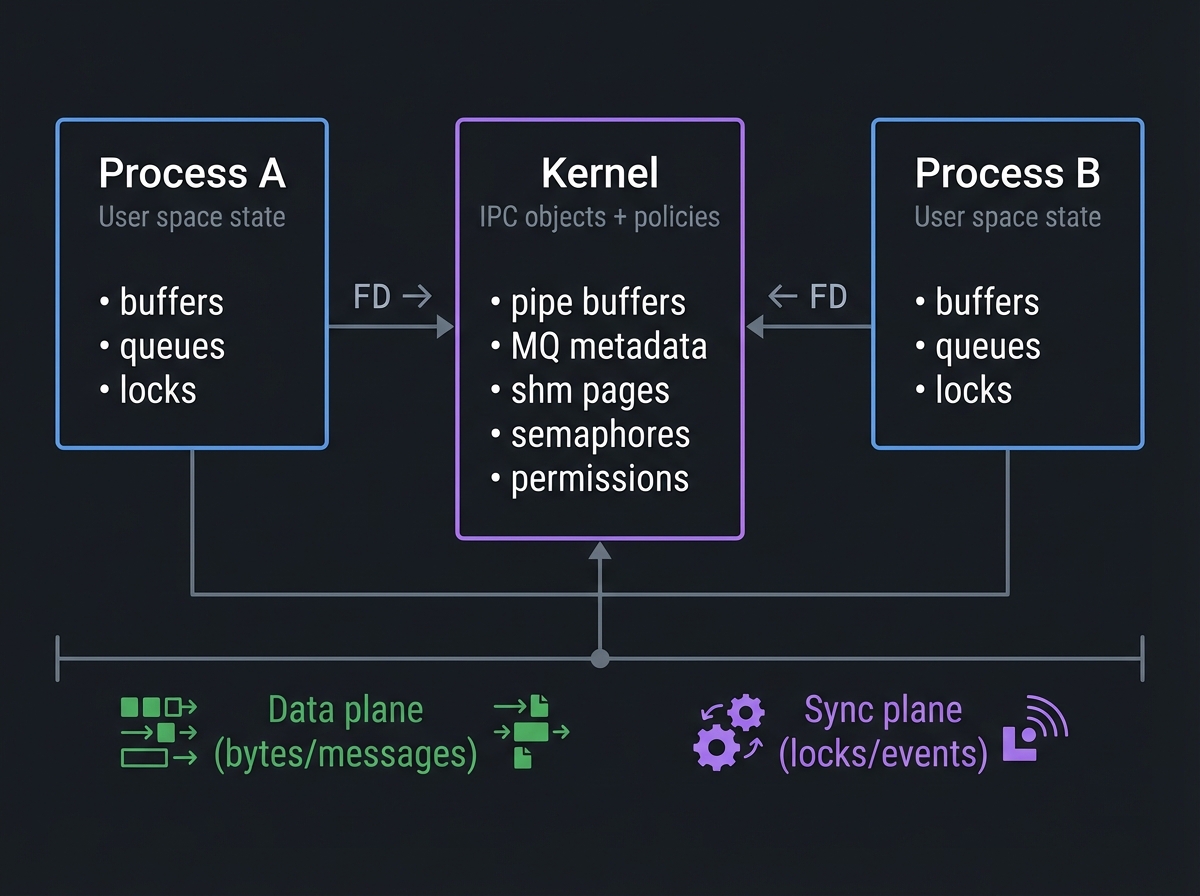
The Big Picture (Mental Model)
           Process A                          Kernel                          Process B
┌────────────────────────┐         ┌──────────────────────────┐        ┌────────────────────────┐
│  User space state      │         │  IPC objects + policies  │        │  User space state      │
│  - buffers             │  FD ->  │  - pipe buffers          │  <- FD │  - buffers             │
│  - queues              │         │  - MQ metadata           │        │  - queues              │
│  - locks               │         │  - shm pages             │        │  - locks               │
└───────────┬────────────┘         │  - semaphores            │        └───────────┬────────────┘
            │                      │  - permissions           │                    │
            v                      └──────────┬──────────────┘                    v
      Data plane (bytes/messages)             │                       Sync plane (locks/events)
            │                                  │                                  │
            └──────────────────────────────────┴──────────────────────────────────┘
Key Terms You Will See Everywhere
- IPC object: A kernel-managed resource for communication or synchronization (pipe, queue, shared memory, semaphore).
- File descriptor (FD): A process-local handle to a kernel object (file, pipe, socket, shared memory fd).
- Blocking vs non-blocking: Whether a call waits for data/space or returns immediately.
- Atomicity: Operations that complete as a single, indivisible step.
- Namespace: The naming system for IPC objects (POSIX names vs System V keys).
- Persistence: Whether IPC objects survive process exit (System V often does) or are reference-counted (POSIX often is).
How to Use This Guide
- Read the Theory Primer first. It is a mini-book and explains the mental models you need to avoid deadlocks, data corruption, and performance traps.
- Work projects in order for the first pass. The early projects build the muscle memory for file descriptors, blocking semantics, and object lifetimes.
- For every project, read the Core Question and Thinking Exercise before coding. This reduces blind copy-paste and builds real intuition.
- Instrument everything. Use
strace,lsof,ipcs,ipcrm,rpcinfo, and log timestamps to make behavior visible. - Repeat each project with one variation. Example: build the same pipeline executor with non-blocking I/O, or swap POSIX MQ for SysV MQ.
Prerequisites & Background Knowledge
Before starting these projects, you should have foundational understanding in these areas:
Essential Prerequisites (Must Have)
Programming Skills:
- C programming (pointers, memory management, structs)
- Understanding of process creation with
fork()and execution withexec() - Basic file I/O operations (
open,read,write,close) - Familiarity with
errnoand error handling patterns - Recommended Reading: “The C Programming Language” by Kernighan & Ritchie
Operating Systems Fundamentals:
- Process vs thread concepts
- Virtual memory basics and page faults
- File descriptors and open file descriptions
- System calls vs library functions
- Recommended Reading: “Operating Systems: Three Easy Pieces” (Concurrency + Processes chapters)
Unix Environment:
- Shell scripting basics
- Reading man pages (
man 2 pipe,man 7 sem_overview,man 7 mq_overview) - Using
straceandlsof - Recommended Reading: “Advanced Programming in the UNIX Environment” by Stevens & Rago — Ch. 3, 8, 15
Helpful But Not Required
Threading:
pthread_create,pthread_join,pthread_mutex_t,pthread_cond_t- Can learn during: Projects 7-10
Networking:
- TCP/UDP basics, ports, DNS
- Can learn during: Projects 16-18 (RPC)
Self-Assessment Questions
Before starting, ask yourself:
- ✅ Can you explain what happens to file descriptors across
fork()andexec()? - ✅ Do you understand why closing a pipe’s write end affects readers?
- ✅ Can you interpret
straceoutput forread()andwrite()? - ✅ Have you used
ipcsoripcrmto inspect IPC objects? - ✅ Can you explain the difference between blocking and non-blocking I/O?
If you answered “no” to questions 1-3: Spend 1-2 weeks on APUE Chapters 3, 8, 15 before starting. If you answered “yes” to all 5: You are ready to begin.
Development Environment Setup
Required Tools:
- Linux machine (Ubuntu 22.04+ or Debian 12 recommended)
- GCC or Clang (C11 support)
makestrace,ltrace,lsofipcs,ipcrmrpcbind,rpcinfo,rpcgen(for RPC projects)
Recommended Tools:
- Valgrind for memory leak detection
- GDB or LLDB for debugging
perffor profilingtcpdumporwiresharkfor RPC traffic
Testing Your Setup:
# Verify POSIX shared memory support
$ ls /dev/shm

# Verify System V IPC support
$ ipcs

# Verify POSIX message queues filesystem (Linux)
$ ls /dev/mqueue

# Verify compiler
$ gcc --version

# Check PIPE_BUF limit
$ getconf PIPE_BUF /
Time Investment
- Foundation projects (1-4): Weekend each (4-8 hours)
- Synchronization projects (5-11): 1 week each (10-20 hours)
- Shared memory projects (12-15): 1-2 weeks each (15-30 hours)
- RPC projects (16-18): 1-3 weeks each (15-40 hours)
- Total sprint: 4-6 months if done sequentially
Important Reality Check
IPC is difficult to debug. Deadlocks and hangs are normal. Processes will block forever if you forget one close(). System V objects can persist after crashes and must be cleaned manually. Embrace the pain; it forces you to build a correct mental model.
Big Picture / Mental Model
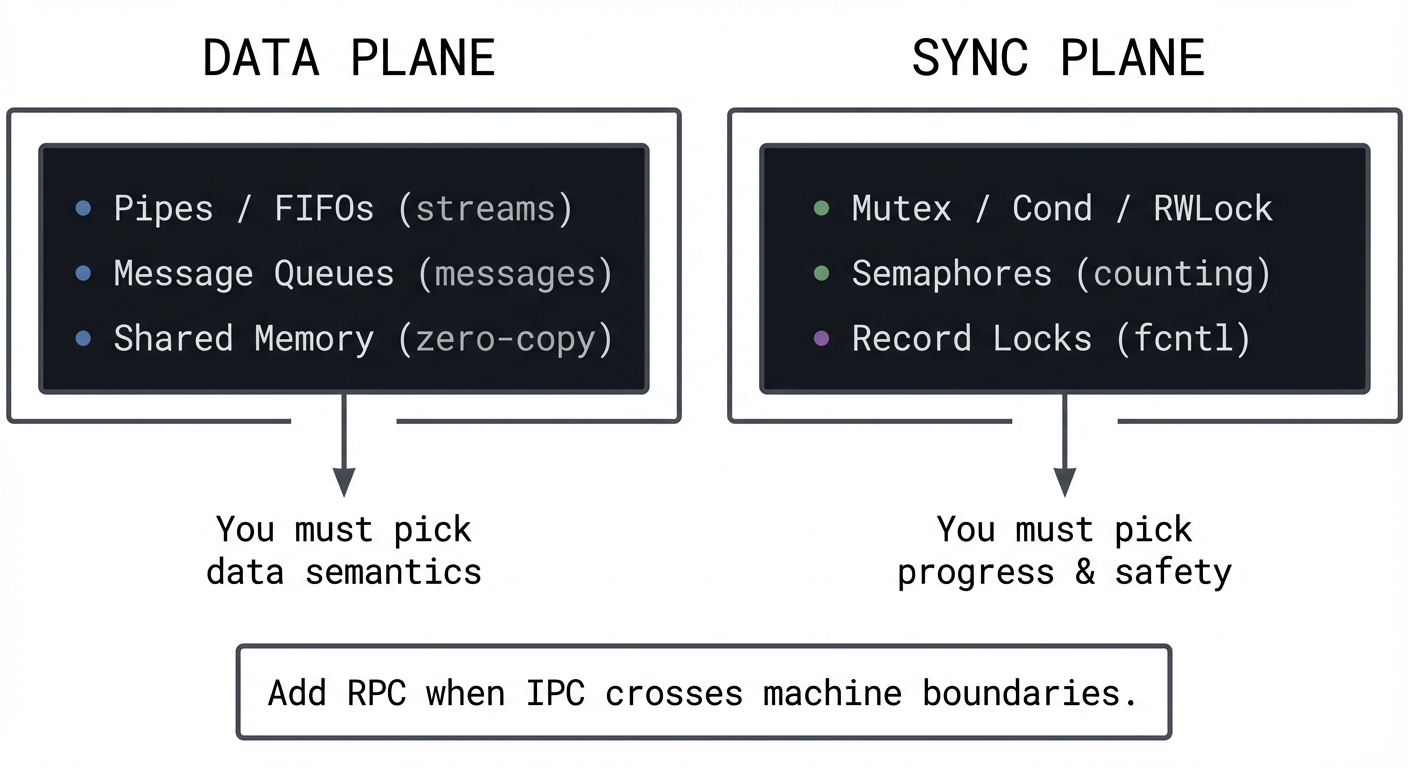
IPC design is two orthogonal problems:
- Data plane: How bytes or messages move between processes.
- Sync plane: How processes coordinate access and progress.
           DATA PLANE                               SYNC PLANE
┌────────────────────────────┐          ┌──────────────────────────────┐
│ Pipes / FIFOs (streams)    │          │ Mutex / Cond / RWLock        │
│ Message Queues (messages)  │          │ Semaphores (counting)         │
│ Shared Memory (zero-copy)  │          │ Record Locks (fcntl)          │
└──────────────┬─────────────┘          └──────────────┬───────────────┘
               │                                       │
               v                                       v
        You must pick                            You must pick
        data semantics                           progress & safety

Add RPC when IPC crosses machine boundaries.
A solid IPC design answers six questions:
- Who owns the data? (single writer vs multiple writers)
- What is the unit of transfer? (bytes vs messages vs records)
- How is backpressure handled? (blocking, drop, bounded queue)
- How is access coordinated? (mutex, sem, lock-free)
- How is cleanup handled? (unlink semantics, crash recovery)
- How is observability achieved? (logging, metrics, tracing)
Theory Primer (Read This Before Coding)
This is the mini-book. Every project assumes you can answer the questions in these chapters.
Chapter 1: Processes, File Descriptors, and IPC Object Lifecycles
Fundamentals
Processes are isolated by design. Each process has its own virtual address space, its own file descriptor table, and its own view of resources. IPC exists because real systems need coordination and data sharing across that isolation boundary. In Unix, almost every IPC mechanism is represented by a file descriptor (pipes, sockets, POSIX shared memory, POSIX message queues), which means the same I/O primitives (read, write, close, poll, select) can be reused. The first mental model to build is that a file descriptor is not the resource itself; it is a per-process handle to a kernel object that has its own lifetime rules.
Every IPC mechanism has a lifecycle: create/open, use, and destroy/unlink. The details differ. Pipes are ephemeral and disappear when all descriptors are closed. POSIX named IPC objects are reference-counted and can be unlinked while still open, just like files. System V objects are persistent kernel objects that survive process exit and must be explicitly removed (e.g., ipcrm). This difference alone explains a large portion of IPC bugs: developers forget to clean up System V semaphores or shared memory segments, then everything fails on the next run due to stale state or exceeded kernel limits.
File descriptor inheritance across fork() and exec() is the next critical mental model. fork() duplicates the parent’s file descriptor table, so both parent and child point to the same underlying kernel objects and offsets. exec() replaces the process image but (unless FD_CLOEXEC is set) preserves file descriptors, which is exactly how shells build pipelines. This is why closing unused file descriptors is not optional: open descriptors in any process keep the underlying IPC object alive and can prevent EOF from propagating or keep locks held.
Finally, understand blocking and atomicity. Most IPC calls are blocking by default: read() waits for data, write() waits for space, sem_wait() waits for a token. Non-blocking mode changes that behavior but introduces EAGAIN handling and often requires poll or select. Atomicity rules (for example, PIPE_BUF) determine whether multiple writers can interleave data. If you do not understand these guarantees, you will build IPC systems that appear to work in tests but fail under load.
IPC is also about failure containment. Processes isolate faults; when one crashes, others can keep running. IPC lets you benefit from isolation without losing collaboration. This is why many large systems prefer multi-process designs over a single multi-threaded process: a crash in one worker does not bring down the entire system, but the workers can still share state through IPC. Understanding this trade-off is key to deciding when to split a system into multiple processes.
A second perspective is that IPC is a contract between producers and consumers. The kernel enforces some parts of this contract (permissions, blocking, limits) but most semantics are your responsibility. You decide what constitutes a message, when a message is complete, and how to recover from partial state. The earlier you define these rules, the fewer bugs you will have later.
Finally, IPC is tied to portability and standards. POSIX IPC APIs are widely supported but not uniform across all Unix variants, while System V APIs are older but entrenched. If you build a portable system, you must know which APIs are available and how they differ. Stevens’ Vol 2 exists largely because these differences matter in real production systems.
Deep Dive
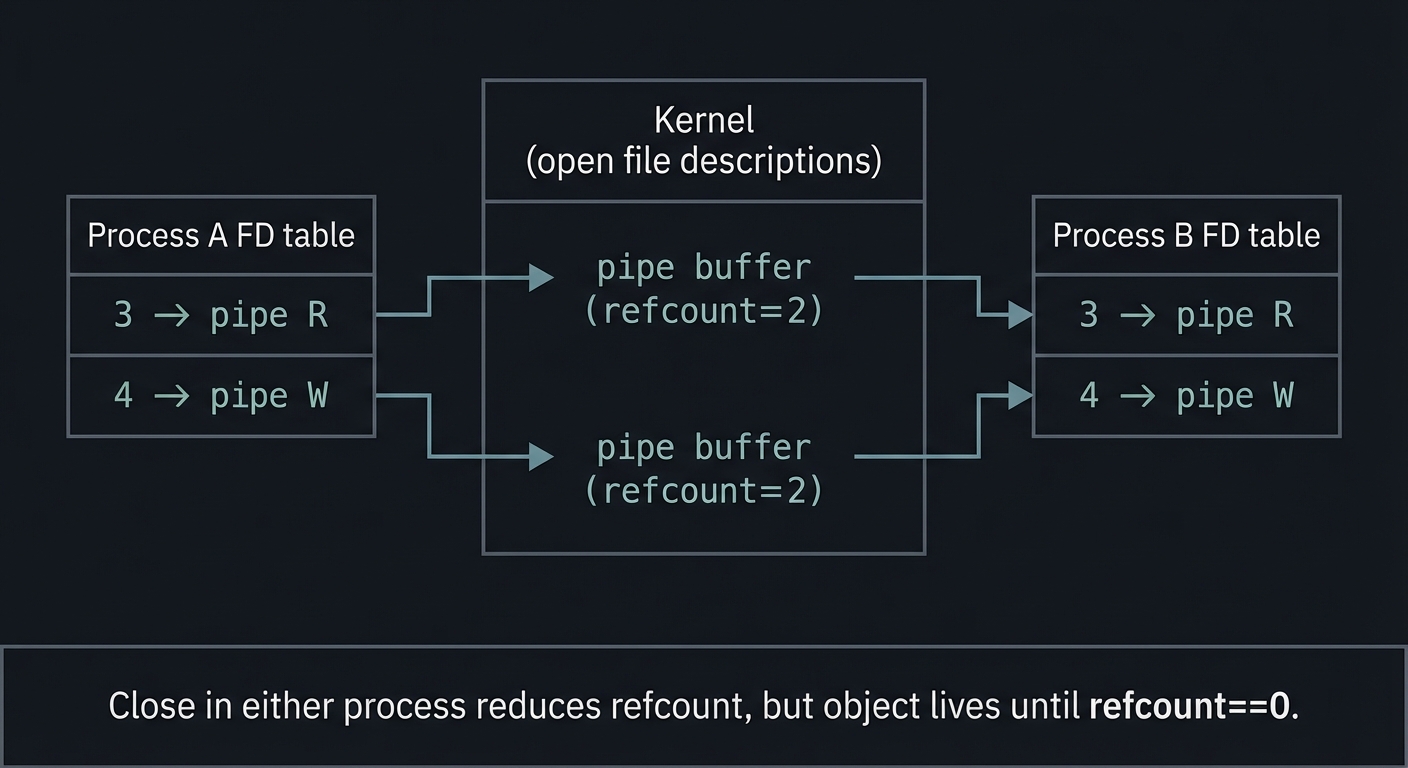
A Unix process has a file descriptor table that maps small integers (0, 1, 2, …) to open file descriptions in the kernel. The open file description tracks file position, status flags, and references to the underlying inode or IPC object. When you fork(), the child inherits a copy of the descriptor table, but both parent and child refer to the same open file descriptions. That means changing flags (like O_NONBLOCK) or closing a descriptor in one process affects the shared kernel object, but not the other process’s descriptor table. This matters for IPC because it means all participants are manipulating a shared kernel-backed resource even when they think they are isolated.
IPC objects have names and namespaces. POSIX IPC names are string-based and look like /myqueue or /myshm. On Linux, POSIX message queues live in /dev/mqueue and POSIX shared memory lives in /dev/shm. System V IPC uses numeric keys (key_t) produced by ftok() or explicit integers. Because System V objects are persistent, the key space becomes part of your system design; your programs must agree on keys or coordinate creation, and you must handle the case where an object already exists from a previous run.
Permissions apply too. IPC objects have modes (like files) that enforce ownership and access control. This is not optional: a queue created with mode 0600 will not be readable by another user. When a program fails mysteriously, always check permissions first. For System V IPC, permissions are stored in the ipc_perm structure and are inspected via ipcs -l and ipcs -i. For POSIX IPC, ls -l /dev/shm and ls -l /dev/mqueue show the backing objects.
Another deep detail is the relationship between data plane and control plane. A pipe moves bytes but provides no explicit notion of messages. If you need message boundaries, you must implement your own framing protocol (length prefix, delimiters, etc.). Message queues and RPC provide message boundaries, but require explicit synchronization and handling of backpressure when queues fill. Shared memory is the fastest data plane, but it provides no synchronization at all; you must bring your own locks, semaphores, or lock-free structures. This is why many IPC designs use pairs: shared memory for data, semaphores for synchronization.
Failure modes are where IPC becomes tricky. If a process dies without cleanup, System V IPC objects persist. If a writer crashes, a reader might block forever unless EOF propagation occurs (pipes) or the reader checks for timeouts (message queues, semaphores). If two processes deadlock on semaphores or record locks, they will wait forever. If signals interrupt syscalls (EINTR), your program must restart or handle partial state. Correct IPC systems are robust systems: they are designed with failure in mind, not as an afterthought.
Finally, note that the kernel limits on IPC objects are real. Message queues have limits on message size and number of messages. Pipes have finite capacity. Semaphores have maximum counts. You must design with these limits in mind or your system will fail unpredictably under load. For example, POSIX message queues on Linux default to msg_max=10 and queues_max=256 unless tuned via /proc/sys/fs/mqueue (mq_overview(7)). A good IPC design starts by understanding these constraints and writing code that fails gracefully when limits are reached.
At a deeper level, understanding duplication of file descriptors is crucial. dup() and dup2() create a new file descriptor that points to the same open file description, which means they share file offsets and flags. This is exactly how dup2() can redirect stdout to a pipe: it makes FD 1 refer to the same open file description as the pipe’s write end. If you later close the original pipe FD, stdout continues to work because the underlying kernel object still has a reference. This detail explains why redirection works and why closing the wrong descriptor can break an entire pipeline.
Signals and EINTR are another subtlety. Many IPC-related syscalls can be interrupted by signals, returning -1 with errno=EINTR. Robust programs either restart the call or design for partial completion. Some systems use sigaction with SA_RESTART, but you should not rely on it universally. Projects with blocking reads or semaphores will expose this if you attach a debugger or send signals during operation.
Multiplexing is also part of the deep model. When multiple IPC channels are active, you must coordinate reads and writes without blocking on the wrong one. The traditional tools are select() and poll(), and modern systems use epoll or kqueue. Even if you do not implement a full event loop in this guide, you must understand how non-blocking I/O pairs with multiplexing to build responsive IPC systems.
Finally, you must internalize the create-or-open race. POSIX IPC objects and files can be created concurrently by multiple processes. If two processes call mq_open or shm_open with O_CREAT at the same time, the first wins. If you need to ensure exclusive creation, you must use O_EXCL and handle EEXIST. This is a common source of race conditions in IPC startup code.
System V IPC introduces another deep detail: key collisions. The ftok() function derives keys from filesystem metadata, which can collide across unrelated programs. This is why robust systems often use well-known numeric keys or dedicate a directory for IPC keys with strict permissions. Always plan for EEXIST when creating System V objects, and decide whether you will reuse or recreate the object.
You should also familiarize yourself with kernel limits. ipcs -l shows limits on message queues, semaphores, and shared memory. These limits are not theoretical; exceeding them will cause IPC creation to fail. For long-running systems, monitoring these limits is part of operational hygiene.
Another lifecycle detail is that some locks and IPC objects are attached to the open file description, not the file descriptor number. This explains why dup() and dup2() can share locks and file offsets. It also explains why closing one descriptor might not release a lock if another descriptor still references the same open file description. Understanding this model helps you debug record-locking anomalies later in the projects.
How This Fits on Projects
Projects 1-6 exercise file descriptors, inheritance, and object lifecycles. Projects 7-15 add synchronization and shared memory. Projects 16-18 add process boundaries across machines. Every single project requires mastery of this chapter.
Definitions & Key Terms
- Open file description: Kernel object referenced by one or more file descriptors, tracking file offset and flags.
- File descriptor table: Per-process mapping from small integers to open file descriptions.
- FD_CLOEXEC: Flag that closes a descriptor across
exec(). - IPC object: Kernel resource used for communication or synchronization.
- Persistence: Whether IPC objects survive process exit.
Mental Model Diagram
Process A FD table        Kernel (open file descriptions)       Process B FD table
┌───────────────┐         ┌────────────────────────────┐        ┌───────────────┐
│ 3 -> pipe R   │ ------> │ pipe buffer (refcount=2)   │ <------│ 3 -> pipe R   │
│ 4 -> pipe W   │ ------> │ pipe buffer (refcount=2)   │ <------│ 4 -> pipe W   │
└───────────────┘         └────────────────────────────┘        └───────────────┘

Close in either process reduces refcount, but object lives until refcount==0.
How It Works (Step-by-Step)
- A process creates or opens an IPC object (pipe, queue, shm) and receives an FD or ID.
- The process forks or hands the identifier to another process.
- Both processes operate on the same kernel object through their own handles.
- The kernel mediates access, applies permissions, and enforces limits.
- When all handles are closed or the object is unlinked/removed, the kernel releases it.
Invariants:
- IPC objects outlive the creating process if references remain.
- Closing all handles releases the object (POSIX); System V requires explicit removal.
- A blocked operation must eventually complete or time out to avoid deadlock.
Failure Modes:
- Forgotten closes keep objects alive and prevent EOF.
- Stale System V objects cause
EEXISTor stale data. - Incorrect permissions cause silent failures or
EACCES.
Minimal Concrete Example
int fd = open("/tmp/data.txt", O_RDONLY);
if (fd == -1) { perror("open"); exit(1); }

pid_t pid = fork();
if (pid == 0) {
    // Child inherits fd; read same file description
    char buf[64];
    read(fd, buf, sizeof(buf));
    _exit(0);
}
// Parent can close independently; underlying object lives if child still holds it
close(fd);
waitpid(pid, NULL, 0);
Common Misconceptions
- “Closing a file descriptor in one process closes it for all.” (False)
- “POSIX IPC objects disappear when a process exits.” (Only if last reference is closed)
- “System V IPC cleans itself up.” (False; you must remove it)
Check-Your-Understanding Questions
- Why do pipes and POSIX IPC objects disappear automatically but System V objects do not?
- What happens to file descriptors across
exec()and how doesFD_CLOEXECchange this? - Why can a pipe reader block forever even after a writer process exits?
Check-Your-Understanding Answers
- POSIX IPC objects are reference-counted and unlinkable; System V objects persist until explicitly removed.
exec()preserves file descriptors unlessFD_CLOEXECis set, which closes them automatically.- The reader may block if another process still holds a write descriptor open, preventing EOF.
Real-World Applications
- Shells wiring pipelines (
bash,zsh) - Databases coordinating worker processes
- Build systems streaming compiler output
- Daemons coordinating with supervisors and loggers
Where You Will Apply It
Projects 1-18 (all of them).
References
- Stevens, UNP Vol 2 — Ch. 1-3
- Advanced Programming in the UNIX Environment — Ch. 3, 8, 15
- The Linux Programming Interface — Ch. 43-44
pipe(7),mq_overview(7),shm_overview(7)(man7.org)
Key Insight
IPC is not just about moving bytes; it is about managing shared kernel objects with precise lifetime and synchronization rules.
Summary
You now know how Unix represents IPC objects, how descriptors and namespaces work, and why object lifetime rules dominate IPC correctness.
Homework / Exercises
- Trace a simple
ls | wc -lpipeline withstraceand list every FD operation. - Create a System V message queue, exit without cleanup, and observe persistence with
ipcs. - Explain the difference between POSIX and System V persistence in your own words.
Solutions
- Use
strace -f -e trace=pipe,dup2,close,execveto see FDs created and inherited. - Run
ipcs -qafter exiting; the queue remains untilipcrm -q. - POSIX uses names and reference counting; System V uses kernel IDs that persist.
Chapter 2: Pipes and FIFOs (Byte-Stream IPC)
Fundamentals
Pipes and FIFOs are the simplest IPC mechanisms in Unix. They are byte streams with no inherent message boundaries. Pipes are created with pipe() and are anonymous: they exist only within a process family (usually parent and child). FIFOs (named pipes) are created with mkfifo() and appear as a special file in the filesystem, allowing unrelated processes to communicate. Both are unidirectional: one end is for reading, the other for writing. Full-duplex communication requires two pipes or two FIFOs.
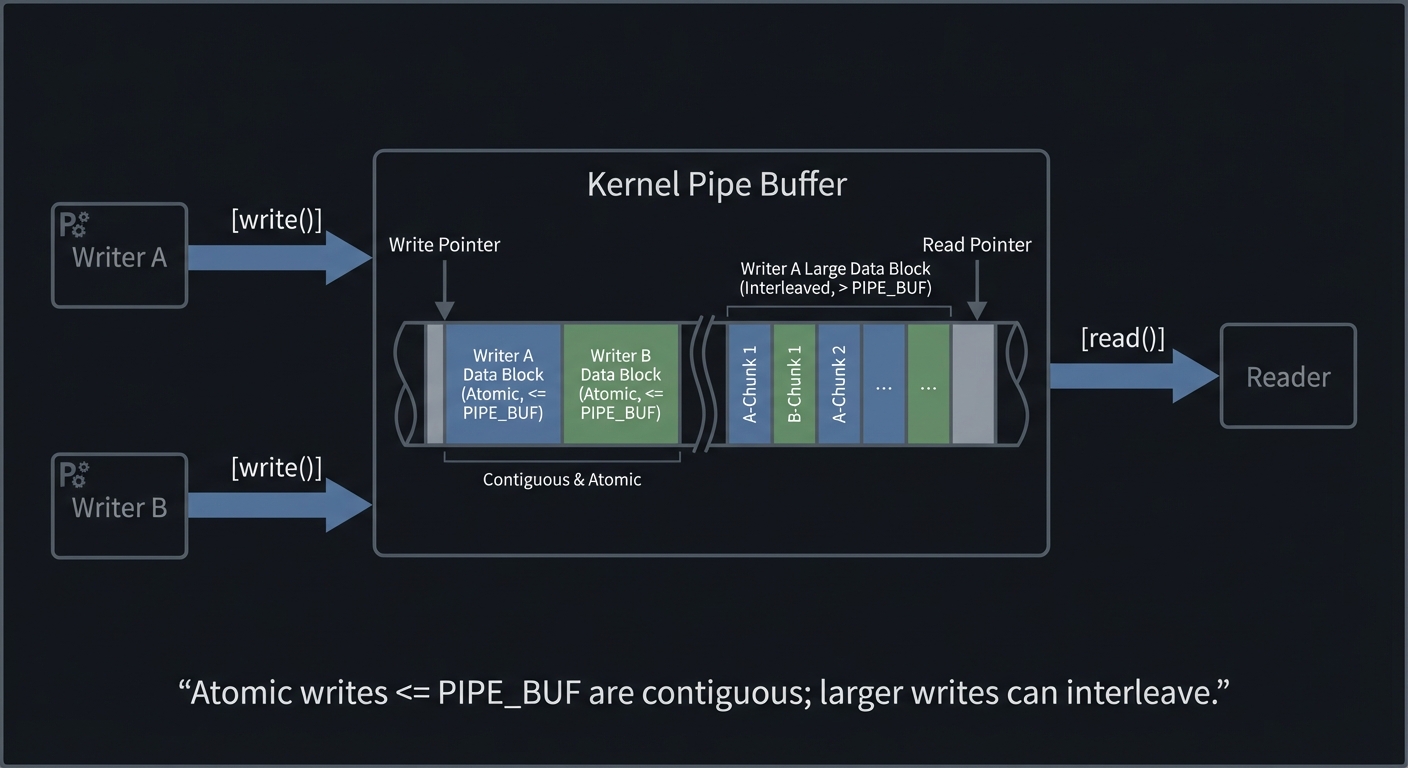
The most important pipe guarantee is atomicity for small writes. POSIX guarantees that writes of less than PIPE_BUF bytes are atomic. On Linux, PIPE_BUF is 4096 bytes, and POSIX requires at least 512 bytes. This means multiple writers can safely write small records without interleaving, but larger writes can be split and interleaved by the kernel. This is the origin of the classic bug where log messages get garbled under load.
Blocking behavior is equally important. By default, read() blocks when the pipe is empty and write() blocks when the pipe is full. If all writers close their ends, readers see EOF (read() returns 0). If all readers close their ends, writers get SIGPIPE and write() fails with EPIPE. FIFOs add an extra subtlety: opening a FIFO for reading blocks until a writer opens it, and opening for writing blocks until a reader opens it (unless O_NONBLOCK is used). These semantics are both powerful and dangerous; failing to open or close correctly is a common deadlock source.
Despite their simplicity, pipes and FIFOs remain widely used because they integrate perfectly with Unix philosophy. They compose well with shell pipelines, can be inspected with standard tools, and are easy to debug. Their limitations (lack of message boundaries, local-only, limited capacity) drive the need for other IPC mechanisms, but for streaming data they remain unmatched in simplicity.
Another essential detail is directionality. Pipes and FIFOs are single-direction streams. A bidirectional channel requires two pipes (or two FIFOs), one for each direction. Many beginners attempt to use a single FIFO for request and response, which can work for strict request/response patterns but becomes fragile under concurrency. The clean solution is two named FIFOs or a per-client FIFO for replies, which mirrors how higher-level protocols separate request and response channels.
Pipes also interact with stdio buffering. If a child process writes to stdout using stdio, data may be buffered and not appear immediately in the parent. This is why interactive programs often force line buffering when stdout is not a terminal. Understanding buffering modes (unbuffered, line buffered, block buffered) helps you debug mysteriously delayed output.
Finally, pipes and FIFOs are local IPC only. The moment communication crosses machine boundaries, you must use sockets or RPC. Recognizing this boundary early prevents overengineering: pipes are perfect for local pipelines, but useless for distributed systems.
One practical rule: if you need message boundaries, you must create them. For example, write fixed-size records or prefix each record with its length. Pipes and FIFOs will not preserve your record boundaries for you.
Deep Dive
A pipe is a kernel buffer with two file descriptors: one for reading and one for writing. The kernel maintains a circular buffer and a set of wait queues. When a writer writes, the kernel copies bytes into the buffer; when a reader reads, the kernel copies bytes out. This makes pipes fast enough for many use cases but still involves two copies (user to kernel, kernel to user). The pipe buffer has a finite capacity (typically 16 pages by default on Linux) and can be resized with F_SETPIPE_SZ for some workloads. However, capacity is not guaranteed; pipe(7) warns that applications must not rely on a fixed capacity. Design your programs to consume data promptly or apply backpressure intentionally.
The key to correct pipe usage is closing unused ends. In a pipeline A | B | C, the parent process might create two pipes and fork three children. Each child must close all pipe ends it does not use, otherwise EOF will never propagate. This is the most common pipeline bug: the last process blocks forever because a write end is still open in some other process. This is why shells are careful about closing descriptors in the parent and children.
Pipes are streams, not messages. If you need message boundaries, you must implement framing: length-prefixed records, delimiter-based records, or fixed-size records smaller than PIPE_BUF to preserve atomicity. FIFOs allow unrelated processes but add name-based coordination and open-time blocking. To avoid blocking on FIFO open, you can open both ends in the same process (open(O_RDWR)) or use O_NONBLOCK and retry. Many production FIFO servers open the FIFO in non-blocking mode and then switch to blocking reads after a writer appears, to avoid startup deadlocks.
There are also two-way pipe patterns. For a bidirectional client-server, you often create two pipes: one for client->server and one for server->client. popen() is effectively a standardized version of this pattern for one-way communication, spawning a process and connecting its stdin or stdout to a pipe. Your Project 3 reimplements this and teaches the exact trade-offs of popen(): you must manage fork()/exec() plus parent-side fdopen() and ensure pclose() waits for the child.
Failure modes include partial reads/writes, signals interrupting syscalls (EINTR), and SIGPIPE. Robust pipe code checks return values, loops on partial writes, handles EINTR, and either ignores SIGPIPE or treats it as a clean shutdown. Performance pitfalls include buffering mismatches and small writes that trigger syscalls too frequently. A common optimization is to batch output in user space before writing to the pipe, but be careful to preserve atomicity boundaries when multiple writers are involved.
Complex pipelines highlight how pipes interact with process management. For an N-command pipeline, you typically create N-1 pipes, then fork N times. Each child process sets up its stdin/stdout by dup2() to the appropriate pipe ends and closes all other pipe ends. The parent closes all pipe ends and waits for all children. This pattern is deceptively simple but can easily leak FDs or deadlock if you close in the wrong order. Drawing a table of FDs for each process is the safest way to reason about correctness.
Non-blocking mode changes everything. With O_NONBLOCK, reads return EAGAIN instead of blocking when no data is available, and writes return EAGAIN when the pipe buffer is full. To build a responsive pipeline, you can combine non-blocking pipes with poll() or select() to wait until a FD is ready. This introduces a control loop that is the precursor to event-driven servers. It is worth experimenting with this pattern to understand how IPC scales when multiple channels are active.
SIGPIPE deserves special attention. By default, writing to a pipe with no readers terminates the process. Many systems ignore SIGPIPE and handle EPIPE manually because abrupt termination is rarely desirable. If your pipeline executor or popen() implementation unexpectedly exits, check whether a downstream process closed its read end and triggered SIGPIPE.
FIFOs introduce additional lifecycle complexity. Because they live in the filesystem, they are subject to permissions, stale files, and cleanup responsibilities. A common pattern is to use a well-known FIFO for server announcements, then create per-client FIFOs for replies. Another pattern is to use a unique FIFO per client identified by PID, which reduces contention but requires careful cleanup. These patterns are practical and mirror how larger systems use temporary sockets or domain sockets for per-client channels.
Performance tuning for pipes often involves batching. If you write one byte at a time, syscall overhead dominates. If you buffer and write in larger chunks, throughput improves but latency might increase. A mature pipeline balances these trade-offs depending on whether throughput or responsiveness is more important.
It is also worth understanding that pipes can be combined with process substitution and shell redirection. This is not just a shell feature; it teaches the same FD wiring logic your pipeline executor uses. Practicing this mentally with real shell commands is a powerful debugging technique.
When multiple pipes are active (for example, a process that reads from several children), you must multiplex. The standard approach is to set all pipes to non-blocking and use poll() or select() to wait for readiness. This pattern prevents one slow pipe from blocking all others, and it is the basis for multi-process log collectors and supervisors.
Another pipeline detail is error propagation. If a middle command fails, upstream writers may get SIGPIPE and downstream readers may see EOF earlier than expected. A robust pipeline executor collects child exit statuses and reports the first failure clearly, rather than just returning the final command’s status. This is one reason shells like bash have options such as pipefail.
A useful validation technique is to deliberately insert sleeps in different pipeline stages and observe how backpressure propagates. This makes the pipe buffer limits visible and helps you reason about throughput under load.
Testing with very large writes (greater than PIPE_BUF) is a quick way to observe interleaving and prove your framing logic works.
How This Fits on Projects
Projects 1-3 are pipe and FIFO heavy. Projects 4-6 contrast pipes with message queues. Projects 16-18 use pipes implicitly in RPC stubs and server management. Understanding pipe semantics is foundational.
Definitions & Key Terms
- PIPE_BUF: Maximum size of an atomic write to a pipe (>=512, Linux 4096).
- FIFO: Named pipe, visible in filesystem.
- SIGPIPE: Signal sent to a process that writes to a pipe with no readers.
- Framing: Encoding message boundaries in a byte stream.
Mental Model Diagram
Writer A     Writer B                     Reader
   \          /                            /
    \        /                            /
     v      v                            v
  [write()] [write()] -> [ Kernel Pipe Buffer ] -> [read()]

Atomic writes <= PIPE_BUF are contiguous; larger writes can interleave.
How It Works (Step-by-Step)
pipe()creates two file descriptors:fd[0](read) andfd[1](write).- The process forks; parent and child now share the same pipe buffer.
- Each process closes the pipe end it does not use.
- Writer writes bytes; reader reads bytes.
- When all writers close, readers see EOF.
Invariants:
- At least one writer must remain open to avoid EOF.
- Writes <= PIPE_BUF are atomic.
Failure Modes:
- Unclosed write end prevents EOF.
- Writer gets SIGPIPE if no readers.
Minimal Concrete Example
int fd[2];
pipe(fd);
if (fork() == 0) {
    close(fd[1]);
    char buf[128];
    read(fd[0], buf, sizeof(buf));
    _exit(0);
}
close(fd[0]);
write(fd[1], "hello", 5);
close(fd[1]);
Common Misconceptions
- “Pipes preserve message boundaries.” (False)
- “EOF happens when the writer exits.” (False if another process still has the write end open)
Check-Your-Understanding Questions
- Why does a reader block even after the writer process exits?
- How does
PIPE_BUFaffect multiple writers? - How do FIFOs differ from pipes in terms of namespace and opening semantics?
Check-Your-Understanding Answers
- Another process still holds a write descriptor open, so EOF does not occur.
- Writes <= PIPE_BUF are atomic; larger writes may interleave.
- FIFOs are named filesystem objects; opening blocks until the other side opens (unless
O_NONBLOCK).
Real-World Applications
- Shell pipelines
- Log processing chains
- Simple client-server tools like
logger | grep | awk
Where You Will Apply It
Projects 1-3.
References
pipe(7),fifo(7)(man7.org)- Stevens, UNP Vol 2 — Ch. 4
- The Linux Programming Interface — Ch. 44
Key Insight
Pipes are deceptively simple; their correctness depends on precise control of file descriptor lifetimes.
Summary
You now understand how pipes and FIFOs work, their blocking semantics, and how atomicity affects multi-writer systems.
Homework / Exercises
- Build a FIFO-based logger that multiple processes can write to simultaneously without interleaving.
- Modify your pipeline executor to handle non-blocking pipes and
EAGAIN.
Solutions
- Ensure each write is <= PIPE_BUF or implement length-prefixed framing.
- Use
fcntlto setO_NONBLOCKand wrap writes in retry loops withpoll().
Chapter 3: Message Queues (POSIX and System V)
Fundamentals
Message queues are IPC mechanisms that preserve message boundaries and allow asynchronous communication. Unlike pipes, they are not streams; each send produces a discrete message and each receive returns one complete message. This makes message queues an excellent fit for request/response patterns, task dispatch, and event-driven architectures.
POSIX message queues use string names (e.g., /jobs) and are manipulated with mq_open, mq_send, mq_receive, and mq_close. They support message priorities, so higher priority messages are delivered first. On Linux, POSIX message queues appear under /dev/mqueue. System V message queues use numeric keys (key_t) and operations like msgget, msgsnd, and msgrcv. System V messages include a mtype field that lets receivers filter for specific types. Both mechanisms provide kernel-managed queues with configurable size limits, and both block when queues are empty or full unless non-blocking flags are used.
The most important difference between POSIX and System V message queues is lifetime and namespace. POSIX queues are reference-counted and can be unlinked, similar to files. System V queues persist until explicitly removed with msgctl(IPC_RMID) or ipcrm, even after all processes exit. This persistence can be useful for long-running services but is a common source of leaks and confusing bugs during development.
Queue capacity is finite. POSIX message queues on Linux default to msg_max=10 messages per queue and queues_max=256 total queues unless tuned via /proc/sys/fs/mqueue (mq_overview(7)). Exceeding these limits causes mq_open or mq_send to fail or block. System V queues also have size limits governed by kernel parameters. Designing robust message queues means thinking about backpressure, bounded buffers, and what happens when producers outpace consumers.
Message queues are also a scheduling tool. Because the kernel maintains an ordered queue, you can treat the queue itself as a backlog of work. This allows systems to decouple producers from consumers: producers can run fast without overwhelming consumers, and consumers can scale horizontally by reading from the queue. This decoupling is one of the reasons message queues are commonly used in job processing systems.
Another key detail is message size constraints. Unlike pipes, queues have explicit maximum message sizes, which can force you to design a serialization protocol carefully. Large payloads may need to be stored in shared memory or files, with the queue carrying only metadata and pointers. This pattern shows up in real systems: control-plane messages in a queue, data-plane payloads in shared memory or files.
Finally, message queues are a middle ground between pipes and shared memory. They preserve message boundaries like RPC, but they are local and avoid some network complexity. Understanding when to choose them is a mark of a mature systems programmer.
Persistence also changes workflow. With System V queues, you can crash and restart without losing queued messages, but you must also handle stale state. With POSIX queues, you can unlink the queue and still keep using it via existing descriptors, which enables safe restarts if done carefully.
Deep Dive
A message queue is essentially a kernel-managed list of messages, each with metadata (size, priority or type). When a sender calls mq_send, the kernel checks permissions, verifies the message size, and either enqueues or blocks if the queue is full. Receivers call mq_receive to dequeue the highest-priority message. Priorities are strict: a priority 10 message will always be delivered before a priority 1 message, regardless of arrival order. This makes POSIX message queues powerful for emergency signals or high-priority jobs, but it can also cause starvation if low-priority messages never get serviced.
System V message queues use mtype to allow selective receive. The msgrcv call can specify msgtyp to select a specific type or a range of types. This enables multiplexing multiple logical channels within a single queue. However, System V APIs are more complex and have different blocking and error semantics. For example, msgsnd can block or fail with EAGAIN if IPC_NOWAIT is used. You must also be careful about struct packing: the message buffer must start with a long mtype, and the size argument excludes this field. These details are a classic source of bugs.
POSIX queues integrate with signals and threads via mq_notify. You can request a signal when a queue transitions from empty to non-empty, or request a thread-based notification. This is a powerful pattern for event-driven servers: the queue acts as a kernel-backed event source. The downside is that mq_notify is one-shot; you must re-register after each notification. Missing this leads to lost wakeups and hung servers.
When designing with message queues, you must decide on serialization and framing. The kernel preserves message boundaries, but you still need a protocol for your application messages. XDR, protobufs, or simple fixed-layout structs can be used. Because queues are bounded, you must define what happens when full: block, drop, or apply backpressure to upstream components. For high-throughput systems, message queues may be too slow; shared memory with a ring buffer is often faster. Projects 4-6 make this trade-off concrete by comparing POSIX and System V queues and benchmarking them against other IPC mechanisms.
POSIX message queues expose explicit attributes through mq_attr: mq_flags (blocking vs non-blocking), mq_maxmsg (maximum messages), and mq_msgsize (max message size). These are not just configuration details; they define system behavior under load. If a producer attempts to send a larger message than mq_msgsize, it fails. If the queue reaches mq_maxmsg, mq_send blocks. A mature design treats these constraints as part of the protocol.
System V message queues have their own quirks. The msgsnd and msgrcv calls accept flags such as IPC_NOWAIT (non-blocking) and MSG_NOERROR (truncate overly large messages instead of failing). msgrcv also supports selecting messages by type, which lets you multiplex logical channels in a single queue. This is powerful, but it can cause surprising behavior if multiple clients share the same queue and use overlapping message types.
Message queues also require careful handling of serialization. The kernel does not know your data structures; it only sees bytes. If you send a struct containing pointers, the receiving process will get meaningless addresses. Always serialize into flat buffers or use a serialization format like XDR or protobuf. This problem becomes very obvious in distributed systems but exists equally in local IPC.
Design patterns matter here. Many production systems use a dispatcher that reads from a queue and forwards jobs to worker processes. This isolates queue logic from worker logic and allows you to implement backpressure, batching, or rate limiting in one place. Another pattern is a dead-letter queue for messages that fail processing, which helps you avoid infinite retry loops.
Finally, note that POSIX message queues can integrate with signals or threads via mq_notify. This allows event-driven designs where the queue itself wakes the server. But mq_notify is one-shot; if you forget to re-register, your server will stop receiving notifications. This is a subtle but common bug, and it teaches you to think about state transitions carefully.
Permissions are another deep detail. Both POSIX and System V queues have ownership and mode bits. If a queue is created with 0600, other users cannot read it. This can lead to confusing failures in multi-user environments. Always design your queue permissions intentionally and document them.
POSIX queues also support timed receive and timed send functions (mq_timedreceive, mq_timedsend). These allow you to build systems that fail fast rather than blocking forever. They are especially valuable in systems where latency matters or where you want to avoid deadlocks.
Queues also expose instrumentation hooks. POSIX provides mq_getattr() to read the current message count (mq_curmsgs), which allows you to build monitoring and alerting around queue depth. System V provides msgctl to query msg_qnum and msg_qbytes. These metrics are essential in production because they reveal backpressure and overload.
System V msgrcv also supports negative msgtyp values, which select the first message with type less than or equal to the absolute value. This is a powerful but rarely used feature that can implement priority-like behavior in System V queues. Understanding these options helps you reason about legacy systems that use them.
Cleanup strategy is part of correctness. For POSIX queues, mq_unlink() removes the name but existing descriptors remain valid. For System V, msgctl(IPC_RMID) immediately marks the queue for deletion. Your shutdown code should handle both patterns cleanly.
Queue depth also affects latency. A full queue means new messages wait longer before processing, which can violate latency SLAs. This is why production systems often include queue depth alerts and autoscaling triggers tied to message backlog.
If you need to persist large payloads, a common pattern is to store the payload in shared memory and send only a handle or offset through the queue. This reduces queue pressure while still preserving message boundaries.
This pattern mirrors modern systems that combine a fast queue with a shared-memory data plane to scale throughput without sacrificing structure.
How This Fits on Projects
Projects 4-6 are dedicated to message queues. Projects 18 uses RPC and shared memory but still benefits from message-based thinking.
Definitions & Key Terms
- Message boundary: The unit of delivery; messages are not split or merged.
- Priority: POSIX attribute that orders delivery by message priority.
- mtype: System V message type used for filtering receives.
- mq_attr: POSIX structure defining max messages and message size.
Mental Model Diagram
 Producers                     Kernel MQ                     Consumers
┌──────────┐               ┌────────────────┐             ┌───────────┐
│ msg_send │  priorities   │ [prio=10]      │  receive ->│ worker A  │
│ msg_send │ ------------> │ [prio=5 ]      │  receive ->│ worker B  │
│ msg_send │               │ [prio=1 ]      │  receive ->│ worker C  │
└──────────┘               └────────────────┘             └───────────┘
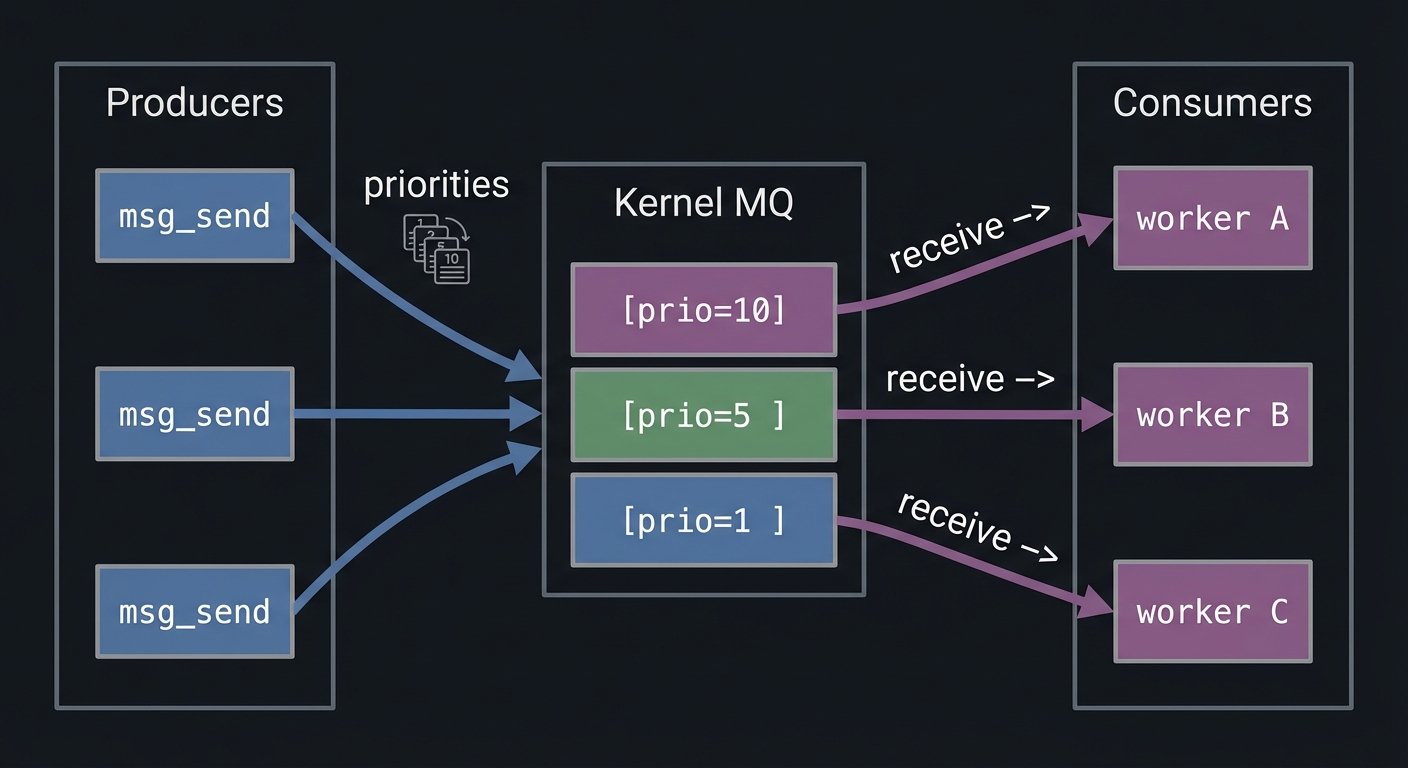
How It Works (Step-by-Step)
- Create/open the queue (
mq_openormsgget). - Configure size and permissions (
mq_attrormsgctl). - Producers enqueue messages.
- Consumers dequeue messages in priority/type order.
- Close and unlink/remove the queue when done.
Invariants:
- Messages are delivered whole.
- Queue size limits are enforced by the kernel.
Failure Modes:
- Full queue causes producers to block or fail.
- Queue persistence causes stale data after crashes.
Minimal Concrete Example
mqd_t mq = mq_open("/jobs", O_CREAT|O_RDWR, 0600, NULL);
const char *msg = "job:42";
mq_send(mq, msg, strlen(msg)+1, 5);
char buf[128];
unsigned prio;
mq_receive(mq, buf, sizeof(buf), &prio);
Common Misconceptions
- “Message queues are always faster than pipes.” (Often false; shared memory or pipes can be faster)
- “POSIX and System V queues behave the same.” (They do not)
Check-Your-Understanding Questions
- What is the difference between POSIX priorities and System V
mtype? - Why can a POSIX queue lose notifications if
mq_notifyis not re-armed? - How do queue size limits affect system design?
Check-Your-Understanding Answers
- POSIX priorities define delivery order; System V types define filtering.
mq_notifyis one-shot and must be registered again after delivery.- They require backpressure or bounded buffering strategies.
Real-World Applications
- Job dispatchers and worker pools
- Logging pipelines with priority alerts
- Event-driven daemons
Where You Will Apply It
Projects 4-6.
References
mq_overview(7)(man7.org)- Stevens, UNP Vol 2 — Ch. 5-6
- The Linux Programming Interface — Ch. 51-54
Key Insight
Message queues trade raw speed for explicit message boundaries and built-in queuing semantics.
Summary
You now understand POSIX and System V message queues, their lifecycles, and their performance trade-offs.
Homework / Exercises
- Implement a length-prefixed protocol on top of a pipe and compare to POSIX MQ.
- Simulate queue overload and design a drop/backpressure policy.
Solutions
- Prefix each record with a 4-byte length; compare throughput and complexity.
- Implement bounded queue and return
EAGAINto producers when full.
Chapter 4: Shared Memory and Memory Mapping (Zero-Copy IPC)
Fundamentals
Shared memory is the fastest IPC mechanism because it avoids copying data through the kernel. Instead, multiple processes map the same physical pages into their virtual address spaces, and they read/write directly. POSIX shared memory uses shm_open to create a shared memory object (backed by /dev/shm on Linux), then ftruncate to size it, and mmap to map it. System V shared memory uses shmget and shmat. Both yield an address you can treat like normal memory.
The trade-off is that shared memory provides no synchronization. If two processes write at the same time, data corruption is guaranteed unless you coordinate. Thus shared memory almost always appears with synchronization primitives: semaphores, mutexes in shared memory, or lock-free data structures with atomics. Projects 12-15 explore this spectrum, from semaphore-protected ring buffers to lock-free queues.
mmap() is the bridge between shared memory and persistent storage. A file mapped with MAP_SHARED becomes shared memory backed by disk. Writes are visible to other processes mapping the same region and can be flushed to disk with msync. This is how embedded databases like SQLite or LMDB get high performance: the OS page cache becomes the database cache. Understanding the difference between MAP_SHARED and MAP_PRIVATE is essential; only MAP_SHARED propagates changes across processes and to the underlying file.
Shared memory introduces the concept of addressing. You cannot safely store raw pointers in shared memory unless all processes map the region at the same virtual address. The correct approach is to store offsets from the base of the shared memory region. This is a common pitfall that appears when teams attempt to share complex data structures across processes.
Another key detail is the distinction between anonymous shared memory (e.g., mmap with MAP_SHARED|MAP_ANON) and named shared memory (shm_open). Anonymous shared memory is simple and fast but cannot be reopened by unrelated processes. Named shared memory can be reopened and persists until unlinked, but requires lifecycle management.
Finally, shared memory is backed by the kernel’s page cache (tmpfs on Linux). It can be swapped and is subject to memory pressure. This means shared memory is fast but not magically unlimited. Design your shared memory systems with memory usage limits, cleanup procedures, and graceful failure modes.
Shared memory also changes how you design data structures. Anything that relies on process-local pointers, file descriptors, or thread IDs cannot be stored directly. You must store offsets or IDs and resolve them at runtime. This is why shared-memory designs often look simpler than in-process designs: simplicity reduces pointer-related bugs.
A final fundamental point: shared memory is about locality and lifetime. Use anonymous shared memory for short-lived, tightly coupled processes, and use named shared memory or mmap() when you need independent processes to attach at different times. This distinction becomes important in real systems where processes are restarted independently.
You can also think of shared memory as a building block. It is not a solution by itself; it is raw capability. The correctness and durability of any shared-memory system come from the conventions you layer on top: headers, versioning, checksums, and synchronization rules.
Deep Dive
Shared memory is conceptually simple but operationally tricky. When you map a shared region, the OS uses the same physical frames for multiple processes. Reads and writes are not atomic at the application level; you must decide on a concurrency strategy. For small control data, simple mutexes or semaphores suffice. For high-throughput data, lock-free ring buffers reduce contention but require careful attention to memory ordering, cache coherence, and false sharing.
POSIX shared memory objects behave like files. You create them with shm_open, size them with ftruncate, map them with mmap, and delete them with shm_unlink. Even after unlinking, existing mappings remain valid until unmapped, just like unlinked files. System V shared memory uses shmget to create a segment identified by an integer ID, shmat to attach, shmdt to detach, and shmctl to control or remove it. These objects persist after process exit and must be explicitly removed to avoid leaks.
Mapping and synchronization must consider cache behavior. When two CPU cores read and write the same cache line, they bounce ownership via cache coherence protocols. If you place two frequently updated counters in the same cache line, you will create false sharing and destroy performance. The fix is padding: align hot fields to cache line boundaries (often 64 bytes). For lock-free queues, you must also use atomic operations with correct memory ordering. A producer must publish data before advancing the write index, and the consumer must read the index with acquire semantics to ensure it sees the data. This is why Project 15 is challenging: correctness depends on the memory model, not just logic.
mmap() introduces additional failure modes. If you grow a file, you must remap it or you risk SIGBUS when accessing beyond the mapped region. msync is required for durability; otherwise you have no guarantee data reaches disk after a crash. If multiple processes map the same file and write concurrently, you still need locking (record locks or external coordination) to prevent corruption. You will implement these patterns in Project 14.
Finally, shared memory requires careful cleanup. POSIX objects in /dev/shm can be unlinked; System V objects require shmctl(IPC_RMID). Leaks are common when processes crash. You should always build a cleanup utility that lists and removes stale objects as part of your development workflow.
Shared memory correctness depends on both hardware and software. On the hardware side, CPU caches and store buffers can reorder reads and writes. On the software side, compilers can reorder operations unless you use atomic operations or memory barriers. This is why lock-free programming is hard: you are negotiating with both the compiler and the CPU. Even in lock-based designs, you should understand that locks provide implicit memory barriers that make shared state visible across cores.
Page size and alignment also matter. Most systems use 4KB pages, but huge pages (2MB) can improve TLB behavior for large shared memory regions. While you may not use huge pages in these projects, you should understand that shared memory performance depends on the page cache and TLB just as much as it depends on raw CPU speed. Mapping large regions without touching them can trigger page faults later at unpredictable times; madvise and pre-faulting can reduce latency spikes.
mmap() introduces the concept of durability ordering. If you update two related records and call msync, you might still lose consistency if the OS writes them out in a different order. Databases solve this with write-ahead logs or copy-on-write schemes. Your memory-mapped database project should at least consider atomic updates and fail-safe layouts, even if it does not implement a full WAL.
Another subtlety is address independence. If you store pointers inside shared memory, they only make sense if all processes map the shared segment at the same address. The safer pattern is to store offsets relative to the base address and compute pointers dynamically. This pattern appears in many production shared-memory databases and is essential for portability.
Finally, shared memory must be cleaned. POSIX shared memory objects behave like files and can be unlinked even while in use. System V shared memory persists indefinitely. Both behaviors can surprise you: unlinked objects remain usable by existing mappings, and persistent objects can leak until you manually remove them. Effective development workflows include automated cleanup scripts.
Shared memory performance can be improved with prefaulting. If you know you will access every page in a region, touching each page at startup avoids page faults later. This is a common technique in low-latency systems. Linux also provides madvise and mlock to influence paging behavior; while not required for the projects, understanding their role helps explain why production shared-memory systems often include a warmup phase.
Durability is another subtlety. msync flushes memory to disk, but it does not guarantee ordering across multiple regions or files. If you update two related records, you may need an explicit ordering protocol (like write-ahead logging) to ensure crash consistency. This is the same fundamental problem solved by real databases.
Handling variable-sized records in shared memory is another advanced pattern. The safest approach is to store a fixed-size header (length, flags, checksum) followed by variable data. An offset table or free-list allocator then manages space. This is the same approach used in many embedded databases that rely on shared memory or memory mapping.
When a shared-memory segment is used by many processes, versioning becomes important. Adding a version field to the header lets new and old processes detect mismatches and refuse to run rather than corrupting data. This is a simple but effective practice for real systems.
You should also validate shared-memory correctness with checksums or sequence counters. Simple invariants like monotonic counters or message sequence IDs catch subtle ordering bugs that are otherwise hard to reproduce.
In shared-memory systems, adding a simple “magic number” and checksum to the header helps detect uninitialized or corrupted regions after crashes.
A simple end-to-end test is to run two processes, write sequential counters into shared memory, and verify monotonic reads on the other side. This catches most ordering and synchronization mistakes early.
How This Fits on Projects
Projects 12-15 are shared memory heavy. Projects 10-11 use shared memory for process-shared semaphores. Project 14 uses mmap() for persistence.
Definitions & Key Terms
- Shared memory: Memory region mapped into multiple processes.
- MAP_SHARED:
mmapflag that shares updates with other processes and the backing file. - False sharing: Performance loss when unrelated data shares a cache line.
- Memory ordering: The rules governing how CPUs reorder reads/writes.
Mental Model Diagram
Process A                 Kernel                  Process B
┌───────────────┐      ┌───────────┐          ┌───────────────┐
│ ptr -> [page] │ <--> │ page frame│ <------> │ ptr -> [page] │
└───────────────┘      └───────────┘          └───────────────┘

Both processes see the same physical memory; synchronization is up to you.
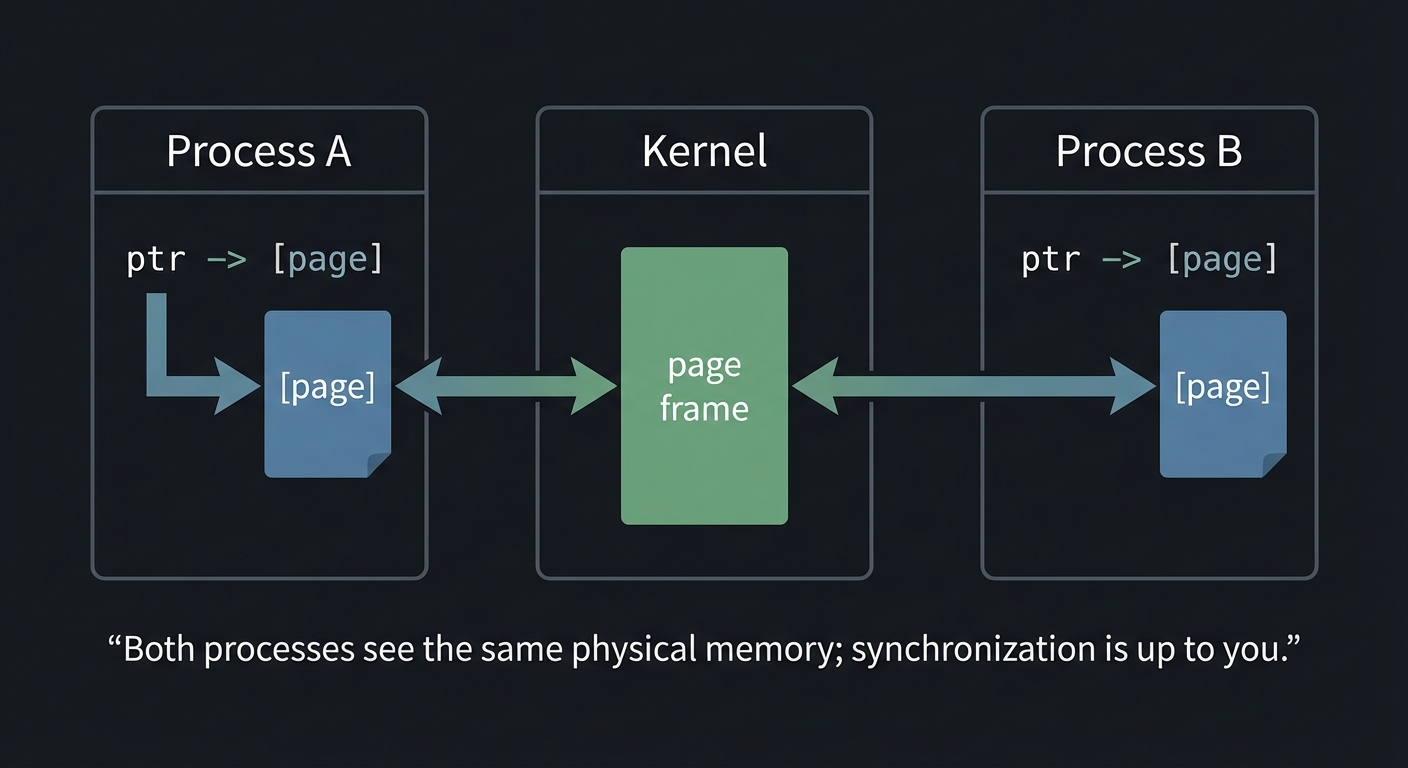
How It Works (Step-by-Step)
- Create or open shared memory (
shm_openorshmget). - Set size (POSIX requires
ftruncate). - Map it with
mmaporshmat. - Coordinate access with locks or atomics.
- Unmap and unlink/remove when done.
Invariants:
- All processes see the same bytes.
- The kernel does not provide synchronization.
Failure Modes:
- Data races cause corruption.
- Stale shared memory segments persist after crashes.
Minimal Concrete Example
int fd = shm_open("/demo", O_CREAT|O_RDWR, 0600);
ftruncate(fd, 4096);
int *counter = mmap(NULL, 4096, PROT_READ|PROT_WRITE, MAP_SHARED, fd, 0);
(*counter)++;
Common Misconceptions
- “Shared memory is safe without locks.” (False)
- “
mmap()automatically makes writes durable.” (False withoutmsync)
Check-Your-Understanding Questions
- Why is shared memory faster than pipes or message queues?
- What happens if a process accesses beyond the mapped region?
- Why do lock-free structures require memory ordering?
Check-Your-Understanding Answers
- It avoids extra copies; processes read/write the same pages.
- The process receives SIGBUS; the mapping is invalid.
- CPUs can reorder operations; without fences, consumers may see stale data.
Real-World Applications
- Databases (shared buffer pools)
- High-frequency trading (ring buffers)
- Image or video pipelines
Where You Will Apply It
Projects 10-15.
References
shm_overview(7),shmget(2),mmap(2)(man7.org)- Stevens, UNP Vol 2 — Ch. 12-14
- The Linux Programming Interface — Ch. 48-54
Key Insight
Shared memory gives you speed but removes safety; correctness depends on the synchronization strategy you build on top.
Summary
You now understand how shared memory works, how mmap() enables persistence, and why synchronization is non-negotiable.
Homework / Exercises
- Write a shared-memory counter with a semaphore guard.
- Implement a shared-memory ring buffer and measure throughput vs pipes.
Solutions
- Use
sem_openwithsem_wait/sem_postaround the counter. - Use
clock_gettimeand compare message/sec for fixed message size.
Chapter 5: Synchronization and Locking (Semaphores, Mutexes, RWLocks, Record Locks)
Fundamentals
Synchronization is the discipline of ensuring multiple processes or threads access shared resources safely. Without it, shared memory becomes a data corruption factory. Unix provides multiple synchronization mechanisms, each with different semantics. Semaphores are counters used to limit concurrency or signal events. Mutexes provide mutual exclusion. Condition variables let threads wait for specific states. Read-write locks allow multiple readers but only one writer. Record locks (fcntl) allow locking byte ranges in files and are used for coordination on disk-backed data structures.
These mechanisms solve different problems. Semaphores are ideal for resource pools, barriers, and producer-consumer queues. Mutexes and condition variables are best when shared memory structures need short critical sections and complex wait conditions. Read-write locks are optimized for read-heavy workloads. Record locking is essential when the shared state is a file (for example, in a memory-mapped database).
The critical insight is that synchronization defines the safety policy of your system. Data structures do not become safe by themselves. If you do not define which operations are atomic and how readers and writers interleave, your system will eventually fail under contention. Projects 7-11 drill these patterns deeply.
Synchronization also defines ownership. A mutex has a clear owner: the thread that locks it must unlock it. A semaphore does not require ownership, which makes it ideal for resource pools or signaling but dangerous if misused. This subtle difference explains why semaphores are sometimes misused as mutexes, leading to bugs that are hard to debug.
Condition variables are another subtle point. They do not represent a condition themselves; they are just a waiting room. The condition is represented by shared state, and every wait must check that state. This is why the canonical pattern is a while-loop around pthread_cond_wait. If you violate this pattern, your code will eventually fail under load.
Finally, record locks remind us that synchronization is not always about memory. Many systems coordinate through files because file-based state is naturally persistent. Record locks allow concurrency on disk-backed data without global locking. This is essential for file-based databases and large log files.
Another subtlety is the difference between Mesa and Hoare condition variable semantics. POSIX uses Mesa semantics: a signal is only a hint, and the condition must always be rechecked. This design favors performance but requires discipline in code.
Synchronization also balances latency vs CPU usage. Spinlocks or busy-wait loops can reduce latency but waste CPU; blocking primitives like semaphores and condition variables conserve CPU but add scheduling latency. Knowing this trade-off helps you choose between busy-waiting (for microsecond-scale latency) and blocking (for general-purpose workloads).
In practice, you often choose synchronization based on workload shape. If critical sections are tiny and frequent, mutexes or spinlocks may be ideal. If waits are long, condition variables or semaphores reduce CPU waste. This trade-off is part of performance engineering.
Semaphores are especially useful when you want to represent a counted resource (available slots, tickets, or permits) across multiple processes. This makes them the natural primitive for pools and rate limiting.
Deep Dive
Semaphores come in two families: POSIX and System V. POSIX semaphores (sem_open, sem_wait, sem_post) can be named or unnamed. Named semaphores appear under /dev/shm/sem.* on Linux and are reference-counted objects. System V semaphores are more complex: they exist as sets of semaphores and support atomic operations across multiple semaphores via semop. This allows advanced patterns like reusable barriers and resource allocation across multiple resources in one atomic step. System V semaphores also support SEM_UNDO, which can automatically adjust semaphore counts when a process exits unexpectedly, helping prevent leaks.
Mutexes and condition variables are part of pthreads but can be placed in shared memory and marked as process-shared. A mutex alone only provides mutual exclusion; a condition variable provides a way for threads or processes to sleep until a condition is true. Correct use requires a loop around pthread_cond_wait because spurious wakeups are allowed. This is a common interview question and a common source of subtle bugs.
Read-write locks extend mutexes by allowing multiple readers to enter concurrently. The trade-off is fairness: if readers continuously arrive, writers can starve unless the lock is designed to be writer-preferring. Implementing a read-write lock from first principles (Project 8) forces you to reason about state transitions, waiting queues, and fairness policies.
Record locking (fcntl) is conceptually different. Locks are attached to file regions, not to in-memory data. They are advisory, meaning only cooperating processes honor them. The granularity is flexible (byte ranges), which allows multiple processes to update different records in the same file concurrently. But it also introduces pitfalls: locks are per-process, and closing any file descriptor for that file releases all locks held by that process. This must be designed around in multi-threaded or multi-process systems.
Synchronization failure modes are serious: deadlocks (cyclic waits), livelocks (processes repeatedly retry without progress), priority inversion (low-priority thread holds a lock needed by a high-priority thread), and starvation (readers or writers never progress). Good design uses timeouts (sem_timedwait), consistent lock ordering, and diagnostics to detect stuck states. Projects 9-11 make these issues concrete.
A correct synchronization design begins with a state machine. For a bounded buffer, the states are “empty”, “partially full”, and “full”. For a read-write lock, the states include counts of active readers and whether a writer is waiting. Expressing the synchronization policy as explicit state transitions helps you reason about deadlocks and fairness. This is why many high-quality synchronization implementations start with a diagram or truth table rather than code.
Process-shared mutexes and condition variables introduce additional complexity. You must initialize them with attributes that mark them as process-shared, and the underlying memory must be in a shared region. If you forget the attribute, the locks will work inside a single process but fail silently across processes. This is a classic bug that appears when developers move from threads to multi-process designs.
System V semaphores are more complex but also more expressive. Because semop can update multiple semaphores atomically, you can implement barriers, multi-resource allocation, or phase transitions without intermediate race windows. The trade-off is a more complex API and more ways to get it wrong. The value of Projects 10 and 11 is that they force you to use these features intentionally.
Record locking deserves deeper attention. POSIX fcntl locks are per-process; they are not per-thread. In a multithreaded process, one thread can unintentionally release another thread’s locks by closing a file descriptor. Modern Linux provides open-file-description locks (F_OFD_SETLK) that are per-file-description rather than per-process, but those are non-POSIX. For portability, you must design around the POSIX semantics.
Deadlocks deserve explicit analysis. The four necessary conditions for deadlock are mutual exclusion, hold-and-wait, no preemption, and circular wait. You can prevent deadlocks by breaking at least one of these conditions: enforce a global lock ordering (break circular wait), use try-lock and backoff (break hold-and-wait), or redesign with lock-free queues. Understanding this theory is not academic; it directly informs how you design IPC systems that cannot afford to hang.
Priority inversion is another real-world failure mode. A low-priority process may hold a lock needed by a high-priority process, causing the high-priority process to wait indefinitely. Some systems use priority inheritance mutexes to mitigate this. Even if you do not implement priority inheritance, you should recognize the problem and know when it can occur.
Robust mutexes are worth understanding as well. Linux supports PTHREAD_MUTEX_ROBUST, which allows a process to detect when a previous owner died while holding the lock. This is a powerful tool for crash recovery in shared-memory systems, though it adds complexity to lock management.
Deadlock avoidance is often implemented by global lock ordering. For example, if you always lock semaphores in increasing numeric order, you prevent cycles. This principle applies equally to record locks and mutexes. Even in small projects, choosing and documenting a lock order prevents entire classes of bugs.
SEM_UNDO is not free. The kernel must track per-process adjustments and apply them on exit. This adds overhead and does not handle all crash scenarios (e.g., kernel crash). Use it for safety during development, but understand its cost in high-performance systems.
Reader-writer locks introduce another subtlety: upgrade/downgrade. Many systems disallow upgrading from read to write without releasing the lock, because it can deadlock. If you ever need upgrades, you must design explicit protocols for it.
When testing synchronization, always include stress tests with randomized sleeps. This increases interleavings and exposes hidden races that do not appear in deterministic runs.
Finally, remember that synchronization is only as good as its testing. Stress tests, fault injection, and lock contention benchmarks are part of the engineering discipline, not optional extras.
When evaluating synchronization, always measure both correctness and fairness; a lock that is “correct” but starves writers can be unacceptable in real systems.
How This Fits on Projects
Projects 7-11 use synchronization heavily, and Projects 12-15 depend on it for shared memory correctness. Project 14 uses record locks to guard on-disk structures.
Definitions & Key Terms
- Semaphore: Integer counter controlling access to a limited resource.
- Mutex: Mutual exclusion lock for critical sections.
- Condition variable: Wait/notify primitive for state changes.
- Read-write lock: Allows many readers or one writer.
- Advisory lock: Lock honored only by cooperating processes.
Mental Model Diagram
Shared data region
┌─────────────────────────────┐
│   critical section           │
└─────────────────────────────┘
          ^           ^
          |           |
     Mutex/RWLock   Semaphore
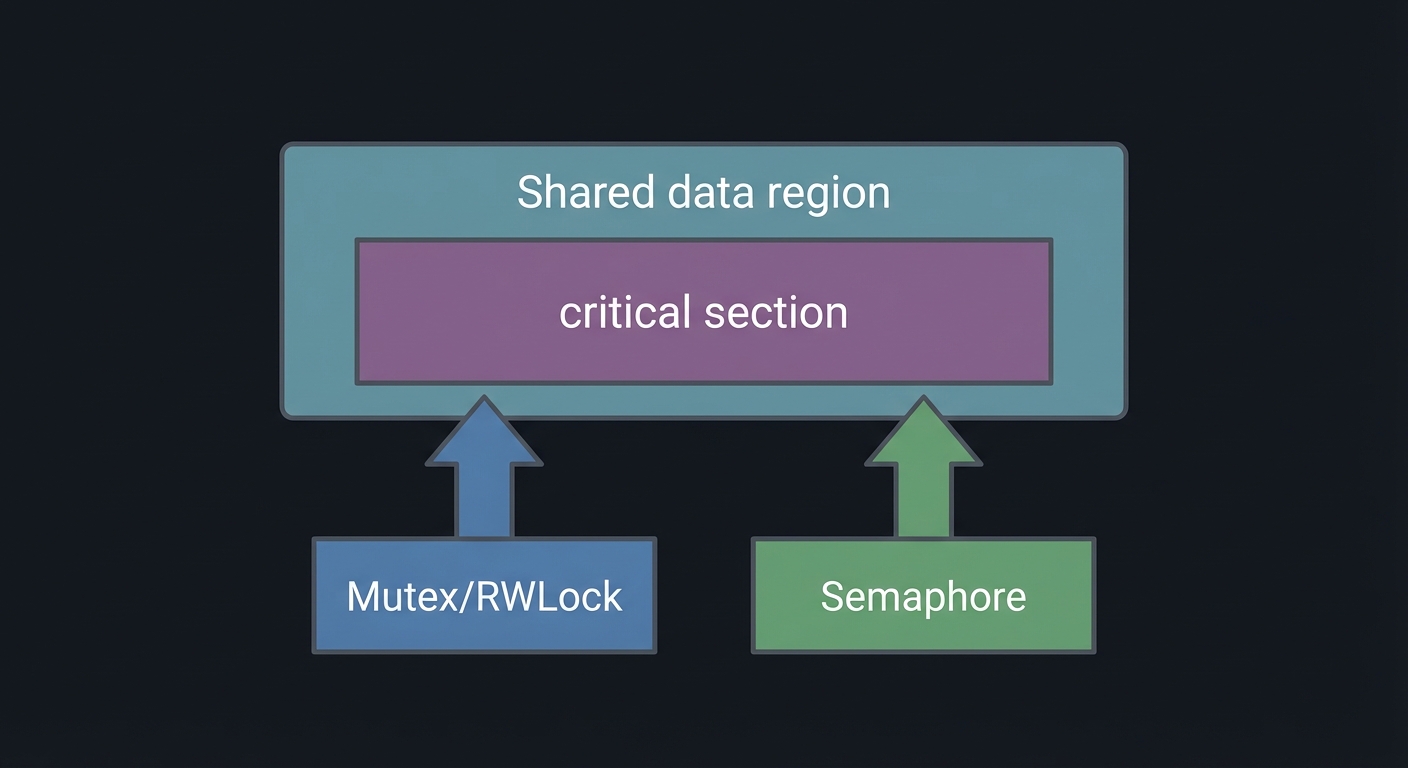
How It Works (Step-by-Step)
- Create synchronization primitives (sem_open, pthread_mutex_init, etc.).
- Associate them with the shared resource.
- Acquire before entering a critical section.
- Release after updating shared state.
- Detect and resolve deadlocks or leaks.
Invariants:
- A resource must be protected by exactly one synchronization policy.
- All code paths must follow the same lock order.
Failure Modes:
- Deadlocks, starvation, and leaked semaphores.
Minimal Concrete Example
sem_t *sem = sem_open("/pool", O_CREAT, 0600, 5);
sem_wait(sem);  // acquire
// use shared resource
sem_post(sem);  // release
Common Misconceptions
- “Semaphore == mutex.” (Not always; semaphores are counting)
- “Condition variables wake exactly one waiter.” (Not guaranteed; spurious wakeups exist)
Check-Your-Understanding Questions
- Why do read-write locks risk writer starvation?
- What does
SEM_UNDOchange about process crashes? - Why are
fcntllocks called advisory?
Check-Your-Understanding Answers
- Readers can keep acquiring the lock, preventing writers from ever acquiring it.
- The kernel can adjust semaphore values when a process exits, reducing leaks.
- The kernel does not enforce them; only cooperative programs honor them.
Real-World Applications
- Database connection pools
- File-based key-value stores
- Multi-process servers
Where You Will Apply It
Projects 7-11 and 14.
References
sem_overview(7),semop(2),fcntl(2)(man7.org)- Stevens, UNP Vol 2 — Ch. 7-11
- The Linux Programming Interface — Ch. 46-48, 53
Key Insight
Synchronization is not a feature you add later; it is the core safety contract of your IPC design.
Summary
You now understand the major synchronization primitives and their failure modes.
Homework / Exercises
- Implement a barrier using POSIX semaphores.
- Build a file-based counter with
fcntllocks and test with multiple processes.
Solutions
- Use two semaphores: one for arrival count and one for release.
- Lock the byte range for the record before reading/writing, then unlock.
Chapter 6: RPC and XDR (IPC Across Machines)
Fundamentals
Remote Procedure Call (RPC) extends IPC beyond a single machine. Instead of writing explicit socket code, you define an interface and call functions as if they were local, while a stub handles serialization, network transport, and error handling. Sun/ONC RPC is the classic Unix RPC system, defined in RFC 5531. It uses XDR (External Data Representation) for portable serialization, defined in RFC 4506.
RPC introduces new complexity: partial failure, network latency, retries, and authentication. You must decide whether calls are idempotent, how to handle timeouts, and how to recover from dropped connections. The RPC model is a huge conceptual leap from local IPC because the network can fail in ways local IPC usually does not.
RPC forces you to think about partial failure. A local IPC call either succeeds or fails in a predictable way. An RPC call can fail because the network is down, because the server is overloaded, or because the response was lost. This uncertainty is why RPC clients must implement timeouts, retries, and idempotency. These are not optional features; they are the core of distributed programming.
RPC also forces you to think about compatibility. Once you define an RPC interface and deploy it, clients and servers may run different versions for long periods. This requires explicit versioning, backwards compatibility, and careful data type evolution. You will practice this in the later projects.
Finally, RPC raises the issue of trust boundaries. Local IPC often assumes trusted participants, but RPC may cross security boundaries. Authentication and authorization become first-class concerns, and the naive AUTH_SYS model quickly shows its limitations.
RPC systems are also about concurrency models. You can design a single-threaded server that handles one request at a time (simple but slow), or a multi-threaded server that dispatches requests concurrently (fast but more complex). Many real systems combine both approaches: a limited thread pool to cap resource use while still allowing parallelism.
RPC APIs also expose error models. You must decide how to map transport failures, timeouts, and server-side errors into return codes or exceptions. Designing these error contracts is as important as designing the data schema, because it determines how clients recover and how debugging works in production.
Service discovery is also core to RPC. The client does not hard-code a port; it asks rpcbind, which allows services to move without breaking clients. This is a direct ancestor of modern service discovery systems.
RPC also changes your testing discipline. You must test not only correctness but also timeouts, retries, and partial failures. A good RPC test suite always includes network fault injection.
Another practical point: RPC debugging often requires network visibility. Capturing traffic with tcpdump or wireshark lets you see whether requests are sent, how long replies take, and whether retransmissions occur. This visibility is essential when building real services.
RPC also affects deployment. Servers must register on startup and clients must tolerate restarts. Even on localhost, you should design for reconnects and transient failures to match real-world behavior.
Deep Dive
An RPC interface is described in an .x file and compiled with rpcgen. This generates client stubs, server skeletons, and XDR serialization code. Each RPC service is identified by a program number and version number, which are registered with rpcbind (the port mapper). Clients query rpcbind to discover which port a service is listening on. This indirection decouples service identity from port numbers, which is a major usability win for dynamic environments.
XDR defines a canonical encoding for data types so heterogeneous machines can communicate. It is big-endian, uses 4-byte alignment, and encodes variable-length arrays and strings with explicit lengths. If you mis-define your XDR types, your service will appear to work locally but fail when compiled on a different architecture. Projects 16-18 force you to think about schema design and serialization boundaries.
Authentication in ONC RPC is pluggable. RFC 5531 defines flavors such as AUTH_NONE, AUTH_SYS, AUTH_SHORT, AUTH_DH (historically known as AUTH_DES), and RPCSEC_GSS. AUTH_SYS sends UID/GID credentials in cleartext and is only appropriate for trusted networks. AUTH_DH is stronger but complex. RPCSEC_GSS is the modern option for Kerberos-based security. Project 17 gives you hands-on understanding of these trade-offs.
RPC failure modes include timeouts, retries causing duplicate requests, and partial failures in distributed systems. An RPC server should make operations idempotent where possible, return clear error codes, and log request identifiers. Clients must handle timeouts gracefully and avoid assuming the server executed the request. These are the same failure patterns you will later see in modern systems like gRPC or Thrift.
RPC protocols have transport choices. ONC RPC supports both UDP and TCP. UDP is faster but unreliable; lost packets require retries, and duplicate requests are possible. TCP provides reliable streams but introduces connection management, head-of-line blocking, and more overhead. Your design must choose the transport based on expected payload size and reliability requirements. The projects default to TCP-like semantics, but you should understand the trade-offs.
XDR’s encoding rules are strict: all data is encoded in 4-byte units, integers are big-endian, and variable-length arrays carry explicit length fields. This means you can predict the wire format exactly. It also means you must be careful with types such as int, long, and hyper to avoid mismatches across architectures. If you define your interface carefully, XDR gives you portability at the cost of some verbosity.
rpcbind (the modern portmapper) typically listens on port 111 and maps program numbers to transport addresses. The server registers itself on startup, and the client queries rpcbind before making its first call. If rpcbind is not running, all RPC services are effectively invisible. This is why debugging RPC often starts with rpcinfo -p.
Security adds another layer. AUTH_SYS is effectively “trust the client”; it sends UID/GID in cleartext. AUTH_DH adds cryptographic authentication but is complex and less widely deployed. RPCSEC_GSS integrates with Kerberos and is the modern approach, but requires a much heavier setup. Even if you only implement AUTH_SYS in this guide, understanding these options prepares you to evaluate RPC security in real systems.
Finally, think about versioning. A well-designed RPC interface is versioned so that new features do not break old clients. This is one of the reasons ONC RPC uses program numbers and version numbers explicitly. In modern systems, this maps directly to API versioning and backward compatibility policies.
The rpcgen output is more than boilerplate. It defines the encoding/decoding functions for every data type in your .x file and creates a dispatch table that routes procedure numbers to server functions. Reading this generated code is one of the best ways to understand the actual wire protocol and how RPC frameworks work internally.
Server-side concurrency is often implemented with svc_run and transport-specific handlers such as svctcp_create or svcudp_create. Even if your implementation is simplified, knowing these components helps you debug why a server is not responding or why it handles only one client at a time.
Finally, RPC error handling depends on distinguishing transport errors (network failure, timeouts) from application errors (invalid arguments, authentication failures). Good RPC APIs propagate both kinds of errors clearly so that clients can recover appropriately.
Idempotency deserves special emphasis. For any RPC that changes state (PUT, DELETE, transfer), you should include a request ID so the server can detect duplicates. This avoids double execution when clients retry after timeouts. Many modern distributed systems rely on this pattern; it is a core distributed-systems skill disguised as an RPC detail.
The request/response model also hides flow control. If clients send faster than servers can process, the network buffers will fill and clients will block or time out. Good RPC services include backpressure signals (for example, explicit “busy” errors or rate limiting) so clients can adapt.
Versioning and compatibility deserve explicit testing. Keep older client stubs and confirm they can talk to newer servers. This practice, even in a small project, mirrors real-world API evolution discipline.
Transport choice also affects security. UDP-based RPC is more vulnerable to spoofing and amplification than TCP-based RPC. If you care about security and reliability, use TCP and authentication together.
RPC stubs also enforce type discipline. If you change a struct in the .x file without bumping the version, old clients may decode the wrong fields silently. The safest practice is to add new fields at the end, keep old fields intact, and always bump version numbers when making incompatible changes.
Finally, do not ignore observability. RPC services should log request IDs, latency, and error types. Without these signals, debugging distributed failures becomes guesswork. Even in these projects, adding basic structured logging will teach you how real systems are diagnosed in production.
A small but important habit is to keep a compatibility test matrix: run old clients against new servers and new clients against old servers. This reveals breaking changes early and reinforces disciplined versioning.
How This Fits on Projects
Projects 16-18 are full RPC systems. They build directly on this chapter.
Definitions & Key Terms
- RPC: Remote procedure call system that hides network details.
- XDR: External Data Representation (portable serialization).
- Program number: Unique identifier for an RPC service.
- rpcbind: Service that maps program numbers to network addresses.
Mental Model Diagram
Client             rpcbind             Server
  |  lookup prog ->  |                   |
  |<-- port info --- |                   |
  |---- RPC call ----------------------> |
  |<--- RPC reply --------------------- |
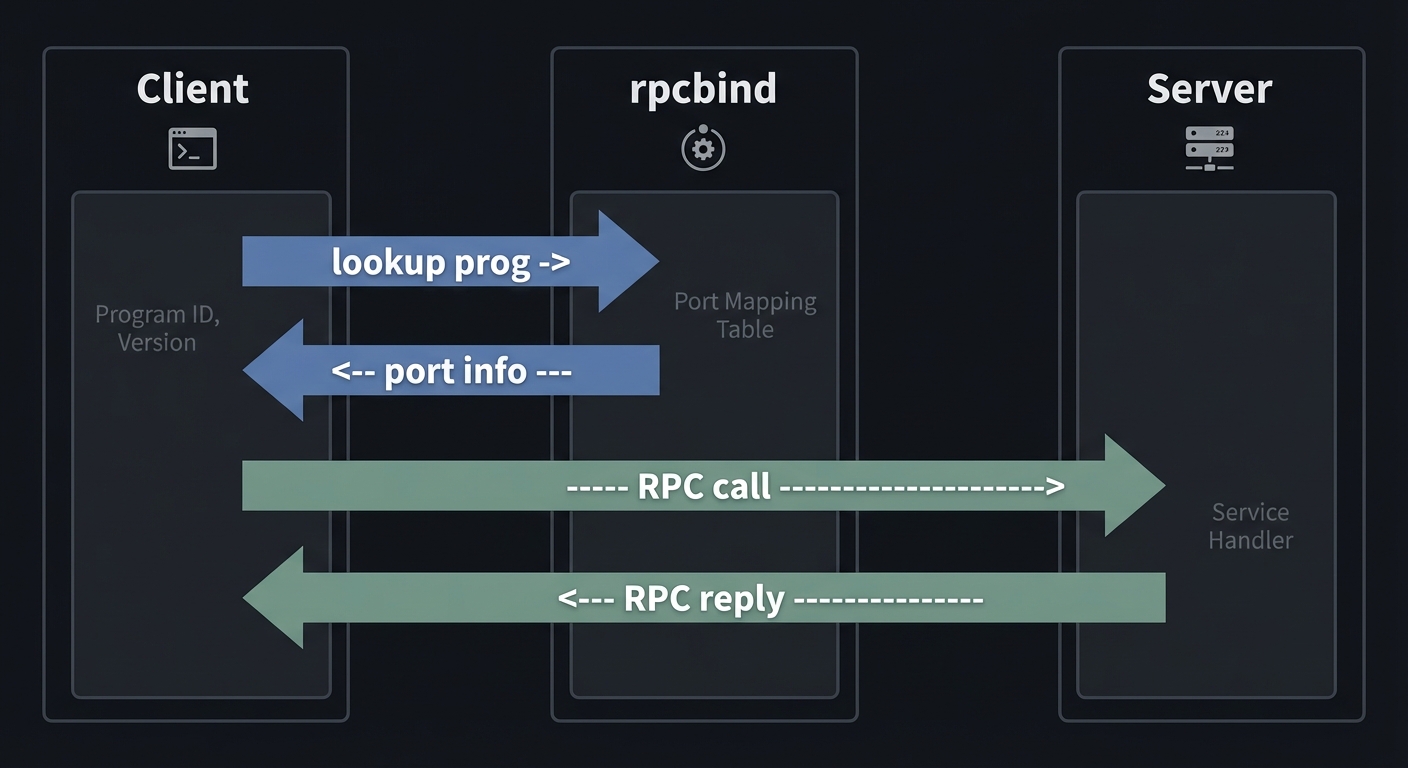
How It Works (Step-by-Step)
- Define interface in
.xfile and runrpcgen. - Start server; it registers program+version with rpcbind.
- Client queries rpcbind for port.
- Client calls RPC; stub serializes via XDR.
- Server executes and returns result.
Invariants:
- Interfaces must be versioned.
- XDR encoding must match across client/server.
Failure Modes:
- Timeouts, retries, duplicate operations.
- Authentication mismatches.
Minimal Concrete Example
/* calc.x */
program CALC_PROG {
  version CALC_VERS {
    int ADD(intpair) = 1;
  } = 1;
} = 0x31230000;
Common Misconceptions
- “RPC is just a local function call.” (Network failures break that illusion)
- “AUTH_SYS is secure.” (It is not on untrusted networks)
Check-Your-Understanding Questions
- Why does RPC need a port mapper like rpcbind?
- What is the role of XDR?
- Why must RPC calls be idempotent or carefully retried?
Check-Your-Understanding Answers
- It maps program numbers to active ports so services can move.
- It provides portable serialization across architectures.
- Retries can cause duplicate operations unless requests are idempotent.
Real-World Applications
- NFS and legacy distributed services
- Internal microservices before gRPC
Where You Will Apply It
Projects 16-18.
References
- RFC 5531 (RPC)
- RFC 4506 (XDR)
rpcbind(8)(man7.org)- Stevens, UNP Vol 2 — Ch. 16-18
Key Insight
RPC turns IPC into distributed systems; the core challenge becomes handling failure and trust.
Summary
You now understand how RPC works, how XDR encodes data, and why authentication and retries matter.
Homework / Exercises
- Define an RPC interface with a version upgrade path.
- Add a request ID to every RPC call and log duplicates.
Solutions
- Add a new version number and keep old procedures for backward compatibility.
- Include a
uint64request ID in each call; log and ignore duplicates.
Glossary (High-Signal)
- Atomicity: An operation that appears indivisible to other processes.
- Backpressure: Mechanism to slow producers when consumers cannot keep up.
- Blocking I/O: A call that waits until it can complete.
- Deadlock: Cyclic waiting where no participant can make progress.
- EOF: End of file;
read()returns 0 when no writers remain. - fd (file descriptor): Small integer handle to a kernel object.
- ftok: Function to generate System V IPC keys from filesystem paths.
- IPC namespace: Naming scheme for IPC objects.
- mtype: System V message type field.
- POSIX name: Name like
/myqueueused for POSIX IPC objects. - SIGPIPE: Signal sent to a process that writes to a pipe with no readers.
- Spurious wakeup: Condition variable wakeup without the condition becoming true.
- XDR: External Data Representation, portable serialization for RPC.
Why Unix IPC Matters
The Modern Problem It Solves
Modern systems are multi-process by design: servers fork workers, databases isolate workloads, and long-running daemons coordinate with supervisors. IPC is the glue. Without it, you cannot build robust pipelines, parallel processing systems, or distributed services.
Real-world impact (with data):
- Performance gap: In the
ipc-benchbenchmarks on Ubuntu 20.04.1 LTS (2020), shared memory delivered ~4.7M msg/s while pipes were ~162K msg/s and Unix domain sockets ~130K msg/s on the same hardware. This is a 25-30x gap that directly drives architectural choices. (source) - Production adoption: CloudWeGo’s Shmipc (2023) reports deployment in 3,000+ services and 1,000,000+ instances at ByteDance, with up to a 24% reduction in overall resource usage for some workloads. (source)
These numbers show why IPC is not academic: the choice of mechanism can decide whether a system is feasible at all.
OLD APPROACH (COPY HEAVY)           NEW APPROACH (ZERO-COPY)
┌───────────────────────────┐      ┌───────────────────────────┐
│  Pipe / Socket            │      │  Shared Memory + Semaphores│
│  user->kernel->user copy  │      │  user->shared page         │
│  lower throughput         │      │  higher throughput         │
└───────────────────────────┘      └───────────────────────────┘
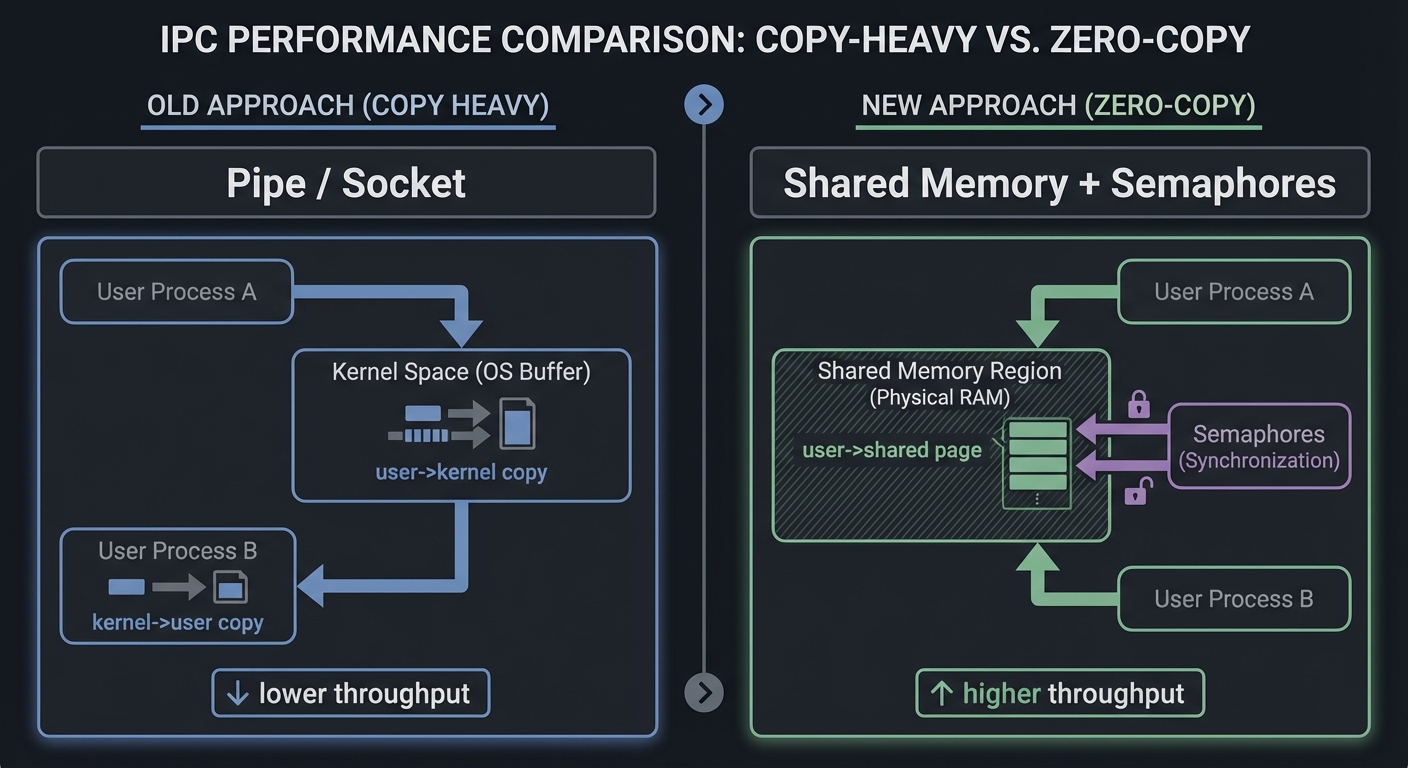
Context & Evolution (History)
- 1970s: Pipes in early Unix
- 1983: System V IPC (message queues, semaphores, shared memory)
- 1990s: POSIX standardization of IPC
- 2000s+: Shared memory and lock-free structures dominate high-performance systems
Concept Summary Table
| Concept Cluster | What You Need to Internalize |
|---|---|
| Process & FD Model | How descriptors, namespaces, and IPC lifecycles govern correctness |
| Pipes & FIFOs | Stream semantics, atomicity (PIPE_BUF), EOF propagation |
| Message Queues | Message boundaries, priorities/types, queue limits |
| Shared Memory & mmap | Zero-copy data sharing and the need for synchronization |
| Synchronization & Locking | Semaphores, mutex/cond, RWLocks, record locks |
| RPC & XDR | Remote IPC semantics, serialization, authentication |
Project-to-Concept Map
| Project | What It Builds | Primer Chapters It Uses |
|---|---|---|
| 1. Shell Pipeline | Pipe-based process wiring | Ch. 1, Ch. 2 |
| 2. FIFO Client-Server | Named pipe IPC | Ch. 1, Ch. 2 |
| 3. popen/pclose | Process spawning + pipe capture | Ch. 1, Ch. 2 |
| 4. POSIX MQ Dispatcher | Priority messaging | Ch. 1, Ch. 3 |
| 5. System V MQ Server | mtype-based messaging | Ch. 1, Ch. 3 |
| 6. MQ Benchmark | IPC performance profiling | Ch. 3 |
| 7. Producer-Consumer | Mutex + cond correctness | Ch. 1, Ch. 5 |
| 8. RWLock | Read-heavy concurrency | Ch. 5 |
| 9. Record Locking DB | File-based coordination | Ch. 5 |
| 10. Semaphore Pool | Counting semaphores | Ch. 5 |
| 11. SysV Barrier | Atomic multi-semaphore ops | Ch. 5 |
| 12. SHM Ring Buffer | Shared memory + sync | Ch. 4, Ch. 5 |
| 13. SHM Image Processor | Shared memory partitioning | Ch. 4, Ch. 5 |
| 14. mmap Database | File-backed shared memory | Ch. 4, Ch. 5 |
| 15. Lock-Free Queue | Atomics + memory ordering | Ch. 4 |
| 16. RPC Calculator | rpcgen + XDR | Ch. 6 |
| 17. RPC Auth | AUTH_SYS / AUTH_DH | Ch. 6 |
| 18. Distributed KV | RPC + local IPC | Ch. 4, Ch. 5, Ch. 6 |
Deep Dive Reading by Concept
IPC Fundamentals and Lifecycles
| Concept | Book & Chapter | Why This Matters |
|---|---|---|
| Process model & IPC lifecycles | UNP Vol 2 (Stevens) — Ch. 1-3 | Namespaces, persistence, fork/exec effects |
| System programming context | APUE (Stevens & Rago) — Ch. 3, 8, 15 | File I/O, process control, IPC |
| Linux IPC overview | TLPI (Kerrisk) — Ch. 43 | Modern Linux IPC overview |
Pipes & FIFOs
| Concept | Book & Chapter | Why This Matters |
|---|---|---|
| Pipes and FIFOs | UNP Vol 2 — Ch. 4 | Canonical pipe/FIFO patterns |
| Pipes and FIFOs | TLPI — Ch. 44 | Linux-specific details and limits |
Message Queues
| Concept | Book & Chapter | Why This Matters |
|---|---|---|
| POSIX MQ | UNP Vol 2 — Ch. 5 | Priority and POSIX API |
| System V MQ | UNP Vol 2 — Ch. 6 | mtype-based queue semantics |
| POSIX MQ (Linux) | TLPI — Ch. 52 | Linux implementation details |
Synchronization & Locks
| Concept | Book & Chapter | Why This Matters |
|---|---|---|
| Mutexes & cond vars | UNP Vol 2 — Ch. 7 | Core pthread sync patterns |
| Read-write locks | UNP Vol 2 — Ch. 8 | Read-heavy concurrency |
| Record locking | UNP Vol 2 — Ch. 9 | File-level coordination |
| Semaphores | UNP Vol 2 — Ch. 10-11 | POSIX and SysV semaphore APIs |
Shared Memory and mmap
| Concept | Book & Chapter | Why This Matters |
|---|---|---|
| Shared memory intro | UNP Vol 2 — Ch. 12 | Shared memory fundamentals |
| POSIX SHM | UNP Vol 2 — Ch. 13 | POSIX API details |
| System V SHM | UNP Vol 2 — Ch. 14 | SysV API details |
| Memory mapping | TLPI — Ch. 49 | mmap and VM behavior |
RPC
| Concept | Book & Chapter | Why This Matters |
|---|---|---|
| RPC fundamentals | UNP Vol 2 — Ch. 16-18 | Sun RPC and XDR |
Quick Start: Your First 48 Hours
Day 1 (4 hours):
- Read Chapter 1 and Chapter 2 of the Theory Primer above.
- Trace
ls | wc -lwithstrace -fand note every FD operation. - Start Project 1 and get a two-command pipeline working.
- Do not over-engineer; focus on correct
fork,dup2, andclose.
Day 2 (4 hours):
- Extend Project 1 to three commands.
- Implement Project 2 with a single FIFO.
- Validate blocking semantics by running server before client and vice versa.
- Skim the Core Question and Thinking Exercise for Project 3.
End of Weekend: You now understand the core mental model of Unix IPC: file descriptors, blocking semantics, and lifecycle management.
Recommended Learning Paths
Path 1: The Systems Generalist (Recommended Start)
Best for: Most learners
- Project 1 -> 2 -> 3
- Project 4 -> 5 -> 6
- Project 7 -> 8 -> 9 -> 10 -> 11
- Project 12 -> 13 -> 14 -> 15
- Project 16 -> 17 -> 18
Path 2: The Performance Engineer
Best for: Users focused on low-latency and throughput
- Project 12 -> 15
- Project 6 (Benchmark) to compare mechanisms
- Project 14 (mmap DB)
- Backfill Projects 7-11 for synchronization depth
Path 3: The Distributed Systems Builder
Best for: Users focused on RPC and distributed storage
- Project 16 -> 17 -> 18
- Project 12 (shared memory cache)
- Project 10 (resource pools)
Path 4: The Concurrency Specialist
Best for: Users focused on correctness under contention
- Project 7 -> 8 -> 9 -> 10 -> 11
- Project 12 -> 15
- Backfill pipes and MQ for completeness
Success Metrics
You are done when you can:
- Explain when to use pipes vs queues vs shared memory with confidence.
- Implement a pipeline executor that handles EOF and avoids FD leaks.
- Build a shared memory ring buffer that runs without deadlocks.
- Show reproducible benchmarks comparing IPC mechanisms.
- Explain RPC failure modes and authentication options in interviews.
Optional Appendices
Appendix A: IPC Debugging Toolkit
strace -f -e trace=pipe,dup2,read,write,close,semop,shmgetto see syscallslsof -p <pid>to inspect file descriptorsipcs -a/ipcrmto inspect and clean SysV objectsls /dev/shmandls /dev/mqueueto inspect POSIX objectsrpcinfo -pto verify RPC registrations
Appendix B: IPC Cleanup Checklist
- Run
ipcsand remove stale queues, semaphores, and shm segments. - Remove
/dev/shm/*and/dev/mqueue/*entries for test runs. - Re-run
ipcs -lto ensure you are under kernel limits.
Appendix C: Linux IPC Limits & Tunables
PIPE_BUFdefines atomic write size (pipe(7)).- POSIX MQ limits:
/proc/sys/fs/mqueue/msg_max,queues_max(mq_overview(7)). - System V limits visible via
ipcs -l.
Project List
The following projects guide you from basic pipes to complete RPC systems, covering every IPC mechanism from Stevens’ book.
Project 1: Build a Shell Pipeline Executor
- File: P01-shell-pipeline.md
- Main Programming Language: C
- Alternative Programming Languages: Rust, Go
- Coolness Level: Level 3 (Genuinely Clever)
- Business Potential: Level 1 (Resume Gold)
- Difficulty: Level 2 (Intermediate)
- Knowledge Area: Operating Systems, Process Management
- Software or Tool: None (pure syscalls)
- Main Book: “Advanced Programming in the UNIX Environment” by Stevens & Rago
What you’ll build: A program that executes cmd1 | cmd2 | cmd3 by creating pipes and forking processes, just like a real shell.
Why it teaches IPC: Forces you to understand pipe file descriptor inheritance across fork(), the critical importance of closing unused ends, and how EOF propagates through a pipeline.
Core challenges you’ll face:
- File descriptor management → Understanding dup2() and close()
- Process coordination → Multiple fork() calls, parent waiting for children
- EOF handling → Why closing write ends matters
Real World Outcome
When complete, you’ll have a program that can execute arbitrary shell pipelines:
What you will see:
- Working pipeline execution: Your program runs
ls -la | grep txt | wc -l - Correct output: Same result as typing it in bash
- Proper cleanup: No zombie processes, no leaked file descriptors
Command Line Outcome Example:
# 1. Compile your pipeline executor
$ gcc -o mypipe mypipe.c
# No errors

# 2. Run a simple two-command pipeline
$ ./mypipe "ls -la" "grep txt"
-rw-r--r-- 1 user user  1234 Jan  1 12:00 notes.txt
-rw-r--r-- 1 user user  5678 Jan  1 12:00 data.txt

# 3. TEST: Three-command pipeline
$ ./mypipe "cat /etc/passwd" "grep root" "cut -d: -f1"
root
# Output shows only "root" - data flowed through all three commands

# 4. TEST: Verify no file descriptor leaks
$ ./mypipe "ls" "cat" &
$ ls -la /proc/$!/fd
total 0
lrwx------ 1 user user 64 Jan  1 12:00 0 -> /dev/pts/0
lrwx------ 1 user user 64 Jan  1 12:00 1 -> /dev/pts/0
lrwx------ 1 user user 64 Jan  1 12:00 2 -> /dev/pts/0
# Only 0,1,2 - no leaked pipe fds!

# 5. TEST: Verify no zombie processes
$ ./mypipe "sleep 1" "cat"
$ ps aux | grep defunct
# No output - no zombies
The Core Question You’re Answering
“How do you wire a pipeline of processes so data flows correctly and the entire pipeline terminates without leaks or deadlocks?”
This project forces you to prove you understand file descriptor inheritance and EOF propagation. Pipelines only work when you close exactly the right FDs in exactly the right processes.
Concepts You Must Understand First
- Pipe creation and atomicity (
PIPE_BUF)- Why are small writes atomic but large writes may interleave?
- How do pipe buffer limits influence throughput?
- Book Reference: “UNP Vol 2” Ch. 4
- File descriptor inheritance across
fork()- Which descriptors exist in the child after fork?
- Why does a single unclosed write end prevent EOF?
- Book Reference: “APUE” Ch. 8
dup2()and redirection- How does
dup2()rewire stdin/stdout? - Why is it safe to close original descriptors after
dup2()? - Book Reference: “APUE” Ch. 3
- How does
Questions to Guide Your Design
- Pipeline topology
- How will you create N-1 pipes for N commands?
- How will you map each process to the correct pipe ends?
- Process management
- Will the parent wait for all children or stream and wait later?
- How will you handle failed
exec()in a child?
- Error handling
- What happens if a command in the middle exits early?
- How will you avoid zombies?
Thinking Exercise
“The Three-Command Pipeline”
Draw the FD table for the parent and each child for cmd1 | cmd2 | cmd3. Mark which descriptors must be closed in each process and which remain open. Then explain why leaving a single write end open in the parent causes the final reader to hang forever.
The Interview Questions They’ll Ask
- “Why does a pipeline hang if you forget to close a pipe end?”
- “What does
PIPE_BUFguarantee?” - “How does
dup2()work internally?” - “What is the difference between
wait()andwaitpid()here?”
Hints in Layers
Hint 1: Start Small
Create a two-command pipeline with one pipe. Fork once, dup2() the pipe ends, and execvp() both commands.
Hint 2: Generalize For N commands, create N-1 pipes, then fork in a loop and wire each child to the correct pipe ends.
Hint 3: Close Aggressively In each child, close all pipe ends you do not use. In the parent, close all pipe ends after forking.
Hint 4: Verify
Use lsof -p <pid> to confirm only stdin/stdout/stderr remain open in children.
Books That Will Help
| Topic | Book | Chapter |
|---|---|---|
| Pipes and FIFOs | “UNP Vol 2” by Stevens | Ch. 4 |
| Process Control | “APUE” by Stevens & Rago | Ch. 8 |
| File I/O | “APUE” by Stevens & Rago | Ch. 3 |
Common Pitfalls & Debugging
Problem 1: “Pipeline hangs forever”
- Why: A write descriptor is still open in some process.
- Fix: Close unused write ends in every process.
- Quick test:
lsof -p <pid>should show only 0/1/2 open.
Problem 2: “Output is interleaved or corrupted”
- Why: Multiple writers write > PIPE_BUF.
- Fix: Use smaller writes or implement framing.
- Quick test: Force writes < 4KB and compare results.
Definition of Done
- Supports 2+ commands with correct output
- Closes unused FDs in all processes
- No zombie processes after completion
- Matches
bashpipeline output for tested cases
Project 2: Client-Server with Named Pipes (FIFOs)
- File: P02-fifo-client-server.md
- Main Programming Language: C
- Alternative Programming Languages: Rust, Python
- Coolness Level: Level 3 (Genuinely Clever)
- Business Potential: Level 2 (Micro-SaaS potential)
- Difficulty: Level 2 (Intermediate)
- Knowledge Area: IPC, Client-Server Architecture
- Software or Tool: None (pure syscalls)
- Main Book: “The Linux Programming Interface” by Michael Kerrisk
What you’ll build: A simple calculator server that listens on a well-known FIFO, receives requests from multiple clients, and sends responses back through client-specific FIFOs.
Why it teaches IPC: FIFOs allow unrelated processes to communicate. This project teaches the common pattern of one well-known server FIFO plus per-client response FIFOs.
Core challenges you’ll face:
- Blocking behavior → open() blocks until both ends connected
- Atomic writes → Keeping requests from multiple clients separate
- Cleanup → Removing FIFOs on shutdown
Real World Outcome
What you will see:
- Server running: Waiting for connections on
/tmp/calc_server - Multiple clients: Each creates its own response FIFO
- Concurrent requests: Clients don’t interfere with each other
Command Line Outcome Example:
# Terminal 1: Start server
$ ./calc_server
Server listening on /tmp/calc_server...
Received: 5 + 3 from client 12345
Sending response: 8 to /tmp/calc_client_12345
Received: 10 * 4 from client 12346
Sending response: 40 to /tmp/calc_client_12346

# Terminal 2: Client 1
$ ./calc_client "5 + 3"
Result: 8

# Terminal 3: Client 2 (simultaneously)
$ ./calc_client "10 * 4"
Result: 40

# Verify FIFOs exist
$ ls -la /tmp/calc*
prw-r--r-- 1 user user 0 Jan  1 12:00 /tmp/calc_server
prw-r--r-- 1 user user 0 Jan  1 12:00 /tmp/calc_client_12345
prw-r--r-- 1 user user 0 Jan  1 12:00 /tmp/calc_client_12346

# After clients exit, their FIFOs are cleaned up
$ ls -la /tmp/calc_client*
ls: cannot access '/tmp/calc_client*': No such file or directory
The Core Question You’re Answering
“How do unrelated processes establish a reliable communication channel using only a filesystem name?”
FIFOs teach you about blocking semantics, open ordering, and the realities of IPC across unrelated processes.
Concepts You Must Understand First
- FIFO creation and open semantics
- Why does opening a FIFO block until the other side opens?
- How does
O_NONBLOCKchange behavior? - Book Reference: “UNP Vol 2” Ch. 4
- Full-duplex communication with two FIFOs
- Why do you need two FIFOs for request/response?
- What happens if both sides open the same FIFO for read and write?
- Book Reference: “TLPI” Ch. 44
- Permissions and cleanup
- Who owns the FIFO file and what permissions are required?
- How do you avoid stale FIFOs after crashes?
- Book Reference: “APUE” Ch. 4
Questions to Guide Your Design
- Connection protocol
- How does a client announce itself to the server?
- How does the server respond without races?
- Blocking behavior
- Will the server block on open or use
O_NONBLOCK? - How will you avoid deadlock on startup?
- Will the server block on open or use
- Cleanup strategy
- When do you unlink the FIFO?
- How do you handle leftover FIFOs from crashes?
Thinking Exercise
“The Deadlock Startup”
Server opens FIFO for reading and blocks. Client opens FIFO for writing and blocks. Why does this happen, and how can you break the deadlock?
The Interview Questions They’ll Ask
- “What happens when you open a FIFO for writing with no reader?”
- “How do you build a bidirectional FIFO client/server?”
- “What is the difference between a FIFO and a pipe?”
Hints in Layers
Hint 1: Start with One-Way Implement a FIFO where the server reads and the client writes.
Hint 2: Add a Reply FIFO Create a second FIFO or a client-specific FIFO for replies.
Hint 3: Avoid Startup Deadlock
Have the server open the FIFO in O_RDONLY | O_NONBLOCK, then switch to blocking after a writer appears.
Hint 4: Test Run server before client and then reverse the order to validate blocking behavior.
Books That Will Help
| Topic | Book | Chapter |
|---|---|---|
| FIFOs | “UNP Vol 2” by Stevens | Ch. 4 |
| Pipes/FIFOs (Linux details) | “TLPI” by Kerrisk | Ch. 44 |
Common Pitfalls & Debugging
Problem 1: “Server hangs on startup”
- Why: FIFO open blocks waiting for writer.
- Fix: Use
O_NONBLOCKor open both ends in server. - Quick test:
strace -e opento see blocking call.
Problem 2: “Client blocks forever”
- Why: No reader has opened the FIFO.
- Fix: Ensure server is running or use non-blocking open and retry.
Definition of Done
- Clients can send requests and receive responses
- Server handles multiple clients sequentially or concurrently
- FIFO files are cleaned up on exit
Project 3: Implement popen() and pclose()
- File: P03-implement-popen.md
- Main Programming Language: C
- Coolness Level: Level 4 (Hardcore Tech Flex)
- Business Potential: Level 1 (Resume Gold)
- Difficulty: Level 3 (Advanced)
- Knowledge Area: Library Implementation, Process Management
What you’ll build: Your own implementation of the popen() and pclose() library functions.
Why it teaches IPC: popen() combines pipe(), fork(), dup2(), and exec() into a convenient API. Building it yourself ensures you understand all the pieces.
Core challenges you’ll face:
- Bidirectional limitation → Why popen is read OR write, not both
- Process tracking → Mapping FILE* to child pid for pclose()
- Signal handling → What happens if child ignores SIGPIPE?
Real World Outcome
# Your implementation passes the same tests as the real popen
$ ./test_mypopen
Testing mypopen("ls", "r")...
  Read: file1.txt\nfile2.txt\n
  mypclose returned: 0
  PASS

Testing mypopen("cat", "w")...
  Wrote: "Hello from parent\n"
  mypclose returned: 0
  PASS

Testing mypopen("exit 42", "r")...
  mypclose returned: 42
  PASS (exit status preserved)
The Core Question You’re Answering
“How can you safely spawn a process and connect to its stdin or stdout in a reusable API?”
popen() looks simple but hides complex lifetime and error-handling rules. This project makes them explicit.
Concepts You Must Understand First
- Fork/exec and FD inheritance
- What happens to pipe FDs after
exec()? - Why is
FD_CLOEXECrelevant? - Book Reference: “APUE” Ch. 8
- What happens to pipe FDs after
fdopen()andFILE*buffering- How does stdio buffering interact with pipes?
- When do you need
fflush()? - Book Reference: “APUE” Ch. 5
- Child exit status and
waitpid()- How do you return the child’s exit code from
pclose()? - How do you avoid zombies?
- Book Reference: “APUE” Ch. 8
- How do you return the child’s exit code from
Questions to Guide Your Design
- API contract
- Will you support both read and write modes?
- What happens if
exec()fails?
- Buffering policy
- Will you set line buffering for interactive commands?
- Resource cleanup
- How will you ensure pipe FDs are closed in both parent and child?
Thinking Exercise
“The Double-Buffered Trap”
What happens when a child process writes to stdout through stdio buffering, and the parent reads from a pipe also using stdio? When can data appear “stuck” until buffers flush?
The Interview Questions They’ll Ask
- “What are the differences between
popen()and manualpipe()+fork()?” - “How does
pclose()retrieve the child’s exit status?” - “Why can
popen()deadlock when both sides use stdio buffering?”
Hints in Layers
Hint 1: Start with pipe + fork
Create a pipe, fork, and use dup2() to redirect stdin or stdout.
Hint 2: Use fdopen()
Convert the parent-side FD into a FILE* with fdopen() for compatibility.
Hint 3: Track PIDs
Store the child PID associated with each FILE* so pclose() can wait correctly.
Hint 4: Handle buffering
If you are reading interactively, consider setvbuf() or fflush() on the child side.
Books That Will Help
| Topic | Book | Chapter |
|---|---|---|
| popen/pclose | “UNP Vol 2” by Stevens | Ch. 4 |
| Process control | “APUE” by Stevens & Rago | Ch. 8 |
| Standard I/O | “APUE” by Stevens & Rago | Ch. 5 |
Common Pitfalls & Debugging
Problem 1: “Child output never appears”
- Why: Child stdout is line-buffered or fully buffered.
- Fix: Call
fflush()or set line buffering. - Quick test: Add
setvbuf(stdout, NULL, _IONBF, 0)in child.
Problem 2: “Zombie processes”
- Why:
pclose()not called orwaitpid()missing. - Fix: Always call
pclose()and handle errors.
Definition of Done
popen()supports read and write modespclose()returns correct exit status- No descriptor leaks across repeated calls
Project 4: POSIX Message Queue Priority Dispatcher
- File: P04-posix-mq-dispatcher.md
- Main Programming Language: C
- Alternative Programming Languages: Rust
- Coolness Level: Level 3 (Genuinely Clever)
- Business Potential: Level 3 (Service & Support Model)
- Difficulty: Level 3 (Advanced)
- Knowledge Area: IPC, Task Scheduling
What you’ll build: A job dispatcher that uses POSIX message queue priorities to ensure high-priority jobs are processed first.
Why it teaches IPC: Unlike pipes, message queues preserve message boundaries and support priorities. This project makes those features essential.
Core challenges you’ll face:
- Priority inversion → Low-priority jobs starving
- Queue full handling → What to do when mq_send blocks
- Async notification → Using mq_notify for efficiency
Real World Outcome
# Start the dispatcher
$ ./job_dispatcher &
Dispatcher running, queue: /job_queue

# Submit jobs with different priorities
$ ./submit_job --priority=0 --cmd="sleep 10"  # Low priority
Job 1 queued (priority 0)

$ ./submit_job --priority=31 --cmd="echo URGENT"  # High priority
Job 2 queued (priority 31)

$ ./submit_job --priority=15 --cmd="date"  # Medium priority
Job 3 queued (priority 15)

# Watch dispatcher output - processes high priority first!
Dispatcher: Processing job 2 (priority 31): echo URGENT
URGENT
Dispatcher: Processing job 3 (priority 15): date
Sat Jan  1 12:00:00 UTC 2025
Dispatcher: Processing job 1 (priority 0): sleep 10
(10 seconds later...)
The Core Question You’re Answering
“How do you build a priority-based dispatch system that preserves message boundaries and enforces backpressure?”
This project makes you internalize POSIX message queue semantics and the reality of bounded buffers.
Concepts You Must Understand First
- POSIX MQ lifecycle (
mq_open,mq_close,mq_unlink)- What happens if the queue already exists?
- How do you clean up after crashes?
- Book Reference: “UNP Vol 2” Ch. 5
- Priority and ordering
- How does priority affect dispatch ordering?
- Can low-priority messages starve?
- Book Reference: “UNP Vol 2” Ch. 5
- Queue limits
- What happens when
mq_send()hitsmq_maxmsg? - How do you tune limits on Linux?
- Book Reference: “TLPI” Ch. 52
- What happens when
Questions to Guide Your Design
- Work queue design
- Will you use a single queue with priorities or multiple queues?
- How do you prevent starvation?
- Worker model
- How do workers sleep and wake efficiently?
- Will you use
mq_notifyor blocking receives?
- Failure handling
- What happens to messages if a worker crashes mid-processing?
Thinking Exercise
“Priority Starvation”
Imagine a stream of high-priority messages arriving continuously. What policy will ensure low-priority messages are eventually processed?
The Interview Questions They’ll Ask
- “How does
mq_notifywork and why is it one-shot?” - “How do you prevent priority starvation?”
- “What are POSIX MQ limits on Linux?”
Hints in Layers
Hint 1: Start with a single queue
Use mq_open() with an mq_attr struct and send messages with priorities.
Hint 2: Add a dispatcher Build a dispatcher process that pulls from the queue and hands work to workers.
Hint 3: Handle full queues
If mq_send() blocks, add a timeout or non-blocking fallback.
Hint 4: Validate Send mixed priorities and verify ordering in logs.
Books That Will Help
| Topic | Book | Chapter |
|---|---|---|
| POSIX MQ | “UNP Vol 2” by Stevens | Ch. 5 |
| Linux MQ details | “TLPI” by Kerrisk | Ch. 52 |
Common Pitfalls & Debugging
Problem 1: “mq_send blocks forever”
- Why: Queue is full and no consumers are draining.
- Fix: Add consumers or use timed send with backpressure.
Problem 2: “Messages arrive out of expected order”
- Why: Same priority; FIFO order still applies.
- Fix: Add sequence numbers if strict ordering is needed.
Definition of Done
- Priority dispatch works and is verifiable
- Queue limits are handled with backpressure or timeouts
- Queue cleanup is robust across crashes
Project 5: System V Message Queue Multi-Client Server
- File: P05-sysv-mq-server.md
- Main Programming Language: C
- Coolness Level: Level 3 (Genuinely Clever)
- Business Potential: Level 2 (Micro-SaaS)
- Difficulty: Level 3 (Advanced)
- Knowledge Area: IPC, Multiplexing
What you’ll build: A server using System V message queues where clients multiplex on a single queue using message types.
Why it teaches IPC: System V message types allow selective receives (msgtyp parameter), enabling multiple logical channels on one queue.
Core challenges you’ll face:
- ftok collisions → Understanding key generation
- Message type protocol → Designing the multiplexing scheme
- Cleanup on crash → Orphaned queues persist!
Real World Outcome
# Server uses one queue for all clients
$ ./sysv_server
Server starting, key=0x12345678, msqid=100
Waiting for requests (msgtyp=1)...

# Client 1 (PID 5001) sends request
$ ./sysv_client "HELLO"
Sending to server (msgtyp=1)
Waiting for response (msgtyp=5001)
Response: HELLO_PROCESSED

# Client 2 (PID 5002) sends simultaneously
$ ./sysv_client "WORLD"
Response: WORLD_PROCESSED

# Both used the SAME queue, but different message types!
$ ipcs -q
------ Message Queues --------
key        msqid      owner      perms      used-bytes   messages
0x12345678 100        user       644        0            0
The Core Question You’re Answering
“How do you build a multi-client server using System V message queues with type-based routing?”
System V MQs are older but still common. This project forces you to handle their unique semantics.
Concepts You Must Understand First
- System V queue lifecycle (
msgget,msgctl)- How are queues created and removed?
- What happens if you reuse a key?
- Book Reference: “UNP Vol 2” Ch. 6
- Message types (
mtype)- How can clients use types for routing?
- How does
msgrcvfilter by type? - Book Reference: “UNP Vol 2” Ch. 6
- Persistence and cleanup
- Why do queues survive after all processes exit?
- How do you avoid stale queues?
- Book Reference: “TLPI” Ch. 46
Questions to Guide Your Design
- Client identification
- Will you use client PID as
mtype? - How does the server send responses?
- Will you use client PID as
- Concurrency
- Will you have a single server or multiple workers reading the same queue?
- Security
- How will you restrict queue access with permissions?
Thinking Exercise
“The Orphaned Queue”
Your server crashes and restarts. The queue still exists with stale messages. How do you detect and handle this?
The Interview Questions They’ll Ask
- “What is
mtypeused for in System V MQ?” - “Why do System V queues persist after processes exit?”
- “How do you prevent queue leaks during development?”
Hints in Layers
Hint 1: Use PID-based types
Send requests with mtype=1 and replies with mtype=client_pid.
Hint 2: Handle existing queue
On startup, inspect and optionally purge the queue with msgctl.
Hint 3: Clean up
Always remove the queue with msgctl(IPC_RMID) on shutdown.
Books That Will Help
| Topic | Book | Chapter |
|---|---|---|
| System V MQ | “UNP Vol 2” by Stevens | Ch. 6 |
| System V IPC overview | “TLPI” by Kerrisk | Ch. 45-46 |
Common Pitfalls & Debugging
Problem 1: “msgrcv returns E2BIG”
- Why: Receive buffer too small for message.
- Fix: Use correct message size or truncate flag.
Problem 2: “Queue persists after crash”
- Why: System V queues are persistent.
- Fix: Use
ipcrmduring cleanup or on startup.
Definition of Done
- Multiple clients can send requests and receive responses
- Server uses message types for routing
- Queue is removed cleanly on exit
Project 6: Message Queue Performance Benchmark
- File: P06-mq-benchmark.md
- Main Programming Language: C
- Coolness Level: Level 2 (Practical but Forgettable)
- Business Potential: Level 1 (Resume Gold)
- Difficulty: Level 2 (Intermediate)
- Knowledge Area: Performance Analysis, IPC
What you’ll build: A benchmark comparing POSIX vs System V message queues, pipes, and Unix domain sockets.
Why it teaches IPC: Numbers don’t lie. You’ll see exactly when each mechanism shines.
Real World Outcome
$ ./ipc_benchmark --msg-size=1024 --iterations=100000

IPC Mechanism Benchmark (1KB messages, 100K iterations)
═══════════════════════════════════════════════════════

Mechanism              Throughput     Latency (avg)   Latency (p99)
─────────────────────────────────────────────────────────────────────
Pipe                   1.2 GB/s       0.8 μs          2.1 μs
FIFO                   1.1 GB/s       0.9 μs          2.4 μs
Unix Domain Socket     1.4 GB/s       0.7 μs          1.8 μs
POSIX Message Queue    0.8 GB/s       1.2 μs          3.5 μs
System V Message Queue 0.6 GB/s       1.6 μs          4.2 μs
Shared Memory + Sem    2.8 GB/s       0.3 μs          0.8 μs

Winner: Shared Memory (for raw throughput)
Best simplicity: Unix Domain Socket
The Core Question You’re Answering
“How do you design a fair, reproducible benchmark for IPC mechanisms?”
Benchmarking IPC is deceptively hard. This project makes you control for noise and measure real effects.
Concepts You Must Understand First
- Timing accuracy
- How do you use
clock_gettime(CLOCK_MONOTONIC)? - How do you avoid timing overhead dominating results?
- Book Reference: “TLPI” Ch. 2
- How do you use
- Warmup and steady-state
- Why is a warmup phase necessary?
- How do you avoid cold-cache bias?
- Throughput vs latency
- What does your benchmark measure?
- How do message sizes affect results?
Questions to Guide Your Design
- Measurement design
- Will you measure messages/sec, latency, or both?
- How many iterations are needed for stable results?
- Noise control
- Will you pin processes to CPUs?
- How will you handle context switches and scheduler noise?
- Reporting
- How will you store and compare results across runs?
Thinking Exercise
“The Microbenchmark Trap”
If your benchmark sends 1-byte messages, do you measure IPC performance or syscall overhead? How would you fix it?
The Interview Questions They’ll Ask
- “Why are microbenchmarks often misleading?”
- “How do you measure latency vs throughput?”
- “How does message size affect IPC performance?”
Hints in Layers
Hint 1: Start with pipes Implement a simple ping-pong benchmark with pipes.
Hint 2: Add queues Swap in POSIX MQ and System V MQ with the same message size.
Hint 3: Control CPU affinity
Use taskset or sched_setaffinity to reduce noise.
Hint 4: Report clearly Output CSV with columns: mechanism, msg_size, throughput, latency.
Books That Will Help
| Topic | Book | Chapter |
|---|---|---|
| Benchmarking & performance | “Computer Systems: A Programmer’s Perspective” | Ch. 5 (Performance) |
| Timing APIs | “TLPI” by Kerrisk | Ch. 2 |
Common Pitfalls & Debugging
Problem 1: “Results vary wildly”
- Why: CPU scheduling noise, turbo boost, cache effects.
- Fix: Pin CPUs and run multiple trials.
Problem 2: “Zero-copy looks slower”
- Why: Synchronization overhead dominates for tiny messages.
- Fix: Test multiple message sizes and batch operations.
Definition of Done
- Benchmark supports pipes, POSIX MQ, SysV MQ
- Outputs reproducible throughput/latency metrics
- Results are stable across 3+ runs
Project 7: Producer-Consumer with Mutexes and Condition Variables
- File: P07-producer-consumer.md
- Main Programming Language: C
- Alternative Programming Languages: Rust, C++
- Coolness Level: Level 3 (Genuinely Clever)
- Business Potential: Level 1 (Resume Gold)
- Difficulty: Level 3 (Advanced)
- Knowledge Area: Concurrency, Synchronization
What you’ll build: The classic bounded-buffer producer-consumer with multiple producers and consumers using pthreads.
Why it teaches IPC: This is THE canonical synchronization problem. If you can implement this correctly, you understand mutexes and condition variables.
Core challenges you’ll face:
- Spurious wakeups → Why while() not if()
- Broadcast vs Signal → When to use each
- Deadlock potential → Lock ordering matters
Real World Outcome
$ ./producer_consumer --producers=3 --consumers=2 --buffer-size=10 --items=1000

Producer-Consumer Simulation
Buffer size: 10, Producers: 3, Consumers: 2, Items: 1000

[P1] Produced item 1
[P2] Produced item 2
[C1] Consumed item 1
[P3] Produced item 3
[P1] Produced item 4
[C2] Consumed item 2
...
[C1] Consumed item 1000

Statistics:
  Total produced: 1000
  Total consumed: 1000
  Buffer empty waits: 234
  Buffer full waits: 156

PASS: All items produced and consumed correctly
The Core Question You’re Answering
“How do you coordinate producers and consumers so that no data is lost and no thread spins uselessly?”
This project makes mutex + condition variable semantics concrete.
Concepts You Must Understand First
- Mutex + condition variables
- Why must
pthread_cond_waitbe called with a mutex held? - Why are spurious wakeups possible?
- Book Reference: “UNP Vol 2” Ch. 7
- Why must
- Bounded buffers
- How do you enforce capacity limits?
- What happens when the buffer is full?
- Book Reference: “Operating Systems: Three Easy Pieces” (Concurrency)
- Process-shared synchronization
- How do you place pthread locks in shared memory?
- How do you set
PTHREAD_PROCESS_SHARED? - Book Reference: “UNP Vol 2” Ch. 7
Questions to Guide Your Design
- Buffer design
- Will you use a ring buffer or linked list?
- How do you handle wrap-around?
- Wakeup strategy
- When do you signal
not_emptyornot_full? - Will you use
pthread_cond_broadcast?
- When do you signal
- Failure handling
- What happens if a producer crashes?
Thinking Exercise
“The Lost Wakeup”
Explain why you must check the condition in a loop around pthread_cond_wait, even when you think only one thread can wake you.
The Interview Questions They’ll Ask
- “Why are spurious wakeups allowed?”
- “How does a bounded buffer prevent overrun?”
- “What is the difference between a semaphore and a condition variable?”
Hints in Layers
Hint 1: Start with a ring buffer Use head/tail indices and a fixed-size array.
Hint 2: Add two condition variables
not_empty and not_full simplify logic.
Hint 3: Use while-loops Always loop on conditions when waiting.
Hint 4: Stress test Run with multiple producers and consumers to expose races.
Books That Will Help
| Topic | Book | Chapter |
|---|---|---|
| Mutex/cond vars | “UNP Vol 2” by Stevens | Ch. 7 |
| Concurrency fundamentals | “Operating Systems: Three Easy Pieces” | Concurrency chapters |
Common Pitfalls & Debugging
Problem 1: “Consumer wakes but buffer empty”
- Why: Spurious wakeup or missed condition.
- Fix: Always check condition in a loop.
Problem 2: “Deadlock under load”
- Why: Inconsistent lock ordering or missing unlock.
- Fix: Audit lock/unlock paths and add logging.
Definition of Done
- Multiple producers/consumers run without deadlock
- Buffer never overruns or underruns
- No busy-waiting; threads sleep when appropriate
Project 8: Reader-Writer Lock Implementation
- File: P08-rwlock-impl.md
- Main Programming Language: C
- Coolness Level: Level 4 (Hardcore Tech Flex)
- Business Potential: Level 1 (Resume Gold)
- Difficulty: Level 4 (Expert)
- Knowledge Area: Concurrency, Lock Design
What you’ll build: Your own read-write lock implementation using only mutexes and condition variables.
Why it teaches IPC: Implementing rwlock from primitives reveals the design decisions: reader preference vs writer preference, and the starvation trade-offs.
Core challenges you’ll face:
- Writer starvation → Continuous readers block writers forever
- Reader starvation → Giving writers priority starves readers
- Fair queuing → FIFO ordering is complex
Real World Outcome
$ ./test_myrwlock --readers=10 --writers=3 --duration=10s

My RWLock Test (10 readers, 3 writers, 10 seconds)

Reader 1 acquired read lock (0 writers waiting)
Reader 2 acquired read lock (0 writers waiting)
Reader 3 acquired read lock (0 writers waiting)
Writer 1 waiting... (3 readers active)
Reader 1 released read lock
Reader 2 released read lock
Reader 3 released read lock
Writer 1 acquired write lock
Writer 1 released write lock
Reader 4 acquired read lock
...

Statistics:
  Read operations: 15,234
  Write operations: 456
  Max reader wait: 12ms
  Max writer wait: 45ms
  No starvation detected: PASS
The Core Question You’re Answering
“How do you allow many readers but only one writer without starvation?”
Implementing a RWLock exposes fairness trade-offs and queueing logic.
Concepts You Must Understand First
- Read vs write phases
- How do you track active readers and waiting writers?
- What is writer starvation?
- Book Reference: “UNP Vol 2” Ch. 8
- Condition variables
- How do you wake the correct set of waiters?
- When do you broadcast vs signal?
- Book Reference: “UNP Vol 2” Ch. 7
- Fairness policies
- Reader-preferring vs writer-preferring designs
- Which policy is safer for databases?
Questions to Guide Your Design
- State representation
- How will you encode reader count and writer presence?
- Fairness
- Will you block new readers when writers are waiting?
- Performance
- How do you minimize contention in read-heavy workloads?
Thinking Exercise
“The Starving Writer”
Simulate a system with constant readers arriving. What happens to a writer in a reader-preferring RWLock?
The Interview Questions They’ll Ask
- “Why do RWLocks risk writer starvation?”
- “What trade-offs exist between reader- and writer-preferring designs?”
- “How would you test RWLock correctness?”
Hints in Layers
Hint 1: Track counts Maintain counters for active readers and waiting writers.
Hint 2: Add a writer flag Block new readers when a writer is waiting (writer preference).
Hint 3: Use two condition variables One for readers, one for writers.
Books That Will Help
| Topic | Book | Chapter |
|---|---|---|
| Read-write locks | “UNP Vol 2” by Stevens | Ch. 8 |
| Concurrency basics | “Operating Systems: Three Easy Pieces” | Concurrency chapters |
Common Pitfalls & Debugging
Problem 1: “Writer never runs”
- Why: Reader-preferring design under constant reader load.
- Fix: Block new readers when a writer is waiting.
Problem 2: “Readers stall too long”
- Why: Writer preference too aggressive.
- Fix: Allow batch of readers before granting writer.
Definition of Done
- Multiple readers can acquire concurrently
- Writers acquire exclusive access
- Fairness policy documented and tested
Project 9: Record Locking Database
- File: P09-record-locking-db.md
- Main Programming Language: C
- Coolness Level: Level 3 (Genuinely Clever)
- Business Potential: Level 2 (Micro-SaaS)
- Difficulty: Level 3 (Advanced)
- Knowledge Area: File Systems, Databases
What you’ll build: A simple key-value store where concurrent processes can read and write records using fcntl byte-range locks.
Why it teaches IPC: Record locking is how databases allow concurrent access. You’ll implement fine-grained locking on a shared file.
Core challenges you’ll face:
- Deadlock detection → fcntl with F_SETLKW can deadlock
- Lock inheritance → What happens across fork()?
- Advisory nature → Uncooperative processes can ignore locks
Real World Outcome
# Start multiple concurrent clients
$ ./kvstore set key1 value1 &
$ ./kvstore set key2 value2 &
$ ./kvstore get key1 &
$ ./kvstore set key1 updated &

# All complete without corruption
$ ./kvstore get key1
updated
$ ./kvstore get key2
value2

# Verify locking works
$ ./kvstore lock-test key1
Process 1: Acquired write lock on key1
Process 2: Waiting for lock...
(Process 1 holds lock for 2 seconds)
Process 1: Released lock
Process 2: Acquired write lock on key1
The Core Question You’re Answering
“How do you coordinate concurrent access to a shared file without corrupting records?”
Record locking is the foundation of many file-based databases.
Concepts You Must Understand First
- Advisory record locks (
fcntl)- What does advisory mean?
- How are locks scoped to processes?
- Book Reference: “UNP Vol 2” Ch. 9
- Lock ranges
- How do you map records to byte ranges?
- What happens when ranges overlap?
- Book Reference: “UNP Vol 2” Ch. 9
- Locking and mmap
- How do record locks interact with
mmap()? - When must you use
msync()? - Book Reference: “TLPI” Ch. 49
- How do record locks interact with
Questions to Guide Your Design
- Record layout
- Fixed-size or variable-size records?
- How will you map keys to offsets?
- Lock granularity
- Will you lock per-record or per-bucket?
- Crash safety
- What happens if a writer dies while holding a lock?
Thinking Exercise
“The Lock Release Surprise”
Why does closing any FD for a file release all locks held by that process, and how does this affect multi-threaded designs?
The Interview Questions They’ll Ask
- “What does advisory locking mean?”
- “How do you prevent two writers from corrupting the same record?”
- “Why can
fcntllocks disappear unexpectedly?”
Hints in Layers
Hint 1: Choose fixed-size records They simplify offset calculation and locking.
Hint 2: Use F_SETLKW
This blocks until the lock is available.
Hint 3: Add lock helpers Create helper functions for lock/unlock to reduce mistakes.
Books That Will Help
| Topic | Book | Chapter |
|---|---|---|
| Record locking | “UNP Vol 2” by Stevens | Ch. 9 |
| File I/O | “APUE” by Stevens & Rago | Ch. 3 |
Common Pitfalls & Debugging
Problem 1: “Locks don’t work”
- Why: Advisory locks require cooperation.
- Fix: Ensure all processes use
fcntllocks.
Problem 2: “Locks vanish”
- Why: Closing any FD releases all locks for that process.
- Fix: Keep the FD open while locks are needed.
Definition of Done
- Concurrent writers never corrupt records
- Lock ranges documented and consistent
- Database survives concurrent access tests
Project 10: POSIX Semaphore Connection Pool
- File: P10-semaphore-pool.md
- Main Programming Language: C
- Coolness Level: Level 3 (Genuinely Clever)
- Business Potential: Level 3 (Service & Support)
- Difficulty: Level 3 (Advanced)
- Knowledge Area: Resource Management, Concurrency
What you’ll build: A database connection pool manager using POSIX counting semaphores to limit concurrent connections.
Why it teaches IPC: Counting semaphores are perfect for resource pools. The semaphore value represents available resources.
Core challenges you’ll face:
- sem_timedwait → Handling connection timeout
- Process-shared semaphores → Allocating in shared memory
- Cleanup on crash → Returning connections when process dies
Real World Outcome
$ ./pool_manager --max-connections=5 &
Pool manager started (5 connections available)

# Spawn 10 workers, each needs a connection
$ for i in {1..10}; do ./worker $i & done

Worker 1: Acquired connection (4 remaining)
Worker 2: Acquired connection (3 remaining)
Worker 3: Acquired connection (2 remaining)
Worker 4: Acquired connection (1 remaining)
Worker 5: Acquired connection (0 remaining)
Worker 6: Waiting for connection...
Worker 7: Waiting for connection...
Worker 1: Released connection (1 remaining)
Worker 6: Acquired connection (0 remaining)
...

All workers completed successfully
The Core Question You’re Answering
“How do you safely limit concurrent access to a finite resource pool across processes?”
Counting semaphores are the canonical solution. This project applies them to a realistic connection pool.
Concepts You Must Understand First
- POSIX counting semaphores
- How does
sem_waitblock when the count is zero? - How does
sem_postrelease capacity? - Book Reference: “UNP Vol 2” Ch. 10
- How does
- Process-shared semaphores
- How do you place semaphores in shared memory?
- What cleanup is required?
- Book Reference: “UNP Vol 2” Ch. 10
- Timeouts and failure handling
- How does
sem_timedwaithelp avoid deadlocks? - How do you recover if a process crashes while holding a connection?
- How does
Questions to Guide Your Design
- Pool data structure
- How will you represent free vs in-use connections?
- Fairness
- Do you guarantee FIFO ordering for waiting processes?
- Recovery
- How do you reclaim a connection if a client dies?
Thinking Exercise
“The Leaked Connection”
A process acquires a connection and crashes. How does your pool ensure the connection is eventually returned?
The Interview Questions They’ll Ask
- “Why use a counting semaphore for a connection pool?”
- “How does
sem_timedwaitprevent indefinite blocking?” - “What is the difference between named and unnamed semaphores?”
Hints in Layers
Hint 1: Semaphore = available connections Initialize semaphore count to pool size.
Hint 2: Track ownership Store connection ownership in shared memory to detect leaks.
Hint 3: Add timeouts
Use sem_timedwait to avoid deadlock during testing.
Books That Will Help
| Topic | Book | Chapter |
|---|---|---|
| POSIX semaphores | “UNP Vol 2” by Stevens | Ch. 10 |
| Shared memory | “UNP Vol 2” by Stevens | Ch. 13 |
Common Pitfalls & Debugging
Problem 1: “Pool deadlocks”
- Why: A connection was not released.
- Fix: Add robust cleanup and watchdog checks.
Problem 2: “Semaphore count incorrect”
- Why: Missed
sem_poston error paths. - Fix: Ensure every acquire has a corresponding release.
Definition of Done
- Max concurrent connections enforced
- Timeouts work and are tested
- Pool recovers from client crashes
Project 11: System V Semaphore Barrier
- File: P11-sysv-barrier.md
- Main Programming Language: C
- Coolness Level: Level 3 (Genuinely Clever)
- Business Potential: Level 1 (Resume Gold)
- Difficulty: Level 3 (Advanced)
- Knowledge Area: Parallel Computing, Synchronization
What you’ll build: A barrier synchronization primitive using System V semaphores where N processes wait until all arrive.
Why it teaches IPC: System V semaphores can atomically operate on multiple semaphores, enabling complex synchronization patterns.
Core challenges you’ll face:
- Atomic multi-semaphore ops → Using semop with multiple sembuf
- SEM_UNDO → Handling process crashes mid-barrier
- Reusable barrier → Resetting for the next round
Real World Outcome
$ ./barrier_test --processes=5 --iterations=3

Barrier Test (5 processes, 3 iterations)

[P1] Reached barrier 1
[P3] Reached barrier 1
[P2] Reached barrier 1
[P5] Reached barrier 1
[P4] Reached barrier 1
--- All processes passed barrier 1 ---

[P2] Reached barrier 2
[P1] Reached barrier 2
[P4] Reached barrier 2
[P3] Reached barrier 2
[P5] Reached barrier 2
--- All processes passed barrier 2 ---

[P1] Reached barrier 3
[P5] Reached barrier 3
[P3] Reached barrier 3
[P4] Reached barrier 3
[P2] Reached barrier 3
--- All processes passed barrier 3 ---

All processes synchronized correctly. PASS
The Core Question You’re Answering
“How can you build a reusable barrier across processes using System V semaphore sets?”
System V semaphores allow atomic multi-semaphore operations. This project demonstrates why that matters.
Concepts You Must Understand First
- Semaphore sets and
semop- How do you update multiple semaphores atomically?
- Why is this useful for barriers?
- Book Reference: “UNP Vol 2” Ch. 11
SEM_UNDO- How does it help with crash recovery?
- When does it fail to help?
- Book Reference: “UNP Vol 2” Ch. 11
- Barrier design
- How do you count arrivals and releases?
- How do you reset for reuse?
Questions to Guide Your Design
- State tracking
- How will you store the arrival count?
- Reusability
- How do you reset the barrier safely?
- Failure handling
- What happens if a process exits mid-barrier?
Thinking Exercise
“The Broken Barrier”
If one process crashes before reaching the barrier, how should the remaining processes behave?
The Interview Questions They’ll Ask
- “Why are System V semaphores good for barriers?”
- “What does
SEM_UNDOdo?” - “How would you implement a reusable barrier?”
Hints in Layers
Hint 1: Use two semaphores One to count arrivals, another to release all processes.
Hint 2: Use semop with multiple operations
This allows atomic update of multiple semaphores.
Hint 3: Reset safely Once all processes pass, reset counts for the next round.
Books That Will Help
| Topic | Book | Chapter |
|---|---|---|
| System V semaphores | “UNP Vol 2” by Stevens | Ch. 11 |
| SysV IPC overview | “TLPI” by Kerrisk | Ch. 47 |
Common Pitfalls & Debugging
Problem 1: “Barrier never releases”
- Why: Arrival count not reached or reset incorrectly.
- Fix: Log counts and ensure atomic semop usage.
Problem 2: “Barrier only works once”
- Why: Semaphores not reset after release.
- Fix: Add a second phase to reset.
Definition of Done
- N processes block until all arrive
- Barrier reusable across multiple rounds
- Crash scenarios are handled or documented
Project 12: POSIX Shared Memory Ring Buffer
- File: P12-shm-ringbuffer.md
- Main Programming Language: C
- Alternative Programming Languages: Rust
- Coolness Level: Level 4 (Hardcore Tech Flex)
- Business Potential: Level 4 (Open Core Infrastructure)
- Difficulty: Level 4 (Expert)
- Knowledge Area: High-Performance IPC, Lock-Free
What you’ll build: A high-performance ring buffer in POSIX shared memory for producer-consumer communication between processes.
Why it teaches IPC: Shared memory is the fastest IPC, but requires careful synchronization. A ring buffer with proper memory barriers is a production pattern.
Core challenges you’ll face:
- Memory mapping → shm_open, ftruncate, mmap
- Synchronization → Semaphores in shared memory
- Cache coherency → Memory barriers and atomics
Real World Outcome
$ ./shm_ringbuffer_bench --buffer-size=1MB --iterations=10M

Shared Memory Ring Buffer Benchmark
Buffer: 1MB, Messages: 10 million

Producer: Writing 10M messages...
Consumer: Reading 10M messages...

Results:
  Throughput: 8.5 million msg/sec
  Bandwidth: 8.5 GB/sec
  Latency (avg): 0.12 μs
  Latency (p99): 0.35 μs
  Zero-copy: Yes

Comparison to pipe: 7x faster
Comparison to Unix socket: 6x faster
The Core Question You’re Answering
“How do you build a high-throughput, low-latency IPC channel using shared memory?”
A ring buffer in shared memory is the canonical zero-copy IPC structure.
Concepts You Must Understand First
- Shared memory lifecycle
shm_open,ftruncate,mmap,shm_unlink- Book Reference: “UNP Vol 2” Ch. 13
- Producer-consumer synchronization
- Semaphores vs mutex/cond for ring buffers
- Book Reference: “UNP Vol 2” Ch. 7, 10
- Memory ordering
- Why must the producer publish data before advancing the write index?
- Book Reference: “Rust Atomics and Locks” (memory ordering)
Questions to Guide Your Design
- Buffer layout
- Will you store metadata in the same cache line as data?
- Synchronization strategy
- Will you use semaphores or spin-based atomics?
- Overflow policy
- Block, drop, or overwrite old data?
Thinking Exercise
“The Wrap-Around Bug”
Your producer index wraps but your consumer does not. What data gets overwritten and how do you detect it?
The Interview Questions They’ll Ask
- “Why is shared memory faster than pipes?”
- “How do you avoid false sharing in a ring buffer?”
- “What memory ordering guarantees do you need for SPSC?”
Hints in Layers
Hint 1: Start with a fixed-size buffer Use a power-of-two size for easy wrap-around.
Hint 2: Use semaphores for slots and items
empty counts free slots, full counts filled slots.
Hint 3: Add padding Place read and write indices on separate cache lines.
Hint 4: Benchmark Measure throughput vs pipes and sockets.
Books That Will Help
| Topic | Book | Chapter |
|---|---|---|
| POSIX shared memory | “UNP Vol 2” by Stevens | Ch. 13 |
| Semaphores | “UNP Vol 2” by Stevens | Ch. 10 |
Common Pitfalls & Debugging
Problem 1: “Consumer reads garbage”
- Why: Producer updated index before data visible.
- Fix: Use proper memory barriers or semaphore ordering.
Problem 2: “Throughput worse than pipes”
- Why: Lock contention or false sharing.
- Fix: Use padding and batch writes.
Definition of Done
- Producer and consumer run without data corruption
- Throughput significantly higher than pipes
- Correct wrap-around behavior
Project 13: System V Shared Memory Image Processor
- File: P13-sysv-shm-images.md
- Main Programming Language: C
- Coolness Level: Level 3 (Genuinely Clever)
- Business Potential: Level 2 (Micro-SaaS)
- Difficulty: Level 3 (Advanced)
- Knowledge Area: Image Processing, Parallel Computing
What you’ll build: An image processing pipeline where multiple worker processes share a large image in System V shared memory.
Why it teaches IPC: Large data (images, matrices) should never be copied through pipes. Shared memory lets workers operate on the same data.
Core challenges you’ll face:
- Segment sizing → shmget with large sizes
- Work partitioning → Each worker processes a region
- Coordination → Signaling when all workers are done
Real World Outcome
$ ./shm_image_filter input.png output.png --filter=blur --workers=4

Shared Memory Image Processor
Image: 4096x4096 (64MB)
Workers: 4
Filter: Gaussian blur

[Master] Loaded image into shared memory (shmid=54321)
[Worker 1] Processing rows 0-1023
[Worker 2] Processing rows 1024-2047
[Worker 3] Processing rows 2048-3071
[Worker 4] Processing rows 3072-4095
[Worker 2] Done (245ms)
[Worker 1] Done (251ms)
[Worker 4] Done (248ms)
[Worker 3] Done (250ms)
[Master] All workers complete, writing output

Total time: 255ms (vs 980ms single-threaded)
Speedup: 3.84x with 4 workers
The Core Question You’re Answering
“How can multiple processes share a large dataset and process it in parallel without copying?”
This project shows why shared memory is essential for large data.
Concepts You Must Understand First
- System V shared memory (
shmget,shmat)- How do you size segments?
- Book Reference: “UNP Vol 2” Ch. 14
- Work partitioning
- How do you divide an image into regions?
- Book Reference: “Operating Systems: Three Easy Pieces” (Parallelism)
- Synchronization
- How do workers signal completion?
- Book Reference: “UNP Vol 2” Ch. 10
Questions to Guide Your Design
- Partitioning strategy
- Row-based vs block-based division?
- Worker coordination
- How do you know when all workers are done?
- Memory layout
- How will you store image pixels in shared memory?
Thinking Exercise
“The Overlapping Region”
What happens if two workers process overlapping rows? How do you prevent this?
The Interview Questions They’ll Ask
- “Why use shared memory for large images?”
- “How do you partition work across processes?”
- “How do you synchronize workers?”
Hints in Layers
Hint 1: Load image in master Store raw pixels in shared memory.
Hint 2: Assign ranges Each worker handles a row range or block.
Hint 3: Use semaphores for completion Workers post to a semaphore when done.
Books That Will Help
| Topic | Book | Chapter |
|---|---|---|
| System V SHM | “UNP Vol 2” by Stevens | Ch. 14 |
| Semaphores | “UNP Vol 2” by Stevens | Ch. 11 |
Common Pitfalls & Debugging
Problem 1: “Workers overwrite each other”
- Why: Overlapping regions.
- Fix: Explicitly assign non-overlapping ranges.
Problem 2: “Output image corrupted”
- Why: Incorrect pixel format or stride handling.
- Fix: Validate with a known test image.
Definition of Done
- Image processed correctly with multiple workers
- Speedup scales with worker count
- Shared memory cleaned up after run
Project 14: Memory-Mapped File Database
- File: P14-mmap-database.md
- Main Programming Language: C
- Coolness Level: Level 4 (Hardcore Tech Flex)
- Business Potential: Level 3 (Service & Support)
- Difficulty: Level 4 (Expert)
- Knowledge Area: Databases, File Systems
What you’ll build: A simple embedded database using mmap() for zero-copy persistence.
Why it teaches IPC: mmap() is shared memory backed by a file. Changes persist automatically. This is how SQLite, LMDB, and other embedded databases work.
Core challenges you’ll face:
- File growth → Remapping when database grows
- Crash consistency → msync and fsync
- Concurrent access → Record locking + mmap
Real World Outcome
$ ./mmapdb create mydata.db --size=100MB
Database created: mydata.db (100MB)

$ ./mmapdb insert mydata.db user:1 '{"name":"Alice"}'
Inserted at offset 0

$ ./mmapdb insert mydata.db user:2 '{"name":"Bob"}'
Inserted at offset 256

$ ./mmapdb get mydata.db user:1
{"name":"Alice"}

# Kill the process abruptly
$ ./mmapdb insert mydata.db user:3 '{"name":"Charlie"}' &
$ kill -9 $!

# Data still persists (mmap wrote to file)
$ ./mmapdb get mydata.db user:3
{"name":"Charlie"}
The Core Question You’re Answering
“How do you build a persistent database where memory and disk are the same thing?”
mmap() eliminates explicit read/write calls but introduces new consistency challenges.
Concepts You Must Understand First
- Memory mapping (
mmap,msync)- How does
MAP_SHAREDpropagate changes? - Book Reference: “TLPI” Ch. 49
- How does
- File growth and remapping
- How do you expand a mapped file safely?
- Book Reference: “APUE” Ch. 3
- Record locking
- How do you avoid concurrent corruption?
- Book Reference: “UNP Vol 2” Ch. 9
Questions to Guide Your Design
- Data layout
- Fixed-size records or variable length?
- Crash consistency
- How will you ensure updates survive power loss?
- Concurrency
- How will you lock ranges for writers and readers?
Thinking Exercise
“The SIGBUS Surprise”
Why does accessing beyond the mapped region crash the process, and how does remapping fix it?
The Interview Questions They’ll Ask
- “What is the difference between
MAP_SHAREDandMAP_PRIVATE?” - “Why is
msync()necessary?” - “How do record locks work with
mmap()?”
Hints in Layers
Hint 1: Start with fixed-size records Simplify indexing and locking.
Hint 2: Use msync for durability
Flush after each write in the initial version.
Hint 3: Remap on growth
Use ftruncate then mremap or munmap/mmap.
Books That Will Help
| Topic | Book | Chapter |
|---|---|---|
| Memory mapping | “TLPI” by Kerrisk | Ch. 49 |
| Record locking | “UNP Vol 2” by Stevens | Ch. 9 |
Common Pitfalls & Debugging
Problem 1: “Data not persisted”
- Why: No
msyncorfsyncafter writes. - Fix: Explicitly flush and test crash recovery.
Problem 2: “SIGBUS on access”
- Why: File smaller than mapping.
- Fix: Resize file before mapping or remap after growth.
Definition of Done
- Data persists across crashes
- Concurrent access is protected by locks
- Database can grow safely
Project 15: Lock-Free SPSC Queue
- File: P15-lockfree-spsc.md
- Main Programming Language: C
- Alternative Programming Languages: Rust, C++
- Coolness Level: Level 5 (Pure Magic)
- Business Potential: Level 4 (Open Core)
- Difficulty: Level 5 (Master)
- Knowledge Area: Lock-Free Programming, Memory Models
What you’ll build: A single-producer single-consumer lock-free queue in shared memory using only atomic operations.
Why it teaches IPC: Lock-free programming eliminates mutex overhead but requires understanding memory ordering. This is how high-frequency trading systems work.
Core challenges you’ll face:
- Memory barriers → __atomic_thread_fence, seq_cst vs relaxed
- False sharing → Cache line padding
- ABA problem → Sequence numbers
Real World Outcome
$ ./lockfree_bench --iterations=100M

Lock-Free SPSC Queue Benchmark
Operations: 100 million

Lock-free queue: 45M ops/sec
Mutex-based queue: 8M ops/sec
Semaphore-based: 6M ops/sec

Speedup: 5.6x over mutex
Latency (p99): 22ns vs 180ns
The Core Question You’re Answering
“How do you safely share data between processes with no locks at all?”
Lock-free programming is hard but essential for ultra-low latency.
Concepts You Must Understand First
- Atomic operations
- What does
__atomicorstdatomicguarantee? - Book Reference: “Rust Atomics and Locks” (memory ordering)
- What does
- Memory ordering
- Acquire/release vs relaxed semantics
- Why is ordering necessary in SPSC?
- Cache line padding
- How does false sharing destroy performance?
Questions to Guide Your Design
- SPSC constraints
- What simplifications are possible because there is only one producer and one consumer?
- Index publishing
- How do you ensure the consumer sees data before the index update?
- Overflow handling
- What happens when the queue is full?
Thinking Exercise
“The Reordering Bug”
If the producer updates the write index before storing the data, what can the consumer observe?
The Interview Questions They’ll Ask
- “What does release-acquire mean?”
- “Why is SPSC easier than MPMC?”
- “How do you prevent false sharing?”
Hints in Layers
Hint 1: Use power-of-two size Simplify modulo operations with bit masks.
Hint 2: Use atomic indices
Producer writes to head, consumer reads tail.
Hint 3: Use release/acquire Producer uses release store; consumer uses acquire load.
Books That Will Help
| Topic | Book | Chapter |
|---|---|---|
| Atomics & memory ordering | “Rust Atomics and Locks” by Mara Bos | Memory ordering chapters |
| Shared memory | “UNP Vol 2” by Stevens | Ch. 12-13 |
Common Pitfalls & Debugging
Problem 1: “Occasional corrupted reads”
- Why: Missing memory barriers.
- Fix: Use proper acquire/release semantics.
Problem 2: “Performance is worse than mutex”
- Why: False sharing or too-small batch sizes.
- Fix: Add padding and batch operations.
Definition of Done
- Queue passes correctness tests under stress
- Throughput beats mutex-based queue
- Memory ordering documented and justified
Project 16: Basic RPC Calculator
- File: P16-rpc-calculator.md
- Main Programming Language: C
- Coolness Level: Level 3 (Genuinely Clever)
- Business Potential: Level 2 (Micro-SaaS)
- Difficulty: Level 3 (Advanced)
- Knowledge Area: Distributed Systems, RPC
What you’ll build: A calculator service using Sun RPC with rpcgen-generated stubs.
Why it teaches IPC: RPC extends IPC across network boundaries. You’ll see how rpcgen generates client stubs, server skeletons, and XDR serialization.
Core challenges you’ll face:
- rpcgen syntax → Writing .x interface files
- XDR types → Serializing complex structures
- portmapper → Registering and looking up services
Real World Outcome
# Define the interface (calc.x)
$ cat calc.x
program CALC_PROG {
    version CALC_VERS {
        int ADD(operands) = 1;
        int SUBTRACT(operands) = 2;
        int MULTIPLY(operands) = 3;
    } = 1;
} = 0x31230000;

# Generate stubs
$ rpcgen calc.x
# Creates: calc.h, calc_clnt.c, calc_svc.c, calc_xdr.c

# Start server
$ ./calc_server &
Registered with portmapper: program 0x31230000, version 1

# Run client
$ ./calc_client localhost add 5 3
Result: 8

$ ./calc_client localhost multiply 7 6
Result: 42

# Query portmapper
$ rpcinfo -p localhost | grep 31230000
    100000    4   tcp    111  portmapper
0x31230000    1   tcp  45678  calc
The Core Question You’re Answering
“How does a local function call turn into a network protocol and back again?”
RPC hides the network, but you must understand the hidden machinery to use it safely.
Concepts You Must Understand First
- rpcgen and XDR
- How does rpcgen generate stubs?
- How does XDR serialize data?
- Book Reference: “UNP Vol 2” Ch. 16
- rpcbind
- How does the client discover the server port?
- Book Reference: “UNP Vol 2” Ch. 16
- Timeouts and retries
- How do you handle network failure?
- Book Reference: “UNP Vol 2” Ch. 17
Questions to Guide Your Design
- Interface design
- How will you version the RPC interface?
- Error handling
- What happens when the server is unreachable?
- Testing
- How will you test on localhost and across machines?
Thinking Exercise
“The Duplicate Request”
A client times out and retries. The server already executed the operation. How do you prevent duplicate effects?
The Interview Questions They’ll Ask
- “What does rpcgen produce?”
- “What is rpcbind used for?”
- “Why is idempotency important in RPC?”
Hints in Layers
Hint 1: Start with the .x file Define procedures and data types in XDR.
Hint 2: Use rpcgen output directly Compile the generated files and link them into client/server.
Hint 3: Test with rpcinfo Verify the program number is registered.
Books That Will Help
| Topic | Book | Chapter |
|---|---|---|
| RPC basics | “UNP Vol 2” by Stevens | Ch. 16 |
| XDR | “UNP Vol 2” by Stevens | Ch. 16 |
Common Pitfalls & Debugging
Problem 1: “Client cannot find server”
- Why: rpcbind not running or server not registered.
- Fix: Start rpcbind and verify with
rpcinfo -p.
Problem 2: “XDR mismatch”
- Why: Client and server compiled from different
.xfiles. - Fix: Regenerate stubs on both sides.
Definition of Done
- RPC server registers successfully with rpcbind
- Client can call procedures and receive results
- Failure cases return clear errors
Project 17: RPC with Authentication
- File: P17-rpc-auth.md
- Main Programming Language: C
- Coolness Level: Level 3 (Genuinely Clever)
- Business Potential: Level 3 (Service & Support)
- Difficulty: Level 3 (Advanced)
- Knowledge Area: Security, RPC
What you’ll build: Extend the RPC calculator with AUTH_SYS (Unix) and AUTH_DES authentication.
Why it teaches IPC: Real RPC services need authentication. You’ll see how Sun RPC’s pluggable authentication works.
Real World Outcome
# Start authenticated RPC server
$ ./calc_server_auth --auth=sys &
Registered with rpcbind (AUTH_SYS)

# Client calls with credentials
$ ./calc_client_auth localhost add 7 9
Using AUTH_SYS (uid=1000, gid=1000)
Result: 16

# Attempt with wrong credentials (simulated)
$ ./calc_client_auth localhost add 7 9 --uid=9999
AUTH failed: RPC: Authentication error
The Core Question You’re Answering
“How do you add identity and trust to an RPC system designed for trusted networks?”
Authentication turns RPC from a toy into a real system, but it exposes security trade-offs.
Concepts You Must Understand First
- AUTH_SYS vs AUTH_DH
- What credentials are sent in AUTH_SYS?
- Why is AUTH_SYS insecure on untrusted networks?
- Book Reference: “UNP Vol 2” Ch. 17
- rpcbind and auth policies
- How are auth flavors negotiated?
- Book Reference: “UNP Vol 2” Ch. 17
- RPCSEC_GSS (awareness)
- Why is RPCSEC_GSS the modern secure option?
Questions to Guide Your Design
- Policy
- Which procedures require authentication?
- Replay resistance
- How do you prevent replay attacks?
- Error reporting
- How will clients distinguish auth errors from network errors?
Thinking Exercise
“The Spoofed UID”
If AUTH_SYS sends UID/GID in cleartext, how could an attacker impersonate a user? What mitigations exist?
The Interview Questions They’ll Ask
- “What is the difference between AUTH_SYS and AUTH_DH?”
- “Why is AUTH_SYS considered weak?”
- “What is RPCSEC_GSS used for?”
Hints in Layers
Hint 1: Start with AUTH_SYS Implement AUTH_SYS first; log UID/GID on the server.
Hint 2: Add AUTH_DH Use the AUTH_DH mechanism if available in your RPC implementation.
Hint 3: Harden errors Return distinct error codes for auth failures.
Books That Will Help
| Topic | Book | Chapter |
|---|---|---|
| RPC authentication | “UNP Vol 2” by Stevens | Ch. 17 |
| RPC basics | “UNP Vol 2” by Stevens | Ch. 16 |
Common Pitfalls & Debugging
Problem 1: “Auth always fails”
- Why: Mismatched auth flavor between client and server.
- Fix: Ensure both specify the same auth mode.
Problem 2: “Auth seems to succeed but is insecure”
- Why: AUTH_SYS sends credentials in cleartext.
- Fix: Use AUTH_DH or RPCSEC_GSS for real security.
Definition of Done
- AUTH_SYS implemented and verified
- Auth failures are correctly detected
- Auth mode documented and tested
Project 18: Distributed Key-Value Store with RPC
- File: P18-rpc-kvstore.md
- Main Programming Language: C
- Coolness Level: Level 4 (Hardcore Tech Flex)
- Business Potential: Level 4 (Open Core)
- Difficulty: Level 4 (Expert)
- Knowledge Area: Distributed Systems, Storage
What you’ll build: A multi-server key-value store using RPC for client-server and server-server communication.
Why it teaches IPC: This combines everything: RPC for remote calls, shared memory for local caching, semaphores for coordination.
Real World Outcome
# Start 3 server replicas
$ ./kv_server --id=1 --port=9001 --peers=localhost:9002,localhost:9003 &
$ ./kv_server --id=2 --port=9002 --peers=localhost:9001,localhost:9003 &
$ ./kv_server --id=3 --port=9003 --peers=localhost:9001,localhost:9002 &

# Client connects to any server
$ ./kv_client --server=localhost:9001 put mykey "Hello World"
OK (replicated to 3 nodes)

$ ./kv_client --server=localhost:9002 get mykey
Hello World

# Kill a server, data still available
$ kill %1
$ ./kv_client --server=localhost:9002 get mykey
Hello World
The Core Question You’re Answering
“How do you combine local IPC and RPC to build a fault-tolerant distributed system?”
This is the capstone where all IPC mechanisms converge.
Concepts You Must Understand First
- RPC semantics and retries
- How do you handle partial failure?
- Book Reference: “UNP Vol 2” Ch. 16-18
- Local caching with shared memory
- How does a shared-memory cache improve performance?
- Book Reference: “UNP Vol 2” Ch. 13
- Synchronization
- How do you coordinate replicas and local processes?
- Book Reference: “UNP Vol 2” Ch. 10
Questions to Guide Your Design
- Replication strategy
- Will you use primary/secondary or peer replication?
- Consistency
- How will you handle stale reads after a failure?
- Failure recovery
- What happens when a node restarts?
Thinking Exercise
“The Split Brain”
Two servers believe they are primary. How does your system prevent or resolve conflicting writes?
The Interview Questions They’ll Ask
- “What consistency model does your KV store provide?”
- “How does the system recover when a server crashes?”
- “Why combine shared memory with RPC?”
Hints in Layers
Hint 1: Start with a single server Get basic put/get working with RPC.
Hint 2: Add replication Forward writes to peers and wait for acknowledgments.
Hint 3: Add local cache Use shared memory for hot keys and semaphore-based locking.
Books That Will Help
| Topic | Book | Chapter |
|---|---|---|
| RPC | “UNP Vol 2” by Stevens | Ch. 16-18 |
| Shared memory | “UNP Vol 2” by Stevens | Ch. 13 |
| Semaphores | “UNP Vol 2” by Stevens | Ch. 10 |
Common Pitfalls & Debugging
Problem 1: “Replication diverges”
- Why: Partial failures and missing acknowledgments.
- Fix: Add write quorum and retry logic.
Problem 2: “Performance degrades”
- Why: Excessive synchronization or synchronous replication.
- Fix: Batch writes or use async replication with durability logs.
Definition of Done
- Writes replicate to all configured peers
- Reads succeed after a peer failure
- Consistency model is documented and tested
Project Comparison Table
| Project | Difficulty | Time | Depth of Understanding | Fun Factor |
|---|---|---|---|---|
| 1. Shell Pipeline | Level 2 | Weekend | High | ★★★★☆ |
| 2. FIFO Client-Server | Level 2 | Weekend | Medium | ★★★☆☆ |
| 3. Implement popen | Level 3 | 1 Week | High | ★★★★☆ |
| 4. POSIX MQ Dispatcher | Level 3 | 1 Week | High | ★★★★☆ |
| 5. System V MQ Server | Level 3 | 1 Week | High | ★★★☆☆ |
| 6. MQ Benchmark | Level 2 | Weekend | Medium | ★★★☆☆ |
| 7. Producer-Consumer | Level 3 | 1 Week | Very High | ★★★★★ |
| 8. RWLock Implementation | Level 4 | 2 Weeks | Very High | ★★★★☆ |
| 9. Record Locking DB | Level 3 | 1 Week | High | ★★★☆☆ |
| 10. Semaphore Pool | Level 3 | 1 Week | High | ★★★★☆ |
| 11. System V Barrier | Level 3 | 1 Week | High | ★★★☆☆ |
| 12. SHM Ring Buffer | Level 4 | 2 Weeks | Very High | ★★★★★ |
| 13. SHM Image Processor | Level 3 | 1 Week | Medium | ★★★★☆ |
| 14. mmap Database | Level 4 | 2 Weeks | Very High | ★★★★★ |
| 15. Lock-Free Queue | Level 5 | 3 Weeks | Extreme | ★★★★★ |
| 16. RPC Calculator | Level 3 | 1 Week | High | ★★★☆☆ |
| 17. RPC Authentication | Level 3 | 1 Week | Medium | ★★★☆☆ |
| 18. Distributed KV Store | Level 4 | 3 Weeks | Very High | ★★★★★ |
Recommendation
If you are new to IPC: Start with Project 1 (Shell Pipeline). It uses only pipes and fork(), the most fundamental IPC primitives.
If you are a systems programmer: Start with Project 7 (Producer-Consumer). Mutexes and condition variables are the foundation of all concurrent code.
If you want high performance: Focus on Projects 12-15 (Shared Memory). This is where the real speed gains happen.
If you need distributed systems: Start with Projects 16-18 (RPC). Understanding Sun RPC helps you appreciate modern alternatives like gRPC.
Final Overall Project: Unix IPC Integration Test Suite
The Goal: Combine all your implementations into a comprehensive IPC benchmark and test harness.
- Create a unified library with all IPC mechanisms
- Build a benchmark CLI that compares them all
- Add stress tests that verify correctness under load
- Generate reports with performance comparisons
- Document the trade-offs you discovered
Success Criteria: You can run ./ipc_suite benchmark --all and get a complete comparison of every IPC mechanism, with correctness verification and performance metrics.
From Learning to Production: What’s Next?
After completing these projects, you’ve built educational implementations. Here’s how to transition to production-grade systems:
What You Built vs. What Production Needs
| Your Project | Production Equivalent | Gap to Fill |
|---|---|---|
| Shared Memory Ring Buffer | LMAX Disruptor, io_uring | Lock-free MPMC, batch operations |
| Message Queue Dispatcher | RabbitMQ, ZeroMQ | Persistence, clustering, acknowledgments |
| RPC Calculator | gRPC, Apache Thrift | HTTP/2, streaming, load balancing |
| mmap Database | LMDB, SQLite | B-trees, ACID transactions, crash recovery |
Skills You Now Have
You can confidently discuss:
- The trade-offs between POSIX and System V IPC
- When to use shared memory vs message passing
- How to avoid deadlocks and race conditions
- Memory ordering and lock-free programming basics
You can read source code of:
- PostgreSQL (shared buffers, semaphores)
- Redis (client-server, fork for persistence)
- Nginx (worker processes, shared memory)
- ZeroMQ (message queues, patterns)
You can architect:
- Multi-process servers with shared state
- High-performance data pipelines
- Distributed systems with RPC
Recommended Next Steps
1. Contribute to Open Source:
- libuv: Node.js’s cross-platform IPC layer
- ZeroMQ: Modern message queue patterns
2. Build Production Systems:
- Replace Sun RPC with gRPC in Project 18
- Add persistence to your message queue
- Implement a proper B-tree for the mmap database
3. Get Certified:
- Linux Foundation Certified System Administrator (LFCS)
- Linux Foundation Certified Engineer (LFCE)
Career Paths Unlocked
With this knowledge, you can pursue:
- Systems Programming (databases, file systems)
- Infrastructure Engineering (containers, orchestration)
- Performance Engineering (low-latency trading, games)
- Distributed Systems (cloud platforms, data pipelines)
Summary
This learning path covers Unix IPC through 18 hands-on projects.
| # | Project Name | Main Language | Difficulty | Time Estimate |
|---|---|---|---|---|
| 1 | Shell Pipeline Executor | C | Level 2 | Weekend |
| 2 | FIFO Client-Server | C | Level 2 | Weekend |
| 3 | Implement popen | C | Level 3 | 1 Week |
| 4 | POSIX MQ Dispatcher | C | Level 3 | 1 Week |
| 5 | System V MQ Server | C | Level 3 | 1 Week |
| 6 | MQ Benchmark | C | Level 2 | Weekend |
| 7 | Producer-Consumer | C | Level 3 | 1 Week |
| 8 | RWLock Implementation | C | Level 4 | 2 Weeks |
| 9 | Record Locking DB | C | Level 3 | 1 Week |
| 10 | Semaphore Pool | C | Level 3 | 1 Week |
| 11 | System V Barrier | C | Level 3 | 1 Week |
| 12 | SHM Ring Buffer | C | Level 4 | 2 Weeks |
| 13 | SHM Image Processor | C | Level 3 | 1 Week |
| 14 | mmap Database | C | Level 4 | 2 Weeks |
| 15 | Lock-Free Queue | C | Level 5 | 3 Weeks |
| 16 | RPC Calculator | C | Level 3 | 1 Week |
| 17 | RPC Authentication | C | Level 3 | 1 Week |
| 18 | Distributed KV Store | C | Level 4 | 3 Weeks |
Expected Outcomes
After completing these projects, you will:
- Understand every IPC mechanism in Unix at the system call level
- Know exactly when to use pipes vs message queues vs shared memory
- Be able to debug race conditions and deadlocks systematically
- Have performance intuition for each IPC mechanism
- Be prepared for systems programming interviews at any company
You’ll have built a complete IPC toolkit from first principles, covering everything in Stevens’ Unix Network Programming Volume 2.
Additional Resources & References
Standards & Specifications
Online Guides
- Beej’s Guide to IPC - Excellent free online resource
- Opensource.com IPC Series
Books
IPC Specific:
- “Unix Network Programming Volume 2” by W. Richard Stevens (Prentice Hall) - THE definitive reference
- “The Linux Programming Interface” by Michael Kerrisk (No Starch Press) - Modern Linux-specific coverage
Concurrency:
- “Programming with POSIX Threads” by David Butenhof - Pthreads bible
- “Rust Atomics and Locks” by Mara Bos - Modern take on lock-free programming
Foundations (from your library):
- “Advanced Programming in the UNIX Environment” by Stevens & Rago - System programming context
- “Operating Systems: Three Easy Pieces” by Arpaci-Dusseau - Theoretical foundation
- “Computer Systems: A Programmer’s Perspective” by Bryant & O’Hallaron - Understanding the machine
This guide covers every IPC mechanism from W. Richard Stevens’ “Unix Network Programming Volume 2: Interprocess Communications.” Work through all 18 projects to achieve complete mastery of Unix IPC.