Project 5: System V Message Queue Multi-Client Server
Create a multi-client server using System V message queues.
Quick Reference
| Attribute | Value |
|---|---|
| Difficulty | Level 3 (Advanced) |
| Time Estimate | 1 Week |
| Main Programming Language | C (Alternatives: ) |
| Alternative Programming Languages | N/A |
| Coolness Level | Level 3 (Genuinely Clever) |
| Business Potential | Level 2 (Micro-SaaS) |
| Prerequisites | C programming, basic IPC familiarity, Linux tools (strace/ipcs) |
| Key Topics | System V MQ, mtype routing, keys, cleanup |
1. Learning Objectives
By completing this project, you will:
- Build a working IPC-based system aligned with Stevens Vol. 2 concepts.
- Implement robust lifecycle management for IPC objects.
- Handle errors and edge cases deterministically.
- Document and justify design trade-offs.
- Benchmark or validate correctness under load.
2. All Theory Needed (Per-Concept Breakdown)
System V Message Queues (msgget/msgsnd/msgrcv)
Fundamentals
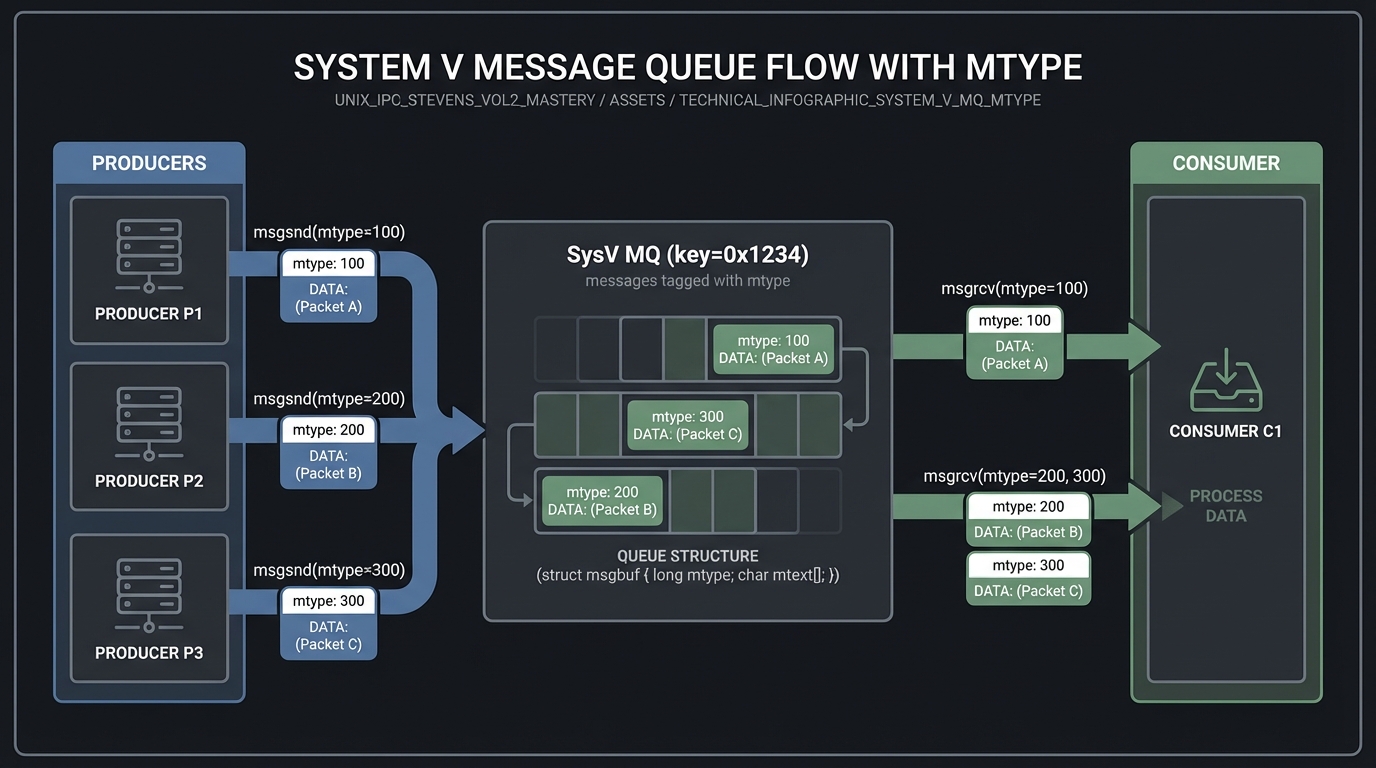
System V message queues are older IPC primitives that use numeric keys and kernel persistence. A queue is created with msgget(key, flags), and messages are sent and received via msgsnd and msgrcv. Each message has a type (mtype) that can be used for selective receive, enabling simple routing patterns without multiple queues. System V queues persist in the kernel until explicitly removed with msgctl(IPC_RMID).
Compared to POSIX MQs, System V queues are lower-level and less ergonomic, but still heavily used in legacy systems and in environments where POSIX MQs are not available. Their persistence and key-based naming require careful lifecycle management.
Deep Dive into the Concept
System V IPC introduces a global key namespace. You can generate keys with ftok(), which hashes a filename and project id, but collisions are possible. Many production systems use fixed numeric keys and dedicated directories to avoid collisions. When you create a queue, you choose whether to create or attach to an existing one. The usual pattern is msgget(key, IPC_CREAT | IPC_EXCL) to ensure you created it, and if it exists, either reuse it or delete and recreate it.
Messages in System V queues consist of a long mtype and an arbitrary byte payload. msgrcv allows you to receive the first message of a given type (or the lowest type greater than a value). This makes it easy to implement multiple logical channels within a single queue. However, message boundaries are not self-describing, so you must define your own protocol for message structs and sizes. Also note that System V queues have per-queue and system-wide limits (msgmnb, msgmax) that can be inspected with ipcs -l.
The persistence model is powerful but dangerous: if a server crashes without removing the queue, it remains and clients may continue to send messages into the void. A robust design includes explicit cleanup on startup: detect and remove stale queues, or attach and drain them. This persistence is the biggest behavioral difference from POSIX MQs and should be a conscious design choice.
How this fits on projects
System V MQs are at the core of the multi-client server project and are compared directly against POSIX MQs in the benchmark project.
Definitions & key terms
- key_t -> Numeric key for System V IPC objects.
- mtype -> Message type used for selective receive.
- IPC_RMID -> Control command to remove a queue.
Mental model diagram (ASCII)
Producers -> [ SysV MQ (key=0x1234) ] -> Consumer
            (messages tagged with mtype)
How it works (step-by-step, with invariants and failure modes)
- Server calls
msggetwith key andIPC_CREAT. - Clients call
msggetwith same key to attach. - Clients send messages with mtype.
- Server receives based on mtype, processes, replies.
- Server removes queue with
msgctl(IPC_RMID)on shutdown.
Failure modes: key collision, stale queues after crash, exceeding msg limits.
Minimal concrete example
int q = msgget(0x1234, IPC_CREAT | 0600);
struct msg { long mtype; char text[32]; } m = {1, "hi"};
msgsnd(q, &m, sizeof(m.text), 0);
msgrcv(q, &m, sizeof(m.text), 1, 0);
**Common misconceptions**

- "System V MQs are obsolete." -> Many systems still use them; they are part of POSIX.
- "`ftok()` is safe." -> It can collide; use fixed keys or dedicated paths.
- "Queues auto-clean." -> They persist until removed explicitly.

**Check-your-understanding questions**

1. What happens if two programs choose the same key?
2. How does `mtype` influence message selection?
3. Why is persistence both a feature and a risk?

**Check-your-understanding answers**

1. They attach to the same queue, possibly causing interference.
2. `msgrcv` can filter by type, enabling routing.
3. It survives crashes but can leave stale queues.

**Real-world applications**

- Legacy financial systems.
- System management daemons on Unix variants.

**Where you’ll apply it**

- In this project: §3.2 Functional Requirements, §7 Common Pitfalls.
- Also used in: [P06-mq-benchmark.md](P06-mq-benchmark.md).

**References**

- Stevens, "UNP Vol 2" Ch. 6.
- `man 7 sysvipc`, `man 2 msgget`.

**Key insights**

- System V MQs are powerful but demand explicit lifecycle management.

**Summary**

System V message queues are persistent, typed message buffers. They are ideal for multi-client servers but require careful key and cleanup discipline.

**Homework/Exercises to practice the concept**

1. Create a queue, crash the server, and observe it with `ipcs`.
2. Implement two mtypes and selective receives.
3. Simulate key collisions and handle them.

**Solutions to the homework/exercises**

1. Use `ipcs -q` and `ipcrm -q` to observe and clean.
2. Send messages with mtype 1 and 2 and receive them separately.
3. Use `IPC_EXCL` and fall back to a different key.


---

## 3. Project Specification

### 3.1 What You Will Build

Create a multi-client server using System V message queues.

### 3.2 Functional Requirements

1. **Requirement 1**: Server creates queue with fixed key
2. **Requirement 2**: Clients send requests with mtype=1
3. **Requirement 3**: Server replies using client-specific mtype

### 3.3 Non-Functional Requirements

- **Performance**: Must handle at least 10,000 messages/operations without failure.
- **Reliability**: IPC objects are cleaned up on shutdown or crash detection.
- **Usability**: CLI output is readable with clear error codes.

### 3.4 Example Usage / Output

```text
./sysv_server &
./sysv_client --id 42 --msg hello
### 3.5 Data Formats / Schemas / Protocols

Message struct: {long mtype; int client_id; char body[256];}.

### 3.6 Edge Cases

- Key collision
- Stale queue on restart
- Oversized messages

### 3.7 Real World Outcome

You will have a working IPC subsystem that can be run, traced, and tested in a reproducible way.

#### 3.7.1 How to Run (Copy/Paste)

```bash
make
./run_demo.sh
#### 3.7.2 Golden Path Demo (Deterministic)

```bash
./run_demo.sh --mode=golden
Expected output includes deterministic counts and a final success line:

```text
OK: golden scenario completed
#### 3.7.3 Failure Demo (Deterministic)

```bash
./run_demo.sh --mode=failure
Expected output:

```text
ERROR: invalid input or unavailable IPC resource
exit=2
---

## 4. Solution Architecture

### 4.1 High-Level Design
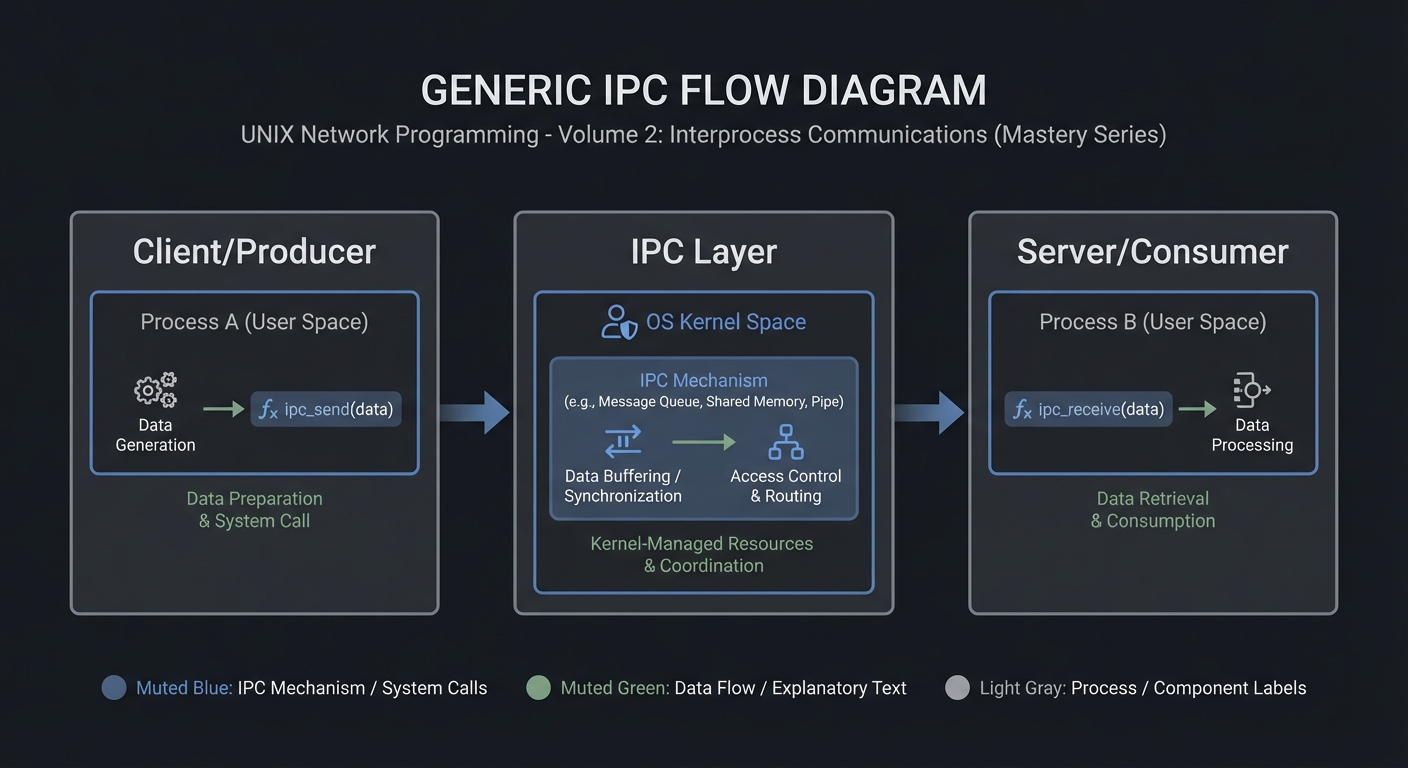
Client/Producer -> IPC Layer -> Server/Consumer
4.2 Key Components
| Component | Responsibility | Key Decisions |
|---|---|---|
| IPC Setup | Create/open IPC objects | POSIX vs System V choices |
| Worker Loop | Send/receive messages | Blocking vs non-blocking |
| Cleanup | Unlink/remove IPC objects | Crash safety |
4.3 Data Structures (No Full Code)
struct message {
  int id;
  int len;
  char payload[256];
};
### 4.4 Algorithm Overview

**Key Algorithm: IPC Request/Response**
1. Initialize IPC resources.
2. Client sends request.
3. Server processes and responds.
4. Cleanup on exit.

**Complexity Analysis:**
- Time: O(n) in number of messages.
- Space: O(1) per message plus IPC buffer.

---

## 5. Implementation Guide

### 5.1 Development Environment Setup

```bash
sudo apt-get install build-essential
### 5.2 Project Structure
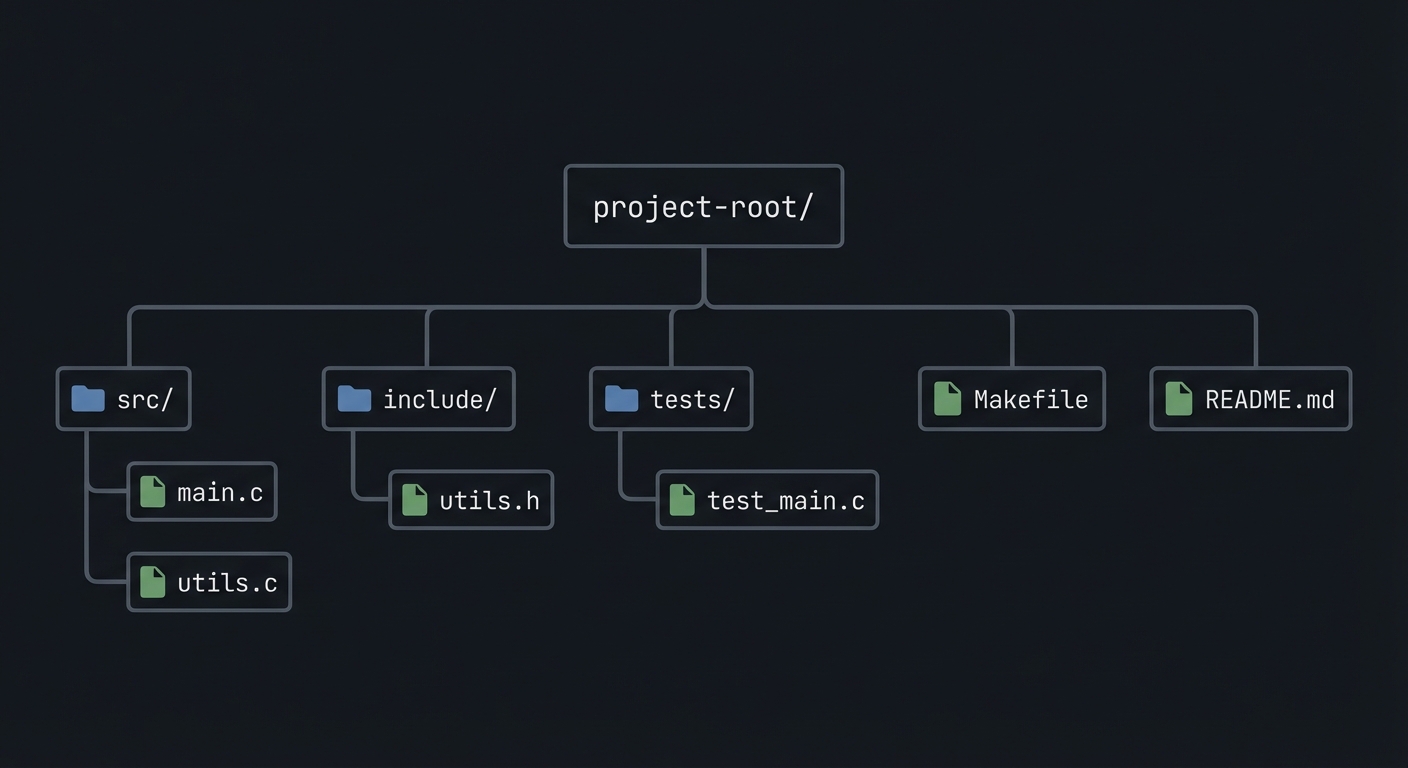
project-root/
├── src/
├── include/
├── tests/
├── Makefile
└── README.md
5.3 The Core Question You’re Answering
“How do you build a request/response service with typed messages?”
5.4 Concepts You Must Understand First
- IPC object lifecycle (create/open/unlink)
- Blocking vs non-blocking operations
- Error handling with errno
5.5 Questions to Guide Your Design
- What invariants guarantee correctness in this IPC flow?
- How will you prevent resource leaks across crashes?
- How will you make the system observable for debugging?
5.6 Thinking Exercise
Before coding, sketch the IPC lifecycle and identify where deadlock could occur.
5.7 The Interview Questions They’ll Ask
- Why choose this IPC mechanism over alternatives?
- What are the lifecycle pitfalls?
- How do you test IPC code reliably?
5.8 Hints in Layers
Hint 1: Start with a single producer and consumer.
Hint 2: Add logging around every IPC call.
Hint 3: Use strace or ipcs to verify resources.
5.9 Books That Will Help
| Topic | Book | Chapter |
|---|---|---|
| IPC fundamentals | Stevens, UNP Vol 2 | Relevant chapters |
| System calls | APUE | Ch. 15 |
5.10 Implementation Phases
Phase 1: Foundation (2-4 hours)
Goals:
- Create IPC objects.
- Implement a minimal send/receive loop.
Tasks:
- Initialize IPC resources.
- Implement basic client and server.
Checkpoint: Single request/response works.
Phase 2: Core Functionality (4-8 hours)
Goals:
- Add error handling and cleanup.
- Support multiple clients or concurrent operations.
Tasks:
- Add structured message format.
- Implement cleanup on shutdown.
Checkpoint: System runs under load without leaks.
Phase 3: Polish & Edge Cases (2-4 hours)
Goals:
- Add deterministic tests.
- Document behaviors.
Tasks:
- Add golden and failure scenarios.
- Document limitations.
Checkpoint: Tests pass, behavior documented.
5.11 Key Implementation Decisions
| Decision | Options | Recommendation | Rationale |
|---|---|---|---|
| Blocking mode | blocking vs non-blocking | blocking | Simpler for first version |
| Cleanup | manual vs automated | explicit cleanup | Avoid stale IPC objects |
6. Testing Strategy
6.1 Test Categories
| Category | Purpose | Examples |
|---|---|---|
| Unit Tests | Validate helpers | message encode/decode |
| Integration Tests | IPC flow | client-server round trip |
| Edge Case Tests | Failure modes | missing queue, full buffer |
6.2 Critical Test Cases
- Single client request/response works.
- Multiple requests do not corrupt state.
- Failure case returns exit code 2.
6.3 Test Data
Input: “hello” Expected: “hello”
7. Common Pitfalls & Debugging
7.1 Frequent Mistakes
| Pitfall | Symptom | Solution |
|---|---|---|
| Not cleaning IPC objects | Next run fails | Add cleanup on exit |
| Blocking forever | Program hangs | Add timeouts or non-blocking mode |
| Incorrect message framing | Corrupted data | Add length prefix and validate |
7.2 Debugging Strategies
- Use
strace -fto see IPC syscalls. - Use
ipcsor/dev/mqueueto inspect objects.
7.3 Performance Traps
- Small queue sizes cause frequent blocking.
8. Extensions & Challenges
8.1 Beginner Extensions
- Add verbose logging.
- Add a CLI flag to toggle non-blocking mode.
8.2 Intermediate Extensions
- Add request timeouts.
- Add a metrics report.
8.3 Advanced Extensions
- Implement load testing with multiple clients.
- Add crash recovery logic.
9. Real-World Connections
9.1 Industry Applications
- IPC services in local daemons.
- Message-based coordination in legacy systems.
9.2 Related Open Source Projects
- nfs-utils - Uses RPC and IPC extensively.
- systemd - Uses multiple IPC mechanisms.
9.3 Interview Relevance
- Demonstrates system call knowledge and concurrency reasoning.
10. Resources
10.1 Essential Reading
- Stevens, “UNP Vol 2”.
- Kerrisk, “The Linux Programming Interface”.
10.2 Video Resources
- Unix IPC lectures from OS courses.
10.3 Tools & Documentation
man 7 ipc,man 2for each syscall.
10.4 Related Projects in This Series
11. Self-Assessment Checklist
11.1 Understanding
- I can describe IPC object lifecycle.
- I can explain blocking vs non-blocking behavior.
- I can reason about failure modes.
11.2 Implementation
- All functional requirements are met.
- Tests pass.
- IPC objects are cleaned up.
11.3 Growth
- I can explain design trade-offs.
- I can explain this project in an interview.
12. Submission / Completion Criteria
Minimum Viable Completion:
- Basic IPC flow works with correct cleanup.
- Error handling returns deterministic exit codes.
Full Completion:
- Includes tests and deterministic demos.
- Documents trade-offs and limitations.
Excellence (Going Above & Beyond):
- Adds performance benchmarking and crash recovery.