Project 1: PostScript Subset Interpreter
Project Overview
| Attribute | Details |
|---|---|
| Difficulty | Level 3: Advanced |
| Time Estimate | 2-3 weeks |
| Programming Language | C |
| Knowledge Area | Interpreters / Graphics |
| Prerequisites | Basic parsing concepts, understanding of coordinate systems |
What you’ll build: A minimal interpreter that executes a subset of PostScript (stack operations, basic drawing commands) and outputs to SVG or PNG.
Why it teaches PostScript→PDF: You’ll understand that PostScript is executed to produce graphics. Every moveto, lineto, stroke is an instruction your interpreter runs. This is exactly what Ghostscript does before converting to PDF.
Learning Objectives
By completing this project, you will:
- Implement a stack-based virtual machine that executes PostScript operators
- Build a graphics state machine that tracks current path, color, and transformations
- Parse and tokenize PostScript syntax including numbers, names, and procedures
- Generate vector graphics output (SVG) from PostScript execution
- Understand the execution model that underlies all graphics APIs (OpenGL, Canvas, Cairo)
The Core Question You’re Answering
“What does it mean for a programming language to ‘draw’? How can code become graphics?”
This is profound because most developers think of programs as producing text output or manipulating data. PostScript inverts this: the language itself IS the graphics. There’s no separation between “code” and “image” - executing the code creates the image.
When you write:
100 100 moveto
200 200 lineto
stroke
You’re not describing a line. You’re not telling some other program to draw a line. You’re executing instructions that move a virtual pen and paint pixels. The language runtime maintains a graphics state machine.
By the end of this project, you’ll internalize: Graphics are state + operations, not static data.
Deep Theoretical Foundation
1. Stack-Based Execution Model
PostScript uses a stack-based architecture, similar to Forth, HP calculators, and (internally) the Java Virtual Machine. Understanding this model is essential.
How Stack Machines Work
In a stack-based machine, there are no variables or registers in the traditional sense. Instead:
- All operands are pushed onto a data stack
- Operators pop their arguments from the stack and push their results back
Traditional (C-like):           Stack-based (PostScript):
result = add(5, 3)              5 3 add
                                ↓
                                Push 5: [5]
                                Push 3: [5, 3]
                                add:    [8]  (pop 3, pop 5, push 8)
Reverse Polish Notation (RPN)
PostScript uses Reverse Polish Notation where operators follow their operands:
| Infix Notation | RPN (PostScript) | Stack Trace |
|---|---|---|
(5 + 3) * 2 |
5 3 add 2 mul |
[5] → [5,3] → [8] → [8,2] → [16] |
x = 10; y = x + 5 |
10 /x exch def x 5 add /y exch def |
Definition operations |
sqrt(16) |
16 sqrt |
[16] → [4] |
Why RPN?
- No parentheses needed - operator precedence is implicit in order
- Natural for stack machines - arguments are already in place
- Simple parser - no need for precedence rules
- 1982 hardware - simpler to implement on limited systems
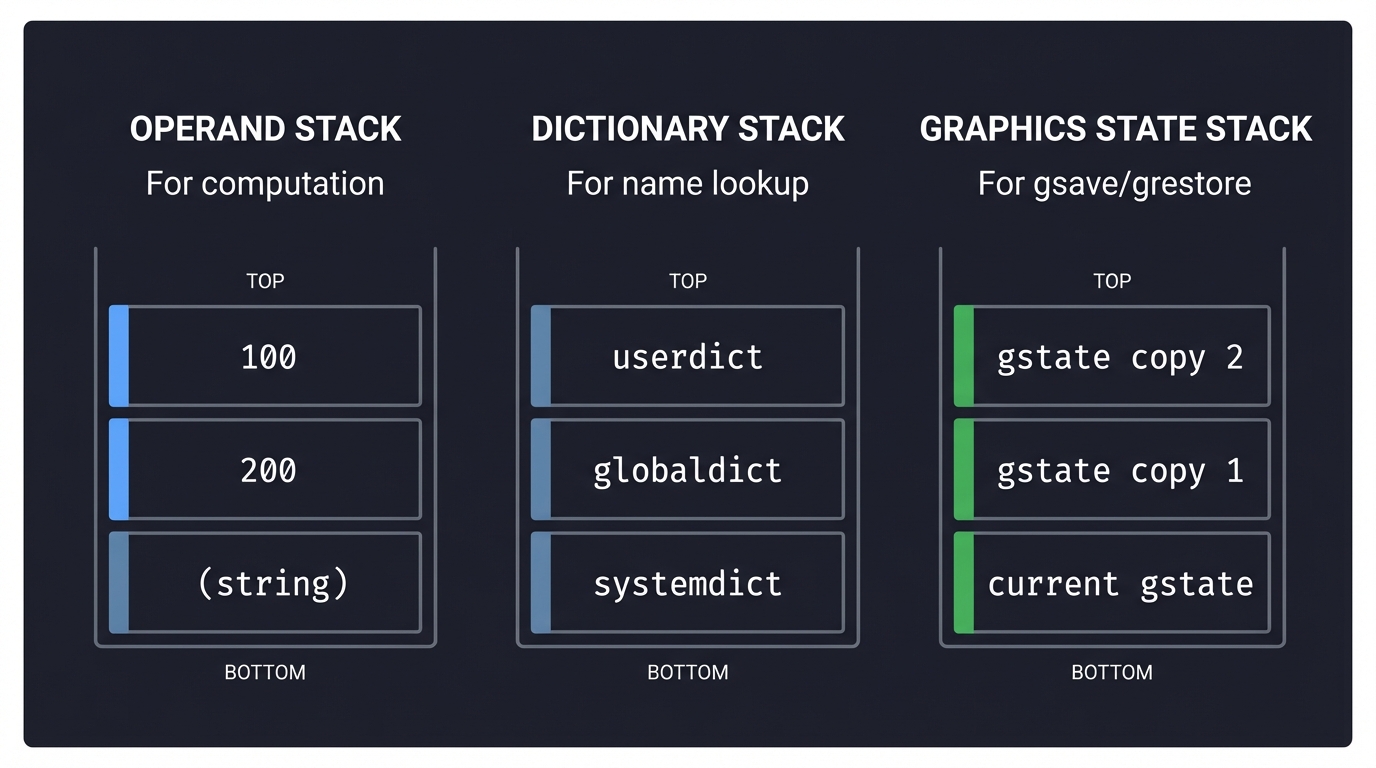
PostScript’s Multiple Stacks
PostScript actually maintains several stacks:
┌─────────────────────────────────────────────────────────────────┐
│                    POSTSCRIPT STACKS                            │
├─────────────────────────────────────────────────────────────────┤
│                                                                 │
│  OPERAND STACK         DICTIONARY STACK      GRAPHICS STATE     │
│  ┌─────────────┐       ┌───────────────┐     STACK              │
│  │    100      │       │  userdict     │     ┌───────────────┐  │
│  ├─────────────┤       ├───────────────┤     │ gstate copy 2 │  │
│  │    200      │       │  globaldict   │     ├───────────────┤  │
│  ├─────────────┤       ├───────────────┤     │ gstate copy 1 │  │
│  │ (string)    │       │  systemdict   │     ├───────────────┤  │
│  └─────────────┘       └───────────────┘     │ current gstate│  │
│                                              └───────────────┘  │
│  For computation        For name lookup       For gsave/grestore│
│                                                                 │
└─────────────────────────────────────────────────────────────────┘
2. Graphics State Machine
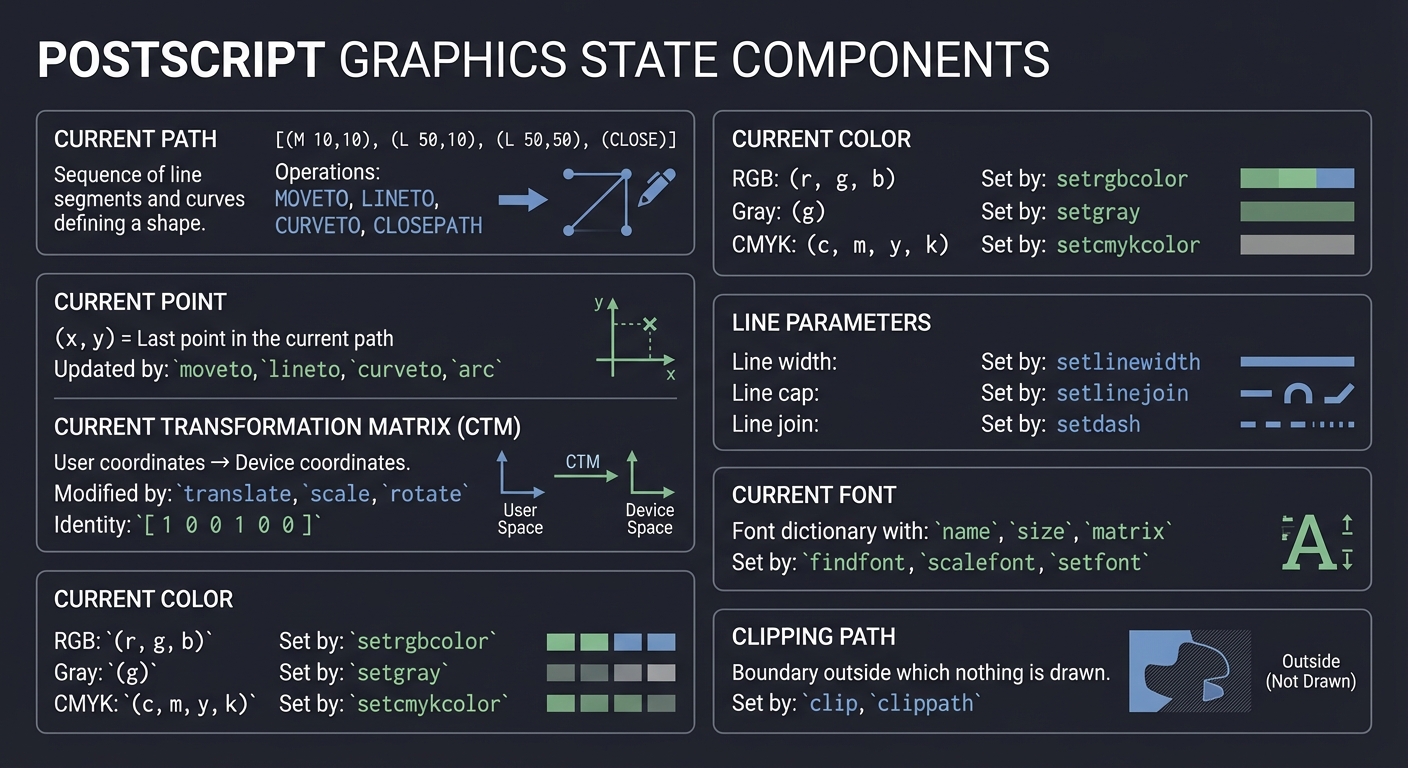
PostScript maintains a graphics state that controls how drawing operations work. This is the core concept that all modern graphics APIs inherit.
Components of Graphics State
┌─────────────────────────────────────────────────────────────────┐
│                     GRAPHICS STATE                               │
├─────────────────────────────────────────────────────────────────┤
│                                                                  │
│  CURRENT PATH                                                    │
│  ┌──────────────────────────────────────────────────────────┐   │
│  │ Sequence of: MOVETO, LINETO, CURVETO, CLOSEPATH          │   │
│  │ Example: [(M 10,10), (L 50,10), (L 50,50), (CLOSE)]      │   │
│  └──────────────────────────────────────────────────────────┘   │
│                                                                  │
│  CURRENT POINT                                                   │
│  ┌──────────────────────────────────────────────────────────┐   │
│  │ (x, y) = Last point in the current path                  │   │
│  │ Updated by: moveto, lineto, curveto, arc                 │   │
│  └──────────────────────────────────────────────────────────┘   │
│                                                                  │
│  CURRENT TRANSFORMATION MATRIX (CTM)                             │
│  ┌──────────────────────────────────────────────────────────┐   │
│  │ [a  b  0]     User coordinates → Device coordinates      │   │
│  │ [c  d  0]     Modified by: translate, scale, rotate      │   │
│  │ [tx ty 1]     Identity: [1 0 0 1 0 0]                    │   │
│  └──────────────────────────────────────────────────────────┘   │
│                                                                  │
│  CURRENT COLOR                                                   │
│  ┌──────────────────────────────────────────────────────────┐   │
│  │ RGB: (r, g, b) or Gray: (g) or CMYK: (c, m, y, k)       │   │
│  │ Set by: setrgbcolor, setgray, setcmykcolor              │   │
│  └──────────────────────────────────────────────────────────┘   │
│                                                                  │
│  LINE PARAMETERS                                                 │
│  ┌──────────────────────────────────────────────────────────┐   │
│  │ Line width, line cap, line join, dash pattern           │   │
│  │ Set by: setlinewidth, setlinecap, setlinejoin, setdash  │   │
│  └──────────────────────────────────────────────────────────┘   │
│                                                                  │
│  CURRENT FONT                                                    │
│  ┌──────────────────────────────────────────────────────────┐   │
│  │ Font dictionary with: name, size, matrix                │   │
│  │ Set by: findfont, scalefont, setfont                    │   │
│  └──────────────────────────────────────────────────────────┘   │
│                                                                  │
│  CLIPPING PATH                                                   │
│  ┌──────────────────────────────────────────────────────────┐   │
│  │ Boundary outside which nothing is drawn                  │   │
│  │ Set by: clip, clippath                                   │   │
│  └──────────────────────────────────────────────────────────┘   │
│                                                                  │
└─────────────────────────────────────────────────────────────────┘
Path Construction vs. Path Painting
A critical insight: building a path and rendering it are separate operations.
PATH CONSTRUCTION (doesn't draw anything):
  newpath         → Clear the current path
  100 100 moveto  → Set current point (start subpath)
  200 100 lineto  → Add line segment to path
  200 200 lineto  → Add another line segment
  closepath       → Close the subpath (line back to start)

PATH PAINTING (actually draws):
  stroke          → Draw path outline with current color/width
  fill            → Fill path interior with current color
  clip            → Use path as clipping boundary

AFTER PAINTING: Current path is CLEARED!
gsave/grestore: The Graphics State Stack
% Save current state
gsave
  1 0 0 setrgbcolor   % Change to red
  100 100 moveto
  200 200 lineto
  stroke              % Red line
grestore              % Restore original state (black color)

% Back to original color
100 150 moveto
200 250 lineto
stroke                % Black line (color restored)
3. Transformation Matrices
All coordinates in PostScript pass through the Current Transformation Matrix (CTM). This is a 3x3 matrix (represented as 6 numbers in PostScript).
The 2D Transformation Matrix
[a  b  0]      Point transformation:
[c  d  0]      x' = a*x + c*y + tx
[tx ty 1]      y' = b*x + d*y + ty

PostScript representation: [a b c d tx ty]
Identity matrix: [1 0 0 1 0 0]
Transformation Operations
| Operation | Matrix | Effect |
|---|---|---|
tx ty translate |
[1 0 0 1 tx ty] | Move origin to (tx, ty) |
sx sy scale |
[sx 0 0 sy 0 0] | Scale by factors |
angle rotate |
[cos(θ) sin(θ) -sin(θ) cos(θ) 0 0] | Rotate by angle |
Matrix Composition (Critical!)
Order matters! Translate then scale ≠ Scale then translate.
% Method 1: translate then scale
100 0 translate
2 2 scale
50 50 moveto    % Actual position: (100 + 50*2, 0 + 50*2) = (200, 100)

% Method 2: scale then translate
2 2 scale
100 0 translate
50 50 moveto    % Actual position: (100*2 + 50*2, 0 + 50*2) = (300, 100)
4. Tokenization and Parsing
PostScript has a relatively simple lexical structure:
TOKEN TYPES:
  NUMBER:    123, -45.67, 1e-5
  NAME:      moveto, stroke, myVariable
  LITERAL:   /moveto, /myName (names as values)
  STRING:    (Hello World), (nested (parens))
  HEX:       <48656C6C6F>
  PROCEDURE: { 100 100 moveto 200 200 lineto stroke }
  ARRAY:     [ 1 2 3 4 5 ]
  DICT:      << /Key1 value1 /Key2 value2 >>
  COMMENT:   % this is a comment

DELIMITERS:
  Whitespace: space, tab, newline, carriage return
  Special: ( ) < > [ ] { } / %
Project Specification
Minimum Viable Implementation
Your interpreter must support:
Stack Operations
| Operator | Stack Effect | Description |
|———-|————–|————-|
| push (implicit) | → n | Push number/name onto stack |
| pop | a → | Discard top of stack |
| dup | a → a a | Duplicate top |
| exch | a b → b a | Exchange top two |
| roll | an...a0 n j → ... | Roll n elements by j |
| clear | ... → | Clear the stack |
| count | ... → ... n | Push stack depth |
Arithmetic Operations
| Operator | Stack Effect | Description |
|———-|————–|————-|
| add | a b → a+b | Addition |
| sub | a b → a-b | Subtraction |
| mul | a b → a*b | Multiplication |
| div | a b → a/b | Real division |
| idiv | a b → floor(a/b) | Integer division |
| mod | a b → a mod b | Modulo |
| neg | a → -a | Negation |
| abs | a → |a| | Absolute value |
| sqrt | a → √a | Square root |
Path Construction
| Operator | Stack Effect | Description |
|———-|————–|————-|
| newpath | → | Clear current path |
| moveto | x y → | Set current point |
| lineto | x y → | Add line to path |
| curveto | x1 y1 x2 y2 x3 y3 → | Bezier curve |
| closepath | → | Close current subpath |
| currentpoint | → x y | Get current point |
Path Painting
| Operator | Stack Effect | Description |
|———-|————–|————-|
| stroke | → | Draw path outline |
| fill | → | Fill path interior |
| showpage | → | Output page |
Graphics State
| Operator | Stack Effect | Description |
|———-|————–|————-|
| gsave | → | Save graphics state |
| grestore | → | Restore graphics state |
| setlinewidth | w → | Set line width |
| setgray | g → | Set gray color (0-1) |
| setrgbcolor | r g b → | Set RGB color |
| translate | tx ty → | Translate CTM |
| scale | sx sy → | Scale CTM |
| rotate | angle → | Rotate CTM (degrees) |
Output Format
Generate SVG files for easy validation:
<?xml version="1.0" encoding="UTF-8"?>
<svg xmlns="http://www.w3.org/2000/svg"
     width="612" height="792"
     viewBox="0 0 612 792">
  <!-- Note: Y-axis flipped because SVG origin is top-left -->
  <g transform="translate(0, 792) scale(1, -1)">
    <path d="M 100 100 L 200 200"
          stroke="rgb(0,0,0)"
          stroke-width="1"
          fill="none"/>
  </g>
</svg>
Solution Architecture
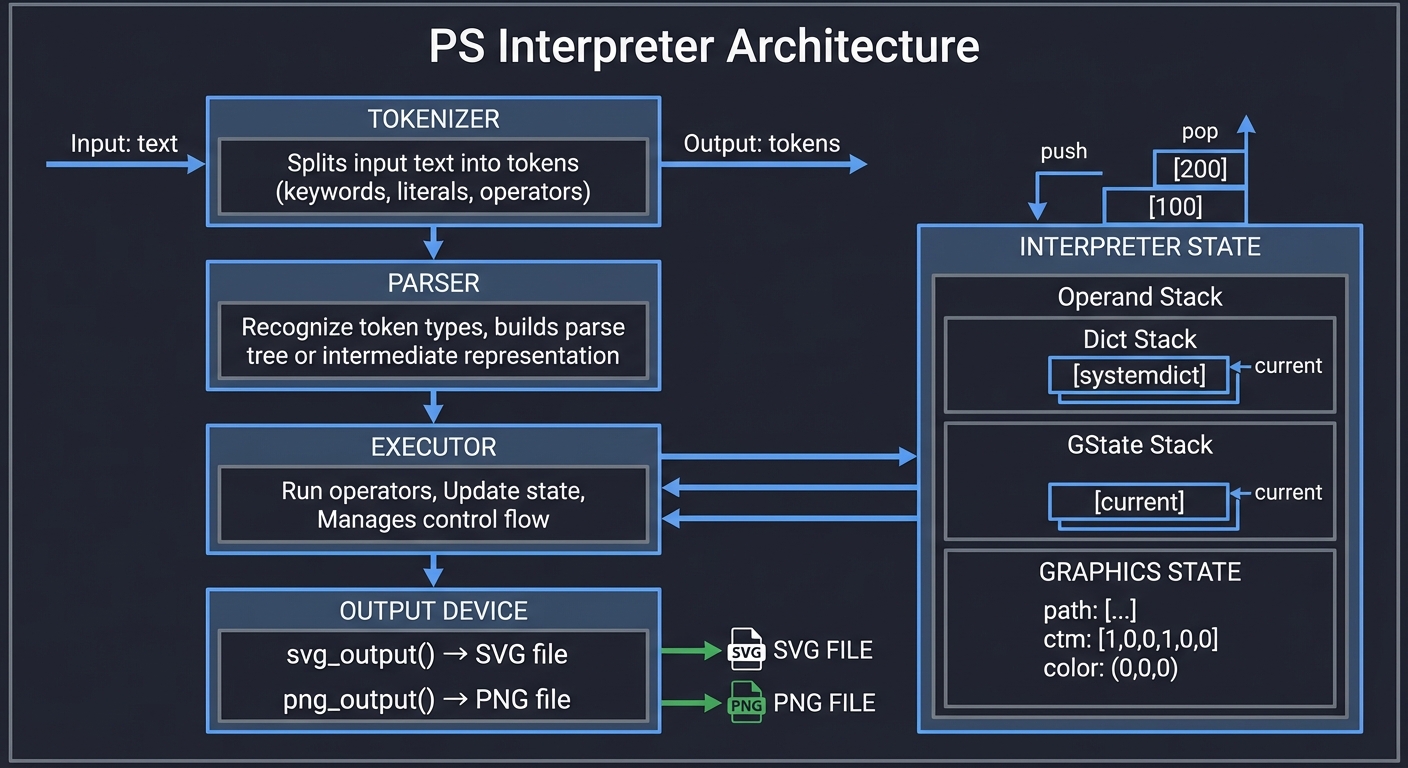
High-Level Structure
┌─────────────────────────────────────────────────────────────────┐
│                    PS INTERPRETER                               │
├─────────────────────────────────────────────────────────────────┤
│                                                                 │
│  ┌───────────────┐    ┌───────────────┐    ┌───────────────┐   │
│  │   TOKENIZER   │───▶│    PARSER     │───▶│   EXECUTOR    │   │
│  │               │    │               │    │               │   │
│  │ Input: text   │    │ Recognize     │    │ Run operators │   │
│  │ Output: tokens│    │ token types   │    │ Update state  │   │
│  └───────────────┘    └───────────────┘    └───────┬───────┘   │
│                                                     │           │
│                         ┌───────────────────────────┘           │
│                         ▼                                       │
│  ┌─────────────────────────────────────────────────────────┐   │
│  │                    INTERPRETER STATE                     │   │
│  │                                                          │   │
│  │  ┌──────────────┐  ┌──────────────┐  ┌──────────────┐   │   │
│  │  │ Operand Stack│  │ Dict Stack   │  │ GState Stack │   │   │
│  │  │ [100, 200]   │  │ [systemdict] │  │ [current]    │   │   │
│  │  └──────────────┘  └──────────────┘  └──────────────┘   │   │
│  │                                                          │   │
│  │  ┌─────────────────────────────────────────────────┐    │   │
│  │  │              GRAPHICS STATE                      │    │   │
│  │  │  path: [...], ctm: [1,0,0,1,0,0], color: (0,0,0)│    │   │
│  │  └─────────────────────────────────────────────────┘    │   │
│  └─────────────────────────────────────────────────────────┘   │
│                         │                                       │
│                         ▼                                       │
│  ┌─────────────────────────────────────────────────────────┐   │
│  │                    OUTPUT DEVICE                         │   │
│  │                                                          │   │
│  │  svg_output() → SVG file                                │   │
│  │  png_output() → PNG file (optional, requires Cairo)     │   │
│  └─────────────────────────────────────────────────────────┘   │
│                                                                 │
└─────────────────────────────────────────────────────────────────┘
Key Data Structures
// Stack element (can hold multiple types)
typedef enum { VAL_NUMBER, VAL_STRING, VAL_NAME, VAL_ARRAY, VAL_PROC } ValueType;

typedef struct {
    ValueType type;
    union {
        double number;
        char* string;
        char* name;
        struct Array* array;
        struct Procedure* proc;
    } data;
} Value;

// Operand stack
typedef struct {
    Value* items;
    int capacity;
    int size;
} Stack;

// Path segment
typedef enum { SEG_MOVE, SEG_LINE, SEG_CURVE, SEG_CLOSE } SegmentType;

typedef struct {
    SegmentType type;
    double x, y;           // For MOVE and LINE
    double x1, y1, x2, y2; // For CURVE (plus x, y for end point)
} PathSegment;

// Current path
typedef struct {
    PathSegment* segments;
    int capacity;
    int count;
    bool has_current_point;
    double current_x, current_y;
} Path;

// Graphics state
typedef struct GraphicsState {
    Path* path;
    double ctm[6];         // [a b c d tx ty]
    double color_r, color_g, color_b;
    double line_width;
    int line_cap;          // 0=butt, 1=round, 2=square
    int line_join;         // 0=miter, 1=round, 2=bevel
} GraphicsState;

// Graphics state stack (for gsave/grestore)
typedef struct {
    GraphicsState** states;
    int capacity;
    int size;
} GStateStack;

// Interpreter context
typedef struct {
    Stack* operand_stack;
    GStateStack* gstate_stack;
    GraphicsState* current_gstate;
    FILE* output;
    bool verbose;
} Interpreter;
Implementation Guide
Phase 1: Stack Calculator (Week 1, Days 1-3)
Start with a pure stack calculator - no graphics yet.
Goal: Execute 5 3 add 2 mul and print 16
// main.c - Minimal stack calculator
#include <stdio.h>
#include <stdlib.h>
#include <string.h>
#include <ctype.h>

#define MAX_STACK 1024

double stack[MAX_STACK];
int stack_ptr = 0;

void push(double val) {
    if (stack_ptr >= MAX_STACK) {
        fprintf(stderr, "Stack overflow\n");
        exit(1);
    }
    stack[stack_ptr++] = val;
}

double pop(void) {
    if (stack_ptr <= 0) {
        fprintf(stderr, "Stack underflow\n");
        exit(1);
    }
    return stack[--stack_ptr];
}

void execute(char* token) {
    // Check if it's a number
    char* end;
    double num = strtod(token, &end);
    if (end != token && *end == '\0') {
        push(num);
        return;
    }

    // Otherwise, it's an operator
    if (strcmp(token, "add") == 0) {
        double b = pop(), a = pop();
        push(a + b);
    }
    else if (strcmp(token, "mul") == 0) {
        double b = pop(), a = pop();
        push(a * b);
    }
    else if (strcmp(token, "sub") == 0) {
        double b = pop(), a = pop();
        push(a - b);
    }
    else if (strcmp(token, "div") == 0) {
        double b = pop(), a = pop();
        push(a / b);
    }
    else if (strcmp(token, "dup") == 0) {
        double a = pop();
        push(a);
        push(a);
    }
    else if (strcmp(token, "exch") == 0) {
        double b = pop(), a = pop();
        push(b);
        push(a);
    }
    else if (strcmp(token, "pop") == 0) {
        pop();
    }
    else {
        fprintf(stderr, "Unknown operator: %s\n", token);
    }
}

int main(int argc, char** argv) {
    char line[1024];

    printf("PostScript Calculator\n");
    printf("Enter expressions (e.g., '5 3 add 2 mul'):\n");

    while (fgets(line, sizeof(line), stdin)) {
        char* token = strtok(line, " \t\n");
        while (token) {
            execute(token);
            token = strtok(NULL, " \t\n");
        }

        printf("Stack: [");
        for (int i = 0; i < stack_ptr; i++) {
            printf("%.2f%s", stack[i], i < stack_ptr-1 ? ", " : "");
        }
        printf("]\n");
    }

    return 0;
}
Test it:
$ ./ps_calc
5 3 add 2 mul
Stack: [16.00]
10 dup mul
Stack: [16.00, 100.00]
Phase 2: Path Construction (Week 1, Days 4-5)
Add graphics state and path operators.
// Add to your interpreter:

typedef struct {
    double x, y;
    int type;  // 0=move, 1=line
} PathPoint;

PathPoint path[1024];
int path_count = 0;
double current_x = 0, current_y = 0;
bool has_current_point = false;

void ps_newpath(void) {
    path_count = 0;
    has_current_point = false;
}

void ps_moveto(void) {
    double y = pop(), x = pop();
    path[path_count].x = x;
    path[path_count].y = y;
    path[path_count].type = 0;  // MOVE
    path_count++;
    current_x = x;
    current_y = y;
    has_current_point = true;
}

void ps_lineto(void) {
    if (!has_current_point) {
        fprintf(stderr, "Error: lineto without current point\n");
        return;
    }
    double y = pop(), x = pop();
    path[path_count].x = x;
    path[path_count].y = y;
    path[path_count].type = 1;  // LINE
    path_count++;
    current_x = x;
    current_y = y;
}

void ps_closepath(void) {
    if (path_count > 0) {
        // Find the last MOVE
        for (int i = path_count - 1; i >= 0; i--) {
            if (path[i].type == 0) {
                ps_push(path[i].x);
                ps_push(path[i].y);
                ps_lineto();
                break;
            }
        }
    }
}
Phase 3: SVG Output (Week 2, Days 1-3)
Convert paths to SVG.
void output_svg(const char* filename) {
    FILE* f = fopen(filename, "w");

    // SVG header (US Letter size: 612x792 points)
    fprintf(f, "<?xml version=\"1.0\" encoding=\"UTF-8\"?>\n");
    fprintf(f, "<svg xmlns=\"http://www.w3.org/2000/svg\" ");
    fprintf(f, "width=\"612\" height=\"792\" viewBox=\"0 0 612 792\">\n");

    // Flip Y-axis (PostScript origin is bottom-left, SVG is top-left)
    fprintf(f, "  <g transform=\"translate(0, 792) scale(1, -1)\">\n");

    // Generate path
    if (path_count > 0) {
        fprintf(f, "    <path d=\"");
        for (int i = 0; i < path_count; i++) {
            if (path[i].type == 0) {
                fprintf(f, "M %.2f %.2f ", path[i].x, path[i].y);
            } else {
                fprintf(f, "L %.2f %.2f ", path[i].x, path[i].y);
            }
        }
        fprintf(f, "\" ");
        fprintf(f, "stroke=\"rgb(%d,%d,%d)\" ",
                (int)(color_r*255), (int)(color_g*255), (int)(color_b*255));
        fprintf(f, "stroke-width=\"%.2f\" ", line_width);
        fprintf(f, "fill=\"none\"/>\n");
    }

    fprintf(f, "  </g>\n");
    fprintf(f, "</svg>\n");

    fclose(f);
}
Phase 4: Transformations (Week 2, Days 4-5)
Implement CTM operations.
double ctm[6] = {1, 0, 0, 1, 0, 0};  // Identity matrix

// Transform a point through the CTM
void transform_point(double x, double y, double* x_out, double* y_out) {
    *x_out = ctm[0] * x + ctm[2] * y + ctm[4];
    *y_out = ctm[1] * x + ctm[3] * y + ctm[5];
}

// Multiply current CTM by another matrix
void concat_matrix(double m[6]) {
    double result[6];
    result[0] = ctm[0] * m[0] + ctm[1] * m[2];
    result[1] = ctm[0] * m[1] + ctm[1] * m[3];
    result[2] = ctm[2] * m[0] + ctm[3] * m[2];
    result[3] = ctm[2] * m[1] + ctm[3] * m[3];
    result[4] = ctm[4] * m[0] + ctm[5] * m[2] + m[4];
    result[5] = ctm[4] * m[1] + ctm[5] * m[3] + m[5];
    memcpy(ctm, result, sizeof(ctm));
}

void ps_translate(void) {
    double ty = pop(), tx = pop();
    double m[6] = {1, 0, 0, 1, tx, ty};
    concat_matrix(m);
}

void ps_scale(void) {
    double sy = pop(), sx = pop();
    double m[6] = {sx, 0, 0, sy, 0, 0};
    concat_matrix(m);
}

void ps_rotate(void) {
    double angle = pop() * M_PI / 180.0;  // degrees to radians
    double c = cos(angle), s = sin(angle);
    double m[6] = {c, s, -s, c, 0, 0};
    concat_matrix(m);
}
Phase 5: gsave/grestore (Week 3, Days 1-2)
Implement the graphics state stack.
#define MAX_GSTATE 32

typedef struct {
    double ctm[6];
    double color_r, color_g, color_b;
    double line_width;
    // Add more state as needed
} GraphicsState;

GraphicsState gstate_stack[MAX_GSTATE];
int gstate_ptr = 0;
GraphicsState current_gstate;

void init_gstate(void) {
    current_gstate.ctm[0] = 1; current_gstate.ctm[1] = 0;
    current_gstate.ctm[2] = 0; current_gstate.ctm[3] = 1;
    current_gstate.ctm[4] = 0; current_gstate.ctm[5] = 0;
    current_gstate.color_r = 0;
    current_gstate.color_g = 0;
    current_gstate.color_b = 0;
    current_gstate.line_width = 1;
}

void ps_gsave(void) {
    if (gstate_ptr >= MAX_GSTATE) {
        fprintf(stderr, "Graphics state stack overflow\n");
        return;
    }
    gstate_stack[gstate_ptr++] = current_gstate;
}

void ps_grestore(void) {
    if (gstate_ptr <= 0) {
        fprintf(stderr, "Graphics state stack underflow\n");
        return;
    }
    current_gstate = gstate_stack[--gstate_ptr];
}
Phase 6: REPL and File Input (Week 3, Days 3-5)
Add interactive mode and file reading.
void run_file(const char* filename) {
    FILE* f = fopen(filename, "r");
    if (!f) {
        fprintf(stderr, "Cannot open %s\n", filename);
        return;
    }

    char line[1024];
    while (fgets(line, sizeof(line), f)) {
        // Skip comments
        char* comment = strchr(line, '%');
        if (comment) *comment = '\0';

        // Tokenize and execute
        char* token = strtok(line, " \t\n");
        while (token) {
            execute(token);
            token = strtok(NULL, " \t\n");
        }
    }

    fclose(f);
}

void run_repl(void) {
    printf("PostScript Subset Interpreter v1.0\n");
    printf("Type 'quit' to exit, 'stack' to show stack\n\n");

    char line[1024];
    printf("PS> ");

    while (fgets(line, sizeof(line), stdin)) {
        if (strncmp(line, "quit", 4) == 0) break;

        if (strncmp(line, "stack", 5) == 0) {
            print_stack();
        } else {
            // Skip comments
            char* comment = strchr(line, '%');
            if (comment) *comment = '\0';

            char* token = strtok(line, " \t\n");
            while (token) {
                execute(token);
                token = strtok(NULL, " \t\n");
            }
        }

        printf("PS> ");
    }
}
Testing Strategy
Unit Tests for Operators
void test_stack_ops(void) {
    printf("Testing stack operations...\n");

    // Test push/pop
    push(42);
    assert(pop() == 42);

    // Test dup
    push(10);
    ps_dup();
    assert(pop() == 10);
    assert(pop() == 10);

    // Test exch
    push(1);
    push(2);
    ps_exch();
    assert(pop() == 1);
    assert(pop() == 2);

    printf("Stack operations: PASSED\n");
}

void test_arithmetic(void) {
    printf("Testing arithmetic...\n");

    // Test add
    push(5);
    push(3);
    ps_add();
    assert(pop() == 8);

    // Test mul
    push(4);
    push(7);
    ps_mul();
    assert(pop() == 28);

    printf("Arithmetic: PASSED\n");
}
Visual Tests with Reference Files
Create simple PostScript files and compare output with Ghostscript:
# Create test file
cat > test_triangle.ps << 'EOF'
%!PS-Adobe-3.0
newpath
100 100 moveto
300 100 lineto
200 300 lineto
closepath
0.5 setgray
fill
showpage
EOF

# Run your interpreter
./ps_interpreter test_triangle.ps output.svg

# Generate reference with Ghostscript
gs -sDEVICE=svg -o reference.svg test_triangle.ps

# Visual comparison
open output.svg reference.svg
Trace Mode for Debugging
$ ./ps_interpreter --trace test.ps

=== PostScript Execution Trace ===

[Token 1] 'newpath'
  Stack before:  []
  Stack after:   []
  Path cleared

[Token 2] '100'
  Stack before:  []
  Stack after:   [100]

[Token 3] '100'
  Stack before:  [100]
  Stack after:   [100, 100]

[Token 4] 'moveto'
  Stack before:  [100, 100]
  Stack after:   []
  Current point: (100, 100)
  Path: M 100 100
Common Pitfalls and Debugging
1. Stack Order Confusion
PostScript uses top-of-stack for the last value pushed. For moveto, the order is x y moveto, so you pop y first, then x.
// WRONG:
void ps_moveto(void) {
    double x = pop();  // This pops Y!
    double y = pop();  // This pops X!
    // ...
}

// CORRECT:
void ps_moveto(void) {
    double y = pop();  // Y was pushed last, so pop first
    double x = pop();  // X was pushed first, so pop second
    // ...
}
2. Coordinate System Flip
PostScript origin is bottom-left (Y increases upward). SVG origin is top-left (Y increases downward). You must flip:
// For SVG output, flip Y coordinate
double svg_y = page_height - ps_y;
3. Path Cleared After Painting
After stroke or fill, the current path is cleared. If you want to both stroke and fill, use:
% Method 1: Draw twice
gsave
fill
grestore
stroke

% Method 2: Use strokepath (advanced)
4. Transformation Matrix Order
Matrix operations are cumulative and order-dependent:
% These are NOT equivalent:
100 0 translate
2 2 scale         % First translate to (100,0), then scale

2 2 scale
100 0 translate   % First scale, so translate becomes (200,0)
Extensions and Challenges
Level 1: Additional Operators
arc: Draw circular arcsclip: Set clipping pathcharpath: Convert text to pathdef: Define named values
Level 2: Procedures
- Parse
{ ... }blocks as executable arrays - Implement
defto bind names to procedures - Support recursive procedures
Level 3: PNG Output
- Integrate Cairo library for rasterization
- Implement anti-aliasing
- Support arbitrary DPI
Level 4: Font Rendering
- Parse Type 1 font programs
- Implement
findfont,scalefont,setfont - Render text with
show
Real-World Connections
Graphics APIs Influenced by PostScript
| API | PostScript Heritage |
|---|---|
| Direct descendant; same operators | |
| Cairo | PostScript-style state machine |
| HTML Canvas | moveTo(), lineTo(), stroke() |
| SVG | Path syntax (M, L, C) |
| Quartz 2D | Apple’s graphics layer |
| DirectX/GDI | Windows drawing model |
Where PostScript Lives Today
- PDF files - Every PDF contains PostScript-like content streams
- Printers - Many professional printers still accept PostScript
- Ghostscript - Powers PDF generation in countless applications
- Fonts - Type 1 fonts are PostScript programs
Self-Assessment Checklist
Before moving to Project 2, verify you can:
- Explain how Reverse Polish Notation works
- Trace stack state during PostScript execution
- Describe the components of graphics state
- Explain the difference between path construction and painting
- Implement
dup,exch,rollcorrectly - Transform coordinates through a 2x2 matrix
- Explain why
gsave/grestoreexists - Generate correct SVG from simple PostScript files
- Debug stack underflow/overflow errors
Resources
Essential Reading
- PostScript Language Tutorial and Cookbook (Blue Book) - Adobe
- PostScript Language Reference Manual (Red Book) - Adobe (free PDF)
- Computer Graphics from Scratch by Gabriel Gambetta - Ch. 1-4
Online Resources
- Learning PostScript by Doing - Blue Book PDF
- PostScript Operators Reference
- Ghostscript Documentation
Tools for Testing
- Ghostscript:
gs -sDEVICE=svg -o output.svg input.ps - Preview.app (macOS): Opens PostScript files directly
- Evince (Linux): PostScript/PDF viewer