Understanding PDF Generation from PostScript & Ghostscript
Goal: Master the complete document processing pipeline—from understanding PostScript as a stack-based programming language that draws, to PDF as a structured document format, to Ghostscript as the transformation engine between them. By completing these projects, you’ll understand what really happens when you “print to PDF,” why these formats were designed the way they were, and how production-grade document processors work at a systems level.
Why PostScript, PDF, and Ghostscript Matter
In 1984, Adobe invented PostScript to solve a fundamental problem: how to describe pages of text and graphics in a way that any printer could reproduce exactly. Their solution was radical—make it a Turing-complete programming language.
That decision shaped modern computing:
- Every PDF you’ve ever seen is descended from PostScript. PDF is “PostScript without the programming”
- Every laser printer from 1985-2010 had a PostScript interpreter built-in (literally a computer inside your printer)
- The entire desktop publishing revolution (PageMaker, QuarkXPress, InDesign) was built on PostScript
- Ghostscript (1988-present) is the open-source implementation that powers Linux printing, PDF generation, and document conversion worldwide
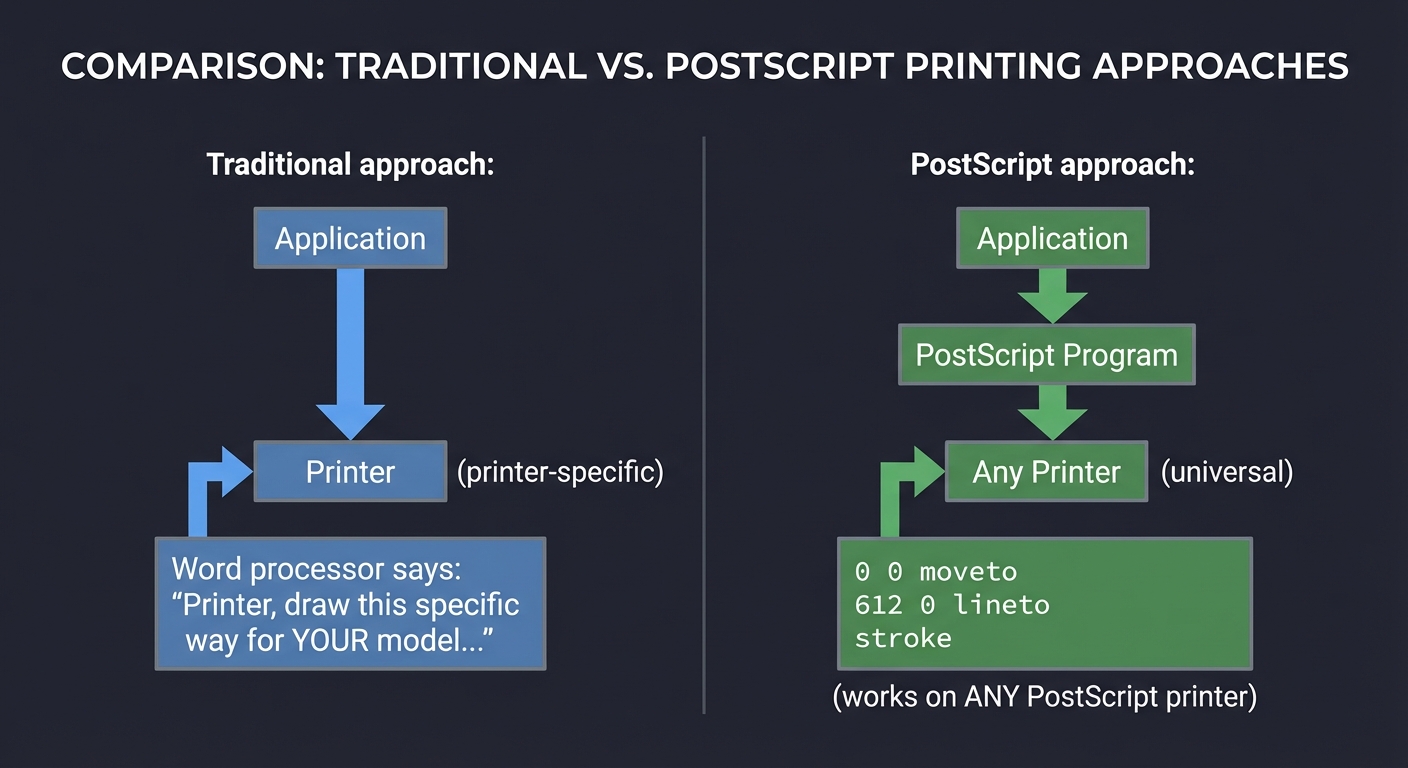
The key insight that makes this whole ecosystem work:
Traditional approach:           PostScript approach:
Application → Printer           Application → PostScript Program → Any Printer
(printer-specific)              (universal)

Word processor says:            Word processor emits:
"Printer, draw this             0 0 moveto
specific way for YOUR           612 0 lineto
model..."                       stroke
                                (works on ANY PostScript printer)
The Document Processing Pipeline: What Actually Happens
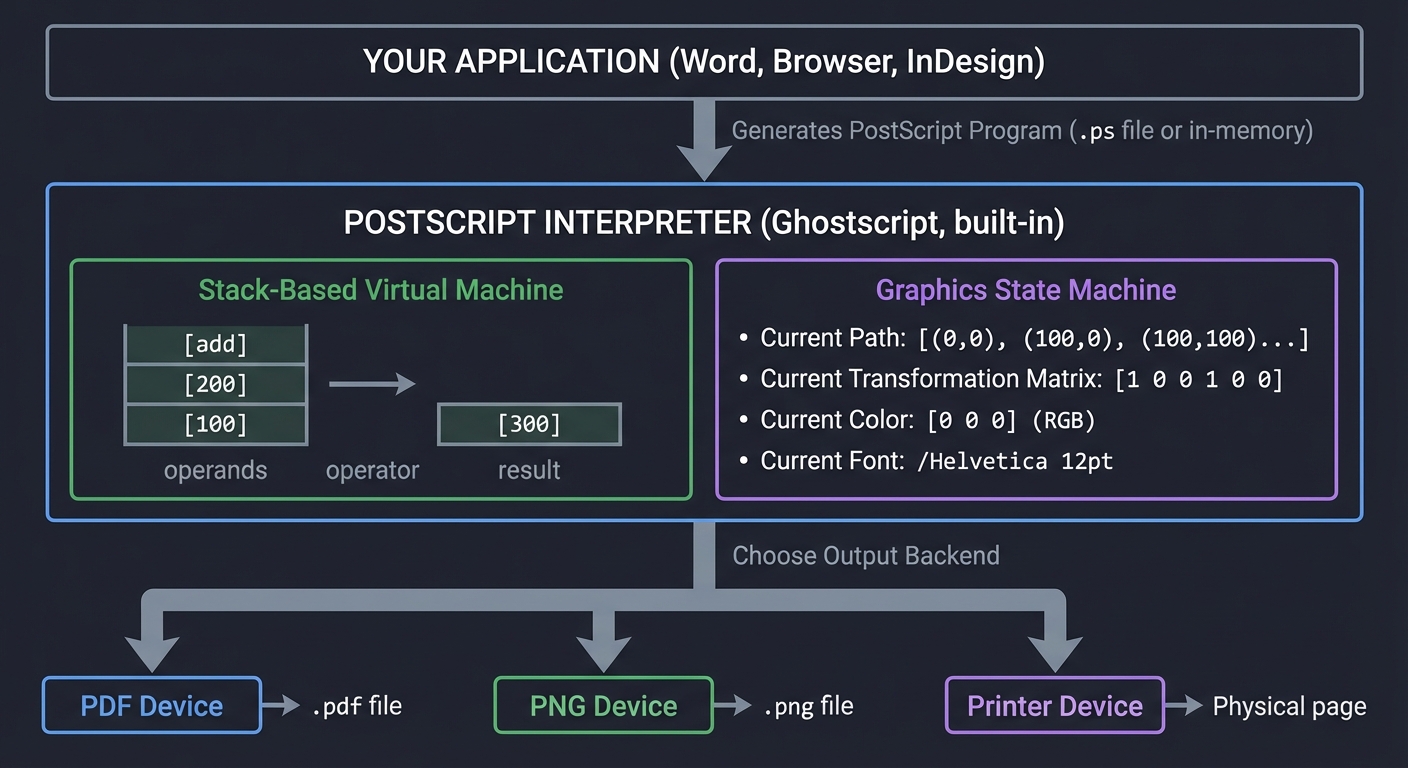
When you click “Export as PDF” or “Print to PDF,” here’s the real flow:
┌─────────────────────────────────────────────────────────────────────┐
│                         YOUR APPLICATION                             │
│                   (Word, Browser, InDesign)                          │
└────────────────────────────┬────────────────────────────────────────┘
                             │
                             ▼
              Generates PostScript Program
              (.ps file or in-memory)
                             │
                             ▼
┌─────────────────────────────────────────────────────────────────────┐
│                    POSTSCRIPT INTERPRETER                            │
│                      (Ghostscript, built-in)                         │
│                                                                      │
│  ┌──────────────────────────────────────────────────────┐          │
│  │  Stack-Based Virtual Machine                         │          │
│  │                                                       │          │
│  │  Stack: [100] [200] [add] → [300]                    │          │
│  │         operands  operator   result                  │          │
│  └──────────────────────────────────────────────────────┘          │
│                             ↓                                        │
│  ┌──────────────────────────────────────────────────────┐          │
│  │  Graphics State Machine                              │          │
│  │                                                       │          │
│  │  • Current Path: [(0,0), (100,0), (100,100)...]      │          │
│  │  • Current Transformation Matrix: [1 0 0 1 0 0]      │          │
│  │  • Current Color: [0 0 0] (RGB)                      │          │
│  │  • Current Font: /Helvetica 12pt                     │          │
│  └──────────────────────────────────────────────────────┘          │
└────────────────────────────┬────────────────────────────────────────┘
                             │
                             ▼
              Choose Output Backend
                             │
         ┌───────────────────┼───────────────────┐
         ▼                   ▼                   ▼
    ┌─────────┐        ┌─────────┐        ┌──────────┐
    │  PDF    │        │  PNG    │        │ Printer  │
    │ Device  │        │ Device  │        │  Device  │
    └─────────┘        └─────────┘        └──────────┘
         │                   │                   │
         ▼                   ▼                   ▼
    .pdf file          .png file        Physical page
The Stack-Based Execution Model: PostScript’s Secret Weapon
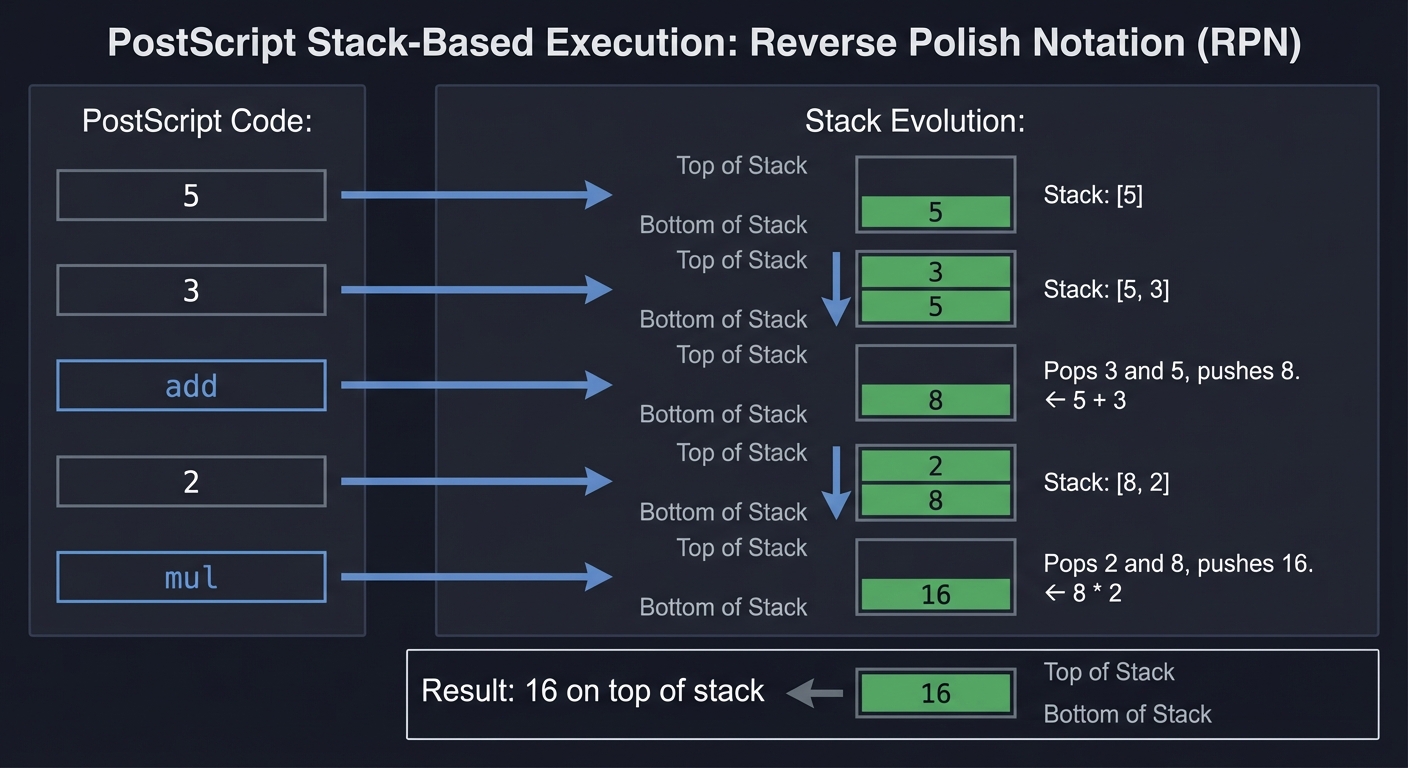
PostScript uses Reverse Polish Notation (RPN) like old HP calculators. Instead of (5 + 3) * 2, you write 5 3 add 2 mul:
PostScript Code:       Stack Evolution:

5                      [5]
3                      [5, 3]
add                    [8]           ← 5 + 3
2                      [8, 2]
mul                    [16]          ← 8 * 2

Result: 16 on top of stack
Why is this powerful for graphics?
Drawing a line from (0,0) to (100,100):
Traditional (C-like):
  drawLine(0, 0, 100, 100);

PostScript:
  0 0 moveto      ← Push 0, push 0, move current point
  100 100 lineto  ← Push 100, push 100, add line to path
  stroke          ← Actually draw the path
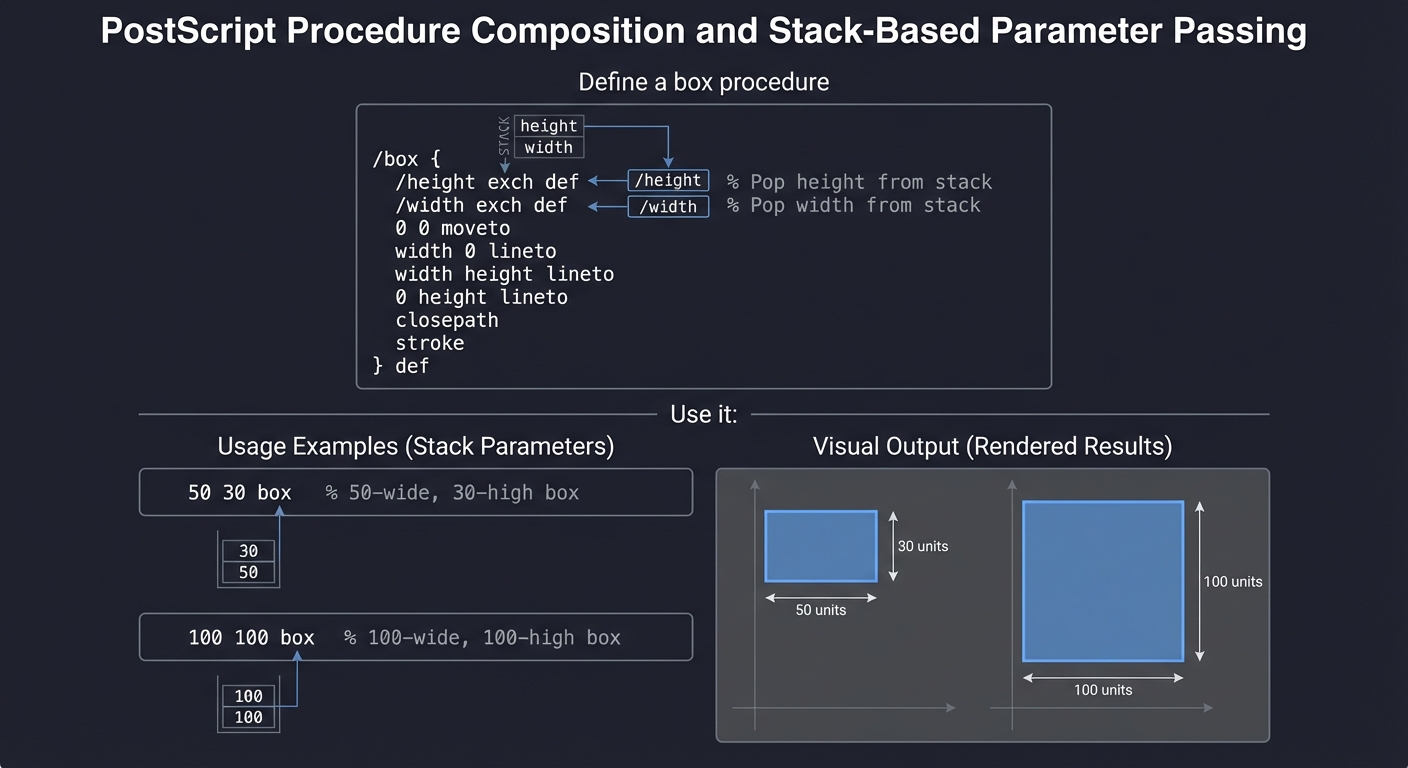
The stack makes composition natural:
% Define a box procedure
/box {
  /height exch def      % Pop height from stack
  /width exch def       % Pop width from stack
  0 0 moveto
  width 0 lineto
  width height lineto
  0 height lineto
  closepath
  stroke
} def

% Use it:
50 30 box     % 50-wide, 30-high box
100 100 box   % 100-wide, 100-high box
The Graphics State Machine: How Drawing Actually Works
PostScript maintains a graphics state that tracks everything about “how to draw”:
┌─────────────────────────────────────────────────────────────────┐
│                     GRAPHICS STATE                               │
├─────────────────────────────────────────────────────────────────┤
│                                                                  │
│  Current Path:         [ ]  (initially empty)                   │
│                        ↓                                         │
│  moveto (10,10)    →   [(10,10)]                                │
│  lineto (50,10)    →   [(10,10), (50,10)]                       │
│  lineto (50,50)    →   [(10,10), (50,10), (50,50)]              │
│  closepath         →   [(10,10), (50,10), (50,50), (10,10)]     │
│  stroke            →   Draw it! Then clear path to [ ]          │
│                                                                  │
├─────────────────────────────────────────────────────────────────┤
│                                                                  │
│  Transformation Matrix (CTM):                                   │
│                                                                  │
│     User Space                     Device Space                 │
│     (your coords)                  (actual pixels/points)        │
│         │                                                        │
│         └──> [a b c d tx ty] ──> (transformed coords)          │
│                                                                  │
│  Identity: [1 0 0 1 0 0]    (no transformation)                │
│  Translate: 100 50 translate → [1 0 0 1 100 50]                │
│  Scale: 2 2 scale → [2 0 0 2 100 50]                           │
│  Rotate: 45 rotate → [0.707 0.707 -0.707 0.707 100 50]        │
│                                                                  │
├─────────────────────────────────────────────────────────────────┤
│                                                                  │
│  Current Color:        [0 0 0]   (black in RGB)                │
│  Current Line Width:   1 pt                                     │
│  Current Font:         /Helvetica 12 pt                         │
│  Current Clip Path:    entire page                              │
│                                                                  │
└─────────────────────────────────────────────────────────────────┘
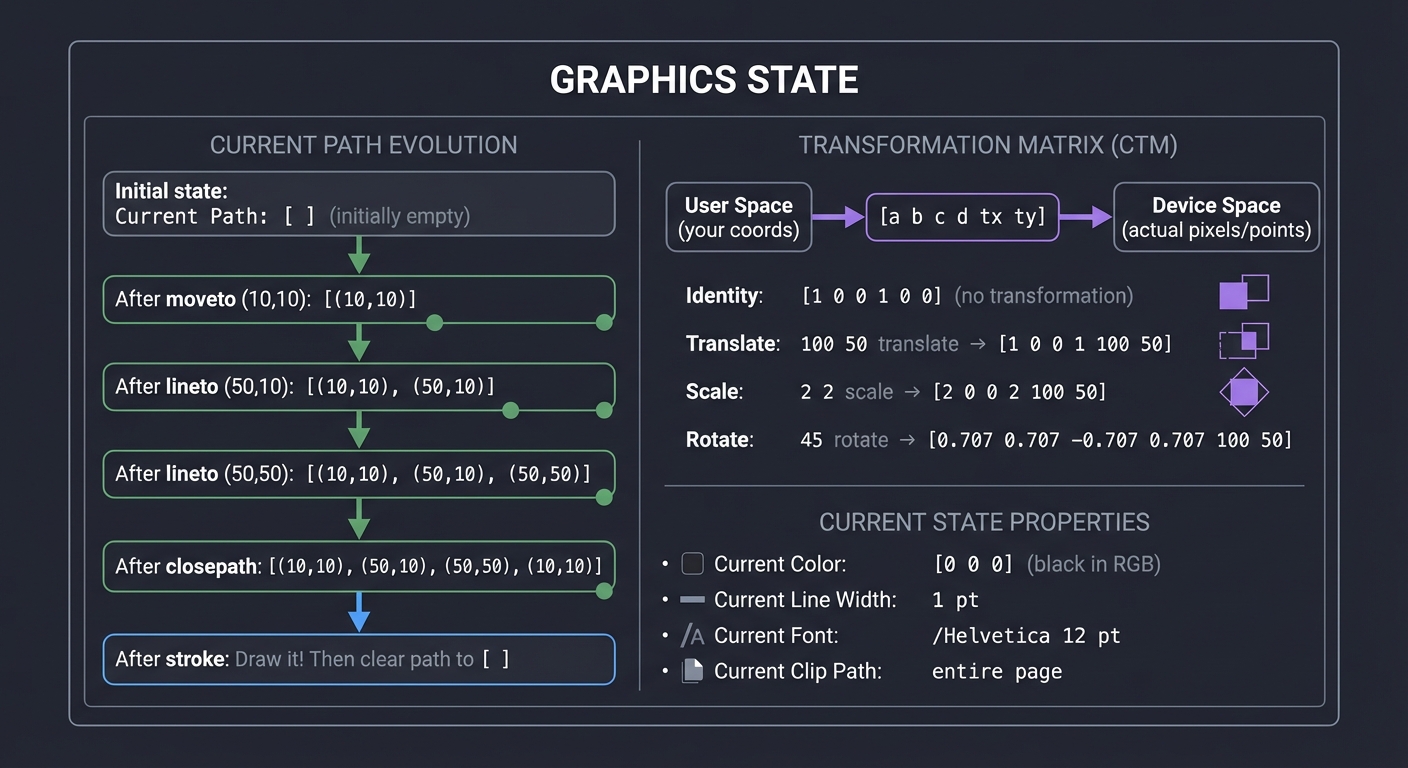
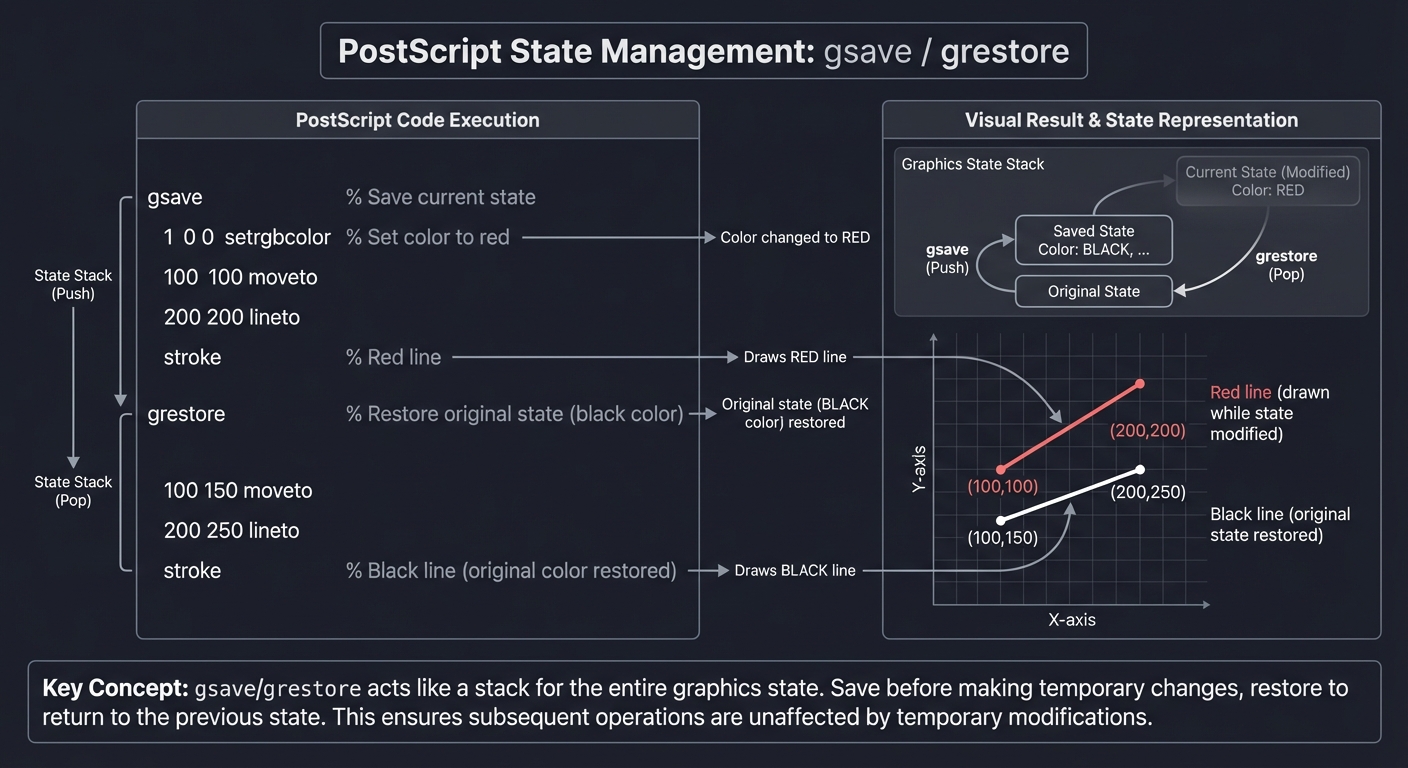
Critical insight: You can save/restore the entire state with gsave/grestore:
gsave                 % Save current state
  1 0 0 setrgbcolor   % Set color to red
  100 100 moveto
  200 200 lineto
  stroke              % Red line
grestore              % Restore original state (black color)

100 150 moveto
200 250 lineto
stroke                % Black line (original color restored)
From PostScript (Executable) to PDF (Static)
The fundamental difference:
| Aspect | PostScript | |
|---|---|---|
| Nature | Programming language (Turing-complete) | Data format (not executable) |
| Execution | Interpreted at runtime | Parsed and rendered |
| Page Order | Can compute pages dynamically | Pages are numbered objects |
| File Structure | Sequential commands | Random-access object graph |
| Loops | for, repeat, loop |
Not allowed |
| Conditionals | if, ifelse |
Not allowed |
| Use Case | Generate complex documents programmatically | Distribute final documents reliably |
PostScript example (dynamic):
% Draw 10 concentric circles
0 10 90 {          % Loop from 0 to 90, step 10
  0 0 moveto       % Start at center
  0 360 arc        % Draw circle with radius from loop
  stroke
} for
PDF equivalent (static):
% You must explicitly specify each circle:
0 0 m  0 0 10 0 360 arc  S    % Circle radius 10
0 0 m  0 0 20 0 360 arc  S    % Circle radius 20
0 0 m  0 0 30 0 360 arc  S    % Circle radius 30
% ... repeat for each circle
PDF’s Object Structure: The Building Blocks
PDF files are collections of numbered objects:
┌─────────────────────────────────────────────────────────────────┐
│                        PDF FILE STRUCTURE                        │
├─────────────────────────────────────────────────────────────────┤
│                                                                  │
│  %PDF-1.7                           ← Header (version)          │
│                                                                  │
│  1 0 obj                            ← Object 1 (Catalog)        │
│    << /Type /Catalog                                            │
│       /Pages 2 0 R >>               ← Reference to object 2     │
│  endobj                                                          │
│                                                                  │
│  2 0 obj                            ← Object 2 (Pages)          │
│    << /Type /Pages                                              │
│       /Kids [3 0 R]                 ← Array of page objects     │
│       /Count 1 >>                                               │
│  endobj                                                          │
│                                                                  │
│  3 0 obj                            ← Object 3 (Page)           │
│    << /Type /Page                                               │
│       /Parent 2 0 R                                             │
│       /MediaBox [0 0 612 792]       ← US Letter size            │
│       /Contents 4 0 R >>            ← Reference to content      │
│  endobj                                                          │
│                                                                  │
│  4 0 obj                            ← Object 4 (Content Stream) │
│    << /Length 44 >>                                             │
│    stream                                                        │
│    0 0 moveto                       ← PostScript-like operators │
│    612 0 lineto                                                 │
│    stroke                                                        │
│    endstream                                                     │
│  endobj                                                          │
│                                                                  │
│  xref                               ← Cross-reference table     │
│  0 5                                                            │
│  0000000000 65535 f                                             │
│  0000000015 00000 n                 ← Byte offset of object 1  │
│  0000000074 00000 n                 ← Byte offset of object 2  │
│  0000000133 00000 n                 ← Byte offset of object 3  │
│  0000000250 00000 n                 ← Byte offset of object 4  │
│                                                                  │
│  trailer                            ← File trailer              │
│    << /Size 5                                                   │
│       /Root 1 0 R >>                                            │
│  startxref                                                       │
│  379                                ← Byte offset of xref       │
│  %%EOF                                                          │
└─────────────────────────────────────────────────────────────────┘
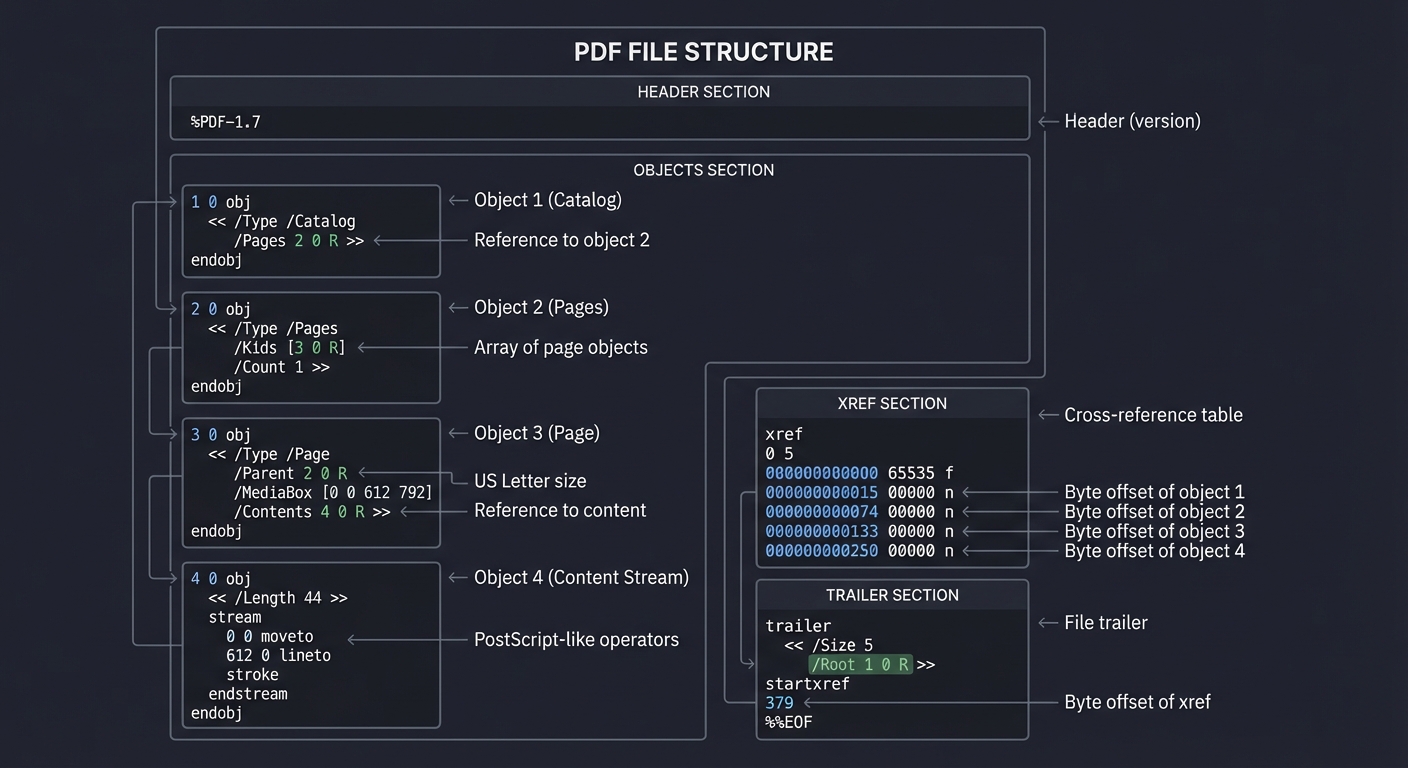
Key insight: The xref table makes PDF random access—you can jump directly to any page without reading the entire file. PostScript requires sequential interpretation.
Why Ghostscript Exists: The Transformation Engine
Ghostscript solves multiple problems:
- PostScript Rendering: Execute
.psfiles and render to screen/printer/image - PostScript to PDF: Convert executable PostScript to static PDF (
ps2pdf) - PDF Rendering: Render PDF files to images or printers
- Format Conversion: PDF ↔ PostScript ↔ PNG/JPEG/etc.
Ghostscript’s architecture:
┌─────────────────────────────────────────────────────────────────┐
│                         GHOSTSCRIPT                              │
├─────────────────────────────────────────────────────────────────┤
│                                                                  │
│  ┌────────────────────────────────────────────────────┐         │
│  │         INPUT LAYER                                │         │
│  │                                                     │         │
│  │  PostScript Interpreter  │  PDF Interpreter (new!) │         │
│  │  (PS + C code)           │  (pure C, fast)         │         │
│  └──────────────────────┬───────────────┬─────────────┘         │
│                         │               │                        │
│                         └───────┬───────┘                        │
│                                 ▼                                │
│  ┌────────────────────────────────────────────────────┐         │
│  │         GRAPHICS LIBRARY                           │         │
│  │                                                     │         │
│  │  • Path construction                               │         │
│  │  • Transformation matrix ops                       │         │
│  │  • Color space management                          │         │
│  │  • Font rendering                                  │         │
│  │  • Image processing                                │         │
│  └──────────────────────┬─────────────────────────────┘         │
│                         ▼                                        │
│  ┌────────────────────────────────────────────────────┐         │
│  │         OUTPUT DEVICES                             │         │
│  │                                                     │         │
│  │  pdfwrite  │  pngalpha  │  jpeg  │  pswrite  │... │         │
│  │  (PDF)     │  (PNG)     │ (JPEG) │  (PS)     │    │         │
│  └────────────────────────────────────────────────────┘         │
│                         │                                        │
└─────────────────────────┼────────────────────────────────────────┘
                          ▼
                    Output File
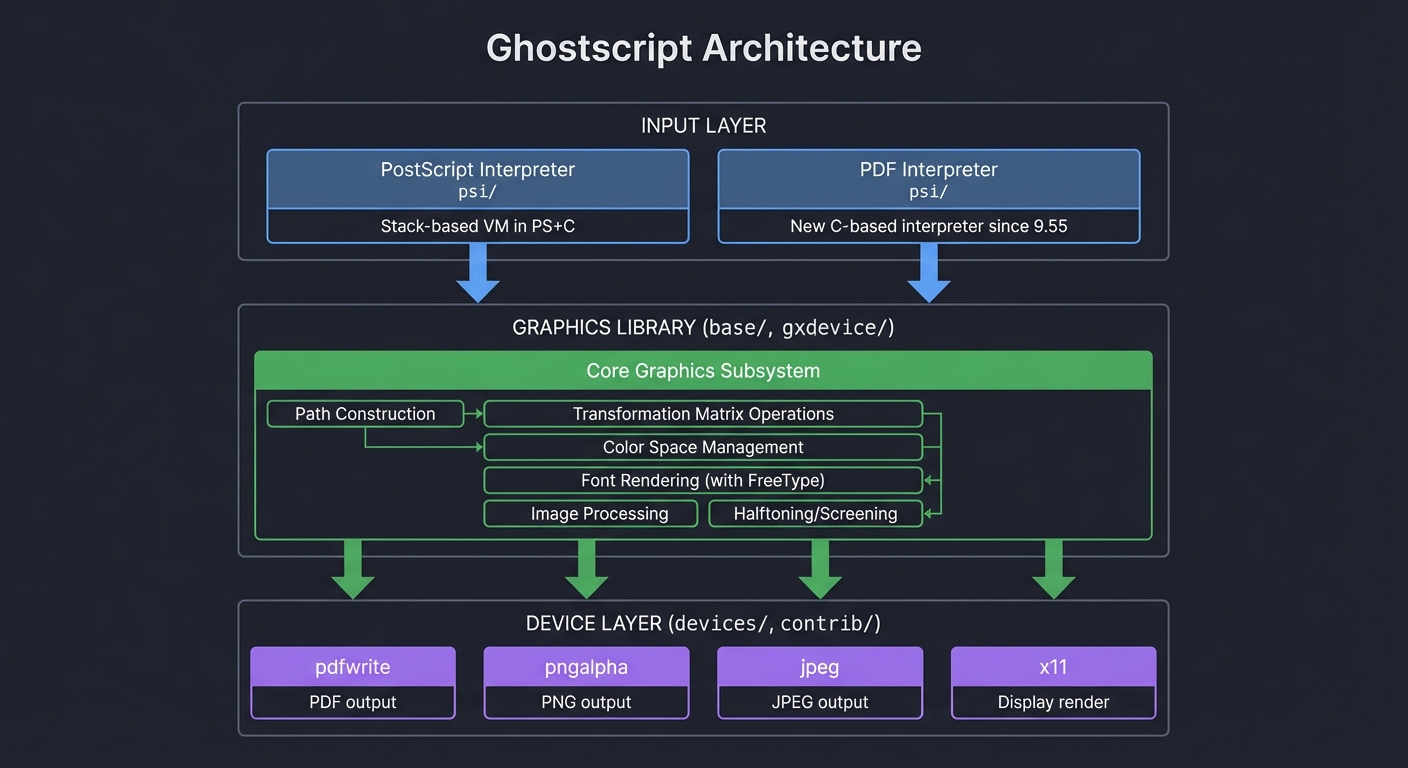
How ps2pdf works internally:
- Parse PostScript program
- Execute it (run the stack-based VM)
- Graphics library captures all drawing operations
pdfwritedevice converts operations to PDF objects- Write PDF file with xref table
Historical Context: Why These Formats Won
1984: PostScript invented
- Problem: Every printer manufacturer had their own protocol
- Solution: Universal programming language for printing
- Impact: Desktop publishing revolution (Macintosh + LaserWriter)
1993: PDF invented
- Problem: PostScript is complex, files are large, can’t random-access pages
- Solution: “PostScript without the programming” + compression + xref table
- Impact: Universal document exchange (replaced fax, standardized forms)
1988-present: Ghostscript
- Problem: PostScript interpreters were proprietary and expensive
- Solution: Open-source implementation
- Impact: Enabled Linux printing, free PDF generation, document conversion
2021: Ghostscript 9.55 - Major rewrite
- Problem: PDF interpreter written in PostScript was slow and had security issues
- Solution: Rewrite PDF interpreter in pure C
- Impact: 2-3x faster PDF rendering, better security
Core Concept Analysis
To truly understand PDF generation from PostScript via Ghostscript, you need to grasp:
| Concept | What It Is |
|---|---|
| PostScript | A Turing-complete stack-based programming language for describing pages (text, graphics, images) |
| A document format derived from PostScript but with a fixed structure (not a programming language) | |
| Ghostscript | An interpreter that executes PostScript programs and can output to various formats including PDF |
| Page Description | How vector graphics, fonts, and images are mathematically described |
| Rendering Pipeline | How abstract descriptions become rasterized pixels or structured documents |
The key insight: PostScript is a program that draws; PDF is a static snapshot of what was drawn.
Concept Summary Table
| Concept Cluster | What You Need to Internalize |
|---|---|
| Stack-based execution | PostScript is a stack machine. Every operation pops arguments from the stack and pushes results. Understanding this is understanding how PostScript executes. |
| Graphics state machine | Drawing operations modify state (current path, transformation matrix, color, font). gsave/grestore save/restore entire state. This is the core of how graphics work. |
| Transformation matrix (CTM) | All coordinates pass through a 2D transformation matrix. Understanding translate, scale, rotate, concat is understanding how coordinate systems work. |
| PostScript as language | PostScript is Turing-complete with procedures, conditionals, loops. It’s not just “data”—it’s executable code that generates graphics. |
| PDF object graph | PDF is a collection of numbered objects with references between them. The xref table enables random access. This structure makes PDFs fast to navigate. |
| Content streams | PDF pages contain content streams—sequences of PostScript-like operators. The operators are almost identical to PostScript but in a static, non-executable context. |
| PS→PDF transformation | Converting PostScript to PDF means executing the program, capturing all drawing operations, and serializing them as PDF objects. Ghostscript’s pdfwrite device does this. |
| Document structure vs rendering | PostScript mixes computation and rendering. PDF separates structure (objects, pages) from rendering (content streams). This is why PDF is better for distribution. |
| Binary file parsing | PDF files are binary with ASCII markers. Understanding byte offsets, xref tables, and stream compression is essential for PDF manipulation. |
| Device abstraction | Ghostscript’s architecture separates interpreters (PS/PDF) from graphics library from output devices. This design enables supporting many output formats from one codebase. |
Deep Dive Reading by Concept
This section maps each concept to specific book chapters. Read these before or alongside projects to build strong mental models.
PostScript Language Fundamentals
| Concept | Book & Chapter |
|---|---|
| Stack-based execution model | Language Implementation Patterns by Terence Parr — Ch. 3: “Enhanced Tree Walkers” (section on stack-based execution) |
| PostScript syntax and operators | PostScript Language Tutorial and Cookbook (Blue Book) by Adobe — Ch. 1-3: “A First Session”, “Types, Operators, and the Stack” |
| Reverse Polish Notation | The Art of Computer Programming, Volume 1 by Donald Knuth — Section 2.2.1: “Stacks” |
| Implementing interpreters | Language Implementation Patterns by Terence Parr — Ch. 9: “Bytecode Assemblers and Interpreters” |
| Stack machines fundamentals | Low-Level Programming by Igor Zhirkov — Ch. 7: “General-Purpose Computation on Stack” |
Graphics and Rendering
| Concept | Book & Chapter |
|---|---|
| 2D graphics fundamentals | Computer Graphics from Scratch by Gabriel Gambetta — Ch. 1-3: “Lines”, “Filled Triangles”, “Shaded Triangles” |
| Transformation matrices | Computer Graphics from Scratch by Gabriel Gambetta — Ch. 4: “Perspective Projection” (2D matrix operations) |
| Vector graphics rendering | Computer Graphics from Scratch by Gabriel Gambetta — Ch. 1: “Introductory Concepts” |
| Coordinate systems | Mathematical Illustrations by Bill Casselman — Ch. 4: “Coordinates and conditionals in PostScript” |
| Path construction | PostScript Language Reference Manual by Adobe — Ch. 4: “Graphics” (path operators) |
PDF Structure and Parsing
| Concept | Book & Chapter |
|---|---|
| PDF file structure | Developing with PDF by Leonard Rosenthol — Ch. 1: “PDF Syntax” |
| Binary file parsing | Practical Binary Analysis by Dennis Andriesse — Ch. 2: “The ELF Format” (general principles apply to PDF) |
| Object graph structures | Domain Specific Languages by Martin Fowler — Ch. 26: “Serialization” |
| Cross-reference tables | PDF Reference Manual 1.7 by Adobe — Section 3.4: “File Structure” |
| Stream compression | Computer Systems: A Programmer’s Perspective by Bryant & O’Hallaron — Ch. 6: “The Memory Hierarchy” (compression algorithms) |
Document Processing Architecture
| Concept | Book & Chapter |
|---|---|
| Pipeline architecture | Language Implementation Patterns by Terence Parr — Ch. 2: “Building Recursive-Descent Parsers” |
| Device abstraction layers | Working Effectively with Legacy Code by Michael Feathers — Ch. 25: “Dependency-Breaking Techniques” |
| Code generation | Engineering a Compiler by Cooper & Torczon — Ch. 7: “Code Generation” |
| Interpreter design | Language Implementation Patterns by Terence Parr — Ch. 3: “Enhanced Tree Walkers” |
| System architecture | Software Architecture in Practice by Bass, Clements & Kazman — Ch. 13: “Pipe-and-Filter Architecture” |
Language Implementation
| Concept | Book & Chapter |
|---|---|
| Virtual machines | Language Implementation Patterns by Terence Parr — Ch. 9: “Bytecode Assemblers and Interpreters” |
| Symbol tables and scoping | Engineering a Compiler by Cooper & Torczon — Ch. 5: “Symbol Tables” |
| Lexing and parsing | Language Implementation Patterns by Terence Parr — Ch. 2: “Building Recursive-Descent Parsers” |
| Domain-specific languages | Domain Specific Languages by Martin Fowler — Ch. 1-3: “An Introductory Example”, “Using Domain-Specific Languages” |
Systems Programming Foundations
| Concept | Book & Chapter |
|---|---|
| C systems programming | 21st Century C by Ben Klemens — Ch. 6: “Your Pal the Pointer” |
| Working with large codebases | Working Effectively with Legacy Code by Michael Feathers — Ch. 16: “I Don’t Understand the Code Well Enough to Change It” |
| Data structures for graphics | C Interfaces and Implementations by David Hanson — Ch. 11: “Sequences” & Ch. 13: “Strings” |
| Memory management | The C Programming Language by Kernighan & Ritchie — Ch. 8: “The UNIX System Interface” |
Essential Reading Order
For maximum comprehension, read in this sequence:
- PostScript Foundations (Week 1):
- PostScript Language Tutorial and Cookbook Ch. 1-3 (understand the language)
- Language Implementation Patterns Ch. 3 (understand stack-based execution)
- Computer Graphics from Scratch Ch. 1-3 (understand 2D graphics)
- PDF Structure (Week 2):
- Developing with PDF Ch. 1 (understand PDF file format)
- PDF Reference Manual 1.7 Section 3.4 (understand xref tables)
- Practical Binary Analysis Ch. 2 (general binary parsing principles)
- Transformation Pipeline (Week 3):
- Engineering a Compiler Ch. 7 (code generation concepts)
- Language Implementation Patterns Ch. 9 (interpreter implementation)
- Domain Specific Languages Ch. 1-3 (DSL design principles)
- Production Implementation (Week 4+):
- Working Effectively with Legacy Code Ch. 16 (reading Ghostscript source)
- Software Architecture in Practice Ch. 13 (pipeline architecture)
- 21st Century C Ch. 6 (C programming for systems)
Project 1: PostScript Subset Interpreter
- File: POSTSCRIPT_PDF_GHOSTSCRIPT_LEARNING_PROJECTS.md
- Programming Language: C
- Coolness Level: Level 3: Genuinely Clever
- Business Potential: 3. The “Service & Support” Model
- Difficulty: Level 3: Advanced
- Knowledge Area: Interpreters / Graphics
- Software or Tool: PostScript
- Main Book: “PostScript Language Tutorial and Cookbook” (Blue Book) by Adobe
What you’ll build: A minimal interpreter that executes a subset of PostScript (stack operations, basic drawing commands) and outputs to SVG or PNG.
Why it teaches PostScript→PDF: You’ll understand that PostScript is executed to produce graphics. Every moveto, lineto, stroke is an instruction your interpreter runs. This is exactly what Ghostscript does before converting to PDF.
Core challenges you’ll face:
- Implementing a stack-based virtual machine (maps to understanding PostScript’s execution model)
- Parsing and tokenizing PostScript syntax (maps to language processing)
- Tracking graphics state (current point, transformation matrix, color) (maps to how PDF stores page content)
- Converting drawing operations to output format (maps to the PS→PDF conversion process)
Difficulty: Intermediate Time estimate: 2-3 weeks Prerequisites: Basic parsing concepts, understanding of coordinate systems
Real world outcome:
- You’ll be able to feed simple
.psfiles to your interpreter and see rendered output (PNG/SVG) - You can visualize the execution step-by-step, showing the stack state and drawing operations
Key Concepts:
- Stack-based VMs: “The Art of Computer Programming, Vol 1” Ch. 2.2.1 - Donald Knuth (stack fundamentals)
- PostScript Language: “PostScript Language Tutorial and Cookbook” (Blue Book) - Adobe (free PDF online)
- Graphics State Machines: “Computer Graphics from Scratch” Ch. 1-3 - Gabriel Gambetta
Learning milestones:
- Execute basic stack operations (
push,pop,dup,exch) - understand PS is just a stack machine - Implement path construction (
moveto,lineto,curveto,stroke,fill) - understand how shapes are described - Handle coordinate transformations (
translate,scale,rotate) - understand the transformation matrix - Output to SVG/PNG - see PostScript execution produce real graphics
Real World Outcome
When you complete this project, you’ll have a working PostScript interpreter that you can actually use in production. Here’s exactly what you’ll see and be able to do:
Running Your Interpreter: The Complete Experience
Basic execution with verbose output:
$ ./ps_interpreter simple_shape.ps output.svg

PostScript Subset Interpreter v1.0
================================
Loading: simple_shape.ps
File size: 147 bytes
Parsing tokens... 74 tokens found

Executing PostScript program...

Stack trace (top = rightmost):
  Step 1:  newpath           → Stack: []
  Step 2:  100               → Stack: [100]
  Step 3:  100               → Stack: [100, 100]
  Step 4:  moveto            → Stack: []
  Step 5:  300               → Stack: [300]
  Step 6:  100               → Stack: [300, 100]
  Step 7:  lineto            → Stack: []
  Step 8:  200               → Stack: [200]
  Step 9:  300               → Stack: [200, 300]
  Step 10: lineto            → Stack: []
  Step 11: closepath         → Stack: []
  Step 12: 0.5               → Stack: [0.5]
  Step 13: setgray           → Stack: []
  Step 14: fill              → Stack: []

Execution complete. Total operations: 14

Graphics State Summary:
  - Path segments: 4 (3 lines + 1 closepath)
  - Drawing operations: 1 fill
  - Current point: (100.0, 100.0)
  - Current color: RGB(0.5, 0.5, 0.5) [gray]
  - Transformation matrix: [1.000 0.000 0.000 1.000 0.000 0.000]
  - Clipping path: none (full page)

Output written to: output.svg (842 bytes)
Rendering time: 0.003s
The input PostScript file (simple_shape.ps):
%!PS-Adobe-3.0
% Draw a simple triangle
newpath
100 100 moveto
300 100 lineto
200 300 lineto
closepath
0.5 setgray
fill
showpage
What You Can Actually Visualize
1. SVG Output - See Your Graphics Rendered
Open output.svg in any browser (Chrome, Firefox, Safari) and see:
- A filled gray triangle with vertices at (100,100), (300,100), and (200,300)
- Coordinates in PostScript’s coordinate system (origin at bottom-left)
- Exact color matching (0.5 gray = RGB(127, 127, 127))
The SVG file contains:
<?xml version="1.0" encoding="UTF-8"?>
<svg xmlns="http://www.w3.org/2000/svg" width="612" height="792" viewBox="0 0 612 792">
  <!-- PostScript coordinate system: Y grows upward -->
  <path d="M 100 692 L 300 692 L 200 492 Z"
        fill="rgb(127, 127, 127)"
        stroke="none"/>
</svg>
Note: Y-coordinate flipped because SVG has origin at top-left (792 - 100 = 692)
2. Step-by-step Execution Trace - Watch the Stack Evolve
Add --trace flag to see every operation in detail:
$ ./ps_interpreter --trace triangle.ps output.svg

=== PostScript Execution Trace ===

[Token 1] 'newpath'
  Type: operator
  Stack before:  []
  Stack after:   []
  Graphics state change:
    - Current path cleared
    - Path segments: 0

[Token 2] '100'
  Type: number (integer)
  Stack before:  []
  Stack after:   [100]
  Graphics state: no change

[Token 3] '100'
  Type: number (integer)
  Stack before:  [100]
  Stack after:   [100, 100]
  Graphics state: no change

[Token 4] 'moveto'
  Type: operator
  Pops: y=100, x=100
  Stack before:  [100, 100]
  Stack after:   []
  Graphics state change:
    - Current point: (100.0, 100.0)
    - Path: M 100.0 100.0
    - Path segments: 1

[Token 5] '300'
  Type: number (integer)
  Stack before:  []
  Stack after:   [300]
  Graphics state: no change

[Token 6] '100'
  Type: number (integer)
  Stack before:  [300]
  Stack after:   [300, 100]
  Graphics state: no change

[Token 7] 'lineto'
  Type: operator
  Pops: y=100, x=300
  Stack before:  [300, 100]
  Stack after:   []
  Graphics state change:
    - Current point: (300.0, 100.0)
    - Path: M 100.0 100.0 L 300.0 100.0
    - Path segments: 2

[Token 8] '200'
  Type: number (integer)
  Stack before:  []
  Stack after:   [200]
  Graphics state: no change

[Token 9] '300'
  Type: number (integer)
  Stack before:  [200]
  Stack after:   [200, 300]
  Graphics state: no change

[Token 10] 'lineto'
  Type: operator
  Pops: y=300, x=200
  Stack before:  [200, 300]
  Stack after:   []
  Graphics state change:
    - Current point: (200.0, 300.0)
    - Path: M 100.0 100.0 L 300.0 100.0 L 200.0 300.0
    - Path segments: 3

[Token 11] 'closepath'
  Type: operator
  Stack before:  []
  Stack after:   []
  Graphics state change:
    - Path closed: adds line from (200.0, 300.0) to (100.0, 100.0)
    - Path: M 100.0 100.0 L 300.0 100.0 L 200.0 300.0 Z
    - Path segments: 4

[Token 12] '0.5'
  Type: number (real)
  Stack before:  []
  Stack after:   [0.5]
  Graphics state: no change

[Token 13] 'setgray'
  Type: operator
  Pops: gray=0.5
  Stack before:  [0.5]
  Stack after:   []
  Graphics state change:
    - Color: RGB(0.5, 0.5, 0.5)
    - Previous color: RGB(0.0, 0.0, 0.0)

[Token 14] 'fill'
  Type: operator
  Stack before:  []
  Stack after:   []
  Graphics state change:
    - Filled path with current color RGB(0.5, 0.5, 0.5)
    - Current path CLEARED (important!)
    - Path segments: 0

=== Execution Complete ===
Total tokens: 14
Final stack depth: 0 (stack is empty - correct!)
3. PNG Rendering - Actual Rasterized Images
Use Cairo or libpng to output actual bitmap images:
$ ./ps_interpreter --format png --width 500 --height 500 triangle.ps triangle.png

Rendering to PNG...
  Canvas size: 500x500 pixels
  DPI: 72 (default)
  Background: white
  Anti-aliasing: enabled

Rasterizing path...
  Triangle vertices: (100,100), (300,100), (200,300)
  Fill color: gray (0.5)

Writing PNG...
Done. File size: 3,247 bytes
You can now open triangle.png in any image viewer.
4. Interactive REPL Mode - Experiment Live
Run your interpreter interactively to test operators:
$ ./ps_interpreter --repl

PostScript Subset Interpreter v1.0 - REPL Mode
Type 'quit' to exit, 'stack' to show stack, 'gstate' to show graphics state

PS> 10 20 add
Stack: [30]

PS> dup
Stack: [30, 30]

PS> mul
Stack: [900]

PS> stack
Operand stack (top = rightmost):
  [0] 900 (integer)
Stack depth: 1

PS> pop
Stack: []

PS> 100 100 moveto
Graphics state updated.
  Current point: (100, 100)
  Path: M 100 100

PS> 200 200 lineto
Graphics state updated.
  Current point: (200, 200)
  Path: M 100 100 L 200 200

PS> stroke
Drawing operation executed: STROKE
  Path stroked with current line width (1.0)
  Current path cleared.

PS> gstate
Graphics State:
  Current point: undefined (no current path)
  Transformation matrix: [1.000 0.000 0.000 1.000 0.000 0.000]
  Current color: RGB(0.000, 0.000, 0.000) [black]
  Line width: 1.0
  Line cap: butt
  Line join: miter
  Path: empty

PS> quit
Goodbye!
What Makes This Impressive
You’re building what professional tools use:
- Ghostscript uses this exact execution model
- Adobe’s RIP (Raster Image Processor) in printers uses this model
- PDF renderers (Poppler, MuPDF) use similar state machines
You can process real PostScript files:
# Generate a PS file from any Linux/macOS application
$ echo "Testing PostScript" | enscript -B -o test.ps

# Run through your interpreter
$ ./ps_interpreter test.ps test.svg

# Compare with Ghostscript's output
$ gs -sDEVICE=svg -o ghostscript_output.svg test.ps

# Visual comparison (both should look identical)
$ open test.svg ghostscript_output.svg
Visualize how PDF converters work:
# Your interpreter shows what ps2pdf sees internally
$ ./ps_interpreter --trace document.ps

# You'll see the exact sequence of operations that become PDF content streams
# This is what Ghostscript does when you run: ps2pdf document.ps
Testing with Complex PostScript
Test with transformations:
$ cat > transform_test.ps << 'EOF'
%!PS-Adobe-3.0
gsave
  % Original square
  newpath
  0 0 moveto
  100 0 lineto
  100 100 lineto
  0 100 lineto
  closepath
  0 setgray
  stroke
grestore

gsave
  % Translate and scale
  150 150 translate
  2 2 scale
  newpath
  0 0 moveto
  100 0 lineto
  100 100 lineto
  0 100 lineto
  closepath
  0.5 setgray
  fill
grestore

showpage
EOF

$ ./ps_interpreter --trace transform_test.ps transform.svg
You’ll see:
- How
gsave/grestoresave and restore the graphics state - How transformation matrices compose
- Why the second square appears larger and offset
Understanding the Graphics State Machine
After completing this project, you’ll viscerally understand:
1. Stack-based execution is simple but powerful:
- No operator precedence rules
- Natural for building graphics incrementally
- Easy to implement (just push/pop data structures)
2. Graphics state is separate from operand stack:
- Operand stack: temporary calculation values
- Graphics state: current point, color, transformation matrix, path
- This separation is why
strokecan clear the path but not affect the stack
3. Path construction vs. path painting:
moveto,lineto,curveto,closepath→ build the pathstroke,fill→ paint the path (and clear it!)- You can build complex paths incrementally, then paint once
4. Why PDF is “frozen PostScript”:
- PostScript:
for loop { draw circle }→ executes at rendering time - PDF: must pre-compute and store each circle as static data
- Your interpreter shows why PDF files are larger but faster to display
The “Aha!” Moment
When you run this:
$ ./ps_interpreter --trace
PS> 5 3 add 2 mul
You’ll see:
[5] → [5, 3] → [8] → [8, 2] → [16]
And realize: This is exactly how Python, Java, and all stack-based VMs work internally. You’ve built a real virtual machine.
The Core Question You’re Answering
“What does it mean for a programming language to ‘draw’? How can code become graphics?”
This is profound because most developers think of programs as producing text output or manipulating data. PostScript inverts this: the language itself IS the graphics. There’s no separation between “code” and “image” - executing the code creates the image.
When you write:
100 100 moveto
200 200 lineto
stroke
You’re not describing a line. You’re not telling some other program to draw a line. You’re executing instructions that move a virtual pen and paint pixels. The language runtime maintains a graphics state machine.
This mental model is critical because:
- Every graphics API works this way: OpenGL, Canvas, Cairo, DirectX - they’re all state machines influenced by PostScript
- PDF is frozen PostScript: Understanding execution → static representation is how you understand PS→PDF conversion
- Interpreters aren’t magic: You’ll see that “running code” just means “updating state based on instructions”
By the end of this project, you’ll internalize: Graphics are state + operations, not static data.
Concepts You Must Understand First
Stop and research these before coding:
- Stack-Based Execution Model
- What does “stack-based” mean for a programming language?
- How is this different from register-based VMs (like the JVM’s evolution)?
- Why did PostScript choose a stack model? (Hint: 1982 hardware constraints)
- What operations must every stack-based VM support? (push, pop, dup, exch, roll)
- Book Reference: “Low-Level Programming” by Igor Zhirkov — Ch. 9: “Stack Machine” sections
- Online Reference: “Virtual Machine Showdown: Stack Versus Registers” by Yunhe Shi (academic paper)
- Reverse Polish Notation (RPN)
- Why does PostScript use
2 3 addinstead ofadd(2, 3)? - How does RPN eliminate the need for parentheses?
- What’s the relationship between RPN and stack machines?
- Practice: Convert
(5 + 3) * 2to RPN:5 3 add 2 mul - Book Reference: “The Art of Computer Programming, Vol 1” by Donald Knuth — §2.2.1 (Stack usage in expression evaluation)
- Why does PostScript use
- Graphics State Machine
- What is “graphics state”? (Current point, transformation matrix, color, line width, etc.)
- Why must rendering systems maintain state?
- What operations modify state vs. query state vs. use state?
- How does
gsave/grestorework? (Stack of graphics states!) - Book Reference: “Computer Graphics from Scratch” by Gabriel Gambetta — Ch. 1-2 (Graphics pipeline fundamentals)
- Coordinate Systems and Transformations
- What is a transformation matrix?
- How do
translate,scale, androtatecompose? - Why is matrix multiplication order critical? (
translate(10,0)thenscale(2)≠scale(2)thentranslate(10,0)) - What does the identity matrix
[1 0 0 1 0 0]mean in PostScript? - Book Reference: “Computer Graphics from Scratch” by Gabriel Gambetta — Ch. 4: “Coordinate Systems and Transformations”
- Path Construction vs. Path Painting
- What’s the difference between building a path and rendering it?
- Why separate
moveto/lineto(construction) fromstroke/fill(painting)? - What happens to the current path after
stroke? (It’s cleared!) - How do subpaths work? (
movetowithoutclosepath) - Book Reference: “PostScript Language Tutorial and Cookbook” (Blue Book) — Adobe Systems, Ch. 3
- Tokenization and Parsing
- How do you split PostScript into tokens? (Whitespace, delimiters like
{}[]) - What’s the difference between executable names (
moveto) and literal names (/moveto)? - How are strings delimited? (
(Hello World)) - What are procedures? (
{ 100 100 moveto 200 200 lineto stroke }) - Book Reference: “Engineering a Compiler” by Cooper & Torczon — Ch. 2: “Lexical Analysis”
- How do you split PostScript into tokens? (Whitespace, delimiters like
- Vector Graphics vs. Raster Graphics
- What does it mean to describe graphics mathematically?
- How do you convert a vector path to pixels? (Rasterization)
- Why is SVG output easier than PNG output for this project?
- What is antialiasing and when does it matter?
- Book Reference: “Computer Graphics from Scratch” by Gabriel Gambetta — Ch. 6: “Rasterization”
Self-assessment questions:
- Can you implement a stack data structure with push/pop/dup/exch in C?
- Can you parse
3 4 add 2 mulinto tokens and evaluate it using a stack? - Do you know what a 2D transformation matrix looks like?
- Have you written a tokenizer/lexer before?
If you answered “no” to any of these, stop and study those concepts first. The project will be frustrating without these foundations.
Questions to Guide Your Design
Before implementing, think through these:
- Interpreter Architecture
- How will you represent the data stack? (array? linked list?)
- What types can be on the stack? (numbers, strings, arrays, procedures, names)
- How will you map PostScript names to C functions? (function pointer table? hash map?)
- Should you use a dictionary stack for variable lookups?
- Token Processing
- Will you tokenize all at once or stream tokens?
- How do you handle comments? (
%to end-of-line) - How do you distinguish numbers from names? (regex? character checks?)
- What about nested procedures? (
{ { inner } outer })
- Graphics State Management
- How do you represent the current path? (array of points? linked list of segments?)
- Where do you store current color, line width, transformation matrix?
- How will you implement
gsave/grestore? (stack of structs?) - What’s the default graphics state when your interpreter starts?
- Rendering Backend
- Will you output to SVG (text-based, easy) or PNG (binary, requires library)?
- For SVG: How do you convert PostScript paths to SVG path syntax?
- For PNG: Which library? (Cairo? libpng? stb_image_write?)
- How do you handle coordinate system differences? (PostScript: origin bottom-left, SVG: origin top-left)
- Operator Implementation Priority
- Which operators are essential for a minimal demo? (
moveto,lineto,stroke,fill) - Which operators can you defer? (
arc,curveto,clip,image) - How will you handle unimplemented operators gracefully?
- Which operators are essential for a minimal demo? (
- Error Handling
- What happens if the stack underflows? (
3 addwith empty stack) - What if an operator gets wrong types? (
movetoneeds two numbers) - Should you have a “verbose mode” for debugging?
- What happens if the stack underflows? (
- Testing Strategy
- How will you test each operator in isolation?
- What simple PostScript programs will verify correctness?
- Can you generate reference outputs from Ghostscript for comparison?
Key insight to internalize: Your interpreter is a loop: read token → execute operator → update state → repeat. Everything else is just details of “how to execute” and “what state to track.”
Thinking Exercise
Build the Mental Model on Paper
Before writing a single line of code, do this exercise with pen and paper:
% Simple PostScript program
100 100 moveto
200 100 lineto
200 200 lineto
100 200 lineto
closepath
0.5 setgray
fill
Trace the execution step-by-step:
Create a table like this and fill it out manually:
| Step | Token | Stack Before | Action | Stack After | Graphics State Changes |
|---|---|---|---|---|---|
| 1 | 100 |
[] |
Push 100 | [100] |
None |
| 2 | 100 |
[100] |
Push 100 | [100, 100] |
None |
| 3 | moveto |
[100, 100] |
Pop y, pop x, move to (x,y) | [] |
Current point = (100, 100), Path = M 100 100 |
| 4 | 200 |
[] |
Push 200 | [200] |
None |
| 5 | 100 |
[200] |
Push 100 | [200, 100] |
None |
| 6 | lineto |
[200, 100] |
Pop y, pop x, line to (x,y) | [] |
Path += L 200 100 |
| … | … | … | … | … | … |
Questions while tracing:
- After
closepath, what does the path look like? (Draw it!) - What’s on the stack before
fillexecutes? - What happens to the path after
fill? (Hint: it’s cleared) - If you added
gsavebeforefillandgrestoreafter, how would that change things?
Draw the graphics state:
Sketch a box showing:
Current Graphics State:
┌─────────────────────────────┐
│ Current Point: (100, 200)   │
│ Current Path: M 100 100     │
│               L 200 100     │
│               L 200 200     │
│               L 100 200     │
│               Z             │
│ Color: 0.5 (gray)           │
│ Transform Matrix: [1 0 0 1 0 0] │
└─────────────────────────────┘
Now simulate a transformation:
gsave
  2 2 scale
  50 50 moveto
  100 100 lineto
  stroke
grestore
Trace this and answer:
- What are the actual coordinates rendered? (After applying
scale) - After
grestore, what’s the transformation matrix? (Back to identity) - Why does this matter for understanding PDF? (PDF has the same save/restore model)
The aha moment:
When you manually execute PostScript on paper, you’ll realize: you’re doing exactly what your C program will do. The interpreter is just mechanizing what you’re doing manually.
The Interview Questions They’ll Ask
When you’ve completed this project, you should be able to confidently answer:
Conceptual Questions:
- “What is PostScript, and why is it Turing-complete?”
- Answer should include: Stack-based language, has loops/conditionals, can compute anything, but designed for graphics
- “Explain how a stack-based language executes
3 4 add 2 mul”- Trace: Push 3 → Push 4 → Pop 4, pop 3, push 7 → Push 2 → Pop 2, pop 7, push 14
- “What’s the difference between building a path and painting a path?”
- Answer:
moveto/linetoconstruct geometry,stroke/fillrasterize it with current color/width
- Answer:
- “Why does PostScript use Reverse Polish Notation?”
- Answer: Natural for stack machines, no need for operator precedence, simpler parser
- “What is the graphics state, and why must it be saved/restored?”
- Answer: Current color, transformation, clip path, etc. Save/restore enables local changes without affecting caller
Technical Questions:
- “How would you implement
dup(duplicate top of stack)?”void ps_dup(Stack* s) { if (s->size == 0) error("Stack underflow"); push(s, s->items[s->size - 1]); } - “What data structure represents a PostScript path?”
- Possible answer: Array of segments, each tagged with type (MOVE, LINE, CURVE, CLOSE)
- “How do you convert PostScript coordinates to SVG?”
- Answer: PostScript origin is bottom-left, SVG is top-left. Transform:
svg_y = page_height - ps_y
- Answer: PostScript origin is bottom-left, SVG is top-left. Transform:
- “What happens if you call
linetowithout a current point?”- Answer: Error - must
movetofirst to establish current point
- Answer: Error - must
- “How would you implement
gsave/grestore?”Stack* gstate_stack; void ps_gsave() { push(gstate_stack, copy(current_gstate)); } void ps_grestore() { current_gstate = pop(gstate_stack); }
Design Questions:
- “Why would you choose SVG output over PNG?”
- Answer: SVG is text-based (easier debugging), lossless, doesn’t require rasterization library
- “How would you debug a PostScript interpreter?”
- Answer: Trace mode (print stack after each op), compare output with Ghostscript, unit test each operator
- “What’s the hardest part of implementing PostScript?”
- Honest answer: Procedures and scoping (dictionary stack), OR font rendering, OR complex paths with curves
Comparison Questions:
- “How is PostScript different from PDF?”
- Answer: PS is executable (Turing-complete), PDF is declarative (frozen state). PS uses operators, PDF has similar operators but in static streams.
- “Why did Adobe create PDF if they already had PostScript?”
- Answer: PS requires interpreter to view (slow, unpredictable). PDF is direct representation (fast, reliable, can jump to pages).
Prepare to draw:
Be ready to draw on a whiteboard:
- Stack state during execution
- Path being constructed
- Transformation matrix application
Hints in Layers
Hint 1: Start with a calculator
Don’t try to build graphics first. Start with a pure stack calculator:
// Minimal PS interpreter: just arithmetic
Stack* stack = stack_new();

while (token = next_token()) {
    if (is_number(token)) {
        push(stack, atof(token));
    } else if (strcmp(token, "add") == 0) {
        double b = pop(stack), a = pop(stack);
        push(stack, a + b);
    } else if (strcmp(token, "mul") == 0) {
        double b = pop(stack), a = pop(stack);
        push(stack, a * b);
    }
}

print_stack(stack);  // Show result
Test: echo "3 4 add 2 mul" | ./ps_calc should output 14
Hint 2: Add path construction (no rendering yet)
typedef struct {
    double x, y;
} Point;

typedef struct {
    Point* points;
    int count;
} Path;

Path* current_path = path_new();
Point current_point = {0, 0};

// In your token loop:
else if (strcmp(token, "moveto") == 0) {
    current_point.y = pop(stack);
    current_point.x = pop(stack);
    path_add_move(current_path, current_point);
}
else if (strcmp(token, "lineto") == 0) {
    Point p = {pop(stack), pop(stack)};
    path_add_line(current_path, p);
    current_point = p;
}
Test by printing the path: Path: M 100 100 L 200 200
Hint 3: Output to SVG (text-based, easy to debug)
SVG is just XML. You can generate it with fprintf:
void path_to_svg(Path* path, FILE* out) {
    fprintf(out, "<svg xmlns=\"http://www.w3.org/2000/svg\" width=\"500\" height=\"500\">\n");
    fprintf(out, "  <path d=\"");

    for (int i = 0; i < path->count; i++) {
        if (path->segments[i].type == MOVE)
            fprintf(out, "M %.2f %.2f ", path->segments[i].x, 500 - path->segments[i].y);
        else if (path->segments[i].type == LINE)
            fprintf(out, "L %.2f %.2f ", path->segments[i].x, 500 - path->segments[i].y);
    }

    fprintf(out, "\" stroke=\"black\" fill=\"none\"/>\n");
    fprintf(out, "</svg>\n");
}
Note the 500 - y coordinate flip!
Hint 4: Use a function pointer table for operators
Instead of giant if-else chains, use a dispatch table:
typedef void (*OperatorFunc)(Interpreter*);

typedef struct {
    char* name;
    OperatorFunc func;
} Operator;

Operator operators[] = {
    {"add", ps_add},
    {"mul", ps_mul},
    {"moveto", ps_moveto},
    {"lineto", ps_lineto},
    {"stroke", ps_stroke},
    // ... more operators
    {NULL, NULL}
};

void execute_operator(Interpreter* interp, char* name) {
    for (int i = 0; operators[i].name; i++) {
        if (strcmp(operators[i].name, name) == 0) {
            operators[i].func(interp);
            return;
        }
    }
    fprintf(stderr, "Unknown operator: %s\n", name);
}
Hint 5: Handle colors and stroke/fill
typedef struct {
    double r, g, b;
    double line_width;
    // ... more state
} GraphicsState;

void ps_setgray(Interpreter* interp) {
    double gray = pop(interp->stack);
    interp->gstate.r = interp->gstate.g = interp->gstate.b = gray;
}

void ps_stroke(Interpreter* interp) {
    path_to_svg(interp->current_path, interp->output,
                interp->gstate, false);  // false = stroke, not fill
    path_clear(interp->current_path);    // Important!
}

void ps_fill(Interpreter* interp) {
    path_to_svg(interp->current_path, interp->output,
                interp->gstate, true);   // true = fill
    path_clear(interp->current_path);
}
Hint 6: Test with real PostScript files
Generate simple test files:
cat > test1.ps << 'EOF'
%!PS-Adobe-3.0
newpath
100 100 moveto
200 200 lineto
stroke
showpage
EOF

./ps_interpreter test1.ps test1.svg
open test1.svg  # macOS
# or: firefox test1.svg
Compare with Ghostscript:
gs -sDEVICE=svg -o gs_test1.svg test1.ps
diff test1.svg gs_test1.svg  # Won't be identical, but visually similar
Hint 7: Add verbose tracing for debugging
if (interp->verbose) {
    printf("Token: '%s'\n", token);
    printf("Stack before: ");
    print_stack(interp->stack);

    execute_operator(interp, token);

    printf("Stack after: ");
    print_stack(interp->stack);
    printf("Current point: (%.2f, %.2f)\n",
           interp->current_point.x, interp->current_point.y);
    printf("\n");
}
Run with: ./ps_interpreter --verbose test.ps
Hint 8: Study the PostScript Language Reference
Download the “PostScript Language Reference Manual” (3rd edition, the “Red Book”) from Adobe. It’s free as PDF. Look at:
- Chapter 4: Graphics
- Chapter 8: Operators (reference)
- Appendix B: Operators (quick ref)
This is the canonical specification. When in doubt, consult it.
Books That Will Help
| Topic | Book | Chapter |
|---|---|---|
| Stack-based virtual machines | “Low-Level Programming” by Igor Zhirkov | Ch. 9: “Virtual Machine” |
| Stack fundamentals | “The Art of Computer Programming, Vol 1” by Donald Knuth | Ch. 2.2.1: “Stacks, Queues, and Deques” |
| PostScript language | “PostScript Language Tutorial and Cookbook” (Blue Book) by Adobe | All chapters (it’s a tutorial) |
| PostScript reference | “PostScript Language Reference Manual” (Red Book) by Adobe | Ch. 4: “Graphics”, Ch. 8: “Operators” |
| Graphics fundamentals | “Computer Graphics from Scratch” by Gabriel Gambetta | Ch. 1-4: “Basic Rendering” |
| Coordinate transformations | “Computer Graphics from Scratch” by Gabriel Gambetta | Ch. 4: “Transformations” |
| Tokenization/parsing | “Engineering a Compiler” by Cooper & Torczon | Ch. 2: “Lexical Analysis” |
| Language implementation | “Language Implementation Patterns” by Terence Parr | Ch. 2: “Tree Grammars”, Ch. 3: “Symbol Tables” |
| Vector to raster conversion | “Computer Graphics from Scratch” by Gabriel Gambetta | Ch. 6: “Rasterization” |
| Real-world interpreter design | “Crafting Interpreters” by Robert Nystrom | Part II: “A Tree-Walk Interpreter” |
| C data structures | “C Interfaces and Implementations” by David Hanson | Ch. 3: “Stacks”, Ch. 4: “Dynamic Arrays” |
| Graphics state machines | “Computer Graphics: Principles and Practice” by Hughes et al. | Ch. 6: “The Graphics Pipeline” |
Reading order for this project:
- Start here: “PostScript Language Tutorial and Cookbook” (Blue Book) - Ch. 1-3 to understand the language
- Implement stack: “C Interfaces and Implementations” - Ch. 3 for a robust stack implementation
- Graphics concepts: “Computer Graphics from Scratch” - Ch. 1-4 before implementing path operations
- Reference during coding: “PostScript Language Reference Manual” (Red Book) - look up each operator as you implement it
Project 2: PDF File Parser & Renderer
- File: POSTSCRIPT_PDF_GHOSTSCRIPT_LEARNING_PROJECTS.md
- Programming Language: C
- Coolness Level: Level 3: Genuinely Clever
- Business Potential: 3. The “Service & Support” Model
- Difficulty: Level 3: Advanced
- Knowledge Area: Document Formats / Compression
- Software or Tool: PDF Structure
- Main Book: “PDF Reference Manual 1.7” by Adobe
What you’ll build: A tool that parses PDF files, extracts their structure, and renders pages to images.
Why it teaches PostScript→PDF: You’ll see that PDF is essentially “frozen PostScript” - the same drawing operations exist, but in a declarative structure rather than executable code. You’ll understand what Ghostscript produces when it converts PS to PDF.
Core challenges you’ll face:
- Parsing PDF’s object structure (dictionaries, arrays, streams) (maps to understanding PDF internals)
- Decompressing content streams (Flate, LZW) (maps to how PDF compresses data)
- Interpreting PDF operators (nearly identical to PostScript drawing commands)
- Rendering text with embedded/referenced fonts (maps to font handling complexity)
Difficulty: Intermediate-Advanced Time estimate: 3-4 weeks Prerequisites: Project 1 or equivalent understanding of graphics state
Real world outcome:
- Feed a PDF and get a PNG rendering of each page
- Dump the internal structure showing objects, streams, and cross-references
- Extract and display the raw drawing operators from content streams
Key Concepts:
- PDF Structure: “PDF Reference Manual 1.7” - Adobe (the specification, free)
- Compression Algorithms: “Computer Systems: A Programmer’s Perspective” Ch. 6 - Bryant & O’Hallaron
- Binary File Parsing: “Practical Binary Analysis” Ch. 2 - Dennis Andriesse
Learning milestones:
- Parse PDF header, xref table, and trailer - understand PDF’s physical structure
- Dereference indirect objects and parse dictionaries - understand PDF’s logical structure
- Decompress and parse content streams - see the PostScript-like operators inside
- Render basic shapes and text to image - complete the pipeline
Real World Outcome
When you complete this project, you’ll have a powerful PDF analysis and rendering tool. Here’s exactly what you’ll be able to do:
Running your PDF parser:
$ ./pdf_parser document.pdf --dump-structure

PDF Parser v1.0
================
File: document.pdf
PDF Version: 1.7
File size: 45,823 bytes

=== HEADER ===
%PDF-1.7

=== CROSS-REFERENCE TABLE ===
Location: byte offset 45650
Objects: 1-25 (25 total)

Object  Offset  Generation  Type
------  ------  ----------  -----
  1     15      0           n (in use)
  2     74      0           n (in use)
  3     133     0           n (in use)
  4     250     0           n (in use)
  5     0       65535       f (free)
...

=== TRAILER ===
<< /Size 26
   /Root 1 0 R
   /Info 24 0 R >>

=== DOCUMENT CATALOG (Object 1) ===
<< /Type /Catalog
   /Pages 2 0 R
   /Metadata 25 0 R >>

=== PAGE TREE (Object 2) ===
<< /Type /Pages
   /Kids [3 0 R]
   /Count 1 >>

=== PAGE 1 (Object 3) ===
<< /Type /Page
   /Parent 2 0 R
   /MediaBox [0 0 612 792]   % US Letter (8.5" x 11")
   /Contents 4 0 R
   /Resources << /Font << /F1 10 0 R >> >> >>

=== CONTENT STREAM (Object 4) ===
Stream length: 187 bytes
Filter: /FlateDecode (zlib compression)

Decompressed content:
----------------------------------------
BT                         % Begin Text
/F1 12 Tf                  % Set font F1, size 12
72 720 Td                  % Move to position (72, 720)
(Hello, World!) Tj         % Show text
ET                         % End Text

q                          % Save graphics state
1 0 0 1 100 600 cm         % Translate to (100, 600)
100 0 m                    % Move to (100, 0)
200 100 l                  % Line to (200, 100)
200 200 l                  % Line to (200, 200)
100 200 l                  % Line to (100, 200)
h                          % Close path
S                          % Stroke
Q                          % Restore graphics state
----------------------------------------
Extracting and visualizing PDF operators:
$ ./pdf_parser document.pdf --extract-operators

Page 1 Operators:
==================
1. BT (Begin Text)
2. /F1 12 Tf (Set Font: F1, Size: 12pt)
3. 72 720 Td (Text Position: x=72, y=720)
4. (Hello, World!) Tj (Show Text: "Hello, World!")
5. ET (End Text)
6. q (Save Graphics State)
7. 1 0 0 1 100 600 cm (Transform Matrix: translate(100, 600))
8. 100 0 m (Move To: 100, 0)
9. 200 100 l (Line To: 200, 100)
10. 200 200 l (Line To: 200, 200)
11. 100 200 l (Line To: 100, 200)
12. h (Close Path)
13. S (Stroke)
14. Q (Restore Graphics State)

Summary:
- Text operations: 4
- Path operations: 6
- State operations: 4
- Total: 14 operators
Rendering PDF to image:
$ ./pdf_parser document.pdf --render output.png

Rendering PDF to PNG...
Page 1: 612x792 pixels
  - Decompressing content stream... done
  - Parsing operators... 14 found
  - Rendering text: "Hello, World!" at (72, 720)
  - Drawing rectangle: (100,0)→(200,100)→(200,200)→(100,200)
  - Applying stroke

Output written to: output.png (147 KB)
Comparing with industry tools:
# Your tool
$ ./pdf_parser sample.pdf --dump-structure > my_analysis.txt

# Compare with pdfinfo (Poppler)
$ pdfinfo sample.pdf

# Compare with pdftk
$ pdftk sample.pdf dump_data

# Your tool shows MORE detail because you built it!
$ ./pdf_parser sample.pdf --show-bytes
Showing raw bytes of object 4:
Offset 0x0250: 34 20 30 20 6F 62 6A 0A  3C 3C 20 2F 4C 65 6E 67  |4 0 obj.<< /Leng|
Offset 0x0260: 74 68 20 31 38 37 20 2F  46 69 6C 74 65 72 20 2F  |th 187 /Filter /|
Offset 0x0270: 46 6C 61 74 65 44 65 63  6F 64 65 20 3E 3E 0A 73  |FlateDecode >>.s|
Offset 0x0280: 74 72 65 61 6D 0A 78 9C  ...                      |tream.x.|
What makes this impressive:
- Deep Understanding: You’ll know PDF structure better than 99% of developers
- Practical Tool: Use it to debug PDF generation issues in your projects
- Security Analysis: Understand how PDF exploits work (malformed objects, zip bombs)
- Format Conversion: Build the foundation for PDF→HTML, PDF→Markdown converters
Real-world use cases:
# Debug why your app generates broken PDFs
$ ./pdf_parser broken_output.pdf --validate
ERROR: Object 15 referenced but not in xref table
ERROR: Stream has declared length 500 but actual length is 327
WARNING: Page MediaBox missing, using default

# Extract embedded files
$ ./pdf_parser document_with_attachments.pdf --list-embedded
Embedded files:
  - invoice.xlsx (45 KB, Object 78)
  - receipt.pdf (12 KB, Object 79)

# Analyze PDF for compression opportunities
$ ./pdf_parser large_document.pdf --analyze-streams
Content Stream Statistics:
  Uncompressed: 15 streams (234 KB)
  FlateDecode:  42 streams (1.2 MB → 340 KB, 72% compression)
  LZW:          3 streams (45 KB → 38 KB, 16% compression)

Recommendation: Recompress uncompressed streams → save 180 KB
You’ll have built a Swiss Army knife for PDF analysis that you’ll use for years.
The Core Question You’re Answering
“What IS a PDF file, really? How does ‘frozen PostScript’ work without an interpreter?”
This is the key insight that separates developers who use PDFs from developers who understand them.
PDF isn’t just “a document format”—it’s a carefully designed data structure that solves a specific problem: How do you distribute PostScript documents without requiring an interpreter?
The answer: Separate structure from content.
PostScript (dynamic):
% This is EXECUTABLE CODE
/box {
    /h exch def /w exch def
    0 0 moveto w 0 lineto w h lineto 0 h lineto closepath
} def

100 50 box fill    % Calls procedure - requires interpreter
PDF (static):
% This is FROZEN DATA
4 0 obj
<< /Length 44 >>
stream
0 0 m              % moveto is now just 'm' - an operator, not a procedure call
100 0 l            % All coordinates are pre-calculated
100 50 l           % No variables, no loops, no procedure calls
0 50 l
h                  % closepath
f                  % fill
endstream
endobj
The profound difference:
| Aspect | PostScript | |
|---|---|---|
| Execution | Requires Turing-complete interpreter | Simple operator parsing |
| Page Access | Must execute from page 1 to get to page 100 | Jump directly to any page via xref table |
| File Size | Can be small (code generates content) | Larger (all content explicit) but compressed |
| Security | Dangerous (arbitrary code execution) | Safer (no loops/conditionals) |
| Reliability | Can hang, crash, or produce different output | Deterministic rendering |
By building this parser, you’ll internalize: PDF traded flexibility for reliability and random access.
Concepts You Must Understand First
Stop and research these before coding:
- Binary File Formats
- What does it mean that PDF is “partially binary, partially ASCII”?
- How do you parse a file format with mixed binary and text?
- What are “magic numbers” and why does PDF have
%PDF-at the start? - How do byte offsets work? Why does the xref table store them?
- Book Reference: “Practical Binary Analysis” by Dennis Andriesse — Ch. 2: “The ELF Format” (general principles)
- Object Graphs and References
- What is an “indirect object” in PDF? (vs. direct objects)
- How does PDF’s reference system work? (
10 0 Rmeans “reference to object 10, generation 0”) - Why use references instead of duplicating data?
- How do you resolve a reference? (Look up in xref table → jump to byte offset → parse object)
- Book Reference: “Developing with PDF” by Leonard Rosenthol — Ch. 1: “PDF Syntax”
- Cross-Reference (xref) Tables
- What problem does the xref table solve? (Random access to objects)
- Why store byte offsets instead of object IDs?
- What’s a “generation number”? (For incremental updates)
- How do you find the xref table? (Start from end of file, read
startxref) - Book Reference: “PDF Reference Manual 1.7” — Section 3.4.3: “Cross-Reference Table”
- Compression Algorithms
- What is Flate/Deflate compression? (zlib - same as gzip)
- How do you decompress a PDF stream? (Use zlib library)
- What’s the difference between stream compression and object compression?
- Why compress? (PDFs can be huge without it - images, fonts, repeated content)
- Book Reference: “Computer Systems: A Programmer’s Perspective” by Bryant & O’Hallaron — Ch. 6.5: “Compression”
- PDF Dictionary Syntax
- How are PDF dictionaries structured? (
<< /Key1 Value1 /Key2 Value2 >>) - What’s the difference between a name (
/Type) and a string ((Hello))? - What are the basic PDF types? (boolean, integer, real, string, name, array, dictionary, stream, null)
- How do you parse nested dictionaries and arrays?
- Book Reference: “Developing with PDF” by Leonard Rosenthol — Ch. 1: “PDF Syntax”
- How are PDF dictionaries structured? (
- Content Stream Operators
- How are PDF operators similar to PostScript? (Almost identical!)
- What’s the difference between
moveto(PS) andm(PDF)? - How do you parse a content stream? (Tokenize → execute graphics state machine)
- Why are operators abbreviated? (
mnotmoveto,lnotlineto) - Book Reference: “PDF Reference Manual 1.7” — Appendix A: “Operator Summary”
- Page Tree Structure
- Why does PDF use a tree of pages instead of an array?
- What’s inherited in the page tree? (Resources, MediaBox, CropBox)
- How do you find page N? (Walk the tree, counting Kids)
- What’s the difference between
/Pagesand/Page? - Book Reference: “Developing with PDF” by Leonard Rosenthol — Ch. 3: “Page Geometry”
Self-assessment questions:
- Can you parse a binary file format in C? (fopen, fseek, fread)
- Do you understand pointers and dynamic memory? (Essential for object graph)
- Have you worked with compression libraries? (zlib or equivalent)
- Can you implement a hash table for object lookup?
If you answered “no” to any of these, stop and build those foundations first.
Questions to Guide Your Design
Before implementing, think through these:
- File Reading Strategy
- Will you load the entire PDF into memory? (Easy but memory-intensive)
- Or use file seeking to read objects on demand? (Complex but efficient)
- How do you handle large PDFs (100+ MB)?
- Should you memory-map the file? (mmap on Unix, MapViewOfFile on Windows)
- Object Storage
- How do you store parsed objects? (Hash table? Array indexed by object number?)
- Do you cache parsed objects or re-parse on each access?
- How do you handle circular references? (e.g., Page → Resources → Font → Page)
- What about linearized PDFs? (Optimized for web streaming)
- Parsing Architecture
- Will you parse the entire PDF upfront or lazily?
- How do you handle PDF versions? (1.3, 1.4, …, 2.0)
- What about malformed PDFs? (Many real-world PDFs violate the spec!)
- Should you support incremental updates? (PDF allows appending changes)
- Content Stream Processing
- How do you tokenize a content stream? (Similar to PostScript!)
- Will you execute operators or just extract them?
- How do you handle operator stacks? (Graphics state stack, text state, etc.)
- What about inline images? (Binary data within content streams)
- Rendering Backend
- Which library for rendering? (Cairo? Skia? Roll your own?)
- How do you handle fonts? (Embedded TrueType/Type1 vs. system fonts)
- What about images? (JPEG, JPEG2000, JBIG2, etc.)
- How do you handle transparency and blend modes?
- Decompression
- Which decompression filters to support? (Flate is most common)
- How do you detect filter type? (
/Filterkey in stream dictionary) - What about cascaded filters? (
[/ASCII85Decode /FlateDecode]) - How do you handle decompression errors gracefully?
- Validation and Error Handling
- What makes a PDF “valid”?
- How do you handle missing required keys?
- What about out-of-bounds object references?
- Should you try to repair broken PDFs?
Key insight to internalize: PDF parsing is two-phase: physical structure (xref, objects) → logical structure (document tree, content). Parse physical first.
Thinking Exercise
Manually Parse a Minimal PDF
Before writing code, do this exercise with a text editor and hex viewer:
Create the simplest valid PDF by hand:
%PDF-1.4
1 0 obj
<< /Type /Catalog /Pages 2 0 R >>
endobj

2 0 obj
<< /Type /Pages /Kids [3 0 R] /Count 1 >>
endobj

3 0 obj
<< /Type /Page /Parent 2 0 R /MediaBox [0 0 612 792]
   /Contents 4 0 R >>
endobj

4 0 obj
<< /Length 44 >>
stream
BT
/F1 12 Tf
100 700 Td
(Hello!) Tj
ET
endstream
endobj

xref
0 5
0000000000 65535 f
0000000009 00000 n
0000000058 00000 n
0000000117 00000 n
0000000218 00000 n
trailer
<< /Size 5 /Root 1 0 R >>
startxref
315
%%EOF
Trace the parsing manually:
- Find xref table: Read from end, find
startxref 315, seek to byte 315 - Parse xref: Object 1 at byte 9, object 2 at byte 58, etc.
- Read trailer: Root is object 1
- Parse object 1 (Catalog): Seek to byte 9, read
<< /Type /Catalog /Pages 2 0 R >> - Follow reference
2 0 R: Look up object 2 in xref → byte 58 - Parse object 2 (Pages): Has one kid: object 3
- Parse object 3 (Page): Content is object 4
- Parse object 4 (Stream): Decompress and parse content
Questions while tracing:
- Why is object 0 marked as “free” (
f)? (Reserved for PDF internals) - What are the byte offsets for each object? (Calculate manually!)
- How do you know where the content stream ends? (
/Length 44means 44 bytes) - What do the operators in the stream mean?
BT= Begin Text/F1 12 Tf= Set font F1, 12pt100 700 Td= Move to (100, 700)(Hello!) Tj= Show text “Hello!”ET= End Text
Now add compression:
Replace object 4’s stream with a compressed version:
4 0 obj
<< /Length 32 /Filter /FlateDecode >>
stream
x\x9c\x0b\x1b\x50\xe0\xe2\xb3\xb4\x30\x54\x30\xe2\x08\x19\xc6\x05...
endstream
endobj
Trace the decompression:
- Read stream dictionary → see
/Filter /FlateDecode - Read 32 bytes of compressed data
- Pass to zlib’s
inflate()function - Get back the original text operators
The aha moment:
When you manually parse a PDF, you’ll realize: it’s just a binary database with a clever indexing scheme. The xref table is the index, objects are records, references are foreign keys.
The Interview Questions They’ll Ask
When you’ve completed this project, be ready to answer:
Conceptual Questions:
- “What is the fundamental difference between PDF and PostScript?”
- Answer: PS is Turing-complete executable code, PDF is static data structure. PS requires interpreter, PDF is parsed deterministically.
- “How does PDF achieve random page access?”
- Answer: Cross-reference table maps object IDs to byte offsets. Each page is an object. Jump directly to any page’s byte offset without parsing the whole file.
- “Why is PDF considered safer than PostScript for email attachments?”
- Answer: PDF has no loops, conditionals, or arbitrary code execution. PS can run infinite loops or malicious code.
- “Explain PDF’s object reference system”
- Answer: Indirect objects have IDs (
10 0 obj). References (10 0 R) point to them. Xref table resolves references to byte offsets.
- Answer: Indirect objects have IDs (
- “What problem do content streams solve?”
- Answer: Separate page structure (objects) from page content (drawing operators). Allows compression and logical organization.
Technical Questions:
- “How do you find the xref table in a PDF?”
```
- Seek to end of file
- Read backwards to find “startxref”
- Read the byte offset after it
- Seek to that offset → xref table ```
- “What are the steps to render a PDF page?”
```
- Find Catalog → Pages tree → specific Page object
- Get page’s /Contents reference
- Dereference to get content stream object
- Decompress stream if /Filter present
- Parse operators and update graphics state
- Render based on final state ```
- “How would you implement PDF object dereferencing?”
Object* dereference(PDF* pdf, Reference ref) { XRefEntry* entry = &pdf->xref[ref.obj_num]; fseek(pdf->file, entry->byte_offset, SEEK_SET); return parse_object(pdf->file); } - “What’s the difference between
/Type /Pagesand/Type /Page?”- Answer:
/Pagesis an internal node in the page tree (has/Kidsarray)./Pageis a leaf node (the actual page with/Contents).
- Answer:
- “How do you decompress a Flate-encoded stream?”
#include <zlib.h>

unsigned char* decompress_flate(unsigned char* compressed, size_t comp_len, size_t* out_len) {
    z_stream stream = {0};
    inflateInit(&stream);
    // ... allocate output buffer, call inflate(), cleanup
    return decompressed;
}
Design Questions:
- “How would you handle a PDF with thousands of pages efficiently?”
- Answer: Lazy loading - parse page tree structure, but only load page content on demand. Don’t load all pages into memory.
- “What’s your strategy for malformed PDFs?”
- Answer: Parse leniently (accept common violations), but log warnings. Attempt repair (e.g., rebuild xref from scan). Fail gracefully on corruption.
- “How would you optimize for streaming/progressive loading?”
- Answer: Support linearized PDFs (hint table at front). Parse critical objects first. Stream decompression.
Comparison Questions:
- “Compare PDF object graphs to ELF section tables”
- Answer: Both use indirection (offsets/references), both have header→index→data structure, both support linking (ELF relocations = PDF references)
- “How is PDF compression different from compressing the whole file (gzip)?”
- Answer: PDF compresses individual streams, not file structure. Allows random access without decompressing everything. More complex but more flexible.
Prepare to draw:
- PDF file structure (header, body, xref, trailer)
- Object reference graph
- Page tree hierarchy
Hints in Layers
Hint 1: Start with structure dumping, not rendering
Don’t try to render immediately. First, just print the file structure:
// Phase 1: Just find and parse xref table
int main() {
    FILE* f = fopen("test.pdf", "rb");

    // Seek to end, find "startxref"
    fseek(f, -50, SEEK_END);
    char buf[50];
    fread(buf, 1, 50, f);
    // Parse backwards for "startxref"

    // Jump to xref location
    // Parse xref table
    // Print object offsets
}
Test: ./pdf_parser simple.pdf prints xref table correctly
Hint 2: Implement object dereferencing
typedef struct {
    int obj_num;
    int gen_num;
    long byte_offset;
    bool in_use;
} XRefEntry;

typedef struct {
    FILE* file;
    XRefEntry* xref;
    int xref_size;
} PDF;

Object* get_object(PDF* pdf, int obj_num) {
    if (obj_num >= pdf->xref_size) return NULL;
    XRefEntry* entry = &pdf->xref[obj_num];
    if (!entry->in_use) return NULL;

    fseek(pdf->file, entry->byte_offset, SEEK_SET);
    return parse_object(pdf->file);
}
Hint 3: Parse dictionaries recursively
Dictionary* parse_dictionary(FILE* f) {
    expect_token(f, "<<");
    Dictionary* dict = dict_new();

    while (true) {
        Token tok = next_token(f);
        if (tok.type == TOKEN_DICT_END) break;  // ">>"

        if (tok.type != TOKEN_NAME) error("Expected name");
        char* key = tok.value;  // e.g., "/Type"

        Object* value = parse_value(f);  // Recursive!
        dict_insert(dict, key, value);
    }

    return dict;
}
Hint 4: Handle streams separately
Object* parse_object(FILE* f) {
    Dictionary* dict = parse_dictionary(f);

    // Check if this is a stream
    Token tok = peek_token(f);
    if (strcmp(tok.value, "stream") == 0) {
        consume_token(f);

        int length = dict_get_int(dict, "/Length");
        unsigned char* data = malloc(length);
        fread(data, 1, length, f);

        expect_token(f, "endstream");

        return stream_object_new(dict, data, length);
    }

    return dict_object_new(dict);
}
Hint 5: Use zlib for decompression
#include <zlib.h>

unsigned char* decompress_stream(Stream* stream) {
    Object* filter = dict_get(stream->dict, "/Filter");
    if (!filter || strcmp(filter->value, "/FlateDecode") != 0) {
        return stream->data;  // Not compressed
    }

    // Decompress with zlib
    int length = dict_get_int(stream->dict, "/Length");
    unsigned char* decompressed = malloc(length * 4);  // Estimate

    z_stream z = {0};
    z.next_in = stream->data;
    z.avail_in = stream->raw_length;
    z.next_out = decompressed;
    z.avail_out = length * 4;

    inflateInit(&z);
    inflate(&z, Z_FINISH);
    inflateEnd(&z);

    return decompressed;
}
Hint 6: Parse content stream operators
void parse_content_stream(unsigned char* data, int length) {
    Tokenizer* tok = tokenizer_new(data, length);

    while (!tokenizer_done(tok)) {
        Token t = next_token(tok);

        if (t.type == TOKEN_OPERATOR) {
            if (strcmp(t.value, "m") == 0) {  // moveto
                double y = pop_number(stack);
                double x = pop_number(stack);
                graphics_state_moveto(gstate, x, y);
            }
            else if (strcmp(t.value, "l") == 0) {  // lineto
                double y = pop_number(stack);
                double x = pop_number(stack);
                graphics_state_lineto(gstate, x, y);
            }
            // ... more operators
        }
        else if (t.type == TOKEN_NUMBER) {
            push_number(stack, t.number_value);
        }
    }
}
Hint 7: Test with hand-crafted PDFs
Create minimal test PDFs to verify each feature:
# Minimal PDF (no compression)
cat > test_simple.pdf << 'EOF'
%PDF-1.4
1 0 obj
<< /Type /Catalog /Pages 2 0 R >>
endobj
2 0 obj
<< /Type /Pages /Kids [3 0 R] /Count 1 >>
endobj
3 0 obj
<< /Type /Page /Parent 2 0 R /MediaBox [0 0 612 792] /Contents 4 0 R >>
endobj
4 0 obj
<< /Length 15 >>
stream
100 100 m 200 200 l S
endstream
endobj
xref
0 5
0000000000 65535 f
0000000009 00000 n
0000000058 00000 n
0000000117 00000 n
0000000231 00000 n
trailer
<< /Size 5 /Root 1 0 R >>
startxref
310
%%EOF
EOF

./pdf_parser test_simple.pdf --dump-operators
Hint 8: Use existing tools to verify your parsing
# Compare your output with pdfinfo
pdfinfo test.pdf

# Extract content streams with pdftk
pdftk test.pdf output uncompressed.pdf uncompress
# Now you can read content streams as plain text!

# Analyze structure with qpdf
qpdf --qdf test.pdf - | less
Books That Will Help
| Topic | Book | Chapter |
|---|---|---|
| PDF file structure | “Developing with PDF” by Leonard Rosenthol | Ch. 1: “PDF Syntax”, Ch. 2: “Document Structure” |
| PDF specification | “PDF Reference Manual 1.7” by Adobe (free PDF) | Section 3: “Syntax”, Section 7: “Operators” |
| Binary file parsing | “Practical Binary Analysis” by Dennis Andriesse | Ch. 2: “The ELF Format” (general principles) |
| Compression algorithms | “Computer Systems: A Programmer’s Perspective” by Bryant & O’Hallaron | Ch. 6.5: “Compression” |
| zlib decompression | “PNG: The Definitive Guide” by Greg Roelofs | Ch. 9: “Compression and Filtering” (same algorithm) |
| Graph data structures | “Algorithms, Fourth Edition” by Robert Sedgewick | Ch. 4: “Graphs” (for object graph traversal) |
| Hash tables | “Algorithms, Fourth Edition” by Robert Sedgewick | Ch. 3.4: “Hash Tables” (for object lookup) |
| Tokenization | “Engineering a Compiler” by Cooper & Torczon | Ch. 2: “Lexical Analysis” |
| File I/O in C | “The C Programming Language” by Kernighan & Ritchie | Ch. 8: “The UNIX System Interface” |
| Working with binary data | “21st Century C” by Ben Klemens | Ch. 9: “Easier Text Handling” (includes binary) |
| Memory management | “C Interfaces and Implementations” by David Hanson | Ch. 5: “Arena” (for PDF object allocation) |
| Graphics state machines | “Computer Graphics from Scratch” by Gabriel Gambetta | Ch. 1-3: “Basic Rendering” |
Reading order for this project:
- Start here: “Developing with PDF” Ch. 1-2 to understand PDF structure
- Reference: “PDF Reference Manual 1.7” Section 3 for syntax details
- Binary parsing: “Practical Binary Analysis” Ch. 2 for file reading techniques
- Implementation: “C Interfaces and Implementations” Ch. 5 for memory management patterns
Project 3: PostScript-to-PDF Converter
- File: POSTSCRIPT_PDF_GHOSTSCRIPT_LEARNING_PROJECTS.md
- Programming Language: C
- Coolness Level: Level 4: Hardcore Tech Flex
- Business Potential: 3. The “Service & Support” Model
- Difficulty: Level 4: Expert
- Knowledge Area: Code Generation / Graphics
- Software or Tool: Ghostscript (Re-implementation)
- Main Book: “Developing with PDF” by Leonard Rosenthol
What you’ll build: A mini “Ghostscript” that executes PostScript and outputs a valid PDF file.
Why it teaches PostScript→PDF: This is the exact transformation Ghostscript performs. You’ll execute PS code and instead of drawing to screen, you’ll capture the operations and emit them as PDF content streams.
Core challenges you’ll face:
- Recording graphics operations during PS execution (maps to how interpreters capture output)
- Generating valid PDF structure (objects, xref, trailer) (maps to PDF generation)
- Handling fonts - embedding or referencing (maps to font subsetting complexity)
- Managing resources (images, patterns) between PS and PDF
Difficulty: Advanced Time estimate: 1 month+ Prerequisites: Projects 1 and 2, or solid understanding of both formats
Real world outcome:
- Take a
.psfile → output a.pdffile that opens in any PDF reader - Compare your output with Ghostscript’s output to verify correctness
- See exactly how PostScript programs become PDF documents
Key Concepts:
- Code Generation: “Engineering a Compiler” Ch. 7 - Cooper & Torczon
- PDF Writing: “Developing with PDF” - Leonard Rosenthol (O’Reilly)
- Stream Processing: “Language Implementation Patterns” Ch. 3 - Terence Parr
Learning milestones:
- Execute PS and capture operation stream - separate execution from output
- Generate minimal valid PDF with captured content - prove the concept works
- Handle resource management (fonts, images) - tackle the hard parts
- Produce PDFs identical to Ghostscript for simple inputs - validation
Real World Outcome
When you complete this project, you’ll have a working converter that transforms PostScript documents into valid PDF files. Here’s exactly what you’ll experience:
Input: A PostScript file (test.ps) containing graphics operations:
%!PS-Adobe-3.0
%%BoundingBox: 0 0 612 792
/Times-Roman findfont 24 scalefont setfont
72 720 moveto
(Hello, PDF World!) show
newpath
100 600 moveto
400 600 lineto
400 300 lineto
100 300 lineto
closepath
0.8 0.2 0.2 setrgbcolor
fill
showpage
Running your converter:
$ ./ps2pdf test.ps output.pdf

PostScript-to-PDF Converter v1.0
================================
Reading PostScript file: test.ps
Parsing PostScript operations...
  - Found font reference: Times-Roman
  - Captured text operation: "Hello, PDF World!" at (72, 720)
  - Captured path: rectangle with 4 points
  - Captured fill operation: RGB(0.8, 0.2, 0.2)
  - Detected showpage (page break)

Building PDF structure...
  - Creating catalog object (1 0 obj)
  - Creating pages tree (2 0 obj)
  - Creating page object (3 0 obj) - 612x792 pts
  - Creating content stream (4 0 obj) - 247 bytes
  - Creating font resource (5 0 obj) - Times-Roman
  - Building cross-reference table (5 entries)
  - Writing trailer with /Root reference

Output written: output.pdf (1,823 bytes)
Conversion complete!
Opening the PDF: When you open output.pdf in any PDF reader (Adobe Acrobat, Preview, Evince, Firefox), you see:
- The text “Hello, PDF World!” rendered in Times-Roman 24pt at the top of the page
- A red-orange filled rectangle in the middle of the page
- The page is standard US Letter size (8.5” x 11”)
- The PDF displays identically to what the PostScript file would have produced
Inspecting the generated PDF (using hexdump -C output.pdf | head -50):
00000000  25 50 44 46 2d 31 2e 34  0a 25 e2 e3 cf d3 0a 31  |%PDF-1.4.%.....1|
00000010  20 30 20 6f 62 6a 0a 3c  3c 0a 2f 54 79 70 65 20  | 0 obj.<<./Type |
00000020  2f 43 61 74 61 6c 6f 67  0a 2f 50 61 67 65 73 20  |/Catalog./Pages |
00000030  32 20 30 20 52 0a 3e 3e  0a 65 6e 64 6f 62 6a 0a  |2 0 R.>>.endobj.|
00000040  32 20 30 20 6f 62 6a 0a  3c 3c 0a 2f 54 79 70 65  |2 0 obj.<<./Type|
00000050  20 2f 50 61 67 65 73 0a  2f 4b 69 64 73 20 5b 33  | /Pages./Kids [3|
...
You can see the actual PDF structure you generated:
- PDF header (
%PDF-1.4) - Object 1: The catalog dictionary pointing to the page tree
- Object 2: The pages tree containing one page
- Object 3: The individual page with MediaBox and content stream reference
- Object 4: The content stream with PDF graphics operators
- Object 5: Font resource dictionary
- Cross-reference table (xref) listing byte offsets for each object
- Trailer dictionary with /Root, /Size, and startxref pointer
Validation against Ghostscript:
$ gs -sDEVICE=pdfwrite -o reference.pdf test.ps
$ diff <(pdfinfo output.pdf) <(pdfinfo reference.pdf)

# Both show:
# Pages: 1
# Page size: 612 x 792 pts (letter)
# PDF version: 1.4

$ pdftk output.pdf dump_data | grep PageMediaRect
# PageMediaRect: 0 0 612 792

$ pdffonts output.pdf
name                 type              encoding         emb sub uni object ID
-------------------- ----------------- ---------------- --- --- --- ---------
Times-Roman          Type 1            Custom           no  no  no       5  0
What you’ve learned: You can now trace the complete journey:
- PostScript stack-based operations → Graphics primitives
- Graphics primitives → PDF content stream operators
- PS font references → PDF font resource dictionaries
- PS coordinate transformations → PDF CTM (Current Transformation Matrix)
- Multiple graphics operations → Single PDF content stream
- PostScript’s procedural execution → PDF’s declarative page description
Your converter demonstrates that you understand both the execution model of PostScript and the structural model of PDF, and can bridge between them.
The Core Question You’re Answering
“How do you transform an executable program (PostScript) into a static document (PDF)?”
This is the fundamental question of PS→PDF conversion. PostScript is a full Turing-complete programming language with loops, conditionals, and procedures. PDF is a static page description format with no flow control. Your converter must:
- Execute PostScript code (run the program)
- Capture the side effects (what gets drawn)
- Serialize those operations into PDF’s declarative format
Before you write any code, sit with this paradox: How do you freeze a running program into a static snapshot? The answer reveals deep truths about interpreters, intermediate representations, and the distinction between computation and presentation.
Concepts You Must Understand First
Stop and research these before coding:
1. PostScript Execution Model (Stack-Based Interpreter)
- What does it mean that PostScript is “stack-based”?
- How does
72 720 movetoactually execute? (Push 72, push 720, call moveto which pops two values) - What is the graphics state stack and how does
gsave/grestorework? - What’s the difference between the operand stack, dictionary stack, and graphics state?
- Book Reference: “PostScript Language Reference Manual” (Adobe Red Book) - Chapters 2-3
- Book Reference: “Language Implementation Patterns” Ch. 3 - Terence Parr (stack-based interpreter pattern)
2. PDF Object Model (Indirect Objects and References)
- What is an “indirect object” in PDF?
- Why does PDF use
3 0 Rsyntax for references instead of pointers? - How does the cross-reference table enable random access to objects?
- What’s the difference between a stream object and a dictionary object?
- Book Reference: “PDF Explained” by John Whitington - Chapter 4: Document Structure
- Book Reference: “Developing with PDF” by Leonard Rosenthol - Chapter 2: PDF Syntax
3. Graphics State Capture (The Core Technical Challenge)
- How do you intercept graphics operations without breaking the PostScript interpreter?
- What is a “graphics device” abstraction layer?
- How does Ghostscript’s “device” interface work? (See
gx_devicestructure) - What operations must you capture? (moveto, lineto, fill, stroke, show, image, etc.)
- Book Reference: “Engineering a Compiler” Ch. 7 - Cooper & Torczon (intermediate representations)
- Online Reference: Ghostscript High Level Devices
4. Content Stream Generation (PDF Graphics Operators)
- What is a PDF content stream?
- How do PostScript operators map to PDF operators?
moveto→m,lineto→l,fill→f,stroke→Ssetrgbcolor→rg(fill) orRG(stroke)show→Tj(requires font setup withBT/ET)
- What is the PDF graphics state and how does it differ from PostScript’s?
- Why must content streams be inside a stream object with
/Filterfor compression? - Book Reference: “PDF Reference (ISO 32000-1)” - Chapter 8: Graphics
- Book Reference: “Developing with PDF” - Chapter 9: Graphics
5. Cross-Reference Table and File Structure
- What is the xref table and why is it at the end of the file?
- How do you calculate byte offsets for each object?
- What goes in the trailer dictionary? (
/Root,/Size,startxref) - Why does PDF start with
%PDF-1.4and include binary bytes (%âãÏÓ)? - Book Reference: “PDF Explained” - Chapter 4: Document Structure
- Online Reference: PDF Cross Reference Table
6. Font Handling (The Hardest Part)
- What’s the difference between Base14 fonts and embedded fonts?
- How do you reference a font in PDF? (
/Type /Font,/Subtype /Type1,/BaseFont /Times-Roman) - What is font subsetting and when is it required?
- How does PostScript’s
findfontandscalefontmap to PDF font resources? - Book Reference: “Developing with PDF” - Chapter 11: Fonts and Text
- Book Reference: “PDF Reference” - Chapter 5.5: Font Dictionaries
7. Code Generation Patterns
- What is an intermediate representation (IR)?
- How do you build a two-stage compiler? (Parser → IR → Code generator)
- What’s the difference between tree-walking interpretation and bytecode generation?
- How do you handle resource allocation (object numbers, byte offsets)?
- Book Reference: “Engineering a Compiler” Ch. 7 - Cooper & Torczon
- Book Reference: “Crafting Interpreters” by Robert Nystrom - Part III: A Bytecode Virtual Machine
Questions to Guide Your Design
Before implementing, think through these:
1. Capturing Graphics Operations
- How will you intercept PostScript operations like
moveto,lineto,fill?- Option A: Modify a PostScript interpreter’s device layer
- Option B: Write your own minimal PS parser that recognizes graphics ops
- Option C: Use Ghostscript as a library and hook its device interface
- What data structure will hold captured operations?
- Array of operation structs? Linked list? String buffer?
- When do you know a page is complete? (PS uses
showpageoperator)
2. Building the PDF Structure
- How will you assign object numbers?
- Sequential counter starting at 1?
- Reserve specific numbers for known objects (catalog=1, pages=2, page=3)?
- How will you track byte offsets for the xref table?
- Write to memory first, then calculate offsets?
- Keep running offset counter while writing?
- What PDF version will you target? (1.4 is widely compatible)
3. Mapping PostScript to PDF Operators
- How do you translate coordinates?
- PS uses points (1/72 inch), PDF uses points - direct mapping
- But PS origin is bottom-left (same as PDF) - confirm this
- How do you handle the graphics state?
- PS:
gsave/grestoremanages a stack - PDF:
q/Qoperators do the same - direct mapping
- PS:
- What about color spaces?
- PS:
setgray,setrgbcolor,setcmykcolor - PDF:
g,rg,k(fill) andG,RG,K(stroke)
- PS:
4. Font Resources
- For a minimal implementation, can you use Base14 fonts only?
- Times-Roman, Helvetica, Courier, Symbol - no embedding needed
- Just reference by name in font dictionary
- How do you track which fonts are used on each page?
- Page’s
/Resources << /Font << /F1 ... >> >>
- Page’s
- What if the PS file uses a custom font? (Advanced - can skip initially)
5. Content Stream Construction
- How do you build the content stream byte sequence?
- String concatenation? Buffer?
- Example: “BT /F1 24 Tf 72 720 Td (Hello, PDF World!) Tj ET\n”
- Do you need to compress it? (
/Filter /FlateDecode)- Not required for correctness, but real PDFs use it
- Can add later with zlib
- How do you calculate the
/Lengthof the stream?
6. Validation Strategy
- How will you test your output?
- Open in multiple PDF readers (Adobe, Preview, Evince)?
- Use
pdfinfo,pdffonts,pdftk dump_datato inspect? - Use
qpdf --checkto validate structure?
- How will you compare against Ghostscript’s output?
- Visual comparison (screenshot diff)?
- Structural comparison (extract text, analyze objects)?
Thinking Exercise
Before coding, trace this transformation by hand:
Given this PostScript file:
%!PS-Adobe-3.0
/Helvetica findfont 12 scalefont setfont
100 700 moveto
(Test) show
showpage
Step 1: Parse and Capture Operations
On paper, trace the PostScript execution:
/Helvetica findfont→ Looks up Helvetica font → pushes font dictionary on stack12 scalefont→ Scales font to 12 points → pushes scaled font on stacksetfont→ Sets current font in graphics state → (no return value)100 700 moveto→ Sets current point to (100, 700) → (modifies graphics state)(Test) show→ Draws text “Test” at current point → (modifies page)showpage→ Outputs page and clears → (page boundary)
What operations must you capture?
- Font reference: Helvetica, size 12
- Text operation: “Test” at position (100, 700)
- Page break: showpage
Step 2: Design the PDF Object Structure
Draw the object graph on paper:
1 0 obj << /Type /Catalog /Pages 2 0 R >>
         ↓
2 0 obj << /Type /Pages /Kids [3 0 R] /Count 1 >>
         ↓
3 0 obj << /Type /Page /Parent 2 0 R /MediaBox [0 0 612 792]
           /Contents 4 0 R /Resources << /Font << /F1 5 0 R >> >> >>
         ↓                              ↓
4 0 obj (content stream)         5 0 obj << /Type /Font /Subtype /Type1
                                            /BaseFont /Helvetica >>
What’s the reference chain?
- Catalog → Pages tree → Individual page
- Page → Content stream (for graphics)
- Page → Font resource (for text)
Step 3: Generate the Content Stream
What PDF operators correspond to the PS operations?
PostScript: 100 700 moveto (Test) show
PDF equivalent:
BT                    % Begin Text
/F1 12 Tf            % Set font F1 (Helvetica) at 12 points
100 700 Td           % Set text position (move to 100, 700)
(Test) Tj            % Show text "Test"
ET                   % End Text
Why the differences?
- PDF requires explicit
BT/ETfor text mode - PDF uses
Td(relative move) orTm(absolute matrix) instead ofmoveto - PDF separates font selection (
Tf) from text rendering (Tj)
Step 4: Calculate Byte Offsets for xref
Write out the PDF file on paper and mark byte positions:
0000000: %PDF-1.4\n                    % offset 0
0000009: 1 0 obj\n<</Type/Catalog...  % offset 9 (object 1)
0000045: 2 0 obj\n<</Type/Pages...    % offset 45 (object 2)
...
For each object, record its starting byte offset. This becomes your xref table:
xref
0 6
0000000000 65535 f
0000000009 00000 n    % object 1 starts at byte 9
0000000045 00000 n    % object 2 starts at byte 45
...
Questions while tracing:
- Why does the catalog point to the page tree instead of directly to pages?
- Because PDF supports multi-page documents; the tree structure scales
- Why is font reference done indirectly through
/F1in resources?- Because the same font might be used multiple times; define once, reference many
- What if you have multiple
showoperations on the same page?- They all go into the same content stream, one after another
- Where does the page size (612x792) come from?
- Standard US Letter size in points (8.5” × 11” × 72 pts/inch)
The Interview Questions They’ll Ask
Prepare to answer these:
- “What’s the fundamental difference between PostScript and PDF?”
- PS is Turing-complete (has loops, conditionals); PDF is declarative (no flow control)
- PS is executed; PDF is parsed and rendered
- PS generates pages through computation; PDF describes pages statically
- “How does Ghostscript’s pdfwrite device work?”
- It implements the device interface (
gx_devicestruct) - Intercepts graphics operations (moveto, lineto, fill, stroke, show)
- Accumulates operations per page, then emits PDF objects when
showpageis called - Reference: Ghostscript VectorDevices documentation
- It implements the device interface (
- “Why is the cross-reference table at the end of the PDF?”
- Because you don’t know byte offsets of objects until you’ve written them
- PDF is designed for incremental updates (append new xref at end)
- The
startxreftrailer points to xref location for fast parsing
- “What’s the difference between
rgandRGin PDF?”rgsets fill color,RGsets stroke color- PDF separates fill and stroke operations unlike PostScript’s unified
setrgbcolor
- “How would you handle a PostScript file with a loop that draws 1000 circles?”
- Execute the PS loop completely (1000 iterations)
- Capture 1000 circle-drawing operations (1000
arc+fillsequences) - Emit all 1000 as PDF path operations in the content stream
- This shows you understand that PS execution is collapsed into PDF’s static representation
- “What’s the minimum valid PDF file structure?”
- Header (
%PDF-1.4) - Catalog object with
/Pagesreference - Pages tree with at least one
/Page - Page with
/MediaBox - Cross-reference table (
xref) - Trailer with
/Rootand/Size startxrefand%%EOF
- Header (
- “Why would you use stream objects for content?”
- Content streams can be compressed (
/Filter /FlateDecode) - Large content doesn’t bloat the object structure
- Stream length is explicit (
/Length N), enabling skip-over without parsing
- Content streams can be compressed (
- “How do you handle fonts that aren’t in the Base14?”
- Must embed the font program (TrueType, Type1, etc.)
- Create font descriptor with metrics (Ascent, Descent, CapHeight, etc.)
- Optionally subset (include only used glyphs) to reduce file size
- Reference: PDF spec section 5.8 on font embedding
Hints in Layers
Hint 1: Start with a Minimal PDF Generator
Don’t tackle PostScript parsing first. Start by writing a program that generates a valid empty PDF:
void generate_empty_pdf(const char* filename) {
    FILE* f = fopen(filename, "wb");

    // Header
    fprintf(f, "%%PDF-1.4\n");

    // Catalog
    long offset_1 = ftell(f);
    fprintf(f, "1 0 obj\n<< /Type /Catalog /Pages 2 0 R >>\nendobj\n");

    // Pages tree
    long offset_2 = ftell(f);
    fprintf(f, "2 0 obj\n<< /Type /Pages /Kids [3 0 R] /Count 1 >>\nendobj\n");

    // Page
    long offset_3 = ftell(f);
    fprintf(f, "3 0 obj\n<< /Type /Page /Parent 2 0 R /MediaBox [0 0 612 792] >>\nendobj\n");

    // xref
    long xref_offset = ftell(f);
    fprintf(f, "xref\n0 4\n");
    fprintf(f, "0000000000 65535 f \n");
    fprintf(f, "%010ld 00000 n \n", offset_1);
    fprintf(f, "%010ld 00000 n \n", offset_2);
    fprintf(f, "%010ld 00000 n \n", offset_3);

    // Trailer
    fprintf(f, "trailer\n<< /Root 1 0 R /Size 4 >>\n");
    fprintf(f, "startxref\n%ld\n", xref_offset);
    fprintf(f, "%%%%EOF\n");

    fclose(f);
}
Verify this opens as a blank page in a PDF reader. This proves you understand PDF structure.
Hint 2: Add a Hardcoded Content Stream
Next, add a content stream with hardcoded graphics (no PostScript parsing yet):
// Content stream
long offset_4 = ftell(f);
fprintf(f, "4 0 obj\n<< /Length 50 >>\nstream\n");
fprintf(f, "BT /F1 24 Tf 100 700 Td (Hello) Tj ET\n");
fprintf(f, "endstream\nendobj\n");

// Font resource
long offset_5 = ftell(f);
fprintf(f, "5 0 obj\n<< /Type /Font /Subtype /Type1 /BaseFont /Helvetica >>\nendobj\n");

// Modify page to reference content and font
fprintf(f, "3 0 obj\n<< /Type /Page /Parent 2 0 R /MediaBox [0 0 612 792] "
           "/Contents 4 0 R /Resources << /Font << /F1 5 0 R >> >> >>\nendobj\n");
Verify you now see “Hello” rendered. This proves you can generate content streams.
Hint 3: Build a Simple Operation Recorder
Create a data structure to record graphics operations:
typedef enum {
    OP_MOVETO,
    OP_LINETO,
    OP_SHOW,
    OP_FILL,
    OP_STROKE,
    OP_SETRGBCOLOR
} OpType;

typedef struct {
    OpType type;
    union {
        struct { double x, y; } moveto;
        struct { double x, y; } lineto;
        struct { char* text; } show;
        struct { double r, g, b; } setrgbcolor;
    } data;
} Operation;

Operation ops[1000];
int num_ops = 0;

void record_moveto(double x, double y) {
    ops[num_ops].type = OP_MOVETO;
    ops[num_ops].data.moveto.x = x;
    ops[num_ops].data.moveto.y = y;
    num_ops++;
}
Write a function that converts recorded operations to PDF content stream syntax.
Hint 4: Parse Minimal PostScript
Don’t build a full PS interpreter. Just recognize key patterns with regex or simple parsing:
void parse_postscript(const char* ps_content) {
    char* line = strtok(ps_content, "\n");
    while (line) {
        double x, y;
        char text[256];
        double r, g, b;

        if (sscanf(line, "%lf %lf moveto", &x, &y) == 2) {
            record_moveto(x, y);
        } else if (sscanf(line, "(%[^)]) show", text) == 1) {
            record_show(text);
        } else if (sscanf(line, "%lf %lf %lf setrgbcolor", &r, &g, &b) == 3) {
            record_setrgbcolor(r, g, b);
        }
        // ... more patterns

        line = strtok(NULL, "\n");
    }
}
This works for simple PS files. You can expand pattern matching as needed.
Hint 5: Map Operations to PDF Operators
Write a converter from your operation array to PDF content stream:
void write_content_stream(FILE* f, Operation* ops, int num_ops) {
    for (int i = 0; i < num_ops; i++) {
        switch (ops[i].type) {
            case OP_MOVETO:
                fprintf(f, "%.2f %.2f m\n", ops[i].data.moveto.x, ops[i].data.moveto.y);
                break;
            case OP_LINETO:
                fprintf(f, "%.2f %.2f l\n", ops[i].data.lineto.x, ops[i].data.lineto.y);
                break;
            case OP_SHOW:
                fprintf(f, "BT (%s) Tj ET\n", ops[i].data.show.text);
                break;
            case OP_SETRGBCOLOR:
                fprintf(f, "%.2f %.2f %.2f rg\n",
                    ops[i].data.setrgbcolor.r,
                    ops[i].data.setrgbcolor.g,
                    ops[i].data.setrgbcolor.b);
                break;
            // ... more cases
        }
    }
}
Hint 6: Use Ghostscript for Validation
Compare your output against Ghostscript’s:
# Generate reference
gs -sDEVICE=pdfwrite -o reference.pdf test.ps

# Generate yours
./ps2pdf test.ps output.pdf

# Visual comparison
diff <(pdftotext reference.pdf -) <(pdftotext output.pdf -)

# Render both to PNG and diff
gs -sDEVICE=png16m -o ref.png reference.pdf
gs -sDEVICE=png16m -o out.png output.pdf
compare ref.png out.png diff.png  # ImageMagick
Hint 7: Debug with PDF Inspection Tools
Use these tools to understand what you’re generating:
# Validate structure
qpdf --check output.pdf

# Inspect objects
pdftk output.pdf dump_data

# Extract text
pdftotext output.pdf

# View fonts
pdffonts output.pdf

# Decompress streams to see raw content
pdftk output.pdf output uncompressed.pdf uncompress
Books That Will Help
| Topic | Book | Chapter/Section |
|---|---|---|
| PostScript execution model | “PostScript Language Reference Manual” (Adobe Red Book) | Ch. 2: Overview, Ch. 3: Language |
| PostScript graphics operations | “PostScript Language Reference Manual” | Ch. 4: Graphics, Ch. 5: Painting |
| PDF document structure | “PDF Explained” by John Whitington | Ch. 4: Document Structure |
| PDF graphics operators | “PDF Explained” by John Whitington | Ch. 5: Graphics |
| PDF file format details | “Developing with PDF” by Leonard Rosenthol | Ch. 2: PDF Syntax, Ch. 9: Graphics |
| Cross-reference tables | “Developing with PDF” by Leonard Rosenthol | Ch. 2.3: File Structure |
| Font handling in PDF | “Developing with PDF” by Leonard Rosenthol | Ch. 11: Fonts and Text |
| Code generation patterns | “Engineering a Compiler” by Cooper & Torczon | Ch. 7: Code Shape |
| Intermediate representations | “Engineering a Compiler” by Cooper & Torczon | Ch. 5: Intermediate Representations |
| Stack-based interpreters | “Language Implementation Patterns” by Terence Parr | Ch. 3: Enhanced Stack Machines |
| Building compilers | “Crafting Interpreters” by Robert Nystrom | Part III: A Bytecode Virtual Machine |
| Device abstraction layers | “21st Century C” by Ben Klemens | Ch. 11: Object-Oriented Programming in C |
| Graphics state management | “Computer Graphics: Principles and Practice” by Foley et al. | Ch. 6: Viewing in 3D (graphics state concepts) |
| String encoding in PostScript/PDF | “Developing with PDF” | Ch. 3: Text and Fonts |
| PDF specification reference | ISO 32000-1:2008 (PDF 1.7 spec) | Available free from Adobe/ISO |
Recommended reading order:
- Start here (Week 1): “PDF Explained” Ch. 4-5 to understand PDF structure and graphics
- Then (Week 1-2): “PostScript Language Reference” Ch. 2-5 to understand PS execution
- Core implementation (Week 2-3): “Engineering a Compiler” Ch. 7 for code generation concepts
- Advanced (Week 3-4): “Developing with PDF” Ch. 9-11 for fonts and complex graphics
- Reference throughout: “Language Implementation Patterns” Ch. 3 for interpreter design
Online resources:
- Ghostscript VectorDevices Documentation - How Ghostscript implements pdfwrite
- PDF Cross Reference Table - xref table format explained
- Adobe PDF Reference Archives - Official PDF specifications
- PostScript Language Tutorial and Cookbook - Adobe’s “Blue Book” for PS programming
Project 4: Ghostscript Source Code Exploration Tool
- File: POSTSCRIPT_PDF_GHOSTSCRIPT_LEARNING_PROJECTS.md
- Main Programming Language: C
- Alternative Programming Languages: Python, Rust
- Coolness Level: Level 3: Genuinely Clever
- Business Potential: 1. The “Resume Gold” (Educational/Personal Brand)
- Difficulty: Level 3: Advanced (The Engineer)
- Knowledge Area: Document Processing, Code Analysis
- Software or Tool: Ghostscript, GDB, ctags
- Main Book: “Working Effectively with Legacy Code” - Michael Feathers
What you’ll build: An annotated walkthrough/visualization of Ghostscript’s actual conversion pipeline, with instrumentation to trace PS execution through PDF output.
Why it teaches PostScript→PDF: Ghostscript is the production implementation. Understanding its architecture shows you how professionals solved these problems at scale.
Core challenges you’ll face:
- Navigating a large C codebase (~1M lines)
- Understanding the device abstraction layer (how Ghostscript supports multiple output formats)
- Tracing execution flow from PS input to PDF output
- Documenting the key data structures and transformations
Difficulty: Intermediate (reading/analysis) to Advanced (modification) Time estimate: 2-3 weeks for exploration, ongoing for modifications Prerequisites: C programming, understanding from earlier projects
Real world outcome:
- A documented guide to Ghostscript’s architecture for PS→PDF conversion
- Instrumented builds that log the conversion process step-by-step
- Ability to trace exactly what happens when you run
gs -sDEVICE=pdfwrite
Key Concepts:
- Reading Large Codebases: “Working Effectively with Legacy Code” Ch. 16 - Michael Feathers
- C Systems Code: “21st Century C” Ch. 6 - Ben Klemens
Learning milestones:
- Build Ghostscript from source and run tests - establish baseline
- Identify key modules: interpreter, graphics library, PDF device - map the architecture
- Add tracing/logging to follow a simple PS→PDF conversion - see the flow
- Document the transformation pipeline with diagrams - solidify understanding
Project 5: PDF Assembly Language
- File: POSTSCRIPT_PDF_GHOSTSCRIPT_LEARNING_PROJECTS.md
- Main Programming Language: Python
- Alternative Programming Languages: Rust, C, Go
- Coolness Level: Level 4: Hardcore Tech Flex
- Business Potential: 2. The “Micro-SaaS / Pro Tool” (Solo-Preneur Potential)
- Difficulty: Level 2: Intermediate (The Developer)
- Knowledge Area: Document Processing, DSL Design
- Software or Tool: PDF Spec, pypdf
- Main Book: “Domain Specific Languages” - Martin Fowler
What you’ll build: A human-readable “assembly language” for PDF that compiles to valid PDF files, with a disassembler that converts PDF back to this format.
Why it teaches PostScript→PDF: By creating a readable intermediate format, you’ll deeply understand PDF’s structure. The assembler/disassembler round-trip proves your understanding is complete.
Core challenges you’ll face:
- Designing a readable syntax that maps 1:1 to PDF structures
- Implementing the assembler (text → binary PDF)
- Implementing the disassembler (PDF → readable text)
- Handling all PDF object types and compression
Difficulty: Intermediate Time estimate: 2-3 weeks Prerequisites: Project 2 (PDF parser understanding)
Real world outcome:
- Write PDFs in human-readable text and compile them
- Disassemble any PDF to understand its structure
- Edit PDFs at the structural level and reassemble
Key Concepts:
- Domain-Specific Languages: “Domain Specific Languages” Ch. 1-3 - Martin Fowler
- Assembler Design: “The Art of Assembly Language” Ch. 4 - Randall Hyde
Learning milestones:
- Design syntax that represents all PDF object types - capture the semantics
- Build assembler for basic PDFs (text, simple graphics) - prove the concept
- Build disassembler that outputs your syntax - complete the round-trip
- Handle complex PDFs with images, fonts, compression - production quality
Real World Outcome
When you complete this project, you’ll have a powerful suite of tools for working with PDF at the structural level. Here’s exactly what you’ll see and be able to do:
Creating a PDF from Assembly Syntax
You’ll write a human-readable text file describing your PDF structure:
$ cat hello.pdfasm
; PDF Assembly Language - Hello World Example
version 1.7

object 1 0
  type Catalog
  pages 2 0 R
end

object 2 0
  type Pages
  kids [3 0 R]
  count 1
end

object 3 0
  type Page
  parent 2 0 R
  mediabox [0 0 612 792]  ; US Letter size
  contents 4 0 R
  resources <<
    /Font <<
      /F1 5 0 R
    >>
  >>
end

object 4 0
  stream
    BT                    ; Begin text
    /F1 24 Tf             ; Set font to F1 at 24pt
    100 700 Td            ; Move to position (100, 700)
    (Hello, PDF World!) Tj ; Show text
    ET                    ; End text
  endstream
end

object 5 0
  type Font
  subtype Type1
  basefont Helvetica
end
Now assemble it into a valid PDF:
$ ./pdfasm assemble hello.pdfasm -o hello.pdf

PDF Assembler v1.0
==================
Parsing hello.pdfasm...
  ✓ Found 5 objects
  ✓ Validated object references
  ✓ Checking content stream syntax
  ✓ Generating cross-reference table
  ✓ Writing PDF structure

Successfully created hello.pdf (1,247 bytes)
PDF version: 1.7
Objects: 5
Pages: 1

$ open hello.pdf
# Opens in your PDF reader showing "Hello, PDF World!" in 24pt Helvetica
Disassembling Any PDF to Understand Its Structure
Take any PDF file and reverse it to readable assembly:
$ ./pdfasm disassemble sample.pdf -o sample.pdfasm

PDF Disassembler v1.0
=====================
Loading sample.pdf...
  ✓ PDF version: 1.7
  ✓ Found 247 objects
  ✓ Cross-reference table: valid
  ✓ Decompressing streams (15 compressed)
  ✓ Resolving indirect references

Writing sample.pdfasm...
  ✓ Header and catalog structure
  ✓ Page tree (12 pages)
  ✓ Content streams (readable operators)
  ✓ Resources (fonts, images, patterns)
  ✓ Metadata and annotations

Successfully disassembled to sample.pdfasm (45,892 bytes)
Original: 127,456 bytes → Assembly: 45,892 bytes (human-readable)
Now examine the assembly output:
$ head -50 sample.pdfasm

; PDF Assembly Language Output
; Generated from: sample.pdf
; PDF Version: 1.7
; Creation Date: 2024-03-15
; Producer: Adobe PDF Library 15.0

version 1.7

; Document Catalog
object 1 0
  type Catalog
  pages 2 0 R
  metadata 247 0 R
  outlines 3 0 R
end

; Page Tree Root
object 2 0
  type Pages
  kids [4 0 R 8 0 R 12 0 R 16 0 R 20 0 R 24 0 R 28 0 R 32 0 R 36 0 R 40 0 R 44 0 R 48 0 R]
  count 12
end

; Page 1
object 4 0
  type Page
  parent 2 0 R
  mediabox [0 0 612 792]
  cropbox [0 0 612 792]
  contents 5 0 R
  resources <<
    /Font <<
      /F1 6 0 R
      /F2 7 0 R
    >>
    /XObject <<
      /Im1 15 0 R
    >>
  >>
end

; Page 1 Content Stream
object 5 0
  stream
    ; Graphics state setup
    q                        ; Save state
    1 0 0 1 72 720 cm        ; Transform: translate(72, 720)
    ...
Interactive Exploration Mode
You can also use it interactively to explore PDFs:
$ ./pdfasm explore document.pdf

PDF Explorer v1.0
=================
Loaded: document.pdf (PDF 1.7, 247 objects, 12 pages)

Commands: list, show <obj>, tree, page <n>, stream <obj>, quit

> list
Objects in document.pdf:
  001: Catalog
  002: Pages (root, 12 pages)
  004: Page (page 1)
  005: Stream (content, 2,456 bytes)
  006: Font (Type1: Helvetica)
  007: Font (Type1: Times-Roman)
  ... (247 total)

> page 1
Page 1:
  Size: 612 x 792 (US Letter)
  Content: Object 5 (2,456 bytes)
  Fonts: F1 (Helvetica), F2 (Times-Roman)
  Images: Im1 (Object 15, JPEG, 1920x1080)

> stream 5
Content Stream (Object 5):
---
q
1 0 0 1 72 720 cm
BT
/F1 12 Tf
(This is page 1 content) Tj
ET
Q
---
Operators: 7 (q, cm, BT, Tf, Tj, ET, Q)
Editing PDFs at the Structural Level
The real power is round-trip editing:
# Disassemble a PDF
$ ./pdfasm disassemble invoice.pdf -o invoice.pdfasm

# Edit the assembly file with your favorite editor
$ vim invoice.pdfasm
# Change text, modify dimensions, add watermarks, etc.

# Reassemble into a new PDF
$ ./pdfasm assemble invoice.pdfasm -o invoice_modified.pdf

# Compare with original
$ diff <(./pdfasm disassemble invoice.pdf -) \
       <(./pdfasm disassemble invoice_modified.pdf -)

# Shows exactly what changed at the PDF object level
Validation and Debugging
The tool provides detailed validation:
$ ./pdfasm validate broken.pdf

PDF Validator v1.0
==================
Analyzing broken.pdf...

✗ ERROR: Cross-reference table mismatch
  Expected object 15 at offset 12456
  Found object at offset 12460 (+4 bytes)

✗ ERROR: Invalid indirect reference
  Object 23 references non-existent object 99

✗ WARNING: Content stream operator error
  Object 45, line 12: 'Tj' operator without prior 'BT'

✓ PDF structure: valid (with 2 errors, 1 warning)

Recommendations:
  - Rebuild cross-reference table (use --fix-xref)
  - Remove or fix object 23 reference
  - Review content stream in object 45
Use Cases You’ll Be Able to Handle
- PDF Forensics: Understand exactly what’s in a PDF file, great for security analysis
- PDF Generation: Create PDFs programmatically from your own DSL
- PDF Repair: Fix corrupted PDFs by editing assembly and reassembling
- Learning Tool: Best way to understand PDF internals is to see them in readable form
- Testing: Generate edge-case PDFs for testing PDF readers/processors
You’ll have command-line tools (pdfasm, pdfdisasm) and potentially a library that other programs can use. This is similar to what tools like qpdf or pdftk do, but with a human-readable intermediate representation that makes PDF structure crystal clear.
The Core Question You’re Answering
“How can we make PDF’s complex binary structure human-readable and editable, while maintaining perfect round-trip fidelity?”
This question sits at the heart of understanding document formats. PDF is notoriously opaque—it’s a binary format with compressed streams, cross-reference tables, and indirect object references. Opening a PDF in a text editor shows mostly gibberish. But PDF is ultimately a structured format with predictable patterns.
The deeper question is: Can we create a 1:1 mapping between binary PDF and human-readable text that preserves all information?
This is the same challenge that:
- Assembly language solves for machine code (binary ↔ mnemonics)
- JSON/YAML solve for serialized data (binary ↔ text)
- SQL DDL solves for database schema (binary tables ↔ CREATE statements)
By building this system, you’ll understand:
- What makes a good intermediate representation
- How to balance human readability with technical completeness
- The fundamental structures that make PDF work
- Why PDF is organized the way it is (and how it relates to PostScript)
Concepts You Must Understand First
Stop and research these before coding:
1. PDF Object Model
Before writing an assembler, you must understand what you’re assembling:
- What are the 8 basic PDF object types? (Boolean, Integer, Real, String, Name, Array, Dictionary, Stream)
- What is an “indirect object” and why does PDF use them?
- What is the difference between
5 0 R(reference) and5(direct integer)? - How does the object numbering work? (object number + generation number)
- Book Reference: “PDF Reference Manual 1.7” - Adobe (Free PDF), Section 3.2 “Objects”
Self-test: Can you explain why << /Type /Page >> is different from 1 0 obj << /Type /Page >> endobj?
2. PDF File Structure
PDF has a specific physical layout:
- What are the 4 sections of a PDF file? (Header, Body, Cross-reference table, Trailer)
- What is the cross-reference (xref) table and why is it needed?
- Why does PDF store byte offsets to objects?
- What is the trailer dictionary and what does it contain?
- How does incremental update work in PDF?
- Book Reference: “Developing with PDF” - Leonard Rosenthol, Chapter 2
Self-test: If you delete 100 bytes from the middle of a PDF, what breaks and why?
3. Content Streams and Operators
Content streams contain the actual drawing commands:
- What is a content stream and how is it different from other PDF objects?
- How do PDF operators compare to PostScript operators? (They’re nearly identical)
- What does the graphics state stack do? (
q/Qoperators) - Why are content streams often compressed?
- What are the main categories of operators? (Path construction, text, color, graphics state)
- Book Reference: “PostScript Language Tutorial and Cookbook” (Blue Book), Chapters on Graphics
Self-test: What does this content stream do? BT /F1 12 Tf 100 700 Td (Hello) Tj ET
4. Compression in PDF
PDF heavily uses compression:
- What compression algorithms does PDF support? (Flate/Deflate is most common)
- How do you detect if a stream is compressed? (Check
/Filterin stream dictionary) - What is the structure of a stream object? (Dictionary followed by compressed data)
- Why might you want to decompress streams in your disassembler?
- Book Reference: “Computer Systems: A Programmer’s Perspective” Ch. 6 - Bryant & O’Hallaron
Self-test: How do you decompress a Flate-encoded stream in Python/C?
5. Domain-Specific Language Design
You’re designing a DSL (assembly language for PDF):
- What makes a good DSL? (Readable, 1:1 mapping, handles edge cases)
- How do you balance human readability with completeness?
- What’s the difference between a textual and binary representation?
- How do you handle comments and documentation in your DSL?
- Book Reference: “Domain Specific Languages” - Martin Fowler, Chapter 2
Self-test: Should your assembly language preserve byte offsets, or calculate them during assembly?
6. Parser and Assembler Architecture
You’ll need to parse both PDF and your assembly language:
- What is a tokenizer/lexer and what is a parser?
- How do you parse binary formats vs. text formats?
- What data structure represents a parsed PDF in memory?
- How do you handle forward references in assembly? (Object referenced before defined)
- Book Reference: “Language Implementation Patterns” - Terence Parr, Chapters 2-3
Self-test: How would you represent << /Type /Page /Parent 2 0 R >> as a data structure?
7. Round-Trip Fidelity
The hardest part is perfect round-trips:
- What does “round-trip fidelity” mean? (PDF → Assembly → PDF produces identical file)
- What information must be preserved? (All objects, streams, metadata)
- What can be normalized? (Whitespace, object order, compression)
- How do you validate that two PDFs are semantically identical?
- Book Reference: “Engineering a Compiler” Ch. 7 - Cooper & Torczon
Self-test: If you disassemble then reassemble a PDF, should the byte sizes match exactly?
Questions to Guide Your Design
Before implementing, think through these:
Assembly Language Syntax Design
- Object Representation
- How will you represent indirect objects in your syntax?
- Should the syntax look like PDF’s native syntax (
1 0 obj ... endobj) or something cleaner? - How do you make references readable? (e.g.,
pages -> object2vspages 2 0 R)
- Stream Handling
- Should streams be embedded inline or stored in separate files?
- How do you represent binary data (images) in text format? (Base64? External files?)
- Should you automatically decompress/compress, or let the user control it?
- Readability vs. Completeness
- Can you add sugar syntax for common patterns? (e.g.,
page { content "..." }instead of objects) - How do you handle edge cases like encrypted PDFs or signed PDFs?
- Should comments be part of the syntax?
- Can you add sugar syntax for common patterns? (e.g.,
Parser Implementation
- PDF Parser
- How do you parse the cross-reference table? (Might be a table or a stream in modern PDFs)
- How do you handle incremental updates? (PDFs can have multiple xref tables)
- What’s your strategy for malformed PDFs?
- Assembly Parser
- What parsing technique will you use? (Recursive descent? Parser combinator?)
- How do you report syntax errors helpfully?
- Should the parser support includes/modules for large documents?
Assembler Implementation
- Object Assembly
- In what order do you write objects? (Can you reorder, or must you preserve order?)
- How do you build the cross-reference table?
- How do you calculate byte offsets?
- Compression
- Should the assembler automatically compress streams?
- How do you let users control compression settings?
- Can you support different compression algorithms?
Testing Strategy
- Validation
- How do you test that your assembler produces valid PDFs?
- Can you use existing PDF tools to validate? (e.g.,
pdfinfo,pdftk,qpdf) - How do you test round-trip fidelity?
- Test Cases
- What’s your simplest possible test PDF? (Probably a single blank page)
- What edge cases must you handle? (Large files, complex fonts, encryption, forms)
Thinking Exercise
Design Your Assembly Syntax
Before coding, design the syntax by hand. Take this minimal PDF (shown in PDF’s native syntax):
%PDF-1.7
1 0 obj
<< /Type /Catalog /Pages 2 0 R >>
endobj

2 0 obj
<< /Type /Pages /Kids [3 0 R] /Count 1 >>
endobj

3 0 obj
<< /Type /Page /Parent 2 0 R /MediaBox [0 0 612 792] /Contents 4 0 R >>
endobj

4 0 obj
<< /Length 44 >>
stream
BT
/F1 12 Tf
100 700 Td
(Hello) Tj
ET
endstream
endobj

xref
0 5
0000000000 65535 f
0000000015 00000 n
0000000068 00000 n
0000000137 00000 n
0000000236 00000 n
trailer
<< /Size 5 /Root 1 0 R >>
startxref
328
%%EOF
Your task: Design 2-3 different syntaxes for representing this in your assembly language:
- Verbose/Explicit Style - Close to original PDF but more readable
- Concise/Sugared Style - Abstracts common patterns
- Hybrid Style - Balance between the two
Questions while designing:
- Which style makes object relationships clearer?
- Which style would be easier to edit by hand?
- Which style maps most directly to PDF (easier to implement)?
- How do you represent the cross-reference table? (Auto-generate it? Make it explicit?)
Example of one possible syntax (Concise style):
pdf 1.7

catalog:
  pages = @pages_root

pages_root:
  type = Pages
  kids = [@page1]
  count = 1

page1:
  type = Page
  parent = @pages_root
  size = letter    # Sugar for MediaBox [0 0 612 792]
  content = """
    BT
    /F1 12 Tf
    100 700 Td
    (Hello) Tj
    ET
  """
Try designing yours now. Consider:
- Labels vs. object numbers
- How to represent references
- Whether to auto-generate boilerplate
- How streams are embedded
The Interview Questions They’ll Ask
Prepare to answer these:
PDF Fundamentals
- “What is the difference between an indirect object and a direct object in PDF?”
- Hint: Indirect objects can be referenced, direct objects are inline values.
- “How does PDF’s cross-reference table work and why is it needed?”
- Hint: It’s an index for random access to objects without scanning the whole file.
- “What happens when you edit a PDF and save it? Does it rewrite the entire file?”
- Hint: No, PDFs support incremental updates by appending.
Design Questions
- “How would you design a human-readable representation of a binary format?”
- Hint: Think about assembly language, JSON, YAML. 1:1 mapping vs. abstraction.
- “What’s the trade-off between a concise syntax and one that maps directly to the binary format?”
- Hint: Concise is easier to write, direct is easier to implement.
- “How do you ensure round-trip fidelity when converting between representations?”
- Hint: Either preserve everything (including byte offsets) or normalize and compare semantics.
Implementation Questions
- “What’s the most challenging part of parsing PDF?”
- Hint: Incremental updates, cross-reference streams (vs tables), malformed files.
- “How would you handle PDF streams that contain binary data like images?”
- Hint: Base64 encoding, external file references, or keep as compressed blob.
- “What parsing strategy would you use for your assembly language?”
- Hint: Recursive descent for simplicity, parser generators for complex grammars.
Advanced Topics
- “How does PDF encryption affect your disassembler/assembler?”
- Hint: You’d need to decrypt to disassemble, re-encrypt to assemble. Complex!
- “Could your tool handle PDF forms, annotations, or digital signatures?”
- Hint: Yes, they’re just objects, but signatures are tricky (rely on byte-exact content).
- “How would you optimize the assembler for very large PDFs (1000+ pages)?”
- Hint: Streaming, incremental writing, avoid loading entire file in memory.
Hints in Layers
Hint 1: Start with the Disassembler
Building the assembler first is tempting, but the disassembler teaches you PDF structure faster. Start here:
import pypdf

# Read a simple PDF
reader = pypdf.PdfReader("hello.pdf")

# Dump the raw objects
for obj_num in reader.trailer["/Root"].indirect_reference:
    obj = reader.get_object(obj_num)
    print(f"Object {obj_num}: {obj}")
This shows you what PDF objects look like in memory. Now design your syntax to represent these objects.
Hint 2: Handle the 8 Object Types
PDF has exactly 8 basic types. Build parsers/serializers for each:
- Boolean:
true,false - Integer:
42,-17 - Real:
3.14,-2.5 - String:
(Hello)or<48656C6C6F>(hex) - Name:
/Type,/Page - Array:
[1 2 3] - Dictionary:
<< /Key /Value >> - Stream: Dictionary + binary data
Your assembly syntax must represent all of these unambiguously.
Hint 3: The Minimal Valid PDF
Test your assembler with the smallest possible valid PDF:
%PDF-1.7
1 0 obj
<< /Type /Catalog /Pages 2 0 R >>
endobj
2 0 obj
<< /Type /Pages /Kids [] /Count 0 >>
endobj
xref
0 3
0000000000 65535 f
0000000015 00000 n
0000000068 00000 n
trailer
<< /Size 3 /Root 1 0 R >>
startxref
127
%%EOF
This is a valid PDF with zero pages. It opens in any PDF reader. Use this to validate your assembler works.
Hint 4: Use Existing Tools for Validation
Don’t reinvent validation. Use these tools to check your output:
# Validate PDF structure
$ qpdf --check assembled.pdf

# Extract info
$ pdfinfo assembled.pdf

# Linearize (also validates)
$ qpdf --linearize assembled.pdf linearized.pdf

# Compare two PDFs semantically
$ diff <(pdftotext original.pdf -) <(pdftotext assembled.pdf -)
Hint 5: Handle Compression Transparently
Most PDFs compress content streams with Flate (zlib). Your disassembler should auto-decompress:
import zlib

def decompress_stream(stream_obj):
    if "/Filter" in stream_obj and stream_obj["/Filter"] == "/FlateDecode":
        return zlib.decompress(stream_obj.get_data())
    return stream_obj.get_data()
Your assembler should let users choose whether to compress:
stream compressed=true
  BT
  /F1 12 Tf
  (This will be Flate-compressed) Tj
  ET
endstream
Hint 6: Test Round-Trips Constantly
After every feature, test the round-trip:
$ ./disassemble original.pdf > original.asm
$ ./assemble original.asm > reassembled.pdf
$ diff <(./disassemble original.pdf) <(./disassemble reassembled.pdf)
Any differences indicate bugs in your disassembler or assembler.
Hint 7: Study qpdf’s Source Code
The qpdf tool (open source, C++) is the gold standard for PDF manipulation. Reading its source teaches you:
- How to handle malformed PDFs
- How to parse cross-reference streams
- How to deal with encryption
- Edge cases you haven’t considered
GitHub: https://github.com/qpdf/qpdf
Books That Will Help
| Topic | Book | Chapter |
|---|---|---|
| PDF structure and object model | PDF Reference Manual 1.7 (Adobe) | Section 3 (Syntax), Section 4 (Graphics) |
| PDF internals and manipulation | “Developing with PDF” - Leonard Rosenthol | Ch. 2 (Architecture), Ch. 3 (Content) |
| Domain-specific language design | “Domain Specific Languages” - Martin Fowler | Ch. 1 (Intro), Ch. 2 (Language Families) |
| Parser implementation | “Language Implementation Patterns” - Terence Parr | Ch. 2 (Basic Parsing), Ch. 3 (Trees) |
| Assembler/disassembler concepts | “The Art of Assembly Language” - Randall Hyde | Ch. 4 (Assembly Process) |
| Compiler backend (assembler) | “Engineering a Compiler” - Cooper & Torczon | Ch. 7 (Code Generation) |
| Binary file formats | “Practical Binary Analysis” - Dennis Andriesse | Ch. 2 (ELF Format - similar concepts) |
| Text processing and parsing | “The C Programming Language” - Kernighan & Ritchie | Ch. 5 (Pointers), Ch. 8 (File I/O) |
| Data compression in PDF | “Computer Systems: A Programmer’s Perspective” - Bryant & O’Hallaron | Ch. 6 (Memory Hierarchy - compression section) |
| PostScript (to understand PDF operators) | “PostScript Language Tutorial and Cookbook” (Blue Book) | All chapters on graphics operators |
| Working with Python and PDFs | pypdf/pikepdf documentation | Official docs (online) |
| Software architecture for tools | “The Pragmatic Programmer” - Hunt & Thomas | Ch. 5 (Design by Contract), Ch. 7 (Tools) |
Project Comparison Table
| Project | Difficulty | Time | Depth of Understanding | Fun Factor |
|---|---|---|---|---|
| PS Interpreter | Intermediate | 2-3 weeks | ⭐⭐⭐⭐ (PostScript execution) | ⭐⭐⭐⭐ |
| PDF Parser/Renderer | Intermediate-Advanced | 3-4 weeks | ⭐⭐⭐⭐ (PDF structure) | ⭐⭐⭐ |
| PS-to-PDF Converter | Advanced | 1 month+ | ⭐⭐⭐⭐⭐ (full pipeline) | ⭐⭐⭐⭐⭐ |
| Ghostscript Explorer | Intermediate | 2-3 weeks | ⭐⭐⭐⭐ (production implementation) | ⭐⭐⭐ |
| PDF Assembly Language | Intermediate | 2-3 weeks | ⭐⭐⭐⭐ (PDF internals) | ⭐⭐⭐⭐ |
Recommendation
Based on the goal of understanding “how PDF files are built from PostScript and Ghostscript”:
Start with Project 1 (PostScript Interpreter) - This gives you the foundational insight that PostScript is executed to produce graphics. Without this, the conversion process won’t make sense.
Then do Project 2 (PDF Parser) - Now you’ll see what the output looks like. You’ll notice the operators in PDF content streams look almost identical to PostScript commands.
Finally tackle Project 3 (PS-to-PDF Converter) - This is where the magic happens. You’ll connect execution to output and truly understand the transformation.
Final Capstone Project: Document Processing Pipeline
What you’ll build: A complete document processing system that:
- Accepts PostScript, PDF, or a custom markup language as input
- Processes through a unified internal representation
- Outputs to PDF, SVG, PNG, or printer commands
- Includes a web interface to upload documents and download converted results
Why this is the ultimate test: This mirrors what production systems like Ghostscript, Cairo, and print servers actually do. You’ll understand why these systems are architected the way they are.
Core challenges you’ll face:
- Designing a unified graphics model that captures PS and PDF semantics
- Implementing multiple input parsers feeding one representation
- Implementing multiple output backends from one representation
- Building a usable interface for real document conversion
Difficulty: Advanced Time estimate: 2-3 months Prerequisites: All previous projects
Real world outcome:
- A working document converter you can use daily
- Upload PS/PDF → get PNG preview or converted PDF
- Process documents programmatically via CLI or API
Key Concepts:
- Graphics Libraries Architecture: Study Cairo’s design (used by Firefox, GTK, etc.)
- Pipeline Architecture: “Software Architecture in Practice” Ch. 13 - Bass, Clements & Kazman
- Web Interfaces: Any modern web framework documentation
Learning milestones:
- Define unified internal graphics model - the architectural core
- Implement PS and PDF input parsers - prove the model works for both
- Implement PDF and PNG output backends - complete the pipeline
- Add web interface - make it usable
- Handle edge cases and optimize - production quality