Project 6: Build “Neovim Lite” (Capstone)
Build a cohesive, extensible modal editor that integrates input, buffers, rendering, Tree-sitter, Lua scripting, and RPC.
Quick Reference
| Attribute | Value |
|---|---|
| Difficulty | Expert |
| Time Estimate | 2-4 weeks |
| Main Programming Language | C + Lua |
| Alternative Programming Languages | Rust + Lua |
| Coolness Level | Level 10 - Full editor build |
| Business Potential | High (custom editor and tooling) |
| Prerequisites | All prior projects or equivalent knowledge |
| Key Topics | modal FSM, buffer/window model, Tree-sitter, Lua embedding, RPC |
1. Learning Objectives
By completing this project, you will:
- Integrate all core editor subsystems into one coherent architecture.
- Design a buffer/window/tabpage model similar to Neovim.
- Embed Lua safely and expose a stable scripting API.
- Run Tree-sitter incrementally for highlighting.
- Provide an RPC API for external tools or GUIs.
- Maintain performance and reliability under continuous edits.
2. All Theory Needed (Per-Concept Breakdown)
2.1 Modular Editor Architecture
Description
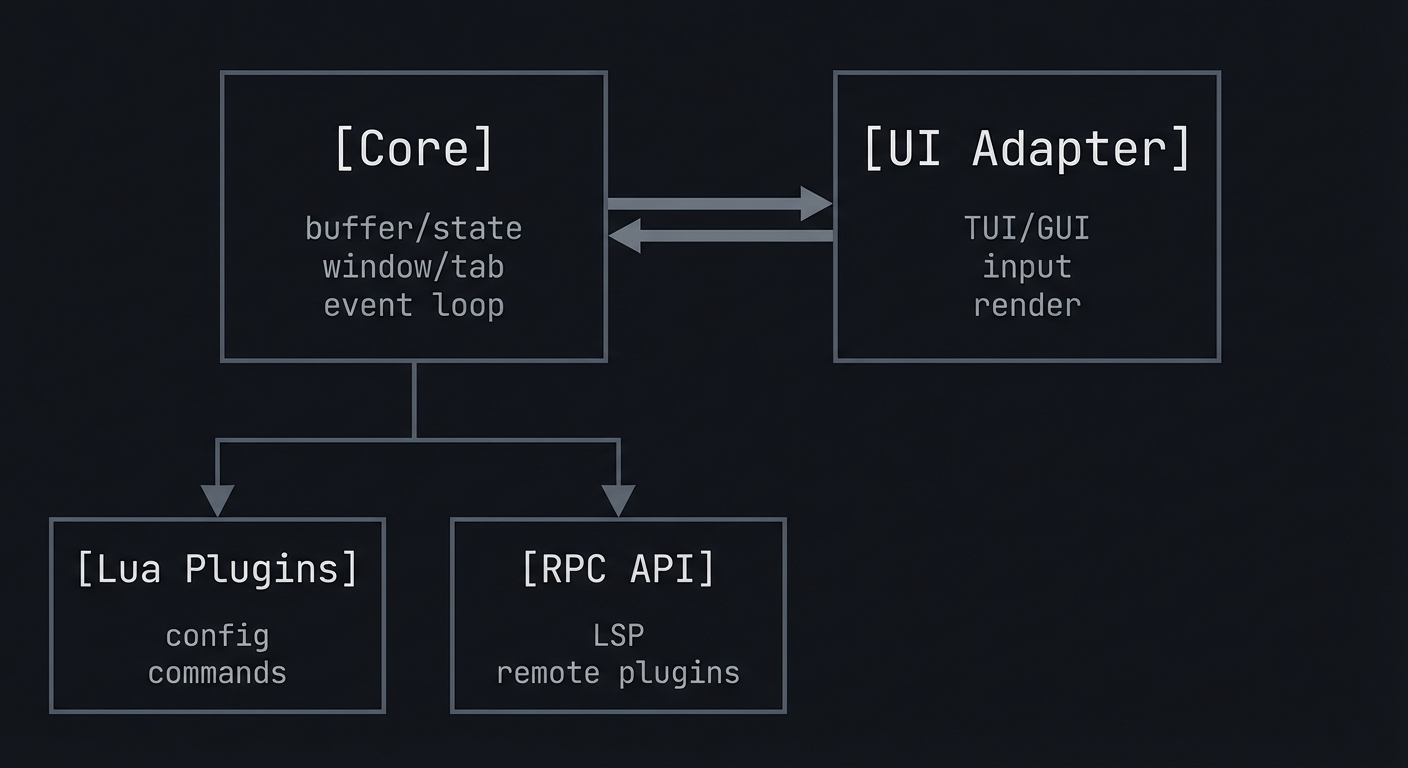
A modern editor separates core logic, UI rendering, and extensions to remain stable and maintainable.
Definitions & Key Terms
- Core: Buffer, commands, rendering model.
- UI layer: TUI or GUI that renders a grid.
- Plugin boundary: Safe API for extension code.
Mental Model Diagram (ASCII)
[Core] <-> [UI Adapter]
  |\
  | \-> [Lua Plugins]
  |\
  | \-> [RPC API]
How It Works (Step-by-Step)
- Define a core module with no UI dependencies.
- Create a UI adapter that renders the core grid.
- Expose a minimal API for plugins and RPC.
- Ensure plugins cannot corrupt core state.
Minimal Concrete Example
core.apply_command(cmd)
ui.render(core.screen)
plugins.call("on_buffer_change")
Common Misconceptions
- “Plugins can modify anything” -> That leads to instability.
- “UI and core should be one” -> That prevents headless use.
Check-Your-Understanding Questions
- Explain why separating UI from core matters.
- Predict what happens if plugins can mutate core structs directly.
- Explain how a headless editor enables automation.
Where You’ll Apply It
- See §4.1 architecture and §5.10 Phase 1.
- Also used in P03-neovim-gui-client.
2.2 Buffer, Window, and Tabpage Model
Description
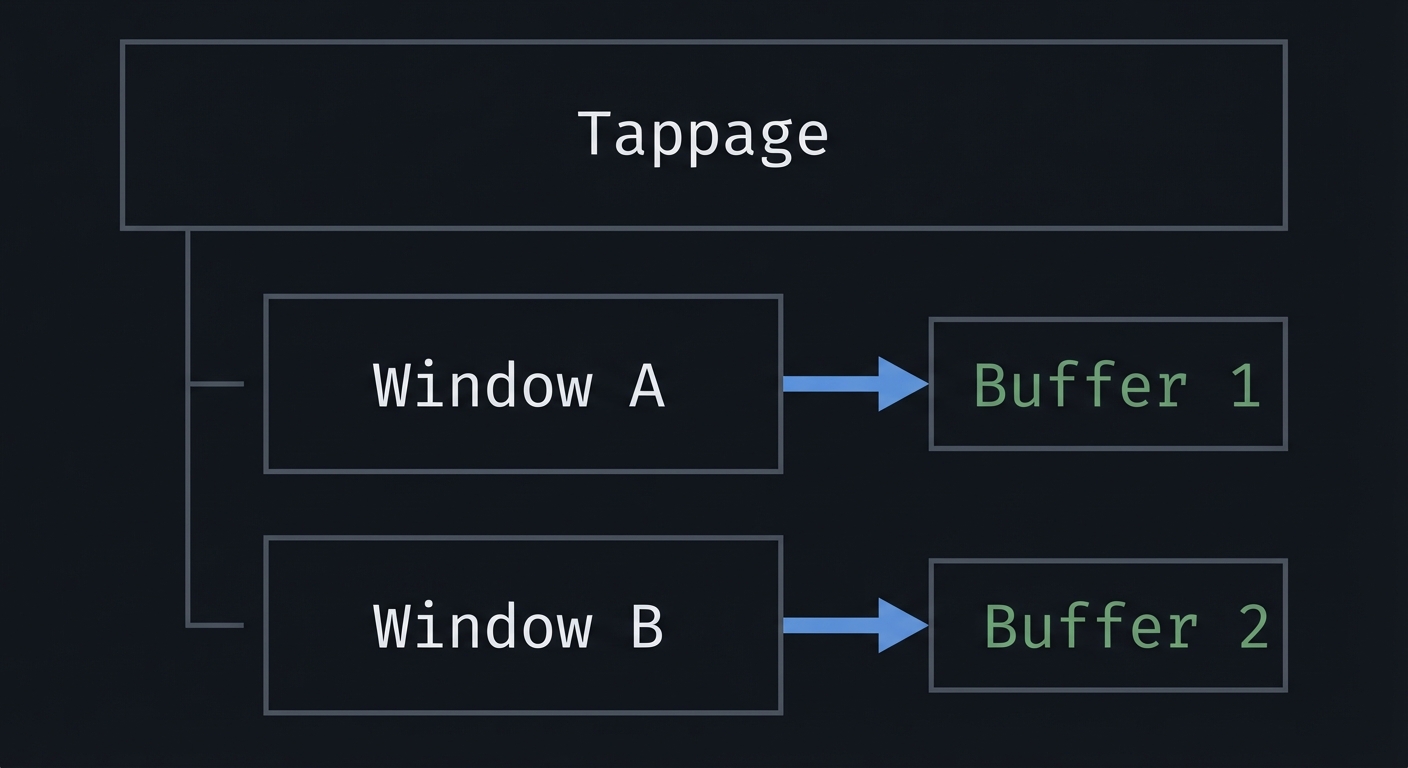
Buffers hold text, windows view buffers, and tabpages organize windows.
Definitions & Key Terms
- Buffer: Text storage with metadata.
- Window: Viewport into a buffer.
- Tabpage: Layout containing multiple windows.
Mental Model Diagram (ASCII)
Tabpage
  |- Window A -> Buffer 1
  |- Window B -> Buffer 2
How It Works (Step-by-Step)
- Store text in buffers with IDs.
- Create windows that reference buffers and viewport state.
- Group windows into tabpages.
- Update only the active window on input.
Minimal Concrete Example
struct Window { int buf_id; int rowoff; int coloff; };
struct Tabpage { Window *windows; int active; };
Common Misconceptions
- “A buffer is always visible” -> Buffers can be hidden.
- “Window state is global” -> Each window has its own cursor and scroll.
Check-Your-Understanding Questions
- Explain why buffers can be shown in multiple windows.
- Predict how splits affect cursor positions.
- Explain how tabpages differ from buffers.
Where You’ll Apply It
- See §3.1 requirements and §5.10 Phase 2.
- Also used in P01-build-modal-text-editor.
2.3 Modal Editing and Command Engine
Description
Modal editing relies on a command engine that interprets keys based on state.
Definitions & Key Terms
- Command engine: Maps input to actions.
- Operator-pending: Temporary state awaiting a motion.
- Command-line mode:
:commands for actions.
Mental Model Diagram (ASCII)
Keys -> Decoder -> Mode FSM -> Command -> Buffer
How It Works (Step-by-Step)
- Decode keys into abstract actions.
- Use FSM to select command interpretation.
- Apply commands to buffer/window.
- Record actions for undo/redo.
Minimal Concrete Example
NORMAL + d + w -> delete word
INSERT + text -> insert bytes
Common Misconceptions
- “Command parsing is trivial” -> Modal grammar is complex.
- “Undo is a feature” -> It requires structural command logging.
Check-Your-Understanding Questions
- Explain why operator-pending is needed.
- Predict the effect of
d$vsdw. - Explain how command-line mode differs from normal commands.
Where You’ll Apply It
- See §5.10 Phase 2 and §7.1 pitfalls.
- Also used in P01-build-modal-text-editor.
2.4 Rendering Pipeline and Grid Model
Description
The editor renders its state as a grid of cells, then outputs to a TUI or GUI.
Definitions & Key Terms
- Grid: 2D array of cells with text and style.
- Highlight layer: Style overlays from syntax or UI.
- Double buffering: Build a frame in memory then render.
Mental Model Diagram (ASCII)
[Buffer] -> [Syntax highlights] -> [Grid] -> [Renderer]
How It Works (Step-by-Step)
- Compute visible lines for each window.
- Apply highlights (syntax, search, status).
- Build a grid for the active UI.
- Render to TUI or send RPC events.
Minimal Concrete Example
Cell { ch='a', hl=Normal }
Cell { ch='b', hl=Keyword }
Common Misconceptions
- “Rendering equals printing text” -> You must manage styles and cursor.
- “Grid is just lines” -> Grid includes empty cells and attributes.
Check-Your-Understanding Questions
- Explain how multiple highlight layers combine.
- Predict what happens if you skip double buffering.
- Explain why a grid model is UI-agnostic.
Where You’ll Apply It
- See §4.1 architecture and §5.10 Phase 2.
- Also used in P03-neovim-gui-client.
2.5 Tree-sitter Integration
Description
Tree-sitter provides incremental parsing and syntax highlighting for buffers.
Definitions & Key Terms
- CST: Concrete syntax tree from Tree-sitter.
- Incremental parse: Update only changed regions.
- Queries: Patterns that map syntax nodes to highlight groups.
Mental Model Diagram (ASCII)
Buffer edits -> Tree-sitter parser -> CST -> highlight queries -> grid styles
How It Works (Step-by-Step)
- Initialize Tree-sitter parser for a buffer.
- On edit, update the parse with incremental changes.
- Run highlight queries and update styles.
- Merge highlights into render pipeline.
Minimal Concrete Example
edit -> parse tree updated -> highlight "function" keyword
Common Misconceptions
- “Parsing once is enough” -> Edits require incremental updates.
- “Queries are optional” -> Without them, no highlight output.
Check-Your-Understanding Questions
- Explain how incremental parsing improves performance.
- Predict what happens if you ignore parse updates.
- Explain how to map query captures to styles.
Where You’ll Apply It
- See §3.1 requirements and §5.10 Phase 3.
- Also used in P04-tree-sitter-grammar.
2.6 Lua Embedding and Plugin API
Description
Embedding Lua lets users extend the editor without recompiling it.
Definitions & Key Terms
- Lua state: Interpreter instance.
- C API: Functions to push values and call Lua.
- Safe API: Restricted functions exposed to plugins.
Mental Model Diagram (ASCII)
[Editor core] <-> [Lua state] <-> [Plugin scripts]
How It Works (Step-by-Step)
- Initialize a Lua state at startup.
- Expose a safe API: buffer ops, window ops, commands.
- Load user scripts and run setup.
- Protect calls with error handling.
Minimal Concrete Example
lua_getglobal(L, "on_buffer_change");
if (lua_pcall(L, 0, 0, 0) != LUA_OK) { /* handle error */ }
Common Misconceptions
- “Lua can access all C data” -> Only what you expose.
- “Errors in Lua should crash” -> They should be contained.
Check-Your-Understanding Questions
- Explain how to prevent Lua crashes from killing the core.
- Predict what happens if plugins mutate raw buffer pointers.
- Explain how to expose functions safely.
Where You’ll Apply It
- See §3.2 requirements and §5.10 Phase 3.
- Also used in P02-neovim-focus-mode-plugin.
2.7 RPC API and External Control
Description
An RPC API lets GUIs or tools control the editor from another process.
Definitions & Key Terms
- RPC: Remote procedure call over a transport.
- MessagePack: Efficient binary serialization.
- UI attach: Event stream for external UIs.
Mental Model Diagram (ASCII)
[External tool] <-> [RPC server] <-> [Editor core]
How It Works (Step-by-Step)
- Start an RPC server (stdio or socket).
- Define a set of safe commands (open, save, input).
- Send redraw events or state updates.
- Handle disconnects gracefully.
Minimal Concrete Example
call: open("file.txt")
notify: redraw(grid_line...)
Common Misconceptions
- “RPC is only for GUIs” -> It can power automation too.
- “RPC commands can be arbitrary” -> Limit to safe API.
Check-Your-Understanding Questions
- Explain why RPC should not expose raw pointers.
- Predict what happens if an RPC client spams input.
- Explain how to support headless automation.
Where You’ll Apply It
- See §4.1 architecture and §5.10 Phase 4.
- Also used in P03-neovim-gui-client.
3. Project Specification
3.1 What You Will Build
A modal editor called neovim-lite that supports:
- Multiple buffers and split windows
- Normal/Insert/Command modes
- Status line and command line
- Tree-sitter syntax highlighting
- Lua scripting for commands
- RPC API for external control
Included: TUI rendering, Lua plugins, Tree-sitter, RPC. Excluded: full Vimscript compatibility, full plugin ecosystem.
3.2 Functional Requirements
- Buffers and windows: Create, switch, and close buffers.
- Splits: Horizontal splits with independent cursors.
- Modes: Normal/Insert/Command with clear status.
- Command line:
:w,:q,:e,:split. - Tree-sitter: Syntax highlighting for at least one language.
- Lua API: Allow Lua scripts to register commands.
- RPC: Accept basic external commands (
open,input).
3.3 Non-Functional Requirements
- Performance: Smooth editing on 10k-line files.
- Reliability: Plugin errors do not crash core.
- Usability: Consistent keybindings and UI.
3.4 Example Usage / Output
$ ./neovim-lite demo.txt
# TUI opens with status line and modes
3.5 Data Formats / Schemas / Protocols
- Config:
init.luawith plugin and command registration. - RPC: MessagePack-RPC over stdio.
- Highlights: Tree-sitter query capture names.
- RPC error shape (MessagePack equivalent of this JSON):
{
  "jsonrpc": "2.0",
  "id": 1,
  "error": { "code": 1001, "message": "Invalid command", "data": "details" }
}
3.6 Edge Cases
- Split windows with different buffers.
- Tree-sitter parse errors.
- Lua plugin exceptions.
- RPC client disconnects mid-command.
3.7 Real World Outcome
You run ./neovim-lite and get a functional modal editor.
3.7.1 How to Run (Copy/Paste)
cc -O2 -Wall -Wextra -o neovim-lite src/*.c -llua
./neovim-lite demo.txt
3.7.2 Golden Path Demo (Deterministic)
- Use
fixtures/demo.txtandNVL_TEST_MODE=1. - Open file, create split, edit, and save.
Expected:
- Status line shows
NORMALwithdemo.txt. - Split shows same buffer in two views.
3.7.3 If CLI: exact terminal transcript
$ NVL_TEST_MODE=1 ./neovim-lite fixtures/demo.txt
# Press:split<Enter>
# Press iHello<Esc>
# Press:w<Enter>
[status] Wrote 5 bytes
Failure demo:
$ ./neovim-lite /root/secret.txt
Error: cannot open file (EACCES)
Exit code: 1
Exit codes:
0clean exit1file open failure2Lua plugin error3RPC init failure
3.7.8 TUI Layout
+----------------------+----------------------+
|demo.txt              |demo.txt              |
|function hello() {    |function hello() {    |
|  print("hi")         |  print("hi")         |
|}                     |}                     |
|-- NORMAL --          |-- NORMAL --          |
+----------------------+----------------------+
4. Solution Architecture
4.1 High-Level Design
[Input] -> [Mode FSM] -> [Command Engine] -> [Buffer/Window Model]
                                          -> [Tree-sitter]
                                          -> [Render Grid] -> [TUI]
                                          -> [Lua API]
                                          -> [RPC Server]
4.2 Key Components
| Component | Responsibility | Key Decisions |
|---|---|---|
| Core | Buffer/window logic | Data structure choice |
| Renderer | Grid build + output | Full redraw vs diff |
| Tree-sitter | Parse + highlight | Incremental updates |
| Lua Engine | Plugin execution | Safe API boundary |
| RPC Server | External control | MessagePack vs JSON |
4.3 Data Structures (No Full Code)
typedef struct { int id; GapBuffer buf; } Buffer;
typedef struct { int buf_id; int cx, cy; int rowoff, coloff; } Window;
typedef struct { Window *wins; int active; } Tabpage;
4.4 Algorithm Overview
Key Algorithm: Render All Windows
- For each window, compute visible rows from its viewport.
- Apply syntax highlighting for the buffer.
- Compose window grids into a full screen grid.
- Render the grid to the terminal.
Complexity Analysis:
- Time: O(V) where V is visible chars
- Space: O(screen rows * cols)
5. Implementation Guide
5.1 Development Environment Setup
cc --version
lua -v
5.2 Project Structure
neovim-lite/
├── src/
│   ├── main.c
│   ├── core.c
│   ├── render.c
│   ├── buffer.c
│   ├── window.c
│   ├── lua_api.c
│   └── rpc.c
├── runtime/
│   ├── queries/
│   └── init.lua
├── fixtures/
│   └── demo.txt
└── Makefile
5.3 The Core Question You’re Answering
“Can you synthesize all isolated editor subsystems into one cohesive, stable program?”
5.4 Concepts You Must Understand First
Stop and research these before coding:
- Buffer/window model
- Tree-sitter incremental parsing
- Lua embedding and safety
- RPC messaging
5.5 Questions to Guide Your Design
- What belongs in core vs UI?
- How do you ensure plugins cannot corrupt state?
- How will you synchronize Tree-sitter with edits?
5.6 Thinking Exercise
Draw an architecture diagram with arrows for data flow. Label where each subsystem owns state.
5.7 The Interview Questions They’ll Ask
- What was the hardest integration bug and how did you fix it?
- How did you balance performance with extensibility?
- How did you prevent plugin crashes from killing the editor?
5.8 Hints in Layers
Hint 1: Build the core first Get buffers and windows working without plugins.
Hint 2: Add rendering next Render a single grid and confirm stability.
Hint 3: Add Tree-sitter Integrate incremental parsing with highlights.
Hint 4: Add Lua and RPC last Expose only safe APIs.
5.9 Books That Will Help
| Topic | Book | Chapter |
|---|---|---|
| Text editors | The Craft of Text Editing | Ch. 1-7 |
| Architecture | Clean Architecture | Ch. 18 |
| Lua C API | Programming in Lua | Part IV |
5.10 Implementation Phases
Phase 1: Core + Rendering (5-7 days)
Goals:
- Buffers, windows, and rendering
Tasks:
- Implement buffer and window structs.
- Render single window with status line.
- Add splits and active window tracking.
Checkpoint: You can open files and split windows.
Phase 2: Modal Engine + Commands (4-6 days)
Goals:
- Normal/Insert/Command modes
- Command engine
Tasks:
- Implement FSM for modes.
- Add command parsing for
:w,:q,:e,:split. - Add undo/redo basics.
Checkpoint: You can edit, save, and split.
Phase 3: Tree-sitter + Highlights (4-6 days)
Goals:
- Syntax highlighting
Tasks:
- Integrate Tree-sitter parser.
- Load queries from runtime.
- Apply highlights to grid.
Checkpoint: Syntax highlighting updates as you type.
Phase 4: Lua + RPC (4-6 days)
Goals:
- Scripting and external control
Tasks:
- Embed Lua and load
init.lua. - Expose a safe API to plugins.
- Implement RPC server and basic commands.
Checkpoint: Lua scripts and RPC commands work without crashing.
5.11 Key Implementation Decisions
| Decision | Options | Recommendation | Rationale |
|---|---|---|---|
| Buffer structure | gap buffer, piece table | gap buffer | simpler to integrate |
| Highlighting | regex, Tree-sitter | Tree-sitter | accurate, incremental |
| Plugin API | direct access, safe wrapper | safe wrapper | stability |
| RPC | JSON-RPC, MessagePack | MessagePack | efficient binary |
6. Testing Strategy
6.1 Test Categories
| Category | Purpose | Examples |
|---|---|---|
| Unit Tests | Buffer and window ops | insert/delete, split |
| Integration Tests | Full flows | open->edit->save |
| Regression Tests | Plugin safety | Lua error handling |
6.2 Critical Test Cases
- Editing in one split does not corrupt the other.
- Tree-sitter highlights update after edits.
- Lua plugin error does not crash core.
6.3 Test Data
fixtures/
  demo.txt
  errors.lua
7. Common Pitfalls & Debugging
7.1 Frequent Mistakes
| Pitfall | Symptom | Solution |
|---|---|---|
| Plugin crash | Editor exits | Wrap Lua calls with error handling |
| Parser desync | Highlights stale | Update Tree-sitter on edits |
| Rendering flicker | Screen flashes | Batch render and hide cursor |
7.2 Debugging Strategies
- Add a debug overlay showing active buffer/window.
- Log RPC commands to a file.
- Use a fixed test file for repeatable scenarios.
7.3 Performance Traps
- Rebuilding the entire grid on every small change.
- Running Tree-sitter on every keystroke without incremental updates.
8. Extensions & Challenges
8.1 Beginner Extensions
- Add line numbers and current line highlight.
- Add simple search (
/pattern).
8.2 Intermediate Extensions
- Add tabs and multiple tabpages.
- Add configurable key mappings.
8.3 Advanced Extensions
- Build a GUI client using your RPC API.
- Add LSP integration for diagnostics.
9. Real-World Connections
9.1 Industry Applications
- Custom editors: Specialized IDEs and domain-specific tools.
- Automation: Headless editors used in CI or formatting pipelines.
9.2 Related Open Source Projects
- neovim: The inspiration and reference.
- helix: Modern modal editor with Tree-sitter.
9.3 Interview Relevance
- System design: architecture and module boundaries.
- Performance: incremental parsing and rendering.
10. Resources
10.1 Essential Reading
- The Craft of Text Editing
- Neovim architecture docs
- Programming in Lua (C API)
10.2 Video Resources
- Neovim architecture talks (search: “neovim architecture”)
10.3 Tools & Documentation
- Tree-sitter documentation
- Lua C API reference
- MessagePack specification
10.4 Related Projects in This Series
- P01 - Modal Editor in C
- P02 - Focus Mode Plugin
- P03 - GUI Client
- P04 - Tree-sitter Grammar
- P05 - LSP Server
11. Self-Assessment Checklist
11.1 Understanding
- I can explain the buffer/window/tabpage model.
- I can describe how Tree-sitter integrates with rendering.
- I can explain the Lua plugin boundary.
11.2 Implementation
- Multiple buffers and splits work correctly.
- Tree-sitter highlights update on edit.
- RPC commands work without crashing.
11.3 Growth
- I can extend the editor with a new subsystem.
- I can explain this project in an interview.
12. Submission / Completion Criteria
Minimum Viable Completion:
- Modal editing with file open/save.
- One window renders correctly.
- Basic command line works.
Full Completion:
- All minimum criteria plus:
- Splits and multiple buffers.
- Tree-sitter highlighting.
- Lua scripts run safely.
Excellence (Going Above & Beyond):
- RPC UI and external client.
- LSP integration.
13. Determinism and Reproducibility Notes
- Use
NVL_TEST_MODE=1to freeze status line timestamps. - Keep
fixtures/demo.txtfor golden demos. - Failure demo uses a known permission error for stable behavior.