Project 4: Distribution Installer (Like Arch’s archinstall)
An interactive or scripted installer that partitions disks, installs packages, configures bootloader, and produces a working system.
Quick Reference
| Attribute | Value |
|---|---|
| Primary Language | See main guide |
| Alternative Languages | N/A |
| Difficulty | Level 2: Intermediate |
| Time Estimate | 1-2 weeks |
| Knowledge Area | System Administration |
| Tooling | Partitioning Tools / Chroot |
| Prerequisites | Shell scripting, understanding of partitions/filesystems |
Goal: Build a safe, repeatable Linux installer that can fully provision a system from bare disk to first boot. You will understand disk layout, filesystems, bootloaders, and post-install configuration flows.
What You Will Build
An interactive or scripted installer that partitions disks, installs packages, configures the bootloader, and produces a working system similar to archinstall. The archinstall project is the official guided installer for Arch Linux.
Why It Matters
Installers are the bridge between an ISO and a functional system. Writing one forces you to be explicit about storage, boot, and system configuration, and teaches you how to recover from the most common install failures.
Prerequisites & Background Knowledge
Essential Prerequisites (Must Have)
- Familiarity with partitions, filesystems, and mounts
- Basic package installation skills
- Comfort with chroot and editing config files
Helpful But Not Required
- UEFI vs BIOS boot knowledge
- LVM or encryption concepts
Self-Assessment Questions
- Can you explain the difference between GPT and MBR?
- Do you know what an EFI System Partition is used for?
- Can you troubleshoot a failed bootloader install?
Core Concept Analysis
Partitioning Strategy
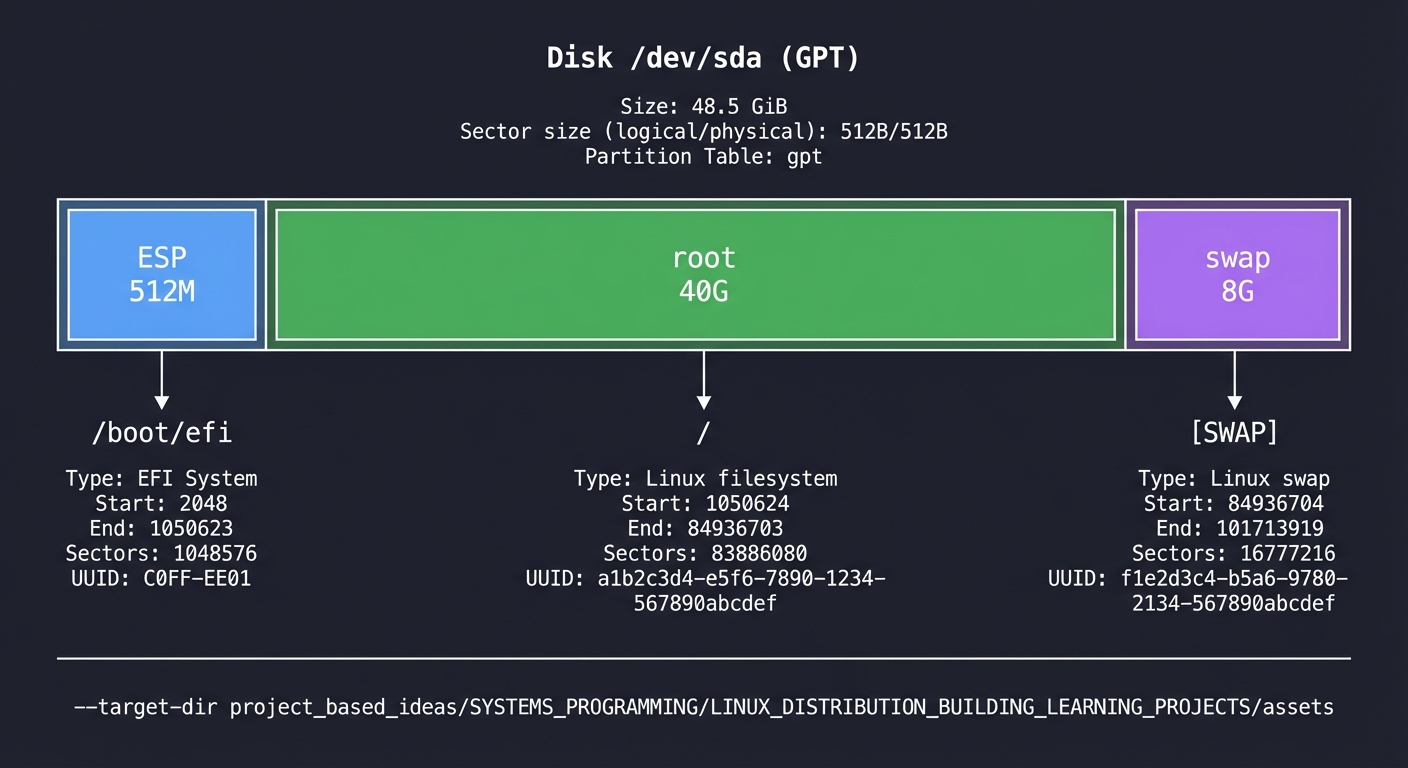
Your installer must define a disk layout: EFI System Partition, root, and optional swap or home. Consistency and validation prevent data loss.
Filesystem Creation
You must format partitions and mount them at the correct locations before install. The order matters for chroot and bootloader setup.
Bootloader Setup
The bootloader installs to the disk and points to the kernel and initramfs. UEFI installs add NVRAM entries with tools like efibootmgr.
Post-Install Configuration
Users and network settings, locales, and init system defaults must be set for a smooth first boot.
Disk Layout (ASCII)
Disk /dev/sda (GPT)
+-------------------------------+
| ESP 512M | root 40G | swap 8G |
+-------------------------------+
| /boot/efi | / | [SWAP]        |
+-------------------------------+
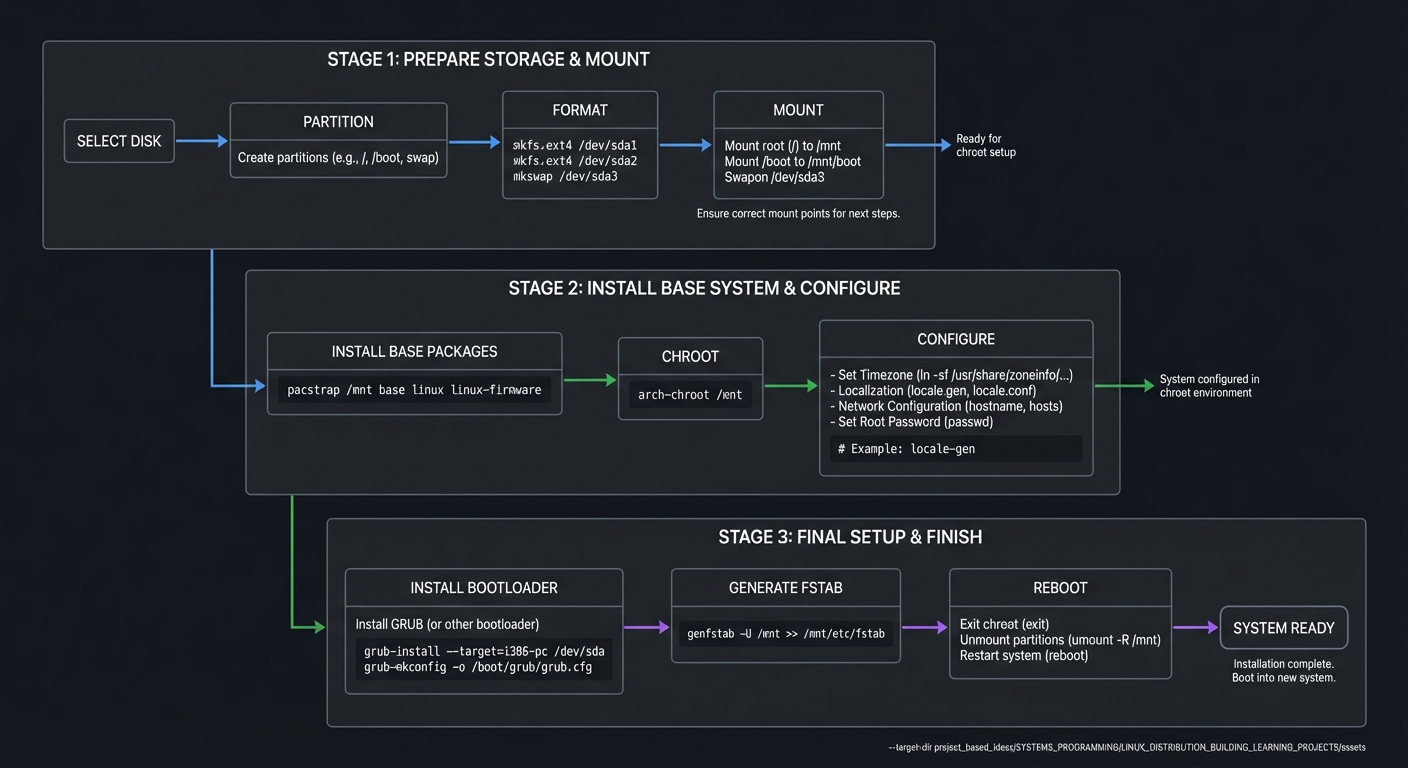
Installer Flow (ASCII)
select disk -> partition -> format -> mount
      |
      v
install base packages -> chroot -> configure
      |
      v
install bootloader -> generate fstab -> reboot
Success Metrics
- Installer can run non-interactively with a config file.
- System boots into a login prompt after install.
- Disk layout and fstab are correct and documented.
Implementation Guide
Phase 1: Discovery and Safety
- Detect disks and validate target device
- Require confirmation before destructive steps
Phase 2: Partitioning + Filesystems
- Create GPT/MBR layout
- Format partitions (ext4, xfs, btrfs)
- Mount root and boot partitions
Phase 3: Base System Install
- Install base packages and kernel
- Create fstab entries
Phase 4: Chroot Configuration
- Set hostname, locale, timezone
- Create user and password
- Enable networking and services
Phase 5: Bootloader
- Install GRUB or systemd-boot
- Create boot entries and verify paths
Milestones
- Milestone 1: Disk partition and format flow is correct
- Milestone 2: Base packages installed and chroot works
- Milestone 3: Bootloader installs and config is valid
- Milestone 4: First boot reaches login prompt
Real-World Outcome
You can show a full install run (scripted) and a clean boot:
$ sudo ./installer --config config.yml
Disk: /dev/sda
Created GPT with ESP and root
Formatted: /dev/sda1 (vfat), /dev/sda2 (ext4)
Mounted: /mnt
Installing base packages...
Chroot configuring...
Installing bootloader...
Install complete. Rebooting.

$ uname -r
6.x.y
The Core Question You Are Answering
How do you safely transform a blank disk into a bootable Linux system in a repeatable way?
Concepts You Must Understand First
- Partition tables (GPT/MBR)
- EFI System Partition and UEFI boot
- chroot environment and package install process
- fstab entries and mount order
Questions to Guide Your Design
- What is the minimal safe partition layout?
- How will you validate that the bootloader paths exist?
- How will you prevent accidental data loss?
- What defaults will you choose for users and services?
Thinking Exercise
Design a minimal installer config format. What fields are required to avoid ambiguity and prevent unsafe defaults?
The Interview Questions They Will Ask
- Why is an EFI System Partition required for UEFI boot?
- How does your installer avoid data loss?
- What steps are required before running chroot?
- How do you make the install reproducible?
Hints in Layers
Hint 1
Start with a dry-run mode that prints the exact partition commands it would run.
Hint 2
Implement mounts and fstab generation before you handle users and services.
Hint 3
Validate bootloader files in /boot after install before rebooting.
Books That Will Help
| Concept | Book | Suggested Chapters (use index) | Why This Matters |
|---|---|---|---|
| Boot process | How Linux Works (Brian Ward) | Boot and startup | Explains firmware, bootloader, kernel |
| Filesystems | Operating Systems: Three Easy Pieces | Filesystems | Helps reason about layout and mounting |
| Shell automation | Effective Shell (Dave Kerr) | Scripting workflows | Helps build reliable installers |
| Linux basics | The Linux Command Line (William Shotts) | System configuration | Supports post-install setup |
Common Pitfalls & Debugging
Problem 1: “Bootloader installed but system does not boot”
- Why: Wrong root UUID or missing initramfs path
- Fix: Verify
/bootcontents and bootloader config - Quick test: Use rescue ISO to inspect /boot and fstab
Problem 2: “Mounts are wrong after reboot”
- Why: Incorrect fstab entries or swapped UUIDs
- Fix: Regenerate fstab with correct UUIDs
- Quick test:
blkidand compare to fstab
Problem 3: “Installer wipes wrong disk”
- Why: No explicit confirmation step
- Fix: Require disk serial or path confirmation
- Quick test: Log selected disk and block device size
Definition of Done
- Installer supports config file and non-interactive mode
- Disk layout and fstab are correct after install
- Bootloader installs and boots successfully
- Post-install configuration completes without manual steps
- Logs are sufficient to debug failures
References
- Main guide:
LINUX_DISTRIBUTION_BUILDING_LEARNING_PROJECTS.md - Archinstall documentation: https://archinstall.readthedocs.io/en/latest/
- UEFI specification: https://uefi.org/specs/UEFI/2.10_A/
- GNU GRUB manual: https://www.gnu.org/software/grub/manual/grub.html