Linux Distribution Building Mastery - Real World Projects
Goal: Understand how a Linux distribution is assembled from source code to a booted machine. You will bootstrap the toolchain, define the filesystem layout, configure the kernel and init system, and build packaging and update workflows. By the end, you will be able to design a minimal distro, build a package manager, and reason about reproducible builds and upgrade safety across the entire software supply chain.
Why Linux Distribution Building Matters
Linux dominates modern infrastructure at every level. As of December 2025:
Market Dominance (2025):
- Cloud Infrastructure: Linux powers 49.2% of all cloud workloads globally, with 92% of VMs across AWS, Google Cloud, and Azure running Linux
- Server Market: Linux holds 44.8% of the server OS market, with some sources reporting 53% globally
- Web Servers: Linux commands 59.4% market share of all websites worldwide, with 96.3% of the top one million sites using Linux
- Supercomputing: 100% of the top 500 supercomputers run on Linux
- IoT/Embedded: 60% of IoT gateway devices operate on embedded Linux, powering 58% of 14.2 billion connected IoT devices
Distribution Scale:
- Ubuntu: 158,944 total package names (72,131 normal packages) as of Feb 2025
- Debian: 120,720 total package names (63,041 normal packages)
- Red Hat Enterprise Linux: 43.1% of enterprise Linux server market share
Economic Impact:
- Linux server OS market: $22.28 billion in 2025, projected to reach $34.12 billion by 2030
- Embedded Linux market: $0.48 billion in 2025, growing to $0.90 billion by 2035 at 6.57% CAGR
- Overall Linux OS market: Projected to grow from $26.41 billion in 2025 to $99.69 billion by 2032 (20.9% CAGR)
A distribution is not just an OS—it is a large-scale, continuous build and delivery system managing tens of thousands of packages, handling security updates, resolving dependencies, and ensuring upgrade safety across millions of deployments.
If you treat Linux as a black box, you will never fully control performance, reliability, or security. Building a distro removes the mystery. It forces you to reason about build chains, package metadata, file ownership, boot flow, and update safety.
CSAPP-style mental model (big picture):
Source code -> Toolchain -> Packages -> Root filesystem -> Boot chain -> Running system
Traditional vs modern workflows:
Traditional (manual)                 Modern (pipeline)
+---------------+                   +-------------------+
| Build by hand |                   | CI build pipeline |
| Copy files    |                   | Reproducible build|
| Manual setup  |                   | Signed packages   |
+------|--------+                   +-------|-----------+
       |                                    |
       v                                    v
   Fragile system                      Repeatable system

Prerequisites and Background Knowledge
Essential Prerequisites (Must Have)
Programming and OS basics:
- Comfortable reading shell scripts and Makefiles
- Understanding processes, filesystems, and permissions
- Familiarity with configure, make, and install workflows
- Recommended Reading: “How Linux Works” by Brian Ward – Ch. 1-4
Helpful But Not Required
- Cross-compilation and toolchain bootstrap
- Kernel configuration and module selection
- Package signing and repository metadata
Self-Assessment Questions
- Can I explain what the kernel does vs what userland does?
- Can I describe what a compiler and libc are responsible for?
- Have I used chroot or a VM to isolate a system build?
If you answered “no” to any of these, spend a week on the recommended readings before continuing.
Development Environment Setup
Required tools:
- A Linux VM or dedicated machine
- GCC, binutils, make, and coreutils
- 30-50 GB of free disk space
Recommended tools:
- QEMU or VirtualBox for test booting
- Git for tracking build scripts
- rsync for filesystem copying
Testing your setup:
Build and run a hello-world C program.
Expected: a hello-world binary runs in your environment.
Time Investment:
- Project 1: 2-4 weeks
- Project 2: 2-3 weeks
- Project 3: 1-2 weeks
- Project 4: 1-2 weeks
- Project 5: 2-3 weeks
Important Reality Check: Distro building is slow and failure-prone on the first attempt. Expect rebuilds, broken boot sequences, and missing dependencies. That is the point.
Core Concept Analysis
1. Toolchain Bootstrap (CSAPP: Linking and loaders)
You cannot build a distro without first building the tools that build everything else. This is a bootstrapping problem: the compiler needs a compiler to compile itself.
Toolchain Bootstrap Stages:
┌─────────────────────────────────────────────────────────────────────┐
│                     THE BOOTSTRAP CYCLE                             │
├─────────────────────────────────────────────────────────────────────┤
│                                                                     │
│  Stage 0: Host System                                              │
│  ┌──────────────┐                                                  │
│  │ Host GCC     │ (system compiler)                                │
│  │ Host binutils│                                                  │
│  │ Host libc    │                                                  │
│  └──────┬───────┘                                                  │
│         │                                                           │
│         ▼                                                           │
│  Stage 1: Cross Toolchain                                          │
│  ┌──────────────────────────────────────────┐                      │
│  │ Build binutils for target                │                      │
│  │ Build minimal GCC (no libc yet)          │                      │
│  │ Build target libc headers                │                      │
│  └──────┬───────────────────────────────────┘                      │
│         │                                                           │
│         ▼                                                           │
│  Stage 2: Build libc                                               │
│  ┌──────────────────────────────────────────┐                      │
│  │ Use Stage 1 GCC to build full glibc      │ ◄──┐                │
│  │ Now we have a complete C library         │    │                │
│  └──────┬───────────────────────────────────┘    │ Circular       │
│         │                                         │ dependency     │
│         ▼                                         │ broken!        │
│  Stage 3: Final Toolchain                        │                │
│  ┌──────────────────────────────────────────┐    │                │
│  │ Rebuild GCC with full libc support       │────┘                │
│  │ Rebuild binutils                         │                      │
│  │ Now independent of host system           │                      │
│  └──────────────────────────────────────────┘                      │
│                                                                     │
└─────────────────────────────────────────────────────────────────────┘

The Bootstrap Paradox:
- GCC (compiler) needs glibc (C library) to compile programs
- glibc needs GCC to compile itself
- Solution: Build in stages, each providing dependencies for the next
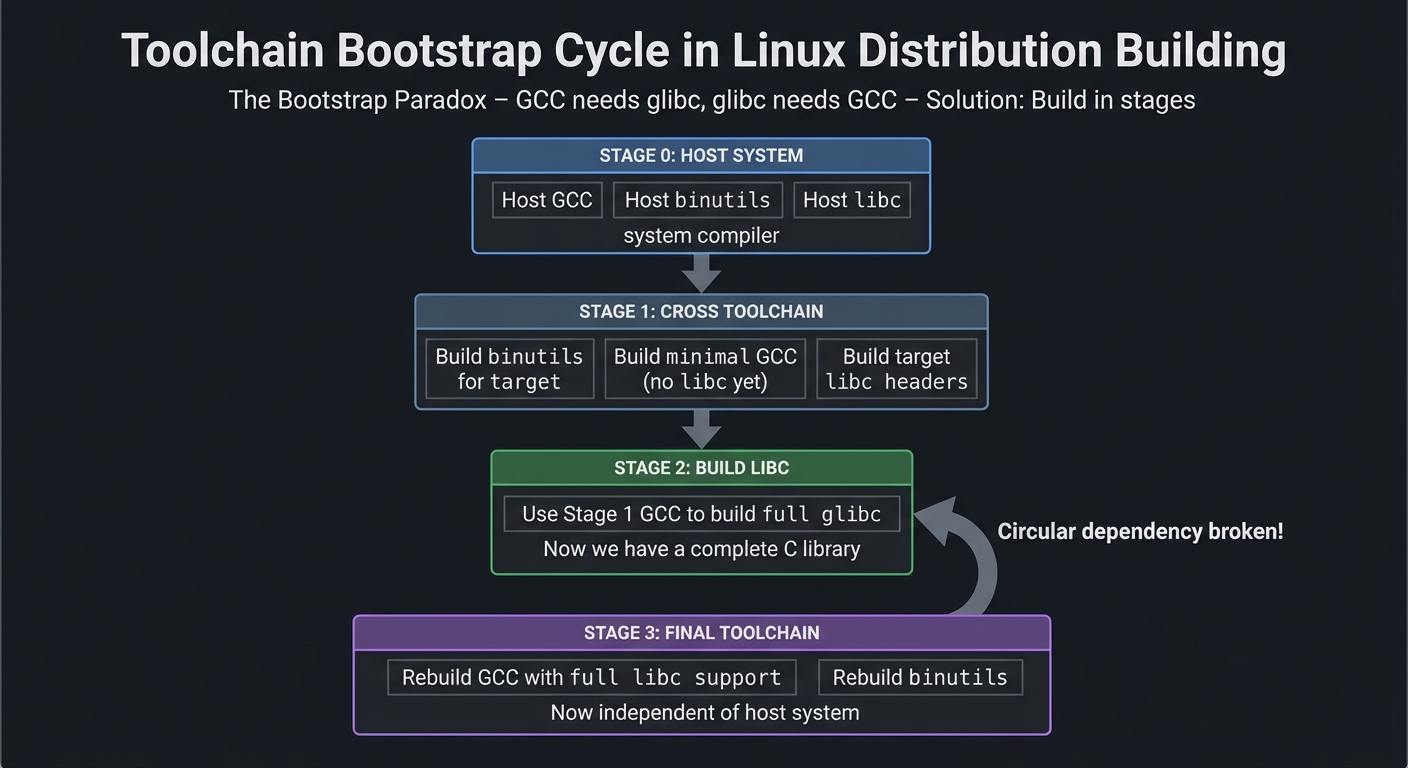
CSAPP connection: Chapter 7 (Linking) explains how object files and libraries become executables. Toolchain bootstrap is that process at distro scale, solving the chicken-and-egg problem of building your build tools.
2. Root Filesystem and FHS (CSAPP: Process memory + system I/O)
A Linux distro is not just binaries. It is a filesystem layout that the kernel and userland expect. The Filesystem Hierarchy Standard (FHS) defines this contract.
Filesystem Hierarchy Standard (FHS):
┌─────────────────────────────────────────────────────────────────────┐
│                  LINUX ROOT FILESYSTEM (/)                          │
├─────────────────────────────────────────────────────────────────────┤
│                                                                     │
│  /boot                     Bootloader and Kernel                   │
│  ├── vmlinuz-*            (kernel image)                           │
│  ├── initrd.img-*         (initial ramdisk)                        │
│  └── grub/                (bootloader config)                      │
│                                                                     │
│  /etc                      System Configuration (text files)       │
│  ├── passwd, shadow       (user database)                          │
│  ├── fstab                (filesystems to mount)                   │
│  ├── network/             (network config)                         │
│  └── systemd/             (init system config)                     │
│                                                                     │
│  /usr                      User Programs (read-only)               │
│  ├── bin/                 (essential user commands)                │
│  ├── lib/                 (shared libraries)                       │
│  ├── include/             (C headers)                              │
│  └── share/               (architecture-independent data)          │
│                                                                     │
│  /var                      Variable Data (read-write)              │
│  ├── log/                 (system logs)                            │
│  ├── cache/               (application caches)                     │
│  ├── lib/                 (state information)                      │
│  └── tmp/                 (temporary files)                        │
│                                                                     │
│  /tmp                      Temporary Files (cleared on boot)       │
│                                                                     │
│  /home                     User Home Directories                   │
│  └── username/            (user-specific files)                    │
│                                                                     │
│  /root                     Root User Home                          │
│                                                                     │
│  /dev                      Device Files (kernel interface)         │
│  ├── sda, sdb             (block devices)                          │
│  ├── tty*                 (terminals)                              │
│  └── null, zero           (special devices)                        │
│                                                                     │
│  /proc                     Kernel Interface (virtual filesystem)   │
│  ├── cpuinfo              (CPU info)                               │
│  ├── meminfo              (memory info)                            │
│  └── [pid]/               (process info)                           │
│                                                                     │
│  /sys                      Kernel Objects (virtual filesystem)     │
│  └── devices, modules...  (kernel subsystems)                      │
│                                                                     │
└─────────────────────────────────────────────────────────────────────┘

Why This Matters:
- Programs expect specific paths (/lib/ld-linux.so.2 for dynamic linker)
- Kernel expects /sbin/init (PID 1)
- Package managers track file ownership per directory
- Violating FHS breaks system behavior
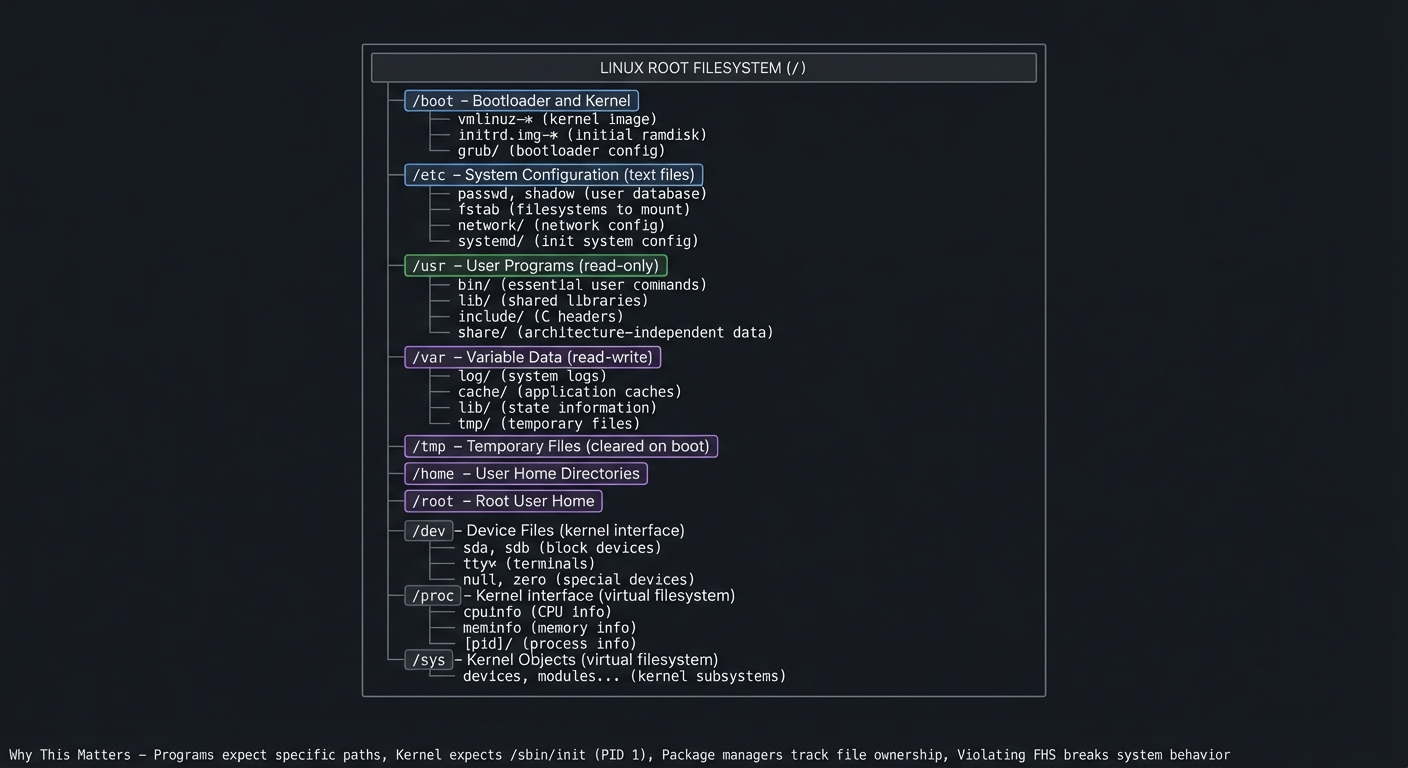
CSAPP connection: Chapters 9-10 show how processes rely on libraries and files. The rootfs is the contract for those expectations—programs open(“/etc/passwd”), dlopen(“/lib/libc.so.6”), and exec(“/bin/sh”) all assume FHS compliance.
3. Boot Chain (CSAPP: Exceptions and control flow)
The boot chain is a strict sequence. If any step is wrong, the system does not boot. Each stage passes control to the next, building the running system layer by layer.
Linux Boot Sequence (from power-on to shell):
┌─────────────────────────────────────────────────────────────────────┐
│                        BOOT CHAIN                                   │
├─────────────────────────────────────────────────────────────────────┤
│                                                                     │
│  1. Power On                                                        │
│  ┌──────────────────────────────────────┐                          │
│  │ CPU executes firmware (BIOS/UEFI)    │                          │
│  │ POST (Power-On Self Test)            │                          │
│  │ Initialize hardware                  │                          │
│  └──────┬───────────────────────────────┘                          │
│         │                                                           │
│         ▼                                                           │
│  2. Bootloader (GRUB, syslinux)                                    │
│  ┌──────────────────────────────────────┐                          │
│  │ Load kernel image (vmlinuz)          │                          │
│  │ Load initial ramdisk (initrd/initramfs)│                        │
│  │ Pass kernel command line parameters  │                          │
│  └──────┬───────────────────────────────┘                          │
│         │                                                           │
│         ▼                                                           │
│  3. Kernel Initialization                                          │
│  ┌──────────────────────────────────────┐                          │
│  │ Decompress and run kernel            │                          │
│  │ Initialize memory management (MMU)   │                          │
│  │ Mount initramfs as temporary root    │                          │
│  │ Load essential drivers               │                          │
│  │ Find and mount real root filesystem  │                          │
│  │ Pivot to real root                   │                          │
│  └──────┬───────────────────────────────┘                          │
│         │                                                           │
│         ▼                                                           │
│  4. Init System (systemd, SysVinit)                                │
│  ┌──────────────────────────────────────┐                          │
│  │ PID 1 starts (/sbin/init)            │                          │
│  │ Parse init configuration             │                          │
│  │ Start essential services             │                          │
│  │   - udev (device management)         │                          │
│  │   - networking                       │                          │
│  │   - logging (syslog/journald)        │                          │
│  └──────┬───────────────────────────────┘                          │
│         │                                                           │
│         ▼                                                           │
│  5. User Services                                                  │
│  ┌──────────────────────────────────────┐                          │
│  │ Start user-facing services           │                          │
│  │   - SSH server                       │                          │
│  │   - Web server                       │                          │
│  │   - Database                         │                          │
│  │ Start getty (login prompt)           │                          │
│  └──────┬───────────────────────────────┘                          │
│         │                                                           │
│         ▼                                                           │
│  6. User Shell                                                     │
│  ┌──────────────────────────────────────┐                          │
│  │ User logs in                         │                          │
│  │ Shell starts (bash, zsh)             │                          │
│  │ System ready for use                 │                          │
│  └──────────────────────────────────────┘                          │
│                                                                     │
└─────────────────────────────────────────────────────────────────────┘

Key Failure Points:
- Wrong kernel cmdline → kernel panic
- Missing /sbin/init → "Kernel panic - not syncing: No init found"
- Bad initramfs → cannot find root filesystem
- Broken systemd unit → services fail to start
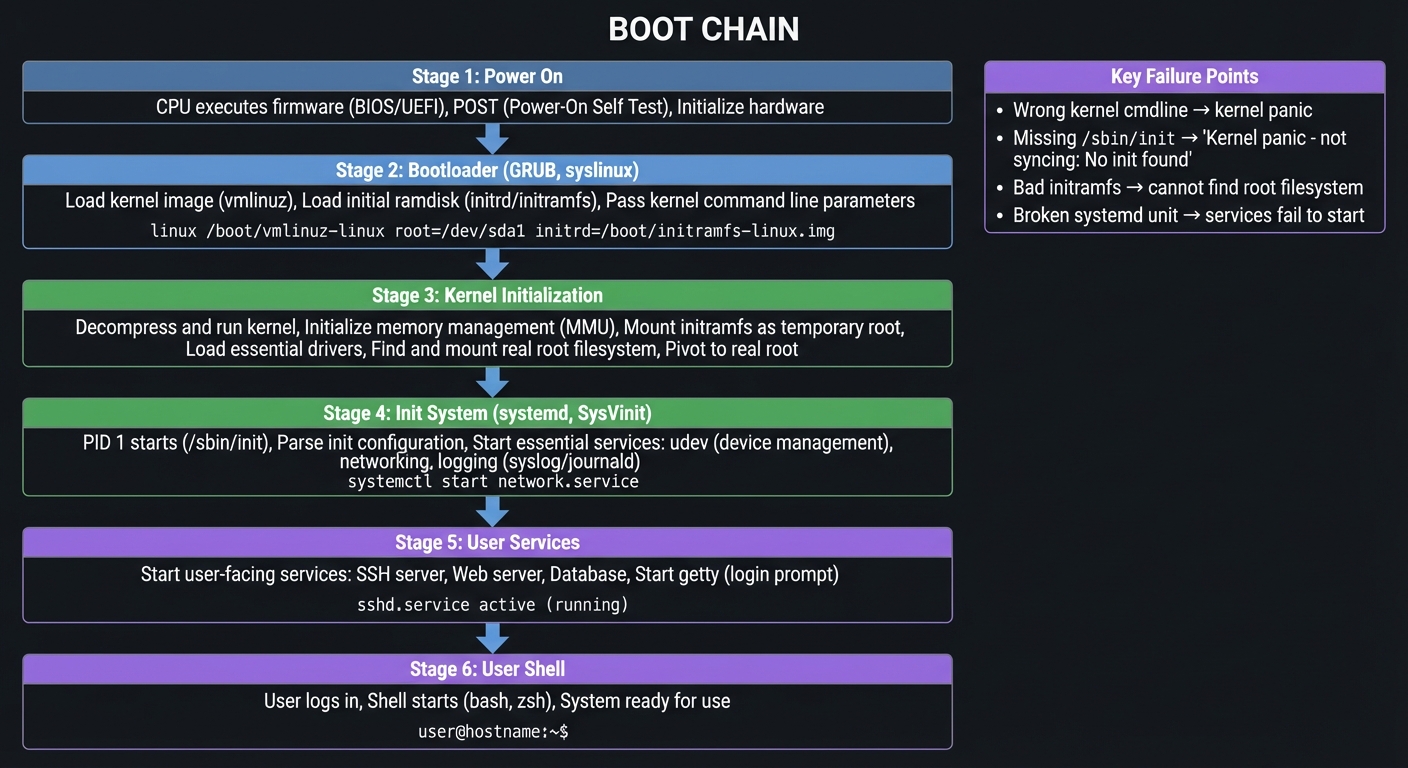
CSAPP connection: Chapter 8 (Exceptions and Control Flow) maps to the transition from firmware to kernel and PID 1. Each stage is a controlled transfer of execution, similar to exception handlers taking control from normal program flow.
4. Package Management and Updates (CSAPP: Data structures + concurrency)
Packages are structured archives plus metadata. The distro depends on correct dependency graphs, versioning rules, and safe upgrades. A package manager is fundamentally a dependency resolver and transaction manager.
Package Management Workflow:
┌─────────────────────────────────────────────────────────────────────┐
│              PACKAGE INSTALLATION PIPELINE                          │
├─────────────────────────────────────────────────────────────────────┤
│                                                                     │
│  1. Repository Sync                                                │
│  ┌──────────────────────────────────────┐                          │
│  │ Fetch repository metadata            │                          │
│  │ Parse package indexes                │                          │
│  │ Build local cache                    │                          │
│  └──────┬───────────────────────────────┘                          │
│         │                                                           │
│         ▼                                                           │
│  2. Dependency Resolution (Graph Algorithm)                        │
│  ┌──────────────────────────────────────┐                          │
│  │ User requests: install nginx         │                          │
│  │                                      │                          │
│  │ Dependency Graph:                    │                          │
│  │    nginx                             │                          │
│  │      ├─→ pcre                        │                          │
│  │      ├─→ zlib                        │                          │
│  │      └─→ openssl                     │                          │
│  │            ├─→ libc                  │                          │
│  │            └─→ libcrypto             │                          │
│  │                                      │                          │
│  │ Topological sort: libc, libcrypto,  │                          │
│  │                   openssl, pcre,     │                          │
│  │                   zlib, nginx        │                          │
│  └──────┬───────────────────────────────┘                          │
│         │                                                           │
│         ▼                                                           │
│  3. Download Phase                                                 │
│  ┌──────────────────────────────────────┐                          │
│  │ Fetch package archives (.deb, .rpm)  │                          │
│  │ Verify checksums (SHA256)            │                          │
│  │ Verify signatures (GPG)              │                          │
│  └──────┬───────────────────────────────┘                          │
│         │                                                           │
│         ▼                                                           │
│  4. Transaction Preparation                                        │
│  ┌──────────────────────────────────────┐                          │
│  │ Create restore point (snapshot)      │                          │
│  │ Extract archives to staging area     │                          │
│  │ Check for file conflicts             │                          │
│  │ Run pre-install scripts              │                          │
│  └──────┬───────────────────────────────┘                          │
│         │                                                           │
│         ▼                                                           │
│  5. Atomic Install (Transaction Commit)                            │
│  ┌──────────────────────────────────────┐                          │
│  │ Move files to final locations        │                          │
│  │ Update dynamic linker cache (ldconfig)│                         │
│  │ Run post-install scripts             │                          │
│  │ Update package database               │                          │
│  └──────┬───────────────────────────────┘                          │
│         │                                                           │
│         ▼                                                           │
│  6. Verification                                                   │
│  ┌──────────────────────────────────────┐                          │
│  │ Test installed binaries              │                          │
│  │ Verify file ownership                │                          │
│  │ Update system caches                 │                          │
│  └──────────────────────────────────────┘                          │
│                                                                     │
│  Rollback on Failure:                                              │
│  ┌──────────────────────────────────────┐                          │
│  │ Restore snapshot                     │                          │
│  │ Revert database changes              │                          │
│  │ Clean staging area                   │                          │
│  └──────────────────────────────────────┘                          │
│                                                                     │
└─────────────────────────────────────────────────────────────────────┘

Critical Problems to Solve:
- Dependency cycles (A needs B, B needs A)
- Version conflicts (need libfoo >= 2.0 AND libfoo < 3.0)
- File ownership (two packages can't own same file)
- Safe rollback (what if install fails halfway?)
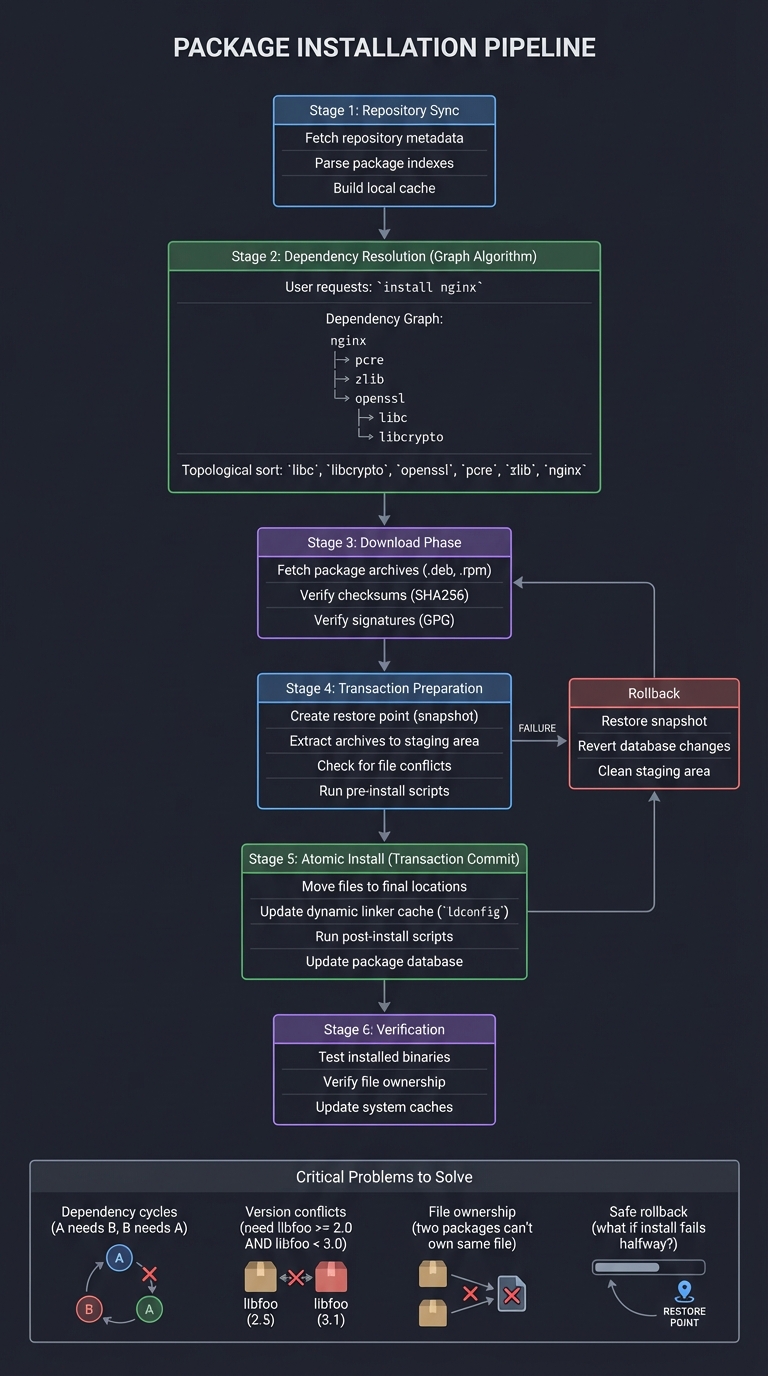
CSAPP connection: Dependency resolution is graph traversal (topological sort), and safe upgrades require transactional thinking (Ch. 12 concurrency as a mindset)—install must be atomic, or the system ends up in an inconsistent state.
5. Reproducibility and Security (CSAPP: Systems rigor)
Distributions live or die on trust. Reproducible builds and signed repositories are the difference between a safe update and a compromised one. Every package must be verifiable from source to installation.
Software Supply Chain Security:
┌─────────────────────────────────────────────────────────────────────┐
│           TRUSTED BUILD AND DISTRIBUTION PIPELINE                   │
├─────────────────────────────────────────────────────────────────────┤
│                                                                     │
│  1. Source Code Verification                                       │
│  ┌──────────────────────────────────────┐                          │
│  │ Fetch source tarball                 │                          │
│  │ Verify GPG signature from upstream   │                          │
│  │ Check against known-good hash        │                          │
│  │ Audit for supply chain attacks       │                          │
│  └──────┬───────────────────────────────┘                          │
│         │                                                           │
│         ▼                                                           │
│  2. Reproducible Build Environment                                 │
│  ┌──────────────────────────────────────┐                          │
│  │ Fixed toolchain version              │                          │
│  │ Deterministic timestamps             │                          │
│  │ Controlled build flags               │                          │
│  │ Isolated build chroot                │                          │
│  │ → Same input = Same output (bit-for-bit)                        │
│  └──────┬───────────────────────────────┘                          │
│         │                                                           │
│         ▼                                                           │
│  3. Build Artifact Signing                                         │
│  ┌──────────────────────────────────────┐                          │
│  │ Generate package file (.deb/.rpm)    │                          │
│  │ Compute SHA256 checksum              │                          │
│  │ Sign with distribution GPG key       │                          │
│  │ Multiple builders verify same hash   │                          │
│  └──────┬───────────────────────────────┘                          │
│         │                                                           │
│         ▼                                                           │
│  4. Repository Metadata                                            │
│  ┌──────────────────────────────────────┐                          │
│  │ Add package to repository index      │                          │
│  │ Update metadata (Packages.gz)        │                          │
│  │ Sign repository metadata (Release.gpg)│                         │
│  │ Publish to mirror network            │                          │
│  └──────┬───────────────────────────────┘                          │
│         │                                                           │
│         ▼                                                           │
│  5. Client-Side Verification                                       │
│  ┌──────────────────────────────────────┐                          │
│  │ Download package                     │                          │
│  │ Verify repository signature          │                          │
│  │ Verify package signature             │                          │
│  │ Verify SHA256 checksum               │                          │
│  │ Only install if ALL checks pass      │                          │
│  └──────────────────────────────────────┘                          │
│                                                                     │
└─────────────────────────────────────────────────────────────────────┘

Attack Vectors This Prevents:
- Compromised mirrors (signature mismatch detected)
- Man-in-the-middle attacks (cannot forge signatures)
- Tampered packages (checksum verification fails)
- Backdoored builds (reproducible builds detect differences)
- Supply chain injection (source verification catches it)
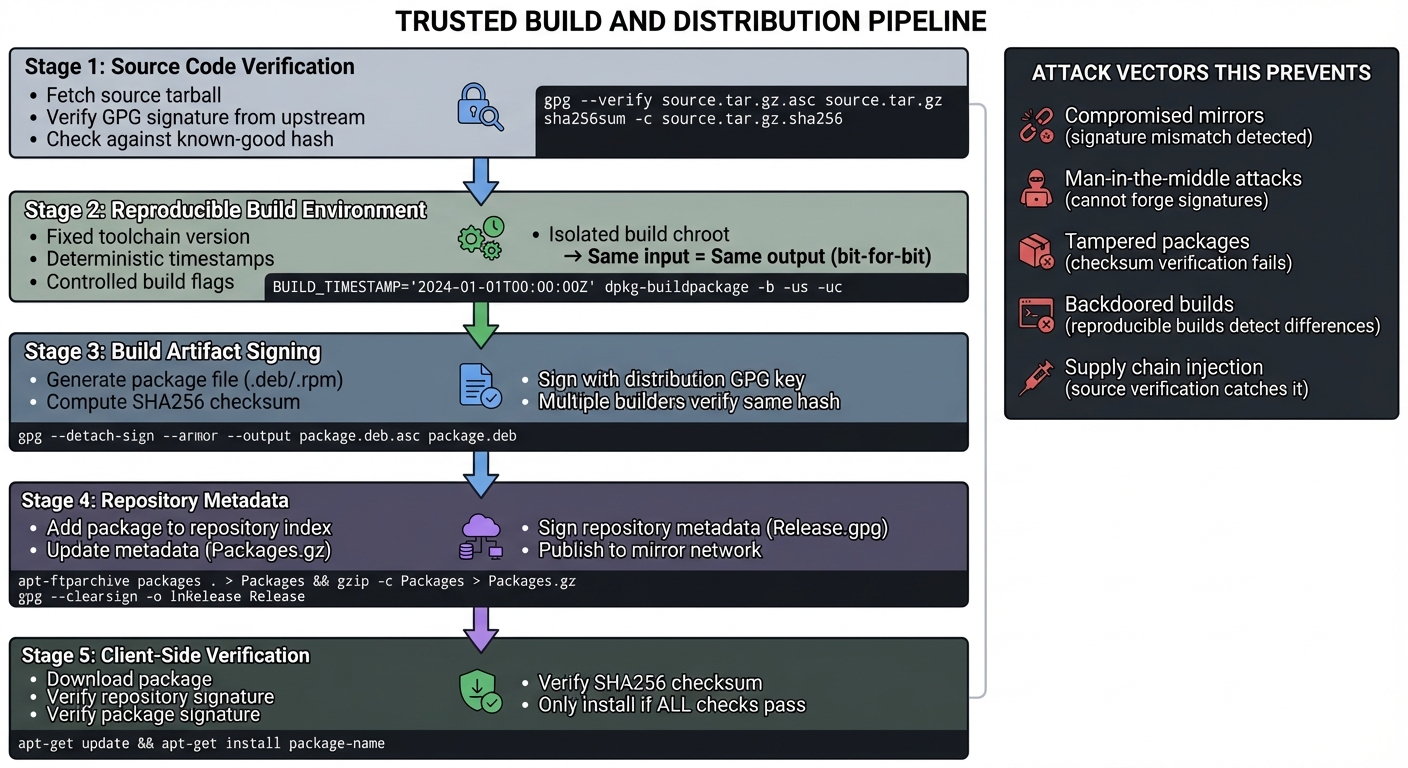
CSAPP connection: Systems rigor (throughout the book) emphasizes correctness and verification. In a distro, this means: can you prove the binary you’re running matches the source code you audited? Reproducible builds make this provable.
Concept Summary Table
| Concept Cluster | What You Need to Internalize |
|---|---|
| Toolchain | Compilers and libc must be bootstrapped in a strict order. |
| System layers | Bootloader, kernel, init, userland, and packages are distinct. |
| Packaging | Metadata, dependency graphs, and upgrade rules matter. |
| Filesystem | FHS is not optional; it defines system behavior. |
| Trust | Reproducible builds and signatures protect the supply chain. |
Deep Dive Reading by Concept
This section maps each concept from above to specific book chapters for deeper understanding. Read these before or alongside the projects to build strong mental models.
Toolchain and Build Systems
| Concept | Book & Chapter |
|---|---|
| Linking and loaders | “Computer Systems: A Programmer’s Perspective” by Bryant & O’Hallaron — Ch. 7: “Linking” |
| Toolchain components | “How Linux Works” by Brian Ward — Ch. 15: “Development Tools” |
| Cross-compilation | “Embedded Linux Primer” by Christopher Hallinan — Ch. 4: “The Toolchain” |
| Make and Makefiles | “Managing Projects with GNU Make” by Robert Mecklenburg — Ch. 1-3 |
| Build automation | “The GNU Make Book” by John Graham-Cumming — Ch. 1-5 |
Linux Internals and Boot Process
| Concept | Book & Chapter |
|---|---|
| System architecture | “How Linux Works” by Brian Ward — Ch. 1-4: “The Big Picture” |
| Boot sequence | “How Linux Works” by Brian Ward — Ch. 5: “How Linux Starts” |
| Init systems | “The Linux Programming Interface” by Michael Kerrisk — Ch. 28: “Process Creation and Program Execution in More Detail” |
| Kernel build and configuration | “Linux Kernel Development” by Robert Love — Ch. 2: “Getting Started with the Kernel” |
| Filesystem hierarchy | “How Linux Works” by Brian Ward — Ch. 4: “Disks and Filesystems” |
System Programming and Syscalls
| Concept | Book & Chapter |
|---|---|
| System calls fundamentals | “The Linux Programming Interface” by Michael Kerrisk — Ch. 1-6: “Fundamental Concepts” |
| Process management | “Advanced Programming in the UNIX Environment” by Stevens & Rago — Ch. 7-8: “Process Environment” and “Process Control” |
| File I/O | “The Linux Programming Interface” by Michael Kerrisk — Ch. 4-5: “File I/O” |
| Virtual memory | “Operating Systems: Three Easy Pieces” by Arpaci-Dusseau — Ch. 13-23: “Address Spaces” through “Complete Virtual Memory Systems” |
Package Management and Dependency Resolution
| Concept | Book & Chapter |
|---|---|
| Graph algorithms | “Grokking Algorithms” by Aditya Bhargava — Ch. 6: “Breadth-First Search” |
| Data structures for package management | “Algorithms” by Sedgewick & Wayne — Ch. 4: “Graphs” |
| Transactions and ACID | “Operating Systems: Three Easy Pieces” by Arpaci-Dusseau — Ch. 42: “Crash Consistency: FSCK and Journaling” |
| Database design | “Designing Data-Intensive Applications” by Martin Kleppmann — Ch. 1-2: “Foundations of Data Systems” |
Security and Reproducible Builds
| Concept | Book & Chapter |
|---|---|
| Cryptographic signatures | “Serious Cryptography” by Jean-Philippe Aumasson — Ch. 13: “Secure Randomness” and Ch. 14: “Common Cryptographic Flaws” |
| Supply chain security | “Secure Coding in C and C++” by Robert C. Seacord — Ch. 1: “Running with Scissors” |
| Build reproducibility | “Linux From Scratch” by Gerard Beekmans — Entire book (hands-on guide to reproducible builds) |
Essential Reading Order
For maximum comprehension, read in this order:
- Foundation (Week 1):
- How Linux Works Ch. 1-5 (system overview and boot)
- CSAPP Ch. 7 (linking fundamentals)
- Deep Systems (Week 2-3):
- The Linux Programming Interface Ch. 1-6 (syscalls)
- Operating Systems: Three Easy Pieces Ch. 1-4 (boot and process lifecycle)
- Build Systems (Week 4):
- Managing Projects with GNU Make Ch. 1-3
- How Linux Works Ch. 15 (toolchain)
- Package Management (Week 5):
- Grokking Algorithms Ch. 6 (graph traversal)
- Designing Data-Intensive Applications Ch. 1-2 (data systems)
Quick Start: Your First 48 Hours
Day 1 (4 hours):
- Read the Core Concept Analysis section.
- Skim Project 1 and Project 3 outcomes.
- Set up a Linux VM and verify toolchain basics.
Day 2 (4 hours):
- Start Project 3 (minimal image) to get a fast boot success.
- Write down every missing dependency you hit.
- Read the Core Question in Project 1 to frame the long journey.
End of Weekend: You will understand the boot chain and why the toolchain must come first.
Recommended Learning Paths
Path 1: The Systems Builder (Recommended)
- Project 3 -> Project 1 -> Project 2 -> Project 5 -> Project 4
Path 2: The Package Engineer
- Project 2 -> Project 5 -> Project 1
Path 3: The Installer Specialist
- Project 4 -> Project 3 -> Project 1
Project 1: Linux From Scratch (LFS) Build
- File: LINUX_DISTRIBUTION_BUILDING_LEARNING_PROJECTS.md
- Programming Language: C / Shell
- Coolness Level: Level 4: Hardcore Tech Flex
- Business Potential: 1. The “Resume Gold”
- Difficulty: Level 4: Expert
- Knowledge Area: OS Architecture / Build Systems
- Software or Tool: GCC / Make / LFS
- Main Book: “Linux From Scratch” by Gerard Beekmans
What you will build: A complete, bootable Linux system compiled entirely from source code, with no pre-built binaries.
Why it teaches distro building: It forces you to bootstrap the toolchain, build the core utilities, and wire the boot process.
Core challenges you will face:
- Building a cross-compiler toolchain (toolchain bootstrap)
- Resolving circular dependencies (gcc needs libc, libc needs gcc)
- Understanding configure, make, install workflows (build systems)
- Creating a bootable initramfs and configuring GRUB (bootloader chain)
- Setting up /etc files for a functional system (filesystem hierarchy)
Real World Outcome
You boot into a terminal on a system you built from source. Every binary, every library, every config file was compiled and placed by you.
$ uname -a
Linux lfs 6.x.y-lfs #1 SMP ... x86_64 GNU/Linux

$ ls /
bin  boot  dev  etc  home  lib  lib64  proc  root  sbin  sys  usr  var

$ gcc --version
gcc (LFS) 13.x.y
The Core Question You Are Answering
“How does a Linux system exist before a package manager exists?”
Concepts You Must Understand First
- Toolchain bootstrap order
- Why does libc depend on gcc and vice versa?
- Book Reference: “How Linux Works” – Ch. 15
- Chroot isolation
- What does it mean to change the root filesystem?
- Book Reference: “The Linux Programming Interface” – Ch. 18
- Boot chain
- Where does the kernel get its root filesystem?
- Book Reference: “Operating Systems: Three Easy Pieces” – Ch. 4
Questions to Guide Your Design
- How will you validate each toolchain stage before proceeding?
- How will you confirm that /lib and /usr/lib are correctly populated?
- What configuration files must exist for a bootable system?
Thinking Exercise
Draw a dependency graph for: binutils, gcc, glibc, and coreutils. Explain the cycle and how LFS breaks it.
The Interview Questions They Will Ask
- Why is a temporary toolchain necessary?
- What does chroot actually change?
- Why is PID 1 special during boot?
- What breaks if /lib/ld-linux is missing?
Hints in Layers
Hint 1: Verify every toolchain step with a simple compile test.
Hint 2: Use a checklist for each package to avoid skipping steps.
Hint 3: If the system fails to boot, inspect init logs and kernel cmdline.
Hint 4: Keep a full build log to replay or debug failures.
Books That Will Help
| Topic | Book | Chapter |
|---|---|---|
| Toolchain bootstrap | “How Linux Works” | Ch. 15 |
| System calls and libc | “The Linux Programming Interface” | Ch. 1-6 |
| Boot and init | “Operating Systems: Three Easy Pieces” | Ch. 4 |
Common Pitfalls and Debugging
Problem 1: “Boot stops at kernel panic”
- Why: Root filesystem not found or init missing
- Fix: Confirm init exists at /sbin/init and kernel cmdline points to correct root
- Quick test: Boot with init=/bin/sh
Problem 2: “Toolchain builds fail mid-way”
- Why: Environment variables not set correctly in chroot
- Fix: Re-check PATH and LFS variables
- Quick test: Print PATH before each build
Project 2: Build Your Own Package Manager
- File: LINUX_DISTRIBUTION_BUILDING_LEARNING_PROJECTS.md
- Programming Language: C or Rust
- Coolness Level: Level 3: Genuinely Clever
- Business Potential: 4. The “Open Core” Infrastructure
- Difficulty: Level 3: Advanced
- Knowledge Area: Systems Administration / Algorithms
- Software or Tool: Package Management
- Main Book: “Designing Data-Intensive Applications” by Martin Kleppmann
What you will build: A package manager that can install, remove, track dependencies, and upgrade software packages.
Why it teaches distro building: Package management is the core of a distribution. It controls how software arrives, updates, and is removed.
Core challenges you will face:
- Designing a package format (archive + metadata)
- Dependency resolution (graph algorithms)
- File ownership tracking
- Repository indexing and downloads
- Atomic install and rollback
Real World Outcome
You can install and remove packages with dependency resolution and repository fetching.
$ mypkg install vim
[mypkg] Resolving dependencies...
[mypkg] Downloading 7 packages
[mypkg] Installing: vim, ncurses, libacl...
[mypkg] Done

$ mypkg remove vim
[mypkg] Removing vim
[mypkg] Orphaned deps: none
The Core Question You Are Answering
“How do distributions safely update thousands of files without breaking systems?”
Concepts You Must Understand First
- Dependency graphs
- How does topological sorting work?
- Book Reference: “Grokking Algorithms” – Ch. 6
- Atomic installs
- How can you roll back a failed update?
- Book Reference: “Operating Systems: Three Easy Pieces” – Ch. 42
- Metadata formats
- What fields must a package manifest include?
Questions to Guide Your Design
- How will you detect and handle conflicts between packages?
- What defines a “safe” rollback?
- Where will you store the package database?
Thinking Exercise
Sketch a dependency graph for a package that needs libc, openssl, and zlib.
The Interview Questions They Will Ask
- How do package managers resolve dependencies?
- What is the difference between a package and a repository?
- Why are transactional installs important?
- How do you detect file ownership conflicts?
Hints in Layers
Hint 1: Start with single-package installs, no deps.
Hint 2: Add a package database that records installed files.
Hint 3: Implement a two-phase install: unpack then commit.
Hint 4: Add rollback by keeping a log of file changes.
Books That Will Help
| Topic | Book | Chapter |
|---|---|---|
| Dependency graphs | “Grokking Algorithms” | Ch. 6 |
| Data storage | “Designing Data-Intensive Applications” | Ch. 1-2 |
| Transactions | “Operating Systems: Three Easy Pieces” | Ch. 42 |
Common Pitfalls and Debugging
Problem 1: “Dependency resolution loops”
- Why: Cyclic dependencies or missing constraints
- Fix: Detect cycles and fail with clear errors
- Quick test: Run a cycle detection on the graph
Problem 2: “Rollback leaves system broken”
- Why: File ownership not tracked
- Fix: Track every installed file and restore previous versions
- Quick test: Simulate a failed install and inspect the filesystem
Project 3: Minimal Bootable Linux Image Builder
- File: LINUX_DISTRIBUTION_BUILDING_LEARNING_PROJECTS.md
- Programming Language: Shell (Bash)
- Coolness Level: Level 4: Hardcore Tech Flex
- Business Potential: 3. The “Service and Support” Model
- Difficulty: Level 3: Advanced
- Knowledge Area: Embedded Systems / OS
- Software or Tool: Buildroot / Busybox
- Main Book: “How Linux Works” by Brian Ward
What you will build: A tool that generates minimal, bootable Linux images from a configuration file.
Why it teaches distro building: This forces you to define the absolute minimum needed for a bootable system.
Core challenges you will face:
- Creating a minimal initramfs with busybox
- Configuring and compiling a kernel for specific hardware
- Setting up a bootloader
- Implementing an image generation pipeline
- Making it useful (networking, storage)
Real World Outcome
You generate a tiny ISO and boot it in QEMU.
$ ./build-image.sh config.yaml
[builder] Kernel built: vmlinuz
[builder] Rootfs built: rootfs.img (12 MB)
[builder] ISO created: minimal-linux.iso

$ qemu-system-x86_64 -cdrom minimal-linux.iso
Booting...
Welcome to Minimal Linux
#
The Core Question You Are Answering
“What is the smallest possible Linux system that still boots and provides a shell?”
Concepts You Must Understand First
- initramfs
- How does the kernel mount the initial root?
- Book Reference: “Linux Kernel Development” – Ch. 14
- Busybox
- Why does a single binary replace dozens of utilities?
- Bootloader basics
- What does the bootloader pass to the kernel?
Questions to Guide Your Design
- What files must exist in /dev, /proc, and /sys?
- How will you handle networking without a full userland?
- How will you produce a reproducible image?
Thinking Exercise
List the minimum binaries needed for a usable shell environment.
The Interview Questions They Will Ask
- What is the role of initramfs?
- Why does PID 1 matter in a minimal system?
- How do you test a bootable image safely?
Hints in Layers
Hint 1: Start with Busybox and a static shell.
Hint 2: Add a simple init script that mounts /proc and /sys.
Hint 3: Use QEMU for fast boot testing.
Hint 4: Keep a config file so builds are repeatable.
Books That Will Help
| Topic | Book | Chapter |
|---|---|---|
| Boot process | “How Linux Works” | Ch. 5 |
| Kernel build | “Linux Kernel Development” | Ch. 2 |
| System calls | “The Linux Programming Interface” | Ch. 1-6 |
Common Pitfalls and Debugging
Problem 1: “Kernel boots but no shell”
- Why: init script missing or wrong permissions
- Fix: Ensure init is executable and in the correct path
- Quick test: Boot with init=/bin/sh
Problem 2: “No device nodes”
- Why: /dev not populated
- Fix: Use devtmpfs or populate nodes manually
- Quick test: Check if /dev/console exists
Project 4: Distribution Installer (Like archinstall)
- File: LINUX_DISTRIBUTION_BUILDING_LEARNING_PROJECTS.md
- Programming Language: Shell / Python
- Coolness Level: Level 2: Practical but Forgettable
- Business Potential: 3. The “Service and Support” Model
- Difficulty: Level 2: Intermediate
- Knowledge Area: System Administration
- Software or Tool: Partitioning Tools / Chroot
- Main Book: “The Linux Command Line” by William Shotts
What you will build: An installer that partitions disks, installs packages, configures bootloader, and produces a working system.
Why it teaches distro building: The installer is the integration point for every distro subsystem.
Core challenges you will face:
- Disk partitioning and filesystem formatting
- Bootloader setup
- Base package installation
- User and network configuration
- Safe error handling and recovery
Real World Outcome
You run an interactive installer that produces a bootable system in one flow.
$ distro-install
[installer] Select disk: /dev/vda
[installer] Partitioning: EFI + root
[installer] Installing base packages...
[installer] Installing bootloader...
[installer] Done. Reboot to /dev/vda
The Core Question You Are Answering
“How does a blank disk become a bootable Linux system?”
Concepts You Must Understand First
- Partition tables
- GPT vs MBR and why it matters
- Filesystems
- Why ext4 and xfs behave differently
- Chroot install flow
- Why installers use chroot to configure the target
Questions to Guide Your Design
- How will you detect the target disk safely?
- What defaults will you use for partition sizes?
- How will you recover from a failed install step?
Thinking Exercise
Draw a disk layout for EFI, root, and swap. Explain why each exists.
The Interview Questions They Will Ask
- How does a bootloader get installed?
- Why does an installer use chroot?
- What are the risks of automatic partitioning?
Hints in Layers
Hint 1: Start with a dry-run that prints steps only.
Hint 2: Use a single disk layout template first.
Hint 3: Log every command for troubleshooting.
Hint 4: Add rollback for failed steps (unmount, cleanup).
Books That Will Help
| Topic | Book | Chapter |
|---|---|---|
| Filesystems | “How Linux Works” | Ch. 4 |
| Bootloader | “Linux Kernel Development” | Ch. 2 |
| Shell automation | “The Linux Command Line” | Ch. 27 |
Common Pitfalls and Debugging
Problem 1: “System boots to a black screen”
- Why: Bootloader not installed to correct disk
- Fix: Verify EFI partition and bootloader target
- Quick test: Use firmware boot menu to inspect entries
Problem 2: “Mounts fail after reboot”
- Why: Incorrect fstab entries
- Fix: Verify UUIDs in /etc/fstab
- Quick test: Use lsblk -f in recovery mode
Project 5: Source-Based Package Build System (Like Gentoo Portage)
- File: LINUX_DISTRIBUTION_BUILDING_LEARNING_PROJECTS.md
- Programming Language: Shell / Python
- Coolness Level: Level 4: Hardcore Tech Flex
- Business Potential: 4. The “Open Core” Infrastructure
- Difficulty: Level 4: Expert
- Knowledge Area: Build Systems / Packaging
- Software or Tool: Portage-like build system
- Main Book: “The Linux Programming Interface” by Michael Kerrisk
What you will build: A source-based build system that compiles packages from recipes, resolves dependencies, and caches build artifacts.
Why it teaches distro building: Source-based systems expose the full build pipeline and make dependency management explicit.
Core challenges you will face:
- Recipe format and metadata
- Dependency graph resolution
- Build sandboxing and isolation
- Caching and incremental builds
- Handling patches and build flags
Real World Outcome
You run a tool that compiles packages from source and caches results.
$ srcpkg build nginx
[srcpkg] Resolving deps: pcre, zlib, openssl
[srcpkg] Fetching sources...
[srcpkg] Building...
[srcpkg] Installing to /opt/srcpkg/rootfs
[srcpkg] Done
The Core Question You Are Answering
“How can a distro guarantee consistent builds from arbitrary source code?”
Concepts You Must Understand First
- Build recipes
- What metadata must a recipe include?
- Sandboxing
- Why builds should not write outside a defined root
- Caching
- When can you reuse build artifacts safely?
Questions to Guide Your Design
- How will you define and validate build recipes?
- How will you isolate builds from the host system?
- What signals that a cached build is still valid?
Thinking Exercise
Design a minimal recipe format for building zlib and explain each field.
The Interview Questions They Will Ask
- Why do source-based distros need build recipes?
- How do you keep builds reproducible?
- What are the risks of build scripts running on a host system?
Hints in Layers
Hint 1: Start with a single package recipe format.
Hint 2: Use a dedicated build root for all builds.
Hint 3: Add caching only after correctness is proven.
Hint 4: Track build flags in cache keys.
Books That Will Help
| Topic | Book | Chapter |
|---|---|---|
| System calls and build env | “The Linux Programming Interface” | Ch. 1-6 |
| Build systems | “The GNU Make Book” | Ch. 1-3 |
| Dependency graphs | “Grokking Algorithms” | Ch. 6 |
Common Pitfalls and Debugging
Problem 1: “Build scripts write to host”
- Why: No sandbox or incorrect root
- Fix: Use a chroot or build root isolation
- Quick test: Scan for unexpected file changes
Problem 2: “Cache returns wrong build”
- Why: Cache key missing build flags or patches
- Fix: Include flags and patch hashes in cache key
- Quick test: Change a flag and confirm rebuild triggers
Project Comparison Table
| Project | Difficulty | Time | Depth of Understanding | Fun Factor |
|---|---|---|---|---|
| 1. LFS Build | Level 4 | 2-4 weeks | Very High | ***– |
| 2. Package Manager | Level 3 | 2-3 weeks | High | ***– |
| 3. Minimal Image Builder | Level 3 | 1-2 weeks | High | ***– |
| 4. Installer | Level 2 | 1-2 weeks | Medium | **— |
| 5. Source Build System | Level 4 | 2-3 weeks | Very High | ***– |
Recommendation
If you are new to distro building: Start with Project 3 to get a boot success fast. If you want to understand packaging deeply: Start with Project 2. If you want a full-stack view: Project 1 is the complete journey.
Summary
This learning path covers Linux distribution building through five deep projects.
| # | Project Name | Main Language | Difficulty | Time Estimate |
|---|---|---|---|---|
| 1 | LFS Build | C / Shell | Level 4 | 2-4 weeks |
| 2 | Package Manager | C / Rust | Level 3 | 2-3 weeks |
| 3 | Minimal Image Builder | Shell | Level 3 | 1-2 weeks |
| 4 | Installer | Shell / Python | Level 2 | 1-2 weeks |
| 5 | Source Build System | Shell / Python | Level 4 | 2-3 weeks |
Expected Outcomes
After completing these projects, you will:
- Understand toolchain bootstrapping and root filesystem design
- Build and debug boot chains from firmware to userspace
- Implement package formats and dependency resolution
- Design reproducible build workflows
- Build a minimal distro that boots and upgrades safely
Additional Resources and References
Industry Analysis
- W3Techs: Linux usage on the web (https://w3techs.com/technologies/details/os-linux)
- Debian: 70,000+ packages (https://www.debian.org/intro/about.en.html)
Books
- “How Linux Works” by Brian Ward
- “Computer Systems: A Programmer’s Perspective” by Bryant and O’Hallaron
- “The Linux Programming Interface” by Michael Kerrisk
- “Operating Systems: Three Easy Pieces” by Arpaci-Dusseau
- “Linux Kernel Development” by Robert Love
- “The GNU Make Book” by John Graham-Cumming