Project 3: Minimal Bootable Linux Image Builder
A tool that generates minimal, bootable Linux images (like Alpine or Buildroot output) from a configuration file.
Quick Reference
| Attribute | Value |
|---|---|
| Primary Language | See main guide |
| Alternative Languages | N/A |
| Difficulty | Level 3: Advanced |
| Time Estimate | 1-2 weeks |
| Knowledge Area | Embedded Systems / OS |
| Tooling | Buildroot / BusyBox |
| Prerequisites | Shell scripting, basic kernel understanding |
Goal: Build an image pipeline that takes a configuration file and produces a minimal Linux image that boots on QEMU. You will understand how kernels, initramfs, bootloaders, and root filesystems are assembled into a single bootable artifact.
What You Will Build
A CLI tool that turns a small config into a bootable disk image (kernel + initramfs + rootfs), similar to Buildroot outputs. Buildroot is a widely used system to generate embedded Linux systems from source.
Why It Matters
Minimal images power containers, embedded devices, and recovery systems. Building one forces you to understand the boot chain, kernel configuration, and early user space.
Prerequisites & Background Knowledge
Essential Prerequisites (Must Have)
- Basic shell scripting and Make usage
- Familiarity with kernel configs and modules
- Basic understanding of the Linux boot process
Helpful But Not Required
- QEMU usage
- BusyBox configuration
Self-Assessment Questions
- Can you explain what initramfs is and why it exists?
- Do you know how to configure a kernel for minimal hardware?
- Can you read kernel boot logs for errors?
Core Concept Analysis
Kernel Configuration
Your kernel must include filesystem, block device, and init support required by your target. Minimal kernels require explicit inclusion of drivers and options.
initramfs as Early Root
initramfs is an early root filesystem used by the kernel before the real root is mounted. It is typically packaged as a cpio archive.
BusyBox
BusyBox provides minimal user space utilities and a compact init. It is commonly used in embedded systems.
Image Layout
Your tool will assemble kernel, initramfs, and rootfs into a bootable image or an ISO/IMG file.
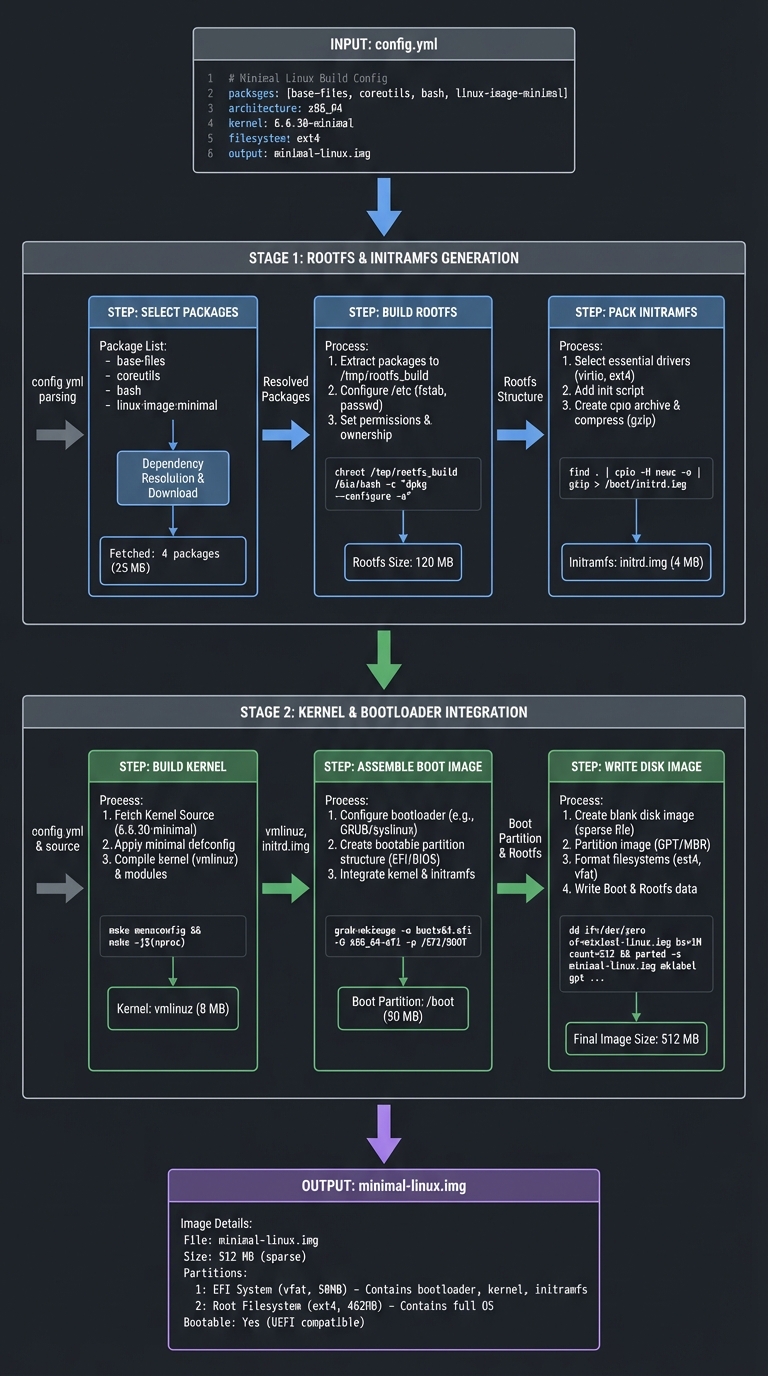
Image Build Pipeline (ASCII)
config.yml
   |
   v
select packages -> build rootfs -> pack initramfs
   |
   v
build kernel -> assemble boot image -> write disk image
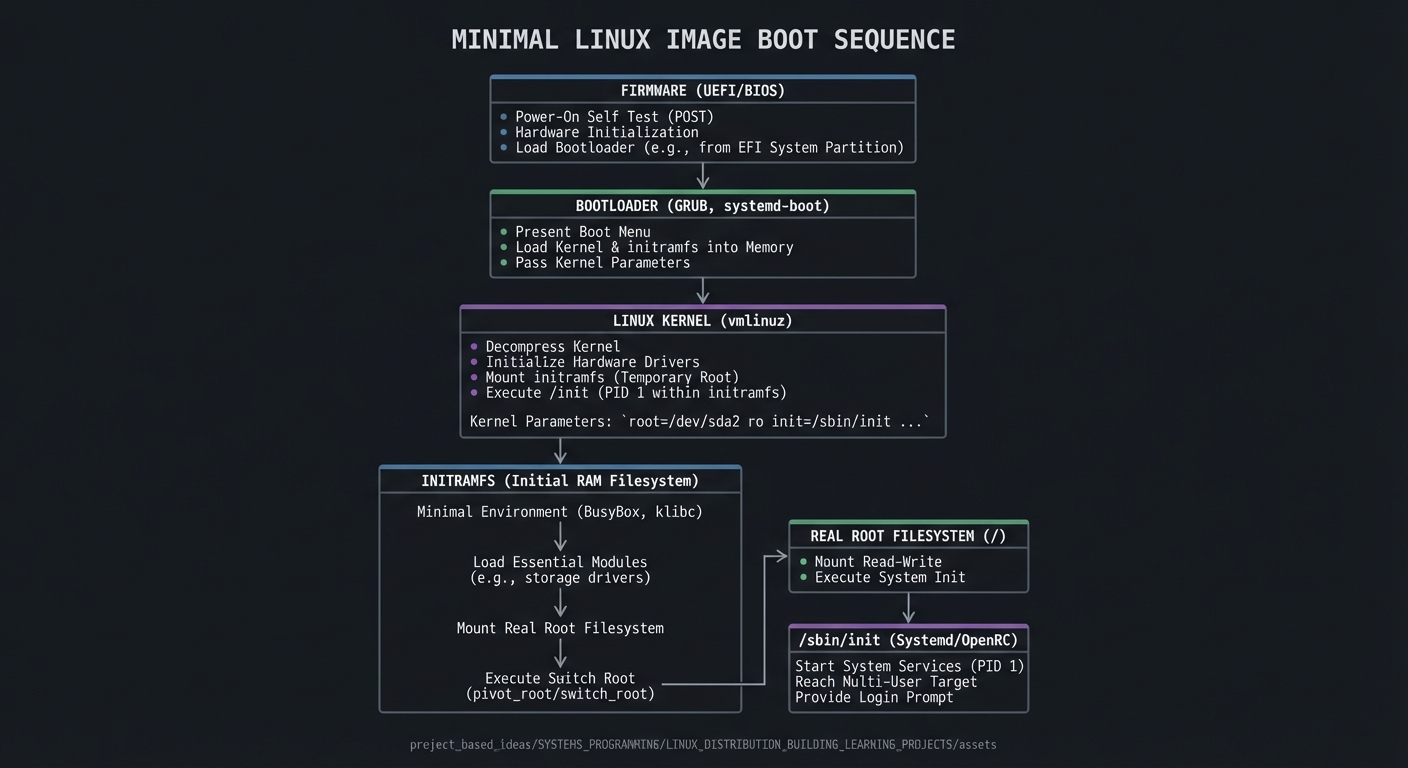
Boot Sequence (ASCII)
Firmware -> Bootloader -> Kernel
                    |
                    v
             initramfs (/init)
                    |
                    v
            real root -> /sbin/init
Success Metrics
- Image boots in QEMU without manual intervention.
- Init script runs and shows expected services.
- Rootfs is minimal and reproducible.
Implementation Guide
Phase 1: Config Parser
- Define a small config format (YAML or TOML)
- Parse kernel version, packages, and init settings
Phase 2: Root Filesystem
- Build BusyBox
- Create directory tree and device nodes
- Install init scripts
Phase 3: Kernel
- Configure a minimal kernel
- Build and install kernel image
Phase 4: initramfs
- Pack rootfs into a cpio archive
- Compress and embed into image
Phase 5: Image Assembly
- Create a disk image (raw or qcow2)
- Write bootloader (or use direct kernel boot for QEMU)
- Validate boot
Milestones
- Milestone 1: Config file parsed and rootfs generated
- Milestone 2: Kernel builds and boots with initramfs
- Milestone 3: Disk image boots in QEMU
- Milestone 4: Output is reproducible from same config
Real-World Outcome
You can show a minimal image booting in QEMU with predictable output:
$ ./minimage build config.yml
Built: out/kernel
Built: out/initramfs.cpio.gz
Built: out/disk.img

$ qemu-system-x86_64 -kernel out/kernel -initrd out/initramfs.cpio.gz \
  -append "console=ttyS0" -nographic

[    0.000000] Linux version 6.x.y
[    0.412345] Init: /init
Welcome to minimal-linux!
/min #
The Core Question You Are Answering
How do you assemble a minimal kernel, initramfs, and rootfs into a reproducible bootable image?
Concepts You Must Understand First
- initramfs packaging and init behavior
- Kernel config essentials (filesystem, console, drivers)
- Bootloader vs direct kernel boot
Questions to Guide Your Design
- Which kernel options are strictly required for your rootfs?
- How will you keep the rootfs minimal and deterministic?
- What is the format of your final image (raw, ISO, qcow2)?
- How will you validate that init ran successfully?
Thinking Exercise
Design the smallest init script that can mount /proc and /sys, then drop into a shell. What happens if you omit one mount?
The Interview Questions They Will Ask
- Why is initramfs usually a cpio archive?
- What must be in the initramfs for a successful boot?
- How would you reduce kernel size without breaking boot?
- What is the difference between direct kernel boot and bootloader boot?
Hints in Layers
Hint 1
Start with a known minimal config: build a BusyBox rootfs and boot directly with QEMU.
Hint 2
Add a small init script that mounts proc, sys, and devtmpfs and then launches sh.
Hint 3
If the boot hangs, check kernel cmdline and ensure the console is set to ttyS0.
Books That Will Help
| Concept | Book | Suggested Chapters (use index) | Why This Matters |
|---|---|---|---|
| Boot process | How Linux Works (Brian Ward) | Boot and startup | Explains kernel and init sequence |
| Kernel basics | Linux Kernel Development (Robert Love) | Kernel configuration | Helps tune kernel for minimal systems |
| Systems programming | Linux System Programming (Robert Love) | Process, init, and signals | Helps implement init scripts |
| OS basics | Operating Systems: Three Easy Pieces | Processes and filesystems | Reinforces process and FS fundamentals |
Common Pitfalls & Debugging
Problem 1: “Kernel panics: unable to mount root”
- Why: initramfs missing or kernel lacks filesystem support
- Fix: Ensure initramfs is loaded and kernel has required filesystem options
- Quick test: Boot with a known good initramfs and compare
Problem 2: “No console output”
- Why: Wrong console device or missing serial support
- Fix: Add
console=ttyS0and enable serial in kernel config - Quick test: Run QEMU with
-nographicand verify output
Problem 3: “init not found”
- Why: /init missing or not executable
- Fix: Place /init in initramfs and chmod +x
- Quick test: List initramfs contents with
cpio -it
Definition of Done
- Config file builds kernel, rootfs, and initramfs
- Image boots in QEMU and reaches a shell
- init script mounts /proc and /sys
- Build is reproducible with same config
- Rootfs size is minimized and documented
References
- Main guide:
LINUX_DISTRIBUTION_BUILDING_LEARNING_PROJECTS.md - Buildroot manual: https://buildroot.org/downloads/manual/manual.html
- BusyBox documentation: https://www.busybox.net/downloads/BusyBox.html
- Linux kernel initramfs documentation: https://docs.kernel.org/6.15/filesystems/ramfs-rootfs-initramfs.html