Project 2: Build Your Own Package Manager
A functional package manager that can install, remove, track dependencies, and upgrade software packages.
Quick Reference
| Attribute | Value |
|---|---|
| Primary Language | See main guide |
| Alternative Languages | N/A |
| Difficulty | Level 3: Advanced |
| Time Estimate | 2-3 weeks |
| Knowledge Area | Systems Administration / Algorithms |
| Tooling | Package Management |
| Prerequisites | Comfortable with C or Rust, basic data structures |
Goal: Design and implement a small but real package manager that can resolve dependencies, fetch packages, verify integrity, install files atomically, and roll back on failure. You will understand why package databases exist, how dependency graphs are solved, and why ownership tracking is essential for safe upgrades and removals.
What You Will Build
A functional package manager that can install, remove, track dependencies, and upgrade software packages, backed by a local database and a remote repository index.
Why It Matters
Every Linux distribution relies on a package manager to control system state. A working implementation teaches you graph theory, filesystem transactions, signatures, and repo metadata design. It also forces you to reason about failure recovery and reproducibility.
Prerequisites & Background Knowledge
Essential Prerequisites (Must Have)
- Comfortable with basic data structures and file IO
- Familiarity with tar archives and checksums
- Ability to parse metadata (JSON, TOML, or custom formats)
Helpful But Not Required
- HTTP client basics and caching
- Graph algorithms (topological sort)
Self-Assessment Questions
- Can you explain why dependencies form a DAG most of the time?
- Do you know how to compute and verify SHA256?
- Can you implement a rollback plan for partial installs?
Core Concept Analysis
Package Format
A package is usually a tar archive plus metadata: name, version, dependencies, file list, and checksums. Your format should be predictable and easy to verify.
Dependency Resolution
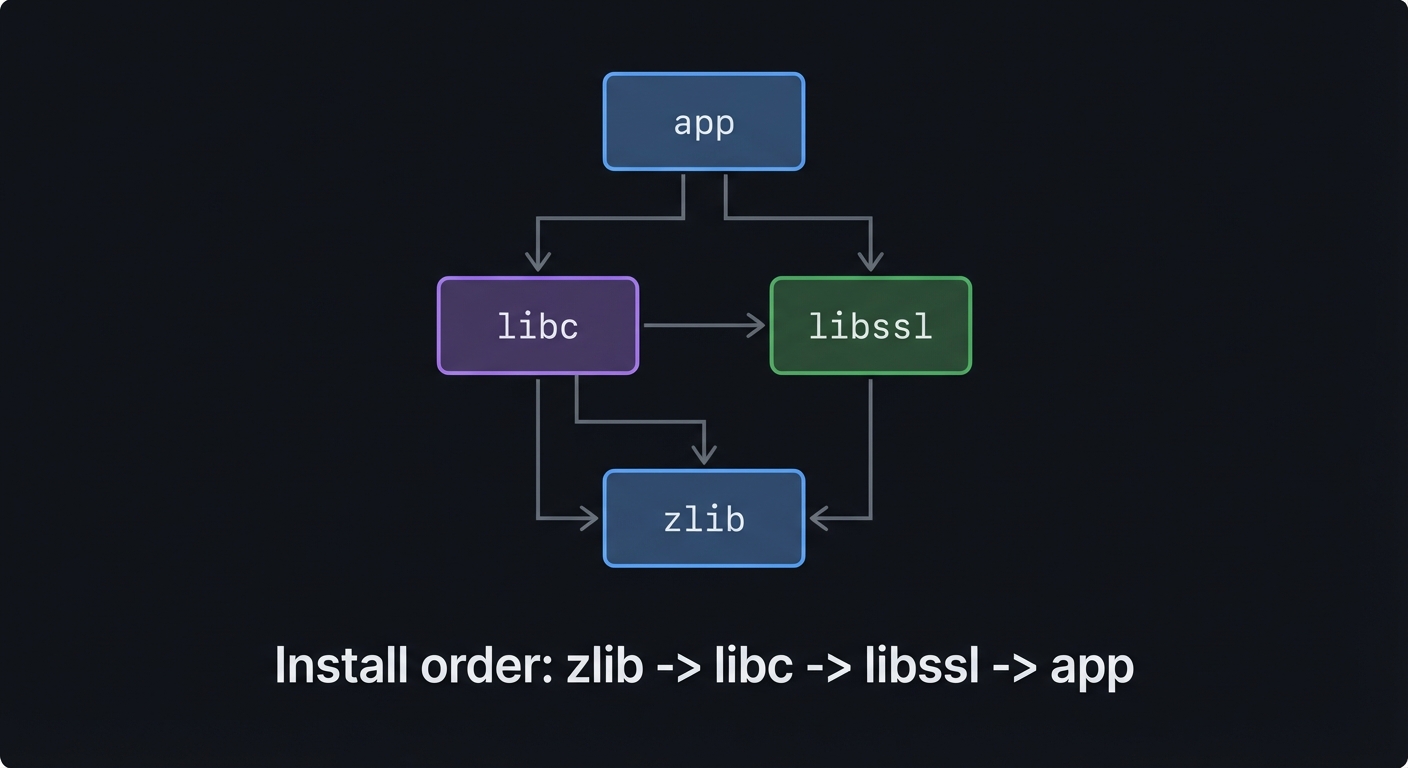
Dependencies form a graph. You need to sort packages so that requirements are installed before dependents. Conflicts and version constraints complicate the graph.
Ownership Database
To remove packages safely, you must know which package owns each file. This prevents deleting files that are still required.
Atomic Install
A partially installed package can break the system. Install into a staging root and then move into place in one final step.
Dependency Graph (ASCII)
libc -> zlib
libc -> libssl
libssl -> zlib
app  -> libc
app  -> libssl

Install order: zlib -> libc -> libssl -> app
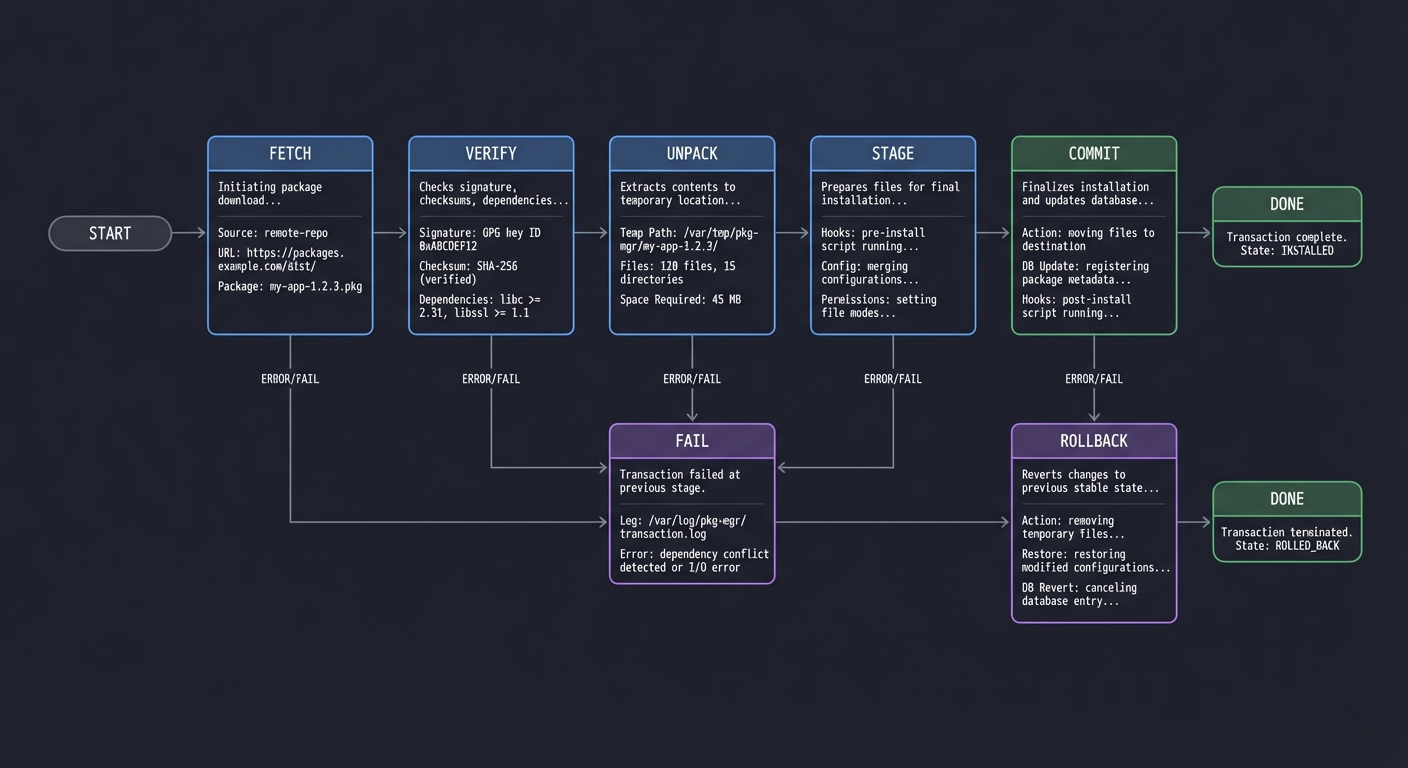
Transaction State Machine (ASCII)
FETCH -> VERIFY -> UNPACK -> STAGE -> COMMIT
   |         |         |        |       |
   |         v         v        v       v
   +-----> FAIL <-----+-----> ROLLBACK -> DONE
Success Metrics
- Installing a package never leaves the system half-updated.
- Removing a package never deletes files owned by another package.
- Dependency order is deterministic and repeatable.
Implementation Guide
Phase 1: Minimal Package Format
- Define metadata fields (name, version, deps, files, checksums)
- Pack and unpack tar archives
Phase 2: Local Package Database
- Store installed packages and file ownership
- Track versions and install times
Phase 3: Dependency Resolver
- Parse dependency graph
- Implement topological sort
- Detect cycles and conflicts
Phase 4: Repository Index
- Host a simple index file (JSON or custom)
- Download and cache packages
- Verify checksums before install
Phase 5: Transactions
- Stage files to a temp root
- Commit with rename/move
- Roll back on failure
Milestones
- Milestone 1: Install and remove a single package with a local tarball
- Milestone 2: Dependency resolver installs in correct order
- Milestone 3: Remote repo index and checksum verification work
- Milestone 4: Atomic install and rollback are reliable
Real-World Outcome
You can show a realistic install session with dependency resolution and a rollback on failure:
$ pkg add app
Resolving dependencies...
- zlib 1.2.13
- libc 2.39
- libssl 3.2.1
- app 1.0.0

Fetching packages...
Verified: zlib
Verified: libc
Verified: libssl
Verified: app

Installing...
[stage] /var/lib/pkg/staging/...
[commit] /usr/bin/app
[commit] /usr/lib/libssl.so

Success: app 1.0.0 installed
Rollback example:
$ pkg add app
Error: checksum mismatch for libssl
Rolling back staged files...
Rollback complete. No changes applied.
The Core Question You Are Answering
How do you safely manage system state changes when every install can change hundreds of files?
Concepts You Must Understand First
- Graphs and topological sort
- File ownership tracking
- Checksums and integrity verification
- Atomic file operations (rename, replace)
Questions to Guide Your Design
- What is the minimal metadata needed to install and remove safely?
- How will you handle version constraints and conflicts?
- Where will you store file ownership information?
- How will you ensure an interrupted install is recoverable?
Thinking Exercise
Draw the dependency graph for five packages with one optional dependency. Decide how your resolver handles optional vs required edges.
The Interview Questions They Will Ask
- How do you detect and handle dependency cycles?
- Why is file ownership tracking required for safe removal?
- How does an atomic install protect system integrity?
- What would you store in the package database and why?
Hints in Layers
Hint 1
Start with a local-only package manager: install a tarball and record its file list.
Hint 2
Add dependency metadata and write a topo-sort to compute install order.
Hint 3
Implement staging and a final rename to ensure installs are atomic.
Books That Will Help
| Concept | Book | Suggested Chapters (use index) | Why This Matters |
|---|---|---|---|
| Graphs | Grokking Algorithms (Aditya Bhargava) | Graphs and topological sort | Directly maps to dependency resolution |
| Filesystems | Operating Systems: Three Easy Pieces | Filesystems and crash consistency | Helps with transactional installs |
| Systems IO | The Linux Programming Interface (Kerrisk) | File operations and metadata | Explains atomic rename and permissions |
| Data modeling | Designing Data-Intensive Applications (Kleppmann) | Storage and data models | Helps design the package DB |
Common Pitfalls & Debugging
Problem 1: “Removing a package deletes shared files”
- Why: No ownership tracking or missing reference counts
- Fix: Track owners for every path and only remove when owner count is zero
- Quick test: Install two packages sharing a lib and remove one
Problem 2: “Dependency order is wrong”
- Why: Graph cycles or missing edges
- Fix: Detect cycles, log edges, and ensure topological ordering
- Quick test: Print graph and verify install order for known DAG
Problem 3: “Install partially applied after crash”
- Why: No atomic commit step
- Fix: Stage to temp dir, then rename into place
- Quick test: Simulate crash by killing installer mid-run
Definition of Done
- Package format includes metadata, checksums, and file list
- Dependency resolution is deterministic and cycle-safe
- Install uses staging and atomic commit
- Rollback leaves system unchanged on failure
- Ownership database supports safe removal and upgrades
References
- Main guide:
LINUX_DISTRIBUTION_BUILDING_LEARNING_PROJECTS.md - Debian Policy Manual (package format + control fields): https://www.debian.org/doc/debian-policy/
- RPM documentation: https://rpm.org/documentation.html