Project 1: Linux From Scratch (LFS) Build
A complete, bootable Linux system compiled entirely from source code, with no pre-built binaries.
Quick Reference
| Attribute | Value |
|---|---|
| Primary Language | See main guide |
| Alternative Languages | N/A |
| Difficulty | Level 4: Expert |
| Time Estimate | 2-4 weeks (first time) |
| Knowledge Area | OS Architecture / Build Systems |
| Tooling | GCC / Make / LFS |
| Prerequisites | Comfortable with command line, basic understanding of compilation |
Goal: Build a self-hosting Linux system from source and understand every boot, toolchain, and filesystem decision behind it. You will be able to bootstrap a compiler toolchain, assemble a root filesystem, configure a kernel, and produce a reproducible bootable system. You will also gain the debugging instincts needed to recover from broken builds and boot failures.
What You Will Build
A complete, bootable Linux system compiled entirely from source code, with no pre-built binaries, following the LFS methodology and adding your own automation, verification, and reproducibility checks. LFS provides step-by-step instructions for building such a system from source.
Why It Matters
Building from source is the fastest way to internalize how toolchains, libraries, bootloaders, and init systems actually fit together. LFS is the canonical reference for this process and documents the end-to-end steps for a clean, custom Linux system.
Prerequisites & Background Knowledge
Essential Prerequisites (Must Have)
- Confident with shell, filesystem permissions, and basic POSIX tooling
- Comfort reading build logs and adjusting configure flags
- Basic understanding of compilation and linking
Helpful But Not Required
- Familiarity with chroot, initramfs, and bootloader concepts
- Prior experience with cross-compilers or embedded builds
Self-Assessment Questions
- Can you explain the difference between static and dynamic linking?
- Can you read a compiler error and locate missing headers or libraries?
- Do you understand what
/boot,/lib, and/usrare for?
Development Environment Setup
- A host Linux machine or VM with enough disk space and RAM
- A dedicated partition or virtual disk for the LFS target
- A clean, repeatable build log directory for later debugging
Time Investment
- 2-4 weeks for a first build if you document each step and solve issues carefully
Important Reality Check
- Expect at least one toolchain break and one boot failure. This is part of the learning.
Core Concept Analysis
Toolchain Bootstrap
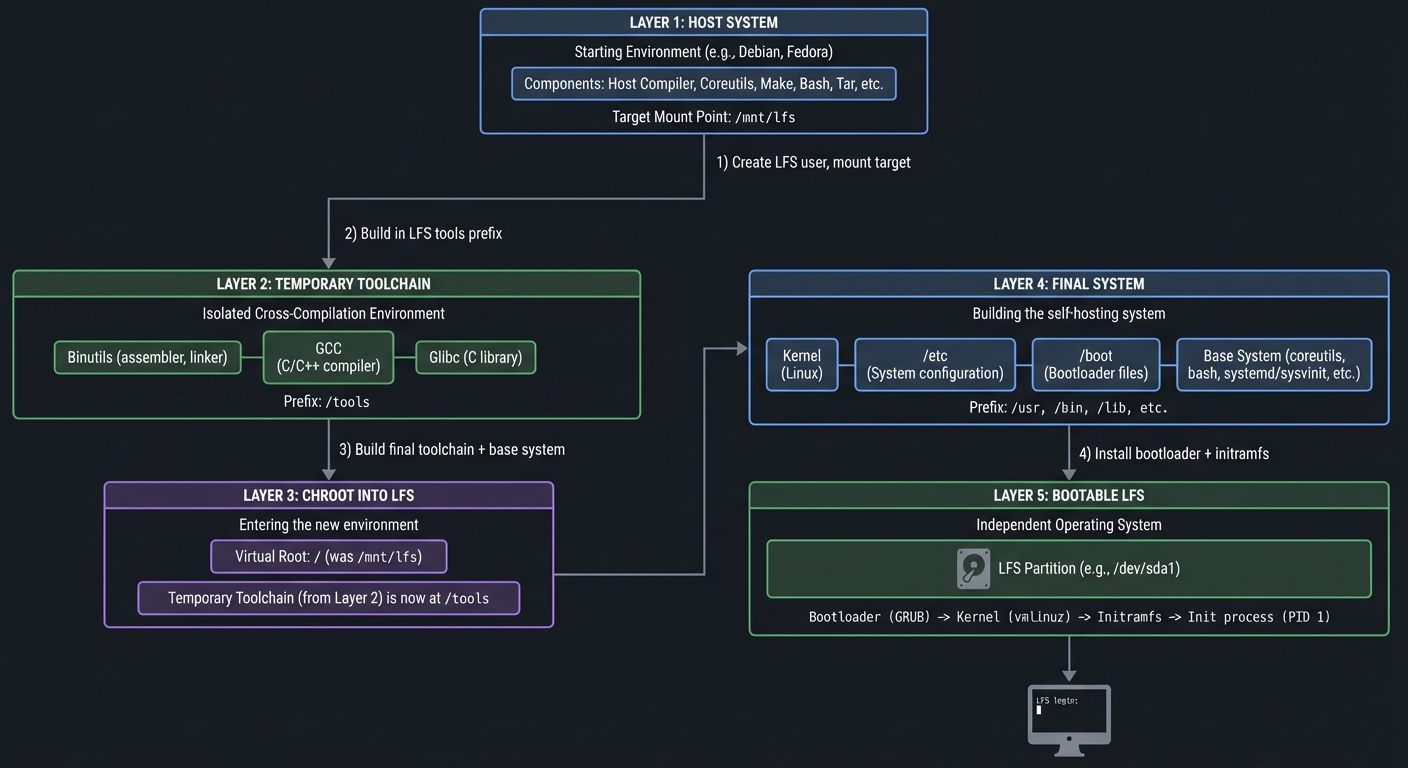
You will build a temporary toolchain that is isolated from the host, then use it to build the final system. This breaks circular dependencies (compiler needs libc, libc needs compiler) and enforces a clean target environment.
Chroot and Sysroot
Chroot creates a clean execution environment so you only see target system paths. A sysroot anchors the root of a target filesystem, making compiler/linker behavior deterministic.
Filesystem Hierarchy
You will assemble a minimal filesystem that obeys FHS conventions for boot, libraries, user binaries, and configuration. This forces clear reasoning about what must exist for the system to boot.
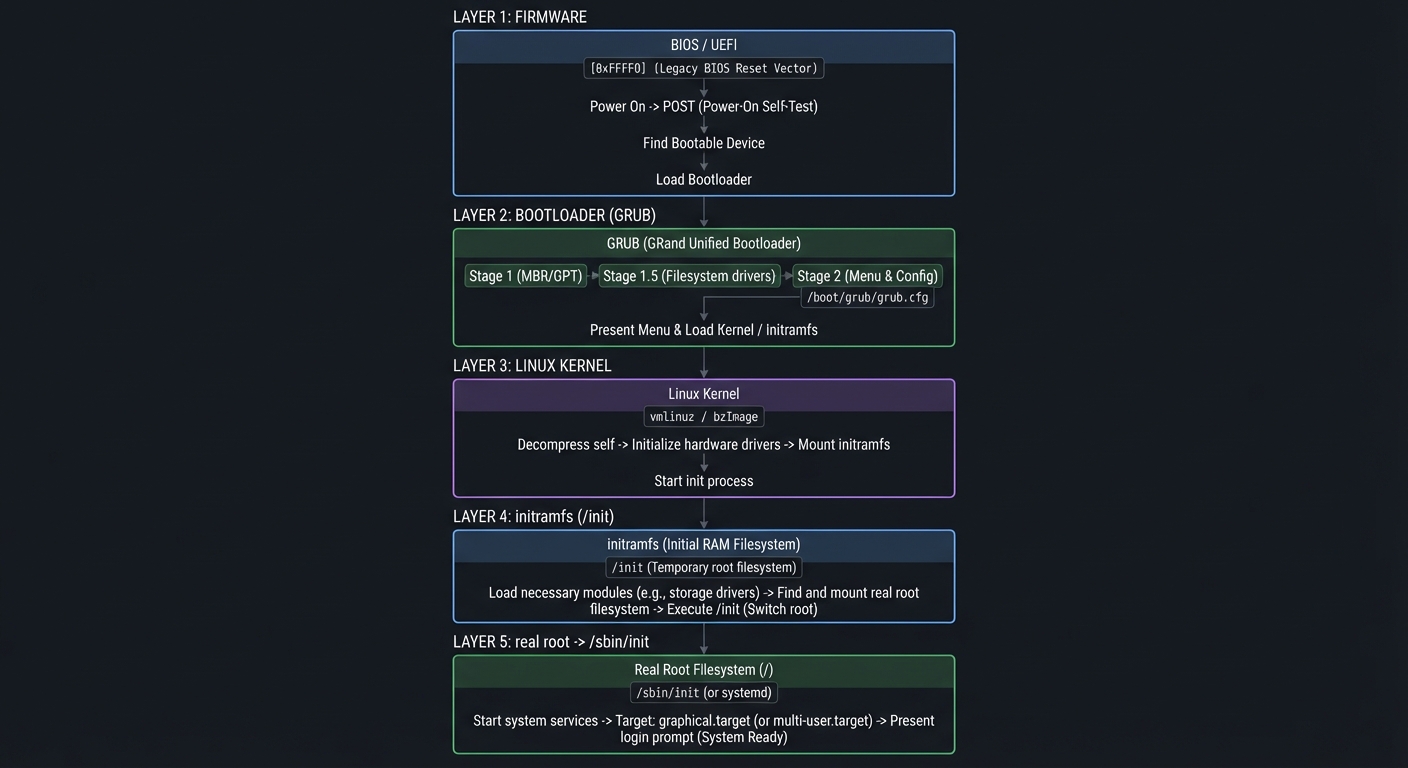
Boot Chain
Your boot chain must be explicit: firmware -> bootloader -> kernel -> initramfs -> init. Each stage has its own failure modes and logs.
initramfs
A minimal initramfs is typically a compressed cpio archive used as an early root filesystem to load drivers and mount the real root before handing off to init.
Build Pipeline Map (ASCII)
Host System
  |
  | 1) Create LFS user, mount target
  v
Temporary Toolchain (binutils, gcc, glibc)
  |
  | 2) Build in LFS tools prefix
  v
Chroot into LFS
  |
  | 3) Build final toolchain + base system
  v
Final System (kernel, /etc, /boot)
  |
  | 4) Install bootloader + initramfs
  v
Bootable LFS
Boot Chain Map (ASCII)
Firmware
  |
  v
Bootloader (GRUB)
  |
  v
Linux Kernel
  |
  v
initramfs (/init)
  |
  v
real root -> /sbin/init
Success Metrics
- You can explain why the temporary toolchain is necessary.
- You can boot into your LFS system without the host OS mounted.
- You can rebuild any package from source with known inputs.
- You can recover from a broken boot chain using logs and chroot.
Implementation Guide
Phase 1: Host Preparation
- Create target partition and mount points
- Create LFS user and isolate environment variables
- Download and verify sources
Phase 2: Temporary Toolchain
- Build binutils and gcc into a temporary prefix
- Build minimal libc and compiler pass-2
- Confirm the toolchain points to the LFS sysroot
Phase 3: Chroot Build
- Enter chroot and rebuild the toolchain for the target
- Build base system packages (bash, coreutils, util-linux, etc.)
- Configure /etc and FHS layout
Phase 4: Kernel + Boot
- Configure and build the kernel
- Create initramfs
- Install GRUB and configure boot entries
Phase 5: First Boot and Fixups
- Boot the system and validate init
- Fix missing device nodes or config files
- Add network and user configuration
Milestones
- Milestone 1: Temporary toolchain builds and passes sanity checks
- Milestone 2: Chroot system builds successfully
- Milestone 3: Kernel boots to a login shell
- Milestone 4: System is reproducible from a script or Makefile
Real-World Outcome
You can demonstrate a full boot from your custom disk image and show the exact system identity and toolchain:
$ uname -a
Linux lfs 6.x.y #1 SMP PREEMPT ... x86_64 GNU/Linux

$ cat /etc/os-release
NAME="Linux From Scratch"
VERSION="custom"

$ gcc --version
gcc (GCC) 13.x

$ ls /boot
vmlinuz-6.x.y  grub/  initramfs.img
You can also chroot from the host and rebuild a package end-to-end:
$ sudo chroot /mnt/lfs /usr/bin/bash -c "cd /sources/bash && ./configure --prefix=/usr && make && make install"
The Core Question You Are Answering
How do you bootstrap a self-hosting Linux system from zero without accidentally using the host OS as a crutch?
Concepts You Must Understand First
- Toolchain bootstrap and cross-compiler isolation
- Dynamic linker paths and ELF interpreter
- Basic bootloader concepts and kernel command line
- initramfs structure and early userspace
Questions to Guide Your Design
- How will you prove the toolchain is using the LFS sysroot?
- Which files and directories are strictly required for first boot?
- How will you detect host contamination in the build?
- What logs will you keep to debug failures?
Thinking Exercise
Sketch the minimal directory tree required to boot: what does the kernel need, what does init need, and what can be deferred until after first login?
The Interview Questions They Will Ask
- Why is a temporary toolchain needed when building LFS?
- How does chroot help produce a clean build?
- What does initramfs do, and why is it often a cpio archive?
- How would you recover a system that drops to initramfs shell?
Hints in Layers
Hint 1
Start by logging every configure and make output to files, and keep a manifest of installed files for each package.
Hint 2
Add a toolchain sanity check script that compiles a hello world and inspects the ELF interpreter and library paths.
Hint 3
If boot fails, mount the root from the host and compare /etc/fstab, /boot/grub/grub.cfg, and /init paths.
Books That Will Help
| Concept | Book | Suggested Chapters (use index) | Why This Matters |
|---|---|---|---|
| Boot process | How Linux Works (Brian Ward) | Boot and startup | Clarifies the chain from firmware to init |
| Filesystems | Operating Systems: Three Easy Pieces | Filesystems and FHS topics | Explains why layout matters |
| Toolchains | Computer Systems: A Programmer’s Perspective | Linking and program loading | Helps debug ELF and linker issues |
| Kernel basics | Linux Kernel Development (Robert Love) | Kernel build and init | Helps tune kernel config for your system |
Common Pitfalls & Debugging
Problem 1: “GCC links against host libraries”
- Why: PATH or sysroot points to host tools
- Fix: Rebuild pass-2 GCC with correct sysroot and reset PATH
- Quick test:
readelf -l hello | rg interpreter
Problem 2: “Kernel boots but init not found”
- Why:
/sbin/initmissing or initramfs not loaded - Fix: Ensure /sbin/init exists and initramfs contains /init
- Quick test: Boot with
init=/bin/shto inspect root
Problem 3: “GRUB menu appears but boot fails”
- Why: Wrong root or missing initramfs path
- Fix: Verify
/boot/grub/grub.cfgentries and filesystem UUIDs - Quick test: In GRUB,
ls (hd0,1)/bootto validate paths
Definition of Done
- Temporary toolchain builds and sanity checks pass
- Chroot build produces a full base system with /etc configured
- Kernel boots and reaches a login prompt
- initramfs can mount the real root and hand off to /sbin/init
- System rebuild is reproducible from a script or Makefile
References
- Main guide:
LINUX_DISTRIBUTION_BUILDING_LEARNING_PROJECTS.md - Linux From Scratch book (download page): https://www.linuxfromscratch.org/lfs/download.html
- GNU GRUB manual: https://www.gnu.org/software/grub/manual/grub.html
- Linux kernel initramfs documentation: https://docs.kernel.org/6.15/filesystems/ramfs-rootfs-initramfs.html