Project 15: Mini Shell Implementation
Build a simplified shell that supports parsing, pipelines, redirection, and builtins.
Quick Reference
| Attribute | Value |
|---|---|
| Difficulty | Level 5: Master |
| Time Estimate | 4-6 weeks |
| Language | Bash (Alternatives: C, Python) |
| Prerequisites | Deep understanding of parsing, processes, file descriptors |
| Key Topics | lexing, parsing, fork/exec, pipes, redirection, builtins |
1. Learning Objectives
By completing this project, you will:
- Implement a lexer and parser for a shell-like grammar.
- Execute commands via fork/exec with proper argv handling.
- Implement pipelines and redirection with file descriptors.
- Add builtins like
cd,exit,export. - Handle signals and job control basics.
2. Theoretical Foundation
2.1 Core Concepts
- Lexing and parsing: Tokenizing input into commands and operators.
- Process creation: fork/exec and process hierarchies.
- Pipes and redirection: file descriptor wiring.
- Builtins vs external commands: run in parent vs child.
- Signal handling: Ctrl+C and process interruption.
2.2 Why This Matters
This is the capstone that makes every previous shell concept concrete. You will internalize how commands become processes and how the shell orchestrates execution.
2.3 Historical Context / Background
Shells like sh, bash, and zsh are decades old, but their fundamentals remain the same: parse, expand, execute. You’re rebuilding those foundations.
2.4 Common Misconceptions
- “Pipelines are magic.” They are just file descriptor plumbing.
- “Builtins are just commands.” They must run in the parent to affect state.
3. Project Specification
3.1 What You Will Build
A minish program that reads commands, parses tokens, supports pipelines and redirections, and executes commands with a small set of builtins.
3.2 Functional Requirements
- Parsing: Tokenize words, pipes, redirections.
- Execution: Run external commands with argv.
- Pipelines: Support
cmd1 | cmd2. - Redirection:
>,>>,<. - Builtins:
cd,exit,export. - Signals: Ctrl+C interrupt.
3.3 Non-Functional Requirements
- Correctness: match shell behavior for core features.
- Reliability: handle errors gracefully.
- Clarity: clean code and clear structure.
3.4 Example Usage / Output
$ minish
minish$ echo hello | tr a-z A-Z > out.txt
minish$ cat out.txt
HELLO
3.5 Real World Outcome
You can explain exactly how a shell interprets and executes commands and have a working implementation demonstrating it.
4. Solution Architecture
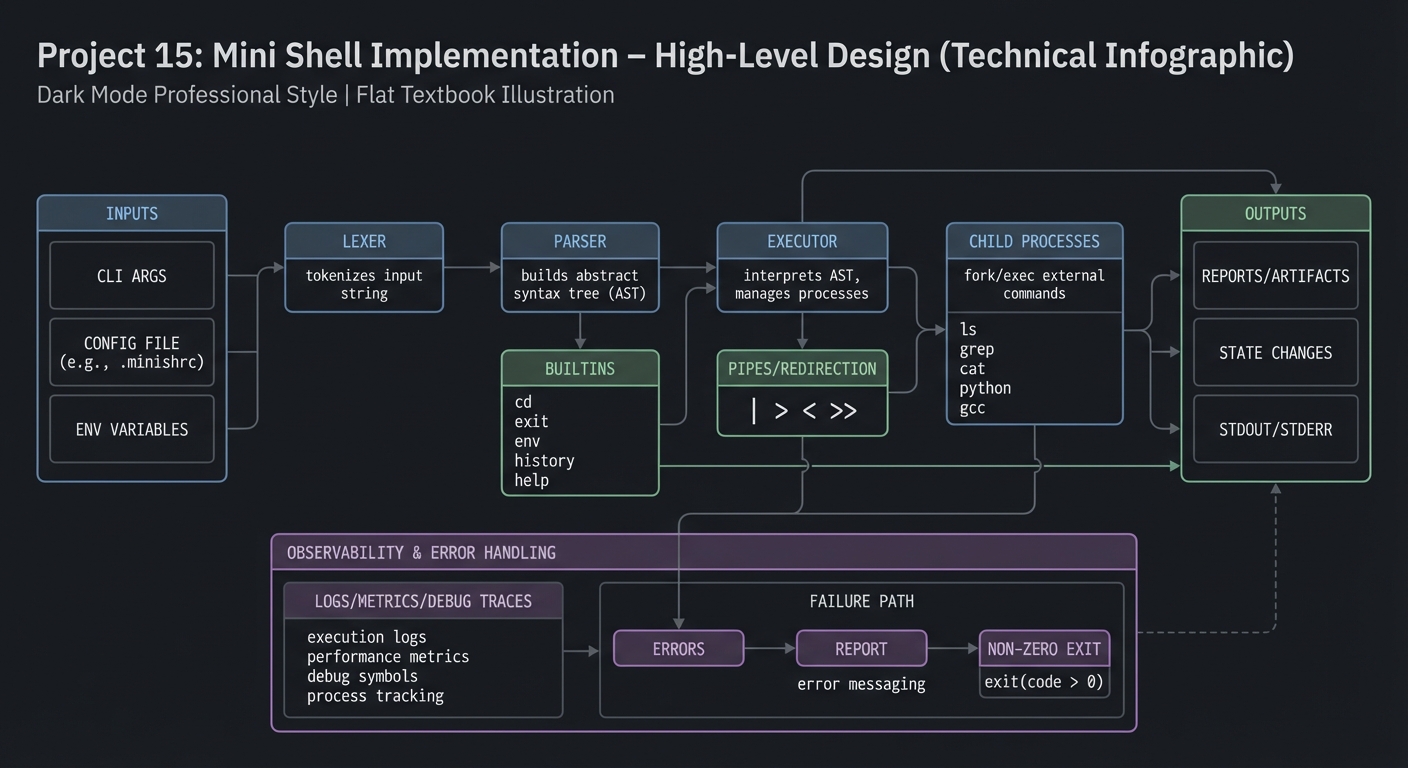
4.1 High-Level Design
input -> lexer -> parser -> executor -> child processes
                       |                |
                       |                +-> pipes/redirection
                       +-> builtins
4.2 Key Components
| Component | Responsibility | Key Decisions |
|---|---|---|
| Lexer | Tokenize input | handle quotes |
| Parser | Build command AST | pipeline nodes |
| Executor | Run commands | fork/exec |
| Builtins | Run in parent | modify env |
| Signal handler | Ctrl+C behavior | parent vs child |
4.3 Data Structures
# pseudo-structure
Command { argv[], redirects[], pipe_to }
4.4 Algorithm Overview
Key Algorithm: Pipeline Execution
- Create pipes for N commands.
- Fork children and connect stdin/stdout.
- Execute each command.
- Close pipes in parent.
- Wait for children.
Complexity Analysis:
- Time: O(n) for n commands
- Space: O(n) for pipes
5. Implementation Guide
5.1 Development Environment Setup
sudo apt-get install gcc make
5.2 Project Structure
minish/
|-- minish
|-- lib/
|   |-- lexer.sh
|   |-- parser.sh
|   |-- exec.sh
|   `-- builtins.sh

5.3 The Core Question You Are Answering
“How does a shell turn text into processes and connect them together?”
5.4 Concepts You Must Understand First
- File descriptors and redirection
- fork/exec model
- Lexing/parsing basics
5.5 Questions to Guide Your Design
- How will you represent pipelines internally?
- How do you detect builtins and run them in parent?
- How will you handle quoting and spaces?
5.6 Thinking Exercise
Manually parse: cat file | grep error > out.txt. Draw the pipeline and file descriptors.
5.7 The Interview Questions They Will Ask
- Why must
cdbe a builtin? - How do pipelines work under the hood?
- How do you implement redirection safely?
5.8 Hints in Layers
Hint 1: Start with executing a single command without pipes.
Hint 2: Add redirection parsing and file descriptor setup.
Hint 3: Add pipelines with two commands.
Hint 4: Add builtins and signal handling.
5.9 Books That Will Help
| Topic | Book | Chapter |
|---|---|---|
| Shell internals | “Advanced Programming in the UNIX Environment” | Ch. 8-10 |
| Processes | “The Linux Programming Interface” | Ch. 27 |
5.10 Implementation Phases
Phase 1: Lexer and Executor (1-2 weeks)
Goals:
- Tokenize input and run single commands.
Tasks:
- Implement lexer with quotes.
- Run commands via
exec.
Checkpoint: ls and echo work.
Phase 2: Redirection and Pipes (1-2 weeks)
Goals:
- Support I/O redirection and pipelines.
Tasks:
- Parse
>,<,>>. - Implement two-command pipelines.
Checkpoint: echo hi | wc -c works.
Phase 3: Builtins and Signals (1 week)
Goals:
- Builtins and Ctrl+C handling.
Tasks:
- Implement
cd,exit,export. - Handle SIGINT for children.
Checkpoint: Ctrl+C stops a running command.
5.11 Key Implementation Decisions
| Decision | Options | Recommendation | Rationale |
|---|---|---|---|
| Parsing | recursive descent vs shunting | simple recursive descent | clarity |
| Builtins | execute in child vs parent | parent | state changes |
| Redirection | open files in parent vs child | child | minimal side effects |
6. Testing Strategy
6.1 Test Categories
| Category | Purpose | Examples |
|---|---|---|
| Unit | lexer/parser | tokenization cases |
| Integration | pipeline | pipe output correctness |
| Edge Cases | quoting | spaces and quotes |
6.2 Critical Test Cases
echo "a b"preserves space.yes | head -n 1terminates correctly.cd /tmpchanges working dir.
6.3 Test Data
fixtures/lexer_cases.txt
7. Common Pitfalls and Debugging
7.1 Frequent Mistakes
| Pitfall | Symptom | Solution |
|---|---|---|
| Not closing pipes | commands hang | close unused fds |
| Builtins in child | cd no effect |
run in parent |
| Naive splitting | quotes break | implement lexer |
7.2 Debugging Strategies
- Print tokens and AST in debug mode.
- Use
straceto inspect syscalls.
7.3 Performance Traps
Spawning too many processes in pipelines can be costly; keep minimal overhead.
8. Extensions and Challenges
8.1 Beginner Extensions
- Add history.
- Add
pwdbuiltin.
8.2 Intermediate Extensions
- Support
&&and||. - Add background
&jobs.
8.3 Advanced Extensions
- Implement job control (
fg,bg). - Add command substitution.
9. Real-World Connections
9.1 Industry Applications
- Foundation for building custom shells or REPLs.
- Understanding process orchestration in containers.
9.2 Related Open Source Projects
- dash: lightweight POSIX shell.
- busybox sh: embedded shell.
9.3 Interview Relevance
- Demonstrates system-level understanding.
- Shows parsing + process control skills.
10. Resources
10.1 Essential Reading
- POSIX Shell Command Language
- Bash manual: expansions and redirection
10.2 Video Resources
- “How a Shell Works” (YouTube)
10.3 Tools and Documentation
strace,lsof,man execve
10.4 Related Projects in This Series
- Project 7: CLI Parser
- Project 8: Process Supervisor
11. Self-Assessment Checklist
11.1 Understanding
- I can explain how pipes connect processes.
- I can explain why builtins must run in parent.
11.2 Implementation
- Redirection works correctly.
- Pipelines execute without hangs.
11.3 Growth
- I can extend the shell with job control.
12. Submission / Completion Criteria
Minimum Viable Completion:
- Execute commands + basic redirection
Full Completion:
- Pipelines + builtins + signals
Excellence (Going Above & Beyond):
- Job control + command substitution