Project 13: Security Audit Scanner
Build a security auditing CLI that checks permissions, configs, and risky patterns.
Quick Reference
| Attribute | Value |
|---|---|
| Difficulty | Level 3: Advanced |
| Time Estimate | 2-3 weeks |
| Language | Bash (Alternatives: Python, Go) |
| Prerequisites | File permissions knowledge, project 3, project 10 |
| Key Topics | permissions, auditing, pattern detection, reporting |
1. Learning Objectives
By completing this project, you will:
- Scan file permissions and identify insecure configurations.
- Detect risky patterns (world-writable, SUID files, weak SSH configs).
- Generate structured audit reports.
- Support whitelisting and custom rules.
- Build a safe tool that never modifies system state.
2. Theoretical Foundation
2.1 Core Concepts
- Unix permissions: user/group/other and special bits.
- SUID/SGID risks: privilege escalation vectors.
- Config auditing: patterns in SSH, sudoers, and services.
- Compliance mindset: repeatable evidence-based checks.
- Least privilege: security principle for automation.
2.2 Why This Matters
Security failures often stem from misconfigurations. An audit scanner helps you surface issues before attackers do.
2.3 Historical Context / Background
Tools like Lynis and OpenSCAP scan systems for vulnerabilities. This project builds a smaller but practical subset.
2.4 Common Misconceptions
- “Permissions are fine if apps work.” Over-permissive files are a risk.
- “Security scanners must fix issues.” Auditing and fixing are separate responsibilities.
3. Project Specification
3.1 What You Will Build
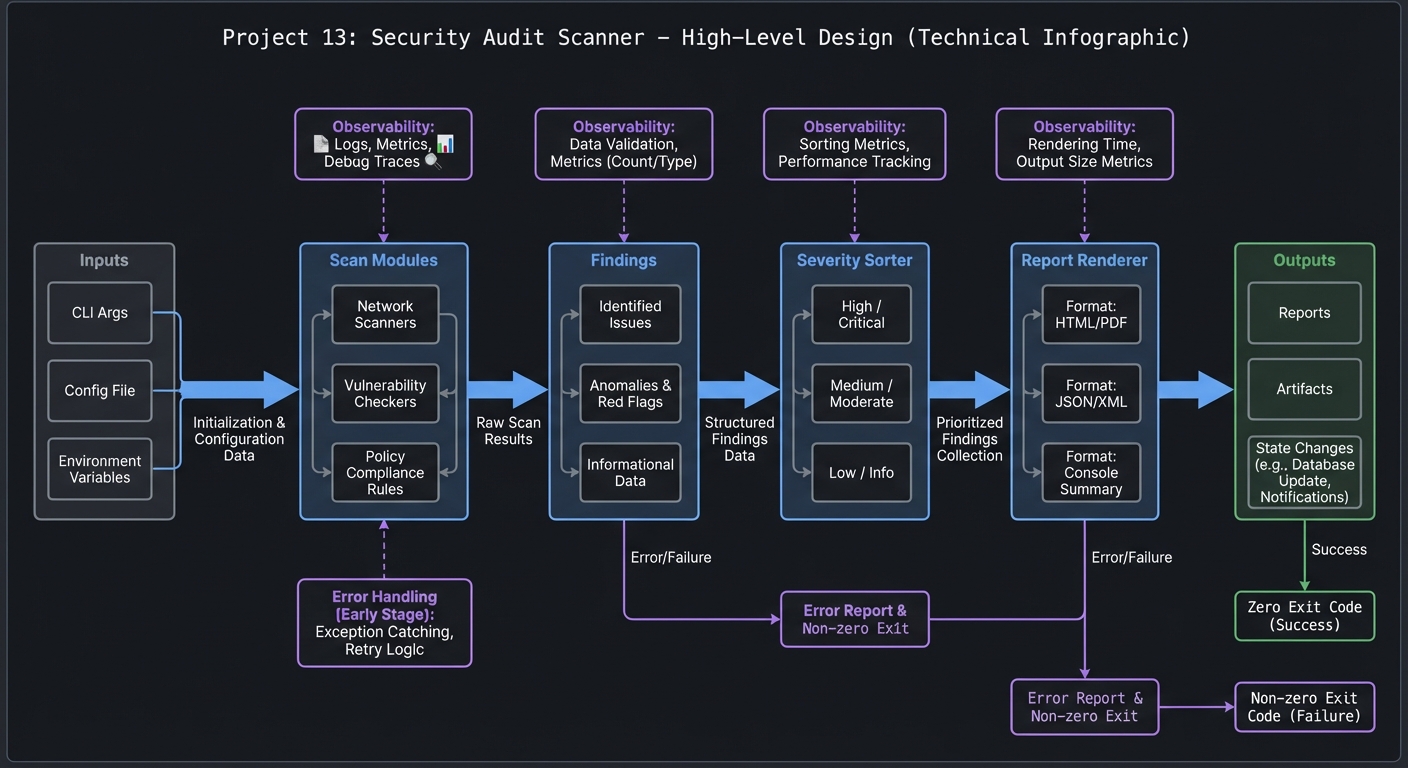
A secscan CLI that runs a series of checks: world-writable files, SUID binaries, weak SSH settings, and unsafe configs. Outputs a report with severity levels.
3.2 Functional Requirements
- Permission scan: world-writable files and dirs.
- SUID/SGID scan: list privileged binaries.
- SSH audit: check for weak settings in sshd_config.
- Service scan: detect risky open services.
- Reporting: severity-ranked output, JSON mode.
- Rules: allow custom rules or ignore lists.
3.3 Non-Functional Requirements
- Safety: read-only behavior.
- Performance: avoid scanning huge directories unnecessarily.
- Usability: clear remediation suggestions.
3.4 Example Usage / Output
$ secscan --ssh --suid --world-writable
[HIGH] /usr/bin/passwd (SUID)
[MED] /var/log/app.log (world-writable)
[LOW] sshd_config: PermitRootLogin yes
3.5 Real World Outcome
You can run secscan after a server setup to ensure permissions and configs align with best practices.
4. Solution Architecture
4.1 High-Level Design
scan modules -> findings -> severity sorter -> report renderer
4.2 Key Components
| Component | Responsibility | Key Decisions |
|---|---|---|
| Scanner | Execute checks | modular checks |
| Rules engine | Apply ignore rules | regex + glob |
| Reporter | Format output | text + JSON |
| Config loader | Read user rules | YAML/ini |
4.3 Data Structures
FINDINGS+=("HIGH|/usr/bin/passwd|SUID binary")
4.4 Algorithm Overview
Key Algorithm: Permission Scan
- Traverse target directories with
find. - Filter for
-perm -0002and SUID/SGID. - Apply ignore rules.
- Emit findings.
Complexity Analysis:
- Time: O(n) for files scanned
- Space: O(f) findings
5. Implementation Guide
5.1 Development Environment Setup
sudo apt-get install findutils
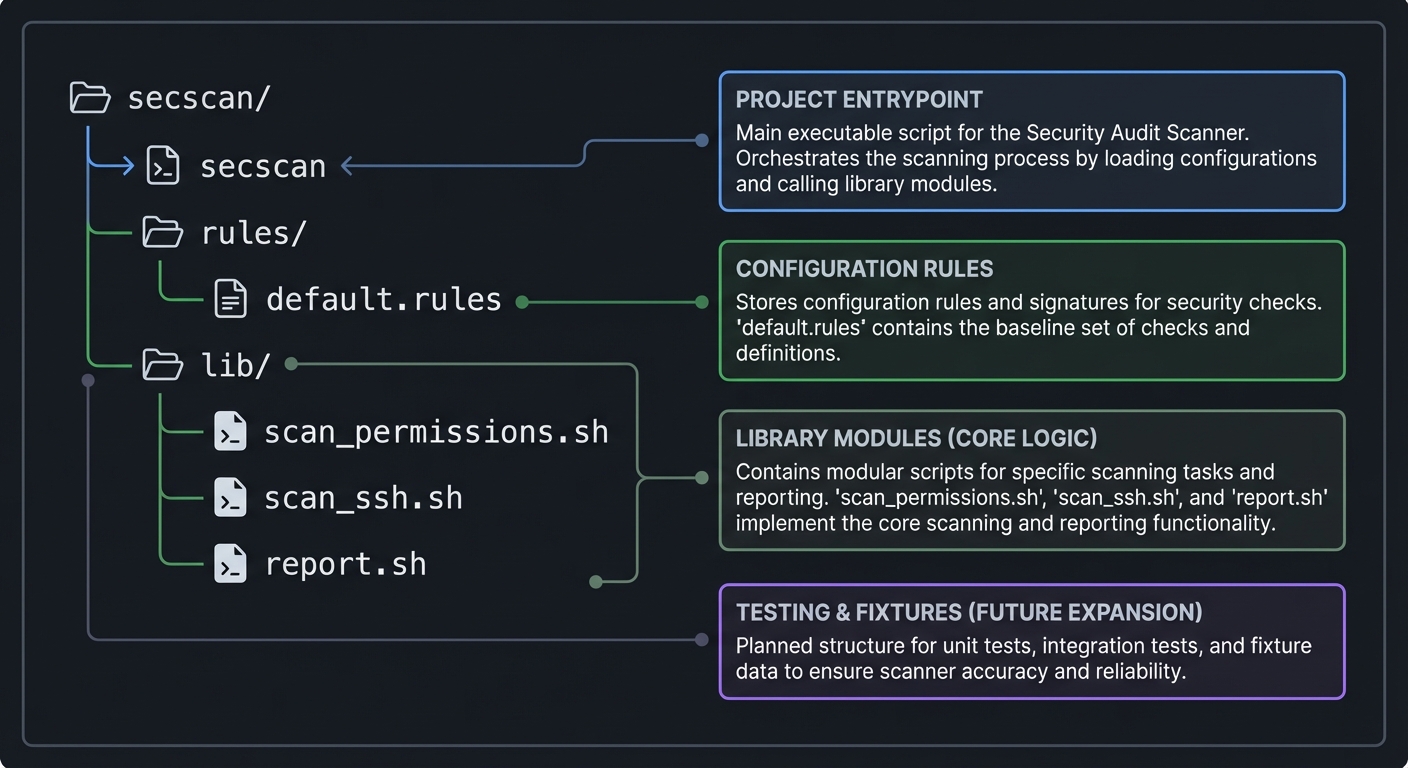
5.2 Project Structure
secscan/
|-- secscan
|-- rules/
|   `-- default.rules
`-- lib/
    |-- scan_permissions.sh
    |-- scan_ssh.sh
    `-- report.sh
5.3 The Core Question You Are Answering
“How can I systematically detect insecure configurations on a Unix system?”
5.4 Concepts You Must Understand First
- Permission bits and special bits
- Common insecure SSH settings
- Safe scanning with
find
5.5 Questions to Guide Your Design
- How will you avoid scanning
/procand/sys? - How do you rank severity?
- How will you allow user-defined ignores?
5.6 Thinking Exercise
List three files on your system that should never be world-writable.
5.7 The Interview Questions They Will Ask
- What is the risk of SUID binaries?
- How do you find world-writable files?
- Why should security scanners be read-only?
5.8 Hints in Layers
Hint 1: Start with find / -perm -0002 -type f.
Hint 2: Add ignore list for /proc, /sys, /dev.
Hint 3: Parse sshd_config lines with grep.
Hint 4: Build a severity ranking system.
5.9 Books That Will Help
| Topic | Book | Chapter |
|---|---|---|
| Unix permissions | “The Linux Command Line” | Ch. 9 |
| System security | “Practical Unix & Internet Security” | Ch. 5 |
5.10 Implementation Phases
Phase 1: Permission Checks (4-5 days)
Goals:
- World-writable and SUID scans.
Tasks:
- Implement permission scans.
- Add ignore rules.
Checkpoint: Findings list is correct.
Phase 2: Config Audits (5-6 days)
Goals:
- SSH and service checks.
Tasks:
- Parse sshd_config.
- Add open port checks.
Checkpoint: Config issues detected.
Phase 3: Reporting (3-4 days)
Goals:
- Severity ranking and JSON.
Tasks:
- Add report formatting.
- Add JSON output.
Checkpoint: Reports are consistent and sortable.
5.11 Key Implementation Decisions
| Decision | Options | Recommendation | Rationale |
|---|---|---|---|
| Scan scope | full disk vs targeted | targeted | avoids performance issues |
| Rule format | regex vs glob | regex | more flexible |
| Output | text vs JSON | both | usable + automatable |
6. Testing Strategy
6.1 Test Categories
| Category | Purpose | Examples |
|---|---|---|
| Unit | rule matching | ignore list |
| Integration | scan flow | test directory fixtures |
| Edge Cases | permission denied | graceful skip |
6.2 Critical Test Cases
- SUID files detected correctly.
- Ignore rules skip expected paths.
- Missing sshd_config handled gracefully.
6.3 Test Data
fixtures/ssh_config_sample
fixtures/unsafe_file
7. Common Pitfalls and Debugging
7.1 Frequent Mistakes
| Pitfall | Symptom | Solution |
|---|---|---|
| Scanning /proc | errors and noise | exclude pseudo-fs |
| No severity ranking | useless reports | apply severity rules |
| Running as root blindly | unsafe usage | document requirements |
7.2 Debugging Strategies
- Run scans on a small test directory first.
- Print debug matches for ignore rules.
7.3 Performance Traps
Full filesystem scans can be slow. Allow --path to narrow scope.
8. Extensions and Challenges
8.1 Beginner Extensions
- Add
--summary-onlyoutput. - Add
--csvoutput.
8.2 Intermediate Extensions
- Add compliance profiles (CIS baseline lite).
- Add scheduled scans with cron.
8.3 Advanced Extensions
- Add remediation scripts (optional).
- Integrate with SIEM systems.
9. Real-World Connections
9.1 Industry Applications
- Security hardening audits.
- Compliance reporting.
9.2 Related Open Source Projects
- Lynis: security auditing tool.
- OpenSCAP: compliance framework.
9.3 Interview Relevance
- Shows security awareness.
- Demonstrates defensive automation.
10. Resources
10.1 Essential Reading
man find,man chmod,man sshd_config
10.2 Video Resources
- “Understanding SUID/SGID” (YouTube)
10.3 Tools and Documentation
find,ss,lsof
10.4 Related Projects in This Series
- Project 9: Network Toolkit
- Project 10: Deployment Automation
11. Self-Assessment Checklist
11.1 Understanding
- I can explain SUID/SGID risks.
- I can interpret permission bits.
11.2 Implementation
- Scanner runs safely without modifying system.
- Reports show severity and remediation.
11.3 Growth
- I can add new checks with confidence.
12. Submission / Completion Criteria
Minimum Viable Completion:
- Permission scan + report
Full Completion:
- Config audits + JSON output
Excellence (Going Above & Beyond):
- Compliance profiles + automation hooks