Project 12: Task Runner and Build System
Build a task runner that defines dependencies, supports parallelism, and caches outputs.
Quick Reference
| Attribute | Value |
|---|---|
| Difficulty | Level 3: Advanced |
| Time Estimate | 2-3 weeks |
| Language | Bash (Alternatives: Python, Go) |
| Prerequisites | Project 7, basic DAG concepts, Make familiarity |
| Key Topics | dependency graphs, caching, parallel execution, build rules |
1. Learning Objectives
By completing this project, you will:
- Model tasks and dependencies as a DAG.
- Implement incremental builds with caching.
- Run tasks in correct order with optional parallelism.
- Provide a declarative task file format.
- Build a CLI with status and dry-run modes.
2. Theoretical Foundation
2.1 Core Concepts
- Dependency graphs: Task ordering and topological sorting.
- Incremental builds: Skip tasks when outputs are up to date.
- Parallel scheduling: Running independent tasks concurrently.
- Task definitions: Inputs, outputs, commands.
- Determinism: Reproducible builds.
2.2 Why This Matters
Build systems are automation at scale. If you can implement a small one, you understand the principles behind make, ninja, and modern CI pipelines.
2.3 Historical Context / Background
Make introduced declarative dependencies decades ago. Modern systems (ninja, bazel) improve speed and determinism. You will implement a simplified version.
2.4 Common Misconceptions
- “A task runner is just a shell script.” Ordering and caching matter.
- “Parallel = faster always.” Poor scheduling can thrash resources.
3. Project Specification
3.1 What You Will Build
A tasker CLI that reads a task file (YAML or simple DSL), resolves dependencies, and executes tasks in order with caching and parallel support.
3.2 Functional Requirements
- Task definitions: name, deps, inputs, outputs, command.
- Topological ordering: run prerequisites first.
- Caching: skip when outputs newer than inputs.
- Parallelism:
-j Nto run independent tasks. - Dry-run: show execution plan without running.
- Status: show which tasks ran vs skipped.
3.3 Non-Functional Requirements
- Reliability: detect cycles and report clearly.
- Performance: handle dozens of tasks quickly.
- Usability: clear error messages.
3.4 Example Usage / Output
$ tasker build -j 4
[tasker] compile -> ok (cached)
[tasker] test -> ok
[tasker] package -> ok
3.5 Real World Outcome
You can define build pipelines for scripts, docs, or assets with reliable caching and parallel execution.
4. Solution Architecture
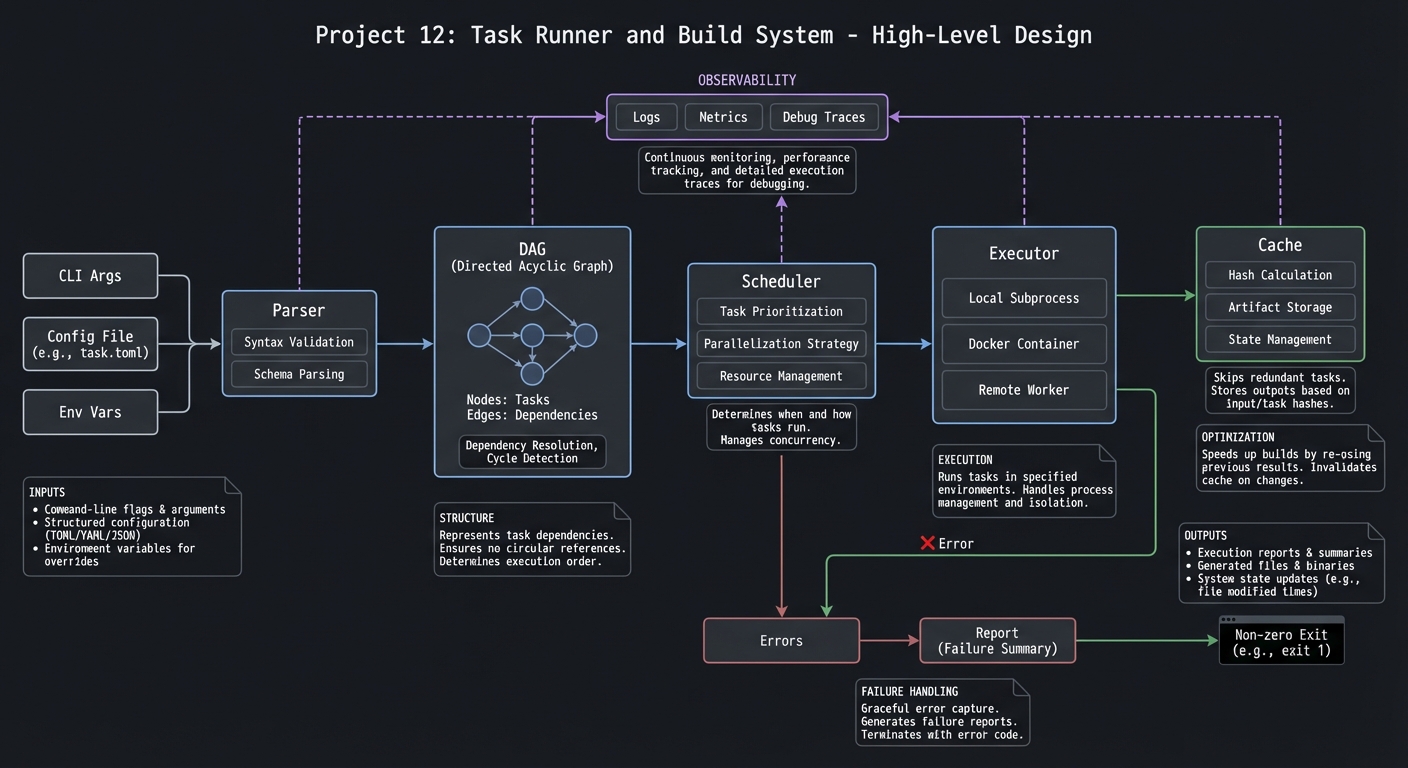
4.1 High-Level Design
task file -> parser -> DAG -> scheduler -> executor -> cache
4.2 Key Components
| Component | Responsibility | Key Decisions |
|---|---|---|
| Parser | Read task definitions | YAML vs DSL |
| DAG builder | Build dependency graph | adjacency list |
| Scheduler | Choose ready tasks | queue + workers |
| Executor | Run commands | bash -c |
| Cache | Check timestamps | input/output comparison |
4.3 Data Structures
TASKS[build_deps]="compile test"
TASKS[build_cmd]="tar -czf app.tar.gz build/"
4.4 Algorithm Overview
Key Algorithm: Topological Execution
- Parse tasks and build graph.
- Detect cycles.
- Find tasks with no unmet deps.
- Execute tasks; mark complete.
- Continue until all tasks complete.
Complexity Analysis:
- Time: O(V + E)
- Space: O(V + E)
5. Implementation Guide
5.1 Development Environment Setup
sudo apt-get install jq
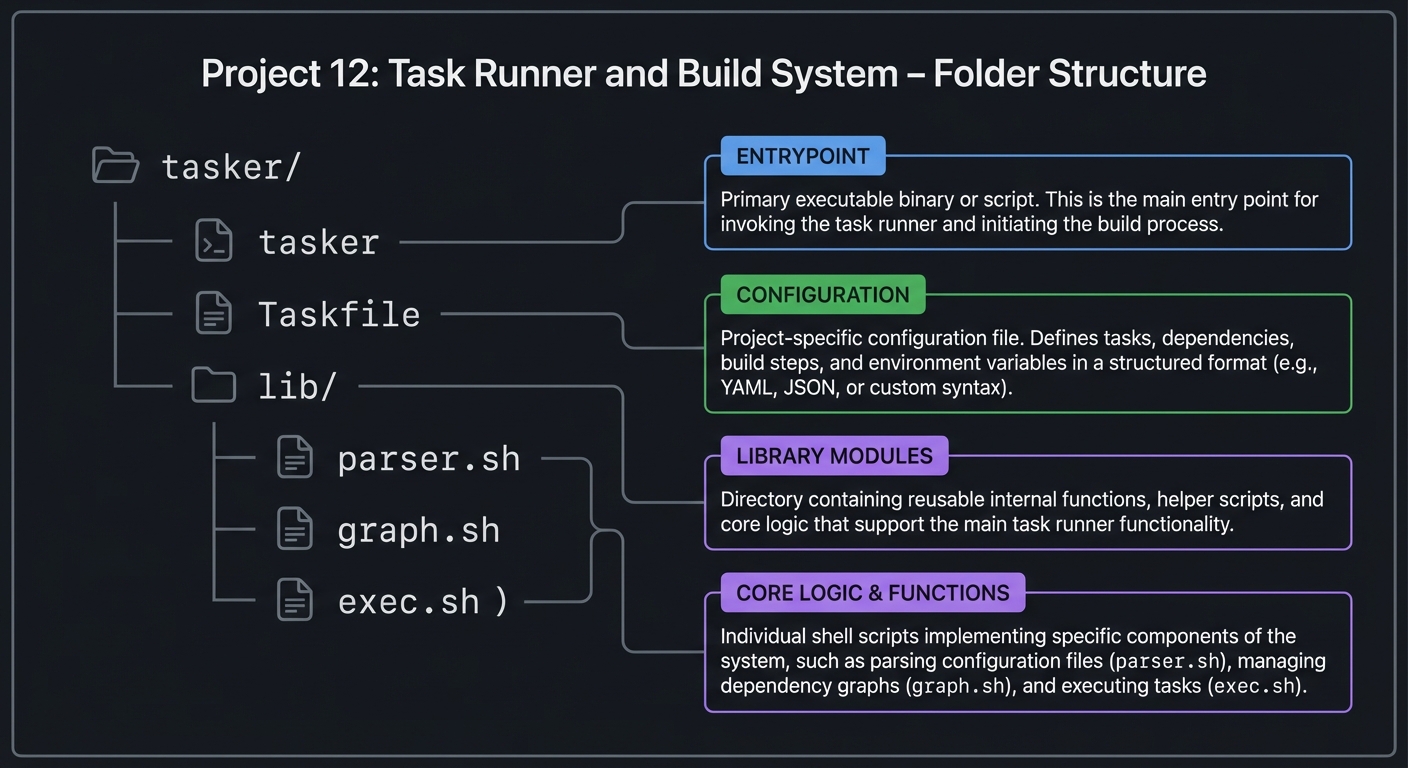
5.2 Project Structure
tasker/
|-- tasker
|-- Taskfile
|-- lib/
|   |-- parser.sh
|   |-- graph.sh
|   `-- exec.sh
5.3 The Core Question You Are Answering
“How do I run tasks in the correct order, only when necessary?”
5.4 Concepts You Must Understand First
- Topological sort
- File modification times
- Parallel job control
5.5 Questions to Guide Your Design
- How do you detect cycles in a task graph?
- How do you decide a task is up-to-date?
- How will you balance parallel execution with output ordering?
5.6 Thinking Exercise
Write a three-task pipeline (build -> test -> package) and describe the DAG.
5.7 The Interview Questions They Will Ask
- How do you detect dependency cycles?
- How does caching reduce build time?
- How do you ensure deterministic builds?
5.8 Hints in Layers
Hint 1: Start with linear task execution.
Hint 2: Add dependency checking with a simple queue.
Hint 3: Add caching using file timestamps.
Hint 4: Add parallel workers with wait.
5.9 Books That Will Help
| Topic | Book | Chapter |
|---|---|---|
| Build systems | “Build Systems” (concepts) | DAG basics |
| Shell automation | “Bash Idioms” | Process control |
5.10 Implementation Phases
Phase 1: Parser and Basic Execution (4-5 days)
Goals:
- Read Taskfile and execute tasks sequentially.
Tasks:
- Parse tasks and commands.
- Execute tasks in order.
Checkpoint: Simple tasks run sequentially.
Phase 2: DAG and Caching (5-6 days)
Goals:
- Build dependency graph and cache.
Tasks:
- Add topological sort.
- Add timestamp-based cache checks.
Checkpoint: Up-to-date tasks skip correctly.
Phase 3: Parallelism (3-4 days)
Goals:
- Run independent tasks concurrently.
Tasks:
- Add worker pool.
- Ensure output remains readable.
Checkpoint: -j speeds up builds.
5.11 Key Implementation Decisions
| Decision | Options | Recommendation | Rationale |
|---|---|---|---|
| Task file format | YAML vs DSL | simple DSL | easy to parse |
| Cache logic | timestamps vs hashes | timestamps | simpler |
| Parallelism | background jobs vs xargs | background jobs | flexible |
6. Testing Strategy
6.1 Test Categories
| Category | Purpose | Examples |
|---|---|---|
| Unit | DAG logic | cycle detection |
| Integration | end-to-end builds | multi-task pipeline |
| Edge Cases | missing outputs | cache invalidation |
6.2 Critical Test Cases
- Cycle detection with two tasks.
- Task skipped when outputs newer than inputs.
- Parallel execution honors dependencies.
6.3 Test Data
fixtures/Taskfile.simple
7. Common Pitfalls and Debugging
7.1 Frequent Mistakes
| Pitfall | Symptom | Solution |
|---|---|---|
| Missing cycle check | infinite loop | detect cycles early |
| Incorrect cache | stale builds | compare inputs/outputs |
| Race conditions | corrupted outputs | serialize conflicting tasks |
7.2 Debugging Strategies
- Print DAG ordering in debug mode.
- Log task start/finish times.
7.3 Performance Traps
Parallel tasks can overwhelm CPU or disk. Provide configurable limits.
8. Extensions and Challenges
8.1 Beginner Extensions
- Add
tasker listcommand. - Add colored output.
8.2 Intermediate Extensions
- Add file hashing cache.
- Add remote cache support.
8.3 Advanced Extensions
- Add distributed execution.
- Build a visual DAG view.
9. Real-World Connections
9.1 Industry Applications
- Build pipelines and CI workflows.
- Documentation generation automation.
9.2 Related Open Source Projects
- make: classic build system.
- ninja: fast dependency-based executor.
9.3 Interview Relevance
- Shows understanding of graphs and automation.
- Demonstrates performance-oriented tooling.
10. Resources
10.1 Essential Reading
man make- “Build Systems” notes
10.2 Video Resources
- “How Make Works” (YouTube)
10.3 Tools and Documentation
jq,make,ninja
10.4 Related Projects in This Series
- Project 7: CLI Parser
- Project 10: Deployment Automation
11. Self-Assessment Checklist
11.1 Understanding
- I can explain topological sorting.
- I can explain cache invalidation.
11.2 Implementation
- Tasker runs with dependencies.
- Parallelism works safely.
11.3 Growth
- I can extend task definitions.
12. Submission / Completion Criteria
Minimum Viable Completion:
- Sequential task runner with dependencies
Full Completion:
- Caching and parallelism
Excellence (Going Above & Beyond):
- Hash-based caching + distributed tasks