Project 11: Test Framework and Runner
Build a lightweight shell-based testing framework with assertions, fixtures, and reports.
Quick Reference
| Attribute | Value |
|---|---|
| Difficulty | Level 2: Intermediate |
| Time Estimate | 1-2 weeks |
| Language | Bash (Alternatives: POSIX sh, Python) |
| Prerequisites | Projects 4 and 7, familiarity with exit codes |
| Key Topics | test isolation, assertions, fixtures, reporting |
1. Learning Objectives
By completing this project, you will:
- Design a shell test runner with clear pass/fail reporting.
- Implement assertion helpers for strings, files, and exit codes.
- Isolate tests using temporary directories.
- Support fixtures and setup/teardown hooks.
- Produce machine-readable test output.
2. Theoretical Foundation
2.1 Core Concepts
- Exit codes as truth: Tests hinge on process exit codes.
- Isolation: Preventing tests from interfering with each other.
- Fixtures: Repeatable inputs and environment setup.
- Assertions: Standardized expectations for behavior.
- Reporting: Human-friendly summaries + machine-readable output.
2.2 Why This Matters
Shell scripts are often untested. A testing framework enforces reliability and enables refactoring without fear.
2.3 Historical Context / Background
BATS popularized shell testing. This project teaches you the mechanics behind frameworks like BATS and shunit2.
2.4 Common Misconceptions
- “Shell scripts don’t need tests.” Automation failures can be costly.
- “Exit code 0 means everything.” You still need output verification.
3. Project Specification
3.1 What You Will Build
A testrun CLI that discovers test files, runs them in isolation, and prints a summary with optional JSON output.
3.2 Functional Requirements
- Test discovery: Run
test_*.shor tagged tests. - Assertions:
assert_eq,assert_file_exists,assert_exit. - Fixtures: setup/teardown functions.
- Isolation: temp dirs per test.
- Reporting: colored output + JSON report.
3.3 Non-Functional Requirements
- Reliability: Ensure cleanup on failure.
- Usability: Clear failure messages with context.
- Speed: Avoid excessive subshells.
3.4 Example Usage / Output
$ testrun
[PASS] test_copy_file
[FAIL] test_missing_arg (expected exit 2, got 0)

Summary: 1 passed, 1 failed
3.5 Real World Outcome
You can add tests to every CLI project in this track, ensuring that changes do not regress behavior.
4. Solution Architecture
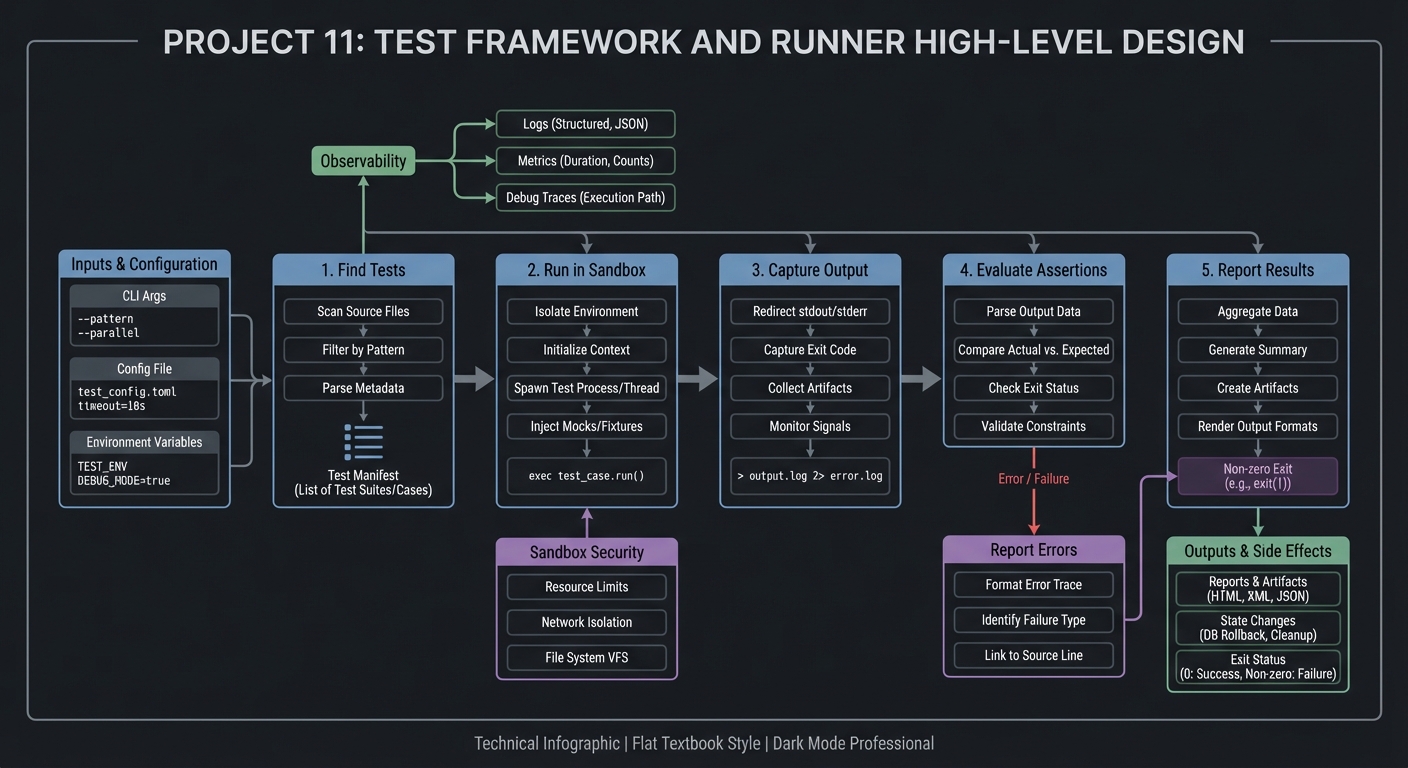
4.1 High-Level Design
find tests -> run sandbox -> capture output -> evaluate assertions -> report
4.2 Key Components
| Component | Responsibility | Key Decisions |
|---|---|---|
| Test discovery | Find test files | glob vs explicit list |
| Runner | Execute tests in isolation | subshell vs function |
| Assertion lib | Provide helper checks | exit on failure |
| Reporter | Summarize results | text + JSON |
4.3 Data Structures
RESULTS[pass]=3
RESULTS[fail]=1
4.4 Algorithm Overview
Key Algorithm: Test Execution Loop
- Discover test files.
- For each test, create temp dir.
- Run test function, capture output.
- Record status and report.
Complexity Analysis:
- Time: O(t) tests
- Space: O(t) for results and logs
5. Implementation Guide
5.1 Development Environment Setup
brew install bash coreutils
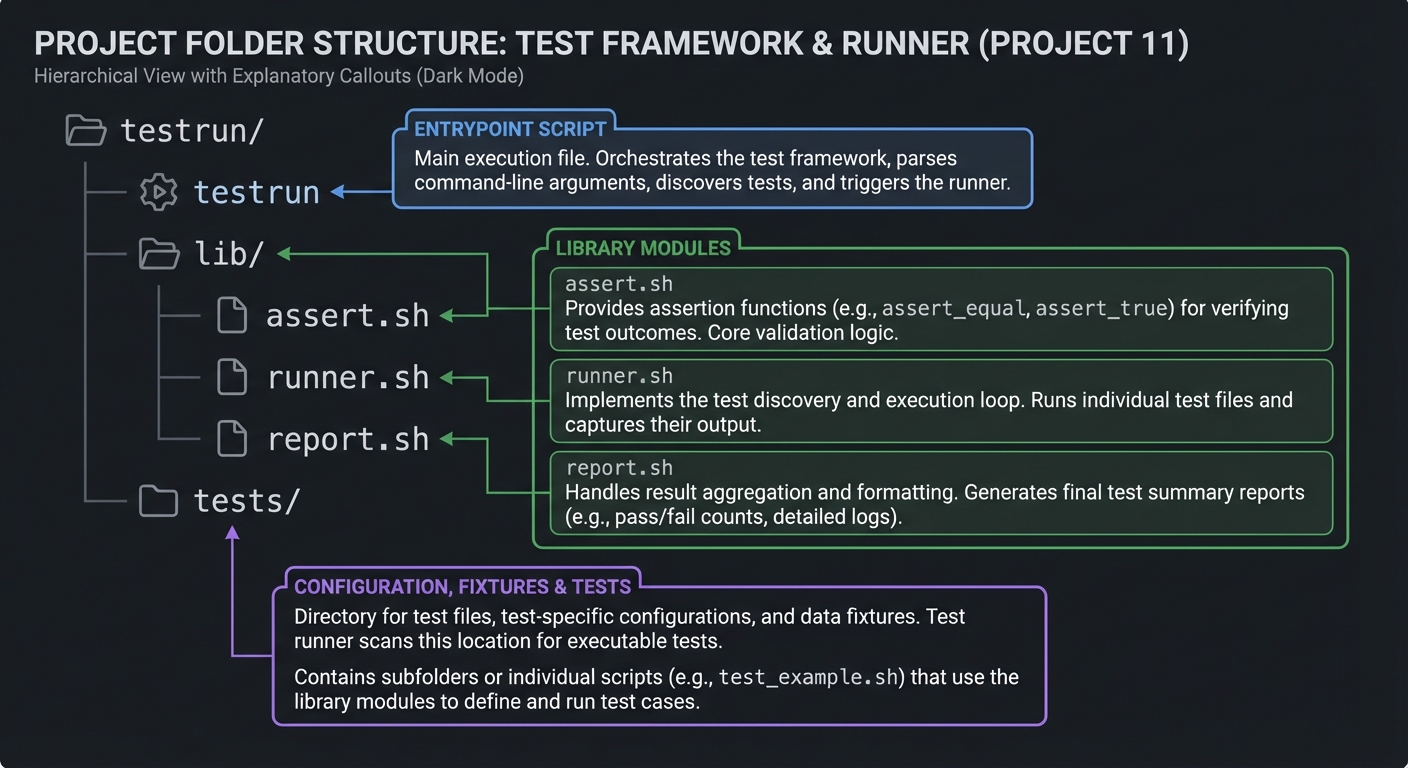
5.2 Project Structure
testrun/
|-- testrun
|-- lib/
|   |-- assert.sh
|   |-- runner.sh
|   `-- report.sh
`-- tests/
5.3 The Core Question You Are Answering
“How can I prove my shell scripts work every time I change them?”
5.4 Concepts You Must Understand First
- Exit codes and
set -ebehavior - Subshell isolation
- Temp directory safety
5.5 Questions to Guide Your Design
- How will you ensure tests clean up after themselves?
- How do you report failures with enough context?
- How will you handle flaky tests?
5.6 Thinking Exercise
Design a test case for a CLI that should fail when given no arguments.
5.7 The Interview Questions They Will Ask
- Why are exit codes central to testing CLI tools?
- How do you isolate tests in shell?
- How do you design assertions for file outputs?
5.8 Hints in Layers
Hint 1: Start with a single assert_eq function.
Hint 2: Add run_cmd helper to capture output and exit code.
Hint 3: Use mktemp -d per test.
Hint 4: Add JSON report as a separate renderer.
5.9 Books That Will Help
| Topic | Book | Chapter |
|---|---|---|
| Shell testing | “Bash Idioms” | Testing section |
| Software testing | “Testing Ruby” (concepts) | Assertions |
5.10 Implementation Phases
Phase 1: Assertions (3-4 days)
Goals:
- Build core assertions and command runner.
Tasks:
- Implement
assert_eqandassert_exit. - Capture output in variables.
Checkpoint: Simple tests pass and fail correctly.
Phase 2: Test Runner (3-4 days)
Goals:
- Discover and run test files.
Tasks:
- Add discovery for
test_*.sh. - Run each test in isolated temp dir.
Checkpoint: Tests run in isolation.
Phase 3: Reporting (2-3 days)
Goals:
- Build summary output and JSON.
Tasks:
- Add colored summary output.
- Emit JSON report file.
Checkpoint: Reports are accurate.
5.11 Key Implementation Decisions
| Decision | Options | Recommendation | Rationale |
|---|---|---|---|
| Isolation | subshell vs separate process | subshell | lighter weight |
| Output capture | temp file vs variable | temp file | simpler for large output |
| JSON output | built-in vs jq | built-in | fewer deps |
6. Testing Strategy
6.1 Test Categories
| Category | Purpose | Examples |
|---|---|---|
| Unit | assertions | assert_eq |
| Integration | runner | multiple test files |
| Edge Cases | temp cleanup | failure scenarios |
6.2 Critical Test Cases
- Assertion failure stops test but not entire suite.
setupandteardownalways run.- Output captured correctly for long logs.
6.3 Test Data
fixtures/expected_output.txt
7. Common Pitfalls and Debugging
7.1 Frequent Mistakes
| Pitfall | Symptom | Solution |
|---|---|---|
Using set -e globally |
tests abort on failure | localize set -e |
| Not cleaning temp dirs | disk clutter | trap cleanup |
| Tests share state | flaky results | isolate dirs |
7.2 Debugging Strategies
- Add
--debugto print full output. - Save failing logs to file.
7.3 Performance Traps
Excessive subshells can slow large suites. Group tests when possible.
8. Extensions and Challenges
8.1 Beginner Extensions
- Add
--listto show tests. - Add
--filterby name.
8.2 Intermediate Extensions
- Add parallel test execution.
- Add JUnit XML output.
8.3 Advanced Extensions
- Add mocking library for commands.
- Add snapshot testing.
9. Real-World Connections
9.1 Industry Applications
- CI pipelines for shell tooling.
- Reliability of deployment scripts.
9.2 Related Open Source Projects
- BATS: Bash Automated Testing System.
- shunit2: shell unit testing framework.
9.3 Interview Relevance
- Shows discipline in testing automation scripts.
- Demonstrates tooling maturity.
10. Resources
10.1 Essential Reading
- BATS documentation
man mktemp,man trap
10.2 Video Resources
- “Testing Bash Scripts” (YouTube)
10.3 Tools and Documentation
shellcheck,bats,jq
10.4 Related Projects in This Series
- Project 7: CLI Parser Library
- Project 12: Task Runner
11. Self-Assessment Checklist
11.1 Understanding
- I can explain how exit codes drive test results.
- I can explain why isolation matters.
11.2 Implementation
- Tests run cleanly with clear output.
- Failures show context.
11.3 Growth
- I can extend the framework with new assertions.
12. Submission / Completion Criteria
Minimum Viable Completion:
- Assertions + runner
Full Completion:
- Fixtures + JSON output
Excellence (Going Above & Beyond):
- Parallel execution + JUnit XML