Project 10: Deployment and Release Automation
Build a deployment CLI that performs atomic releases with rollback, health checks, and logging.
Quick Reference
| Attribute | Value |
|---|---|
| Difficulty | Level 3: Advanced |
| Time Estimate | 2-3 weeks |
| Language | Bash (Alternatives: Python, Go) |
| Prerequisites | SSH basics, rsync/scp, git familiarity, projects 5 and 8 |
| Key Topics | atomic deploys, rollback, SSH automation, health checks |
1. Learning Objectives
By completing this project, you will:
- Automate deployments via SSH with predictable outcomes.
- Implement atomic release directories and symlink switching.
- Add health checks and rollback logic.
- Manage secrets and configs safely.
- Build logging and auditability into releases.
2. Theoretical Foundation
2.1 Core Concepts
- Atomic deployments: Using release directories and symlinks.
- Rollback strategy: Keeping previous releases and switching back.
- Remote execution: SSH,
rsync, and command orchestration. - Health checks: Deterministic validation after deploy.
- Secrets handling: Avoiding plain-text leakage.
2.2 Why This Matters
Manual deployments are risky. This project teaches you how to build safe, reversible automation that reduces downtime and improves confidence.
2.3 Historical Context / Background
Capistrano and Fabric standardized atomic deploys for web apps. Their key pattern–release dirs + symlink–still dominates.
2.4 Common Misconceptions
- “Copying files = deployment.” A deployment also involves configuration, restarts, and validation.
- “Rollback is optional.” Without rollback, failures become outages.
3. Project Specification
3.1 What You Will Build
A deploy CLI that packages a build artifact, uploads it, switches a current symlink, runs health checks, and rolls back if checks fail.
3.2 Functional Requirements
- Build packaging: archive or build artifact creation.
- Upload: transfer to remote host (rsync/scp).
- Release dirs: create
/releases/<timestamp>. - Symlink switch: update
currentatomically. - Health checks: URL or command checks.
- Rollback: restore previous release on failure.
- Logs: record deployment history and status.
3.3 Non-Functional Requirements
- Reliability: Handle network errors and partial uploads.
- Security: Protect secrets and SSH keys.
- Usability: Clear output and exit codes.
3.4 Example Usage / Output
$ deploy production --artifact build.tar.gz --check "curl -sf http://localhost/health"
[deploy] Uploading build.tar.gz...
[deploy] Switched symlink to release 20241231_120000
[deploy] Health check passed
3.5 Real World Outcome
You can deploy a web service in seconds with zero-downtime switchovers and a guaranteed rollback path.
4. Solution Architecture
4.1 High-Level Design
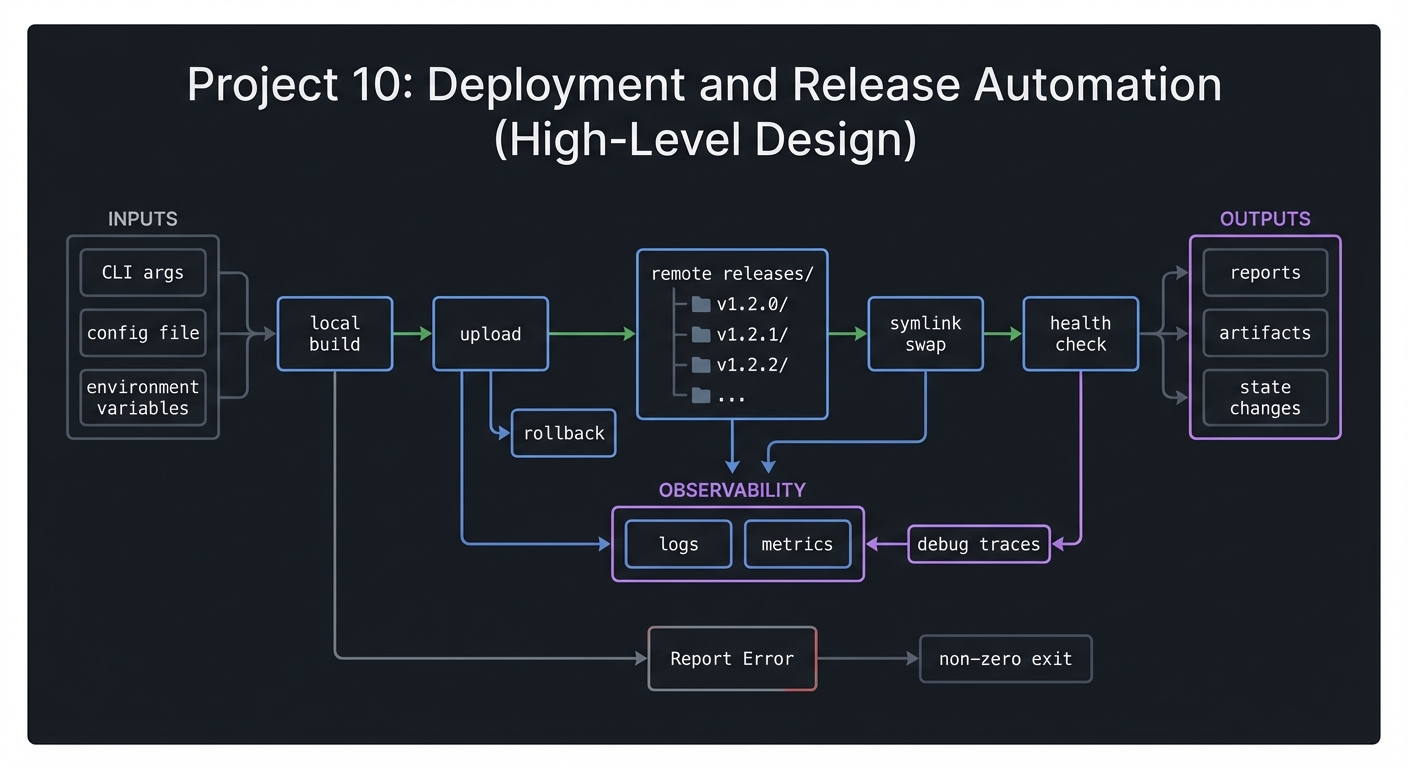
local build -> upload -> remote releases/ -> symlink swap -> health check
                                      |           |
                                      |           +-> rollback
                                      +-> logs
4.2 Key Components
| Component | Responsibility | Key Decisions |
|---|---|---|
| Packager | Build and archive | tar vs rsync |
| Uploader | Transfer artifacts | rsync vs scp |
| Release manager | Create dirs and symlinks | atomic ln -sfn |
| Health checker | Validate service | curl vs custom |
| Rollback engine | Restore previous | keep N releases |
4.3 Data Structures
releases/
  20241231_120000/
  20241230_230000/
current -> releases/20241231_120000
4.4 Algorithm Overview
Key Algorithm: Atomic Deploy
- Upload artifact to new release dir.
- Run pre-switch hooks.
- Update
currentsymlink atomically. - Run health checks.
- On failure, revert to previous symlink.
Complexity Analysis:
- Time: O(size of artifact)
- Space: O(number of retained releases)
5. Implementation Guide
5.1 Development Environment Setup
sudo apt-get install rsync openssh-client
5.2 Project Structure
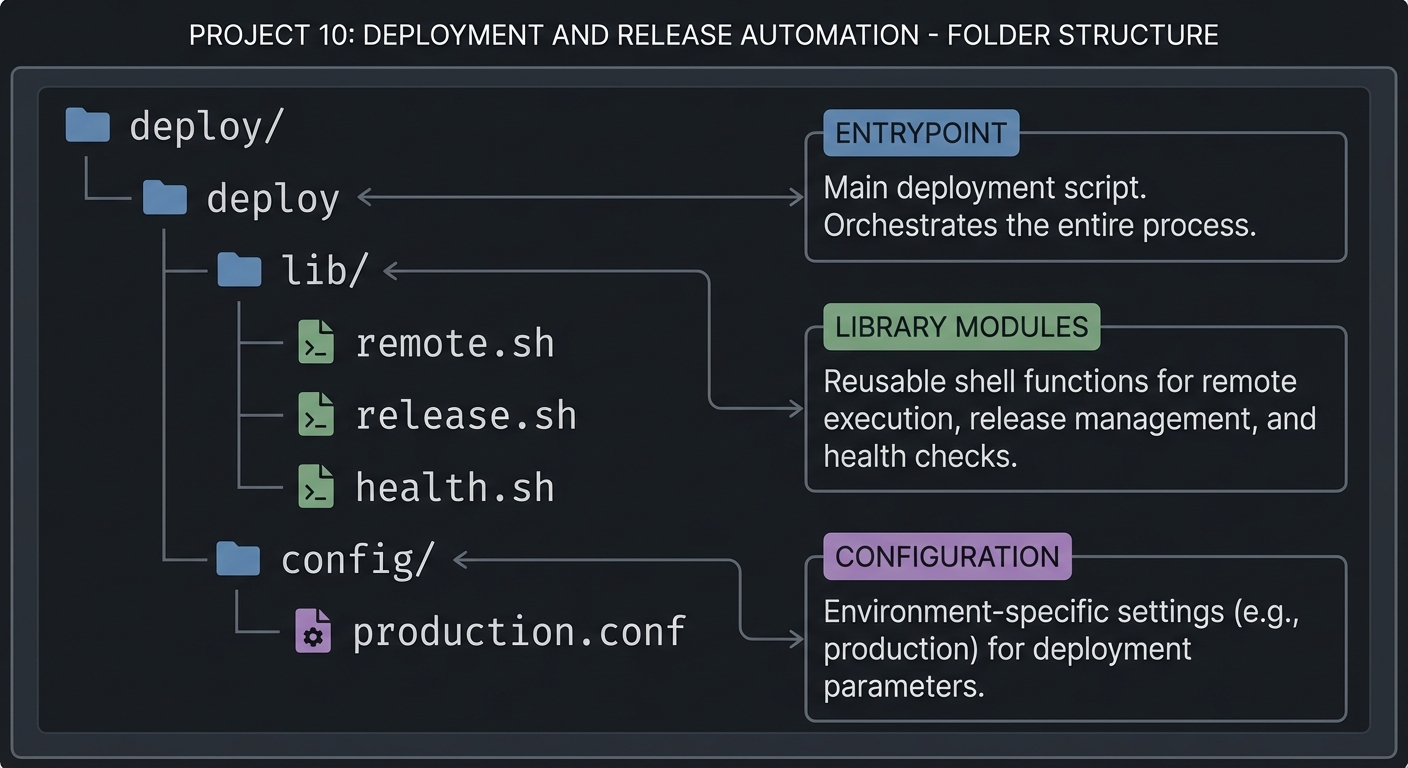
deploy/
|-- deploy
|-- lib/
|   |-- remote.sh
|   |-- release.sh
|   `-- health.sh
`-- config/
    `-- production.conf
5.3 The Core Question You Are Answering
“How can I deploy safely with a single command and zero fear of rollback?”
5.4 Concepts You Must Understand First
- Atomic filesystem operations
- SSH and key management
- Health check design
5.5 Questions to Guide Your Design
- What happens if upload fails halfway?
- How many releases should you keep?
- How do you store deployment logs reliably?
5.6 Thinking Exercise
Draw a timeline of a failed deployment and annotate where rollback occurs.
5.7 The Interview Questions They Will Ask
- Why is symlink switching atomic?
- How do you handle failed health checks?
- What makes a deployment safe?
5.8 Hints in Layers
Hint 1: Start by deploying locally with symlink swaps.
Hint 2: Add SSH remote support with rsync.
Hint 3: Add health checks that run on the remote host.
Hint 4: Implement rollback by restoring previous symlink.
5.9 Books That Will Help
| Topic | Book | Chapter |
|---|---|---|
| Deployment patterns | “The DevOps Handbook” | Part II |
| Unix process control | “The Linux Programming Interface” | Ch. 27 |
5.10 Implementation Phases
Phase 1: Local Deploy (4-5 days)
Goals:
- Build release directories and symlink switching.
Tasks:
- Create release directories.
- Switch current symlink.
Checkpoint: Local deploy works and rollback is possible.
Phase 2: Remote Deploy (5-6 days)
Goals:
- SSH + rsync transfer.
Tasks:
- Add remote upload.
- Add remote symlink switching.
Checkpoint: Deploy to a remote host.
Phase 3: Health Checks & Rollback (3-4 days)
Goals:
- Validate service and rollback on failure.
Tasks:
- Implement checks.
- Add rollback and logging.
Checkpoint: Failure triggers rollback.
5.11 Key Implementation Decisions
| Decision | Options | Recommendation | Rationale |
|---|---|---|---|
| Upload tool | scp vs rsync | rsync | faster + resumable |
| Health checks | curl vs custom | configurable | flexibility |
| Logging | file vs syslog | file | simple auditing |
6. Testing Strategy
6.1 Test Categories
| Category | Purpose | Examples |
|---|---|---|
| Unit | path building | release dir naming |
| Integration | deploy flow | local host deploy |
| Edge Cases | failed upload | simulate rsync failure |
6.2 Critical Test Cases
- Health check fails triggers rollback.
- Missing SSH key returns exit code 2.
- Multiple deploys maintain correct
current.
6.3 Test Data
fixtures/app_v1/
fixtures/app_v2/
7. Common Pitfalls and Debugging
7.1 Frequent Mistakes
| Pitfall | Symptom | Solution |
|---|---|---|
| Non-atomic symlink | intermittent downtime | use ln -sfn |
| No rollback | failed deploy sticks | keep previous release |
| Missing config | deploy fails silently | validate config upfront |
7.2 Debugging Strategies
- Log every step with timestamps.
- Run with
set -xfor tracing.
7.3 Performance Traps
Uploading entire builds each time is slow. Use rsync incremental transfers.
8. Extensions and Challenges
8.1 Beginner Extensions
- Add
deploy statuscommand. - Add colored logs.
8.2 Intermediate Extensions
- Add pre/post hooks.
- Add staged deployments.
8.3 Advanced Extensions
- Multi-host deploy with parallelism.
- Blue/green switching.
9. Real-World Connections
9.1 Industry Applications
- CI/CD pipelines
- Release management for web services
9.2 Related Open Source Projects
- Capistrano: Ruby deploy tool.
- Fabric: Python-based remote execution.
9.3 Interview Relevance
- Shows knowledge of atomic deployment and rollback.
- Demonstrates operational thinking.
10. Resources
10.1 Essential Reading
man rsync,man ssh- “The DevOps Handbook”
10.2 Video Resources
- “Atomic Deployments Explained” (YouTube)
10.3 Tools and Documentation
rsync,ssh,curl
10.4 Related Projects in This Series
- Project 5: Backup System
- Project 12: Task Runner
11. Self-Assessment Checklist
11.1 Understanding
- I can explain how atomic deploys work.
- I can describe rollback steps.
11.2 Implementation
- Deployment is repeatable and logged.
- Health checks guard releases.
11.3 Growth
- I can extend to multiple hosts.
12. Submission / Completion Criteria
Minimum Viable Completion:
- Local deploy with symlink switch
- Basic remote upload
Full Completion:
- Health checks and rollback
Excellence (Going Above & Beyond):
- Blue/green or canary deploys