Project 8: Process Supervisor and Job Scheduler
Build a daemon-like supervisor that starts, monitors, restarts, and schedules background jobs.
Quick Reference
| Attribute | Value |
|---|---|
| Difficulty | Level 4: Expert |
| Time Estimate | 3-4 weeks |
| Language | Bash (Alternatives: Python, Go) |
| Prerequisites | Project 6, understanding of signals, process groups, job control |
| Key Topics | daemons, signals, PID files, restart policies, job scheduling |
1. Learning Objectives
By completing this project, you will:
- Build a long-running supervisor process with lifecycle management.
- Implement restart policies (always/on-failure/backoff).
- Track processes reliably using PID files and process groups.
- Schedule tasks with cron-like intervals or fixed delays.
- Handle shutdown and reload signals gracefully.
2. Theoretical Foundation
2.1 Core Concepts
- Daemonization: Detaching from the terminal and managing background processes.
- Signals:
SIGTERM,SIGHUP,SIGCHLDand their handling. - PID files and locking: Ensuring only one supervisor instance.
- Restart strategies: Backoff, max retries, and crash loops.
- Scheduling semantics: Fixed delay vs fixed rate execution.
2.2 Why This Matters
Process supervisors are the backbone of long-running services. Understanding them teaches reliability patterns like restarts, health checks, and graceful shutdowns.
2.3 Historical Context / Background
Before systemd, tools like daemontools, supervisord, and runit managed processes. Rebuilding a subset reveals their design trade-offs.
2.4 Common Misconceptions
- “Backgrounding a process makes it a daemon.” True daemons detach and manage signals.
- “A PID is enough to track a process.” PIDs get reused; verify command lines.
- “Restart always = reliable.” Unbounded restarts can cause crash loops.
3. Project Specification
3.1 What You Will Build
A sup CLI that manages a set of job definitions, starts them in the background, restarts on failure, and schedules periodic tasks.
3.2 Functional Requirements
- Job definitions: YAML or shell-based job files.
- Start/stop/restart:
sup start job,sup stop job. - Status: Show running, stopped, last exit code.
- Restart policies:
always,on-failure,never. - Scheduling: Interval-based tasks (
every 5m). - Logging: Redirect stdout/stderr to log files.
3.3 Non-Functional Requirements
- Reliability: Avoid orphaned processes.
- Safety: Prevent multiple supervisors from racing.
- Observability: Clear status output and logs.
3.4 Example Usage / Output
$ sup start web
[sup] Started web (pid=4312)
$ sup status
web   running  pid=4312  restarts=1  last_exit=0
worker stopped last_exit=137
3.5 Real World Outcome
You can run long-lived jobs like web servers or background workers with automatic restarts and scheduled maintenance tasks.
4. Solution Architecture
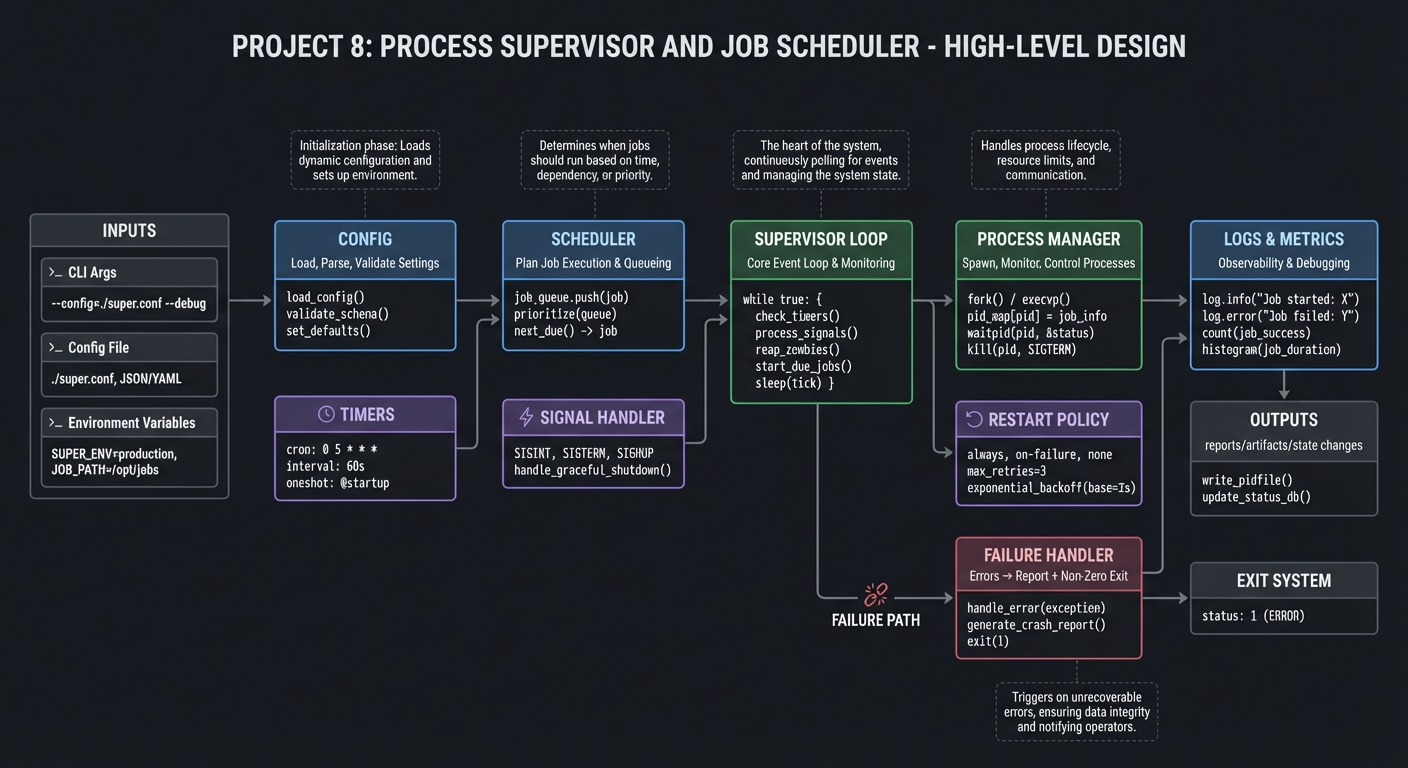
4.1 High-Level Design
config -> scheduler -> supervisor loop -> process manager -> logs
                |             |                  |
                |             |                  +-> restart policy
                +-> timers    +-> signal handler
4.2 Key Components
| Component | Responsibility | Key Decisions |
|---|---|---|
| Config loader | Load job definitions | YAML vs shell |
| Process manager | Start/stop/track jobs | PID file + pgrp |
| Scheduler | Trigger interval jobs | sleep loop vs at/cron |
| Restart engine | Apply policies | exponential backoff |
| Signal handler | Graceful shutdown | trap + cleanup |
4.3 Data Structures
# Job state table
JOB[web_pid]=4312
JOB[web_restarts]=1
JOB[web_last_exit]=0
4.4 Algorithm Overview
Key Algorithm: Restart with Backoff
- On exit, check policy.
- If
on-failureand exit != 0, compute delay. - Sleep for delay, then restart.
- Reset backoff after stable runtime.
Complexity Analysis:
- Time: O(j) per loop (j = jobs)
- Space: O(j) for job state
5. Implementation Guide
5.1 Development Environment Setup
sudo apt-get install procps
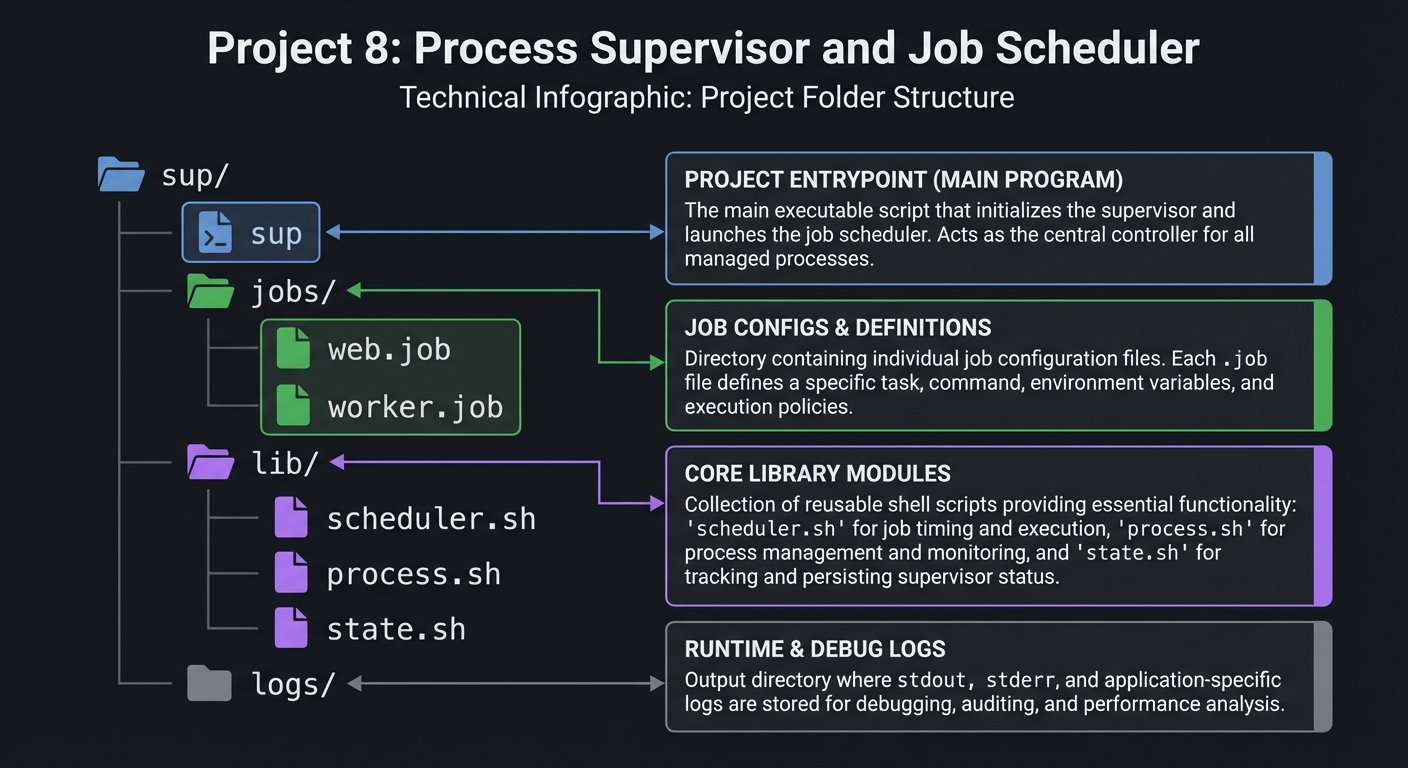
5.2 Project Structure
sup/
|-- sup
|-- jobs/
|   |-- web.job
|   `-- worker.job
|-- lib/
|   |-- scheduler.sh
|   |-- process.sh
|   `-- state.sh
`-- logs/
5.3 The Core Question You Are Answering
“How do I keep a set of jobs alive and predictable without systemd?”
5.4 Concepts You Must Understand First
- Process groups and killing child trees.
- SIGCHLD handling for process exit.
- PID reuse and safe PID validation.
5.5 Questions to Guide Your Design
- How do you ensure a job is really your process, not a reused PID?
- How do you prevent two supervisors from managing the same job?
- How do you implement scheduling without drifting over time?
5.6 Thinking Exercise
Sketch a job lifecycle state machine: stopped -> starting -> running -> crashed -> restarting.
5.7 The Interview Questions They Will Ask
- How do you track daemon processes reliably?
- Why is SIGCHLD important for supervisors?
- How do you avoid restart storms?
5.8 Hints in Layers
Hint 1: Start by supervising a single process.
Hint 2: Add PID files and verify ps output.
Hint 3: Add restart policy with backoff.
Hint 4: Add scheduler as a separate loop.
5.9 Books That Will Help
| Topic | Book | Chapter |
|---|---|---|
| Signals | “Advanced Programming in the UNIX Environment” | Ch. 10 |
| Process management | “The Linux Programming Interface” | Ch. 10 |
5.10 Implementation Phases
Phase 1: Core Supervisor (1 week)
Goals:
- Start, stop, status.
Tasks:
- Build job config format.
- Implement start/stop and PID tracking.
Checkpoint: Start/stop works reliably.
Phase 2: Restart and Scheduling (1 week)
Goals:
- Restart policies and scheduling.
Tasks:
- Add restart policy logic.
- Add interval scheduling.
Checkpoint: Jobs restart on failure and schedule correctly.
Phase 3: Observability (3-4 days)
Goals:
- Logs and clean shutdowns.
Tasks:
- Log stdout/stderr per job.
- Add graceful shutdown on SIGTERM.
Checkpoint: Logs exist and shutdown is clean.
5.11 Key Implementation Decisions
| Decision | Options | Recommendation | Rationale |
|---|---|---|---|
| Job spec format | YAML vs shell | shell-friendly | easy sourcing |
| Scheduling | fixed delay vs fixed rate | fixed delay | simpler, predictable |
| Process tracking | PID only vs PID+cmd | PID+cmd | safer |
6. Testing Strategy
6.1 Test Categories
| Category | Purpose | Examples |
|---|---|---|
| Unit | restart policy logic | backoff timing |
| Integration | job lifecycle | start/stop/restart |
| Edge Cases | PID reuse | simulate old PID |
6.2 Critical Test Cases
- Job crashes repeatedly; backoff increases.
- Supervisor restart restores job state.
sup stopkills child processes too.
6.3 Test Data
fixtures/job_crash.sh
fixtures/job_longrun.sh
7. Common Pitfalls and Debugging
7.1 Frequent Mistakes
| Pitfall | Symptom | Solution |
|---|---|---|
| Not handling SIGCHLD | Zombies accumulate | trap SIGCHLD |
| Killing only parent | children keep running | use process groups |
| No lockfile | multiple supervisors | lock and verify |
7.2 Debugging Strategies
- Use
ps -o pid,ppid,pgid,cmdto inspect trees. - Add verbose logs for state transitions.
7.3 Performance Traps
Busy-looping scheduler can burn CPU. Use sleep with precise intervals.
8. Extensions and Challenges
8.1 Beginner Extensions
- Add
sup reloadto re-read configs. - Add colored status output.
8.2 Intermediate Extensions
- Add health checks (HTTP or command).
- Add cron-style schedules.
8.3 Advanced Extensions
- Build a TUI dashboard for jobs.
- Remote supervisor control via socket.
9. Real-World Connections
9.1 Industry Applications
- Lightweight service management on servers.
- Worker pool supervision in CI systems.
9.2 Related Open Source Projects
- supervisord: Python process supervisor.
- runit: minimal service manager.
9.3 Interview Relevance
- Shows understanding of daemons and process management.
- Demonstrates reliability engineering patterns.
10. Resources
10.1 Essential Reading
man 5 proc,man 7 signal- “Advanced Programming in the UNIX Environment”
10.2 Video Resources
- “How Linux Process Supervision Works” (YouTube)
10.3 Tools and Documentation
ps,pgrep,pkill,nohup
10.4 Related Projects in This Series
- Project 6: System Health Monitor
- Project 10: Deployment Automation
11. Self-Assessment Checklist
11.1 Understanding
- I can explain daemonization.
- I understand process groups and PID reuse.
11.2 Implementation
- Jobs restart with backoff.
- Logs are captured per job.
11.3 Growth
- I can extend the supervisor with health checks.
12. Submission / Completion Criteria
Minimum Viable Completion:
- Start/stop/status for multiple jobs
- Logs to files
Full Completion:
- Restart policies + scheduler
- Clean shutdown and reload
Excellence (Going Above & Beyond):
- Health checks + remote control
- TUI dashboard