Project 7: CLI Argument Parser Library
Build a reusable shell library that parses complex CLI arguments reliably and predictably.
Quick Reference
| Attribute | Value |
|---|---|
| Difficulty | Level 3: Advanced |
| Time Estimate | 2-3 weeks |
| Language | Bash (Alternatives: POSIX sh, Python) |
| Prerequisites | Solid shell scripting, arrays, quoting, project 4/5 |
| Key Topics | argument parsing, validation, API design, error handling, help generation |
1. Learning Objectives
By completing this project, you will:
- Parse short and long flags, subcommands, and positional arguments.
- Implement a robust validation and error-reporting layer.
- Generate consistent help/usage text automatically.
- Create a library API that other scripts can reuse.
- Handle edge cases like
--, repeated flags, and missing values.
2. Theoretical Foundation
2.1 Core Concepts
- Tokenization and quoting: Understanding
$@,"$@",--terminator. - Option parsing patterns:
getopts, manual parsing, and long-flag support. - Command design: Subcommands, global flags, and consistent help output.
- Validation and errors: User-friendly diagnostics and exit codes.
- API design in shell: Namespacing, data passing, and return conventions.
2.2 Why This Matters
Shell scripts often fail not because the core logic is wrong, but because the CLI is brittle. A reusable parser lets you build professional tools and avoid re-implementing parsing logic every time.
2.3 Historical Context / Background
Unix tools set expectations: tar, git, and curl all follow conventions for flags, defaults, and errors. Your library encodes these conventions for your own tools.
2.4 Common Misconceptions
- “getopts supports long flags.” It does not.
- “Unquoted $@ is fine.” It breaks when arguments contain spaces.
- “Help text is optional.” It’s the contract of a CLI tool.
3. Project Specification
3.1 What You Will Build
A library (argparse.sh) that provides a structured way to declare options, parse CLI arguments, validate input, and return parsed results to scripts.
3.2 Functional Requirements
- Flags: Support
-v,-abc,--verbose,--output file. - Values: Accept required/optional values with type checks.
- Subcommands: Parse
cmd subcmd [opts] args. - Defaults: Apply defaults when flags are missing.
- Help/usage: Auto-generate usage and examples.
- Errors: Consistent errors with exit codes and suggestions.
3.3 Non-Functional Requirements
- Reliability: Deterministic parsing for all inputs.
- Portability: Works in Bash 4+; optional POSIX mode.
- Usability: Clear, standardized error messages.
3.4 Example Usage / Output
$ mytool deploy --env prod --timeout 30 --force --file "release.tar.gz"
[args] subcommand=deploy
[args] env=prod
[args] timeout=30
[args] force=true
[args] file=release.tar.gz
3.5 Real World Outcome
Your scripts can now declare flags and parse them consistently, reducing bugs and improving UX. The parser becomes a shared dependency for other projects.
4. Solution Architecture
4.1 High-Level Design
CLI argv -> tokenizer -> option parser -> validator -> output map
              |                |              |
              |                |              +--> errors/help
              +--> "--" handling
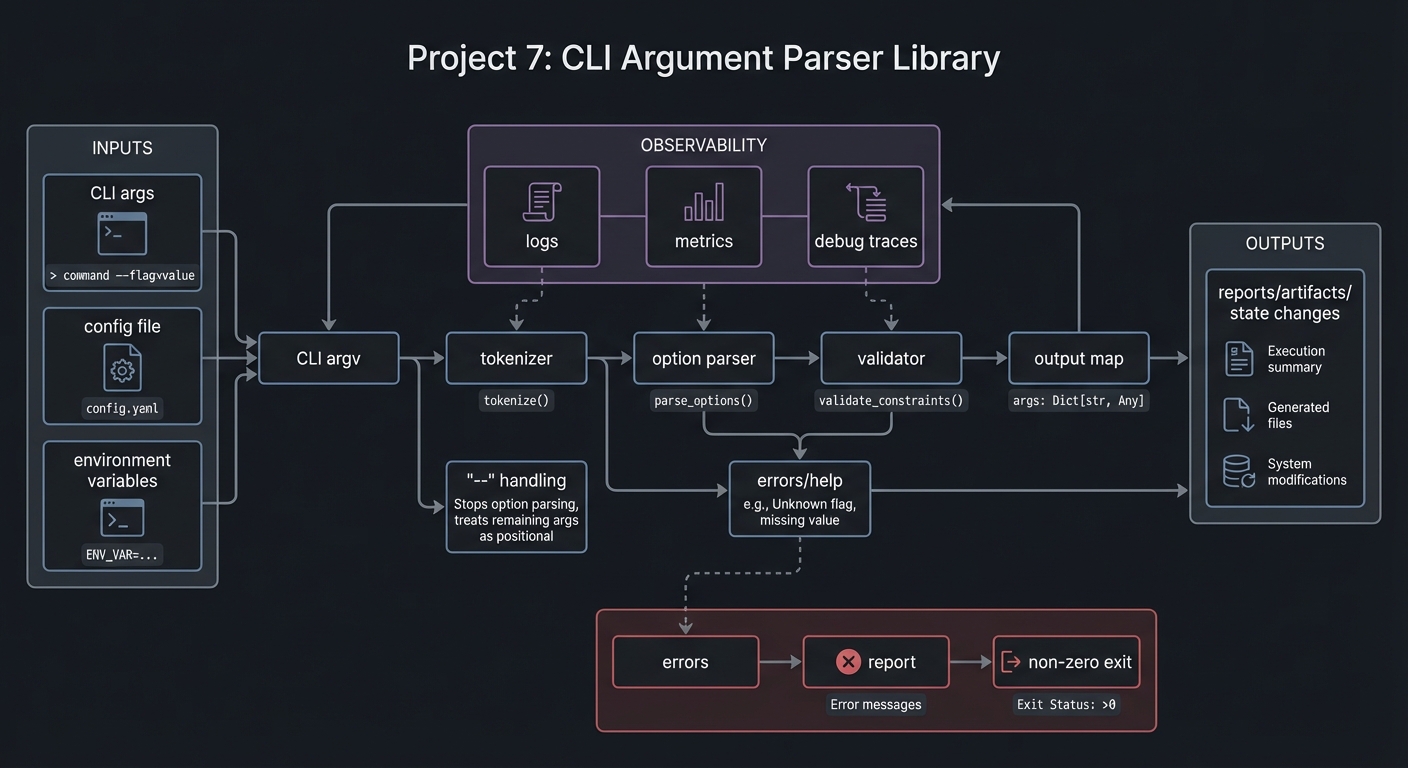
4.2 Key Components
| Component | Responsibility | Key Decisions |
|---|---|---|
| Spec registry | Defines options and defaults | Declarative format |
| Parser | Iterates through argv | Manual parsing over getopts |
| Validator | Type checks and required flags | Centralized error handling |
| Renderer | Usage/help output | Auto-generated with examples |
4.3 Data Structures
Use associative arrays for parsed outputs:
declare -A ARGS
ARGS[env]="prod"
ARGS[force]="true"
4.4 Algorithm Overview
Key Algorithm: Option Parsing Loop
- Iterate over
"$@". - If token starts with
--, parse long flag. - If token starts with
-, parse short flags cluster. - If token is
--, treat remaining args as positional. - Validate required flags and apply defaults.
Complexity Analysis:
- Time: O(n) where n = number of arguments
- Space: O(k) where k = number of parsed options
5. Implementation Guide
5.1 Development Environment Setup
brew install bash
5.2 Project Structure
lib/
|-- argparse.sh
|-- argparse_help.sh
`-- argparse_validate.sh

5.3 The Core Question You Are Answering
“How do I convert an unstructured list of CLI tokens into a validated configuration object?”
5.4 Concepts You Must Understand First
- Quoting and $@ semantics
- Short vs long option conventions
- Exit codes for CLI error signaling
5.5 Questions to Guide Your Design
- How will you handle
-abcwhere-bexpects a value? - What does
--mean in your parser? - How will you represent errors for users and for scripts?
5.6 Thinking Exercise
Write down how tar -czvf file.tar.gz src/ is parsed. Identify how short flags with values should behave.
5.7 The Interview Questions They Will Ask
- How do you parse
-abcwhen-bneeds a value? - Why must you quote
"$@"? - How do you handle unexpected positional arguments?
5.8 Hints in Layers
Hint 1: Start with parsing only --long flags.
Hint 2: Add short flags without values.
Hint 3: Handle short flags with values by peeking at the next token.
Hint 4: Implement a strict mode that errors on unknown flags.
5.9 Books That Will Help
| Topic | Book | Chapter |
|---|---|---|
| CLI conventions | “The Linux Command Line” | Ch. 5-6 |
| Shell scripting patterns | “Bash Idioms” | Parsing section |
5.10 Implementation Phases
Phase 1: Spec and Parser (4-5 days)
Goals:
- Define option spec format.
- Parse long flags.
Tasks:
- Build a spec registry format (arrays or strings).
- Parse
--key valueand--key=value.
Checkpoint: Parser handles long flags correctly.
Phase 2: Short Flags and Subcommands (5-6 days)
Goals:
- Parse short clusters.
- Add subcommand support.
Tasks:
- Add
-abcparsing. - Support command-specific specs.
Checkpoint: Subcommands parse with unique options.
Phase 3: Validation and Help (3-4 days)
Goals:
- Validate required flags and types.
- Generate help output.
Tasks:
- Add required/optional validation.
- Build help output generator.
Checkpoint: Tool prints consistent usage and errors.
5.11 Key Implementation Decisions
| Decision | Options | Recommendation | Rationale |
|---|---|---|---|
| Parsing approach | getopts vs manual |
Manual parsing | Long flags + subcommands |
| Data storage | arrays vs env vars | associative arrays | Clear separation |
| Error handling | echo vs structured | structured errors | script-friendly |
6. Testing Strategy
6.1 Test Categories
| Category | Purpose | Examples |
|---|---|---|
| Unit | Single flag parsing | --foo, -a |
| Integration | Mixed args | cmd sub --x 1 y |
| Edge Cases | Invalid flags, missing values | -b without value |
6.2 Critical Test Cases
--terminator stops parsing flags.-abcwith-brequiring a value.- Unknown flags return exit code 2.
6.3 Test Data
argv_cases.txt
expected_outputs.json
7. Common Pitfalls and Debugging
7.1 Frequent Mistakes
| Pitfall | Symptom | Solution |
|---|---|---|
| Unquoted $@ | Broken parsing on spaces | Always use "$@" |
| Value-less flags | Wrong value assigned | Validate token count |
| Missing defaults | Uninitialized values | Apply defaults early |
7.2 Debugging Strategies
- Add a debug mode that prints the token stream.
- Log parser state transitions.
7.3 Performance Traps
Avoid spawning awk or sed in the parsing loop; pure shell is faster for small token sets.
8. Extensions and Challenges
8.1 Beginner Extensions
- Add
--versionand--helpauto-generation. - Add
--verboseand--quietbehavior.
8.2 Intermediate Extensions
- Support config-file overrides.
- Add environment variable fallbacks.
8.3 Advanced Extensions
- Build a CLI spec linter.
- Auto-generate shell completion scripts.
9. Real-World Connections
9.1 Industry Applications
- Internal tooling with consistent CLI UX.
- DevOps scripts with predictable configuration.
9.2 Related Open Source Projects
- argbash: Bash argument parsing generator.
- docopt: Declarative CLI spec parsing.
9.3 Interview Relevance
- Shows API design skill in shell.
- Demonstrates careful handling of edge cases.
10. Resources
10.1 Essential Reading
- Bash manual:
getoptsand$@behavior - “The Linux Command Line” – CLI conventions
10.2 Video Resources
- “Building Robust Bash CLIs” (YouTube)
10.3 Tools and Documentation
shellcheckrule SC2086argbashexamples
10.4 Related Projects in This Series
- Project 4: Git Hooks Framework
- Project 11: Test Framework & Runner
11. Self-Assessment Checklist
11.1 Understanding
- I can explain the difference between
"$@"and$*. - I can explain how
--changes parsing.
11.2 Implementation
- Parser handles short + long flags correctly.
- Help output matches the spec.
11.3 Growth
- I can use this library in another tool.
12. Submission / Completion Criteria
Minimum Viable Completion:
- Parse short + long flags with values
- Error on missing values
Full Completion:
- Subcommands with distinct specs
- Auto-generated help text
Excellence (Going Above & Beyond):
- Shell completion generation
- Config + env variable layering