Project 4: Git Hooks Framework
Build a shared Git hooks framework that enforces quality checks with clear feedback.
Quick Reference
| Attribute | Value |
|---|---|
| Difficulty | Level 2: Intermediate |
| Time Estimate | 1-2 weeks |
| Language | Bash (Alternatives: POSIX sh, Python, Ruby) |
| Prerequisites | Project 2 or 3, Git basics, familiarity with linters |
| Key Topics | stdin parsing, exit codes, config files, portability |
1. Learning Objectives
By completing this project, you will:
- Understand the Git hook lifecycle and execution context.
- Parse hook inputs and command output safely.
- Design a framework for multiple checks with clear reporting.
- Use exit codes to enforce or warn without blocking.
2. Theoretical Foundation
2.1 Core Concepts
- Git hook lifecycle: When hooks run and what data they receive.
- Exit codes: Using success/failure to control Git behavior.
- Stdin and arguments: Reading commit messages and staged files.
- Portability: Writing scripts that work across environments.
2.2 Why This Matters
Hooks are the earliest and most reliable quality gate in the dev workflow. If you can build a hook framework, you can enforce team standards without extra infrastructure.
2.3 Historical Context / Background
Teams once copied hook scripts manually. Modern tools like pre-commit and Husky automate the distribution. This project teaches the fundamentals behind those tools.
2.4 Common Misconceptions
- Hooks are always optional. They can block commits when required.
- A single hook is enough. Teams need multiple checks and consistent reporting.
3. Project Specification
3.1 What You Will Build
A framework that installs hooks from a shared directory, runs configured checks, and prints a summary with pass/warn/fail statuses.
3.2 Functional Requirements
- Init command: Install hooks into
.git/hooks. - Config file: Define checks per hook.
- Runner: Execute checks and collect results.
- Output: Consistent, readable summary.
- Fail policy: Block or warn based on config.
3.3 Non-Functional Requirements
- Portability: Avoid shell features not supported in POSIX mode.
- Clarity: Errors must explain how to fix issues.
- Reliability: Hooks should be fast and deterministic.
3.4 Example Usage / Output
$ hookmaster init
[hookmaster] Installed pre-commit, commit-msg, pre-push
3.5 Real World Outcome
A team can clone a repo and run a single command to get standardized hooks that enforce policy with useful feedback.
$ git commit -m "wip"
[hookmaster] commit-msg: FAIL
- Message must match conventional commits format
4. Solution Architecture
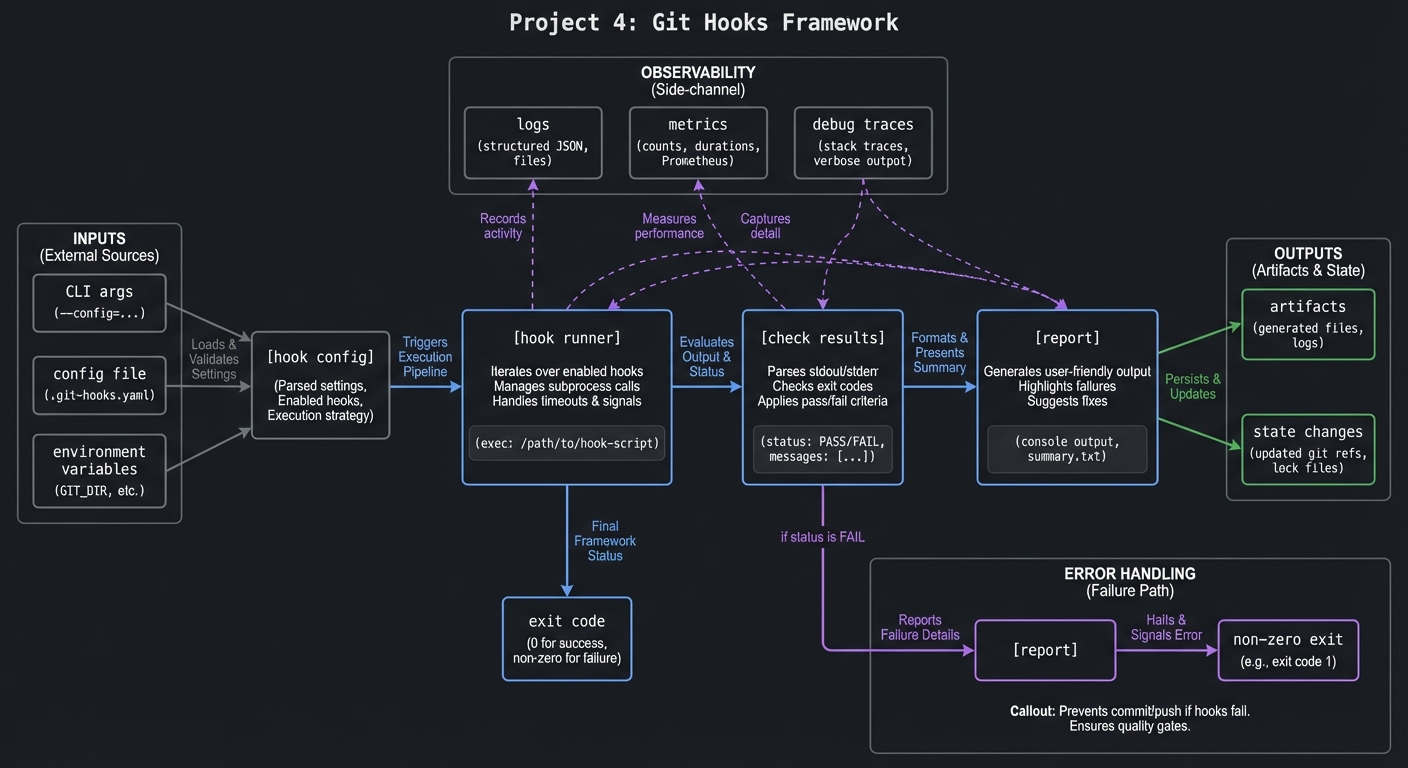
4.1 High-Level Design
[hook config] -> [hook runner] -> [check results] -> [report]
                       |
                       -> exit code
4.2 Key Components
| Component | Responsibility | Key Decisions |
|---|---|---|
| Installer | Copy or link hooks | Use symlinks for updates |
| Config parser | Read checks | YAML vs simple text |
| Runner | Execute checks | Sequential vs parallel |
| Reporter | Display results | Table output |
| Policy | Decide fail/warn | Config-driven |
4.3 Data Structures
Simple config format:
pre-commit: check "npm run lint" fail
commit-msg: pattern "^feat|fix|docs" fail
pre-push: check "npm test" warn
4.4 Algorithm Overview
- Detect hook type and load config.
- For each check, run command or match pattern.
- Track exit codes and failure severity.
- Print summary and exit with correct code.
Complexity Analysis:
- Time: O(c) for c checks
- Space: O(1)
5. Implementation Guide
5.1 Development Environment Setup
# Ensure git and basic tools are available
git --version
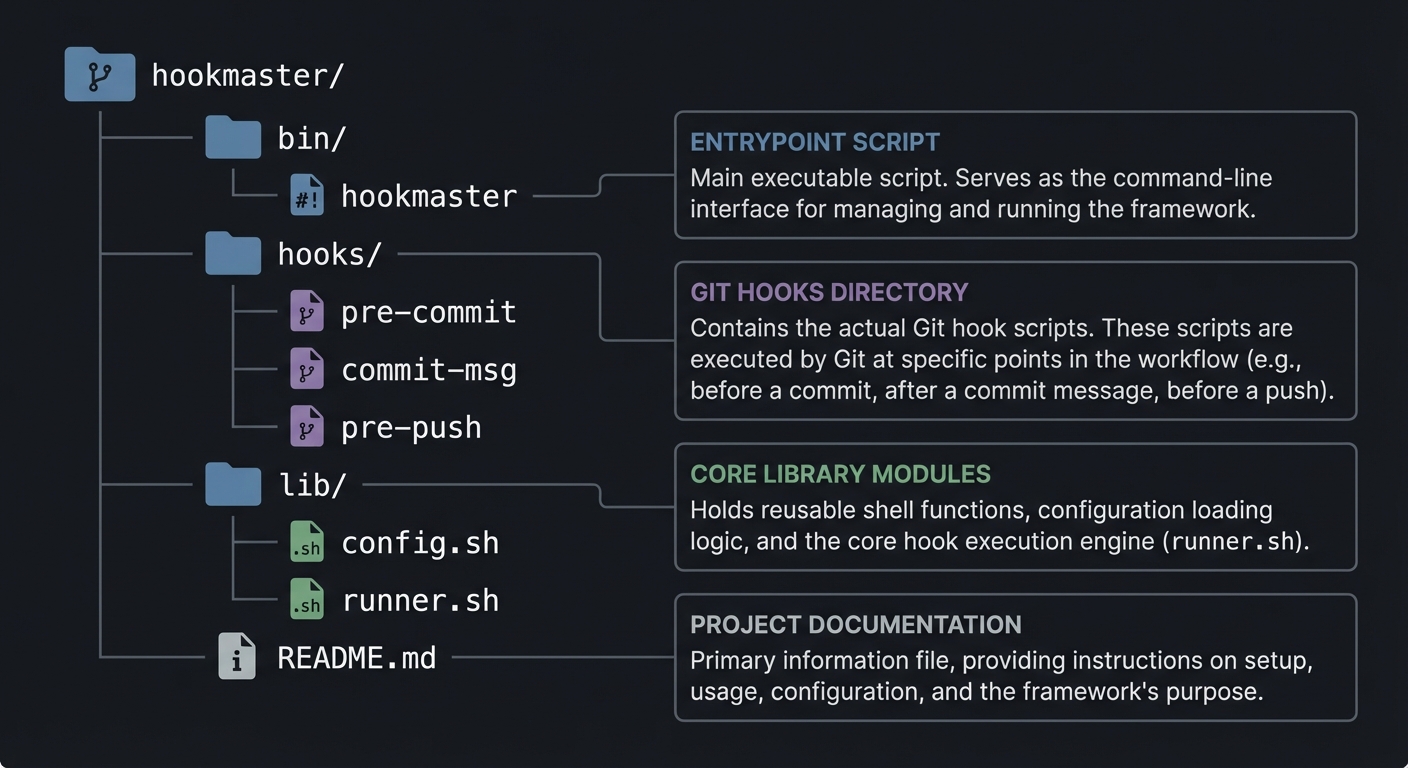
5.2 Project Structure
hookmaster/
|-- bin/
|   `-- hookmaster
|-- hooks/
|   |-- pre-commit
|   |-- commit-msg
|   `-- pre-push
|-- lib/
|   |-- config.sh
|   `-- runner.sh
`-- README.md
5.3 The Core Question You Are Answering
“How can I enforce team standards at the earliest possible point in the workflow?”
5.4 Concepts You Must Understand First
- Git hook stages and inputs.
- Exit codes and how Git interprets them.
- Handling stdin vs file-based input.
5.5 Questions to Guide Your Design
- Which checks should block commits vs warn?
- How will you expose hook configuration?
- How will you keep hooks fast?
5.6 Thinking Exercise
Write a decision table for commit message validation (pass, warn, fail).
5.7 The Interview Questions They Will Ask
- How do Git hooks block a commit?
- How do you handle hook portability across OSes?
- Why are exit codes critical for hooks?
5.8 Hints in Layers
Hint 1: Start with a single hook and one check.
Hint 2: Separate hook detection from check execution.
Hint 3: Standardize output format early.
Hint 4: Add a dry-run mode for testing.
5.9 Books That Will Help
| Topic | Book | Chapter |
|---|---|---|
| Exit codes and errors | “Bash Idioms” | Ch. 6 |
| Input handling | “Learning the Bash Shell” | Ch. 7 |
| Git hooks | “Pro Git” | Ch. 8 |
5.10 Implementation Phases
Phase 1: Foundation (2-3 days)
Goals:
- Install hooks and run one check
Tasks:
- Implement init and hook install
- Implement a simple pre-commit check
Checkpoint: Hook runs and blocks commit on failure.
Phase 2: Core Functionality (3-4 days)
Goals:
- Configurable checks and reporting
Tasks:
- Build config parser
- Add summary reporting
Checkpoint: Multiple checks run with a summary table.
Phase 3: Polish and Edge Cases (2-3 days)
Goals:
- Portability and UX improvements
Tasks:
- Add POSIX compatibility fixes
- Improve error messaging
Checkpoint: Hooks run consistently on different machines.
5.11 Key Implementation Decisions
| Decision | Options | Recommendation | Rationale |
|---|---|---|---|
| Hook installation | copy, symlink | symlink | Central updates |
| Config format | YAML, text | text | Easy to parse |
| Check execution | sequential, parallel | sequential | Predictable output |
6. Testing Strategy
6.1 Test Categories
| Category | Purpose | Examples |
|---|---|---|
| Unit Tests | Config parsing | Valid and invalid entries |
| Integration Tests | Hook execution | Failing and passing commits |
| Edge Case Tests | Large repos | Hooks on big diffs |
6.2 Critical Test Cases
- Commit message fails format check.
- Pre-commit check returns non-zero exit.
- Warning checks do not block commit.
6.3 Test Data
config with three checks
sample commit messages
7. Common Pitfalls and Debugging
7.1 Frequent Mistakes
| Pitfall | Symptom | Solution |
|---|---|---|
| Hook not executable | Git ignores it | Ensure chmod +x |
| Wrong hook path | Hooks never run | Use .git/hooks |
| Poor output | Users ignore failures | Standardize reporting |
7.2 Debugging Strategies
- Add verbose mode to print executed commands.
- Log exit codes for each check.
7.3 Performance Traps
Avoid running slow checks on every commit. Provide optional checks for pre-push.
8. Extensions and Challenges
8.1 Beginner Extensions
- Add commit message templates
- Add colorized output
8.2 Intermediate Extensions
- Add caching for repeated checks
- Add language-specific check bundles
8.3 Advanced Extensions
- Add remote hook sync for teams
- Add pre-receive server hooks
9. Real-World Connections
9.1 Industry Applications
- Enforcing formatting, linting, and commit policies.
9.2 Related Open Source Projects
- pre-commit: Multi-language hook manager
- Husky: JavaScript-focused hook runner
9.3 Interview Relevance
- Understanding Git hooks and CI gate design.
10. Resources
10.1 Essential Reading
- “Pro Git” by Scott Chacon - hooks
- “Bash Idioms” by Carl Albing - exit codes
10.2 Video Resources
- Short Git hooks walkthroughs
10.3 Tools and Documentation
man githooks,git help hooks
10.4 Related Projects in This Series
- Previous: Project 3 (Log Parser)
- Next: Project 5 (Backup System)
11. Self-Assessment Checklist
11.1 Understanding
- I can explain hook lifecycles and inputs.
- I can use exit codes to block or warn.
11.2 Implementation
- Hooks install and run on commit.
- Results are clearly summarized.
11.3 Growth
- I can add a new check without changing core logic.
12. Submission / Completion Criteria
Minimum Viable Completion:
- Hook installation and one check that blocks commits.
Full Completion:
- Configurable checks with summary reporting.
Excellence (Going Above and Beyond):
- Reusable hook bundles and caching.
This guide was generated from CLI_TOOLS/LEARN_SHELL_SCRIPTING_MASTERY.md. For the complete learning path, see the parent directory README.