Project 2: Smart File Organizer
Build a safe file organizer that categorizes messy directories with rules, dry-run, and undo.
Quick Reference
| Attribute | Value |
|---|---|
| Difficulty | Level 1: Beginner |
| Time Estimate | Weekend |
| Language | Bash (Alternatives: Zsh, POSIX sh, Python) |
| Prerequisites | Project 1, basic loops, understanding of file extensions |
| Key Topics | Quoting, globbing, metadata extraction, rules, undo |
1. Learning Objectives
By completing this project, you will:
- Safely iterate over files with spaces and special characters.
- Extract metadata (extension, size, date) for classification.
- Implement dry-run and undo workflows.
- Design a small rule system for organization logic.
2. Theoretical Foundation
2.1 Core Concepts
- Quoting and globbing: The difference between literal and expanded file names.
- Parameter expansion: Extracting file extensions and basenames safely.
- File metadata: Using
statto read size and timestamps. - Transactional operations: How dry-run and undo reduce risk.
2.2 Why This Matters
Real file systems are messy. A reliable organizer teaches you how to safely handle arbitrary inputs, which is the single most important skill in shell scripting.
2.3 Historical Context / Background
File organizers have existed since early desktop environments. The difference here is reproducibility: you control the rules, so the system is deterministic.
2.4 Common Misconceptions
- File names are not safe to split on spaces.
- Moving files without a plan creates data loss.
- Extension-only classification is not always correct.
3. Project Specification
3.1 What You Will Build
A CLI tool that organizes files by rules (extension, size, date, or custom patterns), supports dry-run, writes an undo log, and can reverse the last run.
3.2 Functional Requirements
- Rule-based sorting: Extensions, sizes, and dates.
- Dry-run: Show actions without moving files.
- Undo: Revert the last run using a log.
- Config file: Allow users to define custom categories.
- Summary report: Show what changed.
3.3 Non-Functional Requirements
- Safety: Never overwrite without confirmation.
- Predictability: Dry-run output matches real run.
- Clarity: Summary includes counts and destinations.
3.4 Example Usage / Output
$ organize ~/Downloads --dry-run
[organize] DRY RUN - no files moved
Would move: report.pdf -> Documents/
Would move: photo.png -> Images/
Summary: 12 files in 7 folders
3.5 Real World Outcome
You point the tool at a messy directory and it produces a clean layout with a reversible log. You can preview outcomes, apply changes, and undo in a single command.
$ organize ~/Downloads
[organize] Moving IMG_2024.jpg -> Images/
[organize] Moving report.pdf -> Documents/
[organize] Undo log: ~/.organize_undo_20241222_143052
4. Solution Architecture
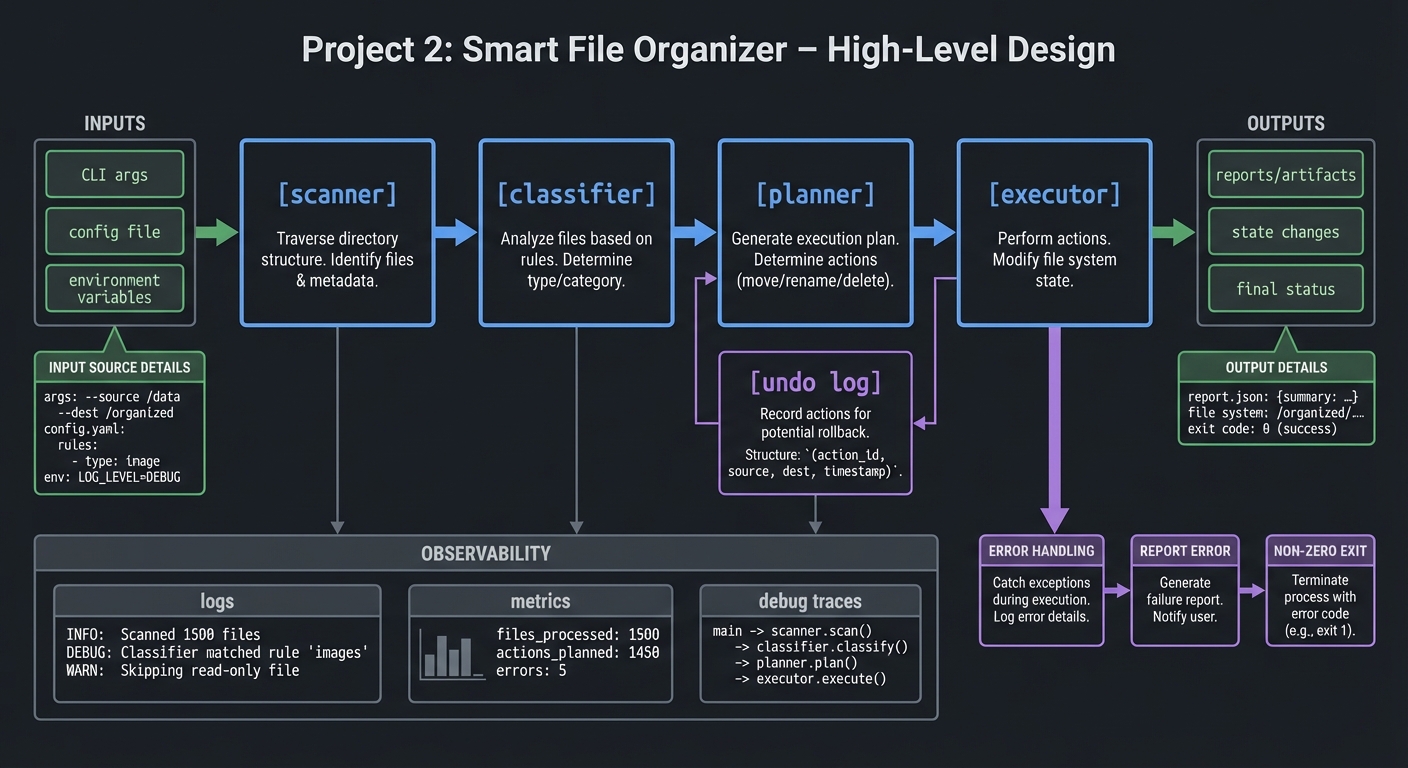
4.1 High-Level Design
[scanner] -> [classifier] -> [planner] -> [executor]
                               |
                               -> [undo log]
4.2 Key Components
| Component | Responsibility | Key Decisions |
|---|---|---|
| Scanner | Enumerate files safely | Use find with null delimiters |
| Classifier | Determine category | Rule order matters |
| Planner | Build move list | Keep deterministic order |
| Executor | Apply moves | Create folders as needed |
| Undo log | Record original paths | Append-only file |
4.3 Data Structures
Simple rule file:
Images: .jpg .jpeg .png .gif
Documents: .pdf .docx .txt
Archives: .zip .tar .gz
4.4 Algorithm Overview
- Scan files using a safe delimiter.
- Classify each file using ordered rules.
- Build a move plan and print summary.
- Apply moves and write undo log.
Complexity Analysis:
- Time: O(n * r) for n files and r rules
- Space: O(n) for plan and undo log
5. Implementation Guide
5.1 Development Environment Setup
# Verify tools exist
find --version
stat --version
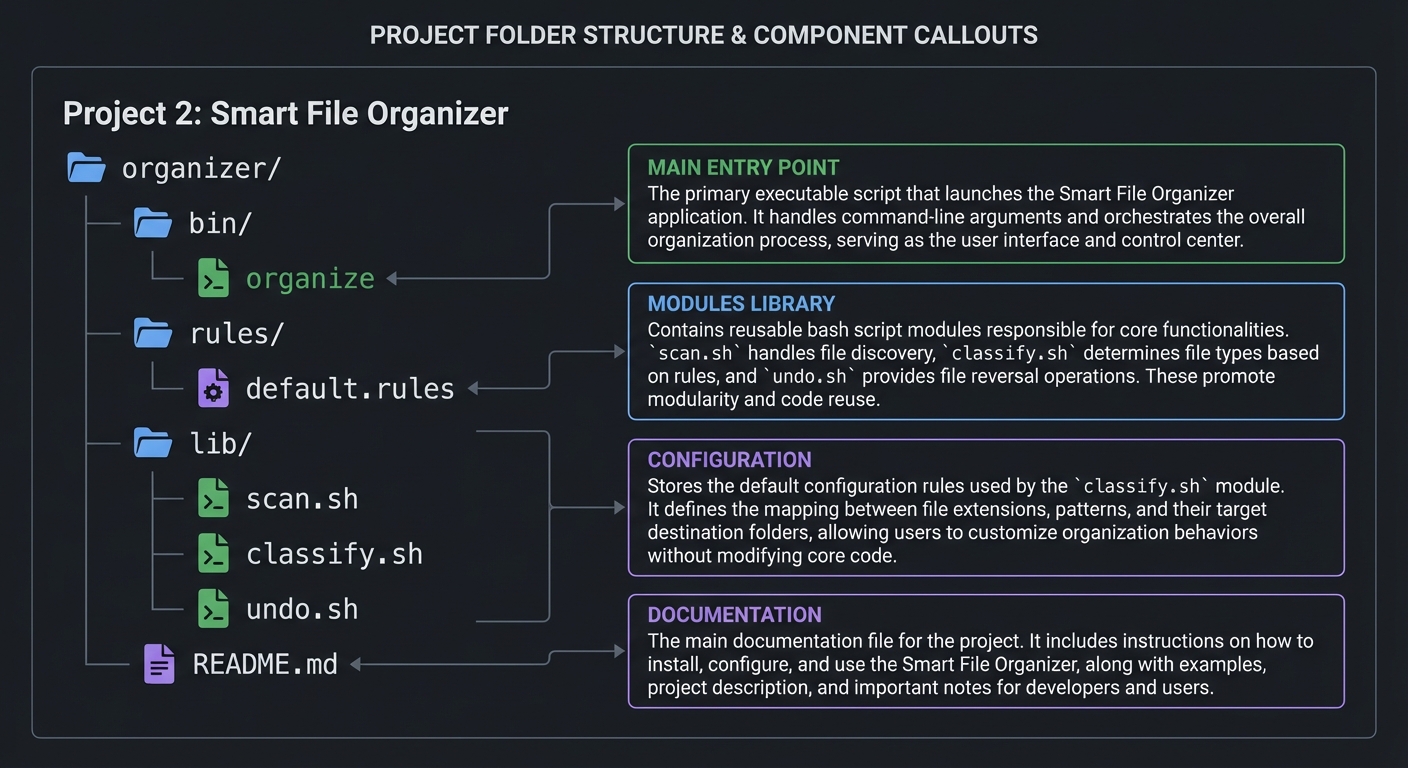
5.2 Project Structure
organizer/
|-- bin/
|   `-- organize
|-- rules/
|   `-- default.rules
|-- lib/
|   |-- scan.sh
|   |-- classify.sh
|   `-- undo.sh
`-- README.md
5.3 The Core Question You Are Answering
“How do I safely process arbitrary file names without losing data?”
Every decision in this project is about preserving correctness with unsafe inputs.
5.4 Concepts You Must Understand First
- Safe iteration: Why
for f in *can be unsafe. - Quoting: How to preserve exact filenames.
- File metadata: Using timestamps and sizes for rules.
5.5 Questions to Guide Your Design
- How will you represent categories and rules?
- How will you prevent overwrites in target folders?
- How will you store undo actions?
5.6 Thinking Exercise
Write down 10 filenames that break naive scripts and explain why.
5.7 The Interview Questions They Will Ask
- How do you handle spaces and special characters in filenames?
- How do you design a reversible script?
- What is the difference between dry-run and real run logic?
5.8 Hints in Layers
Hint 1: Use find with a null delimiter for safe iteration.
Hint 2: Write all moves to a plan file before executing.
Hint 3: Only change files after the plan is validated.
Hint 4: Keep rule ordering explicit and stable.
5.9 Books That Will Help
| Topic | Book | Chapter |
|---|---|---|
| File handling | “Wicked Cool Shell Scripts” | Ch. 1-3 |
| Parameter expansion | “Bash Cookbook” | Ch. 5 |
| Safe scripting | “Effective Shell” | Part 2 |
5.10 Implementation Phases
Phase 1: Foundation (1-2 days)
Goals:
- Safe scanning and basic classification
Tasks:
- Implement file scanning
- Extract extensions and map to folders
Checkpoint: Dry-run lists correct moves.
Phase 2: Core Functionality (2-3 days)
Goals:
- Apply moves and write undo logs
Tasks:
- Create folders on demand
- Perform moves and record undo
Checkpoint: Undo restores all files.
Phase 3: Polish and Edge Cases (1-2 days)
Goals:
- Configurable rules and summary output
Tasks:
- Add rules file support
- Improve reporting
Checkpoint: Rules change behavior without code changes.
5.11 Key Implementation Decisions
| Decision | Options | Recommendation | Rationale |
|---|---|---|---|
| Iteration method | glob, find | find with null | Handles special chars |
| Undo storage | log file, database | log file | Simple and portable |
| Rule format | JSON, text | text list | Easy to parse in shell |
6. Testing Strategy
6.1 Test Categories
| Category | Purpose | Examples |
|---|---|---|
| Unit Tests | Rule parsing | Parse rules file |
| Integration Tests | Full run | Dry-run then execute |
| Edge Case Tests | Weird names | Files with spaces, dashes |
6.2 Critical Test Cases
- File with leading dash does not break move logic.
- Dry-run output matches real run.
- Undo restores all files and folders.
6.3 Test Data
files: "report.pdf", "photo 1.png", "-strange.txt"
7. Common Pitfalls and Debugging
7.1 Frequent Mistakes
| Pitfall | Symptom | Solution |
|---|---|---|
| Unquoted variables | Moves break on spaces | Quote all paths |
| Overwrites | Files disappear | Use collision-safe names |
| Mismatched dry-run | Preview differs | Use same planner |
7.2 Debugging Strategies
- Log each file and its category before moving.
- Validate the undo log before executing moves.
7.3 Performance Traps
Avoid calling external commands in inner loops when possible.
8. Extensions and Challenges
8.1 Beginner Extensions
- Add a
--by-datemode - Add a
--summary-onlymode
8.2 Intermediate Extensions
- Support size-based bucketing
- Add rule priority and overrides
8.3 Advanced Extensions
- Detect file types by magic bytes
- Add a config validator
9. Real-World Connections
9.1 Industry Applications
- Document management and digital asset pipelines.
9.2 Related Open Source Projects
- File Organizer scripts in dotfiles repos
- fd and ripgrep for scanning patterns
9.3 Interview Relevance
- Safe iteration and input handling are common shell interview topics.
10. Resources
10.1 Essential Reading
- “Wicked Cool Shell Scripts” by Dave Taylor - file organization patterns
- “Effective Shell” by Dave Kerr - scripting patterns
10.2 Video Resources
- Short tutorials on
findandxargsusage
10.3 Tools and Documentation
man find,man stat,man mv
10.4 Related Projects in This Series
- Previous: Project 1 (Dotfiles Manager)
- Next: Project 3 (Log Parser and Alert System)
11. Self-Assessment Checklist
11.1 Understanding
- I can explain why safe iteration matters.
- I can design reversible file operations.
11.2 Implementation
- Dry-run and undo behave correctly.
- Files with spaces are handled safely.
11.3 Growth
- I documented rule design decisions.
12. Submission / Completion Criteria
Minimum Viable Completion:
- Files are organized by extension with dry-run mode.
- Undo restores previous state.
Full Completion:
- Configurable rules and summary reports.
Excellence (Going Above and Beyond):
- File-type detection and advanced rule system.
This guide was generated from CLI_TOOLS/LEARN_SHELL_SCRIPTING_MASTERY.md. For the complete learning path, see the parent directory README.