Project 1: Personal Dotfiles Manager
Build a dotfiles manager that installs, backs up, and switches configuration profiles safely.
Quick Reference
| Attribute | Value |
|---|---|
| Difficulty | Level 1: Beginner |
| Time Estimate | Weekend |
| Language | Bash (Alternatives: Zsh, POSIX sh, Fish) |
| Prerequisites | Basic CLI navigation, understanding of dotfiles, text editor familiarity |
| Key Topics | Symlinks, path handling, argument parsing, idempotency |
1. Learning Objectives
By completing this project, you will:
- Safely create and manage symlinks across directories.
- Design a CLI that supports install, uninstall, and status modes.
- Implement defensive file operations with backups and rollbacks.
- Make a script idempotent and safe to run multiple times.
2. Theoretical Foundation
2.1 Core Concepts
- Symlinks vs hard links: Why symlinks are the right abstraction for config files and how they differ from hard links.
- Path resolution: Absolute vs relative paths, and why resolving to absolute paths prevents surprising behavior.
- Idempotency: Designing scripts so repeated runs do not create duplicate or destructive outcomes.
- Argument parsing: Translating user intent into structured script behavior.
2.2 Why This Matters
Dotfiles are the first real automation problem most developers encounter. If your manager is safe and predictable, you can apply the same design discipline to more complex automation later.
2.3 Historical Context / Background
Unix tools traditionally store configuration in hidden files in the home directory. Dotfile managers emerged to avoid manual copying, enabling reproducible setups across machines.
2.4 Common Misconceptions
- A symlink is not a copy; changes to the source reflect in the target.
- Relative symlinks can break when the working directory changes.
- Backups are not optional when operating on user configs.
3. Project Specification
3.1 What You Will Build
A CLI tool that installs dotfiles by creating symlinks from a central repo to their canonical locations, with support for backups, profiles, and a dry-run mode.
3.2 Functional Requirements
- Install mode: Create symlinks for a defined set of files.
- Backup mode: Back up existing files before linking.
- Uninstall mode: Remove links and restore backups.
- Profile mode: Switch between configurations (work, personal, minimal).
- Status mode: Report which files are linked, missing, or divergent.
3.3 Non-Functional Requirements
- Safety: Never overwrite without a backup.
- Reliability: Be safe to re-run with the same inputs.
- Usability: Clear logs and error messages.
3.4 Example Usage / Output
$ dotfiles install --profile work
[dotfiles] Backed up ~/.bashrc -> ~/.bashrc.backup.20241222
[dotfiles] Linked ~/.bashrc -> ~/dotfiles/bash/.bashrc
[dotfiles] Linked ~/.gitconfig -> ~/dotfiles/git/.gitconfig
[dotfiles] Done. 12 links created, 0 skipped
3.5 Real World Outcome
You run the tool from your dotfiles repo. When a new machine is set up, a single command applies your full configuration. You can switch profiles in seconds, and every action is reversible.
$ dotfiles status
[dotfiles] OK: ~/.bashrc -> ~/dotfiles/bash/.bashrc
[dotfiles] OK: ~/.gitconfig -> ~/dotfiles/git/.gitconfig
[dotfiles] MISSING: ~/.vimrc (expected link not found)
4. Solution Architecture
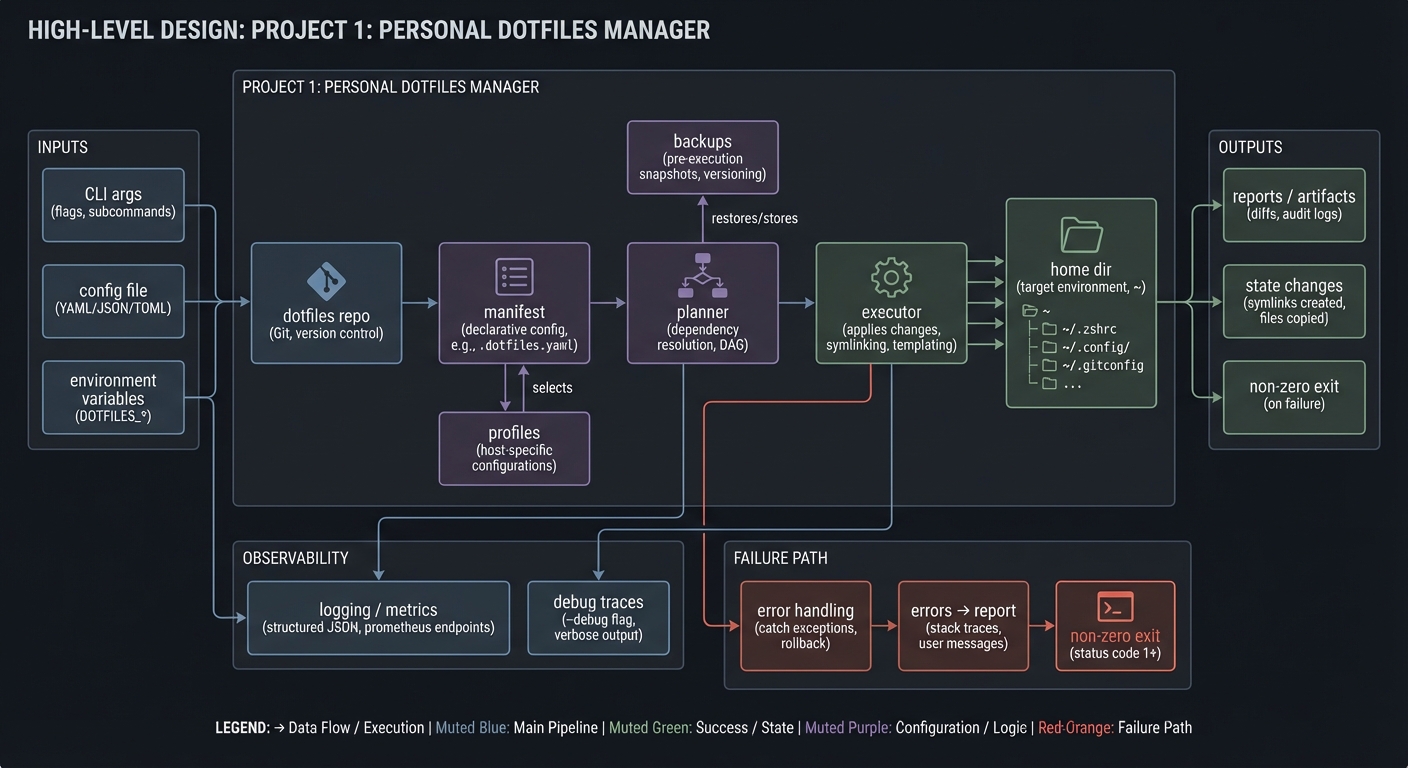
4.1 High-Level Design
[dotfiles repo] -> [manifest] -> [planner] -> [executor] -> [home dir]
                          |              |
                          |              -> backups
                          -> profiles
4.2 Key Components
| Component | Responsibility | Key Decisions |
|---|---|---|
| Manifest loader | List files per profile | YAML vs simple text list |
| Planner | Decide link, backup, or skip | Idempotent rules |
| Executor | Apply filesystem changes | Use absolute paths |
| Backup manager | Create and restore backups | Timestamp format |
| Reporter | Print status and errors | Human-readable output |
4.3 Data Structures
Use a simple manifest file format:
# profile: work
bash/.bashrc -> ~/.bashrc
vim/.vimrc -> ~/.vimrc
git/.gitconfig -> ~/.gitconfig
4.4 Algorithm Overview
- Load manifest for selected profile.
- For each mapping, compute absolute source and target paths.
- If target exists, back it up unless it already matches.
- Create symlink, record outcome, and report.
Complexity Analysis:
- Time: O(n) for n dotfiles
- Space: O(1) plus backups
5. Implementation Guide
5.1 Development Environment Setup
# Ensure bash and coreutils are available
bash --version
ln --version
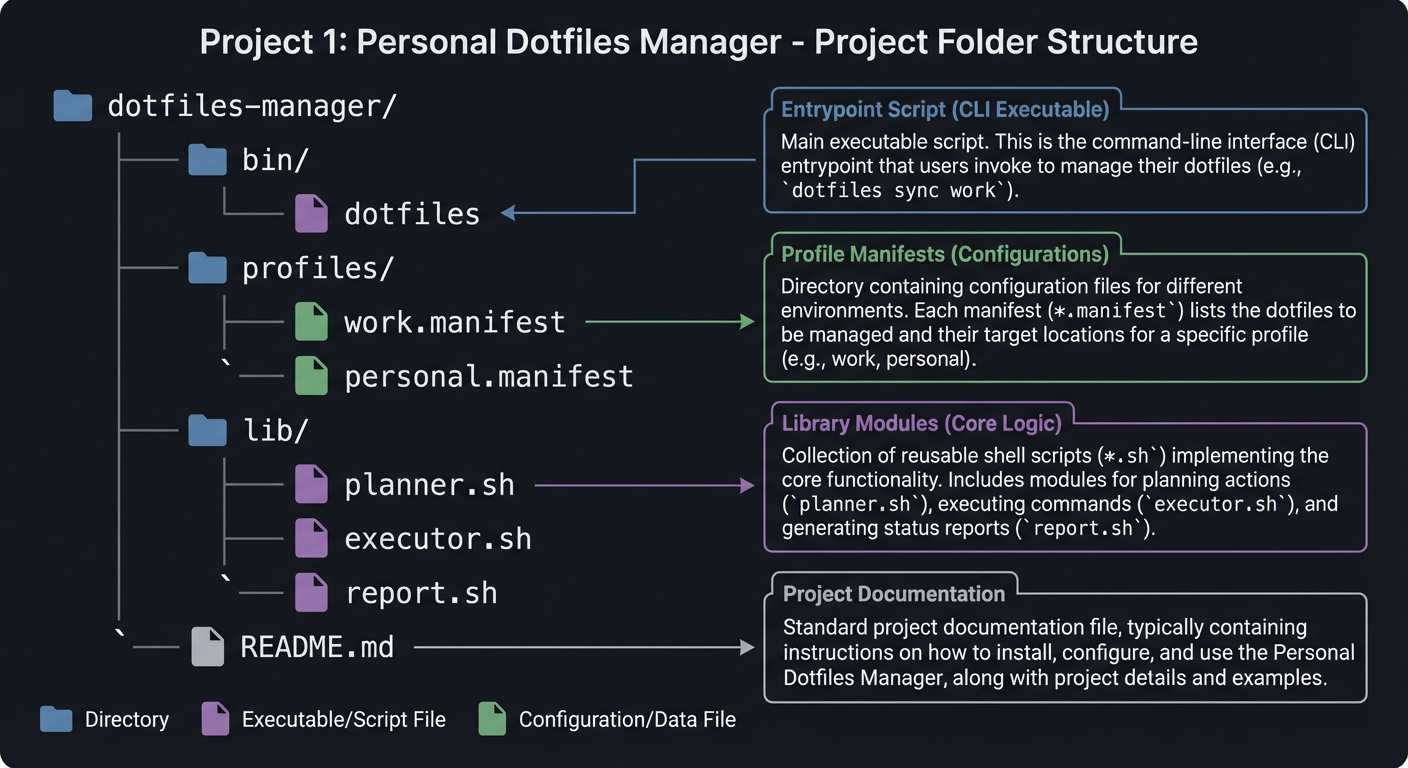
5.2 Project Structure
dotfiles-manager/
|-- bin/
|   |-- dotfiles
|-- profiles/
|   |-- work.manifest
|   `-- personal.manifest
|-- lib/
|   |-- planner.sh
|   |-- executor.sh
|   `-- report.sh
`-- README.md
5.3 The Core Question You Are Answering
“How do I make config management safe, predictable, and reversible?”
A dotfiles manager is not about linking files. It is about trust. Every action must be visible and reversible.
5.4 Concepts You Must Understand First
- Symlink behavior
- What does
ln -sactually create? - How do you detect whether a target is a symlink?
- What does
- File tests
- When should you use
-f,-d, or-L?
- When should you use
- Safe quoting
- How do spaces and special characters break scripts?
5.5 Questions to Guide Your Design
- How will you detect if a target is already linked correctly?
- How will you name backups to avoid collisions?
- How will you keep output consistent across commands?
5.6 Thinking Exercise
Trace this scenario on paper:
Target exists as a regular file. You run install twice. What happens each run?
5.7 The Interview Questions They Will Ask
- Why are symlinks better than copying config files?
- How do you make a script idempotent?
- What happens if a target exists and is a directory?
- How do you safely handle file paths with spaces?
5.8 Hints in Layers
Hint 1: Start with a dry-run mode that only prints actions.
Hint 2: Use absolute paths to avoid accidental relative symlinks.
Hint 3: Separate planning from execution so you can test safely.
Hint 4: Always log what was skipped and why.
5.9 Books That Will Help
| Topic | Book | Chapter |
|---|---|---|
| Symlinks and files | “The Linux Command Line” | Ch. 4 |
| Shell scripting basics | “Learning the Bash Shell” | Ch. 4 |
| Defensive scripting | “Shell Script Professional” | Ch. 6 |
5.10 Implementation Phases
Phase 1: Foundation (1-2 days)
Goals:
- Parse arguments and read a manifest
- Implement dry-run output
Tasks:
- Define manifest format and parser
- Implement install dry-run
Checkpoint: Dry-run prints all planned actions without changing files.
Phase 2: Core Functionality (2-3 days)
Goals:
- Create backups and symlinks
- Implement status checks
Tasks:
- Add backup logic
- Add link creation
- Add status reporting
Checkpoint: You can install and re-run without errors.
Phase 3: Polish and Edge Cases (1-2 days)
Goals:
- Add uninstall and profile switching
- Harden error handling
Tasks:
- Implement uninstall and restore
- Add clear error messages
Checkpoint: You can switch profiles and revert safely.
5.11 Key Implementation Decisions
| Decision | Options | Recommendation | Rationale |
|---|---|---|---|
| Manifest format | YAML, JSON, text | Text list | Simple to parse in shell |
| Backup naming | Timestamp, hash | Timestamp | Human-readable and sortable |
| Link check | Compare paths, checksum | Compare paths | Fast and good enough |
6. Testing Strategy
6.1 Test Categories
| Category | Purpose | Examples |
|---|---|---|
| Unit Tests | Validate path logic | Resolve absolute paths |
| Integration Tests | Validate install/uninstall | Install then restore |
| Edge Case Tests | Handle spaces, missing files | File named “My File” |
6.2 Critical Test Cases
- Install when target exists as regular file.
- Install when target already linked correctly.
- Uninstall restores latest backup correctly.
6.3 Test Data
manifest with 3 files
one existing regular file
one existing symlink
one missing target
7. Common Pitfalls and Debugging
7.1 Frequent Mistakes
| Pitfall | Symptom | Solution |
|---|---|---|
| Relative symlinks | Links break from other dirs | Use absolute paths |
| Unquoted paths | Script fails on spaces | Quote all expansions |
| Missing backups | Config lost | Enforce backup-first rule |
7.2 Debugging Strategies
- Add a verbose mode that prints planned actions.
- Log before and after each filesystem operation.
7.3 Performance Traps
Not a major concern for small file sets, but avoid re-walking directories on every file.
8. Extensions and Challenges
8.1 Beginner Extensions
- Add a
status --jsonoutput mode - Add a
list-profilescommand
8.2 Intermediate Extensions
- Support global ignore patterns
- Add a diff view for modified files
8.3 Advanced Extensions
- Add encrypted secrets support (gpg)
- Support templating with environment variables
9. Real-World Connections
9.1 Industry Applications
- System provisioning tools rely on similar idempotent patterns.
- Developer onboarding scripts often use the same logic.
9.2 Related Open Source Projects
- GNU Stow: Lightweight symlink manager
- chezmoi: Full-featured dotfile manager
9.3 Interview Relevance
- File system primitives, idempotency, and safe scripting patterns.
10. Resources
10.1 Essential Reading
- “The Linux Command Line” by William Shotts - symlinks and paths
- “Learning the Bash Shell” by Cameron Newham - parameter handling
10.2 Video Resources
- Short shell scripting crash courses (optional)
10.3 Tools and Documentation
man ln,man test,man find
10.4 Related Projects in This Series
- Previous: None
- Next: Project 2 (Smart File Organizer)
11. Self-Assessment Checklist
11.1 Understanding
- I can explain symlinks vs hard links.
- I can describe what idempotency means in scripts.
- I can explain how my tool avoids overwriting configs.
11.2 Implementation
- All required commands work.
- Install and uninstall are reversible.
- Error messages are clear.
11.3 Growth
- I documented lessons learned.
- I can explain this project in an interview.
12. Submission / Completion Criteria
Minimum Viable Completion:
- Install creates correct symlinks with backups.
- Status reports correct state.
- Uninstall restores backups.
Full Completion:
- Profile switching and dry-run supported.
- Error handling covers missing files and conflicts.
Excellence (Going Above and Beyond):
- JSON status output and diff view for modified files.
- Encrypted secret handling for sensitive configs.
This guide was generated from CLI_TOOLS/LEARN_SHELL_SCRIPTING_MASTERY.md. For the complete learning path, see the parent directory README.