Project 5: Player Controller State Machine
A character controller with grounded and airborne states, coyote time, jump buffering, and dashes.
Quick Reference
| Attribute | Value |
|---|---|
| Difficulty | Level 3 |
| Time Estimate | 2 weeks |
| Main Programming Language | C# (.NET 8) + MonoGame |
| Alternative Programming Languages | F#, C++ (raylib), Godot C# |
| Coolness Level | Level 3 |
| Business Potential | Level 1 |
| Prerequisites | Deterministic loop basics, debugging discipline, content pipeline fundamentals |
| Key Topics | Finite state machines, Input forgiveness windows, Animation driven feedback |
1. Learning Objectives
- Translate one concrete production question into a testable implementation plan.
- Implement and validate the feature in a MonoGame runtime context.
- Instrument success and failure paths with actionable diagnostics.
- Produce a repeatable demo artifact for portfolio or interview use.
2. All Theory Needed (Per-Concept Breakdown)
Finite state machines
Fundamentals Finite state machines is central to this project because it defines the non-negotiable behavioral contract for the feature. You should be able to describe valid inputs, legal state transitions, and expected outputs under normal and failure conditions.
Deep Dive into the concept Treat Finite state machines as a boundary-setting mechanism. Start by defining the smallest deterministic scenario that proves the feature works. Stress that scenario under altered timing, altered content inputs, and altered user actions. If behavior changes unexpectedly, document hidden coupling and sequence assumptions. Keep transitions explicit and observable via logs or debug panels. Connect each transition to an event record so regression analysis is possible after refactors.
Input forgiveness windows
Fundamentals Input forgiveness windows ensures the project scales from local prototype behavior to repeatable system behavior.
Deep Dive into the concept Use Input forgiveness windows to reason about data flow ownership and mutation timing. Document where writes occur, when validation runs, and how rollback behaves if a write fails.
Animation driven feedback
Fundamentals Animation driven feedback connects this project to shipping reality by forcing you to think about operational constraints early.
Deep Dive into the concept Define one production-like failure mode related to Animation driven feedback and build a mitigation checklist. The solution is complete when you can demonstrate both a golden path and a controlled failure path.
3. Project Specification
3.1 What You Will Build
A player controller state machine with movement states, coyote time, jump buffering, and dash logic tuned for platformer feel.
Visible game deliverable:
- Platformer room with ledges, jump gaps, and dash checkpoints
- State HUD shows Grounded/Airborne/Dash transitions
- Feel panel shows coyote timer and jump buffer counters
3.2 Functional Requirements
- Define explicit controller states and legal transitions.
- Implement coyote-time and jump-buffer timing windows.
- Log state transitions with reasons for debugging.
- Expose movement constants for live tuning and replay tests.
3.3 Non-Functional Requirements
- Performance: Must remain inside project-appropriate frame budget.
- Reliability: Must recover from at least one injected failure mode.
- Usability: Outcome must be observable by a reviewer in under two minutes.
3.4 Example Usage / Output
[CTRL] Grounded->Airborne reason=JumpPressed
[CTRL] coyote_hit=true buffer_hit=true
[CTRL] replay_hash=31d9c7 deterministic=PASS
3.5 Data Formats / Schemas / Protocols
- Event record: {timestamp, module, action, result}
- Feature state snapshot: {version, state, counters, flags}
3.6 Edge Cases
- Jump press exactly at ledge exit.
- Dash input during landing frame.
- Conflicting inputs during hurt/lock states.
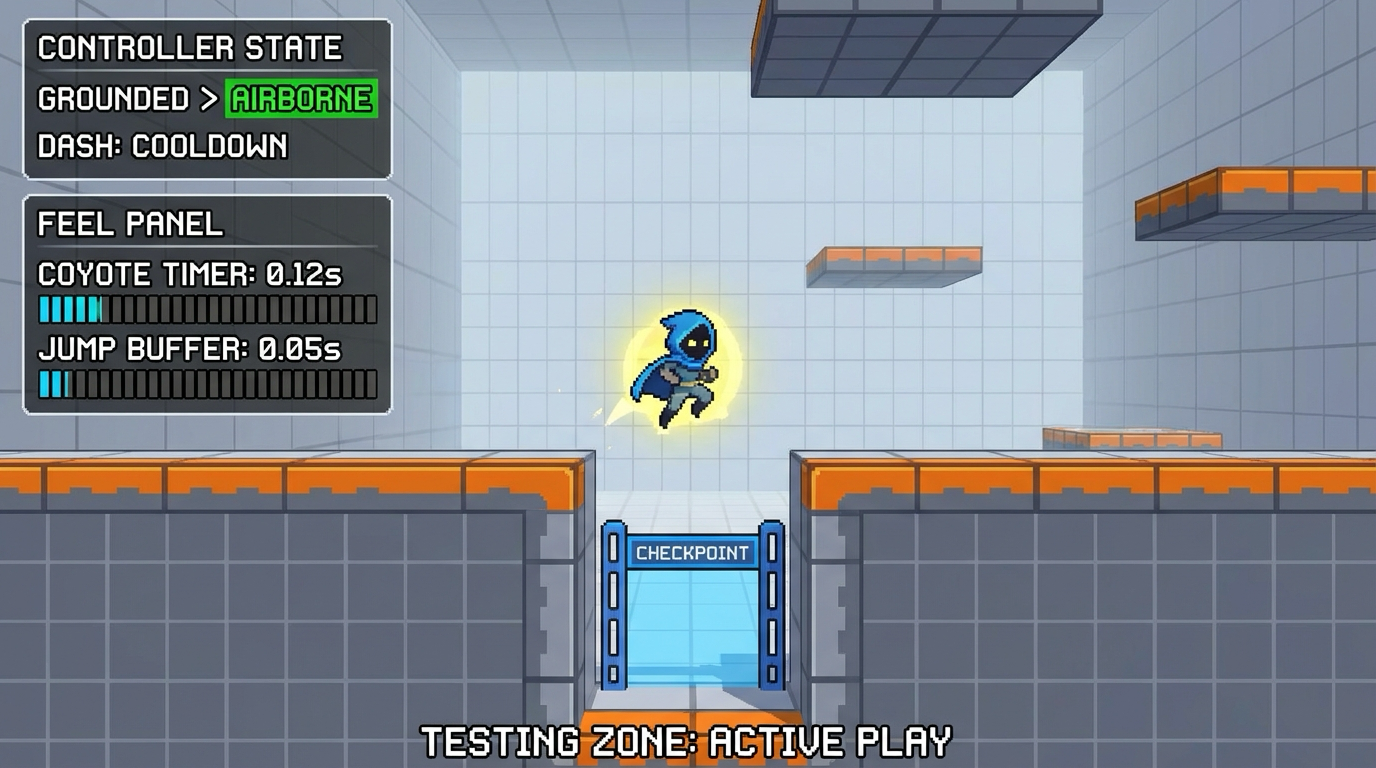
3.7 Real World Outcome
This is a game-facing outcome you can see and play immediately.
What you will see in the game window:
- Platformer room with ledges, jump gaps, and dash checkpoints
- State HUD shows Grounded/Airborne/Dash transitions
- Feel panel shows coyote timer and jump buffer counters
How you interact:
- A/D move
- Space jump
- Left Shift dash
3.7.1 How to Run (Copy/Paste)
$ dotnet restore
$ dotnet build
$ dotnet run --project src/Game -- --scene controller-lab
3.7.2 Golden Path Demo (Deterministic)
- Start the scene and confirm all HUD panels load.
- Perform the three core interactions listed above.
- Verify the success signal appears without warnings.
3.7.3 If CLI: exact transcript
$ dotnet run --project src/Game -- --scene controller-lab
[CTRL] Grounded->Airborne reason=JumpPressed
[CTRL] coyote_hit=true buffer_hit=true
[CTRL] replay_hash=31d9c7 deterministic=PASS
3.7.7 If GUI / Desktop
+------------------------------------------------------+
| controller-lab                                   [F1 HUD] |
|------------------------------------------------------|
| PLAYFIELD: gameplay objects and interactions         |
| HUD: key metrics + status badges                    |
| STATUS: success/failure cues and prompts            |
+------------------------------------------------------+
4. Solution Architecture
4.1 High-Level Design
Action Intent -> State Guard -> Movement Solver -> Collision Feedback -> Transition Log
Action Intent -> State Guard -> Movement Solver -> Collision Feedback -> Transition Log
4.2 Key Components
| Component | Responsibility | Key Decisions |
|---|---|---|
| ControllerStateMachine | Owns state transitions and guards | Single source of transition truth |
| MovementModel | Applies acceleration/gravity/jump math | State-aware movement rules |
| ControllerTelemetry | Tracks transition causes and timer windows | Replay-friendly deterministic traces |
4.4 Algorithm Overview
- Validate preconditions.
- Apply deterministic transition.
- Emit feedback and telemetry.
- Persist if required.
5. Implementation Guide
5.3 The Core Question You’re Answering
“How do modern platformers combine strict rules and forgiving controls?”
5.4 Concepts You Must Understand First
- Finite state machines
- Input forgiveness windows
- Animation driven feedback
5.5 Questions to Guide Your Design
- Which transitions must be impossible by design?
- How will you verify coyote and buffer windows objectively?
- What replay data is required to debug control complaints?
5.6 Thinking Exercise
Trace one full success path and one failure path on paper before implementation.
5.7 The Interview Questions They’ll Ask
- Why did you pick this architecture boundary?
- Which failure mode did you prioritize first and why?
- How does your instrumentation accelerate debugging?
- How would you scale this feature to a larger game?
5.8 Hints in Layers
- Hint 1: Stabilize one invariant before feature expansion.
- Hint 2: Add diagnostics before optimization.
- Hint 3: Keep platform calls at system boundaries.
- Hint 4: Re-run deterministic scenario after each refactor.
5.9 Books That Will Help
| Topic | Book | Chapter |
|---|---|---|
| Core concept | “Game Programming Patterns by Robert Nystrom” | Relevant concept chapter |
| Reliability | “Release It!” | Failure handling chapters |
| Architecture | “Clean Architecture” | Boundary and dependency chapters |
6. Testing Strategy
- Golden path completes and emits success signal.
- Injected failure path recovers without crash.
- Re-run scenario after restart and confirm consistency.
7. Common Pitfalls & Debugging
- Hidden initialization order coupling
- Time-coupled behavior tied to render rate
- Missing fallback behavior on platform call failure
8. Extensions & Challenges
- Beginner: add one extra diagnostics panel metric.
- Intermediate: add replay capture for event flow.
- Advanced: add automated stress test harness.
9. Real-World Connections
This project mirrors shipping feature-module work in real indie and mid-size game teams.
10. Resources
- Steamworks official docs
- MonoGame docs
- Gemini image generation docs (for asset-related projects)
11. Self-Assessment Checklist
- I can explain the feature invariant and prove it in a demo.
- I can trigger and handle one deterministic failure scenario.
- I can describe tradeoffs and future scaling choices.
12. Submission / Completion Criteria
Minimum Viable Completion:
- Feature works in deterministic golden path.
- One controlled failure path is handled gracefully.
- Core diagnostics are visible and documented.
Full Completion:
- All minimum criteria plus edge-case coverage and regression checks.
Excellence:
- Includes polished instrumentation and clear productionization notes.