Excel + Python Integration: Project-Based Learning Guide
Goal: Master the bridge between Excel’s business-friendly interface and Python’s automation power. Move from manual Excel operations to automated, scalable data workflows that integrate Python’s capabilities into Excel environments.
Learning Path Overview
This project collection takes you from basic Excel automation to building production-grade systems that combine Excel’s accessibility with Python’s computational power. Each project builds on skills from previous ones, creating a comprehensive skill set for business automation.
Why Excel + Python Integration Matters
Excel is the world’s most popular data tool, used by billions. Python is the world’s most popular automation language. Combining them creates a superpower that bridges business users and engineers.
- Efficiency: Tasks that take hours in Excel take seconds with Python automation
- Scale: Python can process millions of rows that would crash Excel
- Repeatability: Python scripts eliminate human error in repetitive Excel workflows
- Integration: Python can pull data from APIs, databases, and web sources directly into Excel
- Advanced Analysis: Python’s libraries (pandas, numpy, scikit-learn) provide capabilities far beyond Excel formulas
Projects in This Collection
| Project | Title | Core Skills | Difficulty |
|---|---|---|---|
| P01 | Monthly Sales Report Automation | pandas, openpyxl, data aggregation, chart creation | Beginner |
| P02 | Budget Variance Analyzer | Conditional formatting, data comparison, color scales, icon sets | Intermediate |
| P03 | Excel-to-Database ETL Pipeline | SQLAlchemy, data cleaning, validation, transformation | Intermediate |
| P04 | Live Excel Dashboard with xlwings | xlwings, UDFs, VBA integration, real-time data | Advanced |
| P05 | Automated Invoice Generator with Email | Template generation, PDF export, SMTP, email automation | Advanced |
Core Concept Analysis
The Excel-Python Architecture
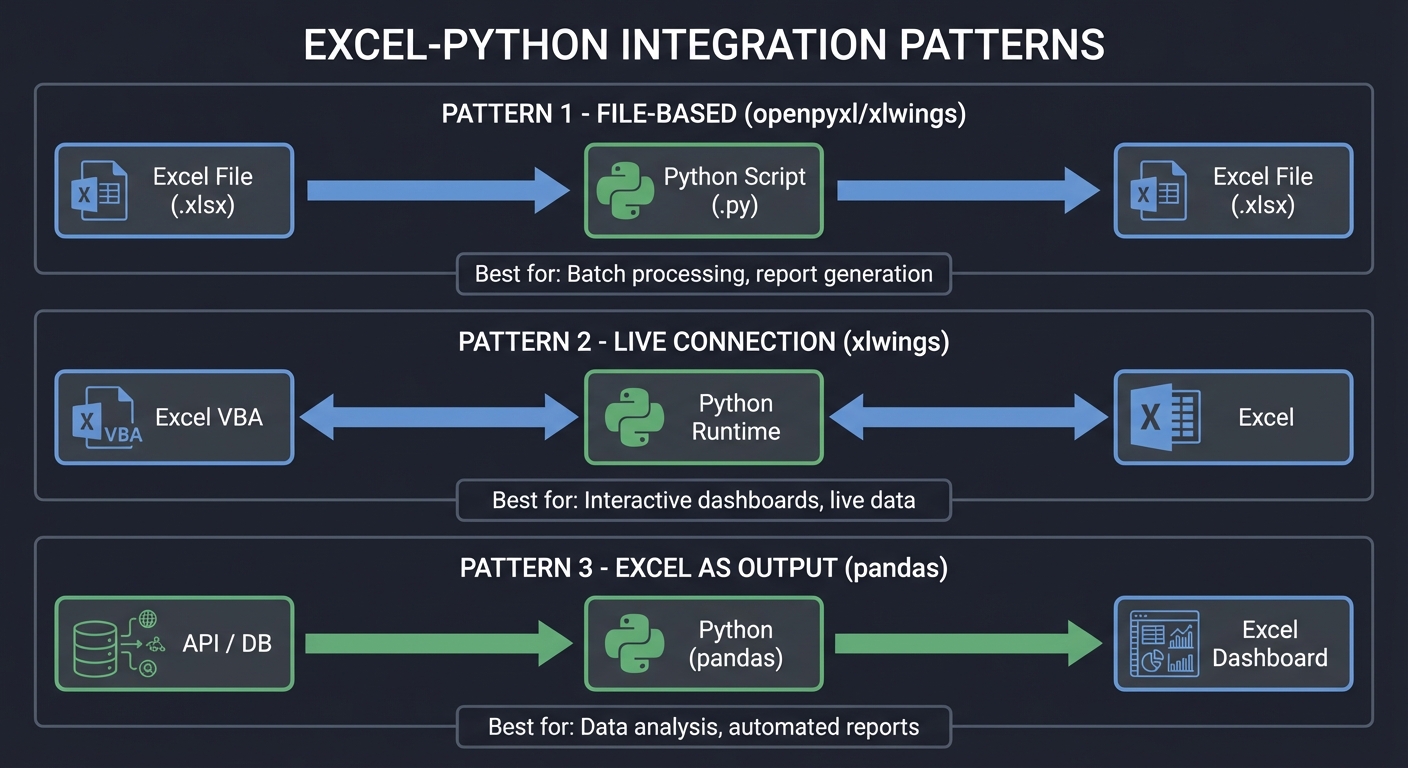
Understanding how Excel and Python communicate is fundamental. There are three primary integration patterns:
┌─────────────────────────────────────────────────┐
│           INTEGRATION PATTERNS                  │
├─────────────────────────────────────────────────┤
│ Pattern 1: File-Based (openpyxl/xlwings)       │
│   Excel File → Python Script → Excel File      │
│                                                 │
│ Pattern 2: Live Connection (xlwings)           │
│   Excel VBA → Python Runtime → Excel           │
│                                                 │
│ Pattern 3: Excel as Output (pandas)            │
│   API/DB → Python → Excel Dashboard            │
└─────────────────────────────────────────────────┘
The Data Transformation Pipeline
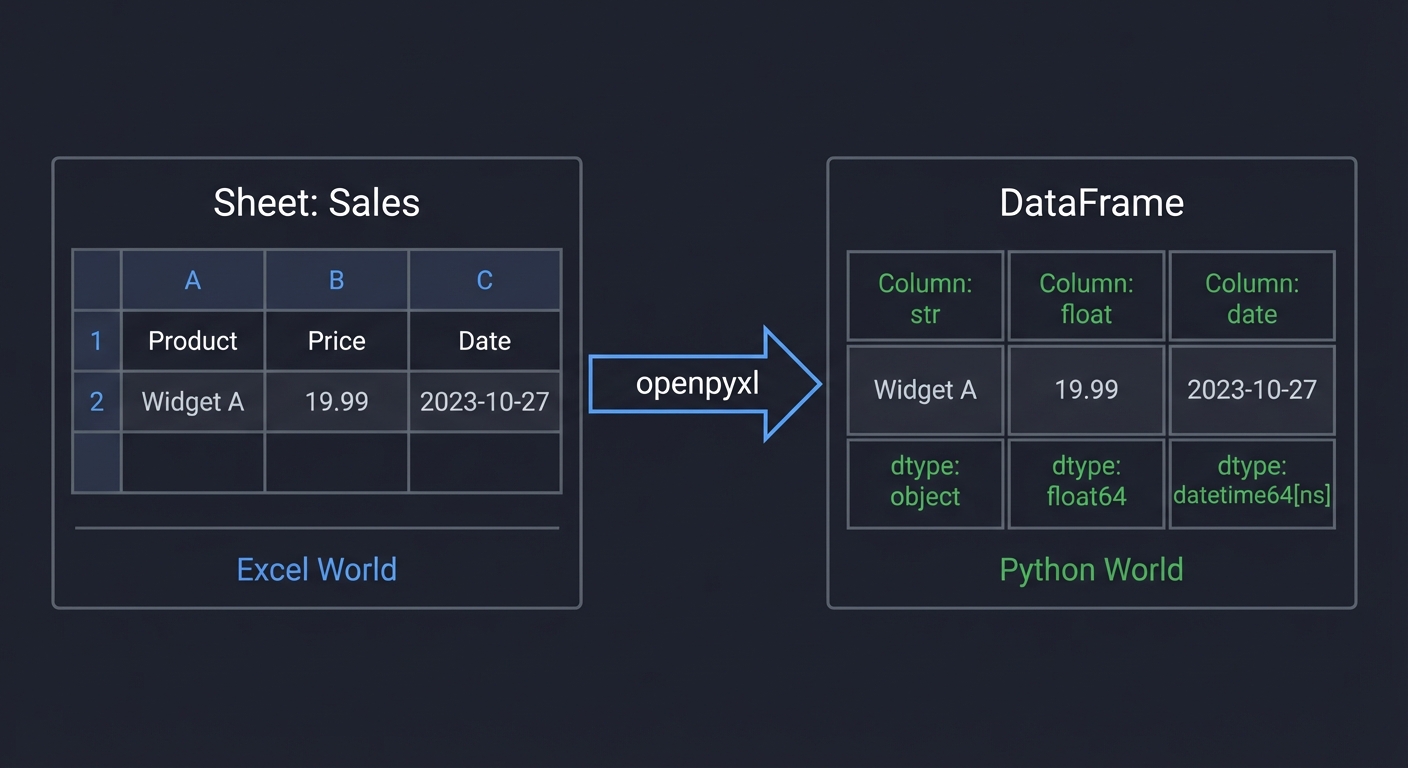
Excel users think in terms of sheets and cells. Python thinks in terms of DataFrames and arrays:
Excel World                   Python World
┌──────────────┐             ┌──────────────┐
│ Sheet: Sales │             │ DataFrame    │
│ A1: Product  │  ───────►   │ Column: str  │
│ B1: Price    │  openpyxl   │ Column: float│
│ C1: Date     │             │ Column: date │
└──────────────┘             └──────────────┘
The Automation Lifecycle
1. EXTRACT        2. TRANSFORM       3. LOAD           4. VALIDATE
┌─────────┐      ┌──────────┐      ┌─────────┐      ┌──────────┐
│ Read    │      │ Clean    │      │ Write   │      │ Check    │
│ Excel   │ ───► │ Analyze  │ ───► │ Excel   │ ───► │ Format   │
│ Files   │      │ Enrich   │      │ Output  │      │ Formulas │
└─────────┘      └──────────┘      └─────────┘      └──────────┘
Concept Summary Table
| Concept Cluster | What You Need to Internalize |
|---|---|
| Library Selection | openpyxl for file manipulation, xlwings for live connection, pandas for data analysis, XlsxWriter for formatting |
| Data Type Mapping | Excel cells are ambiguous; Python requires explicit types. Date/time handling requires special care |
| Formula Preservation | Reading Excel doesn’t execute formulas—you get cached values. Writing formulas requires understanding Excel syntax |
| Performance | Excel has ~1M row limit; Python can handle billions. Large files need chunking strategies |
| User Interface | Excel is the UI layer; Python is the logic layer. Design for non-technical users |
| Error Handling | Excel errors (DIV/0!, #N/A) must be handled explicitly in Python. Validation prevents corruption |
Recommended Reading
Python-Excel Integration Libraries
| Concept | Resource |
|---|---|
| openpyxl | Official Documentation (openpyxl.readthedocs.io) |
| xlwings | Official Documentation (docs.xlwings.org) |
| pandas | “Python for Data Analysis” by Wes McKinney |
Essential Reading Order
- Foundation: openpyxl documentation - Basic read/write operations
- Data Analysis: “Python for Data Analysis” Chapters 5-7
- Advanced Integration: xlwings documentation and examples
Skills Progression
Project 1: Sales Report
├── Read CSV files with pandas
├── Create Excel workbooks with openpyxl
├── Apply basic formatting (fonts, colors)
└── Generate charts

Project 2: Budget Analyzer
├── Conditional formatting rules
├── Data comparison and merging
├── Color scales and data bars
└── Icon sets for visual indicators

Project 3: ETL Pipeline
├── Data cleaning and validation
├── Database connections (SQLAlchemy)
├── Error handling and logging
└── Data quality reporting

Project 4: Live Dashboard
├── xlwings bidirectional communication
├── User-Defined Functions (UDFs)
├── VBA-Python integration
└── Real-time data refresh

Project 5: Invoice Generator
├── Template-based document generation
├── PDF export
├── Email automation (SMTP)
└── Batch processing at scale
Prerequisites
Before starting these projects, you should be comfortable with:
- Python fundamentals (variables, functions, classes, loops)
- Basic pandas DataFrame operations
- Command line / terminal usage
- Git version control basics
Environment Setup
# Create virtual environment
python -m venv excel-python-env
source excel-python-env/bin/activate  # On Windows: excel-python-env\Scripts\activate

# Install core dependencies
pip install pandas openpyxl xlwings xlsxwriter
pip install sqlalchemy psycopg2-binary  # For database projects
pip install requests  # For API integration
How to Use These Projects
- Read the theory first - Each project includes deep conceptual foundations
- Work through the thinking exercises - Design before you code
- Implement incrementally - Use the hints only when stuck
- Review the interview questions - Ensure you understand the “why”
- Complete the extensions - Push beyond the basic requirements
License
This learning material is designed for educational purposes.