Project 5: Automated Invoice Generator with Email Delivery
Build a system that generates personalized invoices in Excel and emails them to customers automatically.
Project Overview
Your company sends monthly invoices to hundreds of customers. Currently, someone manually fills in an Excel template for each customer, saves it as PDF, and emails it. Your task: automate the entire workflow.
What You’ll Build
- Read customer data and billing details from a database or Excel file
- For each customer, generate a personalized invoice using an Excel template
- Populate invoice with customer-specific data (name, items, amounts, taxes)
- Apply business logic (discounts, tax calculations, late fees)
- Save each invoice as a PDF
- Send invoices via email with personalized messages
- Generate a summary report of all invoices sent
Technologies
openpyxlfor Excel template manipulationxlsxwriteroropenpyxlfor invoice generation- PDF generation (Excel’s built-in PDF export or
reportlab) smtplibfor email sendingjinja2for email template rendering (optional)
Learning Objectives
By completing this project, you will:
- Master template-based document generation - Merge data with templates
- Implement business logic - Discounts, taxes, late fees
- Generate PDFs from Excel - Cross-platform considerations
- Send emails with Python - SMTP, attachments, HTML formatting
- Handle batch processing - Progress tracking, error recovery
- Build auditable systems - Logging, reports, verification
Deep Theoretical Foundation
Template-Based Document Generation
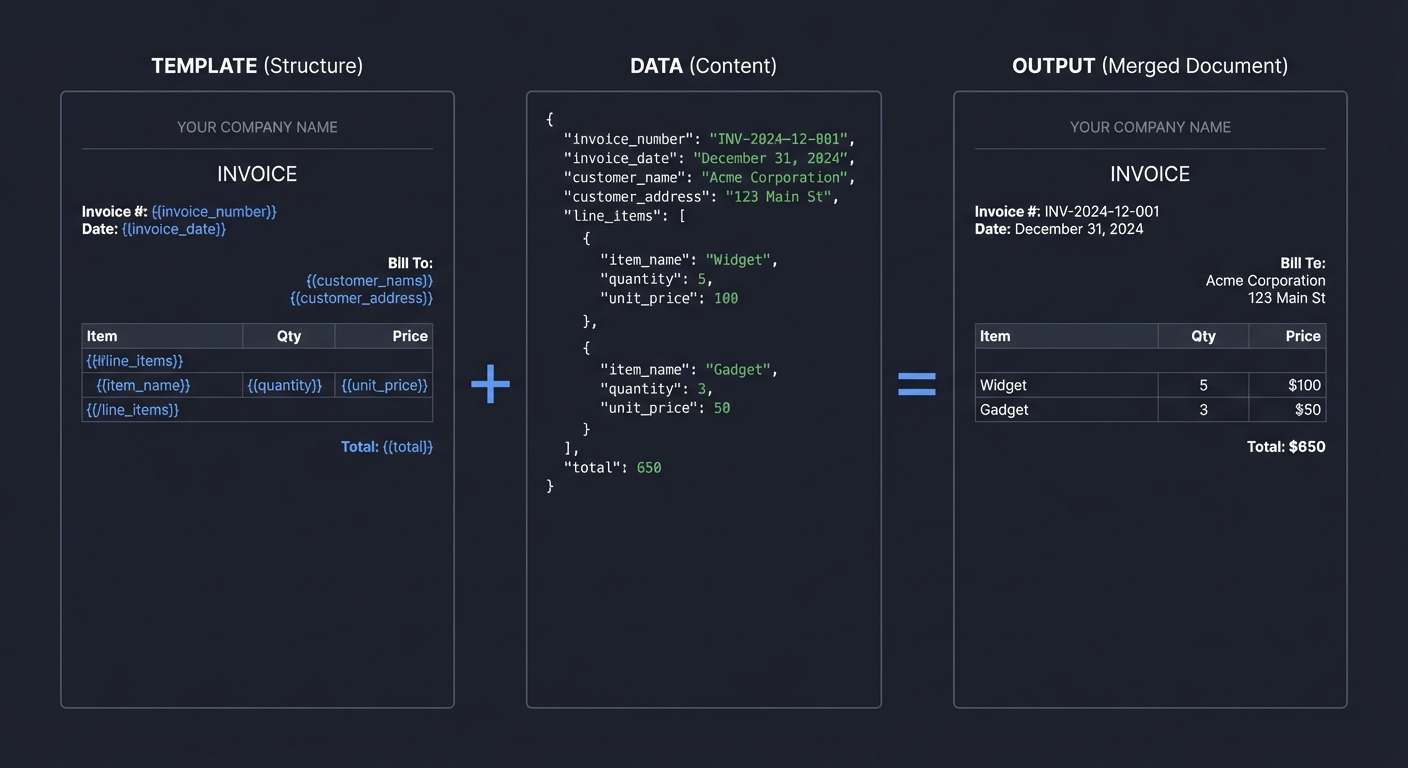
Template-based generation separates structure from content, enabling scalable document creation:
┌─────────────────────────────────────────────────────────────────┐
│              TEMPLATE-BASED GENERATION PATTERN                   │
├─────────────────────────────────────────────────────────────────┤
│                                                                   │
│  TEMPLATE (Structure)                                            │
│  ┌─────────────────────────────────────────────────────────┐    │
│  │  ┌─────────────────────────────────────────────────────┐│    │
│  │  │            YOUR COMPANY NAME                        ││    │
│  │  │                                                      ││    │
│  │  │  Invoice #: {{invoice_number}}                      ││    │
│  │  │  Date: {{invoice_date}}                             ││    │
│  │  │                                                      ││    │
│  │  │  Bill To:                                           ││    │
│  │  │    {{customer_name}}                                ││    │
│  │  │    {{customer_address}}                             ││    │
│  │  │                                                      ││    │
│  │  │  {{#line_items}}                                    ││    │
│  │  │    {{description}} | {{qty}} | {{price}}           ││    │
│  │  │  {{/line_items}}                                    ││    │
│  │  │                                                      ││    │
│  │  │  Total: {{total}}                                   ││    │
│  │  └─────────────────────────────────────────────────────┘│    │
│  └─────────────────────────────────────────────────────────┘    │
│                              +                                   │
│  DATA (Content)                                                  │
│  ┌─────────────────────────────────────────────────────────┐    │
│  │  {                                                       │    │
│  │    "invoice_number": "INV-2024-12-001",                 │    │
│  │    "invoice_date": "December 31, 2024",                 │    │
│  │    "customer_name": "Acme Corporation",                 │    │
│  │    "customer_address": "123 Main St",                   │    │
│  │    "line_items": [                                      │    │
│  │      {"description": "Widget", "qty": 5, "price": 100},│    │
│  │      {"description": "Gadget", "qty": 3, "price": 50}  │    │
│  │    ],                                                   │    │
│  │    "total": 650                                         │    │
│  │  }                                                       │    │
│  └─────────────────────────────────────────────────────────┘    │
│                              =                                   │
│  OUTPUT (Merged Document)                                        │
│  ┌─────────────────────────────────────────────────────────┐    │
│  │  ┌─────────────────────────────────────────────────────┐│    │
│  │  │            YOUR COMPANY NAME                        ││    │
│  │  │                                                      ││    │
│  │  │  Invoice #: INV-2024-12-001                         ││    │
│  │  │  Date: December 31, 2024                            ││    │
│  │  │                                                      ││    │
│  │  │  Bill To:                                           ││    │
│  │  │    Acme Corporation                                 ││    │
│  │  │    123 Main St                                      ││    │
│  │  │                                                      ││    │
│  │  │    Widget | 5 | $100                                ││    │
│  │  │    Gadget | 3 | $50                                 ││    │
│  │  │                                                      ││    │
│  │  │  Total: $650                                        ││    │
│  │  └─────────────────────────────────────────────────────┘│    │
│  └─────────────────────────────────────────────────────────┘    │
│                                                                   │
└─────────────────────────────────────────────────────────────────┘
Business Logic: Invoice Calculations
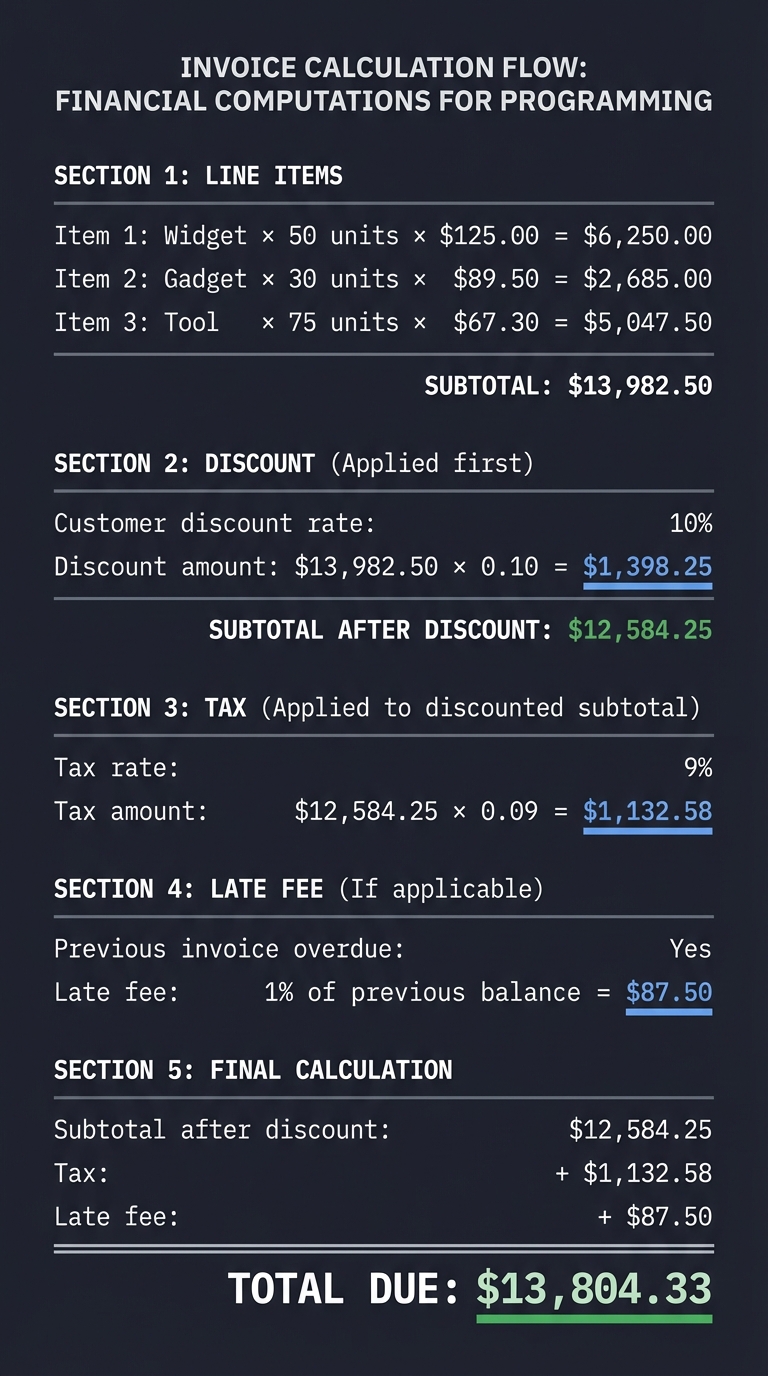
Invoice calculations follow a specific order of operations:
┌─────────────────────────────────────────────────────────────────┐
│              INVOICE CALCULATION FLOW                            │
├─────────────────────────────────────────────────────────────────┤
│                                                                   │
│  LINE ITEMS                                                      │
│  ───────────                                                     │
│  Item 1: Widget × 50 units × $125.00 = $6,250.00                │
│  Item 2: Gadget × 30 units × $89.50  = $2,685.00                │
│  Item 3: Tool   × 75 units × $67.30  = $5,047.50                │
│                                    ─────────────                 │
│                                    SUBTOTAL: $13,982.50         │
│                                                                   │
│  DISCOUNT (Applied first)                                        │
│  ────────                                                        │
│  Customer discount rate: 10%                                    │
│  Discount amount: $13,982.50 × 0.10 = $1,398.25                │
│                                    ─────────────                 │
│                       SUBTOTAL AFTER DISCOUNT: $12,584.25       │
│                                                                   │
│  TAX (Applied to discounted subtotal)                           │
│  ────                                                            │
│  Tax rate: 9%                                                   │
│  Tax amount: $12,584.25 × 0.09 = $1,132.58                     │
│                                                                   │
│  LATE FEE (If applicable)                                        │
│  ────────                                                        │
│  Previous invoice overdue: Yes                                  │
│  Late fee: 1% of previous balance = $87.50                     │
│                                                                   │
│  FINAL CALCULATION                                               │
│  ─────────────────                                               │
│  Subtotal after discount:  $12,584.25                           │
│  Tax:                      + $1,132.58                          │
│  Late fee:                 +    $87.50                          │
│                            ─────────────                         │
│  TOTAL DUE:                 $13,804.33                          │
│                                                                   │
└─────────────────────────────────────────────────────────────────┘
Email Architecture: SMTP Deep Dive
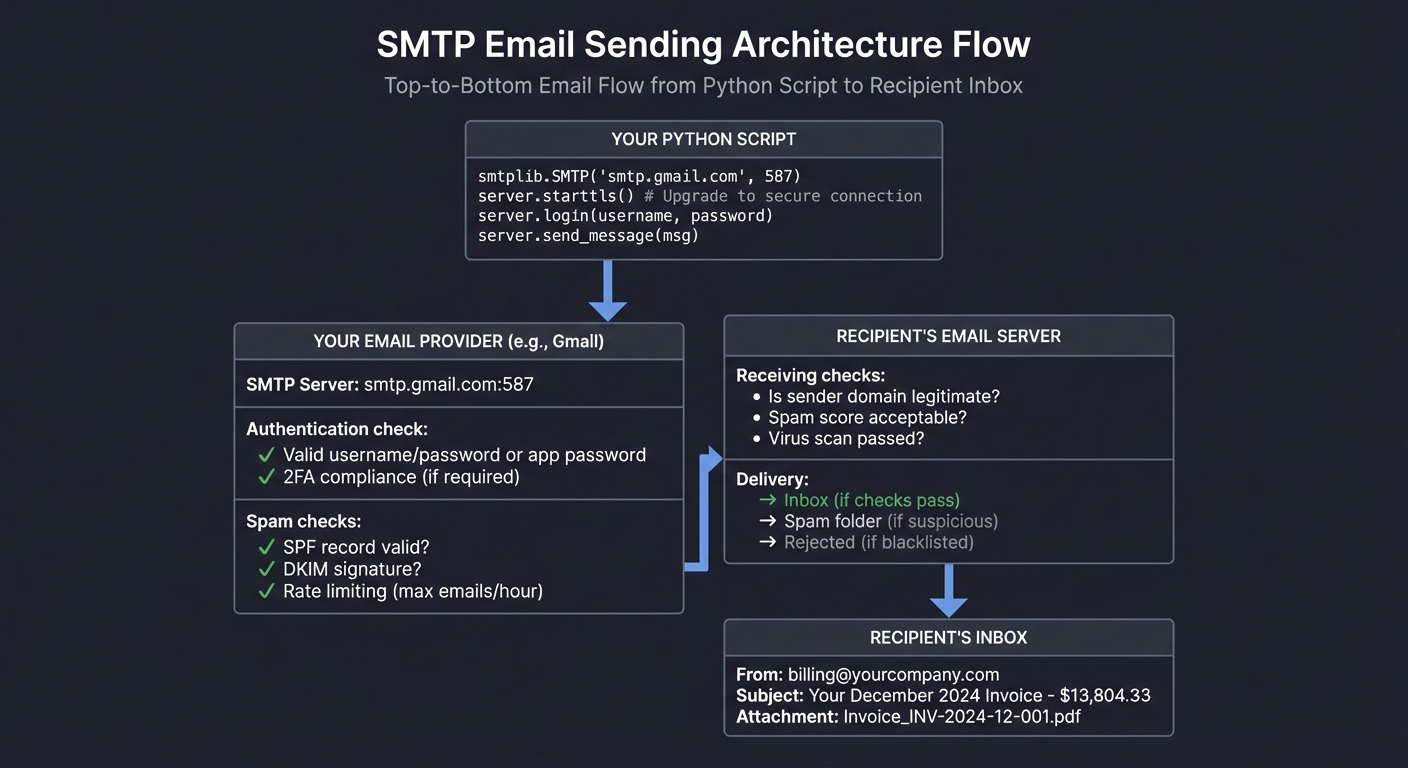
Understanding email protocols is essential for reliable delivery:
┌─────────────────────────────────────────────────────────────────┐
│                   EMAIL SENDING ARCHITECTURE                     │
├─────────────────────────────────────────────────────────────────┤
│                                                                   │
│  YOUR PYTHON SCRIPT                                              │
│  ┌─────────────────────────────────────────────────────────┐    │
│  │                                                          │    │
│  │  smtplib.SMTP('smtp.gmail.com', 587)                    │    │
│  │  server.starttls()  # Upgrade to secure connection      │    │
│  │  server.login(username, password)                       │    │
│  │  server.send_message(msg)                               │    │
│  │                                                          │    │
│  └─────────────────────────────────────────────────────────┘    │
│                              │                                   │
│                              ▼                                   │
│  YOUR EMAIL PROVIDER (e.g., Gmail)                              │
│  ┌─────────────────────────────────────────────────────────┐    │
│  │                                                          │    │
│  │  SMTP Server: smtp.gmail.com:587                        │    │
│  │                                                          │    │
│  │  Authentication check:                                   │    │
│  │    ✓ Valid username/password or app password            │    │
│  │    ✓ 2FA compliance (if required)                       │    │
│  │                                                          │    │
│  │  Spam checks:                                            │    │
│  │    ✓ SPF record valid?                                  │    │
│  │    ✓ DKIM signature?                                    │    │
│  │    ✓ Rate limiting (max emails/hour)                    │    │
│  │                                                          │    │
│  └─────────────────────────────────────────────────────────┘    │
│                              │                                   │
│                              ▼                                   │
│  RECIPIENT'S EMAIL SERVER                                        │
│  ┌─────────────────────────────────────────────────────────┐    │
│  │                                                          │    │
│  │  Receiving checks:                                       │    │
│  │    • Is sender domain legitimate?                       │    │
│  │    • Spam score acceptable?                             │    │
│  │    • Virus scan passed?                                 │    │
│  │                                                          │    │
│  │  Delivery:                                               │    │
│  │    → Inbox (if checks pass)                             │    │
│  │    → Spam folder (if suspicious)                        │    │
│  │    → Rejected (if blacklisted)                          │    │
│  │                                                          │    │
│  └─────────────────────────────────────────────────────────┘    │
│                              │                                   │
│                              ▼                                   │
│  RECIPIENT'S INBOX                                               │
│  ┌─────────────────────────────────────────────────────────┐    │
│  │                                                          │    │
│  │  From: billing@yourcompany.com                          │    │
│  │  Subject: Your December 2024 Invoice - $13,804.33       │    │
│  │  Attachment: Invoice_INV-2024-12-001.pdf                │    │
│  │                                                          │    │
│  └─────────────────────────────────────────────────────────┘    │
│                                                                   │
└─────────────────────────────────────────────────────────────────┘
MIME Message Structure
Email attachments require understanding MIME (Multipurpose Internet Mail Extensions):
┌─────────────────────────────────────────────────────────────────┐
│                   MIME MESSAGE STRUCTURE                         │
├─────────────────────────────────────────────────────────────────┤
│                                                                   │
│  MIMEMultipart (Container)                                       │
│  ├── Headers                                                     │
│  │   ├── From: billing@yourcompany.com                          │
│  │   ├── To: customer@client.com                                │
│  │   ├── Subject: Your Invoice                                  │
│  │   └── Content-Type: multipart/mixed                          │
│  │                                                                │
│  ├── Part 1: MIMEText (alternative)                             │
│  │   ├── text/plain version                                     │
│  │   │   "Dear John, Please find attached..."                   │
│  │   └── text/html version (optional)                           │
│  │       "<html><body><h1>Invoice</h1>..."                      │
│  │                                                                │
│  └── Part 2: MIMEBase (attachment)                              │
│      ├── Content-Type: application/pdf                          │
│      ├── Content-Disposition: attachment; filename="invoice.pdf"│
│      └── Content (base64 encoded PDF bytes)                     │
│                                                                   │
└─────────────────────────────────────────────────────────────────┘
PDF Generation Strategies
There are multiple approaches to generating PDFs from Excel:
┌─────────────────────────────────────────────────────────────────┐
│                PDF GENERATION STRATEGIES                         │
├─────────────────────────────────────────────────────────────────┤
│                                                                   │
│  STRATEGY 1: Excel's Native PDF Export (Windows + Excel)        │
│  ─────────────────────────────────────────────────────────────  │
│  Pros:                                                           │
│    ✓ Perfect fidelity - exactly matches Excel view              │
│    ✓ Supports all Excel features (charts, formatting)          │
│    ✓ Simple API via win32com                                    │
│  Cons:                                                           │
│    ✗ Requires Excel installed                                   │
│    ✗ Windows only (or Mac with modifications)                   │
│    ✗ Slower (launches Excel process)                            │
│                                                                   │
│  Code:                                                           │
│    excel = win32com.client.Dispatch("Excel.Application")        │
│    wb = excel.Workbooks.Open(xlsx_path)                         │
│    wb.ExportAsFixedFormat(0, pdf_path)  # 0 = PDF               │
│                                                                   │
│  ─────────────────────────────────────────────────────────────  │
│                                                                   │
│  STRATEGY 2: LibreOffice Headless (Cross-platform)              │
│  ─────────────────────────────────────────────────────────────  │
│  Pros:                                                           │
│    ✓ Free and open source                                       │
│    ✓ Works on Linux, Mac, Windows                               │
│    ✓ Good Excel compatibility                                   │
│  Cons:                                                           │
│    ✗ Requires LibreOffice installed                             │
│    ✗ Some formatting may differ                                 │
│                                                                   │
│  Code:                                                           │
│    subprocess.run(['libreoffice', '--headless',                 │
│                    '--convert-to', 'pdf', xlsx_path])           │
│                                                                   │
│  ─────────────────────────────────────────────────────────────  │
│                                                                   │
│  STRATEGY 3: Generate PDF Directly (No Excel)                   │
│  ─────────────────────────────────────────────────────────────  │
│  Pros:                                                           │
│    ✓ No external dependencies                                   │
│    ✓ Full control over output                                   │
│    ✓ Works anywhere Python runs                                 │
│  Cons:                                                           │
│    ✗ Must recreate layout in code                               │
│    ✗ More code to write                                         │
│                                                                   │
│  Libraries: reportlab, weasyprint, fpdf                         │
│                                                                   │
└─────────────────────────────────────────────────────────────────┘
The Core Question You’re Answering
“How do I transform data into personalized, professional documents at scale?”
This is template-based document automation—a foundational pattern in business automation. You’re learning to separate structure (the template) from content (the data), then merge them programmatically.
Project Specification
Input Requirements
- Customer/Billing Data:
customer_billing.xlsxor databasecustomer_id | name | address | city | state | zip | email | discount_rate | payment_terms - Line Items Data: Transactions for the billing period
customer_id | product | quantity | unit_price | date - Invoice Template:
invoice_template.xlsx- Pre-designed layout with placeholder cells
- Formatting, logos, and structure already defined
Output Requirements
- Individual Invoices (per customer):
- Excel file:
invoices/2024-12/{Customer}_INV-YYYY-MM-XXX.xlsx - PDF file:
invoices/2024-12/{Customer}_INV-YYYY-MM-XXX.pdf
- Excel file:
- Email Sent to each customer with:
- Personalized subject line
- Professional body text with invoice summary
- PDF attachment
- Summary Report:
Invoice_Summary_YYYY-MM.xlsx- List of all invoices generated
- Total revenue
- Email delivery status
- Any errors or flagged items
Functional Requirements
- Support variable number of line items (1-100+)
- Apply customer-specific discount rates
- Calculate tax based on location
- Add late fees for overdue accounts
- Handle email failures gracefully (retry, log, continue)
- Idempotent: safe to run multiple times for same period
- Generate unique sequential invoice numbers
Solution Architecture
Component Design
┌─────────────────────────────────────────────────────────────────┐
│                 INVOICE AUTOMATION SYSTEM                        │
├─────────────────────────────────────────────────────────────────┤
│                                                                   │
│  ┌────────────────────────────────────────────────────────────┐ │
│  │                    DATA LAYER                              │ │
│  │                                                              │ │
│  │  ┌────────────┐   ┌────────────┐   ┌────────────┐          │ │
│  │  │ CustomerDB │   │ LineItems  │   │ InvoiceNum │          │ │
│  │  │            │   │            │   │  Sequence  │          │ │
│  │  │ • get_all()│   │ • by_cust()│   │ • next()   │          │ │
│  │  │ • by_id()  │   │ • by_date()│   │ • reserve()│          │ │
│  │  └────────────┘   └────────────┘   └────────────┘          │ │
│  └────────────────────────────────────────────────────────────┘ │
│                              │                                   │
│                              ▼                                   │
│  ┌────────────────────────────────────────────────────────────┐ │
│  │                  BUSINESS LOGIC LAYER                      │ │
│  │                                                              │ │
│  │  ┌────────────┐   ┌────────────┐   ┌────────────┐          │ │
│  │  │ Calculator │   │ Validator  │   │ LateFee    │          │ │
│  │  │            │   │            │   │  Checker   │          │ │
│  │  │ • subtotal │   │ • address  │   │ • is_late()│          │ │
│  │  │ • discount │   │ • email    │   │ • calc_fee()          │ │
│  │  │ • tax      │   │ • items    │   │            │          │ │
│  │  │ • total    │   │            │   │            │          │ │
│  │  └────────────┘   └────────────┘   └────────────┘          │ │
│  └────────────────────────────────────────────────────────────┘ │
│                              │                                   │
│                              ▼                                   │
│  ┌────────────────────────────────────────────────────────────┐ │
│  │                 GENERATION LAYER                           │ │
│  │                                                              │ │
│  │  ┌────────────┐   ┌────────────┐   ┌────────────┐          │ │
│  │  │ Template   │   │   PDF      │   │   Email    │          │ │
│  │  │  Engine    │   │ Generator  │   │  Sender    │          │ │
│  │  │            │   │            │   │            │          │ │
│  │  │ • load()   │   │ • convert()│   │ • compose()│          │ │
│  │  │ • fill()   │   │ • save()   │   │ • attach() │          │ │
│  │  │ • save()   │   │            │   │ • send()   │          │ │
│  │  └────────────┘   └────────────┘   └────────────┘          │ │
│  └────────────────────────────────────────────────────────────┘ │
│                              │                                   │
│                              ▼                                   │
│  ┌────────────────────────────────────────────────────────────┐ │
│  │                  REPORTING LAYER                           │ │
│  │                                                              │ │
│  │  ┌────────────┐   ┌────────────┐   ┌────────────┐          │ │
│  │  │  Summary   │   │   Logger   │   │   Error    │          │ │
│  │  │  Report    │   │            │   │  Handler   │          │ │
│  │  │            │   │ • info()   │   │            │          │ │
│  │  │ • create() │   │ • warn()   │   │ • capture()│          │ │
│  │  │ • add_row()│   │ • error()  │   │ • retry()  │          │ │
│  │  │ • save()   │   │            │   │ • escalate()          │ │
│  │  └────────────┘   └────────────┘   └────────────┘          │ │
│  └────────────────────────────────────────────────────────────┘ │
│                                                                   │
└─────────────────────────────────────────────────────────────────┘
Data Flow
┌─────────────────────────────────────────────────────────────────┐
│                  COMPLETE DATA FLOW                              │
├─────────────────────────────────────────────────────────────────┤
│                                                                   │
│  Phase 1: INITIALIZATION                                         │
│  ┌─────────────────────────────────────────────────────────┐    │
│  │  1. Load configuration (SMTP settings, paths, tax rates)│    │
│  │  2. Connect to data sources                              │    │
│  │  3. Load invoice template                                │    │
│  │  4. Initialize invoice number sequence                   │    │
│  │  5. Create output directories                            │    │
│  └─────────────────────────────────────────────────────────┘    │
│                              │                                   │
│                              ▼                                   │
│  Phase 2: DATA GATHERING                                         │
│  ┌─────────────────────────────────────────────────────────┐    │
│  │  1. Fetch all active customers                           │    │
│  │  2. For each customer:                                   │    │
│  │     a. Get line items for billing period                 │    │
│  │     b. Check for overdue balances                        │    │
│  │     c. Get customer-specific settings                    │    │
│  └─────────────────────────────────────────────────────────┘    │
│                              │                                   │
│                              ▼                                   │
│  Phase 3: PER-CUSTOMER PROCESSING (Loop)                        │
│  ┌─────────────────────────────────────────────────────────┐    │
│  │  For each customer with line items:                      │    │
│  │                                                          │    │
│  │  3a. CALCULATE                                           │    │
│  │      - Subtotal = sum(quantity × unit_price)            │    │
│  │      - Discount = subtotal × discount_rate              │    │
│  │      - Tax = (subtotal - discount) × tax_rate           │    │
│  │      - Late fee (if applicable)                         │    │
│  │      - Total = subtotal - discount + tax + late_fee     │    │
│  │                                                          │    │
│  │  3b. GENERATE INVOICE                                    │    │
│  │      - Load template copy                                │    │
│  │      - Fill customer info cells                          │    │
│  │      - Fill line items rows                              │    │
│  │      - Fill totals cells                                 │    │
│  │      - Save as .xlsx                                     │    │
│  │                                                          │    │
│  │  3c. CONVERT TO PDF                                      │    │
│  │      - Open .xlsx with Excel/LibreOffice                │    │
│  │      - Export as PDF                                     │    │
│  │      - Close and save                                    │    │
│  │                                                          │    │
│  │  3d. SEND EMAIL                                          │    │
│  │      - Compose email with customer name                  │    │
│  │      - Attach PDF                                        │    │
│  │      - Send via SMTP                                     │    │
│  │      - Log result (success/failure)                      │    │
│  │                                                          │    │
│  │  3e. RECORD IN SUMMARY                                   │    │
│  │      - Add row to summary report                         │    │
│  └─────────────────────────────────────────────────────────┘    │
│                              │                                   │
│                              ▼                                   │
│  Phase 4: FINALIZATION                                           │
│  ┌─────────────────────────────────────────────────────────┐    │
│  │  1. Save summary report                                  │    │
│  │  2. Save error log (if any failures)                    │    │
│  │  3. Print completion statistics                          │    │
│  │  4. Send admin notification (optional)                   │    │
│  └─────────────────────────────────────────────────────────┘    │
│                                                                   │
└─────────────────────────────────────────────────────────────────┘
Invoice Template Structure
┌─────────────────────────────────────────────────────────────────┐
│                  TEMPLATE CELL MAPPING                           │
├─────────────────────────────────────────────────────────────────┤
│                                                                   │
│  TEMPLATE CELL    PLACEHOLDER           DATA SOURCE              │
│  ────────────     ───────────           ───────────              │
│  B2              COMPANY_LOGO           Static (in template)     │
│  B4              COMPANY_NAME           Static                   │
│  B5              COMPANY_ADDRESS        Static                   │
│  B6              COMPANY_PHONE          Static                   │
│                                                                   │
│  G4              {{invoice_number}}     Generated sequence       │
│  G5              {{invoice_date}}       datetime.now()           │
│  G6              {{due_date}}           invoice_date + 30 days   │
│                                                                   │
│  B10             {{customer_name}}      customers.name           │
│  B11             {{customer_address}}   customers.address        │
│  B12             {{customer_city_st_zip}} Formatted              │
│  B13             {{customer_email}}     customers.email          │
│                                                                   │
│  A17:E17+        LINE_ITEM_ROWS         line_items[]             │
│    A             Row number             Auto-generated           │
│    B             Description            line_items.product       │
│    C             Quantity               line_items.quantity      │
│    D             Unit Price             line_items.unit_price    │
│    E             Amount                 qty × unit_price         │
│                                                                   │
│  E47             {{subtotal}}           sum(line amounts)        │
│  E48             {{discount}}           subtotal × rate          │
│  E49             {{subtotal_after}}     subtotal - discount      │
│  E50             {{tax}}                subtotal_after × tax_rate│
│  E51             {{late_fee}}           if overdue: fee amount   │
│  E53             {{total_due}}          Final total              │
│                                                                   │
│  B55             {{payment_terms}}      customers.payment_terms  │
│                                                                   │
└─────────────────────────────────────────────────────────────────┘
Phased Implementation Guide
Phase 1: Template Design
Goal: Create a professional invoice template in Excel.
Tasks:
- Design invoice layout in Excel
- Add company branding (logo, colors)
- Mark placeholder cells with identifiable patterns
- Set print area and page layout
- Test that it looks correct when opened
Checkpoint: Template opens correctly and looks professional.
Phase 2: Data Loading
Goal: Load customer and billing data into Python.
Tasks:
- Read customer data from Excel/database
- Read line items for billing period
- Group line items by customer
- Validate required fields exist
- Handle missing/invalid data
Checkpoint: Dictionary of customer → line_items ready.
Phase 3: Invoice Calculation Logic
Goal: Implement accurate business calculations.
Tasks:
- Calculate line item amounts (qty × price)
- Calculate subtotal
- Apply customer discount rate
- Calculate tax based on location
- Check for and apply late fees
- Calculate final total
Checkpoint: All calculations match manual Excel verification.
Phase 4: Template Filling
Goal: Populate template with one customer’s data.
Tasks:
- Load template as new workbook
- Write customer information
- Write line items (handling variable count)
- Write calculated totals
- Generate invoice number
- Save with customer-specific filename
Checkpoint: Single complete invoice generates correctly.
Phase 5: PDF Conversion
Goal: Convert Excel invoices to PDF.
Tasks:
- Choose PDF generation strategy
- Implement conversion function
- Handle page breaks for long invoices
- Verify PDF matches Excel formatting
- Save PDF alongside Excel file
Checkpoint: PDFs generate and look correct.
Phase 6: Email Composition
Goal: Create professional invoice emails.
Tasks:
- Create email template (plain text and HTML)
- Compose personalized subject line
- Build email body with invoice summary
- Attach PDF
- Test email locally (print to console)
Checkpoint: Email content is correct without actually sending.
Phase 7: Email Sending
Goal: Actually send emails via SMTP.
Tasks:
- Configure SMTP connection
- Handle authentication (app passwords)
- Send test email to yourself
- Implement retry logic for failures
- Log send results
Checkpoint: Emails arrive in inboxes with attachments.
Phase 8: Batch Processing
Goal: Process all customers efficiently.
Tasks:
- Implement main loop over customers
- Add progress tracking (tqdm)
- Handle per-customer errors (continue, don’t crash)
- Collect all results for summary
- Implement rate limiting for email
Checkpoint: Full run processes all customers.
Phase 9: Summary Report
Goal: Generate audit trail and summary.
Tasks:
- Track all generated invoices
- Track all email send results
- Calculate total revenue
- Save summary to Excel
- Highlight any failures
Checkpoint: Summary accurately reflects run results.
Testing Strategy
Unit Tests
def test_calculate_subtotal():
    items = [
        {'quantity': 5, 'unit_price': 100},
        {'quantity': 3, 'unit_price': 50}
    ]
    assert calculate_subtotal(items) == 650

def test_apply_discount():
    subtotal = 1000
    discount_rate = 0.10
    result = apply_discount(subtotal, discount_rate)
    assert result == 900

def test_calculate_tax():
    amount = 900
    tax_rate = 0.09
    tax = calculate_tax(amount, tax_rate)
    assert tax == 81

def test_invoice_number_sequence():
    gen = InvoiceNumberGenerator('2024-12')
    assert gen.next() == 'INV-2024-12-001'
    assert gen.next() == 'INV-2024-12-002'
Integration Tests
def test_full_invoice_generation():
    customer = {
        'name': 'Test Customer',
        'email': 'test@example.com',
        'address': '123 Test St',
        'discount_rate': 0.10
    }
    items = [
        {'product': 'Widget', 'quantity': 5, 'unit_price': 100}
    ]

    invoice_path = generate_invoice(customer, items, 'INV-TEST-001')

    assert os.path.exists(invoice_path)
    wb = load_workbook(invoice_path)
    ws = wb.active
    assert ws['B10'].value == 'Test Customer'
    assert ws['E47'].value == 500  # subtotal

def test_pdf_generation():
    xlsx_path = 'test_invoice.xlsx'
    pdf_path = convert_to_pdf(xlsx_path)

    assert os.path.exists(pdf_path)
    assert pdf_path.endswith('.pdf')

def test_email_composition():
    msg = compose_invoice_email(
        customer_email='test@example.com',
        customer_name='John',
        invoice_number='INV-001',
        amount=1500.00,
        pdf_path='test.pdf'
    )

    assert msg['To'] == 'test@example.com'
    assert 'INV-001' in msg['Subject']
    assert len(msg.get_payload()) == 2  # body + attachment
Manual Testing Checklist
- Invoice layout matches design
- All placeholders filled correctly
- Calculations are accurate
- PDF looks identical to Excel
- Email subject is personalized
- Email body contains correct amounts
- PDF attachment opens correctly
- Email doesn’t go to spam
- Summary report is accurate
- Error handling works (test with invalid email)
Common Pitfalls and Debugging
Pitfall 1: Email Goes to Spam
Symptom: Emails sent but not appearing in inbox.
Causes and solutions:
- Sender reputation: Use a reputable email service
- Missing SPF/DKIM: Configure domain DNS properly
- Suspicious subject: Avoid all-caps, “FREE”, urgency words
- Too many recipients: Batch slowly, respect rate limits
- Plain text only: Include HTML version too
Pitfall 2: PDF Formatting Different from Excel
Symptom: PDF has different margins, page breaks, fonts.
Cause: Print settings not configured in template.
Solution:
- In template: Set Page Layout → Print Area
- Set Page Layout → Margins
- Set Page Layout → Page Breaks
- Test print preview before automating
Pitfall 3: Line Items Overflow
Symptom: Customer with 50 items breaks the template.
Cause: Fixed row count in template.
Solution:
def insert_line_items(ws, items, start_row):
    # Insert rows if needed
    if len(items) > MAX_TEMPLATE_ROWS:
        extra_rows = len(items) - MAX_TEMPLATE_ROWS
        ws.insert_rows(start_row + MAX_TEMPLATE_ROWS, extra_rows)

    # Copy formatting from template row
    template_row = ws[start_row]
    for i, item in enumerate(items):
        target_row = start_row + i
        # Apply template formatting
        copy_row_formatting(template_row, ws[target_row])
        # Fill data
        ws[f'A{target_row}'] = i + 1
        ws[f'B{target_row}'] = item['description']
        # ...
Pitfall 4: SMTP Authentication Failure
Symptom: “Authentication failed” error.
Cause: Gmail/Outlook requires app-specific passwords.
Solution:
- For Gmail: Enable 2FA, create App Password
- For Outlook: Create app password or use OAuth
- Never use main account password in code
Pitfall 5: Memory Error on Large Batches
Symptom: Script crashes processing 500+ customers.
Cause: Keeping all invoices in memory.
Solution:
# Bad: Load all at once
all_invoices = [generate_invoice(c) for c in customers]

# Good: Process and release
for customer in customers:
    invoice = generate_invoice(customer)
    send_email(customer, invoice)
    # invoice is garbage collected here
Extensions and Challenges
Extension 1: Customer Portal Integration
Generate unique payment links for each invoice.
Skills practiced: URL generation, web integration
Extension 2: Payment Tracking
Update invoice status when payment received.
Skills practiced: State management, database updates, webhooks
Extension 3: Multi-Currency Support
Generate invoices in customer’s local currency.
Skills practiced: Currency conversion APIs, formatting
Extension 4: Recurring Invoices
Automatically generate invoices on schedule.
Skills practiced: Scheduling, subscription management
Extension 5: Invoice Templates per Customer
Different customers get different template designs.
Skills practiced: Template selection logic, customization
Real-World Connections
Industry Applications
- SaaS Companies: Monthly subscription invoices
- Consulting Firms: Project billing and time tracking
- Manufacturing: Order confirmations and invoices
- Freelancers: Client billing automation
Career Relevance
This project demonstrates skills for:
- Automation Engineer roles
- Business Analyst positions
- Backend Developer roles
- DevOps Engineer (for scheduling/deployment)
Portfolio Value
When presenting:
- Show the volume handled (247 invoices in 4 minutes)
- Demonstrate error recovery
- Explain the template system flexibility
- Discuss security (credentials, customer data)
Interview Questions
Prepare to answer:
-
“How would you handle invoices that need to be generated in multiple languages?”
-
“What’s the best way to prevent email from being marked as spam?”
-
“How do you securely store SMTP credentials?”
-
“What if a customer needs a correction to an already-sent invoice?”
-
“How would you scale this to handle 10,000 invoices instead of 247?”
-
“What’s the difference between generating Excel then converting to PDF vs generating PDF directly?”
Hints by Layer
Layer 1: Load Template and Customer Data
from openpyxl import load_workbook
import pandas as pd

# Load template
template = load_workbook('invoice_template.xlsx')

# Load customer data
customers = pd.read_excel('customer_billing_data.xlsx')
Layer 2: Fill Template for One Customer
def generate_invoice(customer_data, items, invoice_num):
    wb = load_workbook('invoice_template.xlsx')
    ws = wb.active

    # Fill in customer data
    ws['G4'] = f'INV-2024-12-{invoice_num:03d}'
    ws['G5'] = datetime.now().strftime('%B %d, %Y')
    ws['G6'] = (datetime.now() + timedelta(days=30)).strftime('%B %d, %Y')
    ws['B10'] = customer_data['name']
    ws['B11'] = customer_data['address']
    ws['B12'] = f"{customer_data['city']}, {customer_data['state']} {customer_data['zip']}"

    # Fill line items
    row = 17
    subtotal = 0
    for item in items:
        ws[f'A{row}'] = row - 16
        ws[f'B{row}'] = item['product']
        ws[f'C{row}'] = item['quantity']
        ws[f'D{row}'] = item['unit_price']
        amount = item['quantity'] * item['unit_price']
        ws[f'E{row}'] = amount
        subtotal += amount
        row += 1

    # Calculate totals
    discount = subtotal * customer_data['discount_rate']
    subtotal_after = subtotal - discount
    tax = subtotal_after * 0.09
    total = subtotal_after + tax

    ws['E47'] = subtotal
    ws['E48'] = -discount
    ws['E50'] = tax
    ws['E53'] = total

    filename = f"invoices/{customer_data['name'].replace(' ', '_')}_INV-{invoice_num:03d}.xlsx"
    wb.save(filename)
    return filename, total
Layer 3: Convert to PDF (Windows)
import win32com.client

def excel_to_pdf(excel_path):
    pdf_path = excel_path.replace('.xlsx', '.pdf')
    excel = win32com.client.Dispatch("Excel.Application")
    excel.Visible = False

    try:
        wb = excel.Workbooks.Open(os.path.abspath(excel_path))
        wb.ExportAsFixedFormat(0, os.path.abspath(pdf_path))
        wb.Close(False)
    finally:
        excel.Quit()

    return pdf_path
Layer 4: Send Email with Attachment
import smtplib
from email.mime.multipart import MIMEMultipart
from email.mime.text import MIMEText
from email.mime.base import MIMEBase
from email import encoders

def send_invoice_email(customer_email, customer_name, pdf_path, amount):
    sender = 'billing@yourcompany.com'
    password = 'your_app_password'  # Use environment variable in production!

    msg = MIMEMultipart()
    msg['From'] = sender
    msg['To'] = customer_email
    msg['Subject'] = f'Your December 2024 Invoice - ${amount:,.2f}'

    body = f"""Dear {customer_name},

Thank you for your continued business.

Please find attached your invoice for December 2024.

Amount Due: ${amount:,.2f}

Best regards,
Your Company Billing Team
"""
    msg.attach(MIMEText(body, 'plain'))

    # Attach PDF
    with open(pdf_path, 'rb') as f:
        part = MIMEBase('application', 'octet-stream')
        part.set_payload(f.read())
        encoders.encode_base64(part)
        part.add_header('Content-Disposition', f'attachment; filename={os.path.basename(pdf_path)}')
        msg.attach(part)

    # Send
    with smtplib.SMTP('smtp.gmail.com', 587) as server:
        server.starttls()
        server.login(sender, password)
        server.send_message(msg)
Layer 5: Batch Processing with Progress
from tqdm import tqdm

def process_all_invoices(customers, items_by_customer):
    results = []
    failures = []

    for idx, customer in tqdm(customers.iterrows(), total=len(customers)):
        try:
            items = items_by_customer.get(customer['id'], [])
            if not items:
                continue  # Skip customers with no items

            # Generate invoice
            excel_path, total = generate_invoice(customer, items, idx + 1)
            pdf_path = excel_to_pdf(excel_path)

            # Send email
            send_invoice_email(customer['email'], customer['name'], pdf_path, total)

            results.append({
                'customer': customer['name'],
                'invoice': os.path.basename(excel_path),
                'amount': total,
                'status': 'Sent'
            })

        except Exception as e:
            failures.append({
                'customer': customer['name'],
                'error': str(e)
            })

    return results, failures
Self-Assessment Checklist
Before considering complete:
- Template designed and professional-looking
- Customer data loads correctly
- Line items grouped by customer
- Calculations verified accurate
- Invoices generate for all customers
- PDFs match Excel formatting
- Emails composed with correct content
- Emails send successfully
- Attachments open correctly
- Summary report accurate
- Errors handled gracefully
- Credentials stored securely (not in code)
- Script is idempotent (safe to rerun)
- Performance acceptable (< 5 min for 250 customers)
- Logging provides audit trail
Resources
| Topic | Resource |
|---|---|
| Excel automation with openpyxl | “Automate the Boring Stuff with Python” by Al Sweigart - Ch. 13 |
| Email automation | “Automate the Boring Stuff with Python” by Al Sweigart - Ch. 18 |
| PDF generation | “Automate the Boring Stuff with Python” by Al Sweigart - Ch. 15 |
| Template pattern | “Design Patterns” by Gang of Four |
| Business logic design | “Clean Code” by Robert C. Martin - Ch. 6 |
| Error handling and logging | “Fluent Python” by Luciano Ramalho - Ch. 7 |