Project 3: Custom Wayland Protocol Extension
Design a custom Wayland protocol in XML and implement both server and client support using wayland-scanner.
Quick Reference
| Attribute | Value |
|---|---|
| Difficulty | Advanced (Level 3) |
| Time Estimate | 1-2 weeks |
| Main Programming Language | C (Alternatives: Rust, C++, Zig) |
| Alternative Programming Languages | Rust, C++, Zig |
| Coolness Level | Level 4: Hardcore Tech Flex |
| Business Potential | Level 1: Resume Gold |
| Prerequisites | Project 1 completed, basic protocol literacy |
| Key Topics | Wayland XML, code generation, versioning, server resources |
1. Learning Objectives
By completing this project, you will:
- Design a new Wayland protocol extension in XML.
- Generate client and server bindings with wayland-scanner.
- Implement server-side behavior in your compositor or a test server.
- Implement a client that uses your new protocol safely.
- Handle versioning and protocol errors gracefully.
2. All Theory Needed (Per-Concept Breakdown)
2.1 Wayland Protocol XML Structure
Description / Expanded Explanation
Wayland protocols are defined in XML. Each interface declares requests, events, enums, and descriptions. The XML is the single source of truth that drives code generation and wire compatibility.
Definitions & Key Terms
- protocol -> XML file containing interfaces
- interface -> collection of requests/events
- request -> client-to-server message
- event -> server-to-client message
- enum -> named constants
Mental Model Diagram (ASCII)
protocol.xml
  <interface name="example">
    <request name="do_thing"/>
    <event name="done"/>
  </interface>
How It Works (Step-by-Step)
- Define a protocol XML file.
- Add interface, requests, events, and enums.
- Run wayland-scanner to generate header and source.
- Implement server side callbacks.
- Use client side API to call requests.
Minimal Concrete Example
<interface name="zwlr_example_v1" version="1">
  <request name="ping"/>
  <event name="pong"/>
</interface>
Common Misconceptions
- Misconception -> XML is just documentation. Correction -> It drives code generation and ABI.
- Misconception -> You can change XML freely after clients exist. Correction -> Changes must be versioned carefully.
Check-Your-Understanding Questions
- Why is XML the source of truth for the protocol?
- What happens if you remove a request from the protocol?
- Predict how clients behave if the server does not implement an advertised request.
Where You’ll Apply It
- In this project: see §5.10 Phase 1 and §3.5 Data Formats.
- Also used in: P01-bare-metal-wayland-client.
2.2 Code Generation with wayland-scanner
Description / Expanded Explanation
wayland-scanner reads XML and generates C headers and stubs. There are separate client and server outputs. Understanding how these files map to XML helps you read and debug the generated code.
Definitions & Key Terms
- wayland-scanner -> code generation tool
- client-header -> client API declarations
- server-header -> server-side interface declarations
- private-code -> internal protocol tables
Mental Model Diagram (ASCII)
protocol.xml -> wayland-scanner -> protocol-client.h + protocol-server.h
How It Works (Step-by-Step)
- Run wayland-scanner client-header -> client header.
- Run wayland-scanner server-header -> server header.
- Run wayland-scanner private-code -> protocol c file.
- Compile generated files into your project.
Minimal Concrete Example
wayland-scanner client-header protocol.xml protocol-client.h
wayland-scanner server-header protocol.xml protocol-server.h
wayland-scanner private-code protocol.xml protocol-protocol.c
Common Misconceptions
- Misconception -> Only client headers are needed. Correction -> Server header and private code are required server-side.
- Misconception -> Generated code is optional. Correction -> You must use generated code to stay ABI compatible.
Check-Your-Understanding Questions
- What is the purpose of the private-code output?
- Why does the server need its own generated header?
- Predict what happens if you forget to compile the protocol c file.
Where You’ll Apply It
- In this project: see §5.2 Project Structure and §5.10 Phase 1.
- Also used in: P02-simple-wayland-compositor-wlroots.
2.3 Versioning and Compatibility
Description / Expanded Explanation
Wayland protocols evolve by incrementing version numbers while maintaining backwards compatibility. Clients bind to a version and should only use requests up to that version. Your protocol must define a stable surface for clients.
Definitions & Key Terms
- version -> interface version number
- bind -> client request specifying desired version
- compatibility -> ability for old clients to work with new servers
Mental Model Diagram (ASCII)
server advertises version 2
client binds version 1 -> only uses v1 requests
How It Works (Step-by-Step)
- Server advertises a version.
- Client binds at min(server, client) version.
- Server must accept requests up to that version.
- New requests are added only in higher versions.
Minimal Concrete Example
protocol = wl_registry_bind(registry, name, &zwlr_example_v1_interface, 1);
Common Misconceptions
- Misconception -> Versioning is optional. Correction -> It is required for safe extension evolution.
- Misconception -> You can change request signatures in-place. Correction -> That breaks ABI; you must add new requests instead.
Check-Your-Understanding Questions
- Why does the client choose a version at bind time?
- What happens if a client sends a v2 request while bound to v1?
- Predict how you would deprecate a request safely.
Where You’ll Apply It
- In this project: see §3.2 Functional Requirements and §6.2 Critical Test Cases.
- Also used in: P04-wayland-panel-bar-layer-shell.
2.4 Server-Side Resource Management
Description / Expanded Explanation
When a client binds your protocol, the server creates a resource object. You must track its state and clean it up when the client disconnects. This prevents crashes and leaks.
Definitions & Key Terms
- resource -> server-side object bound to a client
- destroy request -> client-initiated cleanup
- client disconnect -> server cleanup path
Mental Model Diagram (ASCII)
client bind -> resource create -> callbacks -> destroy -> cleanup
How It Works (Step-by-Step)
- Client binds your protocol global.
- Server creates a resource and sets implementation callbacks.
- Client sends requests; server handles them.
- Client destroys resource or disconnects.
- Server cleans up any associated state.
Minimal Concrete Example
struct wl_resource *res = wl_resource_create(client, &zwlr_example_v1_interface,
                                             version, id);
wl_resource_set_implementation(res, &impl, data, destroy_cb);
Common Misconceptions
- Misconception -> Client disconnect automatically frees all memory. Correction -> You must release any associated allocations.
- Misconception -> You can ignore destroy callbacks. Correction -> That leaks resources and may crash later.
Check-Your-Understanding Questions
- What is the difference between destroy request and client disconnect?
- Why must the server own resource lifetimes?
- Predict the result of accessing a resource after destroy.
Where You’ll Apply It
- In this project: see §5.10 Phase 2 and §7.1 Frequent Mistakes.
- Also used in: P02-simple-wayland-compositor-wlroots.
2.5 Client Binding and Dispatch
Description / Expanded Explanation
The client binds to your protocol and installs listeners for events. Proper dispatch ensures requests and events are processed in order. This is similar to core Wayland but you control the API design.
Definitions & Key Terms
- listener -> set of callbacks for events
- dispatch -> process incoming events
- roundtrip -> synchronize client and server
Mental Model Diagram (ASCII)
bind -> add_listener -> send request -> receive event
How It Works (Step-by-Step)
- Client binds protocol from registry.
- Client adds event listener.
- Client sends a request.
- Server emits event.
- Client dispatches and handles event.
Minimal Concrete Example
zwlr_example_v1_add_listener(example, &example_listener, NULL);
zwlr_example_v1_ping(example);
Common Misconceptions
- Misconception -> Requests are synchronous. Correction -> Requests are asynchronous; use events to receive results.
- Misconception -> Listener can be omitted if you only send requests. Correction -> You still need to dispatch to process errors and disconnects.
Check-Your-Understanding Questions
- Why are Wayland requests asynchronous?
- What happens if you never dispatch events?
- Predict how a protocol error is delivered to the client.
Where You’ll Apply It
- In this project: see §5.10 Phase 3 and §3.4 Example Usage.
- Also used in: P01-bare-metal-wayland-client.
2.6 File Descriptor Passing and Unix Socket Semantics
Description / Expanded Explanation
Wayland can pass file descriptors over the socket using SCM_RIGHTS. This is how dmabuf, shared memory, and many custom protocols transfer resources. Understanding the lifetime rules and duplication semantics is essential when your custom protocol includes fd arguments.
Definitions & Key Terms
- SCM_RIGHTS -> Unix mechanism for passing fds between processes
- fd argument -> protocol argument of type “fd” in XML
- duplication -> the receiver gets its own fd referring to the same file description
- close-after-send -> safe because the fd is duplicated in transit
Mental Model Diagram (ASCII)
server fd -> sendmsg(SCM_RIGHTS) -> client receives new fd
  |                                      |
  +-- server can close                   +-- client owns its copy
How It Works (Step-by-Step)
- Define an argument of type=”fd” in the protocol XML.
- Server sends an event or request containing the fd.
- The kernel duplicates the fd into the receiving process.
- The receiver handles and closes its copy when done.
Minimal Concrete Example
// server side
int fd = open("/tmp/data.bin", O_RDONLY);
my_proto_send_fd(resource, fd);
close(fd); // safe after send
Common Misconceptions
- Misconception -> The receiver shares the same fd number. Correction -> The receiver gets a new fd referring to the same underlying file.
- Misconception -> You must keep the fd open forever after sending. Correction -> You can close after send; the receiver has its own copy.
Check-Your-Understanding Questions
- Why does fd passing require a Unix domain socket?
- What happens if the receiver never closes its fd?
- How do you express an fd in a Wayland protocol XML file?
Where You’ll Apply It
- In this project: see §3.5 Data Formats and §5.10 Phase 2.
- Also used in: P02-simple-wayland-compositor-wlroots for dmabuf support.
2.7 Protocol Error Handling and Contract Enforcement
Description / Expanded Explanation
Wayland is strict: protocol violations are fatal. Your custom protocol must clearly define invariants and enforce them with wl_resource_post_error or wl_client_post_no_memory. This prevents undefined behavior and keeps the compositor and client in sync.
Definitions & Key Terms
- wl_resource_post_error -> report a protocol error for a specific resource
- wl_client_post_no_memory -> report OOM to a client
- wl_display_terminate -> terminate the compositor on fatal server error
- invariant -> a rule that must always hold (e.g., size > 0)
Mental Model Diagram (ASCII)
client sends request
        |
        v
validate arguments -> ok -> execute
                  -> invalid -> post_error + disconnect
How It Works (Step-by-Step)
- Define invariants in your protocol documentation.
- Validate every request argument on the server side.
- If invalid, post a protocol error and let Wayland disconnect the client.
- Use no-memory errors when allocation fails.
Minimal Concrete Example
if (width <= 0 || height <= 0) {
  wl_resource_post_error(resource, MY_PROTO_ERROR_BAD_SIZE,
                         "width/height must be > 0");
  return;
}
Common Misconceptions
- Misconception -> You should ignore invalid requests to be forgiving. Correction -> Wayland relies on strict errors to keep both sides consistent.
- Misconception -> Errors are only for server bugs. Correction -> Errors are for client misuse; server must enforce them.
Check-Your-Understanding Questions
- Why does Wayland terminate the client on protocol errors?
- When should you prefer wl_client_post_no_memory over a custom error?
- What happens if you continue after detecting invalid arguments?
Where You’ll Apply It
- In this project: see §3.2 Functional Requirements and §6.2 Critical Test Cases.
- Also used in: P01-bare-metal-wayland-client when handling configure rules.
2.8 Protocol Design Patterns and Object Lifecycles
Description / Expanded Explanation
Wayland protocols are object trees. Managers create objects, objects emit events, and destroy requests close lifecycles. Designing your protocol with clear factories and lifetimes makes it easier to implement and test.
Definitions & Key Terms
- factory object -> global that creates new protocol objects
- destroy request -> explicit lifecycle end for a resource
- event-driven state -> state that changes only in response to events
- id allocation -> client chooses IDs for new objects
Mental Model Diagram (ASCII)
global manager
   |
   +-- create_widget() -> widget object
   |        |
   |        +-- set_state(), destroy()
   |
   +-- create_controller() -> controller object
How It Works (Step-by-Step)
- Define a global manager interface.
- Provide requests that create new objects (factory pattern).
- Specify explicit destroy requests to release resources.
- Use events to notify clients of state changes or results.
Minimal Concrete Example
<interface name="my_manager" version="1">
  <request name="create_widget">
    <arg name="id" type="new_id" interface="my_widget"/>
  </request>
</interface>
Common Misconceptions
- Misconception -> You can omit destroy requests and rely on disconnect. Correction -> Explicit destroy lets clients release resources early.
- Misconception -> A single interface should do everything. Correction -> Smaller interfaces with clear lifetimes are easier to evolve.
Check-Your-Understanding Questions
- Why does the client allocate object IDs instead of the server?
- What is the benefit of a factory object in Wayland protocols?
- How would you version a protocol that adds a new request?
Where You’ll Apply It
- In this project: see §4.1 High-Level Design and §5.10 Phase 1.
- Also used in: P02-simple-wayland-compositor-wlroots for globals and resources.
3. Project Specification
3.1 What You Will Build
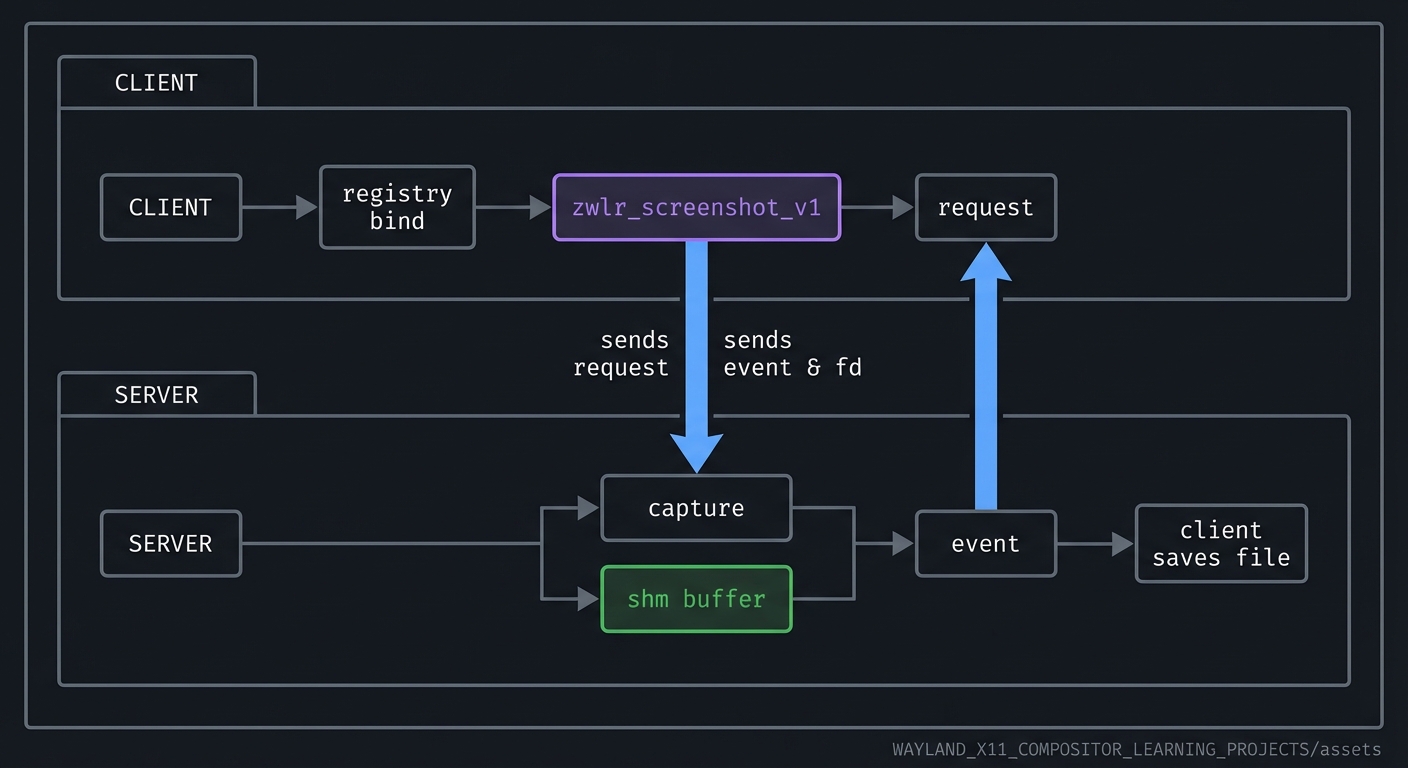
A custom protocol extension called zwlr_screenshot_v1 (or similar) that allows a client to request a screenshot from the compositor. The server side will return a shm buffer containing the captured pixels. The client will save the image to a PNG file.
3.2 Functional Requirements
- Protocol XML: define requests and events for screenshot capture.
- Code generation: use wayland-scanner to generate bindings.
- Server implementation: respond to capture requests and send a buffer.
- Client implementation: request a screenshot and save to disk.
- Versioning: support version 1 and reject higher versions.
3.3 Non-Functional Requirements
- Performance: capture within 500ms for a 1080p output.
- Reliability: handle client disconnects gracefully.
- Usability: clear CLI output and errors.
3.4 Example Usage / Output
$ ./screenshot-client --output HDMI-A-1 --file shot.png
[info] requesting screenshot
[info] received buffer 1920x1080
[info] wrote shot.png
3.5 Data Formats / Schemas / Protocols
- Protocol XML with interface
zwlr_screenshot_v1 - Buffer format: ARGB8888 shm buffer
- File output: PNG
3.6 Edge Cases
- Output name not found -> error.
- Client requests while no buffer available -> error event.
- Client disconnect mid-transfer -> server cleans resources.
3.7 Real World Outcome
3.7.1 How to Run (Copy/Paste)
meson setup build
meson compile -C build
./build/screenshot-server
./build/screenshot-client --output HDMI-A-1 --file shot.png
3.7.2 Golden Path Demo (Deterministic)
Capture a screenshot on a fixed output with a known background color and verify the file hash is stable.
3.7.3 If CLI: exact terminal transcript
$ ./screenshot-client --output HDMI-A-1 --file shot.png
[info] run_id=0003
[info] request sent
[info] event: screenshot_ready size=1920x1080
[info] wrote shot.png
$ echo $?
0
Failure Demo (Deterministic)
$ ./screenshot-client --output DOES_NOT_EXIST --file shot.png
[error] output not found
$ echo $?
4
4. Solution Architecture
4.1 High-Level Design
client -> registry bind -> zwlr_screenshot_v1 -> request
server -> capture -> shm buffer -> event -> client saves file
4.2 Key Components
| Component | Responsibility | Key Decisions | |———–|—————-|—————| | Protocol XML | Define requests/events | Minimal v1 scope | | Scanner build step | Generate bindings | use meson custom_target | | Server handler | Capture and send buffer | reuse existing compositor buffer | | Client tool | Save buffer to PNG | use libpng or stb |
4.3 Data Structures (No Full Code)
struct screenshot_request {
  struct wl_resource *resource;
  struct wl_buffer *buffer;
  int width;
  int height;
};
4.4 Algorithm Overview
Key Algorithm: Screenshot Capture
- Client sends capture request.
- Server allocates shm buffer and renders the output into it.
- Server emits event with buffer and metadata.
- Client maps buffer and saves PNG.
Complexity Analysis:
- Time: O(width * height) for copying pixels.
- Space: O(width * height) for buffer.
5. Implementation Guide
5.1 Development Environment Setup
sudo apt install wayland-protocols libwayland-dev
5.2 Project Structure
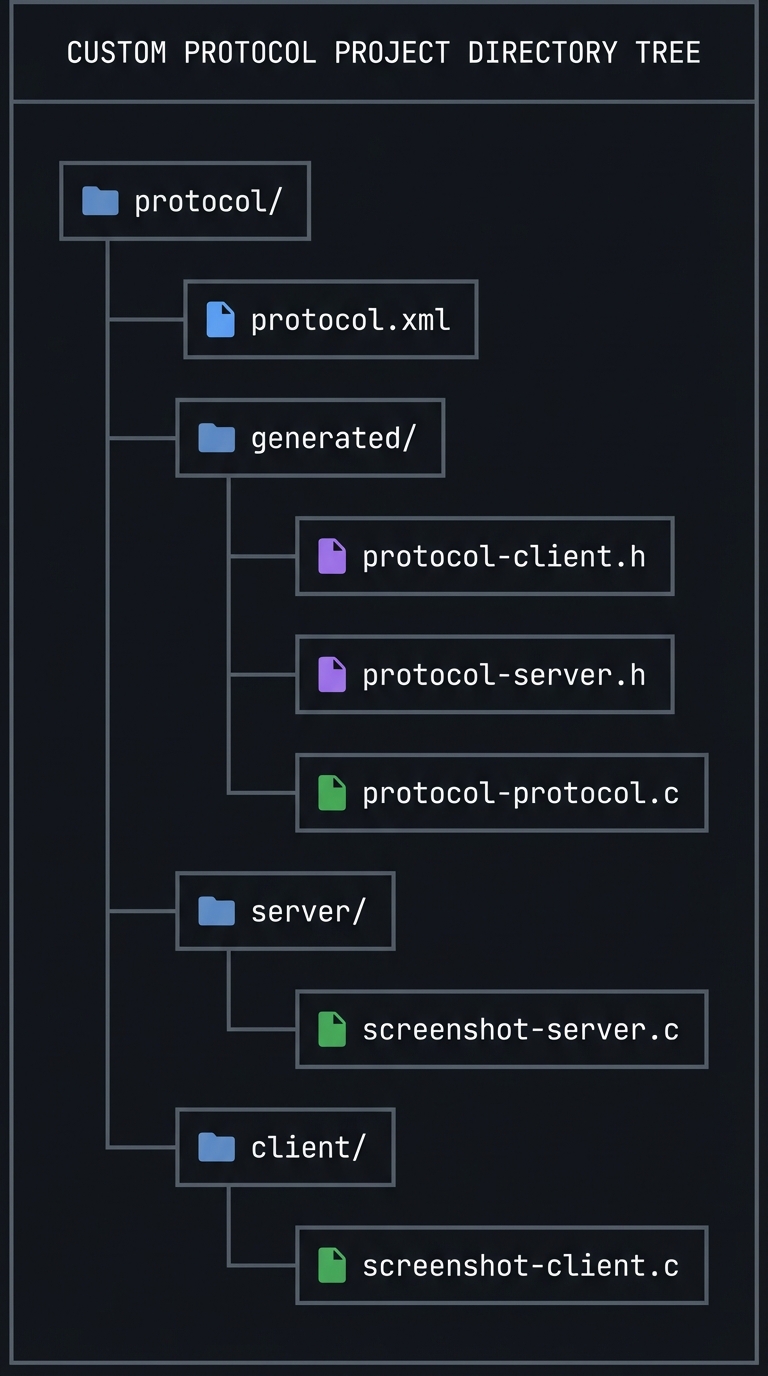
protocol/
├── protocol.xml
├── generated/
│   ├── protocol-client.h
│   ├── protocol-server.h
│   └── protocol-protocol.c
├── server/
│   └── screenshot-server.c
└── client/
    └── screenshot-client.c
5.3 The Core Question You’re Answering
“How do Wayland extensions work end-to-end, from XML definition to runtime behavior?”
5.4 Concepts You Must Understand First
- XML protocol structure (see §2.1).
- wayland-scanner outputs (see §2.2).
- Versioning rules (see §2.3).
- Resource lifecycle (see §2.4).
5.5 Questions to Guide Your Design
- What requests and events does v1 need?
- How will you encode errors (event vs protocol error)?
- How will clients specify which output to capture?
- What is the expected buffer format?
5.6 Thinking Exercise
Sketch the exact sequence of messages for a screenshot request: request, buffer creation, event, client save.
5.7 The Interview Questions They’ll Ask
- How does Wayland protocol extension differ from X11 extensions?
- Why is code generation necessary?
- How do you version a Wayland protocol safely?
- What happens when a client uses an unsupported request?
5.8 Hints in Layers
Hint 1: Keep v1 simple Only support capturing the primary output.
Hint 2: Reuse existing buffers If you already have a renderer, reuse its output buffer.
Hint 3: Add a protocol error for misuse If the client sends a second request before the first completes, send an error.
5.9 Books That Will Help
| Topic | Book | Chapter | |——-|——|———| | Protocol design | The Wayland Book | Ch. 5 | | API design | The Practice of Programming | Ch. 8 |
5.10 Implementation Phases
Phase 1: XML + Codegen (2-3 days)
Goals:
- Write protocol XML
- Generate bindings
Tasks:
- Define interface and requests.
- Add build rules for wayland-scanner.
Checkpoint: build produces protocol headers and c file.
Phase 2: Server Implementation (4-5 days)
Goals:
- Implement request handlers
- Return screenshot buffers
Tasks:
- Create resources on bind.
- Implement capture request.
Checkpoint: server logs show request handled.
Phase 3: Client Tool (3-4 days)
Goals:
- Bind protocol and request screenshot
- Save PNG to disk
Tasks:
- Bind and send request.
- Map buffer and encode PNG.
Checkpoint: valid PNG is saved.
5.11 Key Implementation Decisions
| Decision | Options | Recommendation | Rationale | |———-|———|—————-|———–| | Error reporting | protocol error vs event | event for recoverable, error for misuse | aligns with Wayland norms | | Output selection | name vs id | name | user-friendly | | Buffer format | ARGB8888 vs XRGB | ARGB8888 | consistent with wl_shm |
6. Testing Strategy
6.1 Test Categories
| Category | Purpose | Examples | |———-|———|———-| | Unit Tests | Validate XML parsing | schema validation | | Integration Tests | Client-server interaction | capture request | | Edge Case Tests | invalid output name | error event |
6.2 Critical Test Cases
- Version mismatch: client binds higher version -> reject.
- Concurrent requests: two capture requests -> error.
- Client disconnect: ensure resources freed.
6.3 Test Data
output=HDMI-A-1 file=shot.png
7. Common Pitfalls & Debugging
7.1 Frequent Mistakes
| Pitfall | Symptom | Solution | |——–|———|———-| | Missing private-code file | link errors | compile protocol-protocol.c | | Wrong version binding | protocol error | bind to supported version | | Forgetting destroy callback | leaks | implement destroy handler |
7.2 Debugging Strategies
- Use WAYLAND_DEBUG=1 to see request/event flow.
- Add server logs in request handlers.
7.3 Performance Traps
- Copying large buffers unnecessarily; reuse where possible.
8. Extensions & Challenges
8.1 Beginner Extensions
- Add a request to list available outputs.
- Support capturing only a region.
8.2 Intermediate Extensions
- Add PNG compression options.
- Add async progress events.
8.3 Advanced Extensions
- Add DMA-BUF support for zero-copy capture.
- Integrate with portal-like permissions.
9. Real-World Connections
9.1 Industry Applications
- Wayland protocols like xdg-shell and layer-shell are defined the same way.
- Screenshot and screencast portals use similar patterns.
9.2 Related Open Source Projects
- wayland-protocols repository
- xdg-desktop-portal
9.3 Interview Relevance
- Protocol versioning and ABI stability.
- Designing clear client-server APIs.
10. Resources
10.1 Essential Reading
- The Wayland Book, protocol design chapter
- wayland-scanner documentation
10.2 Video Resources
- Talks on Wayland protocol evolution
10.3 Tools & Documentation
wayland-scannerwayland-info
10.4 Related Projects in This Series
- P01-bare-metal-wayland-client - client basics
- P02-simple-wayland-compositor-wlroots - server integration
10.5 Protocol References (Quick Links)
- Wayland core protocol: https://wayland.freedesktop.org/docs/html/
- Wayland protocol index: https://wayland.app/protocols
- wayland-protocols repo: https://gitlab.freedesktop.org/wayland/wayland-protocols
- linux-dmabuf (FD passing patterns): https://wayland.app/protocols/linux-dmabuf-unstable-v1
11. Self-Assessment Checklist
11.1 Understanding
- I can write a minimal Wayland protocol in XML.
- I can explain how wayland-scanner outputs are used.
- I can describe versioning rules.
11.2 Implementation
- Client can request a screenshot and save it.
- Server handles disconnects safely.
- Generated code is integrated into build.
11.3 Growth
- I can design a new protocol and justify its API.
- I can explain this project in an interview.
12. Submission / Completion Criteria
Minimum Viable Completion:
- Protocol XML and generated bindings compile successfully.
- Client sends request and receives response.
Full Completion:
- All minimum criteria plus:
- Clean error handling and version checks.
- Screenshot saved as PNG.
Excellence (Going Above & Beyond):
- Zero-copy DMA-BUF capture.
- Protocol supports permissions and user confirmation.
13. Deep Dive Appendix: Protocol Design Review Checklist
13.1 Design Review Questions
- Does every object have a clear owner and lifetime?
- Are all requests validated with explicit error codes?
- Is there a deterministic ordering of events for state changes?
- Can the protocol evolve without breaking older clients?
13.2 XML Skeleton Walkthrough
<protocol name="my_proto">
  <interface name="my_manager" version="1">
    <request name="create_widget">
      <arg name="id" type="new_id" interface="my_widget"/>
    </request>
  </interface>
  <interface name="my_widget" version="1">
    <request name="set_color">
      <arg name="r" type="uint"/>
      <arg name="g" type="uint"/>
      <arg name="b" type="uint"/>
    </request>
    <event name="ready"/>
    <request name="destroy" type="destructor"/>
  </interface>
</protocol>
- Manager creates widgets.
- Widgets accept state updates and emit events.
- destroy enforces explicit lifecycle end.
13.3 Compatibility Matrix
- Add request -> bump version, keep old behavior for older clients.
- Add event -> safe; old clients ignore unknown events only if versioned.
- Remove or change semantics -> not safe; create a new interface instead.
13.4 Deterministic Failure Demo
If a client sends negative sizes, the server must disconnect it:
[client] my_widget.set_size(-1, 20)
[server] protocol error: BAD_SIZE
[server] disconnect client