Project 2: Simple Wayland Compositor with wlroots
Build a minimal, working Wayland compositor using wlroots that can display client windows, handle input, and manage outputs.
Quick Reference
| Attribute | Value |
|---|---|
| Difficulty | Master (Level 5) |
| Time Estimate | 4-6 weeks |
| Main Programming Language | C (Alternatives: C++, Rust) |
| Alternative Programming Languages | C++, Rust |
| Coolness Level | Level 5: Pure Magic |
| Business Potential | Level 4: Open Core Infrastructure |
| Prerequisites | Project 1 completed, event-driven C, Linux graphics basics |
| Key Topics | wlroots architecture, DRM/KMS, input routing, scene graphs |
1. Learning Objectives
By completing this project, you will:
- Implement the server side of the Wayland protocol using wlroots.
- Understand how a compositor manages outputs, surfaces, and input devices.
- Build a render pipeline that composites client surfaces to screen.
- Route keyboard and pointer events to the focused surface.
- Debug compositor behavior with logs and wlroots utilities.
2. All Theory Needed (Per-Concept Breakdown)
2.1 Wayland Server Model (Resources, Clients, Globals)
Description / Expanded Explanation
The compositor is the server in the Wayland protocol. It creates globals, accepts client connections, and instantiates resources for client objects. Understanding server-side object lifecycle is the foundation for building a correct compositor.
Definitions & Key Terms
- wl_display (server) -> main Wayland server object
- global -> interface advertised to clients
- resource -> server-side object tied to a client
- client -> connection to a single application
Mental Model Diagram (ASCII)
client connection -> wl_client -> resources (wl_surface, xdg_toplevel)
server -> wl_display -> globals (wl_compositor, xdg_wm_base)
How It Works (Step-by-Step)
- Server creates wl_display.
- Server creates globals and advertises them.
- Client binds globals and sends requests.
- Server creates resources per client.
- Server emits events to clients based on state changes.
Minimal Concrete Example
struct wl_display *display = wl_display_create();
struct wl_event_loop *loop = wl_display_get_event_loop(display);
Common Misconceptions
- Misconception -> Server has a single global state shared by all clients. Correction -> Resources are per-client; each client has its own objects.
- Misconception -> You can ignore client disconnects. Correction -> You must clean up resources when clients disconnect.
Check-Your-Understanding Questions
- What happens when a client binds wl_compositor?
- Why are resources per client rather than global?
- Predict what happens if you keep a pointer to a resource after the client disconnects.
Where You’ll Apply It
- In this project: see §4.2 Key Components and §5.10 Phase 1.
- Also used in: P03-custom-wayland-protocol-extension.
2.2 wlroots Architecture (Backend, Renderer, Scene)
Description / Expanded Explanation
wlroots provides a modular compositor toolkit. The backend handles inputs and outputs, the renderer draws surfaces, and the scene graph manages surface ordering and damage. Knowing these modules lets you implement policy while wlroots handles hardware.
Definitions & Key Terms
- backend -> handles DRM/KMS outputs and input devices
- renderer -> draws textures to outputs
- scene graph -> hierarchical representation of surfaces
- output -> a display monitor (connector)
Mental Model Diagram (ASCII)
backend -> output -> renderer -> scene graph -> frame
backend -> input -> seat -> focus -> client events
How It Works (Step-by-Step)
- Create wlroots backend (auto or DRM).
- Create renderer and allocator.
- Create scene graph and attach outputs.
- On new surface, add to scene.
- On output frame, render scene.
Minimal Concrete Example
struct wlr_backend *backend = wlr_backend_autocreate(display, NULL);
struct wlr_renderer *renderer = wlr_renderer_autocreate(backend);
Common Misconceptions
- Misconception -> wlroots is a compositor itself. Correction -> wlroots is a library; you must implement policy and UI.
- Misconception -> The scene graph is optional for a real compositor. Correction -> You can render manually, but scene simplifies ordering and damage.
Check-Your-Understanding Questions
- What does the backend abstract away?
- Why is the renderer separate from the backend?
- Predict what happens if you render without damage tracking.
Where You’ll Apply It
- In this project: see §4.1 High-Level Design and §5.10 Phase 2.
- Also used in: P04-wayland-panel-bar-layer-shell.
2.3 DRM/KMS Basics (Connectors, CRTCs, Planes)
Description / Expanded Explanation
DRM/KMS is how compositors drive real hardware. Even with wlroots, you need a conceptual map: connectors correspond to outputs, CRTCs scan out a buffer, and planes allow overlays. This explains why outputs are configured the way they are.
Definitions & Key Terms
- connector -> physical output (HDMI, DP)
- CRTC -> scanout engine
- plane -> hardware layer for composition
- modeset -> configuring resolution and refresh
Mental Model Diagram (ASCII)
connector -> CRTC -> scanout
planes: primary + overlay + cursor
How It Works (Step-by-Step)
- DRM enumerates connectors and modes.
- Compositor selects a mode and sets a CRTC.
- Primary plane displays rendered buffer.
- Optional planes handle cursor or overlays.
Minimal Concrete Example
Output: HDMI-A-1 mode 1920x1080@60
CRTC 0 -> primary plane -> framebuffer
Common Misconceptions
- Misconception -> You can ignore DRM/KMS because wlroots handles it. Correction -> You must understand output lifecycles and permissions.
- Misconception -> Planes are the same as surfaces. Correction -> Planes are hardware layers; surfaces are Wayland objects.
Check-Your-Understanding Questions
- Why do you need permissions for /dev/dri/card*?
- What happens when an output is unplugged?
- Predict what happens if you select an unsupported mode.
Where You’ll Apply It
- In this project: see §5.10 Phase 2 and §7.1 Frequent Mistakes.
- Also used in: P01-bare-metal-wayland-client for context.
2.4 Input Pipeline (libinput, Seats, Focus)
Description / Expanded Explanation
Input devices are routed to the correct client via seats. The compositor decides focus and sends events. This is where Wayland enforces security: clients only receive events for focused surfaces.
Definitions & Key Terms
- seat -> group of input devices (keyboard, pointer, touch)
- focus -> which surface receives input
- keymap -> mapping scancodes to symbols
- grab -> temporary input capture
Mental Model Diagram (ASCII)
keyboard -> libinput -> compositor seat -> focused surface -> client event
How It Works (Step-by-Step)
- libinput reports device events.
- wlroots translates to seat events.
- Compositor decides which surface is focused.
- Events are sent only to that surface.
Minimal Concrete Example
wlr_seat_keyboard_notify_enter(seat, surface, keycodes, count, modifiers);
Common Misconceptions
- Misconception -> Input goes to all clients. Correction -> Only the focused surface receives events.
- Misconception -> Focus is automatic. Correction -> Your compositor policy defines focus.
Check-Your-Understanding Questions
- Why does Wayland prevent global keylogging?
- What is the role of the seat?
- Predict behavior when you click a surface without setting focus.
Where You’ll Apply It
- In this project: see §5.10 Phase 3 and §4.2 Key Components.
- Also used in: P04-wayland-panel-bar-layer-shell.
2.5 Scene Graphs and Damage Tracking
Description / Expanded Explanation
A compositor must know what to draw and in what order. A scene graph stores surfaces and their positions, and damage tracking limits redraw to changed regions. This is critical for performance.
Definitions & Key Terms
- scene graph -> hierarchy of nodes representing surfaces
- damage -> region that changed and needs redraw
- z-order -> stacking order
Mental Model Diagram (ASCII)
root
 ├─ background
 ├─ window A
 └─ window B (top)
How It Works (Step-by-Step)
- Add new surfaces to the scene graph.
- When a surface changes, mark damage.
- On output frame, render only damaged regions.
- Recompute stacking order on focus changes.
Minimal Concrete Example
struct wlr_scene_tree *scene = wlr_scene_create();
struct wlr_scene_surface *node = wlr_scene_surface_create(scene, surface);
Common Misconceptions
- Misconception -> Redrawing every frame is fine. Correction -> It wastes GPU and battery on static scenes.
- Misconception -> z-order is fixed. Correction -> You must update it when focus changes.
Check-Your-Understanding Questions
- How does damage tracking improve performance?
- What happens if you forget to update z-order?
- Predict behavior if you render a destroyed surface.
Where You’ll Apply It
- In this project: see §5.10 Phase 2 and §6.2 Critical Test Cases.
- Also used in: P01-bare-metal-wayland-client for client expectations.
2.6 Output Lifecycle and Hotplug
Description / Expanded Explanation
Outputs can appear and disappear (hotplug). The compositor must handle new outputs, allocate render buffers, and destroy resources when outputs vanish. This is fundamental for multi-monitor setups.
Definitions & Key Terms
- output -> monitor
- hotplug -> connect/disconnect at runtime
- mode -> resolution and refresh
Mental Model Diagram (ASCII)
output added -> create output state -> render loop
output removed -> destroy output state
How It Works (Step-by-Step)
- Backend emits new output event.
- Compositor selects preferred mode.
- Create output state and scene output.
- On destroy event, remove from scene and clean resources.
Minimal Concrete Example
wlr_output_commit(output);
Common Misconceptions
- Misconception -> Output list is static. Correction -> It changes with hotplug.
- Misconception -> You can ignore scale or transform. Correction -> Clients depend on correct output scale.
Check-Your-Understanding Questions
- Why should a compositor handle output removal gracefully?
- What happens if you ignore output scale?
- Predict behavior when a window spans two outputs.
Where You’ll Apply It
- In this project: see §5.10 Phase 2 and §8.3 Advanced Extensions.
- Also used in: P04-wayland-panel-bar-layer-shell.
2.7 Shell Protocol Handling and Role Enforcement
Description / Expanded Explanation
A compositor is responsible for enforcing surface roles and the configure/ack/commit contract of shell protocols. xdg-shell defines how normal application windows behave, while layer-shell and other protocols define special surfaces. Correct role management is what turns raw wl_surface objects into windows with policy.
Definitions & Key Terms
- role -> a semantic purpose for a surface (xdg_toplevel, xdg_popup, layer_surface)
- xdg_wm_base -> global used to create xdg_surface objects
- xdg_surface -> role wrapper that enforces configure/ack/commit
- xdg_toplevel -> role that represents a standard window
- configure -> compositor-to-client size/state negotiation
Mental Model Diagram (ASCII)
wl_surface
   |
   +--> xdg_surface (role wrapper)
             |
             +--> xdg_toplevel (window policy)
How It Works (Step-by-Step)
- The compositor advertises xdg_wm_base as a global.
- The client binds and calls get_xdg_surface(wl_surface).
- The compositor creates an xdg_surface resource and tracks pending state.
- The compositor sends configure; the client must ack before commit.
- The compositor rejects invalid role changes to keep protocol invariants.
Minimal Concrete Example
struct wlr_xdg_shell *xdg_shell = wlr_xdg_shell_create(wl_display, 3);
xdg_shell->events.new_surface.notify = handle_xdg_surface;

static void handle_xdg_surface(struct wl_listener *l, void *data) {
  struct wlr_xdg_surface *xdg = data;
  if (xdg->role == WLR_XDG_SURFACE_ROLE_TOPLEVEL) {
    // attach to scene graph, set listeners
  }
}
Common Misconceptions
- Misconception -> Any wl_surface is already a window. Correction -> A surface needs an explicit role like xdg_toplevel.
- Misconception -> The compositor can ignore configure/ack. Correction -> The protocol requires it; skipping breaks clients.
Check-Your-Understanding Questions
- What happens if a client assigns two roles to the same wl_surface?
- Why is configure/ack/commit required before the first buffer?
- Where does the compositor store pending size/state before commit?
Where You’ll Apply It
- In this project: see §3.2 Functional Requirements and §5.10 Phase 2.
- Also used in: P04-wayland-panel-bar-layer-shell for layer-shell roles.
2.8 Buffer Import and Renderer Path (wl_shm and dmabuf)
Description / Expanded Explanation
Compositors do not draw client pixels directly. Instead, they import client buffers into textures and composite those textures into a final frame. wlroots abstracts this with wlr_buffer, wlr_texture, and wlr_renderer. Understanding the buffer import path clarifies why some clients are zero-copy and others are not.
Definitions & Key Terms
- wlr_buffer -> generic wrapper for client-provided buffers
- wlr_texture -> GPU resource created from a buffer
- wlr_renderer -> abstraction for drawing textures
- dmabuf -> GPU-friendly buffer sharing path
- wl_shm -> CPU shared memory path
Mental Model Diagram (ASCII)
client wl_buffer
   |
   v
wlr_buffer -> wlr_texture -> renderer -> output framebuffer
How It Works (Step-by-Step)
- Client commits a surface; wlroots creates/updates a wlr_buffer.
- The compositor imports it into a wlr_texture (shm or dmabuf path).
- The texture is attached to a scene node with position and size.
- During output frame, the renderer draws textures into the output.
- After scanout, wlroots sends frame callbacks and releases buffers.
Minimal Concrete Example
struct wlr_scene *scene = wlr_scene_create();
struct wlr_scene_tree *tree = wlr_scene_tree_create(&scene->node);
struct wlr_scene_surface *sc = wlr_scene_surface_create(tree, xdg->surface);
// wlroots handles buffer import internally when the surface commits
Common Misconceptions
- Misconception -> The compositor copies all pixels every frame. Correction -> dmabuf often enables zero-copy or near-zero-copy paths.
- Misconception -> wl_shm is always slow. Correction -> It is fine for small UIs or low-power devices.
Check-Your-Understanding Questions
- Why does dmabuf allow better performance than wl_shm?
- What happens if the buffer format is unsupported by the renderer?
- When is it safe to release a client buffer?
Where You’ll Apply It
- In this project: see §4.1 High-Level Design and §5.10 Phase 2.
- Also used in: P01-bare-metal-wayland-client for buffer creation.
2.9 Frame Scheduling, Vsync, and Damage
Description / Expanded Explanation
A compositor must align rendering with display refresh to avoid tearing and wasted work. wlroots provides output frame events and damage tracking so you only redraw what changed. This is the heart of a stable, power-efficient compositor.
Definitions & Key Terms
- frame event -> signal that an output is ready for the next frame
- damage -> region of the output that needs redraw
- wlr_output_commit -> applies a new frame to the output
- wlr_output_schedule_frame -> request a frame event in the future
- presentation feedback -> timing info about when a frame was shown
Mental Model Diagram (ASCII)
output frame event -> render scene -> commit -> scanout
         ^                           |
         |                           v
   schedule_frame <------------- damage tracking
How It Works (Step-by-Step)
- The output emits a frame event when it is ready.
- The compositor renders only damaged regions.
- The compositor commits the new frame to the output.
- Clients receive frame callbacks and release events.
- If new damage appears, schedule the next frame.
Minimal Concrete Example
static void handle_output_frame(struct wl_listener *l, void *data) {
  struct wlr_output *output = data;
  wlr_scene_output_commit(scene_output);
}
Common Misconceptions
- Misconception -> Rendering in a tight loop is faster. Correction -> It wastes CPU and can cause jank; schedule frames instead.
- Misconception -> Damage is optional. Correction -> Without damage, you redraw everything, which hurts power and performance.
Check-Your-Understanding Questions
- What causes an output frame event to fire?
- How does damage tracking reduce GPU work?
- When would you schedule a frame manually?
Where You’ll Apply It
- In this project: see §5.10 Phase 3 and §6.2 Critical Test Cases.
- Also used in: P04-wayland-panel-bar-layer-shell for efficient panel updates.
3. Project Specification
3.1 What You Will Build
A minimal but functional Wayland compositor that can run on a TTY, display client windows, handle keyboard and pointer input, and manage multiple outputs. The compositor will include a background color, basic window movement, and a keyboard shortcut to exit.
3.2 Functional Requirements
- Start a Wayland server: create a wl_display and run a main loop.
- Advertise globals: compositor, xdg-shell, seat, output.
- Accept clients: display client surfaces via wlroots scene.
- Input handling: route keyboard and pointer events to focused surface.
- Output management: handle output creation and removal.
- Exit shortcut: allow exiting via a configurable keybinding.
3.3 Non-Functional Requirements
- Performance: stable frame rate with at least two clients open.
- Reliability: compositor should not crash on client exit.
- Usability: log key events and errors to stdout.
3.4 Example Usage / Output
$ ./my_compositor
[info] backend=drm
[info] output added: HDMI-A-1 1920x1080@60
[info] new client: pid=4242
[info] focus set to surface 0xabc
3.5 Data Formats / Schemas / Protocols
- Wayland protocol: wl_compositor, xdg_wm_base, wl_seat
- Input: libinput events mapped to wlroots seat
3.6 Edge Cases
- Client crashes -> compositor should clean resources.
- Output unplugged -> remove output from scene.
- Input device hotplug -> handle new keyboard/mouse.
3.7 Real World Outcome
3.7.1 How to Run (Copy/Paste)
mkdir build && cd build
meson setup ..
meson compile
sudo ./my_compositor
3.7.2 Golden Path Demo (Deterministic)
Run on a single output, launch a terminal from a known app launcher, and move focus between two windows using a fixed keybinding.
3.7.3 If CLI: exact terminal transcript
$ sudo ./my_compositor --bg 0x222222
[info] run_id=0002
[info] output added: HDMI-A-1 1920x1080@60
[info] seat ready
[info] new client: terminal
[info] focus changed
$ echo $?
0
Failure Demo (Deterministic)
$ ./my_compositor
[error] DRM device not accessible (add user to video group)
$ echo $?
3
4. Solution Architecture
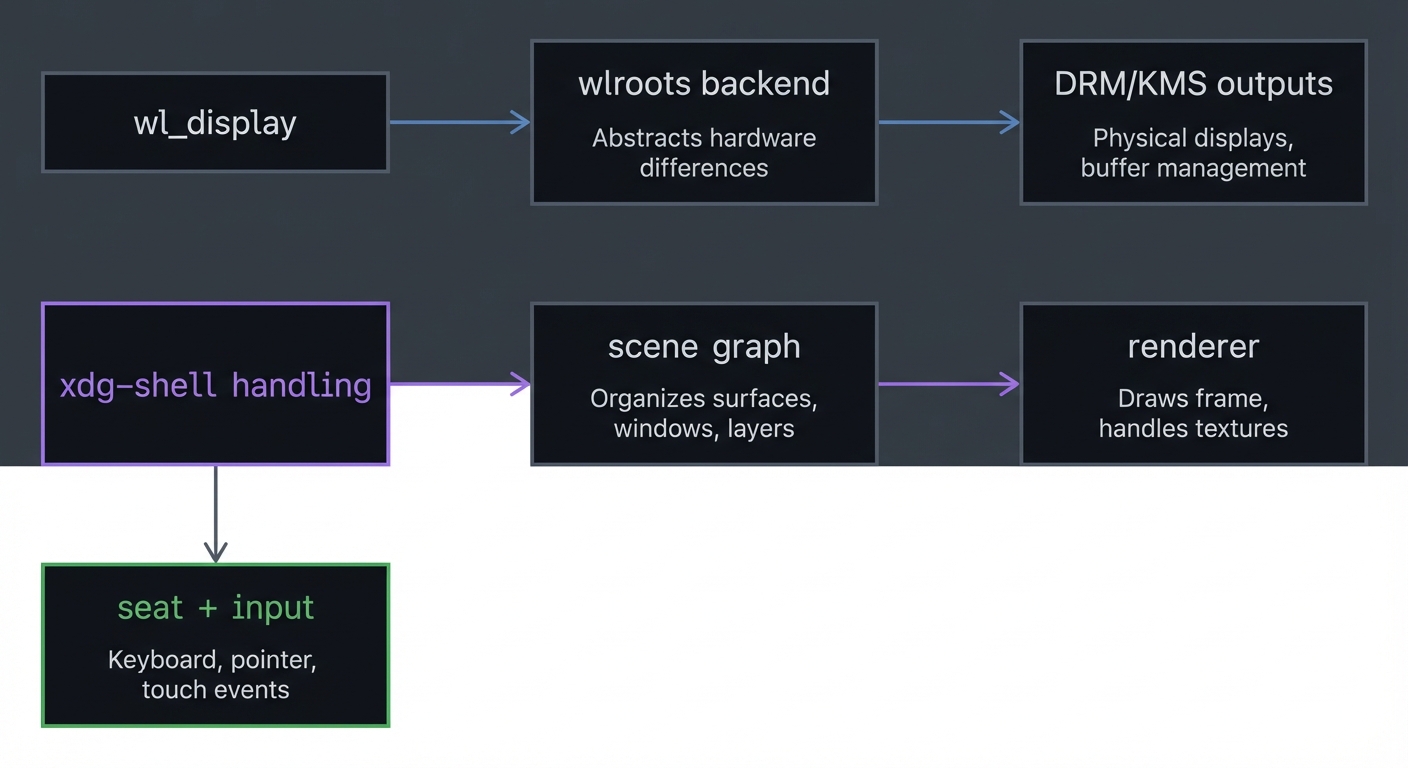
4.1 High-Level Design
+--------------------+    +----------------------+    +------------------+
| wl_display         |--->| wlroots backend      |--->| DRM/KMS outputs  |
+--------------------+    +----------------------+    +------------------+
         |                       |
         v                       v
+--------------------+    +----------------------+    +------------------+
| xdg-shell handling |--->| scene graph          |--->| renderer         |
+--------------------+    +----------------------+    +------------------+
         |
         v
+--------------------+
| seat + input        |
+--------------------+
4.2 Key Components
| Component | Responsibility | Key Decisions | |———–|—————-|—————| | Backend | Manage outputs and inputs | Use wlr_backend_autocreate | | Scene | Store surfaces and order | Use wlr_scene for simplicity | | Renderer | Draw surfaces | Use wlr_renderer_autocreate | | Seat | Input focus and routing | Simple focus-follows-click policy |
4.3 Data Structures (No Full Code)
struct server {
  struct wl_display *display;
  struct wlr_backend *backend;
  struct wlr_renderer *renderer;
  struct wlr_scene *scene;
  struct wlr_seat *seat;
  struct wl_list views; /* linked list of windows */
};
4.4 Algorithm Overview
Key Algorithm: Focus-Follows-Click
- On pointer button press, identify surface under cursor.
- Set keyboard focus to that surface.
- Raise surface to top of scene graph.
Complexity Analysis:
- Time: O(n) to find surface under cursor (n windows).
- Space: O(n) for view list.
5. Implementation Guide
5.1 Development Environment Setup
sudo apt install libwlroots-dev libwayland-dev libxkbcommon-dev libinput-dev
5.2 Project Structure
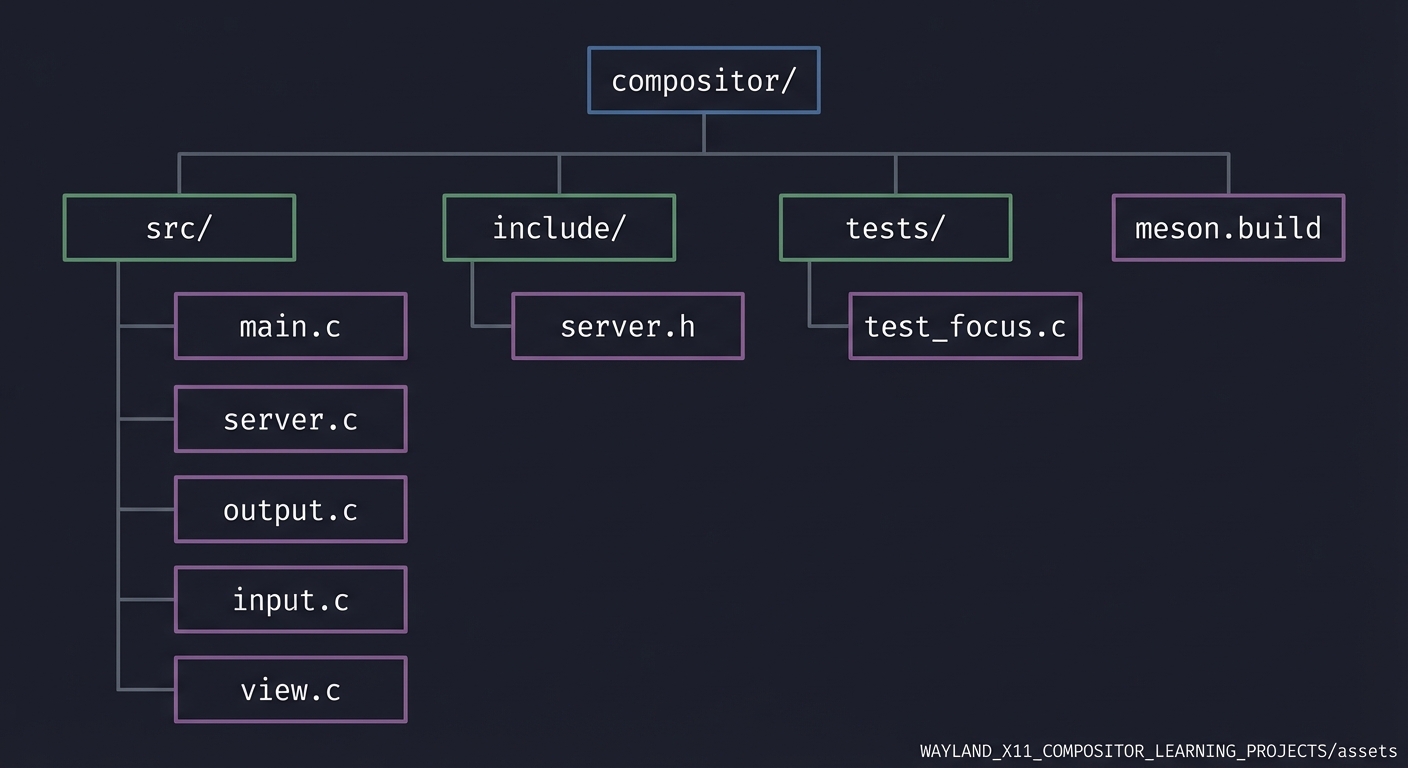
compositor/
├── src/
│   ├── main.c
│   ├── server.c
│   ├── output.c
│   ├── input.c
│   └── view.c
├── include/
│   └── server.h
├── tests/
│   └── test_focus.c
└── meson.build
5.3 The Core Question You’re Answering
“What does a Wayland compositor actually do every frame, and how does it decide which surface gets input and display priority?”
5.4 Concepts You Must Understand First
- Server-side objects and resources (see §2.1).
- wlroots backend, renderer, scene graph (see §2.2).
- DRM/KMS output basics (see §2.3).
- Seat and focus policy (see §2.4).
5.5 Questions to Guide Your Design
- What is your window stacking policy?
- How will you track focus and keyboard state?
- How will you handle output hotplug events?
- Where will you store per-window metadata?
5.6 Thinking Exercise
Draw a timeline of events from compositor startup to first client window appearing. Identify the callbacks involved.
5.7 The Interview Questions They’ll Ask
- What does a Wayland compositor do that X11 splits across server and WM?
- How does wlroots simplify compositor development?
- Explain how a seat routes input in Wayland.
- What are DRM/KMS planes?
- Why is damage tracking important?
5.8 Hints in Layers
Hint 1: Start from tinywl Use tinywl as a reference and strip it down to the essentials.
Hint 2: Log everything Print output add/remove, new surfaces, and focus changes.
Hint 3: Implement focus first Without focus, clients will appear but not accept input.
5.9 Books That Will Help
| Topic | Book | Chapter | |——-|——|———| | Wayland compositor concepts | The Wayland Book | Compositor chapters | | Linux graphics stack | How Linux Works | Ch. 14 | | Event-driven architecture | The Linux Programming Interface | Ch. 63 |
5.10 Implementation Phases
Phase 1: Bootstrapping (1 week)
Goals:
- Create wl_display and backend
- Initialize renderer and scene
Tasks:
- Build minimal compositor that starts and exits.
- Log output detection events.
Checkpoint: compositor starts from TTY and logs outputs.
Phase 2: Surfaces and Rendering (2 weeks)
Goals:
- Accept client surfaces
- Render scene to outputs
Tasks:
- Handle new xdg_surface events.
- Add surfaces to scene graph.
- Render on output frame event.
Checkpoint: clients appear on screen.
Phase 3: Input and Focus (1-2 weeks)
Goals:
- Route keyboard and pointer events
- Implement focus changes
Tasks:
- Set seat keyboard and pointer.
- Implement focus-follows-click.
Checkpoint: you can interact with apps.
5.11 Key Implementation Decisions
| Decision | Options | Recommendation | Rationale | |———-|———|—————-|———–| | Rendering API | custom vs wlr_scene | wlr_scene | simpler and robust | | Focus policy | click vs focus-follows-mouse | click | predictable for beginners | | Output backend | DRM vs headless | DRM | real hardware understanding |
6. Testing Strategy
6.1 Test Categories
| Category | Purpose | Examples | |———-|———|———-| | Unit Tests | Validate focus logic | focus list ordering | | Integration Tests | Run compositor and open clients | start two terminals | | Edge Case Tests | Output hotplug | unplug/replug monitor |
6.2 Critical Test Cases
- Client exit: client closes -> compositor does not crash.
- Focus switch: click another window -> keyboard focus moves.
- Output removal: unplug monitor -> no crash.
6.3 Test Data
Test with two clients: alacritty + foot
7. Common Pitfalls & Debugging
7.1 Frequent Mistakes
| Pitfall | Symptom | Solution | |——–|———|———-| | Missing video permissions | compositor fails at startup | add user to video group | | No keyboard focus | apps appear but no typing | call wlr_seat_keyboard_notify_enter | | Rendering blank screen | outputs present but no content | ensure scene attached to output |
7.2 Debugging Strategies
- weston-info: verify protocol globals.
- wlr_log: enable wlroots debug logs.
7.3 Performance Traps
- Rendering entire scene every frame without damage tracking.
8. Extensions & Challenges
8.1 Beginner Extensions
- Add a simple background color configuration.
- Add a keybinding to exit cleanly.
8.2 Intermediate Extensions
- Implement window moving with mouse drag.
- Add basic tiling layout.
8.3 Advanced Extensions
- Add multi-output layout configuration.
- Implement a simple animation or fade.
9. Real-World Connections
9.1 Industry Applications
- Sway and Wayfire: compositors built on wlroots.
- Embedded compositors: run on kiosks and appliances.
9.2 Related Open Source Projects
- tinywl: canonical minimal compositor.
- swaywm: full-featured wlroots compositor.
9.3 Interview Relevance
- Differences between display server and compositor.
- Understanding of DRM/KMS and input routing.
10. Resources
10.1 Essential Reading
- wlroots documentation and tinywl source code
- The Wayland Book (compositor sections)
10.2 Video Resources
- wlroots and compositor architecture talks
10.3 Tools & Documentation
modetestfor KMS inspectionlibinput debug-eventsfor input tracing
10.4 Related Projects in This Series
- P01-bare-metal-wayland-client - client-side basics
- P04-wayland-panel-bar-layer-shell - shell integration
10.5 Protocol & Kernel References (Quick Links)
- Wayland core protocol: https://wayland.freedesktop.org/docs/html/
- xdg-shell: https://wayland.app/protocols/xdg-shell
- linux-dmabuf: https://wayland.app/protocols/linux-dmabuf-unstable-v1
- DRM/KMS docs: https://docs.kernel.org/gpu/drm-kms.html
- libinput docs: https://wayland.freedesktop.org/libinput/doc/latest/
- wlroots docs: https://wlroots.readthedocs.io/
11. Self-Assessment Checklist
11.1 Understanding
- I can explain the server-side Wayland object model.
- I can describe how outputs and inputs are handled in wlroots.
- I can explain focus policy and damage tracking.
11.2 Implementation
- Compositor starts on a TTY and shows clients.
- Input works for focused surfaces.
- Outputs are handled correctly.
11.3 Growth
- I can read tinywl and understand each callback.
- I can explain my compositor architecture in an interview.
12. Submission / Completion Criteria
Minimum Viable Completion:
- Compositor starts, shows at least one client, and accepts keyboard input.
- Handles output detection and clean shutdown.
Full Completion:
- All minimum criteria plus:
- Working focus and window stacking policy.
- Handles client exits without crashes.
Excellence (Going Above & Beyond):
- Implements multi-output layouts with configurable rules.
- Includes a documented scene graph and damage tracking explanation.
13. Deep Dive Appendix: Compositor Bring-Up Playbook
13.1 Minimal Boot Sequence (From TTY to First Pixel)
- Open a session (logind or direct DRM) and ensure you own the seat.
- Create the backend: wlr_backend_autocreate.
- Create renderer + allocator: wlr_renderer_autocreate, wlr_allocator_autocreate.
- Create a scene and output layout.
- Enable outputs and render a solid color to confirm scanout.
13.2 The First-Frame Checklist
- Output is enabled and has a mode set.
- Renderer begins/ends a frame successfully.
- At least one scene node is visible and positioned.
- Frame event fires and you commit once per refresh.
13.3 Debugging Decision Tree (Black Screen)
- No outputs listed -> Check /dev/dri permissions and backend creation.
- Outputs exist but no frame events -> Confirm output is enabled and schedule_frame is called.
- Frame events fire but no visible content -> Verify scene graph contains a surface and renderer clears to a visible color.
- Clients connect but windows are invisible -> Ensure xdg_shell handler attaches surfaces to the scene.
13.4 Deterministic Golden Demo (Headless)
Run with a headless backend to validate logic without DRM:
WLR_BACKENDS=headless ./your_compositor --log-level=debug
Expected logs:
[info] backend=headless
[info] output created: 1024x768
[info] xdg_surface created: toplevel
[info] frame committed