Learn TypeScript: From Zero to Type Wizard
Goal: Master TypeScript deeply—not just as “JavaScript with types,” but as a powerful structural type system. Understand how the compiler works, how type inference flows, how to manipulate types like data, and how to build robust, type-safe architectures that catch bugs before code even runs.
Why TypeScript Matters
JavaScript was built in 10 days in 1995 to make monkeys dance on web pages. It wasn’t designed for million-line codebases. As applications grew from simple form validations to complex SPAs and enterprise systems, the lack of static typing became a massive liability—undefined is not a function, property 'x' does not exist on type 'y'.
TypeScript, released by Microsoft in 2012, introduces a compile-time type system on top of JavaScript. It allows you to model the shape of your data, ensuring that your code adheres to the contracts you define.
The shift: You stop writing code that checks for errors at runtime, and start writing code that makes errors impossible at compile time.
The Numbers Don’t Lie: TypeScript’s Explosive Growth
| 2024-2025 Adoption Statistics (sources | JetBrains Report): |
- GitHub Milestone: In August 2025, TypeScript became the #1 most used language on GitHub, overtaking Python and JavaScript with 66% year-over-year growth (+1 million contributors)
- Adoption Surge: From 12% in 2017 to 35% in 2024 - nearly tripling in 7 years
- Enterprise Standard: 69% of developers use TypeScript for large-scale applications
- Job Market: 50% increase in TypeScript positions from 2021-2023, with salaries 10-15% higher than pure JavaScript roles
- Developer Satisfaction: 73% satisfaction score (Stack Overflow 2023) vs JavaScript’s 61%
- Production Usage: Major companies like Google, Slack, Airbnb, Microsoft, and Stripe have migrated critical systems to TypeScript
Real-World Impact
Traditional JavaScript Development       TypeScript Development
┌─────────────────────────────┐         ┌─────────────────────────────┐
│ Write code                  │         │ Write code with types       │
│ Run code                    │         │ Compiler catches errors     │
│ Runtime error!              │         │ Fix errors BEFORE runtime   │
│ Debug                       │         │ Run code (already correct)  │
│ Fix                         │         │ Refactor with confidence    │
│ Repeat...                   │         │ Ship to production          │
└─────────────────────────────┘         └─────────────────────────────┘
   Hours of debugging                      Minutes of type-checking

  "Hope it works" mentality              "Proven correct" confidence

Why This Matters for Your Career
For Individual Developers:
- TypeScript developers earn 10-15% higher salaries than JavaScript-only developers
- 40%+ increase in job postings requiring TypeScript (2024 vs 2023)
- TypeScript knowledge is now expected, not optional, for senior positions
- Better tooling (IntelliSense) = 30-40% productivity boost (Microsoft internal studies)
For Teams:
- 15-20% reduction in bugs caught before production (Airbnb case study)
- Faster onboarding: New developers understand codebases via types
- Safer refactoring: Rename a field, compiler finds all usages
- Living documentation: Types never lie or get outdated
For Companies:
- Slack reported 70% of bugs could have been prevented with TypeScript
- Microsoft’s own study: TypeScript prevents ~38% of JavaScript errors
- Lower maintenance costs from catching bugs at compile-time
- Easier to scale teams (types enforce architectural contracts)
The Structural Typing Advantage
Unlike Java/C# (nominal typing), TypeScript uses structural typing. This is crucial for JavaScript’s duck-typed ecosystem:
Nominal Typing (Java/C#)           Structural Typing (TypeScript)
┌─────────────────────────┐        ┌─────────────────────────┐
│ class Duck {            │        │ interface Duck {        │
│   quack() {}            │        │   quack(): void;        │
│ }                       │        │ }                       │
│                         │        │                         │
│ class Robot {           │        │ class Robot {           │
│   quack() {}            │        │   quack() { ... }       │
│ }                       │        │   charge() { ... }      │
│                         │        │ }                       │
│                         │        │                         │
│ Duck d = new Robot();   │        │ const d: Duck =         │
│ ❌ ERROR: Wrong type!   │        │   new Robot();          │
│                         │        │ ✅ OK: Has quack()!     │
└─────────────────────────┘        └─────────────────────────┘

  "Is it THE correct class?"         "Does it have what I need?"
This flexibility matches JavaScript’s reality while adding safety. Learn more about structural vs nominal typing.
The AI Development Multiplier
TypeScript’s growth is accelerating due to AI-assisted development:
- AI tools work BETTER with TypeScript: GitHub Copilot, Cursor, and Claude Code use types for more accurate suggestions
- Scaffolding default: Create-React-App, Next.js, Vite all default to TypeScript
- Framework preference: Angular (TypeScript-first), Vue 3 (TypeScript rewrite), Svelte (TypeScript support)
The future is clear: TypeScript is taking over development in 2025 because it enables both humans AND AI to write better code.
Core Concept Analysis
1. The Structural Type System
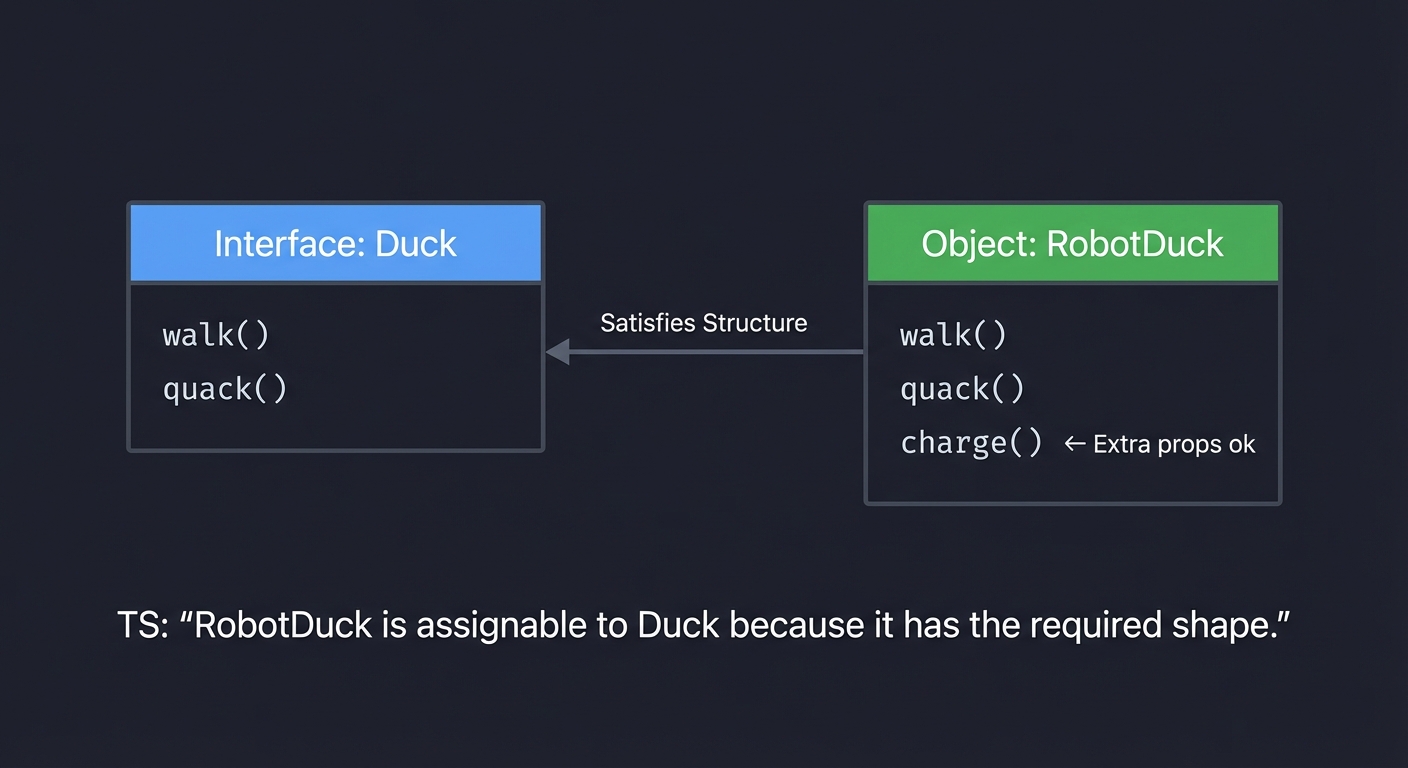
Unlike Java or C# (Nominal Typing), TypeScript uses Structural Typing (Duck Typing). If it walks like a duck and quacks like a duck, it’s a duck—even if you didn’t call it Duck.
    Interface: Duck             Object: RobotDuck
    ┌─────────────┐             ┌─────────────┐
    │  walk()     │             │  walk()     │
    │  quack()    │             │  quack()    │
    └─────────────┘             │  charge()   │ <-- Extra props ok
                                └─────────────┘

    TS: "RobotDuck is assignable to Duck because it has the required shape."
2. The Type Space vs. Value Space
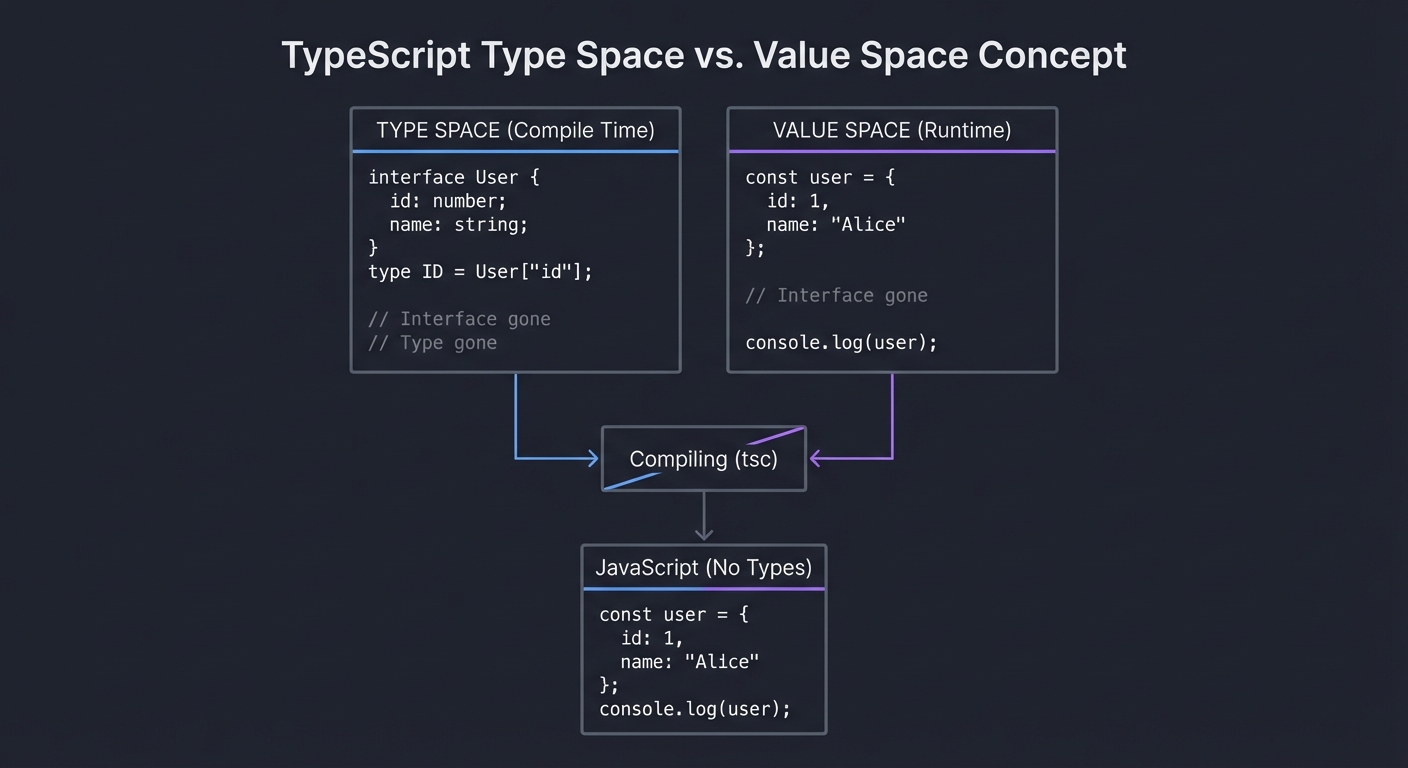
The most confusing part for beginners. TypeScript code exists in two parallel universes that merge during development but separate at runtime.
      TYPE SPACE (Compile Time)           VALUE SPACE (Runtime)
    ┌───────────────────────────┐       ┌───────────────────────┐
    │                           │       │                       │
    │   interface User {        │       │                       │
    │     id: number;           │       │   const user = {      │
    │     name: string;         │       │     id: 1,            │
    │   }                       │       │     name: "Alice"     │
    │   type ID = User["id"];   │       │   };                  │
    │                           │       │                       │
    │   // Interface gone       │       │   // Interface gone   │
    │   // Type gone            │       │   console.log(user)   │
    │                           │       │                       │
    └─────────────┬─────────────┘       └───────────┬───────────┘
                  │                                 │
                  │   Compiling (tsc)               │
                  └─────────────────────────────────┘
                                  │
                                  ▼
                         JavaScript (No Types)
3. Generics: Types as Arguments
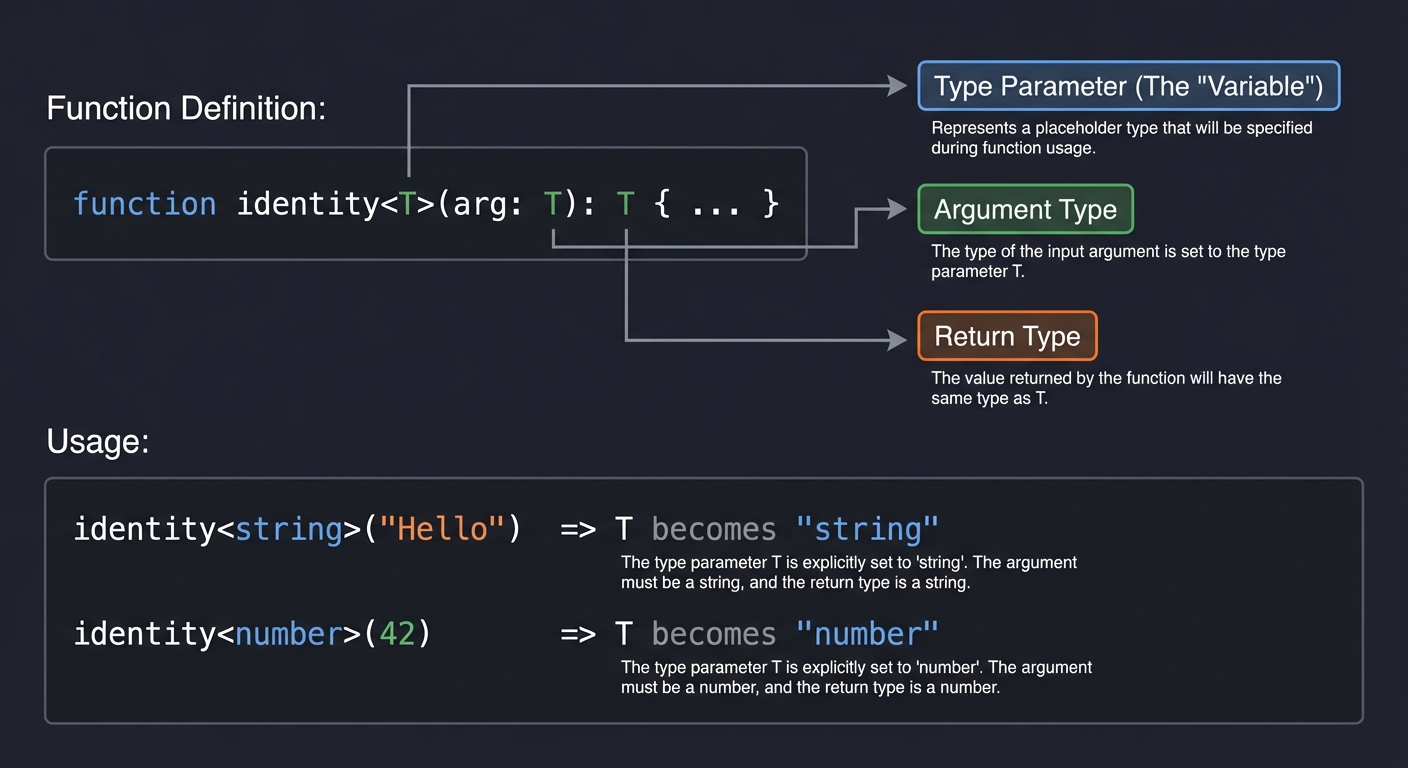
Generics allow you to write reusable code components that work with a variety of types rather than a single one. Think of them as function arguments, but for types.
    Function Definition:
    identity<T>(arg: T): T { ... }
             ^       ^    ^
             │       │    └─ Return Type
             │       └─ Argument Type
             └─ Type Parameter (The "Variable")

    Usage:
    identity<string>("Hello")  => T becomes "string"
    identity<number>(42)       => T becomes "number"
4. Advanced Type Manipulation
TypeScript lets you program with types. You can loop over them, check conditions, and transform them.
- Union:
A | B(A or B) - Intersection:
A & B(Combined features of A and B) - Mapped Types: Iterating over keys (
{ [K in keyof T]: ... }) - Conditional Types:
T extends U ? X : Y(If-statement for types)
5. Control Flow Analysis
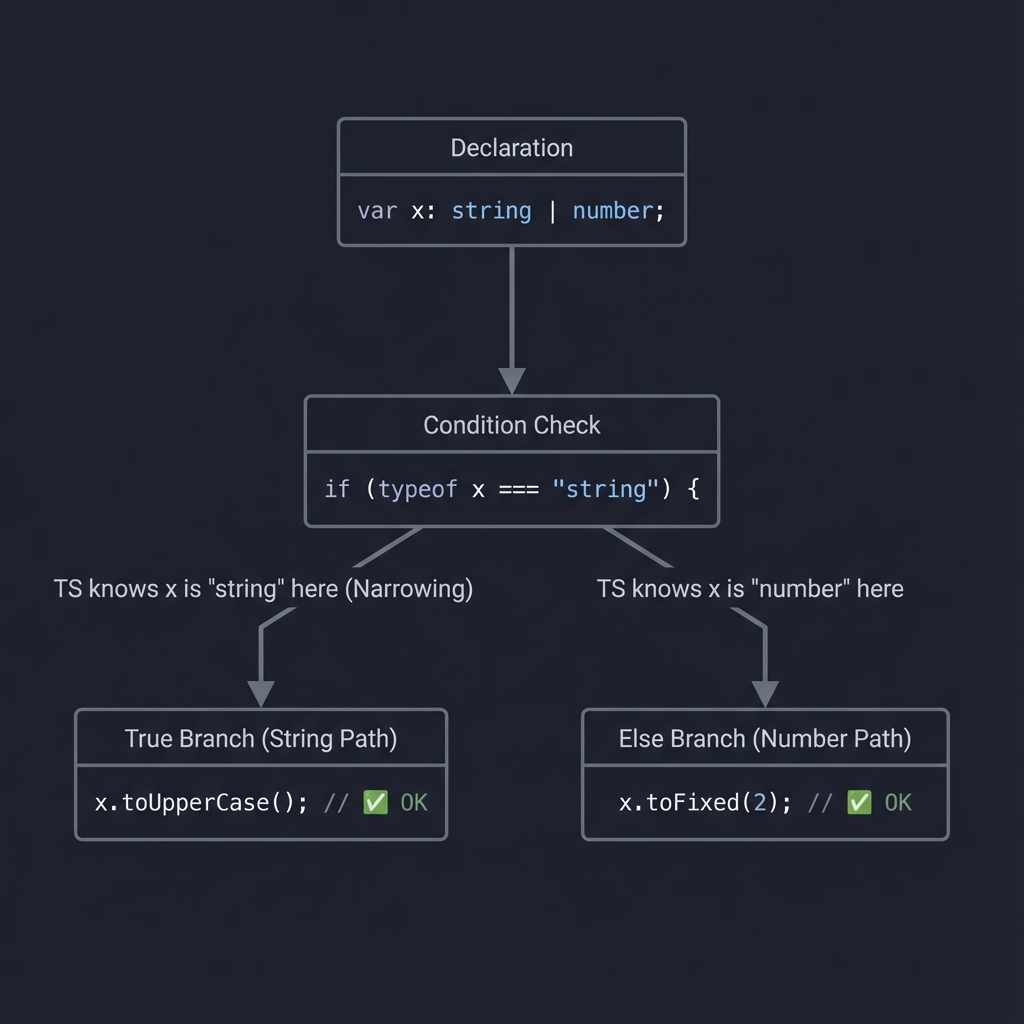
TypeScript reads your code like a flow chart to narrow down types.
    var x: string | number;
           │
           ▼
    if (typeof x === "string") {
        │
        └─ TS knows x is "string" here (Narrowing)
           x.toUpperCase(); // ✅ OK
    } else {
        │
        └─ TS knows x is "number" here
           x.toFixed(2);    // ✅ OK
    }
6. Type Erasure
It is crucial to understand that types are erased. You cannot check if (x instanceof MyInterface) because MyInterface does not exist in the JavaScript output.
Concept Summary Table
| Concept Cluster | What You Need to Internalize |
|---|---|
| Structural Typing | Shape matters more than names. Excess properties are allowed in variables but checked in literals. |
| Type vs. Value | interface, type vanish at runtime. class, enum exist in both spaces. You cannot typeof a type at runtime. |
| Inference | TS tries to guess types. Control flow analysis narrows types (e.g., inside if blocks). |
| Generics | Write code that works on any type while still maintaining relationships between inputs and outputs. |
| Type Guards | Runtime checks that tell the compiler “It’s safe to treat this variable as type X now”. |
| Mapped/Conditional | Meta-programming for types. Transforming types based on logic (e.g., “Make all properties optional”). |
Deep Dive Reading by Concept
| Concept | Book & Chapter |
|---|---|
| Structural Typing | Programming TypeScript by Boris Cherny — Ch. 3 (Types) |
| Generics | Effective TypeScript by Dan Vanderkam — Item 26-27 (Generics usage) |
| Type System Internals | TypeScript Deep Dive (Basarat Ali Syed) — Section: Type System |
| Advanced Types | Programming TypeScript by Boris Cherny — Ch. 6 (Advanced Types) |
| Compiler API | TypeScript Deep Dive — Section: Compiler API |
Essential Reading Order
- Foundation:
- Programming TypeScript, Ch. 3 & 4 (Types, Functions)
- Transformation:
- Programming TypeScript, Ch. 6 (Advanced Types)
- Best Practices:
- Effective TypeScript, Items 1-30
Prerequisites & Background Knowledge
Essential Prerequisites (Must Have)
Before diving into these projects, you should have:
✅ JavaScript Proficiency
- Comfortable with ES6+ features (arrow functions, destructuring, async/await)
- Understanding of closures, scope, and
thisbinding - Experience with Promises and asynchronous patterns
- Familiarity with array/object methods (map, filter, reduce)
✅ Basic Programming Concepts
- Variables, functions, control flow
- Object-oriented programming basics (classes, inheritance)
- Functional programming concepts (pure functions, immutability)
- Understanding of data structures (arrays, objects, maps, sets)
✅ Development Environment
- Node.js installed (v18+ recommended)
- Package manager (npm, yarn, or pnpm)
- Code editor with TypeScript support (VS Code highly recommended)
- Basic terminal/command line familiarity
Helpful But Not Required
These will be learned during the projects:
🔶 Advanced TypeScript Features
- Generic constraints and variance
- Conditional types and
inferkeyword - Template literal types
- Decorator metadata
🔶 Build Tools & Compilation
- Webpack, Vite, or other bundlers
- Module resolution strategies
- Source maps and debugging
🔶 Testing & Quality
- Unit testing frameworks (Jest, Vitest)
- Type testing libraries
- Linting and formatting tools
Self-Assessment Questions
Before starting, ask yourself:
- JavaScript Fundamentals
- Can I explain the difference between
const,let, andvar? - Do I understand how Promises work and why we need
async/await? - Can I write a higher-order function (a function that takes/returns functions)?
- Do I know what
thisrefers to in different contexts?
- Can I explain the difference between
- TypeScript Basics
- Have I written any TypeScript code before (even basic)?
- Do I understand what a type annotation is (
x: number)? - Can I explain the difference between
interfaceandtype? - Do I know what a Generic is (
Array<T>vsArray<string>)?
- Development Skills
- Can I install packages via npm/yarn?
- Do I know how to run a Node.js script?
- Have I used a code editor with autocomplete/IntelliSense?
- Can I read basic error messages and stack traces?
Scoring:
- 10-12 checks: You’re ready to start! Begin with Project 1.
- 6-9 checks: Review JavaScript fundamentals, then start with Project 1.
- 0-5 checks: Spend 1-2 weeks learning JavaScript basics first.
Development Environment Setup
Required Tools
- Node.js & npm (or pnpm/yarn)
# Check installation node --version # Should be v18+ npm --version - TypeScript Compiler
# Install globally (optional but helpful) npm install -g typescript # Check installation tsc --version - VS Code (Recommended Editor)
- Download from https://code.visualstudio.com/
- Extensions to install:
- ESLint - JavaScript/TypeScript linting
- Prettier - Code formatting
- Error Lens - Inline error messages
- TypeScript Importer - Auto-import suggestions
Recommended Tools
- ts-node (Run TypeScript directly)
npm install -g ts-node - Playground Environment
- Official TypeScript Playground: https://www.typescriptlang.org/play
- Use for quick experiments and sharing examples
Project Template
Create a starter template for quick experimentation:
# Create project directory
mkdir ts-experiments && cd ts-experiments

# Initialize npm
npm init -y

# Install TypeScript
npm install --save-dev typescript @types/node

# Create tsconfig.json
npx tsc --init

# Create src directory
mkdir src
Recommended tsconfig.json settings for learning:
{
  "compilerOptions": {
    "target": "ES2022",
    "module": "commonjs",
    "strict": true,
    "esModuleInterop": true,
    "skipLibCheck": true,
    "forceConsistentCasingInFileNames": true,
    "outDir": "./dist",
    "rootDir": "./src"
  }
}
Time Investment Expectations
Be realistic about the time commitment:
| Project Complexity | Time to Build | Time to Master Concepts |
|---|---|---|
| Beginner (Projects 1, 7) | 4-8 hours | 1-2 weeks practice |
| Intermediate (Projects 2, 3) | 8-16 hours | 2-3 weeks practice |
| Advanced (Projects 4, 5, 10) | 16-32 hours | 3-4 weeks practice |
| Expert (Projects 8, 9) | 32-48 hours | 4-6 weeks practice |
| Master (Project 6) | 48-80 hours | 6-8 weeks practice |
Important Notes:
- “Time to Build” is focused coding time
- “Time to Master” includes reading, debugging, and internalizing concepts
- Everyone learns at different speeds - these are estimates
- Getting stuck is normal and part of the learning process
- Some projects require revisiting earlier concepts
Important Reality Check
This learning path is challenging. Here’s what to expect:
❌ Not a Weekend Course
- You won’t “master” TypeScript in a weekend
- Each project requires deep thinking, not just copying code
- Expect to get stuck, frustrated, and confused
✅ Deep Understanding
- You’ll understand WHY TypeScript works the way it does
- You’ll be able to read and write complex library types
- You’ll think differently about type safety and architecture
⚠️ Common Struggles
- Generic inference feels like magic at first (it’s not, but it takes time)
- Compiler errors can be cryptic (learn to read them systematically)
- Type gymnastics (Projects 6, 8) push the limits of the type system
- Debugging types is different from debugging runtime code
💡 Success Strategy
- Start with Project 1 even if it seems “too easy”
- Don’t skip the “Thinking Exercise” sections
- Build each project BEFORE reading the hints
- Get stuck, debug, then read hints
- Use the book references when genuinely confused
- Join TypeScript communities for help (Discord, Reddit, Stack Overflow)
What Success Looks Like
After completing this learning path, you should be able to:
- Read Complex Types
- Understand library type definitions (
node_modules/@types) - Decipher error messages involving generics
- Follow type inference flow through function chains
- Understand library type definitions (
- Write Type-Safe Code
- Create fully typed APIs with zero
anyusage - Design type systems that prevent invalid states
- Use advanced features (mapped types, conditional types) confidently
- Create fully typed APIs with zero
- Debug Type Issues
- Identify why a type error is occurring
- Know when to use type assertions vs type guards
- Navigate compiler error traces
- Architect Systems
- Design module boundaries with proper types
- Set up monorepo configurations
- Choose appropriate type strategies for different scenarios
- Interview Competence
- Answer advanced TypeScript questions
- Explain tradeoffs between type system approaches
- Discuss real-world type system challenges
Quick Start Guide
Feeling overwhelmed? Here’s a streamlined 48-hour introduction before committing to the full learning path:
Day 1: Foundation (4 hours)
Morning (2 hours): TypeScript Basics Refresher
- Read “Programming TypeScript” Ch. 3 (1 hour)
- Try examples in TypeScript Playground (30 min)
- Set up your development environment (30 min)
Afternoon (2 hours): First Taste of Projects
- Start Project 1 (Safe-Fetch) - just read the specification (30 min)
- Try implementing the basic function signature (1 hour)
- Run it, see the type errors, celebrate them! (30 min)
Evening: Reflection
- Did IntelliSense feel magical?
- Did you see how types prevented runtime bugs?
- Are you excited or frustrated? (Both are normal!)
Day 2: Building Confidence (4 hours)
Morning (2 hours): Finish Project 1
- Complete Safe-Fetch implementation (1 hour)
- Test it with real API calls (30 min)
- Read the “Common Pitfalls” section (30 min)
Afternoon (2 hours): Preview Advanced Concepts
- Read Project 2 specification (Universal Validator) (30 min)
- Try to understand the
inferkeyword examples (30 min) - Read “Effective TypeScript” Items 1-5 (1 hour)
Evening: Decision Point
- Can you explain generics to someone?
- Did Project 1 feel achievable?
- Do you want to continue?
Next Steps After 48 Hours
If you’re excited: Continue with Project 2. Plan for 1-2 weeks of focused learning.
If you’re overwhelmed: Take a break. Review JavaScript fundamentals. Come back when ready.
If you’re bored: Jump to Project 6 or 8. Challenge yourself with the hard stuff.
Recommended Learning Paths
Different backgrounds require different approaches. Choose the path that matches your experience:
Path 1: The JavaScript Developer
Background: Strong JS skills, minimal TypeScript experience
Strategy: Build on your JavaScript knowledge
Week 1: Project 1 (Safe-Fetch) + Read Ch. 3-4 of "Programming TypeScript"
Week 2: Project 3 (Event Emitter) - familiar pattern, new types
Week 3: Project 7 (Strict CLI) - practical, immediate value
Week 4: Project 2 (Validator) - introduces advanced patterns
Week 5-6: Project 4 (Immutable Store) - functional programming + types
Week 7-8: Choose Project 5, 6, or 8 based on interest
Focus Areas:
- How types change your design decisions
- Migrating existing JS patterns to TS
- Practical type safety in daily work
Path 2: The Backend Developer
Background: Strong in Java/C#/Go, new to TypeScript
Strategy: Leverage your static typing experience
Week 1: Project 1 + Project 7 (quick wins, familiar concepts)
Week 2: Project 2 (Validator) - similar to class-based validation
Week 3: Project 5 (DI Container) - familiar from Spring/ASP.NET
Week 4: Project 10 (Monorepo) - large-scale architecture
Week 5-6: Project 6 (SQL Builder) - combines DB + types
Week 7-8: Projects 8 or 9 (deep compiler/runtime work)
Focus Areas:
- Structural vs nominal typing differences
- How TS differs from your familiar languages
- Async/Promise patterns in JavaScript ecosystem
Path 3: The Frontend Developer
Background: React/Vue/Angular experience, some TypeScript
Strategy: Go deeper than framework types
Week 1: Project 3 (Event Emitter) - pub/sub patterns
Week 2: Project 9 (Reactivity) - understand framework internals
Week 3: Project 4 (Immutable Store) - state management
Week 4: Project 2 (Validator) - form validation patterns
Week 5-6: Project 10 (Monorepo) - real-world setup
Week 7-8: Project 6 or 8 (push type system limits)
Focus Areas:
- How framework types work under the hood
- Component prop typing patterns
- Build tooling and configuration
Path 4: The Library Author
Background: Building reusable code for others
Strategy: Master type inference and DX
Week 1: Project 2 (Validator) - type inference patterns
Week 2: Project 6 (SQL Builder) - DSL design
Week 3: Project 5 (DI Container) - metadata and reflection
Week 4: Project 8 (AST Linter) - compiler API
Week 5-6: Project 9 (Reactivity) - runtime + compile time magic
Week 7-8: Integrate all patterns into a mini-framework
Focus Areas:
- Developer experience (DX) through types
- Type inference optimization
- Publishing type definitions
Path 5: The Interviewer’s Path
Background: Need to ace TypeScript interviews quickly
Strategy: Focus on commonly asked concepts
Week 1: Projects 1, 3, 7 (fundamentals)
Week 2: Study all "Interview Questions" sections
Week 3: Project 2 (advanced types)
Week 4: Projects 4, 5 (architectural patterns)
Ongoing: Build 2-3 projects for portfolio discussion
Focus Areas:
- Explaining concepts clearly
- Common pitfalls and solutions
- Real-world architectural decisions
Path 6: The Completionist
Background: Want to master everything systematically
Strategy: Linear progression through all projects
Weeks 1-2: Projects 1, 7 (beginners)
Weeks 3-4: Projects 2, 3 (intermediate)
Weeks 5-7: Projects 4, 5, 10 (advanced)
Weeks 8-10: Projects 6, 8, 9 (expert/master)
Weeks 11-12: Final Overall Project (integration)
Focus Areas:
- Deep understanding of every concept
- Building reference implementations
- Teaching others what you’ve learned
Project List
We will build projects that force you to use the type system not just to describe code, but to enforce architecture.
Project 1: The “Safe-Fetch” API Wrapper
- File: TYPESCRIPT_DEEP_DIVE_LEARNING_PROJECTS.md
- Main Programming Language: TypeScript
- Coolness Level: Level 2: Practical but Forgettable
- Business Potential: 2. The “Micro-SaaS / Pro Tool”
- Difficulty: Level 1: Beginner
- Knowledge Area: Generics, Interfaces, Async/Await
- Software or Tool:
fetchAPI (native) - Main Book: “Effective TypeScript” by Dan Vanderkam
What you’ll build: A type-safe wrapper around the browser’s fetch API. It will require the user to define the expected response shape before making a request, and it will return a typed Promise.
Why it teaches Generics: You cannot know what an API returns ahead of time. You need a way to say, “I am fetching a User, so treat the result as a User.” This is the quintessential use case for Generics (<T>).
Core challenges you’ll face:
- Defining a generic function
get<T>(url: string): Promise<T>(maps to Generics) - Handling standardized error responses vs. success data (maps to Union Types)
- Creating a unified configuration object (headers, timeouts) (maps to Interfaces)
Key Concepts:
- Generics: “Programming TypeScript” Ch. 4 - Understanding
<T> - Promises & Async: “Effective TypeScript” Item 25 - Async functions
Difficulty: Beginner
Time estimate: Weekend
Prerequisites: Basic JavaScript fetch, understanding of JSON
Real World Outcome
You will create a library file client.ts. When you import this client into another file (e.g., app.ts) and use it, you will see the following behavior in your IDE (VS Code):
- Create your interface:
interface User { id: number; name: string; email: string; } - Make the call:
const user = await client.get<User>('https://api.example.com/me'); -
Observe the Magic: When you type
user., VS Code will pop up a completion list showing exactlyemail,id, andname.If you try to access a non-existent property:
console.log(user.isAdmin);Result: You will see a red squiggly line under
isAdminand the hover text will read:Property 'isAdmin' does not exist on type 'User'.This confirms that your network response is now strictly typed, preventing you from assuming fields exist when they don’t.
The Core Question You’re Answering
“How do I bridge the gap between the untyped outside world (APIs) and my typed internal code?”
Most bugs happen at the boundaries of your system. This project teaches you how to strictly guard those boundaries.
Concepts You Must Understand First
Stop and research these before coding:
- Generic Functions
- How do I pass a type as an argument?
- Book Reference: “Programming TypeScript” Ch. 4
- Interfaces vs Types
- How do I describe the shape of an object?
- When should I use
interfacevstype?
- Promises
- What is
Promise<T>? - Why does
asyncfunction always return a Promise?
- What is
Questions to Guide Your Design
Before implementing, think through these:
-
Error Handling: How do you represent a failed request? Do you throw an error, or return a Resulttype (SuccessError)? - Defaults: How do you allow the user to override headers while keeping default content-types?
- Methods: Will you have separate methods for
get,post,put, or one masterrequestmethod?
Thinking Exercise
function wrapper<T>(data: any): T {
  return data;
}
Questions while tracing:
- If I call
wrapper<string>(123), TypeScript allows it becausedataisany. How do I prevent this runtime lie? (Hint: You can’t fully at compile time without runtime validation, but you can assert it). - What happens if the API returns
{ "id": "1" }(string) but my interface expectsid: number? (Hint: TypeScript is erased at runtime, so it won’t crash… until you do math on it).
The Interview Questions They’ll Ask
- “Why use
unknowninstead ofanyfor API responses?” - “Explain how Generic Constraints (
T extends object) work.” - “How do you handle JSON parsing errors safely?”
Hints in Layers
Hint 1: Start with a simple function signature: async function http<T>(request: RequestInfo): Promise<T>.
Hint 2: Use the Response body method .json(). Note that .json() returns Promise<any>. You need to cast or assertion this.
Hint 3: Create a custom Error class to handle non-200 HTTP status codes.
Books That Will Help
| Topic | Book | Chapter |
|---|---|---|
| Generics | “Programming TypeScript” | Ch. 4 |
| Any vs Unknown | “Effective TypeScript” | Item 42 |
| Async Functions | “Effective TypeScript” | Item 25 |
Common Pitfalls & Debugging
Problem 1: “Type ‘any’ provides no type safety”
- Symptom: Your IDE shows autocomplete for
user., but lists everything (including non-existent properties) - Why: The
fetch().then(r => r.json())returnsPromise<any>, so TypeScript assumes nothing - Fix: Use
unknowninstead and validate:const data: unknown = await response.json(); // Now validate before using if (isUser(data)) { return data; // TypeScript knows it's User now } - Quick test: Try accessing
user.nonExistentProp- if no error, you’re usinganysomewhere
Problem 2: “Property ‘status’ does not exist on type ‘Response’“
- Symptom: You try to check
response.statusbut TypeScript complains - Why: You might be checking the parsed JSON instead of the Response object
- Fix: Check status BEFORE calling
.json():const response = await fetch(url); if (!response.ok) throw new Error(`HTTP ${response.status}`); const data = await response.json(); // Now parse - Quick test:
console.log(response)- you should see the Response object, not JSON
Problem 3: “Cannot find name ‘T’“
- Symptom: Compiler error saying the generic parameter doesn’t exist
- Why: You forgot to declare
<T>in the function signature - Fix:
function get<T>(url: string): Promise<T>- notice the<T>before parameters - Quick test: Hover over the function name in VS Code - you should see
<T>in the signature
Problem 4: “Argument of type ‘string’ is not assignable to parameter of type ‘never’“
- Symptom: When calling
get<User>(), TypeScript rejects valid arguments - Why: Over-constrained generic (e.g.,
T extends object & string- impossible!) - Fix: Simplify constraints:
T extends objectis usually enough for JSON responses - Quick test: Remove all
extendsconstraints temporarily to isolate the issue
Problem 5: “Type assertion from ‘unknown’ to ‘T’ may be a mistake”
- Symptom: Warning when you do
return data as T - Why: TypeScript knows you’re lying -
datacould be anything - Fix: This is acceptable for a learning project, but in production, use runtime validation (Zod, io-ts)
- Quick test: Pass garbage data (
get<User>('bad-url')) - it will compile but crash at runtime
Project 2: Universal Validator (Runtime Type Checking)
- File: TYPESCRIPT_DEEP_DIVE_LEARNING_PROJECTS.md
- Main Programming Language: TypeScript
- Coolness Level: Level 3: Genuinely Clever
- Business Potential: 4. The “Open Core” Infrastructure
- Difficulty: Level 2: Intermediate
- Knowledge Area: Type Guards, Type Inference, Reflection
- Software or Tool: None (Pure TS)
- Main Book: “Programming TypeScript” by Boris Cherny
What you’ll build: A validation library similar to Zod or io-ts. You will build a system where defining a validator automatically infers the TypeScript type. You define the schema once, and get both runtime validation and compile-time types.
Why it teaches Type Inference: This is the “Holy Grail” of TS libraries. You will learn how to use infer keyword, recursive types, and how to carry types through function calls to drive VS Code’s intellisense.
Core challenges you’ll face:
- Creating a
Schemaclass that knows its own type (maps to Recursive Types) - Implementing
Infer<typeof schema>logic (maps to Conditional Types & infer) - Writing Type Guards that narrow
unknowninput to the schema type (maps to Type Guards)
Key Concepts:
- Type Guards: “Programming TypeScript” Ch. 3 -
iskeyword - Type Inference: “TypeScript Deep Dive” - Type Inference
- Conditional Types: “Programming TypeScript” Ch. 6
Difficulty: Intermediate Time estimate: 1 Week Prerequisites: Project 1, solid understanding of closures
Real World Outcome
You will solve the problem of maintaining duplicate type definitions.
The Experience:
- Define your Schema:
const UserSchema = z.object({ username: z.string(), age: z.number().optional() }); - Extract the Type:
type User = z.infer<typeof UserSchema>;If you hover over
Userin your IDE, you will see:type User = { username: string; age?: number | undefined; } - Validate at Runtime:
If you feed it bad data, your library will throw a runtime error.
try {
    UserSchema.parse({ username: "john", age: "twenty" });
} catch (e) {
    console.log(e.message);
}
Console Output:
Validation Error: Expected number at path 'age', got string.
The Core Question You’re Answering
“How can I make a single definition serve as both my runtime validation logic and my compile-time type definition?”
Concepts You Must Understand First
- User-Defined Type Guards
- How does
function isString(x: any): x is stringwork?
- How does
- The
inferkeyword- How can I extract the return type of a function or the generic argument of a class?
- Recursive Types
- How can a type reference itself (for nested objects)?
Questions to Guide Your Design
- Chaining: How do you implement
.optional()? It needs to change the internal type fromTtoT | undefined. - Nesting: How do you handle
z.object({ address: z.object({ ... }) })? - Type Extraction: How do you access the generic
Tstored inside theValidatorclass from the outside?
Thinking Exercise
type Unwrap<T> = T extends Promise<infer U> ? U : T;
Trace:
- If
TisPromise<string>,infer Ucapturesstring. Result:string. - If
Tisnumber,T extends Promiseis false. Result:number. - Question: How can you use this pattern to extract the type from
Validator<T>?
The Interview Questions They’ll Ask
- “What is the difference between
interfaceandtyperegarding recursion?” - “How do you convert a runtime object literal into a TypeScript type?” (Answer:
typeof) - “Explain how
inferworks in conditional types.”
Hints in Layers
Hint 1: Create a base class Validator<T> that has a parse(input: unknown): T method.
Hint 2: The string() factory function should return new Validator<string>(...).
Hint 3: For objects, the factory will take a map of validators. The return type is the tricky part—you need a Mapped Type: { [K in keyof Input]: Input[K] extends Validator<infer U> ? U : never }.
Books That Will Help
| Topic | Book | Chapter |
|---|---|---|
| Advanced Types | “Programming TypeScript” | Ch. 6 |
| Type Guards | “Effective TypeScript” | Item 19 |
| Conditional Types | “TypeScript Deep Dive” | Conditional Types |
Common Pitfalls & Debugging
Problem 1: “Type instantiation is excessively deep and possibly infinite”
- Symptom: Compiler crashes or shows this error when defining nested object schemas
- Why: Recursive types without a base case can spiral infinitely
- Fix: Add a depth limit or simplify the recursion:
type DeepSchema<T, Depth extends number = 5> = Depth extends 0 ? T : // Base case T extends object ? { [K in keyof T]: DeepSchema<T[K], Prev<Depth>> } : T; - Quick test: Try
z.object({ nested: z.object({ nested: z.object({...}) }) })- should work up to ~10 levels
Problem 2: “Type ‘infer U’ cannot be used in this context”
- Symptom: Error when trying to extract types with
infer - Why:
inferonly works insideextendsclauses of conditional types - Fix: Wrap in a conditional:
T extends Validator<infer U> ? U : never - Quick test: Hover over the extracted type - should show the unwrapped type, not
Validator<...>
Problem 3: “Property ‘parse’ does not exist on type ‘StringValidator | NumberValidator’“
- Symptom: Union types lose common properties
- Why: TypeScript doesn’t automatically find common methods in unions without a shared interface
- Fix: Define a base
Validator<T>interface that all validators implement - Quick test: Create
const v: Validator<any> = z.string()- should work without errors
Problem 4: “Cannot read property ‘optional’ of undefined”
- Symptom: Runtime error when chaining methods like
z.string().optional() - Why: Forgot to return
thisfrom the base validator - Fix: All modifier methods must return
this(or a new instance):optional(): Validator<T | undefined> { return new Validator<T | undefined>(...); } - Quick test: Chain multiple calls:
z.string().optional().nullable()- all should work
Problem 5: “Validation passes but TypeScript shows error”
- Symptom:
UserSchema.parse(data)succeeds, butdata.usernameshows type error - Why: The return type of
parse()is not inferred correctly - Fix: Ensure
parse()returnsT, notunknown:class Validator<T> { parse(input: unknown): T { // validate... return input as T; // After validation } } - Quick test:
const result = schema.parse(data); result.should show autocomplete
Problem 6: “Circular reference when defining object schemas”
- Symptom:
const User = z.object({ friend: User })- Error: ‘User’ is used before defined - Why: Trying to reference the schema while defining it
- Fix: Use
z.lazy()for self-referential types:const User: z.Validator<UserType> = z.object({ friend: z.lazy(() => User).optional() }); - Quick test: Define a linked list schema - should handle recursive structures
Project 3: The “Magic” Event Emitter (Typed Events)
- File: TYPESCRIPT_DEEP_DIVE_LEARNING_PROJECTS.md
- Main Programming Language: TypeScript
- Coolness Level: Level 2: Practical
- Business Potential: 3. Service & Support
- Difficulty: Level 2: Intermediate
- Knowledge Area: Mapped Types, Keyof, Tuple Types
- Software or Tool: Node.js EventEmitter
- Main Book: “Effective TypeScript” by Dan Vanderkam
What you’ll build: A type-safe Event Emitter where the event name determines the type of the payload arguments. You will prevent users from emitting “userLogin” with a string if it expects a User object.
Why it teaches Mapped Types: You need to map a set of event names (keys) to their expected argument lists (values). You will use keyof, lookup types, and tuple types to enforce strict argument lists.
Core challenges you’ll face:
- Defining a type map for events (e.g.,
{ login: User, logout: void }) - Restricting the
onandemitmethods to only use valid keys from that map (maps to keyof) - Typing the arguments as a tuple based on the event key (maps to Tuple Types and Rest Parameters)
Key Concepts:
- keyof Operator: “Programming TypeScript” Ch. 6
- Indexed Access Types:
T[K]syntax - Rest Parameters:
...args: T
Difficulty: Intermediate Time estimate: Weekend Prerequisites: Understanding of Pub/Sub pattern
Real World Outcome
You will create a robust TypedEmitter class. The main outcome is compile-time safety for event-driven architectures.
The Experience:
- Setup:
type AppEvents = { 'user-login': [string, number]; // username, id 'error': [Error]; }; const bus = new TypedEmitter<AppEvents>(); - Trying to emit wrong arguments:
bus.emit('user-login', 'alice'); // Missing argument!Result: VS Code underlines the line in red. Error Message:
Expected 3 arguments, but got 2.(The method + 2 args). - Trying to listen to wrong events:
bus.on('user-logggggin', () => {}); // Typo!Result: Red squiggly line. Error Message:
Argument of type '"user-logggggin"' is not assignable to parameter of type '"user-login" | "error"'.
The Core Question You’re Answering
“How do I enforce dependencies between function arguments?” (i.e., If arg1 is “A”, arg2 must be “TypeA”).
Concepts You Must Understand First
- Lookup Types (
T[K])- How do I get the type of a property by its name?
- Rest parameters with tuples
- How does
(...args: [string, number])work? - Why are tuples distinct from arrays in TS?
- How does
Questions to Guide Your Design
- Generic Class: The
TypedEmitterclass needs a Generic parameter<TEvents>to define the map. - Method Signatures: How do you write the
onmethod?on<K extends keyof TEvents>(event: K, listener: (...args: TEvents[K]) => void): void. - Underlying Implementation: Can you just extend the Node.js
EventEmitterand cast it?
Thinking Exercise
type EventMap = { foo: number; bar: string };
type Keys = keyof EventMap; // "foo" | "bar"
Question: How do I write a function that takes a key K and a value V, where V must match EventMap[K]?
The Interview Questions They’ll Ask
- “How do you type variable-length arguments in TypeScript?”
- “What is the difference between
[string, number](tuple) and(string | number)[](array)?” - “Why do we need
keyofoperator?”
Hints in Layers
Hint 1: Define the generic class class TypedEmitter<T extends Record<string, any[]>>. The constraint ensures the map values are arrays (arguments).
Hint 2: Use keyof T to restrict the event name argument.
Hint 3: Use T[K] to extract the specific argument tuple for that event.
Books That Will Help
| Topic | Book | Chapter |
|---|---|---|
| Mapped Types | “Programming TypeScript” | Ch. 6 |
| Tuples | “Effective TypeScript” | Item 29 |
Common Pitfalls & Debugging
Problem 1: “Type ‘() => void’ is not assignable to type ‘(…args: [string, number]) => void’“
- Symptom: Listener function signature doesn’t match expected arguments
- Why: You declared
AppEvents = { 'login': [string, number] }but listener ignores args - Fix: Listener must accept ALL args:
bus.on('login', (username, id) => { ... }) - Quick test: Try
bus.on('login', () => {})- should error if types are strict
Problem 2: “Argument of type ‘string’ is not assignable to parameter of type ‘keyof TEvents’“
- Symptom: Can’t pass event name as a variable
- Why: TypeScript lost track that the variable is a valid key
- Fix: Use type assertion or generic helper:
function emit<K extends keyof TEvents>(event: K, ...args: TEvents[K]) {...} - Quick test:
const e = 'login'; bus.emit(e, ...)- should work with proper generic
Problem 3: “Expected 2 arguments, but got 3”
- Symptom: Passing correct args but TypeScript counts wrong
- Why: Tuple spread isn’t working - check if using
...args: Tvs...args: T[] - Fix: Ensure
TEvents[K]is an array/tuple:...args: TEvents[K] extends any[] ? TEvents[K] : never - Quick test:
bus.emit('login', 'alice', 123)- exact count should match tuple length
Problem 4: “Property ‘emit’ does not exist on type ‘EventEmitter’“
- Symptom: Can’t call methods on your emitter after creating it
- Why: Generic type was lost during instantiation
- Fix:
new TypedEmitter<AppEvents>()- don’t forget the generic argument - Quick test: Hover over
bus- should showTypedEmitter<AppEvents>, not plainTypedEmitter
Project 4: Immutable State Store (Redux Clone)
- File: TYPESCRIPT_DEEP_DIVE_LEARNING_PROJECTS.md
- Main Programming Language: TypeScript
- Coolness Level: Level 3: Clever
- Business Potential: 4. Open Core Infrastructure
- Difficulty: Level 3: Advanced
- Knowledge Area: Readonly, DeepReadonly, Recursive Types
- Software or Tool: React (optional, for demo)
- Main Book: “Programming TypeScript” by Boris Cherny
What you’ll build: A state management library like Redux or Zustand. The twist: it must enforce Immutability at the type level. You will implement a DeepReadonly type that recursively prevents modification of nested properties, and a produce function (like Immer) that allows safe updates.
Why it teaches Modifiers: You will master readonly, mapped modifiers (-readonly, +readonly), and recursive type definitions. You’ll also learn how to type Higher Order Functions (reducers).
Core challenges you’ll face:
- creating a
DeepReadonly<T>type that drills down into objects and arrays (maps to Recursive Mapped Types) - Typing a reducer function
(state: T, action: Action) => T - Ensuring
subscribelisteners get the correct state slice
Key Concepts:
- Readonly Modifier: “Programming TypeScript” Ch. 6
- Recursive Types: Defining a type that references itself
Difficulty: Advanced Time estimate: 1-2 Weeks Prerequisites: Project 2, Functional Programming basics
Real World Outcome
You will create a global store where accidental state mutation is flagged as a compile error.
The Experience:
- Initialize Store:
const store = createStore({ settings: { theme: "dark" } }); - Attempt Mutation:
const state = store.getState(); state.settings.theme = "light"; // Direct mutation! -
The Result: VS Code will underline
themein red. Error Message:Cannot assign to 'theme' because it is a read-only property.This proves your
DeepReadonlytype has successfully drilled down into the nestedsettingsobject and locked it.
The Core Question You’re Answering
“How do I use the type system to enforce functional programming paradigms like immutability?”
Concepts You Must Understand First
- Mapped Types with Modifiers
- What does
readonly [P in keyof T]: T[P]do?
- What does
- Recursion in Types
- How do I handle the case where
T[P]is an object itself?
- How do I handle the case where
- Conditional Types
- How do I detect if
T[P]is an array, object, or primitive?
- How do I detect if
Questions to Guide Your Design
- Arrays:
readonly T[]vsReadonlyArray<T>. How do you make the contents of the array readonly too? - Actions: How do you define a Discriminated Union of actions?
type Action = { type: "ADD" } | { type: "REMOVE" }. - Performance: Does deep recursion kill the compiler? (Limit depth if needed).
Thinking Exercise
type ReadonlyPoint = { readonly x: number; readonly y: number };
Question: Can I assign a Point (mutable) to a ReadonlyPoint? (Yes, because ReadonlyPoint is a “wider” type in terms of permissions—it asks for at least read access, which Point provides).
Question: Can I assign a ReadonlyPoint to a Point? (No. Point demands write access, which ReadonlyPoint cannot promise).
The Interview Questions They’ll Ask
- “Explain how
constassertions (as const) differ fromreadonlyproperties.” - “How do you remove the
readonlymodifier from a type using mapped types?” (Answer:-readonly). - “What are the caveats of
ReadonlyArray?”
Hints in Layers
Hint 1: DeepReadonly<T> needs to check if T is an object. If so, map over keys and apply DeepReadonly to values.
Hint 2: Don’t forget to handle functions! You don’t want to make function properties readonly in a way that breaks calling them (though usually state is plain data).
Hint 3: Use T extends (...args: any[]) => any ? T : ... to exclude functions from recursion.
Books That Will Help
| Topic | Book | Chapter |
|---|---|---|
| Immutability | “Effective TypeScript” | Item 17 |
| Mapped Modifiers | “Programming TypeScript” | Ch. 6 |
| Readonly | “Programming TypeScript” | Ch. 3 |
Common Pitfalls & Debugging
Problem 1: “Index signature is missing in type ‘Readonly<…>’“
- Symptom: Can’t iterate over readonly object with
for...inorObject.keys() - Why:
Readonlyremoves index signatures by default - Fix: Add index signature back:
type ReadonlyWithIndex<T> = Readonly<T> & { [key: string]: any } - Quick test: Try
Object.keys(state)- should work without errors
Problem 2: “Cannot assign to ‘X’ because it is a read-only property” but I WANT to assign it
- Symptom: Inside reducer, can’t update state even though that’s the point
- Why: Returning the original state object which is readonly
- Fix: Reducer must return a NEW object:
return { ...state, count: state.count + 1 } - Quick test: Use
Object.is(oldState, newState)- should befalse
Problem 3: “Type instantiation is excessively deep” with DeepReadonly
- Symptom: Compiler hangs or crashes with deeply nested objects
- Why: Recursive type has no depth limit
- Fix: Add depth parameter:
type DeepReadonly<T, D extends number = 10> = D extends 0 ? T : ... - Quick test: Try 20-level nesting - should still compile (slowly)
**Problem 4: “Type ‘Date’ is not assignable to type ‘Readonly
- Symptom: Readonly breaks mutable objects like Date, Map, Set
- Why: You need special handling for built-in mutable types
- Fix: Exclude them:
T extends Date | Map<any, any> | Set<any> ? T : DeepReadonly<T> - Quick test: Add
createdAt: Dateto state - should not make Date properties readonly
Project 5: The “Hackable” Decorator System (Dependency Injection)
- File: TYPESCRIPT_DEEP_DIVE_LEARNING_PROJECTS.md
- Main Programming Language: TypeScript
- Coolness Level: Level 4: Tech Flex
- Business Potential: 5. Industry Disruptor (Framework potential)
- Difficulty: Level 3: Advanced
- Knowledge Area: Decorators, Metadata Reflection, Class Architecture
- Software or Tool:
reflect-metadatalibrary - Main Book: “TypeScript Deep Dive” by Basarat Ali Syed
What you’ll build: A lightweight Dependency Injection (DI) container similar to Angular’s or NestJS’s. You will use decorators like @Service() and @Inject() to automatically wire up class dependencies at runtime using metadata.
Why it teaches Metaprogramming: Decorators are how you modify or annotate classes/methods at design time. You’ll learn about the emitDecoratorMetadata compiler option and how TS stores type information that can be read at runtime.
Core challenges you’ll face:
- Implementing Class Decorators (
@Service) to register classes in a container (maps to Class Decorators) - Implementing Parameter Decorators (
@Inject) to specify dependencies (maps to Parameter Decorators) - Using
Reflect.getMetadatato read the types of constructor arguments (maps to Reflection)
Key Concepts:
- Decorators: Experimental feature (standardized in newer TS versions, but legacy often used for DI).
- Reflection: Accessing type data at runtime.
Difficulty: Advanced Time estimate: 1 Week Prerequisites: Understanding of OOP and Inversion of Control (IoC)
Real World Outcome
You will create a script main.ts where you never use the word new to instantiate your services.
The Experience (Console Output):
When you run ts-node main.ts, you will see:
$ ts-node main.ts

[Container] Registering Service: Logger
[Container] Registering Service: UserService
[Container] Resolving UserService...
[Container]   - Found dependency at index 0: Logger
[Container]   - Resolving Logger...
[Container]   - Logger instantiated.
[Container] UserService instantiated with dependencies [Logger].
LOG: User saved successfully!
You will see the container recursively resolving the dependency graph purely based on the metadata emitted by your decorators.
The Core Question You’re Answering
“How can I write code that inspects itself and manages its own dependencies?”
Concepts You Must Understand First
- Decorator Factories
- Functions that return functions.
tsconfig.jsonsettings- You MUST enable
experimentalDecoratorsandemitDecoratorMetadata.
- You MUST enable
- Reflection API
- What is
Reflect.defineMetadataandReflect.getMetadata?
- What is
Questions to Guide Your Design
- Singleton vs Transient: How do you store instances? Should
@Service({ scope: 'transient' })create a new instance every time? - Circular Dependencies: What happens if A needs B and B needs A? (Classic DI nightmare).
- Testing: How does DI make testing easier? (Mocking).
Thinking Exercise
Trace the execution order:
- Decorators run (when file loads).
- Constructor runs (when instantiated). In what order are the decorators applied? (Bottom-up, Right-to-left).
The Interview Questions They’ll Ask
- “What is the difference between Stage 2 (legacy) decorators and Stage 3 (standard) decorators?”
- “How does TypeScript emit type metadata for reflection?”
- “What is Inversion of Control?”
Hints in Layers
Hint 1: The container needs a Map<Constructor, Instance>.
Hint 2: The @Service decorator should save the class constructor into a registry.
Hint 3: The resolve<T>(target: Constructor<T>) method needs to look up design:paramtypes using Reflect.getMetadata.
Books That Will Help
| Topic | Book | Chapter |
|---|---|---|
| Decorators | “Programming TypeScript” | Ch. 8 (Classes) / Appendix |
| Reflection | “TypeScript Deep Dive” | Reflection |
| DI Patterns | “Clean Architecture” | Dependency Inversion Principle |
Common Pitfalls & Debugging
Problem 1: “Unable to resolve signature of class decorator when called as an expression”
- Symptom: TypeScript rejects your decorator function
- Why: Decorator signature doesn’t match expected
ClassDecoratortype - Fix:
function Service() { return function<T extends {new(...args:any[]):{}}>(constructor:T) {...} } - Quick test: Apply
@Service()to a class - should compile without errors
Problem 2: “experimentalDecorators must be enabled”
- Symptom: Decorators don’t work at all
- Why: Forgot to enable in
tsconfig.json - Fix: Add to
compilerOptions:"experimentalDecorators": true, "emitDecoratorMetadata": true - Quick test:
tsc --showConfig- should show both flags astrue
Problem 3: “design:paramtypes metadata is undefined”
- Symptom:
Reflect.getMetadata('design:paramtypes')returnsundefined - Why: Either metadata not emitted or
reflect-metadatanot imported - Fix: Import at entry point:
import 'reflect-metadata';AND enableemitDecoratorMetadata - Quick test: Print metadata in decorator - should show array of constructor param types
Problem 4: “Maximum call stack size exceeded” when resolving dependencies
- Symptom: Circular dependency causes infinite loop
- Why: A depends on B, B depends on A
- Fix: Add circular dependency detection in container or redesign dependencies
- Quick test: Create A→B→A cycle - container should throw descriptive error
Problem 5: “Cannot find name ‘Logger’ in parameter decorator”
- Symptom: Parameter decorators execute before the class definition
- Why: Decorators run at decoration time, not instantiation time
- Fix: Use
() => Logger(lazy evaluation) or string tokens - Quick test: Reference class in its own decorator - should use token, not class reference
Project 6: Type-Safe SQL Query Builder (Template Literal Types)
- File: TYPESCRIPT_DEEP_DIVE_LEARNING_PROJECTS.md
- Main Programming Language: TypeScript
- Coolness Level: Level 5: Pure Magic
- Business Potential: 5. Industry Disruptor
- Difficulty: Level 5: Master
- Knowledge Area: Template Literal Types, Conditional Types, infer
- Software or Tool: SQL (Just strings)
- Main Book: “Effective TypeScript” by Dan Vanderkam
What you’ll build: A tool that parses SQL strings at compile time and generates the return type of the query.
Example: query("SELECT id, name FROM users") -> returns Pick<User, "id" | "name">[].
Why it teaches Template Literal Types: This is the peak of TypeScript’s type system capabilities. You will treat string types as parsable sequences, splitting strings by spaces or commas using infer and recursive conditional types.
Core challenges you’ll face:
- Parsing a string type:
Parse<"SELECT id FROM users">(maps to Template Literal Types) - Splitting strings: Implementing a type-level
Split<Str, Delimiter>(maps to Recursive Types) - Mapping SQL columns to TS object keys (maps to Mapped Types)
Key Concepts:
- Template Literal Types: TS 4.1+ feature allowing
${string}manipulation. - Intrinsic String Manipulation:
Uppercase,Lowercase, etc.
Difficulty: Master Time estimate: 2-3 Weeks Prerequisites: Project 2 & 4, Extreme patience with compiler errors.
Real World Outcome
You write raw SQL strings, and TypeScript understands them better than your database client.
The Experience:
- Define DB Schema:
interface DB { users: { id: number; name: string; age: number }; } - Write Query:
const result = query("SELECT name FROM users"); -
Inspect Result: Hover over
result. You will see:const result: { name: string }[] - Try Invalid Access:
console.log(result[0].age);Result: VS Code Error:
Property 'age' does not exist on type '{ name: string; }'.The compiler correctly analyzed that your SQL string only requested the
namecolumn, soageis not available at runtime.
The Core Question You’re Answering
“Can the type system parse a specific Domain Specific Language (DSL) inside string literals?”
Concepts You Must Understand First
- String Pattern Matching
T extends "SELECT ${infer Cols} FROM ${infer Table}" ? ...
- Recursive String Parsing
- How to loop through a comma-separated string type.
Questions to Guide Your Design
- Complexity Limit: TypeScript has a recursion limit (around 50-100 levels). How do you keep the parser simple enough not to crash the compiler?
- Whitespace: How do you handle
SELECT id(double space)? You need aTrim<T>type utility. - Star Select: How do you handle
SELECT *? (Return all columns).
Thinking Exercise
type TrimLeft<S extends string> = S extends ` ${infer R}` ? TrimLeft<R> : S;
Trace: TrimLeft<" hello">
- Matches ` ` + ` hello
. Recurse withhello`. - Matches ` ` + ` hello
. Recurse withhello`. - Matches ` ` +
hello. Recurse withhello. - No match. Return
hello.
The Interview Questions They’ll Ask
- “What are intrinsic string manipulation types in TypeScript?”
- “How would you create a
KebabCase<T>utility type?” - “What are the performance implications of complex recursive types?”
Hints in Layers
Hint 1: Start small. Just parse SELECT * FROM table.
Hint 2: Implement Split<S, D> first. S extends ${infer Head}${D}${infer Tail} ? Head | Split<Tail, D> : S.
Hint 3: Build a PickColumns utility that takes the DB schema and the union of column names extracted from the parse step.
Books That Will Help
| Topic | Book | Chapter |
|---|---|---|
| Template Literals | “Learning TypeScript” | Strings |
| Recursive Types | “Effective TypeScript” | Item 50+ (later editions) |
Common Pitfalls & Debugging
Problem 1: “Expression produces a union type that is too complex to represent”
- Symptom: Compiler gives up on parsing your SQL string type
- Why: Too many branches in conditional types (exponential growth)
- Fix: Simplify - start with just
SELECT col FROM tablebefore adding WHERE/JOIN/etc - Quick test: Parse
"SELECT * FROM users"- if this fails, your parser is too complex
Problem 2: “Type ‘string’ does not satisfy the constraint ‘SELECT…’“
- Symptom: Can’t pass SQL string to your query function
- Why: Runtime string isn’t narrowed to literal type
- Fix: Use
as const:const sql = "SELECT id FROM users" as const; query(sql); - Quick test: Without
as const, hover over sql - should showstring, not literal
Problem 3: “Expected 0 type arguments, but got 1”
- Symptom: Your
queryfunction doesn’t accept generics as expected - Why: Generic parameter not declared or conditional
- Fix:
function query<T extends string>(sql: T): ParseQuery<T>- make T explicit - Quick test:
query<"SELECT id FROM users">(...)- should work with generic
Problem 4: “Property ‘age’ does not exist on type ‘Pick<User, “id” | “name”>’” - but age IS in the table
- Symptom: Parser didn’t extract the right columns
- Why: Column name parsing failed (whitespace, case sensitivity, etc.)
- Fix: Add
TrimandLowercaseutilities to normalize before parsing - Quick test: Try
"SELECT id "(extra spaces) - should still extract ‘id’
Problem 5: “Type instantiation is excessively deep and possibly infinite” - again!
- Symptom: Recursive string parsing hits depth limit
- Why: TypeScript limits recursion to ~50 levels
- Fix: Accept the limit - document maximum SQL complexity or use runtime parsing
- Quick test: Parse a 100-column SELECT - compiler will fail (that’s OK for a learning project)
Project 7: The “Strict” CLI (Zod + Inquirer + Discriminated Unions)
- File: TYPESCRIPT_DEEP_DIVE_LEARNING_PROJECTS.md
- Main Programming Language: TypeScript
- Coolness Level: Level 3: Clever
- Business Potential: 2. Pro Tool
- Difficulty: Level 2: Intermediate
- Knowledge Area: Discriminated Unions, Control Flow Analysis
- Software or Tool: Node.js, Commander/Inquirer
- Main Book: “Programming TypeScript” by Boris Cherny
What you’ll build: A CLI configuration wizard (like npm init) that asks conditional questions. If the user selects “Database: Postgres”, the next question asks for “Port” (number). If they select “SQLite”, it asks for “File Path” (string). The final config object must be strictly typed based on these choices.
Why it teaches Discriminated Unions: You need to model state where the shape of the data changes based on a specific field (the “discriminant”). This is the pattern for handling varied states (Loading vs Success vs Error) or varied configs.
Core challenges you’ll face:
- Defining a Union type
PostgresConfig | SqliteConfig - Using the
kindortypeproperty to narrow the type (maps to Discriminated Unions) - Ensuring the runtime prompts match the compile-time types (maps to Exhaustiveness Checking)
Key Concepts:
- Discriminated Unions: The “Tag” pattern.
- Exhaustiveness Checking: Using
neverto ensure all cases are handled.
Difficulty: Intermediate Time estimate: Weekend Prerequisites: Basic CLI experience
Real World Outcome
You will run your CLI and interact with it.
The Experience (Terminal Session):
$ ts-node cli.ts

? Select your database type:
  > Postgres
    SQLite

# User selects Postgres

? Enter Postgres Port: 5432
? Enter Hostname: localhost

# Program Output:
Configuration saved:
{
  "type": "postgres",
  "port": 5432,
  "host": "localhost"
}
The Code Experience: Inside your code, handling the config object becomes strictly typed:
if (config.type === 'sqlite') {
    console.log(config.port); // Error: Property 'port' does not exist on type 'SqliteConfig'.
}
The Core Question You’re Answering
“How do I model data that can be one of several different shapes, and safely distinguish between them?”
Concepts You Must Understand First
- The
nevertype- How to use it to ensure a switch statement covers all cases.
- Union Types
- Why is
A | Bless specific thanA?
- Why is
Questions to Guide Your Design
- Scalability: If I add
MysqlConfig, does the compiler force me to update the wizard logic? (It should). - Validation: How do you validate the user input for “Port” is actually a number?
Thinking Exercise
function assertNever(x: never): never {
  throw new Error("Unexpected object: " + x);
}
Trace: How does calling this in the default block of a switch statement enforce exhaustiveness? If you forget a case, the default block receives a type that is NOT never, causing a compile error.
The Interview Questions They’ll Ask
- “What is a Discriminated Union and why is it preferred over optional properties?”
- “What is the purpose of the
nevertype in control flow analysis?” - “How does TypeScript narrow types?”
Hints in Layers
Hint 1: Define the interface for each config type separately, then Union them.
Hint 2: Ensure every interface has a common literal property (e.g., type: 'postgres').
Hint 3: In your prompt logic, use a switch on type to decide the next questions.
Books That Will Help
| Topic | Book | Chapter |
|---|---|---|
| Unions | “Programming TypeScript” | Ch. 3 |
| Control Flow | “Effective TypeScript” | Item 22 |
Common Pitfalls & Debugging
Problem 1: “Property ‘port’ does not exist on type ‘PostgresConfig | SqliteConfig’“
- Symptom: Can’t access union-specific properties without narrowing
- Why: TypeScript only allows access to common properties of all union members
- Fix: Check discriminant first:
if (config.type === 'postgres') { config.port ... } - Quick test: Before narrowing, try
config.port- should error
Problem 2: “Argument of type ‘DbConfig’ is not assignable to parameter of type ‘never’“
- Symptom: Default case in switch receives
neverbut you pass the config - Why: You forgot to handle all union cases
- Fix: Add missing case:
case 'mysql': ...or remove exhaustiveness check temporarily - Quick test: Add new config type to union - switch should error until you handle it
Problem 3: “Type ‘string’ is not assignable to type ‘“postgres” | “sqlite”’“
- Symptom: User input isn’t narrowing to literal type
- Why: Runtime value is
string, not literal - Fix: Validate input:
const type = input as 'postgres' | 'sqlite'AFTER runtime check - Quick test: Get user input, try assigning to config - needs validation first
Problem 4: “Property ‘host’ is declared but its value is never read”
- Symptom: Warning after adding property to config type
- Why: You collected the data but didn’t use it in config object
- Fix: Ensure switch returns config with all properties:
{ type: 'postgres', host, port } - Quick test: Check returned config object - should have all fields
Project 8: The Abstract Syntax Tree (AST) Linter
- File: TYPESCRIPT_DEEP_DIVE_LEARNING_PROJECTS.md
- Main Programming Language: TypeScript
- Coolness Level: Level 4: Tech Flex
- Business Potential: 3. Service & Support (Custom enterprise rules)
- Difficulty: Level 4: Expert
- Knowledge Area: Compiler API, AST, Visitors
- Software or Tool:
typescript(compiler package) - Main Book: “TypeScript Deep Dive” (Compiler section)
What you’ll build: A custom linting tool that enforces a specific architectural rule. Example: “Public class methods must return a Promise”. You will not use Regex; you will parse the code into an AST and inspect the nodes.
Why it teaches Compiler Internals: To really master TS, you should understand how it sees your code. The AST (Abstract Syntax Tree) is that representation. You will use the actual TypeScript Compiler API.
Core challenges you’ll face:
- Setting up the TS Compiler API to parse a file (maps to Compiler API)
- Traversing the tree (Visitor pattern) (maps to AST Traversal)
- Identifying specific nodes (e.g.,
ts.isMethodDeclaration) (maps to Type Guards)
Key Concepts:
- AST: Tree representation of source code.
- Scanner/Parser: How text becomes tokens, and tokens become trees.
Difficulty: Expert Time estimate: 1-2 Weeks Prerequisites: Strong recursion skills
Real World Outcome
You will run your linter against a sample file with known “bad” code.
The Experience (Terminal Output):
$ node my-linter.js ./src/legacy-code.ts

Linting ./src/legacy-code.ts...

[Error] Line 15, Column 4:
    public getUser(id: number): User {
    ^^^^^^^^^^^^^^^^^^^^^^^^^^^^^^^^^^
    Rule Violation: All public methods in this project must return a Promise<T>.
    Reason: We are migrating to an async architecture.

Found 1 error.
The Core Question You’re Answering
“How does TypeScript actually understand my code?”
Concepts You Must Understand First
- Tree Data Structures
- Nodes, Children, Parents.
- Visitor Pattern
- Walking a tree.
- Compiler Phases
- Scanner -> Parser -> Binder -> Checker -> Emitter.
Questions to Guide Your Design
- Scope: How do you distinguish between a public method and a private one? (Check
modifiersarray on the node). - Types: Do you need the Type Checker, or just the AST? (Just AST for syntax checks, Checker for type checks).
Thinking Exercise
Explore the TypeScript AST Viewer. Paste some code and see the tree.
Task: Find the node type for export class Foo {}. It is a ClassDeclaration with a modifiers array containing ExportKeyword.
The Interview Questions They’ll Ask
- “What is the difference between the AST and the Symbol Table?”
- “How does TypeScript resolve module imports internally?”
- “What is a SourceFile in TS API?”
Hints in Layers
Hint 1: Use ts.createSourceFile to parse text into an AST.
Hint 2: Write a recursive function visit(node: ts.Node) that calls ts.forEachChild(node, visit).
Hint 3: Inside visit, check ts.isMethodDeclaration(node).
Books That Will Help
| Topic | Book | Chapter |
|---|---|---|
| Compiler API | “TypeScript Deep Dive” | Compiler |
| Visitors | “Design Patterns” (GoF) | Visitor |
Common Pitfalls & Debugging
Problem 1: “Cannot find module ‘typescript’“
- Symptom: Import statement fails
- Why: TypeScript package not installed as dependency (not just devDependency)
- Fix:
npm install typescript(not--save-dev) - you need runtime access to compiler API - Quick test:
import * as ts from 'typescript'; console.log(ts.version);should work
Problem 2: “Property ‘forEachChild’ does not exist on type ‘Node’“
- Symptom: Can’t traverse the AST
- Why: Using wrong Node type (DOM Node vs ts.Node)
- Fix: Import from TS:
import { Node } from 'typescript'becomesimport * as ts from 'typescript'; ... ts.Node - Quick test: Hover over
Node- should show fromtypescriptmodule, not DOM
Problem 3: “SourceFile is undefined”
- Symptom:
ts.createSourceFile()returns undefined - Why: Wrong arguments (missing ScriptTarget or file content)
- Fix:
ts.createSourceFile('file.ts', sourceCode, ts.ScriptTarget.Latest, true) - Quick test: Parse
"const x = 1;"- should return SourceFile object
Problem 4: “How do I check if a node is a specific type?”
- Symptom: Conditional checks don’t work as expected
- Why: Need type guard functions, not
instanceof - Fix: Use
ts.isMethodDeclaration(node)instead ofnode instanceof MethodDeclaration - Quick test: All node checks should use
ts.is*functions
Problem 5: “Visitor function called thousands of times”
- Symptom: Performance issue or infinite loop
- Why: Recursively visiting children of every node (including tokens/trivia)
- Fix: Add early returns:
if (!ts.isClassDeclaration(node)) { ts.forEachChild(node, visit); return; } - Quick test: Add counter, parse large file - should visit nodes only, not every token
Project 9: Reactivity System (Proxies & Reflect)
- File: TYPESCRIPT_DEEP_DIVE_LEARNING_PROJECTS.md
- Main Programming Language: TypeScript
- Coolness Level: Level 4: Tech Flex
- Business Potential: 5. Industry Disruptor (Framework)
- Difficulty: Level 4: Expert
- Knowledge Area: Proxies, Generics, Recursive Types
- Software or Tool: JS Proxy API
- Main Book: “Effective TypeScript” by Dan Vanderkam
What you’ll build: A fine-grained reactivity system like Vue 3’s reactive() or SolidJS’s signals. You will wrap objects in ES6 Proxies to intercept reads/writes, track dependencies, and trigger effects. Crucially, the proxy must be fully typed—reactive<T>(obj: T): T—maintaining deep property access types.
Why it teaches Proxies & Types: Proxies are powerful but notoriously hard to type correctly because they change runtime behavior. You’ll learn to model “transparent” wrappers that maintain original types while adding side effects.
Core challenges you’ll face:
- Typing the
Proxyhandler to ensure strict adherence to the target object’s shape - Handling deep reactivity (wrapping nested objects recursively)
- Typing the
effect(() => void)system
Key Concepts:
- ES6 Proxies: Intercepting operations.
- Recursive Types: Handling nested objects.
Difficulty: Expert Time estimate: 1 Week Prerequisites: Deep understanding of JS runtime
Real World Outcome
You will see your “magic” variable updates triggering functions automatically in the console.
The Experience (Console Output):
const state = reactive({ count: 0 });

effect(() => {
  console.log(`[Effect] The count is now: ${state.count}`);
});

console.log("Incrementing...");
state.count++;

console.log("Incrementing again...");
state.count++;
Output:
[Effect] The count is now: 0
Incrementing...
[Effect] The count is now: 1
Incrementing again...
[Effect] The count is now: 2
The Core Question You’re Answering
“How do I intercept property access while keeping the compiler happy and unaware that interception is happening?”
Concepts You Must Understand First
- Meta-programming with Proxy
- Traps (
get,set). - Reflect API.
- Traps (
Questions to Guide Your Design
- Unwrapping: If I pass a reactive object to a function expecting a normal object, does it work? (Yes, if typed as
T). - Identity: Is
state === originalObject? (No). - Memory Leaks: How do you clean up effects?
Thinking Exercise
const p = new Proxy(target, handler);
Question: How do I tell TypeScript that p is the same type as target? You simply assert it: return new Proxy(...) as T.
The Interview Questions They’ll Ask
- “What are the limitations of TypeScript when working with Proxies?”
- “How do you type a Proxy that adds dynamic properties?”
- “What is the difference between Proxy and Object.defineProperty?”
Hints in Layers
Hint 1: The return type of reactive<T> is just T. The proxy is transparent.
Hint 2: In the get trap, if the result is an object, wrap it in reactive before returning (lazy recursion).
Hint 3: Use a global stack to track the “currently running effect”.
Books That Will Help
| Topic | Book | Chapter |
|---|---|---|
| Proxies | “JavaScript: The Definitive Guide” | Meta-programming |
| Reactivity | “Vue.js 3 Internals” | Reactivity |
Common Pitfalls & Debugging
Problem 1: “Proxy trap returned different value than target”
- Symptom: Strange behavior when reading properties
- Why:
gettrap returns something incompatible with target’s property descriptor - Fix: Always use
Reflect.get(target, prop, receiver)as base, then wrap result - Quick test: Read non-writable property - proxy should respect it
Problem 2: “Effect runs infinitely”
- Symptom: Console fills with “[Effect] The count is now: X” thousands of times
- Why: Effect itself modifies reactive state, triggering itself
- Fix: Track currently running effect to prevent self-triggering or use batch updates
- Quick test:
effect(() => { state.count++; })- should error or warn, not infinite loop
Problem 3: “TypeError: ‘get’ on proxy: property ‘X’ is a read-only”
- Symptom: Can’t wrap objects with readonly properties
- Why: Proxy must respect target’s property descriptors
- Fix: Check descriptor:
const desc = Object.getOwnPropertyDescriptor(target, prop)and respect it - Quick test: Wrap object with
Object.freeze()- should still work (read-only)
Problem 4: “Deep properties not reactive”
- Symptom:
state.user.name = 'Bob'doesn’t trigger effects - Why: Only top-level object is wrapped in proxy
- Fix: In
gettrap, when returning object, wrap it:if (isObject(result)) return reactive(result) - Quick test:
effect(() => console.log(state.nested.value))then modifystate.nested.value- should trigger
**Problem 5: “TypeScript says ‘Type X is not assignable to type Reactive
- Symptom: Type mismatch after wrapping
- Why: Trying to type Proxy too strictly
- Fix:
reactive<T>(obj: T): T- return same type, proxy is transparent to types - Quick test:
const s: State = reactive(state);- should compile without cast
Project 10: The Ultimate Monorepo (Workspaces & Config)
- File: TYPESCRIPT_DEEP_DIVE_LEARNING_PROJECTS.md
- Main Programming Language: TypeScript
- Coolness Level: Level 2: Practical
- Business Potential: 3. Service & Support
- Difficulty: Level 3: Advanced
- Knowledge Area: Build Systems, Module Resolution, Project References
- Software or Tool: Yarn/PNPM Workspaces, TurboRepo (optional)
- Main Book: “TypeScript Deep Dive” (Configuration)
What you’ll build: A complex project structure with 3 packages: core (shared logic), ui (shared components), and app (consumes both). You will configure TypeScript Project References (composite: true) so that building app automatically checks/builds dependencies, and Go to Definition works across packages.
Why it teaches Architecture: TypeScript isn’t just about code; it’s about compilation context. Understanding tsconfig.json, paths, rootDirs, and references is vital for scaling TS to large codebases.
Core challenges you’ll face:
- Configuring
pathsaliases (e.g.,@my/core) vs package.json exports - Setting up Incremental Builds (
tsbuildinfo) - Understanding
moduleResolution:nodevsbundler
Key Concepts:
- Project References: Breaking a large compilation into smaller chunks.
- Declaration Maps: Jumping to source instead of
.d.ts.
Difficulty: Advanced Time estimate: 1 Week Prerequisites: NPM/Yarn experience
Real World Outcome
You will run a build command that proves TypeScript is respecting your dependency graph.
The Experience (Terminal Output): When you run the build from the root:
$ tsc -b --verbose

[10:00:01] Projects in this build:
    * packages/core/tsconfig.json
    * packages/ui/tsconfig.json
    * packages/app/tsconfig.json

[10:00:02] Building packages/core/tsconfig.json...
[10:00:03] Building packages/ui/tsconfig.json...
[10:00:04] Building packages/app/tsconfig.json...
[Success] Build completed in 3.4s
Then, if you modify a file in ui and run it again:
$ tsc -b --verbose

[10:05:01] Project 'packages/core/tsconfig.json' is up to date because newest input '...' is older than output '...'
[10:05:01] Building packages/ui/tsconfig.json...
[10:05:02] Building packages/app/tsconfig.json...
You see Incremental Compilation in action—Core was skipped!
The Core Question You’re Answering
“How do I scale TypeScript compilation so it doesn’t take 5 minutes to build?”
Concepts You Must Understand First
- Module Resolution Strategies
- Classic vs Node vs Node16.
- Path Mapping
- How
pathsin tsconfig works (and why it doesn’t affect runtime!).
- How
Questions to Guide Your Design
- Circular Deps: Project references strictly forbid cycles. How do you architect your code to avoid them?
- Output: Where do the
.jsfiles go? (Separatedistfolders or alongside src?).
Thinking Exercise
Open a massive node_modules folder. Look at the .d.ts files.
Question: How does VS Code know that import "react" refers to that specific file? (It follows package.json -> types field).
The Interview Questions They’ll Ask
- “What is the purpose of
declarationMapin tsconfig?” - “Explain TypeScript Project References.”
- “What is the difference between
tscandtsc --build?”
Hints in Layers
Hint 1: Every package needs its own tsconfig.json.
Hint 2: The root tsconfig.json should act as a solution file with files: [] and references: [...].
Hint 3: Use tsc -b (build mode) instead of just tsc.
Books That Will Help
| Topic | Book | Chapter |
|---|---|---|
| Project Refs | TS Official Docs | Project References |
| Monorepos | “Micro-Frontends in Action” | Code Sharing |
Common Pitfalls & Debugging
Problem 1: “File ‘X’ is not under ‘rootDir’. ‘rootDir’ is expected to contain all source files”
- Symptom: Project references break build
- Why:
rootDirmisconfigured - doesn’t match actual source location - Fix: Set
"rootDir": "./src"in each package’s tsconfig, or use"composite": truewithout explicit rootDir - Quick test: Run
tsc -b --verbose- should show correct source/output paths
Problem 2: “Cannot find module ‘@my/core’ or its corresponding type declarations”
- Symptom: Importing from another package fails
- Why: Either
pathsmisconfigured or forgot to build dependency first - Fix: Run
tsc -b(build mode) which builds dependencies in order, OR configurepathsin tsconfig - Quick test: Delete
.tsbuildinfoanddist/, runtsc -b- should rebuild dependencies first
Problem 3: “Project references may not form a circular graph”
- Symptom: Build fails with circular dependency error
- Why: Package A references B, B references A
- Fix: Refactor to extract shared code into third package C that both depend on
- Quick test: Draw dependency graph - should be a DAG (directed acyclic graph)
Problem 4: “Cannot write file ‘X’ because it would overwrite input file”
- Symptom: Compilation fails when output and source overlap
- Why:
outDirnot configured correctly - writing to same location as source - Fix: Ensure
"outDir": "./dist"and"rootDir": "./src"don’t overlap - Quick test: Check
dist/folder - should only contain.jsand.d.ts, not.tssource
Problem 5: “Go to Definition jumps to .d.ts instead of source”
- Symptom: IDE navigation goes to type definitions, not actual implementation
- Why:
declarationMapnot enabled - Fix: Add
"declarationMap": trueto all package tsconfigs - Quick test: F12 (Go to Definition) on imported symbol - should jump to source
.ts, not.d.ts
Problem 6: “Changes in package A don’t trigger rebuild of package B”
- Symptom: Stale builds - changes not reflected
- Why: Not using
tsc -b(build mode) which handles incremental compilation - Fix: Always use
tsc -bat root, nevertscin individual packages - Quick test: Modify file in
core, runtsc -b- should rebuildappif it depends on changed file
Project Comparison Table
| Project | Difficulty | Time | Depth of Understanding | Fun Factor |
|---|---|---|---|---|
| Safe-Fetch | Beginner | Weekend | ⭐⭐ | ⭐⭐ |
| Universal Validator | Intermediate | 1 Week | ⭐⭐⭐⭐ | ⭐⭐⭐⭐ |
| Typed Emitter | Intermediate | Weekend | ⭐⭐⭐ | ⭐⭐ |
| Immutable Store | Advanced | 1-2 Wks | ⭐⭐⭐⭐ | ⭐⭐⭐ |
| Decorator DI | Advanced | 1 Week | ⭐⭐⭐ | ⭐⭐⭐⭐⭐ |
| SQL Builder | Master | 2-3 Wks | ⭐⭐⭐⭐⭐ | ⭐⭐⭐⭐⭐ |
| Strict CLI | Intermediate | Weekend | ⭐⭐ | ⭐⭐⭐ |
| AST Linter | Expert | 2 Wks | ⭐⭐⭐⭐⭐ | ⭐⭐⭐ |
| Reactivity | Expert | 1 Week | ⭐⭐⭐⭐ | ⭐⭐⭐⭐ |
| Monorepo | Advanced | 1 Week | ⭐⭐⭐ | ⭐ |
Recommendation
- For the Pragmatist: Start with Project 1 (Safe-Fetch) and Project 7 (Strict CLI). These give immediate ROI in daily work.
- For the Library Author: Do Project 2 (Universal Validator) and Project 6 (SQL Builder). These teach you how to write types for others.
- For the Architect: Focus on Project 5 (DI) and Project 10 (Monorepo). This is how you structure systems.
Final Overall Project: The “Full-Stack” Type-Safe Framework
What you’ll build: A mini-framework that combines your SQL Builder, Validator, DI Container, and Router. You will create an API where you define a database schema and a validator, and the framework automatically generates:
- The SQL queries (checked at compile time).
- The API Routes (with validation).
- The Client SDK (fully typed).
The Goal: Change a database column name, and watch the frontend API call turn red in VS Code immediately. End-to-end type safety from DB to UI.
Summary
This learning path covers TypeScript through 10 hands-on projects.
| # | Project Name | Main Language | Difficulty | Time Estimate |
|---|---|---|---|---|
| 1 | Safe-Fetch API Wrapper | TypeScript | Beginner | Weekend |
| 2 | Universal Validator | TypeScript | Intermediate | 1 Week |
| 3 | Typed Event Emitter | TypeScript | Intermediate | Weekend |
| 4 | Immutable State Store | TypeScript | Advanced | 1-2 Wks |
| 5 | DI Container | TypeScript | Advanced | 1 Week |
| 6 | SQL Query Builder | TypeScript | Master | 2-3 Wks |
| 7 | Strict CLI | TypeScript | Intermediate | Weekend |
| 8 | AST Linter | TypeScript | Expert | 2 Wks |
| 9 | Reactivity System | TypeScript | Expert | 1 Week |
| 10 | The Ultimate Monorepo | TypeScript | Advanced | 1 Week |
Expected Outcomes
After completing these, you will:
- Stop fighting the compiler and start making it work for you.
- Understand generic inference flows deeply.
- Be able to read and write complex library definitions (
.d.ts). - Know how to configure TS for any environment.
- Write code that eliminates entire classes of runtime bugs.