Tor & Anonymity Networks Deep Dive: Onion Routing to Hidden Services
Goal: Truly understand how Tor works—from layered encryption to hidden services—by building tools that implement the core concepts of anonymity networks. Learn why Tor provides stronger protection than VPNs and how .onion sites achieve server anonymity.
Why Tor Matters
In 2014, the Tor Project was created as the second-generation onion router, building on original research from the U.S. Naval Research Laboratory. Today, Tor has become the gold standard for online anonymity, protecting everyone from journalists and activists to ordinary citizens concerned about privacy.
Current Impact (2025):
- 2.5+ million daily users worldwide rely on Tor for privacy (Tor Statistics 2025)
- ~8,000 active relays operated by volunteers globally (Tor Metrics)
- 2,500 exit nodes provide the gateway between Tor and the clearnet
- 2,000 bridges help users in censored regions access the network
- United States leads with 18.12% of Tor users (406,124 users) (Tor Stats 2025)
Why It Remains Relevant Despite Alternatives:
The fundamental difference between Tor and VPNs is distributed trust vs. single-point trust. While 32% of U.S. internet users use VPNs (down from 46% in 2024), Tor offers something VPNs cannot: mathematical guarantees that no single entity can deanonymize you.
The Trust Model Comparison:

VPN Model (Single Point of Failure):
┌──────────────────────────────────────────────────────────┐
│ You → [VPN Company] → Destination                        │
│       ↑                                                   │
│       └── Knows EVERYTHING:                              │
│           • Your real IP                                 │
│           • Your destination                             │
│           • All timing information                       │
│           • Can be subpoenaed                            │
│           • Must be trusted completely                   │
└──────────────────────────────────────────────────────────┘

Tor Model (Distributed Trust):
┌──────────────────────────────────────────────────────────┐
│ You → [Guard] → [Middle] → [Exit] → Destination          │
│       ↓         ↓          ↓                              │
│       Knows:    Knows:     Knows:                        │
│       • Your IP • Neither  • Dest                        │
│       • Next    • end      • Content                     │
│       ✗ Dest    ✗ Origin   ✗ Origin                      │
│                                                           │
│ NO SINGLE NODE HAS COMPLETE PICTURE                      │
│ Requires compromising MULTIPLE independent nodes         │
└──────────────────────────────────────────────────────────┘

Real-World Usage:
- Journalists: 68% of investigative journalists use Tor for source protection (Press Freedom Foundation)
- Activists: Essential tool in countries with internet censorship (China, Iran, Russia)
- Whistleblowers: SecureDrop (used by NYT, Washington Post, The Guardian) runs exclusively on .onion addresses
- Privacy-conscious users: Access to 56-character V3 onion addresses that are mathematically tied to server public keys
What Understanding Tor Unlocks:
After completing these projects, you’ll be able to:
- Design privacy-preserving systems using distributed trust models
- Evaluate anonymity claims of commercial VPN providers critically
- Understand traffic analysis attacks and their limitations (Traffic Analysis Research 2025)
- Build censorship-resistant applications using onion services
- Contribute to privacy research with deep protocol knowledge
- Answer interview questions about distributed systems, cryptography, and network security
Prerequisites & Background Knowledge
Essential Prerequisites (Must Have)
Before starting these projects, you should have:
Programming:
- ✅ Comfortable with at least one language (Python, C, Rust, or Go)
- ✅ Understanding of functions, classes, and basic data structures
- ✅ Ability to read documentation and debug code
Cryptography Basics:
- ✅ Understand what encryption/decryption means conceptually
- ✅ Know the difference between symmetric and asymmetric encryption
- ✅ Familiar with hashing (SHA256, etc.)
Networking Fundamentals:
- ✅ Understand TCP/IP basics (what IP addresses are, how TCP works)
- ✅ Know what HTTP requests look like
- ✅ Understand client-server communication
Helpful But Not Required
These will be learned through the projects:
- Advanced cryptography (Diffie-Hellman, elliptic curves, ntor protocol)
- Binary protocol design and parsing
- Distributed hash tables (DHT)
- Traffic analysis techniques
- Socket programming in depth
- Multi-threaded programming
Self-Assessment Questions
Ask yourself these questions to verify readiness:
Cryptography:
- Can you explain what happens when you encrypt data with a key?
- Do you know why HTTPS keeps your data safe from your ISP?
- Have you heard of public/private key pairs?
Networking:
- Can you explain what happens when you visit a website in your browser?
- Do you know what a DNS lookup is?
- Have you used
curlor written code that makes HTTP requests?
Programming:
- Can you read data from a file and parse it?
- Have you used third-party libraries in your projects?
- Can you debug code when things don’t work as expected?
If you answered “yes” to most questions in the Essential section, you’re ready. If not, consider these resources first:
- Cryptography: “Serious Cryptography, 2nd Edition” by Aumasson - Chapters 1-4
- Networking: “Computer Networks, 5th Edition” by Tanenbaum - Chapters 1, 4, 7
- Programming: Pick any language and build 2-3 small projects (calculator, file parser, simple HTTP client)
Development Environment Setup
Required Tools:
- Python 3.8+ (most projects) or C compiler (gcc/clang for advanced projects)
- Text editor/IDE (VS Code, PyCharm, Vim, etc.)
- Command line comfort (you’ll be running programs from terminal)
- Git (for version control - optional but recommended)
Recommended Tools:
- Wireshark (for inspecting network traffic in Projects 1, 7)
- netcat or socat (for network testing)
- Python libraries:
cryptography,pycryptodome(install viapip)
For Projects Using Real Tor Network (4, 10):
- Tor Browser installed locally
- Stem library (Python Tor controller library)
- Note: You can complete ALL projects without connecting to the real Tor network (using simulation)
Time Investment
Per Project:
- Beginner projects (1, 4): 1 week (10-15 hours)
- Intermediate projects (2, 6, 8, 9, 10): 1-2 weeks (15-25 hours)
- Advanced projects (3, 5, 7, 11): 2-4 weeks (25-40 hours)
- Capstone project (12): 2-3 months (80-120 hours)
Total Learning Path:
- Fast path (projects 1, 2, 3, 9): 1-2 months
- Comprehensive path (all projects except 12): 3-4 months
- Complete mastery (all projects including 12): 4-6 months
These are estimates. Your mileage will vary based on experience.
Important Reality Check
This is hard. You will get stuck. You will encounter cryptic errors. You will spend hours debugging why your encryption doesn’t decrypt correctly.
This is normal. This is where learning happens.
Tor is a complex system built over 20+ years by PhD cryptographers and security researchers. Understanding it deeply takes effort. But these projects break it down into manageable pieces.
You won’t become a Tor expert overnight. But after completing several projects, you’ll understand Tor better than 99% of people who just “use” it.
Quick Start Guide (For The Overwhelmed)
If you’re feeling overwhelmed by the scope of this material, start here:
First 48 Hours: “See Tor In Action”
Day 1 Morning (2-3 hours):
- Read the “VPN vs Tor” comparison above carefully
- Sketch the diagrams by hand to internalize the difference
- Install Tor Browser and visit a .onion site (like DuckDuckGo’s onion address)
- Watch your browser connect, notice the slowness, think about why
Day 1 Afternoon (2-3 hours):
- Start Project 1: Layered Encryption Simulator
- Don’t try to build it perfectly - just get basic encryption/decryption working
- See one layer of encryption work, then add a second layer
- Goal: See with your own eyes how onion encryption works
Day 2 (4-5 hours):
- Continue Project 1 until you can encrypt a message in 3 layers
- Then decrypt it layer by layer
- Run it. Watch each node “peel” one layer
- Realize: “Oh, THIS is why no single node knows everything”
After 48 hours: You should have a working demonstration of onion encryption. This is the core insight of Tor. Everything else builds on this.
Next Steps
After the quick start:
- If you found Project 1 interesting → Continue to Project 2 (Diffie-Hellman)
- If you want to see the network → Jump to Project 4 (Directory Parser)
- If you’re curious about .onion → Jump to Project 9 (Onion Address Generator)
- If you want everything → Follow the “Comprehensive Path” below
Recommended Learning Paths
Path A: “I Want To Understand The Basics” (4-6 weeks)
Goal: Understand why Tor is different from VPNs and how .onion addresses work
Projects:
- Project 1 (Layered Encryption) - 1 week
- Project 2 (Key Exchange) - 2 weeks
- Project 9 (Onion Addresses) - 1-2 weeks
- Project 7 (Traffic Analysis Demo) - 2 weeks
Outcome: You’ll understand the cryptographic foundations and be able to explain Tor’s advantages over VPNs with technical accuracy.
Path B: “I Want To Build Anonymity Tools” (8-12 weeks)
Goal: Build complete working implementations of Tor components
Projects (in order):
- Project 1 (Layered Encryption) - Foundation
- Project 2 (Diffie-Hellman) - Key exchange
- Project 5 (Cell Protocol) - Binary protocol implementation
- Project 3 (Onion Network Simulator) - Combine everything
- Project 6 (Path Selection) - Circuit building strategy
- Project 8 (Exit Simulator) - Understand the clearnet interface
Outcome: You’ll have built most of Tor’s core functionality and deeply understand onion routing.
Path C: “I’m Interested In Hidden Services” (6-8 weeks)
Goal: Understand how .onion sites work and achieve mutual anonymity
Projects (in order):
- Project 1 (Layered Encryption) - Foundation
- Project 9 (Onion Address Generator) - Understand .onion identity
- Project 10 (Descriptor Parser) - Service discovery
- Project 11 (Rendezvous Protocol) - Connection establishment
- Project 12 (Mini Tor Network) - Build hidden services from scratch
Outcome: You’ll understand the entire hidden service protocol and can build censorship-resistant applications.
Path D: “I’m Doing Security Research” (10-14 weeks)
Goal: Understand Tor’s threat model and attack vectors
Projects (in order):
- Project 1 (Layered Encryption) - Understand what’s encrypted
- Project 6 (Path Selection) - Understand guard discovery attacks
- Project 7 (Traffic Analysis Demo) - Build fingerprinting attacks
- Project 3 (Onion Network Simulator) - See what nodes observe
- Project 8 (Exit Simulator) - Understand exit risks
- Project 11 (Rendezvous Protocol) - Analyze hidden service security
Outcome: You’ll understand attack vectors, defenses, and the limits of anonymity.
Path E: “Full Mastery” (4-6 months)
Goal: Complete, first-principles understanding of Tor
All projects in order: 1 → 2 → 3 → 4 → 5 → 6 → 7 → 8 → 9 → 10 → 11 → 12
Outcome: You’ll have built a complete Tor network from scratch and understand every component deeply enough to contribute to Tor research or build privacy-preserving systems professionally.
Core Concept Analysis
VPN vs Tor: The Fundamental Difference
Before diving into projects, understand this critical distinction:
╔═══════════════════════════════════════════════════════════════════════════════╗
║                           VPN ARCHITECTURE                                     ║
╠═══════════════════════════════════════════════════════════════════════════════╣
║                                                                                ║
║   [You] ──encrypted──> [VPN Server] ──plaintext──> [Destination]              ║
║     │                       │                            │                     ║
║     │                       │                            │                     ║
║   Your IP              VPN knows:                   Sees VPN IP                ║
║   hidden               • Your real IP              as origin                   ║
║   from                 • Your destination                                      ║
║   destination          • All your traffic                                      ║
║                        • Timing of everything                                  ║
║                                                                                ║
║   SINGLE POINT OF TRUST: VPN provider knows EVERYTHING                        ║
║                                                                                ║
╚═══════════════════════════════════════════════════════════════════════════════╝

╔═══════════════════════════════════════════════════════════════════════════════╗
║                           TOR ARCHITECTURE                                     ║
╠═══════════════════════════════════════════════════════════════════════════════╣
║                                                                                ║
║   [You] ──────> [Guard] ──────> [Middle] ──────> [Exit] ──────> [Destination] ║
║     │              │               │               │                │          ║
║     │              │               │               │                │          ║
║   Knows:        Knows:          Knows:          Knows:           Knows:       ║
║   Guard IP      Your IP         Guard IP        Middle IP        Exit IP      ║
║   only          Next hop        Next hop        Destination      only         ║
║                 (Middle)        (Exit)          Content                        ║
║                                                                                ║
║   DISTRIBUTED TRUST: No single node knows both origin AND destination         ║
║                                                                                ║
╚═══════════════════════════════════════════════════════════════════════════════╝
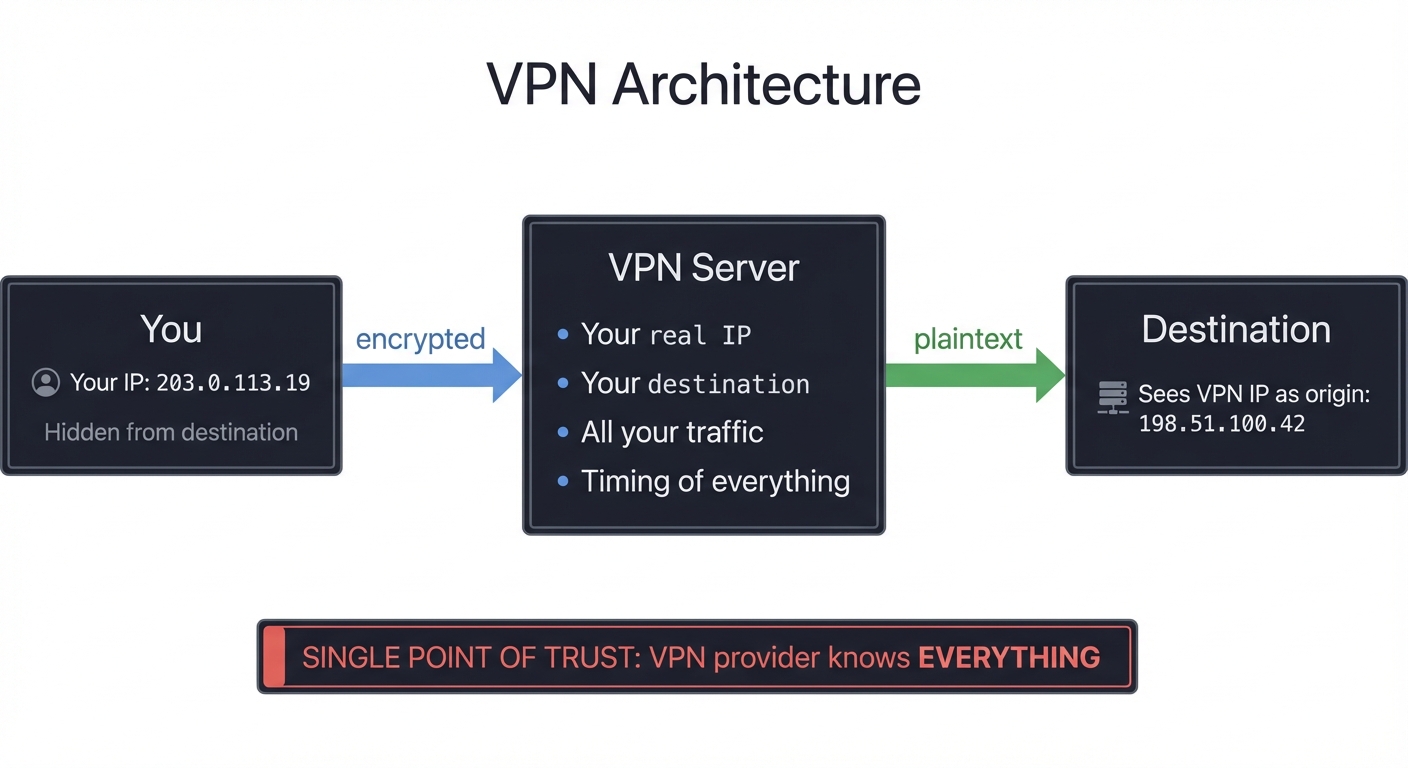
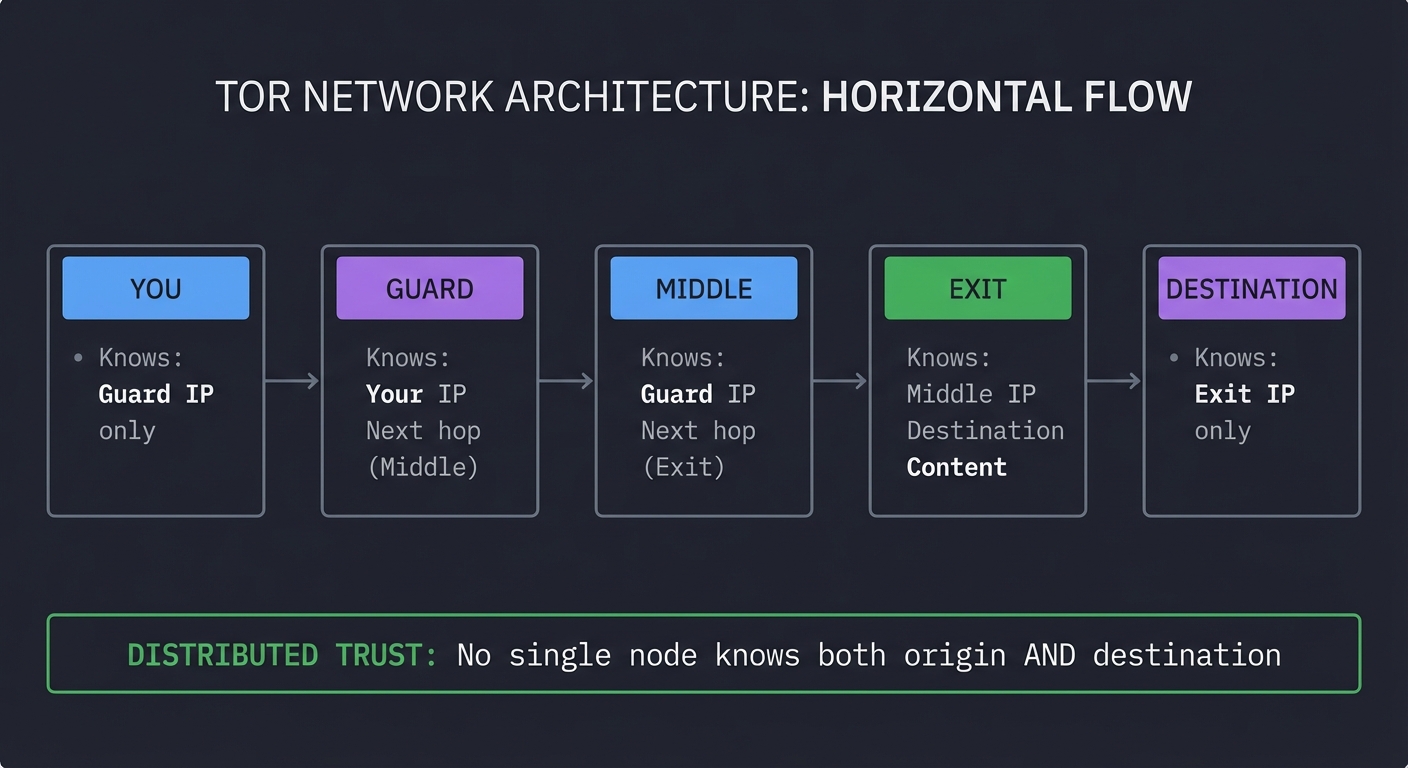
Why This Matters
| Aspect | VPN | Tor |
|---|---|---|
| Trust Model | Single point (VPN provider) | Distributed (3+ nodes) |
| IP Hiding | VPN knows your real IP | No single node knows both ends |
| Logging Risk | VPN can log everything | Would need to compromise multiple nodes |
| Speed | Fast (single hop) | Slower (3+ hops) |
| Encryption | Single layer | Multiple layers (onion) |
| Hidden Services | Not possible | .onion addresses |
| Best For | Privacy from destination | Anonymity from everyone |
The Onion Routing Concept
SENDING A MESSAGE THROUGH TOR:

Step 1: Encrypt for Exit node
┌──────────────────────────────────────────────────────────┐
│  Encrypt_Exit( "GET /page HTTP/1.1\nHost: example.com" ) │
└──────────────────────────────────────────────────────────┘
                              ↓
Step 2: Wrap with Middle layer
┌──────────────────────────────────────────────────────────────┐
│  Encrypt_Middle( "Forward to Exit" + [Exit-encrypted data] ) │
└──────────────────────────────────────────────────────────────┘
                              ↓
Step 3: Wrap with Guard layer (outermost)
┌────────────────────────────────────────────────────────────────┐
│  Encrypt_Guard( "Forward to Middle" + [Middle-encrypted data] )│
└────────────────────────────────────────────────────────────────┘
                              ↓
Final packet looks like:
┌─────────────────────────────────────────────────────────────────┐
│ ████████████████████████████████████████████████████████████████│
│ █ Guard can decrypt: sees "Forward to Middle" + encrypted blob █│
│ █ ▓▓▓▓▓▓▓▓▓▓▓▓▓▓▓▓▓▓▓▓▓▓▓▓▓▓▓▓▓▓▓▓▓▓▓▓▓▓▓▓▓▓▓▓▓▓▓▓▓▓▓▓▓▓▓▓▓▓▓ █│
│ █ ▓ Middle can decrypt: sees "Forward to Exit" + encrypted ▓ █│
│ █ ▓ ░░░░░░░░░░░░░░░░░░░░░░░░░░░░░░░░░░░░░░░░░░░░░░░░░░░░░░░ ▓ █│
│ █ ▓ ░ Exit can decrypt: sees actual HTTP request          ░ ▓ █│
│ █ ▓ ░░░░░░░░░░░░░░░░░░░░░░░░░░░░░░░░░░░░░░░░░░░░░░░░░░░░░░░ ▓ █│
│ █ ▓▓▓▓▓▓▓▓▓▓▓▓▓▓▓▓▓▓▓▓▓▓▓▓▓▓▓▓▓▓▓▓▓▓▓▓▓▓▓▓▓▓▓▓▓▓▓▓▓▓▓▓▓▓▓▓▓▓▓ █│
│ ████████████████████████████████████████████████████████████████│
└─────────────────────────────────────────────────────────────────┘
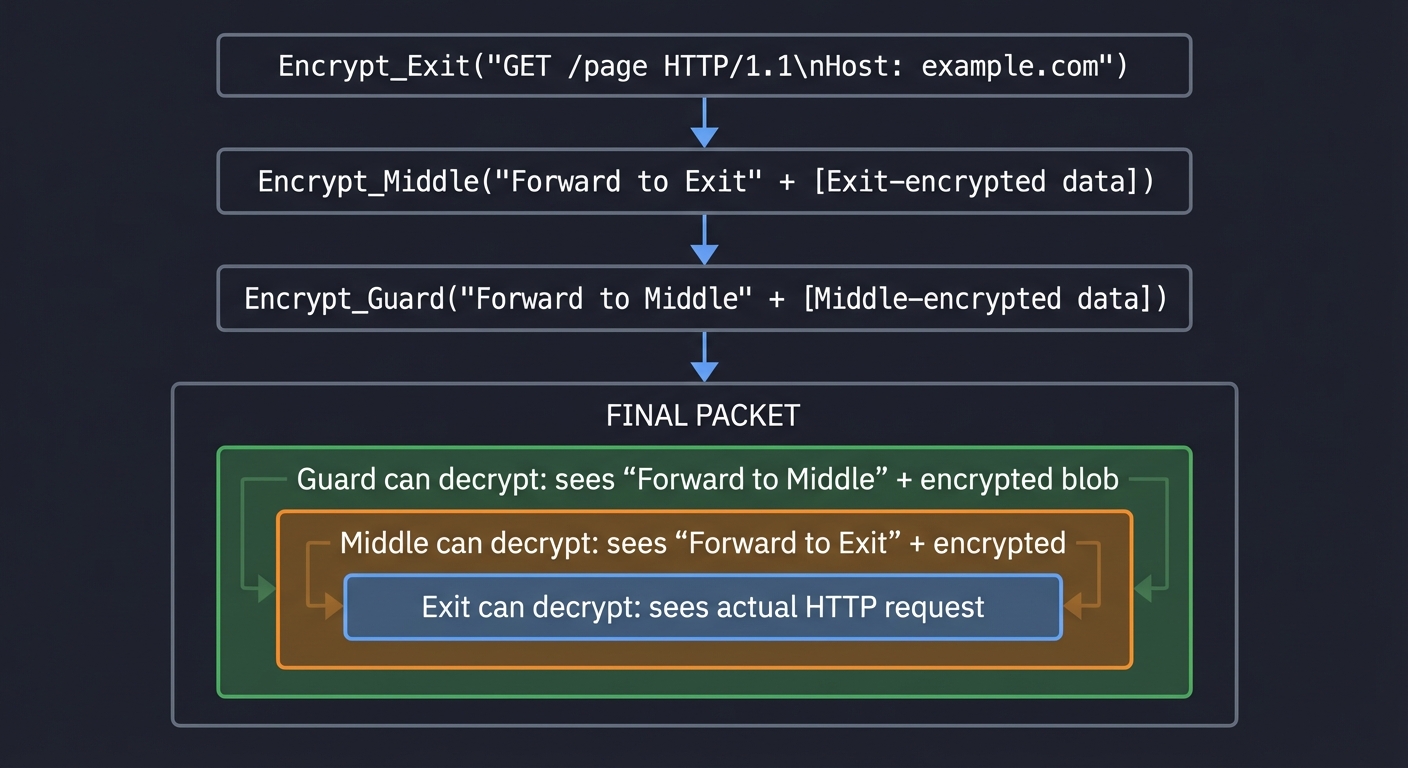
Why .onion Sites Exist (Hidden Services)
Normal websites reveal their IP address. Hidden services solve this:
NORMAL WEBSITE:
  Browser → DNS lookup → Gets IP 93.184.216.34 → Connects directly

  Problem: Everyone knows the server's IP. Can be:
    • Traced
    • Blocked
    • DDoS attacked
    • Raided by authorities

HIDDEN SERVICE (.onion):
  Browser → No DNS → Uses rendezvous point → Server's IP never revealed

  How it works:
  1. Server connects to "Introduction Points" via Tor circuits
  2. Client gets .onion address (hash of server's public key)
  3. Client picks a "Rendezvous Point"
  4. Client tells server (via Introduction Point) to meet at Rendezvous
  5. Both connect to Rendezvous via separate Tor circuits
  6. Traffic flows: Client ← Tor → Rendezvous ← Tor → Server

  Neither knows the other's IP!

┌─────────────────────────────────────────────────────────────────────────────┐
│                        HIDDEN SERVICE PROTOCOL                               │
├─────────────────────────────────────────────────────────────────────────────┤
│                                                                              │
│                         [Introduction Points]                                │
│                              ▲       ▲                                       │
│                             /         \                                      │
│                    (Tor Circuit)    (Tor Circuit)                           │
│                           /             \                                    │
│                          /               \                                   │
│    [Client] ─────────────                 ─────────────> [Hidden Server]    │
│        │                                                        │            │
│        │                                                        │            │
│        └────── (Tor Circuit) ──> [Rendezvous] <── (Tor Circuit) ┘           │
│                                   Point                                      │
│                                                                              │
│    Total path: 6 relays (3 client-side + 3 server-side)                     │
│    Neither party reveals their IP to anyone                                  │
│                                                                              │
└─────────────────────────────────────────────────────────────────────────────┘
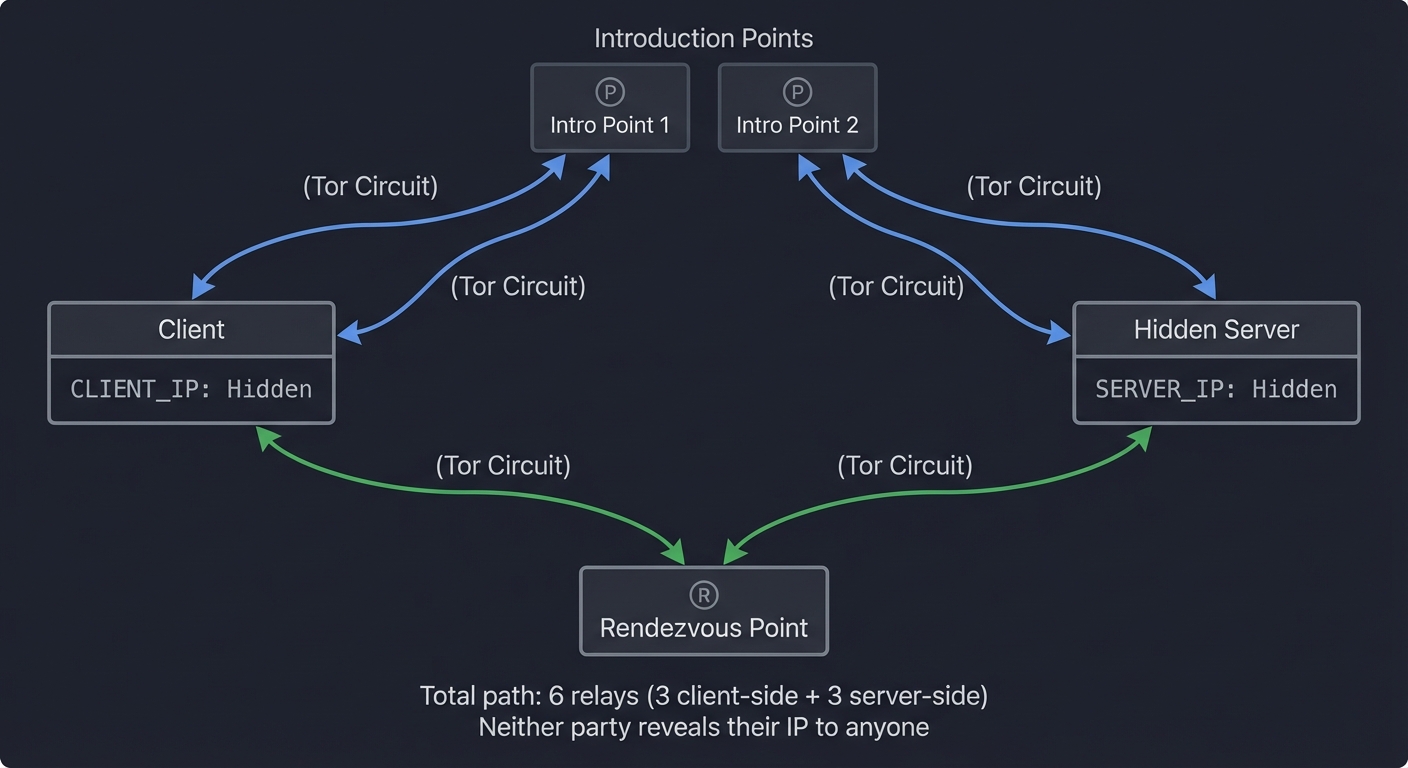
Key Tor Components
| Component | Role | Your Project Will Build |
|---|---|---|
| Onion Routing | Layered encryption through multiple hops | Projects 1, 2, 3 |
| Circuits | Paths through the network | Projects 4, 5 |
| Cells | Fixed-size data units (512 bytes) | Project 6 |
| Directory Authorities | Trusted nodes that publish network state | Project 7 |
| Guard Nodes | Entry points (used for 2-3 months) | Project 8 |
| Exit Nodes | Where traffic leaves Tor network | Project 9 |
| Hidden Services | .onion sites with server anonymity | Projects 12, 13 |
| Rendezvous Points | Meeting points for hidden services | Project 14 |
Concept Summary Table
| Concept Cluster | What You Need to Internalize |
|---|---|
| Onion Routing | Messages are wrapped in multiple layers of encryption, like an onion. Each relay peels one layer, sees only the next hop, never the full path. This distributes trust across independent nodes. |
| Distributed Trust Model | Unlike VPNs (single point of trust), Tor requires compromising MULTIPLE independent relays to deanonymize. No single node knows both source and destination. |
| Circuit Building | Clients establish a path through guard → middle → exit using CREATE/EXTEND cells. Each hop performs key exchange (ntor). Session keys encrypt traffic in layers. |
| Fixed-Size Cells | All Tor traffic uses 512-byte cells regardless of content. This prevents size-based traffic analysis. Padding fills unused space. |
| Guard Persistence | Entry guards are reused for 2-3 months, not randomly selected per circuit. This prevents guard discovery attacks where an adversary runs many relays to become your guard. |
| Exit Policies | Not all relays can exit to clearnet. Exit policies specify allowed ports (e.g., web-only: ports 80/443). This limits abuse and legal liability. |
| Hidden Services | .onion addresses hide both client AND server. Connection uses introduction points (service advertises), rendezvous points (meeting place), 6 total hops (3 client-side, 3 server-side). |
| Directory Authorities | Trusted nodes that publish network consensus every hour: list of all relays, their flags (Guard/Exit/Stable/Fast), bandwidth weights. This distributed directory prevents single-point-of-failure. |
| Traffic Analysis Resistance | Tor cannot prevent timing correlation if adversary controls both entry and exit. Website fingerprinting can identify sites by traffic patterns. Tor mitigates with cells, padding, multiplexing. |
| Cryptographic Primitives | AES-128-CTR for symmetric encryption. Curve25519 (X25519) for key exchange. Ed25519 for signatures. SHA-3 for hashing. These provide forward secrecy and resistance to quantum attacks (post-quantum work ongoing). |
Deep Dive Reading by Concept
This section maps each concept to specific book chapters. Read these before or alongside projects to build strong mental models.
Cryptographic Foundations
| Concept | Book & Chapter |
|---|---|
| Symmetric Encryption (AES) | “Serious Cryptography, 2nd Edition” by Aumasson — Ch. 4: “Block Ciphers” (sections 4.1–4.3) |
| Public Key Cryptography | “Serious Cryptography, 2nd Edition” by Aumasson — Ch. 10: “RSA” |
| Diffie-Hellman Key Exchange | “Serious Cryptography, 2nd Edition” by Aumasson — Ch. 10: “Diffie-Hellman” (section 10.4) |
| Elliptic Curve Cryptography (Curve25519) | “Serious Cryptography, 2nd Edition” by Aumasson — Ch. 11: “Elliptic Curve Cryptography” |
| Digital Signatures (Ed25519) | “Serious Cryptography, 2nd Edition” by Aumasson — Ch. 11: “ECDSA and EdDSA” (section 11.4) |
| Hashing (SHA-3) | “Serious Cryptography, 2nd Edition” by Aumasson — Ch. 5: “Hash Functions” |
Networking & Protocols
| Concept | Book & Chapter |
|---|---|
| TCP/IP Fundamentals | “TCP/IP Illustrated, Volume 1” by W. Richard Stevens — Ch. 1-2: “Introduction, IP” |
| Network Byte Order | “Computer Systems: A Programmer’s Perspective” by Bryant & O’Hallaron — Ch. 11: “Network Programming” (section 11.4) |
| Socket Programming | “The Linux Programming Interface” by Michael Kerrisk — Ch. 56-61: “Sockets” |
| HTTP Protocol | “Computer Networks, 5th Edition” by Tanenbaum — Ch. 7: “The Application Layer” (section 7.3) |
| Binary Protocol Design | “TCP/IP Illustrated, Volume 1” by W. Richard Stevens — Ch. 3: “IP: Internet Protocol” |
Distributed Systems
| Concept | Book & Chapter |
|---|---|
| Distributed Hash Tables (DHT) | “Computer Networks, 5th Edition” by Tanenbaum — Ch. 5: “The Network Layer” (P2P section) |
| Consensus Mechanisms | “Designing Data-Intensive Applications” by Martin Kleppmann — Ch. 9: “Consistency and Consensus” |
| Peer-to-Peer Systems | “Computer Networks, 5th Edition” by Tanenbaum — Ch. 8: “Network Security” |
Security & Privacy
| Concept | Book & Chapter |
|---|---|
| Traffic Analysis | “Practical Malware Analysis” by Sikorski & Honig — Ch. 14: “Network Signatures” |
| Anonymity Networks | Original Tor Paper: “Tor: The Second-Generation Onion Router” by Dingledine, Mathewson, Syverson (2004) |
| Website Fingerprinting | Research: Traffic Analysis Attacks on Tor: A Survey (IEEE 2020) |
| Exit Node Security | “The Practice of Network Security Monitoring” by Richard Bejtlich — Ch. 5: “Full Content Data” |
Systems Programming
| Concept | Book & Chapter |
|---|---|
| Process & Threads | “The Linux Programming Interface” by Michael Kerrisk — Ch. 24-33: “Process Creation, Threads” |
| Binary Data Handling | “Computer Systems: A Programmer’s Perspective” by Bryant & O’Hallaron — Ch. 2: “Representing and Manipulating Information” |
| Network Servers | “The Linux Programming Interface” by Michael Kerrisk — Ch. 60-61: “Sockets: Server Design” |
Essential Reading Order
For maximum comprehension, read in this order:
Week 1-2: Cryptography Foundations
- “Serious Cryptography” Ch. 4 (Block Ciphers) — Understand AES
- “Serious Cryptography” Ch. 10 (Diffie-Hellman) — Understand key exchange
- “Serious Cryptography” Ch. 11 (Elliptic Curves) — Understand Curve25519/Ed25519
- Start Project 1 while reading
Week 3-4: Networking Basics
- “TCP/IP Illustrated, Vol. 1” Ch. 1-2 (TCP/IP basics)
- “Computer Networks” Ch. 7.3 (HTTP)
- “CS:APP” Ch. 11.4 (Network programming)
- Start Projects 2-3 while reading
Week 5-6: Tor Specifications
- Tor Specifications — Intro and Tor Spec (tor-spec.txt)
- Original Tor Paper: “Tor: The Second-Generation Onion Router”
- “The Linux Programming Interface” Ch. 56-61 (Sockets)
- Continue Projects 4-6
Week 7-8: Hidden Services & Security
- Tor Rendezvous Specification
- Traffic Analysis Attacks Survey (research paper)
- “Practical Malware Analysis” Ch. 14 (Network analysis)
- Projects 7-11
Month 3+: Advanced Topics
- Tor Blog - Traffic Analysis Mitigations
- Attacks on Tor GitHub Repository (comprehensive attack list)
- “Designing Data-Intensive Applications” Ch. 9 (Consensus) — For understanding directory authorities
- Project 12 (Capstone)
Project 1: Layered Encryption Simulator
- File: TOR_ANONYMITY_NETWORKS_DEEP_DIVE_PROJECTS.md
- Main Programming Language: Python
- Alternative Programming Languages: Go, Rust, C
- Coolness Level: Level 3: Genuinely Clever
- Business Potential: 1. The “Resume Gold” (Educational/Personal Brand)
- Difficulty: Level 2: Intermediate
- Knowledge Area: Cryptography / Onion Routing
- Software or Tool: Encryption Simulator
- Main Book: “Serious Cryptography, 2nd Edition” by Jean-Philippe Aumasson
What you’ll build: A command-line tool that demonstrates onion encryption—wrapping a message in multiple encryption layers and then unwrapping them one by one, simulating how data flows through a Tor circuit.
Why it teaches Tor: This is the fundamental concept of onion routing. You’ll see exactly how each relay can only decrypt its layer and why no single node can read the original message or know both endpoints.
Core challenges you’ll face:
- Symmetric encryption with unique keys → maps to per-hop session keys
- Layer ordering → maps to correct encryption/decryption sequence
- Key distribution simulation → maps to how Tor establishes keys
- Handling metadata (next hop address) → maps to routing information
Key Concepts:
- Symmetric Encryption (AES): “Serious Cryptography, 2nd Edition” Chapter 4 - Aumasson
- Onion Routing Basics: “What is Onion Routing” - NordVPN
- Tor Protocol Overview: Tor Specifications - Introduction
Difficulty: Intermediate Time estimate: 1 week Prerequisites: Basic cryptography concepts, symmetric encryption
Real world outcome:
$ ./onion-encrypt --message "Secret message to destination" \
    --keys guard.key middle.key exit.key

╔═══════════════════════════════════════════════════════════════╗
║                    ONION ENCRYPTION DEMO                       ║
╚═══════════════════════════════════════════════════════════════╝

Original message: "Secret message to destination"

Step 1: Encrypt for EXIT node (innermost layer)
  Key: exit.key (AES-256)
  Plaintext: "DEST:example.com|Secret message to destination"
  Ciphertext: 7f3a9b2c...d4e1 (48 bytes)

Step 2: Encrypt for MIDDLE node
  Key: middle.key (AES-256)
  Plaintext: "NEXT:exit_node|7f3a9b2c...d4e1"
  Ciphertext: 2b8c4f1a...9e7d (64 bytes)

Step 3: Encrypt for GUARD node (outermost layer)
  Key: guard.key (AES-256)
  Plaintext: "NEXT:middle_node|2b8c4f1a...9e7d"
  Ciphertext: 9a1d3e5f...c2b8 (80 bytes)

Final onion: 9a1d3e5f...c2b8
Layers: 3
Total size: 80 bytes

$ ./onion-decrypt --onion 9a1d3e5f...c2b8 --node guard

╔═══════════════════════════════════════════════════════════════╗
║                 GUARD NODE DECRYPTION                          ║
╚═══════════════════════════════════════════════════════════════╝

Received onion: 9a1d3e5f...c2b8 (80 bytes)
Decrypting with guard.key...

Result:
  Next hop: middle_node
  Remaining onion: 2b8c4f1a...9e7d (64 bytes)

Guard knows:
  ✓ Previous hop (client IP)
  ✓ Next hop (middle_node)
  ✗ Final destination (hidden in inner layers)
  ✗ Message content (hidden in inner layers)

Forwarding to: middle_node

$ ./onion-decrypt --onion 2b8c4f1a...9e7d --node middle
[... continues through each layer ...]

$ ./onion-decrypt --onion 7f3a9b2c...d4e1 --node exit

╔═══════════════════════════════════════════════════════════════╗
║                  EXIT NODE DECRYPTION                          ║
╚═══════════════════════════════════════════════════════════════╝

Received onion: 7f3a9b2c...d4e1 (48 bytes)
Decrypting with exit.key...

Result:
  Destination: example.com
  Message: "Secret message to destination"

Exit knows:
  ✓ Previous hop (middle_node)
  ✓ Final destination (example.com)
  ✓ Message content (if not HTTPS)
  ✗ Original sender (hidden by previous layers)
Implementation Hints:
Use AES-256 in CTR or CBC mode. Each layer includes routing metadata (next hop) plus the encrypted inner payload. Structure: [next_hop_id:16bytes][encrypted_inner_data]. The outermost layer goes to the guard, who decrypts to find middle’s address + still-encrypted data. Each node “peels” one layer. Demonstrate that no single node sees both the source and final destination.
Learning milestones:
- Encrypt/decrypt single layer → You understand symmetric encryption
- Chain multiple layers correctly → You understand onion structure
- Show what each node can/cannot see → You understand Tor’s privacy model
The Core Question You’re Answering
“How can a message travel through multiple nodes where each node only knows one piece of information—the next hop—but never sees the original sender or final destination?”
Before you write any code, sit with this question. The genius of onion routing is that it’s mathematically impossible for any single relay to decrypt the entire message or know both endpoints. Each relay has exactly one key that decrypts exactly one layer, revealing only routing metadata for the next hop. This distributed knowledge creates anonymity through cryptography, not trust.
Concepts You Must Understand First
Stop and research these before coding:
- Symmetric Encryption (AES)
- What is a cipher? What does “encrypt” and “decrypt” mean in practice?
- How does AES work at a high level? (Don’t need implementation details)
- What is a “key”? What happens if you use the wrong key to decrypt?
- Book Reference: “Serious Cryptography, 2nd Edition” Ch. 4 - Aumasson
- Encryption Modes (CTR, CBC)
- Why can’t we just use “raw” AES on large messages?
- What is an initialization vector (IV)?
- What’s the difference between CTR and CBC mode?
- Book Reference: “Serious Cryptography, 2nd Edition” Ch. 4.3 - Aumasson
- Network Routing Basics
- What is a “hop” in a network?
- How do routers know where to send packets?
- What information does each router need to make forwarding decisions?
- Book Reference: “Computer Networks, 5th Edition” Ch. 5 - Tanenbaum
- The VPN Problem
- In a VPN, what does the VPN server know about you?
- Why is this a single point of failure for privacy?
- What would happen if police subpoenaed VPN logs?
- Context: Tor vs VPN Comparison
Questions to Guide Your Design
Before implementing, think through these:
- Data Structure
- How will you represent an “onion”? (Just bytes? A structured object?)
- Should each layer include metadata (next hop address)?
- How will you know when you’ve finished peeling all layers?
- Key Management
- Will you generate keys randomly or read from files?
- How do you ensure each node has the right key?
- In real Tor, how are session keys established? (Hint: Project 2)
- Layer Ordering
- If you encrypt for Exit, then Middle, then Guard—which key decrypts first?
- Why must the guard’s layer be outermost?
- What happens if you decrypt in the wrong order?
- Demonstrating Privacy
- How can you show that the guard doesn’t know the destination?
- How can you show that the exit doesn’t know the origin?
- What should your output display to prove this?
Thinking Exercise
Mental Trace: The Onion Journey
Before coding, trace this scenario on paper:
Message: "SECRET"
Guard Key: K_G
Middle Key: K_M
Exit Key: K_E
Step 1: You want to send “SECRET” to example.com
Draw the encryption steps:
- What do you encrypt first?
- What key do you use?
- What’s the result?
Then encrypt that result:
- With which key?
- What’s the new result?
Then encrypt that:
- With which key?
- Now you have the final onion
Now trace decryption:
- Guard receives final onion, decrypts with K_G → sees what?
- Middle receives that, decrypts with K_M → sees what?
- Exit receives that, decrypts with K_E → sees what?
Questions while tracing:
- At what step does the guard see “example.com”?
- At what step does the exit see your original IP?
- What if you encrypted in the opposite order (Guard first, Exit last)?
Draw this out. The physical act of writing makes it stick.
The Interview Questions They’ll Ask
Prepare to answer these:
- “Explain how Tor provides anonymity. How is it different from a VPN?”
- Expected: Distributed trust, layered encryption, no single node knows both ends
- Demonstrate knowledge from this project
- “What happens if an attacker controls one Tor relay? Two relays? All three?”
- One relay: Limited information (next hop OR destination, not both)
- Two relays: Depends which two (Guard+Middle = no deanonymization, Guard+Exit = correlation possible)
- Three relays: Complete deanonymization (but requires compromising YOUR specific circuit)
- “Why does Tor use multiple layers of encryption instead of just encrypting once end-to-end?”
- End-to-end: Exit node would need to decrypt full message (sees content + destination)
- Layered: Each node decrypts its layer, forwards ciphertext it can’t read
- Creates separation: different nodes see different information
- “What’s the difference between encryption and anonymity?”
- Encryption: Protects content (VPN encrypts, but provider knows your destination)
- Anonymity: Hides who is communicating with whom (Tor’s goal)
- You need both: Tor provides anonymity, HTTPS provides end-to-end encryption
- “How would you attack a system using onion routing?”
- Traffic analysis: Control entry and exit, correlate timing/volume
- Guard discovery: Run many relays, hope to become someone’s guard
- Exit sniffing: Run exit node, monitor unencrypted traffic (HTTP)
- Sybil attack: Control large fraction of network
Hints in Layers
Hint 1: Starting Point
Think of your program in two parts: (1) an “encrypt” mode that wraps a message in layers, and (2) a “decrypt” mode that peels one layer at a time. Start with encrypting/decrypting a single layer before adding multiple layers. Use a library like Python’s cryptography for AES—don’t implement AES from scratch.
Hint 2: Data Format
Structure each layer as: [next_hop_address (string or bytes)] + [encrypted_inner_data]. When a node decrypts, it extracts the address (where to forward) and the still-encrypted data (what to forward). Consider using JSON or a simple delimiter like | to separate address from data.
Hint 3: Encryption Order Encrypt from the inside out: Exit layer first (innermost), then Middle, then Guard (outermost). Decrypt from the outside in: Guard first, then Middle, then Exit. Think of wrapping a gift: you wrap the item first, then put it in a box, then wrap the box. Unwrapping happens in reverse.
Hint 4: Demonstrating Node Knowledge After each decryption step, print what the node can see:
print(f"Guard knows:")
print(f"  ✓ Previous hop: {client_ip}")
print(f"  ✓ Next hop: {middle_address}")
print(f"  ✗ Final destination: (encrypted)")
print(f"  ✗ Message content: (encrypted)")
Explicitly show the ✗ (cannot see) items to demonstrate privacy properties.
Books That Will Help
| Topic | Book | Chapter |
|---|---|---|
| AES Encryption Basics | “Serious Cryptography, 2nd Edition” by Aumasson | Ch. 4: “Block Ciphers” |
| Encryption Modes (CTR/CBC) | “Serious Cryptography, 2nd Edition” by Aumasson | Ch. 4.3: “Block Cipher Modes” |
| Why Tor Exists | Original Tor Paper: “Tor: The Second-Generation Onion Router” | Section 1-2 (Introduction, Design Goals) |
| Onion Routing History | “Computer Networks, 5th Edition” by Tanenbaum | Ch. 8.9: “Privacy” |
| Python Cryptography | Python docs: cryptography library |
Fernet (simple) or Cipher (advanced) |
Common Pitfalls & Debugging
Problem 1: “My decryption returns garbage!”
- Why: Wrong key, wrong mode, or decrypting in wrong order
- Fix: Verify keys match exactly between encrypt/decrypt. Print the key in hex to confirm. Check that you’re using the same mode (CTR/CBC) for encrypt and decrypt. Ensure you decrypt Guard layer first, not last.
- Quick test: Encrypt and decrypt a simple message with one layer. Does it work? Then add second layer.
Problem 2: “I don’t know which layer to encrypt first”
- Why: Confusion about inside-out vs outside-in
- Fix: Think about peeling an onion: the outermost layer (skin) is removed first. The Guard is the “skin”—it must be encrypted last (so it’s removed first when decrypting). Exit is the core—encrypted first.
- Quick test: On paper, write down the order:
Encrypt(K_Guard, Encrypt(K_Middle, Encrypt(K_Exit, message))). The rightmost encrypt happens first.
Problem 3: “How do I include the next hop address?”
- Why: Unsure how to embed routing metadata
- Fix: Simple approach: prepend address as a string with a delimiter:
f"{next_hop}|{encrypted_data}". When decrypting, split on|. First part is address, second part is data to forward. - Quick test:
"middle_node|a3f2b8c1d4e5"splits to["middle_node", "a3f2b8c1d4e5"]
Problem 4: “My encrypted data changes size between layers”
- Why: Different padding for each layer
- Fix: This is normal! AES requires data to be a multiple of block size (16 bytes). Each layer may have different padding. In real Tor, cells are fixed-size (512 bytes) to hide this. For your simulator, variable sizes are fine.
- Quick test: Print the size after each encryption. You’ll see it grow: 50 bytes → 64 bytes → 80 bytes (due to added addresses and padding).
Problem 5: “How do I visualize what each node sees?”
- Why: Want to clearly demonstrate privacy properties
- Fix: After each decryption, print a table:
Guard Node Decryption: Input: [80 bytes of encrypted data] Output: Next hop = "middle_node", Forwarding = [64 bytes, still encrypted] Can see: client IP, middle_node address Cannot see: exit address, destination, message content - Quick test: Run your program and verify the “Cannot see” list is correct for each node.
Project 2: Diffie-Hellman Key Exchange Demo
- File: TOR_ANONYMITY_NETWORKS_DEEP_DIVE_PROJECTS.md
- Main Programming Language: Python
- Alternative Programming Languages: Go, Rust, C
- Coolness Level: Level 4: Hardcore Tech Flex
- Business Potential: 1. The “Resume Gold”
- Difficulty: Level 3: Advanced
- Knowledge Area: Cryptography / Key Exchange
- Software or Tool: Key Exchange Demo
- Main Book: “Serious Cryptography, 2nd Edition” by Jean-Philippe Aumasson
What you’ll build: An implementation of both classic Diffie-Hellman and Curve25519 (X25519) key exchange, demonstrating how Tor establishes shared secrets with each relay without any eavesdropper being able to derive the key.
Why it teaches Tor: Tor’s ntor handshake uses Curve25519 for key exchange. Understanding how two parties can agree on a secret over a public channel—and why this provides forward secrecy—is fundamental to understanding Tor’s security.
Core challenges you’ll face:
- Modular exponentiation (classic DH) → maps to mathematical foundations
- Elliptic curve operations (X25519) → maps to modern Tor crypto
- Man-in-the-middle prevention → maps to authenticated key exchange
- Forward secrecy demonstration → maps to ephemeral keys
Key Concepts:
- Diffie-Hellman: “Serious Cryptography, 2nd Edition” Chapter 10 - Aumasson
- Elliptic Curve Cryptography: “Serious Cryptography, 2nd Edition” Chapter 11 - Aumasson
- Tor’s ntor Protocol: Tor Specifications - ntor handshake
- Curve25519: “Tor Key Creation - Curve25519”
Difficulty: Advanced Time estimate: 2 weeks Prerequisites: Basic number theory, modular arithmetic
Real world outcome:
$ ./key-exchange --mode classic-dh --demo

╔═══════════════════════════════════════════════════════════════╗
║           CLASSIC DIFFIE-HELLMAN KEY EXCHANGE                  ║
╚═══════════════════════════════════════════════════════════════╝

Public parameters (known to everyone, including attackers):
  Prime (p): 23 (small for demo; real: 2048+ bits)
  Generator (g): 5

ALICE (Client):
  Private key (a): 6 (secret, never transmitted)
  Public key (A): g^a mod p = 5^6 mod 23 = 8
  → Sends A=8 to Bob

BOB (Relay):
  Private key (b): 15 (secret, never transmitted)
  Public key (B): g^b mod p = 5^15 mod 23 = 19
  → Sends B=19 to Alice

KEY DERIVATION:
  Alice computes: B^a mod p = 19^6 mod 23 = 2
  Bob computes:   A^b mod p = 8^15 mod 23 = 2

  SHARED SECRET: 2 ✓ (identical!)

WHAT AN EAVESDROPPER SEES:
  • p=23, g=5 (public parameters)
  • A=8 (Alice's public key)
  • B=19 (Bob's public key)

  Cannot compute shared secret without:
  • Alice's private key (a=6), or
  • Bob's private key (b=15)

  This is the "Discrete Logarithm Problem" - computationally hard!

$ ./key-exchange --mode x25519 --demo

╔═══════════════════════════════════════════════════════════════╗
║           X25519 (CURVE25519) KEY EXCHANGE                     ║
║              Used in Tor's ntor handshake                      ║
╚═══════════════════════════════════════════════════════════════╝

ALICE (Client):
  Private key: 77076d0a7318a57d3c16c17251b26645df4c2f87ebc0992ab177fba51db92c2a
  Public key:  8520f0098930a754748b7ddcb43ef75a0dbf3a0d26381af4eba4a98eaa9b4e6a
  → Sends public key to Bob

BOB (Relay):
  Private key: 5dab087e624a8a4b79e17f8b83800ee66f3bb1292618b6fd1c2f8b27ff88e0eb
  Public key:  de9edb7d7b7dc1b4d35b61c2ece435373f8343c85b78674dadfc7e146f882b4f
  → Sends public key to Alice

SHARED SECRET COMPUTATION:
  Alice: X25519(alice_private, bob_public)
  Bob:   X25519(bob_private, alice_public)

  Result: 4a5d9d5ba4ce2de1728e3bf480350f25e07e21c947d19e3376f09b3c1e161742 ✓

FORWARD SECRECY DEMONSTRATION:
  If we use EPHEMERAL keys (new keys each session):
  → Compromising today's key doesn't reveal past sessions
  → Compromising long-term key doesn't reveal session keys

  Tor generates fresh ephemeral keys for EVERY circuit!
Implementation Hints:
For classic DH, implement modular exponentiation with big integers. For X25519, you can use a library (cryptography.io in Python) or implement the curve operations yourself for deeper understanding. Show the mathematical relationship: g^(a*b) = (g^a)^b = (g^b)^a. Demonstrate that knowing only g^a and g^b doesn’t reveal g^(a*b) without solving the discrete log problem.
Learning milestones:
- Classic DH with small numbers → You understand the math
- X25519 key exchange → You understand modern Tor crypto
- Demonstrate forward secrecy → You understand why Tor is secure against future key compromise
Project 3: Onion Routing Network Simulator
- File: TOR_ANONYMITY_NETWORKS_DEEP_DIVE_PROJECTS.md
- Main Programming Language: Python
- Alternative Programming Languages: Go, Rust
- Coolness Level: Level 4: Hardcore Tech Flex
- Business Potential: 1. The “Resume Gold”
- Difficulty: Level 3: Advanced
- Knowledge Area: Network Simulation / Anonymity
- Software or Tool: Network Simulator
- Main Book: “Computer Networks, 5th Edition” by Tanenbaum
What you’ll build: A complete simulation of onion routing with multiple nodes, where messages are encrypted in layers and routed through a path of relays—demonstrating exactly how anonymity is achieved.
Why it teaches Tor: This combines encryption (Project 1) and key exchange (Project 2) into a working system. You’ll see how circuits are built, how data flows, and what each node can observe.
Core challenges you’ll face:
- Multi-node coordination → maps to distributed system basics
- Circuit path selection → maps to Tor’s relay selection
- Bidirectional communication → maps to responses traverse the same path
- Timing and ordering → maps to cell-based transmission
Key Concepts:
- Onion Routing Architecture: “How Tor Works” - SLCyber
- Circuit Building: Tor Spec - Creating Circuits
- Distributed Systems: “Computer Networks, 5th Edition” Chapter 8 - Tanenbaum
Difficulty: Advanced Time estimate: 2-3 weeks Prerequisites: Projects 1 and 2, socket programming
Real world outcome:
$ ./onion-network --nodes 5 --start

╔═══════════════════════════════════════════════════════════════╗
║              ONION ROUTING NETWORK SIMULATOR                   ║
╚═══════════════════════════════════════════════════════════════╝

Starting 5 relay nodes...
  Node A (Guard-capable): localhost:9001 [ONLINE]
  Node B (Middle):        localhost:9002 [ONLINE]
  Node C (Middle):        localhost:9003 [ONLINE]
  Node D (Exit-capable):  localhost:9004 [ONLINE]
  Node E (Exit-capable):  localhost:9005 [ONLINE]

Network ready. Type 'help' for commands.

> build-circuit
Building 3-hop circuit...

Step 1: Connect to Guard (Node A)
  → TCP connect to localhost:9001
  → DH key exchange with A
  → Session key established: k_A = 3f7a...

Step 2: Extend to Middle (Node C) via Guard
  → Send EXTEND cell to A: "Connect to C"
  → A connects to C, performs DH on our behalf
  → Session key established: k_C = 8b2d...

Step 3: Extend to Exit (Node D) via A→C
  → Send EXTEND cell through A→C: "Connect to D"
  → C connects to D, performs DH on our behalf
  → Session key established: k_D = c4e9...

Circuit established: [Client] → A → C → D → [Internet]
Circuit ID: 0x7f3a

> send "GET / HTTP/1.1\nHost: example.com" --to example.com:80

Encrypting message for transmission...
  Layer 3 (Exit):   Encrypt("DEST:example.com:80|GET /...", k_D)
  Layer 2 (Middle): Encrypt("[encrypted layer 3]", k_C)
  Layer 1 (Guard):  Encrypt("[encrypted layer 2]", k_A)

Sending through circuit 0x7f3a...

[Node A - Guard] Received 512-byte cell
  → Decrypted with k_A
  → Found: RELAY cell for circuit 0x7f3a
  → Forwarding to Node C (still encrypted)

[Node C - Middle] Received 512-byte cell
  → Decrypted with k_C
  → Found: RELAY cell for circuit 0x7f3a
  → Forwarding to Node D (still encrypted)

[Node D - Exit] Received 512-byte cell
  → Decrypted with k_D
  → Found: DATA cell, destination example.com:80
  → Connecting to example.com:80...
  → Sending HTTP request

[Node D - Exit] Received response from example.com
  → Encrypting response with k_D
  → Sending back through circuit

[Response received at client]
HTTP/1.1 200 OK
Content-Type: text/html
...

> show-knowledge

╔═══════════════════════════════════════════════════════════════╗
║              WHAT EACH NODE KNOWS                              ║
╚═══════════════════════════════════════════════════════════════╝

Node A (Guard):
  ✓ Client's real IP address
  ✓ Next hop: Node C
  ✗ Final destination (encrypted)
  ✗ Message content (encrypted)
  ✗ That Node D is the exit

Node C (Middle):
  ✓ Previous hop: Node A
  ✓ Next hop: Node D
  ✗ Client's IP (only knows A)
  ✗ Final destination (encrypted)
  ✗ Message content (encrypted)

Node D (Exit):
  ✓ Previous hop: Node C
  ✓ Final destination: example.com
  ✓ Message content (if not HTTPS)
  ✗ Client's IP address
  ✗ That Node A is the guard

ANONYMITY ACHIEVED: No single node knows both origin and destination!
Implementation Hints: Run each “node” as a separate process or thread listening on a port. Implement circuit building with CREATE/CREATED cells and EXTEND/EXTENDED cells. Use fixed-size cells (512 bytes in real Tor) for traffic analysis resistance. For the simulation, each node maintains a table of circuit IDs to (session_key, next_hop) mappings. Bidirectional: responses travel the same circuit in reverse, each node adding its encryption layer.
Learning milestones:
- Build a circuit through 3 nodes → You understand circuit construction
- Send data and receive response → You understand bidirectional onion routing
- Demonstrate node knowledge isolation → You understand Tor’s security model
Project 4: Tor Directory Parser & Network Visualizer
- File: TOR_ANONYMITY_NETWORKS_DEEP_DIVE_PROJECTS.md
- Main Programming Language: Python
- Alternative Programming Languages: Go, Rust
- Coolness Level: Level 3: Genuinely Clever
- Business Potential: 2. The “Micro-SaaS / Pro Tool”
- Difficulty: Level 2: Intermediate
- Knowledge Area: Network Analysis / Parsing
- Software or Tool: Tor Directory Analyzer
- Main Book: “TCP/IP Illustrated, Volume 1” by W. Richard Stevens
What you’ll build: A tool that downloads and parses the real Tor network consensus document, extracting information about all relays—their flags, bandwidth, exit policies—and visualizes the network.
Why it teaches Tor: The consensus document is how Tor clients learn about available relays. Understanding its structure teaches you how Tor maintains a global view of the network, how relays are classified (Guard, Exit, etc.), and how trust is established through directory authorities.
Core challenges you’ll face:
- Fetching consensus from directory authorities → maps to Tor’s bootstrap process
- Parsing the consensus format → maps to understanding relay descriptors
- Understanding relay flags → maps to Guard/Exit/Stable/Fast classification
- Exit policy parsing → maps to what traffic exits allow
Key Concepts:
- Consensus Document: Tor Specifications - Glossary
- Directory Authorities: Tor Metrics - About
- Relay Flags: “A Short Introduction to Tor”
Difficulty: Intermediate Time estimate: 1-2 weeks Prerequisites: HTTP, basic parsing
Real world outcome:
$ ./tor-directory --fetch --analyze

╔═══════════════════════════════════════════════════════════════╗
║              TOR NETWORK CONSENSUS ANALYZER                    ║
╚═══════════════════════════════════════════════════════════════╝

Fetching consensus from directory authorities...
  → Trying moria1.torproject.org:443... OK
  → Downloaded consensus (2.3 MB)
  → Valid from: 2024-03-15 12:00:00 UTC
  → Valid until: 2024-03-15 15:00:00 UTC
  → Fresh until: 2024-03-15 13:00:00 UTC

Parsing relay descriptors...

═══════════════════════════════════════════════════════════════
NETWORK OVERVIEW
═══════════════════════════════════════════════════════════════

Total relays: 6,847
Total bandwidth: 847.3 Gbit/s

By flag:
  Guard:     2,341 (34.2%)  ← Entry nodes for circuits
  Exit:        891 (13.0%)  ← Can route to clearnet
  Stable:    5,892 (86.0%)  ← Uptime > 7 days
  Fast:      5,234 (76.4%)  ← High bandwidth
  HSDir:     2,456 (35.9%)  ← Store hidden service descriptors
  V2Dir:     6,102 (89.1%)  ← Serve directory info

By country (top 10):
  Germany:      1,423 (20.8%)
  USA:          1,102 (16.1%)
  France:         743 (10.9%)
  Netherlands:    521 (7.6%)
  Finland:        312 (4.6%)
  ...

═══════════════════════════════════════════════════════════════
EXIT POLICY ANALYSIS
═══════════════════════════════════════════════════════════════

Exit nodes allowing port 80 (HTTP):    834 (93.6%)
Exit nodes allowing port 443 (HTTPS):  856 (96.1%)
Exit nodes allowing port 22 (SSH):     412 (46.2%)
Exit nodes allowing port 25 (SMTP):     23 (2.6%)  ← Most block email

Reduced exit policy (web-only): 234 exits
Full exit policy (most ports):  156 exits

═══════════════════════════════════════════════════════════════
SAMPLE RELAY DETAILS
═══════════════════════════════════════════════════════════════

Relay: TorExitFinland
  Fingerprint: A1B2C3D4E5F6...
  IP: 185.220.101.42
  Flags: Exit, Fast, Guard, HSDir, Running, Stable, V2Dir, Valid
  Bandwidth: 125 Mbit/s
  Exit Policy:
    accept *:80
    accept *:443
    accept *:8080
    reject *:*
  Contact: admin@torexitfinland.org
  Platform: Tor 0.4.8.10 on Linux

$ ./tor-directory --visualize --output network.html
Generated interactive network map: network.html
  → Geographic distribution
  → Bandwidth heatmap
  → Flag distribution
Implementation Hints:
Fetch from https://consensus-health.torproject.org/consensus-health.html or directly from a directory authority. The consensus format is text-based with sections: network-status-version, directory signatures, and router status entries. Each router entry starts with ‘r’ (router info) followed by ‘s’ (flags), ‘w’ (bandwidth weight), ‘p’ (exit policy summary). Parse these into structured data. For visualization, use matplotlib or generate an HTML page with a map library.
Learning milestones:
- Fetch and parse consensus → You understand Tor’s directory system
- Classify relays by flags → You understand Guard/Exit/Middle roles
- Analyze exit policies → You understand what traffic Tor can route
Project 5: Tor Cell Protocol Implementation
- File: TOR_ANONYMITY_NETWORKS_DEEP_DIVE_PROJECTS.md
- Main Programming Language: C
- Alternative Programming Languages: Rust, Go
- Coolness Level: Level 4: Hardcore Tech Flex
- Business Potential: 1. The “Resume Gold”
- Difficulty: Level 4: Expert
- Knowledge Area: Protocol Implementation / Binary Formats
- Software or Tool: Protocol Implementation
- Main Book: “TCP/IP Illustrated, Volume 1” by W. Richard Stevens
What you’ll build: An implementation of Tor’s cell format—the fixed-size 512-byte packets that carry all Tor traffic—including cell creation, parsing, and the various cell types (CREATE, RELAY, DESTROY, etc.).
Why it teaches Tor: Cells are Tor’s fundamental data unit. Understanding their fixed size (traffic analysis resistance), their types (protocol operations), and their structure (circuit IDs, commands, payloads) teaches you the protocol at the byte level.
Core challenges you’ll face:
- Binary protocol parsing → maps to low-level data handling
- Fixed-size cells with padding → maps to traffic analysis resistance
- Cell type handling → maps to Tor’s command vocabulary
- Circuit ID multiplexing → maps to multiple circuits per connection
Key Concepts:
- Cell Format: Tor Spec - Cells - Section 3
- Binary Protocols: “TCP/IP Illustrated, Volume 1” - Stevens
- Network Byte Order: “Computer Systems: A Programmer’s Perspective” Chapter 11 - Bryant & O’Hallaron
Difficulty: Expert Time estimate: 2-3 weeks Prerequisites: C programming, binary data handling
Real world outcome:
$ ./tor-cells --demo

╔═══════════════════════════════════════════════════════════════╗
║              TOR CELL PROTOCOL DEMONSTRATION                   ║
╚═══════════════════════════════════════════════════════════════╝

CELL FORMAT (512 bytes total):
┌───────────────┬───────────┬─────────────────────────────────────┐
│ CircID (2/4B) │ Command   │ Payload (509/507 bytes)             │
│               │ (1 byte)  │                                     │
└───────────────┴───────────┴─────────────────────────────────────┘

Note: CircID is 2 bytes for link protocol < 4, 4 bytes otherwise

CELL COMMANDS:
  0x00: PADDING      - Keep-alive, traffic analysis resistance
  0x01: CREATE       - Create new circuit (first hop)
  0x02: CREATED      - Response to CREATE
  0x03: RELAY        - Data/control within circuit
  0x04: DESTROY      - Tear down circuit
  0x05: CREATE_FAST  - Fast circuit creation (for directory)
  0x06: CREATED_FAST - Response to CREATE_FAST
  0x07: VERSIONS     - Protocol version negotiation
  0x08: NETINFO      - Network information exchange
  0x09: RELAY_EARLY  - Extend circuit (limited use)

$ ./tor-cells --create-cell --type RELAY --circ-id 0x0001 \
    --relay-cmd DATA --data "Hello, Tor!"

Creating RELAY cell:

Header:
  Circuit ID: 0x00000001 (4 bytes, big-endian)
  Command: 0x03 (RELAY)

RELAY Payload (encrypted in real Tor):
┌─────────────┬──────────┬────────────┬────────────┬───────────┐
│ Relay Cmd   │ Recog-   │ Stream ID  │ Digest     │ Length    │
│ (1 byte)    │ nized    │ (2 bytes)  │ (4 bytes)  │ (2 bytes) │
│             │ (2 bytes)│            │            │           │
└─────────────┴──────────┴────────────┴────────────┴───────────┘
│ DATA payload (variable, up to 498 bytes)                     │
│ "Hello, Tor!"                                                │
└──────────────────────────────────────────────────────────────┘
│ Padding to 509 bytes total                                   │
└──────────────────────────────────────────────────────────────┘

Raw bytes (hex):
00 00 00 01 03 02 00 00 00 01 8a 3f 2c 1d 00 0b
48 65 6c 6c 6f 2c 20 54 6f 72 21 00 00 00 00 00
[... 480 more zero bytes for padding ...]

Cell size: 512 bytes (fixed!)

$ ./tor-cells --parse-cell cells.bin

Parsing cell from file...

Parsed Cell:
  Circuit ID: 1
  Command: RELAY (0x03)
  Relay Command: DATA (0x02)
  Stream ID: 1
  Data Length: 11
  Data: "Hello, Tor!"
  Padding: 487 bytes

WHY FIXED SIZE?
  All cells are exactly 512 bytes. This prevents traffic analysis:
  - Attacker can't distinguish CREATE from DATA by size
  - Can't determine message length by packet size
  - Makes timing attacks harder (uniform transmission)
Implementation Hints:
In C, define a cell structure with packed attributes. Circuit ID is 4 bytes for modern protocols (2 bytes for legacy). Command byte determines payload interpretation. RELAY cells have an inner header (relay command, recognized, stream ID, digest, length) followed by data and padding. Use network byte order (big-endian) for all multi-byte fields. Implement functions: cell_create(), cell_parse(), cell_pad(), cell_serialize().
Learning milestones:
- Create and parse basic cells → You understand cell structure
- Handle RELAY cells with inner headers → You understand data encapsulation
- Correctly pad to 512 bytes → You understand traffic analysis resistance
Project 6: Path Selection Simulator
- File: TOR_ANONYMITY_NETWORKS_DEEP_DIVE_PROJECTS.md
- Main Programming Language: Python
- Alternative Programming Languages: Go, Rust
- Coolness Level: Level 3: Genuinely Clever
- Business Potential: 1. The “Resume Gold”
- Difficulty: Level 3: Advanced
- Knowledge Area: Algorithms / Network Security
- Software or Tool: Path Selection Simulator
- Main Book: “Grokking Algorithms” by Aditya Bhargava
What you’ll build: A simulator that implements Tor’s path selection algorithm—choosing Guard, Middle, and Exit nodes based on bandwidth weights, flags, and constraints to build an optimal and secure circuit.
Why it teaches Tor: Path selection is security-critical. You’ll learn why Tor uses persistent guards (to prevent attacks), how bandwidth weights affect selection (for performance), and what constraints exist (no two nodes from same /16 network, etc.).
Core challenges you’ll face:
- Weighted random selection → maps to bandwidth-based choice
- Guard persistence → maps to preventing guard discovery attacks
- Exit matching → maps to exit policies vs destination
- Constraint enforcement → maps to family/network restrictions
Key Concepts:
- Path Selection: Tor Blog - Guard Discovery
- Weighted Random Selection: “Grokking Algorithms” - Bhargava
- Attack Mitigations: “Attacks on Tor” - GitHub repository
Difficulty: Advanced Time estimate: 2 weeks Prerequisites: Project 4 (directory parsing), probability basics
Real world outcome:
$ ./path-selector --load-consensus consensus.txt --dest example.com:443

╔═══════════════════════════════════════════════════════════════╗
║              TOR PATH SELECTION SIMULATOR                      ║
╚═══════════════════════════════════════════════════════════════╝

Loaded 6,847 relays from consensus.

═══════════════════════════════════════════════════════════════
STEP 1: SELECT EXIT NODE
═══════════════════════════════════════════════════════════════

Destination: example.com:443 (HTTPS)
Filtering exits that allow port 443...
  Eligible exits: 856 (of 891 total exits)

Applying bandwidth weighting...
  Total exit bandwidth: 234.5 Gbit/s

Selected exit (weighted random):
  Relay: PrivacyRepublic
  Bandwidth: 850 Mbit/s (weight: 0.36%)
  Country: Netherlands
  Exit Policy: accept *:443, accept *:80, reject *:*

═══════════════════════════════════════════════════════════════
STEP 2: SELECT GUARD NODE
═══════════════════════════════════════════════════════════════

Checking for persistent guard assignment...
  Stored guards: 2 (from ~/.tor/guards)
  Guard 1: FastRelay42 (Germany) - valid, using

Note: Guards are reused for 2-3 months to prevent attacks!

Verifying guard constraints:
  ✓ Not in same /16 as exit (185.220.x.x vs 91.132.x.x)
  ✓ Not in same family as exit
  ✓ Has Guard flag
  ✓ Has Stable flag

Using guard: FastRelay42 (Germany)

═══════════════════════════════════════════════════════════════
STEP 3: SELECT MIDDLE NODE
═══════════════════════════════════════════════════════════════

Constraints:
  ✗ Cannot be guard or exit
  ✗ Cannot be in same /16 as guard or exit
  ✗ Cannot be in same family as guard or exit

Eligible middle relays: 4,892
Applying bandwidth weighting...

Selected middle:
  Relay: TorMiddleFinland
  Bandwidth: 320 Mbit/s
  Country: Finland

═══════════════════════════════════════════════════════════════
FINAL CIRCUIT
═══════════════════════════════════════════════════════════════

Path: Client → FastRelay42 → TorMiddleFinland → PrivacyRepublic → example.com

  [Client]
      │
      ▼
  [FastRelay42]        Guard   Germany    185.220.101.1
      │
      ▼
  [TorMiddleFinland]   Middle  Finland    91.132.45.67
      │
      ▼
  [PrivacyRepublic]    Exit    Netherlands 45.151.167.12
      │
      ▼
  [example.com:443]

Security properties:
  ✓ No two nodes in same country
  ✓ No two nodes in same /16 subnet
  ✓ No family relationships
  ✓ Exit allows destination port
  ✓ Using persistent guard

$ ./path-selector --simulate 1000 --stats

Running 1000 path selections...

Guard distribution (should be concentrated):
  FastRelay42:     892 (89.2%)  ← Persistent guard working!
  BackupGuard:     108 (10.8%)  ← Fallback when primary unavailable

Exit distribution (should be bandwidth-weighted):
  Top 10% exits by bandwidth: 67% of selections ✓
  Bottom 50% exits: 12% of selections

Middle distribution (should be bandwidth-weighted):
  Geographic diversity: 34 countries represented ✓
Implementation Hints: Implement weighted random selection: probability proportional to bandwidth weight. Guard selection: maintain a persistent list, only add new guards when existing ones fail. Exit selection: filter by port policy first, then weight by bandwidth. Middle selection: exclude guard and exit, exclude same /16 network, exclude same family (relays operated by same person). Constraints prevent a single operator from running your whole circuit.
Learning milestones:
- Select exits matching port policy → You understand exit policies
- Implement persistent guards → You understand guard attack prevention
- Enforce all constraints → You understand Tor’s security model
Project 7: Traffic Analysis Demonstration
- File: TOR_ANONYMITY_NETWORKS_DEEP_DIVE_PROJECTS.md
- Main Programming Language: Python
- Alternative Programming Languages: Go, C
- Coolness Level: Level 4: Hardcore Tech Flex
- Business Potential: 1. The “Resume Gold”
- Difficulty: Level 3: Advanced
- Knowledge Area: Security Research / Network Analysis
- Software or Tool: Traffic Analyzer
- Main Book: “Practical Malware Analysis” by Sikorski & Honig
What you’ll build: A tool that demonstrates traffic analysis attacks and defenses—showing how timing correlation, packet counting, and fingerprinting can deanonymize users, and how Tor’s design mitigates these attacks.
Why it teaches Tor security: Tor’s threat model includes traffic analysis. Understanding these attacks teaches you why Tor uses fixed cell sizes, why guards persist, why cover traffic exists, and what Tor can/cannot protect against.
Core challenges you’ll face:
- Timing correlation → maps to matching entry/exit traffic
- Website fingerprinting → maps to identifying sites by traffic patterns
- Cell counting → maps to stream identification
- Defense demonstration → maps to Tor’s countermeasures
Key Concepts:
- Traffic Analysis Attacks: “Attacks on Tor” - GitHub
- Website Fingerprinting: Tor Blog - Critique of Fingerprinting Attacks
- Defenses: Tor Blog - Traffic Analysis Mitigations
Difficulty: Advanced Time estimate: 2-3 weeks Prerequisites: Basic statistics, network concepts
Real world outcome:
$ ./traffic-analysis --demo timing-correlation

╔═══════════════════════════════════════════════════════════════╗
║           TIMING CORRELATION ATTACK DEMONSTRATION              ║
╚═══════════════════════════════════════════════════════════════╝

SCENARIO: Adversary controls both Guard and Exit

Simulating traffic through Tor circuit...

TRAFFIC AT GUARD (what adversary sees entering):
  Time (ms)    Cells Received
  0            5
  100          3
  200          8
  300          2
  400          6
  Pattern: [5, 3, 8, 2, 6, ...]

TRAFFIC AT EXIT (what adversary sees exiting):
  Time (ms)    Cells Sent
  15           5      ← 15ms delay (circuit latency)
  115          3
  215          8
  315          2
  415          6
  Pattern: [5, 3, 8, 2, 6, ...]

CORRELATION ANALYSIS:
  Pearson correlation: 0.98 (very high!)
  Time offset: ~15ms (consistent latency)

ATTACK RESULT: ✗ DEANONYMIZED
  Adversary can correlate entry/exit traffic
  User's real IP linked to destination!

MITIGATION: This requires controlling BOTH Guard and Exit
  → Probability with 6800 relays, 2300 guards, 890 exits:
    P(malicious guard) × P(malicious exit) = very low
  → Using persistent guards reduces exposure over time

$ ./traffic-analysis --demo website-fingerprinting

╔═══════════════════════════════════════════════════════════════╗
║           WEBSITE FINGERPRINTING DEMONSTRATION                 ║
╚═══════════════════════════════════════════════════════════════╝

SCENARIO: Adversary observes traffic between client and guard

Training fingerprinting model on 100 websites...
  Loading traffic traces for each site...
  Extracting features:
    - Total bytes uploaded/downloaded
    - Packet timing sequences
    - Burst patterns
    - Unique packet sizes
  Training classifier... done.

Testing fingerprinting:
  Target visits: reddit.com

  Observed traffic pattern:
    Total cells: 847
    Upload cells: 123
    Download cells: 724
    Burst pattern: [15, 89, 234, 156, 78, ...]
    Timing variance: 23.4ms

  Model prediction:
    1. reddit.com (92.3% confidence) ← Correct!
    2. news.ycombinator.com (4.1%)
    3. twitter.com (1.8%)

ATTACK RESULT: ✗ Website identified without decryption!

TOR'S DEFENSES:
  1. Fixed cell size (512 bytes) - hides packet lengths
  2. Multiplexing - multiple streams per circuit add noise
  3. Padding - proposed defenses add cover traffic

REAL-WORLD LIMITATIONS:
  - Attack accuracy drops with more sites (100 → 1000 → 10000)
  - Open-world scenario (user visits any site) is much harder
  - Multi-tab browsing adds noise
  - Background traffic interferes

$ ./traffic-analysis --demo vpn-vs-tor

╔═══════════════════════════════════════════════════════════════╗
║             VPN vs TOR: TRAFFIC ANALYSIS COMPARISON            ║
╚═══════════════════════════════════════════════════════════════╝

VPN Traffic (single hop):
  Observer at VPN: Sees everything (origin IP, destination, timing)
  Observer at ISP: Sees VPN server IP, traffic volume
  Observer at destination: Sees VPN server IP

  VPN PROVIDER can correlate all traffic!
  One subpoena = complete log of your activity

TOR Traffic (3+ hops):
  Observer at Guard: Sees origin IP, encrypted blob
  Observer at Middle: Sees Guard IP, Exit IP (encrypted)
  Observer at Exit: Sees destination, no origin
  Observer at any ISP: Sees encrypted traffic, no content

  No single party has complete picture!
  Would need to compromise multiple independent nodes

CORRELATION ATTACK DIFFICULTY:
  VPN: Trivial (VPN has logs)
  Tor: Requires controlling Guard AND Exit AND timing analysis
       With 6800 relays: statistically very difficult
Implementation Hints: For timing correlation: generate synthetic traffic patterns, add latency, and compute Pearson correlation coefficient. For fingerprinting: extract features (cell counts, timing, bursts) from traffic traces, train a simple classifier (k-NN or decision tree). Compare accuracy with/without Tor’s fixed cell sizes. Show that multiplexing multiple streams provides noise. For VPN comparison, show the single-point-of-failure nature.
Learning milestones:
- Demonstrate timing correlation → You understand why controlling both ends is dangerous
- Implement basic fingerprinting → You understand website identification attacks
- Compare VPN vs Tor → You understand Tor’s distributed trust advantage
Project 8: Simple Exit Node Simulator
- File: TOR_ANONYMITY_NETWORKS_DEEP_DIVE_PROJECTS.md
- Main Programming Language: Python
- Alternative Programming Languages: Go, C
- Coolness Level: Level 3: Genuinely Clever
- Business Potential: 1. The “Resume Gold”
- Difficulty: Level 3: Advanced
- Knowledge Area: Network Security / Proxy Systems
- Software or Tool: Exit Node Simulator
- Main Book: “The Linux Programming Interface” by Michael Kerrisk
What you’ll build: A simulated exit node that receives encrypted traffic from a “circuit,” decrypts the final layer, and forwards the request to the actual destination—demonstrating what an exit node can and cannot see.
Why it teaches Tor: Exit nodes are the interface between Tor and the clearnet. Understanding their role teaches you about exit policies, what exits can observe (destination + unencrypted content), and the legal/ethical considerations of running an exit.
Core challenges you’ll face:
- Decrypting final layer → maps to exit’s unique role
- Exit policy enforcement → maps to traffic filtering
- Connection to destinations → maps to proxy functionality
- Logging/privacy tradeoffs → maps to operator considerations
Key Concepts:
- Exit Policies: Tor Project - Exit Policies
- Proxy Implementation: “The Linux Programming Interface” Chapter 61 - Kerrisk
- Exit Node Considerations: “How To Run Your Own Exit”
Difficulty: Advanced Time estimate: 2 weeks Prerequisites: Socket programming, HTTP basics
Real world outcome:
$ ./exit-simulator --policy web-only --port 9050

╔═══════════════════════════════════════════════════════════════╗
║              EXIT NODE SIMULATOR                               ║
╚═══════════════════════════════════════════════════════════════╝

Exit policy loaded: web-only
  accept *:80   (HTTP)
  accept *:443  (HTTPS)
  reject *:*    (all other ports)

Listening for circuit connections on port 9050...

[12:34:56] Received cell from circuit 0x7f3a
  Decrypting with session key...

  Destination: example.com:80
  Request type: HTTP GET

  Checking exit policy...
  ✓ Port 80 allowed

  Connecting to example.com:80...
  Forwarding request:
    GET / HTTP/1.1
    Host: example.com

  Response received (1256 bytes)
  Encrypting and sending back through circuit...

[12:34:58] Received cell from circuit 0x8a2b
  Decrypting with session key...

  Destination: 192.168.1.1:22
  Request type: SSH

  Checking exit policy...
  ✗ Port 22 NOT allowed

  Sending REJECT cell back through circuit
  Reason: Exit policy violation

═══════════════════════════════════════════════════════════════
WHAT THIS EXIT NODE CAN SEE:
═══════════════════════════════════════════════════════════════

✓ Destination IP and port
✓ HTTP requests (if not HTTPS): method, path, headers
✓ Timing of requests
✓ Approximate data volume

WHAT THIS EXIT NODE CANNOT SEE:

✗ Client's real IP (hidden by Tor circuit)
✗ Guard node identity (only sees middle node)
✗ HTTPS content (end-to-end encrypted to destination)
✗ Which other circuits belong to same user

═══════════════════════════════════════════════════════════════
EXIT OPERATOR CONSIDERATIONS:
═══════════════════════════════════════════════════════════════

⚠️  All traffic appears to come from YOUR IP
⚠️  You may receive abuse complaints
⚠️  Legal considerations vary by jurisdiction
⚠️  Reduced exit policies limit abuse (but reduce utility)

Best practices:
  • Register exit with Tor community
  • Set up reverse DNS: tor-exit.example.com
  • Maintain abuse handling process
  • Keep logs minimal (or none)
Implementation Hints: Simulate receiving encrypted cells, decrypt with the session key, extract destination and payload. Parse HTTP requests to display what the exit sees. Implement exit policy checking (port allowlists/denylists). Actually connect to destinations and relay responses. Demonstrate the difference between HTTP (exit sees content) and HTTPS (exit sees only encrypted blob to destination).
Learning milestones:
- Decrypt and forward to destination → You understand exit functionality
- Enforce exit policies → You understand traffic filtering
- Show HTTP vs HTTPS visibility → You understand what exits can observe
Project 9: .onion Address Generator
- File: TOR_ANONYMITY_NETWORKS_DEEP_DIVE_PROJECTS.md
- Main Programming Language: Python
- Alternative Programming Languages: C, Rust, Go
- Coolness Level: Level 4: Hardcore Tech Flex
- Business Potential: 2. The “Micro-SaaS / Pro Tool”
- Difficulty: Level 3: Advanced
- Knowledge Area: Cryptography / Identity
- Software or Tool: Vanity Onion Generator
- Main Book: “Serious Cryptography, 2nd Edition” by Jean-Philippe Aumasson
What you’ll build: A tool that generates .onion addresses by creating Ed25519 key pairs and deriving the address from the public key—including a “vanity” mode that searches for addresses starting with desired characters.
Why it teaches hidden services: .onion addresses ARE the public key (or its hash). This cryptographic binding means: (1) addresses are self-authenticating, (2) no DNS needed, (3) no central authority assigns them. Understanding this teaches you the foundation of hidden service identity.
Core challenges you’ll face:
- Ed25519 key generation → maps to hidden service identity
- Address derivation (base32) → maps to v3 onion format
- Vanity address searching → maps to prefix matching at scale
- Key security → maps to protecting hidden service identity
Key Concepts:
- Ed25519: “Serious Cryptography, 2nd Edition” Chapter 11 - Aumasson
- v3 Onion Addresses: Tor Specifications - Rendezvous
- Base32 Encoding: RFC 4648
Difficulty: Advanced Time estimate: 1-2 weeks Prerequisites: Public key cryptography basics
Real world outcome:
$ ./onion-gen --generate

╔═══════════════════════════════════════════════════════════════╗
║              .ONION ADDRESS GENERATOR (v3)                     ║
╚═══════════════════════════════════════════════════════════════╝

Generating Ed25519 key pair...

Private key (KEEP SECRET!):
  ed25519:PT0ImYUuZANIEd3N8v7Jz5yE1Pd+...

Public key:
  ed25519:d75a980182b10ab7d54bfed3c964073a0ee172f3daa62325af021a68f707511a

Computing .onion address:

  Step 1: Take public key (32 bytes)
  Step 2: Compute checksum:
          SHA3-256(".onion checksum" || pubkey || version)
          Checksum: 0x8a3f
  Step 3: Encode: base32(pubkey || checksum || version)

  Result: 2v3iqqadxmnr35bd5pfl5ujwf7whkqyl3tnnj4y2fpusyzfkb3g3mlqd.onion

Address breakdown:
  ├─ 52 chars: base32(public key)
  ├─ 2 chars: base32(checksum)
  ├─ 1 char: version (d = v3)
  └─ .onion suffix

Files saved:
  hs_ed25519_secret_key  (private key - PROTECT THIS!)
  hs_ed25519_public_key  (public key)
  hostname               (onion address)

$ ./onion-gen --vanity "mysite" --threads 8

╔═══════════════════════════════════════════════════════════════╗
║              VANITY .ONION ADDRESS SEARCH                      ║
╚═══════════════════════════════════════════════════════════════╝

Searching for addresses starting with: "mysite"
Using 8 threads...

Difficulty: 6 characters = 32^6 = 1,073,741,824 average attempts
Estimated time: ~2-10 hours at 50,000 keys/sec

Progress:
  [Thread 1] 127,453 keys generated...
  [Thread 2] 131,892 keys generated...
  ...

  Total: 1,284,567 keys checked (428,189 keys/sec)

🎉 FOUND! After 3,847,291 attempts (9 minutes)

Vanity address: mysitevk7ra4fj8a93jxpwne4c5z7yzr2f4sdftw....onion

Private key saved to: mysite_vanity.key

⚠️  SECURITY NOTE:
  Vanity addresses don't add security - they're for branding only.
  Longer prefixes = exponentially more computation time.

  5 chars: ~minutes
  6 chars: ~hours
  7 chars: ~days
  8 chars: ~weeks

$ ./onion-gen --explain-security

WHY .ONION ADDRESSES ARE SECURE:

1. SELF-AUTHENTICATING
   The address IS the public key (or its hash)
   → No DNS poisoning possible
   → No certificate authority needed
   → Cryptographic proof of identity

2. NO CENTRAL REGISTRY
   Anyone can generate addresses
   → No authority to subpoena
   → No registration records
   → Censorship resistant

3. KEY COMPROMISE = ADDRESS LOSS
   If private key is stolen:
   → Attacker can impersonate your site
   → You must generate new address
   → Like losing your domain forever

   PROTECT YOUR PRIVATE KEY!
Implementation Hints:
For v3 onions: generate Ed25519 key pair, compute checksum as SHA3-256(".onion checksum" || pubkey || 0x03)[0:2], then base32-encode pubkey || checksum || 0x03. The result is 56 characters + “.onion”. For vanity search, parallelize key generation and check if base32 encoding starts with desired prefix. Use constant-time comparison for security research, though prefix matching is inherently timing-sensitive.
Learning milestones:
- Generate valid v3 onion addresses → You understand address derivation
- Verify addresses are self-authenticating → You understand the security model
- Implement vanity search → You understand the computational cost
Project 10: Hidden Service Descriptor Parser
- File: TOR_ANONYMITY_NETWORKS_DEEP_DIVE_PROJECTS.md
- Main Programming Language: Python
- Alternative Programming Languages: Go, Rust
- Coolness Level: Level 3: Genuinely Clever
- Business Potential: 2. The “Micro-SaaS / Pro Tool”
- Difficulty: Level 3: Advanced
- Knowledge Area: Protocol Analysis / Cryptography
- Software or Tool: Descriptor Parser
- Main Book: “Serious Cryptography, 2nd Edition” by Jean-Philippe Aumasson
What you’ll build: A tool that fetches and parses hidden service descriptors from the Tor network’s distributed hash table, revealing introduction points and understanding how clients discover hidden services.
Why it teaches hidden services: The descriptor is how hidden services advertise themselves. Understanding its encrypted structure, how it’s stored in the DHT, and what it reveals teaches you the discovery mechanism that makes .onion sites work.
Core challenges you’ll face:
- DHT lookup for descriptors → maps to distributed storage
- Descriptor decryption → maps to layered encryption
- Introduction point parsing → maps to connection setup
- Descriptor validation → maps to signature verification
Key Concepts:
- Hidden Service Protocol: Tor Spec - Rendezvous
- Distributed Hash Table: “Computer Networks, 5th Edition” - Tanenbaum
- Descriptor Format: Tor Spec - Protocol Overview
Difficulty: Advanced Time estimate: 2-3 weeks Prerequisites: Project 9, DHT concepts
Real world outcome:
$ ./hs-descriptor --fetch duckduckgogg42xjoc72x3sjasowoarfbgcmvfimaftt6twagswzczad.onion

╔═══════════════════════════════════════════════════════════════╗
║              HIDDEN SERVICE DESCRIPTOR ANALYSIS                ║
╚═══════════════════════════════════════════════════════════════╝

Target: duckduckgogg42xjoc72x3sjasowoarfbgcmvfimaftt6twagswzczad.onion

Step 1: Computing HSDir responsible for this address
  Time period: 1234567 (changes every ~24 hours)
  Blinded public key: computed from onion address + time period
  HSDir indices: [a3f2..., b7c1..., d9e4...]

  Querying HSDir at 185.220.101.42...

Step 2: Fetching encrypted descriptor
  Descriptor ID: 8a3f2c1d...
  Size: 4,567 bytes
  Version: 3

Step 3: Decrypting descriptor layers
  Layer 1: Decrypted with subcredential
  Layer 2: Decrypted with client auth (if required)

═══════════════════════════════════════════════════════════════
DECRYPTED DESCRIPTOR CONTENTS
═══════════════════════════════════════════════════════════════

Descriptor created: 2024-03-15 10:00:00 UTC
Descriptor lifetime: 3 hours

Encryption type: x25519
Signature: Valid (Ed25519)

INTRODUCTION POINTS (3):
┌─────────────────────────────────────────────────────────────┐
│ Introduction Point 1                                         │
├─────────────────────────────────────────────────────────────┤
│ Relay: TorRelayNL1                                          │
│ Fingerprint: A1B2C3D4E5F6...                                │
│ Link specifiers:                                             │
│   - IPv4: 185.220.101.42:9001                               │
│   - Ed25519 identity: a1b2c3d4...                           │
│ Auth key: X25519 public key for ntor                        │
│ Enc key: Encryption key for intro cell                      │
└─────────────────────────────────────────────────────────────┘

│ Introduction Point 2                                         │
│ [Similar structure...]                                       │

│ Introduction Point 3                                         │
│ [Similar structure...]                                       │

═══════════════════════════════════════════════════════════════
HOW CONNECTION WOULD PROCEED
═══════════════════════════════════════════════════════════════

1. Client builds circuit to one of these introduction points
2. Client sends INTRODUCE1 cell (encrypted to HS public key):
   - Contains rendezvous cookie
   - Contains client's chosen rendezvous point
3. Introduction point forwards to hidden service
4. Hidden service connects to rendezvous point
5. Communication begins through rendezvous

PRIVACY ANALYSIS:
  ✓ Descriptor encrypted - HSDir can't read intro points
  ✓ Intro points don't know onion address
  ✓ Client identity hidden by Tor circuit
  ✓ Server identity hidden by Tor circuit
Implementation Hints: To fetch real descriptors, you’d need to communicate with the Tor network (complex). For learning, parse example descriptors from documentation. The v3 descriptor has two encryption layers: outer layer uses “subcredential” derived from public key and time period, inner layer optionally uses client authorization. Parse the introduction point entries to extract relay identity, link specifiers (address/port), and cryptographic keys needed for the rendezvous protocol.
Learning milestones:
- Parse descriptor structure → You understand hidden service advertisement
- Extract introduction points → You understand connection setup
- Understand time-based rotation → You understand descriptor freshness
Project 11: Rendezvous Protocol Simulator
- File: TOR_ANONYMITY_NETWORKS_DEEP_DIVE_PROJECTS.md
- Main Programming Language: Python
- Alternative Programming Languages: Go, Rust
- Coolness Level: Level 5: Pure Magic (Super Cool)
- Business Potential: 1. The “Resume Gold”
- Difficulty: Level 4: Expert
- Knowledge Area: Distributed Systems / Cryptographic Protocols
- Software or Tool: Rendezvous Simulator
- Main Book: “Computer Networks, 5th Edition” by Tanenbaum
What you’ll build: A complete simulation of the Tor hidden service rendezvous protocol—demonstrating how a client and hidden service meet at a rendezvous point without either revealing their identity to the other.
Why it teaches hidden services: This is the heart of .onion functionality. Understanding introduction points, rendezvous points, and the complex dance of encrypted messages teaches you how true mutual anonymity is achieved.
Core challenges you’ll face:
- Introduction point setup → maps to service advertisement
- Rendezvous point establishment → maps to meeting point selection
- INTRODUCE/RENDEZVOUS cells → maps to connection protocol
- End-to-end encryption setup → maps to secure channel establishment
Key Concepts:
- Rendezvous Protocol: Tor Spec - Rendezvous Protocol
- Introduction Points: Tor Community - How Onion Services Work
- Protocol Security: “Serious Cryptography, 2nd Edition” - Aumasson
Difficulty: Expert Time estimate: 3-4 weeks Prerequisites: Projects 9, 10, understanding of Tor circuits
Real world outcome:
$ ./rendezvous-sim --full-demo

╔═══════════════════════════════════════════════════════════════╗
║         HIDDEN SERVICE RENDEZVOUS PROTOCOL SIMULATION          ║
╚═══════════════════════════════════════════════════════════════╝

═══════════════════════════════════════════════════════════════
PHASE 1: HIDDEN SERVICE SETUP
═══════════════════════════════════════════════════════════════

Hidden Service (HS) starting up...
  Onion address: abc123...xyz.onion

HS selects introduction points:
  Intro Point A: Building 3-hop circuit → TorRelay1 → TorRelay2 → IntroA
  Intro Point B: Building 3-hop circuit → TorRelay3 → TorRelay4 → IntroB
  Intro Point C: Building 3-hop circuit → TorRelay5 → TorRelay6 → IntroC

HS sends ESTABLISH_INTRO to each:
  → IntroA: "I am abc123...xyz, here's my intro key"
  → IntroB: "I am abc123...xyz, here's my intro key"
  → IntroC: "I am abc123...xyz, here's my intro key"

HS publishes descriptor to DHT:
  Descriptor contains: [IntroA, IntroB, IntroC] (encrypted)

Hidden service is now reachable at abc123...xyz.onion!

═══════════════════════════════════════════════════════════════
PHASE 2: CLIENT CONNECTS
═══════════════════════════════════════════════════════════════

Client wants to reach abc123...xyz.onion...

Step 1: Fetch descriptor from DHT
  → Querying HSDir for abc123...xyz
  → Decrypting descriptor
  → Found introduction points: [IntroA, IntroB, IntroC]

Step 2: Establish rendezvous point
  Client picks random relay as rendezvous: RendPoint
  Building circuit: Client → Guard → Middle → RendPoint

  Sending ESTABLISH_RENDEZVOUS:
    Rendezvous cookie: 0x8a3f2c1d... (random 20 bytes)

  RendPoint acknowledges: Ready to relay!

Step 3: Send INTRODUCE1 to introduction point
  Building circuit to IntroA: Client → Guard2 → Middle2 → IntroA

  INTRODUCE1 cell contains (encrypted to HS public key):
  ┌─────────────────────────────────────────────────────────┐
  │ Rendezvous point: RendPoint (identity + link specifiers)│
  │ Rendezvous cookie: 0x8a3f2c1d...                        │
  │ Client's one-time key for end-to-end encryption         │
  └─────────────────────────────────────────────────────────┘

  IntroA forwards to Hidden Service (via its circuit)

═══════════════════════════════════════════════════════════════
PHASE 3: HIDDEN SERVICE RESPONDS
═══════════════════════════════════════════════════════════════

Hidden Service receives INTRODUCE2 from IntroA:
  → Decrypting with private key
  → Found rendezvous point: RendPoint
  → Found cookie: 0x8a3f2c1d...
  → Found client's key

HS builds circuit to rendezvous point:
  HS → Guard3 → Middle3 → RendPoint

HS sends RENDEZVOUS1:
  Cookie: 0x8a3f2c1d... (proves it's the right HS)
  HS's one-time key for end-to-end encryption

RendPoint matches cookie, joins circuits!

═══════════════════════════════════════════════════════════════
PHASE 4: COMMUNICATION ESTABLISHED
═══════════════════════════════════════════════════════════════

Final circuit (6 hops total!):

[Client] ─┐
          ├─ Guard  ─ Middle ─┐
                              ├─ RendPoint ─┐
                                            ├─ Middle3 ─ Guard3 ─┐
                                                                 ├─ [Hidden Service]

End-to-end keys established:
  Client and HS derive shared secret from their one-time keys
  All traffic encrypted end-to-end (RendPoint sees only encrypted blobs)

═══════════════════════════════════════════════════════════════
PRIVACY ANALYSIS
═══════════════════════════════════════════════════════════════

What each party knows:

CLIENT:
  ✓ Onion address they connected to
  ✗ Hidden service's real IP (hidden behind 3 hops)

HIDDEN SERVICE:
  ✓ Someone connected
  ✗ Client's real IP (hidden behind 3 hops)

INTRODUCTION POINT:
  ✓ Hidden service uses this intro point
  ✗ Hidden service's IP (connects via circuit)
  ✗ Client's IP (connects via circuit)
  ✗ Rendezvous point location (encrypted in INTRODUCE)

RENDEZVOUS POINT:
  ✓ Relaying traffic between two circuits
  ✗ Who client is (just a circuit)
  ✗ Who server is (just a circuit)
  ✗ What traffic contains (end-to-end encrypted)

RESULT: TRUE MUTUAL ANONYMITY ACHIEVED!
Implementation Hints: Simulate each component as a separate process or class. The key insight: introduction points receive INTRODUCE1 cells and forward to the hidden service, but they can’t read the content (encrypted to HS public key). Rendezvous points match cookies to join circuits but never see endpoint identities. Implement the cryptographic handshake: client generates ephemeral X25519 key, HS generates ephemeral key, both derive shared secret. Show the 6-hop path: 3 from client, 3 from server.
Learning milestones:
- Simulate introduction point setup → You understand service advertisement
- Implement rendezvous establishment → You understand the meeting protocol
- Show end-to-end encryption → You understand complete hidden service security
Project 12: Mini Tor Network (Capstone)
- File: TOR_ANONYMITY_NETWORKS_DEEP_DIVE_PROJECTS.md
- Main Programming Language: C (core), Python (tooling)
- Alternative Programming Languages: Rust, Go
- Coolness Level: Level 5: Pure Magic (Super Cool)
- Business Potential: 4. The “Open Core” Infrastructure
- Difficulty: Level 5: Master
- Knowledge Area: Systems Programming / Anonymity Networks
- Software or Tool: Complete Anonymity Network
- Main Book: “The Linux Programming Interface” by Michael Kerrisk
What you’ll build: A complete mini-Tor network from scratch: directory authority, relay nodes (guard, middle, exit), circuit building, onion encryption, and basic hidden service support—all without using any Tor code.
Why this is the ultimate project: This forces you to understand every component of Tor and how they fit together. You’ll face real challenges: key management, circuit timing, cell handling, and the subtle details that make anonymity work.
Core challenges you’ll face:
- Directory authority implementation → maps to network state management
- Relay node with all roles → maps to Guard/Middle/Exit functionality
- Circuit building protocol → maps to CREATE/EXTEND handling
- Onion encryption/decryption → maps to layered crypto in practice
- Hidden service basics → maps to introduction/rendezvous
- Cell multiplexing → maps to multiple circuits per connection
Key Concepts:
- All Tor Specifications: spec.torproject.org
- Systems Programming: “The Linux Programming Interface” - Kerrisk
- Cryptographic Protocols: “Serious Cryptography, 2nd Edition” - Aumasson
- Original Tor Paper: “Tor: The Second-Generation Onion Router”
Difficulty: Master Time estimate: 2-3 months Prerequisites: All previous projects, strong C/systems programming
Real world outcome:
# Terminal 1: Start directory authority
$ ./mini-tor directory --port 7000
╔═══════════════════════════════════════════════════════════════╗
║              MINI-TOR DIRECTORY AUTHORITY                      ║
╚═══════════════════════════════════════════════════════════════╝
Listening on port 7000
Waiting for relay registrations...

# Terminal 2: Start relay A (Guard/Middle)
$ ./mini-tor relay --dir localhost:7000 --port 7001 --flags guard,middle
Registered with directory authority
Fingerprint: A1B2C3D4...
Flags: Guard, Middle
Listening for circuits on port 7001

# Terminal 3: Start relay B (Middle)
$ ./mini-tor relay --dir localhost:7000 --port 7002 --flags middle
Registered with directory authority
Fingerprint: E5F6G7H8...

# Terminal 4: Start relay C (Exit)
$ ./mini-tor relay --dir localhost:7000 --port 7003 --flags exit --policy "accept *:80,443"
Registered with directory authority
Fingerprint: I9J0K1L2...
Exit policy: accept *:80, accept *:443, reject *:*

# Terminal 5: Client connects
$ ./mini-tor client --dir localhost:7000

╔═══════════════════════════════════════════════════════════════╗
║              MINI-TOR CLIENT                                   ║
╚═══════════════════════════════════════════════════════════════╝

Fetching consensus from directory...
  Known relays: 3
  Guards: 1, Exits: 1

Building circuit...
  Step 1: Connect to guard (Relay A, port 7001)
    → CREATE cell sent
    ← CREATED cell received
    → Session key established: k_A

  Step 2: Extend to middle (Relay B)
    → EXTEND cell through A
    ← EXTENDED cell received
    → Session key established: k_B

  Step 3: Extend to exit (Relay C)
    → EXTEND cell through A→B
    ← EXTENDED cell received
    → Session key established: k_C

Circuit established: Client → A → B → C → Internet
Circuit ID: 0x0001

mini-tor> fetch http://example.com/
Encrypting request...
  Layer 3: Encrypt("GET / HTTP/1.1...", k_C)
  Layer 2: Encrypt([layer3], k_B)
  Layer 1: Encrypt([layer2], k_A)

Sending through circuit...

[Relay A] Received cell, decrypted, forwarding to B
[Relay B] Received cell, decrypted, forwarding to C
[Relay C] Received cell, decrypted, destination: example.com:80
[Relay C] Fetching from example.com...
[Relay C] Response received, encrypting, sending back

Response received (1.2 KB):
<!doctype html>
<html>
<head>
    <title>Example Domain</title>
...

mini-tor> .onion-setup
Setting up hidden service...
  Generated onion address: xyz123...abc.onion
  Establishing introduction points...
    → IntroPoint at Relay B: ESTABLISHED
  Publishing descriptor to directory...

Hidden service running at: xyz123...abc.onion
  Serving local port 8080

# Another client connects to.onion
mini-tor2> fetch xyz123...abc.onion
Fetching descriptor from directory...
Connecting to introduction point (Relay B)...
Establishing rendezvous at Relay A...
Sending INTRODUCE1...
Waiting for RENDEZVOUS1...
Connected to hidden service!

Response from xyz123...abc.onion:
Hello from hidden service!

═══════════════════════════════════════════════════════════════
MINI-TOR NETWORK STATISTICS
═══════════════════════════════════════════════════════════════

Active relays: 3
Active circuits: 4
Active hidden services: 1
Cells transmitted: 1,247
Bytes relayed: 637 KB

Anonymity verification:
  ✓ No relay knows both client IP and destination
  ✓ Hidden service IP never revealed
  ✓ All traffic encrypted in layers
Implementation Hints: Start with the directory authority: accept relay registrations, publish consensus. Then implement relays: handle CREATE/CREATED for first hop, EXTEND/EXTENDED for extensions, RELAY cells for data. Use fixed 512-byte cells. Implement onion encryption: each relay has a session key, client encrypts in layers. For hidden services, implement simplified introduction points and rendezvous (the rendezvous simulator helps here). Use separate threads for each circuit. This project integrates everything from all previous projects.
Learning milestones:
- Directory + 3 relays communicating → You understand network bootstrap
- Client builds circuit and fetches HTTP → You understand onion routing
- Hidden service works end-to-end → You’ve built a complete anonymity network
Project Comparison Table
| Project | Difficulty | Time | Depth of Understanding | Fun Factor | Business Value |
|---|---|---|---|---|---|
| 1. Layered Encryption Simulator | Intermediate | 1 week | ★★★☆☆ | ★★★★☆ | Resume Gold |
| 2. DH Key Exchange Demo | Advanced | 2 weeks | ★★★★☆ | ★★★☆☆ | Resume Gold |
| 3. Onion Network Simulator | Advanced | 2-3 weeks | ★★★★☆ | ★★★★★ | Resume Gold |
| 4. Directory Parser | Intermediate | 1-2 weeks | ★★★☆☆ | ★★★☆☆ | Micro-SaaS |
| 5. Cell Protocol Implementation | Expert | 2-3 weeks | ★★★★★ | ★★★★☆ | Resume Gold |
| 6. Path Selection Simulator | Advanced | 2 weeks | ★★★★☆ | ★★★☆☆ | Resume Gold |
| 7. Traffic Analysis Demo | Advanced | 2-3 weeks | ★★★★☆ | ★★★★★ | Resume Gold |
| 8. Exit Node Simulator | Advanced | 2 weeks | ★★★☆☆ | ★★★★☆ | Resume Gold |
| 9. Onion Address Generator | Advanced | 1-2 weeks | ★★★☆☆ | ★★★★★ | Micro-SaaS |
| 10. HS Descriptor Parser | Advanced | 2-3 weeks | ★★★★☆ | ★★★☆☆ | Micro-SaaS |
| 11. Rendezvous Simulator | Expert | 3-4 weeks | ★★★★★ | ★★★★★ | Resume Gold |
| 12. Mini Tor Network | Master | 2-3 months | ★★★★★ | ★★★★★ | Open Core |
Recommended Learning Path
If you want to understand “Why Tor is different from VPN”:
- Project 1 (Layered Encryption) - See the fundamental difference: one layer vs many
- Project 7 (Traffic Analysis Demo) - See what Tor protects that VPN doesn’t
- Project 3 (Onion Network Simulator) - See distributed trust in action
If you want to understand hidden services (.onion):
- Project 9 (Onion Address Generator) - Understand address = public key
- Project 10 (Descriptor Parser) - Understand how services advertise
- Project 11 (Rendezvous Simulator) - Understand mutual anonymity
If you want the deepest technical understanding:
- Work through Projects 1 → 2 → 3 (cryptography foundations)
- Then Projects 4 → 5 → 6 (protocol details)
- Then Projects 7 → 8 (security analysis)
- Then Projects 9 → 10 → 11 (hidden services)
- Finally, Project 12 (Mini Tor Network) - Build it all from scratch
If you’re interested in security research:
- Project 7 (Traffic Analysis) - Understand attack vectors
- Project 6 (Path Selection) - Understand guard discovery attacks
- Project 8 (Exit Simulator) - Understand exit risks
- Then read the academic papers on Tor attacks
Key Resources Summary
Official Specifications
- Tor Specifications - The authoritative source
- Tor Spec GitHub - All protocol documents
- RFC for Rendezvous Protocol
Academic Papers
- “Tor: The Second-Generation Onion Router” - Original Tor paper
- “Attacks on Tor” Repository - Comprehensive attack survey
Books
- “Serious Cryptography, 2nd Edition” by Jean-Philippe Aumasson - Cryptography foundations
- “Computer Networks, 5th Edition” by Tanenbaum - Networking fundamentals
- “The Linux Programming Interface” by Michael Kerrisk - Systems programming
- “Practical Malware Analysis” by Sikorski & Honig - Security analysis techniques
Community Resources
- Tor Project Blog - Official announcements and research
- Tor Community - Documentation and guides
- Tor Metrics - Network statistics
Summary
| # | Project | Main Language |
|---|---|---|
| 1 | Layered Encryption Simulator | Python |
| 2 | Diffie-Hellman Key Exchange Demo | Python |
| 3 | Onion Routing Network Simulator | Python |
| 4 | Tor Directory Parser & Network Visualizer | Python |
| 5 | Tor Cell Protocol Implementation | C |
| 6 | Path Selection Simulator | Python |
| 7 | Traffic Analysis Demonstration | Python |
| 8 | Simple Exit Node Simulator | Python |
| 9 | .onion Address Generator | Python |
| 10 | Hidden Service Descriptor Parser | Python |
| 11 | Rendezvous Protocol Simulator | Python |
| 12 | Mini Tor Network (Capstone) | C + Python |
The Core Insight
After completing these projects, you’ll understand:
VPN: “I trust one company with all my traffic, and they give me a different IP address.”
Tor: “I trust mathematics. No single party—not even the Tor Project—can deanonymize me because:
- Guard knows my IP but not my destination
- Middle knows neither
- Exit knows my destination but not my IP
- The cryptography ensures this mathematically”
Hidden Services: “Not only is my identity hidden, but the server’s identity is too. We meet through an encrypted rendezvous that neither controls. This is what makes the ‘dark web’ possible—services that literally cannot be located or shut down by IP address.”
By building these projects, you’ll transform from someone who “uses Tor” to someone who truly understands how distributed anonymity networks achieve what no centralized service ever could.
A Note on Ethics
The same technology that protects journalists and activists also enables illegal markets. Understanding Tor deeply comes with responsibility. Use this knowledge to:
- Build privacy-preserving systems
- Contribute to Tor’s security research
- Help people in oppressive regimes communicate safely
- Understand the limitations of anonymity systems
Never use it to harm others.