Top 10 Projects for Job Interview Mastery - Learning Guide
Goal: Master the fundamental systems that power modern software by building 10 core projects that every senior engineer should deeply understand. You’ll learn how memory allocators work, how distributed systems achieve consensus, how databases persist data, and how abstractions like containers and interpreters actually function—not through theory, but by implementing them from scratch. After completing these projects, you’ll confidently answer any systems interview question, debug complex production issues, and design scalable architectures because you’ll understand the machinery underneath every abstraction layer.
This guide expands on each project to help you think deeply about what you’re building. No code here - just concepts, questions, and nudges to guide your learning journey.
Before You Start: The Right Mindset
These projects aren’t about “getting them done.” They’re about understanding the systems that power modern software.
When interviewers ask about these topics, they’re not looking for memorized answers. They want to see:
- How you think through problems
- Whether you understand trade-offs
- If you can explain why things work, not just what they do
For each project, ask yourself:
- “What problem is this really solving?”
- “What would happen if I didn’t have this?”
- “Where else have I seen this pattern?”
Part I: Deep Foundations
Before diving into any project, you need mental models of the systems you’re building. This section gives you the conceptual scaffolding that makes everything else click.
Why These 10 Projects?
These aren’t random projects. Each one forces you to confront a fundamental truth about computing that most developers never see:
| Project | The Truth It Reveals |
|---|---|
| malloc | Memory is just numbered bytes. Your language hides this. |
| Load Balancer | Networks fail. Everything in distributed systems is about handling failure. |
| Key-Value Store | All databases are files. The magic is in the data structures. |
| Raft Consensus | You cannot trust time, messages, or other machines. Agreement is hard. |
| Containers | There is no “container.” It’s just a process with isolation. |
| Interpreter | Code is data. Execution is tree walking. |
| Lock-Free Queue | CPUs reorder operations. Memory is not what you think. |
| TCP Server | HTTP is just text over a socket. Frameworks hide the simplicity. |
| Mini-React | UI frameworks are reconciliation engines. Virtual DOM is just diffing. |
| Git Objects | Git is a content-addressable filesystem. Commits are text files. |
Each project strips away an abstraction layer and shows you the machinery underneath.
The Four Pillars of Systems Understanding
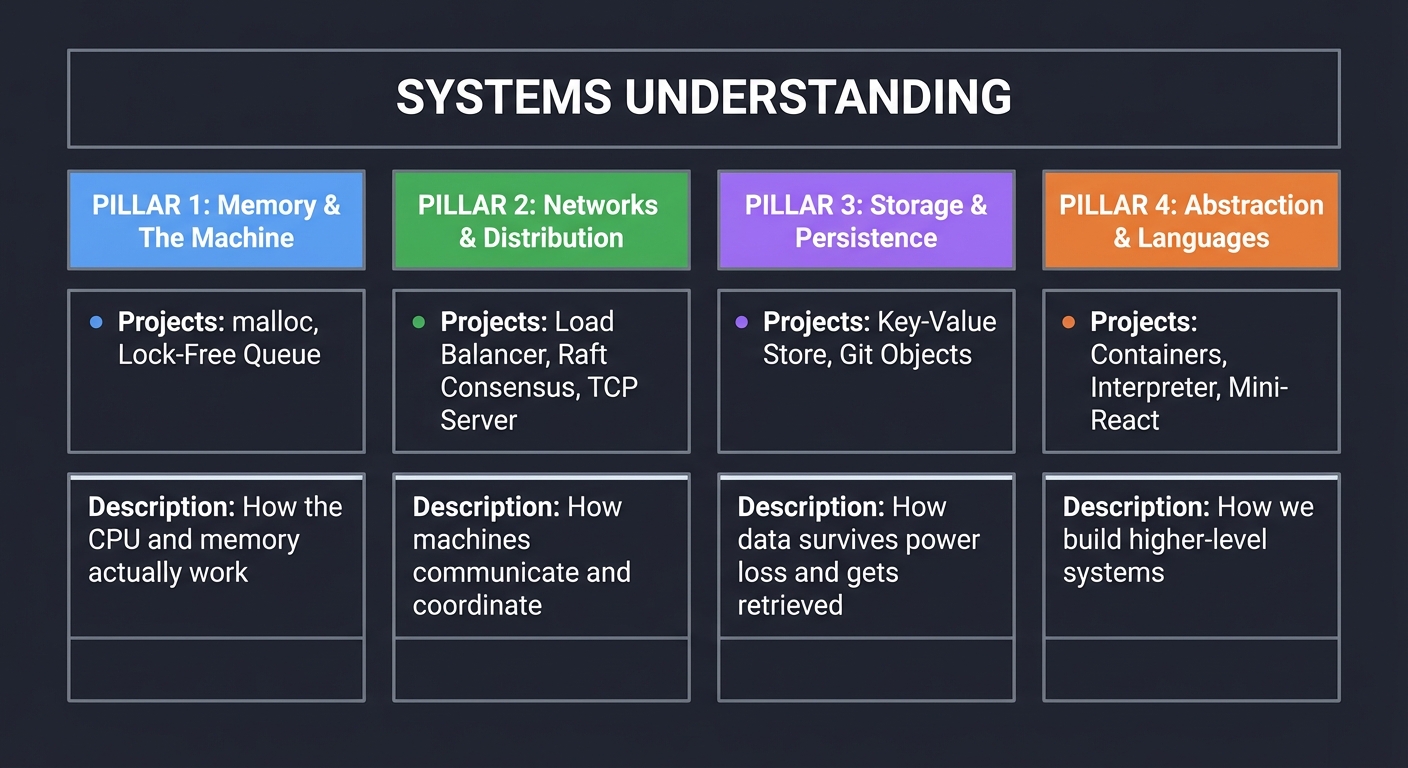
All 10 projects map to four fundamental areas. Master these, and you can build anything:
┌─────────────────────────────────────────────────────────────────────────────┐
│                        SYSTEMS UNDERSTANDING                                 │
├──────────────────┬──────────────────┬──────────────────┬───────────────────┤
│  PILLAR 1        │  PILLAR 2        │  PILLAR 3        │  PILLAR 4         │
│  Memory &        │  Networks &      │  Storage &       │  Abstraction &    │
│  The Machine     │  Distribution    │  Persistence     │  Languages        │
├──────────────────┼──────────────────┼──────────────────┼───────────────────┤
│ • malloc         │ • Load Balancer  │ • Key-Value Store│ • Containers      │
│ • Lock-Free Queue│ • Raft Consensus │ • Git Objects    │ • Interpreter     │
│                  │ • TCP Server     │                  │ • Mini-React      │
├──────────────────┼──────────────────┼──────────────────┼───────────────────┤
│ How the CPU and  │ How machines     │ How data survives│ How we build      │
│ memory actually  │ communicate and  │ power loss and   │ higher-level      │
│ work             │ coordinate       │ gets retrieved   │ systems           │
└──────────────────┴──────────────────┴──────────────────┴───────────────────┘
Pillar 1: Memory & The Machine
Projects: malloc (Project 1), Lock-Free Queue (Project 7)
The Big Picture: How Memory Really Works
Everything in computing ultimately happens in memory. When you understand memory, you understand computing.
The Memory Hierarchy
┌─────────────────────────────────────────────────────────────────┐
│                         CPU                                      │
│  ┌─────────┐                                                    │
│  │ Registers│  ← Fastest (1 cycle), smallest (~64 bytes)        │
│  └────┬────┘    Direct CPU access, named storage                │
│       │                                                          │
│  ┌────┴────┐                                                    │
│  │ L1 Cache│  ← Very fast (4 cycles), small (64 KB)             │
│  └────┬────┘    Per-core, split instruction/data                │
│       │                                                          │
│  ┌────┴────┐                                                    │
│  │ L2 Cache│  ← Fast (10 cycles), medium (256 KB)               │
│  └────┬────┘    Per-core, unified                               │
│       │                                                          │
│  ┌────┴────┐                                                    │
│  │ L3 Cache│  ← Moderate (40 cycles), larger (8+ MB)            │
│  └────┬────┘    Shared across cores                             │
└───────┼─────────────────────────────────────────────────────────┘
        │
┌───────┴─────────────────────────────────────────────────────────┐
│       RAM        ← Slow (100+ cycles), large (16+ GB)           │
│                    Main memory, volatile                         │
└───────┬─────────────────────────────────────────────────────────┘
        │
┌───────┴─────────────────────────────────────────────────────────┐
│       SSD/Disk   ← Very slow (10,000+ cycles), huge (TB)        │
│                    Persistent storage                            │
└─────────────────────────────────────────────────────────────────┘
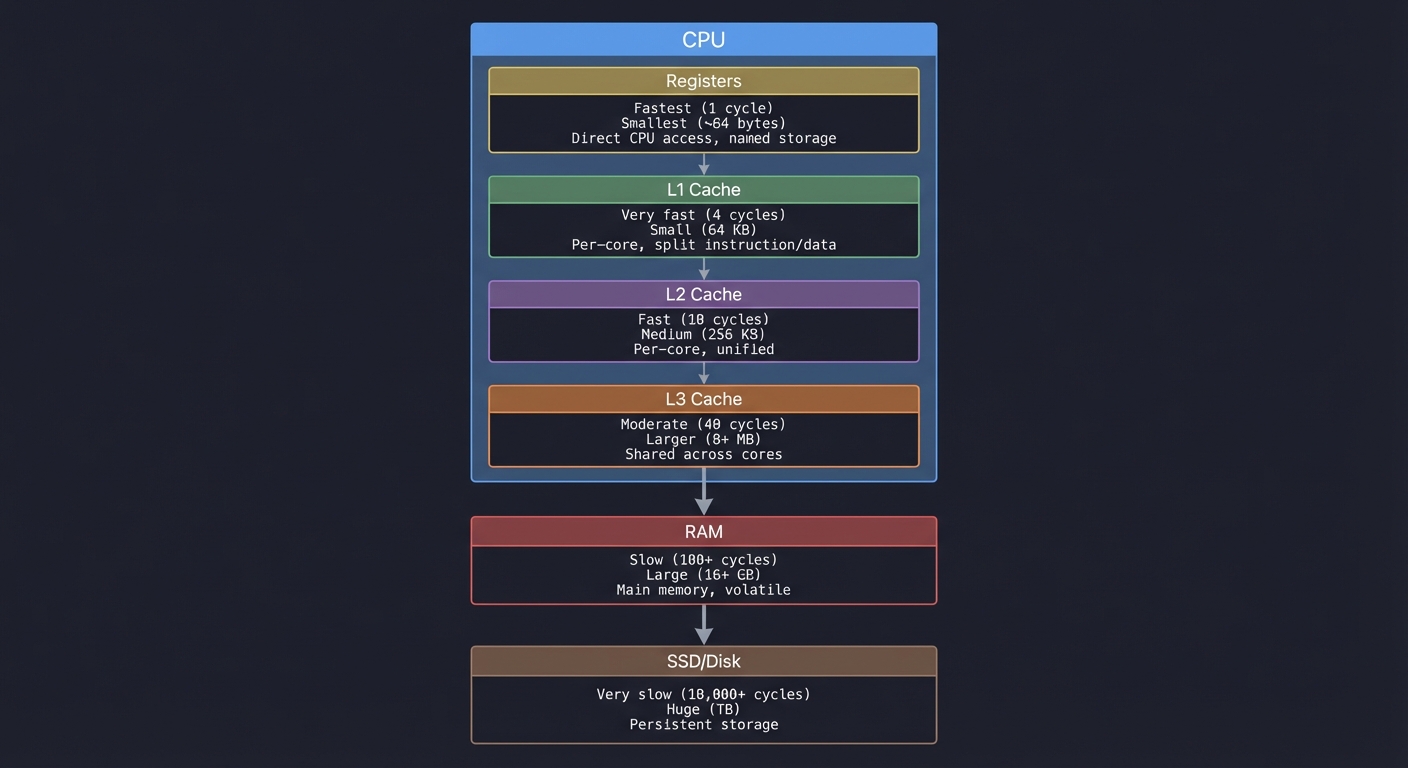
Key insight: A cache miss can be 100x slower than a hit. This is why data structures matter—not for theoretical Big-O, but for cache behavior.
A Process’s Memory Layout
When your program runs, the OS gives it a virtual address space:
High addresses (0xFFFFFFFF on 32-bit / 0x7FFF... on 64-bit)
┌────────────────────────────┐
│         Kernel Space       │  ← You can't touch this
│    (OS code and data)      │    Accessing = segfault
├────────────────────────────┤ ← The "kernel/user boundary"
│                            │
│          Stack             │  ← Local variables, return addresses
│            ↓               │    Grows DOWN toward lower addresses
│                            │    Fixed size (~8MB default on Linux)
│     (unmapped region)      │
│                            │    ← Stack and heap grow toward each other
│            ↑               │
│          Heap              │  ← malloc'd memory
│                            │    Grows UP toward higher addresses
│                            │    Can grow very large
├────────────────────────────┤
│     Memory-Mapped Files    │  ← mmap'd regions, shared libraries
├────────────────────────────┤
│          BSS               │  ← Uninitialized global variables
│                            │    (zero-initialized by OS)
├────────────────────────────┤
│          Data              │  ← Initialized global variables
│                            │    (copied from executable)
├────────────────────────────┤
│          Text              │  ← Your compiled code (read-only)
│                            │    (mapped from executable)
└────────────────────────────┘
Low addresses (0x00000000... but never quite 0)
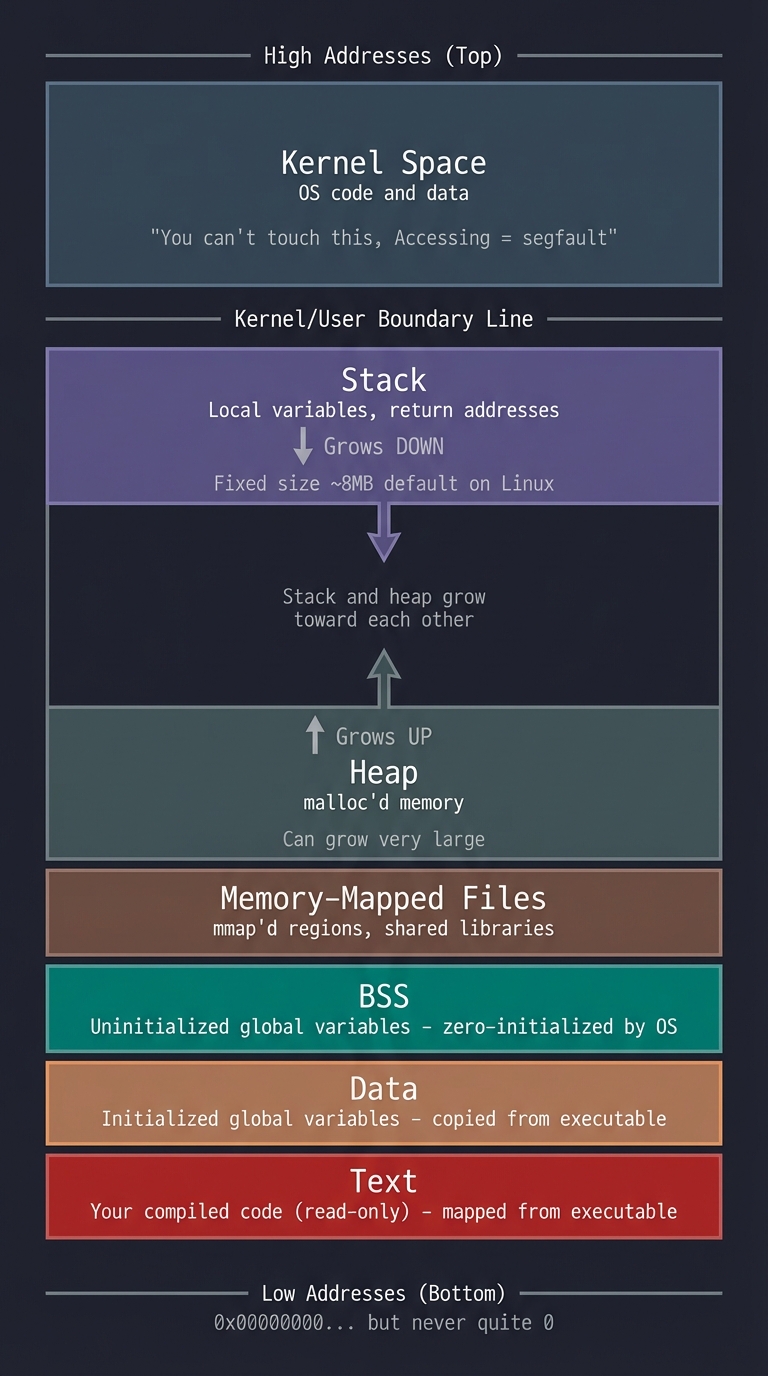
Why this matters for malloc: malloc manages the heap region. It asks the OS for more heap space (via brk/sbrk or mmap) and carves it up for you.
Why this matters for lock-free: Multiple threads share this space. When two cores access the same cache line, you get “false sharing” and performance tanks.
Virtual Memory: The Illusion
Every process thinks it has the entire address space to itself. This is an illusion:
Process A's View          Physical RAM         Process B's View
┌──────────────┐                              ┌──────────────┐
│ 0x1000: my   │         ┌──────────┐         │ 0x1000: my   │
│ variable x   │───┐     │ Frame 42 │    ┌────│ variable y   │
└──────────────┘   │     └──────────┘    │    └──────────────┘
                   │          ↑          │
                   │     ┌──────────┐    │
                   └────→│ Frame 17 │←───┘
                         └──────────┘
                              ↑
                         ┌──────────┐
                         │ Page Table│  ← Maps virtual → physical
                         └──────────┘
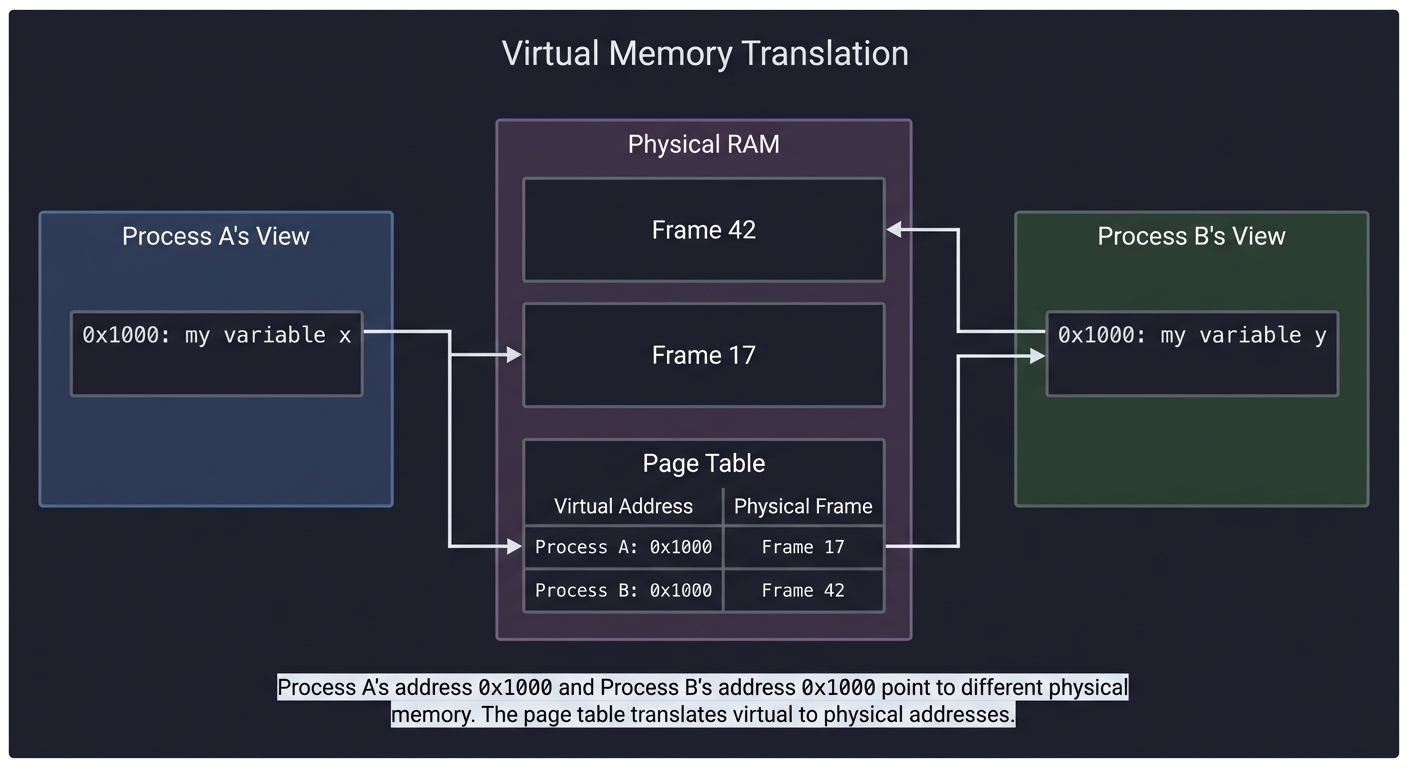
Key insight: Process A’s address 0x1000 and Process B’s address 0x1000 point to different physical memory. The page table (managed by the OS) translates virtual addresses to physical addresses.
Why this matters for malloc: When you call brk() to grow the heap, you’re asking the OS to add entries to your page table—to make more virtual addresses valid.
Why this matters for containers: Linux namespaces give processes different “views” of the system. Memory isolation is one aspect of containerization.
Atomic Operations and Memory Ordering
Modern CPUs reorder operations for performance. This breaks naive concurrent code:
Thread 1                    Thread 2
─────────                   ─────────
x = 1;                      while (flag == 0) { }
flag = 1;                   print(x);

You expect: print "1"
Reality: might print "0" or garbage!

Why? The CPU might reorder Thread 1's writes:
  flag = 1;   ← might happen first!
  x = 1;      ← then this
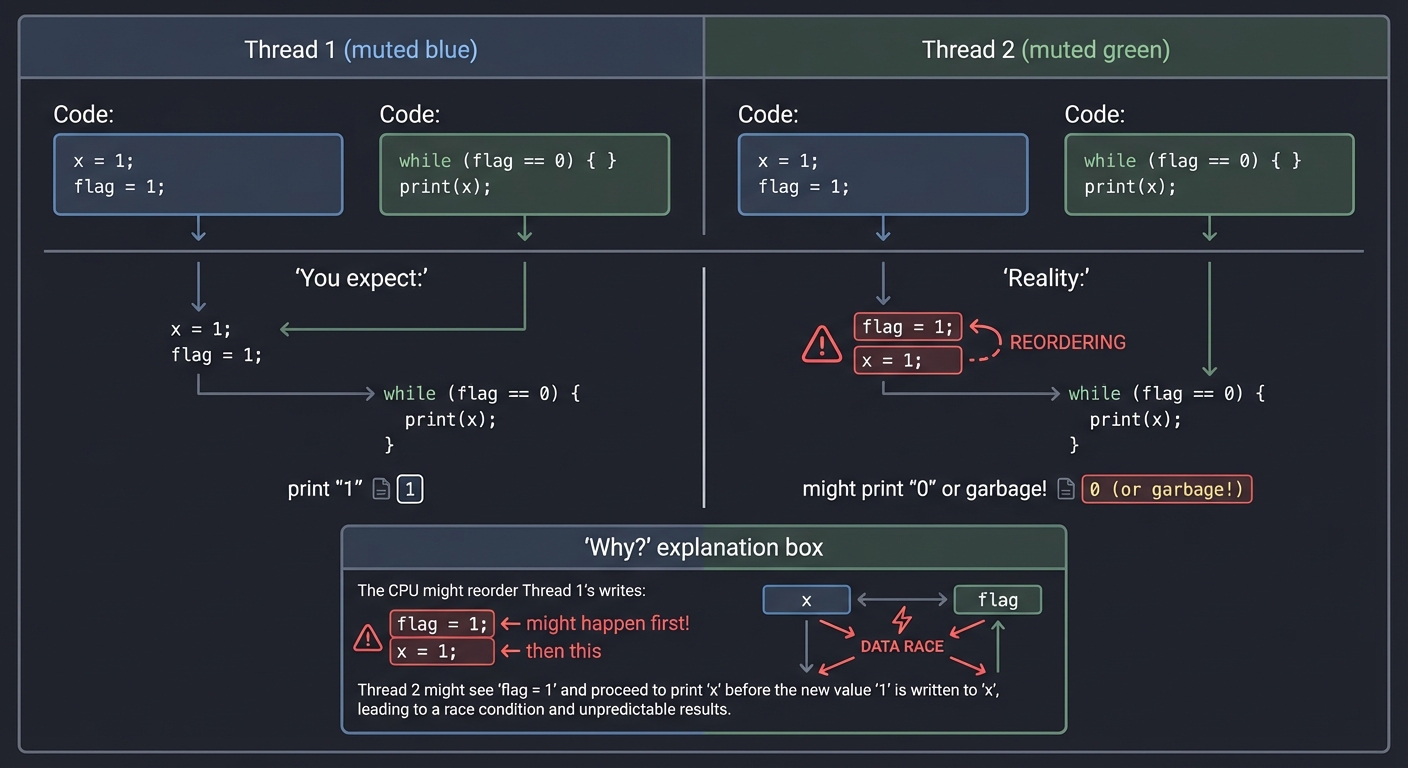
Memory barriers (fences) force ordering. Atomic operations come with ordering guarantees:
| Ordering | Guarantee |
|---|---|
| Relaxed | No ordering, just atomicity |
| Acquire | No reads/writes can be reordered BEFORE this |
| Release | No reads/writes can be reordered AFTER this |
| SeqCst | Total ordering (slowest, safest) |
Why this matters for lock-free: Every lock-free data structure must carefully choose memory orderings. Wrong choice = subtle corruption.
Deep Dive Reading: Memory & The Machine
| Concept | Book & Chapter |
|---|---|
| Memory hierarchy | Computer Systems: A Programmer’s Perspective Ch. 6 - Bryant & O’Hallaron |
| Virtual memory | Computer Systems: A Programmer’s Perspective Ch. 9 - Bryant & O’Hallaron |
| Process address space | Operating Systems: Three Easy Pieces Ch. 13-15 - Arpaci-Dusseau |
| malloc internals | Computer Systems: A Programmer’s Perspective Ch. 9.9 - Bryant & O’Hallaron |
| Atomic operations | Rust Atomics and Locks Ch. 1-3 - Mara Bos |
| Memory ordering | C++ Concurrency in Action Ch. 5 - Anthony Williams |
| Cache behavior | What Every Programmer Should Know About Memory - Ulrich Drepper (paper) |
Pillar 2: Networks & Distribution
Projects: Load Balancer (Project 2), Raft Consensus (Project 4), TCP Server (Project 8)
The Big Picture: How Machines Communicate
All network programming boils down to two things: moving bytes between machines, and handling the fact that this can fail at any time.
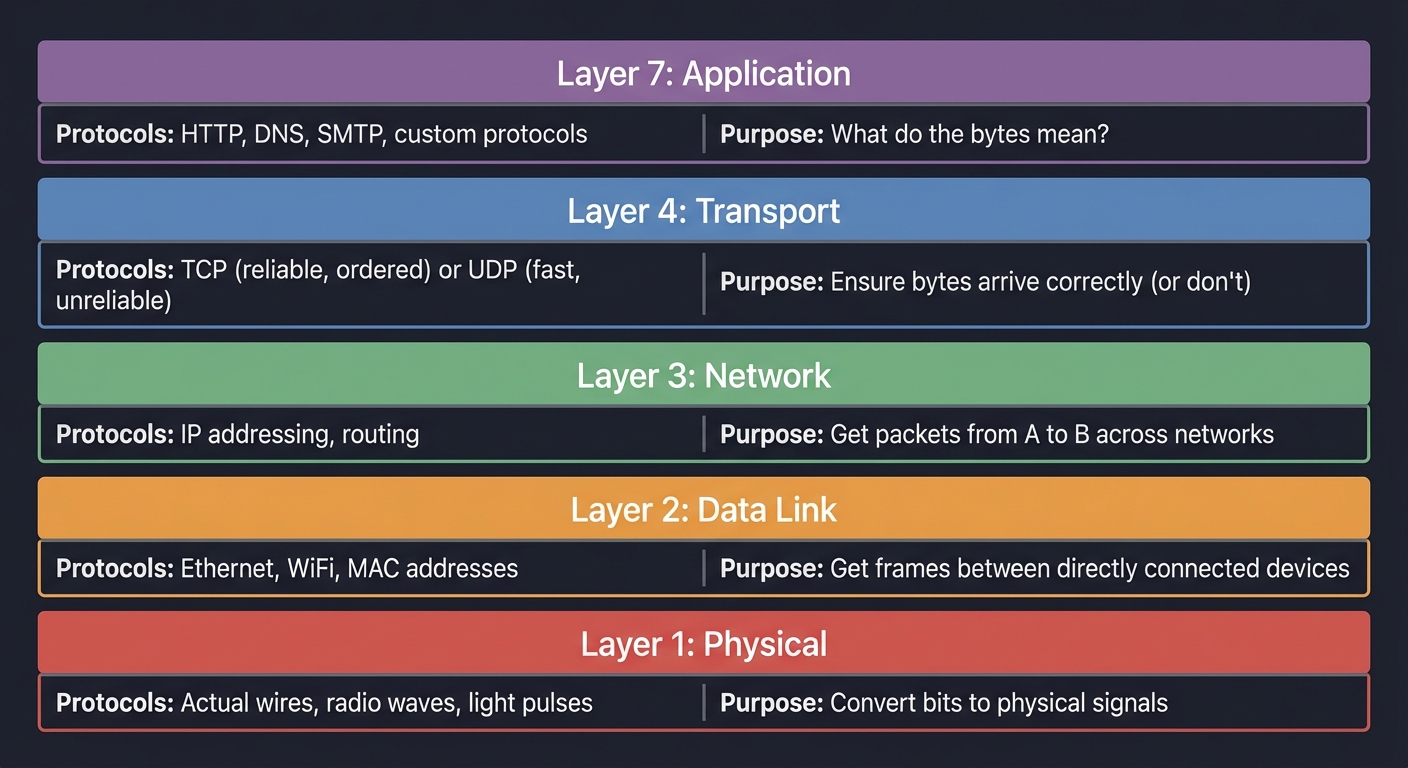
The Network Stack (Simplified)
┌─────────────────────────────────────────────────────────────────┐
│ Layer 7: Application                                             │
│ HTTP, DNS, SMTP, your custom protocols                          │
│ "What do the bytes mean?"                                        │
├─────────────────────────────────────────────────────────────────┤
│ Layer 4: Transport                                               │
│ TCP (reliable, ordered) or UDP (fast, unreliable)               │
│ "Ensure bytes arrive correctly (or don't)"                      │
├─────────────────────────────────────────────────────────────────┤
│ Layer 3: Network                                                 │
│ IP addressing, routing                                          │
│ "Get packets from A to B across networks"                       │
├─────────────────────────────────────────────────────────────────┤
│ Layer 2: Data Link                                               │
│ Ethernet, WiFi, MAC addresses                                   │
│ "Get frames between directly connected devices"                 │
├─────────────────────────────────────────────────────────────────┤
│ Layer 1: Physical                                                │
│ Actual wires, radio waves, light pulses                         │
│ "Convert bits to physical signals"                              │
└─────────────────────────────────────────────────────────────────┘
Why this matters for load balancers:
- L4 load balancer: Works at TCP level. Sees source/dest IP and port. Fast but limited.
- L7 load balancer: Works at HTTP level. Can route based on URL, headers, cookies. Slower but smarter.
TCP: The Reliable Stream
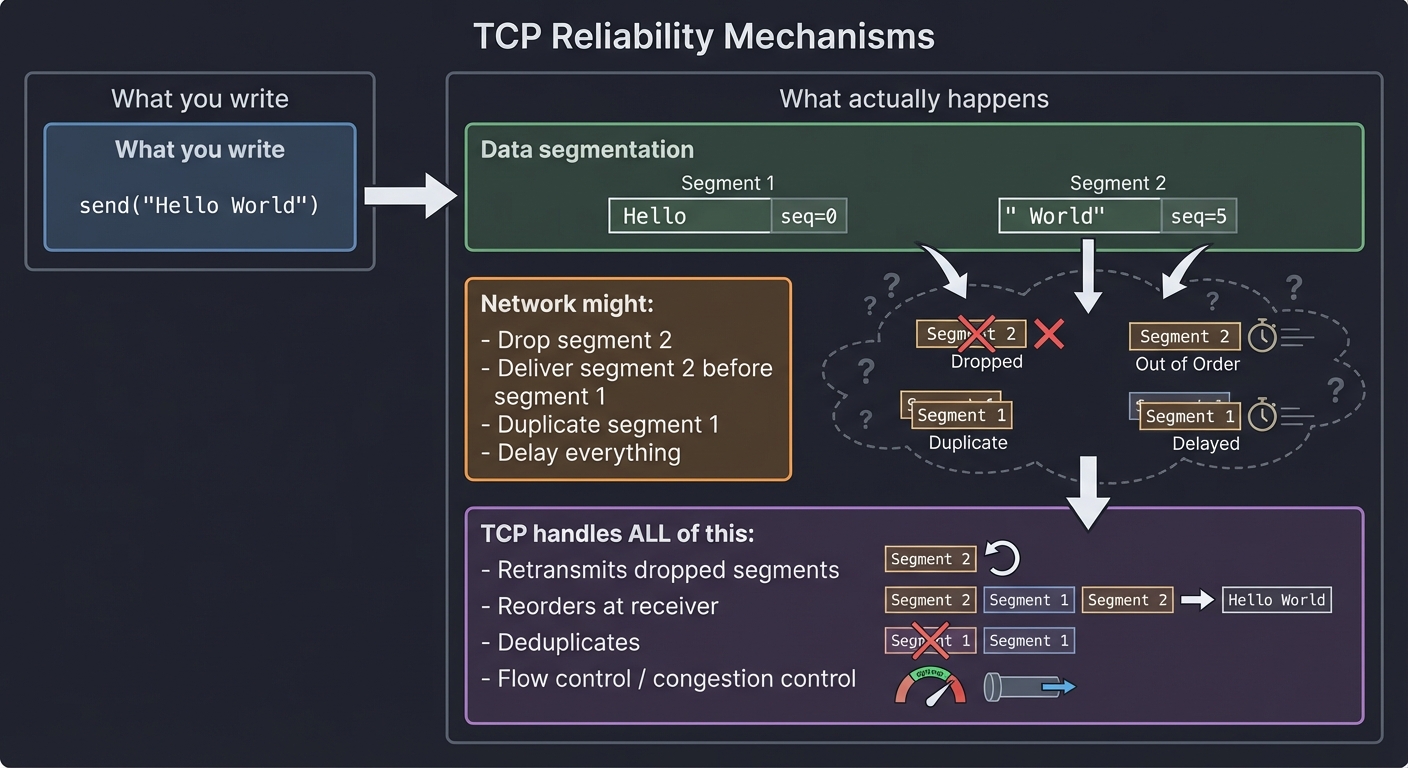
TCP provides the illusion of a reliable, ordered byte stream. But it’s just an illusion built on unreliable packets:
What you write:              What actually happens:
─────────────────           ─────────────────────────
send("Hello World")    →    Segment 1: "Hello" + seq=0
                            Segment 2: " World" + seq=5

                            Network might:
                            - Drop segment 2
                            - Deliver segment 2 before segment 1
                            - Duplicate segment 1
                            - Delay everything

                            TCP handles ALL of this:
                            - Retransmits dropped segments
                            - Reorders at receiver
                            - Deduplicates
                            - Flow control / congestion control
The Three-Way Handshake:
Client                              Server
   │                                   │
   │─────── SYN (seq=x) ──────────────→│
   │                                   │
   │←────── SYN-ACK (seq=y, ack=x+1) ──│
   │                                   │
   │─────── ACK (ack=y+1) ────────────→│
   │                                   │
   │         Connection established    │
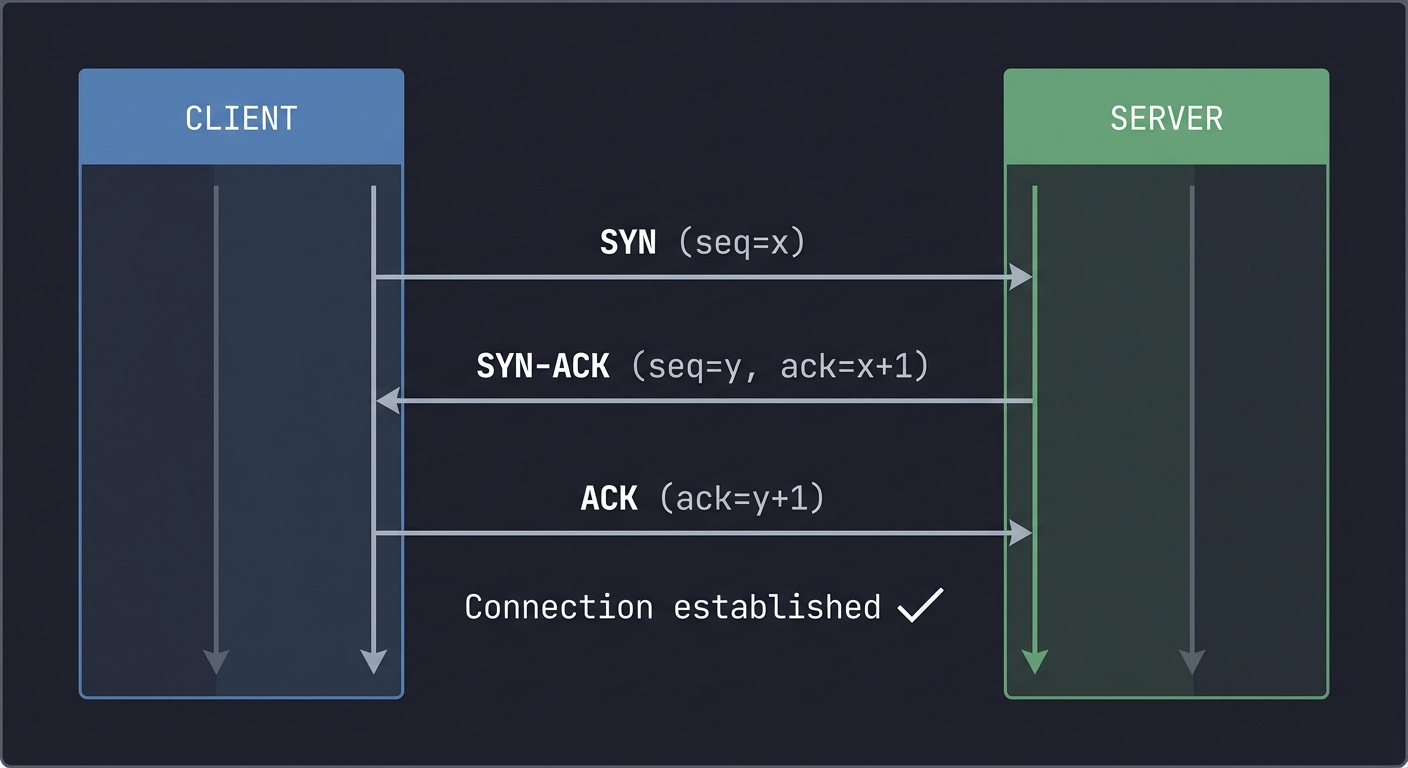
Why this matters for TCP servers: Your server’s listen() backlog is connections in SYN-RECEIVED state. accept() pulls from completed connections.
The Socket API
The Berkeley sockets API is the universal interface for network programming:
Server                              Client
───────                             ──────
socket()    Create endpoint         socket()
   ↓                                   ↓
bind()      Attach to address          │
   ↓                                   │
listen()    Mark as passive            │
   ↓                                   │
accept() ←─── 3-way handshake ────→ connect()
   ↓                                   ↓
recv/send ←────── data ─────────→ recv/send
   ↓                                   ↓
close()     Teardown               close()
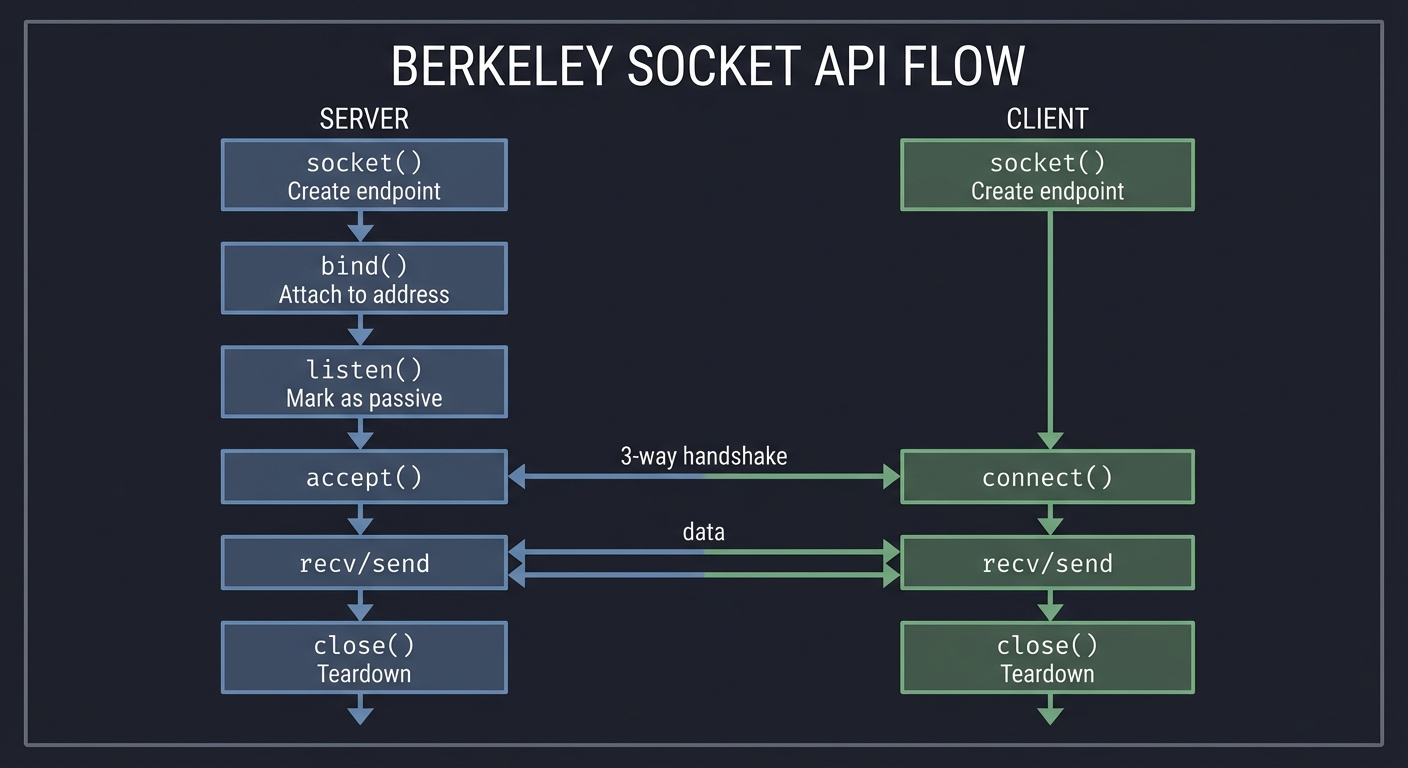
What each syscall does:
socket(): Create a file descriptor for network communicationbind(): Associate the socket with an address (IP + port)listen(): Convert socket from active to passive (server mode)accept(): Wait for and accept incoming connection (returns NEW socket)connect(): Initiate connection to a serversend()/recv(): Transfer data (orread()/write()- same thing for TCP)close(): Terminate the connection
Key insight: After accept(), you have TWO sockets: the original listening socket (still accepting new connections) and a new socket for THIS connection.
The Distributed Systems Reality
Once you have multiple machines, new problems emerge:
The Eight Fallacies of Distributed Computing (Peter Deutsch):
─────────────────────────────────────────────────────────────
1. The network is reliable        ← It will fail
2. Latency is zero               ← It's measurable and variable
3. Bandwidth is infinite         ← It's finite and shared
4. The network is secure         ← Assume hostile actors
5. Topology doesn't change       ← Machines come and go
6. There is one administrator    ← Multiple teams, policies
7. Transport cost is zero        ← Cloud bills prove otherwise
8. The network is homogeneous    ← Mix of protocols, hardware
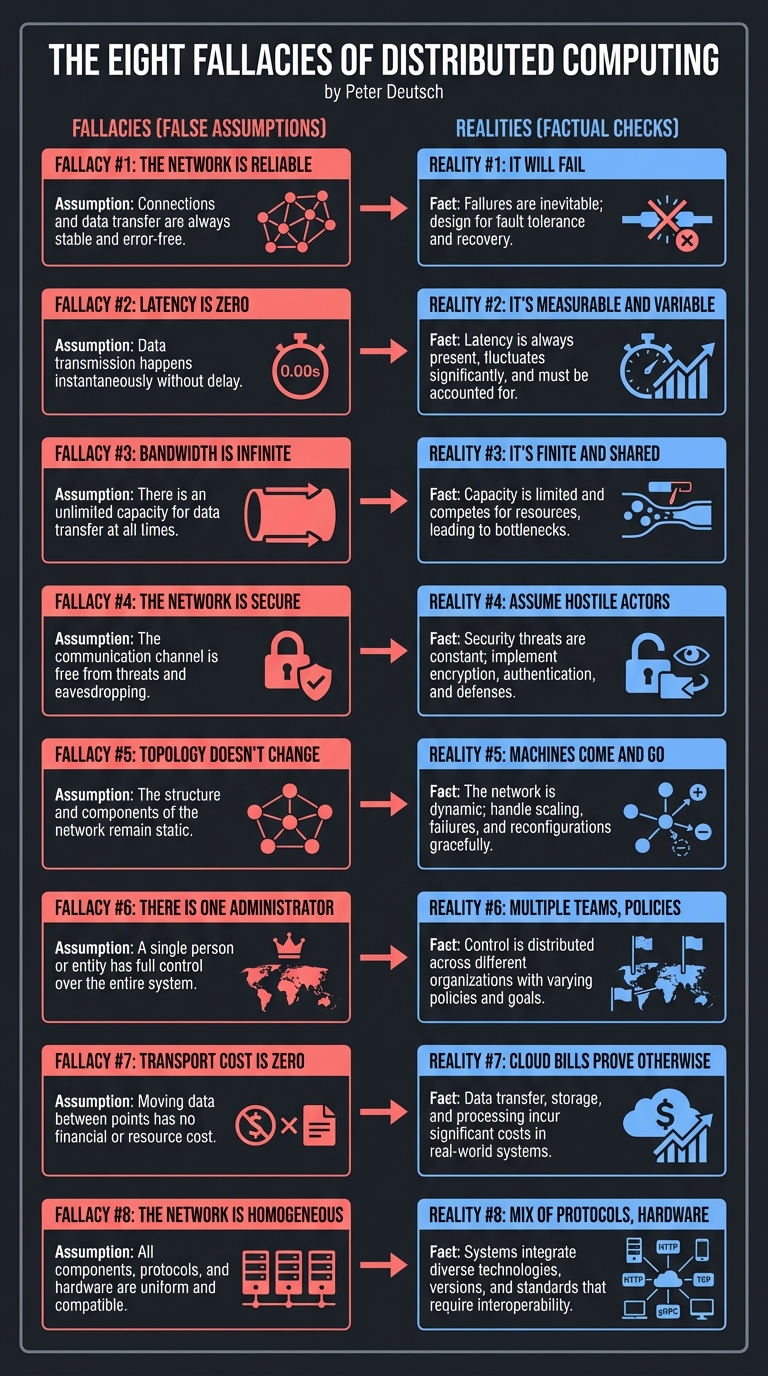
Why this matters for Raft: You cannot assume messages arrive, arrive in order, or arrive once. You must handle all failure modes.
The CAP Theorem
You can only have two of three properties:
        Consistency
           /\
          /  \
         /    \
        /      \
       /   ??   \
      /          \
     /____________\
Availability    Partition
                Tolerance
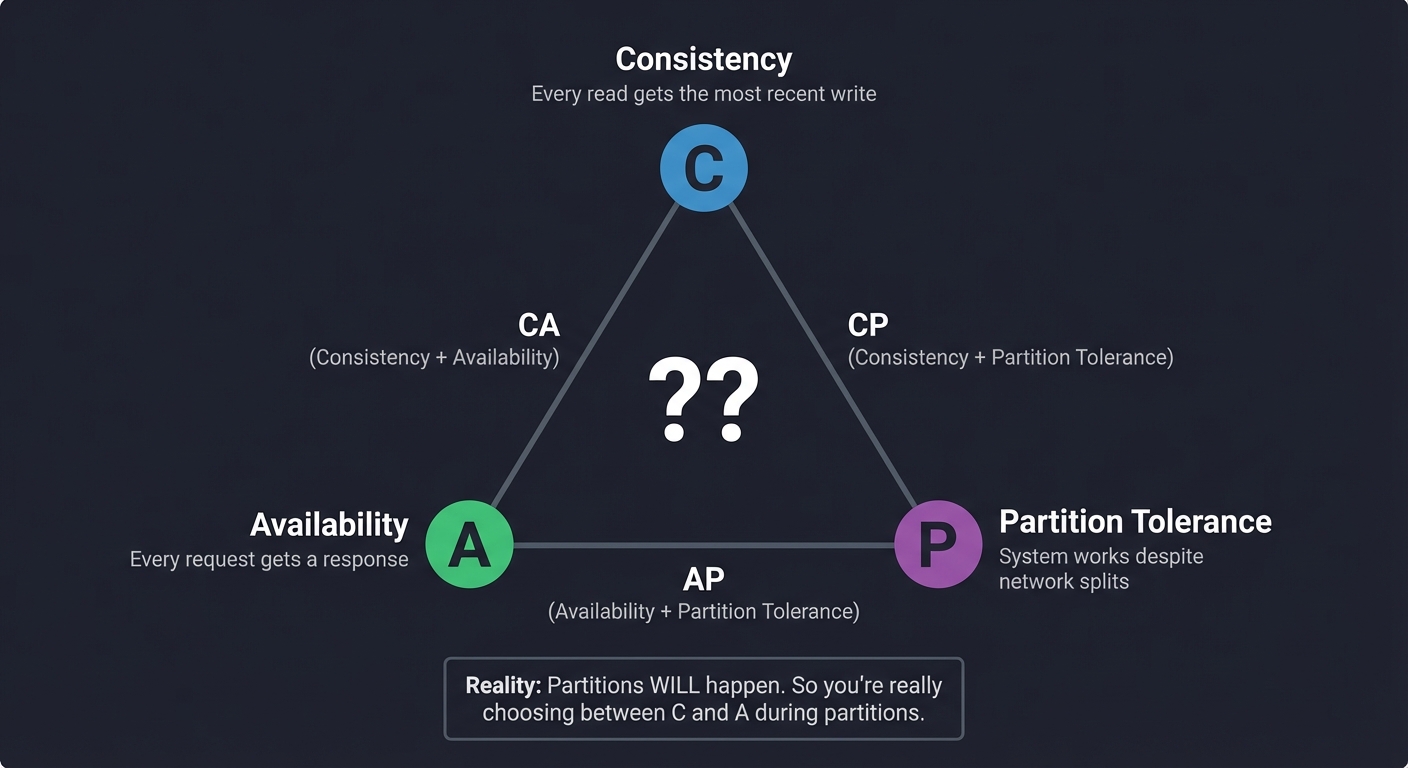
- Consistency: Every read gets the most recent write
- Availability: Every request gets a response
- Partition Tolerance: System works despite network splits
Reality: Partitions WILL happen. So you’re really choosing between C and A during partitions.
Why this matters for Raft: Raft chooses Consistency. During a partition, the minority side CANNOT accept writes (no availability). The majority side continues (linearizable reads/writes).
Consensus: The Fundamental Problem
How do N machines agree on a value, even when some might fail or be slow?
The Problem:
─────────────
5 servers, each might propose a value
Messages might be delayed, lost, duplicated
Some servers might crash and recover
Network might partition

The Goal:
─────────
All non-crashed servers eventually agree on THE SAME VALUE
Once agreed, the value never changes
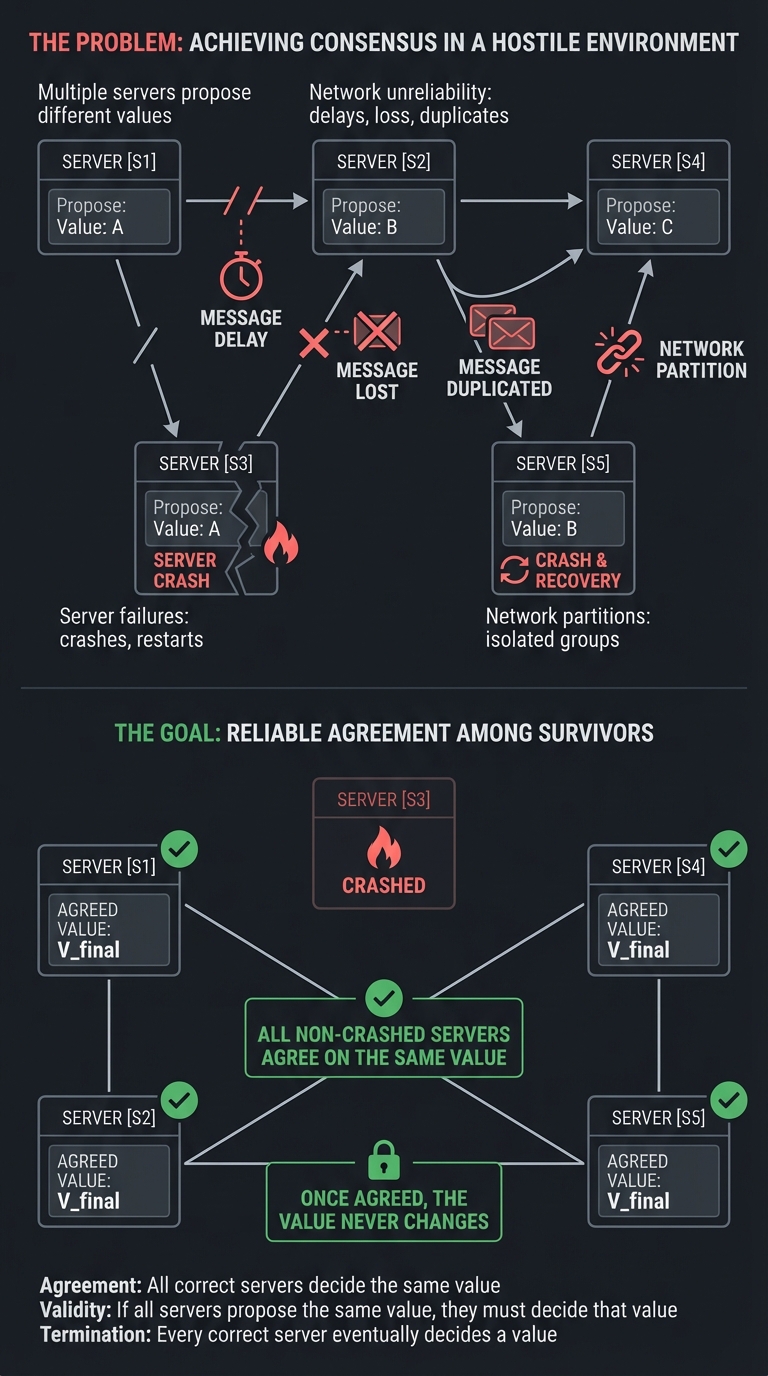
Raft’s approach (simplified):
- Leader Election: One server becomes leader for a “term”
- Log Replication: Leader receives writes, replicates to followers
- Commitment: When majority have the entry, it’s “committed”
- Safety: Only servers with all committed entries can become leader
Deep Dive Reading: Networks & Distribution
| Concept | Book & Chapter |
|---|---|
| Socket programming | The Linux Programming Interface Ch. 56-61 - Michael Kerrisk |
| TCP/IP protocol | TCP/IP Illustrated, Volume 1 Ch. 1-24 - W. Richard Stevens |
| HTTP protocol | HTTP: The Definitive Guide Ch. 1-5 - David Gourley |
| Distributed systems intro | Designing Data-Intensive Applications Ch. 1-2 - Martin Kleppmann |
| Replication | Designing Data-Intensive Applications Ch. 5 - Martin Kleppmann |
| Consensus | Designing Data-Intensive Applications Ch. 9 - Martin Kleppmann |
| The Raft paper | “In Search of an Understandable Consensus Algorithm” - Ongaro & Ousterhout |
| Load balancing | Building Microservices, 2nd Ed Ch. 11 - Sam Newman |
Pillar 3: Storage & Persistence
Projects: Key-Value Store (Project 3), Git Objects (Project 10)
The Big Picture: How Data Survives
When you turn off the power, RAM is gone. Everything you want to keep must be written to disk. But disks are slow and have strange characteristics.
The Storage Hierarchy
Register  ─→  1 ns       (1x)
L1 Cache  ─→  4 ns       (4x)
L2 Cache  ─→  10 ns      (10x)
L3 Cache  ─→  40 ns      (40x)
RAM       ─→  100 ns     (100x)
SSD       ─→  100,000 ns (100,000x = 0.1 ms)
HDD       ─→  10,000,000 ns (10,000,000x = 10 ms)
Network   ─→  varies widely (0.5ms same datacenter, 100ms cross-country)
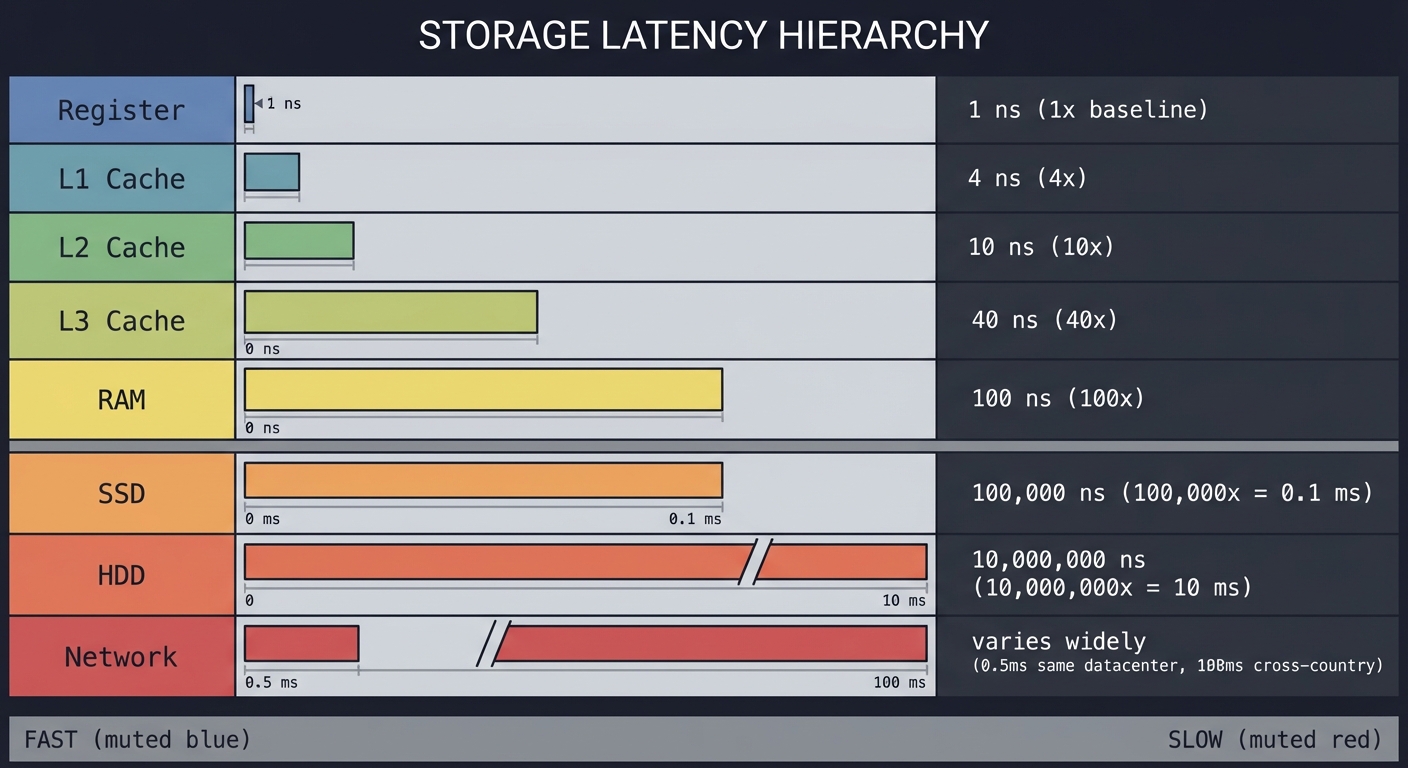
Key insight: SSD is 1000x slower than RAM. This is why databases don’t just write everything to disk for every operation—they batch, cache, and use clever data structures.
The Durability Problem
When is data “really” saved?
Your write call:
─────────────────
write(fd, data, len);

What actually happens:
─────────────────────
1. Data goes to kernel buffer (OS page cache)
   └─ "write() returns success" - BUT DATA IS NOT ON DISK YET

2. Kernel eventually flushes to disk controller
   └─ Controller has its own cache too!

3. Controller writes to actual disk platters/cells
   └─ NOW it's durable (probably)

If power fails at step 1 or 2: DATA IS LOST
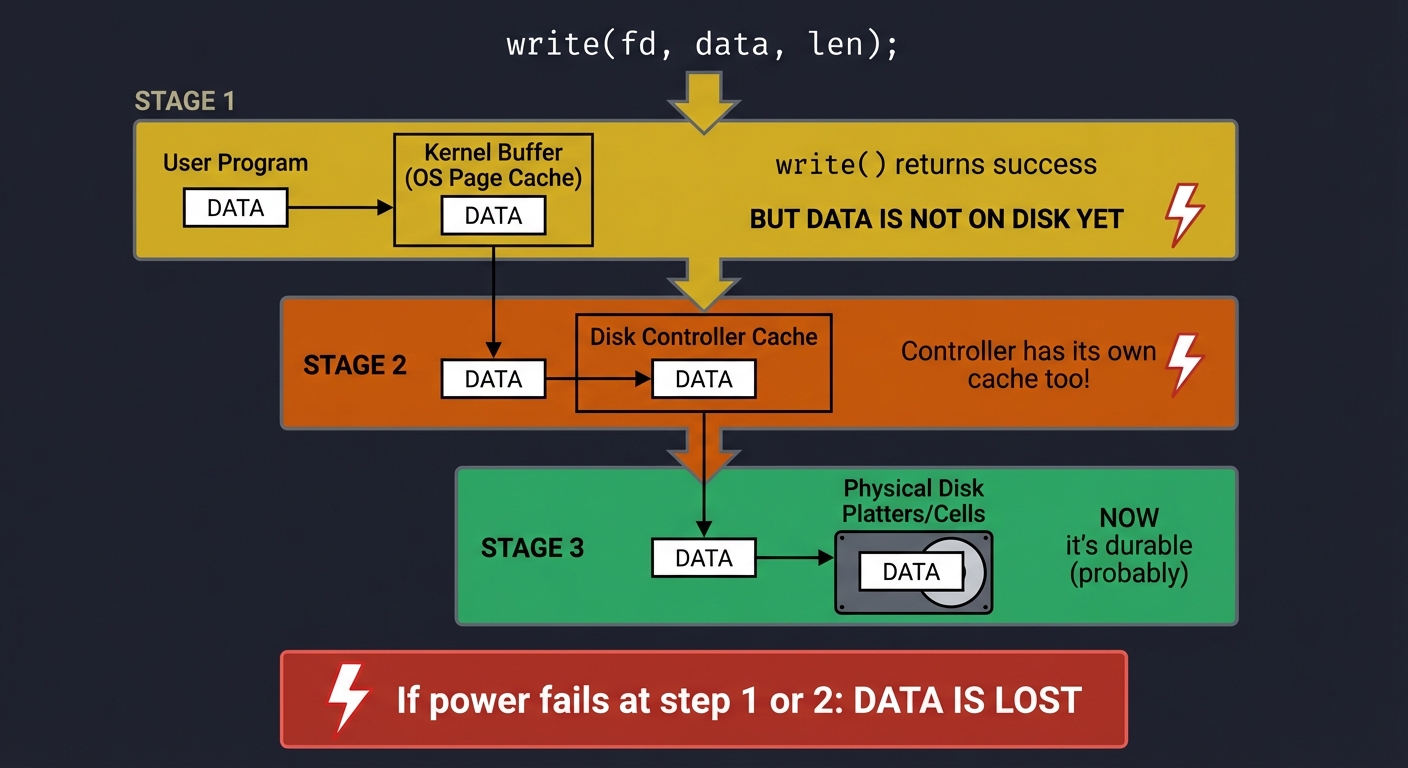
The solution: fsync()
write(fd, data, len);  // Data in kernel buffer
fsync(fd);             // WAIT until data is on physical media
                       // (or at least, controller says it is)
Why this matters for key-value stores: Every write must be durable before you tell the client “success.” Otherwise, you lose data on crash.
File Systems: The Abstraction Layer
File systems provide the abstraction of “files” and “directories” over raw disk blocks:
What you see:              What's on disk:
────────────────          ───────────────────
/home/                    Block 0: Superblock (metadata)
├── user/                 Block 1-N: Inode table
│   ├── file1.txt         Block N+1...: Data blocks
│   └── file2.txt
                          Inode 42: {size=100, blocks=[1001, 1002]}
                          Block 1001: "Hello..."
                          Block 1002: "...World"
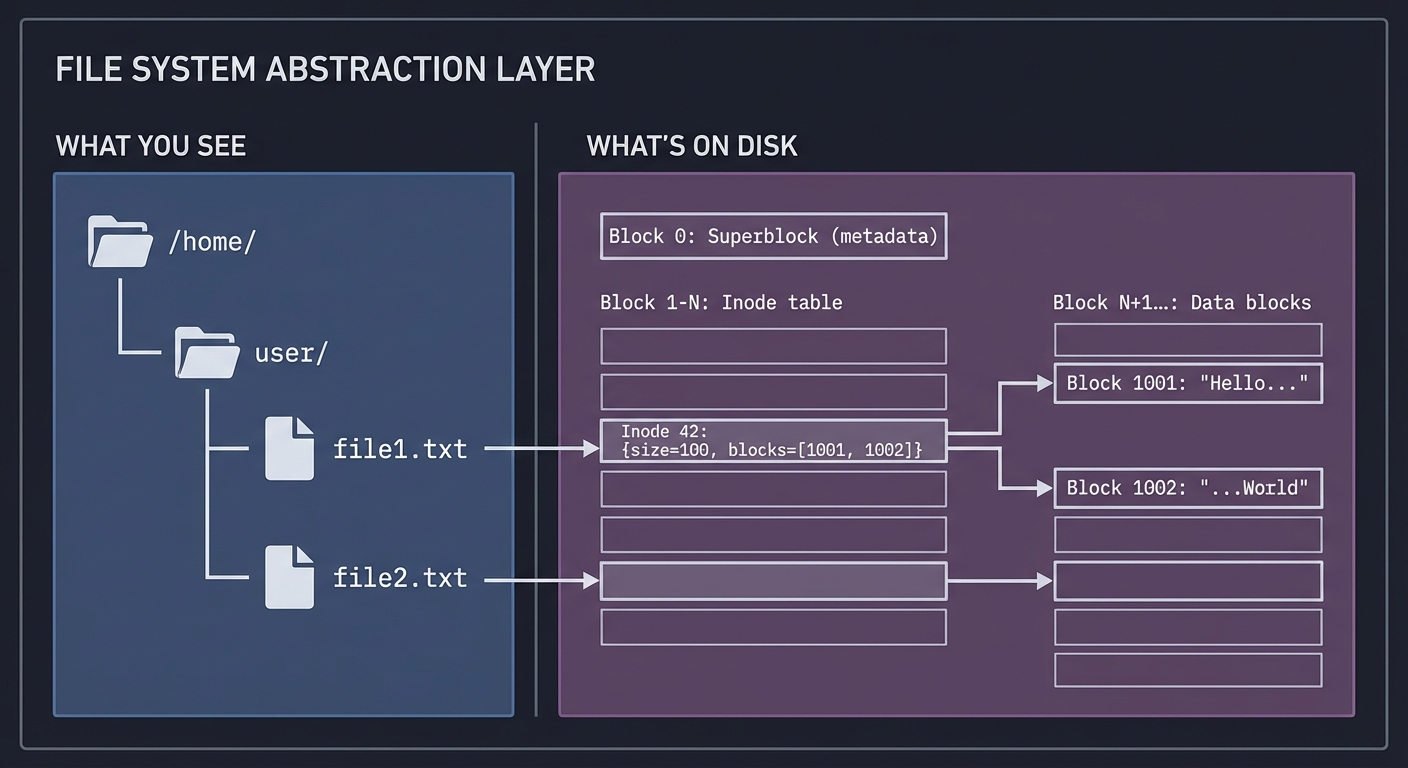
Key concepts:
- Inode: Metadata about a file (size, permissions, block locations)
- Directory: A file that maps names → inode numbers
- Block: The unit of disk I/O (typically 4KB)
Why this matters for Git: Git stores objects as files. Each object is named by its SHA-1 hash and stored in .git/objects/XX/XXXX....
Serialization: Bytes to Structure and Back
To store data, you must convert it to bytes. To read it back, you must parse bytes into data:
In memory:                 On disk (one option):
──────────                ────────────────────
struct User {             Length-prefixed encoding:
  char* name;  → "Alice"  ┌───────┬───────────┬───────┬────┐
  int age;     → 30       │05│Alice│ 30 (4 bytes, little-endian)│
}                         └───────┴───────────┴───────┴────┘

                          Or JSON:
                          {"name":"Alice","age":30}

                          Or Protocol Buffers:
                          <binary, schema-based>
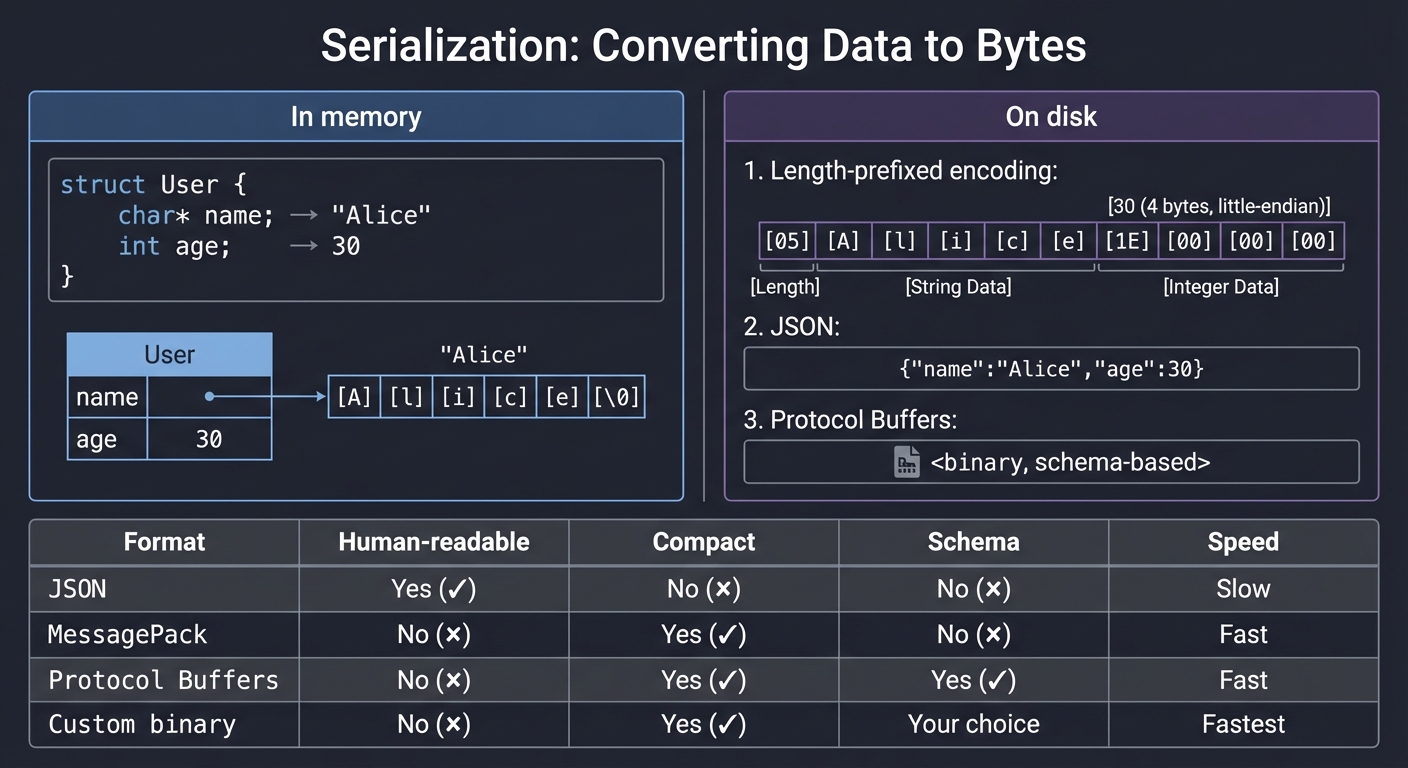
Trade-offs: | Format | Human-readable | Compact | Schema | Speed | |——–|—————|———|——–|——-| | JSON | Yes | No | No | Slow | | MessagePack | No | Yes | No | Fast | | Protocol Buffers | No | Yes | Yes | Fast | | Custom binary | No | Yes | Your choice | Fastest |
Why this matters for key-value stores: You choose a format. Git uses a custom format. Databases often use custom binary formats for speed.
Data Structures for Storage
RAM data structures don’t work well on disk. You need disk-optimized structures:
Hash Tables:
In-memory hash table:
- O(1) lookup
- But: entire table must be in RAM
- No range queries

On-disk hash table (like Bitcask):
- Store values in append-only log
- Keep hash(key) → file_offset in RAM
- O(1) lookup, but index must fit in RAM
B-Trees:
Why B-trees for disk?
- Each node = one disk block (4KB)
- Minimize disk reads (shallow tree)
- Range queries work (sorted within nodes)

Height of B-tree with branching factor 1000:
- 1 billion keys = 3 levels = 3 disk reads!
Log-Structured Merge Trees (LSM):
Write-optimized structure (used by LevelDB, RocksDB):
1. Writes go to in-memory buffer (memtable)
2. When full, flush to sorted disk file (SSTable)
3. Background compaction merges SSTables
4. Reads check memtable, then SSTables (newest first)

Trade-off: Fast writes, slower reads, background work
Why this matters:
- Key-Value Store: You’ll likely start with a hash index, maybe progress to LSM
- Git Objects: Uses content-addressing (hash of content = filename), with pack files for efficiency
Content-Addressable Storage
Git’s brilliant insight: name files by their content hash.
Traditional storage:            Content-addressable storage:
───────────────────            ────────────────────────────
"myfile.txt" → content         SHA1(content) → content

Problems:                      Benefits:
- Same content, different      - Same content = same name
  names = duplicates           - Deduplication automatic
- Renaming = confusion         - Integrity checking built-in
                               - Immutable (content can't change)
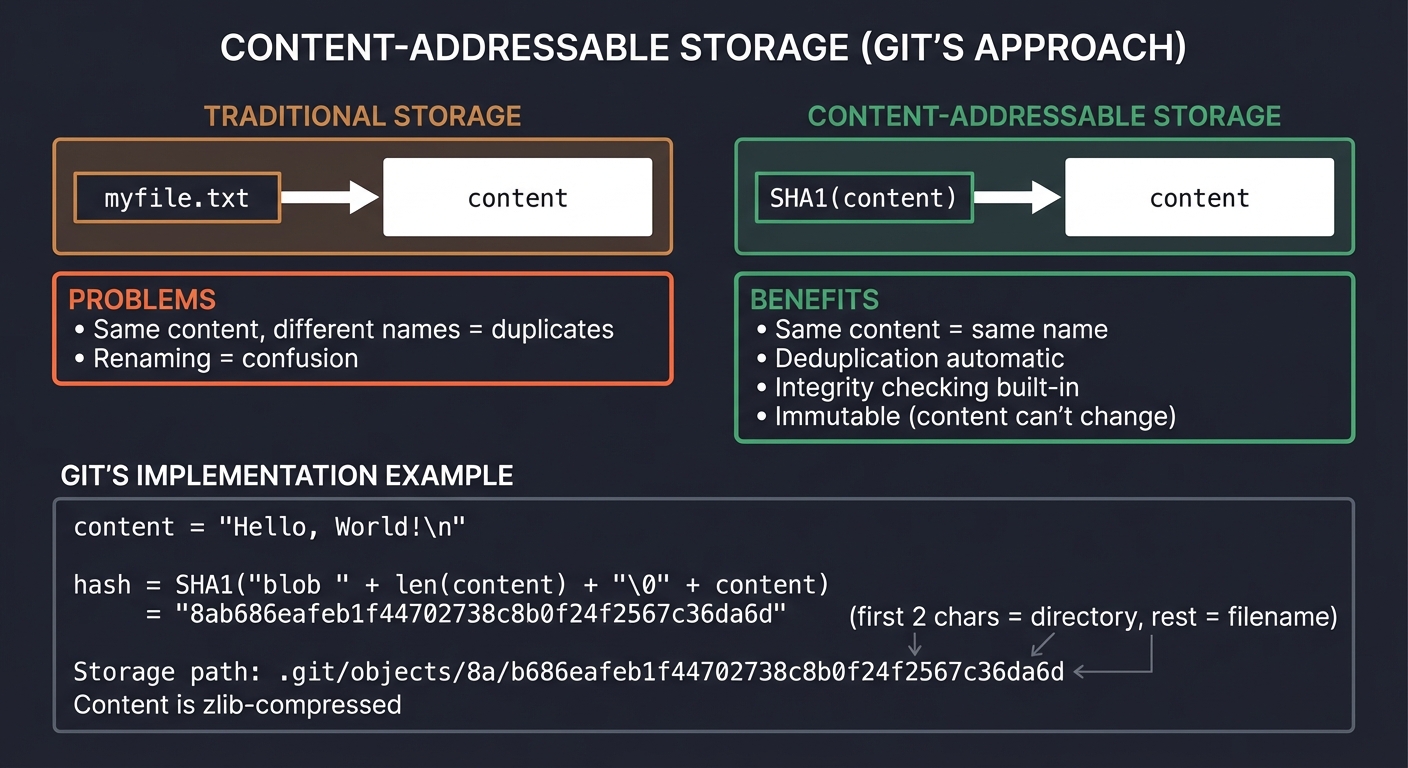
How Git uses this:
# Store a file
content = "Hello, World!\n"
hash = SHA1("blob " + len(content) + "\0" + content)
     = "8ab686eafeb1f44702738c8b0f24f2567c36da6d"

# Store in.git/objects/8a/b686eafeb1f44702738c8b0f24f2567c36da6d
# (first 2 chars = directory, rest = filename)
# Content is zlib-compressed
Deep Dive Reading: Storage & Persistence
| Concept | Book & Chapter |
|---|---|
| File systems | Operating Systems: Three Easy Pieces Ch. 36-42 - Arpaci-Dusseau |
| File I/O in C | The C Programming Language Ch. 7 - Kernighan & Ritchie |
| fsync and durability | The Linux Programming Interface Ch. 13 - Michael Kerrisk |
| Serialization | Designing Data-Intensive Applications Ch. 4 - Martin Kleppmann |
| Storage engines | Designing Data-Intensive Applications Ch. 3 - Martin Kleppmann |
| B-trees | Algorithms, Fourth Edition Section 3.3 - Sedgewick & Wayne |
| Git internals | Pro Git Ch. 10 - Scott Chacon (free online) |
| Content-addressing | “The Git Parable” by Tom Preston-Werner (blog post) |
Pillar 4: Abstraction & Languages
Projects: Containers (Project 5), Interpreter (Project 6), Mini-React (Project 9)
The Big Picture: Building Higher-Level Systems
The first three pillars are about understanding “what’s really happening.” This pillar is about building new abstractions on top of existing ones.
Abstraction: The Fundamental Tool
Computing progresses by building abstractions:
Level 5: Your application
         ↓ uses
Level 4: Framework (React, Django)
         ↓ uses
Level 3: Language runtime (JavaScript engine, Python interpreter)
         ↓ uses
Level 2: Operating system (Linux, Windows)
         ↓ uses
Level 1: Hardware (CPU, RAM, Disk)
         ↓ is
Level 0: Physics (electrons, transistors)
Key insight: Each level hides complexity from the level above. When you build an interpreter, you ARE level 3. When you build a framework, you ARE level 4.
Linux Namespaces: Isolation Without Virtualization
Containers aren’t VMs. They’re just processes with isolated views of system resources:
Without namespaces:           With namespaces:
──────────────────           ─────────────────
All processes see:           Process in container sees:
- Same PID space             - PID 1 (it thinks it's init!)
- Same network              - Its own network interface
- Same filesystem           - Its own root filesystem
- Same users               - Its own user IDs
- Same hostname            - Its own hostname
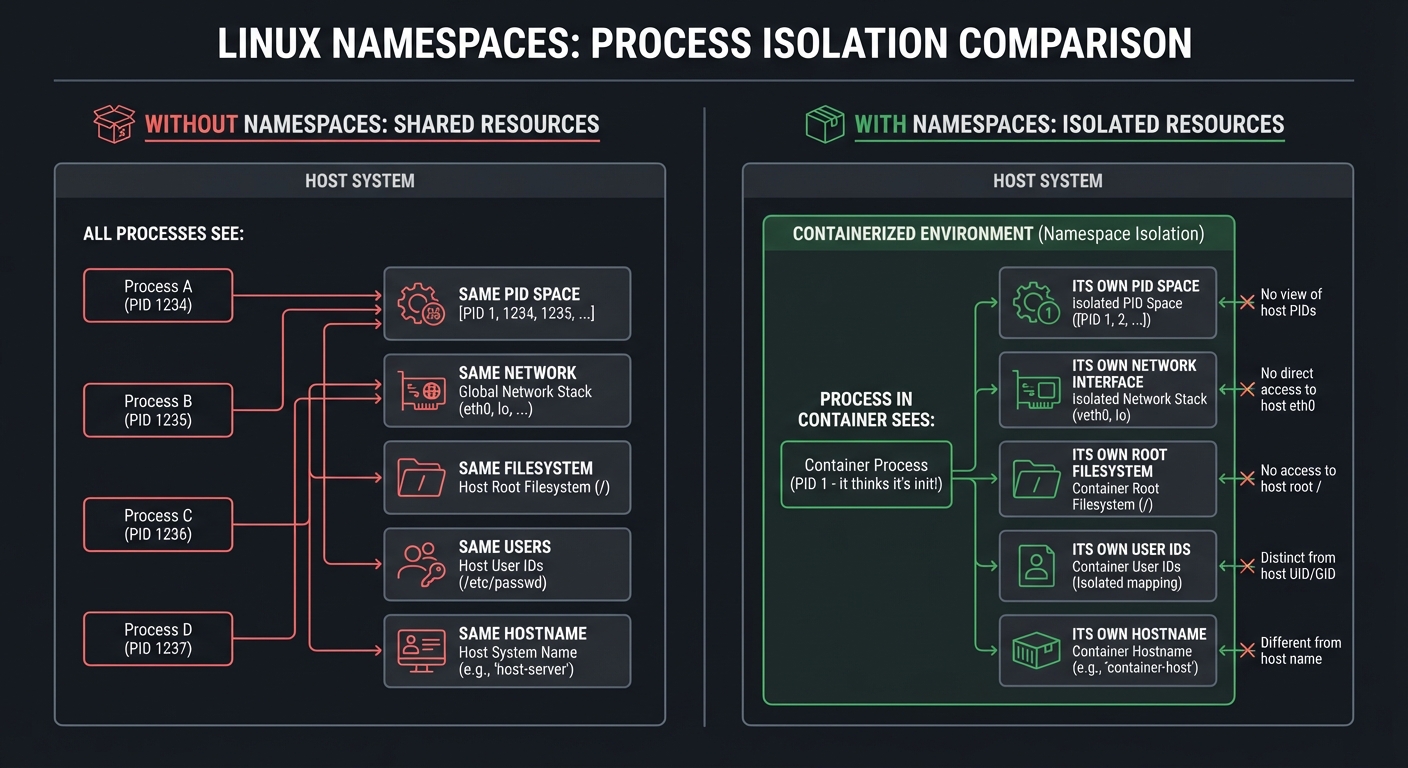
The namespace types: | Namespace | What it isolates | |———–|—————–| | PID | Process IDs (container sees PID 1) | | NET | Network interfaces, ports, routing tables | | MNT | Filesystem mount points | | UTS | Hostname and domain name | | IPC | Inter-process communication (semaphores, message queues) | | USER | User and group IDs | | CGROUP | Which cgroup the process sees |
How to create namespaces:
// Clone with new namespaces
clone(child_func, stack,
      CLONE_NEWPID | CLONE_NEWNS | CLONE_NEWNET | SIGCHLD,
      arg);

// Or unshare from parent
unshare(CLONE_NEWPID | CLONE_NEWNS);
Why this matters: Docker is essentially: namespaces (isolation) + cgroups (resource limits) + union filesystem (image layers) + a nice CLI.
Cgroups: Resource Limits
Namespaces isolate what you can see. Cgroups limit what you can use:
# Create a cgroup
mkdir /sys/fs/cgroup/mycontainer

# Set memory limit to 100MB
echo 100000000 > /sys/fs/cgroup/mycontainer/memory.max

# Set CPU limit to 50% of one core
echo "50000 100000" > /sys/fs/cgroup/mycontainer/cpu.max

# Add a process to this cgroup
echo $PID > /sys/fs/cgroup/mycontainer/cgroup.procs
What you can limit:
- Memory (hard limit, soft limit)
- CPU (time quota, shares)
- I/O (bandwidth, IOPS)
- PIDs (prevent fork bombs)
Language Implementation: The Pipeline
Every interpreter/compiler follows a similar pipeline:
Source Code
    │
    ▼
┌─────────────────┐
│    Lexer        │  "if (x > 5) { print(x); }"
│    (Scanner)    │           ↓
└────────┬────────┘  [IF] [(] [IDENT:x] [>] [NUM:5] [)] [{] [IDENT:print] ...
         │
         ▼
┌─────────────────┐
│    Parser       │  Tokens → Abstract Syntax Tree
└────────┬────────┘           ↓
         │            ┌─────────────────┐
         │            │   IfStatement   │
         │            │  ┌───────┬────┐ │
         │            │  │ > x 5 │body│ │
         │            │  └───────┴────┘ │
         │            └─────────────────┘
         ▼
┌─────────────────┐
│   Analyzer      │  Check types, resolve variables
│   (optional)    │  Catch errors before execution
└────────┬────────┘
         │
         ▼
┌─────────────────┐
│  Interpreter    │  Walk the tree, execute each node
│       OR        │           ↓
│   Compiler      │  Generate machine code / bytecode
└─────────────────┘
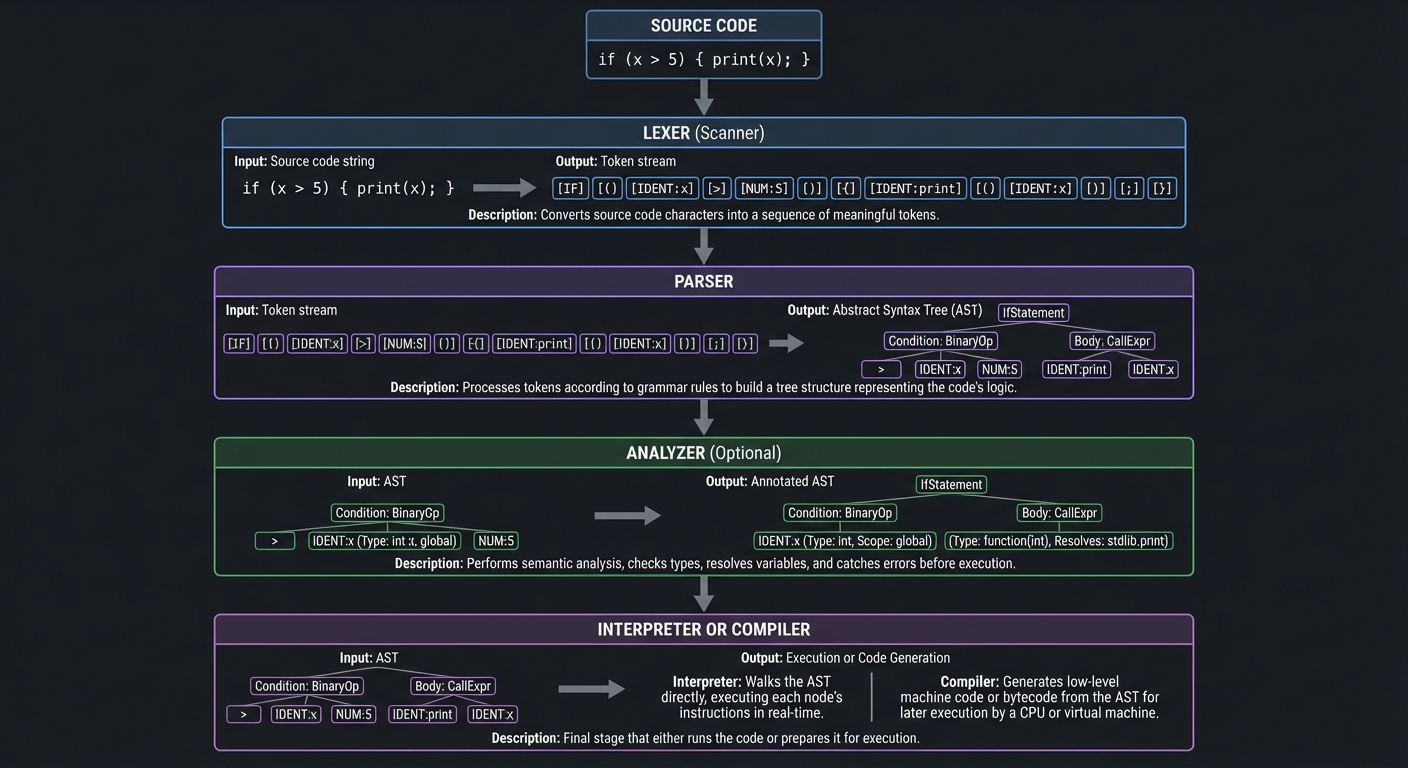
Key concepts:
- Token: The smallest unit of meaning (keyword, identifier, operator)
- AST: Tree structure representing program structure
- Environment: Where variables are stored (symbol table)
- Scope: Rules for variable visibility (lexical scoping)
Why closures are interesting:
function makeCounter() {
  let count = 0;          // This variable...
  return function() {
    count++;              // ...is captured here
    return count;
  };
}

let counter = makeCounter();
counter(); // 1
counter(); // 2
A closure is a function + the environment where it was defined. When makeCounter returns, count should be “dead,” but the inner function keeps it alive.
The Virtual DOM and Reconciliation
React’s key insight: describe what the UI should look like, let the framework figure out how to update it.
Traditional DOM:              Virtual DOM approach:
────────────────             ───────────────────
1. User clicks button        1. User clicks button
2. You manually find         2. Component re-renders (pure function)
   the DOM element              returns new virtual DOM tree
3. You manually update       3. Framework diffs old vs new
   its text content          4. Framework applies minimal changes
4. Hope you didn't
   forget anything

Imperative                   Declarative
(how to update)              (what it should be)
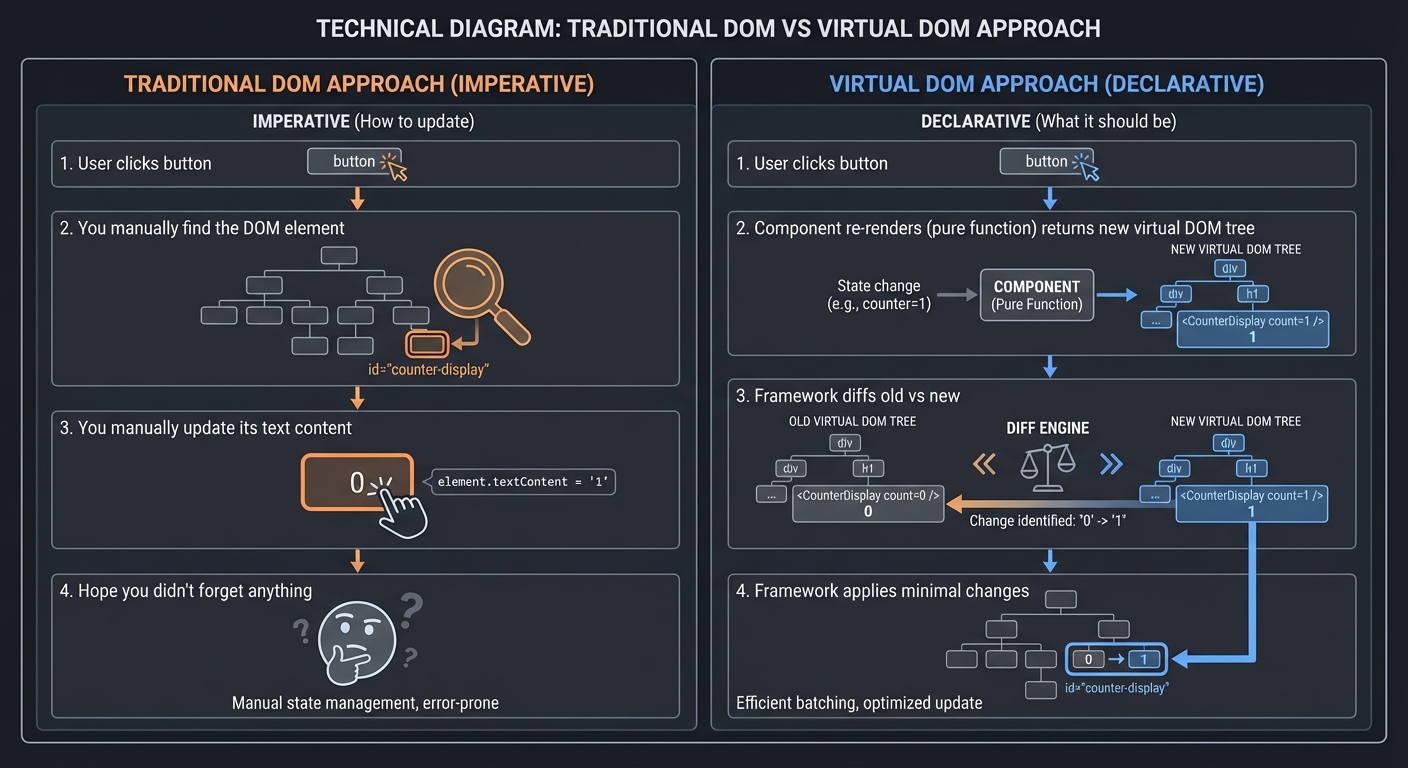
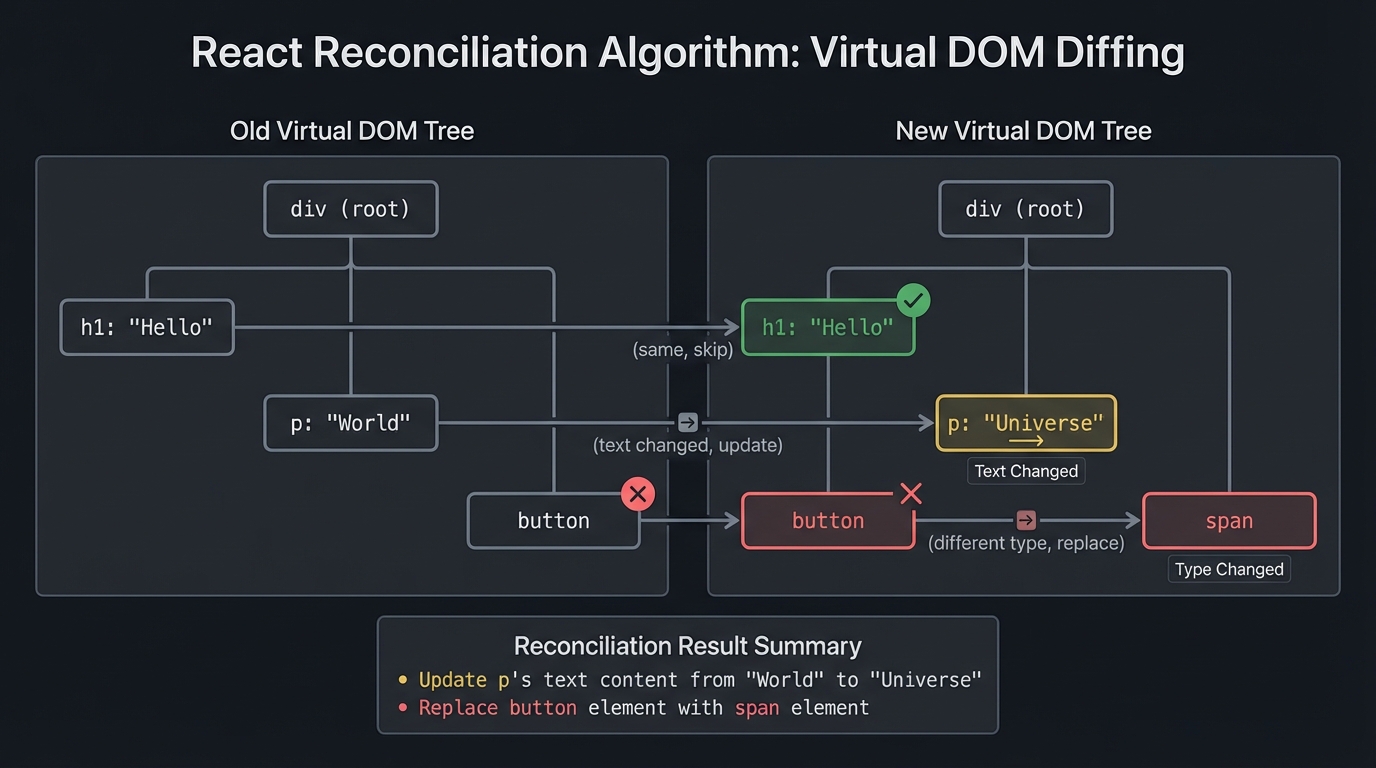
The reconciliation algorithm:
Old tree:                    New tree:
─────────                    ─────────
div                          div
├── h1: "Hello"              ├── h1: "Hello"      (same, skip)
├── p: "World"               ├── p: "Universe"    (text changed, update)
└── button                   └── span             (different type, replace)

Result: Update p's text, replace button with span
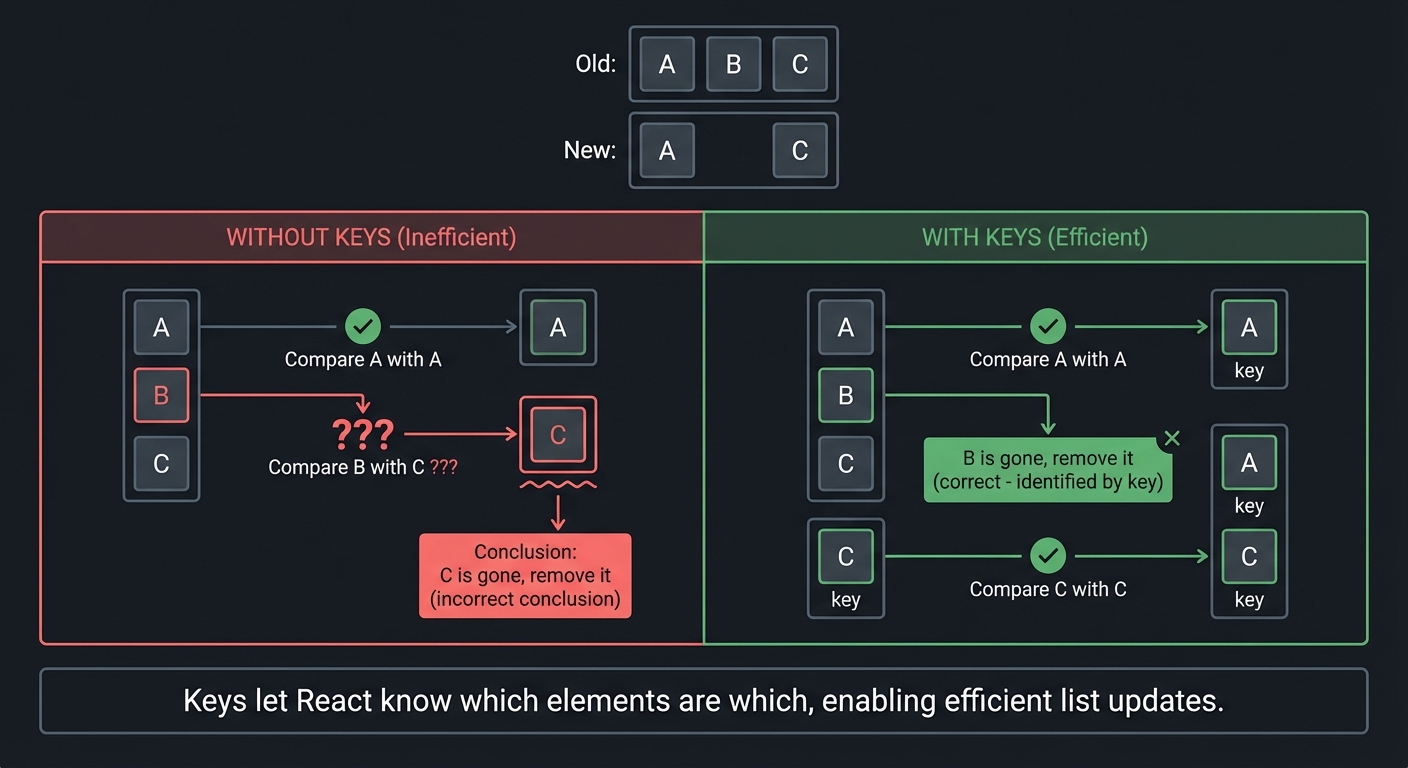
Why keys matter for lists:
Old:  [A, B, C]              New: [A, C]

Without keys:                With keys:
- Compare A with A ✓         - Compare A with A ✓
- Compare B with C ???       - B is gone, remove it
- C is gone, remove it       - Compare C with C ✓

Keys let React know which elements are which,
enabling efficient list updates.
The Fiber Architecture: React can pause rendering and resume later:
Old React:
─────────
render() ─────────────────────────────────→ Done
          (cannot be interrupted)

Fiber React:
────────────
render()→work→yield→work→yield→work→yield→commit
              ↑          ↑
              └──────────┴── "Can I do other work?"
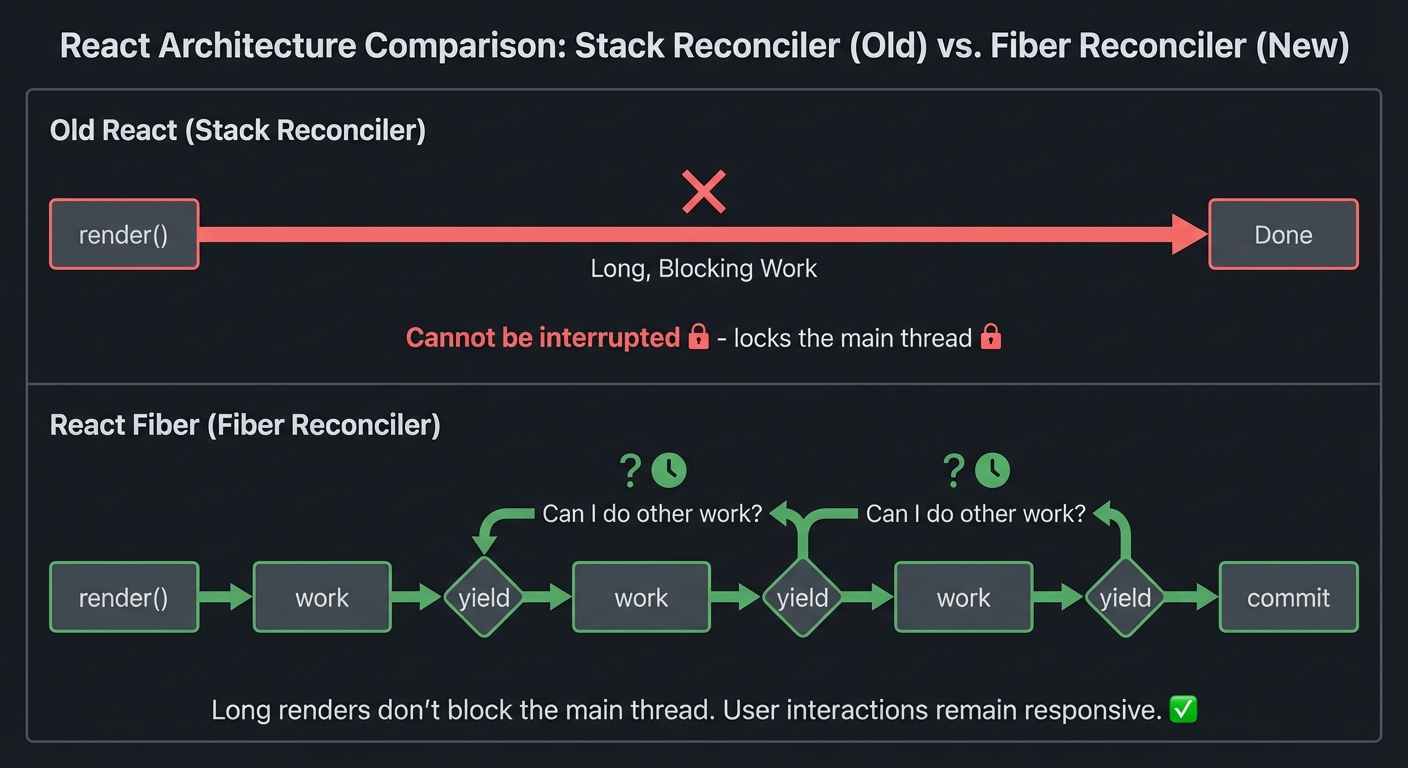
Why this matters: Long renders don’t block the main thread. User interactions remain responsive.
Deep Dive Reading: Abstraction & Languages
| Concept | Book & Chapter |
|---|---|
| Linux namespaces | The Linux Programming Interface Ch. 28 - Michael Kerrisk |
| Cgroups v2 | How Linux Works, 3rd Edition Ch. 8 - Brian Ward |
| Container internals | “Containers from Scratch” talk by Liz Rice (video) |
| Lexical analysis | Crafting Interpreters Ch. 4 - Bob Nystrom |
| Parsing | Crafting Interpreters Ch. 5-6 - Bob Nystrom |
| Interpreters | Crafting Interpreters Ch. 7-13 - Bob Nystrom |
| Closures | Crafting Interpreters Ch. 11 - Bob Nystrom |
| React Fiber | “React Fiber Architecture” by Andrew Clark (GitHub doc) |
| Virtual DOM | “Build Your Own React” by Rodrigo Pombo (pomb.us) |
Concept Summary Table
| Concept Cluster | What You Need to Internalize | Projects |
|---|---|---|
| Memory as bytes | Memory is just numbered boxes. Everything is bytes with interpretation layered on top. | malloc, Lock-Free |
| The stack | Automatic, fast, limited. Local variables live here. Grows down. LIFO. | malloc |
| The heap | Manual, flexible, fragmentation-prone. malloc/free. You control lifetime. | malloc |
| Pointers as addresses | A pointer is just a number that happens to be an address. Arithmetic follows type sizes. | malloc, Lock-Free |
| Atomics & ordering | CPUs reorder operations. Memory barriers enforce ordering. CAS is the primitive. | Lock-Free |
| Sockets | File descriptors for network communication. bind/listen/accept for servers. | TCP Server, Load Balancer |
| TCP semantics | Reliable, ordered byte stream. Built on unreliable packets. Three-way handshake. | TCP Server, Load Balancer |
| Distributed failure | Networks fail, machines crash, messages duplicate. Design for failure. | Raft, Load Balancer |
| Consensus | Agreement despite failures. Majority quorums. Terms/epochs prevent split-brain. | Raft |
| Durability | Data must hit disk before you confirm. fsync is your friend. | Key-Value Store |
| Serialization | Converting structures to bytes and back. Choose your format wisely. | Key-Value Store, Git |
| Content-addressing | Name things by their hash. Immutable, deduplicated, integrity-checked. | Git |
| Namespaces | Isolated views of system resources. The core of containerization. | Containers |
| Cgroups | Resource limits. Memory, CPU, I/O constraints. | Containers |
| Lexical analysis | Breaking source code into tokens. Regular languages. | Interpreter |
| Parsing | Building trees from token sequences. Context-free grammars. | Interpreter |
| Environments & scope | Where variables live. Lexical scoping. Closure capture. | Interpreter |
| Virtual DOM | Describe UI declaratively. Framework computes minimal updates. | Mini-React |
| Reconciliation | Diffing old and new trees. Keys for list stability. | Mini-React |
Prerequisites & Background Knowledge
Essential Prerequisites (Must Have)
Before starting these projects, you should have:
- Programming Fundamentals
- Proficiency in at least one systems language (C, C++, Rust, or Go preferred)
- Understanding of pointers, memory addresses, and manual memory management
- Ability to read and write multi-file programs
- Basic Systems Knowledge
- Familiarity with Linux/Unix command line
- Understanding of what a process is
- Basic knowledge of file descriptors and I/O
- Awareness that syscalls exist (even if you don’t know them all)
- Development Environment
- Linux machine (native, VM, or WSL2—macOS works for most projects)
- C compiler (gcc or clang)
- Text editor or IDE of choice
- Basic debugging tools (gdb/lldb, print statements)
Helpful But Not Required
You’ll learn these concepts through the projects, but prior exposure helps:
- Networking basics (what is TCP vs UDP, what is an IP address)
- Concurrency primitives (threads, mutexes, race conditions)
- Data structures (hash tables, trees, linked lists)
- How databases work at a high level
- Git usage (for the Git internals project)
- Web development basics (for TCP server and Mini-React)
Self-Assessment Questions
Check your readiness with these questions:
| Question | If you answered YES… |
|---|---|
| Can you explain what a pointer is and dereference one in code? | ✅ Ready for malloc, lock-free queue |
Do you know what fork() does? |
✅ Ready for containers |
| Have you written a program that opens and reads a file? | ✅ Ready for key-value store, Git |
| Do you understand what a TCP connection is (at least conceptually)? | ✅ Ready for load balancer, TCP server |
| Have you debugged a segmentation fault before? | ✅ You’ll survive the memory projects |
| Can you write a recursive function? | ✅ Ready for interpreter, Mini-React |
| Do you know what a hash function does? | ✅ Ready for Git, key-value store |
If you answered NO to most of these:
- Start with Projects 8 (TCP Server) or 6 (Interpreter)—they’re more forgiving
- Read “The C Programming Language” Chapters 1-6 first
- Consider taking a systems programming course before tackling malloc or Raft
Development Environment Setup
Minimum required tools:
# Check your C compiler
gcc --version || clang --version

# Install essential debugging tools
sudo apt install build-essential gdb valgrind  # Ubuntu/Debian
brew install gcc gdb valgrind                  # macOS

# For networking projects
sudo apt install netcat-openbsd tcpdump wireshark

# For containers project (Linux only)
# No special tools needed—uses standard Linux syscalls
Recommended tools:
# AddressSanitizer support (better than valgrind in many cases)
# Use clang -fsanitize=address when compiling

# For Go projects
curl -L https://go.dev/dl/go1.21.linux-amd64.tar.gz | sudo tar -C /usr/local -xz

# For Rust projects
curl --proto '=https' --tlsv1.2 -sSf https://sh.rustup.rs | sh

# Code formatting
sudo apt install clang-format  # For C/C++
Time Investment Expectations
Per-project time estimates:
| Project | Beginner | Intermediate | Advanced |
|---|---|---|---|
| 1. malloc | 3-4 weeks | 2 weeks | 1 week |
| 2. Load Balancer | 2 weeks | 1 week | 3 days |
| 3. Key-Value Store | 2-3 weeks | 1-2 weeks | 1 week |
| 4. Raft | 4-6 weeks | 3-4 weeks | 2 weeks |
| 5. Containers | 2 weeks | 1 week | 3-4 days |
| 6. Interpreter | 3-4 weeks | 2 weeks | 1 week |
| 7. Lock-Free Queue | 3-4 weeks | 2-3 weeks | 1-2 weeks |
| 8. TCP Server | 1-2 weeks | 3-5 days | 2-3 days |
| 9. Mini-React | 2-3 weeks | 1-2 weeks | 3-5 days |
| 10. Mini Git | 1-2 weeks | 3-5 days | 2-3 days |
Total time commitment: 6-12 months if doing all 10 projects sequentially
These estimates assume:
- Working on this part-time (5-10 hours/week)
- Reading recommended chapters before coding
- Debugging and rewriting sections that don’t work
- Actually understanding, not just “getting it to compile”
Important Reality Check
These projects are HARD. That’s the point.
You will:
- ✅ Get stuck frequently
- ✅ Spend hours debugging strange behavior
- ✅ Rewrite entire sections when you realize your design was wrong
- ✅ Question whether you’re “smart enough” (you are—it’s just hard)
- ✅ Experience the satisfaction of finally understanding something deeply
You will NOT:
- ❌ Finish each project in a weekend (unless you already know the material)
- ❌ Write perfect code on the first try
- ❌ Understand everything immediately
- ❌ Find these as easy as following a tutorial
That’s okay. The struggle is where the learning happens.
If a project feels too easy, you’re probably not going deep enough. The goal isn’t to check boxes—it’s to genuinely understand the systems underneath.
Quick Start Guide: Your First 48 Hours
Feeling overwhelmed? Start here.
Day 1: Get Your Bearings (4 hours)
Morning: Pick Your First Project
Based on your background, start with:
- Have C experience? → Start with Project 1 (malloc) or Project 8 (TCP Server)
- More comfortable with Go/Rust? → Start with Project 2 (Load Balancer)
- Enjoy parsers/compilers? → Start with Project 6 (Interpreter)
- Want something visual? → Start with Project 9 (Mini-React) or Project 10 (Git)
- Just pick for me! → Start with Project 8 (TCP Server)—it’s the most forgiving
Afternoon: Read the Foundation
- Read the relevant “Pillar” section in this guide (30 minutes)
- Read the project’s “Core Question You’re Answering” section (5 minutes)
- Skim the recommended book chapter (1 hour)
- Read “Concepts You Must Understand First” and Google what you don’t know (1-2 hours)
End of Day 1: You should understand WHAT you’re building and WHY it matters, even if you don’t know HOW yet.
Day 2: Write Your First Line of Code (4 hours)
Morning: Minimal Viable Implementation
- Don’t try to build the full thing yet. Start with the absolute simplest version.
- malloc? Just use
sbrk()to grow heap and return pointers. No free yet. - Load balancer? Round-robin to 2 hardcoded backends. No health checks.
- TCP server? Accept one connection, echo back what’s sent, then exit.
- malloc? Just use
- Get it to compile and run (even if it doesn’t do much)
Afternoon: Make It “Work”
- Add ONE feature from the “Core Challenges” list
- Use the “Thinking Exercise” to trace what your code does
- Reference the “Hints in Layers”—start with Hint 1
End of Day 2: You should have a working (if incomplete) program that demonstrates you understand the core concept.
After 48 Hours: Iterate and Expand
Now that you have something working:
- Review the “Questions to Guide Your Design”—rethink your approach
- Read the interview questions—can you answer them now?
- Expand your implementation to handle the next challenge
- Use the debugging tools in “Tools for Understanding”
- When stuck, consult “Books That Will Help” for specific chapters
Key principle: Working code beats perfect code. Iterate toward correctness and completeness.
Recommended Project Order
If you’re doing multiple projects, follow this sequence:
Path 1: Systems Engineering Focus
- TCP Server (warm-up)
- malloc (understand memory)
- Lock-Free Queue (understand concurrency)
- Load Balancer (understand networking)
- Key-Value Store (understand storage)
- Raft (understand distribution)
- Containers (understand isolation)
Path 2: Language/Tools Focus
- Interpreter (understand execution)
- Mini-React (understand rendering)
- Git Objects (understand content addressing)
- TCP Server (understand protocols)
- Containers (understand namespaces)
Path 3: Interview Prep (Most Asked)
- TCP Server
- Load Balancer
- malloc
- Key-Value Store
- Raft
- Interpreter
Choose based on your goals, but finish one before starting another. Deep understanding beats broad surface knowledge.
Essential Reading Order
For maximum comprehension, read in this order before starting the projects:
Week 1: Foundations
- Computer Systems: A Programmer’s Perspective Ch. 1-2
- What computers actually do, data representation
- The C Programming Language Ch. 5-6
- Pointers and structures (even if you know C, review this)
- Operating Systems: Three Easy Pieces Ch. 1-6
- Virtualization fundamentals, what an OS does
Week 2: Memory & Processes
- Computer Systems: A Programmer’s Perspective Ch. 9
- Virtual memory (critical for malloc, containers)
- The Linux Programming Interface Ch. 6-7
- Processes and memory allocation
- Operating Systems: Three Easy Pieces Ch. 13-17
- Address spaces, memory API, free space management
Week 3: Networking
- The Linux Programming Interface Ch. 56-59
- Socket fundamentals
- TCP/IP Illustrated, Volume 1 Ch. 1-3, 12-24
- TCP protocol details (or skim if time-limited)
- Designing Data-Intensive Applications Ch. 1-2
- Distributed systems mindset
Week 4: Distribution & Storage
- Designing Data-Intensive Applications Ch. 3-5
- Storage engines, replication
- Designing Data-Intensive Applications Ch. 8-9
- Distributed systems problems, consensus
- Pro Git Ch. 10
- Git internals
Week 5: Abstraction & Languages
- Crafting Interpreters Ch. 1-8
- Scanning, parsing, evaluating (or full book if doing interpreter project)
- The Linux Programming Interface Ch. 28
- Namespaces
- Build Your Own React (pomb.us)
- React internals
Week 6: Advanced Topics
- Rust Atomics and Locks (full book)
- Memory ordering, lock-free programming
- C++ Concurrency in Action Ch. 5
- Memory model (applies to any language)
- The Raft paper
- “In Search of an Understandable Consensus Algorithm”
Tools for Understanding
Memory Debugging
# AddressSanitizer (compile-time instrumentation)
clang -fsanitize=address -g program.c -o program
./program  # Reports memory errors with stack traces

# Valgrind (runtime instrumentation)
valgrind --leak-check=full ./program
valgrind --tool=helgrind ./program  # For threading bugs

# GDB/LLDB
lldb ./program
(lldb) breakpoint set --name main
(lldb) run
(lldb) memory read &variable
(lldb) register read
Network Debugging
# See what's on the wire
tcpdump -i any port 8080 -A

# Interactive packet inspection
wireshark

# Test TCP connections
nc -l 8080           # Listen
nc localhost 8080    # Connect

# HTTP debugging
curl -v http://localhost:8080/
System Inspection
# Process memory map
cat /proc/$PID/maps

# Open files and sockets
lsof -p $PID

# System calls
strace ./program

# Namespace inspection
ls -la /proc/$PID/ns/

# Cgroup inspection
cat /sys/fs/cgroup/$CGROUP/memory.current
Part II: The Projects
With these foundations in place, you’re ready to tackle the projects. Each project below includes specific questions and guidance to help you apply what you’ve learned.
Project 1: Memory Allocator (malloc/free from scratch)
Source File: TRACK_A_OS_KERNEL_PROJECTS.md
Language: C
Why Interviewers Love This: Every C/C++ interview eventually goes to memory. Building malloc proves you understand what happens when you write int *p = malloc(sizeof(int) * 100);
Original Project Specification
- Programming Language: C
- Coolness Level: Level 4: Hardcore Tech Flex
- Business Potential: 1. The “Resume Gold”
- Difficulty: Level 3: Advanced
- Knowledge Area: Memory Management / Systems Programming
- Software or Tool: sbrk / mmap
- Main Book: “Computer Systems: A Programmer’s Perspective” by Bryant & O’Hallaron
What you’ll build: A complete memory allocator that replaces malloc/free, using only brk() and mmap() syscalls, with visual debugging output showing heap state.
Why it teaches OS internals: malloc is the interface between your program and the kernel’s virtual memory system. By implementing it, you’ll understand why the heap exists, how the kernel grows your address space, the difference between virtual and physical memory, and why memory fragmentation happens.
Core challenges you’ll face:
- Managing the program break with
brk()/sbrk()(maps to virtual memory, syscalls) - Using
mmap()for large allocations (maps to virtual memory, page faults) - Implementing free lists and coalescing (maps to memory management algorithms)
- Handling alignment requirements (maps to hardware memory model)
- Debugging memory corruption (maps to understanding address space layout)
Resources for key challenges:
- “Computer Systems: A Programmer’s Perspective” Ch. 9.9 - Detailed malloc implementation walkthrough
- “Operating Systems: Three Easy Pieces” Ch. 17 - Free space management
Key Concepts:
- Virtual address space layout: “Computer Systems: A Programmer’s Perspective” Ch. 9 - Bryant & O’Hallaron
- Free list management: “Operating Systems: Three Easy Pieces” Ch. 17 - Arpaci-Dusseau
- mmap syscall: “The Linux Programming Interface” Ch. 49 - Michael Kerrisk
- Memory alignment: “C Interfaces and Implementations” Ch. 5 - David Hanson
Difficulty: Intermediate Time estimate: 2-3 weeks Prerequisites: C, pointers, basic understanding of processes
Real world outcome:
LD_PRELOAD=./mymalloc.so ./some_program- Replace system malloc with yours- Visual heap dump:
[BLOCK 0x1000: 64 bytes USED] [BLOCK 0x1040: 128 bytes FREE] ... - Run benchmarks comparing your allocator to glibc malloc
- Successfully run complex programs (even a shell) using your allocator
Learning milestones:
- Basic allocation with brk works → You understand heap growth and the program break
- Free works with coalescing → You understand fragmentation and metadata management
- mmap for large allocations → You understand different memory mapping strategies
- Can run real programs → You’ve built something production-quality
The Core Question You’re Answering
“When I call malloc, where do those bytes come from? And when I call free, where do they go?”
Before you write a single line of code, sit with this question. Most developers have a vague sense of “the heap” but can’t explain what that actually means.
Concepts You Must Understand First
Stop and research these before coding:
- Virtual Memory vs Physical Memory
- What’s the difference? Why does it matter?
- What does the OS actually give you when you “get memory”?
- Book Reference: “Computer Systems: A Programmer’s Perspective” Ch. 9 - Bryant & O’Hallaron
- The Program Break (
brk/sbrk)- What is the “program break”? Where is it in your address space?
- What system call changes it?
- Why is this called “growing the heap”?
mmapfor Anonymous Memory- When should you use
mmapinstead ofsbrk? - Why do production allocators use both?
- Book Reference: “The Linux Programming Interface” Ch. 49 - Michael Kerrisk
- When should you use
- Alignment Requirements
- Why can’t you just return any address?
- What happens if you return a misaligned pointer?
- How does the CPU access memory?
Questions to Guide Your Design
Before implementing, think through these:
- Block Metadata
- How will you know, given a pointer from
free(), how big that block was? - Where will you store this information? Before the user’s data? After?
- What’s the minimum overhead per allocation?
- How will you know, given a pointer from
- Free List Management
- When you
free()a block, where does it go? - How will you find a suitable block for the next
malloc()? - What’s the trade-off between speed and memory efficiency?
- When you
- Finding a Free Block: Strategies
- First Fit: Find the first block big enough. What’s the problem?
- Best Fit: Find the smallest block that fits. Why is this slow?
- Next Fit: Start searching where you left off. Why might this help?
Think: Which would you choose, and why?
- Fragmentation
- What happens when you have 1000 bytes free, but split across 10 non-contiguous blocks?
- Can you satisfy
malloc(500)even though you have 1000 bytes free? - What is “external fragmentation”?
- Coalescing
- When you
free()a block, what if the blocks before and after are also free? - Should you merge them? How?
- What data structure lets you check neighbors quickly?
- When you
Thinking Exercise: Walk Through by Hand
Before coding, trace this sequence on paper:
malloc(100) -> returns 0x1000
malloc(50)  -> returns 0x1068 (why?)
malloc(200) -> returns 0x10A0
free(0x1068)
malloc(30)  -> returns ??? (where does this go?)
free(0x1000)
free(0x10A0)
malloc(300) -> what happens now?
Questions while tracing:
- Where are your metadata headers?
- How big is each block really (including metadata)?
- After the frees, what does your free list look like?
- Can you coalesce after the last two frees?
The Interview Questions They’ll Ask
Prepare to answer these:
- “Walk me through what happens when you call
malloc(1000).” - “Why do you need alignment? What could go wrong?”
- “What’s the difference between internal and external fragmentation?”
- “When would you use
mmapinstead ofsbrk?” - “How would you debug a double-free bug?”
- “What’s wrong with this code:
free(p); free(p);?”
Hints in Layers (Only If Stuck)
Hint 1: Start Simple
Implement a bump allocator first. Just keep a pointer and move it forward on each malloc. Never reuse memory. This is “wrong” but teaches you the basics.
Hint 2: Free List Structure
A free list is just a linked list where each node is a free block. The “next” pointer lives inside the free block itself (since it’s not being used for user data).
Hint 3: Boundary Tags
To check if your neighbors are free, put size information at BOTH ends of each block. This is called “boundary tags” and lets you coalesce in O(1).
Books That Will Help
| Topic | Book | Chapter |
|---|---|---|
| The big picture | “Computer Systems: A Programmer’s Perspective” | Ch. 9 (Virtual Memory) |
| Implementation walkthrough | “Computer Systems: A Programmer’s Perspective” | Ch. 9.9 (Dynamic Memory Allocation) |
| Free space management | “Operating Systems: Three Easy Pieces” | Ch. 17 |
| mmap syscall | “The Linux Programming Interface” | Ch. 49 |
| Clean C interface design | “C Interfaces and Implementations” | Ch. 5 |
Real World Outcome
You’ll create a drop-in replacement for the system malloc that can run real programs. Here’s EXACTLY what success looks like:
When you compile your allocator as a shared library:
$ gcc -shared -fPIC -o libmymalloc.so mymalloc.c

# Test with a simple program
$ cat > test.c <<EOF
#include <stdlib.h>
#include <stdio.h>
int main() {
    char *str = malloc(100);
    sprintf(str, "Hello from custom malloc!");
    printf("%s\n", str);
    free(str);
    return 0;
}
EOF

$ gcc test.c -o test

# Run with your allocator instead of glibc's
$ LD_PRELOAD=./libmymalloc.so ./test
[MALLOC] Requesting 100 bytes
[MALLOC] Heap break at 0x5651a2b3d000
[MALLOC] sbrk(4096) to grow heap
[MALLOC] Allocated block at 0x5651a2b3d010, size=100, total=112 (with header)
Hello from custom malloc!
[FREE] Freeing block at 0x5651a2b3d010
[FREE] Coalescing with next free block
When you enable visual heap dumps, you’ll see memory state:
$ LD_PRELOAD=./libmymalloc.so MALLOC_DEBUG=1 ./test

Initial heap state:
  Heap start: 0x5651a2b3d000
  Heap end:   0x5651a2b3d000
  Free list: (empty)

After malloc(100):
  ┌───────────────────────────────────────────┐
  │ USED: 112 bytes @ 0x5651a2b3d000          │ ← Your allocation
  ├───────────────────────────────────────────┤
  │ FREE: 3984 bytes @ 0x5651a2b3d070         │ ← Remaining heap
  └───────────────────────────────────────────┘

After free:
  ┌───────────────────────────────────────────┐
  │ FREE: 4096 bytes @ 0x5651a2b3d000         │ ← Coalesced
  └───────────────────────────────────────────┘
  Free list: 0x5651a2b3d000 → NULL
Running complex programs with your allocator:
# Can it run /bin/ls?
$ LD_PRELOAD=./libmymalloc.so /bin/ls
[MALLOC] 384 allocations, 127 frees, 94KB allocated
Desktop  Documents  Downloads  Pictures
[MALLOC] Shutting down: 257 blocks still in use (leak detection)

# Can it run a shell?
$ LD_PRELOAD=./libmymalloc.so /bin/bash
bash-5.1$ echo "It works!"
It works!
bash-5.1$ exit
[MALLOC] Total stats: 8472 allocations, 8470 frees

# Performance comparison
$ time ./benchmark
glibc malloc: 1.23s, 0 bytes leaked

$ time LD_PRELOAD=./libmymalloc.so ./benchmark
my malloc:    2.87s, 0 bytes leaked

# Your allocator is ~2.3x slower than glibc (that's normal for a basic impl)
Advanced: Integration with debugging tools
# Your allocator should work with valgrind's memcheck
$ valgrind --leak-check=full --suppressions=malloc.supp ./test

# AddressSanitizer compatibility
$ gcc -fsanitize=address test.c -o test
$ LD_PRELOAD=./libmymalloc.so ./test
# Should report memory errors correctly
You know you’ve succeeded when:
- ✅ Simple test programs allocate and free correctly
- ✅ Complex programs (ls, bash, python) run without crashes
- ✅ Memory leaks are detected and reported
- ✅ Fragmentation is reasonable (check with long-running tests)
- ✅ Double-free is detected and causes controlled failure
- ✅ Performance is within 3-5x of glibc malloc
Common Pitfalls & Debugging
Problem 1: “Segfault when freeing memory”
Symptom:
$ ./test
Hello from custom malloc!
Segmentation fault (core dumped)
- Why: You’re likely corrupting the free list pointers. When you free a block, you write a
nextpointer inside it. If the user’s code wrote past their allocation, they’ve overwritten your free list metadata. - Fix:
- Add “canary” values (magic numbers) before and after each block
- Check canaries on every malloc/free
- Use AddressSanitizer during development:
gcc -fsanitize=address
- Quick test: ```c // Add to your block header struct block { size_t size; unsigned int magic_start; // Set to 0xDEADBEEF // … user data … unsigned int magic_end; // Set to 0xBEEFDEAD at block+size };
// In free(), check: if (block->magic_start != 0xDEADBEEF) { fprintf(stderr, “Heap corruption detected at %p\n”, block); abort(); }
**Problem 2: "Program runs out of memory quickly"**

**Symptom:**
```bash
[MALLOC] sbrk(4096)
[MALLOC] sbrk(4096)
... (thousands of times)
[MALLOC] Failed to allocate: Cannot allocate memory
- Why: Your free list isn’t working. Every malloc calls
sbrkinstead of reusing freed blocks. Freed blocks aren’t being added to the free list, or your search algorithm never finds them. - Fix:
- Add logging to free():
printf("Added %p to free list\n", block); - Add logging to malloc search:
printf("Checking block %p, size=%zu, needed=%zu\n", ...); - Verify free list is a linked list: walk it and print all nodes
- Add logging to free():
- Quick test:
# Should see reuse
malloc(100); free(); malloc(100);  # Should NOT call sbrk twice
Problem 3: “Mysterious corruption after many allocations”
Symptom: Program runs fine for a while, then crashes randomly. Different behavior on each run.
- Why: Buffer overflow somewhere. User code wrote past allocation boundary, corrupting adjacent block headers.
- Fix:
- Allocate extra space for guard pages:
// Allocate 1 page before and after heap region, mark as PROT_NONE mmap(..., PROT_NONE); // Before mmap(..., PROT_READ|PROT_WRITE); // Actual heap mmap(..., PROT_NONE); // After // Any access to guard pages = instant crash at exact location - Use AddressSanitizer: It catches out-of-bounds writes
- Fill free blocks with pattern:
0xDEADBEEF— if you see this value in unexpected places, it’s a freed block being used
- Allocate extra space for guard pages:
- Quick test:
char *p = malloc(10);
p[15] = 'X';  // Out of bounds write
free(p);
malloc(10);   // Corruption might appear here
Problem 4: “Alignment errors on certain architectures”
Symptom:
Bus error (core dumped)  # On ARM/RISC-V
# Or: SIGILL, Illegal instruction
- Why: You returned a misaligned pointer. Some CPUs require pointers to be aligned to their size (8-byte aligned for 64-bit values).
- Fix:
- Always align to 16 bytes (safe for all types):
#define ALIGNMENT 16 #define ALIGN(size) (((size) + (ALIGNMENT-1)) & ~(ALIGNMENT-1)) size_t alloc_size = ALIGN(requested_size + sizeof(header)); - Return pointer AFTER header, aligned:
void *user_ptr = (void *)((char *)block + sizeof(header));
assert((uintptr_t)user_ptr % 16 == 0);  // Verify alignment
- Always align to 16 bytes (safe for all types):
- Quick test:
double *d = malloc(sizeof(double));
*d = 3.14;  // Should NOT crash
Problem 5: “Double-free not detected”
Symptom:
free(p);
free(p);  // Should crash or warn, but doesn't
malloc(...);  // Returns garbage or crashes later
- Why: You’re not marking blocks as free/in-use. Can’t distinguish freed blocks from allocated blocks.
- Fix:
- Add a
is_freeflag to block header:struct block { size_t size; int is_free; // 0 = allocated, 1 = free struct block *next; // Only valid if is_free==1 }; - Check in free():
if (block->is_free) {
    fprintf(stderr, "Double-free detected at %p\n", ptr);
    abort();
}
block->is_free = 1;
- Add a
- Quick test:
void *p = malloc(100);
free(p);
free(p);  // Should abort with "Double-free detected"
Problem 6: “Huge memory waste (fragmentation)”
Symptom:
# After 1000 alloc/free cycles:
[MALLOC] Heap size: 512KB
[MALLOC] Actually in use: 50KB
[MALLOC] Wasted: 462KB across 789 tiny free blocks
- Why: External fragmentation. Lots of small free blocks that can’t satisfy larger requests.
- Fix:
- Implement coalescing: When freeing, check if adjacent blocks are also free and merge them.
- Use boundary tags: Put size at BOTH ends of block so you can check neighbors in O(1).
- Strategy choice: Best-fit is better than first-fit for fragmentation (but slower).
- Quick test:
// Worst case for fragmentation
for (int i = 0; i < 1000; i++) {
  malloc(8);
  malloc(64);
}
// Free all the 8-byte blocks
// Then try malloc(100) — should succeed by coalescing
Debugging Tools Checklist:
| Tool | When to Use | Command |
|---|---|---|
| AddressSanitizer | Detect out-of-bounds access, use-after-free | gcc -fsanitize=address |
| Valgrind memcheck | Find memory leaks, uninitialized reads | valgrind --leak-check=full |
| GDB | Step through malloc/free logic | gdb ./program |
| strace | See actual sbrk/mmap syscalls | strace -e brk,mmap ./program |
| Heap profiler | Visualize fragmentation | Custom tool or Massif |
Project 2: Build a Load Balancer
Source File: SYSTEM_DESIGN_MASTERY_PROJECTS.md
Language: Go (or C, Rust, Python)
Why Interviewers Love This: This is THE classic system design question. “Design a load balancer” appears in almost every senior backend interview.
Original Project Specification
- Programming Language: Go
- Alternative Programming Languages: Rust, C, Python
- Coolness Level: Level 3: Genuinely Clever
- Business Potential: 3. The “Service & Support” Model
- Difficulty: Level 3: Advanced
- Knowledge Area: Networking / Distributed Systems
- Software or Tool: HAProxy / Nginx (conceptual model)
- Main Book: “Designing Data-Intensive Applications” by Martin Kleppmann
What you’ll build: A TCP/HTTP load balancer that distributes incoming connections across multiple backend servers using configurable algorithms (round-robin, least-connections, weighted), performs health checks, and gracefully removes unhealthy servers.
Why it teaches system design: Load balancers are the front door of every distributed system. Building one forces you to understand:
- How to handle thousands of concurrent connections
- Health checking and failure detection
- The difference between L4 and L7 load balancing
- Connection pooling and keep-alive management
- Why NGINX and HAProxy make certain architectural choices
Core challenges you’ll face:
- Connection multiplexing (one goroutine per connection won’t scale) → maps to concurrency patterns
- Health check design (how often? what counts as “unhealthy”?) → maps to failure detection
- Graceful degradation (what happens when all backends are down?) → maps to fault tolerance
- Hot reload config (change backends without dropping connections) → maps to zero-downtime operations
- Sticky sessions (route same user to same backend) → maps to stateful vs stateless
Key Concepts:
- Connection Management: “The Linux Programming Interface” Chapter 59-61 - Michael Kerrisk
- Concurrency Patterns: “Learning Go, 2nd Edition” Chapter 12 - Jon Bodner
- Load Balancing Algorithms: “System Design Interview” Chapter 6 - Alex Xu
- Health Checks: “Building Microservices, 2nd Edition” Chapter 11 - Sam Newman
Difficulty: Advanced Time estimate: 2-3 weeks Prerequisites: Network sockets, concurrency basics, HTTP protocol
Real world outcome:
# Start 3 backend servers
$ ./backend --port 8081 --name "Server-A" &
$ ./backend --port 8082 --name "Server-B" &
$ ./backend --port 8083 --name "Server-C" &

# Start your load balancer
$ ./loadbalancer --config lb.yaml --port 80
[LB] Loaded 3 backends: 8081, 8082, 8083
[LB] Health checker started (interval: 5s)
[LB] Listening on :80

# Test distribution
$ for i in {1..6}; do curl http://localhost/; done
Response from Server-A
Response from Server-B
Response from Server-C
Response from Server-A
Response from Server-B
Response from Server-C

# Kill one backend, watch failover
$ kill %2  # Kill Server-B
[LB] Backend 8082 failed health check (3 consecutive failures)
[LB] Removed 8082 from pool

$ for i in {1..4}; do curl http://localhost/; done
Response from Server-A
Response from Server-C
Response from Server-A
Response from Server-C
Implementation Hints:
- Start with a simple TCP proxy that forwards bytes between client and one backend
- Add round-robin by maintaining a counter and using modulo
- Health checks should run in a separate goroutine with configurable intervals
- Use channels to communicate backend status changes to the main routing logic
- For HTTP, you’ll need to parse headers to implement features like sticky sessions (look at the
Cookieheader)
Learning milestones:
- TCP proxy works → You understand socket forwarding and connection lifecycle
- Round-robin distributes evenly → You understand stateless routing
- Unhealthy servers are removed → You understand failure detection patterns
- Zero-downtime config reload → You understand graceful operations
The Core Question You’re Answering
“If I have 10 servers, how do I decide which one handles each request?”
This seems simple until you consider: What if one server is down? What if one is slow? What if you need session persistence?
Concepts You Must Understand First
- OSI Layers: L4 vs L7
- What’s the difference between a Layer 4 and Layer 7 load balancer?
- At L4, what information do you have to make decisions?
- At L7, what additional information becomes available?
- Why is L7 more resource-intensive?
- Load Balancing Algorithms
- Round Robin: Simple, but what’s wrong with it?
- Least Connections: Better for long requests, but how do you track connection counts?
- Weighted: Not all servers are equal. How do you assign weights?
- IP Hash: Sticky without storing state. But what’s the problem when servers change?
- Health Checking
- Active vs Passive health checks - what’s the difference?
- How often should you check? What’s the trade-off?
- How many failures before you mark a server as down?
- What about “half-open” state for recovery?
- Connection Management
- What is keep-alive? Why does it matter?
- What’s connection pooling? Why do load balancers need it?
- What happens to in-flight requests when a backend dies?
Questions to Guide Your Design
- Data Flow
- When a client connects, what bytes are you reading?
- If you’re L7, how do you know when the HTTP request is complete?
- How do you forward bytes to the backend?
- How do you forward the response back?
- Concurrency Model
- One thread per connection? (Simple but doesn’t scale)
- Event-driven with epoll/kqueue? (Scalable but complex)
- Go’s goroutines? (Balance of simplicity and scale)
- What are the trade-offs?
- State Management
- What state do you need to track per connection?
- What state do you need globally (like backend health)?
- How do you share this state safely between threads/goroutines?
- Failure Modes
- What happens if a backend is slow but not down?
- What if your load balancer itself crashes?
- What about “cascading failures”?
Thinking Exercise: Design the Algorithm
Consider this scenario:
- 3 backends: A (weight=1), B (weight=2), C (weight=1)
- Backend B just failed a health check
- You need to route the next 10 requests
Questions:
- How do weighted round-robin work with these weights?
- What happens to B’s traffic while it’s marked unhealthy?
- When should B come back into rotation?
- What if B is marked healthy but then fails again immediately?
The Interview Questions They’ll Ask
- “How would you design a load balancer for 1 million requests per second?”
- “What’s the difference between L4 and L7 load balancing?”
- “How do you handle sticky sessions? What are the trade-offs?”
- “How would you implement graceful degradation when backends are failing?”
- “What happens to in-flight requests when you need to remove a backend?”
- “How do you prevent the thundering herd problem?”
Hints in Layers
Hint 1: Start as a Proxy
First, build a simple TCP proxy that forwards all traffic to ONE backend. Get this working perfectly before adding multiple backends.
Hint 2: Health Check Goroutine
Run health checks in a separate goroutine on a timer. Use a channel or atomic variable to communicate backend status to the main routing logic.
Hint 3: Hot Reload
To reload config without dropping connections, don’t close existing connections. Just let them drain while new connections use the new config.
Books That Will Help
| Topic | Book | Chapter |
|---|---|---|
| Networking fundamentals | “The Linux Programming Interface” | Ch. 59-61 |
| System design context | “Designing Data-Intensive Applications” | Ch. 1 (Reliability, Scalability) |
| Health checks | “Building Microservices, 2nd Edition” | Ch. 11 |
| Load balancing concepts | “System Design Interview” | Ch. 6 |
Real World Outcome
You’ll build a production-ready L7 (application-layer) load balancer that distributes HTTP traffic across backend servers with health checking and multiple routing algorithms. Here’s exactly what you’ll see:
Starting your load balancer:
$ go build -o loadbalancer main.go

$ ./loadbalancer --port 8080 \
    --backends "http://backend1:3000,http://backend2:3000,http://backend3:3000" \
    --algorithm round-robin \
    --health-check-interval 5s

[2024-12-28 10:15:30] Load Balancer starting on :8080
[2024-12-28 10:15:30] Backend pool:
  [1] http://backend1:3000 (healthy)
  [2] http://backend2:3000 (healthy)
  [3] http://backend3:3000 (healthy)
[2024-12-28 10:15:30] Algorithm: Round Robin
[2024-12-28 10:15:30] Health check: every 5s
[2024-12-28 10:15:30] Ready to accept connections
When clients make requests, you’ll see routing decisions:
# Client makes requests
$ curl http://localhost:8080/api/users
{"users": [...]}

# Load balancer logs
[2024-12-28 10:15:35] 192.168.1.100 → backend1:3000 | GET /api/users | 200 OK | 45ms
[2024-12-28 10:15:36] 192.168.1.100 → backend2:3000 | GET /api/posts | 200 OK | 32ms
[2024-12-28 10:15:37] 192.168.1.100 → backend3:3000 | GET /api/comments | 200 OK | 28ms
[2024-12-28 10:15:38] 192.168.1.100 → backend1:3000 | GET /api/likes | 200 OK | 51ms
# Round-robin: backend1 → backend2 → backend3 → backend1...
Health checking in action:
# Backend2 crashes
[2024-12-28 10:16:00] Health check failed: backend2:3000 (connection refused)
[2024-12-28 10:16:00] Marking backend2:3000 as UNHEALTHY
[2024-12-28 10:16:00] Available backends: 2/3

# Traffic automatically reroutes
[2024-12-28 10:16:02] 192.168.1.100 → backend1:3000 | GET /api/users | 200 OK | 43ms
[2024-12-28 10:16:03] 192.168.1.100 → backend3:3000 | GET /api/users | 200 OK | 39ms
[2024-12-28 10:16:04] 192.168.1.100 → backend1:3000 | GET /api/users | 200 OK | 41ms
# Skipping backend2 (unhealthy)

# Backend2 recovers
[2024-12-28 10:16:30] Health check succeeded: backend2:3000
[2024-12-28 10:16:30] Marking backend2:3000 as HEALTHY
[2024-12-28 10:16:30] Available backends: 3/3
Different load balancing algorithms:
# Weighted round-robin
$ ./loadbalancer --algorithm weighted-round-robin \
    --weights "backend1:3000=5,backend2:3000=3,backend3:3000=2"

[Requests] backend1 gets 50%, backend2 gets 30%, backend3 gets 20%

# Least connections
$ ./loadbalancer --algorithm least-connections

[2024-12-28 10:20:00] Active connections:
  backend1:3000 → 12 connections
  backend2:3000 → 8 connections
  backend3:3000 → 15 connections
[2024-12-28 10:20:01] New request → backend2:3000 (least loaded)

# IP hash (sticky sessions)
$ ./loadbalancer --algorithm ip-hash

[2024-12-28 10:25:00] 192.168.1.100 → backend1:3000 (hash: 0x5A3B)
[2024-12-28 10:25:01] 192.168.1.100 → backend1:3000 (same client, same backend)
[2024-12-28 10:25:02] 192.168.1.101 → backend2:3000 (hash: 0x7C2F)
Metrics and monitoring:
# Access metrics endpoint
$ curl http://localhost:8080/metrics

{
  "total_requests": 15234,
  "successful_requests": 15102,
  "failed_requests": 132,
  "avg_response_time_ms": 42,
  "backends": [
    {
      "url": "http://backend1:3000",
      "healthy": true,
      "total_requests": 5102,
      "active_connections": 8,
      "avg_response_time_ms": 45,
      "error_rate": 0.008
    },
    {
      "url": "http://backend2:3000",
      "healthy": true,
      "total_requests": 5051,
      "active_connections": 6,
      "avg_response_time_ms": 38,
      "error_rate": 0.011
    },
    {
      "url": "http://backend3:3000",
      "healthy": true,
      "total_requests": 5081,
      "active_connections": 7,
      "avg_response_time_ms": 43,
      "error_rate": 0.009
    }
  ]
}
Load testing to verify distribution:
# Generate 10,000 requests with 100 concurrent clients
$ hey -n 10000 -c 100 http://localhost:8080/api/test

Summary:
  Total:        12.3456 secs
  Requests/sec: 809.87

Status code distribution:
  [200] 9987 responses
  [503] 13 responses (backend temporarily down)

# Check distribution
$ curl http://localhost:8080/metrics | jq '.backends[].total_requests'
3329  # backend1
3337  # backend2
3321  # backend3
# Nearly perfect distribution with round-robin
Advanced: Circuit breaker pattern:
# Backend starts failing repeatedly
[2024-12-28 11:00:00] backend2:3000 error (timeout)
[2024-12-28 11:00:01] backend2:3000 error (timeout)
[2024-12-28 11:00:02] backend2:3000 error (timeout)
[2024-12-28 11:00:03] Circuit breaker OPEN for backend2:3000
[2024-12-28 11:00:03] Temporarily removing backend2 from pool (60s cooldown)

# After cooldown, try again
[2024-12-28 11:01:03] Circuit breaker HALF-OPEN for backend2:3000
[2024-12-28 11:01:03] Sending probe request...
[2024-12-28 11:01:04] Probe succeeded → Circuit breaker CLOSED
[2024-12-28 11:01:04] backend2:3000 back in rotation
You know you’ve succeeded when:
- ✅ Traffic distributes evenly across all healthy backends
- ✅ Failed backends are automatically detected and removed from rotation
- ✅ Recovered backends are automatically re-added
- ✅ No requests fail due to load balancer issues
- ✅ Performance overhead is < 5ms per request
- ✅ Can handle 1000+ req/sec without dropping connections
Common Pitfalls & Debugging
Problem 1: “Connection refused when backends are actually up”
Symptom:
[ERROR] Failed to connect to backend1:3000: connection refused
# But: curl http://backend1:3000 works fine!
- Why: Your load balancer is likely binding to a network interface that can’t reach the backends. Common in Docker/VM environments where
localhostmeans different things in different namespaces. - Fix:
- Use fully qualified hostnames instead of
localhost:http://backend1.local:3000 - Check DNS resolution:
dig backend1.localorhost backend1 - Verify network connectivity:
telnet backend1 3000 - If using Docker: ensure all containers are on the same network
- Use fully qualified hostnames instead of
- Quick test:
# From load balancer container/host
$ nc -zv backend1 3000
Connection to backend1 3000 port [tcp/*] succeeded!
Problem 2: “Requests pile up on one backend despite round-robin”
Symptom:
backend1: 8234 requests
backend2: 152 requests
backend3: 94 requests
# Expected even distribution!
- Why: You’re not thread-safe. Multiple goroutines/threads are reading and writing the “current backend index” simultaneously, causing race conditions.
- Fix:
- Use atomic operations:
import "sync/atomic" var currentIndex uint32 func nextBackend() *Backend { idx := atomic.AddUint32(¤tIndex, 1) return backends[idx % len(backends)] } - Or use a mutex:
var mu sync.Mutex
var currentIndex int

func nextBackend() *Backend {
    mu.Lock()
    defer mu.Unlock()
    backend := backends[currentIndex]
    currentIndex = (currentIndex + 1) % len(backends)
    return backend
}
- Use atomic operations:
- Quick test:
# Run with race detector
$ go run -race main.go
# Should report: WARNING: DATA RACE if not properly synchronized
Problem 3: “Health checks mark healthy backends as down”
Symptom:
[2024-12-28] Health check failed: backend1:3000 (i/o timeout)
# But backend1 is fine and serving traffic!
- Why: Health check timeout is too aggressive. Backend might be slow but not dead. Or you’re checking during a legitimate slow moment.
- Fix:
- Increase timeout:
http.Client{Timeout: 10 * time.Second} - Use exponential backoff: Don’t mark unhealthy on first failure
if failureCount >= 3 { // 3 consecutive failures markUnhealthy(backend) } - Check a lightweight endpoint:
/healthinstead of/api/heavy-operation
- Increase timeout:
- Quick test:
```bash
Manually test health check endpoint
$ time curl -i http://backend1:3000/health HTTP/1.1 200 OK
Time: 0.523s
If consistently > your timeout, adjust timeout upward
**Problem 4: "Load balancer crashes under load"**

**Symptom:**
```bash
# At 500 req/sec
panic: runtime error: slice bounds out of range

# Or
fatal error: concurrent map writes
- Why: Either:
- You’re modifying the backend list while iterating (when removing unhealthy backends)
- You’re using a map without locks
- You’re hitting Go’s file descriptor limit
- Fix:
- For slice iteration:
// Copy slice before modifying healthyBackends := make([]*Backend, len(backends)) copy(healthyBackends, backends) // Now iterate over healthyBackends, modify backends - For map access:
type SafeMap struct { mu sync.RWMutex data map[string]*Backend } - Increase file descriptor limit:
ulimit -n 65536
# Or in code: syscall.Setrlimit(syscall.RLIMIT_NOFILE, ...)
- For slice iteration:
- Quick test:
# Load test
$ ab -n 10000 -c 100 http://localhost:8080/
# Should not crash
Problem 5: “Sticky sessions don’t work (IP hash broken)”
Symptom:
# Same client IP, different backends
192.168.1.100 → backend1
192.168.1.100 → backend3
192.168.1.100 → backend2
- Why: You’re hashing the wrong IP. Likely hashing the connection’s local IP (always 127.0.0.1 if behind a proxy) instead of the original client IP.
- Fix:
- Read X-Forwarded-For header:
clientIP := r.Header.Get("X-Forwarded-For") if clientIP == "" { clientIP = r.RemoteAddr // Fallback } - Hash consistently:
import "hash/fnv"

func hashIP(ip string) uint32 {
    h := fnv.New32a()
    h.Write([]byte(ip))
    return h.Sum32()
}

backendIndex := hashIP(clientIP) % uint32(len(backends))
- Read X-Forwarded-For header:
- Quick test:
# Make multiple requests from same client
$ for i in {1..10}; do curl http://localhost:8080/whoami; done
# Should always hit the same backend
Problem 6: “Slow backends drag down the whole system”
Symptom:
backend1: avg 50ms (fine)
backend2: avg 5000ms (slow!)
backend3: avg 45ms (fine)

Client experience: ALL requests slow (avg 1683ms)
# One slow backend ruins everything!
- Why: You’re not timing out slow backends. Requests wait forever for the slow backend, blocking your connection pool.
- Fix:
- Set request timeout per backend:
client := &http.Client{ Timeout: 2 * time.Second, // Kill request after 2s } - Fail fast and retry on next backend:
for attempt := 0; attempt < 3; attempt++ { backend := selectBackend() resp, err := proxyRequest(backend, req) if err == nil { return resp // Success } // Failed, try next backend } return http.StatusServiceUnavailable - Use least-latency algorithm: Route to fastest backend
- Set request timeout per backend:
- Quick test:
```bash
Intentionally slow one backend
$ (cd backend2 && sed -i ‘s/sleep 0/sleep 5/’ handler.py)
Load balancer should skip it or timeout quickly
**Debugging Tools Checklist:**

| Tool | When to Use | Command |
|------|-------------|---------|
| **tcpdump** | See actual HTTP traffic | `tcpdump -i any -A port 8080` |
| **netstat** | Check connection states | `netstat -an \| grep 8080` |
| **strace** | See syscalls (connection failures) | `strace -e trace=network ./loadbalancer` |
| **Go race detector** | Find concurrent access bugs | `go run -race main.go` |
| **pprof** | Find performance bottlenecks | `go tool pprof http://localhost:8080/debug/pprof/profile` |
| **hey/ab** | Load testing | `hey -n 10000 -c 100 http://localhost:8080/` |

---

## [Project 3: Persistent Key-Value Store](/guides/top-10-job-interview-projects-expanded/P03-persistent-key-value-store)

**Source File:** `DATABASE_INTERNALS_C_LEARNING_PROJECTS.md`
**Language:** C
**Why Interviewers Love This:** This is the foundation of all databases. Interviewers want to know if you understand how data goes from memory to disk and back.

---

### Original Project Specification

- **Programming Language**: C
- **Alternative Programming Languages**: Rust, Go
- **Coolness Level**: Level 3: Genuinely Clever
- **Business Potential**: 1. The "Resume Gold"
- **Difficulty**: Level 1: Beginner
- **Knowledge Area**: Database Internals, File I/O
- **Software or Tool**: File System, Binary Serialization
- **Main Book**: "The C Programming Language" by Kernighan & Ritchie

**What you'll build**: A simple key-value database that stores data to disk, supports GET/PUT/DELETE operations, and survives program restarts.

**Why it teaches databases**: This is the absolute foundation. Before B-trees, SQL, or transactions, a database must solve one problem: how do you store structured data on disk and read it back efficiently? You'll confront serialization, file formats, and the gap between memory and persistent storage.

**Core challenges you'll face**:
- **Serialization**: How do you convert C structs to bytes and back? (maps to data encoding)
- **File I/O**: When do you `fopen`, `fread`, `fwrite`, `fsync`? (maps to durability)
- **Simple indexing**: How do you find a key without scanning everything? (maps to indexing concepts)
- **Memory management**: Managing buffers, avoiding leaks (maps to buffer management)

**Key Concepts**:
- **File I/O in C**: *"The C Programming Language"* Ch. 7 (Input and Output) - Kernighan & Ritchie
- **Serialization formats**: *"Designing Data-Intensive Applications"* Ch. 4 (Encoding and Evolution) - Martin Kleppmann
- **Basic data structures**: *"C Interfaces and Implementations"* Ch. 2 (Interfaces and Implementations) - David R. Hanson

**Difficulty**: Beginner
**Time estimate**: Weekend
**Prerequisites**: Basic C (pointers, structs, file I/O)

**Real world outcome**:
```bash
# A working CLI tool
$ ./kvstore put name "Douglas"
OK

$ ./kvstore get name
Douglas

$ ./kvstore put age "30"
OK

$ ./kvstore get age
30

# Data persists after restart
$ ./kvstore get name
Douglas

# You can hexdump your data file and understand every byte
$ hexdump -C mydata.db
00000000  04 00 00 00 6e 61 6d 65  07 00 00 00 44 6f 75 67  |....name....Doug|
00000010  6c 61 73 03 00 00 00 61  67 65 02 00 00 00 33 30  |las....age....30|
Learning milestones:
- Store a single key-value pair and retrieve it → You understand basic file writes
- Handle multiple keys with a simple linear scan → You see why this is slow (O(n))
- Add a simple hash-based index file → You understand why databases need indexes
The Core Question You’re Answering
“How do I store data so it survives a power outage, and still read it back quickly?”
The tension between durability and speed is what makes databases interesting.
Concepts You Must Understand First
- Serialization
- How do you convert a C struct to bytes?
- What about variable-length strings?
- What’s the difference between binary and text formats?
- What’s endianness and why does it matter?
- File I/O
fopen,fread,fwrite,fsync- what does each do?- What’s the difference between
fflushandfsync? - What happens if power fails between
fwriteandfsync? - Book Reference: “The C Programming Language” Ch. 7 - K&R
- Indexing Fundamentals
- Why is linear scan O(n) unacceptable for large data?
- What data structures enable O(log n) lookup?
- What’s a hash index vs a tree index?
Questions to Guide Your Design
- File Format
- How will you structure your data file?
- Will you have a header? What information?
- Fixed-size records or variable-size?
- How do you handle deletions?
- Key-Value Storage
- Where does the key go? The value?
- How do you find a key without scanning everything?
- What happens when you update an existing key?
- Durability
- What order do you do operations to ensure durability?
- Write data then index? Or index then data?
- What if you crash in the middle?
Thinking Exercise: Trace the Operations
Walk through these operations on paper:
PUT("name", "Alice")
PUT("age", "30")
PUT("city", "NYC")
GET("age") -> should return "30"
PUT("age", "31")  // update
GET("age") -> should return "31"
DELETE("city")
GET("city") -> should return NOT FOUND
Questions while tracing:
- What does your file look like after each PUT?
- How do you handle the update to “age”?
- How do you mark “city” as deleted?
- What happens to the file size after DELETE?
The Interview Questions They’ll Ask
- “Walk me through what happens when I call PUT(“key”, “value”).”
- “How would you ensure durability even if the process crashes?”
- “Why would you need an index? What’s wrong with linear scan?”
- “How would you handle variable-length values?”
- “What’s the difference between your simple store and a real database?”
Hints in Layers
Hint 1: Start with Append-Only
The simplest design: append every PUT to the file. For GET, scan backwards (most recent wins). This is “wrong” but teaches the basics.
Hint 2: Simple Index File
Create a second file that maps keys to byte offsets in the data file. Update this index on every PUT. Now GET is O(1).
Hint 3: Compaction
Over time, your file grows with old versions. Periodically, rewrite the file keeping only the latest value for each key.
Books That Will Help
| Topic | Book | Chapter |
|---|---|---|
| C file I/O | “The C Programming Language” | Ch. 7 |
| Serialization & encoding | “Designing Data-Intensive Applications” | Ch. 4 |
| Storage engines | “Designing Data-Intensive Applications” | Ch. 3 |
| B-trees | “Algorithms, Fourth Edition” | Section 3.3 |
Project 4: Raft Consensus Implementation
Source File: CONSENSUS_PROTOCOLS_LEARNING_PROJECTS.md
Language: C (or Go, Rust)
Why Interviewers Love This: “How do distributed systems agree on state?” separates senior engineers from everyone else. Very few candidates can discuss this intelligently.
Original Project Specification
- Programming Language: C
- Alternative Programming Languages: Go, Rust, Python
- Coolness Level: Level 5: Pure Magic
- Business Potential: 4. The “Open Core” Infrastructure
- Difficulty: Level 3: Advanced
- Knowledge Area: Distributed Systems, Consensus Protocols
- Software or Tool: Raft Protocol, RPC
- Main Book: “Designing Data-Intensive Applications” by Martin Kleppmann
What you’ll build: A complete implementation of the Raft consensus algorithm with leader election, log replication, and a simple key-value store on top.
Why it teaches consensus: Raft was explicitly designed to be understandable. It’s the same power as Paxos but decomposed into clear sub-problems. Building Raft will teach you everything about how real distributed databases maintain consistency.
Core challenges you’ll face:
- State machine transitions: Implementing the three states (Follower, Candidate, Leader) and transitions → maps to state machines
- Log replication: Ensuring logs are identical across nodes → maps to replicated state machines
- Term numbers: Handling term numbers and preventing stale leaders → maps to logical clocks, fencing
- Commit rules: When is a write “safe”? → maps to safety guarantees
- Crash recovery: Handling node crashes and recovery → maps to persistence, durability
Resources for key challenges:
- The Secret Lives of Data - Raft - START HERE. Gentle, guided visualization
- Raft.js Visualization - Interactive simulation with timeline
- “In Search of an Understandable Consensus Algorithm” (the Raft paper) - Surprisingly readable!
Key Concepts:
- Replicated State Machines: “Designing Data-Intensive Applications” Ch. 9 - Martin Kleppmann
- Log Replication: The Raft Paper Section 5 - Ongaro & Ousterhout
- Term Numbers & Fencing: “Designing Data-Intensive Applications” Ch. 8 (Fencing Tokens) - Martin Kleppmann
- Persistence: “Operating Systems: Three Easy Pieces” (Persistence section) - Arpaci-Dusseau
Difficulty: Intermediate-Advanced Time estimate: 2-4 weeks Prerequisites: Solid understanding of networking, concurrency
Real world outcome:
# Start 5 nodes
$ ./raft-node --id=1 --peers=2,3,4,5 &
$ ./raft-node --id=2 --peers=1,3,4,5 &
$ ./raft-node --id=3 --peers=1,2,4,5 &
$ ./raft-node --id=4 --peers=1,2,3,5 &
$ ./raft-node --id=5 --peers=1,2,3,4 &

# Write a value (goes to leader, replicates to majority)
$ curl -X PUT localhost:8001/key/name -d "Alice"
{"status": "committed", "term": 3, "index": 42}

# Kill 2 nodes - cluster still works!
$ kill %2 %3

# Read still works (majority alive)
$ curl localhost:8001/key/name
{"value": "Alice"}
Learning milestones:
- Leader election works → You understand how distributed systems pick a coordinator
- Log replication works → You understand how writes propagate reliably
- Survives node failures → You truly understand fault-tolerant consensus
The Core Question You’re Answering
“If I have 5 servers, and some can fail or be slow, how do they all agree on the same data?”
This is THE fundamental problem of distributed systems.
Concepts You Must Understand First
- The Problem: Distributed Consensus
- Why can’t you just pick one server to be the “source of truth”?
- What happens when that server fails?
- Why is this problem fundamentally hard?
- The Two Generals Problem
- Why is agreement impossible with unreliable communication?
- What does this mean for network systems?
- How does Raft work around this?
- State Machine Replication
- What is a replicated state machine?
- If all replicas apply the same log in the same order, what do you get?
- Book Reference: “Designing Data-Intensive Applications” Ch. 9
Questions to Guide Your Design
- Leader Election
- How do nodes decide who the leader is?
- What is a “term”? Why do you need it?
- What happens during a network partition?
- How do you prevent split-brain?
- Log Replication
- What is the “log” in Raft?
- How does the leader replicate entries to followers?
- When is an entry “committed”?
- What happens if a follower is behind?
- Safety Guarantees
- What does Raft guarantee about committed entries?
- Why can’t you lose a committed entry?
- What happens to uncommitted entries during leader failure?
Thinking Exercise: Trace the Protocol
Consider this scenario:
- 5 nodes: A, B, C, D, E
- A is the leader (term 1)
- Client sends “SET x = 5”
Trace what happens:
- Where does the write go first?
- How does it propagate?
- When does A tell the client “success”?
- What if B and C respond but D and E don’t?
Now add failure:
- A crashes before responding to client
- B becomes leader (term 2)
- What happens to “SET x = 5”?
The Interview Questions They’ll Ask
- “Explain how Raft leader election works.”
- “What happens if there’s a network partition in a 5-node cluster?”
- “Why does Raft need a majority quorum?”
- “What’s the difference between committed and uncommitted entries?”
- “How does Raft handle a leader that was partitioned and returns with stale data?”
- “Why is Raft easier to understand than Paxos?”
Hints in Layers
Hint 1: Start with Leader Election Only
Implement just the election protocol first. Get 5 nodes to reliably elect a leader, handle leader crashes, and re-elect. Log replication comes later.
Hint 2: Heartbeats Are Key
The leader sends heartbeats (empty AppendEntries) to maintain leadership. If a follower doesn’t receive heartbeats, it starts an election.
Hint 3: Randomized Timers
Election timeouts should be randomized to prevent split votes. If everyone times out at the same moment, you get chaos.
Resources That Will Help
| Resource | What You’ll Learn |
|---|---|
| The Secret Lives of Data - Raft | Visual, interactive introduction |
| The Raft Paper | The actual algorithm (surprisingly readable) |
| “Designing Data-Intensive Applications” Ch. 9 | Context on consensus |
Project 5: Build Your Own Container from Scratch
Source File: DOCKER_CONTAINERS_KUBERNETES_LEARNING_PROJECTS.md
Language: C or Go
Why Interviewers Love This: Everyone uses Docker. Almost nobody knows how it actually works. This separates you from the crowd.
Original Project Specification
- Programming Language: C or Go
- Coolness Level: Level 4: Hardcore Tech Flex
- Business Potential: 1. The “Resume Gold”
- Difficulty: Level 3: Advanced
- Knowledge Area: OS Virtualization / Systems Programming
- Software or Tool: Linux Namespaces / Cgroups
- Main Book: “The Linux Programming Interface” by Michael Kerrisk
What you’ll build: A mini-container runtime in C or Go that uses Linux namespaces and cgroups to isolate a process—basically docker run without Docker.
Why it teaches containers: Docker isn’t magic. Containers are just Linux processes with isolation. By calling clone() with namespace flags and setting up cgroups yourself, you’ll see that a “container” is just a fancy way to run a process.
Core challenges you’ll face:
- PID namespace: Setting up PID namespace (your container’s process thinks it’s PID 1)
- Mount namespace: Creating a mount namespace and pivot_root to a new filesystem
- Network namespace: Configuring network namespace with a veth pair
- Cgroups: Limiting CPU/memory with cgroups v2
- Usability: Making the isolated process actually usable (mounting /proc, setting hostname)
Resources for key challenges:
- “Containers from Scratch” by Liz Rice (talk + code) - The definitive walkthrough of building containers in Go
- “The Linux Programming Interface” by Michael Kerrisk (Ch. 28-29) - Authoritative reference on namespaces
Key Concepts:
- Linux Namespaces: “The Linux Programming Interface” Ch. 28 - Michael Kerrisk
- Cgroups v2: “How Linux Works, 3rd Edition” Ch. 8 - Brian Ward
- Mount/pivot_root: “Linux System Programming” Ch. 1 - Robert Love
- Process Isolation: “Operating Systems: Three Easy Pieces” - Remzi Arpaci-Dusseau (Virtualization section)
Difficulty: Intermediate Time estimate: 1-2 weeks Prerequisites: C or Go, basic Linux syscalls, comfort with the terminal
Real world outcome:
# Run your container runtime
$ ./mycontainer run /bin/sh

# Inside the container:
$ ps aux
PID   USER     COMMAND
1     root     /bin/sh      # You are PID 1!

$ ls /
bin  dev  etc  proc  sys   # Isolated filesystem

$ ip addr
# Only loopback - no host interfaces visible

$ hostname
mycontainer

# From the host, limit to 50MB RAM
$ ./mycontainer run --memory=50M /bin/sh
# Exceed the limit and watch OOM killer in action
Learning milestones:
- First namespace isolation working → You understand that containers are just processes
- Filesystem isolation with pivot_root → You understand why container images are just directory trees
- Network namespace with veth → You understand how Docker networking actually works
- Cgroups resource limits → You understand why containers can be limited to specific resources
The Core Question You’re Answering
“What IS a container? What makes it different from a VM or a regular process?”
Spoiler: A container is just a process with isolation. Docker isn’t magic.
Concepts You Must Understand First
- Linux Namespaces
- What are namespaces? (Not the C++ kind!)
- PID namespace: Why does the container’s process think it’s PID 1?
- Mount namespace: How does the container have its own filesystem?
- Network namespace: How does it get its own IP address?
- Book Reference: “The Linux Programming Interface” Ch. 28
- cgroups (Control Groups)
- What are cgroups?
- How do you limit CPU usage?
- How do you limit memory?
- What happens when a container exceeds its memory limit?
- Pivot Root and Chroot
- What is the root filesystem?
- How do you change a process’s view of “/”?
- What’s the difference between chroot and pivot_root?
Questions to Guide Your Design
- Process Isolation
- How do you create a process in a new namespace?
- What’s the
clone()system call? What flags does it take? - What happens when the isolated process runs
ps aux?
- Filesystem Isolation
- How do you give the process a different root directory?
- What about /proc and /sys? Does the container need them?
- What is an overlay filesystem?
- Resource Limits
- How do you create a new cgroup?
- How do you add a process to it?
- What cgroup controllers are available?
Thinking Exercise: Trace What Docker Does
When you run docker run -it ubuntu /bin/bash, what happens?
- What namespaces are created?
- What cgroups are set up?
- Where does the filesystem come from?
- How is networking configured?
- What is PID 1 inside the container?
Research each step. Then try to replicate it with system calls.
The Interview Questions They’ll Ask
- “What is a container, really?”
- “How are containers different from VMs?”
- “What are Linux namespaces? Can you name a few?”
- “How do you limit a container’s memory?”
- “What happens when a container exceeds its memory limit?”
- “How does Docker networking work?”
Hints in Layers
Hint 1: Start with PID Namespace
Use clone(CLONE_NEWPID) to create a child process in a new PID namespace. The child should see itself as PID 1. This one insight makes containers click.
Hint 2: Minimal Filesystem
You don’t need a full Linux distribution. A statically linked binary plus a few directories (/proc, /sys) is enough to start.
Hint 3: Watch Liz Rice's Talk
“Containers from Scratch” by Liz Rice is a must-watch. She builds a container in Go in 20 minutes. Watch it, then do it in C.
Books That Will Help
| Topic | Book | Chapter |
|---|---|---|
| Namespaces | “The Linux Programming Interface” | Ch. 28 |
| Cgroups | “How Linux Works, 3rd Edition” | Ch. 8 |
| Process isolation | “Operating Systems: Three Easy Pieces” | Virtualization section |
Project 6: Interpreter for a Programming Language (Lox or Monkey)
Source File: COMPILERS_INTERPRETERS_LEARNING_PROJECTS.md
Language: C
Why Interviewers Love This: Building a language proves you understand recursion, tree traversal, and parsing - core CS concepts.
Original Project Specification
- Programming Language: C
- Coolness Level: Level 5: Pure Magic (Super Cool)
- Business Potential: 1. The “Resume Gold”
- Difficulty: Level 2: Intermediate
- Knowledge Area: Compilers / Interpreters
- Software or Tool: Lox / Monkey
- Main Book: “Crafting Interpreters” by Bob Nystrom
What you’ll build: A complete tree-walking interpreter for a dynamically-typed language with variables, functions, closures, control flow, and classes/objects.
Why it teaches compilers/interpreters: This project forces you through the entire interpretation pipeline. You can’t skip anything. By the end, you’ll have implemented closures (which requires understanding environments and scope chains), first-class functions, and dynamic dispatch.
Core challenges you’ll face:
- Designing a scanner that handles strings, comments, and multi-character operators → maps to lexical analysis
- Implementing a parser that handles statements, expressions, and declarations → maps to parsing
- Creating an environment chain for lexical scoping and closures → maps to semantic analysis
- Implementing control flow by recursively evaluating AST nodes → maps to runtime execution
Resources for key challenges:
- “Crafting Interpreters” by Bob Nystrom (free online) - The definitive guide; walks through building Lox step-by-step
- “Writing An Interpreter In Go” by Thorsten Ball - Practical alternative using the Monkey language
Key Concepts:
- Lexical Scoping: “Language Implementation Patterns” Ch. 6 - Terence Parr
- Closure Implementation: “Crafting Interpreters” Ch. 11 - Bob Nystrom
- Tree-Walking Evaluation: “Engineering a Compiler” Ch. 5 - Cooper & Torczon
- Symbol Tables: “Compilers: Principles and Practice” Ch. 5 - Dave & Dave
Difficulty: Intermediate Time estimate: 2-3 weeks Prerequisites: Comfortable with recursion, basic data structures
Real world outcome:
fun makeCounter() {
  var i = 0;
  fun count() {
    i = i + 1;
    print i;
  }
  return count;
}

var counter = makeCounter();
counter(); // prints 1
counter(); // prints 2
Learning milestones:
- Expressions and statements work → You understand the execution model
- Functions work → You understand call stacks and return values
- Closures work → You truly understand lexical scope and environments
- Classes work → You understand dynamic dispatch and inheritance
The Core Question You’re Answering
“How does
if (x > 5) { print(x); }become actual computation?”
There’s no magic. It’s parsing, tree building, and tree walking.
Concepts You Must Understand First
- Lexical Analysis (Tokenization)
- What is a token?
- How do you convert
if (x > 5)into tokens? - What’s the difference between a lexeme and a token type?
- Parsing and Abstract Syntax Trees
- What is a grammar?
- What is an AST?
- How do you handle operator precedence?
- Book Reference: “Crafting Interpreters” Ch. 5-6 by Bob Nystrom
- Scoping and Environments
- What is lexical scoping?
- What is an environment?
- How do closures work?
Questions to Guide Your Design
- Scanner Design
- How do you recognize keywords vs identifiers?
- How do you handle strings with escape characters?
- What about multi-character operators like
==or>=?
- Parser Design
- What parsing technique will you use? Recursive descent?
- How do you handle precedence? (1 + 2 * 3 = 7, not 9)
- How do you report errors meaningfully?
- Evaluator Design
- How do you execute an IF statement?
- How do you handle function calls?
- Where do you store variables?
Thinking Exercise: Parse by Hand
Parse this code into an AST (draw the tree):
fun greet(name) {
  print "Hello, " + name;
}

var x = 10;
if (x > 5) {
  greet("World");
}
Questions:
- What’s at the root of your tree?
- How is the function stored?
- How is the if statement represented?
- How is the function call represented?
The Interview Questions They’ll Ask
- “Walk me through how you would parse
2 + 3 * 4.” - “What is an Abstract Syntax Tree?”
- “How do closures work in your interpreter?”
- “How do you handle variable scoping?”
- “What’s the difference between a compiler and an interpreter?”
Hints in Layers
Hint 1: Follow the Book
“Crafting Interpreters” by Bob Nystrom is free online and walks you through building Lox step-by-step. It’s one of the best programming books ever written.
Hint 2: Start with Expressions
Build a calculator first. Parse and evaluate 2 + 3 * 4 correctly. Then add variables. Then statements. Then functions.
Hint 3: Closures Are Environments
A closure is a function plus the environment it was created in. When you call a function, create a new environment whose parent is the closure’s environment.
Books That Will Help
| Topic | Book | Chapter |
|---|---|---|
| Complete walkthrough | “Crafting Interpreters” (free online) | All of it |
| Alternative language | “Writing An Interpreter In Go” | All of it |
| Parsing fundamentals | “Language Implementation Patterns” | Ch. 2-3 |
| Theory | “Compilers: Principles and Practice” | Ch. 3-4 |
Project 7: Lock-Free Concurrent Queue
Source File: CONCURRENCY_PARALLEL_PROGRAMMING_PROJECTS.md
Language: C
Why Interviewers Love This: Multithreading questions are notoriously difficult. Building lock-free structures shows you understand concurrency at the hardware level.
Original Project Specification
- Programming Language: C
- Alternative Programming Languages: Rust, C++
- Coolness Level: Level 5: Pure Magic (Super Cool)
- Business Potential: 1. The “Resume Gold”
- Difficulty: Level 4: Expert (The Systems Architect)
- Knowledge Area: Lock-Free Programming, Atomics
- Software or Tool: Atomic Operations, Memory Barriers
- Main Book: “Rust Atomics and Locks” by Mara Bos
What you’ll build: A high-performance queue that multiple threads can push to and pop from without ever acquiring a lock—using only atomic operations.
Why it teaches concurrency: This is the “deep end” of concurrent programming. You’ll wrestle with memory ordering, the ABA problem, and understand why lock-free doesn’t mean wait-free. This project transforms your mental model of what’s happening at the hardware level.
Core challenges you’ll face:
- Compare-And-Swap loops → maps to atomic operations, retry logic
- The ABA problem → maps to tagged pointers, hazard pointers, epoch-based reclamation
- Memory ordering → maps to acquire/release semantics, memory barriers
- Linearizability → maps to correctness proofs, happens-before relationships
- Testing concurrent code → maps to stress testing, model checking
Resources for key challenges:
- “Rust Atomics and Locks” by Mara Bos - The clearest modern explanation of atomics
- “The Art of Multiprocessor Programming” by Herlihy & Shavit Ch. 10 - The definitive academic treatment
Key Concepts:
- Atomic Operations & CAS: “Rust Atomics and Locks” Ch. 2-3 - Mara Bos
- Memory Ordering: “C++ Concurrency in Action” Ch. 5 - Anthony Williams
- The ABA Problem: “The Art of Multiprocessor Programming” Ch. 10.6 - Herlihy & Shavit
- Linearizability: “The Art of Multiprocessor Programming” Ch. 3
Difficulty: Advanced Time estimate: 2-3 weeks Prerequisites: Solid understanding of pointers/memory, basic atomic operations
Real world outcome:
A library: LockFreeQueue<T> that passes 10 million operations across 16 threads with zero data corruption. Benchmark showing 3-5x throughput vs mutex-based queue under high contention. A visualization showing CAS retry rates under different loads.
Learning milestones:
- Basic atomic push/pop compiles → You understand the API
- Corruption under stress → You’ve hit the ABA problem
- ABA solved but slower than mutex → You’ve learned memory ordering costs
- Outperforms mutex under contention → You’ve mastered lock-free programming
The Core Question You’re Answering
“Can multiple threads use a data structure simultaneously without locks?”
Yes, but it requires understanding what CPUs actually guarantee.
Concepts You Must Understand First
- Atomic Operations
- What is an atomic operation?
- What is Compare-And-Swap (CAS)?
- Why can’t you use regular reads and writes?
- Book Reference: “Rust Atomics and Locks” Ch. 1-3 by Mara Bos
- Memory Ordering
- What is memory reordering?
- What are acquire and release semantics?
- Why does memory ordering matter for correctness?
- The ABA Problem
- What is the ABA problem?
- Why is it dangerous for lock-free data structures?
- How do you solve it? (Hazard pointers, tagged pointers, epoch-based reclamation)
Questions to Guide Your Design
- Queue Structure
- What does a node look like?
- How do you track head and tail?
- What are the invariants you need to maintain?
- Push Operation
- How do you add to the tail atomically?
- What if two threads try to push at the same time?
- What’s your retry strategy?
- Pop Operation
- How do you remove from the head atomically?
- What if the queue is empty?
- How do you know when a pop succeeded?
Thinking Exercise: The ABA Problem
Consider this scenario:
- Thread 1 reads head = A
- Thread 1 is preempted
- Thread 2 pops A
- Thread 2 pops B
- Thread 2 pushes A (the same node, recycled!)
- Thread 1 resumes, sees head is still A, thinks nothing changed
Questions:
- Why is this a problem?
- What could go wrong?
- How would a tagged pointer help?
The Interview Questions They’ll Ask
- “What is Compare-And-Swap?”
- “What is the ABA problem? How do you solve it?”
- “What’s the difference between lock-free and wait-free?”
- “What is memory ordering? Why does it matter?”
- “When would you use a lock-free data structure instead of a mutex?”
Hints in Layers
Hint 1: Use the Michael-Scott Queue
The Michael-Scott queue is the classic lock-free queue. Study it before implementing. It uses a dummy node and CAS on head and tail.
Hint 2: Tagged Pointers
Pack a counter with your pointer. When you CAS, you CAS the pointer+counter together. Even if the pointer returns to the same value, the counter won’t.
Hint 3: Test Under Contention
Bugs only appear under high concurrency. Run 16+ threads hammering the queue for millions of operations. Use thread sanitizer.
Books That Will Help
| Topic | Book | Chapter |
|---|---|---|
| Modern atomics | “Rust Atomics and Locks” | All of it (applies to any language) |
| Memory ordering | “C++ Concurrency in Action” | Ch. 5 |
| Lock-free algorithms | “The Art of Multiprocessor Programming” | Ch. 10 |
Project 8: TCP Socket Server (Raw Foundation)
Source File: LEARN_WEB_FRAMEWORK_FROM_SCRATCH.md
Language: Python (or C)
Why Interviewers Love This: Many candidates use Express or Django but can’t explain the HTTP lifecycle. This proves you understand what happens at the network level.
Original Project Specification
- Programming Language: Python
- Alternative Programming Languages: C, Rust, Go
- Coolness Level: Level 2: Practical but Forgettable
- Business Potential: 1. The “Resume Gold”
- Difficulty: Level 1: Beginner
- Knowledge Area: Socket Programming / Network I/O
- Software or Tool: netcat, Wireshark
- Main Book: “The Linux Programming Interface” by Michael Kerrisk
What you’ll build: A basic TCP server that accepts connections on port 8000, reads bytes from clients, and sends back simple responses. You can connect with telnet localhost 8000 and see it work.
Why it teaches web frameworks: A web framework is built on top of TCP sockets. You need to understand the raw mechanics before you can abstract them. This project shows you that “accepting HTTP requests” is just reading bytes from a socket.
Core challenges you’ll face:
- Creating a listening socket → maps to understanding
socket(),bind(),listen() - Accepting multiple clients → maps to the
accept()loop - Reading variable amounts of data → maps to buffering and protocol framing
- Keeping connections alive → maps to understanding connection lifecycle
Key Concepts:
- Socket creation and binding: “The Linux Programming Interface” Chapter 55 - Michael Kerrisk
- TCP/IP basics: “TCP/IP Illustrated, Volume 1” Chapter 3 - W. Richard Stevens
- Non-blocking I/O: “The Linux Programming Interface” Chapter 63
- Connection management: “Advanced Programming in the UNIX Environment” Chapter 16 - Stevens & Rago
Difficulty: Beginner Time estimate: Weekend Prerequisites: Basic understanding of networking (TCP, IP, ports), comfort with your chosen language
Real world outcome:
$ python tcp_server.py &
Listening on port 8000...

$ telnet localhost 8000
Trying 127.0.0.1...
Connected to localhost.
Escape character is '^]'.
Hello from server!
Implementation Hints:
A TCP server requires these steps:
- Create a socket with
socket()(address family AF_INET, type SOCK_STREAM) - Bind it to an address and port with
bind() - Mark it as listening with
listen() - Loop accepting connections with
accept() - For each connection, read data with
recv()and send withsend() - Handle connection closure gracefully
Think about:
- What happens when a client connects before you’re ready to handle them? (backlog queue)
- What happens if you try to bind to a port that’s already in use?
- What does
accept()return and how do you use it? - How do you cleanly shutdown the server?
Learning milestones:
- Server accepts one connection and sends data → You understand socket basics
- Server handles multiple sequential clients → You understand the accept loop
- Server keeps connections alive → You understand connection lifecycle
- Server gracefully handles client disconnections → You understand edge cases
The Core Question You’re Answering
“What does a web server actually DO when you type a URL in your browser?”
It reads bytes from a socket. That’s it. Everything else is built on top.
Concepts You Must Understand First
- TCP/IP Basics
- What is a socket?
- What’s the difference between TCP and UDP?
- What is a port?
- Book Reference: “The Linux Programming Interface” Ch. 56-58
- The Socket API
socket(),bind(),listen(),accept()- what does each do?- What is the “listen backlog”?
- What does
accept()return?
- HTTP Protocol
- What does an HTTP request look like on the wire?
- What’s the request line? What are headers?
- Where does the body go?
Questions to Guide Your Design
- Connection Lifecycle
- When does a connection start?
- When does it end?
- What is keep-alive?
- Reading Data
- How do you know when a request is complete?
- What if the client sends data slowly?
- What if the client sends more data than you expected?
- Sending Data
- What’s the difference between
send()and the data being delivered? - Can
send()send less than you asked? - What’s the proper way to send all your data?
- What’s the difference between
Thinking Exercise: HTTP by Hand
Telnet to a web server and type an HTTP request:
$ telnet example.com 80
GET / HTTP/1.1
Host: example.com
(Note: you need a blank line after headers)
Observe:
- What does the server send back?
- Can you identify the status line, headers, and body?
- What happens if you leave off the Host header?
Now do the reverse:
- Run a simple socket server
- Connect with
curl -v http://localhost:8000/ - Look at what bytes curl sends you
The Interview Questions They’ll Ask
- “Walk me through what happens when you type a URL in the browser.”
- “What’s the difference between TCP and UDP?”
- “What is the three-way handshake?”
- “How does HTTP know when the request body ends?”
- “What’s the difference between HTTP/1.1 and HTTP/2?”
Hints in Layers
Hint 1: Echo Server First
Before HTTP, just read bytes and echo them back. Make sure you can handle multiple connections.
Hint 2: Parse Line by Line
HTTP requests are line-delimited. Read lines until you hit \r\n\r\n (blank line), that’s the end of headers.
Hint 3: Handle Partial Reads
recv() might not give you all the data at once. You need to buffer and handle partial reads.
Books That Will Help
| Topic | Book | Chapter |
|---|---|---|
| Socket programming | “The Linux Programming Interface” | Ch. 56-61 |
| HTTP protocol | “HTTP: The Definitive Guide” | Ch. 1-5 |
| TCP fundamentals | “TCP/IP Illustrated, Vol. 1” | Ch. 3 |
Project 9: Build Complete Mini-React
Source File: LEARN_REACT_INTERNALS.md
Language: JavaScript
Why Interviewers Love This: For frontend roles, “How does React work internally?” is THE senior-level question. Building it proves you understand the magic.
Original Project Specification
- Programming Language: JavaScript/TypeScript
- Alternative Programming Languages: N/A
- Coolness Level: Level 5: Pure Magic (Super Cool)
- Business Potential: 1. The “Resume Gold”
- Difficulty: Level 5: Master (The First-Principles Wizard)
- Knowledge Area: Complete Framework
- Software or Tool: Node.js, Browser
- Main Book: Build Your Own React (pomb.us)
What you’ll build: A complete mini-React combining all core concepts—createElement, Fiber, reconciliation, hooks (useState, useEffect, useRef), event delegation, and concurrent-like features.
Why it teaches React internals: Building a working React from scratch proves you understand React at the deepest level. This is the ultimate capstone that integrates Virtual DOM, reconciliation, and hooks into a cohesive system.
Core challenges you’ll face:
- Implementing createElement → maps to understanding JSX transformation and element structure
- Building Fiber work loop → maps to incremental rendering and work units
- Implementing hooks storage → maps to understanding Rules of Hooks
- Reconciliation with keys → maps to efficient list updates
- Event delegation system → maps to SyntheticEvents and performance
- Two-phase rendering → maps to render vs commit separation
Resources for key challenges:
- Build Your Own React - Rodrigo Pombo’s excellent step-by-step guide
- React Fiber Architecture - Andrew Clark’s explanation
- Deep Dive: How Do React Hooks Really Work?
Key Concepts:
- Virtual DOM: Plain objects representing UI structure
- Fiber Architecture: Work units enabling incremental rendering
- Reconciliation: Diffing algorithm with O(n) heuristics
- Hooks: Linked list storage on Fiber nodes
- Event Delegation: Single listener at root
- Two-Phase Rendering: Render (interruptible) vs Commit (synchronous)
Difficulty: Master Time estimate: 1-2 months Prerequisites: All foundational React internal concepts (createElement, renderer, diffing, Fiber, hooks)
Real world outcome:
// Your mini-React in action
import { createElement, render, useState, useEffect, useRef } from './mini-react';

function App() {
  const [count, setCount] = useState(0);
  const [items, setItems] = useState(['A', 'B', 'C']);
  const inputRef = useRef(null);

  useEffect(() => {
    console.log(`Count is now ${count}`);
  }, [count]);

  return createElement('div', { className: 'app' },
    createElement('h1', null, `Count: ${count}`),
    createElement('button', { onClick: () => setCount(c => c + 1) }, '+'),
    createElement('button', { onClick: () => setCount(c => c - 1) }, '-'),

    createElement('input', { ref: inputRef }),
    createElement('button', { onClick: () => inputRef.current.focus() }, 'Focus'),

    createElement('ul', null,
      items.map((item, i) =>
        createElement('li', { key: item },
          item,
          createElement('button', {
            onClick: () => setItems(items.filter((_, j) => j !== i))
          }, 'x')
        )
      )
    ),
    createElement('button', {
      onClick: () => setItems([...items, String.fromCharCode(65 + items.length)])
    }, 'Add Item')
  );
}

render(createElement(App), document.getElementById('root'));
Implementation Hints:
Build incrementally in this order:
- createElement - Transform JSX-like syntax to element objects
- render - Convert elements to actual DOM nodes
- Fiber structure - Create work units with child/sibling/return pointers
- Work loop - Use
requestIdleCallbackto process work incrementally - Reconciliation - Compare old and new Fiber trees, generate effects
- Commit phase - Apply all DOM mutations atomically
- useState - Store state in hooks array on Fiber, trigger re-render on setState
- useEffect - Queue effects during render, run after commit
- Keys - Use map-based reconciliation for children
- Event delegation - Single listener at root, walk Fiber tree for handlers
Key insight: React Elements are just objects. Fibers are work units. Hooks are arrays. The “magic” is just well-organized data structures.
Learning milestones:
- Basic rendering works → Static elements appear
- State works → useState triggers re-renders
- Effects work → useEffect runs after render
- Lists with keys work → Efficient reconciliation
- Events work → Event delegation handles clicks
- Everything together → Complete React-like experience
The Core Question You’re Answering
“When I call setState, what actually happens?”
Spoiler: It builds a tree, diffs it against the old tree, and updates only what changed.
Concepts You Must Understand First
- Virtual DOM
- What is the Virtual DOM?
- Why is it faster than direct DOM manipulation?
- What’s a React Element? (Hint: it’s just an object)
- Fiber Architecture
- What is a Fiber?
- Why can React interrupt rendering?
- What are the render and commit phases?
- Resource: Build Your Own React
- Hooks
- How does React know which useState call is which?
- Why can’t you call hooks inside conditions?
- Where is hook state actually stored?
Questions to Guide Your Design
- createElement
- What does JSX compile to?
- What’s the structure of a React Element?
- How are children represented?
- Reconciliation
- How do you compare old and new trees?
- When do you reuse DOM nodes vs create new ones?
- Why do keys matter for lists?
- State and Updates
- Where do you store component state?
- How does setState trigger a re-render?
- Why does React batch updates?
Thinking Exercise: Trace a Render
Consider this component:
function Counter() {
  const [count, setCount] = useState(0);
  return (
    <button onClick={() => setCount(count + 1)}>
      {count}
    </button>
  );
}
Trace what happens when the button is clicked:
- What function gets called?
- What does setCount do immediately?
- When does Counter() run again?
- What does the new Virtual DOM look like?
- What’s different from the old one?
- What DOM operation is needed?
The Interview Questions They’ll Ask
- “How does the Virtual DOM work?”
- “What is React Fiber? Why was it needed?”
- “How do hooks work internally?”
- “Why can’t you call hooks conditionally?”
- “What’s the difference between useEffect and useLayoutEffect?”
- “How does React’s key prop help with performance?”
Hints in Layers
Hint 1: Start with createElement
Implement createElement to return plain objects. Get this working with Babel before adding rendering.
Hint 2: requestIdleCallback
Use requestIdleCallback for the work loop. This is how React yields to the browser.
Hint 3: Hooks Are Arrays
Store hooks in an array on the fiber node. The hook index (0, 1, 2…) identifies each hook. That’s why order matters.
Resources That Will Help
| Resource | What You’ll Learn |
|---|---|
| Build Your Own React | Complete walkthrough |
| React Fiber Architecture | Why Fiber exists |
| Deep Dive: How Do Hooks Work? | Hooks internals |
Project 10: Mini Git Object Store
Source File: GIT_INTERNALS_LEARNING_PROJECTS.md
Language: C
Why Interviewers Love This: Git is a content-addressable filesystem. Understanding it teaches you hashing, trees, and how simple concepts compose into powerful systems.
Original Project Specification
- Programming Language: C
- Coolness Level: Level 4: Hardcore Tech Flex
- Business Potential: 1. The “Resume Gold”
- Difficulty: Level 3: Advanced
- Knowledge Area: Version Control / Filesystems
- Software or Tool: Zlib / SHA-1
- Main Book: “Pro Git” by Scott Chacon
What you’ll build: A C program that can create, store, and retrieve Git objects (blobs, trees, commits) using the exact same format Git uses—so your objects are readable by real git cat-file.
Why it teaches Git: This forces you to understand that Git is fundamentally a key-value store where keys are SHA-1 hashes. You’ll see that a “commit” is just a text file with a specific format, compressed with zlib.
Core challenges you’ll face:
- Implementing SHA-1 hashing for content addressing → maps to understanding why Git uses hashes
- Parsing and generating Git object formats → maps to understanding the object model
- Zlib compression/decompression → maps to understanding
.git/objectsstorage - Building tree objects that reference blobs → maps to understanding how directories work
Key Concepts:
- SHA-1 Hashing: “Pro Git” by Scott Chacon, Chapter 10.2 - Git Objects
- Object Storage Format: “Git Internals” section of Pro Git (free online)
- Zlib Compression: zlib manual + “Computer Systems: A Programmer’s Perspective” Ch. 6 (data representation)
- Content-Addressable Storage: “The Git Parable” by Tom Preston-Werner (blog post)
Difficulty: Intermediate Time estimate: 1-2 weeks Prerequisites: C fundamentals, basic understanding of hashing concepts
Real world outcome:
# Create a blob that real Git can read
$ ./minigit hash-object -w myfile.txt
e69de29bb2d1d6434b8b29ae775ad8c2e48c5391

# Verify with real Git
$ git cat-file -p e69de29bb2d1d6434b8b29ae775ad8c2e48c5391
<contents of myfile.txt>

# Create a tree object
$ ./minigit mktree
100644 blob e69de29bb2d1d6434b8b29ae775ad8c2e48c5391	myfile.txt

# Create a commit
$ ./minigit commit-tree <tree-sha> -m "Initial commit"
a1b2c3d4...

# Real Git can show your commit!
$ git log --oneline
a1b2c3d Initial commit
Implementation Hints:
Git object format (before compression):
<type> <size>\0<content>
Where:
typeis “blob”, “tree”, or “commit”sizeis the content length in bytes (as ASCII decimal)\0is a null bytecontentis the actual data
For blobs: content is just the file contents.
For trees: content is a list of entries: <mode> <name>\0<20-byte-sha>
For commits: content is headers + blank line + message
Storage: Compress with zlib, store in .git/objects/XX/YYYYYY... where XX is first 2 hex chars of SHA-1.
Learning milestones:
- Create blob objects that
git cat-filecan read → You understand content addressing - Create tree objects linking blobs → You understand Git’s directory model
- Create commit objects with parent references → You understand Git’s history model
The Core Question You’re Answering
“What IS a Git commit? Where does the code go?”
A commit is just a text file, compressed, named by its hash. That’s it.
Concepts You Must Understand First
- Content-Addressable Storage
- What does “content-addressable” mean?
- If you hash the same content twice, what do you get?
- Why is this useful for version control?
- Git Object Types
- What is a blob? (File contents)
- What is a tree? (Directory listing)
- What is a commit? (Snapshot + metadata + parent pointer)
- Book Reference: “Pro Git” Ch. 10 by Scott Chacon
- SHA-1 Hashing
- What is SHA-1?
- Why is it used for object names?
- What’s the format before hashing? (type + space + length + null + content)
Questions to Guide Your Design
- Object Format
- What’s the exact format of a blob object?
- How is it compressed? (zlib)
- Where is it stored? (.git/objects/XX/XXXXX…)
- Tree Objects
- How does a tree encode file names and modes?
- How does it reference blobs?
- How does it reference subtrees?
- Commit Objects
- What information is in a commit?
- How does it reference its parent(s)?
- How does it reference the tree it represents?
Thinking Exercise: Build a Commit by Hand
Without using git add or git commit, create a commit using low-level commands:
- Create a blob:
echo "Hello" | git hash-object -w --stdin - Create a tree that contains that blob
- Create a commit that points to that tree
Then:
- Use
git cat-file -p <hash>to examine each object - Can you understand the format?
- Can
git logdisplay your hand-built commit?
The Interview Questions They’ll Ask
- “What are the four types of Git objects?”
- “What happens when you run
git commit?” - “How does Git know if a file has changed?”
- “Why is Git’s storage efficient even though it stores every version?”
- “What is a merge commit? How is it different?”
Hints in Layers
Hint 1: Start with Blobs
Implement hash-object first. Take file content, add header, hash it, compress it, store it. Then verify with git cat-file -p.
Hint 2: Tree Format is Tricky
Tree entries are: mode + space + filename + null byte + 20-byte binary SHA. Not hex, binary!
Hint 3: Zlib Compression
Git objects are zlib-compressed. Use zlib’s compress() and uncompress() functions. The file on disk is compressed; the hash is of the uncompressed content.
Books That Will Help
| Topic | Book | Chapter |
|---|---|---|
| Git internals | “Pro Git” (free online) | Ch. 10 |
| Content-addressable storage | “The Git Parable” (blog post) | All of it |
| SHA-1 and hashing | “Serious Cryptography” | Ch. 7 |
Summary: What Makes These Projects Interview Gold
Each project teaches you something that separates senior engineers from everyone else:
| Project | What It Proves You Understand |
|---|---|
| 1. malloc | Memory, pointers, the heap - C fundamentals |
| 2. Load Balancer | System design, networking, failure handling |
| 3. Key-Value Store | Persistence, durability, the basics of databases |
| 4. Raft Consensus | Distributed systems - the hardest part of modern software |
| 5. Containers | Linux internals, what “Docker” actually is |
| 6. Interpreter | Parsing, recursion, language design - core CS |
| 7. Lock-Free Queue | Concurrency at the hardware level |
| 8. TCP Server | What happens on the wire - not just framework magic |
| 9. Mini-React | Frontend internals - not just “I use React” |
| 10. Git Objects | Content-addressable storage, how Git really works |
The Learning Approach
For each project:
-
Understand the “why” first - Don’t start coding until you can explain the problem in simple terms.
-
Research the concepts - Read the books and resources. You can’t build what you don’t understand.
-
Walk through by hand - Trace the algorithm on paper before writing code.
-
Build incrementally - Start with the simplest version. Add complexity gradually.
-
Test against reality - Can your malloc work with
LD_PRELOAD? Can your Git objects be read by real Git? Reality is the test. -
Prepare to explain - Practice explaining what you built. The interview isn’t about the code - it’s about demonstrating understanding.
“The best way to understand something is to build it from scratch.”
— Every senior engineer who got the job
Good luck. You’ve got this.