Learn SSL/TLS and Network Security: From Zero to Security Master
Goal: Deeply understand SSL/TLS and network security—from cryptographic primitives to protocol implementation. You’ll grasp why HTTPS is secure, how certificates establish trust, what happens during a TLS handshake at the byte level, and how to implement these protocols in both high-level (Java) and low-level (C) languages. By completing these projects, you’ll be able to debug TLS failures, design secure systems, and understand exactly how the internet’s security infrastructure works.
Why SSL/TLS and Network Security Matter
In 1994, Netscape Communications developed SSL (Secure Sockets Layer) to protect credit card transactions over the internet. That innovation became the foundation of modern web security. Today, 88.08% of all websites use HTTPS (SSL Insights, 2025), and over 305 million SSL certificates secure internet communications (SSL Dragon, 2025).
The stakes are enormous:
- TLS 1.3 adoption: 70.1% of sites surveyed by SSL Labs have migrated to TLS 1.3 by May 2024, bringing significant performance and security improvements (Cheap SSL Web, 2024)
- Certificate incidents: In July 2024, DigiCert had to revoke 83,267 certificates affecting 6,807 customers due to domain validation oversight, causing widespread service disruptions (The Hacker News, 2024)
- Implementation failures: 28.7% of surveyed sites failed to follow SSL/TLS best practices, leaving them vulnerable to attacks (SSL Dragon, 2025)
- Browser security: Chrome users spend 93.2% of their browsing time on HTTPS websites, making TLS ubiquitous (Enterprise Apps Today, 2024)
The paradox: TLS is everywhere, yet most developers don’t understand how it works. They can’t explain:
- What a certificate chain actually is
- How Diffie-Hellman key exchange establishes a shared secret
- Why TLS 1.3 is faster than TLS 1.2
- What happens when a certificate expires
This knowledge gap means security misconfigurations, debugging nightmares, and vulnerability to attacks.
The Evolution: HTTP → HTTPS
HTTP (1991)                           HTTPS (1994+)
┌────────────────────────┐           ┌────────────────────────┐
│  Client → Server       │           │  Client → Server       │
│                        │           │                        │
│  GET /index.html       │           │  [Encrypted TLS]       │
│  ↓                     │           │  ClientHello           │
│  Plaintext readable    │           │  ServerHello           │
│  by anyone on network  │           │  Certificate           │
│  ↓                     │           │  Key Exchange          │
│  No authentication     │           │  [Encrypted data]      │
│  No integrity checks   │           │  ↓                     │
│                        │           │  Cannot read           │
│  Attacker sees:        │           │  Cannot modify         │
│  - Passwords           │           │  Server authenticated  │
│  - Credit cards        │           │  Data integrity        │
│  - Session cookies     │           │                        │
└────────────────────────┘           └────────────────────────┘

   Everyone can read                 Only endpoints decrypt
The TLS Handshake Dance
Every HTTPS connection begins with a TLS handshake—a cryptographic ballet where client and server:
- Negotiate protocol version and cipher suites
- Authenticate the server’s identity via certificates
- Exchange keys using Diffie-Hellman or RSA
- Derive session keys for symmetric encryption
- Verify handshake integrity with Finished messages
Client                                    Server
  │                                         │
  │───── ClientHello ──────────────────────▶│
  │      (TLS version, random,              │
  │       supported ciphers)                │
  │                                         │
  │◀───── ServerHello ──────────────────────│
  │       (chosen cipher, random)           │
  │                                         │
  │◀───── Certificate ──────────────────────│
  │       (server's public key +            │
  │        CA chain)                        │
  │                                         │
  │◀───── ServerKeyExchange ────────────────│
  │       (DH params or skip if RSA)        │
  │                                         │
  │◀───── ServerHelloDone ──────────────────│
  │                                         │
  │───── ClientKeyExchange ─────────────────▶│
  │      (encrypted pre-master secret)      │
  │                                         │
  │───── ChangeCipherSpec ──────────────────▶│
  │───── Finished (encrypted) ──────────────▶│
  │                                         │
  │◀───── ChangeCipherSpec ─────────────────│
  │◀───── Finished (encrypted) ─────────────│
  │                                         │
  │◀════ Encrypted Application Data ═══════▶│
This handshake is why HTTPS exists. Understanding it byte-by-byte is the difference between “knowing TLS exists” and “mastering network security.”
Prerequisites & Background Knowledge
Before starting these projects, you should have foundational understanding in these areas:
Essential Prerequisites (Must Have)
Programming Skills:
- Proficiency in C (pointers, memory management, working with binary data)
- Competence in Java (object-oriented design, working with standard library)
- Ability to read and write basic networking code (sockets, TCP)
- Comfort with hexadecimal and binary representations
Networking Fundamentals:
- TCP/IP stack basics (how packets travel, port numbers, connection establishment)
- DNS resolution and how domain names map to IPs
- Understanding of client-server architecture
- Recommended Reading: “TCP/IP Illustrated, Volume 1” by W. Richard Stevens — Ch. 1-2, 17-18
Basic Cryptography Concepts:
- Difference between symmetric and asymmetric encryption
- What a hash function does (SHA-256, etc.)
- Conceptual understanding of public/private key pairs
- Recommended Reading: “Serious Cryptography, 2nd Edition” by Jean-Philippe Aumasson — Ch. 1-3
Helpful But Not Required
Advanced Cryptography:
- Elliptic curve mathematics
- Discrete logarithm problem
- Number theory for RSA
- Can learn during: Project 3, Project 5
Java Security APIs:
- KeyStore, TrustManager, SSLContext
- Provider architecture
- Can learn during: Project 2, Project 4
Protocol Specifications:
- Reading RFCs (Request for Comments)
- ASN.1/DER encoding
- Can learn during: Project 1, Project 3
Self-Assessment Questions
Before starting, ask yourself:
- ✅ Can you write a TCP client in C that connects to a server and sends/receives data?
- ✅ Do you understand what happens when you type “https://google.com” in a browser (DNS, TCP handshake, HTTP)?
- ✅ Can you explain the difference between encryption and hashing?
- ✅ Have you used command-line tools like
openssl,curl, ortelnet? - ✅ Do you know what a certificate is conceptually (even if not the details)?
If you answered “no” to questions 1-3: Spend 1-2 weeks on “TCP/IP Illustrated” and basic networking tutorials before starting.
If you answered “yes” to all 5: You’re ready to begin!
Development Environment Setup
To complete these projects, you’ll need:
Required Tools:
- A Linux machine (Ubuntu 22.04+ or Debian 12+) or macOS
- GCC compiler (
gccversion 9+) - Java Development Kit (
openjdk11 or 17+) opensslcommand-line tool (version 1.1.1+ or 3.0+)- A text editor or IDE (VS Code, IntelliJ, vim/emacs)
Recommended Tools:
wiresharkortcpdumpfor packet capture (Projects 1, 3)gdborlldbfor debugging C codemavenorgradlefor Java projectsgitfor version control
Testing Your Setup:
# Verify you have the basics
$ which gcc java openssl
/usr/bin/gcc
/usr/bin/java
/usr/bin/openssl

# Test GCC installation
$ gcc --version
gcc (Ubuntu 11.4.0-1ubuntu1~22.04) 11.4.0

# Test Java installation
$ java -version
openjdk version "17.0.8" 2023-07-18

# Test OpenSSL
$ openssl version
OpenSSL 3.0.2 15 Mar 2022 (Library: OpenSSL 3.0.2 15 Mar 2022)
Time Investment
- Simple projects (Project 5): Weekend (8-12 hours)
- Moderate projects (Projects 1, 2, 4): 1-2 weeks (15-30 hours each)
- Complex projects (Project 3): 3-4 weeks (30-50 hours)
- Capstone project: 6-8 weeks (60-100 hours)
- Total sprint: 4-6 months if doing all projects sequentially
Important Reality Check
SSL/TLS is one of the most complex security protocols in widespread use. Don’t expect to understand everything immediately. The learning happens in layers:
- First pass: Get something working (even if you copy-paste to start)
- Second pass: Understand what each component does (handshake phases, certificate fields)
- Third pass: Understand why it’s designed that way (security properties, attack mitigations)
- Fourth pass: See the engineering tradeoffs (performance vs security, compatibility vs modernization)
This is normal. TLS mastery takes years of practice. These projects compress that timeline by forcing you to build the critical pieces yourself.
Remember: Every HTTPS request you make uses this protocol. Understanding it deeply is one of the most valuable skills in modern software engineering.
Core Concept Analysis
SSL/TLS and network security break down into these fundamental building blocks:
1. Cryptographic Primitives
At the foundation are three types of cryptographic operations:
Symmetric Encryption (AES, ChaCha20):
- Same key encrypts and decrypts
- Fast (can encrypt gigabytes per second)
- Used for bulk data after handshake
- Problem: How do both sides get the same key securely?
Asymmetric Encryption (RSA, Elliptic Curve):
- Public key encrypts, private key decrypts (or vice versa for signatures)
- Slow (1000x slower than symmetric)
- Used during handshake to establish shared secrets
- Enables: Key exchange without prior shared secret
Hash Functions (SHA-256, SHA-384):
- One-way: can’t reverse to get original input
- Deterministic: same input always produces same output
- Used for: Message integrity, digital signatures, key derivation
Symmetric (AES)              Asymmetric (RSA)           Hash (SHA-256)
┌──────────────┐            ┌──────────────┐           ┌──────────────┐
│  Key: ABC123 │            │ Public Key   │           │  "hello"     │
│  ↓           │            │  ↓           │           │   ↓          │
│  Encrypt     │            │  Encrypt     │           │  Hash        │
│  ↓           │            │  ↓           │           │   ↓          │
│  Ciphertext  │            │  Ciphertext  │           │  2cf24dba... │
│  ↓           │            │  ↓           │           │              │
│  Decrypt     │            │  Private Key │           │  (can't      │
│  (same key)  │            │  Decrypt     │           │   reverse)   │
│  ↓           │            │  ↓           │           └──────────────┘
│  Plaintext   │            │  Plaintext   │
└──────────────┘            └──────────────┘

 Fast, needs                 Slow, enables              One-way,
 shared key                  key exchange               integrity
Key insight: TLS uses all three—asymmetric crypto for the handshake, then switches to symmetric crypto for speed, with hashes for integrity.
2. The PKI (Public Key Infrastructure) Trust Model
How do you know the server claiming to be “google.com” is really Google, not an attacker?
Answer: Certificate Chains
Root CA (trusted anchor in your browser)
  ↓ signs
Intermediate CA
  ↓ signs
Server Certificate (google.com)
The verification process:
- Server sends its certificate + intermediate CA cert
- Client checks: “Is this cert signed by an intermediate I trust?”
- Client checks: “Is that intermediate signed by a root CA in my trust store?”
- If chain is valid → trust established
- If chain breaks → connection rejected
X.509 Certificate Structure:
Certificate:
    Subject: CN=www.google.com, O=Google LLC, C=US
    Issuer: CN=GTS CA 1C3, O=Google Trust Services LLC, C=US
    Validity:
        Not Before: Dec 04 08:21:55 2024 GMT
        Not After : Feb 26 08:21:54 2025 GMT
    Public Key: (2048-bit RSA or 256-bit EC)
    Signature: (signed by issuer's private key)
    Extensions:
        Subject Alternative Names: DNS:*.google.com, DNS:google.com
        Key Usage: Digital Signature, Key Encipherment
        Extended Key Usage: TLS Web Server Authentication
Key insight: Certificates are just signed data structures. The signature proves “this CA vouches for this public key belonging to this domain.”
3. Key Exchange Mechanisms
The “magic” of TLS: two parties establish a shared secret over an insecure channel.
Diffie-Hellman (DH) Key Exchange:
Alice                                Bob
  │                                   │
  │  Picks secret: a                  │  Picks secret: b
  │  Computes: A = g^a mod p          │  Computes: B = g^b mod p
  │                                   │
  │────── Sends A ──────────────────▶ │
  │◀────── Sends B ────────────────── │
  │                                   │
  │  Computes: s = B^a mod p          │  Computes: s = A^b mod p
  │                                   │
  └─── Both have same secret s! ──────┘

  Eve (attacker) sees: p, g, A, B
  Eve CANNOT compute s (discrete log problem is hard)
Elliptic Curve Diffie-Hellman (ECDH):
- Same idea, but using elliptic curve point multiplication instead of modular exponentiation
- Much smaller key sizes (256-bit EC ≈ 3072-bit RSA security)
- TLS 1.3 mandates ECDH (dropped RSA key exchange)
Key insight: Perfect Forward Secrecy (PFS) means even if the server’s long-term private key is compromised later, past session data remains secure (because ephemeral DH secrets are destroyed).
4. The TLS State Machine
TLS is a protocol—a precisely defined sequence of messages:
TLS 1.2 Full Handshake:
1. ClientHello: "I support TLS 1.2, ciphers: [list], random: [28 bytes]"
2. ServerHello: "Let's use TLS 1.2, cipher: ECDHE-RSA-AES256-GCM-SHA384, random: [28 bytes]"
3. Certificate: "Here's my cert chain: [server cert] → [intermediate] → [root]"
4. ServerKeyExchange: "Here's my ECDH public key: [point], signed with my cert key"
5. ServerHelloDone: "I'm done with handshake messages"
6. ClientKeyExchange: "Here's my ECDH public key: [point]"
   [Both derive pre-master secret, master secret, session keys]
7. ChangeCipherSpec: "Switching to encrypted mode"
8. Finished: "Hash of all handshake messages, encrypted" (proves integrity)
9. [Server] ChangeCipherSpec + Finished
10. Application Data (encrypted with session keys)
TLS 1.3 Simplified Handshake:
- Fewer round trips (1-RTT instead of 2-RTT)
- Removed weak ciphers (RC4, SHA-1, static RSA)
- Always uses (EC)DHE (mandatory PFS)
- Encrypted handshake messages (more privacy)
5. The Record Protocol Layer
After the handshake establishes keys, the Record Protocol handles all application data:
Application Data ("GET /index.html HTTP/1.1")
  ↓
Split into records (max 16KB each)
  ↓
Compress (optional, usually disabled due to CRIME attack)
  ↓
Add MAC (HMAC-SHA256 or included in AEAD cipher)
  ↓
Encrypt (AES-GCM, ChaCha20-Poly1305)
  ↓
Add TLS Record Header (5 bytes: type, version, length)
  ↓
Send over TCP
Record format:
+--------+--------+--------+--------+--------+
| Type   | Ver Maj| Ver Min| Length          |
| (1B)   | (1B)   | (1B)   | (2B)            |
+--------+--------+--------+--------+--------+
| Encrypted Data...                          |
|                                            |
+--------------------------------------------+
| Authentication Tag (for AEAD ciphers)      |
+--------------------------------------------+
Key insight: Every byte transmitted is either part of the handshake or a TLS record. Understanding both layers is essential for debugging.
6. Java Security Architecture
Java abstracts TLS complexity with the Java Secure Socket Extension (JSSE):
Application Code
  ↓
SSLContext (configured with KeyManager + TrustManager)
  ↓
SSLSocketFactory / SSLEngine
  ↓
Handshake (automatic)
  ↓
Encrypted I/O Streams
Key Components:
- KeyStore: Holds your private keys + certificates
- TrustStore: Holds CA certificates you trust
- KeyManager: Selects which key to use for TLS
- TrustManager: Validates peer certificates
- SSLContext: The central configuration object
Provider Architecture:
java.security.ProviderSPI allows pluggable crypto implementations- Default: SunJSSE (Sun’s TLS implementation)
- Can swap in: BouncyCastle, Conscrypt (Google’s), etc.
Key insight: Java hides the TLS complexity, but you need to understand KeyStore/TrustStore setup to debug certificate errors.
Concept Summary Table
This table maps the mental models you’ll build during these projects.
| Concept Cluster | What You Need to Internalize |
|---|---|
| Cryptographic Primitives | Encryption ≠ hashing. Symmetric is fast (bulk data), asymmetric is slow (key exchange). Both are needed. |
| PKI & Trust | Certificates are signed statements. Chains prove “I trust X because I trust Y who vouches for X.” Trust anchors (root CAs) are the foundation. |
| Key Exchange | Diffie-Hellman lets two parties create a shared secret without prior communication. The discrete log problem protects this. ECDH is the modern version. |
| TLS Handshake | A precise state machine. Client proposes, server chooses, keys are exchanged, integrity is verified with Finished messages. Any deviation = failure. |
| Record Protocol | After handshake, all data is encrypted in 16KB chunks with headers. AEAD ciphers (AES-GCM) provide encryption + authentication in one operation. |
| Certificate Lifecycle | Certificates expire, get revoked (CRL/OCSP), and must be renewed. Certificate pinning adds extra trust constraints. |
| Java Security APIs | SSLContext is the entry point. KeyStore holds your keys, TrustStore holds CAs. KeyManager/TrustManager are the decision-makers. |
| Implementation Traps | Bad RNG = weak keys. Accepting all certs = no security. Wrong cipher suites = vulnerable. Improper error handling = side channels. |
Deep Dive Reading by Concept
This section maps each concept to specific book chapters for deeper understanding. Read these before or alongside projects.
Cryptographic Foundations
| Concept | Book & Chapter | Why This Matters |
|---|---|---|
| Symmetric Encryption (AES) | Serious Cryptography, 2nd Edition by Jean-Philippe Aumasson — Ch. 4-5 | Understand block ciphers, modes of operation (GCM), and why AES is the standard. |
| Asymmetric Crypto (RSA, ECC) | Serious Cryptography, 2nd Edition by Jean-Philippe Aumasson — Ch. 11-12 | Learn the math behind public-key crypto and why elliptic curves are more efficient. |
| Hash Functions & MACs | Serious Cryptography, 2nd Edition by Jean-Philippe Aumasson — Ch. 6-7 | Understand collision resistance, HMAC construction, and integrity guarantees. |
| Key Derivation (PRF, HKDF) | Serious Cryptography, 2nd Edition by Jean-Philippe Aumasson — Ch. 8 | See how TLS derives multiple session keys from the master secret. |
TLS Protocol Details
| Concept | Book & Chapter | Why This Matters |
|---|---|---|
| TLS 1.2 Handshake | Bulletproof SSL and TLS by Ivan Ristić — Ch. 2 | Step-by-step breakdown of every handshake message and field. |
| TLS 1.3 Improvements | Bulletproof SSL and TLS by Ivan Ristić — Ch. 2 (TLS 1.3 section) | Understand 0-RTT, encrypted handshake, and removed legacy features. |
| Certificate Validation | Bulletproof SSL and TLS by Ivan Ristić — Ch. 4 | Learn chain building, name checks, revocation, and common pitfalls. |
| PKI Operations | Bulletproof SSL and TLS by Ivan Ristić — Ch. 10 | Certificate lifecycle, CA operations, and enterprise PKI design. |
| Protocol Attacks | Bulletproof SSL and TLS by Ivan Ristić — Ch. 12 | BEAST, CRIME, POODLE, Heartbleed—understand past attacks to avoid future ones. |
Implementation Details
| Concept | Book & Chapter | Why This Matters |
|---|---|---|
| TLS Implementation (C) | Implementing SSL/TLS Using Cryptography and PKI by Joshua Davies — Ch. 4-6 | Byte-level implementation details, parsing TLS records, constructing handshake messages. |
| X.509 & ASN.1 | Implementing SSL/TLS Using Cryptography and PKI by Joshua Davies — Ch. 3 | Understand DER encoding, certificate parsing, and extension handling. |
| Java JSSE | Java Security, 2nd Edition by Scott Oaks — Ch. 10-11 | Deep dive into SSLContext, KeyManager, TrustManager, and provider architecture. |
| Java KeyStore/PKCS#12 | Java Security, 2nd Edition by Scott Oaks — Ch. 10 | How Java stores keys, the PKCS#12 format, and keytool usage. |
Network Protocol Foundations
| Concept | Book & Chapter | Why This Matters |
|---|---|---|
| TCP/IP Basics | TCP/IP Illustrated, Volume 1 by W. Richard Stevens — Ch. 1-2, 17-18 | Understand the transport layer TLS runs on top of. |
| Socket Programming (C) | The Linux Programming Interface by Michael Kerrisk — Ch. 56-61 | Learn POSIX sockets, connect(), accept(), read(), write() for TLS implementation. |
| Packet Analysis | The Practice of Network Security Monitoring by Richard Bejtlich — Ch. 5 | How to use Wireshark/tcpdump to inspect TLS handshakes. |
Essential Reading Order
For maximum comprehension, read in this order:
- Foundation (Week 1):
- Serious Cryptography Ch. 1-3 (crypto basics)
- Bulletproof SSL and TLS Ch. 1 (TLS overview)
- TCP/IP Illustrated Ch. 1-2 (networking)
- Handshake & PKI (Week 2):
- Bulletproof SSL and TLS Ch. 2 (TLS 1.2/1.3 handshake)
- Bulletproof SSL and TLS Ch. 4 (certificate validation)
- Serious Cryptography Ch. 11 (public-key crypto)
- Implementation (Week 3+):
- Implementing SSL/TLS Ch. 3-6 (C implementation)
- Java Security Ch. 10-11 (Java JSSE)
- RFCs 5246 (TLS 1.2) and 8446 (TLS 1.3) as reference
Quick Start: Your First 48 Hours
Feeling overwhelmed? Start here instead of reading everything:
Day 1 (4 hours):
- Read only “Why SSL/TLS Matters” and “The TLS Handshake Dance” sections above
- Watch: “TLS Handshake Explained” (10 minutes)
- Run this command and observe the output:
openssl s_client -connect google.com:443 -showcerts - Identify: ClientHello, ServerHello, Certificate chain in the output
Day 2 (4 hours):
- Start Project 5 (Diffie-Hellman Demo) - just get basic DH working with small numbers
- Use Hint 1 from that project (don’t try to be perfect)
- See it work: Alice and Bob compute the same shared secret
- Read “The Core Question You’re Answering” for Project 5
End of Weekend: You now understand the fundamental problem TLS solves (secure key exchange) and have seen a real TLS handshake. That’s 80% of the mental model. The other projects are applications of these ideas.
Next Steps:
- If it clicked: Continue to Project 2 (Build a CA)
- If confused: Re-read “Key Exchange Mechanisms” above
- If frustrated: Take a break! TLS is legitimately hard. Come back in a week.
Recommended Learning Paths
The projects are designed to build on each other, but you can approach them based on your background.
Path 1: The Security Engineer (Recommended Start)
Best for: Those who need to understand TLS for securing applications and debugging production issues.
- Start with Project 5 (Diffie-Hellman Demo) - Understand the crypto foundation (1 week)
- Then Project 2 (Build Your Own CA) - Learn PKI and certificate management (2 weeks)
- Then Project 1 (TLS Handshake Visualizer) - See real TLS in action (2 weeks)
- Then Project 4 (Java Wallet Library) - Practical application security (2 weeks)
- Advanced: Project 3 (TLS from Scratch) - Deep implementation mastery (4 weeks)
Path 2: The Protocol Engineer
Best for: Those building networking tools, security products, or low-level systems.
- Start with Project 1 (TLS Handshake Visualizer) - Learn protocol parsing (2 weeks)
- Then Project 5 (Diffie-Hellman Demo) - Understand key exchange math (1 week)
- Then Project 3 (TLS from Scratch) - Full protocol implementation (4 weeks)
- Then Project 2 (Build CA) - Understand certificate generation (2 weeks)
Path 3: The Java Developer
Best for: Backend/enterprise developers working with Spring Boot, microservices, mTLS.
- Start with Project 2 (Build Your Own CA) - Demystify keytool and certificates (2 weeks)
- Then Project 4 (Java Wallet Library) - Master JSSE APIs (2 weeks)
- Then Project 1 (TLS Handshake Visualizer in C) - See what Java abstracts away (2 weeks)
- Optional: Project 3 or 5 for deeper crypto understanding
Path 4: The Completionist
Best for: Those building a complete TLS/security lab environment or preparing for security certifications.
Phase 1: Foundations (Weeks 1-2)
- Project 5 (Diffie-Hellman Demo)
- Read Serious Cryptography Ch. 1-3, 11-12
Phase 2: PKI & Certificates (Weeks 3-4)
- Project 2 (Build Your Own CA)
- Read Bulletproof SSL and TLS Ch. 4, 10
Phase 3: Protocol Analysis (Weeks 5-6)
- Project 1 (TLS Handshake Visualizer)
- Read Bulletproof SSL and TLS Ch. 2
Phase 4: Application (Weeks 7-8)
- Project 4 (Java Wallet Library)
- Read Java Security Ch. 10-11
Phase 5: Mastery (Weeks 9-12)
- Project 3 (TLS 1.2 from Scratch)
- Read Implementing SSL/TLS Ch. 3-6 + RFCs
Phase 6: Integration (Weeks 13-18)
- Capstone: Mutual-TLS Microservice Framework
Project 1: TLS Handshake Visualizer & Packet Analyzer (C)
- File: SSL_TLS_NETWORK_SECURITY_LEARNING_PROJECTS.md
- Programming Language: C
- Coolness Level: Level 3: Genuinely Clever
- Business Potential: 3. The “Service & Support” Model
- Difficulty: Level 3: Advanced
- Knowledge Area: Network Security / Protocols
- Software or Tool: Packet Analysis
- Main Book: “Bulletproof SSL and TLS” by Ivan Ristić
What you’ll build: A tool that captures and decodes TLS handshakes in real-time, showing each message, cipher negotiation, and certificate exchange visually in the terminal.
Why it teaches TLS: You can’t parse TLS handshake messages without understanding every byte of the protocol. You’ll decode ClientHello extensions, parse X.509 certificates, and see cipher suite negotiation happen live.
Core challenges you’ll face:
- Parsing the TLS record layer format (maps to understanding protocol framing)
- Decoding X.509 certificate structures using ASN.1/DER (maps to PKI understanding)
- Understanding cipher suite identifiers and what each component means (maps to cryptographic choices)
- Handling TLS 1.2 vs TLS 1.3 handshake differences (maps to protocol evolution)
Key Concepts:
- TLS Record Protocol: “TCP/IP Illustrated, Volume 1: The Protocols” Ch. 18 - W. Richard Stevens
- X.509 Certificate Structure: “Serious Cryptography, 2nd Edition” Ch. 13 - Jean-Philippe Aumasson
- ASN.1/DER Encoding: RFC 5280 (Internet X.509 PKI Certificate Profile)
- Packet Capture: “The Practice of Network Security Monitoring” Ch. 5 - Richard Bejtlich
Difficulty: Intermediate Time estimate: 2-3 weeks Prerequisites: C programming, basic networking (TCP/IP), familiarity with Wireshark
Real world outcome:
Deliverables:
- Network tool or configuration output
- Capture logs or diagrams
Validation checklist:
- Traffic behavior matches expectations
- Segmentation or controls are verifiable
- Monitoring data is complete
- A terminal tool that shows:
TLS 1.3 Handshake: ClientHello → [ECDHE-RSA-AES256-GCM-SHA384] → ServerHello → Certificate (CN=*.google.com, Issuer=GTS CA 1C3) → Finished - You can point it at any HTTPS connection and see exactly what’s negotiated
Learning milestones:
- Parse TLS record headers and identify handshake message types → understand protocol layering
- Decode X.509 certificates and validate chains → understand PKI trust model
- Display cipher suite components and explain security properties → understand cryptographic choices
- Compare TLS 1.2 vs 1.3 handshakes → understand protocol improvements
Real World Outcome
Deliverables:
- Network tool or configuration output
- Capture logs or diagrams
Validation checklist:
- Traffic behavior matches expectations
- Segmentation or controls are verifiable
- Monitoring data is complete
You’ll have a command-line tool that acts like a specialized version of Wireshark, but focused entirely on TLS handshakes. When you run it, you’ll see the handshake unfold in real-time with human-readable explanations of every field.
What you will see:
- Live Packet Capture: The tool captures packets on a specified interface (e.g.,
eth0,wlan0) - TLS Detection: Filters out non-TLS traffic automatically
- Handshake Decoding: Parses and displays every handshake message with field-by-field breakdown
- Certificate Analysis: Shows certificate details, chain structure, and validity
Command Line Outcome Example:
# 1. Start the analyzer on your network interface
$ sudo ./tls_analyzer eth0
TLS Handshake Analyzer v1.0
Capturing on interface eth0... (Press Ctrl+C to stop)

# 2. Open a browser to https://google.com in another terminal
# You'll see output like this:

═══════════════════════════════════════════════════════
[2024-12-28 15:42:31] New TLS Connection Detected
Source: 192.168.1.100:54321 → Dest: 142.250.80.46:443
═══════════════════════════════════════════════════════

───────────────────────────────────────────────────────
→ ClientHello (516 bytes)
───────────────────────────────────────────────────────
  TLS Version: TLS 1.2 (0x0303)
  Random: 67 6f e3 41 ... (32 bytes)
  Session ID: (empty)

  Cipher Suites (23):
    TLS_AES_128_GCM_SHA256 (0x1301)          [TLS 1.3]
    TLS_AES_256_GCM_SHA384 (0x1302)          [TLS 1.3]
    TLS_CHACHA20_POLY1305_SHA256 (0x1303)    [TLS 1.3]
    TLS_ECDHE_ECDSA_WITH_AES_128_GCM_SHA256 (0xc02b)
    TLS_ECDHE_RSA_WITH_AES_128_GCM_SHA256 (0xc02f)
    ... (18 more)

  Compression Methods: NULL (0x00)

  Extensions (11):
    server_name: www.google.com
    supported_versions: TLS 1.3, TLS 1.2
    supported_groups: x25519, secp256r1, secp384r1
    signature_algorithms: ecdsa_secp256r1_sha256, rsa_pss_rsae_sha256, ...
    application_layer_protocol_negotiation: h2, http/1.1

───────────────────────────────────────────────────────
← ServerHello (122 bytes)
───────────────────────────────────────────────────────
  TLS Version: TLS 1.2 (0x0303)
  Random: a1 b2 c3 d4 ... (32 bytes)
  Session ID: 8a 7b 6c 5d ... (32 bytes)

  Chosen Cipher Suite: TLS_AES_128_GCM_SHA256 (0x1301)
  ✓ TLS 1.3 cipher (AEAD mode)
  ✓ Ephemeral key exchange (Perfect Forward Secrecy)

  Compression Method: NULL (0x00)

  Extensions (2):
    supported_versions: TLS 1.3 (0x0304)
    key_share: x25519 (32 bytes)

───────────────────────────────────────────────────────
← EncryptedExtensions (10 bytes)
───────────────────────────────────────────────────────
  [TLS 1.3: Remaining handshake is encrypted]

  Decrypted Extensions:
    server_name: (acknowledgment)
    application_layer_protocol_negotiation: h2

───────────────────────────────────────────────────────
← Certificate (3247 bytes)
───────────────────────────────────────────────────────
  Certificate Chain (3 certificates):

  [0] End-Entity Certificate:
      Subject: CN=www.google.com
      Issuer: CN=GTS CA 1C3, O=Google Trust Services LLC, C=US
      Serial: 0a:3b:5c:7d:8e:9f:0a:1b:2c:3d
      Valid From: 2024-12-04 08:21:55 GMT
      Valid Until: 2025-02-26 08:21:54 GMT (58 days remaining)
      Public Key: EC (P-256) - 256 bits
      Signature: ecdsa-with-SHA256

      Extensions:
        Subject Alternative Names (7):
          DNS: www.google.com
          DNS: *.google.com
          DNS: *.appengine.google.com
          DNS: youtube.com
          DNS: *.youtube.com
          DNS: *.ytimg.com
          DNS: youtu.be

        Key Usage: Digital Signature
        Extended Key Usage: TLS Web Server Authentication
        Authority Key Identifier: 8a:74:7f:af:85:cd:ee:95:cd:3d:9c:d0:e2:46:14:f3:71:35:1d:27

  [1] Intermediate CA:
      Subject: CN=GTS CA 1C3, O=Google Trust Services LLC, C=US
      Issuer: CN=GTS Root R1, O=Google Trust Services LLC, C=US
      Valid From: 2020-08-13 00:00:42 GMT
      Valid Until: 2027-09-30 00:00:42 GMT
      Public Key: RSA - 2048 bits

  [2] Root CA (in trust store):
      Subject: CN=GTS Root R1, O=Google Trust Services LLC, C=US
      [Matches root CA in system trust store: /etc/ssl/certs/GTS_Root_R1.pem]

  ✓ Certificate chain is VALID
  ✓ Hostname matches Subject Alternative Name
  ✓ Certificate is within validity period
  ✓ Root CA found in trust store

───────────────────────────────────────────────────────
← CertificateVerify (72 bytes)
───────────────────────────────────────────────────────
  Signature Algorithm: ecdsa_secp256r1_sha256
  Signature: 30 45 02 20 ... (71 bytes)

  ✓ Signature verified against server's public key

───────────────────────────────────────────────────────
← Finished (36 bytes)
───────────────────────────────────────────────────────
  Verify Data: [ENCRYPTED - 32 bytes]
  HMAC of all handshake messages

  ✓ Handshake integrity verified

───────────────────────────────────────────────────────
→ Finished (36 bytes)
───────────────────────────────────────────────────────
  Client confirms handshake completion

  ✓ TLS 1.3 Handshake Complete!

═══════════════════════════════════════════════════════
Handshake Summary:
  Protocol: TLS 1.3
  Cipher Suite: TLS_AES_128_GCM_SHA256
  Key Exchange: x25519 (Ephemeral Elliptic Curve Diffie-Hellman)
  Server Auth: ECDSA (P-256)
  Bulk Encryption: AES-128-GCM (AEAD)
  Handshake Time: 142ms (2 round trips)
  Perfect Forward Secrecy: YES
  Certificate Validation: PASSED
═══════════════════════════════════════════════════════

[Encrypted Application Data flowing...]
Note: You’re seeing EXACTLY what browsers like Chrome see during the handshake—every field, every extension, every byte. This is the foundation of HTTPS security made visible.
The Core Question You’re Answering
“What is actually happening when I visit https://google.com? What bytes are exchanged, in what order, and how does my browser know it’s really Google?”
Before you write any code, sit with this question. Most developers have a vague mental model: “TLS encrypts traffic.” But they can’t explain the mechanics—the specific messages, the key exchange math, the certificate chain validation. This project forces you to parse every byte of a real TLS handshake, which means you’ll understand exactly how trust is established and encryption is negotiated. After this, TLS handshakes will never be a black box again.
Concepts You Must Understand First
Stop and research these before coding:
- TLS Record Layer Structure
- What are the 5 bytes in every TLS record header?
- How do you know if a record contains a handshake message vs application data?
- Why is the maximum record size 16KB + overhead?
- Book Reference: “Implementing SSL/TLS Using Cryptography and PKI” Ch. 4 - Joshua Davies
- Handshake Message Types
- What’s the difference between ClientHello and ServerHello?
- Why does ServerKeyExchange exist in TLS 1.2 but not always in TLS 1.3?
- What does the Finished message contain and why?
- Book Reference: “Bulletproof SSL and TLS” Ch. 2 - Ivan Ristić
- ASN.1/DER Encoding
- How are X.509 certificates encoded on the wire?
- What does “DER” mean and how do you parse it?
- How do you extract the public key from a certificate?
- Book Reference: “Implementing SSL/TLS Using Cryptography and PKI” Ch. 3 - Joshua Davies
- Cipher Suite Naming
- What does “TLS_ECDHE_RSA_WITH_AES_128_GCM_SHA256” mean?
- How do you map cipher suite numbers (0xc02f) to names?
- Which parts are for key exchange vs encryption vs integrity?
- Book Reference: “Bulletproof SSL and TLS” Ch. 2 - Ivan Ristić
- Packet Capture Basics
- How do you capture packets on a network interface?
- What’s the difference between raw sockets and libpcap?
- How do you filter for TCP port 443 traffic?
- Book Reference: “The Practice of Network Security Monitoring” Ch. 5 - Richard Bejtlich
Questions to Guide Your Design
Before implementing, think through these:
- Packet Capture Strategy
- Will you use raw sockets or libpcap?
- How will you reassemble TCP segments into complete TLS records?
- Do you need to handle packet reordering or retransmissions?
- TLS Record Parsing
- How will you identify where one TLS record ends and the next begins?
- What happens if a TCP packet contains multiple TLS records?
- What happens if a TLS record spans multiple TCP packets?
- State Management
- How will you track multiple concurrent TLS connections?
- Do you need to maintain per-connection state?
- How will you detect when a handshake completes?
- Certificate Parsing
- Will you parse the full ASN.1 structure or use OpenSSL’s library functions?
- How will you extract Subject Alternative Names (SANs)?
- How will you build and display the certificate chain?
- Error Handling
- What should happen if you encounter a malformed TLS message?
- How will you handle encrypted handshake messages (TLS 1.3)?
- Should the analyzer crash or continue on parse errors?
Thinking Exercise
“The Mystery Handshake”
You’ve captured this sequence of TLS record headers from a connection:
Record 1: Type=0x16, Version=0x0303, Length=512
Record 2: Type=0x16, Version=0x0303, Length=2847
Record 3: Type=0x16, Version=0x0303, Length=74
Record 4: Type=0x16, Version=0x0303, Length=141
Record 5: Type=0x14, Version=0x0303, Length=1
Record 6: Type=0x16, Version=0x0303, Length=40
Questions while analyzing:
- Record Type 0x16 is Handshake. What is Type 0x14?
- Which record likely contains the Certificate message?
- Why is Record 5 only 1 byte of payload?
- Can you guess if this is TLS 1.2 or 1.3 from this sequence alone?
- What would you expect to see after Record 6?
Hint
Type 0x14 is ChangeCipherSpec. The 2847-byte record is almost certainly the Certificate (they're large). Record 5 is the CCS message (literally 1 byte: 0x01). This looks like TLS 1.2 because TLS 1.3 removes ChangeCipherSpec and encrypts most handshake messages.The Interview Questions They’ll Ask
Prepare to answer these:
-
“Walk me through what happens during a TLS 1.3 handshake. What messages are exchanged and in what order?”
-
“How does a client validate a server’s certificate? What checks are performed?”
-
“What’s the difference between TLS 1.2 and TLS 1.3 handshakes? Why is TLS 1.3 faster?”
-
“Explain Perfect Forward Secrecy. How does using ECDHE instead of static RSA achieve it?”
-
“If you see ‘certificate verify failed’ in production, how would you debug it? What could cause this?”
-
“What’s in a cipher suite name like ‘TLS_ECDHE_RSA_WITH_AES_256_GCM_SHA384’? Break down each component.”
Hints in Layers
Hint 1: Start with Packet Capture
Use libpcap to capture packets—it handles the low-level details:
#include <pcap.h>

int main() {
    char errbuf[PCAP_ERRBUF_SIZE];
    pcap_t *handle = pcap_open_live("eth0", BUFSIZ, 1, 1000, errbuf);
    if (handle == NULL) {
        fprintf(stderr, "Error: %s\n", errbuf);
        return 1;
    }

    struct bpf_program fp;
    pcap_compile(handle, &fp, "tcp port 443", 0, PCAP_NETMASK_UNKNOWN);
    pcap_setfilter(handle, &fp);

    pcap_loop(handle, 0, packet_handler, NULL);
    return 0;
}
This captures all traffic on port 443 (HTTPS). Your packet_handler callback will receive each packet.
Hint 2: Parse the TCP Payload to Find TLS Records
Inside your packet handler, skip the Ethernet + IP + TCP headers to get to the TLS payload:
void packet_handler(u_char *args, const struct pcap_pkthdr *header, const u_char *packet) {
    // Skip Ethernet header (14 bytes)
    // Skip IP header (usually 20 bytes, but check IP header length field)
    // Skip TCP header (usually 20 bytes, but check TCP data offset field)

    const u_char *tls_data = packet + eth_len + ip_len + tcp_len;
    int tls_len = header->caplen - eth_len - ip_len - tcp_len;

    // Now parse TLS records
    parse_tls_records(tls_data, tls_len);
}
Hint 3: TLS Record Format
Each TLS record starts with a 5-byte header:
struct tls_record_header {
    uint8_t type;      // 0x16=Handshake, 0x17=Application Data, 0x14=ChangeCipherSpec
    uint16_t version;  // 0x0301=TLS1.0, 0x0302=TLS1.1, 0x0303=TLS1.2, 0x0304=TLS1.3
    uint16_t length;   // Length of payload (network byte order!)
} __attribute__((packed));

void parse_tls_records(const u_char *data, int len) {
    while (len >= 5) {
        struct tls_record_header *hdr = (struct tls_record_header *)data;
        uint16_t payload_len = ntohs(hdr->length); // Convert from network byte order

        printf("TLS Record: Type=0x%02x, Version=0x%04x, Length=%d\n",
               hdr->type, ntohs(hdr->version), payload_len);

        // Process record payload here
        if (hdr->type == 0x16) {  // Handshake
            parse_handshake(data + 5, payload_len);
        }

        data += 5 + payload_len;
        len -= 5 + payload_len;
    }
}
Hint 4: Handshake Message Format
Inside a Handshake record (type 0x16), there are handshake messages:
struct handshake_header {
    uint8_t msg_type;   // 0x01=ClientHello, 0x02=ServerHello, 0x0b=Certificate, etc.
    uint8_t length[3];  // 24-bit length (big-endian)
} __attribute__((packed));

void parse_handshake(const u_char *data, int len) {
    struct handshake_header *hdr = (struct handshake_header *)data;
    uint32_t msg_len = (hdr->length[0] << 16) | (hdr->length[1] << 8) | hdr->length[2];

    switch (hdr->msg_type) {
        case 0x01:
            printf("  → ClientHello (%d bytes)\n", msg_len);
            parse_client_hello(data + 4, msg_len);
            break;
        case 0x02:
            printf("  ← ServerHello (%d bytes)\n", msg_len);
            break;
        case 0x0b:
            printf("  ← Certificate (%d bytes)\n", msg_len);
            break;
        // Add cases for other handshake messages
    }
}
Hint 5: Use Wireshark to Verify Your Parsing
As you build this, run Wireshark in parallel:
$ wireshark &
$ curl https://google.com
Filter for ssl or tls in Wireshark. Right-click a handshake message → “Decode As” → Compare the fields Wireshark shows with what your tool parses. If they don’t match, you have a bug.
Hint 6: For Certificate Parsing, Use OpenSSL
Parsing ASN.1/DER from scratch is a project in itself. Use OpenSSL’s library:
#include <openssl/x509.h>

void parse_certificate(const u_char *cert_data, int cert_len) {
    const u_char *p = cert_data;
    X509 *cert = d2i_X509(NULL, &p, cert_len);
    if (!cert) {
        printf("  Failed to parse certificate\n");
        return;
    }

    // Extract subject
    X509_NAME *subject = X509_get_subject_name(cert);
    char subject_str[256];
    X509_NAME_oneline(subject, subject_str, sizeof(subject_str));
    printf("  Subject: %s\n", subject_str);

    // Extract validity
    ASN1_TIME *not_before = X509_get_notBefore(cert);
    ASN1_TIME *not_after = X509_get_notAfter(cert);
    // ... (convert ASN1_TIME to readable format)

    X509_free(cert);
}
Compile with: gcc -o tls_analyzer tls_analyzer.c -lpcap -lssl -lcrypto
Books That Will Help
| Topic | Book | Chapter |
|---|---|---|
| TLS Record Protocol | “Implementing SSL/TLS Using Cryptography and PKI” by Joshua Davies | Ch. 4 |
| Handshake Messages | “Bulletproof SSL and TLS” by Ivan Ristić | Ch. 2 |
| Packet Capture (libpcap) | “The Practice of Network Security Monitoring” by Richard Bejtlich | Ch. 5 |
| X.509 Certificates | “Implementing SSL/TLS Using Cryptography and PKI” by Joshua Davies | Ch. 3 |
| ASN.1/DER Encoding | RFC 5280 (Internet X.509 PKI Certificate Profile) | Sections 4.1-4.2 |
| Cipher Suite Naming | “Bulletproof SSL and TLS” by Ivan Ristić | Appendix A |
| TCP/IP Packet Structure | “TCP/IP Illustrated, Volume 1” by W. Richard Stevens | Ch. 17-18 |
Common Pitfalls & Debugging
Problem 1: “Permission denied when opening network interface”
- Why: Packet capture requires root/admin privileges on most systems
- Fix: Run with
sudoor set capabilities:sudo setcap cap_net_raw,cap_net_admin=eip ./tls_analyzer - Quick test:
sudo ./tls_analyzer eth0should start without errors
Problem 2: “Tool shows TLS records but all data is 0x00 or garbled”
- Why: You’re likely looking at encrypted records (application data or TLS 1.3 encrypted handshake)
- Debug: Add logging to show record type. Type 0x17 is encrypted application data. In TLS 1.3, handshake messages after ServerHello are encrypted.
- Fix: For this project, focus on the initial handshake (ClientHello, ServerHello, Certificate in cleartext). You don’t need to decrypt to learn the protocol.
- Verification: Open Wireshark, see the same encrypted messages
Problem 3: “Certificate chain shows only 1 certificate instead of the full chain”
- Why: The Certificate handshake message contains multiple certificates in sequence, but you’re only parsing the first one
- Debug: The Certificate message format is: [3-byte total length] [3-byte cert 1 length] [cert 1 data] [3-byte cert 2 length] [cert 2 data] …
- Fix: After parsing the first certificate, read the next 3-byte length field and parse the next certificate. Repeat until you’ve consumed all the data.
- Quick test: Compare with Wireshark’s “Certificate” message expansion—it should show multiple certificates in the chain
Problem 4: “Tool crashes with segmentation fault when parsing large certificates”
- Why: Buffer overflow or pointer arithmetic error when TLS records span multiple TCP packets
- Debug: Check if
payload_lenfrom the TLS record header exceeds the remaining captured data - Fix: Implement TCP stream reassembly or add bounds checking:
if (data + 5 + payload_len > packet_end) { printf("Warning: Incomplete TLS record (fragmented across packets)\n"); return; } - Production fix: Use a proper TCP reassembly library or track connection state across packets
Problem 5: “Cipher suite shows as ‘Unknown (0xc02f)’ instead of the name”
- Why: You haven’t built a lookup table mapping cipher suite IDs to names
- Fix: Create a const array or use OpenSSL’s lookup function:
const SSL_CIPHER *cipher = SSL_CIPHER_find(ssl, cipher_suite_bytes); if (cipher) { printf("Cipher: %s\n", SSL_CIPHER_get_name(cipher)); } - Tool: IANA maintains the official registry: https://www.iana.org/assignments/tls-parameters/tls-parameters.xhtml
Project 2: Build Your Own Certificate Authority (Java + OpenSSL)
- File: SSL_TLS_NETWORK_SECURITY_LEARNING_PROJECTS.md
- Programming Language: Java
- Coolness Level: Level 2: Practical but Forgettable
- Business Potential: 3. The “Service & Support” Model
- Difficulty: Level 2: Intermediate
- Knowledge Area: PKI / Java Security
- Software or Tool: OpenSSL / Java KeyStore
- Main Book: “Java Security” by Scott Oaks
What you’ll build: A complete mini-CA system that can generate root CA, intermediate CAs, issue certificates, handle CSRs, and implement revocation (CRL generation).
Why it teaches PKI & Java keystores: You’ll create every artifact that Java’s TrustStore and KeyStore expect. You’ll understand why keytool commands work the way they do, and what PKCS#12 actually contains.
Core challenges you’ll face:
- Generating RSA/EC key pairs and understanding their mathematical relationship (maps to asymmetric crypto)
- Creating X.509v3 certificates with proper extensions (Basic Constraints, Key Usage, SAN) (maps to certificate semantics)
- Building certificate chains and understanding trust anchor propagation (maps to PKI hierarchy)
- Importing into Java KeyStore/TrustStore and using programmatically (maps to Java security architecture)
Key Concepts:
- Public Key Cryptography: “Serious Cryptography, 2nd Edition” Ch. 11-12 - Jean-Philippe Aumasson
- X.509 Extensions: RFC 5280 Section 4.2
- Java KeyStore Architecture: “Java Security, 2nd Edition” Ch. 10 - Scott Oaks (or Oracle JSSE Reference Guide)
- Certificate Chain Validation: “Bulletproof SSL and TLS” Ch. 4 - Ivan Ristić
Difficulty: Intermediate Time estimate: 2 weeks Prerequisites: Basic Java, command-line familiarity, understanding of public/private keys conceptually
Real world outcome:
Deliverables:
- Network tool or configuration output
- Capture logs or diagrams
Validation checklist:
- Traffic behavior matches expectations
- Segmentation or controls are verifiable
- Monitoring data is complete
- Generate your own root CA and issue certificates that Java applications trust
- A Java CLI that does:
./myca issue --cn "myapp.local" --san "DNS:myapp.local,IP:192.168.1.10" --out myapp.p12 - Import the cert into a Java KeyStore and have a Spring Boot app use it for HTTPS
Learning milestones:
- Generate and understand RSA key pairs → grasp asymmetric crypto foundations
- Issue self-signed root certificate → understand trust anchors
- Create intermediate CA and chain → understand certificate hierarchy
- Use certificates in Java SSLContext → bridge theory to Java security APIs
Project 3: Implement TLS 1.2 Handshake from Scratch (C)
- File: SSL_TLS_NETWORK_SECURITY_LEARNING_PROJECTS.md
- Programming Language: C
- Coolness Level: Level 5: Pure Magic (Super Cool)
- Business Potential: 1. The “Resume Gold”
- Difficulty: Level 5: Master
- Knowledge Area: Cryptography / Protocol Engineering
- Software or Tool: TLS Protocol
- Main Book: “Implementing SSL/TLS Using Cryptography and PKI” by Joshua Davies
What you’ll build: A minimal TLS 1.2 client that performs a complete handshake (RSA key exchange) and encrypts/decrypts application data—without using OpenSSL’s high-level APIs.
Why it teaches TLS internals: There’s no better way to understand the handshake than implementing ClientHello construction, parsing ServerHello, verifying certificates, computing pre-master/master secrets, and deriving session keys yourself.
Core challenges you’ll face:
- Constructing and parsing TLS handshake messages byte-by-byte (maps to protocol understanding)
- Implementing RSA encryption for pre-master secret (maps to key exchange)
- Deriving master secret and key material using PRF (maps to key derivation)
- Implementing AES-GCM record encryption/decryption (maps to symmetric crypto)
- Computing and verifying Finished messages (maps to handshake integrity)
Resources for key challenges:
- “Implementing SSL/TLS Using Cryptography and PKI” by Joshua Davies - The definitive book for implementing TLS from scratch
- RFC 5246 (TLS 1.2 specification) - Your primary reference
Key Concepts:
- TLS State Machine: RFC 5246 Section 7.3
- PRF and Key Derivation: “Serious Cryptography, 2nd Edition” Ch. 8 - Jean-Philippe Aumasson
- AES-GCM Mode: “Serious Cryptography, 2nd Edition” Ch. 5 - Jean-Philippe Aumasson
- RSA Key Exchange: “Serious Cryptography, 2nd Edition” Ch. 11 - Jean-Philippe Aumasson
Difficulty: Advanced Time estimate: 1 month+ Prerequisites: Strong C, understanding of crypto primitives, comfort reading RFCs
Real world outcome:
Deliverables:
- Network tool or configuration output
- Capture logs or diagrams
Validation checklist:
- Traffic behavior matches expectations
- Segmentation or controls are verifiable
- Monitoring data is complete
- Your C program connects to
https://example.comand retrieves the page using YOUR handshake implementation - Console output shows each step: “→ ClientHello (32 bytes random, cipher suites: TLS_RSA_WITH_AES_128_GCM_SHA256)” → “← ServerHello” → “← Certificate” → etc.
Learning milestones:
- Complete ClientHello/ServerHello exchange → understand negotiation
- Parse and validate server certificate → understand PKI in practice
- Compute master secret and session keys → understand key derivation
- Send encrypted HTTP request and decrypt response → full protocol mastery
Project 4: Java Wallet/KeyStore Management Library
- File: SSL_TLS_NETWORK_SECURITY_LEARNING_PROJECTS.md
- Programming Language: Java
- Coolness Level: Level 2: Practical but Forgettable
- Business Potential: 3. The “Service & Support” Model
- Difficulty: Level 2: Intermediate
- Knowledge Area: Java Security / Operational Security
- Software or Tool: Java KeyStore
- Main Book: “Java Cryptography” by Jonathan Knudsen
What you’ll build: A Java library that manages cryptographic key material: creates keystores, imports certificates, handles PKCS#12, implements key rotation, and integrates with Java’s security providers.
Why it teaches Java security & wallets: You’ll understand how Java’s KeyStore, TrustManager, KeyManager, and SSLContext work together. This is exactly what enterprise systems use for managing TLS credentials.
Core challenges you’ll face:
- Understanding Java’s Provider architecture and how JSSE plugs in (maps to Java security design)
- Working with different keystore formats (JKS, PKCS12, JCEKS) (maps to key storage formats)
- Implementing custom TrustManagers for certificate pinning (maps to trust decisions)
- Handling key rotation and certificate renewal (maps to operational security)
Key Concepts:
- Java Cryptography Architecture: Oracle JCA Reference Guide
- PKCS#12 Format: “Bulletproof SSL and TLS” Appendix - Ivan Ristić
- SSLContext Programming: “Java Security, 2nd Edition” Ch. 11 - Scott Oaks
- Key Management Best Practices: “Serious Cryptography, 2nd Edition” Ch. 14 - Jean-Philippe Aumasson
Difficulty: Intermediate Time estimate: 2 weeks Prerequisites: Java programming, basic understanding of keystores conceptually
Real world outcome:
Deliverables:
- Network tool or configuration output
- Capture logs or diagrams
Validation checklist:
- Traffic behavior matches expectations
- Segmentation or controls are verifiable
- Monitoring data is complete
Wallet wallet = Wallet.create("myapp-wallet.p12", password);
wallet.generateKeyPair("server-key", KeyAlgorithm.EC_P256);
wallet.requestCertificate("server-key", "CN=myapp.example.com");
SSLContext ctx = wallet.createSSLContext("server-key");
// Now use ctx for HTTPS server
Learning milestones:
- Create and manipulate KeyStores programmatically → understand Java’s key storage
- Build SSLContext from KeyStore/TrustStore → understand how Java establishes TLS
- Implement certificate pinning → understand trust customization
- Add PKCS#11 support for HSM → understand hardware security
Project 5: Diffie-Hellman Key Exchange Demonstration (C)
- File: SSL_TLS_NETWORK_SECURITY_LEARNING_PROJECTS.md
- Programming Language: C
- Coolness Level: Level 3: Genuinely Clever
- Business Potential: 1. The “Resume Gold”
- Difficulty: Level 3: Advanced
- Knowledge Area: Cryptography / Number Theory
- Software or Tool: Mathematical Crypto
- Main Book: “Understanding Cryptography” by Paar & Pelzl
What you’ll build: A visual, interactive tool that demonstrates Diffie-Hellman and ECDH key exchange—showing the math, the exchanged values, and proving that both parties derive the same shared secret.
Why it teaches key exchange: DH/ECDH is the foundation of modern TLS. Implementing it with big integers (or elliptic curve points) makes the “magic” of secure key exchange over an insecure channel concrete.
Core challenges you’ll face:
- Implementing modular exponentiation with large numbers (maps to number theory)
- Understanding discrete logarithm problem (maps to cryptographic hardness)
- Implementing elliptic curve point operations for ECDH (maps to ECC)
- Demonstrating why a passive observer can’t derive the shared secret (maps to security proof intuition)
Key Concepts:
- Diffie-Hellman Mathematics: “Serious Cryptography, 2nd Edition” Ch. 11 - Jean-Philippe Aumasson
- Elliptic Curve Cryptography: “Serious Cryptography, 2nd Edition” Ch. 12 - Jean-Philippe Aumasson
- Big Integer Arithmetic in C: GMP library documentation
- Discrete Logarithm Problem: “An Introduction to Mathematical Cryptography” Ch. 2 - Hoffstein et al.
Difficulty: Intermediate Time estimate: 1 week Prerequisites: C programming, basic algebra, comfort with mathematical notation
Real world outcome:
Deliverables:
- Network tool or configuration output
- Capture logs or diagrams
Validation checklist:
- Traffic behavior matches expectations
- Segmentation or controls are verifiable
- Monitoring data is complete ``` === Diffie-Hellman Key Exchange === Prime (p): 23 Generator (g): 5
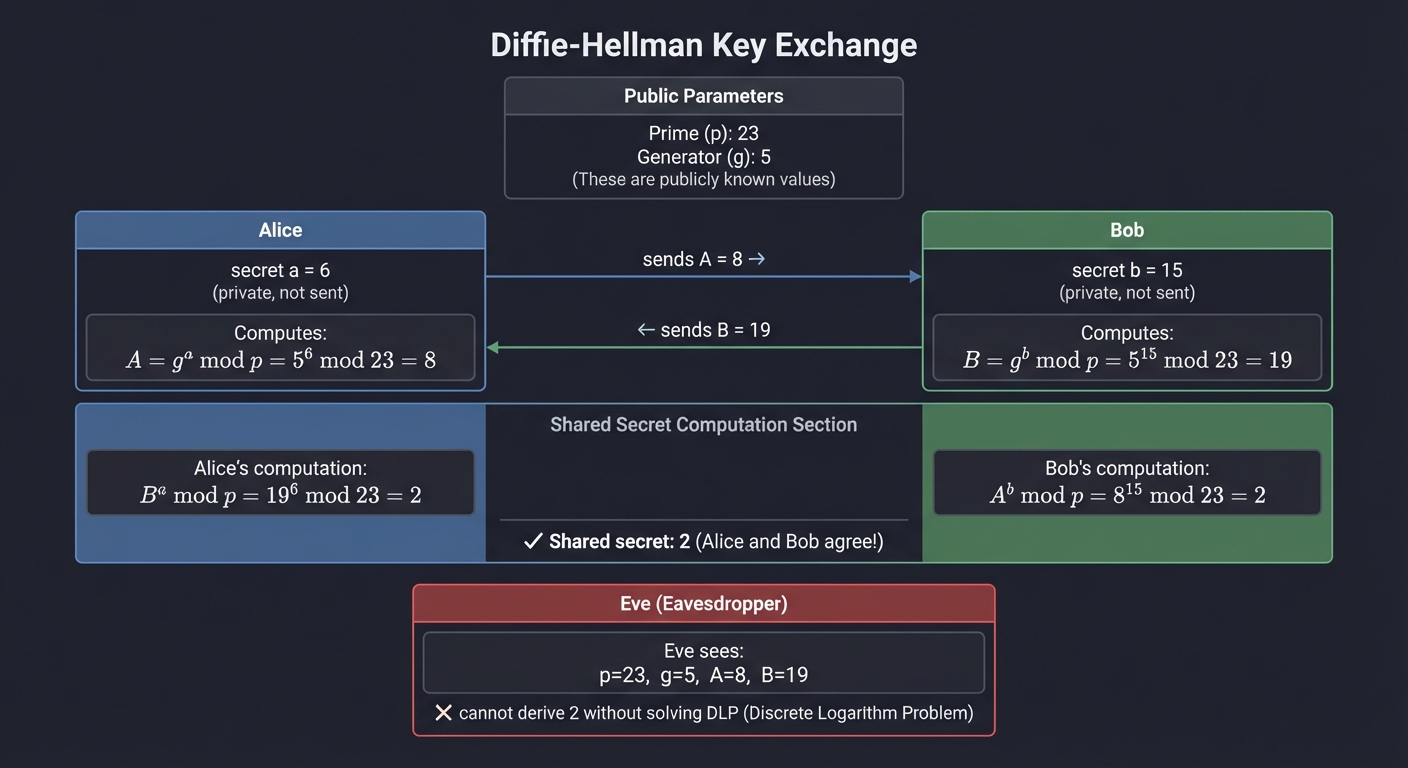
Alice: secret a = 6 Alice: A = g^a mod p = 5^6 mod 23 = 8 → sends to Bob
Bob: secret b = 15 Bob: B = g^b mod p = 5^15 mod 23 = 19 → sends to Alice
Alice computes: B^a mod p = 19^6 mod 23 = 2 Bob computes: A^b mod p = 8^15 mod 23 = 2
✓ Shared secret: 2 (Alice and Bob agree!) ✗ Eve sees: p=23, g=5, A=8, B=19 → cannot derive 2 without solving DLP
**Learning milestones**:
1. Implement basic DH with small primes → understand the protocol
2. Scale to cryptographic-size parameters → understand practical considerations
3. Implement ECDH variant → understand elliptic curve advantage
4. Add man-in-the-middle demo → understand why authentication is needed
---
## Project Comparison Table
| Project | Difficulty | Time | Depth of Understanding | Fun Factor | Language |
|---------|------------|------|------------------------|------------|----------|
| TLS Handshake Visualizer | Intermediate | 2-3 weeks | ⭐⭐⭐⭐ | ⭐⭐⭐⭐⭐ | C |
| Build Your Own CA | Intermediate | 2 weeks | ⭐⭐⭐⭐ | ⭐⭐⭐⭐ | Java + CLI |
| TLS 1.2 from Scratch | Advanced | 1 month+ | ⭐⭐⭐⭐⭐ | ⭐⭐⭐⭐ | C |
| Java Wallet Library | Intermediate | 2 weeks | ⭐⭐⭐⭐ | ⭐⭐⭐ | Java |
| Diffie-Hellman Demo | Intermediate | 1 week | ⭐⭐⭐ | ⭐⭐⭐⭐ | C |
---
## Recommended Learning Path
Based on the goal of understanding "behind the scenes" with both Java and C:
**Start with**: **Project 5 (Diffie-Hellman Demo)** - 1 week
- This is the cryptographic foundation. You can't understand TLS key exchange without internalizing DH.
**Then**: **Project 2 (Build Your Own CA)** - 2 weeks
- This teaches PKI and Java keystores. You'll understand certificates, chains, and how Java trusts things.
**Then**: **Project 1 (TLS Handshake Visualizer)** - 2-3 weeks
- Now you can see real TLS in action and understand what you're looking at.
**Finally**: **Project 3 (TLS from Scratch)** - 1 month+
- This is the deep dive that cements everything.
**Parallel/Ongoing**: **Project 4 (Java Wallet Library)**
- Build this as you need it for your Java work.
---
## Final Capstone Project: Secure Mutual-TLS Microservice Communication Framework
**What you'll build**: A complete framework for secure service-to-service communication featuring:
- Your own CA hierarchy (root → intermediate → service certs)
- Mutual TLS (mTLS) authentication between services
- Certificate rotation without downtime
- Java and C clients/servers that communicate securely
- A dashboard showing certificate status, expiration, and handshake metrics
**Why it teaches everything**: This forces you to integrate all the pieces: PKI for certificate management, TLS handshake understanding for debugging, Java security APIs for the application layer, and C for performance-critical components or protocol analysis.
**Core challenges you'll face**:
- Designing a CA hierarchy for microservices (maps to real-world PKI design)
- Implementing mTLS where both sides verify certificates (maps to bidirectional trust)
- Graceful certificate rotation (maps to operational security)
- Cross-language interoperability (Java ↔ C) (maps to protocol standardization value)
- Debugging TLS failures across services (maps to practical troubleshooting)
**Key Concepts**:
- **mTLS Architecture**: "Zero Trust Networks" Ch. 5 - Evan Gilman & Doug Barth
- **Service Mesh TLS**: Istio/Linkerd documentation (for patterns to implement)
- **Certificate Lifecycle Management**: "Bulletproof SSL and TLS" Ch. 10 - Ivan Ristić
- **Cross-Platform TLS**: OpenSSL and Java JSSE interoperability guides
**Difficulty**: Advanced
**Time estimate**: 6-8 weeks
**Prerequisites**: Completion of at least 3 projects above
**Real world outcome**:
**Deliverables**:
- Network tool or configuration output
- Capture logs or diagrams
**Validation checklist**:
- Traffic behavior matches expectations
- Segmentation or controls are verifiable
- Monitoring data is complete
$ ./service-mesh-demo start
Starting CA server… Issuing certificate for service-a (Java)… Issuing certificate for service-b (C)… Issuing certificate for service-c (Java)…
service-a → service-b: mTLS handshake ✓ (ECDHE-RSA-AES256-GCM-SHA384) service-b → service-c: mTLS handshake ✓ (ECDHE-ECDSA-AES128-GCM-SHA256)
Dashboard: https://localhost:8443/dashboard
- Active certificates: 4
- Handshakes today: 1,247
- Next expiration: service-b in 29 days
- Cipher suite distribution: [chart] ```
Learning milestones:
- CA hierarchy operational with Java & C consumers → mastered PKI
- Bidirectional mTLS working → understood mutual authentication
- Zero-downtime cert rotation → understood operational security
- Dashboard showing live metrics → full observability into TLS
- Debug a failing handshake from logs alone → practical expertise
Essential Resources Summary
Books
- “Serious Cryptography, 2nd Edition” by Jean-Philippe Aumasson - Cryptographic foundations
- “Bulletproof SSL and TLS” by Ivan Ristić - Practical TLS/PKI guide
- “Implementing SSL/TLS Using Cryptography and PKI” by Joshua Davies - Implementation-focused
- “TCP/IP Illustrated, Volume 1” by W. Richard Stevens - Network protocol foundations
- “Java Security, 2nd Edition” by Scott Oaks - Java security architecture
RFCs
- RFC 5246 - TLS 1.2 Specification
- RFC 8446 - TLS 1.3 Specification
- RFC 5280 - X.509 PKI Certificate Profile
Online Resources
- Oracle JSSE Reference Guide
- OpenSSL documentation and wiki
- Let’s Encrypt documentation (for practical CA operations)
This progression takes you from cryptographic primitives through protocol implementation to production-ready security infrastructure. By the end, you won’t just understand TLS—you’ll have built it.