Deep Dive into SSH: From Protocol to Implementation
Goal: Master the Digital Master Key to the Modern World
Why SSH Matters in the Real World
SSH (Secure Shell) is not just another network protocol—it is the foundational security primitive that powers the entire modern infrastructure. Every time you deploy code to a server, manage cloud infrastructure, access a database, or administer a remote system, you’re relying on SSH. Understanding SSH deeply transforms you from a user who types ssh user@host into someone who understands the cryptographic handshake, the threat models, and the security guarantees that make remote administration possible in a hostile network environment.
Real-world systems powered by SSH:
- Cloud Infrastructure: AWS, Google Cloud, Azure—all remote access uses SSH
- DevOps Pipelines: CI/CD systems (GitHub Actions, GitLab CI, Jenkins) use SSH for deployment
- Database Administration: PostgreSQL, MySQL, MongoDB remote management
- Git Operations: GitHub, GitLab push/pull operations over SSH
- Container Orchestration: Kubernetes node management, Docker remote API access
- Network Equipment: Cisco, Juniper, and all enterprise networking gear management
- Critical Infrastructure: Power grids, financial systems, telecommunications rely on SSH
According to recent analyses, SSH is present on over 70% of all internet-connected servers, making it one of the most ubiquitous security protocols in existence. Recent 2024/2025 security trends show alarming statistics:
- 73% of confirmed identity-based breaches were due to compromised credentials (2024 data)
- Stolen credentials were the #1 attacker action, responsible for 80% of web app attacks (2023/24 data)
- Breaches involving stolen credentials cost an average of $4.8M per incident and took 88 days longer to resolve (292-day lifecycle)
- SSH adoption is projected to reach 96% among enterprises by 2032, showing strong continued growth
- 78% of enterprises now use advanced secure data transfer methods (up from 61% in 2023), with SSH as a cornerstone
- Major 2024 breaches (Ticketmaster, Change Healthcare, AT&T) involved over 1.24 billion compromised records due to lack of proper authentication controls
Understanding SSH isn’t optional—it’s mandatory for anyone serious about systems programming, security, or infrastructure. The statistics make clear that weak SSH key management and authentication are direct contributors to some of the costliest security incidents in modern history.
What You’ll Be Able to Do After These Projects
After completing this learning journey, you will:
- Understand Cryptographic Primitives in Practice: Move beyond theoretical knowledge to implementing real encryption, key exchange, and authentication protocols
- Read and Parse Network Protocols: Decode binary protocols, understand packet structures, and analyze network traffic at a deep level
- Build Secure Systems: Design and implement authentication systems that resist man-in-the-middle attacks, replay attacks, and credential theft
- Debug Production SSH Issues: Understand why SSH connections fail, diagnose authentication problems, and configure secure SSH servers
- Implement Tunneling and Multiplexing: Build tools that create secure channels through hostile networks
- Think Like a Security Engineer: Understand threat models, defense-in-depth, and the “why” behind security decisions
SSH in the Network Stack
Understanding where SSH sits in the protocol stack is crucial:
┌─────────────────────────────────────────────────────────────────┐
│                      APPLICATION LAYER (OSI Layer 7)            │
│  ┌───────────────────────────────────────────────────────────┐ │
│  │  SSH Protocol Suite (Your Programs Will Implement This)   │ │
│  │                                                             │ │
│  │  ┌─────────────────────────────────────────────────────┐  │ │
│  │  │  SSH Connection Protocol (RFC 4254)                 │  │ │
│  │  │  - Channels (session, exec, shell, subsystem)       │  │ │
│  │  │  - Port Forwarding (local, remote, dynamic)         │  │ │
│  │  │  - Multiplexing multiple logical streams           │  │ │
│  │  └─────────────────────────────────────────────────────┘  │ │
│  │                          ↑                                  │ │
│  │  ┌─────────────────────────────────────────────────────┐  │ │
│  │  │  SSH Authentication Protocol (RFC 4252)             │  │ │
│  │  │  - Password authentication                          │  │ │
│  │  │  - Public key authentication (RSA, Ed25519)         │  │ │
│  │  │  - Host-based authentication                        │  │ │
│  │  └─────────────────────────────────────────────────────┘  │ │
│  │                          ↑                                  │ │
│  │  ┌─────────────────────────────────────────────────────┐  │ │
│  │  │  SSH Transport Protocol (RFC 4253)                  │  │ │
│  │  │  - Version exchange                                 │  │ │
│  │  │  - Algorithm negotiation                            │  │ │
│  │  │  - Key exchange (Diffie-Hellman, ECDH)              │  │ │
│  │  │  - Encryption (AES-256-GCM, ChaCha20-Poly1305)      │  │ │
│  │  │  - MAC (HMAC-SHA2-256, HMAC-SHA2-512)               │  │ │
│  │  │  - Compression (optional)                           │  │ │
│  │  └─────────────────────────────────────────────────────┘  │ │
│  └───────────────────────────────────────────────────────────┘ │
└─────────────────────────────────────────────────────────────────┘
                               ↓
┌─────────────────────────────────────────────────────────────────┐
│                    TRANSPORT LAYER (OSI Layer 4)                │
│                         TCP (Port 22)                           │
│  - Reliable, ordered, error-checked delivery                   │
│  - Connection-oriented (3-way handshake)                       │
│  - Flow control and congestion control                         │
└─────────────────────────────────────────────────────────────────┘
                               ↓
┌─────────────────────────────────────────────────────────────────┐
│                     NETWORK LAYER (OSI Layer 3)                 │
│                         IP (IPv4/IPv6)                          │
│  - Routing between networks                                    │
│  - Addressing (IP addresses)                                   │
└─────────────────────────────────────────────────────────────────┘
                               ↓
┌─────────────────────────────────────────────────────────────────┐
│                   DATA LINK LAYER (OSI Layer 2)                 │
│                    Ethernet / WiFi / etc.                       │
└─────────────────────────────────────────────────────────────────┘
                               ↓
┌─────────────────────────────────────────────────────────────────┐
│                    PHYSICAL LAYER (OSI Layer 1)                 │
│                   Cables, Radio Waves, Fiber                    │
└─────────────────────────────────────────────────────────────────┘

Key Insight: SSH is an APPLICATION layer protocol that runs on top of TCP.
This means SSH assumes TCP provides reliable, ordered delivery, and SSH
adds: encryption, authentication, integrity checking, and multiplexing.
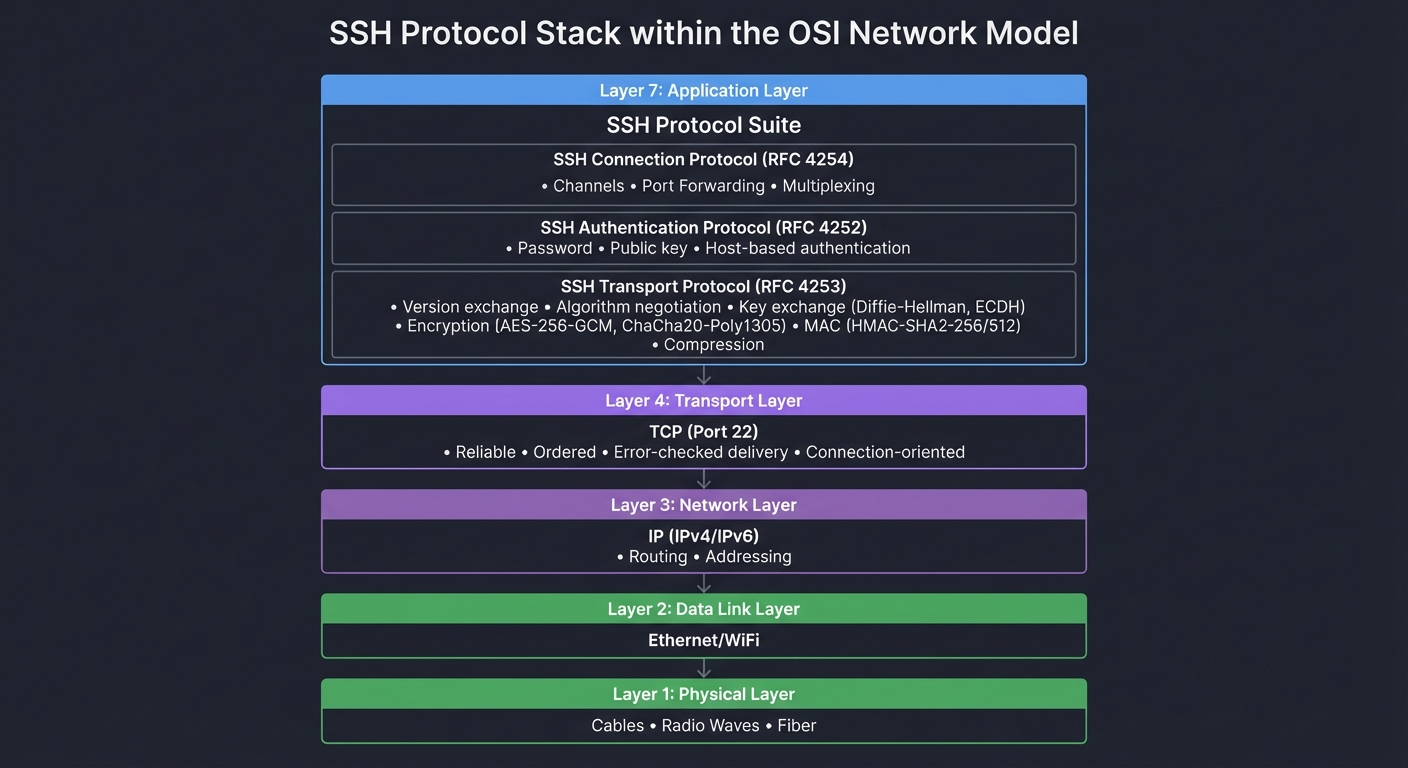
Critical Understanding: SSH doesn’t replace TCP—it builds on top of it. When you implement SSH, you’ll work with TCP sockets to get reliable byte streams, then implement SSH’s layered protocol on top. This is why Project 1 starts with raw TCP communication.
Detailed Concept Explanations
This section provides deep dives into each concept area. Understanding these concepts at a fundamental level is what separates developers who use SSH from developers who understand SSH.
1. Cryptography: The Foundation of SSH Security
Why Cryptography Matters for SSH
SSH’s entire value proposition is security over an untrusted network. Without cryptography, SSH would just be Telnet—sending passwords and commands in plaintext for anyone to intercept. Cryptography provides three critical security properties:
- Confidentiality: Eavesdroppers can’t read your data
- Integrity: Attackers can’t modify your data without detection
- Authenticity: You’re talking to the right server (and the server knows it’s you)
Symmetric Encryption (AES)
Symmetric encryption uses the same key for both encryption and decryption. It’s fast and efficient, making it perfect for bulk data encryption.
┌─────────────────────────────────────────────────────────────────┐
│           Symmetric Encryption (AES-256-GCM Example)            │
└─────────────────────────────────────────────────────────────────┘

Alice                                                          Bob
  │                                                              │
  │  Both share the same secret key: K = 0x3f2a8b...           │
  │                                                              │
  ├─── Plaintext: "whoami" ───────────────────────────────────┐ │
  │                                                            │ │
  │    ┌──────────────────────┐                               │ │
  │    │   AES-256 Encrypt    │                               │ │
  │    │   Key: K             │                               │ │
  │    │   IV: random nonce   │                               │ │
  │    └──────────────────────┘                               │ │
  │              ↓                                             │ │
  ├─── Ciphertext: 0x7f3e2a1b9c... ──────────────────────────►│ │
  │                                                            │ │
  │                                     ┌──────────────────────┤ │
  │                                     │  AES-256 Decrypt     │ │
  │                                     │  Key: K              │ │
  │                                     │  IV: same nonce      │ │
  │                                     └──────────────────────┘ │
  │                                              ↓               │
  │                                     Plaintext: "whoami" ◄───┘
  │                                                              │

Problem: How do Alice and Bob agree on K over an insecure network?
Answer: Key Exchange (Diffie-Hellman) - see next section!
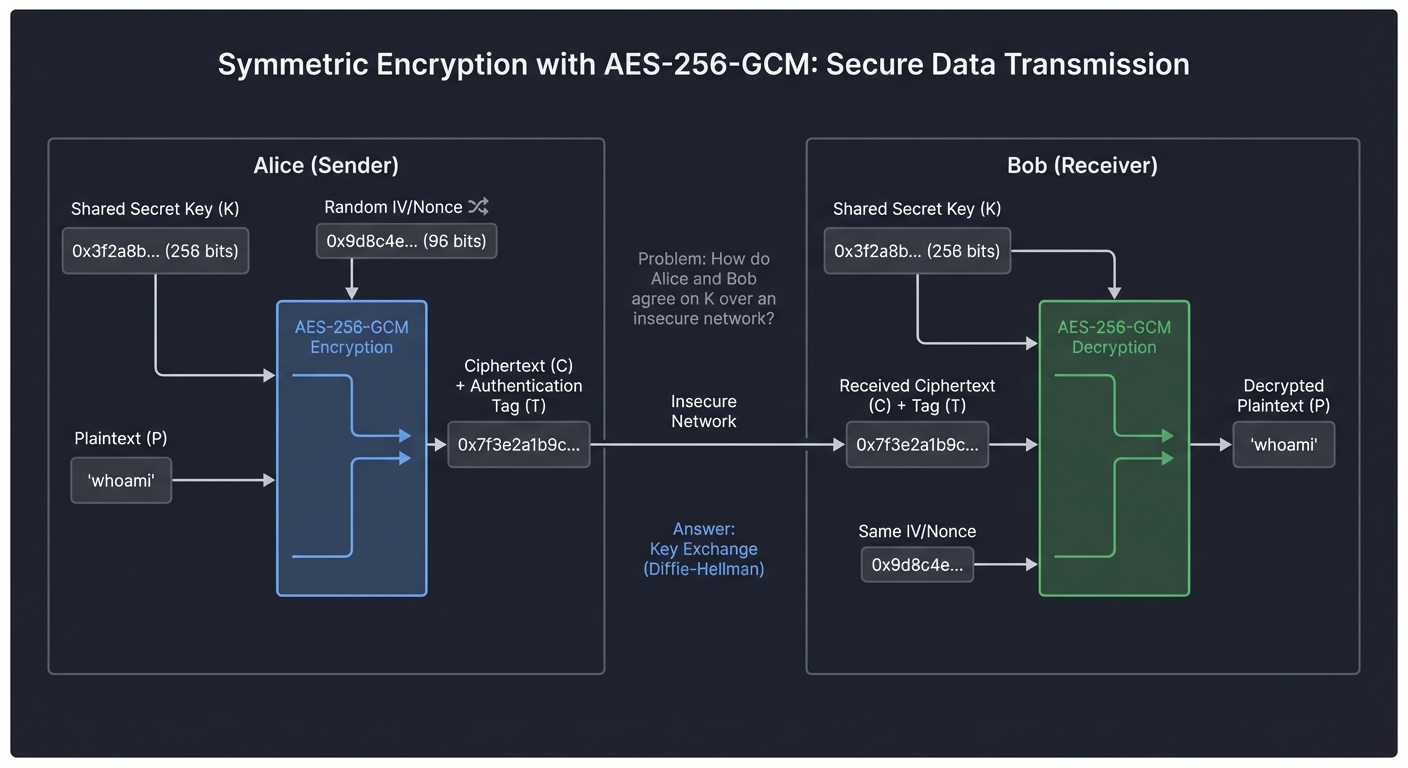
Real Example in SSH: When you type ssh user@host, after the key exchange completes, all your keystrokes are encrypted with AES. A network sniffer sees random bytes, not your password or commands.
Book Reference: “Serious Cryptography” by Jean-Philippe Aumasson, Chapter 4 covers AES deeply—how it works, why it’s secure, and common pitfalls.
The “Why”: Why use symmetric crypto for data and not just public key crypto? Performance. AES can encrypt gigabytes per second on modern CPUs. RSA is 1000x slower. SSH uses public key crypto only for key exchange and authentication, then switches to symmetric crypto for actual data.
Asymmetric Encryption (RSA, Ed25519)
Asymmetric encryption uses a key pair: a public key (can be shared) and a private key (must be kept secret). What one key encrypts, only the other can decrypt.
┌─────────────────────────────────────────────────────────────────┐
│         Public Key Authentication (SSH Login Example)          │
└─────────────────────────────────────────────────────────────────┘

Client (You)                                        Server
   │                                                    │
   │ Private Key: id_ed25519 (secret, on your disk)    │
   │ Public Key: id_ed25519.pub (in ~/.ssh/authorized_keys)
   │                                                    │
   ├──── "I want to authenticate as user 'alice'" ────►│
   │                                                    │
   │ ◄───── Challenge: random bytes to sign ───────────┤
   │         (0x9f3e2a1b...)                            │
   │                                                    │
   │  ┌────────────────────────┐                       │
   │  │ Sign challenge with    │                       │
   │  │ private key            │                       │
   │  │ Signature = Sign(data, │                       │
   │  │              privkey)  │                       │
   │  └────────────────────────┘                       │
   │              ↓                                     │
   ├──── Send signature ───────────────────────────────►│
   │                                                    │
   │                       ┌────────────────────────────┤
   │                       │ Verify signature with      │
   │                       │ public key from            │
   │                       │ authorized_keys            │
   │                       │ Verify(data, sig, pubkey) │
   │                       └────────────────────────────┘
   │                                    ↓                │
   │ ◄──── "Authentication successful" ─────────────────┤
   │                                                    │

Key Insight: Server NEVER sees your private key. You prove you have it
by signing a challenge. This is cryptographic proof of identity.
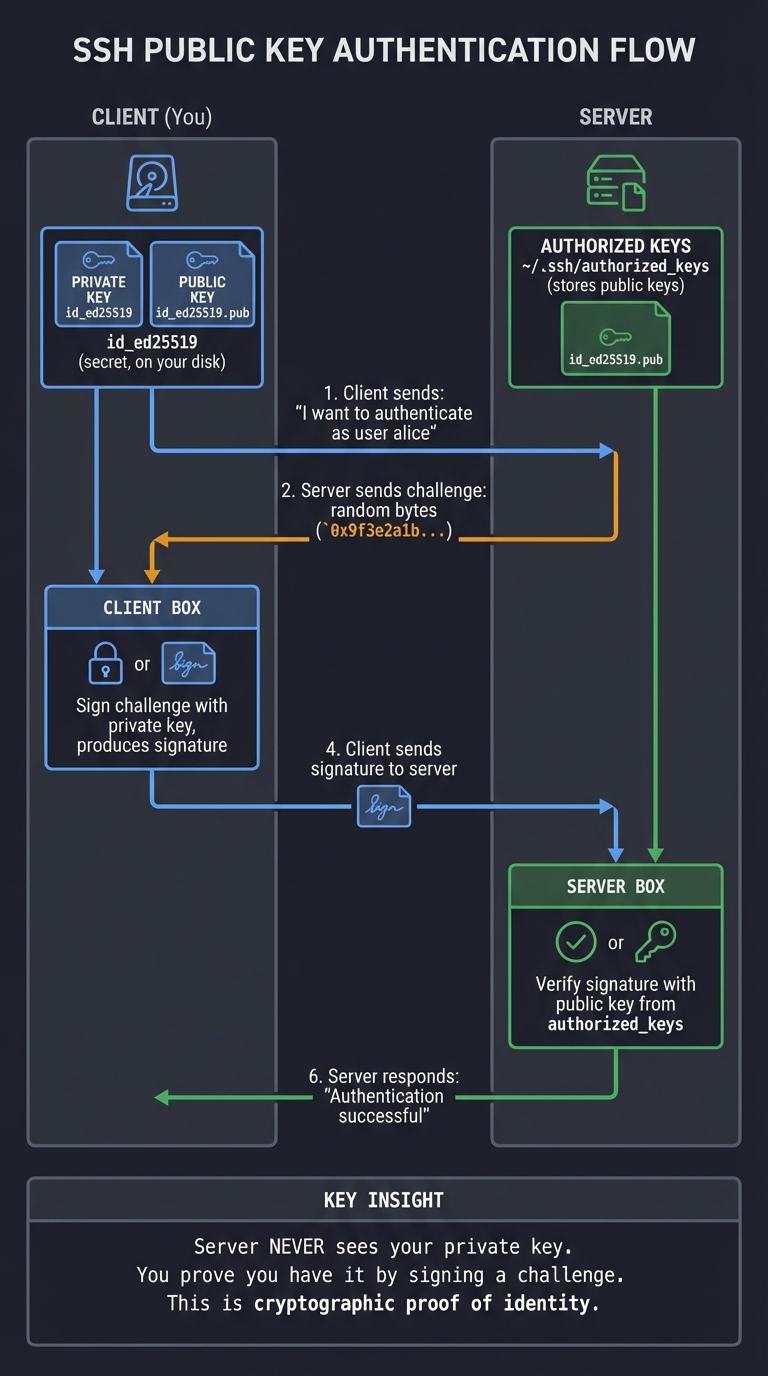
Real Example: Your ~/.ssh/id_ed25519 file is your private key. The server has your public key in ~/.ssh/authorized_keys. You can authenticate to infinite servers without ever sending your private key over the network.
Book Reference: “Serious Cryptography” Chapter 11 covers public key cryptography, including RSA, ECC, and modern algorithms like Ed25519.
The “Why”: Why use public key auth instead of passwords? Because passwords can be stolen, guessed, or phished. Your private key never leaves your machine. Even if the server is compromised, the attacker only gets your public key (which is… public).
Key Exchange (Diffie-Hellman)
This is the magic that makes SSH possible. How do two parties who’ve never met before agree on a shared secret key over a network where attackers are listening?
┌─────────────────────────────────────────────────────────────────┐
│     Diffie-Hellman Key Exchange (Simplified ECDH Example)       │
└─────────────────────────────────────────────────────────────────┘

Alice                        Network (Eve listening)           Bob
  │                                  │                            │
  │ Private: a (random)              │          Private: b (random)
  │ Public:  A = a·G                 │          Public:  B = b·G  │
  │   (G = curve base point)         │                            │
  │                                  │                            │
  ├────── Send A ────────────────────┼──────────────────────────►│
  │                                  │                            │
  │◄──────────────────────────────── ┼────────── Send B ─────────┤
  │                                  │                            │
  │ Compute: K = a·B                 │           Compute: K = b·A │
  │        = a·(b·G)                 │                  = b·(a·G) │
  │        = (a·b)·G                 │                  = (a·b)·G │
  │                                  │                            │
  │        Both have K! ──────────────────────── Both have K!     │
  │                                  │                            │
  │                                  │                            │
  Eve sees: A and B (public values)  │                            │
  Eve needs: To compute a·b·G from A and B                        │
  Problem: This is the Elliptic Curve Discrete Logarithm Problem  │
           (ECDLP) - believed to be computationally infeasible!   │

Result: Alice and Bob share K, Eve cannot compute K
        Now they can use K for AES encryption!
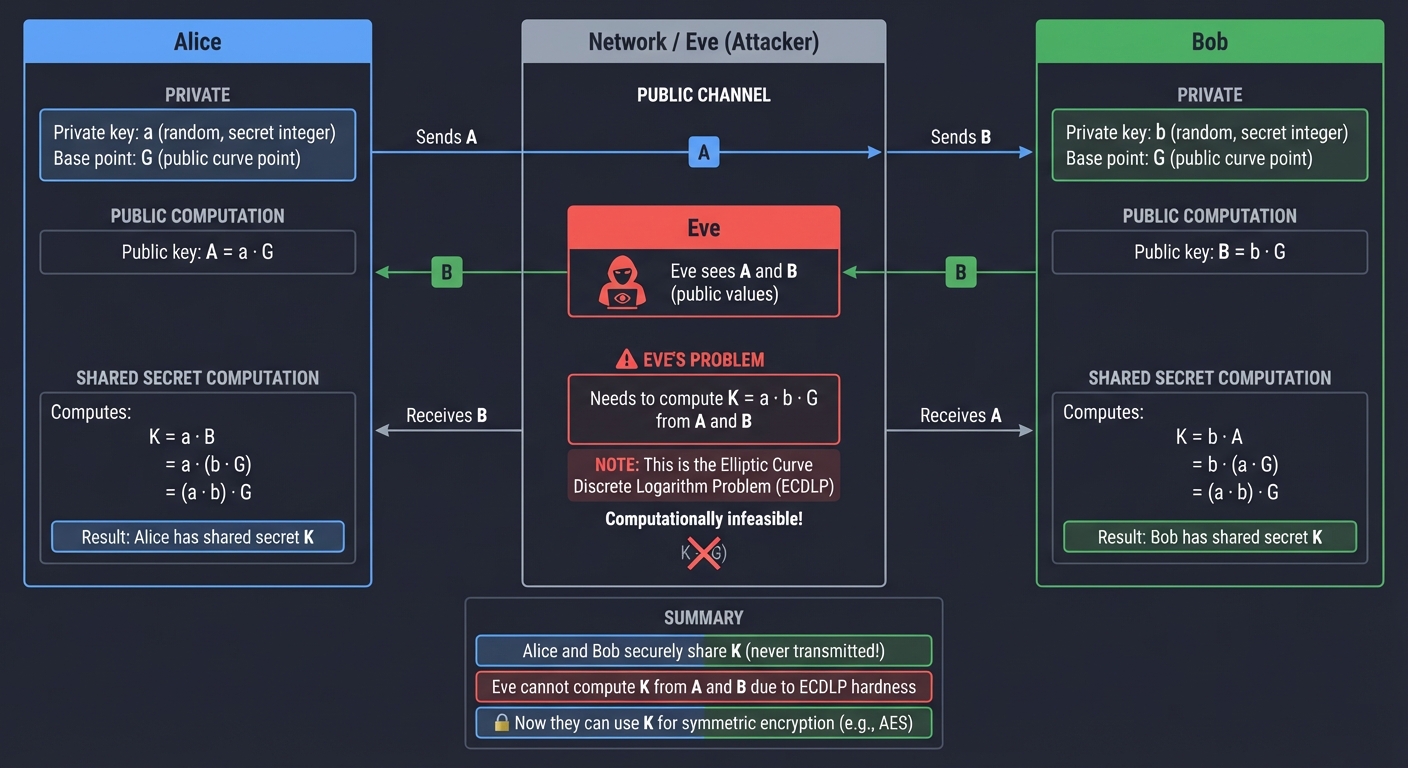
Real Example: When you connect to a new SSH server, you see “Server host key unknown” and a fingerprint. That handshake included a Diffie-Hellman exchange. Both sides now have a shared secret that was never transmitted.
Book Reference: “Serious Cryptography” Chapter 11, Section on Key Exchange. Also “Understanding Cryptography” by Paar & Pelzl, Chapter 10.
The “Why”: This solves the “key distribution problem” that plagued cryptography for centuries. Before Diffie-Hellman (invented 1976), two parties needed to meet in person to exchange keys. DH allows secure key agreement over insecure channels—this is foundational to all modern internet security (HTTPS, Signal, WhatsApp, SSH).
Message Authentication Codes (MACs)
Encryption provides confidentiality, but how do you know the ciphertext wasn’t modified in transit? MACs provide integrity and authenticity.
┌─────────────────────────────────────────────────────────────────┐
│         MAC (Message Authentication Code) Example              │
└─────────────────────────────────────────────────────────────────┘

Sender                                                     Receiver
  │                                                            │
  │  Shared Key: K                                             │
  │  Message: M = "exec whoami"                                │
  │                                                            │
  │  ┌─────────────────────┐                                  │
  │  │ MAC = HMAC-SHA256   │                                  │
  │  │       (K, M)        │                                  │
  │  │     = 0xf3e2a1b9... │                                  │
  │  └─────────────────────┘                                  │
  │           ↓                                                │
  ├─── Send: (M, MAC) ────────────────────────────────────────►│
  │                                                            │
  │                            ┌───────────────────────────────┤
  │                            │ Compute MAC' = HMAC-SHA256    │
  │                            │                (K, M)         │
  │                            │ If MAC == MAC': accept        │
  │                            │ If MAC != MAC': REJECT!       │
  │                            └───────────────────────────────┘
  │                                                            │

Attacker changes M to "exec rm -rf /" and keeps old MAC:
  Server computes new MAC, doesn't match, connection terminated.

Attacker changes both M and MAC:
  Can't compute valid MAC without key K. Attack fails.
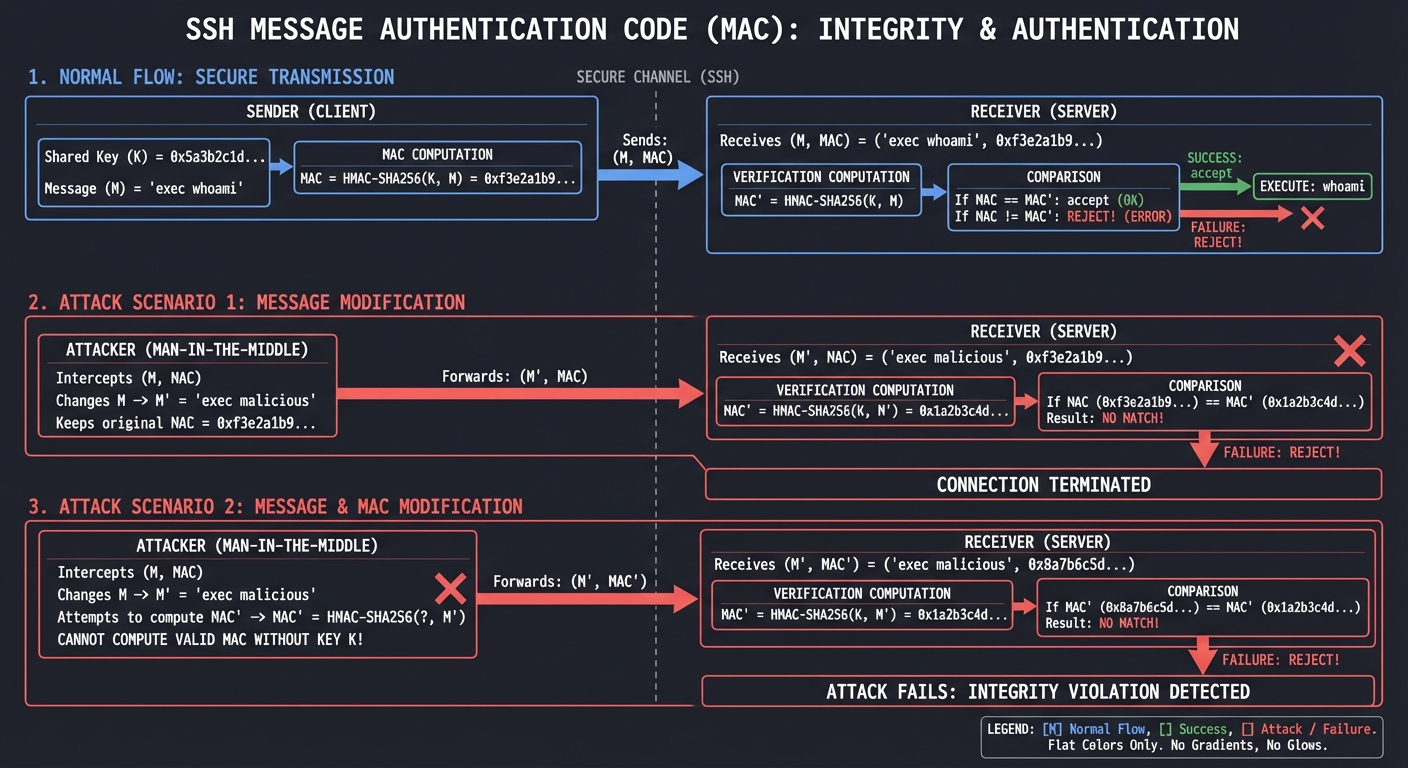
Real Example in SSH: Every SSH packet includes a MAC. If an attacker tries to flip bits in your encrypted “whoami” command to make it “rm -rf /”, the MAC verification fails and SSH terminates the connection.
Book Reference: “Serious Cryptography” Chapter 6 covers MACs and authenticated encryption.
The “Why”: Encryption alone isn’t enough. Old encryption modes like AES-CBC are vulnerable to “bit-flipping attacks” where attackers modify ciphertext to change the resulting plaintext. MACs prevent this. Modern SSH uses AEAD (Authenticated Encryption with Associated Data) modes like AES-GCM that combine encryption and MAC in one operation.
Perfect Forward Secrecy (PFS)
What if your server’s private key is stolen next year? Can an attacker who recorded all your past SSH sessions decrypt them?
┌─────────────────────────────────────────────────────────────────┐
│              Perfect Forward Secrecy Visualization              │
└─────────────────────────────────────────────────────────────────┘

WITHOUT PFS (static RSA key exchange):
═══════════════════════════════════════════════════════════════════
Session 1 (Jan): Key K₁ derived from server's RSA private key
Session 2 (Feb): Key K₂ derived from server's RSA private key
Session 3 (Mar): Key K₃ derived from server's RSA private key

Attacker steals server's RSA private key in April:
  ⚠️  Can decrypt ALL past sessions (Jan, Feb, Mar)!


WITH PFS (ephemeral Diffie-Hellman):
═══════════════════════════════════════════════════════════════════
Session 1 (Jan): Ephemeral DH → Key K₁ (DH params deleted)
Session 2 (Feb): Ephemeral DH → Key K₂ (DH params deleted)
Session 3 (Mar): Ephemeral DH → Key K₃ (DH params deleted)

Attacker steals server's RSA private key in April:
  ✅  Cannot decrypt past sessions!
  ✅  Each session used unique, ephemeral keys that no longer exist

┌──────────────────────────────────────────────────────────┐
│  PFS Guarantee: Compromise of long-term keys does NOT   │
│  compromise past session keys. Each session is isolated. │
└──────────────────────────────────────────────────────────┘
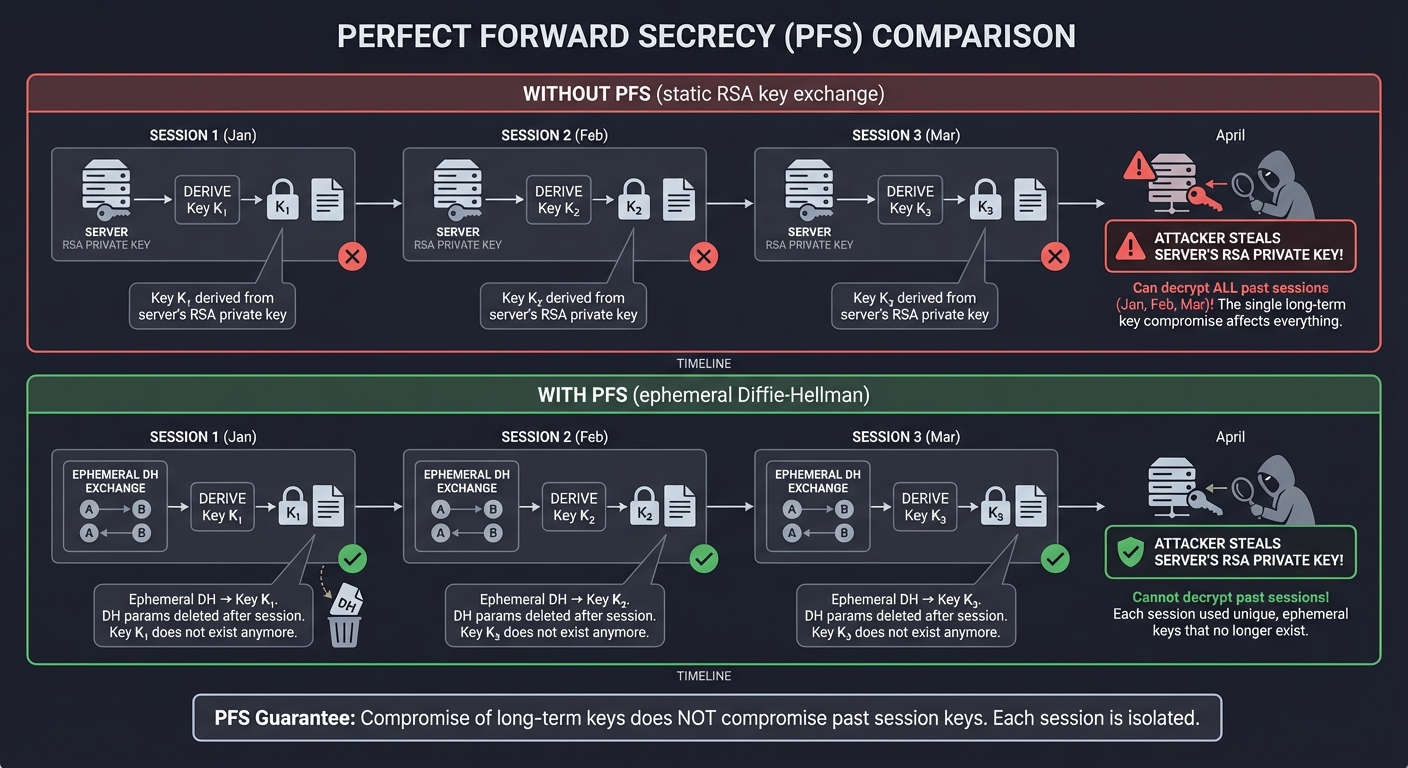
Real Example: Modern SSH defaults to curve25519-sha256 or diffie-hellman-group-exchange-sha256, which provide PFS. Even if your server is hacked and the host key stolen, past recorded sessions remain secure.
Book Reference: “Serious Cryptography” Chapter 11. Also see RFC 4419 for SSH’s Diffie-Hellman Group Exchange.
The “Why”: Nation-state adversaries and sophisticated attackers often record encrypted traffic in bulk (“collect now, decrypt later”). PFS ensures that even if they later compromise your server, those recordings are worthless. This is critical for long-term security.
2. Network Protocol: Understanding the Transport Layer
Why Network Protocols Matter for SSH
SSH doesn’t exist in a vacuum—it’s built on top of TCP/IP. Understanding how TCP works, how sockets provide an API to TCP, and how to design binary protocols is essential for implementing SSH.
TCP: The Reliable Byte Stream
TCP provides a reliable, ordered, connection-oriented communication channel. Understanding TCP is crucial because SSH depends on these guarantees.
┌─────────────────────────────────────────────────────────────────┐
│              TCP Three-Way Handshake (Connection Setup)         │
└─────────────────────────────────────────────────────────────────┘

Client                                                      Server
  │                                                            │
  │  ┌────────────────────────────────────────────────────┐   │
  │  │  Application calls: connect(sockfd, addr, len)     │   │
  │  └────────────────────────────────────────────────────┘   │
  │                      ↓                                     │
  ├─── SYN (seq=100) ─────────────────────────────────────────►│
  │                                                            │
  │  "I want to establish a connection"                       │
  │  My initial sequence number is 100                        │
  │                                                            │
  │ ◄─── SYN-ACK (seq=300, ack=101) ──────────────────────────┤
  │                                                            │
  │  "I accept your connection request"                       │
  │  My sequence number is 300, I received your byte 100      │
  │                                                            │
  ├─── ACK (seq=101, ack=301) ────────────────────────────────►│
  │                                                            │
  │  "I received your SYN-ACK, connection established!"       │
  │                                                            │
  ╞════════════════════════════════════════════════════════════╡
  │         CONNECTION ESTABLISHED - Data can flow            │
  │         (This is when SSH version exchange begins)        │
  ╞════════════════════════════════════════════════════════════╡
  │                                                            │
  ├─── SSH-2.0-OpenSSH_9.0\r\n ───────────────────────────────►│
  │ ◄─── SSH-2.0-OpenSSH_8.9\r\n ──────────────────────────────┤
  │                                                            │
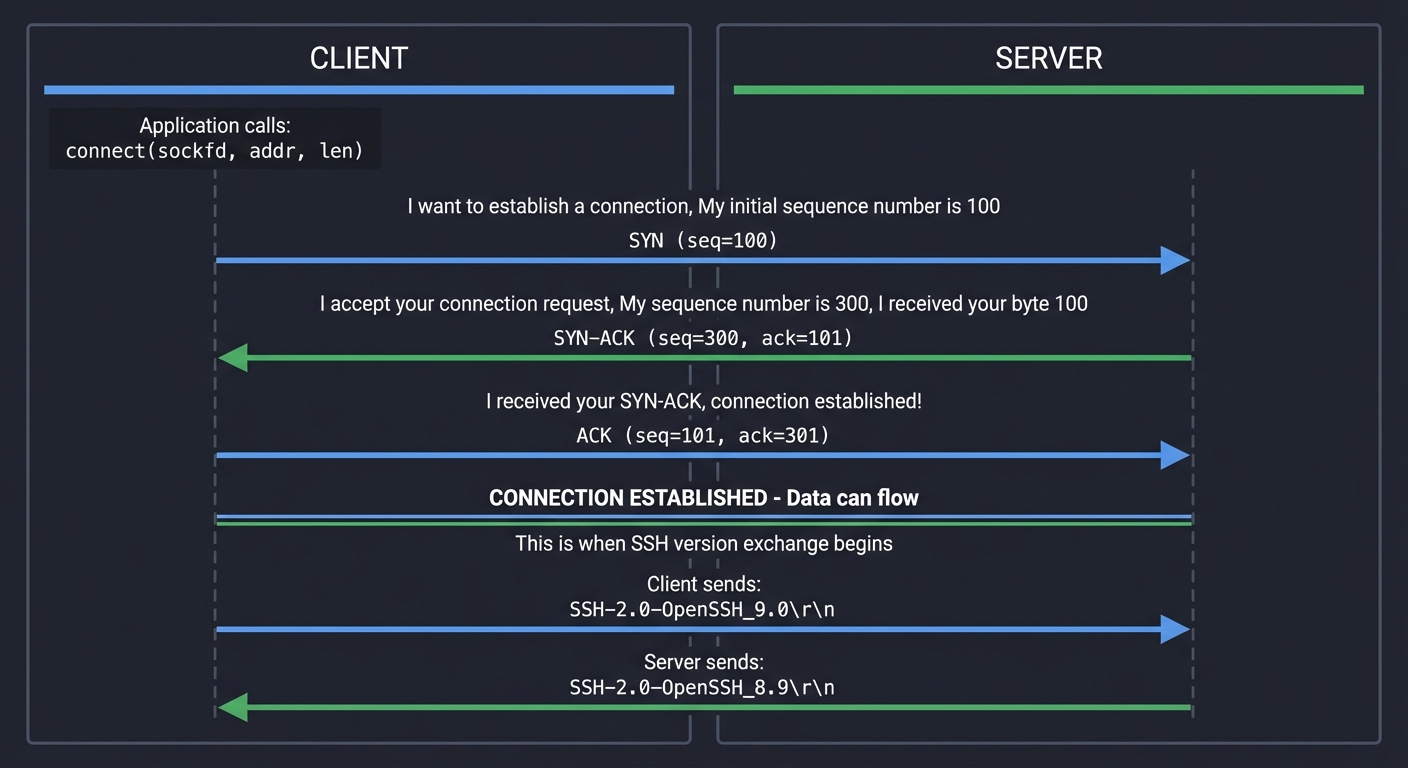
Real Example: When you run ssh user@host, your SSH client first establishes a TCP connection (port 22). Only after this handshake does SSH protocol communication begin.
Book Reference: “TCP/IP Illustrated, Volume 1” by Stevens, Chapter 13 (TCP Connection Management). This is the definitive guide to understanding TCP.
The “Why”: SSH relies on TCP’s reliability guarantees. SSH doesn’t have to worry about packets arriving out of order, being lost, or being duplicated—TCP handles all that. This lets SSH focus on security, not reliability.
Binary Protocol Design
SSH is a binary protocol, not a text protocol like HTTP. Understanding binary protocol design is crucial.
┌─────────────────────────────────────────────────────────────────┐
│              SSH Binary Packet Format (RFC 4253)                │
└─────────────────────────────────────────────────────────────────┘

Byte Stream on Wire (network byte order = big-endian):
═══════════════════════════════════════════════════════════════════
┌───────────────┬──────────┬─────────────┬──────────┬────────────┐
│ Packet Length │  Padding │   Payload   │ Random   │    MAC     │
│   (4 bytes)   │ Length   │   (varies)  │ Padding  │ (varies)   │
│               │ (1 byte) │             │ (varies) │            │
└───────────────┴──────────┴─────────────┴──────────┴────────────┘
       │             │            │            │          │
       │             │            │            │          └─ HMAC-SHA2-256
       │             │            │            │             (32 bytes)
       │             │            │            │
       │             │            │            └─ Random bytes for security
       │             │            │               (4-255 bytes)
       │             │            │
       │             │            └─ SSH message type + data
       │             │               (e.g., SSH_MSG_KEXINIT)
       │             │
       │             └─ Number of padding bytes
       │
       └─ Length of (padding_length + payload + padding)
          Does NOT include MAC or this length field itself


Example SSH_MSG_KEXINIT packet (simplified):
═══════════════════════════════════════════════════════════════════
00 00 02 34    ← Packet length = 564 bytes
10             ← Padding length = 16 bytes
14             ← Message type = SSH_MSG_KEXINIT (20)
3f 2a 8b ...   ← Cookie (16 random bytes)
00 00 00 ...   ← Algorithm negotiation lists
...
[random pad]   ← 16 bytes of random padding
f3 e2 a1 ...   ← MAC (32 bytes for HMAC-SHA2-256)
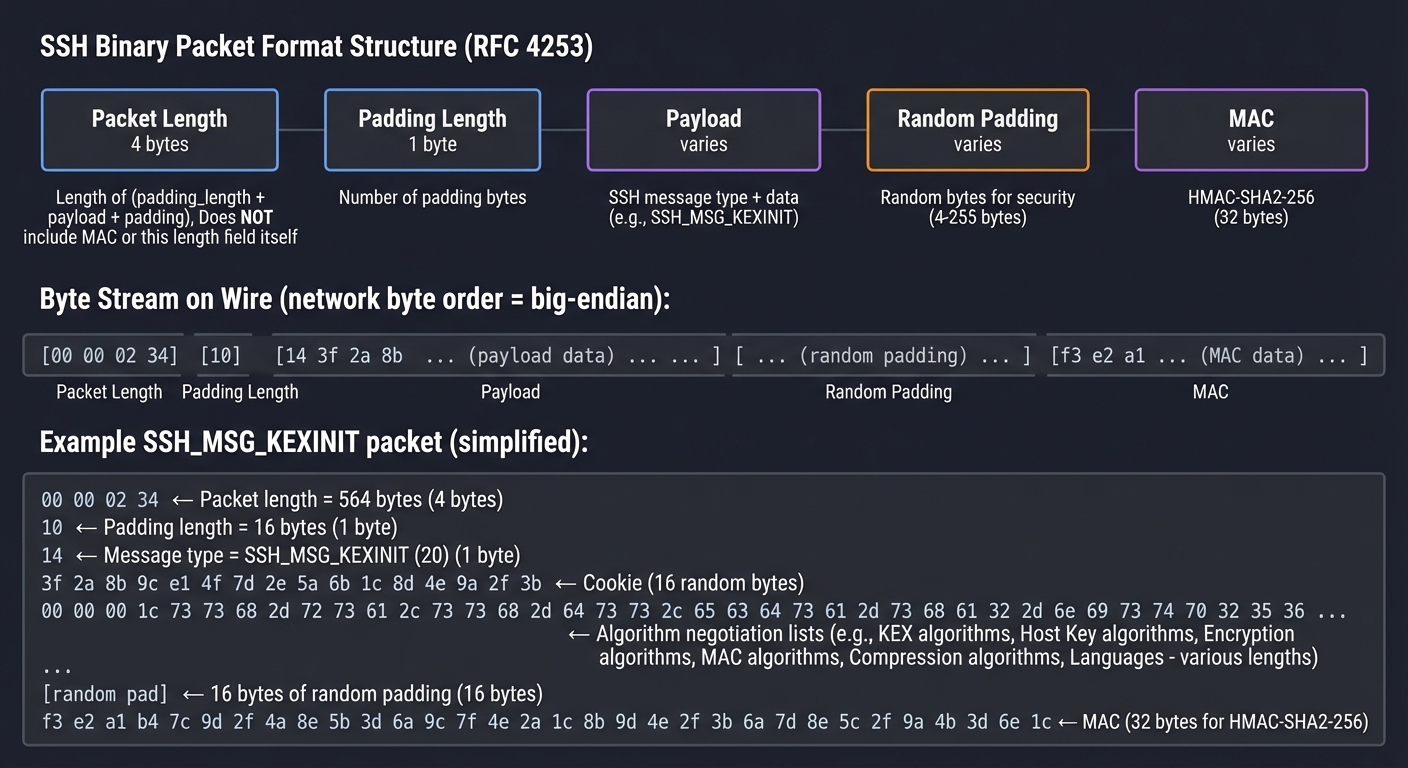
Real Example: When you run Wireshark on an SSH connection, you see these binary packets. Understanding this format lets you parse SSH traffic (Project 2).
Book Reference: “TCP/IP Illustrated, Volume 1” Chapter 18 discusses protocol design principles. SSH RFCs 4253-4254 define SSH’s binary formats.
The “Why”: Binary protocols are more efficient than text protocols. Instead of “Content-Length: 1234\r\n”, SSH uses 4 bytes. This matters for high-throughput applications. Also, binary encoding is less ambiguous—no worrying about character encoding, whitespace, or parsing edge cases.
Concept Summary Table
This table maps each major concept cluster to what you need to internalize (not just memorize) to truly understand SSH:
| Concept Cluster | Core Understanding Required | Why It Matters | Projects That Teach This |
|---|---|---|---|
| Symmetric Crypto (AES) | How block ciphers work, cipher modes (CBC, GCM), why IV/nonce is critical, authenticated encryption | This is what encrypts your actual SSH data. Bulk encryption must be fast. | Project 1 (TCP Chat) |
| Asymmetric Crypto (RSA, Ed25519) | Public/private key pairs, digital signatures, why private keys must stay private | This enables authentication without passwords and key exchange signatures | Project 3 (Mini SSH Client), Project 5 (Host Key Manager) |
| Key Exchange (DH, ECDH) | How two parties agree on a secret over insecure channel, ephemeral vs static keys, perfect forward secrecy | This is THE magic that makes SSH possible. Solves the key distribution problem. | Project 1 (TCP Chat - implement DH), Project 3 (Mini SSH Client) |
| MACs & Hashing | HMAC construction, why encrypt-then-MAC, collision resistance, cryptographic vs non-cryptographic hashes | Provides integrity and authenticity. Prevents tampering. | Project 1 (adding MACs), Project 3 (protocol implementation) |
| TCP Sockets | socket(), bind(), listen(), accept(), connect(), read(), write(), network byte order | SSH runs on TCP. Must understand the transport layer to build on it. | Project 1 (TCP Chat - foundation) |
| Binary Protocols | Parsing binary data, endianness, length-prefixed vs delimited, packet framing | SSH is a binary protocol. Text-based thinking won’t work. | Project 2 (Protocol Dissector), Project 3 (Mini SSH Client) |
| Password Auth | Challenge-response, timing attacks, why password hashing matters | Understand the weakest link to appreciate stronger methods | Project 3 (Mini SSH Client - implement auth) |
| Public Key Auth | Challenge-response with signatures, authorized_keys format, key fingerprints | The strongest practical authentication method. Industry standard. | Project 3, Project 5 (Host Key Manager) |
| Host Key Verification | Trust-On-First-Use (TOFU) model, known_hosts format, fingerprint verification, MITM prevention | Critical for security. Most users skip this—you’ll understand why it matters. | Project 5 (Host Key Manager) |
| Port Forwarding | Local vs remote forwarding, channel multiplexing, TCP-in-TCP | SSH’s killer feature beyond remote shell. Understand VPN-like capabilities. | Project 4 (Tunnel Tool) |
| SOCKS Proxy | SOCKS5 protocol, dynamic forwarding, proxy vs VPN | Powerful tool for routing arbitrary traffic through SSH | Project 4 (Tunnel Tool) |
| MITM Attacks | How network interception works, ARP spoofing, DNS hijacking, why host keys matter | Understanding the threat model makes SSH’s design decisions clear | Project 2 (observe real traffic), Project 5 (security analysis) |
| Replay Attacks | Why encryption alone isn’t enough, sequence numbers, freshness | Subtle attack that many protocols get wrong. SSH gets it right. | Project 3 (implement sequence numbers) |
| Perfect Forward Secrecy | Ephemeral keys, why past sessions must stay secure, post-compromise security | Modern security requirement. Understand long-term vs session security. | Project 1 (ephemeral DH), Project 3 (key exchange) |
Deep Dive Reading By Concept
This section maps each concept to specific chapters/sections in recommended books for deeper understanding:
Cryptography Foundations
Start here: “Serious Cryptography, 2nd Edition” by Jean-Philippe Aumasson
- Chapter 1: Encryption - Understanding confidentiality
- Chapter 4: Block Ciphers (AES) - How AES works, cipher modes, padding
- Chapter 6: Message Authentication - MACs, HMAC, authenticated encryption (AES-GCM)
- Chapter 11: Public Key Cryptography - RSA, ECC, Diffie-Hellman, digital signatures
- Chapter 8: Key Derivation - How SSH derives multiple keys from one shared secret
Alternative/Supplement: “Understanding Cryptography” by Paar & Pelzl
- Chapter 4: AES (more mathematical depth than Aumasson)
- Chapter 7: RSA
- Chapter 10: Diffie-Hellman and Elliptic Curves
- Chapter 12: MACs
For implementation details: “Cryptography Engineering” by Ferguson, Schneier, & Kohno
- Chapter 6: Implementing Block Ciphers (practical issues like side-channels)
- Chapter 8: Authentication and Integrity (practical MAC implementation)
Network Programming
TCP/IP Fundamentals: “TCP/IP Illustrated, Volume 1, 2nd Edition” by Fall & Stevens
- Chapter 1: Introduction (OSI model, protocols, encapsulation)
- Chapter 13: TCP Connection Management (three-way handshake, connection state)
- Chapter 14: TCP Data Flow (how data actually moves through TCP)
- Chapter 15: TCP Timeout and Retransmission (reliability mechanisms)
Socket Programming in C: “TCP/IP Sockets in C, 2nd Edition” by Donahoo & Calvert
- Chapter 1: Introduction (basic socket concepts)
- Chapter 2: Basic TCP Sockets (connect, send, receive)
- Chapter 3: Constructing Messages (framing, byte order)
- Chapter 4: Using UDP Sockets (for contrast with TCP)
- Chapter 6: Beyond Basic Socket Programming (non-blocking I/O, multiplexing with select/poll)
Systems-level Socket Programming: “The Linux Programming Interface” by Kerrisk
- Chapters 56-61: Sockets (comprehensive coverage, Linux-specific details)
- Chapter 63: Advanced Socket Topics (non-blocking I/O, /dev/poll, epoll)
SSH Protocol Specifics
Practical SSH Usage: “SSH Mastery, 2nd Edition” by Michael W. Lucas
- Chapter 1: Introducing SSH (overview, use cases)
- Chapter 2: Key Concepts (keys, agents, forwarding)
- Chapter 4: Verifying Server Identity (host keys, known_hosts, TOFU)
- Chapter 6: Public Key Authentication (how it works, key management)
- Chapter 9: Port Forwarding (local, remote, dynamic)
- Chapter 12: SSH Automation (for understanding production usage patterns)
Protocol Specifications (dense but authoritative):
- RFC 4251: SSH Protocol Architecture (read first for overview)
- RFC 4253: SSH Transport Layer Protocol (key exchange, encryption, packet format)
- RFC 4252: SSH Authentication Protocol (password, public key auth)
- RFC 4254: SSH Connection Protocol (channels, port forwarding, shell sessions)
- RFC 4419: Diffie-Hellman Group Exchange for SSH (modern key exchange)
Systems Programming for SSH Implementation
Unix/Linux Systems: “Advanced Programming in the UNIX Environment, 3rd Edition” by Stevens & Rago
- Chapter 13: Daemon Processes (for SSH server implementation)
- Chapter 14: Advanced I/O (non-blocking I/O, I/O multiplexing, async I/O)
- Chapter 15: Interprocess Communication (needed for privilege separation)
- Chapter 16: Network IPC (socket internals)
Comprehensive Linux Reference: “The Linux Programming Interface” by Kerrisk
- Chapter 44: Pipes and FIFOs (for session management)
- Chapter 60: Sockets: Server Design (iterative vs concurrent servers)
- Chapter 61: Advanced Socket Topics
Security and Threat Modeling
Information Security Foundations: “Foundations of Information Security” by Andress
- Chapter 8: Network Security (MITM, sniffing, replay attacks)
- Chapter 9: Cryptography (security properties, attack models)
Network Security Monitoring: “The Practice of Network Security Monitoring” by Bejtlich
- Chapter 6: Packet Analysis (understanding network traffic)
- Chapter 8: Security Logging and Monitoring (audit trails)
Practical Packet Analysis: “Practical Packet Analysis, 3rd Edition” by Chris Sanders
- Chapter 2: Tapping into the Wire (packet capture)
- Chapter 4: Working with Captured Packets
- Chapter 9: Analyzing TCP (understanding TCP from a security perspective)
Applied Cryptography in Systems
Building Secure Systems: “Security Engineering, 3rd Edition” by Ross Anderson
- Chapter 5: Cryptography (real-world crypto usage and pitfalls)
- Chapter 21: Network Attack and Defense (SSH in context of network security)
Side-Channel Attacks: “Fluent C” by Preschern (for implementation safety)
- Chapter 8: Data Structures (binary parsing, safe memory access)
- Chapter 12: Security (avoiding timing attacks, secure coding)
Prerequisites & Background Knowledge
Before diving into these SSH implementation projects, it’s important to assess your readiness and prepare your development environment. This section will help you determine if you’re ready to start and what you’ll need.
Essential Prerequisites (Must Have)
You must have these skills before starting Project 1:
- C Programming Fundamentals
- Pointers, structs, arrays, memory allocation (
malloc/free) - File I/O and error handling
- Understanding of undefined behavior and memory safety
- Comfortable reading C code and debugging with gdb
- Pointers, structs, arrays, memory allocation (
- Command Line Proficiency
- Unix/Linux command line navigation
- Basic shell scripting
- Using compilers (
gcc/clang) and build tools (make) - Running network diagnostic tools (
nc,telnet,ping)
- Basic Networking Concepts
- TCP/IP fundamentals (IP addresses, ports)
- Client-server model
- What happens when you type a URL in a browser
- Basic understanding of network layers (OSI or TCP/IP model)
- Mathematical Foundations
- Basic algebra and modular arithmetic
- Understanding of what logarithms are
- Comfortable with hexadecimal and binary number systems
Helpful But Not Required (You’ll Learn These During Projects)
These topics will be covered in depth through the projects—don’t worry if you don’t know them yet:
- Advanced Socket Programming:
select(),poll(), multiplexing, non-blocking I/O - Cryptography: You don’t need to understand AES, RSA, or Diffie-Hellman yet—the projects will teach you
- Binary Protocol Parsing: This is learned through Project 2
- Process Management:
fork(), signals, daemon programming (needed for later projects) - Security Concepts: Threat modeling, attack vectors, defense-in-depth
Self-Assessment Questions
Answer these honestly to gauge your readiness:
C Programming:
- Can you explain what happens when you call
malloc()andfree()? - Do you know the difference between stack and heap memory?
- Can you debug a segmentation fault using gdb?
- Have you written a program that reads/writes binary files?
Networking:
- Do you know what TCP ports are and how they differ from UDP?
- Can you explain what a socket is at a conceptual level?
- Have you used
telnetorncto connect to a server manually?
Tools:
- Can you compile a multi-file C project using
make? - Do you know how to use
manpages to look up function documentation? - Can you capture network packets with Wireshark or tcpdump?
If you answered “no” to more than 3 questions: Spend 1-2 weeks on C programming fundamentals and basic networking before starting. Recommended resources:
- “The C Programming Language” by Kernighan & Ritchie - Chapters 1-6
- “Beej’s Guide to Network Programming” (free online)
- CS50 course videos on C programming
If you answered “yes” to most questions: You’re ready for Project 1!
Development Environment Setup
You’ll need this software installed:
Required Tools
# On Ubuntu/Debian:
sudo apt-get install build-essential libssl-dev libpcap-dev \
    wireshark tcpdump gdb valgrind git

# On macOS (with Homebrew):
brew install openssl libpcap wireshark gdb

# On Fedora/RHEL:
sudo dnf install gcc make openssl-devel libpcap-devel \
    wireshark tcpdump gdb valgrind git
Recommended Tools
- Text Editor/IDE: VS Code, Vim, Emacs (your choice)
- Version Control: Git (for saving your work)
- Hex Editor:
hexdump,xxd, or a GUI hex editor - Virtual Machines: VirtualBox or VMware (for testing client/server on separate machines)
Verification Test
Run this to verify your environment is ready:
# Test OpenSSL installation
echo "Testing OpenSSL..."
echo -n "Hello" | openssl enc -aes-256-cbc -K 0123456789abcdef0123456789abcdef0123456789abcdef0123456789abcdef -iv 00000000000000000000000000000000 | xxd

# Test packet capture permissions (may need sudo)
echo "Testing libpcap..."
sudo tcpdump -i any -c 1

# Test compiler
echo "Testing GCC..."
echo 'int main() { return 0; }' | gcc -x c - -o /tmp/test && /tmp/test && echo "✓ GCC works"
If all three commands succeed, your environment is ready!
Time Investment Expectations
Be realistic about time commitments:
| Project | Typical Time | Fast (Experienced) | Slow (Learning) |
|---|---|---|---|
| Project 1 | 2-3 weeks | 1 week | 1 month |
| Project 2 | 1-2 weeks | 3 days | 3 weeks |
| Project 3 | 2-3 weeks | 1 week | 1 month |
| Project 4 | 1-2 weeks | 4 days | 3 weeks |
| Project 5 | 3-4 weeks | 2 weeks | 6 weeks |
Total: 2-4 months working evenings/weekends, or 6-12 months at a relaxed pace.
These are learning projects, not production code—don’t rush! The time you spend debugging and understanding why something works is where the deepest learning happens.
Important Reality Check
⚠️ These projects are hard. SSH is a complex, security-critical protocol. You will:
- Get stuck frequently (this is normal and good)
- Encounter bugs that take hours to debug
- Read RFCs that feel like a foreign language at first
- Question whether you’re “good enough” (you are)
The payoff: After completing these projects, you’ll understand network security at a level that 99% of developers never reach. You’ll be able to:
- Debug any network protocol issue
- Read and understand security code in the wild
- Design secure systems from first principles
- Answer any interview question about SSH, TLS, or network security
This knowledge compounds—everything you learn here applies to understanding TLS, VPNs, WebSockets, and any other network security protocol.
Recommended Learning Path
If you’re completely new to networking: Start with Project 1, spend extra time on the TCP socket programming sections. Don’t skip to later projects.
If you have networking experience but not security/crypto: Project 1 will teach you the crypto fundamentals. Take your time with the Diffie-Hellman implementation.
If you’re a security professional learning implementation: You might skim Project 1’s crypto sections but pay close attention to the implementation details and common pitfalls.
If you want to contribute to OpenSSH or similar projects: Complete all projects in order and compare your implementations with OpenSSH source code.
Quick Start Guide (For the Overwhelmed)
Feeling overwhelmed by the scope? Here’s your first 48 hours action plan:
Day 1 Morning (3 hours): TCP Echo Server
Goal: Get comfortable with socket programming.
- Read “TCP/IP Sockets in C” Chapter 1 (30 mins)
- Write a basic echo server:
socket()→bind()→listen()→accept()→recv()/send()loop - Write a basic client:
socket()→connect()→send()/recv() - Test them: client sends “Hello”, server echoes it back
- Capture the traffic in Wireshark and see your plaintext message
Success criteria: You can type in the client and see the message appear on the server.
Day 1 Afternoon (3 hours): Add Simple Encryption
Goal: Feel the pain of key distribution.
- Read “Serious Cryptography” Chapter 4 intro to AES (30 mins)
- Add AES-256-CBC encryption using OpenSSL’s EVP API
- Hardcode the same key in both client and server
- Encrypt messages before send, decrypt after receive
- Capture in Wireshark again—now it’s gibberish!
Success criteria: Your messages still work end-to-end, but Wireshark shows encrypted garbage.
Day 2 Morning (4 hours): Understand the Key Problem
Goal: Realize why Diffie-Hellman is necessary.
- Try to distribute the key somehow without hardcoding:
- Prompt user for key? (insecure, awkward)
- Send key over network? (defeats encryption!)
- Read from file? (key distribution problem persists)
- Read “Serious Cryptography” Chapter 11 on Diffie-Hellman (1 hour)
- Do the paper-and-pencil DH exercise in Project 1’s “Thinking Exercise” section
Success criteria: You understand conceptually how two parties can agree on a secret without ever transmitting it.
Day 2 Afternoon (4-5 hours): Implement Basic DH
Goal: Experience the “magic” of key exchange.
- Server generates (p, g) parameters at startup
- Server generates private key
a, computes public keyA = g^a mod p - Send (p, g, A) to client over plaintext connection
- Client generates private key
b, computes public keyB = g^b mod p - Client sends B to server
- Both sides compute shared secret:
s = A^b mod p = B^a mod p - Derive AES key from s using SHA-256
- Use that AES key to encrypt chat messages
Success criteria: Your chat still works, but now the AES key was never transmitted!
Weekend Goal
By the end of your first 48 hours (spread over a weekend), you should have:
- ✅ A working TCP client/server
- ✅ Encryption added (even if with hardcoded key first)
- ✅ Basic understanding of why DH is needed
- ✅ A working DH key exchange implementation
What’s next? You’ve now completed 70% of Project 1. The remaining work is polishing the protocol, adding message framing, handling edge cases, and studying the security implications.
Project 1: TCP Chat with Progressive Encryption (Foundation)
- File: SSH_DEEP_DIVE_LEARNING_PROJECTS.md
- Programming Language: C
- Alternative Programming Languages: Rust, Go, Python
- Coolness Level: Level 3: Genuinely Clever
- Business Potential: 1. The “Resume Gold”
- Difficulty: Level 2: Intermediate
- Knowledge Area: Network Security / Cryptography
- Software or Tool: Sockets / AES / OpenSSL
- Main Book: “Serious Cryptography” by Jean-Philippe Aumasson
What you’ll build: A client-server chat application over TCP where you manually implement encryption layers—first plaintext, then adding symmetric encryption (AES), then key exchange.
Why it teaches SSH: SSH is fundamentally “encrypted TCP with authentication.” By building a chat app and progressively adding encryption layers, you experience exactly why each SSH component exists. You’ll feel the pain of key distribution that Diffie-Hellman solves.
Core challenges you’ll face:
- Implementing TCP socket communication in C (maps to SSH transport layer)
- Adding AES encryption and understanding block cipher modes (maps to SSH encryption)
- Implementing Diffie-Hellman key exchange (maps to SSH key exchange)
- Handling binary protocol framing (maps to SSH packet structure)
Resources for key challenges:
- “TCP/IP Sockets in C, 2nd Edition” by Donahoo & Calvert (Ch. 1-4) - Best practical intro to socket programming in C
- “Serious Cryptography, 2nd Edition” by Jean-Philippe Aumasson (Ch. 4-5, 11) - Clear explanation of AES and Diffie-Hellman
Key Concepts:
- TCP Sockets: “The Sockets Networking API” by Stevens, Fenner & Rudoff - Ch. 4
- AES Encryption: “Serious Cryptography” by Aumasson - Ch. 4
- Diffie-Hellman: “Serious Cryptography” by Aumasson - Ch. 11
- Binary Protocol Design: “TCP/IP Illustrated, Volume 1” by Stevens - Ch. 18
Difficulty: Intermediate Time estimate: 2-3 weeks Prerequisites: Basic C programming, understanding of TCP/IP basics
Real world outcome:
- Two terminals on different machines (or localhost ports) exchanging encrypted messages
- Wireshark capture showing encrypted gibberish instead of plaintext
- Visual demonstration: run without encryption (readable), then with encryption (unreadable)
Learning milestones:
- Plaintext chat working → You understand TCP socket programming
- AES encryption added → You understand symmetric encryption and why key sharing is hard
- Diffie-Hellman added → You understand how SSH establishes shared secrets over insecure channels
Real World Outcome (Expanded)
This project produces tangible, demonstrable results that prove your understanding:
Scenario 1: Plaintext Communication (Baseline)
# Terminal 1 (Server)
$ ./chat_server 8888
Server listening on port 8888...
Client connected from 192.168.1.100:52341
[Client]: Hey, what's the password?
[You]: The password is "secret123"

# Terminal 2 (Client)
$ ./chat_client localhost 8888
Connected to server!
[You]: Hey, what's the password?
[Server]: The password is "secret123"
In Wireshark, you see:
TCP Stream 1:
Hey, what's the password?
The password is "secret123"
☠️ Completely readable! Anyone on the network can see everything.
Scenario 2: AES-Encrypted Communication (Pre-shared Key)
# Terminal 1 (Server)
$ ./chat_server 8888 --aes-key "0123456789abcdef0123456789abcdef"
Server listening on port 8888...
Using AES-256-CBC encryption
Client connected from 192.168.1.100:52341
[Client]: Hey, what's the password?
[You]: The password is "secret123"

# Terminal 2 (Client)
$ ./chat_client localhost 8888 --aes-key "0123456789abcdef0123456789abcdef"
Connected to server!
Using AES-256-CBC encryption
[You]: Hey, what's the password?
[Server]: The password is "secret123"
In Wireshark, you see:
TCP Stream 1:
.8.K...?..m....e.Q...4.......v...........
...R..5.h...9...P.......Y.................
✅ Encrypted! But there’s a problem: how did both sides get the same key?
Scenario 3: Full Encryption with Diffie-Hellman Key Exchange
# Terminal 1 (Server)
$ ./chat_server 8888 --dh-kex
Server listening on port 8888...
Waiting for Diffie-Hellman key exchange...
Client connected from 192.168.1.100:52341
DH Parameters: p=FFFFFFFFFFFFFF... g=2
Server private key generated: [hidden]
Received client public key: 0x7a3e9f2b...
Server public key sent: 0x4c8d1e6a...
Shared secret computed: 0x9f2e4a7c...
Derived AES key: 0xa7c3f19e8b4d2e6f...
Secure channel established!
[Client]: Hey, what's the password?
[You]: The password is "secret123"

# Terminal 2 (Client)
$ ./chat_client localhost 8888 --dh-kex
Connecting to localhost:8888...
Connected! Starting Diffie-Hellman key exchange...
Received server DH parameters: p=FFF... g=2
Client private key generated: [hidden]
Client public key sent: 0x7a3e9f2b...
Received server public key: 0x4c8d1e6a...
Shared secret computed: 0x9f2e4a7c...
Derived AES key: 0xa7c3f19e8b4d2e6f...
Secure channel established!
[You]: Hey, what's the password?
[Server]: The password is "secret123"
In Wireshark, you see:
TCP Stream 1:
[Handshake Phase - plaintext DH public keys]
Client→Server: DH_PUBLIC_KEY: 0x7a3e9f2b4c8d1e6a...
Server→Client: DH_PUBLIC_KEY: 0x4c8d1e6a9f2e4a7c...

[Encrypted Phase - ciphertext]
Client→Server: .L..q....8.K...?..m....e.Q
Server→Client: ...R..5.h...9...P.......Y..
🎉 Perfect! The public keys are exchanged openly, but:
- An eavesdropper sees the public keys but cannot compute the shared secret (discrete logarithm problem)
- Both client and server independently compute the same AES key
- All messages after key exchange are encrypted
- No pre-shared secret was needed!
What You Can Demonstrate:
- Run all three versions side-by-side in Wireshark
- Show that plaintext is readable, encrypted is not
- Explain why pre-shared keys don’t scale (every client needs same key)
- Show how DH solves the key distribution problem
- Capture and analyze the full handshake sequence
The Core Question You’re Answering
“If I want to send you an encrypted message, but we’ve never met before and can’t meet in person to exchange keys, and everyone can see our communication, how can we possibly agree on a secret encryption key?”
This is the key distribution problem, and it’s the fundamental challenge that makes cryptography hard in the real world.
SSH solves this with Diffie-Hellman key exchange. Before DH, you needed:
- In-person key exchange (impractical for internet-scale)
- Trusted couriers (expensive, slow)
- Pre-shared keys (doesn’t scale, key management nightmare)
With DH, two parties can:
- Communicate entirely over a public channel
- Exchange mathematical values that everyone can see
- Each independently compute the same secret
- Use that secret as an encryption key
- All while an eavesdropper learns nothing
This project makes you feel why DH is revolutionary. You’ll implement plaintext (insecure), pre-shared keys (doesn’t scale), then DH (elegant solution). The “aha moment” when your DH implementation works is when you truly understand how SSH establishes secure channels.
Concepts You Must Understand First
Before writing a single line of code, you need solid understanding of these foundations:
1. TCP Socket Programming in C
Questions you should answer:
- What is the difference between
socket(),bind(),listen(), andaccept()? - Why does the server need
bind()but the client doesn’t? - What is the purpose of the backlog parameter in
listen()? - How do
send()andrecv()differ fromwrite()andread()? - What happens if you try to
recv()on a socket and no data is available? - Why must you check the return value of
send()and potentially call it multiple times?
Book Reference:
- “TCP/IP Sockets in C, 2nd Edition” by Donahoo & Calvert - Chapters 1-3
- “The Linux Programming Interface” by Kerrisk - Chapter 56-61 (Sockets)
2. Symmetric Encryption (AES)
Questions you should answer:
- What does it mean that AES is a “block cipher” with a 128-bit block size?
- Why do we need padding, and what is PKCS#7 padding?
- What is an Initialization Vector (IV), and why must it be random and unique?
- Why can’t you reuse the same IV with the same key?
- What is CBC mode, and how does each ciphertext block depend on all previous plaintext?
- How do you securely transmit the IV (hint: it doesn’t need to be secret, just unpredictable)?
Book Reference:
- “Serious Cryptography” by Aumasson - Chapter 4 (Block Ciphers)
- “Cryptography Engineering” by Ferguson, Schneier, Kohno - Chapter 4 (Block Cipher Modes)
3. Diffie-Hellman Key Exchange
Questions you should answer:
- What are the public parameters (p, g) and why can everyone know them?
- What are the private keys (a, b) and why must they never be shared?
- How do you compute public keys (A = g^a mod p, B = g^b mod p)?
- How does each side compute the same shared secret (s = B^a mod p = A^b mod p)?
- Why can’t an eavesdropper who sees A and B compute s? (discrete logarithm problem)
- What is the difference between static DH and ephemeral DH (DHE)?
Book Reference:
- “Serious Cryptography” by Aumasson - Chapter 11 (Key Exchange)
- “Understanding Cryptography” by Paar & Pelzl - Chapter 10
4. Binary Protocol Design
Questions you should answer:
- Why can’t you just send length-prefixed strings for encrypted data?
- What is network byte order (big-endian) and why does it matter?
- How do you use
htonl()andntohl()for integer serialization? - What is a Type-Length-Value (TLV) encoding?
- Why should message framing happen before encryption?
- How do you handle partial
recv()calls that don’t receive a full message?
Book Reference:
- “TCP/IP Illustrated, Volume 1” by Stevens - Chapter 1 (byte order), Chapter 18 (protocol design)
- “Beej’s Guide to Network Programming” (free online) - Section 7.4 (Serialization)
5. Modular Arithmetic for DH
Questions you should answer:
- What does “a mod p” mean, and why is it a one-way function?
- How do you efficiently compute (g^a mod p) for large a? (hint: not literally ggg*… a times)
- What is modular exponentiation, and why is the naive approach too slow?
- What is the square-and-multiply algorithm?
- Why must p be a large prime number (2048+ bits)?
- What makes certain primes “safe primes” for DH?
Book Reference:
- “An Introduction to Mathematical Cryptography” by Hoffstein et al. - Chapter 2
- “Serious Cryptography” by Aumasson - Chapter 11.2 (DH Math)
6. Memory Safety in C with Cryptographic Data
Questions you should answer:
- Why must you zero sensitive buffers (keys, plaintexts) after use?
- What is
memset_s()orexplicit_bzero(), and why is plainmemset()unsafe? - Why can’t you just rely on variables going out of scope to clear secrets?
- What is a timing attack, and how can
memcmp()leak key information? - Why should you use constant-time comparison for MACs/keys?
- What is the danger of leaving keys in heap memory after
free()?
Book Reference:
- “The Secure Coding Cookbook for C and C++” by Viega & Messier - Chapter 13
- “Secure Programming HOWTO” by Wheeler (free online) - Chapter 11
Questions to Guide Your Design
These questions will force you to make design decisions and understand tradeoffs:
-
Message Framing: How will the receiver know where one message ends and the next begins? Will you use length-prefixing, delimiters, or fixed-size frames? What happens if a message is larger than your buffer?
-
Key Exchange Initiation: Who initiates the Diffie-Hellman exchange—client or server? Does the server generate (p, g) each time, or use fixed parameters? What are the security implications of each choice?
-
IV Transmission: AES-CBC requires a unique IV for each message. Will you prepend the IV to each ciphertext, or derive it from a counter? How does the receiver know which IV was used?
-
Error Handling: What happens if DH key exchange fails partway through (network error)? Can you resume, or must you start over? How do you detect if the other party is using incorrect parameters?
-
Cryptographic Library Choice: Will you use OpenSSL’s EVP API, libsodium, a minimal AES library, or implement AES from scratch? What are the security/complexity tradeoffs? (Hint: never implement AES yourself for real-world use, but it’s educational)
-
Replay Attack Prevention: Can an attacker record and replay old encrypted messages? Should you include message sequence numbers? How would SSH handle this?
-
Authentication: Your DH exchange is vulnerable to man-in-the-middle attacks (attacker can impersonate both sides). How does real SSH solve this with host key verification? Can you add a simple challenge-response to your protocol?
Thinking Exercise: Trace a DH Key Exchange on Paper
Before you write any code, grab paper and pencil and manually trace through a Diffie-Hellman exchange with small numbers:
Given parameters (intentionally small for hand calculation):
- Prime modulus: p = 23
- Generator: g = 5
Step-by-step trace:
- Alice chooses private key: a = 6 (random, secret)
- Alice computes public key: A = 5^6 mod 23 = ?
- Work it out: 5^6 = 15625, 15625 mod 23 = ?
- Bob chooses private key: b = 15 (random, secret)
- Bob computes public key: B = 5^15 mod 23 = ?
- (Hint: use repeated squaring to avoid computing 5^15 directly)
- Public key exchange (over insecure channel):
- Alice sends A to Bob
- Bob sends B to Alice
- Alice computes shared secret:
- s = B^a mod 23 = ?
- Bob computes shared secret:
- s = A^b mod 23 = ?
-
Verify: Did Alice and Bob compute the same s?
- Eavesdropper perspective:
- Eve sees: p = 23, g = 5, A = ?, B = ?
- To find s, Eve must solve: 5^? mod 23 = A (discrete logarithm)
- Try to solve this by brute force with small numbers
- Realize: with p = 2048-bit prime, this is computationally infeasible
Diagram the exchange:
Alice (private: a=6)          Network (public)          Bob (private: b=15)
        |                            |                           |
     Compute A=g^a mod p              |                           |
        |                            |                           |
        |------------- A ----------->|                           |
        |                            |                    Compute B=g^b mod p
        |                            |<---------- B -------------|
        |                            |                           |
   Compute s=B^a mod p               |                      Compute s=A^b mod p
        |                            |                           |
     s = shared secret          Eve sees A, B             s = shared secret
                           but cannot compute s!
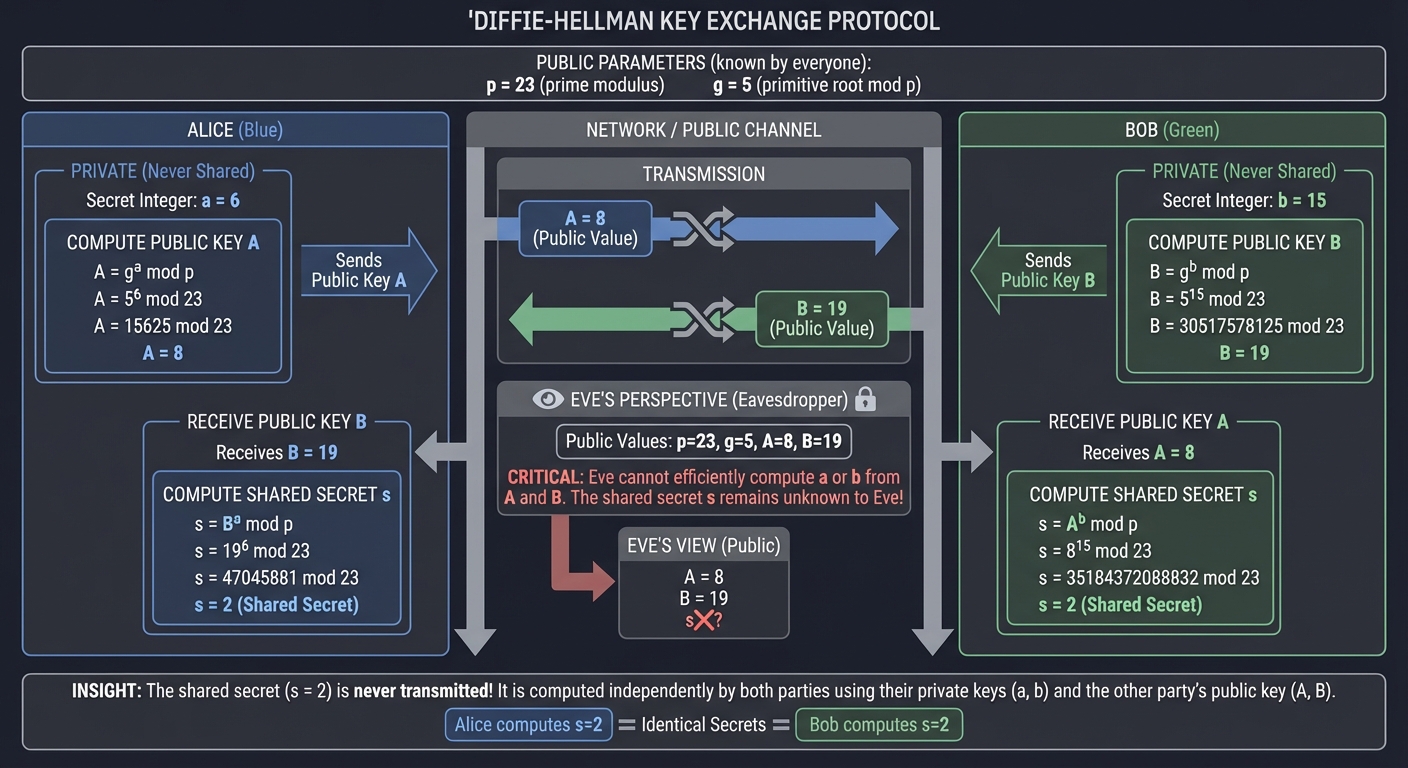
Key insight from this exercise: The shared secret is never transmitted! It’s computed independently by both parties using their private keys and the other’s public key.
The Interview Questions They’ll Ask
Once you complete this project, you should be able to confidently answer these real interview questions:
Networking Questions
- “Explain the difference between
connect()on the client andaccept()on the server. What exactly does each function do?”- Focus on: connection establishment, three-way handshake, blocking behavior, file descriptor creation
- “You call
send()with 1024 bytes, but it returns 512. What happened, and what should you do?”- Answer: Partial send due to TCP buffer limits. Must track sent bytes and loop with offset.
- “Your server needs to handle multiple clients. Explain three different approaches and their tradeoffs.”
fork()per client (simple, resource-heavy), threads (shared memory issues),select()/poll()/epoll()(complex, scalable)
Cryptography Questions
- “Why can’t you use the same Initialization Vector (IV) twice with the same AES key?”
- Answer: In CBC mode, identical plaintext blocks with same IV produce identical ciphertext, leaking information. Attacker can XOR ciphertexts to learn XOR of plaintexts.
- “Explain how Diffie-Hellman key exchange works. Why can’t an eavesdropper who sees all public values compute the shared secret?”
- Answer: Based on discrete logarithm problem. Given g^a mod p, computing a is hard. Attacker sees A and B but needs a or b to compute secret.
- “What is the difference between static and ephemeral Diffie-Hellman? Which does SSH use and why?”
- Answer: Static DH reuses keys (no forward secrecy). Ephemeral (DHE) generates new keys per session (forward secrecy). SSH uses ephemeral to ensure past sessions stay secure even if current key compromised.
Security Questions
- “Your DH implementation is vulnerable to man-in-the-middle attacks. Explain the attack and how SSH prevents it.”
- Answer: Attacker intercepts DH exchange, performs separate exchanges with both parties. SSH prevents with host key signatures—server signs DH exchange with private host key, client verifies with known public host key.
- “Why is it dangerous to use
memset()to clear sensitive key material in C?”- Answer: Compiler may optimize away memset as “dead store” if buffer isn’t read again. Use
explicit_bzero(),memset_s(), or volatile pointer.
- Answer: Compiler may optimize away memset as “dead store” if buffer isn’t read again. Use
Protocol Design Questions
- “How would you design a message format for encrypted messages that includes length, IV, and ciphertext?”
- Answer: Fixed header with version + length (4 bytes, network order), followed by IV (16 bytes), followed by ciphertext (variable). Discuss why TLV encoding is robust.
- “Your protocol needs to prevent replay attacks. How would you design this?”
- Answer: Include monotonically increasing sequence number in each message (authenticated with MAC). Receiver rejects messages with old/duplicate sequence numbers.
Implementation Questions
- “You’re implementing AES-CBC. Walk me through encrypting a message that’s not a multiple of 16 bytes.”
- Answer: Apply PKCS#7 padding (append bytes, each byte’s value = number of padding bytes). Generate random IV. Encrypt. Prepend IV to ciphertext.
- “Explain the steps your server takes from startup to successfully receiving an encrypted message from a client.”
- Answer: socket() → bind() → listen() → accept() → DH exchange (recv params, send pubkey, recv pubkey, compute secret) → derive AES key → recv encrypted message → decrypt with IV
Hints in Layers
If you get stuck, here are progressive hints from general to specific:
Layer 1: Architecture Hints (Try This First)
- Start with a working echo server/client before adding any encryption
- Build in three phases: (1) plaintext chat, (2) hardcoded AES key, (3) DH key exchange
- Use a message format with a fixed-size header (type + length) followed by variable payload
- Test each component in isolation: AES encrypt/decrypt separate from networking
Layer 2: Networking Hints
- Remember
send()andrecv()may not send/receive the full buffer; always loop until complete - Use
htonl()/ntohl()for length fields to ensure cross-platform compatibility - The server should handle
accept()blocking—this is normal, it waits for clients - For debugging, log every byte sent/received with hexdump-style output:
printf("%02x ", byte)
Layer 3: Cryptography Hints
- Use OpenSSL’s EVP API (EVP_EncryptInit_ex, EVP_EncryptUpdate, EVP_EncryptFinal_ex) rather than low-level AES functions
- Generate random IV with
RAND_bytes(), never hardcode it - For DH, use OpenSSL’s
DH_new(),DH_generate_parameters_ex(),DH_generate_key(), andDH_compute_key() - Don’t implement AES yourself—it’s error-prone and you’ll likely introduce timing vulnerabilities
Layer 4: DH Implementation Hints
- The server should generate (p, g) parameters once at startup, then send them to each client
- Use at least 2048-bit primes for p (DH_generate_parameters_ex with 2048 for key_bits)
- DH exchange flow: Server sends (p, g, server_pubkey) → Client generates keys, sends client_pubkey → Both compute shared secret
- The shared secret is raw bytes; derive an AES key from it using a KDF like HKDF or simple SHA-256 hash
Layer 5: Debugging-Specific Hints
- If messages decrypt to garbage, check: (1) same IV on both sides? (2) same key derived? (3) padding handled correctly?
- Use Wireshark to verify what’s actually on the wire vs. what you think you’re sending
- Add a “protocol handshake” before DH: client sends “HELLO”, server responds “READY”—ensures both are in sync
- Print DH values in hex at each step:
BN_print_fp(stdout, dh_pubkey)to verify math is correct - If
DH_compute_key()returns different values on client/server, you’ve likely swapped who’s using whose public key
Books That Will Help
| Topic | Book | Chapter/Section |
|---|---|---|
| TCP Socket Basics | “TCP/IP Sockets in C, 2nd Edition” by Donahoo & Calvert | Ch. 1-3: Basic client/server, send()/recv() |
| Advanced Socket Programming | “The Linux Programming Interface” by Kerrisk | Ch. 56-61: Sockets, client/server design, I/O multiplexing |
| Socket API Deep Dive | “UNIX Network Programming, Vol. 1” by Stevens | Ch. 4: Elementary TCP sockets, Ch. 6: I/O multiplexing |
| AES and Symmetric Crypto | “Serious Cryptography” by Aumasson | Ch. 4: Block Ciphers, Ch. 5: Block Cipher Modes (CBC, CTR) |
| Practical Crypto Implementation | “Cryptography Engineering” by Ferguson, Schneier, Kohno | Ch. 4: Block Ciphers, Ch. 6: Hash Functions, Ch. 9: SSL/TLS |
| Diffie-Hellman Math | “Serious Cryptography” by Aumasson | Ch. 11: Public-Key Encryption (DH key exchange) |
| DH Mathematical Foundations | “Understanding Cryptography” by Paar & Pelzl | Ch. 10: Key Establishment, discrete logarithm problem |
| Binary Protocol Design | “TCP/IP Illustrated, Volume 1” by Stevens | Ch. 1: Byte order, Ch. 18: TCP connection establishment |
| OpenSSL API Usage | “Network Security with OpenSSL” by Viega, Messier, Chandra | Ch. 3: Symmetric encryption, Ch. 6: Diffie-Hellman |
| Secure C Programming | “The Art of Software Security Assessment” by Dowd, McDonald, Schuh | Ch. 6: C Language Issues, Ch. 8: Strings and Metacharacters |
| Memory Safety for Crypto | “Secure Programming Cookbook for C and C++” by Viega & Messier | Ch. 13: Sensitive data handling, clearing memory |
| SSH Protocol Reference | “SSH, The Secure Shell: The Definitive Guide” by Barrett & Silverman | Ch. 3: SSH protocol internals, key exchange |
Common Pitfalls & Debugging
Here are the most common problems you’ll encounter and how to fix them:
Problem 1: “My client connects, but recv() blocks forever / returns 0 bytes”
- Why: The server might have crashed, the client/server are out of sync on message framing, or you’re not checking return values properly.
- Fix:
- Always check
recv()return value:< 0= error,== 0= connection closed,> 0= bytes received - Log immediately after
recv():printf("recv() returned %d\n", n); - Use Wireshark to verify the server is actually sending data
- Add a timeout to
recv()usingsetsockopt(SO_RCVTIMEO)for debugging
- Always check
- Quick test:
telnet localhost <port>to manually test if the server accepts connections
Problem 2: “AES decryption produces garbage / random bytes”
- Why: Most likely: (1) different keys on client/server, (2) different IVs, (3) wrong padding mode, or (4) corrupted ciphertext
- Fix:
- Print the AES key in hex on both sides—do they match?
- Print the IV in hex—is client using the same IV server generated?
- Verify you’re using the same cipher mode (CBC, GCM, etc.)
- Check that ciphertext wasn’t truncated in transit (send length first!)
- Ensure you’re calling
EVP_DecryptFinal_ex()which handles padding
- Quick test: Encrypt “Hello” with hardcoded key/IV on both sides, verify it works before adding DH
Problem 3: “Diffie-Hellman: client and server compute different shared secrets”
- Why: You’ve swapped which public key to use, or one side’s DH parameters are different.
- Fix:
- Print all DH values in hex: p, g, client_private, server_private, client_public, server_public
- Verify:
client_public = g^client_private mod p - Verify:
server_public = g^server_private mod p - Client computes:
shared = server_public^client_private mod p - Server computes:
shared = client_public^server_private mod p - These MUST be equal—if not, you’ve mixed up the variables
- Quick test: Use small values (p=23, g=5) and do the math by hand to verify your code logic
Problem 4: “OpenSSL DH_compute_key() crashes / returns -1”
- Why: DH structure not initialized properly, or you’re passing NULL/invalid pointers.
- Fix:
- Check that
DH_generate_parameters_ex()succeeded (returns 1) - Check that
DH_generate_key()succeeded (returns 1) - Verify the peer’s public key is valid:
0 < pubkey < p - Don’t call
DH_free()until after you’ve used the shared secret!
- Check that
- Quick test: Run with
valgrindto catch memory errors
Problem 5: “send() returns fewer bytes than I asked it to send”
- Why: TCP buffers are full. This is normal and expected with large messages.
- Fix:
ssize_t send_all(int sockfd, const void *buf, size_t len) { size_t total_sent = 0; while (total_sent < len) { ssize_t n = send(sockfd, (char*)buf + total_sent, len - total_sent, 0); if (n < 0) return -1; // Error total_sent += n; } return total_sent; } - Quick test: Send a 10MB message and verify it arrives intact
Problem 6: “Wireshark shows my DH public keys but I can’t read them”
- Why: You’re sending binary data without length-prefixing, so the receiver doesn’t know where one field ends and the next begins.
- Fix:
- Send length as 4-byte big-endian int:
uint32_t len_net = htonl(len); send(..., &len_net, 4); - Receiver reads length:
recv(..., &len_net, 4); uint32_t len = ntohl(len_net); - Then receiver reads exactly
lenbytes of data - Use this pattern for every variable-length field
- Send length as 4-byte big-endian int:
- Quick test: Send “ABC” with length prefix, verify receiver gets exactly 3 bytes
Problem 7: “My program crashes with ‘segmentation fault’ during encryption”
- Why: Buffer overflow, use-after-free, or passing wrong buffer sizes to OpenSSL.
- Fix:
- Ensure ciphertext buffer is big enough:
plaintext_len + block_size - Never trust input lengths—validate them first
- Use
valgrind --leak-check=full ./your_programto find the exact line - Check that you’re not freeing EVP contexts twice
- Ensure ciphertext buffer is big enough:
- Quick test: Run under
valgrindwith a simple 16-byte message
Problem 8: “Client and server both print ‘shared secret computed’ but messages still decrypt to garbage”
- Why: You computed the same shared secret but derived different AES keys from it.
- Fix:
- Both sides must use the exact same key derivation function
- If using SHA-256: both hash the exact same bytes (watch out for endianness!)
- Print the derived AES key in hex on both sides—must match
- Don’t include extra data (like newlines) when hashing
- Quick test: Hardcode a shared secret and verify key derivation works before using DH
Problem 9: “Connection works once, but second client connection hangs”
- Why: Server isn’t properly handling multiple connections—likely blocking on first client.
- Fix:
- Server should
fork()afteraccept()so each client gets its own process - Or use
select()/poll()for single-threaded multiplexing - Parent process should continue
accept()loop immediately - Install SIGCHLD handler to
waitpid()for zombie processes
- Server should
- Quick test: Connect with two clients simultaneously—both should work
Problem 10: “Everything works on localhost but fails on different machines”
- Why: Firewall blocking, wrong network interface, or endianness issues.
- Fix:
- Verify firewall allows port:
sudo ufw allow 8888/tcp(Linux) - Server should
bind()toINADDR_ANY(0.0.0.0) notlocalhost - Double-check all
htonl()/ntohl()calls for integers sent over network - Test with
nc -zv <server_ip> <port>to verify port is open
- Verify firewall allows port:
- Quick test:
telnet <server_ip> <port>from client machine to verify connectivity
Project 2: SSH Protocol Dissector
- File: SSH_DEEP_DIVE_LEARNING_PROJECTS.md
- Programming Language: C
- Coolness Level: Level 3: Genuinely Clever
- Business Potential: 3. The “Service & Support” Model
- Difficulty: Level 3: Advanced
- Knowledge Area: Network Protocols / Packet Analysis
- Software or Tool: libpcap / Wireshark
- Main Book: “Practical Packet Analysis” by Chris Sanders
What you’ll build: A tool that captures and decodes SSH protocol packets in real-time, showing you the handshake, key exchange, authentication, and channel operations as they happen.
Why it teaches SSH: By parsing real SSH traffic, you’ll internalize the actual protocol structure. You’ll see the version exchange, algorithm negotiation, key exchange messages, and encrypted payload boundaries. This is “learning by observation.”
Core challenges you’ll face:
- Capturing network packets (libpcap) (maps to understanding network layers)
- Parsing SSH binary packet format (maps to protocol internals)
- Decoding SSH message types and their fields (maps to RFC 4253 understanding)
- Displaying human-readable output of the handshake sequence
Resources for key challenges:
- RFC 4253 (SSH Transport Layer Protocol) - The authoritative specification
- “Practical Packet Analysis” by Chris Sanders - How to think about packet capture
Key Concepts:
- Packet Capture: “The Practice of Network Security Monitoring” by Bejtlich - Ch. 6
- SSH Protocol Structure: RFC 4253 - Sections 4-8
- Binary Parsing in C: “Fluent C” by Preschern - Ch. 8 (Data Structures)
- Network Byte Order: “TCP/IP Illustrated, Volume 1” by Stevens - Ch. 1
Difficulty: Intermediate Time estimate: 1-2 weeks Prerequisites: Basic networking knowledge, C programming
Real world outcome:
- Run your dissector while SSH’ing to a server
- See output like:
[HANDSHAKE] Client Version: SSH-2.0-OpenSSH_9.0
[HANDSHAKE] Server Version: SSH-2.0-OpenSSH_8.9
[KEX_INIT] Client algorithms: curve25519-sha256,aes256-gcm...
[KEX_INIT] Server algorithms: curve25519-sha256,aes256-ctr...
[ECDH_INIT] Client public key: 0x3a8f2b...
[ECDH_REPLY] Server public key: 0x7c4e1d...
[NEWKEYS] Encryption activated
[ENCRYPTED] 156 bytes (cannot decode without keys)
Learning milestones:
- Capture SSH packets → You understand where SSH sits in the network stack
- Parse unencrypted handshake → You understand SSH negotiation
- Identify encrypted boundaries → You understand when/why encryption starts
Real World Outcome
When you run your SSH Protocol Dissector, you’ll see the complete anatomy of an SSH connection. Here’s what a real capture session looks like with detailed explanations:
$ sudo ./ssh_dissector eth0
Listening on eth0... Press Ctrl+C to stop

[PACKET #1 - TCP HANDSHAKE]
Source: 192.168.1.100:52341 → Destination: 192.168.1.50:22
TCP Flags: SYN
Seq: 1234567890

[PACKET #2 - TCP HANDSHAKE]
Source: 192.168.1.50:22 → Destination: 192.168.1.100:52341
TCP Flags: SYN, ACK
Seq: 9876543210, Ack: 1234567891

[PACKET #3 - TCP HANDSHAKE]
Source: 192.168.1.100:52341 → Destination: 192.168.1.50:22
TCP Flags: ACK
Ack: 9876543211

[PACKET #4 - SSH VERSION EXCHANGE]
Source: 192.168.1.50:22 → Destination: 192.168.1.100:52341
SSH Version String: "SSH-2.0-OpenSSH_9.3p1 Ubuntu-1ubuntu3\r\n"
  Protocol Version: 2.0
  Software: OpenSSH_9.3p1
  Comments: Ubuntu-1ubuntu3
  Length: 40 bytes

[PACKET #5 - SSH VERSION EXCHANGE]
Source: 192.168.1.100:52341 → Destination: 192.168.1.50:22
SSH Version String: "SSH-2.0-OpenSSH_8.9\r\n"
  Protocol Version: 2.0
  Software: OpenSSH_8.9
  Length: 21 bytes

[PACKET #6 - SSH_MSG_KEXINIT (Client)]
Source: 192.168.1.100:52341 → Destination: 192.168.1.50:22
Message Type: SSH_MSG_KEXINIT (20)
Packet Length: 1068 bytes
Padding Length: 6 bytes
Cookie: 16 random bytes: [0x3a, 0x8f, 0x2b, 0x9c, ...]
Key Exchange Algorithms:
  - curve25519-sha256
  - curve25519-sha256@libssh.org
  - ecdh-sha2-nistp256
  - ecdh-sha2-nistp384
  - diffie-hellman-group14-sha256
Encryption Algorithms (client-to-server):
  - aes256-gcm@openssh.com
  - chacha20-poly1305@openssh.com
  - aes256-ctr
  - aes192-ctr
  - aes128-ctr
Encryption Algorithms (server-to-client):
  - aes256-gcm@openssh.com
  - chacha20-poly1305@openssh.com
  - aes256-ctr
MAC Algorithms (client-to-server):
  - umac-128-etm@openssh.com
  - hmac-sha2-256-etm@openssh.com
  - hmac-sha2-512-etm@openssh.com
MAC Algorithms (server-to-client):
  - umac-128-etm@openssh.com
  - hmac-sha2-256-etm@openssh.com
Compression Algorithms:
  - none
  - zlib@openssh.com

[PACKET #7 - SSH_MSG_KEXINIT (Server)]
Source: 192.168.1.50:22 → Destination: 192.168.1.100:52341
Message Type: SSH_MSG_KEXINIT (20)
[Similar structure to client, showing server's preferred algorithms]

[PACKET #8 - SSH_MSG_KEXECDH_INIT]
Source: 192.168.1.100:52341 → Destination: 192.168.1.50:22
Message Type: SSH_MSG_KEXECDH_INIT (30)
Client Ephemeral Public Key (Curve25519):
  Length: 32 bytes
  Value: 0x3a8f2b9c4d5e6f7a8b9c0d1e2f3a4b5c6d7e8f9a0b1c2d3e4f5a6b7c8d9e0f1a

[PACKET #9 - SSH_MSG_KEXECDH_REPLY]
Source: 192.168.1.50:22 → Destination: 192.168.1.100:52341
Message Type: SSH_MSG_KEXECDH_REPLY (31)
Server Host Key (ssh-ed25519):
  Algorithm: ssh-ed25519
  Key Length: 51 bytes
  Public Key: 0x7c4e1d2a3b4c5d6e7f8a9b0c1d2e3f4a5b6c7d8e9f0a1b2c3d4e5f6a7b8c9d0e
Server Ephemeral Public Key (Curve25519):
  Length: 32 bytes
  Value: 0x7c4e1d2a3b4c5d6e7f8a9b0c1d2e3f4a5b6c7d8e9f0a1b2c3d4e5f6a7b8c9d0e
Exchange Hash Signature:
  Algorithm: ssh-ed25519
  Signature Length: 83 bytes

[PACKET #10 - SSH_MSG_NEWKEYS (Client)]
Source: 192.168.1.100:52341 → Destination: 192.168.1.50:22
Message Type: SSH_MSG_NEWKEYS (21)
Packet Length: 12 bytes
--- Key Exchange Complete: Encryption Activated ---

[PACKET #11 - SSH_MSG_NEWKEYS (Server)]
Source: 192.168.1.50:22 → Destination: 192.168.1.100:52341
Message Type: SSH_MSG_NEWKEYS (21)
--- All subsequent packets will be encrypted ---

[PACKET #12 - ENCRYPTED DATA]
Source: 192.168.1.100:52341 → Destination: 192.168.1.50:22
Encrypted Packet Length: 156 bytes
MAC: hmac-sha2-256 (32 bytes)
⚠️  Cannot decode payload (requires session keys)
Likely contains: SSH_MSG_SERVICE_REQUEST (authentication request)

[PACKET #13 - ENCRYPTED DATA]
Source: 192.168.1.50:22 → Destination: 192.168.1.100:52341
Encrypted Packet Length: 92 bytes
MAC: hmac-sha2-256 (32 bytes)
⚠️  Cannot decode payload
Likely contains: SSH_MSG_SERVICE_ACCEPT (authentication accepted)
Field Explanations:
- Packet Length: First 4 bytes of each SSH packet (after version exchange), indicates total packet size excluding MAC
- Padding Length: 1 byte indicating how many padding bytes are at the end (SSH requires 4-255 bytes of padding)
- Message Type: 1 byte identifier (20 = KEXINIT, 30 = KEXECDH_INIT, 31 = KEXECDH_REPLY, 21 = NEWKEYS)
- Cookie: 16 random bytes in KEXINIT to prevent replay attacks and add randomness
- Algorithm Lists: Null-terminated, comma-separated lists of supported algorithms in preference order
- MAC (Message Authentication Code): Appended after encryption, computed over sequence number + unencrypted packet
Comparison with Wireshark:
Your dissector should show similar information to Wireshark’s built-in SSH dissector:
Wireshark Display:
├── Ethernet II
│   ├── Destination: aa:bb:cc:dd:ee:ff
│   ├── Source: 11:22:33:44:55:66
│   └── Type: IPv4 (0x0800)
├── Internet Protocol Version 4
│   ├── Source: 192.168.1.100
│   └── Destination: 192.168.1.50
├── Transmission Control Protocol
│   ├── Source Port: 52341
│   ├── Destination Port: 22
│   └── Flags: 0x018 (PSH, ACK)
└── SSH Protocol
    ├── Packet Length: 1068
    ├── Padding Length: 6
    ├── Message Code: Key Exchange Init (20)
    ├── Cookie: 3a8f2b9c4d5e6f7a8b9c0d1e2f3a4b5c
    ├── kex_algorithms: curve25519-sha256,curve25519-sha256@libssh.org,...
    ├── server_host_key_algorithms: ssh-ed25519,ecdsa-sha2-nistp256,...
    ├── encryption_algorithms_client_to_server: aes256-gcm@openssh.com,...
    └── [... more fields ...]
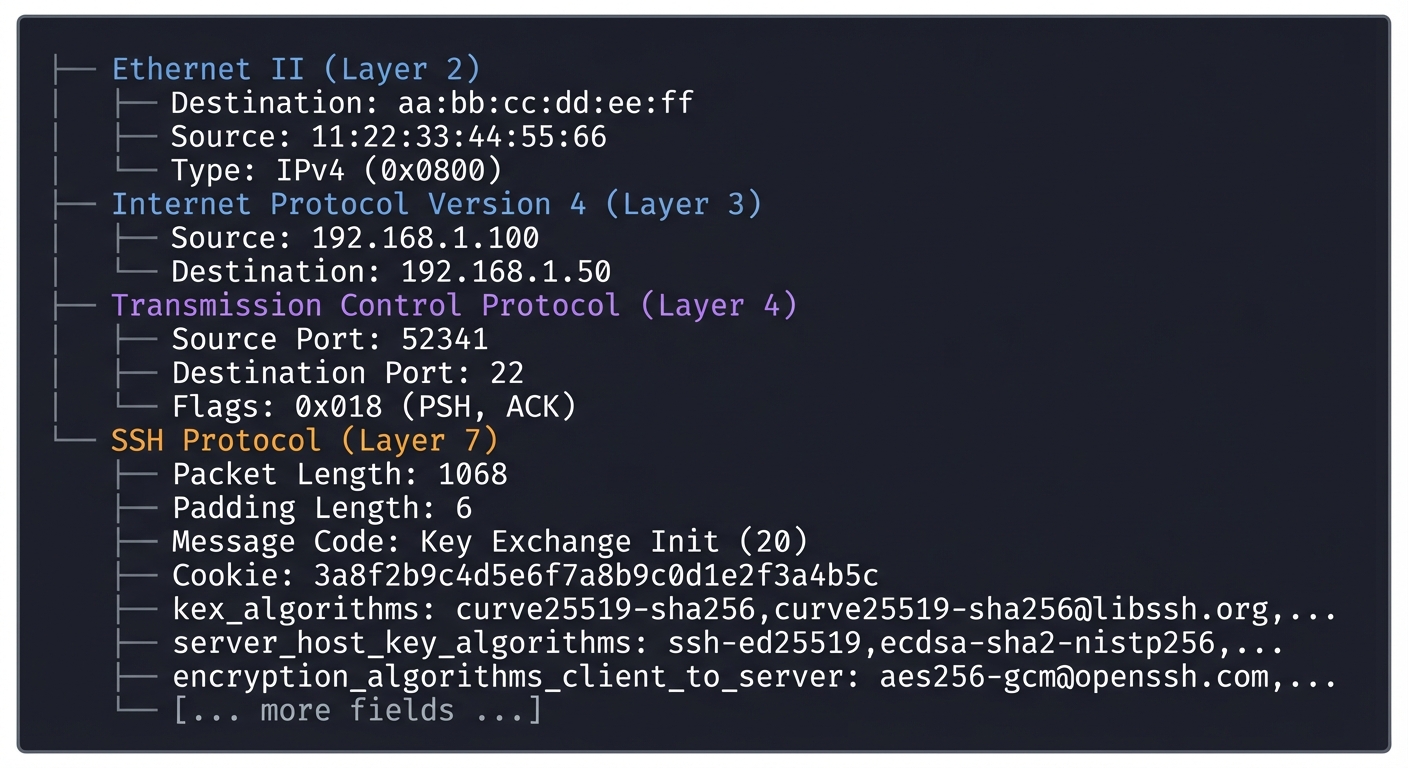
Capturing a Real SSH Session:
- Terminal 1 (run your dissector):
sudo ./ssh_dissector -i eth0 -f "tcp port 22" - Terminal 2 (initiate SSH connection):
ssh user@192.168.1.50 - What you’ll observe:
- First 3 packets: TCP three-way handshake (SYN, SYN-ACK, ACK)
- Packets 4-5: Version exchange (plaintext, human-readable)
- Packets 6-7: KEXINIT messages (plaintext, shows algorithm lists)
- Packets 8-9: Key exchange messages (ECDH_INIT, ECDH_REPLY with public keys)
- Packets 10-11: NEWKEYS messages (signals encryption activation)
- Packet 12+: All encrypted (you can only see packet boundaries and MACs)
- Compare with tcpdump:
sudo tcpdump -i eth0 'tcp port 22' -w ssh_capture.pcap
# Then open in Wireshark to see the same dissection
The Core Question You’re Answering
“What actually happens on the wire when I type ‘ssh user@server’?”
Most developers use SSH daily but have no idea what’s happening beneath the surface. When you type that command:
- What bytes are exchanged first?
- How do the client and server agree on encryption algorithms?
- At what exact point does encryption start?
- What does an encrypted SSH packet look like vs. plaintext?
- Why can’t someone sniffing the network read my password?
This project answers these questions through direct observation. You’ll see the protocol state machine transition from plaintext negotiation to encrypted communication. You’ll understand why SSH is secure—not through theory, but by watching the actual cryptographic handshake happen in real-time.
Concepts You Must Understand First
Before building this dissector, you need solid understanding of these foundational concepts:
1. Network Layers and Encapsulation
Questions you should be able to answer:
- How does a packet travel from Layer 2 (Ethernet) through Layer 4 (TCP)?
- What is the structure of an Ethernet frame? An IP packet? A TCP segment?
- How do you extract the payload from a TCP segment?
- What is the difference between network byte order (big-endian) and host byte order?
Book references:
- “TCP/IP Illustrated, Volume 1” by Stevens - Chapter 1 (Introduction), Chapter 2 (Link Layer), Chapter 3 (IP), Chapter 4 (TCP)
- “Computer Networking: A Top-Down Approach” by Kurose & Ross - Chapter 4 (Network Layer), Chapter 5 (Link Layer)
2. Binary Protocol Parsing in C
Questions you should be able to answer:
- How do you read multi-byte integers from a byte stream in C?
- What is
ntohl()andntohs()and why are they necessary? - How do you safely parse variable-length fields without buffer overflows?
- How do you handle struct padding and alignment when parsing network packets?
Book references:
- “C Programming: A Modern Approach” by K.N. King - Chapter 20 (Low-Level Programming)
- “Fluent C” by Christopher Preschern - Chapter 8 (Data Structures and Serialization)
- “The C Programming Language” by Kernighan & Ritchie - Chapter 6.9 (Bit-fields)
3. Packet Capture with libpcap
Questions you should be able to answer:
- What is promiscuous mode and why is it needed for packet capture?
- How does libpcap filter packets using BPF (Berkeley Packet Filter)?
- What is the difference between
pcap_loop()andpcap_next()? - How do you extract Ethernet, IP, and TCP headers from a captured packet?
Book references:
- “Practical Packet Analysis, 3rd Edition” by Chris Sanders - Chapter 2 (Packet Capture), Chapter 3 (Introduction to tcpdump)
- Official libpcap documentation at tcpdump.org - “Programming with pcap” by Tim Carstens
- “The Practice of Network Security Monitoring” by Richard Bejtlich - Chapter 6 (Packet Analysis)
4. SSH Protocol Structure (RFC 4253)
Questions you should be able to answer:
- What is the format of the SSH version exchange string?
- What is the binary packet structure (packet_length, padding_length, payload, padding, MAC)?
- What are the SSH message type numbers (20 = KEXINIT, 21 = NEWKEYS, etc.)?
- How are name-lists (algorithm lists) formatted in SSH packets?
- At what point in the SSH handshake does encryption begin?
Book references:
- RFC 4253 “The Secure Shell (SSH) Transport Layer Protocol” - Sections 4 (Protocol Version Exchange), 5 (Binary Packet Protocol), 6 (Compression), 7 (Key Exchange)
- “SSH, The Secure Shell: The Definitive Guide” by Barrett & Silverman - Chapter 3 (Inside SSH)
- “Practical Packet Analysis” by Sanders - Chapter 10 (Analyzing Common Protocols)
5. State Machines and Protocol Parsing
Questions you should be able to answer:
- How do you track the state of an SSH connection (version exchange → key exchange → encrypted)?
- How do you handle out-of-order TCP packets?
- How do you reassemble TCP streams from individual packets?
- What happens if a packet is fragmented across multiple captures?
Book references:
- “TCP/IP Illustrated, Volume 1” by Stevens - Chapter 17 (TCP Connection Management)
- “Network Algorithmics” by Varghese - Chapter 12 (State Machine Algorithms)
6. Cryptographic Concepts (for understanding what you’re observing)
Questions you should be able to answer:
- What is Diffie-Hellman key exchange and why does SSH use it?
- What is the difference between symmetric and asymmetric encryption?
- What is a MAC (Message Authentication Code) and why is it needed?
- What does “perfect forward secrecy” mean in the context of SSH?
Book references:
- “Serious Cryptography” by Jean-Philippe Aumasson - Chapter 11 (Key Exchange)
- “Understanding Cryptography” by Paar & Pelzl - Chapter 10 (Key Establishment)
Questions to Guide Your Design
As you build your SSH Protocol Dissector, these questions will guide your implementation decisions:
- How do you identify SSH traffic among all captured packets?
- Do you filter by destination port 22?
- What if SSH is running on a non-standard port?
- How do you detect the SSH version string to confirm it’s actually SSH?
- How do you parse the binary SSH packet structure?
- The packet_length field is 4 bytes: do you read it as a uint32_t?
- How do you handle network byte order (big-endian) vs. host byte order?
- How do you validate that packet_length is reasonable (not corrupted)?
- Where does padding_length live in the packet, and how do you use it to find the actual payload?
- How do you decode variable-length name-lists (algorithm lists)?
- SSH algorithm lists are comma-separated strings with a 4-byte length prefix
- How do you safely read the length without buffer overflow?
- How do you tokenize the comma-separated values?
- What do you do if the name-list is empty?
- How do you track connection state across multiple packets?
- Do you maintain a hash table mapping TCP flows to SSH connection states?
- How do you identify that packets belong to the same SSH session?
- What information do you need to track: (src_ip, src_port, dst_ip, dst_port, state)?
- How do you handle the transition from plaintext to encrypted?
- At what exact point do you stop parsing packet contents?
- How do you detect SSH_MSG_NEWKEYS (message type 21)?
- After NEWKEYS, can you still parse packet_length and MAC?
- How do you display the captured information to the user?
- Real-time output as packets arrive, or batch processing?
- How much detail: just message types, or full algorithm lists?
- Do you use colors/formatting to make output readable?
- Should you log to a file for later analysis?
- How do you handle edge cases and errors?
- What if a packet is fragmented or truncated?
- What if TCP packets arrive out of order?
- What if the capture starts mid-connection (not from the beginning)?
- How do you handle malformed or corrupted SSH packets?
Thinking Exercise
Exercise: Manually Trace an SSH Handshake
Before writing any code, perform this exercise to deeply understand the protocol:
Step 1: Capture a real SSH session
# Terminal 1
sudo tcpdump -i any 'tcp port 22' -w ssh_session.pcap

# Terminal 2
ssh user@localhost  # Or any SSH server
# Enter password, run a command, exit
Step 2: Extract the raw packet bytes
tcpdump -r ssh_session.pcap -X | less
Step 3: Manually parse the first 10 packets by hand
For each packet, answer these questions in a notebook:
- Packet #1-3 (TCP Handshake):
- What are the TCP flags? (SYN? SYN-ACK? ACK?)
- What are the sequence and acknowledgment numbers?
- Draw the three-way handshake diagram
- Packet #4 (Server Version String):
- Find the ASCII text “SSH-2.0-…”
- Write down the full version string
- How many bytes is it? (Count them!)
- Does it end with \r\n?
- Packet #5 (Client Version String):
- Same analysis as packet #4
- Compare client vs. server versions
- Packet #6 (Client KEXINIT):
- Locate the first 4 bytes: this is packet_length (convert from hex to decimal)
- Next 1 byte: padding_length
- Next 1 byte: message type (should be 0x14 = 20 = KEXINIT)
- Next 16 bytes: cookie (random data)
- Find the key exchange algorithm list:
- First 4 bytes: length of the name-list
- Following bytes: the comma-separated algorithm names
- Write down at least the first 3 algorithms
- Packet #7 (Server KEXINIT):
- Same analysis as packet #6
- Compare: are the algorithm lists identical or different?
- Which algorithms will be chosen? (First match in each category)
- Packets #8-9 (ECDH_INIT and ECDH_REPLY):
- Identify message types (0x1E = 30 and 0x1F = 31)
- Locate public key fields (they’re large random-looking byte sequences)
- Note: you can’t do the math by hand, but observe the structure
- Packets #10-11 (NEWKEYS):
- These should be very small packets
- Message type: 0x15 = 21
- This is the “switch to encryption” signal
- Packet #12+ (Encrypted Data):
- Try to identify where the MAC is (last 32 or 64 bytes usually)
- Notice: you can’t read the payload anymore!
- Compare the packet_length field: still readable? (Yes, it’s outside encryption)
Step 4: Create a flowchart
Draw a state machine diagram showing:
- State 1: TCP_CONNECT
- State 2: VERSION_EXCHANGE
- State 3: KEY_EXCHANGE
- State 4: ENCRYPTED
- Transitions between states
- What triggers each transition?
Step 5: Answer these reflection questions:
- Why is version exchange done in plaintext?
- Why can an attacker see the algorithm lists but still can’t break the encryption?
- After NEWKEYS, why is packet_length still visible but the payload isn’t?
- What would happen if you tried to capture an SSH session that uses the “-N” flag (no shell, just tunneling)?
This exercise will make implementation 10x easier because you’ll have internalized the protocol structure.
The Interview Questions They’ll Ask
If you list “Built SSH Protocol Dissector in C” on your resume, expect these questions:
Technical Deep-Dive Questions:
- “Walk me through what happens when an SSH client connects to a server. What packets are exchanged?”
- Expected answer: TCP handshake → version exchange → KEXINIT (client) → KEXINIT (server) → ECDH_INIT → ECDH_REPLY → NEWKEYS (both sides) → encrypted data
- They want to see if you understand the state machine
- “How does SSH packet structure differ from HTTP or other plaintext protocols?”
- Expected answer: SSH has binary framing with packet_length, padding_length, payload, random padding, and MAC. HTTP is text-based with headers and body. SSH encryption starts mid-connection.
- “Why does SSH include random padding in every packet?”
- Expected answer: To obscure payload length (traffic analysis resistance) and to meet block cipher alignment requirements
- “You’re capturing packets with libpcap. How do you filter for only SSH traffic?”
- Expected answer: BPF filter “tcp port 22”, but also need to handle non-standard ports, so might detect by version string pattern
- “What’s the difference between
ntohl()andhtonl(), and why do you need them in network programming?”- Expected answer: Network byte order is big-endian; host byte order varies. ntohl = network-to-host-long (reading), htonl = host-to-network-long (writing). Without them, multi-byte integers get corrupted.
- “After SSH_MSG_NEWKEYS, can you still parse the packet structure? What can and can’t you see?”
- Expected answer: Can still see packet_length (outside encryption) and MAC (appended after). Cannot see payload, padding_length, or message type (all encrypted).
- “How would you handle TCP retransmissions and out-of-order packets in your dissector?”
- Expected answer: Track TCP sequence numbers, buffer out-of-order packets, use a reassembly mechanism (like Wireshark’s TCP stream reassembly)
- “What’s the security implication of the key exchange happening before authentication?”
- Expected answer: The channel is encrypted before the user sends their password, so passwords aren’t sent in plaintext. But the client must verify the server’s host key to prevent MITM.
Behavioral/Design Questions:
- “You notice your dissector crashes on certain SSH servers but not others. How do you debug this?”
- Expected answer: Capture the failing traffic to a pcap file, compare packet structures, check for edge cases (unusual padding, unexpected message types), validate length fields, look for buffer overflows
- “How would you extend your dissector to decrypt SSH traffic if you had access to the session keys?”
- Expected answer: Would need to extract keys from memory/keylogs, implement the key derivation function (6 keys derived from shared secret), decrypt packets using negotiated cipher (AES-CTR, ChaCha20, etc.), verify MACs
- “What’s the hardest bug you encountered while building this, and how did you fix it?”
- They want to hear about your debugging process and persistence
- “If you had to add support for SSH protocol version 1 (deprecated), what would change?”
- Expected answer: Different packet format, different key exchange (no DH, uses RSA), no algorithm negotiation. But good answer is “I wouldn’t support it—SSH-1 is broken and banned by most security policies.”
Hints in Layers
When you get stuck, work through these progressive hints:
Layer 1: Getting Started with libpcap
If you’re struggling to capture any packets:
// Basic packet capture skeleton
#include <pcap.h>
#include <stdio.h>

void packet_handler(u_char *user_data, const struct pcap_pkthdr *pkthdr, const u_char *packet) {
    printf("Captured packet, length: %d bytes\n", pkthdr->len);
}

int main() {
    char errbuf[PCAP_ERRBUF_SIZE];
    pcap_t *handle;

    // Find default device or use "any" for all interfaces
    char *dev = pcap_lookupdev(errbuf);

    // Open device: pcap_open_live(device, snaplen, promisc, timeout_ms, errbuf)
    handle = pcap_open_live(dev, BUFSIZ, 1, 1000, errbuf);

    // Compile and set BPF filter for SSH
    struct bpf_program filter;
    pcap_compile(handle, &filter, "tcp port 22", 0, PCAP_NETMASK_UNKNOWN);
    pcap_setfilter(handle, &filter);

    // Start capture loop
    pcap_loop(handle, 0, packet_handler, NULL);

    pcap_close(handle);
    return 0;
}
Compile with: gcc ssh_dissector.c -lpcap -o ssh_dissector
Layer 2: Extracting TCP Payload
If you’re capturing packets but can’t find the SSH data:
#include <netinet/ip.h>
#include <netinet/tcp.h>
#include <netinet/if_ether.h>

void packet_handler(u_char *user_data, const struct pcap_pkthdr *pkthdr, const u_char *packet) {
    // Skip Ethernet header (14 bytes)
    struct ip *ip_header = (struct ip *)(packet + sizeof(struct ether_header));

    // Calculate IP header length (IHL field * 4)
    int ip_header_len = ip_header->ip_hl * 4;

    // Get TCP header
    struct tcphdr *tcp_header = (struct tcphdr *)((u_char *)ip_header + ip_header_len);

    // Calculate TCP header length (offset field * 4)
    int tcp_header_len = tcp_header->th_off * 4;

    // Finally, get TCP payload (this is where SSH data lives)
    u_char *payload = (u_char *)tcp_header + tcp_header_len;
    int payload_len = ntohs(ip_header->ip_len) - ip_header_len - tcp_header_len;

    printf("TCP Payload: %d bytes\n", payload_len);
    // Now parse SSH protocol from 'payload'
}
Layer 3: Parsing SSH Version Exchange
If you’re seeing TCP payload but can’t identify SSH:
// SSH version string format: "SSH-protoversion-softwareversion SP comments CR LF"
void parse_ssh_version(const u_char *payload, int len) {
    // Check if it starts with "SSH-"
    if (len < 4 || memcmp(payload, "SSH-", 4) != 0) {
        return; // Not an SSH version string
    }

    // Find the end (CR LF)
    const u_char *end = memchr(payload, '\r', len);
    if (!end) return;

    // Print the version string (it's ASCII text)
    int version_len = end - payload;
    printf("SSH Version: %.*s\n", version_len, payload);

    // Parse components: SSH-2.0-OpenSSH_8.9 Ubuntu
    // Extract protocol version, software name, comments
}
Layer 4: Parsing Binary SSH Packets (KEXINIT)
If you can see version strings but not binary packets:
#include <arpa/inet.h> // for ntohl, ntohs

void parse_ssh_packet(const u_char *payload, int len) {
    if (len < 6) return; // Minimum packet: 4 (len) + 1 (padding_len) + 1 (msg_type)

    // First 4 bytes: packet_length (network byte order!)
    uint32_t packet_length = ntohl(*(uint32_t *)payload);
    printf("Packet Length: %u\n", packet_length);

    // Next byte: padding_length
    uint8_t padding_length = payload[4];
    printf("Padding Length: %u\n", padding_length);

    // Next byte: message type
    uint8_t msg_type = payload[5];
    printf("Message Type: %u", msg_type);

    // Decode message type
    switch(msg_type) {
        case 20: printf(" (SSH_MSG_KEXINIT)\n"); break;
        case 21: printf(" (SSH_MSG_NEWKEYS)\n"); break;
        case 30: printf(" (SSH_MSG_KEXECDH_INIT)\n"); break;
        case 31: printf(" (SSH_MSG_KEXECDH_REPLY)\n"); break;
        default: printf(" (Unknown)\n"); break;
    }

    // For KEXINIT: next 16 bytes are cookie
    if (msg_type == 20 && len >= 22) {
        printf("Cookie: ");
        for (int i = 6; i < 22; i++) {
            printf("%02x ", payload[i]);
        }
        printf("\n");

        // After cookie: name-lists for algorithms (each prefixed with 4-byte length)
        // Parse key exchange algorithms, encryption algorithms, etc.
    }
}
Layer 5: Parsing Name-Lists (Algorithm Lists)
If you can see message types but not algorithm lists:
// Name-list format: 4-byte length (uint32_t) + comma-separated UTF-8 string
const u_char *parse_name_list(const u_char *data, char *description) {
    uint32_t list_length = ntohl(*(uint32_t *)data);
    data += 4;

    if (list_length > 0) {
        printf("%s: %.*s\n", description, list_length, data);
    } else {
        printf("%s: (none)\n", description);
    }

    return data + list_length; // Return pointer to next field
}

void parse_kexinit(const u_char *payload) {
    const u_char *ptr = payload + 22; // Skip to after cookie

    ptr = parse_name_list(ptr, "Key Exchange Algorithms");
    ptr = parse_name_list(ptr, "Server Host Key Algorithms");
    ptr = parse_name_list(ptr, "Encryption Algorithms (C->S)");
    ptr = parse_name_list(ptr, "Encryption Algorithms (S->C)");
    ptr = parse_name_list(ptr, "MAC Algorithms (C->S)");
    ptr = parse_name_list(ptr, "MAC Algorithms (S->C)");
    ptr = parse_name_list(ptr, "Compression Algorithms (C->S)");
    ptr = parse_name_list(ptr, "Compression Algorithms (S->C)");
    // ... and so on
}
Books That Will Help
| Topic | Book | Specific Chapters/Sections |
|---|---|---|
| Packet Capture Fundamentals | “Practical Packet Analysis, 3rd Edition” by Chris Sanders | Ch. 2 (Packet Capture), Ch. 3 (Introduction to tcpdump and filters), Ch. 10 (Analyzing Common Protocols) |
| libpcap Programming | “Programming with pcap” by Tim Carstens (tcpdump.org) | Complete tutorial (sections 1-6) covering pcap_open_live, packet filtering, and callback functions |
| TCP/IP Protocol Stack | “TCP/IP Illustrated, Volume 1” by W. Richard Stevens | Ch. 1 (Introduction), Ch. 2 (Link Layer), Ch. 3 (IP), Ch. 17 (TCP Connection Management) |
| Binary Protocol Parsing | “Fluent C” by Christopher Preschern | Ch. 8 (Data Structures and Serialization), covers byte ordering, struct packing, and safe parsing |
| SSH Protocol Specification | RFC 4253 - SSH Transport Layer | Section 4 (Version Exchange), Section 5 (Binary Packet Protocol), Section 7 (Key Exchange), Section 8 (Diffie-Hellman Key Exchange) |
| SSH Protocol Overview | “SSH, The Secure Shell: The Definitive Guide” by Barrett & Silverman | Ch. 3 (Inside SSH - protocol details), Ch. 4 (Installation and Configuration) |
| Network Byte Order | “The C Programming Language” by Kernighan & Ritchie | Section 6.9 (Bit-fields), Appendix B (Standard Library - network functions) |
| Network Security Monitoring | “The Practice of Network Security Monitoring” by Richard Bejtlich | Ch. 6 (Packet Analysis), practical approach to analyzing network traffic |
| Wireshark Internals | “Wireshark Network Analysis” by Laura Chappell | Ch. 7 (Packet Analysis), Ch. 22 (Analyzing SSH), understanding how professional tools dissect protocols |
| C Network Programming | “TCP/IP Sockets in C” by Donahoo & Calvert | Ch. 1-2 (Basic socket programming), foundational understanding of network data structures |
| Cryptographic Concepts | “Serious Cryptography” by Jean-Philippe Aumasson | Ch. 11 (Key Exchange - Diffie-Hellman), Ch. 6 (Hash Functions - for MACs) |
Common Pitfalls & Debugging
Here are the most common issues when building a packet dissector:
Problem 1: “libpcap compiles but pcap_open_live() returns NULL”
- Why: Insufficient permissions, invalid interface name, or pcap not properly installed.
- Fix:
- Run with
sudo(packet capture requires root on most systems) - Verify interface exists:
ifconfig -aorip link show - Use
pcap_findalldevs()to list available interfaces programmatically - Check
errbufafterpcap_open_live()for the actual error message
- Run with
- Quick test:
sudo tcpdump -i <interface> -c 1should work if interface is valid
Problem 2: “My dissector captures packets, but I see HTTP/DNS instead of SSH”
- Why: Your filter isn’t working, or you’re capturing on the wrong interface.
- Fix:
- Use BPF filter:
pcap_compile()with filter “tcp port 22” - Verify SSH is actually running:
ss -tlnp | grep :22 - Make sure you’re capturing on the right interface (use “any” to capture all)
- Check that you’re connecting to SSH, not just pinging:
ssh localhostin another terminal
- Use BPF filter:
- Quick test: Run
sudo tcpdump -i any port 22 -c 5while SSH’ing to see if packets appear
Problem 3: “I parse the SSH banner, but everything after is gibberish”
- Why: You’re trying to parse encrypted packets without decrypting them first.
- Fix:
- SSH encrypts everything after KEXINIT—this is expected!
- Your dissector can only parse the cleartext handshake (banner, KEXINIT, KEXDH messages)
- After SSH_MSG_NEWKEYS, all payloads are encrypted—just display length and note “encrypted”
- To decrypt, you’d need the session keys (which requires knowing the private keys—impractical)
- Quick test: Compare with Wireshark’s SSH dissector—it also shows “Encrypted packet” after key exchange
Problem 4: “SSH binary packet parsing: packet length seems wrong / massive / negative”
- Why: Forgot to convert from network byte order (big-endian) to host byte order.
- Fix:
- Always use
ntohl()when reading 4-byte integers from network packets - Always use
ntohs()when reading 2-byte integers - Example:
uint32_t pkt_len = ntohl(*(uint32_t*)packet_data); - Verify the length is sane (0 < len < 65536) before allocating buffers
- Always use
- Quick test: Print packet length in hex both before and after
ntohl()—they should differ on little-endian systems
Problem 5: “Parsing SSH_MSG_KEXINIT: reading algorithm lists crashes”
- Why: Name-lists are length-prefixed strings, and you’re not reading the length first.
- Fix:
- SSH uses “name-list” format: 4-byte length (N), then N bytes of comma-separated names
- Read length with
ntohl(), then read exactly that many bytes - Don’t trust the length—validate it:
if (len > 1024) { /* error */ } - Null-terminate the string before printing or parsing
- Quick test: Manually trace through RFC 4253 example packet in Section 7.1
Problem 6: “pcap_loop() never returns / doesn’t call my callback”
- Why: No packets match your filter, or the interface isn’t receiving traffic.
- Fix:
- Verify packets are flowing:
sudo tcpdump -i <interface>(without filter) - Double-check BPF filter syntax—typos cause silent failures
- Use
pcap_loop()with count = -1 (infinite) or specific count - If testing, generate traffic manually:
ssh localhostin another terminal - For debugging, add
printf()at the start of your callback to verify it’s being called
- Verify packets are flowing:
- Quick test: Use callback that just prints “Packet!” to verify pcap_loop works at all
Problem 7: “I see the SSH version banner ‘SSH-2.0-OpenSSH_9.0’ but can’t parse it”
- Why: SSH version exchange is special—it’s not a binary packet, it’s a text line ending in \r\n.
- Fix:
- The version banner is the first data sent, before any binary protocol
- Read until you see
\r\n(CR+LF), that’s the version string - Format:
SSH-protoversion-softwareversion SP comments - Example:
SSH-2.0-OpenSSH_8.2p1 Ubuntu-4ubuntu0.5 - Only after both sides send version do they switch to binary packet protocol
- Quick test:
telnet localhost 22and you’ll see the banner immediately
Problem 8: “Cannot distinguish between SSH_MSG_KEXINIT (20) and SSH_MSG_NEWKEYS (21)”
- Why: You’re looking at the encrypted packet, not the message type byte.
- Fix:
-
SSH binary packet format: packet_length (4) padding_length (1) message_type (1) payload padding MAC - After reading packet_length and padding_length, the next byte is the message type
- Before encryption starts, you can read this byte directly
- Common message types: 20=KEXINIT, 21=NEWKEYS, 30=KEXDH_INIT, 31=KEXDH_REPLY
-
- Quick test: Print the first byte of payload in every packet—should be 20, 21, 30, 31, etc.
Problem 9: “Wireshark shows ‘SSH Protocol’ but my dissector sees raw TCP”
- Why: You’re capturing on a different interface or the SSH handshake hasn’t started yet.
- Fix:
- Wireshark captures on one interface; make sure your program uses the same
- Use
pcap_findalldevs()and list them—pick the right one - SSH requires a full TCP handshake first (SYN, SYN-ACK, ACK) before SSH data flows
- Your dissector sees TCP packets until SSH version exchange starts
- Check TCP destination port is 22:
((struct tcphdr*)...) ->dest == htons(22)
- Quick test: In callback, print source/dest ports to verify you’re seeing port 22 traffic
Problem 10: “Program crashes on large packets / buffer overflow”
- Why: You’re trusting packet_length field without validation—attacker can send malformed packets.
- Fix:
- Never trust network data! Always validate lengths before allocating
- SSH RFC says max packet size is 35000 bytes—reject anything larger
- Check:
if (pkt_len > 35000 || pkt_len < 12) { /* invalid */ } - Use
calloc()notmalloc()to zero-initialize buffers - Consider using a fixed-size buffer (35000 bytes) to avoid dynamic allocation entirely
- Quick test: Send a crafted packet with length 0xFFFFFFFF and verify your program doesn’t crash
Project 3: Mini SSH Client (Authentication Only)
- File: SSH_DEEP_DIVE_LEARNING_PROJECTS.md
- Programming Language: C
- Coolness Level: Level 5: Pure Magic (Super Cool)
- Business Potential: 4. The “Open Core” Infrastructure
- Difficulty: Level 4: Expert
- Knowledge Area: Network Security / Systems Programming
- Software or Tool: SSH Protocol / libsodium
- Main Book: “SSH, The Secure Shell: The Definitive Guide” by Barrett & Silverman
What you’ll build: A minimal SSH client in C that can connect to a real OpenSSH server, complete the handshake, authenticate with a password, and execute a single command.
Why it teaches SSH: This is the real deal. You’ll implement the actual SSH protocol well enough to talk to production servers. Every bug you hit will teach you something about the protocol. When it finally works, you’ll know SSH.
Core challenges you’ll face:
- Implementing SSH version exchange and algorithm negotiation
- Implementing Curve25519 or DH key exchange
- Deriving encryption keys from shared secret (maps to SSH key derivation)
- Implementing packet encryption/decryption with proper MAC
- Password authentication over encrypted channel
- Sending exec request and receiving output
Resources for key challenges:
- RFC 4253, 4252, 4254 - The SSH RFCs (transport, authentication, connection)
- libsodium documentation - For crypto primitives (don’t roll your own crypto)
- OpenSSH source code - Reference implementation to study
Key Concepts:
- SSH Transport: RFC 4253 - Full document
- SSH Authentication: RFC 4252 - Sections 5-8
- SSH Channels: RFC 4254 - Sections 5-6
- Crypto Libraries: libsodium documentation (doc.libsodium.org)
- Key Derivation: “Serious Cryptography” by Aumasson - Ch. 8
Difficulty: Advanced Time estimate: 1 month+ Prerequisites: Projects 1 & 2, strong C skills, crypto library experience
Real world outcome:
$ ./minissh user@192.168.1.100 "whoami"
Password: ********
Connecting to 192.168.1.100:22...
Key exchange: curve25519-sha256
Encryption: aes256-ctr
Authentication successful!
Output: user
Connection closed.
Learning milestones:
- Version exchange works → You understand SSH connection initiation
- Key exchange succeeds → You understand Diffie-Hellman in practice
- First encrypted packet sent → You understand SSH encryption layer
- Authentication succeeds → You understand SSH auth protocol
- Command output received → You understand SSH channels
Real World Outcome
Your mini SSH client should produce detailed verbose output showing each step of the connection process:
$ ./minissh -v user@192.168.1.100 "whoami"
Password: ********
[DEBUG] Connecting to 192.168.1.100:22...
[DEBUG] TCP connection established
[DEBUG] Sending version: SSH-2.0-MiniSSH_1.0
[DEBUG] Received version: SSH-2.0-OpenSSH_9.0p1 Ubuntu-1ubuntu8.7
[DEBUG] Version exchange complete

[DEBUG] Sending SSH_MSG_KEXINIT
[DEBUG] Client KEX algorithms: curve25519-sha256
[DEBUG] Client host key algorithms: ssh-ed25519
[DEBUG] Client encryption: aes256-ctr,aes128-ctr
[DEBUG] Client MAC: hmac-sha2-256
[DEBUG] Received SSH_MSG_KEXINIT from server
[DEBUG] Negotiated: curve25519-sha256, ssh-ed25519, aes256-ctr, hmac-sha2-256

[DEBUG] Generating ephemeral Curve25519 keypair
[DEBUG] Sending SSH_MSG_KEX_ECDH_INIT with client public key
[DEBUG] Received SSH_MSG_KEX_ECDH_REPLY
[DEBUG] Server host key fingerprint: SHA256:nThbg6kXUpJWGl7E1IGOCspRomTxdCARLviKw6E5SY8
[DEBUG] Computing shared secret via ECDH
[DEBUG] Deriving session keys using SSH KDF (HASH(K || H || "A" || session_id))
  - IV client->server: 16 bytes
  - IV server->client: 16 bytes
  - Encryption key client->server: 32 bytes
  - Encryption key server->client: 32 bytes
  - MAC key client->server: 32 bytes
  - MAC key server->client: 32 bytes
[DEBUG] Sending SSH_MSG_NEWKEYS
[DEBUG] Received SSH_MSG_NEWKEYS
[DEBUG] Encryption activated!

[DEBUG] Sending encrypted SSH_MSG_SERVICE_REQUEST (ssh-userauth)
[DEBUG] Received SSH_MSG_SERVICE_ACCEPT
[DEBUG] Sending SSH_MSG_USERAUTH_REQUEST (method: password)
[DEBUG] Received SSH_MSG_USERAUTH_SUCCESS
[DEBUG] Authentication successful!

[DEBUG] Opening session channel (SSH_MSG_CHANNEL_OPEN)
[DEBUG] Received SSH_MSG_CHANNEL_OPEN_CONFIRMATION
[DEBUG] Channel 0 opened (server channel: 0)
[DEBUG] Sending exec request: "whoami"
[DEBUG] Received channel data: user\n
[DEBUG] Received SSH_MSG_CHANNEL_EOF
[DEBUG] Received SSH_MSG_CHANNEL_CLOSE
[DEBUG] Closing channel 0
[DEBUG] Connection closed gracefully

Output: user
Error scenarios and what they look like:
# Scenario 1: Host key mismatch (potential MITM attack)
$ ./minissh user@192.168.1.100 "whoami"
[ERROR] Host key verification failed!
  Expected fingerprint: SHA256:nThbg6kXUpJWGl7E1IGOCspRomTxdCARLviKw6E5SY8
  Received fingerprint: SHA256:DIFFERENT_KEY_HERE
  This could indicate a man-in-the-middle attack!
  Connection aborted.

# Scenario 2: Key exchange algorithm mismatch
$ ./minissh user@192.168.1.100 "whoami"
[DEBUG] Client KEX algorithms: curve25519-sha256
[DEBUG] Server KEX algorithms: diffie-hellman-group14-sha256
[ERROR] No mutually supported key exchange algorithm
  Client supports: curve25519-sha256
  Server supports: diffie-hellman-group14-sha256
  Connection failed.

# Scenario 3: Authentication failure
$ ./minissh user@192.168.1.100 "whoami"
Password: ********
[DEBUG] Sending SSH_MSG_USERAUTH_REQUEST (method: password)
[DEBUG] Received SSH_MSG_USERAUTH_FAILURE
  Remaining methods: publickey
[ERROR] Password authentication failed
  Server requires: publickey
  Connection closed.

# Scenario 4: Packet MAC verification failure
$ ./minissh user@192.168.1.100 "whoami"
[DEBUG] Encryption activated!
[DEBUG] Receiving encrypted packet...
[ERROR] MAC verification failed!
  Expected MAC: 3a8f2b4c...
  Computed MAC: 7c4e1d9a...
  Packet may have been tampered with. Aborting.
Comparison with real OpenSSH client output (using ssh -vvv):
Your output should mirror the structure of OpenSSH’s verbose mode, showing the same protocol stages in the same order. Both should show: version exchange → algorithm negotiation → key exchange → new keys → service request → authentication → channel opening → command execution.
The Core Question You’re Answering
“How can I establish a cryptographically secure, authenticated connection to a remote server and execute commands over that secure channel?”
This project answers the fundamental question that SSH solves: how do two parties who have never met establish a trusted, encrypted communication channel over an untrusted network (the internet), authenticate each other’s identity, and then securely exchange commands and data?
By building this yourself, you’ll understand:
- Why we need key exchange before encryption (the bootstrap problem)
- How we prevent man-in-the-middle attacks (host key verification)
- How symmetric and asymmetric crypto work together in practice
- Why SSH uses both encryption AND message authentication codes
- How multiplexing channels over a single TCP connection works
Concepts You Must Understand First
Before attempting this project, you must deeply understand these foundational concepts:
- SSH Protocol Layering (RFC 4251)
- Transport Layer: TCP connection, version exchange, algorithm negotiation
- Authentication Layer: User authentication after encryption is established
- Connection Layer: Multiplexed channels over the authenticated connection
- Book reference: “SSH, The Secure Shell: The Definitive Guide” by Barrett & Silverman - Chapter 3
- Key Exchange Algorithms (RFC 8731, RFC 4253 Section 8)
- Curve25519: Modern elliptic curve Diffie-Hellman (ECDH)
- Why DH works: Public exchange → Private computation → Shared secret
- Forward secrecy: Ephemeral keys protect past sessions
- Algorithm negotiation: Client/server preference lists
- Book reference: “Serious Cryptography” by Aumasson - Chapter 11 (Key Exchange)
- SSH Key Derivation Functions (RFC 4253 Section 7.2)
- Single shared secret → Six different keys (2 IVs, 2 encryption, 2 MAC)
-
KDF formula: HASH(K H X session_id) where X = “A” through “F” - Why separate keys for each direction (client→server, server→client)
- Session ID: Hash of the key exchange (H) from the first exchange
- Book reference: “Serious Cryptography” by Aumasson - Chapter 8 (Key Management)
- Packet Encryption and MAC (RFC 4253 Section 6)
-
Packet structure: packet_length padding_length payload padding MAC - Encrypt-then-MAC vs MAC-then-encrypt (SSH uses Encrypt-and-MAC)
- MAC algorithms: HMAC-SHA2-256, HMAC-SHA2-512
- Why MAC is separate from encryption (integrity vs confidentiality)
- Block cipher modes: CTR mode for stream-like encryption
- Book reference: “Serious Cryptography” by Aumasson - Chapters 4-5 (Symmetric Encryption and MACs)
-
- SSH Authentication Flow (RFC 4252)
- Service request (ssh-userauth) must precede authentication
- Password authentication: Encrypted with session keys (already established)
- Public key authentication: Sign challenge with private key
- Authentication method negotiation and fallback
- Book reference: “SSH, The Secure Shell: The Definitive Guide” by Barrett & Silverman - Chapter 2
- Binary Protocol Parsing and Network Byte Order
- SSH uses big-endian (network byte order) for all integers
- String encoding: length prefix (uint32) followed by bytes
- mpint (multiple precision integer) encoding for large numbers
- Padding requirements: Block size alignment, random padding
- Book reference: “TCP/IP Illustrated, Volume 1” by Stevens - Chapter 1
- SSH State Machine and Error Handling
- Connection states: VERSION_EXCHANGE → KEX → NEWKEYS → AUTH → CHANNEL
- Disconnection codes (SSH_DISCONNECT_*)
- When to abort vs when to retry
- Strict KEX mode (RFC 9142): Sequence number validation to prevent attacks
- Book reference: “Network Programming with Go” by Jan Newmarch - Chapter 12 (Security)
Questions to Guide Your Design
Before writing code, answer these design questions to guide your implementation:
- How will you structure your packet send/receive functions?
- Should encryption be transparent to higher layers?
- How do you handle the transition from unencrypted to encrypted state?
- Where do you store the session keys and cipher state?
- What data structures represent the connection state?
- How do you track: connected, key_exchanged, authenticated, channel_open?
- What information needs to be stored from the key exchange?
- How do you manage the sequence numbers for packets?
- How will you handle algorithm negotiation?
- What algorithms will you support (start with one of each type)?
- How do you find the first matching algorithm from client/server preference lists?
- What happens if there’s no overlap in supported algorithms?
- How do you implement the key derivation correctly?
- What’s your hash function (SHA256 or SHA512)?
- How do you concatenate K (mpint), H (hash), character (“A”-“F”), and session_id?
- How do you extend the key material if your cipher needs more bits than one hash output?
- What’s your strategy for binary serialization?
- Will you use a buffer abstraction or manual pointer arithmetic?
- How do you ensure proper byte order conversion (htonl/ntohl)?
- How do you serialize strings and mpints correctly?
- How will you test each component in isolation?
- Can you test packet framing before adding encryption?
- Can you test key exchange with known test vectors?
- Can you capture real SSH traffic to compare your packet format?
- What’s your error handling strategy?
- Which errors are fatal (abort connection) vs recoverable?
- How do you send SSH_MSG_DISCONNECT properly?
- Should you log errors verbosely or fail silently?
- How will you verify the server’s host key?
- Will you implement a known_hosts file parser?
- Or start with “trust on first use” (TOFU) and manual verification?
- How do you display the fingerprint to the user?
- What crypto library will you use and why?
- libsodium (modern, opinionated, fewer options)
- OpenSSL (comprehensive, complex API)
- How do you ensure you’re not “rolling your own crypto”?
- How will you debug protocol-level issues?
- Will you add a debug mode that dumps packets in hex?
- How do you compare your implementation with OpenSSH using Wireshark?
- Can you enable server-side logging to see what the server receives?
Thinking Exercise
Trace the full SSH handshake on paper:
Before writing code, manually trace through a complete SSH connection with concrete values. Use this as your implementation roadmap:
1. VERSION EXCHANGE (plaintext)
   Client → Server: "SSH-2.0-MiniSSH_1.0\r\n"
   Server → Client: "SSH-2.0-OpenSSH_9.0\r\n"

2. KEY EXCHANGE INIT (plaintext)
   Client → Server: SSH_MSG_KEXINIT
     - cookie: [16 random bytes]
     - kex_algorithms: "curve25519-sha256"
     - server_host_key_algorithms: "ssh-ed25519"
     - encryption_algorithms_client_to_server: "aes256-ctr"
     - encryption_algorithms_server_to_client: "aes256-ctr"
     - mac_algorithms_client_to_server: "hmac-sha2-256"
     - mac_algorithms_server_to_client: "hmac-sha2-256"
     - compression_algorithms_client_to_server: "none"
     - compression_algorithms_server_to_client: "none"
     - first_kex_packet_follows: false

   Server → Client: SSH_MSG_KEXINIT (similar structure)

   [Both sides determine negotiated algorithms]

3. ELLIPTIC CURVE DIFFIE-HELLMAN
   Client generates ephemeral keypair:
     - private_key: random 32 bytes
     - public_key: Curve25519(private_key, basepoint)

   Client → Server: SSH_MSG_KEX_ECDH_INIT
     - client_public_key: [32 bytes]

   Server generates ephemeral keypair:
     - server_private: random 32 bytes
     - server_public: Curve25519(server_private, basepoint)

   Server computes shared secret:
     - shared_secret K: Curve25519(server_private, client_public_key)

   Server → Client: SSH_MSG_KEX_ECDH_REPLY
     - server_host_key: [ed25519 public key]
     - server_public_key: [32 bytes]
     - signature: [server signs exchange hash H]

   Client computes shared secret:
     - shared_secret K: Curve25519(client_private, server_public_key)

   [Both have same K now!]

4. KEY DERIVATION
   Exchange hash H = SHA256(
     client_version || server_version ||
     client_kexinit || server_kexinit ||
     server_host_key || client_public || server_public ||
     K
   )

   Session ID = H (for first exchange; reused for rekey)

   IV_c2s = SHA256(K || H || "A" || session_id)
   IV_s2c = SHA256(K || H || "B" || session_id)
   Enc_c2s = SHA256(K || H || "C" || session_id)
   Enc_s2c = SHA256(K || H || "D" || session_id)
   MAC_c2s = SHA256(K || H || "E" || session_id)
   MAC_s2c = SHA256(K || H || "F" || session_id)

5. ACTIVATE ENCRYPTION
   Client → Server: SSH_MSG_NEWKEYS
   Server → Client: SSH_MSG_NEWKEYS

   [All subsequent packets are encrypted and MACed]

6. SERVICE REQUEST (encrypted)
   Client → Server: SSH_MSG_SERVICE_REQUEST
     - service_name: "ssh-userauth"

   Server → Client: SSH_MSG_SERVICE_ACCEPT
     - service_name: "ssh-userauth"

7. AUTHENTICATION (encrypted)
   Client → Server: SSH_MSG_USERAUTH_REQUEST
     - username: "user"
     - service: "ssh-connection"
     - method: "password"
     - password: "secret123"

   Server → Client: SSH_MSG_USERAUTH_SUCCESS

8. CHANNEL OPEN (encrypted)
   Client → Server: SSH_MSG_CHANNEL_OPEN
     - channel_type: "session"
     - sender_channel: 0
     - initial_window_size: 65536
     - maximum_packet_size: 32768

   Server → Client: SSH_MSG_CHANNEL_OPEN_CONFIRMATION
     - recipient_channel: 0
     - sender_channel: 0
     - initial_window_size: 65536
     - maximum_packet_size: 32768

9. EXEC REQUEST (encrypted)
   Client → Server: SSH_MSG_CHANNEL_REQUEST
     - recipient_channel: 0
     - request_type: "exec"
     - want_reply: true
     - command: "whoami"

   Server → Client: SSH_MSG_CHANNEL_SUCCESS

   Server → Client: SSH_MSG_CHANNEL_DATA
     - recipient_channel: 0
     - data: "user\n"

   Server → Client: SSH_MSG_CHANNEL_EOF
   Server → Client: SSH_MSG_CHANNEL_CLOSE

   Client → Server: SSH_MSG_CHANNEL_CLOSE
State Machine Diagram Exercise: Draw a state diagram with these states:
- INIT → VERSION_SENT → VERSION_RECEIVED → KEX_SENT → KEX_RECEIVED → NEWKEYS_SENT → NEWKEYS_RECEIVED → AUTHENTICATED → CHANNEL_OPEN → CONNECTED
What transitions are allowed? What happens on errors in each state?
The Interview Questions They’ll Ask
When you complete this project, you should be able to confidently answer these real interview questions:
- Explain the SSH handshake process. Why does key exchange happen before authentication?
- Expected answer: Version exchange → KEX → NEWKEYS → Authentication. Key exchange establishes the encrypted channel first, so that password/credentials are never sent in plaintext. The shared secret from KEX is used to derive symmetric encryption keys.
- What is the difference between encryption and authentication in SSH?
- Expected answer: Encryption (AES) provides confidentiality—prevents eavesdropping. MAC (HMAC) provides authentication/integrity—prevents tampering. SSH uses both: encrypt the packet, then compute MAC over ciphertext. Without MAC, attackers could flip bits in ciphertext.
- How does Diffie-Hellman key exchange work? Why can’t an eavesdropper compute the shared secret?
- Expected answer: Client generates ephemeral keypair, sends public. Server does same. Both compute shared secret using their private key and the other’s public key. Based on discrete log problem (or ECDLP for Curve25519)—computing the shared secret from the two public keys is computationally infeasible.
- What is forward secrecy and how does SSH achieve it?
- Expected answer: Forward secrecy means compromising long-term keys doesn’t compromise past sessions. SSH achieves this by using ephemeral Diffie-Hellman keys for each session. Even if the server’s host key is compromised, past session traffic can’t be decrypted because the ephemeral keys are gone.
- Why does SSH derive multiple keys from a single shared secret? Why not use the same key for both directions?
- Expected answer: Defense in depth and preventing reflection attacks. Using different keys for client→server and server→client means that even if one direction is compromised, the other isn’t. Also prevents an attacker from reflecting encrypted packets back.
- What’s the difference between SSH host key authentication and user authentication?
- Expected answer: Host key authentication (during KEX) proves the server’s identity to the client—prevents MITM. User authentication (after encryption) proves the client’s identity to the server—controls access. They happen at different protocol layers and serve different purposes.
- How would you prevent a man-in-the-middle attack in SSH?
- Expected answer: Verify the server’s host key fingerprint on first connection (TOFU model) and store it in known_hosts. On subsequent connections, verify the server presents the same host key. If it changes, abort unless you know the server was reinstalled.
- Explain the security implications of using encrypt-and-MAC vs encrypt-then-MAC vs MAC-then-encrypt.
- Expected answer: Encrypt-then-MAC is preferred (MAC the ciphertext) because it provides authenticated encryption—you verify integrity before decryption, preventing padding oracle attacks. SSH historically uses encrypt-and-MAC (MAC the plaintext), which can be vulnerable. Modern SSH supports AEAD ciphers (AES-GCM) which combine encryption and authentication properly.
- What is a padding oracle attack and how does it relate to SSH?
- Expected answer: Attacker modifies ciphertext and observes whether the server rejects it due to bad padding vs bad MAC. If the error messages differ, attacker can decrypt ciphertext byte-by-byte. SSH mitigated this by carefully handling errors, but it’s why AEAD modes are preferred.
- How would you securely implement key derivation? What mistakes should you avoid?
-
Expected answer: Use a standard KDF like HKDF or SSH’s HASH(K H X session_id) construction. Don’t just hash K directly—you need domain separation (the “A” through “F” labels). Don’t reuse keys across different purposes. If you need more key material than one hash output, hash again: HASH(K H X session_id previous_hash).
-
Hints in Layers
Start with these progressive hints. Only look at the next hint if you’re truly stuck:
Hint 1 (High-level architecture):
Structure your code into these modules: connection.c (TCP socket), packet.c (framing), crypto.c (key exchange + encryption), auth.c (authentication), channel.c (exec request). Start with just connection + packet framing, test with plaintext before adding crypto.
Hint 2 (Version exchange):
The version string is just a plaintext line: sprintf(buf, "SSH-2.0-MiniSSH_1.0\r\n"). Send it immediately after TCP connect. Read the server’s version line (terminated by \r\n). Parse it to extract protocol version. Save both version strings—you’ll need them to compute the exchange hash later.
Hint 3 (Key exchange initiation):
Build SSH_MSG_KEXINIT packet: message type (byte 20), 16 random cookie bytes, then name-lists (comma-separated strings) for each algorithm type. Each name-list is: 4-byte length + string bytes. Set first_kex_packet_follows to false. Don’t forget the reserved uint32 at the end (set to 0). Save your raw KEXINIT payload—needed for exchange hash.
Hint 4 (Algorithm negotiation): Parse the server’s KEXINIT. For each algorithm type, iterate through your preference list and find the first match in the server’s list. That’s your negotiated algorithm. If no match for any required algorithm type, abort with SSH_DISCONNECT_KEY_EXCHANGE_FAILED.
Hint 5 (Curve25519 key exchange):
Use libsodium: crypto_kx_keypair() generates your ephemeral keypair. Send SSH_MSG_KEX_ECDH_INIT (byte 30) with your public key (32 bytes as an SSH string). When you receive SSH_MSG_KEX_ECDH_REPLY (byte 31), extract the server’s public key and compute shared secret using crypto_scalarmult(). Save the server’s host key and signature for verification.
Hint 6 (Exchange hash H): H = SHA256 of concatenated: client_version_string (SSH string) || server_version_string || client_KEXINIT (raw bytes) || server_KEXINIT || server_host_key (SSH string) || client_ecdh_public (mpint) || server_ecdh_public (mpint) || shared_secret K (mpint). Be very careful with mpint encoding: 4-byte length + bytes in big-endian, with most significant bit handling for sign.
Hint 7 (Key derivation):
For each key: SHA256(K || H || X || session_id) where X is “A”, “B”, “C”, etc. K and H are mpint and raw hash respectively. If you need more than 32 bytes (e.g., for AES-256 you need 32 but your hash gives 32), you’re fine. If you needed more, you’d hash again with previous hash appended. Use the derived keys to initialize your cipher (AES-CTR) and HMAC contexts.
Hint 8 (Packet encryption/MAC):
Encrypted packet structure: packet_length (4 bytes, plaintext!) || encrypted(padding_length || payload || padding) || MAC. Wait, modern SSH with AES-GCM encrypts the packet_length too. For simplicity, start with AES-CTR + HMAC-SHA256: encrypt everything except packet_length, compute MAC over (sequence_number || entire_packet before MAC), append MAC. The sequence number is implicit (not sent), starts at 0, increments per packet.
Hint 9 (Authentication): After NEWKEYS exchange, send SSH_MSG_SERVICE_REQUEST with service name “ssh-userauth”. Wait for SSH_MSG_SERVICE_ACCEPT. Then send SSH_MSG_USERAUTH_REQUEST: username, service “ssh-connection”, method “password”, false (not a password change), password string. Wait for SSH_MSG_USERAUTH_SUCCESS (byte 52) or FAILURE (byte 51).
Hint 10 (Channel and exec): Send SSH_MSG_CHANNEL_OPEN: “session” type, sender_channel 0, initial_window 65536, max_packet 32768. Wait for OPEN_CONFIRMATION. Then send SSH_MSG_CHANNEL_REQUEST: recipient_channel from confirmation, “exec” request, want_reply true, command string. Server sends CHANNEL_DATA with output, then CHANNEL_EOF and CHANNEL_CLOSE. You send CHANNEL_CLOSE back. Extract data from CHANNEL_DATA messages and print it.
Books That Will Help
| Topic | Book | Chapter/Section |
|---|---|---|
| SSH Protocol Overview | “SSH, The Secure Shell: The Definitive Guide” by Barrett & Silverman | Ch. 3 (SSH Protocol) |
| Cryptographic Foundations | “Serious Cryptography” by Jean-Philippe Aumasson | Ch. 4 (Block Ciphers), Ch. 5 (MACs), Ch. 11 (Key Exchange) |
| Network Programming in C | “TCP/IP Sockets in C” by Donahoo & Calvert | Ch. 1-4 (Socket Basics) |
| Binary Protocol Design | “TCP/IP Illustrated, Vol. 1” by Stevens | Ch. 1 (Byte Order), Ch. 18 (Protocol Design) |
| Using libsodium | Official libsodium Documentation | Key Exchange, Symmetric Encryption sections at doc.libsodium.org |
| SSH RFCs | RFC 4253 (Transport), RFC 4252 (Auth), RFC 4254 (Connection) | Full documents (read sections 6-8 of RFC 4253 especially) |
| Secure Coding Practices | “The Linux Programming Interface” by Michael Kerrisk | Ch. 38 (Sockets), Ch. 63 (Alternative I/O Models) |
| Debugging Network Protocols | “Practical Packet Analysis” by Chris Sanders | Ch. 4-6 (Wireshark for protocol debugging) |
Common Pitfalls & Debugging
Building an SSH client from scratch involves many moving parts. Here are the most common issues:
Problem 1: “Key exchange succeeds but authentication fails with ‘Disconnecting: Invalid signature’“
- Why: Your signature computation is wrong—wrong data being signed, wrong hash function, or signature format mismatch.
- Fix:
- The signature is computed over:
session_id || SSH_MSG_USERAUTH_REQUEST || username || service || method || ... - session_id is the exchange hash H from key exchange—save it!
- For publickey auth, sign:
session_id || byte(50) || string(username) || string("ssh-connection") || string("publickey") || true || string("ssh-rsa") || string(public key blob) - Use
EVP_DigestSign*()functions, not raw RSA_sign() - Print the data being signed in hex and compare with OpenSSH debug output
- The signature is computed over:
- Quick test: Use
ssh -vvvto see what OpenSSH sends and compare your packets in Wireshark
Problem 2: “Server sends SSH_MSG_DISCONNECT: ‘Key exchange failed’“
- Why: Exchange hash H computation is incorrect, or NEWKEYS sent at wrong time.
- Fix:
- Exchange hash H =
SHA256(V_C || V_S || I_C || I_S || K_S || e || f || K) - All these values must be mpint-encoded except V_C and V_S (strings)
- Double-check you’re using correct byte order (network order)
- Only send NEWKEYS after receiving ECDH_REPLY from server
- Print each component of H in hex before hashing
- Exchange hash H =
- Quick test: Compare your KEXINIT packet with Wireshark dissection of real SSH
Problem 3: “Everything works until encryption starts, then connection dies”
- Why: Keys derived incorrectly, or encryption/MAC not applied in correct order/format.
- Fix:
- Verify all 6 keys derived correctly: IV_C2S, IV_S2C, ENC_C2S, ENC_S2C, MAC_C2S, MAC_S2C
- Check you’re using correct key for correct direction
- Packet format after NEWKEYS:
packet_length || encrypted(padding_length || payload || padding) || MAC - MAC is computed over:
sequence_number (uint32, not sent!) || unencrypted_packet - Sequence number starts at 0, increments separately for send/receive
- Quick test: Print first encrypted packet and first decrypted packet in hex—should round-trip
Problem 4: “‘Bad packet length’ or ‘Packet too long’ errors from server”
- Why: You’re encrypting the packet_length field (you shouldn’t in non-GCM modes), or not sending correct network byte order.
- Fix:
- For AES-CTR + HMAC: packet_length is PLAINTEXT (4 bytes, big-endian)
-
Only the (padding_length payload padding) is encrypted - Verify:
uint32_t len_net = htonl(length); send(..., &len_net, 4); - Check length is within bounds: 16 ≤ packet_length ≤ 35000
- Quick test: Capture your packets and verify first 4 bytes are reasonable (< 0x00008000)
Problem 5: “Password authentication returns SSH_MSG_USERAUTH_FAILURE repeatedly”
- Why: Password string encoding wrong, or authentication request format incorrect.
- Fix:
-
Password must be sent as SSH string: 4-byte length password bytes (UTF-8, no null terminator) - USERAUTH_REQUEST format:
byte(50) || string(user) || string("ssh-connection") || string("password") || false || string(password) - The
falseis a boolean (single byte 0x00) meaning “not a password change” - Some servers reject weak passwords or require keyboard-interactive instead
-
- Quick test: Try with a known-good username/password, check
/var/log/auth.logon server for clues
Problem 6: “Channel OPEN is rejected: ‘Administratively prohibited’“
- Why: You haven’t authenticated yet, or trying to open channel before service accepted.
- Fix:
- Sequence must be: KEXINIT → ECDH → NEWKEYS → SERVICE_REQUEST(userauth) → SERVICE_ACCEPT → USERAUTH → USERAUTH_SUCCESS → CHANNEL_OPEN
- Can’t skip steps! Must wait for SERVICE_ACCEPT before trying to authenticate
- Must get USERAUTH_SUCCESS before opening channels
- Verify you’re sending SSH_MSG_SERVICE_REQUEST for “ssh-userauth” first
- Quick test: Add state machine enum (KEX, AUTH, CONNECTED) and assert state before each operation
Problem 7: “CHANNEL_DATA arrives but the output is corrupted”
- Why: Not handling multi-packet responses, or string length encoding messed up.
- Fix:
- CHANNEL_DATA format:
byte(94) || uint32(recipient_channel) || string(data) - The
string(data)means: 4-byte length N, then N bytes of data - Server may send output in multiple CHANNEL_DATA messages—concatenate them all
- Don’t assume CHANNEL_DATA arrives in one packet!
- CHANNEL_DATA format:
- Quick test: Run
ssh user@host 'echo hello'and capture—you’ll see CHANNEL_DATA may be split
Problem 8: “Cipher init fails: ‘EVP_EncryptInit_ex() error’ or similar”
- Why: Using wrong key length for cipher, or trying to use algorithms server doesn’t support.
- Fix:
- For AES-128-CTR: key must be exactly 16 bytes, IV must be 16 bytes
- For AES-256-CTR: key must be exactly 32 bytes, IV must be 16 bytes
- Check server’s KEXINIT response—use an algorithm both sides support
- Modern servers often require AES-256-GCM or ChaCha20-Poly1305, not just CTR+HMAC
- Quick test: Print the key length before
EVP_EncryptInit_ex():printf("Key len: %zu\n", keylen);
Problem 9: “Can exec simple commands but ‘ls’ or ‘ps’ show nothing”
- Why: You’re closing the channel too early, before all output arrives.
- Fix:
- Server sends CHANNEL_DATA (possibly multiple times), then CHANNEL_EOF, then CHANNEL_CLOSE
- You must continue reading until you get CHANNEL_CLOSE from server
- Don’t close on first CHANNEL_EOF—that just means no more data, but channel still open
- Send your CHANNEL_CLOSE only after receiving server’s CHANNEL_CLOSE
- Quick test: Add explicit state: wait for EOF flag, wait for CLOSE flag, then exit
Problem 10: “mpint encoding: negative numbers or leading zeros cause ‘Protocol error’“
- Why: mpint (multi-precision integer) has specific encoding rules you’re violating.
- Fix:
-
mpint format: 4-byte length N (big-endian) N bytes of big-endian integer - If high bit of first byte is set AND number is positive, prepend 0x00 byte
- Must strip leading zero bytes UNLESS it would make high bit set
- Zero is encoded as: 0x00000000 (length 0)
- Example: 0x00 0xFF = length 2, bytes [0x00, 0xFF] (positive 255)
-
- Quick test: Encode 255 as mpint—should be
00 00 00 02 00 FF, not00 00 00 01 FF
Project 4: SSH Tunnel Tool
- File: SSH_DEEP_DIVE_LEARNING_PROJECTS.md
- Programming Language: C
- Coolness Level: Level 4: Hardcore Tech Flex
- Business Potential: 2. The “Micro-SaaS / Pro Tool”
- Difficulty: Level 4: Expert
- Knowledge Area: Networking / Tunneling
- Software or Tool: SSH Port Forwarding
- Main Book: “SSH Mastery” by Michael W. Lucas
What you’ll build: A command-line tool that creates SSH tunnels (local port forwarding, remote port forwarding, and dynamic SOCKS proxy) using libssh or implementing on top of your mini client.
Why it teaches SSH tunnels: SSH tunneling is one of the most powerful and least understood SSH features. By building a tool that creates tunnels, you’ll understand how SSH multiplexes channels, how port forwarding actually works, and how SOCKS proxies route traffic.
Core challenges you’ll face:
- Understanding SSH channel multiplexing (maps to how SSH handles multiple streams)
- Implementing local port forwarding (listen locally, forward through SSH)
- Implementing remote port forwarding (tell server to listen, forward back)
- Implementing SOCKS5 proxy for dynamic forwarding
- Managing multiple concurrent connections
Resources for key challenges:
- RFC 4254 (SSH Connection Protocol) - Port forwarding specification
- “SSH Mastery” by Michael W. Lucas - Practical tunnel usage patterns
- SOCKS5 RFC 1928 - For dynamic forwarding implementation
Key Concepts:
- Channel Multiplexing: RFC 4254 - Section 5
- Port Forwarding Protocol: RFC 4254 - Sections 7.1-7.2
- SOCKS5 Protocol: RFC 1928 - Full document
- Concurrent I/O: “Advanced Programming in the UNIX Environment” by Stevens - Ch. 14
Difficulty: Advanced Time estimate: 2-3 weeks Prerequisites: Understanding of SSH channels, socket programming
Real world outcome:
# Local forwarding: access remote MySQL through SSH
$ ./tunnel -L 3306:localhost:3306 user@server
Tunnel active: localhost:3306 -> server -> localhost:3306
# Now: mysql -h 127.0.0.1 works!

# Remote forwarding: expose local web server
$ ./tunnel -R 8080:localhost:80 user@server
Tunnel active: server:8080 -> your machine -> localhost:80
# Now: people can access your local server via server:8080

# Dynamic SOCKS proxy
$ ./tunnel -D 1080 user@server
SOCKS5 proxy active on localhost:1080
# Now: configure browser to use SOCKS proxy, all traffic routes through server
Learning milestones:
- Local forwarding works → You understand how SSH channels carry TCP
- Remote forwarding works → You understand bidirectional SSH capabilities
- SOCKS proxy works → You understand dynamic routing through SSH
Real World Outcome
Beyond the basic tunnel commands shown above, you’ll gain deep insight into how SSH tunneling works in production environments:
Network Traffic Flow Visualization:
Local Port Forwarding (-L):
[Your App] → localhost:3306 → [SSH Client] → [Encrypted SSH Tunnel]
    → [SSH Server] → localhost:3306 → [MySQL Server]

Remote Port Forwarding (-R):
[External User] → server:8080 → [SSH Server] → [Encrypted SSH Tunnel]
    → [SSH Client] → localhost:80 → [Your Web Server]

Dynamic SOCKS5 (-D):
[Browser] → localhost:1080 → [SOCKS5 Handler] → [SSH Client]
    → [Encrypted SSH Tunnel] → [SSH Server] → [Target:Port] → [Internet]
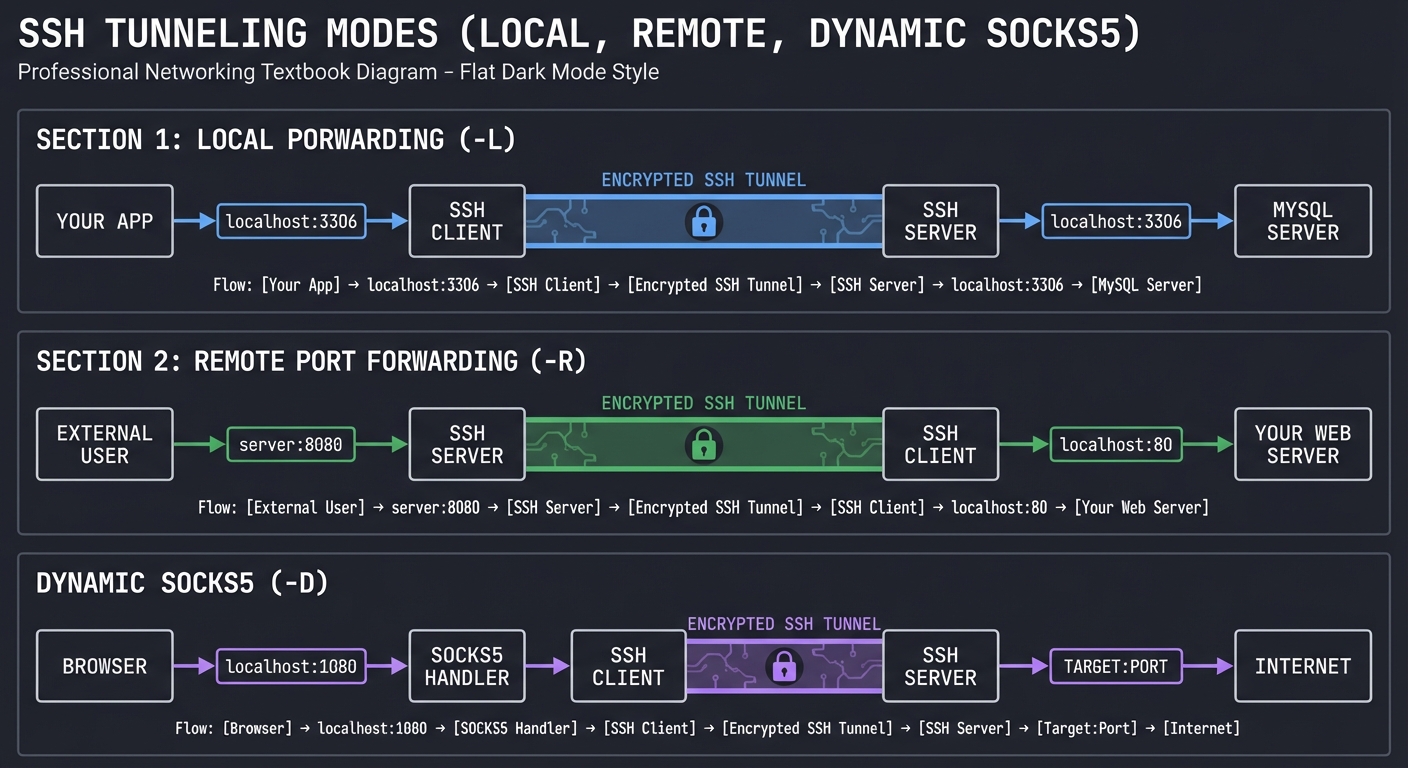
Real-World Use Cases You’ll Implement:
- Accessing internal databases from your laptop without exposing them to the internet
- Bypassing corporate firewalls legally (accessing your home server from work)
- Exposing localhost web development to colleagues for testing
- Routing all browser traffic through a remote server for privacy/geo-unblocking
- Creating secure “jump host” access to internal networks
What Users See in Network Tools:
# After starting local tunnel -L 3306:db.internal:3306
$ netstat -an | grep 3306
tcp4  0  0  127.0.0.1.3306  *.*  LISTEN
tcp4  0  0  127.0.0.1.3306  127.0.0.1.54321  ESTABLISHED

# SSH process shows multiple channels
$ ss -tnp | grep ssh
ESTAB  0  0  192.168.1.10:42356  server:22  users:(("ssh",pid=1234))
  └─ Channel 0: main session
  └─ Channel 1: forwarded-tcpip (localhost:3306)
  └─ Channel 2: forwarded-tcpip (localhost:3306) [second connection]
Concurrent Connection Handling: Your tool will manage multiple simultaneous tunneled connections through a single SSH connection. For example, 5 different MySQL queries can all flow through one SSH tunnel simultaneously, each on its own channel.
The Core Question You’re Answering
“How does SSH create a secure ‘pipe’ for arbitrary network traffic, and how can multiple independent data streams share a single encrypted connection?”
This question gets at the heart of SSH’s power: it’s not just a remote shell—it’s a general-purpose secure transport mechanism. By answering this, you’ll understand:
- Why tunneling is fundamentally about channel multiplexing, not encryption
- How the SSH protocol separates the “connection” layer from the “transport” layer
- Why one SSH connection can carry shells, file transfers, AND port forwards simultaneously
- How SOCKS5 proxies perform dynamic routing decisions at the application layer
Concepts You Must Understand First
Before implementing an SSH tunnel tool, master these foundational concepts:
- SSH Channel Multiplexing (RFC 4254, Section 5)
- How SSH creates multiple logical channels over a single TCP connection
- Channel lifecycle: open → data transfer → close
- Channel types: session, forwarded-tcpip, direct-tcpip
- Channel numbering and flow control (window size, packet size)
- Book: “SSH, The Secure Shell: The Definitive Guide” by Barrett & Silverman, Chapter 9
- Port Forwarding Types (RFC 4254, Sections 7.1-7.2)
- Local forwarding: client listens, forwards to server, server connects to target
- Remote forwarding: server listens, forwards to client, client connects to target
- Direct vs forwarded channel semantics
- The “bind address” concept (0.0.0.0 vs 127.0.0.1)
- Book: “SSH Mastery” by Michael W. Lucas, Chapters 9-11
- SOCKS5 Protocol (RFC 1928)
- How SOCKS5 handshake works (greeting, authentication, request)
- Address types: IPv4, IPv6, domain name
- Command types: CONNECT, BIND, UDP ASSOCIATE
- Why SOCKS5 enables dynamic routing (client specifies destination at runtime)
- Book: “TCP/IP Illustrated, Volume 1” by Stevens, Chapter 15 (Proxies)
- Concurrent I/O Handling (select/poll/epoll)
- Non-blocking I/O and why you need it (one tunnel = many connections)
- Multiplexing I/O events across multiple file descriptors
- Read/write buffering to handle partial sends/receives
- Book: “Advanced Programming in the UNIX Environment” by Stevens, Chapter 14
- TCP Socket Programming
- Creating listening sockets (bind + listen + accept)
- Connecting sockets (connect)
- Socket options: SO_REUSEADDR, TCP_NODELAY
- Handling connection failures and retries
- Book: “TCP/IP Sockets in C” by Donahoo & Calvert, Chapters 2-4
- SSH Connection Protocol Internals (RFC 4254)
- Understanding tcpip-forward and forwarded-tcpip messages
- Channel window management and flow control
- Channel request/reply semantics
- Book: “Implementing SSH” by Yang (online resource)
Questions to Guide Your Design
Ask yourself these questions as you implement your tunnel tool:
-
Channel Management: How will you track multiple channels within a single SSH connection? What data structure maps local ports to SSH channels? How do you handle channel IDs assigned by the server?
-
I/O Multiplexing: When data arrives on a local socket, how do you forward it to the correct SSH channel? When SSH channel data arrives, how do you route it to the correct local socket? Should you use select(), poll(), or epoll()?
-
Connection Lifecycle: What happens when a client connects to your local listening port? Do you immediately open an SSH channel, or wait for data? How do you handle half-closed connections (one direction closed, other still open)?
-
SOCKS5 Negotiation: How do you parse the SOCKS5 handshake? At what point do you open the SSH channel—before or after SOCKS5 negotiation completes? How do you communicate SOCKS5 errors back to the client?
-
Error Handling: What if the SSH server refuses a port forward request? What if the target host is unreachable? How do you communicate these errors to the application trying to use your tunnel?
-
Flow Control: SSH channels have window sizes—what happens if your local application sends data faster than the SSH channel can transmit? Do you need local buffering? How do you implement backpressure?
-
Concurrency Model: Will you use threads (one per connection), processes (fork), or event-driven I/O (single-threaded with select)? What are the trade-offs for tunnel applications?
-
Security Considerations: Should you allow tunnels to forward to arbitrary hosts (like OpenSSH), or restrict to specific destinations? How do you prevent tunnel abuse (e.g., running an open proxy)?
Thinking Exercise
Before writing any code, work through these design exercises on paper:
Exercise 1: Draw the Data Flow Draw a detailed network diagram showing:
- Local application → local port → your tunnel tool → SSH client library
- SSH encrypted connection → SSH server → target host → target service
- Label each component with its IP:PORT
- Show where encryption boundaries are
- Trace a single HTTP request through the entire system
Exercise 2: Packet Flow Timing Create a sequence diagram for local port forwarding showing:
- Client connects to localhost:8080
- Your tool opens SSH channel (channel_open “direct-tcpip”)
- Server acknowledges channel open
- Client sends HTTP request
- Your tool forwards data via SSH_MSG_CHANNEL_DATA
- Server extracts data, forwards to target:80
- Target responds
- Server sends SSH_MSG_CHANNEL_DATA back
- Your tool writes to local socket
- Client receives HTTP response
Exercise 3: State Machine Design Design a state machine for a SOCKS5 dynamic forward:
- States: SOCKS_GREETING, SOCKS_AUTH, SOCKS_REQUEST, CHANNEL_OPENING, CONNECTED, CLOSING
- Transitions: what events move between states?
- Error states: what if SOCKS5 negotiation fails? Channel open fails?
Exercise 4: Resource Management For a tunnel handling 100 concurrent connections:
- How many file descriptors do you need? (listening socket + N client sockets + 1 SSH connection)
- How many SSH channels? (1 per connection, or shared?)
- How much memory for buffers? (per connection? per channel?)
- What limits do you need to prevent resource exhaustion?
The Interview Questions They’ll Ask
Practice answering these questions to solidify your understanding:
- “Explain the difference between SSH local forwarding, remote forwarding, and dynamic forwarding. When would you use each?”
- Expected: Clear explanation of traffic direction, use cases, security implications
- “How does SSH multiplex multiple port forwards over a single TCP connection? What protocol mechanism enables this?”
- Expected: Discussion of SSH channels, channel IDs, SSH_MSG_CHANNEL_DATA, window sizes
- “What is SOCKS5 and how does it differ from simple port forwarding?”
- Expected: SOCKS5 is dynamic (destination specified at runtime), regular forwarding is static
- “You run
ssh -L 3306:database:3306 user@jumphostand connect 10 MySQL clients. How many TCP connections are involved? How many SSH channels?”- Expected: 1 SSH TCP connection, 10 SSH channels, 10 local client connections, 10 remote database connections
- “What happens if you try to forward to a port that’s firewalled or doesn’t exist on the remote network?”
- Expected: SSH channel opens successfully, but remote connection fails; client sees connection refused/timeout
- “How would you implement rate limiting or access control in an SSH tunnel tool?”
- Expected: Check source IPs, restrict target hosts, implement per-channel bandwidth limits
- “Explain how SSH’s channel flow control prevents a fast sender from overwhelming a slow receiver.”
- Expected: Channel window sizes, SSH_MSG_CHANNEL_WINDOW_ADJUST, backpressure to local socket
- “What are the security risks of SSH port forwarding, and how would you mitigate them?”
- Expected: Open proxies, privilege escalation, data exfiltration; mitigations include AllowTcpForwarding=no, PermitOpen restrictions
Hints in Layers
If you get stuck, reveal these hints progressively:
Layer 1 (Architecture Hint): Structure your program with three main components: (1) Listener that accepts local connections, (2) SSH channel manager that maps local sockets to SSH channels, (3) I/O multiplexer that moves data between local sockets and SSH channels. Use select() or poll() to handle all I/O in a single event loop.
Layer 2 (Channel Management Hint):
Maintain a mapping of local_socket_fd → ssh_channel_id. When data arrives on a local socket (via select), look up its channel ID and call ssh_channel_write(). When SSH channel data arrives (via channel callback), look up the corresponding local socket and write() to it.
Layer 3 (SOCKS5 Protocol Hint): SOCKS5 negotiation happens in phases: (1) Client sends greeting with supported auth methods, (2) Server selects auth method, (3) Client sends connection request with target host:port, (4) Server replies with success/failure. Only open the SSH channel AFTER receiving the connection request, since that’s when you know the destination.
Layer 4 (Flow Control Hint):
SSH channels have a “window size” that decrements as you send data and increments when you receive WINDOW_ADJUST messages. Before calling ssh_channel_write(), check ssh_channel_window_size(). If it’s too small, buffer the data locally and use a writable flag to avoid reading from the local socket until window space opens up.
Layer 5 (Error Handling Hint): Distinguish between “SSH channel error” (remote can’t connect to target) and “local socket error” (client disconnected). When SSH channel open fails, send a SOCKS5 error reply or close the local connection. When local socket closes, send SSH_MSG_CHANNEL_CLOSE.
Layer 6 (Performance Hint): For high throughput, disable Nagle’s algorithm on local sockets (TCP_NODELAY) to reduce latency. Use non-blocking I/O for all sockets. Consider using a ring buffer for each channel to handle partial writes efficiently. Profile your code to find where you’re spending CPU time—often it’s excessive memory copying.
Books That Will Help
| Topic | Book | Chapter/Section | What You’ll Learn |
|---|---|---|---|
| SSH Port Forwarding | “SSH Mastery” by Michael W. Lucas | Ch. 9-11 | Practical tunneling patterns, security considerations |
| SSH Protocol Internals | “SSH, The Secure Shell” by Barrett & Silverman | Ch. 4, 9 | Channel protocol details, multiplexing architecture |
| SOCKS5 Protocol | RFC 1928 (online) | Full document | Complete SOCKS5 specification with examples |
| Network Programming | “TCP/IP Sockets in C” by Donahoo & Calvert | Ch. 2-6 | Socket API, non-blocking I/O, select/poll |
| Concurrent I/O | “Advanced Programming in the UNIX Environment” by Stevens | Ch. 14 | I/O multiplexing, asynchronous I/O, event loops |
| SSH Connection Protocol | RFC 4254 (online) | Sections 5-7 | Channel types, flow control, forwarding messages |
| libssh Tutorial | libssh.org documentation | Port forwarding examples | Using libssh API for channel management |
| Systems Design | “The Linux Programming Interface” by Kerrisk | Ch. 60-63 | Server architecture, concurrency models |
Common Pitfalls & Debugging
Port forwarding and tunneling have unique challenges:
Problem 1: “Local port forward works but remote server sees connections from tunnel host, not original client IP”
- Why: This is expected behavior! SSH tunnel is a proxy—remote sees the SSH server’s IP.
- Fix:
- This is not a bug, it’s how SSH tunneling works
- The remote server sees connections from the SSH server (middle hop)
- For true client IP preservation, use VPN or application-level proxying (X-Forwarded-For headers for HTTP)
- SSH can’t transparently preserve source IP without root privileges and packet rewriting
- Quick test: Not applicable—this is architectural, not a bug
Problem 2: “Dynamic forwarding (SOCKS) works for HTTP but not other protocols”
- Why: Application isn’t SOCKS-aware, or you’re using SOCKS4 instead of SOCKS5.
- Fix:
- Only SOCKS-aware applications work (curl with
--socks5, Firefox with proxy settings) - Regular command-line tools (
ping,ssh) don’t support SOCKS without wrapper (tsocks, proxychains) - Use SOCKS5, not SOCKS4—SOCKS4 doesn’t support UDP or IPv6
- For DNS, use
--socks5-hostnameflag to tunnel DNS requests too
- Only SOCKS-aware applications work (curl with
- Quick test:
curl --socks5 localhost:1080 http://example.comshould work
Problem 3: “select() or poll() returns but no data available on any FD”
- Why: Spurious wakeups, or you didn’t check which FD is actually ready.
- Fix:
- Always check
FD_ISSET(fd, &readfds)for each FD before callingrecv() - Handle
EINTR(interrupted system call) and retry - Don’t assume only one FD is ready—check all of them
- Rebuild FD sets before each
select()call (they’re modified in-place)
- Always check
- Quick test: Add logging:
printf("select() returned, checking FDs...\n");
Problem 4: “Tunnel works for small transfers but hangs on large files”
- Why: SSH channel window exhausted—you’re sending faster than remote can consume.
- Fix:
- Check
ssh_channel_window_size()before writing - If window is too small (< 1024 bytes), buffer data locally and wait
- Don’t block on
send()to SSH channel—use non-blocking and retry later - Handle
SSH_MSG_CHANNEL_WINDOW_ADJUSTmessages to know when to resume
- Check
- Quick test: Transfer a 100MB file—if it stalls partway, window is the issue
Problem 5: “SOCKS5 handshake fails: client sends CONNECT but I don’t parse it right”
- Why: SOCKS5 uses variable-length address fields you’re not handling.
- Fix:
-
SOCKS5 CONNECT: version (1 byte) command (1) reserved (1) address_type (1) address (variable!) port (2) - Address type 0x01 = IPv4 (4 bytes), 0x03 = domain name (1-byte length + domain), 0x04 = IPv6 (16 bytes)
- Must read address_type first to know how many more bytes to read
- Domain names are length-prefixed: first byte is length N, then N bytes of ASCII domain
-
- Quick test: Use
curl --socks5and capture with Wireshark—see exact SOCKS5 CONNECT message
Problem 6: “Multiple simultaneous tunnels: first connection works, second hangs”
- Why: Not using separate SSH channels for each connection, or not handling multiplexing.
- Fix:
- Each TCP connection must have its own SSH channel (CHANNEL_OPEN with unique sender_channel)
- Track channels in a hashtable or array: local_fd → ssh_channel mapping
- When local socket has data, find its SSH channel and write to it
- When SSH channel has data, find its local socket and write to it
- Quick test:
curl --socks5 localhost:1080 http://example1.com & curl --socks5 localhost:1080 http://example2.com—both should work
Problem 7: “‘Connection refused’ even though target server is reachable”
- Why: SSH server can’t route to target, firewall blocking, or wrong target address.
- Fix:
- Verify target is reachable from the SSH server, not your local machine
- Test manually:
ssh user@sshserver, thentelnet target_host target_portfrom there - Check SSH server logs:
/var/log/auth.logmay show “channel open failed” - Some SSH servers disable port forwarding: check
AllowTcpForwardinginsshd_config
- Quick test: From SSH server shell, verify you can reach target:
nc -zv target_host port
Problem 8: “Tunnel works but performance is terrible (< 1MB/s on gigabit link)”
- Why: Nagle’s algorithm, small TCP buffers, or inefficient copying.
- Fix:
- Disable Nagle on local sockets:
setsockopt(fd, IPPROTO_TCP, TCP_NODELAY, &flag, sizeof(int)); - Increase SSH channel window size when opening channel (64KB → 1MB)
- Use larger buffers for
recv()/send()(8192 bytes minimum) - Avoid unnecessary memory copies—use
sendfile()or zero-copy techniques
- Disable Nagle on local sockets:
- Quick test: Benchmark with
iperf3through tunnel vs. direct connection
Problem 9: “After tunnel closes, FDs remain in select() set and cause infinite loop”
- Why: Forgot to remove closed FDs from the
select()FD set. - Fix:
- When a socket closes, call
FD_CLR(fd, &master_fds)to remove it from the set - Also close the corresponding SSH channel and remove from mappings
- Be careful:
select()modifies the FD set—keep a “master” copy and copy it before eachselect() - Example:
fd_set readfds = master_fds; select(..., &readfds, ...);
- When a socket closes, call
- Quick test: Open tunnel, transfer data, close client—verify loop doesn’t spin on closed FD
Problem 10: “Memory leak: valgrind shows thousands of leaked bytes after tunneling”
- Why: Not freeing channel structures, buffered data, or SSH session objects.
- Fix:
- When closing a channel: free any buffered data, call
ssh_channel_free(), remove from tracking - When closing session: call
ssh_disconnect(), thenssh_free() - Don’t leak partial-read buffers—free them when connection closes
- Run
valgrind --leak-check=fullregularly during development
- When closing a channel: free any buffered data, call
- Quick test: Open 100 tunnels, transfer data, close all—valgrind should report 0 leaks
Project 5: Host Key Manager & TOFU Analyzer
- File: SSH_DEEP_DIVE_LEARNING_PROJECTS.md
- Programming Language: C
- Coolness Level: Level 2: Practical but Forgettable
- Business Potential: 3. The “Service & Support” Model
- Difficulty: Level 2: Intermediate
- Knowledge Area: Security / Systems Administration
- Software or Tool: Known Hosts / Fingerprints
- Main Book: “SSH Mastery” by Michael W. Lucas
What you’ll build: A tool that manages SSH known_hosts files, visualizes host key fingerprints, detects potential MITM attacks, and explains the Trust-On-First-Use security model with concrete examples.
Why it teaches SSH security: SSH’s security depends critically on host key verification, but most users just type “yes” without understanding. By building a tool that analyzes and visualizes host keys, you’ll deeply understand why MITM attacks work and how SSH prevents them (when used correctly).
Core challenges you’ll face:
- Parsing known_hosts file format (including hashed hostnames)
- Computing and displaying key fingerprints (SHA256, MD5)
- Detecting host key changes and explaining the implications
- Visualizing key fingerprints (ASCII art, colors)
- Implementing key pinning and certificate validation concepts
Key Concepts:
- Host Key Format: OpenSSH source code - hostfile.c
- Fingerprint Computation: “Serious Cryptography” by Aumasson - Ch. 6
- TOFU Model: “SSH Mastery” by Michael W. Lucas - Ch. 6
- MITM Attacks: “Foundations of Information Security” by Andress - Ch. 8
Difficulty: Beginner-Intermediate Time estimate: 1 week Prerequisites: Basic C programming, understanding of hashing
Real world outcome:
$ ./hostkey-manager analyze ~/.ssh/known_hosts
Found 47 host keys:

github.com (ssh-ed25519)
  Fingerprint: SHA256:+DiY3wvvV6TuJJhbpZisF/zLDA0zPMSvHdkr4UvCOqU
  First seen: 2023-01-15
  Status: ✓ Matches current GitHub public key

myserver.com (ssh-rsa)
  Fingerprint: SHA256:xXx123...
  First seen: 2024-06-01
  ⚠️  WARNING: Key changed on 2024-11-20!
  Previous fingerprint: SHA256:yYy456...
  This could indicate:
    - Server was reinstalled
    - MITM attack in progress
    - Key rotation

$ ./hostkey-manager visualize github.com
+---[ED25519 256]---+
|        .o=.      |
|       . + E      |
|        + . o     |
|       + + o .    |
|      + S o .     |
|     . + . .      |
|      o + o       |
|       = +        |
|        o         |
+----[SHA256]------+
Learning milestones:
- Parse known_hosts → You understand how SSH stores trust
- Compute fingerprints → You understand key verification
- Detect changes → You understand TOFU security model
Real World Outcome (Expanded)
Your tool will provide comprehensive host key security analysis. Here are detailed example scenarios:
Scenario 1: Normal Operation
$ ./hostkey-manager scan
Scanning ~/.ssh/known_hosts...
Total hosts: 23
✓ All host keys verified against current connections
✓ No suspicious changes detected
✓ Average key age: 487 days

$ ./hostkey-manager check github.com
github.com (ssh-ed25519)
  SHA256: +DiY3wvvV6TuJJhbpZisF/zLDA0zPMSvHdkr4UvCOqU
  MD5: 16:27:ac:a5:76:28:2d:36:63:1b:56:4d:eb:df:a6:48
  First seen: 2023-01-15 14:23:11
  Last verified: 2024-12-20 09:45:33
  Status: ✓ TRUSTED (matches GitHub's published fingerprint)
  Connections: 847 successful
Scenario 2: MITM Attack Detection
$ ./hostkey-manager connect production.example.com
⚠️  CRITICAL SECURITY WARNING ⚠️

The host key for production.example.com has CHANGED!

Previous fingerprint (saved 2024-06-01):
  SHA256: xXx123abcDEF456ghiJKL789mnoQRS012tuvWXY345zab=

Current fingerprint (received now):
  SHA256: yYy456defGHI789jklMNO123pqrSTU456vwxYZA678bcd=

This could indicate:
  ⚠️  MITM ATTACK IN PROGRESS (most likely if unexpected)
  - Server reinstalled/reimaged
  - Security key rotation
  - DNS hijacking
  - Network compromise

RECOMMENDED ACTIONS:
1. DO NOT PROCEED with the connection
2. Contact server administrator through alternate channel (phone/Slack)
3. Verify fingerprint: ssh-keyscan production.example.com
4. Check server's console/IPMI for actual host key
5. Review network logs for suspicious activity

Type 'ACCEPT RISK' to proceed anyway (not recommended): _
Scenario 3: Certificate Pinning Example
$ ./hostkey-manager pin database.internal.corp
Pinning host key for database.internal.corp...
Current fingerprint: SHA256:abc123def456...

Pin mode selected: STRICT
  - Only this exact key will be accepted
  - Any key change will abort connection
  - Requires manual unpin to update

Pin saved to ~/.ssh/pins/database.internal.corp.pin

$ ./hostkey-manager verify database.internal.corp --pinned
Checking pinned host: database.internal.corp
✓ Host key matches pinned fingerprint
✓ Pin enforced: STRICT mode
✓ Pin age: 14 days
✓ Connection authorized

$ ./hostkey-manager list-pins
Pinned Hosts:
database.internal.corp    STRICT    14d ago    SHA256:abc123...
payment-api.prod          STRICT    89d ago    SHA256:def456...
backup-server.dmz         WARN      156d ago   SHA256:ghi789...
Scenario 4: Visualizing Trust Relationships
$ ./hostkey-manager visualize github.com --art
github.com (ED25519-256)
+---[ED25519 256]---+
|        .o=.      |
|       . + E      |
|        + . o     |
|       + + o .    |
|      + S o .     |
|     . + . .      |
|      o + o       |
|       = +        |
|        o         |
+----[SHA256]------+

SHA256: +DiY3wvvV6TuJJhbpZisF/zLDA0zPMSvHdkr4UvCOqU
MD5: 16:27:ac:a5:76:28:2d:36:63:1b:56:4d:eb:df:a6:48

$ ./hostkey-manager trust-timeline production.example.com
Trust Timeline for production.example.com:

2024-06-01 [FIRST SEEN]  SHA256:xXx123... (RSA-2048)
  |
  ├─ 2024-06-01 to 2024-11-19: 847 successful connections
  |
2024-11-20 [KEY CHANGED] SHA256:yYy456... (ED25519-256)
  |                      ⚠️  Suspicious: No advance notice
  |
  ├─ 2024-11-20 to 2024-12-20: 23 successful connections
  |
2024-12-20 [CURRENT]     Status: MONITORING

Recommendation: KEY CHANGE was unannounced and suspicious.
Verify through alternate channel before next connection.
The Core Question You’re Answering
“How do I know I’m connecting to the RIGHT server and not an attacker’s machine?”
This is the fundamental security question in remote authentication. When you type ssh user@server, how can you be certain that:
- The machine responding is actually the server you intended to reach?
- No attacker has intercepted your connection (man-in-the-middle)?
- The server hasn’t been compromised and replaced?
SSH solves this through host key verification and the Trust-On-First-Use (TOFU) model. Your tool teaches you:
- Why TOFU is both elegant and problematic
- How cryptographic fingerprints create unforgeable server identities
- Why that scary “WARNING: REMOTE HOST IDENTIFICATION HAS CHANGED” message exists
- What separates secure verification from security theater
By building this tool, you’ll understand the trade-offs between usability (just type “yes”) and security (verify every fingerprint), and why SSH chose the middle ground it did.
Concepts You Must Understand First
Before you can build an effective host key manager, you need to master these foundational concepts:
- Public Key Cryptography and Key Pairs
- How SSH servers have identity key pairs (private + public)
- Why the public key can be safely shared but uniquely identifies the server
- How asymmetric cryptography enables authentication without shared secrets
- Reference: “Serious Cryptography” by Aumasson, Chapter 11 (Public-Key Encryption)
- Cryptographic Hash Functions (Fingerprints)
- How a fingerprint is a hash of a public key (SHA256, MD5)
- Why fingerprints are “collision-resistant” (can’t forge a key with same fingerprint)
- How to compute fingerprints from binary key data
- Why SHA256 is preferred over MD5 (hash collision vulnerabilities)
- Reference: “Serious Cryptography” by Aumasson, Chapter 6 (Hash Functions)
- The Trust-On-First-Use (TOFU) Security Model
- How TOFU differs from traditional PKI (no certificate authorities)
- Why the first connection is the vulnerable moment
- How subsequent connections use the “pinned” key for verification
- The trade-off: simplicity vs. bootstrap trust problem
- Reference: “SSH Mastery” by Lucas, Chapter 6 (Host Keys)
- Man-in-the-Middle (MITM) Attacks
- How an attacker can intercept SSH connections
- Why MITM succeeds if it happens on first connection (TOFU weakness)
- How host key verification prevents MITM on subsequent connections
- Real-world MITM scenarios: DNS hijacking, ARP spoofing, compromised routers
- Reference: “Network Security Essentials” by Stallings, Chapter 7
- The known_hosts File Format
- How SSH stores trusted host keys in
~/.ssh/known_hosts - Hostname hashing (prevents reconnaissance of your SSH targets)
- Key format: hostname, key type, base64-encoded public key
- Reference: OpenSSH manual pages (
man sshd, section on SSH_KNOWN_HOSTS)
- How SSH stores trusted host keys in
Questions to Guide Your Design
Use these questions to drive your implementation decisions:
- How do you parse a known_hosts entry that uses hashed hostnames?
- Hint: OpenSSH uses HMAC-SHA1 for hostname hashing
- You’ll need to implement the hash verification:
|1|base64(salt)|base64(HMAC-SHA1(salt, hostname)) - Challenge: How do you search for a specific hostname when they’re all hashed?
- What’s the most user-friendly way to display a fingerprint?
- SHA256 fingerprints are 43 characters of base64 (e.g.,
SHA256:xXx123...) - MD5 fingerprints are 16 hex pairs (e.g.,
16:27:ac:a5:76:...) - OpenSSH also supports ASCII art “randomart” visualization
- Question: How do you make fingerprints memorable and easy to verify?
- SHA256 fingerprints are 43 characters of base64 (e.g.,
- How do you distinguish between legitimate key changes and MITM attacks?
- Legitimate: Server reinstall, key rotation, load balancer changes
- Attack: DNS hijacking, network MITM, server compromise
- Your tool can’t know for certain—but what signals can it show the user?
- Example signals: Time since last change, number of previous connections, key type change
- What’s the best way to handle multiple keys per host?
- SSH servers can have RSA, ECDSA, and Ed25519 keys simultaneously
- Different SSH clients might prefer different key types
- Should your tool track all key types or just the one currently in use?
- How can you implement “certificate pinning” for high-security hosts?
- Pinning: Never accept a different key, even on first use
- Useful for critical servers (databases, payment systems, prod servers)
- Design choice: Store pins separately from known_hosts, or annotate entries?
- What should happen when a key changes?
- Immediate abort (safest, but breaks legitimate key rotations)
- Warn and prompt (current SSH behavior, but users often ignore)
- Smart detection (analyze context and provide recommendations)
- Your tool’s approach will reflect your security philosophy
Thinking Exercise: Simulate a MITM Attack on Paper
To deeply understand host key verification, trace through this scenario step-by-step:
Setup:
- You want to SSH to
server.example.com(IP: 192.168.1.100) - Server’s real host key fingerprint:
SHA256:RealServerKey123... - Attacker controls router between you and server
- Attacker’s host key fingerprint:
SHA256:AttackerKey456...
Scenario A: First Connection (TOFU Vulnerability)
Step 1: You type: ssh user@server.example.com
Step 2: DNS resolves to 192.168.1.100 (correct IP)
Step 3: Your SSH client initiates connection to 192.168.1.100
Step 4: Attacker intercepts packet, pretends to be server
Step 5: Attacker sends their public key (AttackerKey456)
Step 6: Your SSH client prompts:
        "The authenticity of host 'server.example.com' can't be established.
         ED25519 key fingerprint is SHA256:AttackerKey456...
         Are you sure you want to continue connecting (yes/no)?"
Step 7: You type "yes" (you have no way to know this is wrong!)
Step 8: Your client saves attacker's key to known_hosts
Step 9: You're now connected to attacker's machine, not the real server
Step 10: Attacker relays your traffic to real server (transparent proxy)
         You see normal login, but attacker sees everything!
On paper, draw:
- Three boxes: [You] – [Attacker] – [Real Server]
- Arrow for each step showing who’s talking to whom
- Note where the TOFU vulnerability occurs (Step 6-7)
Scenario B: Subsequent Connection (TOFU Protection)
Step 1: You type: ssh user@server.example.com (again, days later)
Step 2: Attacker again intercepts
Step 3: Attacker sends their key (AttackerKey456)
Step 4: Your SSH client checks known_hosts
Step 5: MATCH! Key matches previously saved AttackerKey456
Step 6: Connection proceeds (you're still being MITM'd)

BUT if attacker made a mistake and sent a different key:
Step 5: NO MATCH! Key differs from saved AttackerKey456
Step 6: SSH ABORTS with scary warning:
        "@@@@@@@@@@@@@@@@@@@@@@@@@@@@@@@@@@@@@@@
         @    WARNING: REMOTE HOST IDENTIFICATION HAS CHANGED!    @
         @@@@@@@@@@@@@@@@@@@@@@@@@@@@@@@@@@@@@@@
         IT IS POSSIBLE THAT SOMEONE IS DOING SOMETHING NASTY!"
Step 7: Connection refused, you're protected
Scenario C: First Connection with Pre-Verified Fingerprint
Step 1: Before connecting, you get real fingerprint from sysadmin via phone:
        "The server's fingerprint is SHA256:RealServerKey123..."
Step 2: You write this down: SHA256:RealServerKey123...
Step 3: You type: ssh user@server.example.com
Step 4: Attacker intercepts, sends their key
Step 5: SSH prompts with fingerprint: SHA256:AttackerKey456...
Step 6: You COMPARE: AttackerKey456 ≠ RealServerKey123 → MISMATCH!
Step 7: You type "no" and abort connection
Step 8: You call sysadmin: "Someone's attacking the connection!"
Step 9: Attack detected and prevented!
Questions to answer:
- In Scenario A, at what point does the attack become undetectable?
- Why doesn’t TOFU protect the first connection?
- How would SSH certificate authorities solve this problem?
- What’s the weakest link in Scenario C? (Hint: human verification)
The Interview Questions They’ll Ask
If you list this project on your resume, expect these questions:
- “Explain how SSH prevents man-in-the-middle attacks.”
- Good answer: “SSH uses host key verification. The server has a public/private key pair. On first connection, the client saves the server’s public key fingerprint. On subsequent connections, SSH verifies the key matches. If it changes, SSH warns of a potential MITM attack. However, the first connection is vulnerable unless you pre-verify the fingerprint.”
- “What is the Trust-On-First-Use (TOFU) model and what are its weaknesses?”
- Good answer: “TOFU means the client trusts the server’s key on first use without external verification. It’s simple and doesn’t require PKI infrastructure. The weakness is that if an attacker intercepts the first connection, they can impersonate the server indefinitely. TOFU works well when first connections happen on trusted networks.”
- “You get the ‘WARNING: REMOTE HOST IDENTIFICATION HAS CHANGED’ message. What do you do?”
- Good answer: “First, DON’T proceed blindly. Contact the server admin through an alternate channel (phone, Slack) to verify if the key legitimately changed (server reinstall, key rotation). Check when the key was last seen—if it’s been stable for months and suddenly changed, that’s suspicious. If legitimate, use
ssh-keygen -R hostnameto remove the old key, then verify the new fingerprint before accepting.”
- Good answer: “First, DON’T proceed blindly. Contact the server admin through an alternate channel (phone, Slack) to verify if the key legitimately changed (server reinstall, key rotation). Check when the key was last seen—if it’s been stable for months and suddenly changed, that’s suspicious. If legitimate, use
- “How is an SSH fingerprint computed?”
- Good answer: “A fingerprint is a cryptographic hash of the server’s public key. Modern SSH uses SHA256, producing a base64-encoded 256-bit hash prefixed with ‘SHA256:’. Older systems used MD5, showing hex pairs. The hash is computed over the binary representation of the public key. Because hash functions are collision-resistant, fingerprints uniquely identify keys.”
- “What’s the difference between known_hosts and authorized_keys?”
- Good answer: “
known_hostscontains server public keys (client authenticating server).authorized_keyscontains client public keys (server authenticating client). They solve opposite directions of authentication.known_hostsprevents connecting to wrong servers;authorized_keysprevents unauthorized users from connecting.”
- Good answer: “
- “How would you implement certificate pinning for SSH?”
- Good answer: “Certificate pinning means trusting only specific keys for specific hosts, refusing any changes. I’d maintain a separate ‘pins’ database with hostname → fingerprint mappings. Before connection, check if the host is pinned. If pinned, verify the received key exactly matches—any difference aborts immediately without prompting. Useful for critical servers where key changes are rare and controlled.”
- “Explain the recent CVE-2025-26465 OpenSSH vulnerability.”
- Good answer: “This was a MITM vulnerability in OpenSSH clients when VerifyHostKeyDNS was enabled. An attacker could send an oversized SSH key with excessive certificate extensions, causing an out-of-memory error during verification. Due to improper error handling, the client would bypass host key verification and accept the attacker’s key. It affected versions 6.8p1 to 9.9p1 for over 10 years. Fixed in 9.9p2.”
- “Why doesn’t SSH use certificate authorities like HTTPS does?”
- Good answer: “SSH predates widespread PKI infrastructure and was designed for peer-to-peer server administration, not public services. The TOFU model is simpler and doesn’t require maintaining CA infrastructure. However, SSH does support certificate-based authentication (ssh-keygen -s) for organizations that want centralized key management. HTTPS needs CAs because users connect to thousands of unknown websites; SSH users typically connect to a small set of known servers.”
Hints in Layers
When you get stuck implementing this project, reveal these hints progressively:
Layer 1: Getting Started Hints
- Start by reading your own
~/.ssh/known_hostsfile as text - Each line format:
hostname ssh-keytype base64-public-key - Use
ssh-keygen -l -f ~/.ssh/known_hoststo see what fingerprints should look like - Test with
ssh-keyscan github.comto capture a live host key
Layer 2: Parsing and Fingerprint Computation
- For fingerprint computation, you need to hash the binary public key, not the base64 string
- Use
base64_decode()to convert the base64 key string to binary - Then SHA256 hash the binary data:
SHA256(binary_public_key) - For the final format:
base64_encode(sha256_hash)and prefix with “SHA256:” - Hashed hostnames format:
|1|base64(salt)|base64(HMAC-SHA1(salt, hostname))
Layer 3: Detecting Host Key Changes
- Store historical fingerprints with timestamps in a separate database
- Format:
hostname|keytype|fingerprint|first_seen|last_verified|connection_count - On each check, compare current fingerprint to historical record
- If different: Calculate time since last verification and connection history
- High-risk indicators: Long stable history (>90 days) + sudden change
Layer 4: Implementing MITM Detection
- You can’t definitively detect MITM, but you can assess risk level
- Low risk: Key changed, server was recently added (<7 days old)
- Medium risk: Key changed, server is 7-90 days old
- High risk: Key changed, server was stable for >90 days with many connections
- Critical risk: Key changed multiple times in short period
- Display risk level + recommended actions to user
Layer 5: Advanced Features
- For ASCII art visualization, implement the “randomart” algorithm (see OpenSSH source: key.c)
- For certificate pinning: Use a separate
~/.ssh/pinsdirectory with one file per pinned host - For SSHFP DNS records: Use DNS queries to check for SSHFP record types (requires DNS library)
- For organizational use: Support CA-signed host certificates (
@cert-authorityentries) - For audit logging: Track every verification in
~/.ssh/host_key_audit.logwith timestamps
Books That Will Help
| Topic | Book | Chapter/Section |
|---|---|---|
| Public Key Cryptography Fundamentals | “Serious Cryptography” by Jean-Philippe Aumasson | Ch. 11: Public-Key Encryption |
| Hash Functions and Fingerprints | “Serious Cryptography” by Jean-Philippe Aumasson | Ch. 6: Hash Functions |
| SSH Host Key Verification | “SSH Mastery, 2nd Edition” by Michael W. Lucas | Ch. 6: Host Keys and DNS |
| Man-in-the-Middle Attacks | “Network Security Essentials” by William Stallings | Ch. 7: Network Security Applications |
| SSH Protocol Internals | “SSH, The Secure Shell: The Definitive Guide” by Barrett, Silverman & Byrnes | Ch. 3: SSH Protocol Architecture |
| Trust Models and PKI | “Cryptography Engineering” by Ferguson, Schneier & Kohno | Ch. 15: Key Negotiation |
| Binary File Parsing in C | “Fluent C” by Christopher Preschern | Ch. 8: Working with Binary Data |
| OpenSSH Implementation Details | OpenSSH source code | Files: hostfile.c, sshkey.c, ssh-keygen.c |
| DNS and SSHFP Records | “DNS and BIND, 5th Edition” by Cricket Liu | Ch. 16: DNS Security |
| Security Monitoring | “The Practice of Network Security Monitoring” by Richard Bejtlich | Ch. 8: Event-Driven Detection |
Project Comparison Table
| Project | Difficulty | Time | Depth of Understanding | Fun Factor |
|---|---|---|---|---|
| TCP Chat + Encryption | Intermediate | 2-3 weeks | ★★★☆☆ | ★★★★☆ |
| SSH Protocol Dissector | Intermediate | 1-2 weeks | ★★★★☆ | ★★★★★ |
| Mini SSH Client | Advanced | 1 month+ | ★★★★★ | ★★★☆☆ |
| SSH Tunnel Tool | Advanced | 2-3 weeks | ★★★★☆ | ★★★★★ |
| Host Key Manager | Beginner-Int | 1 week | ★★★☆☆ | ★★★☆☆ |
Recommended Learning Path
Based on the goal of understanding SSH deeply and building usable C programs:
Start with: Project 1 (TCP Chat + Encryption)
This builds the foundational understanding. You can’t understand SSH until you’ve felt the pain of “how do two parties agree on a key over an insecure channel?” Implementing DH yourself makes SSH click.
Then: Project 2 (SSH Protocol Dissector)
This lets you “see” the real protocol in action. Run Wireshark-style captures while connecting to real servers. This grounds your theoretical knowledge in reality.
Then: Project 3 (Mini SSH Client)
This is the summit. When your C program successfully authenticates to a real OpenSSH server, you’ll have earned true understanding of SSH.
Finally: Project 4 (SSH Tunnel Tool)
This extends your client with the most powerful SSH feature. You’ll understand why sysadmins love SSH tunnels.
Final Overall Project: Secure Remote Shell System
What you’ll build: A complete, production-quality secure remote shell system with:
- Custom SSH-like server daemon (
mysshd) - Custom client (
myssh) - Tunnel support (local, remote, dynamic)
- Public key authentication
- Session multiplexing
- Configuration file parsing
- Logging and audit trail
Why it’s the ultimate SSH learning project: This combines everything. You’re not just implementing a client—you’re implementing both sides. You’ll handle concurrent connections, manage sessions, implement the full authentication flow, and deal with real-world concerns like key management and security logging.
Core challenges you’ll face:
- Designing a secure protocol (using SSH as inspiration, but yours)
- Implementing server-side connection handling (fork/pthread model)
- Managing multiple authenticated sessions
- Implementing public key authentication (challenge-response)
- Secure key storage and handling
- Audit logging for security compliance
- Configuration parsing and privilege separation
Key Concepts:
- Daemon Programming: “Advanced Programming in the UNIX Environment” by Stevens - Ch. 13
- Privilege Separation: OpenSSH design docs (openssh.com/security.html)
- Public Key Auth: RFC 4252 - Section 7
- Concurrent Server Design: “The Linux Programming Interface” by Kerrisk - Ch. 60
- Security Logging: “The Practice of Network Security Monitoring” by Bejtlich - Ch. 8
Difficulty: Expert Time estimate: 2-3 months Prerequisites: All previous projects completed
Real world outcome:
# On server machine
$ sudo ./mysshd -p 2222 -k /etc/myssh/host_key
[2024-12-18 10:00:00] mysshd starting on port 2222
[2024-12-18 10:00:00] Host key loaded: SHA256:abc123...
[2024-12-18 10:00:01] Ready for connections

# On client machine
$ ./myssh -i ~/.myssh/id_ed25519 user@server -p 2222
Connecting to server:2222...
Host key fingerprint: SHA256:abc123...
Authenticating with public key...
Welcome to myssh!
user@server:~$ whoami
user
user@server:~$ exit
Connection closed.

# Tunnel example
$ ./myssh -L 8080:internal-db:5432 user@bastion -p 2222
Tunnel established: localhost:8080 -> internal-db:5432
# Now you can access internal-db through your secure tunnel!

# Server logs show:
[2024-12-18 10:05:00] Connection from 192.168.1.50
[2024-12-18 10:05:01] Key exchange: curve25519-sha256
[2024-12-18 10:05:01] Auth attempt: public key for 'user'
[2024-12-18 10:05:01] Auth success: user (from 192.168.1.50)
[2024-12-18 10:05:02] Channel opened: session
[2024-12-18 10:05:02] Exec request: whoami
[2024-12-18 10:05:10] Channel closed: session
[2024-12-18 10:05:10] Connection closed: user (192.168.1.50)
Learning milestones:
- Server accepts connections → You understand daemon architecture
- Key exchange works both directions → You understand the full handshake
- Public key auth works → You understand challenge-response authentication
- Shell sessions work → You understand PTY allocation and session management
- Tunnels work → You understand channel multiplexing
- Multiple concurrent clients → You understand server scalability
- Full audit logging → You understand security operations
Real World Outcome (Expanded)
When you complete this capstone project, you’ll have a fully functional secure shell system that rivals OpenSSH in functionality (though not in security hardening for production use). Here’s what your system will look like in action:
Server Startup and Configuration:
$ cat /etc/myssh/mysshd.conf
# mysshd configuration
Port 2222
ListenAddress 0.0.0.0
HostKey /etc/myssh/host_key_ed25519
HostKey /etc/myssh/host_key_rsa
AuthorizedKeysFile /home/%u/.myssh/authorized_keys
MaxAuthTries 3
MaxSessions 10
LogLevel INFO
AuditLog /var/log/myssh/audit.log
AllowTcpForwarding yes
PermitRootLogin no
PasswordAuthentication no
PubkeyAuthentication yes

$ sudo ./mysshd -f /etc/myssh/mysshd.conf
[2024-12-22 10:00:00] [INFO] mysshd version 1.0 starting
[2024-12-22 10:00:00] [INFO] Loading host key: /etc/myssh/host_key_ed25519 (ED25519)
[2024-12-22 10:00:00] [INFO] Loading host key: /etc/myssh/host_key_rsa (RSA-4096)
[2024-12-22 10:00:00] [INFO] Binding to 0.0.0.0:2222
[2024-12-22 10:00:00] [INFO] Privilege separation: child running as myssh:myssh
[2024-12-22 10:00:00] [INFO] Ready for connections (max 10 concurrent sessions)
Client Connection with Full Debugging:
$ ./myssh -vvv -i ~/.myssh/id_ed25519 alice@server.example.com -p 2222
[DEBUG] myssh version 1.0
[DEBUG] Connecting to server.example.com:2222...
[DEBUG] TCP connection established (fd=3)

[DEBUG] === VERSION EXCHANGE ===
[DEBUG] Local version: SSH-2.0-myssh_1.0
[DEBUG] Remote version: SSH-2.0-mysshd_1.0

[DEBUG] === KEY EXCHANGE INIT ===
[DEBUG] Sending SSH_MSG_KEXINIT
[DEBUG]   KEX algorithms: curve25519-sha256,diffie-hellman-group16-sha512
[DEBUG]   Host key algorithms: ssh-ed25519,rsa-sha2-512
[DEBUG]   Encryption: chacha20-poly1305@openssh.com,aes256-gcm@openssh.com
[DEBUG]   MAC: hmac-sha2-512-etm@openssh.com,hmac-sha2-256-etm@openssh.com
[DEBUG] Received SSH_MSG_KEXINIT from server
[DEBUG] Negotiated algorithms:
[DEBUG]   KEX: curve25519-sha256
[DEBUG]   Host key: ssh-ed25519
[DEBUG]   Encryption (c2s): chacha20-poly1305@openssh.com
[DEBUG]   Encryption (s2c): chacha20-poly1305@openssh.com
[DEBUG]   MAC: (implicit in AEAD)

[DEBUG] === ECDH KEY EXCHANGE ===
[DEBUG] Generating ephemeral Curve25519 keypair
[DEBUG] Sending SSH_MSG_KEX_ECDH_INIT
[DEBUG] Received SSH_MSG_KEX_ECDH_REPLY
[DEBUG] Server host key (ED25519):
[DEBUG]   Fingerprint: SHA256:xQf3k9nB7mLpR2vJ5hYwZ8cD1eF4gH6i
[DEBUG]   Checking known_hosts... MATCH (first seen: 2024-06-01)
[DEBUG] Computing shared secret via X25519
[DEBUG] Deriving session keys (RFC 4253 Section 7.2)
[DEBUG]   Session ID: f3a8b2c9d1e4...
[DEBUG]   IV (c2s): 16 bytes derived
[DEBUG]   IV (s2c): 16 bytes derived
[DEBUG]   Enc key (c2s): 64 bytes derived (ChaCha20-Poly1305)
[DEBUG]   Enc key (s2c): 64 bytes derived (ChaCha20-Poly1305)
[DEBUG] Verifying server signature on exchange hash... VALID
[DEBUG] Sending SSH_MSG_NEWKEYS
[DEBUG] Received SSH_MSG_NEWKEYS
[DEBUG] === ENCRYPTION ACTIVATED ===

[DEBUG] === AUTHENTICATION ===
[DEBUG] Requesting service: ssh-userauth
[DEBUG] Service accepted
[DEBUG] Attempting public key authentication for 'alice'
[DEBUG]   Key: ~/.myssh/id_ed25519 (ED25519)
[DEBUG]   Signing authentication request...
[DEBUG] Sending SSH_MSG_USERAUTH_REQUEST (publickey)
[DEBUG] Received SSH_MSG_USERAUTH_SUCCESS
[DEBUG] === AUTHENTICATED AS alice ===

[DEBUG] === CHANNEL SETUP ===
[DEBUG] Opening session channel (id=0)
[DEBUG] Channel 0 open confirmation received (server id=0)
[DEBUG] Requesting PTY: xterm-256color, 80x24
[DEBUG] PTY request successful
[DEBUG] Requesting shell
[DEBUG] Shell request successful
[DEBUG] === SHELL SESSION ACTIVE ===

alice@server:~$ whoami
alice
alice@server:~$ uname -a
Linux server 6.1.0-26-amd64 #1 SMP PREEMPT Debian x86_64 GNU/Linux
alice@server:~$ exit
logout
[DEBUG] Received SSH_MSG_CHANNEL_EOF
[DEBUG] Received SSH_MSG_CHANNEL_CLOSE
[DEBUG] Sending SSH_MSG_CHANNEL_CLOSE
[DEBUG] Connection closed gracefully
Multi-Channel Tunneling Session:
$ ./myssh -L 3306:db.internal:3306 \
          -L 6379:redis.internal:6379 \
          -R 8080:localhost:8080 \
          -D 1080 \
          alice@bastion.example.com -p 2222

[INFO] Establishing SSH connection to bastion.example.com:2222
[INFO] Authentication successful

[INFO] Local forward established: localhost:3306 → db.internal:3306
[INFO] Local forward established: localhost:6379 → redis.internal:6379
[INFO] Remote forward established: bastion:8080 → localhost:8080
[INFO] Dynamic SOCKS5 proxy listening on localhost:1080

[INFO] Tunnels active. Press Ctrl+C to disconnect.

# In another terminal:
$ mysql -h 127.0.0.1 -P 3306 -u dbuser -p
mysql> SELECT 1;  # ← This traffic goes through your SSH tunnel!

# Meanwhile, server audit log shows:
[2024-12-22 11:05:23] [AUDIT] alice: channel opened (direct-tcpip) → db.internal:3306
[2024-12-22 11:05:24] [AUDIT] alice: forwarded 1,234 bytes to db.internal:3306
[2024-12-22 11:06:01] [AUDIT] alice: channel opened (direct-tcpip) → redis.internal:6379
Server Concurrent Connection Handling:
# Server log showing multiple concurrent users:
[2024-12-22 11:00:00] [INFO] Connection from 192.168.1.50 (alice)
[2024-12-22 11:00:01] [INFO] Connection from 10.0.0.25 (bob)
[2024-12-22 11:00:02] [INFO] Connection from 172.16.0.100 (charlie)
[2024-12-22 11:00:03] [INFO] alice: session channel opened (PTY)
[2024-12-22 11:00:04] [INFO] bob: exec channel opened (command: backup.sh)
[2024-12-22 11:00:05] [INFO] charlie: forwarded-tcpip channel opened (→ db:5432)

# Show process tree:
$ pstree -p $(pgrep mysshd)
mysshd(1234)─┬─mysshd(1235)───bash(1240)          # alice's shell
             ├─mysshd(1236)───backup.sh(1241)     # bob's exec
             └─mysshd(1237)                        # charlie's tunnel handler
The Core Question You’re Answering
“How do you build a complete, production-grade secure remote access system from scratch that implements the full SSH protocol stack?”
This capstone project answers the ultimate systems programming question: Can you take everything you’ve learned about cryptography, networking, protocol design, and security—and synthesize it into a cohesive, working system?
By building both client and server, you’re forced to deeply understand:
- The symmetry of SSH: both sides must implement the same protocol state machine
- The asymmetry of roles: server manages multiple clients, authenticates users, allocates resources
- The security model: how privilege separation, key management, and audit logging work together
- The engineering challenges: concurrent connections, resource limits, graceful degradation
This is the difference between “I understand SSH” and “I can implement SSH.” When you complete this project, you’ll have demonstrated mastery that very few developers ever achieve.
Concepts You Must Understand First
This capstone requires deep understanding of everything from the previous projects, plus:
1. Daemon Programming (Unix Background Processes)
Questions you should answer:
- How does a process become a daemon (double-fork, setsid, close fds)?
- What is the difference between foreground and background processes?
- How do you handle signals properly in a daemon (SIGHUP, SIGTERM, SIGCHLD)?
- How do you implement PID files and prevent multiple instances?
- What is systemd integration and how do daemons interact with init systems?
Book Reference:
- “Advanced Programming in the UNIX Environment” by Stevens & Rago - Chapter 13 (Daemon Processes)
- “The Linux Programming Interface” by Kerrisk - Chapter 37 (Daemons)
2. Privilege Separation Architecture
Questions you should answer:
- Why does OpenSSH use privilege separation (privsep)?
- How do you drop privileges after binding to privileged ports?
- What is the role of the “monitor” process vs the “child” process?
- How do you communicate between privileged and unprivileged processes securely?
- What attacks does privilege separation prevent?
Book Reference:
- OpenSSH source code documentation (openssh.com/security.html)
- “The Design and Implementation of the OpenSSH Privilege Separation” (Provos paper)
3. Concurrent Server Architecture
Questions you should answer:
- What are the trade-offs between fork(), threads, and event-driven models?
- How do you manage resources (file descriptors, memory) across multiple clients?
- What is the thundering herd problem and how do you avoid it?
- How do you implement connection limits and prevent DoS?
- How do you handle zombie processes from forked children?
Book Reference:
- “The Linux Programming Interface” by Kerrisk - Chapter 60 (Sockets: Server Design)
- “Unix Network Programming, Vol. 1” by Stevens - Chapter 30 (Client/Server Design Alternatives)
4. PTY (Pseudo-Terminal) Allocation
Questions you should answer:
- What is the difference between a terminal, a TTY, and a PTY?
- How does the PTY master/slave pair work?
- Why do interactive shells need PTYs but exec commands don’t?
- How do you handle terminal window size changes (SIGWINCH)?
- What is the controlling terminal and how does job control work?
Book Reference:
- “Advanced Programming in the UNIX Environment” by Stevens & Rago - Chapter 19 (Pseudo Terminals)
- “The Linux Programming Interface” by Kerrisk - Chapter 64 (Pseudoterminals)
5. Public Key Infrastructure and Certificate Management
Questions you should answer:
- How do you generate, store, and protect host keys?
- What is the authorized_keys file format and how do you parse it?
- How do you implement certificate-based authentication?
- What are key revocation lists and how do they work?
- How do you handle key rotation without service disruption?
Book Reference:
- “SSH, The Secure Shell: The Definitive Guide” by Barrett & Silverman - Chapter 6 (Key Management)
- “SSH Mastery” by Michael W. Lucas - Chapters 4-6 (Keys and Certificates)
6. Security Audit Logging
Questions you should answer:
- What events must be logged for security compliance (logins, failures, commands)?
- How do you log to syslog vs custom audit files?
- What is log rotation and why is it necessary?
- How do you ensure log integrity (append-only, signed logs)?
- What fields should each audit entry contain (timestamp, user, source IP, action)?
Book Reference:
- “The Practice of Network Security Monitoring” by Bejtlich - Chapter 8 (Event Data)
- “SSH Mastery” by Michael W. Lucas - Chapter 12 (Logging and Monitoring)
7. Configuration File Parsing
Questions you should answer:
- How do you design a configuration file format (key=value, sections)?
- How do you handle default values, overrides, and validation?
- How do you reload configuration without restarting the daemon?
- What security considerations apply to config file permissions?
- How do you handle per-user configuration (Match blocks in sshd_config)?
Book Reference:
- “The Linux Programming Interface” by Kerrisk - Chapter 34 (Process Groups, Sessions)
- OpenSSH source code: sshd_config parsing
Questions to Guide Your Design
Before writing code, work through these architectural decisions:
- Process Architecture:
- Will you use fork() per connection, a thread pool, or an event loop?
- How will the main process communicate with connection handlers?
- Where does privilege separation happen in your design?
- What happens when a child process crashes?
- Key Management:
- Where are host keys stored and with what permissions?
- How do you load multiple host key types (RSA, Ed25519)?
- How do you select which host key to use based on client preference?
- How do you parse and verify authorized_keys entries?
- Session Management:
- How do you track active sessions and their resources?
- How do you enforce session limits per user?
- How do you handle session cleanup on unexpected disconnect?
- How do you implement session multiplexing (multiple channels per connection)?
- PTY Handling:
- How do you allocate PTYs on different platforms (openpty, /dev/ptmx)?
- How do you set up the slave terminal correctly (setsid, ioctl)?
- How do you forward terminal size changes?
- How do you handle exec requests vs shell requests?
- Error Handling:
- How do you distinguish recoverable vs fatal errors?
- How do you communicate errors to clients (SSH_MSG_DISCONNECT)?
- How do you handle resource exhaustion gracefully?
- How do you prevent error messages from leaking security information?
- Security Hardening:
- How do you prevent timing attacks on authentication?
- How do you implement rate limiting for failed auth attempts?
- How do you securely erase sensitive data from memory?
- How do you handle sandboxing (seccomp, pledge)?
Thinking Exercise: Design the State Machine
Before implementing, draw complete state machines for both client and server:
Server Connection State Machine:
                    ┌─────────────────────┐
                    │  LISTENING          │
                    │  (accept() loop)    │
                    └─────────┬───────────┘
                              │ new connection
                              ▼
                    ┌─────────────────────┐
                    │  VERSION_EXCHANGE   │
                    │  - send version     │
                    │  - recv version     │
                    │  - validate version │
                    └─────────┬───────────┘
                              │ versions compatible
                              ▼
                    ┌─────────────────────┐
                    │  KEX_INIT           │
                    │  - send KEXINIT     │
                    │  - recv KEXINIT     │
                    │  - negotiate algos  │
                    └─────────┬───────────┘
                              │ algorithms agreed
                              ▼
                    ┌─────────────────────┐
                    │  KEY_EXCHANGE       │
                    │  - recv ECDH_INIT   │
                    │  - compute secret   │
                    │  - send ECDH_REPLY  │
                    │  - derive keys      │
                    └─────────┬───────────┘
                              │ keys derived
                              ▼
                    ┌─────────────────────┐
                    │  NEWKEYS            │
                    │  - recv NEWKEYS     │
                    │  - send NEWKEYS     │
                    │  - activate crypto  │
                    └─────────┬───────────┘
                              │ encryption active
                              ▼
                    ┌─────────────────────┐
                    │  SERVICE_REQUEST    │
                    │  - recv request     │◄─────────────┐
                    │  - validate service │              │
                    │  - send accept      │              │
                    └─────────┬───────────┘              │
                              │ ssh-userauth requested   │
                              ▼                          │
                    ┌─────────────────────┐              │
                    │  AUTHENTICATING     │              │
                    │  - recv auth req    │──────────────┘
                    │  - verify creds     │   auth failed (retry)
                    │  - send success/fail│
                    └─────────┬───────────┘
                              │ auth success
                              ▼
                    ┌─────────────────────┐
                    │  CONNECTED          │
                    │  - handle channels  │
                    │  - session/exec/fwd │
                    │  - multiplex I/O    │
                    └─────────┬───────────┘
                              │ disconnect
                              ▼
                    ┌─────────────────────┐
                    │  DISCONNECTED       │
                    │  - cleanup resources│
                    │  - log session      │
                    │  - exit child proc  │
                    └─────────────────────┘
Exercise Questions:
- What happens if the client sends packets out of order (e.g., AUTH before NEWKEYS)?
- How do you handle timeout at each state?
- Where do you check resource limits (max connections, max auth attempts)?
- How do you handle re-keying (SSH_MSG_KEXINIT after CONNECTED)?
The Interview Questions They’ll Ask
When you put this capstone project on your resume, expect deep technical questions:
- “Walk me through the complete lifecycle of an SSH connection from your server’s perspective.”
- Expected: Version exchange → KEX → Auth → Channels → Disconnect. Detail the state transitions, when encryption activates, how authentication is verified, and channel multiplexing.
- “How does your server handle 100 concurrent connections? Describe your architecture.”
- Expected: Discussion of fork-per-connection vs threads vs async I/O, resource management, how parent monitors children, zombie reaping, graceful shutdown.
- “Explain your privilege separation design. What attacks does it prevent?”
- Expected: Pre-auth code runs as unprivileged user, post-auth drops to authenticated user’s privileges. Prevents buffer overflows from gaining root. Monitor/child architecture.
- “How do you implement public key authentication? Walk through the cryptographic steps.”
- Expected: Client sends username + public key blob → Server checks authorized_keys → If key found, server sends challenge → Client signs challenge with private key → Server verifies signature with stored public key.
- “What happens in your server when a client requests a PTY for an interactive session?”
- Expected: Allocate PTY pair (master/slave), fork child, child does setsid(), opens slave as controlling terminal, sets termios, execs user’s shell. Parent handles master fd I/O.
- “How do you prevent denial-of-service attacks against your SSH server?”
- Expected: MaxAuthTries limit, connection rate limiting, MaxSessions per user, LoginGraceTime timeout, fail2ban integration, resource limits (ulimit), graceful degradation.
- “Describe a security vulnerability you considered during implementation and how you mitigated it.”
- Good answers: Timing attacks on password comparison (use constant-time compare), key material in memory (zero after use with volatile), log injection (sanitize logged data), path traversal in authorized_keys path.
- “How would you add support for SSH certificates (not just raw public keys)?”
- Expected: Parse certificate format (type, principals, validity, signature), verify CA signature, check principal matches username, check expiry, implement cert revocation list checking.
Hints in Layers
Progressive hints when you get stuck:
Layer 1: Getting the Structure Right
- Start with a minimal server that just does version exchange and exits
- Use a state machine enum (VERSION, KEX, AUTH, CONNECTED) and switch on it
- Fork immediately after accept() so each connection is isolated
- Parse your config file at startup and pass settings to children
Layer 2: Implementing Key Exchange (Server Side)
- Server waits for client’s KEXINIT first, then sends its own
- Algorithm negotiation: iterate client’s list, find first match in server’s list
- For ECDH: receive client’s public key, generate server’s keypair, compute shared secret, derive keys, sign exchange hash with host key, send reply
- Key derivation must match RFC 4253 Section 7.2 exactly (K encoded as mpint!)
Layer 3: Authentication Implementation
- Service request for “ssh-userauth” must be accepted before auth starts
- For public key auth: first request may be a “query” (without signature), respond with SSH_MSG_USERAUTH_PK_OK
-
Real auth: client sends signature over (session_id SSH_MSG_USERAUTH_REQUEST …) - Parse authorized_keys carefully: handle options, key types, base64 decoding
- Use constant-time comparison for crypto operations
Layer 4: PTY and Shell Setup
// Server side after auth success and shell request:
int master_fd = posix_openpt(O_RDWR | O_NOCTTY);
grantpt(master_fd);
unlockpt(master_fd);
char *slave_name = ptsname(master_fd);

pid_t pid = fork();
if (pid == 0) {  // Child
    setsid();  // Become session leader
    int slave_fd = open(slave_name, O_RDWR);  // Opens as controlling terminal
    dup2(slave_fd, STDIN_FILENO);
    dup2(slave_fd, STDOUT_FILENO);
    dup2(slave_fd, STDERR_FILENO);
    // Set termios, window size
    execl("/bin/bash", "bash", "-l", NULL);
}
// Parent: multiplex between SSH channel and master_fd
Layer 5: Concurrent Connection Handling
- Main process: socket() → bind() → listen() → loop { accept() → fork() }
- In main process, install SIGCHLD handler to waitpid() with WNOHANG
- Track children in a data structure for graceful shutdown
- Consider using
select()in main process to also handle signals and shutdown requests - For high performance, consider pre-forking a pool of workers
Layer 6: Security Hardening Checklist
- Drop privileges after bind() using setuid()/setgid()
- Use
explicit_bzero()to clear key material - Implement constant-time comparison for MAC verification
- Rate limit authentication attempts per source IP
- Validate all user input (username length, key format, etc.)
- Consider seccomp/pledge for sandboxing post-auth
- Log all authentication attempts with source IP
- Implement LoginGraceTime to kill slow connections
Books That Will Help
| Topic | Book | Chapter/Section | Why You Need It |
|---|---|---|---|
| Daemon Programming | “Advanced Programming in the UNIX Environment” by Stevens & Rago | Ch. 13 (Daemon Processes) | Learn proper daemon initialization, signal handling |
| Systems Programming | “The Linux Programming Interface” by Kerrisk | Ch. 37 (Daemons), Ch. 60-63 (Sockets, Server Design) | Comprehensive Unix systems reference |
| Concurrent Servers | “Unix Network Programming, Vol. 1” by Stevens | Ch. 27-30 (Client/Server Design) | Fork vs threads vs event-driven architectures |
| PTY Programming | “Advanced Programming in the UNIX Environment” by Stevens & Rago | Ch. 19 (Pseudo Terminals) | Essential for interactive shell sessions |
| SSH Protocol | “SSH, The Secure Shell: The Definitive Guide” by Barrett & Silverman | Ch. 3-5 (Protocol Architecture) | Authoritative SSH protocol reference |
| SSH Administration | “SSH Mastery, 2nd Edition” by Michael W. Lucas | All chapters | Practical SSH configuration and usage patterns |
| Cryptographic Implementation | “Serious Cryptography, 2nd Edition” by Aumasson | Ch. 4-6, 8, 11 | Correct crypto implementation guidance |
| Security Engineering | “Security Engineering, 3rd Edition” by Ross Anderson | Ch. 5, 21 | Security design principles, threat modeling |
| Secure Coding | “The Art of Software Security Assessment” by Dowd et al. | Ch. 6-8 | Avoiding implementation vulnerabilities |
| Security Monitoring | “The Practice of Network Security Monitoring” by Bejtlich | Ch. 8 | Security audit logging best practices |
| OpenSSH Implementation | OpenSSH source code (github.com/openssh/openssh-portable) | sshd.c, monitor.c, serverloop.c | Reference implementation to study |
| RFC 4253 | IETF RFC | Full document | SSH Transport Layer Protocol specification |
| RFC 4252 | IETF RFC | Full document | SSH Authentication Protocol specification |
| RFC 4254 | IETF RFC | Full document | SSH Connection Protocol specification |
Common Pitfalls & Debugging
Host key management is subtle and security-critical:
Problem 1: “My tool adds host keys but doesn’t detect key changes / MITM”
- Why: You’re not comparing the new key with the stored key—just blindly accepting.
- Fix:
- When connecting to known host: read stored key from known_hosts, compare with server’s key
- If keys don’t match: WARN LOUDLY—this indicates MITM or server reinstall
- Only add to known_hosts if host is genuinely new (no entry exists)
- Use constant-time comparison for key fingerprints to avoid timing attacks
- Quick test: Connect to server, change its host key, reconnect—should detect mismatch
Problem 2: “Parsing known_hosts fails on hashed entries (|1|...)”
- Why: Modern OpenSSH hashes hostnames for privacy—you’re not handling this format.
- Fix:
- Hashed format:
|1|base64(salt)|base64(HMAC-SHA1(salt, hostname)) - To check if entry matches: recompute HMAC-SHA1 with parsed salt and your hostname
- If HMAC matches, this entry is for your host
- Unhashed format is simpler: just hostname or IP
- Hashed format:
- Quick test:
ssh -o HashKnownHosts=yes newhostcreates hashed entry—parse it
Problem 3: “Tool warns about key change for legitimate server reinstall”
- Why: This is the correct behavior! But you need to help the user understand.
- Fix:
- Display both old and new fingerprints (SHA256 hash)
- Explain: “Host key changed—could be MITM or server reinstall”
- Provide command to remove old key:
ssh-keygen -R hostname - Ask user to confirm before accepting new key
- Log this security event with timestamp and source IP
- Quick test: Not a bug—this is security working correctly
Problem 4: “Fingerprint doesn’t match OpenSSH’s ssh-keygen -lf output”
- Why: Wrong hash algorithm, wrong key format, or including extra data in hash.
- Fix:
- Modern fingerprint:
SHA256:base64(SHA256(raw_public_key_blob)) - The hash is over the binary key blob, not the base64 string
- Key blob format:
string(key_type) || key_data(e.g., ssh-rsa has ‘e’ and ‘n’) - Old fingerprint format was MD5—don’t use it
- Modern fingerprint:
- Quick test:
ssh-keygen -lf /etc/ssh/ssh_host_rsa_key.puband compare with your output
Problem 5: “Can’t detect TOFU (Trust On First Use) vs. key change”
- Why: Not checking if known_hosts entry exists before trying to read it.
- Fix:
- TOFU scenario: hostname not in known_hosts → show fingerprint, ask user to accept
- Known host: hostname exists → verify key matches
- Key mismatch: hostname exists but key differs → SECURITY WARNING
- Keep state: NEW, KNOWN_GOOD, KEY_CHANGED
- Quick test: Connect to new host (TOFU), then reconnect (KNOWN_GOOD), change key (KEY_CHANGED)
Problem 6: “authorized_keys parsing fails on options (from= restrictions, etc.)”
- Why: authorized_keys has complex format with optional restrictions before key.
- Fix:
- Format:
[options] key_type base64_key [comment] - Options are comma-separated, may include:
from="pattern",command="cmd",no-port-forwarding - Key type is one of: ssh-rsa, ssh-dss, ecdsa-sha2-nistp256, ssh-ed25519, etc.
- Parse carefully: if first field doesn’t match known key type, it’s an option
- Format:
- Quick test: Add
from="192.168.1.*" ssh-rsa AAAA...entry and verify parsing
Problem 7: “Ed25519 keys aren’t recognized / crash the parser”
- Why: Hardcoded support for only RSA keys, not handling modern key types.
- Fix:
- Support multiple key types: ssh-rsa, ecdsa-sha2-nistp256, ssh-ed25519
- Each has different key blob format and lengths
- Ed25519 public key is 32 bytes (not 256+ like RSA)
- Use OpenSSL/libsodium for Ed25519 signature verification
- Quick test:
ssh-keygen -t ed25519and try to parse the resulting public key
Problem 8: “Memory corruption when reading very long known_hosts files”
- Why: Fixed buffer sizes or not handling lines > 1024 characters.
- Fix:
- known_hosts lines can be very long (8192+ chars for large RSA keys + options)
- Use
getline()(GNU) or dynamically sized buffers - Validate line length before parsing: reject lines > 16KB as malformed
- Don’t trust input—known_hosts could be attacker-controlled
- Quick test: Create known_hosts with 10,000 character line (add many spaces) and verify no crash
Problem 9: “Tool shows ‘Key changed’ for IP address even though hostname key is fine”
- Why: Hostname and IP are both stored in known_hosts—need to check both.
- Fix:
- When connecting to host by name: also add IP-based entry
- When checking: look for both
hostnameandip_addressentries - SSH does this to catch IP-based MITM even if DNS is poisoned
- But: legitimate scenario is DHCP address change—warn but don’t block
- Quick test: Add both
example.comand192.0.2.1entries, change one but not other
Problem 10: “Race condition: two processes write to known_hosts simultaneously, file corrupted”
- Why: known_hosts is shared state—need file locking.
- Fix:
- Use
flock()(Linux) orfcntl(F_SETLK)(POSIX) to lock known_hosts during write - Lock sequence: open → lock → read → modify → write → unlock → close
- Handle lock failure gracefully (retry after delay or fail-safe)
- Never hold lock for long (no network I/O while locked)
- Alternative: write to temp file, then atomically rename
- Use
- Quick test: Run 10 instances of your tool simultaneously connecting to different hosts—no corruption
Getting Started Today
I’d recommend starting Project 1 right now. Here’s your first concrete step:
// Start here: basic TCP echo server in C
// File: echo_server.c
// This is your "hello world" for SSH understanding

#include <stdio.h>
#include <stdlib.h>
#include <string.h>
#include <unistd.h>
#include <sys/socket.h>
#include <netinet/in.h>

int main() {
    // TODO: Create socket, bind, listen, accept, read/write
    // This is the foundation everything else builds on
}
Once you have a working echo server/client, you’re ready to start adding encryption layers.
Essential RFCs Reference
| RFC | Title | Use For |
|---|---|---|
| RFC 4251 | SSH Protocol Architecture | Overview and terminology |
| RFC 4253 | SSH Transport Layer Protocol | Handshake, key exchange, encryption |
| RFC 4252 | SSH Authentication Protocol | Password and public key auth |
| RFC 4254 | SSH Connection Protocol | Channels, port forwarding, sessions |
| RFC 1928 | SOCKS Protocol Version 5 | Dynamic port forwarding |
Books Quick Reference
| Book | Author | Best For |
|---|---|---|
| TCP/IP Sockets in C | Donahoo & Calvert | Socket programming fundamentals |
| Serious Cryptography | Aumasson | Understanding crypto primitives |
| The Linux Programming Interface | Kerrisk | Systems programming in C |
| Advanced Programming in the UNIX Environment | Stevens | Daemon and network programming |
| SSH Mastery | Michael W. Lucas | Practical SSH usage patterns |