Project 5: “Works On My Machine” Debugger
Build a diagnostic tool that fingerprints system environments and diffs them across machines.
Quick Reference
| Attribute | Value |
|---|---|
| Difficulty | Intermediate |
| Time Estimate | 1-2 weeks |
| Language | C (Alternatives: Rust, Go) |
| Prerequisites | Basic C, Linux filesystem basics |
| Key Topics | /proc, resource limits, dynamic linking |
1. Learning Objectives
By completing this project, you will:
- Collect critical environment data that affects program behavior.
- Parse
/procand system configuration files safely. - Produce structured output for diffing.
- Explain common “works on my machine” causes with evidence.
2. Theoretical Foundation
2.1 Core Concepts
- /proc and /sys: Virtual files exposing kernel state.
- Resource limits:
getrlimit()and/proc/self/limits. - Dynamic linking: library resolution via ld.so and
LD_LIBRARY_PATH. - Environment variables: execution context affecting behavior.
2.2 Why This Matters
Many production failures are caused by environment mismatches. A reliable fingerprint tool turns guesswork into evidence.
2.3 Historical Context / Background
Linux exposes extensive runtime state via /proc. Tooling like lsof and strace emerged to make system state observable.
2.4 Common Misconceptions
- “The OS is the same, so behavior is the same.” Kernel settings and limits vary.
- “Environment variables only affect the shell.” They affect libraries and runtime behavior.
3. Project Specification
3.1 What You Will Build
A CLI tool with two subcommands:
capture: produce a JSON snapshot of machine state.diff: compare two snapshots and highlight differences.
3.2 Functional Requirements
- Fingerprint capture: limits, kernel version, libc version, env vars.
- /proc inspection: read
/proc/self/limits,/proc/self/maps,/proc/sys/*. - Diff output: highlight mismatches with human-readable explanations.
- Output format: JSON or line-delimited key/value pairs.
3.3 Non-Functional Requirements
- Performance: completes in < 1 second on typical systems.
- Reliability: handles missing files gracefully.
- Usability: clear help and example usage.
3.4 Example Usage / Output
$ ./diagtool capture > local.json
$ ./diagtool diff local.json ci.json
ULIMIT_NOFILE: 1024 (ci) vs 65535 (local)
LD_LIBRARY_PATH: unset (ci) vs /opt/lib (local)
3.5 Real World Outcome
You run capture locally and in CI, then run diff to see a precise list of discrepancies. Example output:
$ ./diagtool diff local.json server.json
KERNEL_VERSION: 6.6.8 (local) vs 5.15.0 (server)
RLIMIT_NPROC: 4096 (local) vs 1024 (server)
4. Solution Architecture
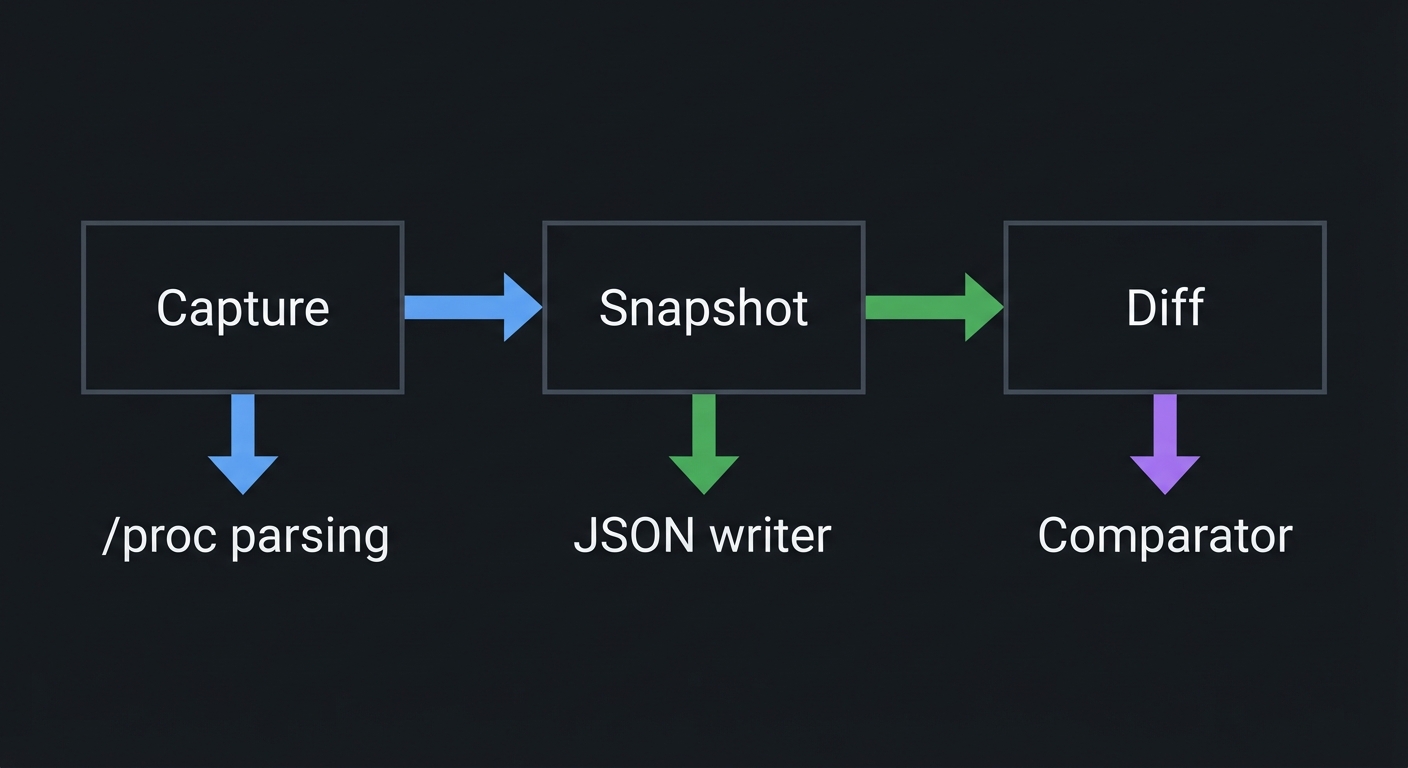
4.1 High-Level Design
┌──────────────┐   ┌──────────────┐   ┌──────────────┐
│   Capture    │──▶│   Snapshot   │──▶│    Diff      │
└──────────────┘   └──────────────┘   └──────────────┘
        │                  │                  │
        ▼                  ▼                  ▼
   /proc parsing       JSON writer        Comparator
4.2 Key Components
| Component | Responsibility | Key Decisions |
|---|---|---|
| Collector | Read system state | use robust file parsing |
| Serializer | Write JSON | stable key ordering |
| Diff Engine | Compare snapshots | human-friendly output |
4.3 Data Structures
struct kv_pair {
    char key[128];
    char value[256];
};

struct snapshot {
    struct kv_pair *items;
    size_t count;
};
4.4 Algorithm Overview
Key Algorithm: snapshot diff
- Load snapshot A and B into key-value maps.
- For each key in union, compare values.
- Output differences with context.
Complexity Analysis:
- Time: O(N) for N keys
- Space: O(N)
5. Implementation Guide
5.1 Development Environment Setup
sudo apt-get install build-essential
5.2 Project Structure
diagtool/
├── src/
│   ├── main.c
│   ├── capture.c
│   ├── diff.c
│   └── json.c
├── tests/
│   └── test_diff.sh
├── Makefile
└── README.md

5.3 The Core Question You’re Answering
“What system facts actually change program behavior across machines?”
5.4 Concepts You Must Understand First
Stop and research these before coding:
- /proc filesystem
- What does
/proc/self/limitsrepresent? - Book Reference: “How Linux Works” Ch. 8
- What does
- Resource limits
RLIMIT_NOFILE,RLIMIT_NPROCand failure modes.- Book Reference: “TLPI” Ch. 36
- Dynamic linking
- How
LD_LIBRARY_PATHand rpath affect loading. - Book Reference: “CS:APP” Ch. 7
- How
5.5 Questions to Guide Your Design
Before implementing, think through these:
- Which environment variables are most likely to cause breakage?
- How will you format diff output for easy scanning?
- What should happen if a file is missing on one system?
- How do you avoid collecting sensitive data?
5.6 Thinking Exercise
Find a Real Difference
Compare ulimit -n and /proc/sys/fs/file-max on two machines. Note how they differ and what error messages appear when exceeded.
5.7 The Interview Questions They’ll Ask
Prepare to answer these:
- “What are common causes of ‘works on my machine’ bugs?”
- “How does
/procexpose process limits?” - “What is
LD_LIBRARY_PATHand why is it risky?”
5.8 Hints in Layers
Hint 1: Start with limits
/proc/self/limits is a goldmine for differences.
Hint 2: Stable sorting Sort keys before output so diffs are deterministic.
Hint 3: Redact paths Avoid dumping private file paths unless necessary.
5.9 Books That Will Help
| Topic | Book | Chapter |
|---|---|---|
| /proc and processes | “How Linux Works” | Ch. 8 |
| Resource limits | “TLPI” | Ch. 36 |
| Dynamic linking | “CS:APP” | Ch. 7 |
5.10 Implementation Phases
Phase 1: Foundation (2-3 days)
Goals:
- Capture basic system facts
- JSON serialization
Tasks:
- Read kernel version and OS info.
- Implement simple JSON writer.
Checkpoint: capture produces valid JSON.
Phase 2: Core Functionality (3-4 days)
Goals:
- /proc parsing
- Diff engine
Tasks:
- Parse
/proc/self/limitsand/proc/self/maps. - Implement diff output.
Checkpoint: diff highlights real differences.
Phase 3: Polish & Edge Cases (2-3 days)
Goals:
- CLI flags
- Redaction and filtering
Tasks:
- Add
--include/--excludefilters. - Handle missing files gracefully.
Checkpoint: Tool runs on minimal containers.
5.11 Key Implementation Decisions
| Decision | Options | Recommendation | Rationale |
|---|---|---|---|
| Output format | JSON vs text | JSON | machine-readable diffs |
| Key storage | hash map vs array | hash map | faster diff lookup |
| Sensitivity | full dump vs redaction | redaction | safer by default |
6. Testing Strategy
6.1 Test Categories
| Category | Purpose | Examples |
|---|---|---|
| Unit Tests | Parser correctness | limits parser |
| Integration Tests | Capture+diff | run on same host |
| Edge Case Tests | Missing files | minimal container |
6.2 Critical Test Cases
- Identical snapshots: diff should be empty.
- Different limits: ensure output is readable.
- Missing /proc: degrade gracefully with warnings.
6.3 Test Data
{"RLIMIT_NOFILE":"1024"}
7. Common Pitfalls & Debugging
7.1 Frequent Mistakes
| Pitfall | Symptom | Solution |
|---|---|---|
| Unstable ordering | noisy diffs | sort keys |
| Over-collecting | sensitive output | apply filters |
| Parsing errors | crash on format | defensive parsing |
7.2 Debugging Strategies
- Log file reads to see missing paths.
- Validate JSON with
jq.
7.3 Performance Traps
Reading huge /proc entries can be slow; keep scope focused.
8. Extensions & Challenges
8.1 Beginner Extensions
- Add CSV output.
- Add a “quick summary” mode.
8.2 Intermediate Extensions
- Integrate with
sshto capture remote snapshot. - Add library version comparisons using
ldd.
8.3 Advanced Extensions
- Build a TUI diff viewer.
- Add baseline profiles for CI enforcement.
9. Real-World Connections
9.1 Industry Applications
- CI/CD debugging for environment drift.
- Support tooling for customer deployments.
9.2 Related Open Source Projects
- neofetch: https://github.com/dylanaraps/neofetch - System info tool
- strace: https://github.com/strace/strace - System call inspection
9.3 Interview Relevance
- Shows systematic debugging mindset.
- Demonstrates knowledge of /proc and limits.
10. Resources
10.1 Essential Reading
- “How Linux Works” by Brian Ward - Ch. 8
- “The Linux Programming Interface” by Michael Kerrisk - Ch. 36
10.2 Video Resources
- Linux /proc deep dives - YouTube
- SRE incident debugging talks
10.3 Tools & Documentation
man 2 getrlimit: Resource limitsman 5 proc: /proc layout
10.4 Related Projects in This Series
- Project 1 teaches inode tracking and FD awareness.
- Project 6 uses the diagnostics to compare deployment environments.
11. Self-Assessment Checklist
11.1 Understanding
- I can explain why limits differ across machines.
- I can parse
/proc/self/limitsconfidently. - I can describe how dynamic linking varies.
11.2 Implementation
- Capture and diff work reliably.
- Output is stable and readable.
- Sensitive data is handled safely.
11.3 Growth
- I can explain this tool in an interview.
- I can use it to debug a real issue.
12. Submission / Completion Criteria
Minimum Viable Completion:
captureproduces a snapshot.diffcompares two snapshots.
Full Completion:
- Includes limits, kernel, and environment info.
- Robust parsing and stable output.
Excellence (Going Above & Beyond):
- Remote capture and baseline enforcement.
- TUI diff viewer.
This guide was generated from SPRINT_5_SYSTEMS_INTEGRATION_PROJECTS.md. For the complete learning path, see the parent directory.