Learning Reverse Proxies & Nginx: Project-Based Deep Dive
Great topic! Reverse proxies are fundamental infrastructure that sit at the heart of modern web architecture. To truly understand them, you need to see the HTTP traffic flow, implement routing logic yourself, and wrestle with real configuration challenges.
Core Concept Analysis
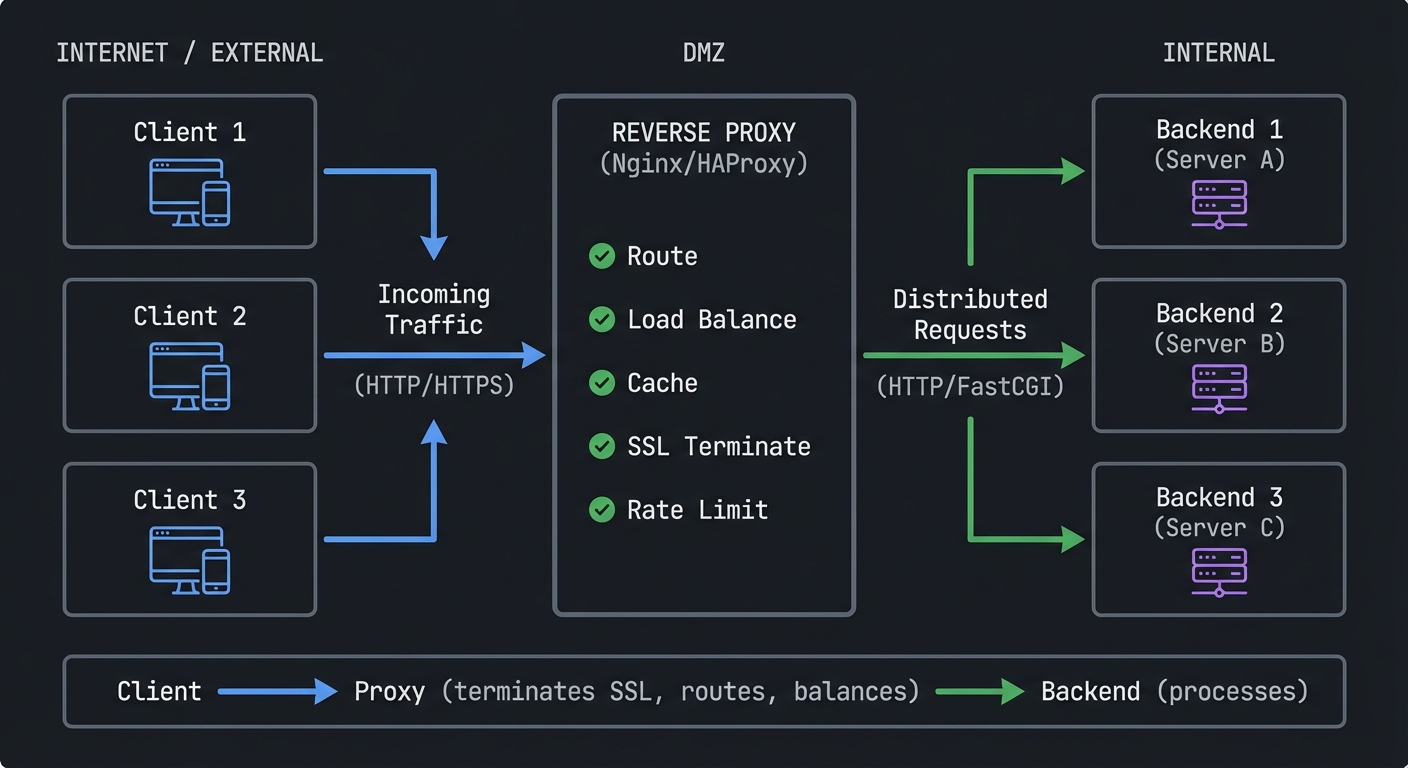
What is a Reverse Proxy?
┌──────────────┐
│   Client 1   │───┐
└──────────────┘   │
                   │      ┌─────────────────┐         ┌──────────────┐
┌──────────────┐   │      │                 │         │  Backend 1   │
│   Client 2   │───┼─────▶│ Reverse Proxy   │────────▶│  (Server A)  │
└──────────────┘   │      │   (Nginx/HAProxy)│         └──────────────┘
                   │      │                 │
┌──────────────┐   │      │  • Route        │         ┌──────────────┐
│   Client 3   │───┘      │  • Load Balance │────────▶│  Backend 2   │
└──────────────┘          │  • Cache        │         │  (Server B)  │
                          │  • SSL Terminate│         └──────────────┘
  Internet/External       │  • Rate Limit   │
                          └─────────────────┘         ┌──────────────┐
                                                       │  Backend 3   │
                                 DMZ/Internal          │  (Server C)  │
                                                       └──────────────┘

Flow: Client → Proxy (terminates SSL, routes, balances) → Backend (processes)
Reverse Proxy breaks down into these fundamental building blocks:
| Concept | What It Really Is |
|---|---|
| HTTP Protocol | Request/response cycle, headers, methods, status codes |
| Connection Management | Keep-alive, connection pooling, timeouts |
| Routing & Rewriting | URL matching, path manipulation, host-based routing |
| Load Balancing | Distribution algorithms (round-robin, least-conn, IP hash) |
| SSL/TLS Termination | Decrypt at proxy, forward plaintext to backends |
| Caching | Store responses, invalidation strategies, cache keys |
| Rate Limiting | Request throttling, token buckets, sliding windows |
| Health Checks | Backend availability, failover, circuit breakers |
Project 1: Build Your Own Reverse Proxy from Scratch
- File: REVERSE_PROXY_NGINX_LEARNING_PROJECTS.md
- Programming Language: C
- Coolness Level: Level 3: Genuinely Clever
- Business Potential: 3. The “Service & Support” Model
- Difficulty: Level 2: Intermediate
- Knowledge Area: Networking / Web Servers
- Software or Tool: Reverse Proxy Logic
- Main Book: “Nginx HTTP Server” by Clément Nedelcu
What you’ll build: A simple reverse proxy in C or Python that forwards HTTP requests to backend servers, implementing basic load balancing and logging.
Why it teaches reverse proxies: You cannot truly understand what Nginx does until you implement the core loop yourself: accept connection → parse HTTP request → select backend → forward request → relay response. Every “magic” configuration option becomes obvious when you’ve written the code it controls.
Core challenges you’ll face:
- Parsing HTTP/1.1 requests correctly (maps to understanding HTTP protocol)
- Managing multiple concurrent connections (maps to connection handling)
- Implementing round-robin and least-connections algorithms (maps to load balancing)
- Handling chunked transfer encoding and Content-Length (maps to protocol details)
- Forwarding headers like
X-Forwarded-ForandHost(maps to proxy headers)
Key Concepts:
- HTTP Protocol: “TCP/IP Illustrated, Volume 1” Ch. 9-10 by W. Richard Stevens
- Socket Programming: “The Linux Programming Interface” Ch. 56-61 by Michael Kerrisk
- Concurrent Connections: “TCP/IP Sockets in C” Ch. 6 by Donahoo & Calvert
- Load Balancing Algorithms: “Designing Data-Intensive Applications” Ch. 6 by Martin Kleppmann
Difficulty: Intermediate Time estimate: 1-2 weeks Prerequisites: Basic C or Python, understanding of TCP sockets
Real world outcome:
- Run
curl http://localhost:8080/api/usersand see it forwarded to one of three backend servers - Watch your terminal show logs:
[PROXY] 192.168.1.5 -> backend-2:3001 GET /api/users 200 45ms - Kill a backend server and see requests automatically route to healthy ones
Learning milestones:
- Day 2-3: Successfully forward a single HTTP request → understand request/response cycle
- Day 5-7: Handle multiple backends with round-robin → understand load balancing fundamentals
- Day 10-14: Add health checks and connection pooling → understand why Nginx configs exist
Project 2: Multi-Service Docker Lab with Nginx
- File: REVERSE_PROXY_NGINX_LEARNING_PROJECTS.md
- Programming Language: Nginx Configuration (DSL)
- Coolness Level: Level 1: Pure Corporate Snoozefest
- Business Potential: 3. The “Service & Support” Model
- Difficulty: Level 1: Beginner
- Knowledge Area: DevOps / Infrastructure
- Software or Tool: Nginx / Docker
- Main Book: “Nginx HTTP Server” by Clément Nedelcu
What you’ll build: A complete local development environment with Nginx routing to multiple services (API, frontend, WebSocket server, static files), with SSL, rate limiting, and caching configured.
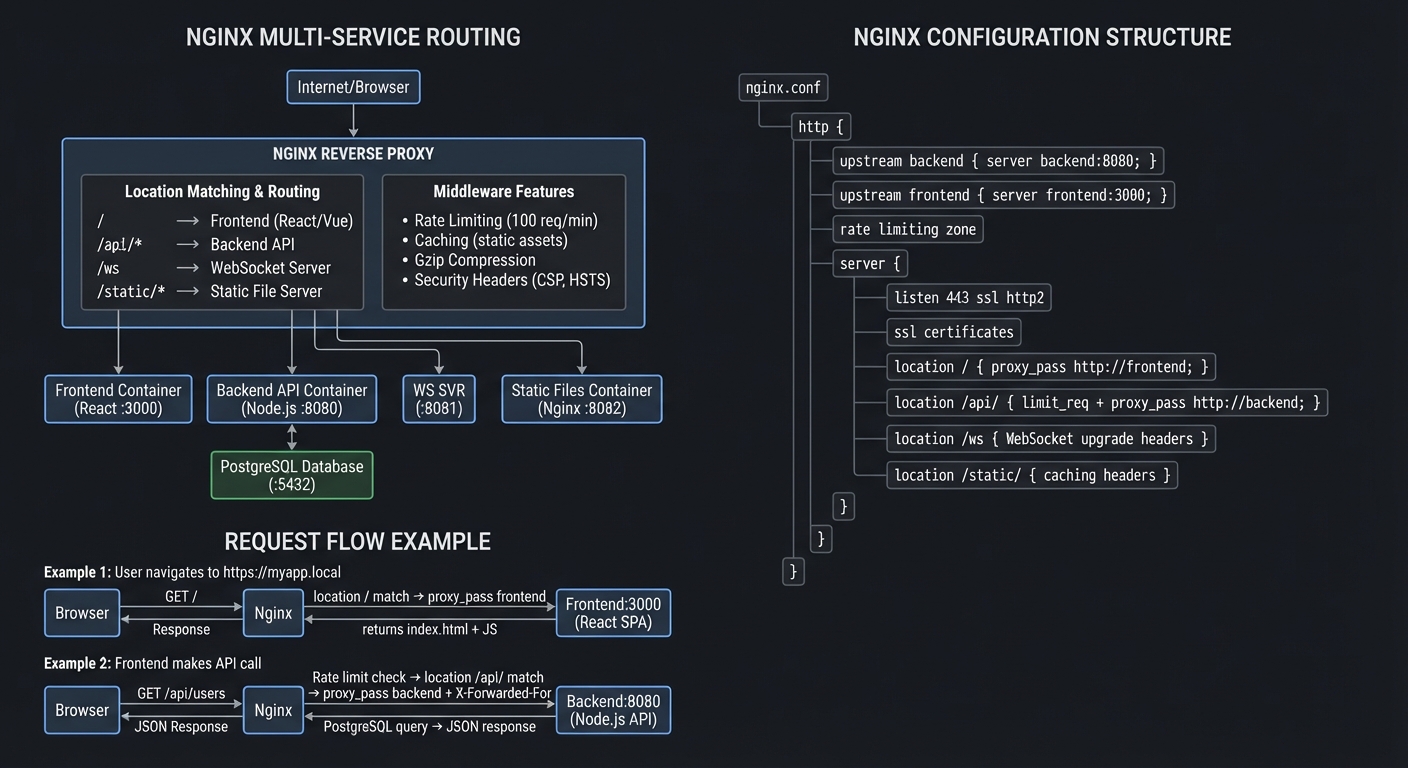
Multi-Service Architecture with Nginx
┌─────────────────────────────────────────────────────────────────────────┐
│                   NGINX MULTI-SERVICE ROUTING                           │
└─────────────────────────────────────────────────────────────────────────┘

   Internet/Browser
         │
         ▼
   ┌─────────────────────────────────────┐
   │  https://myapp.local                │
   │  (SSL/TLS Termination)              │
   │  Port 443                           │
   └──────────────┬──────────────────────┘
                  │
                  ▼
   ┌──────────────────────────────────────────────┐
   │           NGINX REVERSE PROXY                │
   │                                              │
   │  ┌────────────────────────────────────────┐ │
   │  │  Location Matching & Routing           │ │
   │  │                                        │ │
   │  │  /          → Frontend (React/Vue)    │ │
   │  │  /api/*     → Backend API             │ │
   │  │  /ws        → WebSocket Server        │ │
   │  │  /static/*  → Static File Server      │ │
   │  └────────────────────────────────────────┘ │
   │                                              │
   │  ┌────────────────────────────────────────┐ │
   │  │  Middleware Features                   │ │
   │  │  • Rate Limiting (100 req/min)        │ │
   │  │  • Caching (static assets)            │ │
   │  │  • Gzip Compression                   │ │
   │  │  • Security Headers (CSP, HSTS)       │ │
   │  └────────────────────────────────────────┘ │
   └──────┬─────────┬──────────┬─────────┬───────┘
          │         │          │         │
          ▼         ▼          ▼         ▼
   ┌──────────┐ ┌─────────┐ ┌─────┐ ┌──────────┐
   │ Frontend │ │ Backend │ │ WS  │ │  Static  │
   │Container │ │   API   │ │ SVR │ │  Files   │
   │          │ │Container│ │     │ │Container │
   │  React   │ │         │ │     │ │          │
   │  :3000   │ │ Node.js │ │:8081│ │  Nginx   │
   │          │ │  :8080  │ │     │ │  :8082   │
   └──────────┘ └────┬────┘ └─────┘ └──────────┘
                     │
                     ▼
              ┌────────────┐
              │ PostgreSQL │
              │  Database  │
              │   :5432    │
              └────────────┘

┌─────────────────────────────────────────────────────────────────────────┐
│                    NGINX CONFIGURATION STRUCTURE                        │
└─────────────────────────────────────────────────────────────────────────┘

nginx.conf
├── http {
│   ├── upstream backend {
│   │   └── server backend:8080;
│   │   }
│   │
│   ├── upstream frontend {
│   │   └── server frontend:3000;
│   │   }
│   │
│   ├── rate limiting zone
│   │   └── limit_req_zone $binary_remote_addr zone=api_limit:10m rate=100r/m;
│   │
│   └── server {
│       ├── listen 443 ssl http2;
│       ├── server_name myapp.local;
│       │
│       ├── ssl_certificate     /etc/nginx/ssl/cert.pem;
│       ├── ssl_certificate_key /etc/nginx/ssl/key.pem;
│       │
│       ├── location / {
│       │   └── proxy_pass http://frontend;
│       │   }
│       │
│       ├── location /api/ {
│       │   ├── limit_req zone=api_limit burst=20;
│       │   ├── proxy_pass http://backend;
│       │   └── proxy_set_header X-Forwarded-For $proxy_add_x_forwarded_for;
│       │   }
│       │
│       ├── location /ws {
│       │   ├── proxy_pass http://websocket:8081;
│       │   ├── proxy_http_version 1.1;
│       │   ├── proxy_set_header Upgrade $http_upgrade;
│       │   └── proxy_set_header Connection "upgrade";
│       │   }
│       │
│       └── location /static/ {
│           ├── proxy_pass http://static:8082;
│           ├── proxy_cache static_cache;
│           └── add_header Cache-Control "public, max-age=31536000";
│           }
│       }
└── }

┌─────────────────────────────────────────────────────────────────────────┐
│                        REQUEST FLOW EXAMPLE                             │
└─────────────────────────────────────────────────────────────────────────┘

1) User navigates to https://myapp.local
   ┌─────────┐
   │ Browser │──────▶ GET / ──────▶ Nginx (SSL termination)
   └─────────┘                          │
                                        ▼
                               location / match
                                        │
                                        ▼
                               proxy_pass http://frontend
                                        │
                                        ▼
                                ┌───────────────┐
                                │ Frontend:3000 │
                                │ (React SPA)   │
                                └───────┬───────┘
                                        │
   ┌─────────┐                          │
   │ Browser │◀─── index.html + JS ─────┘
   └─────────┘

2) Frontend makes API call
   ┌─────────┐
   │ Browser │──────▶ GET /api/users ──────▶ Nginx
   └─────────┘                                  │
                                                ▼
                                       Rate limit check
                                       (100 req/min OK?)
                                                │
                                                ▼
                                       location /api/ match
                                                │
                                                ▼
                                       proxy_pass http://backend
                                       + X-Forwarded-For header
                                                │
                                                ▼
                                        ┌───────────────┐
                                        │ Backend:8080  │
                                        │ (Node.js API) │
                                        └───────┬───────┘
                                                │
                                                ▼
                                        ┌───────────────┐
                                        │ PostgreSQL    │
                                        │ Query users   │
                                        └───────┬───────┘
   ┌─────────┐                                  │
   │ Browser │◀───── JSON response ─────────────┘
   └─────────┘
Why it teaches Nginx: Configuration files make sense only when you see their effects. By building a realistic multi-service setup, you’ll understand why each directive exists and what happens when you change it.
Core challenges you’ll face:
- Writing
locationblocks with correct matching precedence (maps to URL routing) - Configuring upstream blocks with health checks (maps to backend management)
- Setting up SSL certificates with Let’s Encrypt/mkcert (maps to TLS termination)
- Implementing rate limiting with
limit_req_zone(maps to traffic control) - Configuring proxy buffering and timeouts (maps to performance tuning)
- WebSocket proxying with
proxy_http_versionandUpgradeheaders (maps to protocol upgrades)
Key Concepts:
- Nginx Architecture: “Nginx HTTP Server” Ch. 1-3 by Clément Nedelcu
- SSL/TLS Fundamentals: “Serious Cryptography, 2nd Edition” Ch. 11-13 by Jean-Philippe Aumasson
- HTTP Caching: “HTTP: The Definitive Guide” Ch. 7 by Gourley & Totty
- Docker Networking: “The Book of Kubernetes” Ch. 4-5 by Alan Hohn
Difficulty: Beginner-Intermediate Time estimate: Weekend to 1 week Prerequisites: Basic Docker, command line comfort
Real world outcome:
- Visit
https://myapp.localand see your frontend - API calls to
https://myapp.local/api/*route to your backend service - WebSocket connections to
wss://myapp.local/wsconnect to your real-time server - Static files at
https://myapp.local/static/*served with aggressive caching headers - Hit the rate limit and see
429 Too Many Requests
Learning milestones:
- Hour 4: Basic routing working → understand
locationblocks andproxy_pass - Day 2: SSL and multiple services → understand virtual hosts and TLS termination
- Day 4-7: Caching, rate limiting, WebSockets → understand advanced Nginx modules
Project 3: Build a Load Balancer with Health Checks
- File: REVERSE_PROXY_NGINX_LEARNING_PROJECTS.md
- Programming Language: Go
- Coolness Level: Level 3: Genuinely Clever
- Business Potential: 4. The “Open Core” Infrastructure
- Difficulty: Level 3: Advanced
- Knowledge Area: Distributed Systems / Networking
- Software or Tool: Load Balancer Logic
- Main Book: “Building Microservices” by Sam Newman
What you’ll build: A custom load balancer (in Go or Rust) that implements multiple algorithms, active health checking, graceful backend draining, and a real-time dashboard showing traffic distribution.
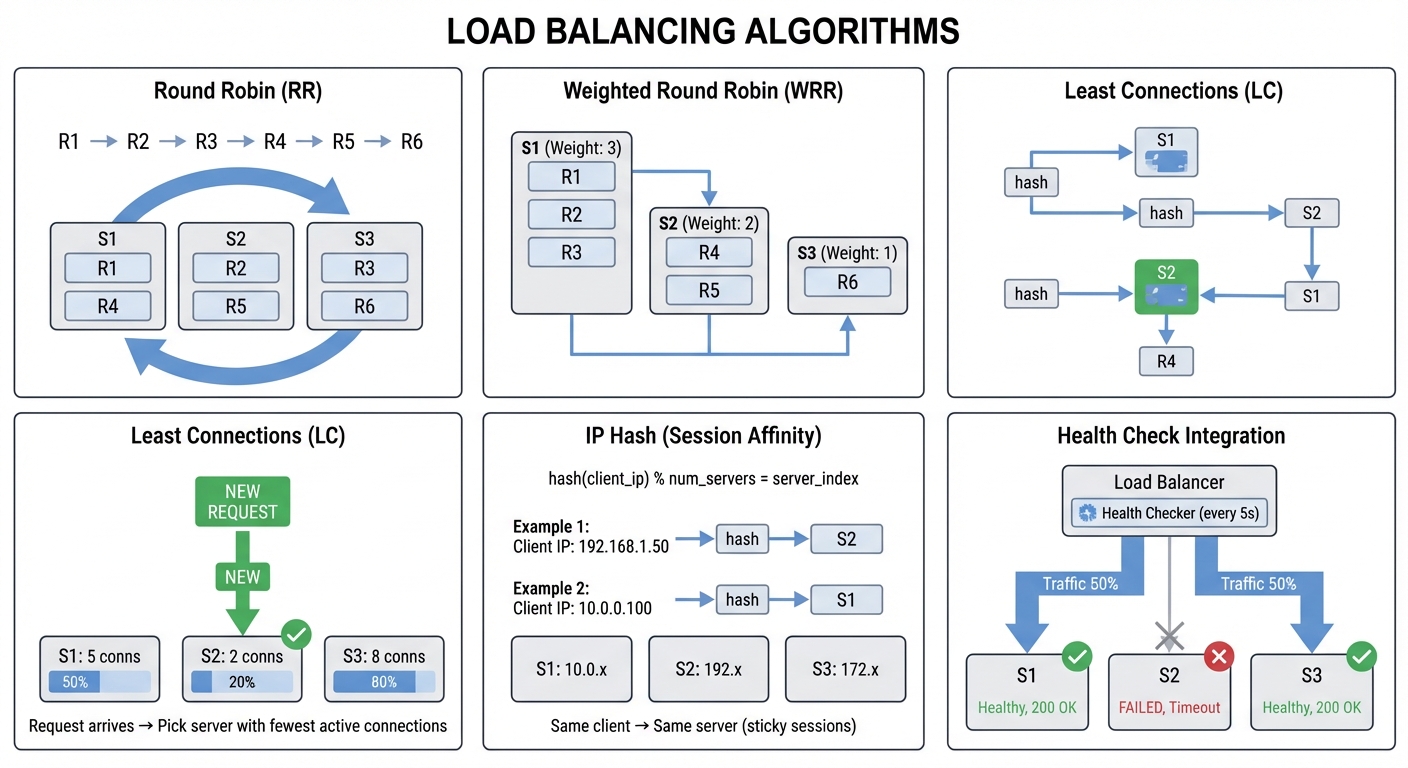
Load Balancing Algorithms Visualized
┌─────────────────────────────────────────────────────────────────────────┐
│                      LOAD BALANCING ALGORITHMS                          │
└─────────────────────────────────────────────────────────────────────────┘

1) Round Robin (RR)
   Requests: R1 → R2 → R3 → R4 → R5 → R6

   ┌──────┐    ┌──────┐    ┌──────┐
   │ S1   │◄───│ S2   │◄───│ S3   │
   │ R1,R4│    │ R2,R5│    │ R3,R6│
   └──────┘    └──────┘    └──────┘
    ▲                           │
    └───────────────────────────┘

2) Weighted Round Robin (WRR)
   Weights: S1=3, S2=2, S3=1

   ┌──────┐    ┌──────┐    ┌──────┐
   │ S1   │    │ S2   │    │ S3   │
   │R1,R2,│    │ R4,R5│    │  R6  │
   │  R3  │    │      │    │      │
   └──────┘    └──────┘    └──────┘
   Weight:3    Weight:2    Weight:1

3) Least Connections (LC)

   Request arrives → Pick server with fewest active connections

   ┌──────┐    ┌──────┐    ┌──────┐
   │ S1   │    │ S2   │    │ S3   │
   │ 5    │    │ 2    │◄── │ 8    │
   │conns │    │conns │NEW │conns │
   └──────┘    └──────┘    └──────┘
                  ▲
                  └─── New request goes here

4) IP Hash (Session Affinity)

   hash(client_ip) % num_servers = server_index

   Client IP: 192.168.1.50 → hash → S2
   Client IP: 10.0.0.100   → hash → S1

   ┌──────┐    ┌──────┐    ┌──────┐
   │ S1   │    │ S2   │    │ S3   │
   │10.0.x│    │192.x │    │172.x │
   └──────┘    └──────┘    └──────┘

   Same client → Same server (sticky sessions)

5) Health Check Integration

   ┌─────────────────┐
   │ Load Balancer   │
   │                 │
   │ Health Checker  │───┐
   │ (every 5s)      │   │
   └────────┬────────┘   │
            │            │
   ┌────────┼────────────┼────────┐
   │        ▼            ▼        │
   │   ┌────────┐  ┌────────┐   ┌────────┐
   │   │ S1 ✓   │  │ S2 ✗   │   │ S3 ✓   │
   │   │Healthy │  │FAILED  │   │Healthy │
   │   │200 OK  │  │Timeout │   │200 OK  │
   │   └────────┘  └────────┘   └────────┘
   │       ▲           ╳             ▲
   └───────┼───────────┼─────────────┼─────┘
           │           │             │
         Traffic   No traffic     Traffic
         (50%)     (removed)       (50%)
Why it teaches load balancing: Load balancing seems simple until you handle edge cases: What if a backend is slow but not dead? How do you drain connections gracefully during deployment? By building this, you’ll understand why HAProxy and Nginx have so many knobs.
Core challenges you’ll face:
- Implementing weighted round-robin and least-connections (maps to distribution algorithms)
- Building active health checks with configurable intervals (maps to availability)
- Handling connection draining during backend removal (maps to graceful deployments)
- Sticky sessions via cookies or IP hashing (maps to session affinity)
- Exposing metrics for Prometheus/Grafana (maps to observability)
Key Concepts:
- Load Balancing Theory: “Building Microservices, 2nd Edition” Ch. 8 by Sam Newman
- Health Check Patterns: “Release It!, 2nd Edition” Ch. 5 by Michael Nygard
- Distributed Systems: “Designing Data-Intensive Applications” Ch. 6 by Martin Kleppmann
- Go Networking: “Learning Go, 2nd Edition” Ch. 13-14 by Jon Bodner
Difficulty: Intermediate-Advanced Time estimate: 2-3 weeks Prerequisites: Go or Rust, basic distributed systems concepts
Real world outcome:
- Open
http://localhost:9000/dashboardand see real-time graphs of requests per backend - Run
curl http://localhost:8080/api/datarepeatedly and watch traffic distribute - Kill a backend container and see the dashboard show it turning red, with traffic rerouting
- Deploy a new backend version and watch “draining” state before old backend is removed
Learning milestones:
- Week 1: Basic forwarding with round-robin → understand core proxy mechanics
- Week 2: Health checks and failover → understand availability patterns
- Week 3: Dashboard and metrics → understand observability in infrastructure
Project 4: Implement HTTP Caching Layer
- File: REVERSE_PROXY_NGINX_LEARNING_PROJECTS.md
- Programming Language: C
- Coolness Level: Level 3: Genuinely Clever
- Business Potential: 4. The “Open Core” Infrastructure
- Difficulty: Level 3: Advanced
- Knowledge Area: Web Performance / Caching
- Software or Tool: HTTP Caching Logic
- Main Book: “HTTP: The Definitive Guide” by Gourley & Totty
What you’ll build: A caching reverse proxy that stores responses, respects HTTP cache headers (Cache-Control, ETag, Last-Modified), implements cache invalidation, and shows cache hit/miss statistics.
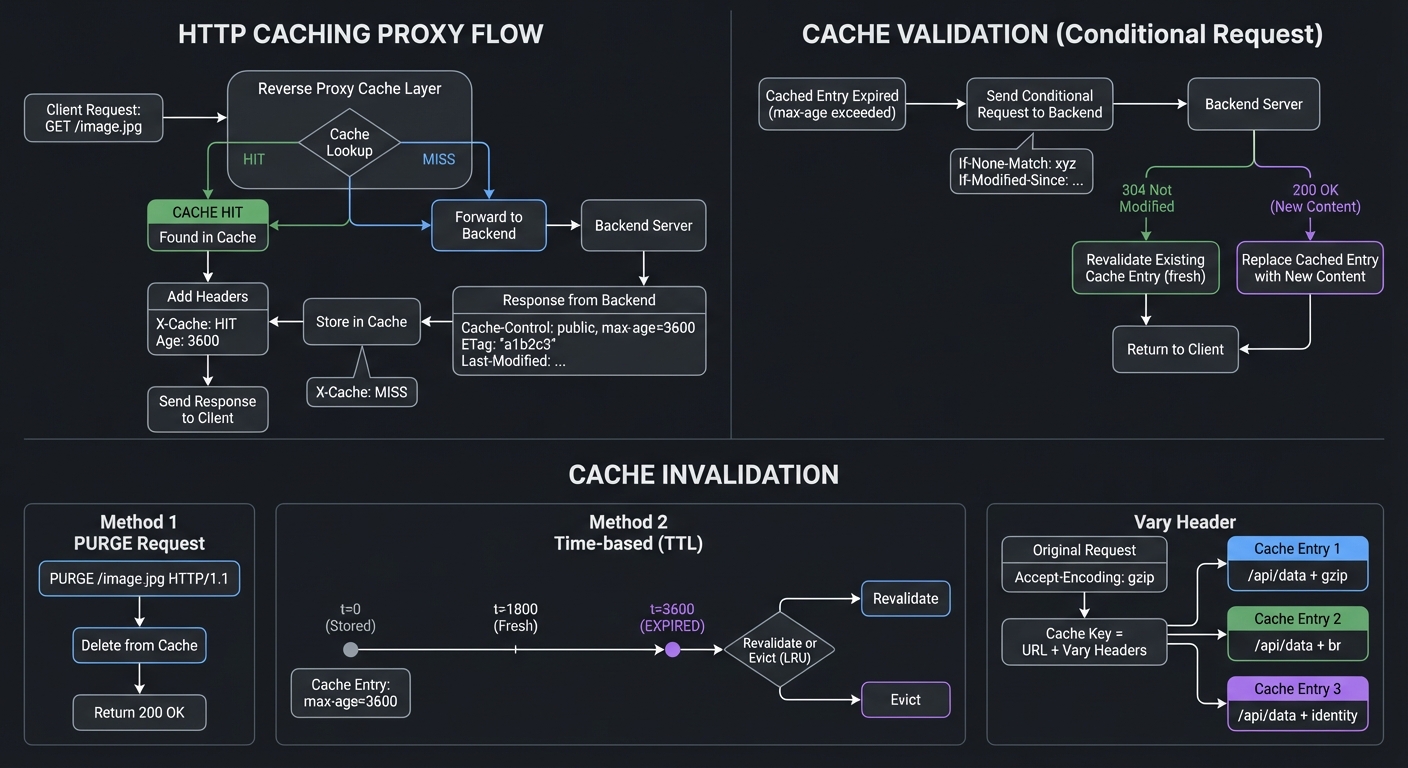
HTTP Caching Flow Diagram
┌─────────────────────────────────────────────────────────────────────────┐
│                        HTTP CACHING PROXY FLOW                          │
└─────────────────────────────────────────────────────────────────────────┘

Client Request: GET /image.jpg
     │
     ▼
┌─────────────────┐
│  Reverse Proxy  │
│  Cache Layer    │
└────────┬────────┘
         │
         ▼
    ┌────────┐
    │ Cache  │
    │Lookup  │
    └───┬────┘
        │
    ┌───┴─────┐
    │         │
  Found?    Not Found?
    │         │
    ▼         ▼
┌───────┐  ┌──────────────┐      ┌─────────┐
│CACHE  │  │ Forward to   │─────▶│ Backend │
│ HIT   │  │   Backend    │      │ Server  │
└───┬───┘  └──────────────┘      └────┬────┘
    │                                  │
    │                                  ▼
    │                          ┌──────────────┐
    │                          │   Response   │
    │                          │ Headers:     │
    │                          │ Cache-Control│
    │                          │ ETag/Last-   │
    │                          │  Modified    │
    │                          └──────┬───────┘
    │                                 │
    │                            ┌────▼────┐
    │                            │ Store   │
    │                            │in Cache │
    │                            └────┬────┘
    │                                 │
    └─────────┬───────────────────────┘
              ▼
      ┌───────────────┐
      │ Add Headers:  │
      │ X-Cache: HIT  │
      │ X-Cache: MISS │
      │ Age: 3600     │
      └───────┬───────┘
              ▼
      ┌───────────────┐
      │ Send Response │
      │  to Client    │
      └───────────────┘

┌─────────────────────────────────────────────────────────────────────────┐
│                    CACHE VALIDATION (Conditional Request)               │
└─────────────────────────────────────────────────────────────────────────┘

Cached Entry Expired (max-age exceeded)
     │
     ▼
┌──────────────────────┐
│ Send Conditional     │       ┌─────────┐
│ Request to Backend:  │──────▶│ Backend │
│ If-None-Match: xyz   │       │ Server  │
│ If-Modified-Since    │       └────┬────┘
└──────────────────────┘            │
                                    │
                        ┌───────────┴────────────┐
                        │                        │
                        ▼                        ▼
                ┌───────────────┐      ┌─────────────────┐
                │  304 Not      │      │  200 OK         │
                │  Modified     │      │  (New Content)  │
                └───────┬───────┘      └────────┬────────┘
                        │                       │
                        ▼                       ▼
                ┌───────────────┐      ┌─────────────────┐
                │ Revalidate    │      │ Replace Cached  │
                │ Existing Cache│      │ Entry with New  │
                │ Entry (fresh) │      │ Content         │
                └───────┬───────┘      └────────┬────────┘
                        │                       │
                        └───────────┬───────────┘
                                    ▼
                            ┌───────────────┐
                            │ Return to     │
                            │ Client        │
                            └───────────────┘

┌─────────────────────────────────────────────────────────────────────────┐
│                         CACHE INVALIDATION                              │
└─────────────────────────────────────────────────────────────────────────┘

Method 1: PURGE Request
   PURGE /image.jpg HTTP/1.1  ────▶ Delete from Cache
                                    Return 200 OK

Method 2: Time-based (TTL)
   Cache Entry: max-age=3600
   ┌──────────┐     ┌──────────┐     ┌──────────┐
   │  t=0     │────▶│ t=1800   │────▶│ t=3600   │
   │  Stored  │     │  Fresh   │     │ EXPIRED  │
   └──────────┘     └──────────┘     └────┬─────┘
                                          │
                                          ▼
                                    Revalidate or
                                    Evict (LRU)

Method 3: Vary Header
   Original Request: Accept-Encoding: gzip
   Cache Key = URL + Vary Headers

   /api/data + gzip     → Cache Entry 1
   /api/data + br       → Cache Entry 2
   /api/data + identity → Cache Entry 3
Why it teaches caching: Caching is where most proxy “magic” happens. Understanding cache keys, vary headers, and invalidation strategies demystifies why your CDN behaves strangely and why Nginx’s caching directives are complex.
Core challenges you’ll face:
- Parsing and respecting
Cache-Controldirectives (maps to HTTP cache semantics) - Implementing conditional requests with
ETag/If-None-Match(maps to validation) - Handling
Varyheader for cache key generation (maps to content negotiation) - Building cache invalidation via PURGE requests (maps to cache management)
- Storing responses efficiently on disk with LRU eviction (maps to storage management)
Key Concepts:
- HTTP Caching: RFC 7234 (HTTP Caching) - The authoritative source
- Cache Algorithms: “Algorithms, Fourth Edition” Ch. 4 by Sedgewick & Wayne (for LRU)
- File I/O: “The Linux Programming Interface” Ch. 4-5 by Michael Kerrisk
Difficulty: Intermediate Time estimate: 1-2 weeks Prerequisites: Understanding of HTTP headers, basic file I/O
Real world outcome:
- First request:
curl -I http://localhost:8080/image.jpgshowsX-Cache: MISS - Second request: Same URL shows
X-Cache: HITand returns in <5ms - Send
PURGE /image.jpgand see cache cleared - Dashboard shows: “Cache hits: 847, Misses: 23, Hit rate: 97.3%”
Learning milestones:
- Day 3-4: Basic caching working → understand cache storage and retrieval
- Day 7-10: Full HTTP cache semantics → understand why CDN configs are complex
- Day 14: Invalidation and monitoring → understand production cache operations
Project 5: Security-Focused WAF Proxy
- File: REVERSE_PROXY_NGINX_LEARNING_PROJECTS.md
- Programming Language: C
- Coolness Level: Level 4: Hardcore Tech Flex
- Business Potential: 3. The “Service & Support” Model
- Difficulty: Level 3: Advanced
- Knowledge Area: Web Security / Networking
- Software or Tool: WAF Logic
- Main Book: “Web Application Hacker’s Handbook” by Stuttard & Pinto
What you’ll build: A Web Application Firewall (WAF) proxy that inspects requests, blocks common attacks (SQL injection, XSS, path traversal), implements rate limiting, and logs suspicious activity.
WAF Request Inspection Flow
┌─────────────────────────────────────────────────────────────────────────┐
│                 WEB APPLICATION FIREWALL (WAF) FLOW                     │
└─────────────────────────────────────────────────────────────────────────┘

Client Request
     │
     ▼
┌─────────────────┐
│   WAF Proxy     │
│  (Entry Point)  │
└────────┬────────┘
         │
         ▼
┌────────────────────────────────────────┐
│     INSPECTION PIPELINE                │
│                                        │
│  ┌──────────────────────────────────┐ │
│  │  1. IP Blacklist Check           │ │
│  │     • Known attack IPs           │ │
│  │     • Tor exit nodes (optional)  │ │
│  └──────────┬───────────────────────┘ │
│             │                          │
│             ▼                          │
│  ┌──────────────────────────────────┐ │
│  │  2. Rate Limiting                │ │
│  │     • Per-IP: 100 req/min        │ │
│  │     • Per-Path: 50 req/min       │ │
│  │     • Token bucket algorithm     │ │
│  └──────────┬───────────────────────┘ │
│             │                          │
│             ▼                          │
│  ┌──────────────────────────────────┐ │
│  │  3. SQL Injection Detection      │ │
│  │     Pattern match:               │ │
│  │     • ' OR 1=1--                 │ │
│  │     • UNION SELECT               │ │
│  │     • DROP TABLE                 │ │
│  │     • ; DELETE FROM              │ │
│  └──────────┬───────────────────────┘ │
│             │                          │
│             ▼                          │
│  ┌──────────────────────────────────┐ │
│  │  4. XSS Detection                │ │
│  │     Pattern match:               │ │
│  │     • <script>                   │ │
│  │     • javascript:                │ │
│  │     • onerror=                   │ │
│  │     • eval(                      │ │
│  └──────────┬───────────────────────┘ │
│             │                          │
│             ▼                          │
│  ┌──────────────────────────────────┐ │
│  │  5. Path Traversal Detection    │ │
│  │     Pattern match:               │ │
│  │     • ../../../etc/passwd        │ │
│  │     • ..%2F..%2F                 │ │
│  │     • %00 (null byte)            │ │
│  └──────────┬───────────────────────┘ │
│             │                          │
│             ▼                          │
│  ┌──────────────────────────────────┐ │
│  │  6. Header Validation            │ │
│  │     • Content-Length limits      │ │
│  │     • User-Agent checks          │ │
│  │     • Host header validation     │ │
│  └──────────┬───────────────────────┘ │
└─────────────┼────────────────────────┘
              │
    ┌─────────┴──────────┐
    │                    │
 BLOCKED?             ALLOWED?
    │                    │
    ▼                    ▼
┌─────────┐      ┌──────────────┐
│ 403     │      │ Forward to   │
│Forbidden│      │   Backend    │
│         │      └──────┬───────┘
│ + Log   │             │
└─────────┘             ▼
                 ┌──────────────┐
                 │   Backend    │
                 │   Server     │
                 └──────┬───────┘
                        │
                        ▼
                 ┌──────────────┐
                 │   Response   │
                 └──────┬───────┘
                        │
                        ▼
                 ┌──────────────┐
                 │ Add Security │
                 │   Headers    │
                 │              │
                 │ • CSP        │
                 │ • X-Frame-   │
                 │   Options    │
                 │ • HSTS       │
                 │ • X-XSS-     │
                 │   Protection │
                 └──────┬───────┘
                        │
                        ▼
                 ┌──────────────┐
                 │ Return to    │
                 │   Client     │
                 └──────────────┘

┌─────────────────────────────────────────────────────────────────────────┐
│                     ATTACK DETECTION EXAMPLES                           │
└─────────────────────────────────────────────────────────────────────────┘

1) SQL Injection Attack

   Request: GET /search?q=' OR 1=1--
                              │
                              ▼
                   ┌────────────────────┐
                   │ Pattern Match:     │
                   │ ' OR 1=1--         │
                   │ DETECTED ✗         │
                   └────────┬───────────┘
                            │
                            ▼
   ┌──────────────────────────────────────┐
   │ Response: 403 Forbidden              │
   │ X-WAF-Block-Reason: SQL_INJECTION    │
   └──────────────────────────────────────┘
   │
   ▼
   Log: [2024-12-27 14:30:15] BLOCKED
        IP: 192.168.1.50
        Attack: SQL_INJECTION
        Pattern: ' OR 1=1--
        Path: /search

2) Rate Limiting

   Client IP: 192.168.1.100
   Time window: 60 seconds

   Request 1-100:  ✓ ALLOWED
   Request 101:    ✗ BLOCKED (rate limit exceeded)

   ┌──────────────────────────────────────┐
   │ Response: 429 Too Many Requests      │
   │ Retry-After: 45                      │
   └──────────────────────────────────────┘

3) Path Traversal

   Request: GET /files?path=../../../../etc/passwd
                                  │
                                  ▼
                   ┌────────────────────┐
                   │ Pattern Match:     │
                   │ ../ sequence       │
                   │ DETECTED ✗         │
                   └────────┬───────────┘
                            │
                            ▼
   ┌──────────────────────────────────────┐
   │ Response: 403 Forbidden              │
   │ X-WAF-Block-Reason: PATH_TRAVERSAL   │
   └──────────────────────────────────────┘

┌─────────────────────────────────────────────────────────────────────────┐
│                         WAF DASHBOARD METRICS                           │
└─────────────────────────────────────────────────────────────────────────┘

┌──────────────────────────────────────────────────────────────────┐
│  Total Requests: 10,247                                          │
│  Blocked: 127 (1.2%)                                             │
│  Allowed: 10,120 (98.8%)                                         │
└──────────────────────────────────────────────────────────────────┘

Attacks Blocked by Type:
┌─────────────────┬───────┬─────────────────────────┐
│ SQL Injection   │  45   │ ████████████░░░░░░░░    │
│ XSS             │  32   │ ████████░░░░░░░░░░░░    │
│ Path Traversal  │  18   │ ████░░░░░░░░░░░░░░░░    │
│ Rate Limiting   │  28   │ ██████░░░░░░░░░░░░░░    │
│ IP Blacklist    │   4   │ █░░░░░░░░░░░░░░░░░░░    │
└─────────────────┴───────┴─────────────────────────┘

Top Attack Sources (IP):
1. 192.168.1.50    - 23 attacks
2. 10.0.0.100      - 18 attacks
3. 172.16.0.5      - 12 attacks
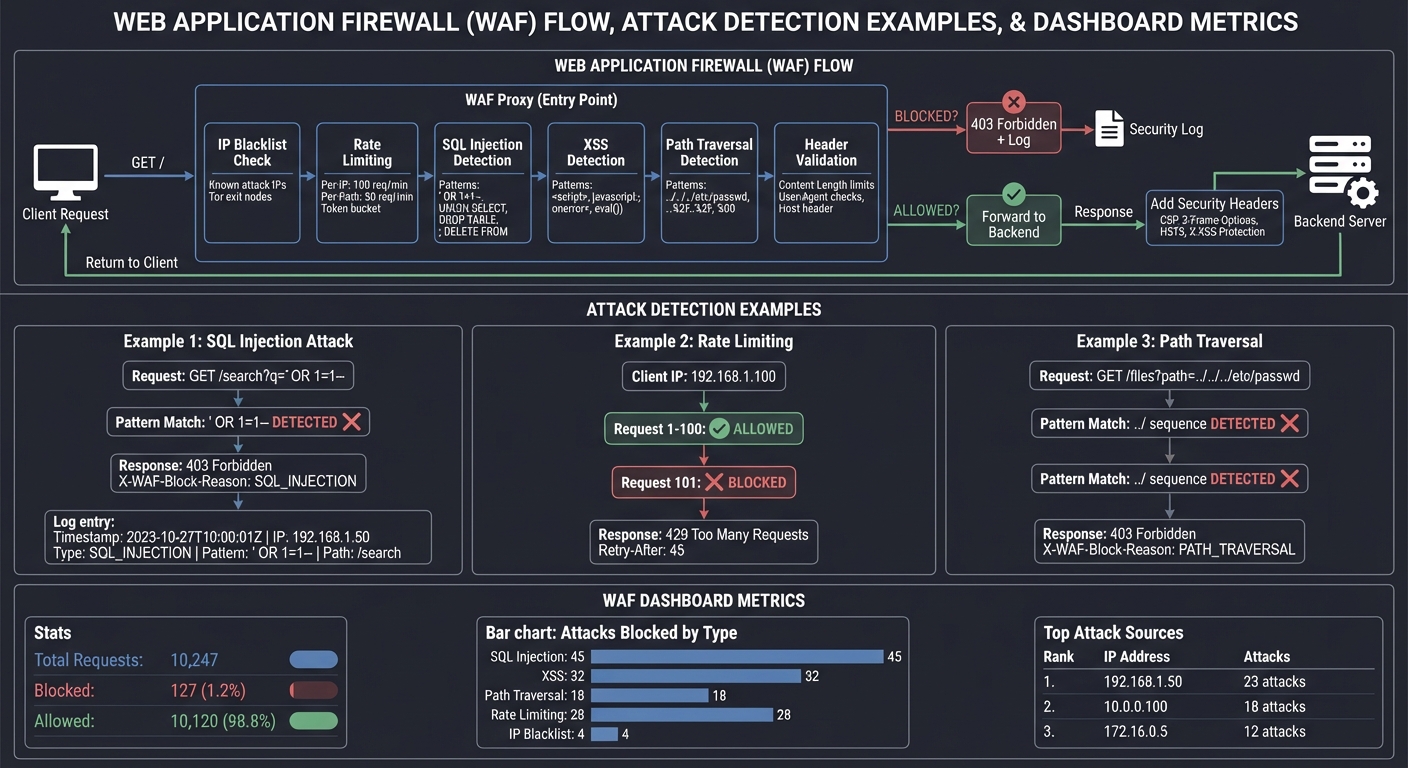
Why it teaches security: Reverse proxies are often the first line of defense. Building a WAF forces you to understand how attacks work at the HTTP level and why security headers matter.
Core challenges you’ll face:
- Pattern matching for SQL injection and XSS (maps to attack detection)
- Implementing IP-based and token bucket rate limiting (maps to DDoS mitigation)
- Adding security headers (
CSP,X-Frame-Options, etc.) (maps to response hardening) - Logging and alerting on suspicious patterns (maps to security monitoring)
- Handling false positives without breaking legitimate traffic (maps to real-world tradeoffs)
Resources for key challenges:
- “Bug Bounty Bootcamp” by Vickie Li - Understanding attacks from attacker perspective
Key Concepts:
- Web Security Fundamentals: “Foundations of Information Security” Ch. 8-10 by Jason Andress
- Attack Patterns: “Bug Bounty Bootcamp” Ch. 6-12 by Vickie Li
- Rate Limiting: “Designing Data-Intensive Applications” Ch. 4 by Martin Kleppmann
Difficulty: Intermediate-Advanced Time estimate: 2 weeks Prerequisites: Security fundamentals, regex, HTTP understanding
Real world outcome:
- Send
curl "http://localhost:8080/search?q='; DROP TABLE users;--"→ blocked with 403 - Send 100 requests in 1 second → see rate limiting kick in with 429
- Check
waf.logand see:[BLOCKED] IP:192.168.1.50 Pattern:SQL_INJECTION Path:/search - View dashboard showing attack attempts by category and source IP
Learning milestones:
- Day 3-5: Basic pattern matching → understand common attack vectors
- Day 7-10: Rate limiting and logging → understand traffic analysis
- Day 14: Full WAF with dashboard → understand production security operations
Project Comparison Table
| Project | Difficulty | Time | Depth of Understanding | Fun Factor | Real-World Applicability |
|---|---|---|---|---|---|
| Build Own Proxy | Intermediate | 1-2 weeks | ⭐⭐⭐⭐⭐ | ⭐⭐⭐ | Foundation for everything |
| Docker Lab with Nginx | Beginner-Int | Weekend-1 week | ⭐⭐⭐ | ⭐⭐⭐⭐ | Directly usable in jobs |
| Load Balancer | Int-Advanced | 2-3 weeks | ⭐⭐⭐⭐ | ⭐⭐⭐⭐ | DevOps/SRE skills |
| Caching Layer | Intermediate | 1-2 weeks | ⭐⭐⭐⭐ | ⭐⭐⭐ | CDN understanding |
| WAF Proxy | Int-Advanced | 2 weeks | ⭐⭐⭐⭐ | ⭐⭐⭐⭐⭐ | Security expertise |
Recommendation
Based on wanting deep understanding of how these technologies work:
Start with Project 1 (Build Your Own Reverse Proxy) → This gives you the mental model that makes everything else click. Once you’ve parsed HTTP requests and forwarded them yourself, Nginx configuration files transform from magic incantations to obvious mappings.
Then do Project 2 (Docker Lab with Nginx) → Apply your understanding to the real tool. You’ll configure Nginx with confidence because you know what’s happening underneath.
Optional depth: If you want to specialize, pick Project 3 (Load Balancing) for DevOps/SRE paths, or Project 5 (WAF) for security paths.
Final Capstone Project: Production-Grade API Gateway
What you’ll build: A complete API Gateway that combines everything: reverse proxying, load balancing, authentication (JWT validation), rate limiting, caching, request transformation, and a management dashboard—deployed with Docker Compose and monitored with Prometheus/Grafana.
Why it teaches everything together: Real infrastructure combines all these concepts. An API Gateway is the single point where routing, security, performance, and observability meet. Building one forces you to make the same tradeoffs that Nginx, Kong, and AWS API Gateway engineers make.
Core challenges you’ll face:
- JWT validation and authentication middleware (maps to auth at the edge)
- Request/response transformation (header injection, body modification)
- Per-route configuration (different rate limits, caching policies per endpoint)
- Circuit breaker pattern for failing backends
- Hot-reload configuration without dropping connections
- Comprehensive metrics and logging for debugging
Key Concepts:
- API Gateway Patterns: “Building Microservices, 2nd Edition” Ch. 5-6 by Sam Newman
- Authentication: “Foundations of Information Security” Ch. 5 by Jason Andress
- Circuit Breakers: “Release It!, 2nd Edition” Ch. 5 by Michael Nygard
- Observability: “Designing Data-Intensive Applications” Ch. 4 by Martin Kleppmann
- Configuration Management: “Infrastructure and Ops Superstream: Distributed Computing” by Sam Newman
Difficulty: Advanced Time estimate: 1 month+ Prerequisites: Complete at least Projects 1 and 2
Real world outcome:
- Deploy with
docker-compose upand have a full API gateway running - Configure routes via YAML:
path: /api/v1/* → backend: user-service, rate_limit: 100/min - Open
http://gateway.local:9090/dashboardand see:- Real-time request flow visualization
- Per-route latency percentiles
- Backend health status
- Rate limit consumption per API key
- Send requests without JWT → 401 Unauthorized
- Trigger circuit breaker by killing backend → see fallback response
- Hot-reload config → zero dropped connections
Learning milestones:
- Week 1-2: Core gateway with routing and auth → understand edge services
- Week 2-3: Rate limiting, caching, circuit breakers → understand resilience patterns
- Week 3-4: Dashboard and metrics → understand production operations
- Week 4+: Configuration hot-reload, graceful shutdown → understand zero-downtime operations
This progression will take you from “I kind of know what Nginx does” to “I could rebuild it if I needed to.” The key is building things that force you to handle the edge cases that make reverse proxies complex.