Learn Pydantic: Data Validation Mastery in Python
Goal: Deeply understand Pydantic—from basic validation to advanced features like discriminated unions, custom types, and the Rust-powered internals—and how it compares to dataclasses and attrs.
Why Pydantic Matters
Pydantic has become the de facto standard for data validation in Python. It powers FastAPI, LangChain, and is used by Netflix, Microsoft, NASA, and OpenAI. Understanding Pydantic deeply means:
- Bulletproof APIs: Validate every input before it touches your business logic
- Self-documenting schemas: Generate OpenAPI specs automatically
- Type-safe Python: Catch errors at runtime that mypy can’t catch statically
- Configuration management: Validate environment variables and settings
- AI/LLM integration: Define structured outputs for language models
After completing these projects, you will:
- Understand how Pydantic validates data under the hood
- Create complex nested models with custom validators
- Use advanced features like discriminated unions and generics
- Integrate Pydantic with FastAPI for production APIs
- Know when to use Pydantic vs dataclasses vs attrs
- Understand the Rust core (pydantic-core) architecture
Core Concept Analysis
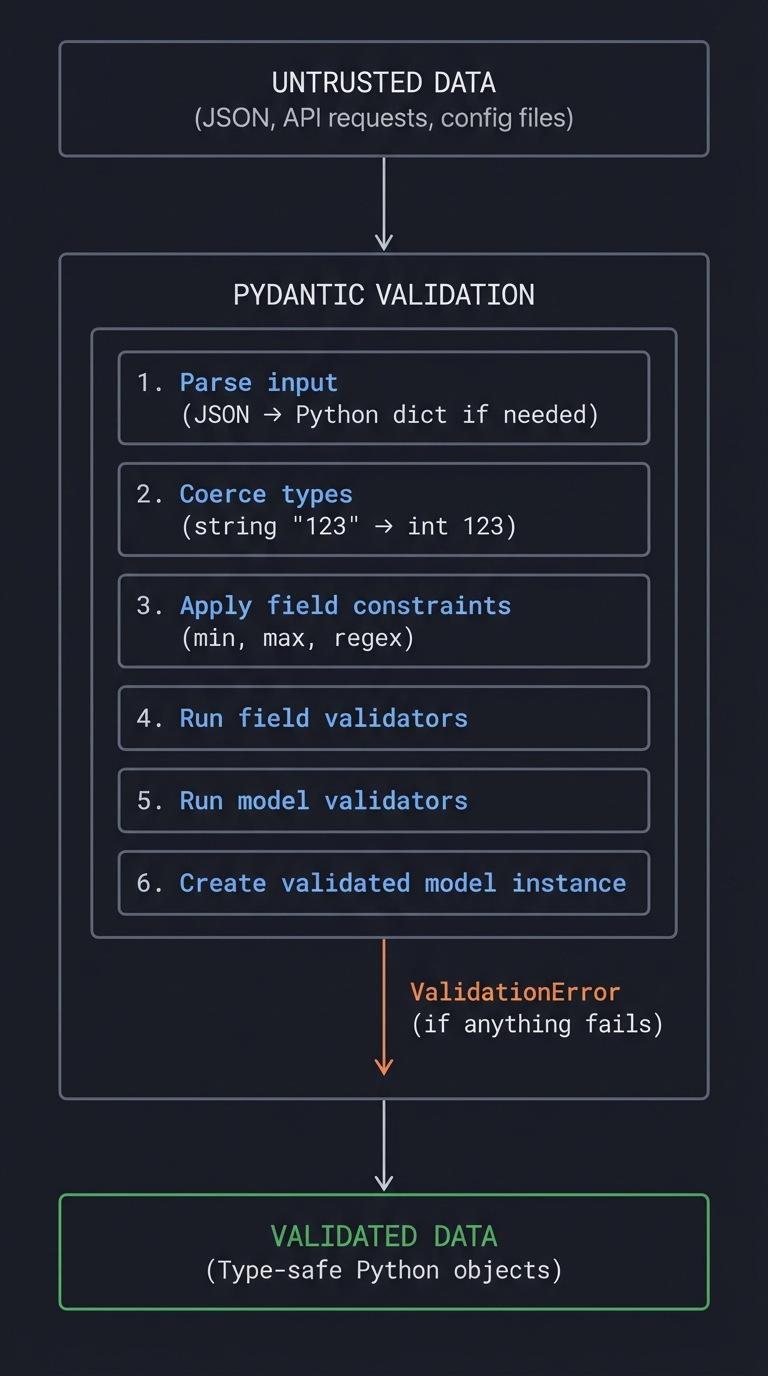
The Pydantic Philosophy
                    ┌─────────────────────────────────────┐
                    │         UNTRUSTED DATA              │
                    │  (JSON, API requests, config files) │
                    └──────────────────┬──────────────────┘
                                       │
                                       ▼
┌─────────────────────────────────────────────────────────────────────────┐
│                          PYDANTIC VALIDATION                            │
│  ┌─────────────────────────────────────────────────────────────────┐   │
│  │  1. Parse input (JSON → Python dict if needed)                   │   │
│  │  2. Coerce types (string "123" → int 123)                       │   │
│  │  3. Apply field constraints (min, max, regex)                   │   │
│  │  4. Run field validators                                         │   │
│  │  5. Run model validators                                         │   │
│  │  6. Create validated model instance                              │   │
│  └─────────────────────────────────────────────────────────────────┘   │
│                              ↓                                          │
│                       ValidationError                                   │
│                    (if anything fails)                                 │
└─────────────────────────────────────────────────────────────────────────┘
                                       │
                                       ▼
                    ┌─────────────────────────────────────┐
                    │         VALIDATED DATA              │
                    │    (Type-safe Python objects)       │
                    └─────────────────────────────────────┘
Fundamental Concepts
- BaseModel: The foundation of Pydantic
- Define fields with type annotations
- Automatic validation on instantiation
- JSON serialization/deserialization built-in
- Type Coercion vs Strict Mode:
- Default: Pydantic tries to convert types (
"123"→123) - Strict mode: Requires exact types, no coercion
- Configurable per-field or per-model
- Default: Pydantic tries to convert types (
- Validators:
@field_validator: Validate/transform individual fields@model_validator: Validate relationships between fieldsmode='before': Run before Pydantic’s validationmode='after': Run after Pydantic’s validation
- Serialization:
model_dump(): Convert to dictmodel_dump_json(): Convert to JSON stringmodel_validate(): Create from dictmodel_validate_json(): Create from JSON (faster path)
- Field Configuration:
Field(): Default values, constraints, metadata- Constraints:
min_length,max_length,ge,le,pattern Annotated[]: Combine type hints with validation
- The Rust Core (pydantic-core):
- Core validation logic written in Rust
- 5-50x faster than Pydantic V1
- Exposed via Python bindings (pyo3)
Comparison with Alternatives
| Feature | Pydantic | dataclasses | attrs |
|---|---|---|---|
| Primary Use | Validation & serialization | Data containers | Flexible data classes |
| Validation | Built-in, automatic | Manual (__post_init__) |
Validators, but not first-class |
| Type Coercion | Yes, by default | No | No |
| JSON Support | Built-in | Manual | Needs cattrs |
| Performance | Very fast (Rust) | Faster (no validation) | Fast |
| Stdlib | No | Yes (3.7+) | No |
| Schema Generation | JSON Schema, OpenAPI | No | No |
| Best For | APIs, external data | Internal data structures | Complex class behavior |
When to Use Each
# Use DATACLASSES when:
# - Data is internal/trusted
# - You don't need validation
# - You want stdlib, no dependencies

from dataclasses import dataclass

@dataclass
class Point:
    x: float
    y: float

# Use ATTRS when:
# - You need __slots__ for memory efficiency
# - You want more control over dunder methods
# - You need validators without full Pydantic overhead

import attrs

@attrs.define
class Point:
    x: float = attrs.field(validator=attrs.validators.gt(0))
    y: float

# Use PYDANTIC when:
# - Data comes from external sources (APIs, files, users)
# - You need JSON serialization
# - You need schema generation
# - You're building an API (especially with FastAPI)

from pydantic import BaseModel

class Point(BaseModel):
    x: float
    y: float
Project List
Projects are ordered from fundamental understanding to advanced implementations.
Project 1: Schema Validator CLI (Understand Core Validation)
- File: PYDANTIC_DATA_VALIDATION_DEEP_DIVE_PROJECTS.md
- Main Programming Language: Python
- Alternative Programming Languages: N/A (Pydantic is Python-only)
- Coolness Level: Level 2: Practical but Forgettable
- Business Potential: 2. The “Micro-SaaS / Pro Tool”
- Difficulty: Level 1: Beginner
- Knowledge Area: Data Validation / CLI Tools
- Software or Tool: Pydantic, Click/Typer
- Main Book: “Robust Python” by Patrick Viafore
What you’ll build: A CLI tool that validates JSON/YAML files against Pydantic schemas, showing detailed error messages and suggesting fixes—like a linter for your data.
Why it teaches Pydantic: This project forces you to understand error handling, custom error messages, and the full validation lifecycle. You’ll see exactly what Pydantic catches and how.
Core challenges you’ll face:
- Defining flexible schemas → maps to BaseModel and Field configuration
- Parsing validation errors → maps to ValidationError structure
- Custom error messages → maps to field descriptions and error customization
- Handling nested models → maps to complex schema relationships
- Supporting multiple formats → maps to JSON vs YAML vs dict validation
Key Concepts:
- BaseModel Basics: Pydantic Models Documentation
- Validation Errors: Error Handling in Pydantic
- Field Configuration: Pydantic Fields
- Type Hints: “Robust Python” Chapter 4 - Viafore
Difficulty: Beginner Time estimate: Weekend Prerequisites: Basic Python, understanding of JSON
Real world outcome:
# Define a schema
$ cat schemas/user.py
from pydantic import BaseModel, Field, EmailStr
from typing import Optional
from datetime import date

class Address(BaseModel):
    street: str
    city: str
    country: str = Field(min_length=2, max_length=2)  # ISO country code

class User(BaseModel):
    name: str = Field(min_length=1, max_length=100)
    email: EmailStr
    age: int = Field(ge=0, le=150)
    address: Optional[Address] = None

# Validate a file
$ pydantic-validate --schema schemas/user.py --file data/users.json

Validating data/users.json against User schema...

✗ Record 1: 3 validation errors
  ├── email
  │   └── value is not a valid email address [type=value_error]
  │       Got: "not-an-email"
  │       Expected: Valid email format (e.g., user@example.com)
  │
  ├── age
  │   └── Input should be greater than or equal to 0 [type=greater_than_equal]
  │       Got: -5
  │       Expected: 0 ≤ age ≤ 150
  │
  └── address.country
      └── String should have at most 2 characters [type=string_too_long]
          Got: "United States" (13 chars)
          Expected: 2-letter ISO country code (e.g., "US")

✓ Record 2: Valid
✓ Record 3: Valid

Summary: 2/3 records valid (66.7%)
Implementation Hints:
Pydantic’s ValidationError provides rich error information:
from pydantic import BaseModel, ValidationError

class User(BaseModel):
    name: str
    age: int

try:
    User(name="", age="not-a-number")
except ValidationError as e:
    for error in e.errors():
        print(f"Field: {error['loc']}")
        print(f"Message: {error['msg']}")
        print(f"Type: {error['type']}")
        print(f"Input: {error['input']}")
Error structure:
loc: Tuple of field path (e.g.,('address', 'country'))msg: Human-readable error messagetype: Error type identifierinput: The invalid valuectx: Additional context (for some errors)
Questions to guide your implementation:
- How do you load a Pydantic model dynamically from a file path?
- How do you validate a list of records?
- How do you provide helpful suggestions for common errors?
- How do you handle YAML vs JSON input?
Learning milestones:
- You validate simple models → You understand BaseModel
- You handle validation errors → You understand error structure
- You validate nested models → You understand complex schemas
- You provide helpful messages → You understand Field metadata
Project 2: Configuration Management System (Understand Pydantic Settings)
- File: PYDANTIC_DATA_VALIDATION_DEEP_DIVE_PROJECTS.md
- Main Programming Language: Python
- Alternative Programming Languages: N/A
- Coolness Level: Level 3: Genuinely Clever
- Business Potential: 3. The “Service & Support” Model
- Difficulty: Level 2: Intermediate
- Knowledge Area: Configuration / Environment Variables
- Software or Tool: pydantic-settings, python-dotenv
- Main Book: “Architecture Patterns with Python” by Harry Percival & Bob Gregory
What you’ll build: A type-safe configuration system that loads settings from environment variables, .env files, config files, and CLI arguments with full validation and documentation.
Why it teaches Pydantic Settings: Real applications need configuration from multiple sources. Pydantic Settings handles this elegantly with precedence rules and validation.
Core challenges you’ll face:
- Multiple configuration sources → maps to settings sources and precedence
- Secret handling → maps to SecretStr and sensitive data
- Nested configuration → maps to nested models in settings
- Environment variable naming → maps to env_prefix and env_nested_delimiter
- Dynamic defaults → maps to computed defaults and factory functions
Key Concepts:
- Pydantic Settings: pydantic-settings Documentation
- SecretStr: Secret Types
- Configuration Patterns: “Architecture Patterns with Python” Chapter 11
- 12-Factor App Config: 12factor.net/config
Difficulty: Intermediate Time estimate: 1 week Prerequisites: Project 1, understanding of environment variables
Real world outcome:
# config.py
from pydantic_settings import BaseSettings, SettingsConfigDict
from pydantic import Field, SecretStr, PostgresDsn
from typing import Optional

class DatabaseSettings(BaseSettings):
    host: str = "localhost"
    port: int = 5432
    name: str
    user: str
    password: SecretStr

    model_config = SettingsConfigDict(env_prefix="DB_")

class RedisSettings(BaseSettings):
    url: str = "redis://localhost:6379"
    password: Optional[SecretStr] = None

    model_config = SettingsConfigDict(env_prefix="REDIS_")

class AppSettings(BaseSettings):
    debug: bool = False
    secret_key: SecretStr
    allowed_hosts: list[str] = ["localhost"]

    database: DatabaseSettings = Field(default_factory=DatabaseSettings)
    redis: RedisSettings = Field(default_factory=RedisSettings)

    model_config = SettingsConfigDict(
        env_file=".env",
        env_file_encoding="utf-8",
        env_nested_delimiter="__",
    )

# Usage
settings = AppSettings()
print(settings.database.host)  # From DB_HOST env var
print(settings.database.password.get_secret_value())  # Explicitly reveal
# .env file
DEBUG=true
SECRET_KEY=super-secret-key-123
ALLOWED_HOSTS=["example.com", "api.example.com"]
DB_HOST=postgres.example.com
DB_PORT=5432
DB_NAME=myapp
DB_USER=admin
DB_PASSWORD=db-secret-password
REDIS_URL=redis://redis.example.com:6379

# CLI tool
$ config-manager show
╭─────────────────────────────────────────────────────────────╮
│ Application Configuration                                   │
├─────────────────────────────────────────────────────────────┤
│ debug: true                                                 │
│ secret_key: ******** (SecretStr)                           │
│ allowed_hosts: ["example.com", "api.example.com"]          │
│                                                             │
│ database:                                                   │
│   host: postgres.example.com                               │
│   port: 5432                                               │
│   name: myapp                                              │
│   user: admin                                              │
│   password: ******** (SecretStr)                           │
│                                                             │
│ redis:                                                      │
│   url: redis://redis.example.com:6379                      │
│   password: None                                           │
╰─────────────────────────────────────────────────────────────╯

$ config-manager validate
✓ All configuration valid

$ config-manager export --format=json --include-secrets=false
{
  "debug": true,
  "allowed_hosts": ["example.com", "api.example.com"],
  "database": {
    "host": "postgres.example.com",
    "port": 5432,
    "name": "myapp",
    "user": "admin"
  }
}
Implementation Hints:
Settings source precedence (highest to lowest):
- Init arguments passed to settings class
- Environment variables
.envfile- Default values
SecretStr prevents accidental logging:
from pydantic import SecretStr

password: SecretStr = SecretStr("secret")
print(password)  # **********
print(password.get_secret_value())  # secret (explicit reveal)
Nested environment variables:
# With env_nested_delimiter="__"
# DATABASE__HOST=localhost becomes settings.database.host
Questions to guide your implementation:
- How do you validate that required secrets are present in production?
- How do you generate a
.env.examplefrom your settings class? - How do you handle different configs for dev/staging/prod?
- How do you document all available settings?
Learning milestones:
- You load from env vars → You understand basic settings
- You handle secrets safely → You understand SecretStr
- You use multiple sources → You understand precedence
- You document config → You understand Field descriptions
Project 3: API Request/Response Validator (Understand FastAPI Integration)
- File: PYDANTIC_DATA_VALIDATION_DEEP_DIVE_PROJECTS.md
- Main Programming Language: Python
- Alternative Programming Languages: N/A
- Coolness Level: Level 3: Genuinely Clever
- Business Potential: 3. The “Service & Support” Model
- Difficulty: Level 2: Intermediate
- Knowledge Area: API Design / Web Frameworks
- Software or Tool: FastAPI, Pydantic
- Main Book: “Building Data Science Applications with FastAPI” by François Voron
What you’ll build: A complete REST API with Pydantic models for request validation, response serialization, and automatic OpenAPI documentation—demonstrating best practices for production APIs.
Why it teaches FastAPI integration: FastAPI and Pydantic are a perfect match. Understanding how they work together explains why FastAPI is so popular and productive.
Core challenges you’ll face:
- Request body validation → maps to Pydantic models as dependencies
- Response models → maps to response_model and serialization
- Query/path parameters → maps to Field for parameter validation
- Error handling → maps to custom exception handlers
- Schema documentation → maps to Field descriptions and examples
Key Concepts:
- FastAPI + Pydantic: FastAPI Documentation
- Request Validation: Request Body
- Response Models: Response Model
- API Best Practices: “Building Data Science Applications with FastAPI” Chapters 3-5
Difficulty: Intermediate Time estimate: 1-2 weeks Prerequisites: Project 1, basic REST API knowledge
Real world outcome:
# models.py
from pydantic import BaseModel, Field, EmailStr, ConfigDict
from typing import Optional
from datetime import datetime
from enum import Enum

class UserRole(str, Enum):
    admin = "admin"
    user = "user"
    guest = "guest"

class UserBase(BaseModel):
    """Base user fields shared across schemas"""
    email: EmailStr = Field(
        ...,
        description="User's email address",
        examples=["user@example.com"]
    )
    name: str = Field(
        ...,
        min_length=1,
        max_length=100,
        description="User's display name"
    )
    role: UserRole = Field(
        default=UserRole.user,
        description="User's role in the system"
    )

class UserCreate(UserBase):
    """Schema for creating a new user"""
    password: str = Field(
        ...,
        min_length=8,
        description="Password (min 8 characters)"
    )

class UserUpdate(BaseModel):
    """Schema for updating a user (all fields optional)"""
    email: Optional[EmailStr] = None
    name: Optional[str] = Field(None, min_length=1, max_length=100)
    role: Optional[UserRole] = None

class UserResponse(UserBase):
    """Schema for user responses (no password!)"""
    id: int
    created_at: datetime
    updated_at: Optional[datetime] = None

    model_config = ConfigDict(from_attributes=True)  # For ORM compatibility

class UserList(BaseModel):
    """Paginated list of users"""
    items: list[UserResponse]
    total: int
    page: int
    per_page: int
    pages: int

# main.py
from fastapi import FastAPI, HTTPException, Query, Path
from fastapi.exceptions import RequestValidationError
from fastapi.responses import JSONResponse

app = FastAPI(title="User API", version="1.0.0")

@app.exception_handler(RequestValidationError)
async def validation_exception_handler(request, exc):
    errors = []
    for error in exc.errors():
        errors.append({
            "field": ".".join(str(loc) for loc in error["loc"]),
            "message": error["msg"],
            "type": error["type"]
        })
    return JSONResponse(
        status_code=422,
        content={"detail": "Validation failed", "errors": errors}
    )

@app.post("/users", response_model=UserResponse, status_code=201)
async def create_user(user: UserCreate):
    """Create a new user with validated data"""
    # Pydantic already validated the request body!
    return save_user(user)

@app.get("/users", response_model=UserList)
async def list_users(
    page: int = Query(1, ge=1, description="Page number"),
    per_page: int = Query(10, ge=1, le=100, description="Items per page"),
    role: Optional[UserRole] = Query(None, description="Filter by role")
):
    """List users with pagination and filtering"""
    return get_users(page, per_page, role)

@app.get("/users/{user_id}", response_model=UserResponse)
async def get_user(
    user_id: int = Path(..., ge=1, description="User ID")
):
    """Get a specific user by ID"""
    user = find_user(user_id)
    if not user:
        raise HTTPException(status_code=404, detail="User not found")
    return user
# Test the API
$ curl -X POST http://localhost:8000/users \
    -H "Content-Type: application/json" \
    -d '{"email": "test@example.com", "name": "Test User", "password": "short"}'

{
  "detail": "Validation failed",
  "errors": [
    {
      "field": "body.password",
      "message": "String should have at least 8 characters",
      "type": "string_too_short"
    }
  ]
}

# Valid request
$ curl -X POST http://localhost:8000/users \
    -H "Content-Type: application/json" \
    -d '{"email": "test@example.com", "name": "Test User", "password": "securepassword123"}'

{
  "id": 1,
  "email": "test@example.com",
  "name": "Test User",
  "role": "user",
  "created_at": "2024-01-15T10:30:00Z",
  "updated_at": null
}

# Auto-generated OpenAPI docs at http://localhost:8000/docs
Implementation Hints:
Separate input and output models:
# Input: includes password, no id
class UserCreate(BaseModel):
    email: EmailStr
    password: str

# Output: includes id, no password
class UserResponse(BaseModel):
    id: int
    email: EmailStr
Use from_attributes=True for ORM objects:
class UserResponse(BaseModel):
    model_config = ConfigDict(from_attributes=True)

# Now works with SQLAlchemy models:
user_orm = db.query(User).first()
return UserResponse.model_validate(user_orm)
Questions to guide your implementation:
- How do you handle partial updates (PATCH)?
- How do you exclude fields from response?
- How do you add examples to OpenAPI docs?
- How do you validate request headers?
Learning milestones:
- You validate request bodies → You understand Pydantic + FastAPI
- You customize error responses → You understand error handling
- You use response models → You understand serialization
- You generate OpenAPI docs → You understand schema generation
Project 4: Custom Validators and Types (Understand Advanced Validation)
- File: PYDANTIC_DATA_VALIDATION_DEEP_DIVE_PROJECTS.md
- Main Programming Language: Python
- Alternative Programming Languages: N/A
- Coolness Level: Level 3: Genuinely Clever
- Business Potential: 2. The “Micro-SaaS / Pro Tool”
- Difficulty: Level 3: Advanced
- Knowledge Area: Type Systems / Validation Logic
- Software or Tool: Pydantic, Annotated types
- Main Book: “Fluent Python” by Luciano Ramalho
What you’ll build: A library of custom Pydantic types and validators for common use cases—phone numbers, credit cards, URLs with specific patterns, monetary amounts, and domain-specific types.
Why it teaches advanced validation: Real applications need validation beyond built-in types. Understanding custom validators and types unlocks Pydantic’s full power.
Core challenges you’ll face:
- Field validators → maps to @field_validator decorator
- Model validators → maps to @model_validator for cross-field validation
- Custom types with Annotated → maps to reusable validation logic
- BeforeValidator vs AfterValidator → maps to validation pipeline
- Wrap validators → maps to intercepting the validation process
Key Concepts:
- Validators: Pydantic Validators
- Custom Types: Custom Types
- Annotated Validators: Annotated Validators
- Type System: “Fluent Python” Chapter 8 - Ramalho
Difficulty: Advanced Time estimate: 1-2 weeks Prerequisites: Project 1-3, understanding of Python decorators
Real world outcome:
# custom_types.py
from pydantic import (
    BaseModel, Field, field_validator, model_validator,
    BeforeValidator, AfterValidator, PlainValidator,
    GetCoreSchemaHandler, GetJsonSchemaHandler
)
from pydantic_core import CoreSchema, core_schema
from typing import Annotated, Any
from decimal import Decimal
import re

# ============= CUSTOM TYPE WITH ANNOTATED =============

def validate_phone(value: str) -> str:
    """Normalize and validate phone numbers"""
    # Remove all non-digits
    digits = re.sub(r'\D', '', value)
    if len(digits) == 10:
        return f"+1{digits}"  # Assume US
    elif len(digits) == 11 and digits.startswith('1'):
        return f"+{digits}"
    elif len(digits) >= 11:
        return f"+{digits}"
    raise ValueError(f"Invalid phone number: {value}")

PhoneNumber = Annotated[str, BeforeValidator(validate_phone)]

# ============= CUSTOM TYPE CLASS =============

class Money:
    """Represents monetary amount with currency"""
    def __init__(self, amount: Decimal, currency: str = "USD"):
        self.amount = Decimal(str(amount)).quantize(Decimal("0.01"))
        self.currency = currency.upper()

    def __repr__(self):
        return f"{self.currency} {self.amount}"

    @classmethod
    def __get_pydantic_core_schema__(
        cls,
        _source_type: Any,
        _handler: GetCoreSchemaHandler
    ) -> CoreSchema:
        return core_schema.no_info_after_validator_function(
            cls._validate,
            core_schema.union_schema([
                core_schema.is_instance_schema(Money),
                core_schema.str_schema(),
                core_schema.float_schema(),
                core_schema.dict_schema(
                    keys_schema=core_schema.str_schema(),
                    values_schema=core_schema.any_schema(),
                ),
            ]),
        )

    @classmethod
    def _validate(cls, value: Any) -> "Money":
        if isinstance(value, Money):
            return value
        if isinstance(value, (int, float, Decimal)):
            return Money(Decimal(str(value)))
        if isinstance(value, str):
            # Parse "USD 100.00" or "100.00"
            match = re.match(r'^([A-Z]{3})?\s*(\d+\.?\d*)$', value.strip())
            if match:
                currency = match.group(1) or "USD"
                amount = Decimal(match.group(2))
                return Money(amount, currency)
        if isinstance(value, dict):
            return Money(
                amount=Decimal(str(value.get('amount', 0))),
                currency=value.get('currency', 'USD')
            )
        raise ValueError(f"Cannot parse Money from {value}")

# ============= FIELD VALIDATORS =============

class Order(BaseModel):
    customer_email: str
    shipping_email: str | None = None
    items: list[str]
    total: Money
    discount_code: str | None = None
    phone: PhoneNumber

    @field_validator('customer_email', 'shipping_email', mode='before')
    @classmethod
    def normalize_email(cls, v: str | None) -> str | None:
        if v is None:
            return None
        return v.lower().strip()

    @field_validator('items')
    @classmethod
    def items_not_empty(cls, v: list[str]) -> list[str]:
        if not v:
            raise ValueError('Order must have at least one item')
        return v

    @field_validator('discount_code')
    @classmethod
    def validate_discount_code(cls, v: str | None) -> str | None:
        if v is None:
            return None
        if not re.match(r'^[A-Z0-9]{6,10}$', v.upper()):
            raise ValueError('Invalid discount code format')
        return v.upper()

    # Cross-field validation
    @model_validator(mode='after')
    def check_emails(self):
        if self.shipping_email is None:
            self.shipping_email = self.customer_email
        return self

# ============= USAGE =============

order = Order(
    customer_email="  JOHN@EXAMPLE.COM  ",
    items=["Widget", "Gadget"],
    total="USD 99.99",  # Parsed to Money object
    discount_code="save20",
    phone="(555) 123-4567"  # Normalized to +15551234567
)

print(order.customer_email)  # john@example.com (normalized)
print(order.shipping_email)  # john@example.com (copied from customer)
print(order.total)           # USD 99.99 (Money object)
print(order.phone)           # +15551234567 (normalized)
print(order.discount_code)   # SAVE20 (uppercased)
Implementation Hints:
Validator modes:
# mode='before': Run BEFORE Pydantic's type validation
@field_validator('field', mode='before')
def transform_before(cls, v):
    return v.strip()  # v is still raw input

# mode='after': Run AFTER Pydantic's type validation
@field_validator('field', mode='after')
def validate_after(cls, v):
    return v  # v is already validated/coerced

# mode='wrap': Control the entire validation
@field_validator('field', mode='wrap')
def wrap_validation(cls, v, handler):
    try:
        return handler(v)  # Call Pydantic's validation
    except ValidationError:
        return default_value
Using Annotated for reusable validators:
from typing import Annotated
from pydantic import AfterValidator

def must_be_positive(v: int) -> int:
    if v <= 0:
        raise ValueError("Must be positive")
    return v

PositiveInt = Annotated[int, AfterValidator(must_be_positive)]

class Model(BaseModel):
    count: PositiveInt  # Reusable!
    amount: PositiveInt
Questions to guide your implementation:
- How do you create a custom type that works with JSON Schema?
- How do you validate based on other field values?
- How do you chain multiple validators?
- How do you handle validation that needs async operations?
Learning milestones:
- You use field validators → You understand per-field validation
- You use model validators → You understand cross-field validation
- You create custom types → You understand Annotated pattern
- You implement __get_pydantic_core_schema__ → You understand deep integration
Project 5: Discriminated Unions Parser (Understand Polymorphic Data)
- File: PYDANTIC_DATA_VALIDATION_DEEP_DIVE_PROJECTS.md
- Main Programming Language: Python
- Alternative Programming Languages: N/A
- Coolness Level: Level 4: Hardcore Tech Flex
- Business Potential: 3. The “Service & Support” Model
- Difficulty: Level 3: Advanced
- Knowledge Area: Type Systems / Union Types
- Software or Tool: Pydantic, Literal types
- Main Book: “Robust Python” by Patrick Viafore
What you’ll build: A webhook handler that uses discriminated unions to parse different event types—orders, payments, refunds—each with different fields, all validated correctly based on a type discriminator.
Why it teaches discriminated unions: Real-world APIs (Stripe, GitHub, etc.) send different payloads based on event type. Discriminated unions handle this elegantly and efficiently.
Core challenges you’ll face:
- Union type matching → maps to smart vs left-to-right mode
- Literal discriminators → maps to using field values for dispatch
- Callable discriminators → maps to dynamic type selection
- Fallback types → maps to handling unknown event types
- OpenAPI generation → maps to proper schema for unions
Key Concepts:
- Discriminated Unions: Pydantic Unions
- Literal Types: Python Literal Types
- Tagged Unions Pattern: “Robust Python” Chapter 6 - Viafore
- OpenAPI Discriminator: OpenAPI Specification
Difficulty: Advanced Time estimate: 1-2 weeks Prerequisites: Project 3, understanding of union types
Real world outcome:
# webhook_models.py
from pydantic import BaseModel, Field
from typing import Literal, Union, Annotated
from datetime import datetime
from decimal import Decimal

# Base event with common fields
class BaseEvent(BaseModel):
    id: str
    timestamp: datetime
    version: str = "1.0"

# Specific event types
class OrderCreatedEvent(BaseEvent):
    type: Literal["order.created"]
    data: "OrderData"

class OrderData(BaseModel):
    order_id: str
    customer_id: str
    items: list[str]
    total: Decimal

class PaymentSucceededEvent(BaseEvent):
    type: Literal["payment.succeeded"]
    data: "PaymentData"

class PaymentData(BaseModel):
    payment_id: str
    order_id: str
    amount: Decimal
    method: Literal["card", "bank", "crypto"]

class PaymentFailedEvent(BaseEvent):
    type: Literal["payment.failed"]
    data: "PaymentFailedData"

class PaymentFailedData(BaseModel):
    payment_id: str
    order_id: str
    error_code: str
    error_message: str

class RefundIssuedEvent(BaseEvent):
    type: Literal["refund.issued"]
    data: "RefundData"

class RefundData(BaseModel):
    refund_id: str
    payment_id: str
    amount: Decimal
    reason: str

# Fallback for unknown events
class UnknownEvent(BaseEvent):
    type: str
    data: dict

# The discriminated union!
WebhookEvent = Annotated[
    Union[
        OrderCreatedEvent,
        PaymentSucceededEvent,
        PaymentFailedEvent,
        RefundIssuedEvent,
    ],
    Field(discriminator="type")
]

# Wrapper with fallback
class WebhookPayload(BaseModel):
    event: Union[WebhookEvent, UnknownEvent]

    @classmethod
    def parse_event(cls, data: dict) -> "WebhookPayload":
        """Parse with fallback for unknown event types"""
        try:
            return cls(event=data)
        except Exception:
            # If discriminated union fails, use UnknownEvent
            return cls(event=UnknownEvent(**data))

# webhook_handler.py
from fastapi import FastAPI, Request, HTTPException
from functools import singledispatch

app = FastAPI()

@singledispatch
def handle_event(event: BaseEvent):
    """Default handler for unknown events"""
    print(f"Unknown event type: {event.type}")

@handle_event.register
def _(event: OrderCreatedEvent):
    print(f"New order {event.data.order_id} for customer {event.data.customer_id}")
    # Process order...

@handle_event.register
def _(event: PaymentSucceededEvent):
    print(f"Payment {event.data.payment_id} succeeded for order {event.data.order_id}")
    # Update order status...

@handle_event.register
def _(event: PaymentFailedEvent):
    print(f"Payment failed: {event.data.error_message}")
    # Notify customer...

@handle_event.register
def _(event: RefundIssuedEvent):
    print(f"Refund {event.data.refund_id}: ${event.data.amount}")
    # Process refund...

@app.post("/webhooks")
async def receive_webhook(request: Request):
    payload = await request.json()
    event = WebhookPayload.parse_event(payload).event

    handle_event(event)

    return {"status": "received", "event_type": event.type}
# Test different event types
$ curl -X POST http://localhost:8000/webhooks \
    -H "Content-Type: application/json" \
    -d '{
        "type": "order.created",
        "id": "evt_123",
        "timestamp": "2024-01-15T10:30:00Z",
        "data": {
            "order_id": "ord_456",
            "customer_id": "cust_789",
            "items": ["widget", "gadget"],
            "total": "99.99"
        }
    }'

# Output: New order ord_456 for customer cust_789
{"status": "received", "event_type": "order.created"}

# Unknown event type (graceful fallback)
$ curl -X POST http://localhost:8000/webhooks \
    -H "Content-Type: application/json" \
    -d '{
        "type": "inventory.updated",
        "id": "evt_999",
        "timestamp": "2024-01-15T10:31:00Z",
        "data": {"sku": "ABC123", "quantity": 50}
    }'

# Output: Unknown event type: inventory.updated
{"status": "received", "event_type": "inventory.updated"}
Implementation Hints:
Three union modes in Pydantic V2:
# 1. "left_to_right" - Try models in order (V1 behavior)
Union[ModelA, ModelB]  # Tries A first, then B

# 2. "smart" (default) - Use best match heuristics
Union[ModelA, ModelB]  # Pydantic picks best match

# 3. Discriminator - Use field value to dispatch
Annotated[Union[ModelA, ModelB], Field(discriminator="type")]
Callable discriminator for complex cases:
from pydantic import Discriminator

def get_event_type(data: dict) -> str:
    # Complex logic to determine type
    if "order_id" in data.get("data", {}):
        if "error_code" in data.get("data", {}):
            return "payment.failed"
        return "payment.succeeded"
    return "unknown"

Event = Annotated[
    Union[PaymentSucceeded, PaymentFailed, Unknown],
    Discriminator(get_event_type)
]
Questions to guide your implementation:
- How do you handle nested discriminated unions?
- How do you ensure proper OpenAPI schema generation?
- How do you handle versioned event schemas?
- How do you test all union variants?
Learning milestones:
- You use Literal discriminators → You understand basic unions
- You implement fallback handling → You understand error resilience
- You use callable discriminators → You understand complex dispatch
- You generate proper OpenAPI → You understand schema compatibility
Project 6: Generic Model Library (Understand Generics and Templates)
- File: PYDANTIC_DATA_VALIDATION_DEEP_DIVE_PROJECTS.md
- Main Programming Language: Python
- Alternative Programming Languages: N/A
- Coolness Level: Level 4: Hardcore Tech Flex
- Business Potential: 2. The “Micro-SaaS / Pro Tool”
- Difficulty: Level 4: Expert
- Knowledge Area: Type Systems / Generics
- Software or Tool: Pydantic, typing.Generic
- Main Book: “Fluent Python” by Luciano Ramalho
What you’ll build: A library of generic Pydantic models—paginated responses, API envelopes, result types—that work with any data type while maintaining full type safety.
Why it teaches generics: Generic models eliminate duplication and enforce consistency. Understanding them is essential for building reusable Pydantic libraries.
Core challenges you’ll face:
- Generic BaseModel → maps to Generic[T] inheritance
- Type variable bounds → maps to constraining T
- Generic validation → maps to how Pydantic handles generics
- Nested generics → maps to Generic[T, U] patterns
- Runtime type resolution → maps to get_args, get_origin
Key Concepts:
- Pydantic Generics: Generic Models
- Python Generics: typing.Generic
- Type Variables: “Fluent Python” Chapter 15 - Ramalho
- Covariance/Contravariance: Advanced typing concepts
Difficulty: Expert Time estimate: 2 weeks Prerequisites: Project 4, strong understanding of Python type hints
Real world outcome:
# generic_models.py
from pydantic import BaseModel, Field
from typing import Generic, TypeVar, Optional, Sequence
from datetime import datetime

T = TypeVar('T')
E = TypeVar('E')

# ============= RESULT TYPE (Like Rust's Result) =============

class Success(BaseModel, Generic[T]):
    """Successful operation result"""
    success: bool = True
    data: T
    timestamp: datetime = Field(default_factory=datetime.now)

class Failure(BaseModel, Generic[E]):
    """Failed operation result"""
    success: bool = False
    error: E
    timestamp: datetime = Field(default_factory=datetime.now)

# Union type for Result
Result = Success[T] | Failure[E]

# ============= PAGINATED RESPONSE =============

class PaginatedResponse(BaseModel, Generic[T]):
    """Generic paginated response wrapper"""
    items: list[T]
    total: int
    page: int = Field(ge=1)
    per_page: int = Field(ge=1, le=100)

    @property
    def pages(self) -> int:
        return (self.total + self.per_page - 1) // self.per_page

    @property
    def has_next(self) -> bool:
        return self.page < self.pages

    @property
    def has_prev(self) -> bool:
        return self.page > 1

    @classmethod
    def from_sequence(
        cls,
        items: Sequence[T],
        page: int = 1,
        per_page: int = 10
    ) -> "PaginatedResponse[T]":
        """Create paginated response from full sequence"""
        total = len(items)
        start = (page - 1) * per_page
        end = start + per_page
        return cls(
            items=list(items[start:end]),
            total=total,
            page=page,
            per_page=per_page
        )

# ============= API ENVELOPE =============

class APIResponse(BaseModel, Generic[T]):
    """Standard API response envelope"""
    success: bool = True
    data: Optional[T] = None
    message: Optional[str] = None
    errors: Optional[list[str]] = None
    meta: Optional[dict] = None

    @classmethod
    def ok(cls, data: T, message: str = None) -> "APIResponse[T]":
        return cls(success=True, data=data, message=message)

    @classmethod
    def error(cls, message: str, errors: list[str] = None) -> "APIResponse[T]":
        return cls(success=False, message=message, errors=errors)

# ============= USAGE WITH CONCRETE TYPES =============

class User(BaseModel):
    id: int
    name: str
    email: str

class Order(BaseModel):
    id: int
    user_id: int
    total: float

# Concrete types - fully type-checked!
UserResponse = APIResponse[User]
UserPage = PaginatedResponse[User]
OrderResult = Result[Order, str]

# FastAPI integration
from fastapi import FastAPI

app = FastAPI()

@app.get("/users", response_model=APIResponse[PaginatedResponse[User]])
async def list_users(page: int = 1, per_page: int = 10):
    users = get_users_from_db()
    paginated = PaginatedResponse.from_sequence(users, page, per_page)
    return APIResponse.ok(paginated)

@app.get("/users/{user_id}", response_model=APIResponse[User])
async def get_user(user_id: int):
    user = find_user(user_id)
    if user:
        return APIResponse.ok(user)
    return APIResponse.error("User not found")

# Type checker understands:
response: APIResponse[User] = APIResponse.ok(User(id=1, name="John", email="john@example.com"))
print(response.data.name)  # Type checker knows data is User!
# API Response examples
$ curl http://localhost:8000/users

{
  "success": true,
  "data": {
    "items": [
      {"id": 1, "name": "John", "email": "john@example.com"},
      {"id": 2, "name": "Jane", "email": "jane@example.com"}
    ],
    "total": 100,
    "page": 1,
    "per_page": 10
  },
  "message": null,
  "errors": null,
  "meta": null
}

# OpenAPI schema correctly shows nested generic types
Implementation Hints:
Basic generic model pattern:
from typing import Generic, TypeVar
from pydantic import BaseModel

T = TypeVar('T')

class Wrapper(BaseModel, Generic[T]):
    data: T

# Usage
class User(BaseModel):
    name: str

# Concrete type
UserWrapper = Wrapper[User]

# Pydantic validates correctly
wrapper = UserWrapper(data={"name": "John"})
print(wrapper.data.name)  # "John"
Bounded type variables:
from pydantic import BaseModel
from typing import TypeVar

# T must be a BaseModel subclass
T = TypeVar('T', bound=BaseModel)

class Container(BaseModel, Generic[T]):
    item: T

    def get_model_name(self) -> str:
        return self.item.__class__.__name__
Questions to guide your implementation:
- How do you handle multiple type variables?
- How do you validate generic types at runtime?
- How do you ensure proper JSON Schema generation?
- How do you handle optional generic fields?
Learning milestones:
- You create basic generic models → You understand Generic[T]
- You use bounded type variables → You understand constraints
- You compose nested generics → You understand complex types
- You integrate with FastAPI → You understand practical usage
Project 7: Build Your Own Mini-Pydantic (Understand Internals)
- File: PYDANTIC_DATA_VALIDATION_DEEP_DIVE_PROJECTS.md
- Main Programming Language: Python
- Alternative Programming Languages: N/A
- Coolness Level: Level 5: Pure Magic (Super Cool)
- Business Potential: 1. The “Resume Gold”
- Difficulty: Level 4: Expert
- Knowledge Area: Metaprogramming / Type Systems / Validation
- Software or Tool: Python typing, inspect
- Main Book: “Fluent Python” by Luciano Ramalho
What you’ll build: A simplified version of Pydantic that uses type hints for validation—without using Pydantic itself. This reveals exactly how Pydantic works under the hood.
Why it teaches internals: You cannot truly understand a framework until you’ve built a miniature version. This project demystifies the “magic” of type-based validation.
Core challenges you’ll face:
- Extracting type hints → maps to get_type_hints, annotations
- Type checking at runtime → maps to isinstance, get_origin, get_args
- Handling Optional and Union → maps to parsing typing constructs
- Nested model validation → maps to recursive validation
- Error aggregation → maps to collecting all errors before raising
Key Concepts:
- Python Typing Internals: typing module docs
- Pydantic Architecture: Pydantic Internals
- Metaclasses: “Fluent Python” Chapter 24 - Ramalho
- Descriptors: “Fluent Python” Chapter 23 - Ramalho
Difficulty: Expert Time estimate: 2-3 weeks Prerequisites: Projects 1-6, deep understanding of Python type system
Real world outcome:
# mini_pydantic.py
from typing import get_type_hints, get_origin, get_args, Union, Optional
from dataclasses import dataclass
import inspect

class ValidationError(Exception):
    def __init__(self, errors: list[dict]):
        self.errors = errors
        super().__init__(f"{len(errors)} validation error(s)")

class MiniModelMeta(type):
    """Metaclass that enables validation on model instantiation"""

    def __new__(mcs, name, bases, namespace):
        cls = super().__new__(mcs, name, bases, namespace)

        # Skip for the base class
        if name == 'MiniModel':
            return cls

        # Get type hints (handles forward references)
        try:
            hints = get_type_hints(cls)
        except Exception:
            hints = getattr(cls, '__annotations__', {})

        cls.__field_types__ = hints
        cls.__required_fields__ = set()
        cls.__optional_fields__ = set()

        # Determine required vs optional
        for field_name, field_type in hints.items():
            origin = get_origin(field_type)
            if origin is Union:
                args = get_args(field_type)
                if type(None) in args:
                    cls.__optional_fields__.add(field_name)
                else:
                    cls.__required_fields__.add(field_name)
            else:
                # Check for default value
                if hasattr(cls, field_name):
                    cls.__optional_fields__.add(field_name)
                else:
                    cls.__required_fields__.add(field_name)

        return cls

class MiniModel(metaclass=MiniModelMeta):
    """A mini version of Pydantic's BaseModel"""

    def __init__(self, **data):
        errors = []

        # Check required fields
        for field in self.__required_fields__:
            if field not in data:
                errors.append({
                    'loc': (field,),
                    'msg': 'Field required',
                    'type': 'missing'
                })

        # Validate and set fields
        for field_name, field_type in self.__field_types__.items():
            if field_name in data:
                value = data[field_name]
                try:
                    validated = self._validate_field(field_name, field_type, value)
                    setattr(self, field_name, validated)
                except Exception as e:
                    errors.append({
                        'loc': (field_name,),
                        'msg': str(e),
                        'type': 'validation_error'
                    })
            elif field_name in self.__optional_fields__:
                # Set default or None
                default = getattr(self.__class__, field_name, None)
                setattr(self, field_name, default)

        if errors:
            raise ValidationError(errors)

    def _validate_field(self, name: str, expected_type, value):
        """Validate a single field"""
        origin = get_origin(expected_type)

        # Handle Optional[X] (Union[X, None])
        if origin is Union:
            args = get_args(expected_type)
            if value is None and type(None) in args:
                return None
            # Try each type in union
            for arg in args:
                if arg is type(None):
                    continue
                try:
                    return self._validate_field(name, arg, value)
                except Exception:
                    continue
            raise ValueError(f"Value doesn't match any type in Union")

        # Handle list[X]
        if origin is list:
            if not isinstance(value, list):
                raise ValueError(f"Expected list, got {type(value).__name__}")
            item_type = get_args(expected_type)[0] if get_args(expected_type) else str
            return [self._validate_field(f"{name}[{i}]", item_type, v)
                    for i, v in enumerate(value)]

        # Handle dict[K, V]
        if origin is dict:
            if not isinstance(value, dict):
                raise ValueError(f"Expected dict, got {type(value).__name__}")
            return value

        # Handle nested MiniModel
        if isinstance(expected_type, type) and issubclass(expected_type, MiniModel):
            if isinstance(value, expected_type):
                return value
            if isinstance(value, dict):
                return expected_type(**value)
            raise ValueError(f"Expected {expected_type.__name__} or dict")

        # Handle basic types with coercion
        if expected_type is int:
            return int(value)
        if expected_type is float:
            return float(value)
        if expected_type is str:
            return str(value)
        if expected_type is bool:
            if isinstance(value, bool):
                return value
            if isinstance(value, str):
                return value.lower() in ('true', '1', 'yes')
            return bool(value)

        # Direct type check
        if isinstance(value, expected_type):
            return value

        raise ValueError(f"Expected {expected_type.__name__}, got {type(value).__name__}")

    def model_dump(self) -> dict:
        """Convert to dictionary"""
        result = {}
        for field_name in self.__field_types__:
            value = getattr(self, field_name, None)
            if isinstance(value, MiniModel):
                result[field_name] = value.model_dump()
            elif isinstance(value, list):
                result[field_name] = [
                    v.model_dump() if isinstance(v, MiniModel) else v
                    for v in value
                ]
            else:
                result[field_name] = value
        return result

    def __repr__(self):
        fields = ', '.join(f'{k}={getattr(self, k)!r}'
                          for k in self.__field_types__)
        return f'{self.__class__.__name__}({fields})'

# ============= USAGE =============

class Address(MiniModel):
    street: str
    city: str
    country: str = "USA"  # Default value

class User(MiniModel):
    name: str
    age: int
    email: Optional[str] = None
    address: Optional[Address] = None
    tags: list[str] = []

# Valid usage
user = User(
    name="John",
    age="25",  # Coerced to int!
    address={"street": "123 Main St", "city": "NYC"}  # Nested validation!
)

print(user)
# User(name='John', age=25, email=None, address=Address(...), tags=[])

print(user.model_dump())
# {'name': 'John', 'age': 25, 'email': None, 'address': {'street': '123 Main St', 'city': 'NYC', 'country': 'USA'}, 'tags': []}

# Validation errors
try:
    User(age="not-a-number")
except ValidationError as e:
    for error in e.errors:
        print(f"{error['loc']}: {error['msg']}")
# ('name',): Field required
# ('age',): invalid literal for int() with base 10: 'not-a-number'
Implementation Hints:
Key Python typing APIs:
from typing import get_type_hints, get_origin, get_args, Union

# get_type_hints: Extract annotations with forward ref resolution
hints = get_type_hints(MyClass)  # {'field': int, ...}

# get_origin: Get the base of a generic type
get_origin(list[int])  # list
get_origin(Union[int, str])  # typing.Union
get_origin(int)  # None

# get_args: Get the type arguments
get_args(list[int])  # (int,)
get_args(Union[int, str])  # (int, str)
get_args(Optional[int])  # (int, NoneType)
The real Pydantic is more complex:
- Uses Rust (pydantic-core) for performance
- Supports computed fields, validators, serializers
- Handles recursive models and forward references
- Generates JSON Schema
Questions to guide your implementation:
- How do you handle circular/recursive model references?
- How do you implement field validators?
- How do you support strict mode (no coercion)?
- How do you generate error messages like Pydantic?
Learning milestones:
- You extract type hints → You understand annotations
- You validate basic types → You understand type checking
- You handle nested models → You understand recursion
- You aggregate errors → You understand error handling patterns
Project 8: LLM Structured Output (Understand AI/ML Integration)
- File: PYDANTIC_DATA_VALIDATION_DEEP_DIVE_PROJECTS.md
- Main Programming Language: Python
- Alternative Programming Languages: N/A
- Coolness Level: Level 4: Hardcore Tech Flex
- Business Potential: 4. The “Open Core” Infrastructure
- Difficulty: Level 3: Advanced
- Knowledge Area: AI/ML / LLM / JSON Schema
- Software or Tool: OpenAI, Anthropic, Instructor
- Main Book: “AI Engineering” by Chip Huyen
What you’ll build: A system that uses Pydantic to define structured outputs for LLMs, ensuring the AI returns validated, type-safe data instead of arbitrary text.
Why it teaches AI integration: LLMs are revolutionizing software, but they output unstructured text. Pydantic bridges this gap by defining schemas that LLMs can follow, enabling reliable AI-powered features.
Core challenges you’ll face:
- JSON Schema generation → maps to model_json_schema()
- Schema injection in prompts → maps to guiding LLM output
- Response parsing → maps to model_validate_json()
- Retry logic → maps to handling malformed responses
- Nested complex types → maps to LLM limitations with complex schemas
Key Concepts:
- JSON Schema Generation: Pydantic JSON Schema
- Instructor Library: Instructor Docs
- OpenAI Function Calling: OpenAI Functions
- LLM Engineering: “AI Engineering” - Huyen
Difficulty: Advanced Time estimate: 1-2 weeks Prerequisites: Project 3-4, basic understanding of LLM APIs
Real world outcome:
# structured_llm.py
from pydantic import BaseModel, Field
from typing import Optional, Literal
import openai
import json

# ============= DEFINE STRUCTURED OUTPUTS =============

class SentimentAnalysis(BaseModel):
    """Analyze the sentiment of text"""
    sentiment: Literal["positive", "negative", "neutral"]
    confidence: float = Field(ge=0, le=1, description="Confidence score")
    key_phrases: list[str] = Field(description="Key phrases that indicate sentiment")
    reasoning: str = Field(description="Brief explanation of the analysis")

class ExtractedEntity(BaseModel):
    """A named entity extracted from text"""
    name: str
    entity_type: Literal["person", "organization", "location", "date", "product"]
    context: str = Field(description="The sentence where entity appears")

class DocumentAnalysis(BaseModel):
    """Complete analysis of a document"""
    summary: str = Field(max_length=500)
    sentiment: SentimentAnalysis
    entities: list[ExtractedEntity]
    topics: list[str]
    language: str

# ============= LLM INTEGRATION =============

class StructuredLLM:
    """Wrapper for getting structured outputs from LLMs"""

    def __init__(self, model: str = "gpt-4"):
        self.model = model
        self.client = openai.OpenAI()

    def generate(
        self,
        prompt: str,
        output_schema: type[BaseModel],
        max_retries: int = 3
    ) -> BaseModel:
        """Generate structured output from LLM"""

        # Get JSON schema from Pydantic model
        schema = output_schema.model_json_schema()

        for attempt in range(max_retries):
            try:
                response = self.client.chat.completions.create(
                    model=self.model,
                    messages=[
                        {
                            "role": "system",
                            "content": f"""You are a helpful assistant that always responds with valid JSON.
Your response must conform to this JSON schema:

{json.dumps(schema, indent=2)}

Respond ONLY with valid JSON, no other text."""
                        },
                        {"role": "user", "content": prompt}
                    ],
                    response_format={"type": "json_object"}
                )

                # Parse and validate with Pydantic
                json_str = response.choices[0].message.content
                return output_schema.model_validate_json(json_str)

            except Exception as e:
                if attempt == max_retries - 1:
                    raise
                print(f"Attempt {attempt + 1} failed: {e}, retrying...")

        raise RuntimeError("Max retries exceeded")

# ============= USAGE =============

llm = StructuredLLM()

# Sentiment Analysis
text = """
I absolutely loved this product! The quality is amazing and
the customer service was incredibly helpful when I had questions.
Highly recommend to anyone looking for a reliable solution.
"""

sentiment = llm.generate(
    prompt=f"Analyze the sentiment of this text:\n\n{text}",
    output_schema=SentimentAnalysis
)

print(sentiment)
# SentimentAnalysis(
#     sentiment='positive',
#     confidence=0.95,
#     key_phrases=['absolutely loved', 'amazing', 'incredibly helpful', 'highly recommend'],
#     reasoning='The text contains multiple strong positive indicators...'
# )

# Full Document Analysis
document = """
Apple Inc. announced today that CEO Tim Cook will present the new
iPhone 16 at their headquarters in Cupertino, California on
September 12, 2024. Analysts expect strong sales despite economic concerns.
"""

analysis = llm.generate(
    prompt=f"Analyze this document:\n\n{document}",
    output_schema=DocumentAnalysis
)

print(analysis.model_dump_json(indent=2))
# {
#   "summary": "Apple announces upcoming iPhone 16 presentation...",
#   "sentiment": {
#     "sentiment": "neutral",
#     "confidence": 0.7,
#     ...
#   },
#   "entities": [
#     {"name": "Apple Inc.", "entity_type": "organization",...},
#     {"name": "Tim Cook", "entity_type": "person",...},
#     {"name": "Cupertino, California", "entity_type": "location",...},
#     {"name": "September 12, 2024", "entity_type": "date",...}
#   ],
#   "topics": ["technology", "product launch", "business"],
#   "language": "en"
# }
Implementation Hints:
Generate JSON Schema from Pydantic:
from pydantic import BaseModel

class User(BaseModel):
    name: str
    age: int

schema = User.model_json_schema()
# {
#   'properties': {
#     'name': {'title': 'Name', 'type': 'string'},
#     'age': {'title': 'Age', 'type': 'integer'}
#   },
#   'required': ['name', 'age'],
#   'title': 'User',
#   'type': 'object'
# }
Using Instructor library (recommended):
import instructor
from openai import OpenAI

# Patch OpenAI client
client = instructor.from_openai(OpenAI())

# Now extraction is automatic
user = client.chat.completions.create(
    model="gpt-4",
    response_model=User,  # Pydantic model!
    messages=[{"role": "user", "content": "Extract: John is 25 years old"}]
)
# Returns validated User instance
Questions to guide your implementation:
- How do you handle LLM responses that don’t match the schema?
- How do you optimize schemas for better LLM compliance?
- How do you handle streaming responses?
- How do you implement function calling with Pydantic?
Learning milestones:
- You generate JSON Schema → You understand schema export
- You parse LLM responses → You understand JSON validation
- You handle retries → You understand error recovery
- You use complex nested types → You understand LLM limitations
Project 9: Database ORM Integration (Understand SQLModel/SQLAlchemy)
- File: PYDANTIC_DATA_VALIDATION_DEEP_DIVE_PROJECTS.md
- Main Programming Language: Python
- Alternative Programming Languages: N/A
- Coolness Level: Level 3: Genuinely Clever
- Business Potential: 3. The “Service & Support” Model
- Difficulty: Level 3: Advanced
- Knowledge Area: ORM / Database / Data Modeling
- Software or Tool: SQLModel, SQLAlchemy, Alembic
- Main Book: “Architecture Patterns with Python” by Percival & Gregory
What you’ll build: A data layer using SQLModel (Pydantic + SQLAlchemy) that shares models between API validation and database operations, with migrations and relationship handling.
Why it teaches database integration: Real applications need both validation (Pydantic) and persistence (SQLAlchemy). SQLModel unifies these, eliminating duplication.
Core challenges you’ll face:
- Model sharing → maps to one model for API and DB
- Relationship handling → maps to foreign keys, lazy loading
- Migrations → maps to Alembic with SQLModel
- Query building → maps to SQLModel select() syntax
- Async support → maps to async SQLAlchemy
Key Concepts:
- SQLModel: SQLModel Documentation
- SQLAlchemy 2.0: SQLAlchemy Unified Tutorial
- Repository Pattern: “Architecture Patterns with Python” Chapter 2
- Alembic Migrations: Alembic Tutorial
Difficulty: Advanced Time estimate: 2 weeks Prerequisites: Project 3, SQL knowledge, understanding of ORMs
Real world outcome:
# models.py
from sqlmodel import SQLModel, Field, Relationship
from typing import Optional
from datetime import datetime
from pydantic import EmailStr

class UserBase(SQLModel):
    """Base user fields - used for validation"""
    email: EmailStr = Field(unique=True, index=True)
    name: str = Field(min_length=1, max_length=100)
    is_active: bool = Field(default=True)

class User(UserBase, table=True):
    """Database model - includes id and relationships"""
    id: Optional[int] = Field(default=None, primary_key=True)
    created_at: datetime = Field(default_factory=datetime.utcnow)
    hashed_password: str

    # Relationships
    orders: list["Order"] = Relationship(back_populates="user")

class UserCreate(UserBase):
    """API input model - includes password"""
    password: str = Field(min_length=8)

class UserRead(UserBase):
    """API output model - includes id, no password"""
    id: int
    created_at: datetime

class OrderBase(SQLModel):
    total: float = Field(ge=0)
    status: str = Field(default="pending")

class Order(OrderBase, table=True):
    id: Optional[int] = Field(default=None, primary_key=True)
    user_id: int = Field(foreign_key="user.id")
    created_at: datetime = Field(default_factory=datetime.utcnow)

    user: Optional[User] = Relationship(back_populates="orders")
    items: list["OrderItem"] = Relationship(back_populates="order")

class OrderItem(SQLModel, table=True):
    id: Optional[int] = Field(default=None, primary_key=True)
    order_id: int = Field(foreign_key="order.id")
    product_name: str
    quantity: int = Field(ge=1)
    price: float = Field(ge=0)

    order: Optional[Order] = Relationship(back_populates="items")

# repository.py
from sqlmodel import Session, select
from typing import Optional

class UserRepository:
    def __init__(self, session: Session):
        self.session = session

    def create(self, user_create: UserCreate) -> User:
        hashed_password = hash_password(user_create.password)
        user = User(
            **user_create.model_dump(exclude={"password"}),
            hashed_password=hashed_password
        )
        self.session.add(user)
        self.session.commit()
        self.session.refresh(user)
        return user

    def get_by_id(self, user_id: int) -> Optional[User]:
        return self.session.get(User, user_id)

    def get_by_email(self, email: str) -> Optional[User]:
        statement = select(User).where(User.email == email)
        return self.session.exec(statement).first()

    def list_with_orders(self, skip: int = 0, limit: int = 10) -> list[User]:
        statement = (
            select(User)
            .offset(skip)
            .limit(limit)
            .options(selectinload(User.orders))
        )
        return self.session.exec(statement).all()

# main.py
from fastapi import FastAPI, Depends, HTTPException
from sqlmodel import Session

app = FastAPI()

@app.post("/users", response_model=UserRead)
def create_user(user: UserCreate, session: Session = Depends(get_session)):
    repo = UserRepository(session)

    if repo.get_by_email(user.email):
        raise HTTPException(400, "Email already registered")

    return repo.create(user)

@app.get("/users/{user_id}", response_model=UserRead)
def get_user(user_id: int, session: Session = Depends(get_session)):
    repo = UserRepository(session)
    user = repo.get_by_id(user_id)
    if not user:
        raise HTTPException(404, "User not found")
    return user
Implementation Hints:
SQLModel combines Pydantic and SQLAlchemy:
# table=True makes it a database table
class User(SQLModel, table=True):
    id: Optional[int] = Field(default=None, primary_key=True)
    name: str

# table=False (default) is just Pydantic validation
class UserCreate(SQLModel):
    name: str
Pattern for API models:
class UserBase(SQLModel):        # Shared fields
    name: str
    email: str

class User(UserBase, table=True): # Database
    id: int = Field(primary_key=True)
    hashed_password: str

class UserCreate(UserBase):       # API input
    password: str

class UserRead(UserBase):         # API output
    id: int
Questions to guide your implementation:
- How do you handle optional relationships in responses?
- How do you validate at the model level vs database level?
- How do you handle migrations with SQLModel?
- How do you implement async database operations?
Learning milestones:
- You create SQLModel tables → You understand the unified model
- You handle relationships → You understand ORM patterns
- You separate API models → You understand schema layering
- You implement repository pattern → You understand clean architecture
Final Project: Production Validation Framework (Combine Everything)
- File: PYDANTIC_DATA_VALIDATION_DEEP_DIVE_PROJECTS.md
- Main Programming Language: Python
- Alternative Programming Languages: N/A
- Coolness Level: Level 5: Pure Magic (Super Cool)
- Business Potential: 4. The “Open Core” Infrastructure
- Difficulty: Level 5: Master
- Knowledge Area: Full-Stack Python / API Design
- Software or Tool: FastAPI, Pydantic, SQLModel, Redis, Celery
- Main Book: “Architecture Patterns with Python” by Percival & Gregory
What you’ll build: A complete production application demonstrating all Pydantic features—API validation, settings management, database models, LLM integration, custom types, and comprehensive error handling.
Why this is the ultimate project: This project proves you understand not just Pydantic, but how to architect Python applications with robust data validation throughout the stack.
Core challenges you’ll face:
- Layered validation → maps to input, domain, output models
- Async everything → maps to async validation, database, cache
- Custom type library → maps to reusable domain types
- Error aggregation → maps to user-friendly error responses
- Performance optimization → maps to model_construct, caching
Difficulty: Master Time estimate: 1-2 months Prerequisites: All previous projects
Real world outcome:
production-app/
├── app/
│   ├── api/
│   │   ├── routes/
│   │   │   ├── users.py
│   │   │   ├── orders.py
│   │   │   └── ai.py          # LLM endpoints
│   │   ├── dependencies.py
│   │   └── error_handlers.py
│   │
│   ├── models/
│   │   ├── base.py            # Base models, mixins
│   │   ├── users.py           # User models (all layers)
│   │   ├── orders.py          # Order models
│   │   └── ai.py              # LLM structured outputs
│   │
│   ├── types/
│   │   ├── money.py           # Money custom type
│   │   ├── phone.py           # Phone number type
│   │   ├── address.py         # Address validation
│   │   └── validators.py      # Shared validators
│   │
│   ├── db/
│   │   ├── session.py         # Database connection
│   │   ├── repositories/      # Repository pattern
│   │   └── migrations/        # Alembic migrations
│   │
│   ├── services/
│   │   ├── user_service.py
│   │   ├── order_service.py
│   │   └── ai_service.py      # LLM integration
│   │
│   ├── config/
│   │   └── settings.py        # Pydantic Settings
│   │
│   └── main.py
│
├── tests/
│   ├── test_models.py
│   ├── test_validators.py
│   └── test_api.py
│
├── pyproject.toml
└── docker-compose.yml
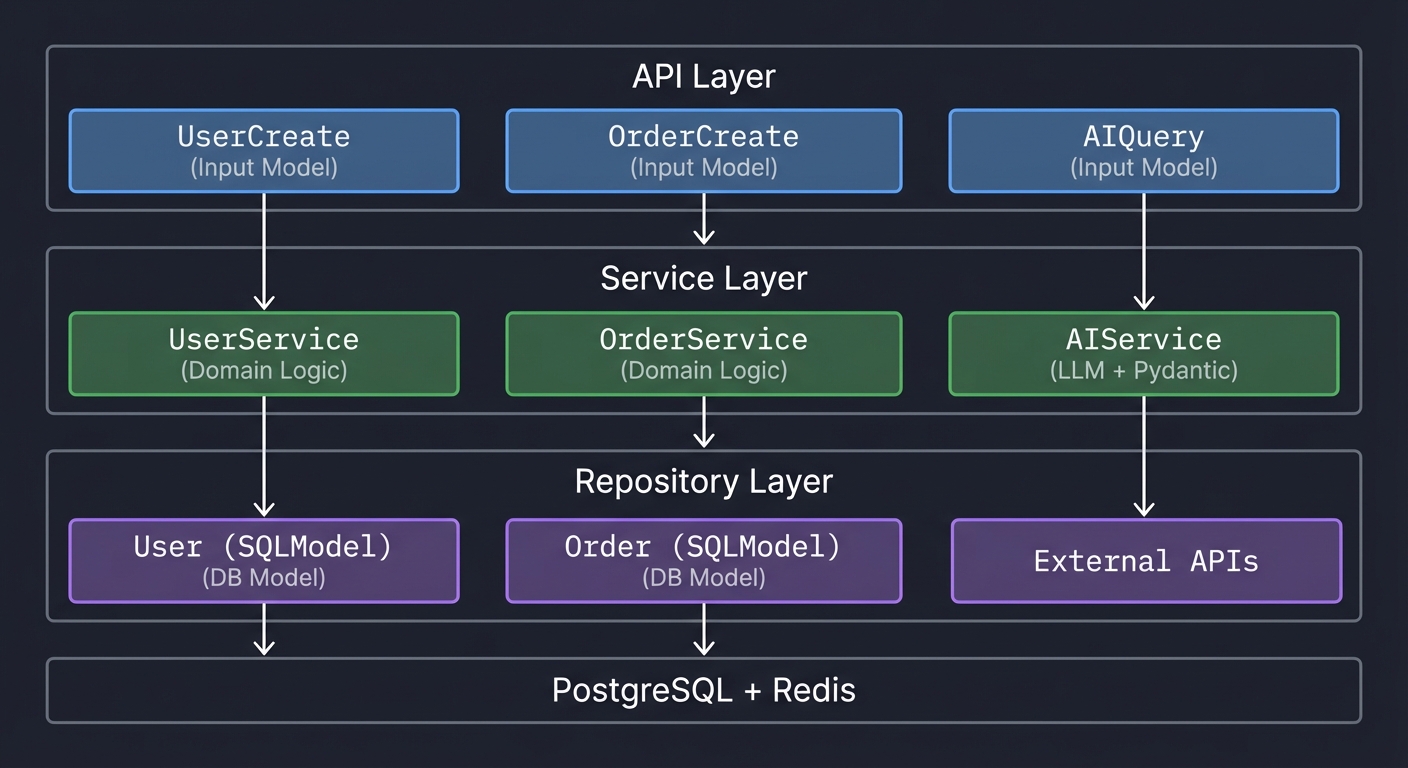
Architecture:
┌─────────────────────────────────────────────────────────────────────────┐
│                              API Layer                                   │
│  ┌─────────────────┐  ┌─────────────────┐  ┌─────────────────┐         │
│  │ UserCreate      │  │ OrderCreate     │  │ AIQuery         │         │
│  │ (Input Model)   │  │ (Input Model)   │  │ (Input Model)   │         │
│  └────────┬────────┘  └────────┬────────┘  └────────┬────────┘         │
└───────────┼────────────────────┼────────────────────┼───────────────────┘
            │                    │                    │
            ▼                    ▼                    ▼
┌─────────────────────────────────────────────────────────────────────────┐
│                           Service Layer                                  │
│  ┌─────────────────┐  ┌─────────────────┐  ┌─────────────────┐         │
│  │ UserService     │  │ OrderService    │  │ AIService       │         │
│  │ (Domain Logic)  │  │ (Domain Logic)  │  │ (LLM + Pydantic)│         │
│  └────────┬────────┘  └────────┬────────┘  └────────┬────────┘         │
└───────────┼────────────────────┼────────────────────┼───────────────────┘
            │                    │                    │
            ▼                    ▼                    ▼
┌─────────────────────────────────────────────────────────────────────────┐
│                          Repository Layer                                │
│  ┌─────────────────┐  ┌─────────────────┐  ┌─────────────────┐         │
│  │ User (SQLModel) │  │ Order (SQLModel)│  │ External APIs   │         │
│  │ (DB Model)      │  │ (DB Model)      │  │                 │         │
│  └────────┬────────┘  └────────┬────────┘  └─────────────────┘         │
└───────────┼────────────────────┼────────────────────────────────────────┘
            │                    │
            ▼                    ▼
┌─────────────────────────────────────────────────────────────────────────┐
│                          PostgreSQL + Redis                              │
└─────────────────────────────────────────────────────────────────────────┘
Learning milestones:
- Settings work across environments → You understand configuration
- API validates all inputs → You understand request validation
- Custom types are reusable → You understand type composition
- LLM returns structured data → You understand AI integration
- Errors are user-friendly → You understand error handling
- Performance is optimized → You understand production patterns
Project Comparison Table
| Project | Difficulty | Time | Depth of Understanding | Fun Factor |
|---|---|---|---|---|
| 1. Schema Validator CLI | Beginner | Weekend | ⭐⭐⭐ | ⭐⭐⭐ |
| 2. Configuration Management | Intermediate | 1 week | ⭐⭐⭐⭐ | ⭐⭐⭐ |
| 3. FastAPI Integration | Intermediate | 1-2 weeks | ⭐⭐⭐⭐ | ⭐⭐⭐⭐ |
| 4. Custom Validators & Types | Advanced | 1-2 weeks | ⭐⭐⭐⭐⭐ | ⭐⭐⭐⭐ |
| 5. Discriminated Unions | Advanced | 1-2 weeks | ⭐⭐⭐⭐⭐ | ⭐⭐⭐⭐ |
| 6. Generic Models | Expert | 2 weeks | ⭐⭐⭐⭐⭐ | ⭐⭐⭐ |
| 7. Build Mini-Pydantic | Expert | 2-3 weeks | ⭐⭐⭐⭐⭐ | ⭐⭐⭐⭐⭐ |
| 8. LLM Structured Output | Advanced | 1-2 weeks | ⭐⭐⭐⭐ | ⭐⭐⭐⭐⭐ |
| 9. Database ORM Integration | Advanced | 2 weeks | ⭐⭐⭐⭐ | ⭐⭐⭐⭐ |
| Final: Production Framework | Master | 1-2 months | ⭐⭐⭐⭐⭐ | ⭐⭐⭐⭐⭐ |
Recommended Learning Path
For Python Developers New to Pydantic
- Project 1 (Schema Validator) - 1 weekend
- Project 2 (Settings) - 1 week
- Project 3 (FastAPI) - 1-2 weeks
For Developers Building APIs
- Project 3 (FastAPI) - Start here
- Project 4 (Custom Validators) - Essential for real apps
- Project 5 (Discriminated Unions) - For webhook handling
- Project 9 (Database) - For full-stack
For Advanced Python Developers
- Project 7 (Build Mini-Pydantic) - Understand internals
- Project 6 (Generics) - Build reusable libraries
- Project 8 (LLM) - Cutting-edge AI integration
Summary
| # | Project Name | Main Language |
|---|---|---|
| 1 | Schema Validator CLI | Python |
| 2 | Configuration Management System | Python |
| 3 | API Request/Response Validator | Python |
| 4 | Custom Validators and Types | Python |
| 5 | Discriminated Unions Parser | Python |
| 6 | Generic Model Library | Python |
| 7 | Build Your Own Mini-Pydantic | Python |
| 8 | LLM Structured Output | Python |
| 9 | Database ORM Integration | Python |
| Final | Production Validation Framework | Python |
Essential Resources
Official Documentation
Key Articles & Tutorials
Books
- “Robust Python” by Patrick Viafore - Type hints and validation
- “Fluent Python” by Luciano Ramalho - Python internals
- “Architecture Patterns with Python” by Percival & Gregory - Clean architecture
- “Building Data Science Applications with FastAPI” by François Voron