Project 7: Latency Budget and Tail Latency Simulator
Project Overview
| Attribute | Details |
|---|---|
| Difficulty | Intermediate |
| Time Estimate | 1-2 weeks |
| Primary Language | C |
| Alternative Languages | Go, Rust, Python |
| Knowledge Area | Latency Engineering |
| Tools Required | perf, tracing tools, gnuplot/matplotlib |
| Primary Reference | “Designing Data-Intensive Applications” by Martin Kleppmann |
Learning Objectives
By completing this project, you will be able to:
- Explain tail latency phenomena including why p99 diverges from median
- Model queuing behavior and its exponential effect on latency
- Measure and report latency distributions with proper histograms
- Identify sources of latency variance including scheduler, I/O, and GC
- Design latency budgets that account for tail behavior
- Implement latency mitigation strategies like hedging and timeouts
Deep Theoretical Foundation
Why Tail Latency Matters
Consider a service handling 1 million requests per day. At p99, 1% of requests experience the tail latency:
- 10,000 users per day experience the worst-case latency
- If average session has 100 requests, every user experiences tail latency
User experience distribution for 100-request session:
┌────────────────────────────────────────────────────────────────┐
│ Probability of hitting at least one p99 request:               │
│   1 - (0.99)^100 = 63%                                         │
│                                                                 │
│ Probability of hitting at least one p99.9 request:             │
│   1 - (0.999)^100 = 10%                                        │
└────────────────────────────────────────────────────────────────┘
The tail isn’t an edge case—it’s the common case for user experience.
The Queuing Theory Connection
Little’s Law: L = λW
- L = average number of items in queue
- λ = arrival rate
- W = average wait time
Key insight: As utilization approaches 100%, wait time approaches infinity.
Queuing delay vs. utilization (M/M/1 queue):
┌──────────────────────────────────────────────────────┐
│ Utilization    │  Relative Delay                     │
├────────────────┼─────────────────────────────────────┤
│ 50%            │  1.0x service time                  │
│ 70%            │  2.3x                               │
│ 80%            │  4.0x                               │
│ 90%            │  9.0x                               │
│ 95%            │  19.0x                              │
│ 99%            │  99.0x                              │
└────────────────┴─────────────────────────────────────┘
At 80% utilization, average latency is 4x the service time. At 95%, it’s 19x.
Sources of Latency Variance
1. Queuing Delays
- Request arrives when server busy
- Must wait for current requests to complete
- Variance increases with load
2. Scheduler Interference
- OS scheduler preempts process
- Context switch adds 1-10 microseconds
- Other processes steal CPU time
3. I/O Variance
- Disk seek time: 0.1-10 ms range
- Network jitter: RTT variance
- Contention for I/O resources
4. Garbage Collection
- Stop-the-world pauses: 10-100+ ms
- Even concurrent GC has some pause
- Unpredictable timing
5. Memory Effects
- TLB misses: microsecond delays
- Page faults: millisecond delays
- NUMA remote access: 2x latency
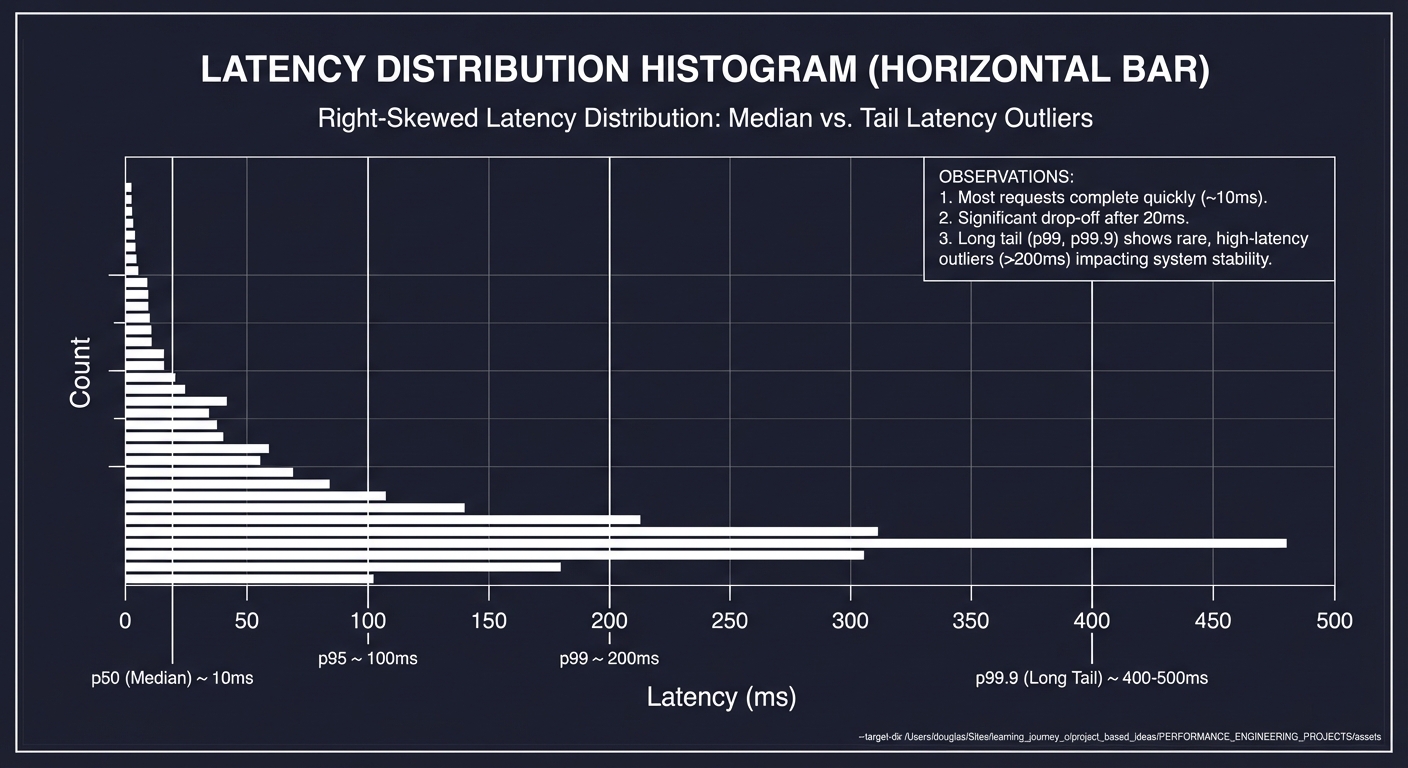
Latency Distribution Shapes
Real latency distributions are NOT normal. They have:
- Right skew: Long tail of slow requests
- Multi-modal: Peaks at different latency levels
- Heavy tails: Extreme outliers (10x, 100x median)
Typical latency distribution:
Count
  │
  │ ▄
  │ ██
  │ ███
  │ ████
  │ █████
  │ ██████
  │ ███████▄
  │ █████████▄▄▄▄▄▄▄▄▄▄▄▄▄▄▄▄▄▄______.......
  └───────────────────────────────────────────→ Latency
    p50     p90  p95    p99        p99.9

Note the long tail extending far beyond median
Latency Budget Concept
A latency budget allocates time across components:
Total SLA: 100ms
├── Network (client→server): 10ms
├── Load balancer: 2ms
├── Authentication: 5ms
├── Business logic: 30ms
├── Database query: 40ms
├── Response serialization: 5ms
├── Network (server→client): 8ms
└── Buffer for variance: 0ms ← PROBLEM!
Without buffer, any variance exceeds SLA. A realistic budget:
Total SLA: 100ms
├── Core processing: 50ms (50% of budget)
├── I/O operations: 30ms (30% of budget)
└── Variance buffer: 20ms (20% of budget)
Complete Project Specification
What You’re Building
A latency simulation and analysis toolkit called latency_sim that:
- Generates synthetic workloads with configurable latency patterns
- Simulates queuing effects at various load levels
- Produces latency histograms suitable for observability export
- Identifies latency budget violations and sources
- Models mitigation strategies (timeouts, hedging, retry)
Functional Requirements
latency_sim run --workload <name> --qps <rate> --duration <sec>
latency_sim analyze --input <data.csv> --percentiles 50,90,95,99,99.9
latency_sim histogram --input <data.csv> --buckets <list> --output <file>
latency_sim budget --components <config.yaml> --sla <ms>
latency_sim mitigation --strategy <hedge|timeout|retry> --compare
Example Output
Latency Simulation Report
═══════════════════════════════════════════════════
Workload: web_api
Configuration:
  Target QPS: 500
  Duration: 300 seconds
  Total requests: 150,000

Latency Distribution:
───────────────────────────────────────────────────
  p50:    4.8 ms  ████████████████
  p75:    7.3 ms  ███████████████████████
  p90:   12.1 ms  ██████████████████████████████
  p95:   18.4 ms  ████████████████████████████████████
  p99:   38.9 ms  ████████████████████████████████████████████
  p99.9: 127.3 ms ████████████████████████████████████████████████████████████

Histogram (Prometheus-compatible):
───────────────────────────────────────────────────
  latency_bucket{le="5"}     68,421
  latency_bucket{le="10"}    24,832
  latency_bucket{le="25"}     5,127
  latency_bucket{le="50"}     1,384
  latency_bucket{le="100"}      198
  latency_bucket{le="250"}       38
  latency_count              150,000
  latency_sum                1,247,342

Budget Analysis (SLA: 50ms):
───────────────────────────────────────────────────
Component         Actual p99   Budget   Status
network_ingress   3.2 ms       5 ms     ✓ OK
authentication    4.8 ms       5 ms     ✓ OK
business_logic    22.1 ms      20 ms    ⚠ OVER (110%)
database          18.4 ms      15 ms    ⚠ OVER (123%)
serialization     2.1 ms       5 ms     ✓ OK
TOTAL            50.6 ms       50 ms    ✗ SLA VIOLATED

Tail Latency Analysis:
───────────────────────────────────────────────────
• p99 is 8.1x higher than p50 (tail amplification)
• 1,500 requests exceeded SLA (1%)
• Worst-case latency: 312 ms (65x p50)
• Queue depth exceeded 20 for 42 seconds (14%)

Root Cause Indicators:
───────────────────────────────────────────────────
• Database p99 correlates with queue depth spikes
• 89% of SLA violations occurred during high queue depth
• Recommendation: Reduce database query latency or add capacity
Solution Architecture
Component Design
┌─────────────────────────────────────────────────────────────┐
│                    CLI Interface                             │
│   Workload configuration, analysis parameters                │
└──────────────────────────┬──────────────────────────────────┘
                           │
          ┌────────────────┼────────────────┐
          │                │                │
          ▼                ▼                ▼
   ┌─────────────┐  ┌─────────────┐  ┌─────────────┐
   │ Workload    │  │ Queue       │  │ Timer       │
   │ Generator   │  │ Simulator   │  │ Engine      │
   └──────┬──────┘  └──────┬──────┘  └──────┬──────┘
          │                │                │
          └────────────────┼────────────────┘
                           │
                           ▼
           ┌───────────────────────────────┐
           │      Measurement Collector     │
           │  Per-request latency storage   │
           └───────────────┬───────────────┘
                           │
          ┌────────────────┼────────────────┐
          │                │                │
          ▼                ▼                ▼
   ┌─────────────┐  ┌─────────────┐  ┌─────────────┐
   │ Histogram   │  │ Percentile  │  │ Budget      │
   │ Builder     │  │ Calculator  │  │ Analyzer    │
   └─────────────┘  └─────────────┘  └─────────────┘
Key Data Structures
// Single request measurement
typedef struct {
    uint64_t request_id;
    uint64_t arrival_time_ns;
    uint64_t start_time_ns;      // When processing started
    uint64_t end_time_ns;
    uint64_t queue_depth;        // Queue depth at arrival
    // Component breakdown (optional)
    uint64_t component_times[MAX_COMPONENTS];
} request_record_t;

// Histogram for percentile calculation
typedef struct {
    double *bucket_bounds;       // [5, 10, 25, 50, 100, 250, 500, 1000]
    uint64_t *bucket_counts;
    size_t num_buckets;
    uint64_t total_count;
    double sum;                  // For mean calculation
} histogram_t;

// Latency budget configuration
typedef struct {
    const char *component_name;
    double budget_ms;
    double actual_p99_ms;
    double utilization;          // actual/budget
    int exceeded;
} budget_component_t;

typedef struct {
    budget_component_t *components;
    size_t num_components;
    double sla_ms;
    double total_actual_ms;
    int sla_violated;
} budget_analysis_t;
Workload Generator
// Simulates realistic latency distribution
double generate_latency(workload_config_t *config) {
    // Base latency (log-normal distribution for realism)
    double base = config->base_latency_ms;
    double variance = config->variance_factor;

    // Log-normal gives right-skewed distribution
    double normal = random_normal(0, 1);
    double latency = base * exp(variance * normal);

    // Add occasional spikes (GC, I/O contention)
    if (random_uniform() < config->spike_probability) {
        latency += config->spike_latency_ms;
    }

    return latency;
}

// Queue simulation
double simulate_queue_delay(queue_t *q, double service_time) {
    double arrival_time = current_time();

    // Find when queue will be free
    double queue_free_time = q->busy_until;
    double wait_time = (queue_free_time > arrival_time)
                       ? (queue_free_time - arrival_time)
                       : 0;

    // Update queue state
    q->busy_until = fmax(arrival_time, queue_free_time) + service_time;
    q->depth = (int)(wait_time / service_time);  // Approximate depth

    return wait_time;
}
Phased Implementation Guide
Phase 1: Basic Latency Collection (Days 1-3)
Goal: Measure and store per-request latencies.
Steps:
- Create request record structure
- Implement nanosecond-precision timing
- Generate synthetic workload with sleep-based delays
- Store latencies in array for analysis
- Calculate basic statistics (min, max, mean)
Validation: Mean matches expected average latency.
Phase 2: Percentile Calculation (Days 4-5)
Goal: Accurate percentile computation.
Steps:
- Implement array-based percentile calculation (sort + index)
- Add histogram-based approximate percentiles
- Compare accuracy of both methods
- Generate distribution visualization
Validation: Percentiles match expected for known distributions.
Phase 3: Queue Simulation (Days 6-8)
Goal: Model queuing effects on latency.
Steps:
- Implement M/M/1 queue simulation
- Generate arrivals with Poisson process
- Track queue depth over time
- Show latency explosion at high utilization
Validation: Matches theoretical queuing formula within 10%.
Phase 4: Budget Analysis (Days 9-11)
Goal: Component-level budget tracking.
Steps:
- Parse budget configuration (YAML/JSON)
- Simulate multi-component latency
- Calculate per-component p99
- Identify budget violations
- Generate recommendations
Validation: Correctly identifies over-budget components.
Phase 5: Observability Export (Days 12-14)
Goal: Production-ready histogram export.
Steps:
- Implement Prometheus histogram format
- Add stable dimension tagging
- Create Datadog distribution format
- Test import into real observability platform
Validation: Metrics appear correctly in Grafana/Datadog.
Testing Strategy
Statistical Validation
- Known distribution: Generate exponential, verify percentiles match theory
- Queuing formula: Verify M/M/1 queue matches analytical results
- Percentile accuracy: Compare histogram to exact sort-based calculation
Edge Cases
- Zero-latency requests: Handle correctly
- Extreme outliers: Don’t overflow or distort statistics
- Empty periods: Handle gaps in traffic
Load Testing
- Sustained load: Run for hours, verify no memory leaks
- Burst traffic: Handle 10x normal load
- Slow drain: Verify queue eventually empties
Common Pitfalls and Debugging
Pitfall 1: Timer Resolution Issues
Symptom: All latencies cluster at same value.
Cause: Timer resolution too coarse for measurements.
Solution:
// Use CLOCK_MONOTONIC for nanosecond precision
struct timespec ts;
clock_gettime(CLOCK_MONOTONIC, &ts);
uint64_t ns = ts.tv_sec * 1000000000ULL + ts.tv_nsec;

// Verify resolution
struct timespec res;
clock_getres(CLOCK_MONOTONIC, &res);
printf("Timer resolution: %ld ns\n", res.tv_nsec);
Pitfall 2: Histogram Bucket Misdesign
Symptom: Most latencies fall in one bucket.
Cause: Bucket boundaries don’t match distribution.
Solution:
// Exponential buckets cover wide range
// Good: [1, 2, 5, 10, 25, 50, 100, 250, 500, 1000, +Inf]
// Bad:  [10, 20, 30, 40, 50, 60, 70, 80, 90, 100, +Inf]

// Align with SLO boundaries
// If SLO is 100ms, have bucket at 100ms exactly
Pitfall 3: Coordinated Omission
Symptom: Latency looks better than reality.
Cause: When system is slow, fewer requests are sent, hiding latency.
Solution: Use “intended” vs “actual” arrival times:
// Coordinated omission affected (WRONG)
for (int i = 0; i < num_requests; i++) {
    uint64_t start = now();
    send_request();        // May block if server slow
    uint64_t end = now();
    record_latency(end - start);
}

// Corrected (RIGHT)
uint64_t intended_interval = 1000000000 / target_qps;
uint64_t next_intended = now();

for (int i = 0; i < num_requests; i++) {
    uint64_t actual_start = now();
    send_request();
    uint64_t end = now();

    // Include time waiting for previous requests
    record_latency(end - next_intended);

    next_intended += intended_interval;
}
Pitfall 4: Ignoring Warmup Period
Symptom: First percentiles are way off.
Cause: System not at steady state (cold caches, JIT warming).
Solution: Discard first N seconds or N requests.
Extensions and Challenges
Extension 1: Hedging Simulation
Implement hedging (send duplicate request after timeout):
// If no response in 10ms, send to second server
// Use whichever responds first
// Measure improvement in p99
Extension 2: Adaptive Load Shedding
Implement admission control:
- Track queue depth
- Reject requests when queue > threshold
- Measure trade-off: rejected requests vs tail latency
Extension 3: Distributed Tracing Integration
Add trace ID propagation:
- Generate span for each component
- Export to Jaeger/Zipkin format
- Correlate slow requests with traces
Challenge: Real Service Integration
Apply latency analysis to real service:
- Instrument actual HTTP endpoints
- Measure component latencies
- Compare simulation to reality
- Tune model parameters
Real-World Connections
Industry Patterns
- Google’s Tail at Scale: Hedged requests, backup requests
- Amazon’s p99 SLOs: Everything measured at p99, not average
- Netflix’s Adaptive Load Shedding: Concurrency limits based on latency
- LinkedIn’s Latency Budgets: Component-level tracking
Observability Best Practices (2025)
- Store histograms, not aggregates: Enables accurate percentiles
- Use stable dimensions only: Avoid high-cardinality tags
- Align buckets with SLOs: Bucket at exact SLO boundary
- Track queue depth alongside latency: Enables correlation
Self-Assessment Checklist
Before considering this project complete, verify:
- You can explain why p99 diverges from median
- You demonstrated queuing effects on latency
- Your histogram buckets are appropriately distributed
- You can identify budget violations by component
- Latency export is compatible with real observability platforms
- You understand and avoid coordinated omission
- You can recommend mitigation strategies
Resources
Essential Reading
- “Designing Data-Intensive Applications” by Kleppmann, Chapter 8
- “Systems Performance” by Gregg, Chapter 2
- “Site Reliability Engineering” (Google), Chapter 4
Papers
- “The Tail at Scale” (Google, 2013)
- “Fail at Scale” (Facebook, 2015)
Tools
- HdrHistogram: High dynamic range histogram library
- Prometheus: Histogram implementation
- Grafana: Visualization and SLO tracking