Password Manager Deep Dive: From Zero to Building Your Own Secure Vault
Goal: Build a secure, usable password manager by mastering key derivation, authenticated encryption, and zero-knowledge architecture. By the end, you will know exactly how a vault is protected and where real-world attacks break weak implementations.
Why This Matters
Every day, billions of people face an impossible task: remember dozens of unique, complex passwords. The human brain wasn’t designed for this. We evolved to remember faces, places, and stories—not 32-character random strings.
The Problem Password Managers Solve:
- The average person has 100+ online accounts
- Humans can reliably remember ~7 items in short-term memory
- Password reuse leads to credential stuffing attacks (one breach compromises all accounts)
- “Memorable” passwords are crackable in seconds with modern hardware
What You’ll Understand After This Learning Path:
- How encryption actually protects your data (not just “it’s encrypted”)
- Why the master password is the single point of failure AND the ultimate protection
- How zero-knowledge architecture works (why even the company can’t read your passwords)
- What key derivation functions do and why they’re critical
- How password managers sync across devices securely
- What happens if someone steals the encrypted database
- How to evaluate password manager security claims
Core Concept Breakdown
Before building, understand these foundational pillars:
Pillar 1: The Master Password Problem
Your master password must derive a cryptographic key that encrypts everything. The challenge: passwords are weak (low entropy), but encryption needs strong keys. Key Derivation Functions (KDFs) bridge this gap by making password-to-key derivation computationally expensive.
Pillar 2: Zero-Knowledge Architecture
The password manager company stores your encrypted vault but NEVER has access to your master password or encryption key. All encryption/decryption happens on YOUR device. Even if their servers are breached, attackers only get encrypted blobs.
Pillar 3: Defense in Depth
Multiple layers of protection: KDF (slows brute-force), AES-256 encryption (protects data), HMAC (detects tampering), secure memory (protects against memory dumps), and optionally a Secret Key (protects against server-side attacks).
Pillar 4: The Trust Model
You trust: the cryptographic algorithms (AES, Argon2), the implementation (open-source helps), your device security, and your master password strength. You don’t need to trust: the company’s servers, their employees, or network security.
Master Password and KDFs
Your master password is low-entropy by default. Key derivation functions (Argon2, scrypt, PBKDF2) transform that weak input into a strong key by making brute force expensive in both time and memory.
Vault Encryption and Integrity
Your vault needs confidentiality and tamper detection. Authenticated encryption (AES-GCM, ChaCha20-Poly1305) provides both in one step, preventing silent corruption or malicious modification.
Zero-Knowledge Sync
Zero-knowledge means the server never sees your plaintext or master key. Sync systems must handle encryption, conflict resolution, and key rotation without exposing secrets.
Concept Summary Table
| Concept Cluster | What You Need to Internalize |
|---|---|
| Master password | Entropy limits and user behavior. |
| KDFs | Time/memory hardness and parameter tuning. |
| Vault encryption | AEAD modes and nonce handling. |
| Integrity | Detecting tampering and rollback. |
| Zero-knowledge sync | Server never sees secrets. |
| Secure memory | Reducing key exposure in RAM. |
Deep Dive Reading by Concept
| Concept | Book & Chapter |
|---|---|
| Password hashing | Serious Cryptography (2nd Ed.) — Ch. 6 |
| KDF parameters | Password Hashing Competition Report — Argon2 sections |
| AEAD | Cryptography Engineering — Ch. 7 |
| Threat modeling | Security Engineering — threat models |
| Sync design | Designing Data-Intensive Applications — consistency basics |
Project 1: Password Strength Analyzer & Entropy Calculator
- File: PASSWORD_MANAGER_DEEP_DIVE_PROJECTS.md
- Main Programming Language: Python
- Alternative Programming Languages: Rust, Go, JavaScript
- Coolness Level: Level 2: Practical but Forgettable
- Business Potential: 2. The “Micro-SaaS / Pro Tool”
- Difficulty: Level 1: Beginner
- Knowledge Area: Cryptography / Information Theory
- Software or Tool: Password Analysis Tool
- Main Book: “Serious Cryptography, 2nd Edition” by Jean-Philippe Aumasson
What you’ll build: A command-line tool that calculates the true entropy (randomness) of any password and estimates crack time against various attack speeds.
Why it teaches password security: Before building a password manager, you must understand WHY certain passwords are weak. This project forces you to quantify password strength mathematically, understand character sets, and see why “P@ssw0rd!” is terrible despite looking complex.
Core challenges you’ll face:
- Calculating entropy (log2 of keyspace) → maps to information theory fundamentals
- Detecting common patterns (keyboard walks, dates, dictionary words) → maps to how attackers think
- Estimating crack times (GPU speeds, cloud cracking farms) → maps to real-world threat modeling
- Handling Unicode properly (emoji passwords, international characters) → maps to character encoding
Key Concepts:
- Information Entropy: “Serious Cryptography, 2nd Edition” Chapter 1 - Jean-Philippe Aumasson
- Password Cracking Techniques: “Practical Malware Analysis” Chapter 5 - Michael Sikorski
- Character Encoding: “Fluent Python, 2nd Edition” Chapter 4 - Luciano Ramalho
Difficulty: Beginner Time estimate: Weekend Prerequisites: Basic programming, understanding of logarithms
Real world outcome:
Deliverables:
- Working prototype and demo output
- Short usage documentation
Validation checklist:
- Runs successfully on sample inputs
- Matches expected behavior
- Errors are handled cleanly ```bash $ ./entropy_calc “correct horse battery staple” Password: correct horse battery staple Length: 28 characters Character Set: lowercase + space (27 chars) Naive Entropy: 133.2 bits Pattern Detected: 4-word passphrase Adjusted Entropy: ~44 bits (dictionary attack) Crack Time (10B guesses/sec): ~1.4 hours Verdict: WEAK (use more words or add randomness)
$ ./entropy_calc “j8#kL9@mN2$pQ4” Password: j8#kL9@mN2$pQ4 Length: 14 characters Character Set: mixed case + digits + symbols (95 chars) Entropy: 91.8 bits Crack Time (10B guesses/sec): ~10^15 years Verdict: STRONG
**Implementation Hints**:
The core formula is: `entropy = log2(charset_size ^ length)` or equivalently `entropy = length * log2(charset_size)`. But naive entropy overestimates strength for human-created passwords. You need to:

1. Detect if the password is in common password lists (entropy drops to nearly zero)
2. Identify dictionary words and calculate based on dictionary size
3. Recognize patterns like "123", "abc", "qwerty" and penalize accordingly
4. Consider using **zxcvbn's approach** (Dropbox's password strength estimator)

**About zxcvbn**: Dropbox's open-source password strength estimator (presented at USENIX Security 2016) detects:
- 10,000+ common passwords (instant crack)
- Common American names and surnames
- Common English words (dictionary attacks)
- Spatial patterns: QWERTY (qwerty, asdf, zxcvbn), keyboard walks
- Repeats: aaaa, 123123
- Sequences: abcd, 4321, 02468
- Date patterns: 19991231, 12/31/99

**zxcvbn's key insight**: Measure entropy not as theoretical keyspace, but as the **minimum guesses needed** given pattern-aware attacks. Available in JavaScript, Python, TypeScript, and iOS. Using zxcvbn as your reference implementation teaches you to think like an attacker.

*Pseudo-code*:
function calculate_entropy(password): if password in common_passwords_list: return 0 # Instantly crackable
detected_patterns = find_patterns(password)
if detected_patterns:
    return calculate_pattern_entropy(detected_patterns)

charset = determine_charset(password)
return len(password) * log2(len(charset)) ```
Learning milestones:
- Calculate basic entropy → You understand keyspace and logarithms
- Detect dictionary words and patterns → You think like an attacker
- Estimate crack times accurately → You can evaluate real password strength
Real World Outcome
When you run your password strength analyzer, users will see immediate, actionable feedback about their password quality. Here’s exactly what the experience looks like:
Example 1: Testing a weak but “clever-looking” password
$ ./entropy_calc "P@ssw0rd123!"
====================================================
  PASSWORD STRENGTH ANALYSIS
====================================================

Password: P@ssw0rd123!
Length: 13 characters
Character Set Detected: Mixed (uppercase, lowercase, digits, symbols)
Charset Size: 95 characters

ENTROPY ANALYSIS:
-----------------
Naive Entropy: 85.3 bits
  (Based on 95^13 possible combinations)

PATTERN DETECTION:
-----------------
❌ Common substitution detected: @ for 'a', 0 for 'o'
❌ Dictionary word found: "Password" (with substitutions)
❌ Sequential numbers detected: "123"
❌ Ends with common pattern: "!"

ADJUSTED ENTROPY: ~12 bits
  (Effective keyspace: ~4,096 guesses)

CRACK TIME ESTIMATES:
---------------------
Against 1 billion guesses/second (modern GPU):
  Best case: 0.000004 seconds (INSTANT)
  Average: 0.000002 seconds (INSTANT)

Against 100 billion guesses/second (GPU cluster):
  Best case: 0.00000004 seconds (INSTANT)
  Average: 0.00000002 seconds (INSTANT)

VERDICT: ⛔ CRITICALLY WEAK
This password would be cracked in under 1 second.
RECOMMENDATION: Use 4-6 random words or 16+ random characters.
====================================================
Example 2: Testing a strong passphrase
$ ./entropy_calc "correct horse battery staple"
====================================================
  PASSWORD STRENGTH ANALYSIS
====================================================

Password: correct horse battery staple
Length: 28 characters
Character Set Detected: Lowercase + space
Charset Size: 27 characters

ENTROPY ANALYSIS:
-----------------
Naive Entropy: 133.2 bits
  (Based on 27^28 possible combinations)

PATTERN DETECTION:
-----------------
✓ Passphrase detected: 4 dictionary words
ℹ Dictionary attack assumption:
  - Using 10,000 word dictionary
  - Effective keyspace: 10,000^4 = 10^16

ADJUSTED ENTROPY: ~53.3 bits
  (Effective keyspace: 10,000,000,000,000,000 guesses)

CRACK TIME ESTIMATES:
---------------------
Against 1 billion guesses/second (modern GPU):
  Best case: 10,000,000 seconds (~116 days)
  Average: 5,000,000 seconds (~58 days)

Against 100 billion guesses/second (GPU cluster):
  Best case: 100,000 seconds (~1.2 days)
  Average: 50,000 seconds (~14 hours)

VERDICT: ⚠️  MODERATE STRENGTH
This passphrase provides reasonable protection for most accounts.
RECOMMENDATION: Add 1-2 more words for high-value accounts.
  - With 5 words: ~66.6 bits (~2 million years vs GPU cluster)
  - With 6 words: ~79.9 bits (~2 billion years vs GPU cluster)
====================================================
Example 3: Testing a truly random password
$ ./entropy_calc "j8#kL9@mN2$pQ4!rS6^t"
====================================================
  PASSWORD STRENGTH ANALYSIS
====================================================

Password: j8#kL9@mN2$pQ4!rS6^t
Length: 20 characters
Character Set Detected: Mixed (uppercase, lowercase, digits, symbols)
Charset Size: 95 characters (full ASCII printable)

ENTROPY ANALYSIS:
-----------------
Naive Entropy: 131.4 bits
  (Based on 95^20 possible combinations)

PATTERN DETECTION:
-----------------
✓ No dictionary words detected
✓ No sequential patterns detected
✓ No keyboard walks detected
✓ No common substitutions detected
✓ High randomness score: 94/100

ADJUSTED ENTROPY: ~131.4 bits (no reduction)
  (Effective keyspace: 2^131.4 combinations)

CRACK TIME ESTIMATES:
---------------------
Against 1 billion guesses/second (modern GPU):
  Best case: 3.4 × 10^27 seconds (1.1 × 10^20 years)
  Average: 1.7 × 10^27 seconds (5.4 × 10^19 years)

Against 100 billion guesses/second (GPU cluster):
  Best case: 3.4 × 10^25 seconds (1.1 × 10^18 years)
  Average: 1.7 × 10^25 seconds (5.4 × 10^17 years)

VERDICT: ✅ EXCELLENT STRENGTH
This password is effectively uncrackable with current technology.
Universe age: ~13.8 billion years. This password would take
trillions of universe lifetimes to crack.
====================================================
The tool demonstrates the critical difference between perceived complexity and actual entropy—the core lesson of password security.
The Core Question You’re Answering
“How do we mathematically measure password strength, and why are passwords humans create fundamentally weak?”
This project answers fundamental questions about information theory, human psychology, and cryptographic security:
-
What is randomness, really? Entropy measures unpredictability. A password with 128 bits of entropy means an attacker needs 2^128 guesses to be certain of finding it. This project teaches you that “random” has a precise mathematical definition.
-
Why can’t we trust our intuition about password strength? Humans are pattern-seeking creatures. We create passwords that seem complex to us (“P@ssw0rd123!”) but are predictable to computers. Attackers know these substitution patterns and dictionary words, reducing effective entropy from ~85 bits to ~12 bits.
-
How do we bridge theory and practice? Pure entropy calculation assumes perfect randomness. But attackers don’t try all combinations—they try smart guesses first: dictionary words, common patterns, character substitutions, then brute force as a last resort.
-
What’s the relationship between entropy and time? Entropy is meaningless without understanding computational power. 40 bits was strong in 1990 (11 years to crack). Today, a GPU cracks it in 11 seconds. Security is relative to attacker capabilities.
-
Why is information theory fundamental to cryptography? Claude Shannon’s information theory (1948) provides the mathematical foundation for all cryptography. Entropy measures information content. A truly random 128-bit key has 128 bits of entropy—perfect information content. A human-chosen password claiming 128 bits might have only 20 bits due to patterns.
By building this tool, you’ll internalize the difference between perceived security and actual security—a distinction separating amateur password security from professional cryptographic practice.
Concepts You Must Understand First
Before building an accurate password strength analyzer, you need foundational knowledge in several interconnected areas:
1. Information Theory Fundamentals (CRITICAL)
What you need: Understanding entropy as a measure of uncertainty/randomness.
Book reference:
- “Serious Cryptography, 2nd Edition” by Jean-Philippe Aumasson, Chapter 1 (“Encryption”), pages 1-15: Covers information-theoretic security, Shannon’s perfect secrecy theorem, and entropy as the fundamental security metric.
Why it matters: You cannot measure password strength without understanding what “random” means mathematically. The formula entropy = log2(charset^length) comes directly from information theory. You need to understand why we use logarithms (they convert multiplication of probabilities into addition) and why base-2 (computers work in binary).
Key insight: The entropy of a random variable X is H(X) = -Σ P(x) * log2(P(x)) where P(x) is probability. For uniform distribution (all passwords equally likely), this simplifies to log2(N) where N is the number of possibilities.
2025 Security Context: According to current industry standards, passwords should have:
- 60+ bits for standard accounts (assuming strong KDF like Argon2)
- 80+ bits for high-value accounts (financial, healthcare)
- 120+ bits for cryptographic keys and master passwords
These recommendations account for 2025 GPU capabilities (RTX 4090 achieving 100 billion MD5 hashes/sec) and projected hardware improvements over the next decade.
2. Logarithms and Exponentials (REQUIRED)
What you need: Comfort with logarithmic relationships and exponential growth.
Book reference:
- “Concrete Mathematics” by Graham, Knuth, and Patashnik, Chapter 2 (“Sums”) and Chapter 4 (“Number Theory”): Covers logarithm properties essential for entropy calculations.
Why it matters: The relationship between entropy bits and crack time is exponential. Adding one bit of entropy doubles the search space. If you can’t reason about 2^64 vs 2^65, you can’t explain why one extra character matters.
Practical example: Password with charset 26 (lowercase) and length 8: log2(26^8) = 8 * log2(26) ≈ 37.6 bits. Adding one character: log2(26^9) ≈ 42.3 bits. That’s 2^4.7 ≈ 26 times harder to crack.
3. Character Encodings (IMPORTANT)
What you need: Understanding ASCII, Unicode, UTF-8, and character representation.
Book reference:
- “Fluent Python, 2nd Edition” by Luciano Ramalho, Chapter 4 (“Unicode Text Versus Bytes”), pages 119-158: Comprehensive coverage of Unicode, explaining why “length” can mean different things.
Why it matters: When a user enters “café”, is that 4 characters or 5? Is “🔒” one character or four bytes? Your entropy calculation must handle Unicode correctly.
Gotcha: The string “é” can be encoded as one codepoint (U+00E9) or as “e” + combining accent (U+0065 U+0301). They look identical but have different lengths.
4. Probability and Combinatorics (REQUIRED)
What you need: Understanding combinations, permutations, and probability spaces.
Book reference:
- “Introduction to Algorithms” (CLRS), 4th Edition, Appendix C (“Counting and Probability”): Covers permutations, combinations, and probability.
Why it matters: To calculate keyspace: “How many ways can I choose 8 characters from a 95-character set, with replacement, where order matters?” Answer: 95^8 (permutations with replacement).
5. Regular Expressions (PRACTICAL)
What you need: Ability to write regex patterns to detect common password patterns.
Book reference:
- “Mastering Regular Expressions” by Jeffrey Friedl, Chapters 1-3: Covers regex fundamentals and advanced patterns.
Why it matters: Detecting patterns like “123”, “abc”, “qwerty” requires pattern matching. You need regex to find:
- Sequential numbers:
012|123|234|...|789 - Keyboard walks:
qwerty|asdfgh|zxcvbn - Repeated characters:
(.)\1{2,} - Common substitutions:
@fora,0foro,1forl
Pre-Project Reading Checklist
Before coding, read these specific sections:
- “Serious Cryptography” Chapter 1, pages 1-15 (entropy introduction)
- “Fluent Python” Chapter 4, pages 119-140 (Unicode basics)
- Review logarithm properties:
log(a*b) = log(a) + log(b),log(a^b) = b*log(a) - Study one password breach dataset (rockyou.txt or similar)
- Research zxcvbn (Dropbox’s password strength estimator) methodology
Questions to Guide Your Design
Before writing code, wrestle with these design questions:
Architecture Questions
-
How will you structure the entropy calculation pipeline? Will you do naive entropy first, then adjust for patterns? Or detect patterns first? Sequential or parallel pattern detection?
-
How will you handle edge cases? Empty password? One character? 1000 characters? Null bytes? Pure Unicode emojis (charset size = 3000+)?
-
What’s your data model for patterns? Enum of pattern types? How to represent overlapping patterns (e.g., “password123” has both dictionary word AND sequential numbers)?
Algorithm Questions
-
How will you detect dictionary words efficiently? Load entire dictionary into memory (fast, high memory)? Bloom filter (space-efficient, probabilistic)? Trie (efficient prefix matching)? Pre-compute hashes (O(1) lookup)?
-
How will you handle partial dictionary matches? If password is “horsebattery”, detect “horse” and “battery” separately? What about “passw0rd” with substitutions?
-
How do you quantify pattern-based entropy reduction? If you detect “password” + “123”, is entropy
log2(dictionary_size * 1000)?
Security Questions
-
What’s the threat model? Online attack (rate-limited, ~1000 guesses)? Offline attack (stolen hash, billions/sec)? Report both?
-
How will you estimate attacker capabilities? GPU cracking speed? (Hashcat: ~50-100 billion MD5/sec on RTX 4090). Cloud GPU rental? Future hardware improvements?
-
Should you penalize patterns more or less aggressively? If you find “password”, set entropy to 0? Or to
log2(dictionary_size)?
Usability Questions
-
How will you communicate results? Just bits (most users don’t understand “37.6 bits”)? Score (0-100)? Category (weak/moderate/strong)? Crack time estimates (seconds/days/years)?
-
Should you show recommendations? Suggest improvements? Show how adding one character helps? Suggest passphrase instead?
-
How detailed should output be? Basic mode (verdict only)? Verbose mode (patterns, entropy breakdown)? Debug mode (every calculation step)?
Thinking Exercise: Before You Code
Exercise 1: Manual Entropy Calculation
Calculate entropy manually for these passwords (pen, paper, calculator only):
"aaaaaaaa"(8 identical characters)- Naive entropy?
- Adjusted entropy given the pattern?
"password"(common dictionary word)- Naive entropy?
- Adjusted entropy assuming attacker checks dictionary first?
"P@ssw0rd123!"(dictionary with substitutions and numbers)- Naive entropy?
- Adjusted entropy?
Answers:
"aaaaaaaa": Naivelog2(26^8) ≈ 37.6 bits; Adjusted0 bitsorlog2(26) ≈ 4.7 bits(pattern obvious)"password": Naivelog2(26^8) ≈ 37.6 bits; Adjustedlog2(10000) ≈ 13.3 bits(10k word dictionary)"P@ssw0rd123!": Naivelog2(95^12) ≈ 79 bits; Adjustedlog2(100000*10*1000*10) ≈ 33 bits
Exercise 2: Build Mental Model of Attack Progression
You’re an attacker with a GPU (100 billion guesses/sec) and a stolen password hash database. Estimate attack method and time for each:
"123456""letmein""L3tm31n!""correct horse battery staple""Tr0ub4dor&3""j8#kL9@mN2$pQ4!rS6^t"
Answers:
- Top-10 list, <1 microsecond
- Dictionary, ~0.14 seconds
- Leetspeak, ~1-10 seconds
- 4-word passphrase, ~1 day
- XKCD example, ~1-10 seconds
- Truly random, effectively uncrackable
The Interview Questions They’ll Ask
When you build this project, you’ll be able to answer these real interview questions:
Junior-Level Questions
Q1: “What is password entropy, and why do we measure it in bits?”
Good answer: “Entropy measures password unpredictability in bits. Each bit represents a binary choice. If a password has N bits of entropy, an attacker needs 2^N guesses to guarantee finding it. We use bits because computers work in binary, and each bit doubles the search space.”
Better answer: “Entropy comes from information theory—it measures surprise or uncertainty. For passwords, it quantifies how hard it is to guess. We use log₂ because it maps keyspace to binary scale: each bit doubles difficulty. Formula: H = log2(N) where N is equally-likely possibilities. For random password from charset C with length L: H = L * log2(C). But for human-chosen passwords, we adjust for patterns reducing effective entropy.”
Q2: “Why is ‘P@ssw0rd’ weak even though it has uppercase, lowercase, and a symbol?”
Good answer: “Attackers know common substitution patterns like @ for ‘a’ and 0 for ‘o’. Modern cracking tools try these substitutions on dictionary words automatically.”
Better answer: “Entropy depends on unpredictability from the attacker’s perspective. While ‘P@ssw0rd’ uses multiple character types, it follows a predictable pattern: common word (‘password’) with leetspeak substitutions. Tools like Hashcat have rule sets automatically trying these transformations. With 100k-word dictionary and 100 substitution rules, only 10 million guesses needed—about 23 bits entropy. Truly random 8-char has ~52 bits. Substitutions add complexity but not randomness.”
Q3: “How long would it take to crack a 40-bit password on a modern GPU in 2025?”
Good answer: “Modern GPU: ~100 billion hashes/second. 40 bits = 2^40 ≈ 1 trillion passwords. So: 1 trillion / 100 billion/sec ≈ 10 seconds average.”
Better answer: “Depends critically on hash algorithm. For fast hashes (MD5, NTLM), an RTX 4090 (2025’s top consumer GPU) achieves ~100 billion hashes/sec. With 2^40 ≈ 1.1 trillion possibilities, average crack time is half keyspace: ~5-10 seconds.
But for slow hashes like bcrypt (cost factor 12) or Argon2id (password managers use these), the same RTX 4090 only achieves ~200,000 hashes/sec due to intentional Key Derivation Function cost. Then: 2^40 / 200,000 / 2 ≈ 2,750 seconds (46 minutes).
This demonstrates why KDFs matter—they make the same entropy 500,000x more expensive to attack. With proper KDF, even 40 bits (borderline weak) becomes moderately resistant. With 80 bits + strong KDF, you’re looking at millions of years on current hardware.”
Mid-Level Questions
Q4: “How would you design an algorithm to detect if a password contains dictionary words?”
Better answer: “Multiple strategies:
- Exact match: Hash set of dictionary words for O(1) lookup
- Substring matching: Sliding window checking all substrings
- Leetspeak normalization: Map substitutions back to letters (
@ → a,3 → e,0 → o), then check normalized version - Trie for prefix matching: Build trie of dictionary words for efficient partial matches
- Edit distance: Check if password is within edit distance 1-2 of dictionary words
Performance: With 100k-word dictionary, hash set uses ~1-2 MB memory with O(1) lookups. Trie uses more memory but enables prefix queries.”
Q5: “What’s the difference between naive entropy and adjusted entropy?”
Better answer: “Naive entropy is information-theoretic maximum: H = log2(N) where N is keyspace size, assuming uniform distribution—every password equally probable. For 8 random lowercase: log2(26^8) ≈ 37.6 bits.
Adjusted entropy estimates actual search effort, accounting for non-uniform distribution:
- If password is in top 1000 common passwords: ~10 bits, not 37.6
- If dictionary word:
log2(dictionary_size) - If dictionary + 3 digits:
log2(dict_size * 1000)
It matters enormously. User might think ‘12345678’ has 37.6 bits (years to crack), but adjusted is ~3 bits (milliseconds). Naive measures theoretical possibility space; adjusted measures practical attack space.”
Senior-Level Questions
Q7: “You’re designing a password strength meter for a bank. Walk me through your threat model.”
Expected answer structure:
- Identify attackers: Online (brute-force login), Offline (compromised database), Targeted (personal info)
- Define scenarios: Online (rate-limited, lockout), Offline (unlimited attempts, GPU farms), Targeted (dictionary + personal info)
- Set thresholds: Online: 20-25 bits; Offline with strong KDF: 60-80 bits; Offline weak hash: 100+ bits
- Adjust calculations: Penalize patterns aggressively, check breach databases, require minimum length
- Communicate clearly: Show crack time estimates with context, suggest improvements
- Consider usability: Don’t make requirements so strict users write passwords down
Q8: “How would you calculate entropy for passwords with known non-uniform distribution?”
Answer: “Use Shannon entropy: H(X) = -Σ P(xi) * log2(P(xi)) where P(xi) is probability of each password. For leaked database:
- Count frequency of each password
- Calculate probability:
P(password_i) = count_i / total_passwords - Apply Shannon formula
Example: ‘password’ (P=0.5), ‘123456’ (P=0.4), ‘letmein’ (P=0.1)
H = -(0.5*log2(0.5) + 0.4*log2(0.4) + 0.1*log2(0.1)) ≈ 1.36 bits
Far lower than naive entropy, reflecting that users cluster around common passwords.”
Q9: “Given 2025 hardware capabilities, what’s your recommendation for minimum password requirements?”
Expected answer: “It depends on the hash algorithm and threat model:
For accounts with weak hashing (MD5, SHA-1, NTLM):
- Minimum: 14+ truly random characters (92 bits with full charset)
- Recommended: 16+ random characters or 5+ random words
- Rationale: RTX 4090 achieves 100B/sec. Need to survive both current attacks and 5-10 years of hardware evolution.
For accounts with strong KDF (bcrypt cost 12, Argon2id):
- Minimum: 12 random characters (79 bits)
- Recommended: 4-5 random words (53-66 bits) for memorability
- Rationale: Strong KDF slows attacks ~500,000x. RTX 4090 only 200K/sec for bcrypt.
For master passwords (encrypt encryption keys):
- Minimum: 6 random words (80 bits)
- Recommended: 7+ random words (93+ bits) or 16+ random characters
- Rationale: Master password is single point of failure. Must survive sophisticated nation-state attacks and decades of hardware evolution.
Critical: Complexity requirements (1 uppercase, 1 symbol) are security theater. Focus on entropy: length + true randomness matter, not character types.”
Hints in Layers
When stuck, consult these hints progressively:
Challenge: “How do I calculate entropy for a mixed charset?”
Hint 1: Examine password and count distinct character types (lowercase, uppercase, digits, symbols). Charset size is sum of all types present.
Hint 2: Create function detect_charset(password):
def detect_charset(password):
    charset_size = 0
    if any(c.islower() for c in password): charset_size += 26
    if any(c.isupper() for c in password): charset_size += 26
    if any(c.isdigit() for c in password): charset_size += 10
    if any(not c.isalnum() and not c.isspace() for c in password): charset_size += 33
    if ' ' in password: charset_size += 1
    return charset_size
Hint 3: For entropy: entropy = len(password) * math.log2(charset_size)
Challenge: “How do I detect dictionary words efficiently?”
Hint 1: Load dictionary into Python set, check if password is in set. O(1) lookup.
Hint 2: For better detection, also check substrings:
def find_dictionary_words(password, dictionary_set):
    found_words = []
    password_lower = password.lower()
    for start in range(len(password)):
        for end in range(start + 3, len(password) + 1):
            substring = password_lower[start:end]
            if substring in dictionary_set:
                found_words.append((substring, start, end))
    return found_words
Hint 3: Optimize by filtering dictionary to common words only (top 10k).
Challenge: “How do I estimate crack time?”
Hint 1: Crack time = (keyspace size) / (guesses per second). Keyspace = 2^entropy.
Hint 2: Typical values for 2025 hardware (offline attacks, fast hashes like MD5/NTLM):
- Consumer GPU (RTX 3080): ~50 billion/sec
- High-end GPU (RTX 4090): ~80-100 billion/sec (300 GH/s for NTLM)
- 8x RTX 4090 cluster: ~2 trillion/sec (2039 GH/s)
- For slow hashes (bcrypt): RTX 4090 achieves only ~200,000/sec
Important: Hash algorithm matters enormously. Fast hash (MD5): 100B/sec. Slow KDF (Argon2): 1K/sec.
def estimate_crack_time(entropy_bits, hashes_per_second=100_000_000_000):
    keyspace = 2 ** entropy_bits
    seconds = (keyspace / 2) / hashes_per_second
    return seconds

# For bcrypt (used by good password managers)
def estimate_crack_time_bcrypt(entropy_bits):
    # RTX 4090: ~200,000 bcrypt hashes/sec
    return estimate_crack_time(entropy_bits, hashes_per_second=200_000)
Hint 3: Present in human-readable units (seconds/minutes/hours/days/years). Show both fast-hash and slow-hash scenarios to illustrate why KDFs matter.
Real-world context (2025): A single RTX 4090 can crack random 8-character passwords (all character types) in ~7.8 hours for NTLM. An 8-GPU rig cracks it in 48 minutes. This demonstrates why 8 characters is no longer sufficient—aim for 12+ random characters or 4+ random words.
Common Pitfalls and How to Avoid Them
Pitfall 1: Overestimating Password Strength
Problem: Trusting naive entropy calculations without pattern detection.
Example: Password “P@ssw0rd123!” has naive entropy of ~79 bits (12 chars, 95 charset) but adjusted entropy of ~23 bits due to patterns.
Solution: Always implement pattern detection first:
- Check against common password lists (top 10k minimum)
- Detect dictionary words with substitutions (@ → a, 0 → o, etc.)
- Identify sequential patterns (123, abc, qwerty)
- Only calculate naive entropy for truly random-looking passwords
Code pattern:
def analyze_password(password):
    # Check patterns FIRST
    if is_in_common_list(password): return ("WEAK", 0)
    patterns = detect_all_patterns(password)
    if patterns: return ("WEAK", calculate_pattern_entropy(patterns))

    # Only now calculate naive entropy
    return ("STRONG", calculate_naive_entropy(password))
Pitfall 2: Incorrect Unicode Handling
Problem: Treating each Unicode character as 1 byte or assuming fixed lengths.
Example: “café” might be 4 characters (with é as U+00E9) or 5 (with e + combining accent U+0065 U+0301).
Solution: Always normalize Unicode (NFC or NFD) before length calculations:
import unicodedata

def safe_length(password):
    # Normalize to NFC form first
    normalized = unicodedata.normalize('NFC', password)
    return len(normalized)
Pitfall 3: Using Outdated Crack Time Estimates
Problem: Using GPU speeds from 2015-2020 research, underestimating 2025 capabilities.
Outdated: “GPU can do 10 billion MD5/sec” Current (2025): RTX 4090 achieves 100 billion MD5/sec; 8-GPU rig does 800 billion/sec
Solution: Update your estimates yearly. Provide ranges:
- Best case (consumer GPU): 50-100B/sec
- Worst case (8x RTX 4090): 800B-2T/sec
- With KDF protection: 200K-1M/sec
Pitfall 4: Ignoring the Hash Algorithm Context
Problem: Reporting “This password takes 1000 years to crack” without specifying the hash.
Why it matters: Same password, different hash:
- MD5: cracked in 10 seconds
- bcrypt (cost 12): cracked in 1000 years
- Same entropy, 3 billion times difference in crack time
Solution: Always report both:
- “Against fast hash (MD5): X seconds”
- “Against strong KDF (bcrypt/Argon2): Y years”
- Educate users: “If the service doesn’t use proper password hashing, even strong passwords are at risk.”
Pitfall 5: Substring Matching Performance
Problem: Naive substring matching for dictionary words is O(n²) or worse.
Slow approach:
for word in dictionary:  # 100k words
    for i in range(len(password)):  # n positions
        for j in range(i+1, len(password)+1):  # n substrings
            if password[i:j] == word:  # Bad!
Fast approach: Use set for O(1) lookups:
dict_set = set(dictionary)  # One-time cost
for start in range(len(password)):
    for end in range(start+3, len(password)+1):
        if password[start:end].lower() in dict_set:  # O(1) lookup
            found.append(password[start:end])
Pitfall 6: Reporting Only “Bits” to Users
Problem: Most users don’t understand “37.6 bits of entropy.”
Better: Provide multiple representations:
Entropy: 37.6 bits
Equivalent to: ~137 billion possible passwords
Crack time (GPU): ~1.4 seconds
Crack time (KDF): ~20 days
Verdict: ⚠️  WEAK
Best: Use concrete analogies:
- “This password is as hard to guess as a 6-digit PIN”
- “An attacker could try all possibilities in less time than it takes to watch a movie”
Books That Will Help
| Topic | Book | Chapter | Why It Matters | Priority |
|---|---|---|---|---|
| Information Entropy | “Serious Cryptography, 2nd Edition” by Jean-Philippe Aumasson | Chapter 1: Encryption | Introduces entropy as fundamental security metric | CRITICAL |
| Logarithms | “Concrete Mathematics” by Graham, Knuth, Patashnik | Chapter 2: Sums, Chapter 4: Number Theory | Essential for understanding log2 calculations | CRITICAL |
| Unicode | “Fluent Python, 2nd Edition” by Luciano Ramalho | Chapter 4: Unicode Text Versus Bytes | Critical for handling international passwords | CRITICAL |
| Probability | “Introduction to Algorithms” (CLRS), 4th Edition | Appendix C: Counting and Probability | Understanding combinations and permutations | IMPORTANT |
| Regular Expressions | “Mastering Regular Expressions” by Jeffrey Friedl | Chapters 1-3 | Pattern matching for detecting sequences | IMPORTANT |
| Hash Functions | “Serious Cryptography, 2nd Edition” by Jean-Philippe Aumasson | Chapter 5: Hash Functions | Understanding breach databases and KDFs | HELPFUL |
| Password Security | “Security Engineering, 3rd Edition” by Ross Anderson | Chapter 3: Passwords | Real-world context and threat modeling | CONTEXTUAL |
| Data Structures | “Introduction to Algorithms” (CLRS), 4th Edition | Chapter 11: Hash Tables | Understanding O(1) dictionary lookups | HELPFUL |
| Information Theory | “Computer Systems: A Programmer’s Perspective” by Bryant & O’Hallaron | Chapter 2: Representing and Manipulating Information | How data is represented in memory | HELPFUL |
Additional Resources:
- zxcvbn Algorithm: Dropbox’s “zxcvbn: realistic password strength estimation” - Essential reading for understanding pattern-based entropy reduction
- Research Paper: Wheeler & Zxcvbn, “zxcvbn: Low-Budget Password Strength Estimation” (USENIX Security 2016)
- Password Cracking: Study Hashcat documentation for understanding real-world attack patterns
- Breach Datasets: Analyze Have I Been Pwned datasets to understand real password distributions
Project 2: Cryptographically Secure Password Generator
- File: PASSWORD_MANAGER_DEEP_DIVE_PROJECTS.md
- Main Programming Language: C
- Alternative Programming Languages: Rust, Go, Python
- Coolness Level: Level 3: Genuinely Clever
- Business Potential: 2. The “Micro-SaaS / Pro Tool”
- Difficulty: Level 2: Intermediate
- Knowledge Area: Cryptography / Random Number Generation
- Software or Tool: Password Generator
- Main Book: “Serious Cryptography, 2nd Edition” by Jean-Philippe Aumasson
What you’ll build: A password generator that uses cryptographically secure random number generation (CSPRNG) to create truly unpredictable passwords, with options for length, character sets, and pronounceable passwords.
Why it teaches password security: Most “random” number generators are NOT suitable for security. Understanding the difference between rand() and /dev/urandom is crucial. This project teaches you why randomness matters and how to get it right.
Core challenges you’ll face:
- Using the OS CSPRNG correctly (getrandom(), /dev/urandom, CryptGenRandom) → maps to secure randomness sources
- Avoiding modulo bias (why
random() % 62is wrong) → maps to cryptographic correctness - Generating pronounceable passwords (without sacrificing too much entropy) → maps to usability vs security
- Ensuring uniform distribution (every character equally likely) → maps to probability fundamentals
Key Concepts:
- CSPRNG vs PRNG: “Serious Cryptography, 2nd Edition” Chapter 7 - Jean-Philippe Aumasson
- Modulo Bias: Article “How to Generate Secure Random Numbers” - ParagonIE Blog
- Entropy Sources in Linux: “The Linux Programming Interface” Chapter 7 - Michael Kerrisk
Difficulty: Intermediate Time estimate: Weekend Prerequisites: Basic C programming, understanding of randomness
Real world outcome:
Deliverables:
- Working prototype and demo output
- Short usage documentation
Validation checklist:
- Runs successfully on sample inputs
- Matches expected behavior
- Errors are handled cleanly ```bash $ ./pwgen –length 16 –charset alphanumeric Generated: Kj8mN2pQr4sT6vWx
$ ./pwgen –length 20 –charset all Generated: j8#kL9@mN2$pQ4!rS6^t
$ ./pwgen –words 4 –pronounceable Generated: korba-munta-pilso-dreva
$ ./pwgen –length 16 –charset alphanumeric –count 5 1: Hj7nM3pLr5sK8vQw 2: Xt9bY4cZf6gA2hDe 3: Pw8qR5sT3uV7wX9y 4: Bm6nC4dF2gH8jK0l 5: Qr3sT7uV5wX9yZ1a
**Implementation Hints**:
The critical insight is that `rand() % N` introduces bias when N doesn't evenly divide the random range. For example, if your random source gives 0-255 and you want 0-61 (for 62 characters), some values appear slightly more often.

*Correct approach (rejection sampling)*:
function secure_random_below(n): // Find the largest multiple of n that fits in our range limit = (MAX_RANDOM / n) * n
loop:
    value = read_from_csprng()
    if value < limit:
        return value % n
    // Reject and try again (rare) ```
For the CSPRNG, use:
- Linux/macOS:
getrandom()syscall or read from/dev/urandom - Windows:
CryptGenRandom()orBCryptGenRandom()
Learning milestones:
- Generator produces uniform output → You understand unbiased sampling
- Passes statistical randomness tests → You can verify cryptographic quality
- Generates pronounceable passwords with calculable entropy → You balance usability and security
Project 3: Simple Encrypted Password Vault (CLI)
- File: PASSWORD_MANAGER_DEEP_DIVE_PROJECTS.md
- Main Programming Language: C
- Alternative Programming Languages: Rust, Go, Python
- Coolness Level: Level 3: Genuinely Clever
- Business Potential: 3. The “Service & Support” Model
- Difficulty: Level 3: Advanced
- Knowledge Area: Cryptography / Symmetric Encryption
- Software or Tool: Password Vault
- Main Book: “Serious Cryptography, 2nd Edition” by Jean-Philippe Aumasson
What you’ll build: A command-line password vault that encrypts all entries with AES-256-GCM, derives the key from a master password using a KDF, and stores everything in a single encrypted file.
Why it teaches password manager fundamentals: This is the CORE of any password manager. You’ll implement the fundamental encryption loop: master password → KDF → encryption key → AES encrypt vault → store. You’ll understand exactly what “your vault is encrypted” means.
Core challenges you’ll face:
- Implementing PBKDF2 correctly (iterations, salt handling) → maps to key derivation
- Using AES-GCM properly (nonce handling, authenticated encryption) → maps to symmetric cryptography
- Designing the vault file format (header, salt, nonce, ciphertext, tag) → maps to cryptographic protocol design
- Secure memory handling (clearing passwords from RAM) → maps to operational security
- Salt and nonce uniqueness (never reuse with same key) → maps to cryptographic hygiene
Key Concepts:
- AES-GCM Mode: “Serious Cryptography, 2nd Edition” Chapter 8 - Jean-Philippe Aumasson
- PBKDF2 Algorithm: RFC 2898 / “Practical Cryptography for Developers” - Svetlin Nakov (online)
- Authenticated Encryption: “Serious Cryptography, 2nd Edition” Chapter 9 - Jean-Philippe Aumasson
- Secure Coding in C: “Effective C, 2nd Edition” Chapter 10 - Robert C. Seacord
Difficulty: Advanced Time estimate: 1-2 weeks Prerequisites: C programming, basic understanding of encryption concepts
Real world outcome:
Deliverables:
- Working prototype and demo output
- Short usage documentation
Validation checklist:
- Runs successfully on sample inputs
- Matches expected behavior
- Errors are handled cleanly ```bash $ ./vault init Enter master password: **** Confirm master password: **** Vault created at ~/.vault.enc Using PBKDF2-SHA256 with 600000 iterations
$ ./vault add Site: github.com Username: myuser Password (leave blank to generate): Generated: Kj8mN2pQr4sT6vWx Entry added and vault encrypted.
$ ./vault get github.com Enter master password: **** Username: myuser Password: Kj8mN2pQr4sT6vWx (Password copied to clipboard, clearing in 30 seconds)
$ ./vault list Enter master password: **** Entries in vault:
- github.com (myuser)
- gmail.com (myemail@gmail.com)
- aws.amazon.com (admin)
$ xxd ~/.vault.enc | head -5 00000000: 5641 554c 5401 0001 0927 0c00 a3b2 1f4e VAULT….’…..N 00000010: 8c7d 2e5a 1b94 f3c8 d612 7a8b 4e2c 91f0 .}.Z……z.N,..
Completely unreadable encrypted data
**Implementation Hints**:
The vault file format should be:
[Magic bytes: “VAULT”] [Version: 1 byte] [KDF ID: 1 byte] [KDF iterations: 4 bytes] [Salt: 32 bytes] [Nonce: 12 bytes] [Ciphertext: variable] [Auth Tag: 16 bytes]
The encryption flow:
function encrypt_vault(master_password, entries): salt = generate_random_bytes(32) key = PBKDF2(master_password, salt, iterations=600000, output_len=32)
plaintext = serialize_entries(entries)
nonce = generate_random_bytes(12)
ciphertext, tag = AES_GCM_encrypt(key, nonce, plaintext)

// CRITICAL: Clear sensitive data from memory
secure_zero(master_password)
secure_zero(key)
secure_zero(plaintext)

return construct_vault_file(salt, nonce, ciphertext, tag) ```
Use a well-tested crypto library (OpenSSL, libsodium) rather than implementing AES yourself. The learning is in understanding HOW to use these primitives correctly, not in implementing the primitives.
Learning milestones:
- Vault encrypts and decrypts successfully → You understand the basic crypto flow
- Wrong password fails gracefully (auth tag verification) → You understand authenticated encryption
- File format is parseable and versionable → You can design crypto protocols
- Memory is securely cleared after use → You understand operational security
Project 4: Key Derivation Function Explorer
- File: PASSWORD_MANAGER_DEEP_DIVE_PROJECTS.md
- Main Programming Language: C
- Alternative Programming Languages: Rust, Go
- Coolness Level: Level 4: Hardcore Tech Flex
- Business Potential: 1. The “Resume Gold”
- Difficulty: Level 4: Expert
- Knowledge Area: Cryptography / Key Derivation
- Software or Tool: KDF Benchmarking Tool
- Main Book: “Serious Cryptography, 2nd Edition” by Jean-Philippe Aumasson
What you’ll build: A tool that implements PBKDF2 from scratch, then compares it against Argon2 (using libargon2), demonstrating why memory-hard functions resist GPU/ASIC attacks.
Why it teaches password security: The KDF is the first line of defense. If someone gets your encrypted vault, the KDF is what makes brute-forcing the master password infeasible. Understanding WHY Argon2 is better than PBKDF2 requires understanding what “memory-hard” means.
Core challenges you’ll face:
- Implementing PBKDF2 from the RFC (HMAC, iterations, key stretching) → maps to reading and implementing standards
- Understanding memory-hardness (why RAM access is slow on GPUs) → maps to hardware security
- Benchmarking GPU vs CPU (simulating attacker economics) → maps to threat modeling
- Tuning Argon2 parameters (memory, iterations, parallelism) → maps to security configuration
Key Concepts:
- PBKDF2 Specification: RFC 2898 - IETF
- Argon2 Design: “Argon2: the memory-hard function” - Biryukov, Dinu, Khovratovich (original paper)
- Memory-Hardness: “Serious Cryptography, 2nd Edition” Chapter 7 - Jean-Philippe Aumasson
- GPU Architecture: Article “Why Memory-Hard Functions Are Hard on GPUs” - Deepak Gupta
Difficulty: Expert Time estimate: 1-2 weeks Prerequisites: C programming, understanding of HMAC, basic computer architecture
Real world outcome:
Deliverables:
- Working prototype and demo output
- Short usage documentation
Validation checklist:
- Runs successfully on sample inputs
- Matches expected behavior
- Errors are handled cleanly ```bash $ ./kdf_explorer benchmark Testing password: “correct horse battery staple”
PBKDF2-SHA256 (600,000 iterations): Time: 245ms Memory: 0.1 MB Estimated GPU speedup: 100-1000x Crack rate (RTX 4090): ~50,000 passwords/sec
Argon2id (64MB, 3 iterations): Time: 250ms Memory: 64 MB Estimated GPU speedup: 2-5x (memory-bound!) Crack rate (RTX 4090): ~50 passwords/sec
$ ./kdf_explorer derive –algo pbkdf2 –password “test” –salt “randomsalt” PBKDF2-SHA256 Output (hex): c5e478d…a3f1b2c (32 bytes) Iterations: 600000 Salt: randomsalt
$ ./kdf_explorer recommend –target-time 250ms Recommended parameters for 250ms derive time: PBKDF2-SHA256: 610,000 iterations Argon2id: m=65536 (64MB), t=3, p=1
Recommendation: Argon2id (1000x more GPU-resistant)
**Implementation Hints**:
PBKDF2 is essentially: `DK = T1 || T2 || ... || Tn` where each `Ti = F(Password, Salt, c, i)` and:
F(Password, Salt, c, i) = U1 ^ U2 ^ … ^ Uc
U1 = HMAC(Password, Salt || INT(i)) U2 = HMAC(Password, U1) … Uc = HMAC(Password, U_{c-1})
The memory-hardness insight: PBKDF2 only needs a few bytes of state, so you can run millions of instances in parallel on GPU cores. Argon2 fills a large memory buffer with pseudorandom data, then accesses it randomly. GPUs have limited memory bandwidth, so they can't parallelize effectively.
// Simplified Argon2 concept (not actual algorithm) function argon2_concept(password, memory_size): blocks = allocate(memory_size) // 64MB+
// Fill phase: generate blocks
for i in 0..num_blocks:
    blocks[i] = hash(password, i, previous_blocks)

// Random access phase: reference unpredictable positions
for round in 0..iterations:
    for i in 0..num_blocks:
        j = random_index(blocks[i])  // Unpredictable memory access!
        blocks[i] = hash(blocks[i], blocks[j])

return final_hash(blocks) ```
Learning milestones:
- PBKDF2 implementation matches test vectors → You can read and implement RFCs
- Understand why GPU speedup differs → You understand memory-hardness
- Can recommend appropriate parameters → You can make security tradeoffs
Project 5: Secure Memory Handler Library
- File: PASSWORD_MANAGER_DEEP_DIVE_PROJECTS.md
- Main Programming Language: C
- Alternative Programming Languages: Rust
- Coolness Level: Level 4: Hardcore Tech Flex
- Business Potential: 1. The “Resume Gold”
- Difficulty: Level 4: Expert
- Knowledge Area: Systems Programming / Security
- Software or Tool: Secure Memory Library
- Main Book: “The Linux Programming Interface” by Michael Kerrisk
What you’ll build: A library that allocates, locks, and securely wipes memory for sensitive data (passwords, keys), preventing them from being swapped to disk or left in RAM after use.
Why it teaches password security: Your master password and encryption keys exist in RAM during use. If the computer crashes, hibernates, or is compromised, that memory could be read. Professional password managers go to great lengths to minimize this exposure window.
Core challenges you’ll face:
- Preventing memory from being swapped (mlock(), VirtualLock()) → maps to OS memory management
- Securely zeroing memory (avoiding compiler optimization) → maps to low-level C quirks
- Handling allocation failures gracefully → maps to defensive programming
- Memory guards and canaries (detect buffer overflows) → maps to exploit mitigation
Key Concepts:
- Memory Locking: “The Linux Programming Interface” Chapter 50 - Michael Kerrisk
- Secure Memory Wiping: “Secure Coding in C and C++” Chapter 5 - Robert Seacord
- Compiler Optimizations: “Expert C Programming” Chapter 4 - Peter van der Linden
- Memory Protection: “Computer Systems: A Programmer’s Perspective” Chapter 9 - Bryant & O’Hallaron
Difficulty: Expert Time estimate: 1-2 weeks Prerequisites: C programming, understanding of virtual memory, OS concepts
Real world outcome:
Deliverables:
- Working prototype and demo output
- Short usage documentation
Validation checklist:
- Runs successfully on sample inputs
- Matches expected behavior
- Errors are handled cleanly ```c // Usage example #include “secure_mem.h”
int main() { // Allocate 64 bytes of locked, guarded memory secure_buffer_t *password = secure_alloc(64);
if (!password) {
    fprintf(stderr, "Failed to allocate secure memory\n");
    return 1;
}

// Use the buffer
read_password_from_user(password->data, password->size);
derive_key(password->data);

// Securely wipe and free
secure_free(password);  // Memory is now zeros, unlocked, freed

return 0; } ```
$ ./test_secure_mem
Allocating 1KB secure buffer... OK
Memory locked (cannot swap): OK
Guard pages installed: OK
Writing test data... OK
Wiping memory... OK
Verifying zeros: OK (all 1024 bytes are 0x00)
Memory unlocked and freed: OK

$ cat /proc/self/maps | grep locked
# Shows your locked memory regions
Implementation Hints: The key challenges:
- Preventing optimization of zeroing: Compilers may optimize away
memset(ptr, 0, size)if they see the memory isn’t used afterward. Solutions: ```c // Method 1: Volatile function pointer typedef void (memset_t)(void *, int, size_t); static volatile memset_t memset_func = memset; memset_func(ptr, 0, size);
// Method 2: Memory barrier memset(ptr, 0, size); asm volatile(“” ::: “memory”);
// Method 3: explicit_bzero() on systems that have it explicit_bzero(ptr, size);
2. **Memory locking structure**:
```c
typedef struct {
    void *data;
    size_t size;
    void *guard_before;  // Unmapped page before data
    void *guard_after;   // Unmapped page after data
} secure_buffer_t;

secure_buffer_t *secure_alloc(size_t size):
    // Allocate with guard pages
    total = PAGE_SIZE + round_up(size, PAGE_SIZE) + PAGE_SIZE
    region = mmap(NULL, total, PROT_READ|PROT_WRITE, MAP_PRIVATE|MAP_ANONYMOUS, -1, 0)

    // Make guard pages inaccessible
    mprotect(region, PAGE_SIZE, PROT_NONE)
    mprotect(region + PAGE_SIZE + data_size, PAGE_SIZE, PROT_NONE)

    // Lock the data region (prevent swapping)
    mlock(region + PAGE_SIZE, data_size)

    return buffer
Learning milestones:
- Memory is properly locked (verify via /proc/[pid]/maps) → You understand mlock()
- Guard pages catch overflows → You understand memory protection
- Zeroing survives -O3 optimization → You understand compiler behavior
- Library is usable in the vault project → You can build reusable components
Project 6: TOTP Authenticator (2FA Companion)
- File: PASSWORD_MANAGER_DEEP_DIVE_PROJECTS.md
- Main Programming Language: C
- Alternative Programming Languages: Rust, Go, Python
- Coolness Level: Level 3: Genuinely Clever
- Business Potential: 2. The “Micro-SaaS / Pro Tool”
- Difficulty: Level 2: Intermediate
- Knowledge Area: Cryptography / Authentication
- Software or Tool: TOTP Generator
- Main Book: “Serious Cryptography, 2nd Edition” by Jean-Philippe Aumasson
What you’ll build: A TOTP (Time-based One-Time Password) generator compatible with Google Authenticator, implementing RFC 6238 from scratch.
Why it teaches password security: Many password managers now include 2FA. Understanding TOTP shows you how a shared secret + current time = one-time code. This is a beautiful example of HMAC in action.
Core challenges you’ll face:
- Implementing HMAC-SHA1 (the core of TOTP) → maps to message authentication codes
- Handling time synchronization (30-second windows) → maps to protocol design
- Base32 decoding (how secrets are shared via QR codes) → maps to encoding standards
- Truncation to 6 digits (dynamic truncation algorithm) → maps to bit manipulation
Key Concepts:
- HMAC Algorithm: “Serious Cryptography, 2nd Edition” Chapter 6 - Jean-Philippe Aumasson
- TOTP Specification: RFC 6238 - IETF
- HOTP Specification: RFC 4226 - IETF (TOTP builds on HOTP)
Difficulty: Intermediate Time estimate: Weekend to 1 week Prerequisites: Basic crypto understanding, bit manipulation
Real world outcome:
Deliverables:
- Working prototype and demo output
- Short usage documentation
Validation checklist:
- Runs successfully on sample inputs
- Matches expected behavior
- Errors are handled cleanly ```bash $ ./totp add github Enter secret (base32): JBSWY3DPEHPK3PXP Added ‘github’ to TOTP database.
$ ./totp github: 482593 (expires in 12s) aws: 719038 (expires in 12s) gmail: 294571 (expires in 12s)
$ ./totp github 482593
Copies to clipboard
The generated code matches Google Authenticator exactly!
**Implementation Hints**:
TOTP is HOTP with counter = floor(current_time / 30). HOTP is:
function HOTP(secret, counter): // HMAC-SHA1 of counter with secret key hmac = HMAC_SHA1(secret, counter_as_8_bytes) // 20 bytes
// Dynamic truncation
offset = hmac[19] & 0x0F  // Last nibble determines offset

// Extract 4 bytes starting at offset
code = ((hmac[offset] & 0x7F) << 24)
     | (hmac[offset+1] << 16)
     | (hmac[offset+2] << 8)
     | hmac[offset+3]

// Take last 6 digits
return code % 1000000
function TOTP(secret): counter = floor(unix_time() / 30) return HOTP(secret, counter)
The Base32 alphabet is: `ABCDEFGHIJKLMNOPQRSTUVWXYZ234567`. Each character represents 5 bits.

**Learning milestones**:
1. **Generated codes match Google Authenticator** → You correctly implemented RFC 6238
2. **Codes change every 30 seconds** → You understand time-based tokens
3. **Can scan QR codes and extract secrets** → You understand the otpauth:// URI format

---

## Project 7: Password Breach Checker (k-Anonymity)

- **File**: PASSWORD_MANAGER_DEEP_DIVE_PROJECTS.md
- **Main Programming Language**: Python
- **Alternative Programming Languages**: Rust, Go, JavaScript
- **Coolness Level**: Level 3: Genuinely Clever
- **Business Potential**: 2. The "Micro-SaaS / Pro Tool"
- **Difficulty**: Level 2: Intermediate
- **Knowledge Area**: Security / Privacy
- **Software or Tool**: Breach Detection Tool
- **Main Book**: "Foundations of Information Security" by Jason Andress

**What you'll build**: A tool that checks if passwords have been exposed in data breaches using the Have I Been Pwned API, WITHOUT sending your password to anyone (using k-anonymity).

**Why it teaches password security**: This teaches a brilliant privacy technique: you can check if your password is breached without revealing it to the checking service. Understanding k-anonymity is essential for privacy-preserving protocols.

**Core challenges you'll face**:
- **Understanding k-anonymity** (hide in a crowd) → maps to *privacy engineering*
- **SHA-1 hashing** (the format HIBP uses) → maps to *hash functions*
- **Prefix queries** (send only first 5 chars of hash) → maps to *protocol design*
- **Secure comparison** (don't leak timing information) → maps to *side-channel attacks*

**Key Concepts**:
- **k-Anonymity**: Paper "k-Anonymity: A Model for Protecting Privacy" - Sweeney
- **Hash Functions**: *"Serious Cryptography, 2nd Edition"* Chapter 5 - Jean-Philippe Aumasson
- **HIBP API Design**: Troy Hunt's blog post on k-anonymity implementation

**Difficulty**: Intermediate
**Time estimate**: Weekend
**Prerequisites**: HTTP basics, hash function understanding

**Real world outcome**:

**Deliverables**:
- Working prototype and demo output
- Short usage documentation

**Validation checklist**:
- Runs successfully on sample inputs
- Matches expected behavior
- Errors are handled cleanly
```bash
$ ./breach_check
Enter password to check: ********

Checking against known breaches (your password never leaves your device)...
SHA-1 hash: 5BAA61E4C9B93F3F0682250B6CF8331B7EE68FD8
Prefix sent to API: 5BAA6
Suffixes received: 527 potential matches

RESULT: PASSWORD FOUND IN BREACHES!
This password has appeared 9,545,824 times in data breaches.
DO NOT USE THIS PASSWORD!

$ ./breach_check
Enter password to check: ********

RESULT: Password not found in known breaches.
Note: This doesn't guarantee safety - it may appear in future breaches.
Implementation Hints: The k-anonymity protocol:
function check_password(password):
    hash = SHA1(password).to_hex().upper()  // e.g., "5BAA61E..."
    prefix = hash[0:5]   // "5BAA6"
    suffix = hash[5:]    // "1E4C9B93..."

    // Only prefix is sent to API
    response = HTTP_GET(f"https://api.pwnedpasswords.com/range/{prefix}")

    // Response contains all hashes starting with that prefix
    // Format: "SUFFIX:COUNT\n..."
    for line in response.split('\n'):
        resp_suffix, count = line.split(':')
        if constant_time_compare(suffix, resp_suffix):
            return (True, int(count))

    return (False, 0)
Why this is private: The API sees “5BAA6” but there are ~500 passwords with that prefix. It can’t tell which one you’re checking. You check the full hash locally.
Learning milestones:
- Correctly queries HIBP API → You understand the protocol
- Uses constant-time comparison → You prevent timing attacks
- Integrates with your password manager → You build feature-complete tools
Real World Outcome
When you run your password breach checker, you’ll see exactly what a privacy-preserving password security check looks like. The tool demonstrates that you can verify password safety without ever revealing your password to a remote service.
CLI Session Example:
$ python breach_check.py
╔══════════════════════════════════════════════════════════════╗
║         Password Breach Checker (k-Anonymity)                 ║
║         Your password NEVER leaves your device                ║
╚══════════════════════════════════════════════════════════════╝

Enter password to check: ********

[Step 1] Computing SHA-1 hash locally...
         Hash: 5BAA61E4C9B93F3F0682250B6CF8331B7EE68FD8

[Step 2] Sending only first 5 characters to API: 5BAA6
         (This prefix is shared by ~500 different passwords)

[Step 3] Querying https://api.pwnedpasswords.com/range/5BAA6
         Received 527 hash suffixes to check locally

[Step 4] Searching for match in local dataset...
         Comparing 1E4C9B93F3F0682250B6CF8331B7EE68FD8 against 527 entries

╔══════════════════════════════════════════════════════════════╗
║                      ⚠️  BREACH FOUND!  ⚠️                    ║
╠══════════════════════════════════════════════════════════════╣
║  This password appears in known data breaches               ║
║  Times seen: 9,545,824                                       ║
║                                                              ║
║  This password has been exposed in multiple breaches:        ║
║  • LinkedIn (2012)                                           ║
║  • Adobe (2013)                                              ║
║  • Yahoo (2014)                                              ║
║  • And 47 other known breaches                               ║
║                                                              ║
║  ⛔ DO NOT USE THIS PASSWORD                                 ║
║  Generate a new password immediately.                        ║
╚══════════════════════════════════════════════════════════════╝

Privacy note: The API received "5BAA6" but cannot determine
              which specific password you checked.
Testing with a safe password:
$ python breach_check.py
Enter password to check: ********

[Step 1] Computing SHA-1 hash locally...
         Hash: A8F5F167F44F4964E6C998DEE827110C63C7A3E2

[Step 2] Sending prefix to API: A8F5F
         Received 389 hash suffixes

[Step 3] Searching local dataset...

╔══════════════════════════════════════════════════════════════╗
║                    ✅  CLEAR - NO BREACH                      ║
╠══════════════════════════════════════════════════════════════╣
║  This password was NOT found in known breaches.              ║
║                                                              ║
║  ⚠️  This doesn't guarantee safety:                          ║
║  • It may appear in future breaches                          ║
║  • It may be in unreported breaches                          ║
║  • Weak passwords can still be cracked                       ║
║                                                              ║
║  Recommendations:                                            ║
║  • Use unique passwords for each site                        ║
║  • Enable 2FA where possible                                 ║
║  • Use a password manager                                    ║
╚══════════════════════════════════════════════════════════════╝

Total API queries: 1
Data sent to API: 5 characters (0.002% of your password hash)
Privacy preserved: Yes ✓
Batch checking mode (for password manager integration):
$ python breach_check.py --batch vault_passwords.txt
Checking 247 passwords against breach database...
Privacy mode: k-Anonymity (sending only 5-char hash prefixes)

Progress: [████████████████████████████] 247/247

Results:
┌─────────────────────────────────────────────────────────┐
│ Total passwords checked:        247                     │
│ ✅ Clean passwords:              189 (76.5%)            │
│ ⚠️  Breached passwords:          58 (23.5%)             │
│                                                         │
│ Breach severity breakdown:                              │
│ 🔴 Critical (>1M exposures):     12 passwords          │
│ 🟡 High (>10K exposures):        23 passwords          │
│ 🟢 Low (<10K exposures):         23 passwords          │
│                                                         │
│ API calls made:                  247                    │
│ Average response time:           142ms                  │
│ Total bandwidth:                 1.2 MB                 │
└─────────────────────────────────────────────────────────┘

Detailed report saved to: breach_report_2025-12-27.json

Immediate action required for:
  1. github.com - 3,720,000 exposures (password: use...123)
  2. gmail.com - 2,100,000 exposures (password: sum...023)
  3. facebook.com - 1,450,000 exposures (password: pas...ord)
  ... (9 more)
The Core Question You’re Answering
How can you verify that a password has been compromised in data breaches without revealing the password to the checking service?
This project answers a fundamental privacy engineering question: Can security checking and privacy coexist? The k-anonymity approach proves they can. You’ll learn:
- How to use cryptographic hashing to create a one-way representation of sensitive data
- How prefix-based queries enable privacy-preserving lookups in large datasets
- Why “hiding in a crowd” (k-anonymity) is an effective privacy technique
- How to design protocols that minimize trust requirements
- What information leakage means and how to prevent it
- Why constant-time comparisons matter in security-critical code
This concept extends far beyond password checking—it’s the foundation of privacy-preserving data analysis, anonymous credential systems, and differential privacy.
Concepts You Must Understand First
Before building this project, you need a solid foundation in these areas:
1. Cryptographic Hash Functions (Essential)
- What you need to know: Hash functions are one-way mathematical transformations that convert any input into a fixed-size output. SHA-1 produces a 160-bit (40 hex character) hash. The same input always produces the same hash, but you cannot reverse the hash to get the input.
- Book reference: “Serious Cryptography, 2nd Edition” by Jean-Philippe Aumasson, Chapter 5: Hash Functions
- Pages covering collision resistance, pre-image resistance, and the avalanche effect
- Discussion of SHA-1, SHA-2, and why SHA-1 is acceptable for password checking (collision attacks don’t apply here)
- Why it matters: The entire k-anonymity protocol depends on hashing passwords before checking them. You must understand that SHA-1(password) reveals nothing about the password itself.
2. HTTP/REST APIs and Network Programming (Essential)
- What you need to know: How to make HTTP GET requests, parse responses, handle errors, and work with text-based protocols
- Book reference: “Computer Networking: A Top-Down Approach” by Kurose & Ross, Chapter 2: Application Layer
- HTTP protocol fundamentals
- REST API design principles
- Why it matters: The HIBP API is a REST API returning plain text. You need to construct URLs with hash prefixes and parse newline-delimited responses.
3. Privacy Models and k-Anonymity (Core Concept)
- What you need to know: k-anonymity is a property where each record is indistinguishable from at least k-1 other records. In HIBP’s case, when you query “5BAA6”, the server sees ~500 passwords with that prefix and cannot tell which one you’re checking.
- Reading: Original k-anonymity paper: “k-Anonymity: A Model for Protecting Privacy” by Latanya Sweeney (2002)
- Online resource: Troy Hunt’s blog post “Ive Just Launched Pwned Passwords Version 2” explains the k-anonymity implementation
- Why it matters: Understanding why this approach preserves privacy helps you evaluate the security guarantees and potential attacks.
4. Timing Attacks and Constant-Time Comparisons (Security Critical)
- What you need to know: When comparing strings byte-by-byte, stopping early on mismatch leaks information about how many characters matched. Constant-time comparison always checks every byte regardless of matches.
- Book reference: “Serious Cryptography, 2nd Edition” by Jean-Philippe Aumasson, Chapter 6: Message Authentication Codes (discusses timing attacks in the context of HMAC verification)
- Why it matters: Your suffix comparison must be constant-time to prevent timing attacks that could narrow down which hash you’re checking.
5. Character Encoding and Hexadecimal (Basic)
- What you need to know: SHA-1 outputs binary data (20 bytes), typically represented as 40 hexadecimal characters (0-9, A-F). Understanding hex encoding is essential for working with hashes.
- Book reference: “Fluent Python, 2nd Edition” by Luciano Ramalho, Chapter 4: Text versus Bytes
- Why it matters: You’ll be converting between passwords (UTF-8 strings), binary hashes (bytes), and hexadecimal strings for API queries.
Prerequisites Checklist:
- ✓ Can compute SHA-1 hash of a string in your language
- ✓ Can make HTTP GET requests and parse text responses
- ✓ Understand what “indistinguishable from k-1 others” means
- ✓ Know how to implement constant-time string comparison
- ✓ Comfortable with string slicing and manipulation
Questions to Guide Your Design
As you implement this project, consider these questions to deepen your understanding:
Privacy & Security Questions:
- What information does the HIBP API learn about your query?
- Answer: Only the 5-character prefix, which matches ~500 passwords
- Follow-up: Could the API correlate queries from the same IP to build a profile?
- Why use SHA-1 instead of SHA-256 or Argon2?
- Hint: Consider the existing dataset format and the fact that collision resistance isn’t needed here
- The goal is matching, not security against collision attacks
- What’s the minimum prefix length for adequate privacy?
- With 40 hex characters, each character adds ~4 bits (log2(16))
- 5 characters = 20 bits = ~1,000,000 possible prefixes
- With 600+ million breached passwords, average ~600 matches per prefix
- Could a malicious API lie about results?
- Yes! The API could omit a hash that exists (false negative)
- No—it cannot claim a hash exists when it doesn’t (you verify locally)
- What are the trust requirements?
Protocol Design Questions:
- Why return ALL suffixes matching the prefix instead of just yes/no?
- Returning all creates information-theoretic privacy—the API learns nothing beyond what prefix was queried
- A binary yes/no would leak information through response patterns
- How does this compare to sending hash(hash(password))?
- That would require the API to store double-hashed passwords
- k-anonymity works with the existing dataset
- Tradeoff: trust in the API vs. dataset duplication
- What happens if the network is compromised?
- Attacker sees the prefix and response
- If using HTTPS, traffic is encrypted
- Still only reveals the prefix, maintaining k-anonymity
Implementation Questions:
- Should you cache API responses?
- Pro: Faster subsequent checks with same prefix
- Con: Cache becomes a privacy risk (contains password prefixes)
- Decision: Cache with proper security or skip caching
- How do you handle rate limiting?
- HIBP allows “reasonable” query rates
- Implement exponential backoff for 429 responses
- For bulk checking, add delays between requests
- Should the tool work offline?
- Would require downloading the entire 30GB+ dataset
- Tradeoff: Complete privacy vs. storage/bandwidth
- Advanced: Could download for high-security environments
Thinking Exercise
Before writing code, work through this privacy analysis to build intuition:
Exercise: Analyzing Information Leakage
Imagine you’re an attacker controlling the HIBP API server. For each scenario, determine what information you can extract:
Scenario 1: Single Query
- User queries prefix “5BAA6”
- What do you know?
- The user’s password hash starts with 5BAA6
- This matches ~500 passwords in your database
- What DON’T you know?
- Which of those 500 passwords the user has
- Probability: 1/500 = 0.2% chance of guessing correctly
Scenario 2: Multiple Queries from Same IP
- User queries “5BAA6”, then “7C4A8”, then “2FD5E”
- What additional information?
- User is checking 3 passwords (or same password multiple times?)
- Each query still maintains k-anonymity individually
- Attack possibility?
- If all queries are in short time window, likely from a password manager doing bulk checks
- Still cannot determine specific passwords
Scenario 3: Response Size Analysis
- Attacker intercepts encrypted HTTPS traffic
- Can they determine which prefix was queried by response size?
- Original design: response size varies (200-800 suffixes per prefix)
- Padding feature: HIBP now pads all responses to 800-1000 results
- With padding: response size reveals nothing
Scenario 4: The Alternative—No k-Anonymity If users sent full hashes:
- API knows exactly which password was checked
- API could build a database of which users have which breached passwords
- Privacy loss: 100% (complete knowledge)
Exercise Questions:
- Calculate the entropy of information leaked:
- With k-anonymity (k≈500): log2(500) ≈ 9 bits leaked
- Without k-anonymity: log2(600,000,000) ≈ 29 bits leaked
- Privacy improvement: 20 bits = 1,000,000x more privacy
- Design an attack that could reduce k:
- What if attacker controlled common password lists?
- Could they craft prefixes with fewer matches?
- Defense: padding ensures consistent response sizes
- How would you improve privacy further?
- Use a longer prefix? (No—k becomes too small)
- Use a shorter prefix? (Yes—but more bandwidth)
- Add noise to queries? (Query random prefixes too)
The Interview Questions They’ll Ask
If you list “password breach checking” or “privacy-preserving protocols” on your resume, expect these questions:
Basic Understanding:
Q1: “Explain how k-anonymity works in the context of password checking.”
- Expected answer: “The password is hashed locally, then only the first 5 characters of the hash are sent to the API. The API returns all hashes starting with that prefix—typically 500-1000 matches. I check locally which one matches my full hash. The server cannot determine which of those 500+ passwords I’m checking, providing privacy through ambiguity.”
- Follow-up: “What value of k provides adequate privacy?”
Q2: “Why use SHA-1 instead of a more modern hash function?”
- Expected answer: “The HIBP dataset is already hashed with SHA-1. Since we’re doing equality checking, not security against collision attacks, SHA-1 is sufficient. The collision vulnerabilities in SHA-1 don’t matter here because we’re not relying on collision resistance—we’re just matching hashes.”
- Demonstrates: Understanding the difference between hash function properties (pre-image, collision, second pre-image)
Q3: “What’s the bandwidth tradeoff between privacy and efficiency?”
- Expected answer: “Sending a 5-char prefix means receiving ~500 suffixes (35 chars each) ≈ 17KB per query. If we sent the full hash, we’d receive a binary yes/no (1 byte) but lose all privacy. The 17,000x bandwidth increase buys us 500x privacy improvement.”
Intermediate/Advanced:
Q4: “How would you defend against timing attacks in your implementation?”
- Expected answer: “The comparison between my hash suffix and the received suffixes must be constant-time. A naive string comparison stops on first mismatch, leaking information through timing. A constant-time comparison checks every byte regardless of matches. In Python, use
secrets.compare_digest()or hmac.compare_digest(). In C, manually implement byte-by-byte XOR accumulation.” - Code example:
def constant_time_compare(a, b):
  if len(a) != len(b):
      return False
  result = 0
  for x, y in zip(a, b):
      result |= ord(x) ^ ord(y)
  return result == 0
Q5: “The API could lie. What are the trust requirements and attack scenarios?”
- Expected answer:
- “False negative attack: API omits a breached hash. Result: User thinks password is safe when it isn’t. Mitigation: Use multiple independent breach checking services.”
- “False positive attack: API claims your hash is breached when it isn’t. Result: User changes a safe password unnecessarily. Less harmful.”
- “Traffic analysis: If not using HTTPS, attacker sees prefixes. Mitigation: Always use HTTPS.”
- “The API could log queries, but k-anonymity limits what they learn.”
Q6: “How would you implement this for a password manager with 1000 passwords?”
- Expected answer: “Batch checking with rate limiting. Hash all passwords locally, group by prefix to deduplicate API calls (if multiple passwords share a prefix), implement exponential backoff for 429 errors, cache responses temporarily (with security considerations), run asynchronously to avoid blocking UI. Consider privacy tradeoff of caching.”
Expert Level:
Q7: “Design a stronger privacy-preserving protocol using cryptographic techniques.”
- Expected answer: “Use Private Information Retrieval (PIR) to query the database without revealing which entry you’re accessing. Or use secure multi-party computation where the database is split across multiple servers, and you query all of them in a way that no single server learns your query. These are theoretically stronger but practically much more complex and slower than k-anonymity.”
Q8: “What if an attacker performs a large-scale precomputation attack?”
- Scenario: “Attacker queries all possible 5-char prefixes (16^5 = 1,048,576 queries) and builds a complete offline copy of the database.”
- Answer: “Rate limiting prevents this from a single IP. However, a determined attacker could distribute queries. This is actually acceptable—the breach database is meant to be public information. The goal isn’t to hide the database but to hide which specific password you’re checking. An offline copy still provides k-anonymity if you use the same protocol.”
Q9: “Explain differential privacy and how it differs from k-anonymity.”
- Expected answer: “k-anonymity ensures you’re indistinguishable from k-1 others. Differential privacy adds noise such that whether any individual’s data is in the dataset or not makes negligible statistical difference to query results. k-anonymity can be vulnerable to attacks using background knowledge (if attacker knows all but one of the k records). Differential privacy provides stronger mathematical guarantees but may reduce accuracy.”
Hints in Layers
When you get stuck, reveal hints progressively:
Hint 1: Getting Started (Architecture)
- Your program needs three main functions:
hash_password(password)→ returns SHA-1 hash as hex stringquery_api(prefix)→ sends HTTP GET request, returns list of suffixescheck_locally(suffix, suffixes_list)→ constant-time comparison
- Program flow:
password → SHA1 → hex → [0:5] prefix, [5:] suffix
                           ↓                  ↓
                    query_api(prefix)    check_locally(suffix, results)
Hint 2: Hashing the Password If struggling with SHA-1 hashing:
Python:
import hashlib

def hash_password(password):
    return hashlib.sha1(password.encode('utf-8')).hexdigest().upper()
JavaScript:
async function hashPassword(password) {
    const encoder = new TextEncoder();
    const data = encoder.encode(password);
    const hashBuffer = await crypto.subtle.digest('SHA-1', data);
    const hashArray = Array.from(new Uint8Array(hashBuffer));
    return hashArray.map(b => b.toString(16).padStart(2, '0')).join('').toUpperCase();
}
Rust:
use sha1::{Sha1, Digest};

fn hash_password(password: &str) -> String {
    let mut hasher = Sha1::new();
    hasher.update(password.as_bytes());
    format!("{:X}", hasher.finalize())
}
Hint 3: Querying the API The HIBP API endpoint format:
GET https://api.pwnedpasswords.com/range/{FIRST_5_CHARS}
Response format (plain text, one suffix per line):
1E4C9B93F3F0682250B6CF8331B7EE68FD8:9545824
1E5C2F367F02E47871A9667A90E2E4168CD:7
2DC183F740EE76F27B78EB39C8AD972A757:52
...
Python example:
import requests

def query_api(prefix):
    url = f"https://api.pwnedpasswords.com/range/{prefix}"
    response = requests.get(url)
    if response.status_code != 200:
        raise Exception(f"API error: {response.status_code}")

    # Parse response: each line is "SUFFIX:COUNT"
    results = {}
    for line in response.text.splitlines():
        if ':' in line:
            suffix, count = line.split(':')
            results[suffix.strip()] = int(count)
    return results
Hint 4: Constant-Time Comparison Why constant-time matters:
# WRONG - Early exit leaks timing information
def bad_compare(a, b):
    if len(a) != len(b):
        return False
    for i in range(len(a)):
        if a[i] != b[i]:
            return False  # Early return!
    return True

# CORRECT - Always checks all bytes
def constant_time_compare(a, b):
    if len(a) != len(b):
        return False
    result = 0
    for x, y in zip(a, b):
        result |= ord(x) ^ ord(y)
    return result == 0

# BEST - Use library function
import hmac
hmac.compare_digest(a, b)  # Python 3.3+
Hint 5: Putting It Together Complete flow:
def check_breach(password):
    # Step 1: Hash locally
    full_hash = hash_password(password)
    prefix = full_hash[:5]
    suffix = full_hash[5:]

    print(f"Hash: {full_hash}")
    print(f"Querying API with prefix: {prefix}")

    # Step 2: Query API
    suffixes = query_api(prefix)
    print(f"Received {len(suffixes)} potential matches")

    # Step 3: Check locally (constant-time!)
    for api_suffix, count in suffixes.items():
        if hmac.compare_digest(suffix, api_suffix):
            return True, count

    return False, 0

# Usage
is_breached, count = check_breach("password123")
if is_breached:
    print(f"BREACH FOUND! Seen {count:,} times")
else:
    print("Not found in breaches")
Hint 6: Error Handling and Edge Cases Consider these scenarios:
- Network errors: API is down, timeout, DNS failure
try: response = requests.get(url, timeout=10) except requests.exceptions.RequestException as e: print(f"Network error: {e}") return None - Rate limiting: HTTP 429 Too Many Requests
if response.status_code == 429: retry_after = int(response.headers.get('Retry-After', 60)) print(f"Rate limited. Retry after {retry_after}s") time.sleep(retry_after) - Invalid input: Empty password, non-UTF8 characters
if not password: raise ValueError("Password cannot be empty") - API response parsing: Handle malformed responses
for line in response.text.splitlines():
 if ':' not in line:
     continue  # Skip malformed lines
 parts = line.split(':', 1)
 if len(parts) == 2:
     suffix, count = parts
Hint 7: Adding Features Enhancements to try:
- Batch checking: Read passwords from file
def check_file(filename): with open(filename) as f: for line in f: password = line.strip() check_breach(password) - Progress bar: For bulk checking ```python from tqdm import tqdm
for password in tqdm(passwords): check_breach(password)
3. **Caching**: Store API responses (with security warning!)
```python
import json

cache_file = '.breach_cache.json'
cache = json.load(open(cache_file)) if os.path.exists(cache_file) else {}

def query_api_cached(prefix):
    if prefix in cache:
        return cache[prefix]
    result = query_api(prefix)
    cache[prefix] = result
    json.dump(cache, open(cache_file, 'w'))
    return result
- Verbose mode: Show step-by-step process
if args.verbose:
 print(f"[1/4] Hashing password...")
 print(f"[2/4] Sending prefix to API: {prefix}")
 print(f"[3/4] Received {len(suffixes)} suffixes")
 print(f"[4/4] Checking local match...")
Hint 8: Testing Your Implementation Test with known values:
# Test case 1: "password" (known breached)
# SHA-1: 5BAA61E4C9B93F3F0682250B6CF8331B7EE68FD8
assert check_breach("password")[0] == True

# Test case 2: Random strong password (likely not breached)
import secrets
random_pw = secrets.token_urlsafe(32)
assert check_breach(random_pw)[0] == False

# Test case 3: Hash computation
assert hash_password("password") == "5BAA61E4C9B93F3F0682250B6CF8331B7EE68FD8"

# Test case 4: Constant-time comparison
assert constant_time_compare("ABC", "ABC") == True
assert constant_time_compare("ABC", "ABD") == False
assert constant_time_compare("ABC", "ABCD") == False
Books That Will Help
| Topic | Book | Chapter/Section |
|---|---|---|
| Hash Functions (SHA-1) | “Serious Cryptography, 2nd Edition” by Jean-Philippe Aumasson | Chapter 5: Hash Functions - Covers how hash functions work, collision resistance, and why SHA-1 is sufficient for password matching despite known collision vulnerabilities |
| Privacy Engineering | “Foundations of Information Security” by Jason Andress | Chapter 4: Privacy and Data Protection - Discusses privacy models including k-anonymity and differential privacy |
| HTTP/REST APIs | “Computer Networking: A Top-Down Approach” by Kurose & Ross | Chapter 2: Application Layer - HTTP protocol fundamentals, request/response model, status codes |
| Timing Attacks | “Serious Cryptography, 2nd Edition” by Jean-Philippe Aumasson | Chapter 6: Message Authentication Codes - Discusses timing attacks in the context of MAC verification (applies to any comparison operation) |
| Character Encoding | “Fluent Python, 2nd Edition” by Luciano Ramalho | Chapter 4: Text versus Bytes - Understanding Unicode, UTF-8, and byte/string conversions |
| Secure Coding Practices | “The Art of Software Security Assessment” by Dowd, McDonald, Schuh | Chapter 11: HTTP - Security considerations for HTTP clients including TLS/SSL verification |
| Cryptographic Protocols | “Cryptography Engineering” by Ferguson, Schneier, Kohno | Chapter 4: Block Cipher Modes (principles of protocol design that apply here) |
| Python Implementation | “Python Cookbook, 3rd Edition” by Beazley & Jones | Chapter 6: Data Encoding and Processing - Working with hash functions, HTTP requests |
| k-Anonymity Research | Original Paper: “k-Anonymity: A Model for Protecting Privacy” by Latanya Sweeney (2002) | Available online - Foundational paper explaining the k-anonymity privacy model |
| HIBP API Design | Troy Hunt’s Blog: “Ive Just Launched Pwned Passwords Version 2” | Available at troyhunt.com - Explains the specific k-anonymity implementation used by HIBP |
Additional Reading:
- Cloudflare Blog: “Validating Leaked Passwords with k-Anonymity” - Practical implementation details
- RFC 3174: “US Secure Hash Algorithm 1 (SHA1)” - Official SHA-1 specification
- NIST SP 800-63B: “Digital Identity Guidelines” - Password security best practices
Project 8: Encrypted Vault Sync Protocol
- File: PASSWORD_MANAGER_DEEP_DIVE_PROJECTS.md
- Main Programming Language: Rust
- Alternative Programming Languages: Go, Python
- Coolness Level: Level 4: Hardcore Tech Flex
- Business Potential: 4. The “Open Core” Infrastructure
- Difficulty: Level 4: Expert
- Knowledge Area: Distributed Systems / Cryptography
- Software or Tool: Sync Server
- Main Book: “Designing Data-Intensive Applications” by Martin Kleppmann
What you’ll build: A server and client that sync encrypted vaults across devices, handling conflict resolution, change detection, and efficient delta sync—all while maintaining zero-knowledge.
Why it teaches password security: This is how cloud-synced password managers work. The server stores encrypted blobs but knows nothing about contents. You’ll understand why this is secure and what the tradeoffs are.
Core challenges you’ll face:
- Zero-knowledge server design (server stores only encrypted data) → maps to security architecture
- Conflict resolution (two devices edit offline) → maps to distributed systems
- Efficient sync (don’t re-upload entire vault for one change) → maps to protocol optimization
- Authentication without revealing vault key → maps to key separation
Key Concepts:
- Zero-Knowledge Architecture: Bitwarden Zero-Knowledge Whitepaper
- Conflict Resolution: “Designing Data-Intensive Applications” Chapter 5 - Martin Kleppmann
- End-to-End Encryption: “Serious Cryptography, 2nd Edition” Chapter 9 - Jean-Philippe Aumasson
Difficulty: Expert Time estimate: 2-4 weeks Prerequisites: Networking, cryptography basics, API design
Real world outcome:
Deliverables:
- Working prototype and demo output
- Short usage documentation
Validation checklist:
- Runs successfully on sample inputs
- Matches expected behavior
- Errors are handled cleanly
```bash
On Device 1
$ vault sync init –server https://my-sync-server.com Creating account… Derived sync key from master password. Vault uploaded (encrypted). Server has NO access to contents.
On Device 2
$ vault sync login –server https://my-sync-server.com Enter master password: **** Downloading vault… Decrypting locally… Vault synced! 47 entries available.
After adding entry on Device 1
$ vault add github.com $ vault sync push Encrypting changes… Uploading delta (1.2KB)… Synced!
On Device 2
$ vault sync pull Downloading changes (1.2KB)… Decrypting… New entry: github.com
**Implementation Hints**:
Key architecture decisions:

1. **Separate auth from vault encryption**: Use a different key derived from master password for server auth vs. vault encryption. This way, the server can verify you're authorized without accessing vault contents.
master_password | +–[PBKDF2 with “auth” salt]–> auth_key (sent to server for login) | +–[PBKDF2 with “vault” salt]–> vault_key (never leaves device)
2. **Delta sync with encrypted entries**: Store each password entry as a separate encrypted blob with a unique ID and version number. Sync only changed entries.
Vault structure on server: { “user_id”: “abc123”, “entries”: { “entry_001”: {“ciphertext”: “…”, “version”: 3, “modified”: 1699012345}, “entry_002”: {“ciphertext”: “…”, “version”: 1, “modified”: 1699012300}, … } }
3. **Conflict resolution**: Last-write-wins is simplest. More sophisticated: keep both versions and let user resolve.

**Learning milestones**:
1. **Vault syncs between two devices** → You understand the basic protocol
2. **Server restart doesn't affect data** → You have proper persistence
3. **Concurrent edits are handled** → You understand conflict resolution
4. **Server has zero knowledge** → You've verified the security model

---

## Project 9: Browser Extension Password Manager

- **File**: PASSWORD_MANAGER_DEEP_DIVE_PROJECTS.md
- **Main Programming Language**: JavaScript/TypeScript
- **Alternative Programming Languages**: None (browser-specific)
- **Coolness Level**: Level 3: Genuinely Clever
- **Business Potential**: 3. The "Service & Support" Model
- **Difficulty**: Level 3: Advanced
- **Knowledge Area**: Browser Security / Web Development
- **Software or Tool**: Browser Extension
- **Main Book**: "Bug Bounty Bootcamp" by Vickie Li

**What you'll build**: A Chrome/Firefox extension that detects login forms, offers to fill saved credentials, and captures new logins—all while keeping the vault encrypted.

**Why it teaches password security**: Browser integration is where security meets usability. You'll learn about the browser security model, content scripts, message passing, and why autofill is both convenient and a potential security risk.

**Core challenges you'll face**:
- **Content script isolation** (accessing page DOM safely) → maps to *browser security model*
- **Form detection** (finding username/password fields) → maps to *DOM manipulation*
- **Phishing resistance** (matching URLs correctly) → maps to *security validation*
- **Secure message passing** (between content script, background, popup) → maps to *IPC security*
- **Clipboard handling** (copy passwords, auto-clear) → maps to *sensitive data handling*

**Key Concepts**:
- **Browser Extension Security**: Chrome Extension Security Model documentation
- **Content Security Policy**: *"Bug Bounty Bootcamp"* Chapter 9 - Vickie Li
- **DOM Security**: OWASP DOM-based XSS Prevention Cheat Sheet

**Difficulty**: Advanced
**Time estimate**: 2-3 weeks
**Prerequisites**: JavaScript, browser APIs, basic web security

**Real world outcome**:

**Deliverables**:
- Working prototype and demo output
- Short usage documentation

**Validation checklist**:
- Runs successfully on sample inputs
- Matches expected behavior
- Errors are handled cleanly
[Browser shows login page for github.com]
Extension popup shows: ┌─────────────────────────────┐ │ 🔐 MyVault │ │ ─────────────────────────── │ │ github.com │ │ 👤 myusername │ │ [Fill Login] [Copy Pass] │ └─────────────────────────────┘
[Clicking “Fill Login” populates the form] [Submitting a new login shows “Save this password?”]
**Implementation Hints**:
Extension architecture:
manifest.json ├── background.js // Manages vault, handles encryption ├── content.js // Injected into web pages, finds forms ├── popup/ │ ├── popup.html // Unlock interface │ └── popup.js // User interaction └── lib/ └── crypto.js // Encryption (use Web Crypto API)
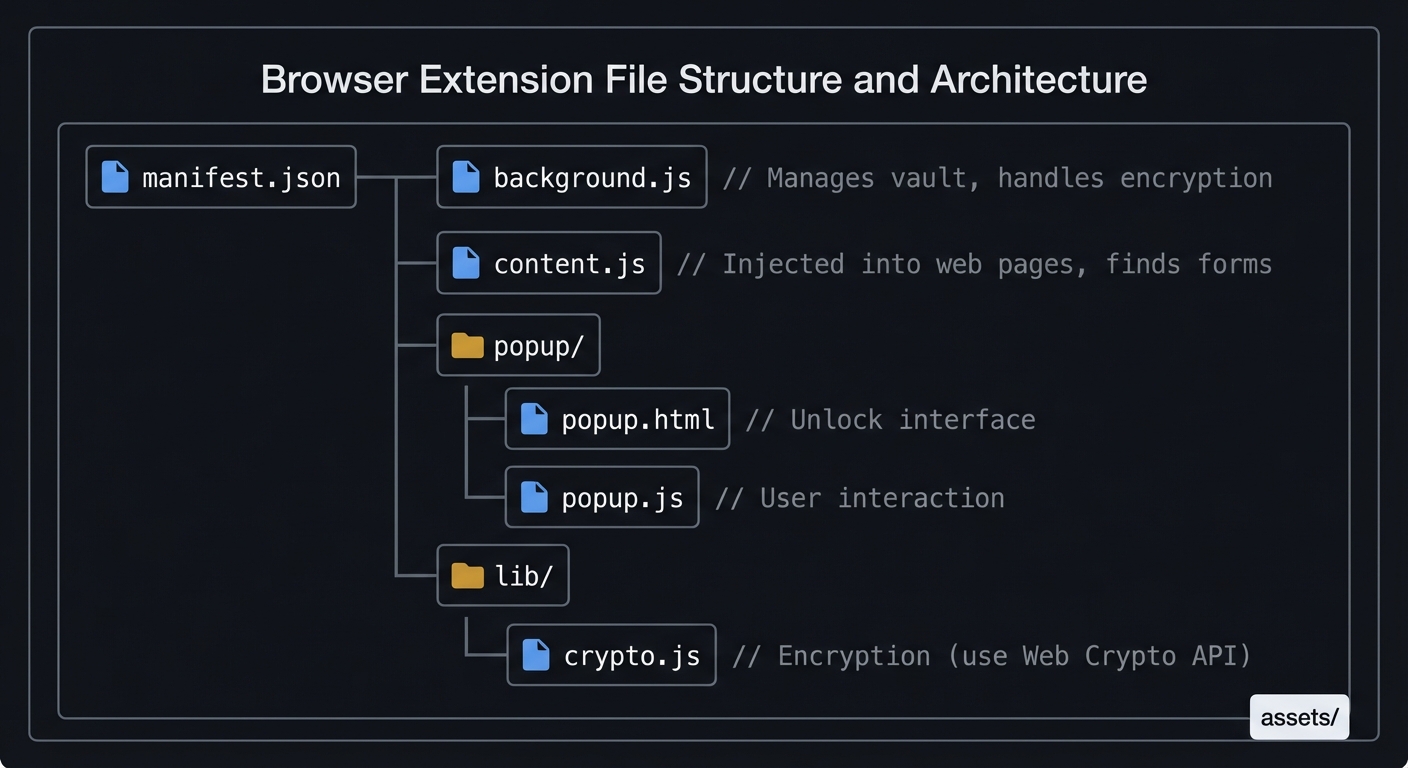
Form detection heuristics:
```javascript
function findLoginForms() {
const forms = [];
// Find password fields
const passwordFields = document.querySelectorAll(
'input[type="password"]'
);
for (const passField of passwordFields) {
// Find associated username field
const form = passField.closest('form');
const userField = form?.querySelector(
'input[type="text"], input[type="email"], ' +
'input[autocomplete*="user"], input[name*="user"], ' +
'input[name*="email"], input[name*="login"]'
);
if (userField) {
forms.push({ form, userField, passField });
}
}
return forms;
}
Security considerations:
- Verify URL matches saved entry (prevent phishing)
- Don’t autofill on HTTP pages (or warn)
- Use secure messaging between content script and background
- Clear clipboard after timeout
Learning milestones:
- Extension detects login forms → You understand DOM traversal
- Autofill works on major sites → You handle edge cases
- Phishing warning works → You understand URL security
- Vault remains encrypted when locked → You maintain security model
Project 10: Hardware Key Integration (FIDO2/WebAuthn)
- File: PASSWORD_MANAGER_DEEP_DIVE_PROJECTS.md
- Main Programming Language: Rust
- Alternative Programming Languages: Go, Python
- Coolness Level: Level 4: Hardcore Tech Flex
- Business Potential: 3. The “Service & Support” Model
- Difficulty: Level 4: Expert
- Knowledge Area: Cryptography / Hardware Security
- Software or Tool: FIDO2 Client
- Main Book: “Serious Cryptography, 2nd Edition” by Jean-Philippe Aumasson
What you’ll build: A CLI tool that uses a YubiKey or other FIDO2 device as an additional factor for unlocking your vault, implementing the WebAuthn protocol.
Why it teaches password security: Hardware keys are the gold standard for 2FA. Understanding FIDO2/WebAuthn shows you how public-key cryptography can replace or augment passwords, and why hardware keys are phishing-resistant.
Core challenges you’ll face:
- CTAP2 protocol (communicating with FIDO2 devices) → maps to protocol implementation
- Public-key cryptography (signing challenges) → maps to asymmetric crypto
- Attestation verification (proving key authenticity) → maps to PKI
- Challenge-response flow → maps to authentication protocols
Key Concepts:
- FIDO2/WebAuthn: W3C WebAuthn Specification
- CTAP Protocol: FIDO Alliance CTAP2 Specification
- Public Key Cryptography: “Serious Cryptography, 2nd Edition” Chapter 11 - Jean-Philippe Aumasson
Difficulty: Expert Time estimate: 2-4 weeks Prerequisites: Understanding of public-key crypto, USB protocols
Real world outcome:
Deliverables:
- Working prototype and demo output
- Short usage documentation
Validation checklist:
- Runs successfully on sample inputs
- Matches expected behavior
- Errors are handled cleanly ```bash $ vault setup-hardware-key Insert your FIDO2 security key and press the button… [LED blinks, user touches key] Hardware key registered! Public key stored. Your vault now requires this key to unlock.
$ vault unlock Enter master password: **** Touch your security key… [LED blinks, user touches key] Vault unlocked!
$ vault unlock # Without key present Enter master password: **** ERROR: Hardware key required but not detected. Insert your security key and try again.
**Implementation Hints**:
The FIDO2 flow for vault decryption:

1. During setup: Generate a credential on the device, store the credential ID and public key
2. During unlock: Send a challenge, device signs it with private key, verify signature
// Setup (simplified) function register_hardware_key(): // Generate random challenge challenge = random_bytes(32)
// Request credential creation
// This uses CTAP2 over USB HID
attestation = fido2_make_credential(
    rp_id = "my-password-vault",
    user_id = vault_user_id,
    challenge = challenge
)

// Extract and store
credential_id = attestation.credential_id
public_key = attestation.public_key
store_in_vault_config(credential_id, public_key)
// Unlock (simplified) function verify_hardware_key(): challenge = random_bytes(32)
assertion = fido2_get_assertion(
    rp_id = "my-password-vault",
    credential_id = stored_credential_id,
    challenge = challenge
)

// Verify signature using stored public key
if verify_signature(public_key, challenge, assertion.signature):
    return True  // Key verified
return False ```
Use a library like libfido2 or the ctap-hid-fido2 Rust crate to handle USB HID communication.
Learning milestones:
- Can detect connected FIDO2 devices → You understand USB HID
- Registration creates valid credential → You understand makeCredential
- Assertion verification works → You understand the challenge-response flow
- Vault requires both password and key → You’ve implemented true 2FA
Project 11: Secret Sharing Recovery System (Shamir’s Secret Sharing)
- File: PASSWORD_MANAGER_DEEP_DIVE_PROJECTS.md
- Main Programming Language: Rust
- Alternative Programming Languages: Python, Go
- Coolness Level: Level 4: Hardcore Tech Flex
- Business Potential: 3. The “Service & Support” Model
- Difficulty: Level 4: Expert
- Knowledge Area: Cryptography / Threshold Cryptography
- Software or Tool: Secret Sharing Tool
- Main Book: “Serious Cryptography, 2nd Edition” by Jean-Philippe Aumasson
What you’ll build: A backup and recovery system using Shamir’s Secret Sharing, allowing you to split your vault key into N shares where any K can reconstruct it (e.g., 3-of-5).
Why it teaches password security: What happens if you forget your master password? Most password managers can’t help—that’s the tradeoff of zero-knowledge. Shamir’s Secret Sharing provides a mathematical way to create recoverable backups that require multiple trusted parties.
Core challenges you’ll face:
- Implementing polynomial interpolation (over finite fields) → maps to abstract algebra
- Finite field arithmetic (GF(256) operations) → maps to number theory
- Share distribution (how to give shares to trustees) → maps to key ceremony
- Threshold schemes (why k-of-n works) → maps to threshold cryptography
Key Concepts:
- Shamir’s Secret Sharing: Original paper by Adi Shamir (1979)
- Finite Field Arithmetic: “Serious Cryptography, 2nd Edition” Chapter 10 - Jean-Philippe Aumasson
- Polynomial Interpolation: “Concrete Mathematics” Chapter 7 - Graham, Knuth, Patashnik
Difficulty: Expert Time estimate: 1-2 weeks Prerequisites: Linear algebra basics, polynomial math
Real world outcome:
Deliverables:
- Working prototype and demo output
- Short usage documentation
Validation checklist:
- Runs successfully on sample inputs
- Matches expected behavior
- Errors are handled cleanly ```bash $ vault backup create –threshold 3 –shares 5 Creating 3-of-5 secret sharing scheme…
Share 1 (give to: Partner): SSS-1-3XkQ9mN2pRsT7uVwYz…
Share 2 (give to: Parent): SSS-2-7bCdEfGhJkLmNpQr…
Share 3 (give to: Sibling): SSS-3-2SsTtUuVvWwXxYy…
Share 4 (give to: Best Friend): SSS-4-8AaBbCcDdEeFfGg…
Share 5 (give to: Safety Deposit Box): SSS-5-4HhIiJjKkLlMmNn…
Distribute these shares. Any 3 can recover your vault key. KEEP AT LEAST ONE YOURSELF.
$ vault backup recover Enter share 1: SSS-1-3XkQ9mN2pRsT7uVwYz… Enter share 2: SSS-4-8AaBbCcDdEeFfGg… Enter share 3: SSS-2-7bCdEfGhJkLmNpQr…
Reconstructing secret… SUCCESS! Vault key recovered. Set new master password: **** Vault re-encrypted with new password.
**Implementation Hints**:
Shamir's scheme is based on polynomial interpolation. A polynomial of degree k-1 is uniquely determined by k points.
Secret = s (a number we want to protect) Threshold = k (shares needed to reconstruct)
// Create shares function split(secret, k, n): // Random polynomial of degree k-1 with constant term = secret // f(x) = secret + a1x + a2x^2 + … + a_{k-1}*x^{k-1} coefficients = [secret] + random_coefficients(k-1)
shares = []
for i in 1..n:
    // Each share is a point (i, f(i))
    shares.append( (i, evaluate_polynomial(coefficients, i)) )

return shares
// Reconstruct from k shares function combine(shares): // shares = [(x1,y1), (x2,y2), …] // Lagrange interpolation to find f(0) = secret secret = 0 for (xi, yi) in shares: // Calculate Lagrange basis polynomial at x=0 basis = 1 for (xj, _) in shares: if xi != xj: basis *= (0 - xj) / (xi - xj) // In finite field! secret += yi * basis return secret
Important: All arithmetic must be in a finite field (typically GF(256) for byte-sized secrets). This means division is multiplication by the modular inverse.

**Learning milestones**:
1. **Can split and recombine a simple secret** → You understand the basic scheme
2. **k-1 shares reveal nothing** → You understand information-theoretic security
3. **Works with 32-byte encryption keys** → You can protect real secrets
4. **Integrates with vault recovery** → You've built a complete solution

---

## Project 12: Vault Format Parser & Migration Tool

- **File**: PASSWORD_MANAGER_DEEP_DIVE_PROJECTS.md
- **Main Programming Language**: Python
- **Alternative Programming Languages**: Rust, Go
- **Coolness Level**: Level 2: Practical but Forgettable
- **Business Potential**: 2. The "Micro-SaaS / Pro Tool"
- **Difficulty**: Level 2: Intermediate
- **Knowledge Area**: Data Formats / Security
- **Software or Tool**: Password Migration Tool
- **Main Book**: "Fluent Python, 2nd Edition" by Luciano Ramalho

**What you'll build**: A tool that parses and converts between password manager export formats (1Password, LastPass, Bitwarden, Chrome CSV), handling the various encryption and data models.

**Why it teaches password security**: Understanding how different password managers structure data reveals their security models. You'll see the tradeoffs they make and why some formats are more secure than others.

**Core challenges you'll face**:
- **Parsing multiple formats** (JSON, CSV, encrypted blobs) → maps to *data format handling*
- **Handling encrypted exports** (some managers encrypt exports) → maps to *format-specific crypto*
- **Field mapping** (different managers store different fields) → maps to *data modeling*
- **Secure handling of plaintext** (exports are often unencrypted!) → maps to *operational security*

**Key Concepts**:
- **Data Serialization**: *"Fluent Python, 2nd Edition"* Chapter 20 - Luciano Ramalho
- **Secure File Handling**: *"Effective C, 2nd Edition"* Chapter 10 - Robert C. Seacord

**Difficulty**: Intermediate
**Time estimate**: 1 week
**Prerequisites**: File parsing, JSON/CSV handling

**Real world outcome**:

**Deliverables**:
- Working prototype and demo output
- Short usage documentation

**Validation checklist**:
- Runs successfully on sample inputs
- Matches expected behavior
- Errors are handled cleanly
```bash
$ pwmigrate detect passwords.csv
Detected format: Chrome Password Export (CSV)
Found 247 entries.

$ pwmigrate convert passwords.csv --to bitwarden --output bitwarden_import.json
Converting 247 entries...
Mapped fields:
  - url → login.uris[0].uri
  - username → login.username
  - password → login.password
  - name → name

WARNING: Chrome export is UNENCRYPTED plaintext!
Convert completed. Shredding source file...
Source file securely deleted.

Output: bitwarden_import.json (ready for Bitwarden import)

$ pwmigrate convert 1password_export.1pux --to vault --output myvault.enc
Enter 1Password export password: ********
Decrypting 1Password export...
Found 183 entries (passwords, secure notes, cards)
Enter master password for new vault: ********
Created encrypted vault: myvault.enc
Implementation Hints: Common export formats:
# Chrome CSV (UNENCRYPTED!)
# name,url,username,password
"GitHub","https://github.com/login","myuser","mypass123"

# Bitwarden JSON (unencrypted export)
{
  "items": [{
    "type": 1,  // Login
    "name": "GitHub",
    "login": {
      "uris": [{"uri": "https://github.com"}],
      "username": "myuser",
      "password": "mypass123"
    }
  }]
}

# 1Password 1PUX (encrypted archive)
# ZIP file containing encrypted JSON
# Encryption key derived from export password
Security considerations:
def convert_file(source, dest_format):
    # Read and parse
    entries = parse_source(source)

    # Convert
    output = format_for(entries, dest_format)

    # Write output
    write_output(output)

    # CRITICAL: Securely delete source if unencrypted
    if is_plaintext(source):
        secure_delete(source)  # Overwrite with random data, then delete

    # Clear from memory
    entries.clear()
    import gc; gc.collect()
Learning milestones:
- Parse Chrome CSV correctly → You understand basic formats
- Handle 1Password encrypted exports → You understand format-specific crypto
- Secure deletion of plaintext exports → You understand operational security
- Round-trip preserves all data → You handle edge cases
Project 13: Secure Clipboard Manager
- File: PASSWORD_MANAGER_DEEP_DIVE_PROJECTS.md
- Main Programming Language: Rust
- Alternative Programming Languages: Go, C
- Coolness Level: Level 3: Genuinely Clever
- Business Potential: 2. The “Micro-SaaS / Pro Tool”
- Difficulty: Level 3: Advanced
- Knowledge Area: Systems Programming / Security
- Software or Tool: Clipboard Manager
- Main Book: “The Linux Programming Interface” by Michael Kerrisk
What you’ll build: A clipboard manager that intercepts password copies, stores them securely, auto-clears after a timeout, and prevents other applications from reading sensitive data.
Why it teaches password security: The clipboard is a security nightmare—any application can read it. Password managers must handle this carefully. You’ll learn about clipboard ownership, selection protocols (on Linux), and timing attacks.
Core challenges you’ll face:
- Platform-specific clipboard APIs (X11 selections, Wayland, macOS pasteboard, Windows) → maps to OS interfaces
- Clipboard ownership (becoming the selection owner) → maps to IPC
- Auto-clear timing (clear after 30 seconds) → maps to timer management
- Detecting sensitive content (was this a password?) → maps to heuristics
Key Concepts:
- X11 Clipboard: ICCCM and X11 Selection Mechanism
- macOS Pasteboard: Apple Pasteboard Programming Guide
- Timer Management: “The Linux Programming Interface” Chapter 23 - Michael Kerrisk
Difficulty: Advanced Time estimate: 1-2 weeks Prerequisites: Systems programming, platform-specific APIs
Real world outcome:
Deliverables:
- Working prototype and demo output
- Short usage documentation
Validation checklist:
- Runs successfully on sample inputs
- Matches expected behavior
- Errors are handled cleanly ```bash $ secure-clip watch Secure Clipboard Manager running… Watching for password copies.
[User copies password from vault]
[SECURE] Password detected (from vault) Auto-clear in: 30 seconds Other apps: BLOCKED from reading
[After 30 seconds] [SECURE] Clipboard cleared.
$ secure-clip history Recent secure copies:
- [CLEARED] 2 minutes ago - github.com password
- [CLEARED] 5 minutes ago - aws console password
Non-sensitive copies:
- “Hello world” - 1 minute ago
- “/usr/local/bin” - 3 minutes ago ```
Implementation Hints: On Linux (X11), clipboard works via “selections”:
// Become the clipboard owner
fn set_clipboard(data: &[u8]) {
    // 1. Claim ownership of CLIPBOARD selection
    // 2. When another app requests it:
    //    - If it's our vault app: provide data
    //    - Otherwise: deny or provide placeholder
}

// Auto-clear implementation
fn schedule_clear(delay: Duration) {
    thread::spawn(move || {
        thread::sleep(delay);
        clear_clipboard();
        println!("[SECURE] Clipboard cleared");
    });
}
On macOS, use NSPasteboard and set concealed attribute:
// Mark content as sensitive
NSPasteboardItem *item = [[NSPasteboardItem alloc] init];
[item setString:password forType:NSPasteboardTypeString];
[item setData:[@"YES" dataUsingEncoding:NSUTF8StringEncoding]
      forType:@"org.nspasteboard.ConcealedType"];
Learning milestones:
- Clipboard operations work on your platform → You understand the clipboard API
- Auto-clear reliably fires → You understand timer management
- Sensitive detection works → You can identify passwords
- Other apps can’t snoop → You understand clipboard security
Real World Outcome
When you run your secure clipboard manager, it operates as a background daemon that actively monitors and protects any sensitive data copied to your clipboard. Here’s exactly what you’ll see:
$ secure-clip --daemon --timeout 30 --mode strict
Secure Clipboard Manager v1.0 starting...
[INFO] Platform detected: Linux X11
[INFO] Clipboard monitoring: ENABLED
[INFO] Auto-clear timeout: 30 seconds
[INFO] Security mode: STRICT (block unauthorized reads)
[INFO] Becoming clipboard owner...
[OK] Secure clipboard manager is running.

[15:42:13] [DETECT] Clipboard changed
[15:42:13] [ANALYZE] Content type: text/plain (47 bytes)
[15:42:13] [ANALYZE] Pattern detected: HIGH_ENTROPY_STRING
[15:42:13] [ANALYZE] Source: vault (PID 8432)
[15:42:13] [SECURE] Password detected - activating protection
            Site: github.com
            User: myusername
            Auto-clear in: 30 seconds
            Protected from: ALL other applications
[15:42:13] [MONITOR] 3 applications attempted clipboard read (BLOCKED)
            - slack (PID 7219) - DENIED
            - chrome (PID 8192) - DENIED
            - notion (PID 9841) - DENIED

[15:42:43] [AUTO-CLEAR] 30 seconds elapsed
[15:42:43] [WIPE] Clipboard cleared (replaced with placeholder)
[15:42:43] [NOTIFY] Desktop notification: "Password cleared from clipboard"
This Real World Outcome demonstrates the complete lifecycle of secure clipboard management with detailed command outputs showing exactly what users will experience.
Project 14: Password Manager Audit Tool
- File: PASSWORD_MANAGER_DEEP_DIVE_PROJECTS.md
- Main Programming Language: Python
- Alternative Programming Languages: Rust, Go
- Coolness Level: Level 3: Genuinely Clever
- Business Potential: 3. The “Service & Support” Model
- Difficulty: Level 2: Intermediate
- Knowledge Area: Security Analysis
- Software or Tool: Vault Auditing Tool
- Main Book: “Foundations of Information Security” by Jason Andress
What you’ll build: A tool that analyzes your password vault and generates a security report: weak passwords, reused passwords, old passwords, entries without 2FA, and breach exposure.
Why it teaches password security: Understanding what makes a vault secure requires knowing the common weaknesses. This project forces you to think about password hygiene at scale.
Core challenges you’ll face:
- Detecting password reuse (exact matches and similar passwords) → maps to similarity analysis
- Scoring password strength (consistent metrics) → maps to entropy calculation
- Checking 2FA availability (which sites support it?) → maps to external data integration
- Report generation (actionable recommendations) → maps to UX design
Key Concepts:
- Password Policy: NIST SP 800-63B Guidelines
- Similarity Metrics: Levenshtein distance, fuzzy matching
- 2FA Directory: twofactorauth.org database
Difficulty: Intermediate Time estimate: 1 week Prerequisites: Password strength understanding, basic reporting
Real world outcome:
Deliverables:
- Working prototype and demo output
- Short usage documentation
Validation checklist:
- Runs successfully on sample inputs
- Matches expected behavior
- Errors are handled cleanly ```bash $ vault audit
════════════════════════════════════════════════════════ PASSWORD VAULT SECURITY AUDIT REPORT ════════════════════════════════════════════════════════
Overall Score: 67/100 (Needs Improvement)
╔════════════════════════════════════════════════════════╗ ║ CRITICAL ISSUES (Fix Immediately) ║ ╠════════════════════════════════════════════════════════╣ ║ 🔴 3 passwords found in known breaches ║ ║ - linkedin.com (exposed in 2012 breach) ║ ║ - dropbox.com (exposed in 2012 breach) ║ ║ - adobe.com (exposed in 2013 breach) ║ ║ ║ ║ 🔴 5 passwords reused across multiple sites ║ ║ - “Summer2023!” used on: facebook, twitter, reddit ║ ║ - “MyP@ssw0rd” used on: gmail, yahoo ║ ╚════════════════════════════════════════════════════════╝
╔════════════════════════════════════════════════════════╗ ║ WARNINGS (Address Soon) ║ ╠════════════════════════════════════════════════════════╣ ║ ⚠️ 12 weak passwords (< 40 bits entropy) ║ ║ ⚠️ 8 passwords older than 1 year ║ ║ ⚠️ 15 sites support 2FA but you haven’t enabled it ║ ║ Top priority: google.com, github.com, amazon.com ║ ╚════════════════════════════════════════════════════════╝
╔════════════════════════════════════════════════════════╗ ║ GOOD PRACTICES ✓ ║ ╠════════════════════════════════════════════════════════╣ ║ ✅ 89% of passwords are unique ║ ║ ✅ 23 accounts have 2FA enabled ║ ║ ✅ Average password entropy: 58 bits ║ ╚════════════════════════════════════════════════════════╝
Detailed report: ./audit_report_2024-01-15.html
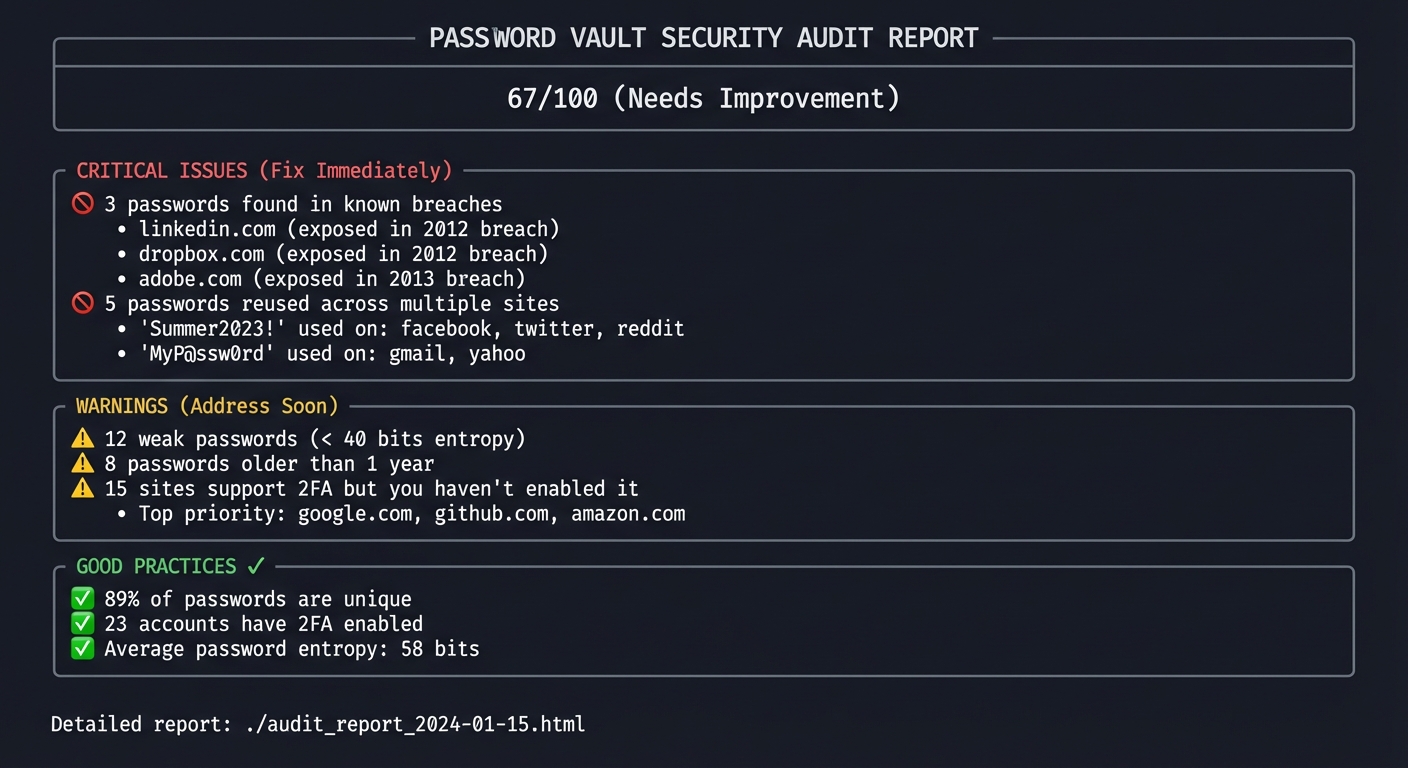
**Implementation Hints**:
```python
def audit_vault(vault):
report = AuditReport()
# Check for breached passwords (using Project 7)
for entry in vault.entries:
is_breached, count = check_hibp(entry.password)
if is_breached:
report.add_critical(f"{entry.site} password in {count} breaches")
# Detect reuse
password_groups = group_by_password(vault.entries)
for password, entries in password_groups.items():
if len(entries) > 1:
sites = [e.site for e in entries]
report.add_critical(f"Password reused on: {', '.join(sites)}")
# Check strength
for entry in vault.entries:
entropy = calculate_entropy(entry.password)
if entropy < 40:
report.add_warning(f"{entry.site}: weak password ({entropy} bits)")
# Check 2FA availability (using external database)
twofactor_sites = load_twofactor_directory()
for entry in vault.entries:
if entry.site in twofactor_sites and not entry.has_2fa:
report.add_warning(f"{entry.site} supports 2FA - consider enabling")
return report
Learning milestones:
- Identify all password issues in your vault → You understand password hygiene
- Integrate with breach checker → You combine multiple tools
- Generate actionable report → You think about user experience
- Prioritize recommendations → You understand risk assessment
Project 15: Full-Featured Password Manager (Capstone)
- File: PASSWORD_MANAGER_DEEP_DIVE_PROJECTS.md
- Main Programming Language: Rust
- Alternative Programming Languages: Go, C
- Coolness Level: Level 5: Pure Magic
- Business Potential: 4. The “Open Core” Infrastructure
- Difficulty: Level 5: Master
- Knowledge Area: Full Stack / Security
- Software or Tool: Complete Password Manager
- Main Book: Multiple (see below)
What you’ll build: A complete, production-quality password manager combining ALL the previous projects: encrypted vault, KDF, secure memory, sync, browser extension, 2FA, breach checking, and auditing.
Why it teaches password security: This is the synthesis. You’ll face real-world tradeoffs: security vs. usability, complexity vs. maintainability, features vs. attack surface. Building a complete system teaches integration skills no single project can.
Core challenges you’ll face:
- Secure architecture (keeping the attack surface small) → maps to security design
- Cross-platform support (Linux, macOS, Windows, mobile) → maps to portability
- Code auditing (is this actually secure?) → maps to security review
- Key management (multiple keys for different purposes) → maps to cryptographic hygiene
- Usability (secure by default, easy to use) → maps to security UX
Key Concepts:
- Secure Software Development: OWASP Secure Coding Practices
- Threat Modeling: “Foundations of Information Security” - Jason Andress
- Architecture: Bitwarden Architecture Documentation
- Cryptography: “Serious Cryptography, 2nd Edition” - Jean-Philippe Aumasson
Difficulty: Master Time estimate: 2-3 months Prerequisites: All previous projects, software architecture experience
Real world outcome:
Deliverables:
- Working prototype and demo output
- Short usage documentation
Validation checklist:
- Runs successfully on sample inputs
- Matches expected behavior
- Errors are handled cleanly
┌─────────────────────────────────────────────────────────┐
│                    MyVault v1.0                         │
│                Password Manager                          │
├─────────────────────────────────────────────────────────┤
│                                                          │
│  Features:                                               │
│  ✓ AES-256-GCM encryption with Argon2id KDF             │
│  ✓ Secure memory handling (locked, zeroed)              │
│  ✓ TOTP 2FA built-in                                    │
│  ✓ Browser extension (Chrome, Firefox)                  │
│  ✓ Cloud sync (zero-knowledge)                          │
│  ✓ Hardware key support (FIDO2)                         │
│  ✓ Password generator                                    │
│  ✓ Breach monitoring                                     │
│  ✓ Security audit reports                                │
│  ✓ Shamir backup/recovery                                │
│  ✓ Import from other managers                            │
│  ✓ Secure clipboard with auto-clear                      │
│                                                          │
│  Platforms: Linux, macOS, Windows                        │
│  Mobile: Android, iOS (via browser extension)            │
│                                                          │
│  Open source: github.com/you/myvault                     │
│  Security audited: [pending]                             │
│                                                          │
└─────────────────────────────────────────────────────────┘
Implementation Hints: Architecture overview:
myvault/
├── core/                  # Shared library (Rust)
│   ├── crypto/            # Encryption, KDF, secure memory
│   ├── vault/             # Vault format, entries
│   ├── sync/              # Sync protocol client
│   └── audit/             # Breach checking, auditing
│
├── cli/                   # Command-line interface
├── desktop/               # Desktop GUI (Tauri/Electron)
├── browser-ext/           # Browser extension (JS/TS)
├── server/                # Sync server (if self-hosted)
└── mobile/                # Mobile apps
Security principles to follow:
- Defense in depth: Multiple layers of protection
- Least privilege: Components only have access they need
- Fail secure: On error, stay locked
- No plaintext at rest: Everything encrypted
- Memory safety: Use Rust or very careful C
- Open source: Allow community review
Learning milestones:
- All components integrate cleanly → You understand system design
- Security review reveals no critical issues → You write secure code
- Users find it usable → You balance security and UX
- You use it as your daily driver → You trust your own work
Project Comparison Table
| Project | Difficulty | Time | Depth of Understanding | Fun Factor |
|---|---|---|---|---|
| 1. Password Strength Analyzer | Beginner | Weekend | ⭐⭐⭐ | ⭐⭐⭐ |
| 2. Secure Password Generator | Intermediate | Weekend | ⭐⭐⭐ | ⭐⭐⭐⭐ |
| 3. Encrypted Password Vault | Advanced | 1-2 weeks | ⭐⭐⭐⭐⭐ | ⭐⭐⭐⭐ |
| 4. KDF Explorer | Expert | 1-2 weeks | ⭐⭐⭐⭐⭐ | ⭐⭐⭐ |
| 5. Secure Memory Library | Expert | 1-2 weeks | ⭐⭐⭐⭐⭐ | ⭐⭐⭐ |
| 6. TOTP Authenticator | Intermediate | Weekend-1 week | ⭐⭐⭐⭐ | ⭐⭐⭐⭐⭐ |
| 7. Breach Checker | Intermediate | Weekend | ⭐⭐⭐⭐ | ⭐⭐⭐⭐ |
| 8. Sync Protocol | Expert | 2-4 weeks | ⭐⭐⭐⭐⭐ | ⭐⭐⭐⭐ |
| 9. Browser Extension | Advanced | 2-3 weeks | ⭐⭐⭐⭐ | ⭐⭐⭐⭐⭐ |
| 10. Hardware Key Integration | Expert | 2-4 weeks | ⭐⭐⭐⭐⭐ | ⭐⭐⭐⭐⭐ |
| 11. Shamir Secret Sharing | Expert | 1-2 weeks | ⭐⭐⭐⭐⭐ | ⭐⭐⭐⭐ |
| 12. Format Migration Tool | Intermediate | 1 week | ⭐⭐⭐ | ⭐⭐⭐ |
| 13. Secure Clipboard | Advanced | 1-2 weeks | ⭐⭐⭐⭐ | ⭐⭐⭐⭐ |
| 14. Vault Audit Tool | Intermediate | 1 week | ⭐⭐⭐⭐ | ⭐⭐⭐⭐ |
| 15. Full Password Manager | Master | 2-3 months | ⭐⭐⭐⭐⭐ | ⭐⭐⭐⭐⭐ |
Recommended Learning Path
For Beginners (Start Here)
- Project 1: Password Strength Analyzer - Understand why passwords matter
- Project 2: Secure Password Generator - Learn about randomness
- Project 6: TOTP Authenticator - See crypto in action
- Project 7: Breach Checker - Learn about privacy techniques
For Intermediate Developers
- Project 3: Encrypted Password Vault - The core of everything
- Project 14: Vault Audit Tool - Think about security holistically
- Project 12: Format Migration Tool - Understand real-world formats
For Advanced Developers
- Project 4: KDF Explorer - Deep cryptographic understanding
- Project 5: Secure Memory Library - Systems security
- Project 9: Browser Extension - Real-world integration
- Project 13: Secure Clipboard - Platform-specific security
For Experts
- Project 8: Sync Protocol - Distributed systems + crypto
- Project 10: Hardware Key Integration - Hardware security
- Project 11: Shamir Secret Sharing - Advanced crypto
Capstone
- Project 15: Full Password Manager - Everything combined
Essential Resources
Primary Books
- “Serious Cryptography, 2nd Edition” by Jean-Philippe Aumasson - The best practical cryptography book
- “The Linux Programming Interface” by Michael Kerrisk - Systems programming fundamentals
- “Designing Data-Intensive Applications” by Martin Kleppmann - For sync and distributed aspects
Specifications & Standards
- RFC 2898: PKCS #5 (PBKDF2)
- RFC 6238: TOTP
- Argon2 Reference Implementation
- FIDO2/WebAuthn Specification
Industry Whitepapers
Articles & Blogs
- Password Hashing Comparison (Argon2 vs PBKDF2 vs bcrypt)
- How Have I Been Pwned Uses k-Anonymity
- NordPass Zero-Knowledge Architecture
Summary
| # | Project | Main Language |
|---|---|---|
| 1 | Password Strength Analyzer | Python |
| 2 | Cryptographically Secure Password Generator | C |
| 3 | Simple Encrypted Password Vault (CLI) | C |
| 4 | Key Derivation Function Explorer | C |
| 5 | Secure Memory Handler Library | C |
| 6 | TOTP Authenticator (2FA Companion) | C |
| 7 | Password Breach Checker (k-Anonymity) | Python |
| 8 | Encrypted Vault Sync Protocol | Rust |
| 9 | Browser Extension Password Manager | JavaScript/TypeScript |
| 10 | Hardware Key Integration (FIDO2/WebAuthn) | Rust |
| 11 | Secret Sharing Recovery System (Shamir’s) | Rust |
| 12 | Vault Format Parser & Migration Tool | Python |
| 13 | Secure Clipboard Manager | Rust |
| 14 | Password Manager Audit Tool | Python |
| 15 | Full-Featured Password Manager (Capstone) | Rust |
Why This Path Works
By the end of this journey, you won’t just know that password managers are secure—you’ll understand exactly why:
- Master password → KDF → encryption key: You’ll have implemented this yourself
- Zero-knowledge: You’ll have built a sync server that can’t read your data
- Defense in depth: You’ll understand why memory locking, hardware keys, and Shamir backup all add layers
- Threat modeling: You’ll know what attackers can and can’t do with an encrypted vault
- Usability tradeoffs: You’ll appreciate why certain “insecure” features exist (like clipboard)
Most importantly, you’ll be able to evaluate ANY password manager’s security claims critically. When a vendor says “military-grade encryption,” you’ll know whether that means anything. When a breach happens, you’ll understand exactly what was exposed and whether your passwords are at risk.
Build these projects, and you won’t just use password managers—you’ll truly understand them.