Progressive Web Apps (PWA) - Offline-First Mastery
Goal: Deeply understand the architecture of Progressive Web Apps (PWAs) by mastering the “Offline-First” mindset. You will go beyond “adding to home screen” to understand Service Workers, advanced caching strategies, client-side databases (IndexedDB), and background synchronization, enabling you to build web applications that are as resilient and performant as native apps, regardless of network conditions.
Why Offline-First PWAs Matter
In 2015, Alex Russell and Frances Berriman coined the term “Progressive Web App” (PWA) to describe a new class of web applications that bridge the gap between the web and native apps. But PWAs are more than just “bookmarks on the home screen”—they represent a fundamental shift in how we build for a global, mobile-first audience.
Consider the impact of the PWA architecture:
- Twitter Lite: Saw a 75% increase in tweets sent and a 20% decrease in bounce rate. Their PWA is only 600KB, compared to the 23MB+ Android app.
- Starbucks: Doubled their daily active users. Their PWA is 99.8% smaller than their iOS app, making it accessible to users with limited storage.
- AliExpress: Increased conversion rates for new users by 104% after launching their PWA.
- The “Lie-Fi” Problem: 60% of mobile users globally are still on 2G or 3G networks. Offline-first PWAs aren’t a luxury; they are the only way to reach the “Next Billion Users.”
The core shift is decoupling the network from the user interface.
- Resilience: Handling the “Lie-Fi”—where the device thinks it’s connected but data isn’t moving.
- Performance: Serving from a local cache is near-instant (0-20ms). Even the fastest 5G cannot beat the speed of light to a server 500 miles away.
- Engagement: Push Notifications and “Add to Home Screen” drive user retention levels previously only seen in native apps.
- Security: PWAs require HTTPS by design, ensuring user data remains private and untampered.
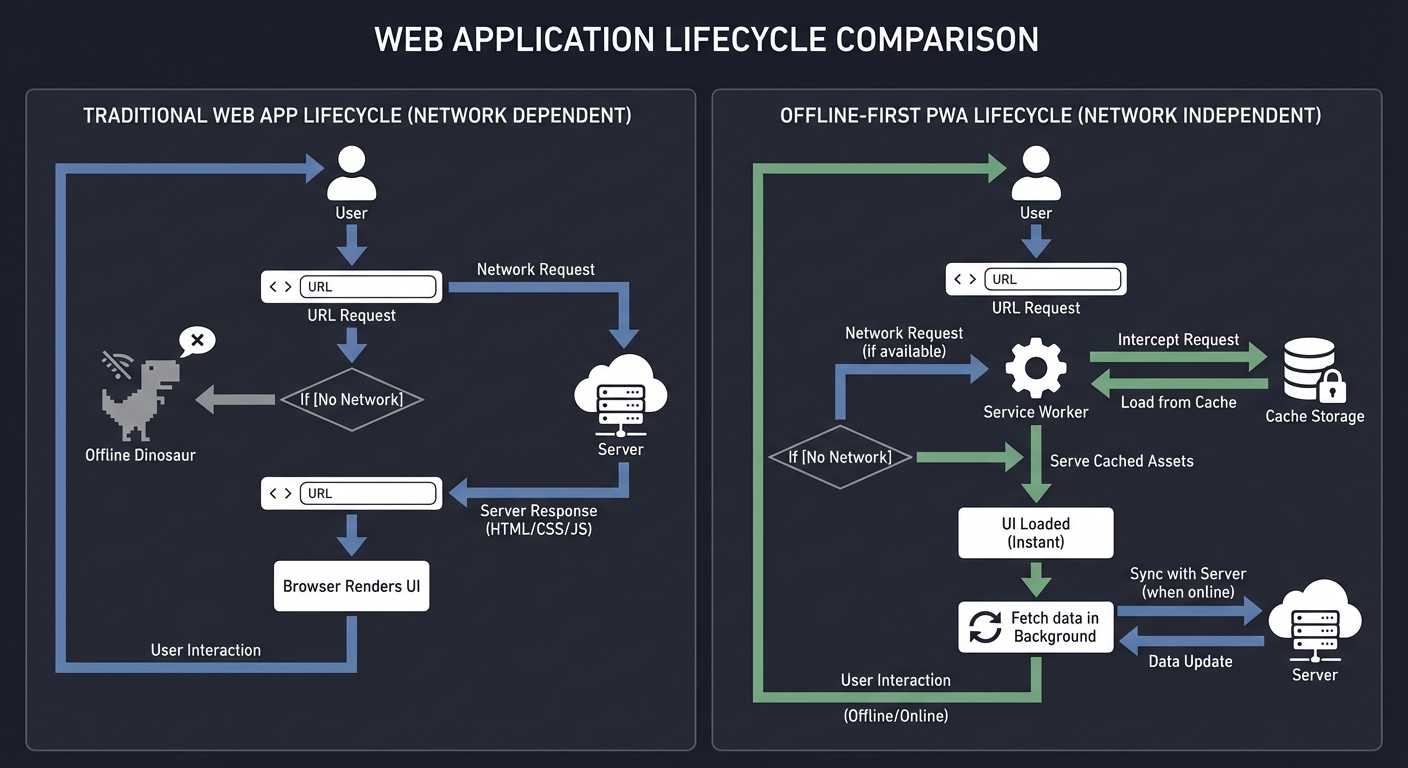
Traditional Web App Lifecycle          Offline-First PWA Lifecycle
      (Network Dependent)                 (Network Independent)

  User → URL → Server                     User → URL → Service Worker
               ↓                                        ↓
  [No Network] → [Offline Dinosaur]       [No Network] → [Load from Cache]
                                                        ↓
                                          [UI Loaded] → [Fetch data in BG]
Core Concept Analysis
1. The Service Worker: Your Programmable Proxy
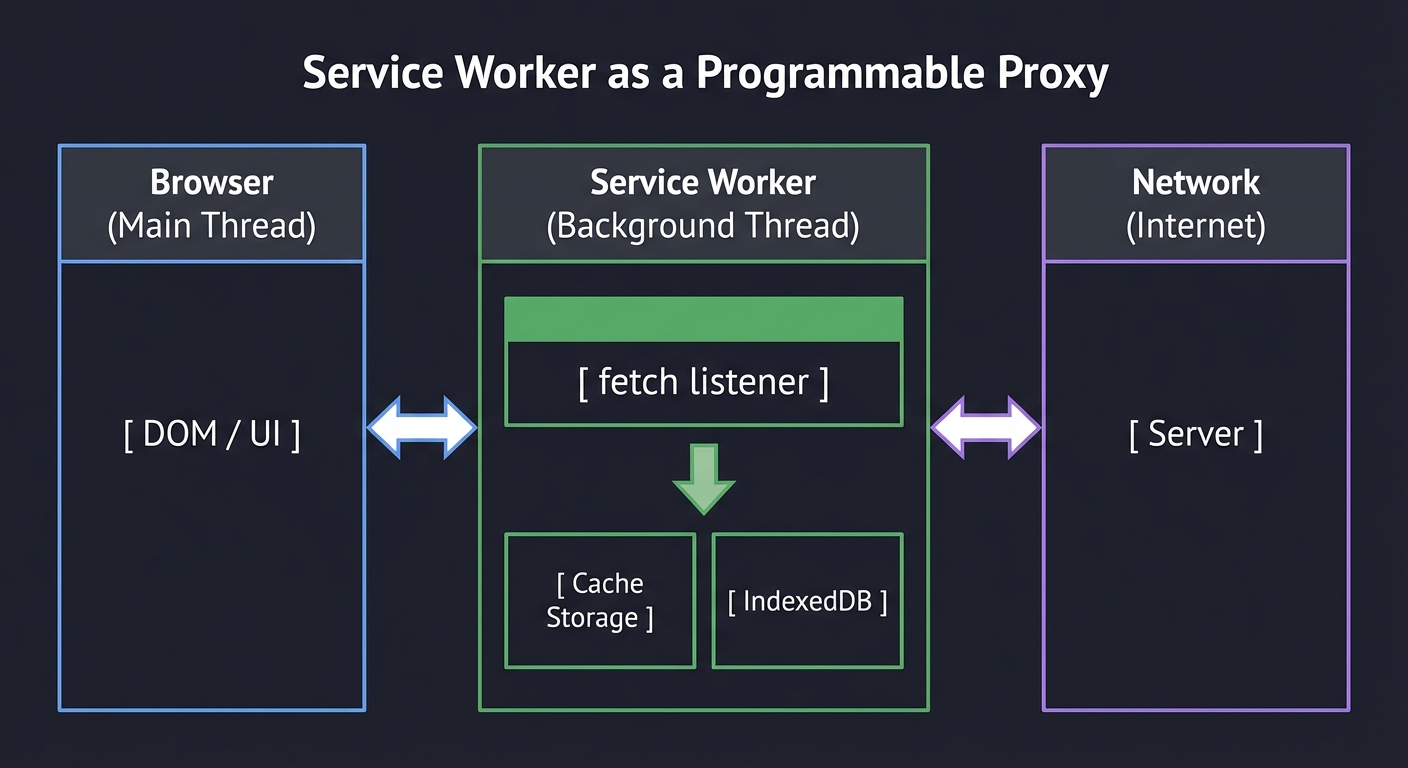
The Service Worker is a JavaScript file that runs in the background, separate from the main browser thread. It acts as a programmable network proxy, intercepting every request your app makes.
In 2015, Google engineers realized that the web’s biggest weakness was the “Lie-Fi” problem: when your phone shows 4 bars of LTE, but you’re behind a corporate firewall or in a crowded stadium where 0 bytes are moving. The Service Worker was designed to solve this by putting the developer in control of the request/response cycle.
Thread Isolation
Unlike standard JavaScript, a Service Worker:
- Has no DOM access: You cannot talk to
windowordocument. - Is non-blocking: It runs on its own thread, so heavy processing doesn’t freeze the UI.
- Is ephemeral: It sleeps when not in use and wakes up when an event (like
fetchorpush) occurs.
Main Thread (UI)                Service Worker Thread
┌──────────────────┐            ┌────────────────────────┐
│  Click Handler   │            │                        │
│  DOM Updates     │            │  Idle (Sleeping)       │
│  Animations      │            │                        │
└────────┬─────────┘            └───────────┬────────────┘
         │      postMessage()               │
         ├─────────────────────────────────>┤ (Wake up!)
         │                                  │
         │ <────────────────────────────────┤ (Result)
         │                                  │
The Proxy Mechanism
Every time your app calls fetch(), the event is first sent to the Service Worker’s fetch listener. The SW can then decide to:
- Fetch from the network.
- Return a response from the Cache API.
- Generate a “synthetic” response (e.g., a custom SVG or JSON) entirely in JavaScript.
┌──────────────────┐       ┌────────────────────────┐       ┌──────────────┐
│     Browser      │       │     Service Worker     │       │   Network    │
│  (Main Thread)   │       │   (Background Thread)  │       │   (Internet) │
│                  │       │                        │       │              │
│  [ DOM / UI ]    │ <───> │  [ fetch listener ]    │ <───> │  [ Server ]  │
│                  │       │           ↓            │       │              │
└──────────────────┘       │  [ Cache Storage ]     │       └──────────────┘
                           │  [ IndexedDB ]         │
                           └────────────────────────┘
2. The Lifecycle: Installation to Activation
The Service Worker lifecycle is designed to protect the user from “breaking” the app. If a user has three tabs open, you can’t just swap the Service Worker underneath them without potentially corrupting the data or state.
   Registration          Installation            Activation
  ┌────────────┐        ┌────────────┐         ┌────────────┐
  │ index.html │───>    │ sw.js      │────>    │ Takes      │
  │ registers  │        │ pre-caches │         │ Control    │
  │ sw.js      │        │ assets     │         │ of Clients │
  └────────────┘        └────────────┘         └────────────┘
                               ↑                      │
                        (Waiting state if             │
                         old version exists) <────────┘
Key insight: A new Service Worker will install in the background but will remain in a “waiting” state if there is an existing Service Worker controlling the page. This ensures that a single app version always has a consistent Service Worker.
3. Caching Strategies: Choosing the Right Tool
Caching isn’t just “save everything.” It’s about choosing the right strategy for the right data.
Cache-First (Performance)
Best for static assets (images, fonts, scripts) that don’t change often.
Request -> Cache (Hit) -> Return
        -> Cache (Miss) -> Network -> Cache -> Return
Network-First (Freshness)
Best for data that updates frequently but needs an offline fallback (e.g., account balance, news).
Request -> Network (Success) -> Cache -> Return
        -> Network (Fail) -> Cache (Fallback) -> Return
Stale-While-Revalidate (Balance)
The “Holy Grail” of PWA performance. It returns cached data instantly, then fetches the update in the background for the next visit.
Request -> Cache -> Return (Instant)
        +-> Network -> Cache (Update)
| Strategy | Logic | Use Case |
|---|---|---|
| Cache-First | Check cache; if not there, fetch from network. | Images, Fonts, CSS, JS. |
| Network-First | Try network; if it fails, show cached version. | Frequently updated data (Prices, News). |
| Stale-While-Revalidate | Show from cache immediately; update cache in BG. | User profiles, list of items. |
| Cache-Only | Only look in the cache. | Essential UI components. |
4. Structured Data: IndexedDB
While the Cache API is perfect for files (Requests/Responses), IndexedDB is for the data inside those files. It is an asynchronous, transactional, object-oriented database.
Unlike LocalStorage, which is limited to ~5MB and is synchronous (blocking the UI), IndexedDB can store huge amounts of data (often limited only by the user’s disk space) and doesn’t freeze your animations.
            IndexedDB Structure
┌───────────────────────────────────────────┐
│ Database: 'JournalApp'                    │
├───────────────────────────────────────────┤
│ Object Store: 'Entries'                   │
│ ┌────┬─────────────┬───────────┬────────┐ │
│ │ ID │ Title       │ Content   │ Sync   │ │
│ ├────┼─────────────┼───────────┼────────┤ │
│ │ 1  │ Hello World │ My first..│ true   │ │
│ │ 2  │ Deep Dive   │ PWA is..  │ false  │ │
│ └────┴─────────────┴───────────┴────────┘ │
└───────────────────────────────────────────┘

5. Background Sync: Resilient Data Transmission
Background Sync is a web API that lets you defer actions until the user has stable connectivity. This ensures that whatever the user enters is eventually sent to the server, even if they close the tab or the browser.
The key to Background Sync is the Sync Manager. You register a “sync tag,” and the browser guarantees that the Service Worker will be woken up when the connection is restored to handle that tag.
1. Browser is Offline
2. User clicks "Submit"
3. App saves data to IndexedDB
4. App registers "sync" event
5. [TIME PASSES / TAB CLOSED]
6. Browser detects Network is back
7. Browser wakes up Service Worker
8. Service Worker fires "sync" event
9. Service Worker reads IndexedDB
10. Service Worker sends data to Server

6. Push Notifications: Engaging Beyond the Tab
Push Notifications allow your server to send messages to the user even when the browser is closed. This is achieved through a three-party architecture:
- Your Server: Triggers the push message.
- Push Service: (e.g., Firebase Cloud Messaging or Mozilla Push Service) Acts as the intermediary that holds the message until the device is online.
- Service Worker: The “silent” listener on the user’s device that receives the message and displays a notification.
[Your Server] ---> [Push Service (FCM/Apple)] ---> [User Device]
                                                      ↓
                                               [Service Worker]
                                                      ↓
                                            [System Notification]

Tools for Debugging PWAs
You can’t build what you can’t see. Modern browsers have a dedicated “Application” tab for PWA debugging:
1. Chrome DevTools - Application Tab
- Service Workers: Manually trigger
install,activate, orpushevents. Toggle “Offline” mode. - Cache Storage: Inspect exactly which files are cached and their sizes.
- IndexedDB: Browse your object stores and even edit values manually.
- Manifest: Check if your icons are the right size and if your “theme_color” is valid.
2. Lighthouse
Chrome’s built-in auditing tool. Run a “PWA” report to check for:
- “Installable” criteria (Manifest + Service Worker).
- Redirects from HTTP to HTTPS.
- Performance metrics on slow networks.
3. Workbox
A set of libraries from Google that simplify Service Worker development. While you’ll start with vanilla JS, Workbox is the industry standard for production PWAs.
Concept Summary Table
| Concept Cluster | What You Need to Internalize |
|---|---|
| Service Worker Proxy | How to intercept fetch events and respond programmatically. |
| The Lifecycle | The install, activate, and fetch events and how they differ from standard JS. |
| Caching Strategies | Balancing speed vs. data freshness using the Cache API. |
| The Web App Manifest | Configuring icons, theme colors, and display modes (standalone vs. browser). |
| IndexedDB Transactions | Storing structured JSON data for offline CRUD operations. |
| Background Sync | Deferring network actions until the connection is restored. |
| Push Notifications | Engaging users even when the app is closed. |
Deep Dive Reading by Concept
Foundations & Lifecycle
| Concept | Book & Chapter |
|---|---|
| Intro to PWAs | Progressive Web Apps by Jason Grigsby — Ch. 1: “Defining Progressive Web Apps” |
| Your first Service Worker | Building Progressive Web Apps by Tal Ater — Ch. 2: “Your First Service Worker” |
| The SW Lifecycle | Building Progressive Web Apps by Tal Ater — Ch. 4: “Service Worker Lifecycle and Cache Management” |
Caching & Performance
| Concept | Book & Chapter |
|---|---|
| CacheStorage API | Building Progressive Web Apps by Tal Ater — Ch. 3: “The CacheStorage API” |
| Offline UX Patterns | Progressive Web Apps by Jason Grigsby — Ch. 5: “Offline” |
| High-level Performance | High Performance Browser Networking by Ilya Grigorik — Ch. 1: “Latency and Bandwidth” |
Data & Resilience
| Concept | Book & Chapter |
|---|---|
| IndexedDB Mastery | Building Progressive Web Apps by Tal Ater — Ch. 6: “Storing Data Locally with IndexedDB” |
| Background Sync | Building Progressive Web Apps by Tal Ater — Ch. 7: “Ensuring Offline Functionality with Background Sync” |
| Conflict Resolution | Designing Data-Intensive Applications by Martin Kleppmann — Ch. 5: “Replication” (Multi-leader section) |
Installation & Engagement
| Concept | Book & Chapter |
|---|---|
| Web App Manifest | Building Progressive Web Apps by Tal Ater — Ch. 9: “Grabbing Homescreen Real Estate” |
| Push Notifications | Building Progressive Web Apps by Tal Ater — Ch. 10: “Reach Out with Push Notifications” |
Project 1: The “Unstoppable” Portfolio (The App Shell)
- File:
portfolio/index.html,portfolio/sw.js - Main Programming Language: JavaScript (Vanilla)
- Coolness Level: Level 2: Practical but Forgettable
- Difficulty: Level 1: Beginner
- Main Book: Progressive Web Apps by Jason Grigsby
What you’ll build: A fast-loading personal portfolio that works entirely offline. It will cache all CSS, JS, and HTML on first visit.
Why it teaches PWA: This is the “Hello World” of Service Workers. It forces you to handle the install event and the fetch event, specifically implementing the Cache-First strategy.
Real World Outcome
You’ll have a website that, once visited once, continues to work even if you put your computer in Airplane Mode.
Example Verification:
- Open your portfolio in Chrome.
- Open DevTools -> Application -> Service Workers.
- Check the “Offline” box.
- Refresh the page. The site should load instantly.
# In the console, you should see your custom logs:
[SW] Registered successfully with scope: https://localhost:8080/
[SW] Installing: Caching App Shell...
[SW] Fetching: index.html (Served from Cache)
[SW] Fetching: style.css (Served from Cache)
The Core Question You’re Answering
“How can a web browser serve a file it cannot reach on the network?”
Most developers think the browser is a “dumb” requester. You are proving that with a Service Worker, the browser becomes an intelligent proxy capable of making decisions about resource delivery.
Concepts You Must Understand First
Stop and research these before coding:
- Service Worker Scope
- Why can’t a SW in
/js/sw.jscontrol/index.htmlby default? - How does the
pathof the SW script affect which pages it controls?
- Why can’t a SW in
- Promises in JavaScript
- Service Workers are almost entirely promise-based. Do you know
async/await?
- Service Workers are almost entirely promise-based. Do you know
- HTTPS Requirements
- Why do SWs require HTTPS? (Hint: Man-in-the-middle attacks).
Questions to Guide Your Design
- Cache Names: How will you version your cache? (e.g.,
static-v1,static-v2) - The “WaitUntil”: Why is
event.waitUntil()necessary during theinstallphase? - Fallback UI: What happens if a user requests a page that isn’t in the cache while they are offline?
Thinking Exercise
The Refresh Trace:
- You have
v1of your SW active. - You change your
style.cssand the SW code tov2. - You refresh the page.
Question: Why do you still see the old
style.css? How many refreshes or tab closures does it take forv2to take control?
The Interview Questions They’ll Ask
- “What is the difference between a Service Worker and a Web Worker?”
- “Explain the Service Worker lifecycle.”
- “What is an ‘App Shell’ and why is it important for PWAs?”
Hints in Layers
- Hint 1: Registration happens in your main
app.jsor a<script>tag inindex.html. - Hint 2: Use
caches.open('my-cache-v1')andcache.addAll(['/', '/style.css', '/app.js']). - Hint 3: In the
fetchlistener, useevent.respondWith(caches.match(event.request)).
Books That Will Help
| Topic | Book | Chapter |
|---|---|---|
| SW Basics | Building Progressive Web Apps | Ch. 2 |
| The Cache API | Building Progressive Web Apps | Ch. 3 |
| UX of Offline | Progressive Web Apps (Grigsby) | Ch. 5 |
Implementation Hints
Focus on the install event first. This is where you pre-cache your “App Shell.” Think of the App Shell as the minimal HTML, CSS, and JavaScript required to power the user interface. If the user is offline, they should at least see the header, footer, and navigation menu—even if the content is missing.
In your fetch event, always check the cache first for static assets. This is the definition of “Offline-First.” You are telling the browser: “Don’t even look at the network yet; I might have what you need right here.”
Learning Milestones
- SW Registered -> You see the Service Worker active in DevTools.
- Cache Populated -> You see your
index.htmlandstyles.cssinside the Cache Storage tab. - Offline Success -> You can reload the page with Wi-Fi off and see the site.
Project 2: The Offline Journal (IndexedDB Mastery)
- File:
journal/db.js,journal/index.html - Main Programming Language: JavaScript
- Coolness Level: Level 3: Genuinely Clever
- Difficulty: Level 2: Intermediate
- Main Book: Building Progressive Web Apps by Tal Ater
What you’ll build: A private journal app where entries are saved to a local browser database (IndexedDB). Users can write, read, and delete entries while completely disconnected.
Why it teaches PWA: Caching files (Cache API) is easy; caching data (IndexedDB) is the real challenge. You’ll learn how to manage transactional storage that survives page refreshes and browser restarts.
Real World Outcome
A functional CRUD application that doesn’t need a backend server. All data lives in the user’s browser storage.
Example Interaction:
- Type a secret note: “PWA is the future”.
- Click “Save”.
- Close the browser.
- Disconnect Wi-Fi.
- Re-open the app. Your note is still there!
# In DevTools -> Application -> IndexedDB:
Database: JournalDB
  Object Store: entries
    Key: 1672145600000 (Timestamp)
    Value: { title: "PWA is the future", content: "...", date: "2025-12-27" }
The Core Question You’re Answering
“How do we store structured data in the browser without the 5MB limit of LocalStorage?”
LocalStorage is synchronous and slow. IndexedDB is asynchronous, transactional, and can store gigabytes. It is the backbone of any serious offline-first application.
Concepts You Must Understand First
- Object Stores vs. Tables: How does NoSQL storage differ from SQL?
- Transactions: Why must every IndexedDB operation happen inside a transaction?
- The IDB Lifecycle:
onupgradeneeded- how do you create a “table” in JS? - Asynchronous Patterns: IndexedDB is notoriously callback-heavy. You should use a wrapper like
idbor wrap it in your own Promises.
Questions to Guide Your Design
- Schema Design: What will be your primary key? (UUID or Timestamp?)
- Database Versioning: If you add a “tags” field later, how will you migrate existing entries?
- UI Syncing: How does the UI know when a transaction has finished to refresh the list?
Thinking Exercise
The Race Condition: You start a transaction to add an entry. Before it finishes, the user closes the tab. Question: Does the entry exist when they come back? (Hint: Think about what “Atomic” means in ACID).
The Interview Questions They’ll Ask
- “Why use IndexedDB instead of LocalStorage?”
- “What is the purpose of the
onupgradeneededevent?” - “Is IndexedDB thread-safe?”
Hints in Layers
- Hint 1: Use
indexedDB.open('JournalDB', 1). - Hint 2: Create your object store in
request.onupgradeneeded. - Hint 3: For CRUD, use
db.transaction(['entries'], 'readwrite').objectStore('entries').add(data).
Books That Will Help
| Topic | Book | Chapter |
|---|---|---|
| IndexedDB | Building Progressive Web Apps | Ch. 6 |
| Promises/Async | JavaScript: The Definitive Guide | Ch. 13 |
Project 3: News Aggregator (Stale-While-Revalidate)
- File:
news/sw.js,news/api.js - Main Programming Language: JavaScript
- Coolness Level: Level 3: Genuinely Clever
- Difficulty: Level 2: Intermediate
- Main Book: Building Progressive Web Apps by Tal Ater
What you’ll build: A news reader that pulls from a public API. It shows the cached news immediately (blazing fast) but updates the UI if a newer version is fetched from the network.
Why it teaches PWA: This is the most complex caching strategy. It teaches you how to manage two data sources (Cache and Network) and how to update the UI without annoying the user.
Real World Outcome
A news app that feels instant. The user never sees a loading spinner for previously viewed content.
Example Trace:
- User opens app.
- 0ms: App checks cache, finds news from 1 hour ago.
- 50ms: App renders cached news. User starts reading.
- 800ms: Network request finishes with new headlines.
- 810ms: App shows a small toast: “New headlines available. [Refresh]”.
The Core Question You’re Answering
“How can we provide both speed (from cache) and freshness (from network) without one compromising the other?”
Concepts You Must Understand First
- Stale-While-Revalidate Strategy: Understanding the logic flow.
- Cache-Control Headers: How the browser’s native cache interacts with your Service Worker.
- Broadcast Channel API: How to send a message from the Service Worker to the main thread to say “I found new data!”
Questions to Guide Your Design
- The “Flash of Old Content”: Is it better to auto-update the UI or ask the user to refresh?
- Network Timeout: How long should you wait for the network before giving up on the update?
- Data Merging: If the user is scrolling, should you inject new items at the top?
Thinking Exercise
The Double Response: Your code will try to return two things (one from cache, one from network). Question: How do you handle the main thread receiving two sets of data for the same page?
The Interview Questions They’ll Ask
- “Describe the Stale-While-Revalidate strategy.”
- “How do you communicate from a Service Worker back to the client page?”
- “What are the risks of using the cache for dynamic content?”
Hints in Layers
- Hint 1: In the
fetchevent, return the cache match immediately. - Hint 2: Also trigger a
fetch(request)and when it returns, update the cache. - Hint 3: Use
self.clients.matchAll()to find active windows andpostMessage()the new data to them.
Books That Will Help
| Topic | Book | Chapter |
|---|---|---|
| Advanced Caching | Building Progressive Web Apps | Ch. 5 |
| Client Communication | Building Progressive Web Apps | Ch. 8 |
Project 4: The “Background Poster” (Background Sync)
- File:
sync/sw.js,sync/db.js - Main Programming Language: JavaScript
- Coolness Level: Level 4: Hardcore Tech Flex
- Difficulty: Level 3: Advanced
- Main Book: Building Progressive Web Apps by Tal Ater
What you’ll build: A feedback form where the “Submit” button works even in a tunnel. If the user is offline, the Service Worker queues the message and automatically sends it the moment the user regains connectivity—even if they’ve closed the tab.
Why it teaches PWA: This project introduces the Background Sync API. It teaches you how to defer actions and move logic out of the short-lived page lifecycle into the long-lived Service Worker lifecycle.
Real World Outcome
You’ll see a “pending” state in your UI that resolves itself automatically without user intervention once the network returns.
Example Verification:
- Turn off Wi-Fi.
- Fill out the “Contact Us” form and click “Submit”.
- Notice the app says “Saved! We’ll send this when you’re back online.”
- Close the browser tab.
- Turn on Wi-Fi.
- Check your server logs. The request arrives despite the app being closed!
# Server Logs:
[14:02:10] Received: "Your app is great!" from client_id: 882
# Note the timestamp: 10 minutes after the user clicked submit!
The Core Question You’re Answering
“How do we ensure user actions aren’t lost when the network fails at the exact moment of submission?”
Most developers just show an “Error: Try again” toast. PWA masters assume the network will fail and build a system that manages the retry logic on behalf of the user.
Concepts You Must Understand First
- The Sync Manager: How to register a “sync tag”.
- Persistence during Sync: You must store the data in IndexedDB first, because the page might be closed when the
syncevent fires. - One-off Sync vs. Periodic Sync: (We focus on one-off here).
Questions to Guide Your Design
- Sync Tags: How will you uniquely identify a sync task? (e.g.,
outbox-sync). - Error Handling: What if the network returns, but the server returns a
500 Internal Server Error? Does the SW retry? - Idempotency: How does the server know if it already processed a request (in case of double-sync)?
Thinking Exercise
The Closed Tab: You are offline, click submit, and then immediately close your laptop.
Question: When does the sync event fire? (Hint: The Service Worker is independent of the tab).
The Interview Questions They’ll Ask
- “How does Background Sync differ from a simple
fetchwith a retry loop?” - “Where should you store data that needs to be synced later?”
- “Can Background Sync work on iOS?” (Important: Check current support status).
Hints in Layers
- Hint 1: Register the sync:
navigator.serviceWorker.ready.then(sw => sw.sync.register('my-tag')). - Hint 2: In
sw.js, listen for thesyncevent:self.addEventListener('sync', event => { ... }). - Hint 3: Inside the listener, fetch the data from IndexedDB and then use
fetch()to send it to the server.
Books That Will Help
| Topic | Book | Chapter |
|---|---|---|
| Background Sync | Building Progressive Web Apps | Ch. 7 |
| Service Worker Events | Progressive Web Apps (Grigsby) | Ch. 3 |
Project 5: Offline Image Compressor (Compute-Heavy PWA)
- File:
compressor/worker.js,compressor/ui.js - Main Programming Language: JavaScript
- Alternative Programming Languages: WebAssembly (C/Rust)
- Coolness Level: Level 4: Hardcore Tech Flex
- Difficulty: Level 3: Advanced
- Main Book: High Performance Browser Networking by Ilya Grigorik
What you’ll build: A tool where users drop high-res images to be resized and compressed. The compression happens entirely on the client, and the app works offline.
Why it teaches PWA: Heavy computation (like image processing) freezes the UI thread. You’ll learn how to use Web Workers alongside Service Workers to build a high-performance app that stays responsive while doing hard work.
Real World Outcome
A specialized utility that replaces a server-side service with a faster, cheaper, private client-side alternative.
Example Performance Metric:
- Server-side: 2s (upload) + 1s (process) + 1s (download) = 4s total.
- PWA: 0s (upload) + 0.8s (process) = 0.8s total, zero data cost.
The Core Question You’re Answering
“How do we perform heavy computation without freezing the user’s screen?”
Concepts You Must Understand First
- The Event Loop: Why a long-running loop in JS kills the UI.
- Web Workers vs. Service Workers: One is for computation, one is for network proxying.
- Transferable Objects: Passing an
ArrayBufferwithout copying it (Performance).
Questions to Guide Your Design
- Threading Model: How will you communicate between the UI thread and the Web Worker? (
postMessage). - Memory Management: How do you handle 50MB image files without the browser tab crashing?
- WASM Integration: Can you use a C library (like
mozjpeg) via WebAssembly for better compression?
Thinking Exercise
The UI Freeze: Run a for loop from 1 to 1 billion in the main thread. Try to click a button.
Question: Why doesn’t the button click? Now, move that loop to a Web Worker.
The Interview Questions They’ll Ask
- “What is a Web Worker?”
- “What are the limitations of a Web Worker? (Can it access the DOM?)”
- “How do you pass data between the main thread and a worker efficiently?”
Hints in Layers
- Hint 1: Create a worker:
const worker = new Worker('worker.js'). - Hint 2: Use the
Canvas APIto resize the image in the worker (usingOffscreenCanvas). - Hint 3: Use
worker.postMessage({ buffer }, [buffer])to transfer the memory ownership.
Books That Will Help
| Topic | Book | Chapter |
|---|---|---|
| Web Workers | High Performance Browser Networking | Ch. 14 |
| Binary Data | JavaScript: The Definitive Guide | Ch. 11 |
Project 6: Push Chat (The Push API)
- File:
push/sw.js,push/server.js - Main Programming Language: JavaScript (Node.js backend)
- Coolness Level: Level 5: Pure Magic
- Difficulty: Level 4: Expert
- Main Book: Building Progressive Web Apps by Tal Ater
What you’ll build: A simple chat application where you receive notifications even when the browser is completely closed.
Why it teaches PWA: This is the ultimate “Native” feature. It teaches you how to coordinate between a backend server, the browser’s Push Service (Google/Mozilla/Apple), and your Service Worker.
Real World Outcome
A web app that acts like WhatsApp. You receive a notification on your desktop/mobile, click it, and the app opens to the right chat.
Example Verification:
- Close all tabs of your Chat app.
- Minimize the browser.
- Send a message from another device.
- Result: A system notification appears: “New message from Alice: ‘Hey!’”.
The Core Question You’re Answering
“How can a server talk to a browser that isn’t even open?”
Concepts You Must Understand First
- Push vs. Notification APIs: One is for receiving data, the other for displaying UI.
- VAPID Keys: Why public/private key pairs are required for push security.
- The Push Service Architecture: The role of intermediates like FCM or Mozilla Push Service.
Questions to Guide Your Design
- Subscription Persistence: How will you store and update the
PushSubscriptionon your server? - Handling Interactions: What should happen when the user clicks the notification?
- Payload Security: How do you handle encryption of the data payload?
Thinking Exercise
The Quiet Window: If the user has the chat open and active, should you still show a system notification? How do you check for “focus” inside the SW?
The Interview Questions They’ll Ask
- “Why do we need a 3rd party Push Service?”
- “How does the browser know which Service Worker to wake up for a push message?”
- “What are the privacy implications of the Push API?”
Hints in Layers
- Hint 1: Use the
web-pushNPM package on the backend. - Hint 2: Subscribe the user using
registration.pushManager.subscribe(). - Hint 3: Handle the
pushevent in the SW and callself.registration.showNotification().
Books That Will Help
| Topic | Book | Chapter |
|---|---|---|
| Push API | Building Progressive Web Apps | Ch. 10 |
| Notification UX | Progressive Web Apps (Grigsby) | Ch. 6 |
Project 7: Selective Pre-fetcher (Predictive Caching)
- File:
prefetch/index.js,prefetch/sw.js - Main Programming Language: JavaScript
- Coolness Level: Level 3: Genuinely Clever
- Difficulty: Level 3: Advanced
- Main Book: High Performance Browser Networking by Ilya Grigorik
What you’ll build: A system that detects when a link enters the viewport and instructs the Service Worker to cache it before the user clicks.
Why it teaches PWA: This moves beyond “caching on install” to Dynamic Runtime Caching. You’ll learn how to balance speed vs. data/battery waste.
Real World Outcome
A browsing experience where every click feels like a local file system operation.
Example Trace:
- User scrolls. “Article 5” enters viewport.
- SW fetches and caches
/article-5. - User clicks “Article 5”.
- Load time: 10ms (Served from cache).
The Core Question You’re Answering
“How can we predict the user’s next move to eliminate perceived latency?”
Concepts You Must Understand First
- Intersection Observer API: Tracking element visibility.
- Network Information API: Checking for metered connections.
- Dynamic Cache Management: Adding resources to the cache on-the-fly.
Questions to Guide Your Design
- Prioritization: Should pre-fetching ever slow down the main content loading?
- Storage Quotas: How will you purge pre-fetched items that were never used?
- Network Sensitivity: Should you disable pre-fetching on 3G?
Thinking Exercise
The Accuracy Metric: How many pre-fetches lead to actual clicks? How can you log this to optimize your logic?
The Interview Questions They’ll Ask
- “What is speculative pre-fetching?”
- “How do you avoid wasting user data in a PWA?”
- “Explain the Intersection Observer API.”
Hints in Layers
- Hint 1: Use
IntersectionObserveron all<a>tags. - Hint 2: Send the URL to the SW via
postMessage. - Hint 3: In the SW, use
cache.add(url)inside the message listener.
Books That Will Help
| Topic | Book | Chapter |
|---|---|---|
| Performance Patterns | High Performance Browser Networking | Ch. 12 |
| Viewport Detection | Learning Web Design | Ch. 21 |
Project 8: The “Load Balancer” Service Worker (Mirror Routing)
- File:
balancer/sw.js - Main Programming Language: JavaScript
- Coolness Level: Level 4: Hardcore Tech Flex
- Difficulty: Level 4: Expert
- Main Book: Site Reliability Engineering (Google)
What you’ll build: A Service Worker that acts as a client-side load balancer. If the primary API is slow or down, the SW re-routes the request to a secondary mirror automatically.
Why it teaches PWA: This explores the full power of the fetch event. You are programming the network.
Real World Outcome
An application that stays online even if your primary hosting provider goes completely offline.
Example Verification:
- Block
api.primary.comin your hosts file. - The app should continue to function normally.
- Check console:
[SW] Primary failed. Re-routing to mirror.secondary.com.
The Core Question You’re Answering
“How can we make the web resilient to infrastructure failure?”
Concepts You Must Understand First
- Request Cloning:
request.clone()- why you can’t use a request twice. - Race Conditions:
Promise.race()for timeouts. - Circuit Breakers: When to stop trying the primary.
Questions to Guide Your Design
- Timeout: How many ms is “too slow”?
- Error Detection: How to tell “Server Error” from “No Network”?
- Recovery: When to try the primary again?
Thinking Exercise
The Consistency Problem: If you read from a mirror, how do you know the data isn’t stale compared to the primary?
The Interview Questions They’ll Ask
- “Why clone a Request?”
- “How to implement a timeout for a fetch?”
- “Risks of client-side load balancing?”
Hints in Layers
- Hint 1: In
fetchlistener, callfetch(event.request.clone()). - Hint 2: Use
setTimeoutwrapped in a Promise to race. - Hint 3: If timeout/error, fetch the mirror URL.
Books That Will Help
| Topic | Book | Chapter |
|---|---|---|
| Reliability | Site Reliability Engineering | Ch. 5 |
| Async Logic | JavaScript: The Definitive Guide | Ch. 13 |
Project 9: Offline Scoreboard (Conflict Resolution)
- File:
scoreboard/db.js,scoreboard/sync.js - Main Programming Language: JavaScript
- Coolness Level: Level 3: Genuinely Clever
- Difficulty: Level 4: Expert
- Main Book: Designing Data-Intensive Applications by Martin Kleppmann
What you’ll build: A shared scoreboard where multiple players update scores while offline. When they reconnect, the app merges the scores.
Why it teaches PWA: Conflict resolution is the hardest part of Offline-First.
Real World Outcome
A collaborative tool where users don’t “lose work” because someone else was editing.
Example Conflict:
- Alice: Sets Score to 10.
- Bob: Sets Score to 12.
- Result: App shows Bob’s 12 but tracks Alice’s 10 in history.
The Core Question You’re Answering
“How do we maintain data integrity in a distributed environment?”
Concepts You Must Understand First
- LWW (Last Write Wins): Pros and cons.
- Causal Consistency: Event ordering.
- Idempotency: Handling duplicate syncs.
Questions to Guide Your Design
- Metadata: What extra fields (timestamps) are needed?
- UI: How to show “Unsynced” status?
- Merging: How to handle simultaneous edits to the same field?
Thinking Exercise
Clock Skew: What if Alice’s clock is 5 minutes ahead of Bob’s?
The Interview Questions They’ll Ask
- “What is a merge conflict?”
- “Why is LWW problematic?”
- “Explain idempotency.”
Hints in Layers
- Hint 1: Store changes as a log in IndexedDB.
- Hint 2: Send the log to the server.
- Hint 3: Use server-side timestamps for the final order.
Books That Will Help
| Topic | Book | Chapter |
|---|---|---|
| Conflict Resolution | Designing Data-Intensive Applications | Ch. 5 |
Project 10: Versioned Migrator (DB Evolution)
- File:
migrator/db.js - Main Programming Language: JavaScript
- Coolness Level: Level 4: Hardcore Tech Flex
- Difficulty: Level 4: Expert
- Main Book: Building Progressive Web Apps by Tal Ater
What you’ll build: A robust migration system for IndexedDB to upgrade local data when your app schema evolves.
Why it teaches PWA: Real apps change. Without migrations, updates break for existing users.
Real World Outcome
Users refresh the page and their data is automatically migrated to the new schema without loss.
The Core Question You’re Answering
“How do we evolve our data schema without breaking users’ local storage?”
Concepts You Must Understand First
onupgradeneeded: Schema modification entry point.- Version Numbers: Tracking schema state.
- Data Mapping: Transforming old records to new.
Questions to Guide Your Design
- Rollbacks: What if migration fails?
- Long Migrations: Handling large datasets.
- Testability: How to test version 1 to version 10 updates?
Thinking Exercise
The Split Field: Version 1 has fullName. Version 2 has firstName and lastName. Write the logic.
The Interview Questions They’ll Ask
- “How to handle IDB schema changes?”
- “What happens if a user skips multiple versions?”
- “Explain the upgrade event properties.”
Hints in Layers
- Hint 1: Use
switch(oldVersion)withoutbreak. - Hint 2: Handle each version increment step-by-step.
- Hint 3: Use
transaction.objectStore().createIndex()for new fields.
Books That Will Help
| Topic | Book | Chapter |
|---|---|---|
| DB Versioning | Building Progressive Web Apps | Ch. 6 |
| Schema Evolution | Designing Data-Intensive Applications | Ch. 4 |
Project Comparison Table
| Project | Difficulty | Time | Key Focus |
|---|---|---|---|
| 1. Unstoppable Portfolio | Beginner | 1-2 days | SW Lifecycle / Cache API |
| 2. Offline Journal | Intermediate | 3-5 days | IndexedDB CRUD |
| 3. News Aggregator | Intermediate | 1 week | Stale-While-Revalidate |
| 4. Background Poster | Advanced | 1 week | Background Sync API |
| 5. Image Compressor | Advanced | 2 weeks | Web Workers / Performance |
| 6. Push Chat | Expert | 3 weeks | Push API / Server Integration |
| 7. Predictive Prefetcher | Advanced | 1 week | Intersection Observer / UX |
| 8. Mirror Load Balancer | Expert | 2 weeks | Reliability / Fetch Logic |
| 9. Offline Scoreboard | Expert | 3 weeks | Conflict Resolution |
| 10. Versioned Migrator | Expert | 2 weeks | Database Architecture |
Final Overall Project: The “Resilient Field Engineer” Suite
What you’ll build: A comprehensive platform for field technicians working in remote areas (no Wi-Fi/Cell).
- The Map: Uses a Service Worker to cache map tiles as the user moves (Project 7).
- The Report: A complex form with photo uploads that uses Background Sync (Project 4).
- The Schedule: Syncs jobs from a central server and handles conflict resolution (Project 9).
- The Sync Engine: Uses a Custom Sync library to handle data migrations (Project 10).
Why it teaches everything: Integration of multiple workers, complex IndexedDB management, and the psychology of “Offline-First”.
Summary
After completing these projects, you will:
- Master the Service Worker Lifecycle.
- Implement advanced Caching Strategies.
- Build transactional IndexedDB systems.
- Leverage Background Sync and Push APIs.
- Handle Conflict Resolution in distributed environments.
You’ll have a portfolio of 10 expert-level projects demonstrating total mastery of the PWA ecosystem.