Regex: Pattern Mastery - Real World Projects
Goal: Build a deep, engineering-grade understanding of regular expressions: the syntax, the engines that execute them, the performance and security trade-offs, and the real-world applications that make regex a daily tool in systems, security, data, and language tooling. By the end, you will be able to design patterns deliberately (not by trial-and-error), explain why a pattern is correct, and predict when it will be fast or dangerously slow. You will understand how regex relates to finite automata and why some features (like backreferences) change the algorithmic game. The projects culminate in building a regex engine and optimization pipeline from first principles.
Introduction
Regular expressions (regex) are a compact language for describing sets of strings and rules for finding or transforming them. In practice, regex lets you answer questions like: “Does this input match a valid format?”, “Where are the tokens in this file?”, and “How can I extract and transform just the parts I care about?”.
What you will build (by the end of this guide):
- A grep-like pattern matcher and several real-world parsers/validators
- A search-and-replace engine with capture-aware transformations
- A tokenizer and a miniature regex engine (NFA/DFA)
- A regex debugger/visualizer and a basic optimizer
Scope (what is included):
- Regex syntax and mental models (literal matching, classes, quantifiers, anchors)
- Engine internals (backtracking vs. Thompson NFA vs. DFA-style matching)
- Performance and security (catastrophic backtracking, ReDoS)
- Practical applications (validation, parsing, tokenization, log processing)
Out of scope (for this guide):
- Full formal proofs of regular language theory
- All vendor-specific regex extensions (we focus on portable concepts)
- GUI-centric tools or IDE-specific regex UIs
The Big Picture (Mental Model)
                ┌───────────────────────────────┐
                │           Pattern             │
                │   "^(?<user>\w+):\s*(\d+)"    │
                └───────────────┬───────────────┘
                                │
                                v
┌───────────────────────────────┴──────────────────────────────┐
│                      Regex Engine Pipeline                   │
├───────────────────────────────────────────────────────────────┤
│ Parse -> AST -> (Optional) Optimize -> NFA/DFA -> Match Loop  │
└───────────────────────────────┬───────────────────────────────┘
                                │
                                v
                 ┌───────────────────────────┐
                 │       Match Objects       │
                 │  spans, groups, captures  │
                 └──────────────┬────────────┘
                                │
                                v
                 ┌───────────────────────────┐
                 │  Use in App / Tool / CLI  │
                 └───────────────────────────┘
Key Terms You Will See Everywhere
- Regex flavor: A specific implementation of regex features and semantics (POSIX, PCRE, Python, JavaScript, RE2, etc.).
- Backtracking: A matching strategy that tries alternatives by rewinding input to explore other paths; powerful but can be slow.
- NFA/DFA: Finite automata models used to execute regex efficiently.
How to Use This Guide
- Read the Theory Primer first. It is the “mini-book” that explains the concepts the projects rely on.
- Start with Project 1 to build a minimal matcher. This anchors the mental model.
- Build in layers. Each project adds a new idea (lookarounds, captures, sanitization, parsing, performance).
- Always test patterns with real data. Build a tiny test corpus for each project.
- Use the project checklists. The “Definition of Done” items are your completion criteria.
Prerequisites & Background
Before starting these projects, you should have foundational understanding in these areas:
Essential Prerequisites (Must Have)
Programming Skills:
- Proficiency in one language (Python, JavaScript, Go, or Rust)
- Comfortable with reading files and processing strings
- Basic command-line usage and tool invocation
CS Fundamentals:
- Basic data structures (arrays, stacks, hash maps)
- Big-O notation for understanding performance
- Basic state machines (you should know what “state” and “transition” mean)
Text Processing:
- Strings, encodings, and escaping rules
- Understanding of ASCII vs Unicode at a high level
Helpful But Not Required
Automata Theory:
- Formal definitions of NFA/DFA and regular languages
- Can learn during: Projects 9, 11, 13
Compiler Concepts:
- Tokenization and lexing
- Can learn during: Projects 9 and Project 14 (Capstone)
Self-Assessment Questions
- Can you read a file line by line and process each line in your language of choice?
- Do you understand why a pattern like
\nis different from a literaln? - Can you explain what a “state” and “transition” are in a finite state machine?
- Do you know how to measure the runtime of a function or script?
- Are you comfortable writing a simple CLI program?
If you answered “no” to 1-3, spend 1-2 weeks reviewing basic string processing and CLI projects first.
Development Environment Setup
Required Tools:
- A Unix-like environment (macOS or Linux recommended)
- Python 3.11+ or Node.js 18+ (for the early projects)
- A modern terminal and text editor
Recommended Tools:
ripgrepandjqfor quick test data generationhyperfinefor benchmarking regex performancetime,perf, or similar profiling tools
Testing Your Setup:
$ python3 --version
Python 3.11.9

$ node --version
v20.10.0

$ rg --version
ripgrep 14.1.0
Time Investment
- Simple projects (1-3): Weekend (4-8 hours each)
- Moderate projects (4-8): 1 week (10-20 hours each)
- Complex projects (9-14, including Capstone): 2+ weeks each
- Total sprint: ~2-3 months if completed end-to-end
Important Reality Check
Regex is deceptively simple. The first time through, your patterns will be wrong. That is normal. Mastery comes from understanding why a pattern matches or fails, and how the engine explores alternatives. The projects are structured so that each new feature explains a failure you hit in the previous project.
Big Picture / Mental Model
                   ┌──────────────────────┐
                   │   Pattern Language   │
                   └─────────┬────────────┘
                             │ parse
                             v
                   ┌──────────────────────┐
                   │   Regex AST (tree)   │
                   └─────────┬────────────┘
                             │ compile
                             v
                   ┌──────────────────────┐
                   │  NFA / DFA / VM code │
                   └─────────┬────────────┘
                             │ execute
                             v
                   ┌──────────────────────┐
                   │  Match + Captures    │
                   └─────────┬────────────┘
                             │ integrate
                             v
                   ┌──────────────────────┐
                   │   Tools & Products   │
                   └──────────────────────┘
Theory Primer (Read This Before Coding)
This section is the “textbook” for the projects. Each chapter corresponds to a concept cluster that appears throughout the project list.
Chapter 1: Pattern Syntax, Literals, and Escaping
Fundamentals
Regex is a small language with its own syntax rules, and the first mental model you need is that a regex pattern is not the same as a plain string. A pattern is made of literals (characters that match themselves) and metacharacters (characters that change meaning, like . or *). The simplest patterns are literal characters: cat matches the string “cat”. As soon as you introduce metacharacters, you are describing sets of strings rather than one specific string. For example, c.t matches cat, cot, or c7t. Escaping is what keeps your intent precise: \. means “match a literal dot” instead of “any character”. Understanding escaping also requires understanding two layers of interpretation: your programming language string literal rules and the regex engine’s rules. That is why raw strings (r"..." in Python) are so important. If you do not control escaping, you will not control your pattern.
Deep Dive into the Concept
Regex syntax is best understood as a tiny grammar with precedence rules. At the core are atoms (literals, character classes, and grouped subexpressions). Atoms can be concatenated (juxtaposed), alternated (|), and repeated (quantifiers). Precedence matters: repetition binds tighter than concatenation, which binds tighter than alternation. That means ab|cd is (ab)|(cd) and not a(b|c)d. Different regex flavors implement different syntax, but the POSIX definitions are still the foundational mental model: POSIX defines basic (BRE) and extended (ERE) regular expressions, which differ mainly in whether characters like +, ?, |, and grouping parentheses need escaping. This matters when you write portable patterns for tools like sed (BRE) or grep -E (ERE). In many modern regex flavors (PCRE, Python, JavaScript), the syntax is closer to ERE but with many extensions.
The key to writing correct patterns is to recognize how your engine tokenizes the pattern. For example, in most engines, the dot . matches any character except newline, but that changes under a DOTALL/SINGLELINE flag. Similarly, metacharacters like { can either be a quantifier or a literal, depending on whether a valid quantifier follows. Escaping is therefore not cosmetic; it changes the meaning of the language. A good habit is to write regex in verbose mode (where supported) or to build it step-by-step: start with a literal baseline, then add operators one at a time, testing each expansion. The moment you add a metacharacter, re-ask: “Is this supposed to be syntax or a literal?”.
Regex flavor differences also emerge here. POSIX defines specific behavior for word boundaries and character classes, while many modern engines add shorthand like \w or Unicode property classes like \p{L}. RE2, for example, intentionally avoids features that require backtracking (like backreferences and lookarounds) to preserve linear-time guarantees. These flavor differences are not just about syntax; they change which algorithms the engine can use and thus how patterns behave in practice.
Another deep point is token boundary ambiguity. The pattern a{2,3} is a quantifier, but a{2, is a literal { followed by 2, in many engines because the quantifier is invalid. This means a malformed quantifier can silently change semantics rather than throw an error, depending on the flavor. That is why robust tools expose a "strict" mode or validate patterns before use. The safest practice is to test your pattern as a unit (in the exact engine you will use) and to prefer explicit, unambiguous syntax when possible.
Finally, there is a human syntax problem: readability. Most regex bugs are not because the regex is impossible to write, but because it is hard to read and maintain. The solution is to structure patterns: use non-capturing groups to clarify scope, whitespace/comments in verbose mode where available, and staged composition (build your regex from smaller sub-patterns). Treat regex like code. If it is too dense to explain in words, it is too dense to ship.
How This Fits in Projects
You will apply this in Projects 1-6 whenever you translate requirements into regex and need to escape user input correctly.
Definitions & Key Terms
- Literal: A character that matches itself.
- Metacharacter: A character with special meaning in regex syntax (
.,*,+,?,|,(,),[,],{,},^,$). - Escaping: Using
\to force a metacharacter to be treated as a literal. - Regex flavor: A specific implementation’s syntax and behavior.
Mental Model Diagram
pattern string --> lexer --> tokens --> AST
   "a\.b"         [a][\.][b]     (concat a . b)
How It Works (Step-by-Step)
- The engine parses the pattern string into tokens.
- Tokens are grouped into atoms, concatenations, and alternations.
- The parser builds an AST that reflects precedence rules.
- That AST is later compiled into an NFA/DFA or VM bytecode.
Minimal Concrete Example
Pattern:  "file\.(txt|md)"
Matches:  file.txt, file.md
Rejects:  file.csv, filetxt
Common Misconceptions
- “Regex is just a string.” -> It is a language with grammar and precedence.
- “If it works in my editor, it will work everywhere.” -> Flavor differences matter.
Check-Your-Understanding Questions
- Why does
a.bmatchaXbbut nota\nb? - What does
\.mean inside a regex pattern? - How does
ab|cddiffer froma(b|c)d?
Check-Your-Understanding Answers
.matches any character except newline unless DOTALL is enabled.- It escapes the dot, so it matches a literal
.. ab|cdmatchesaborcd;a(b|c)dmatchesabdoracd.
Real-World Applications
- Building portable CLI tools that support POSIX vs PCRE modes
- Escaping user input before inserting into a regex
Where You Will Apply It
- Project 1: Pattern Matcher CLI
- Project 2: Text Validator Library
- Project 3: Search and Replace Tool
References
- POSIX regex grammar and BRE/ERE rules: https://man.openbsd.org/re_format.7
- Russ Cox, “Regular Expression Matching Can Be Simple And Fast”: https://swtch.com/~rsc/regexp/regexp1.html
- RE2 design notes and syntax (linear-time, no backreferences): https://github.com/google/re2 and https://github.com/google/re2/wiki/Syntax
Key Insight: Regex is a language, not a string. Treat it like a language and you will write correct patterns.
Summary
Escaping and syntax rules are the foundation. Without them, every other concept will fail.
Homework/Exercises
- Convert these literal strings into correct regex literals:
a+b,file?.txt,hello(world). - Write both BRE and ERE versions of the same pattern: “one or more digits”.
Solutions
a\+b,file\?\.txt,hello\(world\)- BRE:
\{1,\}or[0-9]\{1,\}; ERE:[0-9]+
Chapter 2: Character Classes and Unicode
Fundamentals
Character classes are the “vocabulary” of regex. A character class matches one character from a set. The simplest is [abc], which matches a, b, or c. Ranges like [a-z] compress common sets. Negated classes like [^0-9] match anything except digits. In practice, classes are used for validation (is this a digit?), parsing (what starts a token?), and sanitization (what should be stripped). Modern regex engines also provide shorthand classes such as \d, \w, and \s, but those are flavor-dependent: in Unicode-aware engines they match a wider set than ASCII digits or letters. That is why Unicode awareness matters even in “simple” patterns.
Deep Dive into the Concept
The tricky part of character classes is that they are not just lists of characters; they are a bridge between the regex engine and the text encoding model. In ASCII, [a-z] is a straightforward range. In Unicode, ranges can behave unexpectedly if you do not understand collation and normalization. POSIX character classes like [:alpha:] or [:digit:] are defined in terms of locale and can shift meaning based on environment. Meanwhile, Unicode properties such as \p{L} (letters) or \p{Nd} (decimal digits) are explicit and stable across locales but are not universally supported across all regex flavors. A crucial design choice for any regex-heavy system is whether to treat text as bytes or characters. Python, JavaScript, and modern libraries operate on Unicode code points, but some legacy or performance-focused tools still operate on bytes. This changes how \w and . behave.
Unicode is large and evolving. Unicode 17.0 (2025) reports 159,801 graphic+format characters and 297,334 total assigned code points, and the release added 4,803 new characters in a single year. https://www.unicode.org/versions/stats/charcountv17_0.html and https://blog.unicode.org/2025/09/unicode-170-release-announcement.html This means a naive ASCII-only class is insufficient for global input. If you validate a username with [A-Za-z], you are excluding most of the planet. Conversely, using \\w may allow combining marks or scripts you did not intend. Regex designers must decide: do you want strict ASCII, full Unicode letters, or a custom set? This is why production-grade validation often uses explicit Unicode properties rather than shorthand classes.
Character classes also have subtle syntax rules. Inside [], most metacharacters lose their meaning, except for -, ^, ], and \. You must place - at the end or escape it to mean a literal hyphen. A common bug is forgetting that \b means backspace inside [] in some flavors, not word boundary. That is a cross-flavor hazard that breaks patterns when moved between engines.
Unicode also introduces normalization issues. The same user-visible character can be represented by different code point sequences (for example, an accented letter can be a single composed code point or a base letter plus a combining mark). A regex that matches a composed form may fail to match the decomposed form unless you normalize input or explicitly allow combining marks (\p{M}). This is why production-grade systems normalize text before regex validation, or they include combining marks in allowed classes. Without normalization, your regex might appear correct in tests but fail for real-world input from different devices or keyboards.
Case folding is another trap. In ASCII, case-insensitive matching is straightforward. In Unicode, case folding is language-dependent and not always one-to-one (some characters expand to multiple code points). Engines vary in how they implement this. If you depend on case-insensitive matching for international input, you must test with real samples and understand your engine’s Unicode mode. Otherwise, a pattern that seems correct for A-Z can quietly break for non-Latin scripts.
How This Fits in Projects
Classes show up in validation (Project 2), parsing (Project 5), log processing (Project 6), and tokenization (Project 9).
Definitions & Key Terms
- Character class: A set of characters matched by a single position.
- POSIX class:
[:alpha:],[:digit:], etc., often locale-dependent. - Unicode property: A named property such as
\p{L}(letter).
Mental Model Diagram
[Class] -> matches exactly 1 code point
         ┌──────────────┐
   input │  a  9  _  日 │
         └─┬──┬──┬──┬───┘
           │  │  │  │
         [a-z]  \d  \w  \p{L}
How It Works (Step-by-Step)
- The engine parses the class and builds a set of allowed code points.
- For each input position, it tests membership in that set.
- Negated classes invert the membership test.
Minimal Concrete Example
Pattern:  "^[A-Za-z_][A-Za-z0-9_]*$"
Matches:  _var, user123
Rejects:  9start, cafe
Common Misconceptions
- “[A-Z] is Unicode uppercase.” -> It is ASCII unless Unicode properties are used.
- “\w always means [A-Za-z0-9_].” -> It varies by flavor and Unicode settings.
Check-Your-Understanding Questions
- What does
[^\s]match? - Why is
[A-Z]a poor choice for international names? - How do you include a literal
-inside a class?
Check-Your-Understanding Answers
- Any non-whitespace character.
- It excludes letters outside ASCII; Unicode names will fail.
- Place it first/last or escape it:
[-a-z]or[a\-z].
Real-World Applications
- Email/URL validation rules
- Token boundaries in programming languages
- Log parsing across multi-locale systems
Where You Will Apply It
- Project 2: Text Validator Library
- Project 5: URL/Email Parser
- Project 9: Tokenizer/Lexer
References
- Unicode character counts (Unicode 17.0): https://www.unicode.org/versions/stats/charcountv17_0.html
- Unicode 17.0 release announcement: https://blog.unicode.org/2025/09/unicode-170-release-announcement.html
- Unicode Standard, Chapter 3 (conformance and properties): https://www.unicode.org/versions/Unicode17.0.0/core-spec/chapter-3/
- POSIX class syntax and collation rules: https://man.openbsd.org/re_format.7
Key Insight: A character class is a policy decision. It encodes who and what you allow.
Summary
Character classes are where regex meets the real world: encodings, locales, and Unicode.
Homework/Exercises
- Write a pattern that matches only ASCII hex colors.
- Write a Unicode-friendly pattern that matches “letters” and “marks”.
Solutions
^#?[A-Fa-f0-9]{6}$^[\p{L}\p{M}]+$(in engines that support Unicode properties)
Chapter 3: Quantifiers and Repetition (Greedy, Lazy, Possessive)
Fundamentals
Quantifiers let you say “how many times” an atom can repeat. * means zero or more, + means one or more, ? means optional, and {m,n} lets you specify exact ranges. This is the backbone of pattern flexibility. By default, most engines are greedy: they match as much as they can while still allowing the rest of the pattern to match. But sometimes you need lazy behavior (minimal matching) or possessive behavior (no backtracking). Understanding these three modes is a core survival skill.
Deep Dive into the Concept
Quantifiers are a major reason regex can be both powerful and dangerous. Greedy quantifiers (*, +, {m,n}) cause the engine to consume as much input as possible, then backtrack if needed. This is what makes patterns like <.*> match across multiple tags: the .* is greedy and swallows everything. Lazy quantifiers (*?, +?, {m,n}?) invert that behavior: they consume as little as possible and expand only if needed. Possessive quantifiers (*+, ++, {m,n}+) are different: they consume as much as possible and never give it back. This is safer for performance but can cause matches to fail if later parts of the pattern need that input.
In many regex engines (including Python), lazy and possessive quantifiers are implemented as modifiers on the main quantifier. This creates an important mental model: the regex engine is not matching in a purely declarative way; it is executing a search strategy. Greedy means “take as much as you can; backtrack later”. Lazy means “take as little as you can; expand later”. Possessive means “take as much as you can; never backtrack”. These three strategies create different match results even though they describe similar sets of strings.
Quantifiers are also where catastrophic backtracking emerges. Nested quantifiers with overlapping matches ((a+)+, (.*a)*) create many possible paths. Backtracking engines will explore these paths and can take exponential time. This is a real-world security risk (ReDoS) and a major reason some engines (RE2) refuse to implement features like backreferences that require backtracking.
Quantifiers interact with anchors and alternation in non-obvious ways. For example, ^\d+\s+\w+ is efficient because it is anchored and linear. But .*\w at the start of a pattern is almost always a red flag because it forces the engine to attempt matches at many positions. The right mental model is “quantifiers multiply the search space”. If you add them, be sure you also add anchors or context to keep the search constrained.
Another advanced nuance is quantifier stacking and nested groups. A pattern like (\w+\s+)* is deceptively simple but often unstable: the inner \w+\s+ can match the same prefixes in multiple ways, and the outer * multiplies those choices. This ambiguity is exactly what causes exponential behavior in backtracking engines. The fix is to make the repeated unit unambiguous, for example by anchoring it to a delimiter or by using atomic/possessive constructs when supported. If you cannot make it unambiguous, consider switching to a safer engine or redesign the parsing strategy.
Quantifier ranges ({m,n}) are also a trade-off between correctness and performance. A tight range like {3,5} is predictable and efficient; a wide range like {0,10000} can be expensive because it allows huge variation. If you know realistic limits (e.g., username lengths), encode them. This not only improves performance but also improves security by bounding worst-case behavior. Think of ranges as constraints, not just matching convenience.
How This Fits in Projects
Quantifiers are everywhere: validators (Project 2), parsers (Project 5), search/replace (Project 3), and sanitizer (Project 4).
Definitions & Key Terms
- Greedy quantifier: Matches as much as possible, then backtracks.
- Lazy quantifier: Matches as little as possible, then expands.
- Possessive quantifier: Matches as much as possible, no backtracking.
Mental Model Diagram
input:  <a> b <c>
pattern: <.*?>
            ^  ^
        lazy expands until '>'
How It Works (Step-by-Step)
- Quantifier consumes input according to its strategy.
- Engine tries to match the rest of the pattern.
- If it fails, greedy/lazy backtrack differently; possessive does not.
Minimal Concrete Example
Pattern:  "<.*?>"
Text:     "<a> b <c>"
Match:    "<a>"
Common Misconceptions
- ”
.*always means the same thing.” -> It depends on context and flags. - “Lazy is always better.” -> Sometimes you need greedy for correctness.
Check-Your-Understanding Questions
- What does
a.*bmatch inaXbYb? - Why might
.*at the start of a regex be slow? - When should you use possessive quantifiers?
Check-Your-Understanding Answers
- Greedy:
aXbYb(whole string). Lazy:aXb. - It forces the engine to explore many backtracking paths.
- When you want to prevent backtracking for performance and the match logic allows it.
Real-World Applications
- Parsing HTML-like tags
- Extracting tokens with flexible lengths
- Avoiding ReDoS in validation patterns
Where You Will Apply It
- Project 3: Search and Replace Tool
- Project 4: Input Sanitizer
- Project 6: Log Parser
References
- Python
redocumentation (greedy/lazy/possessive quantifiers): https://docs.python.org/3/library/re.html - OWASP ReDoS guidance: https://owasp.org/www-community/attacks/Regular_expression_Denial_of_Service_-_ReDoS
Key Insight: Quantifiers are power tools. They can build or destroy performance.
Summary
Quantifiers define repetition and control the engine’s search strategy. Mastering them is essential.
Homework/Exercises
- Write a pattern to match quoted strings without spanning lines.
- Write a pattern that matches 3 to 5 digits, possessively.
Solutions
"[^"\n]*"\d{3,5}+(in engines that support possessive quantifiers)
Chapter 4: Anchors, Boundaries, and Modes
Fundamentals
Anchors match positions, not characters. ^ anchors to the beginning and $ to the end. Word boundaries (\b in many flavors, [[:<:]] and [[:>:]] in POSIX) match the transition between word and non-word characters. Anchors are critical for validation: without them, a pattern can match a substring and still succeed. Modes (flags) like MULTILINE and DOTALL change how anchors and . behave. Understanding these is the difference between “matches any line” and “matches the whole file”.
Deep Dive into the Concept
Anchors define context. Without anchors, the engine can search for a match starting at any position. With anchors, you tell the engine where a match is allowed to begin or end. This is not just a correctness feature; it is a performance feature. Anchoring a pattern to the start of the string reduces the number of candidate positions the engine must consider. This can turn a potentially expensive search into a linear one.
Word boundaries are trickier than they seem. In many engines, \b is defined as the boundary between a word character (\w) and a non-word character. That means its behavior changes if \w is Unicode-aware. In POSIX, word boundaries are defined differently (with [[:<:]] and [[:>:]]), and their behavior depends on locale and definition of “word”. This is a classic portability pitfall. If your regex must be portable across environments, explicit character classes may be safer than word boundaries.
Modes like MULTILINE and DOTALL alter the fundamental semantics of anchors and the dot. In MULTILINE mode, ^ and $ match at line boundaries within a multi-line string; in DOTALL mode, . matches newlines. These flags are powerful but also dangerous: accidentally enabling DOTALL can make .* span huge sections of text, leading to unexpected captures and performance problems. A best practice is to keep patterns local: use explicit \n when you mean newlines, and scope DOTALL to a group if the flavor supports inline modifiers (e.g., (?s:...)).
Anchors also interact with greedy quantifiers. A common performance bug is .* followed by an anchor like $, which can cause the engine to backtrack repeatedly. Anchoring early (^) and using more specific classes reduce this risk. The right mental model is that anchors and boundaries define the search space. Quantifiers explore within that space. Use anchors to make the search space as small as possible.
Another nuance is the difference between string anchors and line anchors. Some flavors provide explicit anchors for the absolute start and end of the string (e.g., \A and \Z), which are unaffected by multiline mode. This becomes important when you embed regex inside tools where the input might include newlines and you still want to match the entire string. If your engine supports these, use them when you mean "absolute start/end" to avoid surprises caused by multiline mode.
Boundaries also differ in locale-sensitive environments. POSIX word boundaries are defined in terms of character classes and locale-specific definitions of word characters. That means a regex written for one locale might behave differently in another. If you need portability, define explicit word character classes instead of relying on locale-sensitive boundaries.
How This Fits in Projects
Anchors are used in validation (Project 2), parsing structured data (Project 5), and log processing (Project 6).
Definitions & Key Terms
- Anchor: A zero-width assertion for positions (
^,$). - Boundary: A position between categories of characters (word vs non-word).
- Mode/Flag: Engine setting that changes behavior (MULTILINE, DOTALL).
Mental Model Diagram
line:  "error: disk full"
        ^               $

MULTILINE:
^ matches after every \n, $ before every \n
How It Works (Step-by-Step)
- Engine checks whether current position satisfies anchor/boundary.
- If yes, it continues; if not, it fails at that position.
- Modes change what qualifies as “start” or “end”.
Minimal Concrete Example
Pattern:  "^ERROR:"
Text:     "INFO\nERROR: disk full"
Match:    only if MULTILINE is enabled
Common Misconceptions
- ”^ always means start of string.” -> Not in multiline mode.
- “\b matches word boundaries in all languages equally.” -> It depends on \w and Unicode.
Check-Your-Understanding Questions
- Why is
^\w+$a safe validation pattern? - What happens to
$in MULTILINE mode? - How does DOTALL change
.?
Check-Your-Understanding Answers
- It anchors the entire string so only full matches pass.
- It matches before newlines as well as end of string.
- It allows
.to match newline characters.
Real-World Applications
- Validating fields (usernames, IDs)
- Anchoring log parsers to line boundaries
Where You Will Apply It
- Project 2: Text Validator Library
- Project 6: Log Parser
- Project 10: Template Engine
References
- Python
redocs (anchor behavior, DOTALL, MULTILINE): https://docs.python.org/3/library/re.html - POSIX word boundary syntax: https://man.openbsd.org/re_format.7
Key Insight: Anchors do not match characters, they match positions. Use them to shrink the search space.
Summary
Anchors and boundaries define context, correctness, and performance.
Homework/Exercises
- Write a regex that matches a line starting with “WARN”.
- Write a regex that matches exactly one word (no spaces), across Unicode.
Solutions
^WARN(with MULTILINE if needed)^\p{L}+$(Unicode property-enabled engines)
Chapter 5: Grouping, Alternation, Captures, and Backreferences
Fundamentals
Grouping controls precedence, alternation selects between choices, and captures remember matched text. Parentheses (...) create groups; alternation | lets you say “this or that”. Capturing groups are useful because they let you reuse parts of the match later (in replacements or backreferences). But they also affect performance and clarity: groups that you do not need should be non-capturing ((?:...)) when supported.
Deep Dive into the Concept
Alternation is one of the most subtle performance traps in regex. The engine tries alternatives in order. If the first alternative is ambiguous or too broad, the engine will spend time exploring it before falling back to the second. This means that ordering matters: put the most specific alternatives first when using backtracking engines. A common optimization is prefix factoring: cat|car|cap becomes ca(?:t|r|p) which avoids re-evaluating the prefix.
Grouping also controls scope for quantifiers and anchors. (ab)* means repeat the group, while ab* means repeat only b. This is not just syntax; it changes the automaton. Capturing groups assign numbers based on their opening parenthesis, and those numbers are used in backreferences (\1, \2). Backreferences allow matching the same text that was previously captured. This breaks the regular-language model and forces backtracking engines to keep track of matched substrings. That is why RE2 and DFA-based engines do not support backreferences: they cannot be implemented with a pure automaton. The cost is expressive power; the benefit is linear-time guarantees.
Captures also power replacement. When you perform a substitution, you often reference groups by number or name (e.g., $1 or \g<name>). This is the basis of real-world text transformations. It is also a source of bugs: forgetting to escape $ or \ in replacement strings can create subtle errors. A best practice is to name your groups for clarity and to avoid numbering errors as patterns evolve.
Grouping interacts with quantifiers in subtle ways. For example, (ab)+ captures only the last iteration in many engines, not all iterations. If you need all iterations, you must collect matches using findall() or repeated matching instead of relying on a single capture group. This is a common misunderstanding that leads to data loss in extraction tools. Another common issue is catastrophic backtracking in alternations, especially when one alternative is a prefix of another (e.g., abc|ab). The engine will try abc, fail at c, then backtrack to try ab, potentially multiplying work across large inputs. Reordering or factoring alternatives fixes this.
Finally, group naming conventions matter in large regexes. If you build a template engine or parser, named groups become your API contract: they define the fields your code expects. Choose stable names and avoid renumbering. This makes refactoring safe and lowers the risk of silent bugs when the regex changes.
How This Fits in Projects
Captures and alternation are used in Projects 3, 5, 7, and 10, where you extract and reorganize text.
Definitions & Key Terms
- Capturing group: A parenthesized subexpression whose match is stored.
- Non-capturing group:
(?:...), used for grouping without storage. - Backreference: A reference to previously captured text (
\1).
Mental Model Diagram
Pattern:  (user|admin):(\d+)
Groups:   1=user|admin, 2=digits
Match:    admin:42
How It Works (Step-by-Step)
- The engine explores alternatives left-to-right.
- Each time a capturing group matches, its span is stored.
- Backreferences force later parts of the pattern to equal stored text.
Minimal Concrete Example
Pattern:  "^(\w+)-(\1)$"
Matches:  "abc-abc"
Rejects:  "abc-def"
Common Misconceptions
- “Grouping always captures.” -> Not if you use non-capturing groups.
- “Alternation order doesn’t matter.” -> It matters in backtracking engines.
Check-Your-Understanding Questions
- Why does
ab|abehave differently thana|ab? - What is a backreference and why is it expensive?
- When should you prefer
(?:...)?
Check-Your-Understanding Answers
- The engine tries left-to-right; first match wins.
- It forces the engine to compare with previous captures, breaking pure NFA/DFA matching.
- When you need grouping but not the captured text.
Real-World Applications
- Parsing key/value pairs
- Extracting tokens with labeled fields
- Template rendering with captures
Where You Will Apply It
- Project 3: Search and Replace Tool
- Project 5: URL/Email Parser
- Project 10: Template Engine
References
- RE2 documentation on unsupported backreferences: https://github.com/google/re2
- POSIX re_format notes on capturing groups: https://man.openbsd.org/re_format.7
Key Insight: Grouping controls structure; capturing controls memory. Use both deliberately.
Summary
Groups and alternation create structure and reuse. They are essential for real extraction tasks.
Homework/Exercises
- Write a regex that matches repeated words: “hello hello”.
- Convert
(foo|bar|baz)into a factored form.
Solutions
^(\w+)\s+\1$ba(?:r|z)|fooor(?:foo|ba(?:r|z))
Chapter 6: Lookarounds and Zero-Width Assertions
Fundamentals
Lookarounds are assertions that check context without consuming characters. Positive lookahead (?=...) requires that the following text matches; negative lookahead (?!...) requires it not to match. Lookbehind variants apply to text before the current position. These are powerful for constraints like “match a number only if followed by a percent sign” without including the percent sign in the match.
Deep Dive into the Concept
Lookarounds extend regex expressiveness without consuming input. That makes them ideal for validation and extraction tasks that require context. For example, \d+(?=%) matches the digits in 25% but not the percent sign. Negative lookahead lets you exclude patterns: ^(?!.*password).* rejects strings containing “password”. Lookbehind is even more precise for context, but it is not universally supported or has restrictions (fixed-length vs variable-length) depending on the engine. That means portability is a concern: a pattern that works in Python may fail in JavaScript or older PCRE versions.
From an engine perspective, lookarounds often require additional scanning. Many engines treat lookahead as a branch that is evaluated at the current position without advancing. In backtracking engines, that can be implemented naturally. In DFA-style engines, lookarounds are harder because they break the one-pass model. This is one reason RE2 does not support lookaround at all. In PCRE2, the alternative DFA-style matcher can handle some constructs but still has limitations around capturing and lookaround handling.
Lookarounds can also hide performance issues. A common trap is to use lookahead with .* inside, which can cause the engine to scan the remainder of the string repeatedly. You should treat lookarounds as advanced tools: use them sparingly, and prefer explicit parsing when possible.
There is also a portability dimension: some engines only allow fixed-length lookbehind, while others permit variable-length lookbehind with constraints. That means a pattern like (?<=\\w+) may compile in one engine and fail in another. When portability matters, avoid lookbehind entirely or constrain it to fixed-length tokens. If you must support multiple environments, document the supported subset and provide fallback patterns that avoid lookbehind.
Lookarounds can also be replaced with capture + post-processing. For example, instead of (?<=\\$)\\d+, you can capture \\$(\\d+) and then use the captured group in your application logic. This is often more portable and easier to debug, and it avoids hidden performance costs in complex lookarounds.
How This Fits in Projects
Lookarounds appear in sanitization (Project 4), URL parsing (Project 5), markdown parsing (Project 7), and template engines (Project 10).
Definitions & Key Terms
- Lookahead: Assertion about what follows the current position.
- Lookbehind: Assertion about what precedes the current position.
- Zero-width: Does not consume characters.
Mental Model Diagram
text:  "$100.00"
regex: (?<=\$)\d+(?=\.)
match: 100
How It Works (Step-by-Step)
- Engine arrives at a position.
- Lookaround runs its subpattern without consuming input.
- If the assertion passes, the main match continues.
Minimal Concrete Example
Pattern:  "\b\w+(?=\.)"
Text:     "end." -> match "end"
Common Misconceptions
- “Lookarounds are always zero-cost.” -> They can be expensive.
- “All engines support lookbehind.” -> Many do not or restrict it.
Check-Your-Understanding Questions
- What does
(?=abc)do at a position? - Why does RE2 not support lookarounds?
- How can lookarounds cause repeated scanning?
Check-Your-Understanding Answers
- It asserts that
abcfollows without consuming it. - They are not implementable with linear-time guarantees in RE2’s design.
- The engine may re-check the same prefix/suffix multiple times.
Real-World Applications
- Enforcing password policies
- Extracting substrings with context
Where You Will Apply It
- Project 4: Input Sanitizer
- Project 5: URL/Email Parser
- Project 7: Markdown Parser
References
- RE2 design notes (no lookaround for linear-time guarantee): https://github.com/google/re2
- RE2 syntax reference: https://github.com/google/re2/wiki/Syntax
- ECMAScript lookbehind support notes (MDN): https://developer.mozilla.org/en-US/docs/Web/JavaScript/Reference/Regular_expressions/Lookbehind_assertion
- PCRE2 matching documentation: https://www.pcre.org/current/doc/html/pcre2matching.html
Key Insight: Lookarounds are context checks. They are powerful but not universally supported.
Summary
Lookarounds allow you to express context without consumption but carry performance and portability risks.
Homework/Exercises
- Match numbers that are followed by “ms” without capturing “ms”.
- Match “error” only if it is not preceded by “ignore-“.
Solutions
\d+(?=ms)(?<!ignore-)error(if lookbehind is supported)
Chapter 7: Substitution, Replacement, and Match Objects
Fundamentals
Matching is only half of regex. The other half is transformation: using captured groups to rewrite text. Most engines provide a substitution operation (e.g., s/regex/repl/ or re.sub()) where you can reference groups in the replacement string. Understanding match objects (start, end, groups) lets you build tools like search-and-replace, refactoring scripts, and data extractors.
Deep Dive into the Concept
Substitution is where regex becomes a “text transformation language.” Capturing groups define what you want to keep, and the replacement string defines how to rearrange it. For example, converting YYYY-MM-DD into DD/MM/YYYY is a simple capture reorder. But real-world substitutions require more: conditional logic, case normalization, escaping special characters, and ensuring that replacements do not accidentally re-trigger patterns.
Match objects provide detailed metadata about a match: the span (start/end), groups, group names, and the original input. These details are critical when building tools that annotate or highlight matches. For example, a grep-like CLI can highlight matches by slicing the string using match.start() and match.end(). A parser can build structured objects from named groups. A refactoring tool can record match positions and apply replacements in reverse order to avoid shifting offsets.
Substitution also interacts with regex engine features like global matching and overlapping matches. Some engines treat replacements as non-overlapping: once a match is replaced, the engine continues after that match. Others allow overlapping matches through advanced APIs. This affects how you implement repeated substitutions. A safe approach is to iterate matches explicitly and build the output string manually, especially when you need custom logic.
Replacement strings introduce another layer of escaping. $1 or \1 means “insert group 1”, but a literal $ might need to be escaped. This is where bugs often happen. In production code, it is safer to use replacement functions (callbacks) rather than raw strings, because the function receives a match object and returns the intended replacement directly.
Substitution pipelines also require careful attention to order of operations. If you apply multiple regex replacements sequentially, earlier replacements can affect later patterns (either by changing the text or by introducing new matches). This is not necessarily wrong, but it must be intentional. A robust design documents the pipeline order, includes tests for order-dependent cases, and provides a dry-run mode that shows diffs so users can review changes before applying them.
Finally, consider streaming replacements for large files. Many simple implementations read the entire file into memory, apply replacements, and write out the result. For multi-gigabyte logs, this is not viable. The correct approach is to stream line-by-line or chunk-by-chunk, but that introduces edge cases where matches may span chunk boundaries. If you need streaming, either design patterns that are line-local or implement a rolling buffer with overlap.
How This Fits in Projects
This chapter powers Projects 3, 8, 10, and 12, where match objects and substitutions are core features.
Definitions & Key Terms
- Match object: A data structure representing one match (span + groups).
- Replacement string: Output text that can reference capture groups.
- Global match: Find all matches, not just the first.
Mental Model Diagram
input:   2024-12-25
pattern: (\d{4})-(\d{2})-(\d{2})
repl:    $3/$2/$1
output:  25/12/2024
How It Works (Step-by-Step)
- Engine finds a match and records group spans.
- Replacement engine substitutes group references into output.
- Output is assembled, often by concatenating segments.
Minimal Concrete Example
Pattern:  "(\w+),(\w+)"
Replace:  "$2 $1"
Text:     "Doe,John" -> "John Doe"
Common Misconceptions
- “Replacement is just string concatenation.” -> It depends on group references and escaping.
- “Matches are always non-overlapping.” -> Some APIs allow overlap.
Check-Your-Understanding Questions
- Why is a callback replacement safer than a raw replacement string?
- What happens if your replacement inserts text that matches the pattern?
- How do you highlight matches in a CLI?
Check-Your-Understanding Answers
- It avoids escaping pitfalls and gives you full control via the match object.
- It may cause repeated replacements unless you control iteration.
- Use match spans to inject color codes before/after the match.
Real-World Applications
- Data cleaning and normalization
- Refactoring code (rename variables, reorder fields)
- Building extraction pipelines
Where You Will Apply It
- Project 3: Search and Replace Tool
- Project 8: Data Extractor
- Project 12: Regex Debugger & Visualizer
References
- Python
redocumentation (match objects, replacement syntax): https://docs.python.org/3/library/re.html
Key Insight: Substitution turns regex from a checker into a transformer.
Summary
Match objects and substitutions are essential for building tools, not just validators.
Homework/Exercises
- Replace all dates
YYYY-MM-DDwithMM/DD/YYYY. - Convert
LAST, FirstintoFirst Lastwith a single regex.
Solutions
(\d{4})-(\d{2})-(\d{2})->$2/$3/$1^\s*(\w+),\s*(\w+)\s*$->$2 $1
Chapter 8: Regex Engines, Automata, and Performance
Fundamentals
Regex engines are not all the same. Some are backtracking engines (Perl, PCRE, Python), while others are automata-based (Thompson NFA, DFA, RE2). Backtracking engines are flexible and support advanced features (like backreferences), but they can be slow in the worst case. Automata-based engines provide linear-time guarantees but often restrict features. Understanding this trade-off is the key to writing safe and fast regex.
Deep Dive into the Concept
The canonical automata model for regex is the NFA, which can be constructed from a regex using Thompson’s construction. An NFA can be simulated in two ways: naive backtracking (try one path, then backtrack) or parallel simulation (track all possible states at once). Russ Cox’s classic analysis shows that backtracking can explode exponentially for certain patterns, while Thompson NFA simulation runs in time proportional to input length. This is the theoretical basis for why some regex engines are “fast” and others are vulnerable to catastrophic backtracking.
PCRE2 documents this explicitly: its standard algorithm is depth-first NFA (backtracking) and its alternative algorithm is a DFA-like breadth-first approach that scans input once. The backtracking approach is fast in the common case and supports captures, but it can be exponential in the worst case. The DFA-like approach avoids backtracking but sacrifices features like backreferences and capturing. This trade-off appears across regex engines.
RE2 takes a strong stance: it guarantees linear-time matching by refusing to implement features that require backtracking, such as backreferences and lookarounds. This makes it suitable for untrusted input and high-scale environments. The cost is reduced expressiveness. If your use case requires backreferences or variable-length lookbehind, you will not be able to use RE2.
From a security perspective, backtracking engines can be exploited with ReDoS (Regular expression Denial of Service). OWASP documents how certain patterns (nested quantifiers with overlap) can take exponential time when fed crafted input. This means regex is not just about correctness; it is about security. A safe regex design includes: anchoring patterns, avoiding nested ambiguous quantifiers, and using engine-specific safety features like timeouts.
The practical takeaway is that engine internals must be part of your design process. Choose an engine appropriate for your risk profile. If regex is user-supplied or used on large untrusted inputs, prefer linear-time engines. If you need advanced features and have controlled input, backtracking engines may be acceptable but must be hardened.
Modern engines also use hybrid techniques. Some start with a fast pre-scan using literal prefixes (Boyer-Moore style), then fall back to full regex matching only when a candidate position is found. Others compile regex into a small virtual machine, which can be JIT-compiled for speed. These optimizations matter in high-throughput systems: when you run millions of regexes per second, even a small constant factor becomes significant. This is why real-world engines often include a literal "prefilter" step that finds likely matches before running the full engine.
From a tooling perspective, the internal representation (AST -> NFA -> DFA) is also where optimization opportunities arise. You can detect that a regex is a literal string and bypass the engine entirely. You can factor alternations into tries, or transform patterns to reduce backtracking. These optimizations are not just academic; they are required for production-grade engines and are the heart of the regex optimizer project in this guide.
How This Fits in Projects
This chapter is the foundation for Projects 9, 11, 12, 13, and Project 14 (Capstone).
Definitions & Key Terms
- Backtracking engine: Tries alternatives sequentially, may be exponential.
- Thompson NFA: An efficient NFA simulation approach.
- DFA-style matcher: Tracks multiple states in parallel for linear-time matching.
- ReDoS: Regex Denial of Service via catastrophic backtracking.
Mental Model Diagram
Regex -> NFA ->
  backtracking: explore one path, rewind, try next
  Thompson NFA: keep a set of states, advance all at once
How It Works (Step-by-Step)
- Regex is compiled into an NFA.
- Engine either backtracks or simulates multiple states.
- Backtracking explores exponential paths; NFA simulation stays linear.
Minimal Concrete Example
Pattern:  "^(a+)+$"
Input:    "aaaaX"
Result:   catastrophic backtracking in many engines
Common Misconceptions
- “All regex engines are equivalent.” -> Engine choice changes performance and safety.
- “Backtracking only affects rare cases.” -> Attackers exploit those cases.
Check-Your-Understanding Questions
- Why does RE2 not support backreferences?
- What is the difference between backtracking NFA and Thompson NFA simulation?
- What makes
(a+)+dangerous?
Check-Your-Understanding Answers
- Backreferences require backtracking and break linear-time guarantees.
- Backtracking tries one path at a time; Thompson NFA tracks all possible states.
- Nested quantifiers create many overlapping paths, leading to exponential backtracking.
Real-World Applications
- Safe regex processing at scale (logs, security filters)
- Engine selection in production systems
Where You Will Apply It
- Project 9: Tokenizer/Lexer
- Project 11: Regex Engine
- Project 13: Regex Optimizer
- Project 14: Full Regex Suite (Capstone)
References
- Russ Cox: “Regular Expression Matching Can Be Simple And Fast” https://swtch.com/~rsc/regexp/regexp1.html
- PCRE2 matching documentation (standard vs DFA algorithm): https://www.pcre.org/current/doc/html/pcre2matching.html
- RE2 README (linear-time guarantee, unsupported features): https://github.com/google/re2
- OWASP ReDoS documentation: https://owasp.org/www-community/attacks/Regular_expression_Denial_of_Service_-_ReDoS
Key Insight: Regex is only as safe as the engine that runs it.
Summary
Regex performance is about algorithm choice. Backtracking is powerful but risky; automata are safe but limited.
Homework/Exercises
- Identify a regex that can cause catastrophic backtracking.
- Rewrite it into a safer version using atomic/possessive constructs if supported.
Solutions
(a+)+$is a classic ReDoS pattern.(?>a+)+$ora++$in engines that support atomic/possessive constructs.
Glossary
High-Signal Terms
- Anchor: A zero-width assertion that matches a position, not a character.
- Backtracking: Engine strategy that tries alternative paths by rewinding input.
- Backreference: A feature that matches the same text captured earlier (breaks regular-language guarantees).
- BRE/ERE (POSIX): Basic/Extended Regular Expression flavors with different escaping rules for operators like
+and|. - Catastrophic Backtracking: Exponential-time matching caused by nested/overlapping quantifiers.
- Capture Group: Parenthesized part of a regex whose match is stored.
- DFA (Deterministic Finite Automaton): Automaton with one transition per symbol per state.
- Leftmost-Longest: POSIX rule that prefers the earliest, then longest, match.
- Lookaround: Zero-width assertion that checks context without consuming input.
- NFA (Nondeterministic Finite Automaton): Automaton that can have multiple transitions per symbol.
- Regex Flavor: The syntax/semantics of a particular regex implementation.
- ReDoS: Denial of service caused by catastrophic backtracking.
- Thompson NFA: Classic linear-time NFA construction and simulation approach.
- Unicode Property Class: Character class based on Unicode properties (e.g.,
\\p{L}for letters). - Quantifier: Operator that repeats an atom (
*,+,{m,n}).
Why Regular Expressions Matter
The Modern Problem It Solves
Modern software is flooded with text: logs, configs, markup, API responses, and user input. Regex is the universal tool for quickly identifying and transforming patterns in this text. It powers search, validation, tokenization, and data extraction across every layer of software.
Real-world impact with current statistics:
- Unicode scale (2025): Unicode 17.0 reports 159,801 graphic+format characters and 297,334 total assigned code points. Regex engines must handle far more than ASCII. https://www.unicode.org/versions/stats/charcountv17_0.html
- Unicode growth: The Unicode Consortium’s 17.0 announcement notes 4,803 new characters added in 2025, reinforcing why Unicode-aware classes (
\p{L},\p{Nd}) matter. https://blog.unicode.org/2025/09/unicode-170-release-announcement.html - Security impact: OWASP defines ReDoS as a denial-of-service attack caused by regex patterns that can take extremely long (often exponential) time on crafted inputs. https://owasp.org/www-community/attacks/Regular_expression_Denial_of_Service_-_ReDoS
- Markdown ambiguity: CommonMark exists because Markdown implementations diverged without a strict spec, and it lists broad adoption across major platforms (GitHub, GitLab, Reddit, Stack Overflow). https://commonmark.org/
OLD APPROACH                        NEW APPROACH
┌───────────────────────┐           ┌──────────────────────────┐
│ Manual parsing        │           │ Regex-driven pipelines   │
│ Dozens of if/else     │           │ Compact patterns + tests │
└───────────────────────┘           └──────────────────────────┘
Context & Evolution (Brief)
Regex began as a theoretical model (Kleene) and became practical through tools like grep and sed. Today, regex engines range from backtracking implementations (Perl/PCRE/Python) to safe automata-based engines (RE2), reflecting the trade-off between expressiveness and performance.
Concept Summary Table
| Concept Cluster | What You Need to Internalize |
|---|---|
| Pattern Syntax & Escaping | Regex is a language; precedence and escaping define meaning. |
| Character Classes & Unicode | Classes encode policy; Unicode makes ASCII-only patterns unsafe. |
| Quantifiers & Repetition | Greedy/lazy/possessive quantifiers control search and performance. |
| Anchors & Boundaries | Anchors define positions and shrink the search space. |
| Grouping & Captures | Grouping creates structure; captures store text; alternation order matters. |
| Lookarounds | Context checks without consuming input; not universally supported. |
| Substitution & Match Objects | Transformations require capture-aware replacements and spans. |
| Engine Internals & Performance | Backtracking vs automata determines correctness, speed, and security. |
Project-to-Concept Map
| Project | What It Builds | Primer Chapters It Uses |
|---|---|---|
| Project 1: Pattern Matcher CLI | Basic grep-like matcher | 1, 3, 4, 7 |
| Project 2: Text Validator Library | Validation patterns | 1, 2, 3, 4 |
| Project 3: Search and Replace Tool | Capture-aware substitutions | 1, 3, 5, 7 |
| Project 4: Input Sanitizer | Security-focused filtering | 2, 3, 6, 8 |
| Project 5: URL/Email Parser | Structured extraction | 2, 3, 5, 6 |
| Project 6: Log Parser | Anchored parsing | 2, 4, 7 |
| Project 7: Markdown Parser | Nested parsing | 5, 6, 7 |
| Project 8: Data Extractor | Bulk extraction and transforms | 2, 7 |
| Project 9: Tokenizer/Lexer | Formal tokenization | 2, 8 |
| Project 10: Template Engine | Substitution + context | 5, 7 |
| Project 11: Regex Engine | NFA-based matcher | 1, 8 |
| Project 12: Regex Debugger | Visualization and tracing | 7, 8 |
| Project 13: Regex Optimizer | Automata transforms | 8 |
| Project 14: Full Regex Suite (Capstone) | Full engine + tools | 1-8 |
Deep Dive Reading by Concept
Fundamentals & Syntax
| Concept | Book & Chapter | Why This Matters |
|---|---|---|
| Regex syntax basics | Mastering Regular Expressions (Friedl) Ch. 1-2 | Core syntax and mental models |
| Pattern precedence | Mastering Regular Expressions Ch. 2 | Prevents incorrect matches |
| POSIX regex rules | The Linux Command Line (Shotts) Ch. 19 | CLI portability |
Engine Internals & Automata
| Concept | Book & Chapter | Why This Matters |
|---|---|---|
| Regex to NFA | Engineering a Compiler (Cooper & Torczon) Ch. 2.4 | Foundation for engine building |
| DFA vs NFA | Introduction to Automata Theory (Hopcroft et al.) Ch. 2 | Performance trade-offs |
| Practical regex mechanics | Mastering Regular Expressions Ch. 4 | Understand backtracking |
Performance & Security
| Concept | Book & Chapter | Why This Matters |
|---|---|---|
| Catastrophic backtracking | Mastering Regular Expressions Ch. 6 | Security and reliability |
| Input validation patterns | Regular Expressions Cookbook Ch. 4 | Real-world validators |
| Debugging patterns | Building a Debugger (Brand) Ch. 1-2 | Build the debugger project |
Standards & Specs (High-Value Primary Sources)
| Concept | Source | Why This Matters |
|---|---|---|
| URI/URL grammar | RFC 3986 | Canonical URL structure for Project 5 |
| Email addr-spec | RFC 5322 + RFC 5321 | Standards for parsing and validation in Project 5 |
| Markdown parsing rules | CommonMark Spec + test suite | Correctness baseline for Project 7 |
| POSIX regex grammar | OpenBSD re_format.7 | Precise BRE/ERE rules and leftmost-longest behavior |
| Safe regex engine constraints | RE2 Syntax/README | Why some features are disallowed for linear time |
| Thompson NFA explanation | Russ Cox regex article | Foundation for Projects 11-13 |
Quick Start
Your First 48 Hours
Day 1 (4 hours):
- Read Chapter 1 and Chapter 3 in the primer.
- Skim Chapter 8 (engines) for the high-level idea.
- Start Project 1 and build a minimal matcher with
search(). - Test with 5 simple patterns and 2 edge cases.
Day 2 (4 hours):
- Add flags
-i,-n, and-vto Project 1. - Add a simple highlight feature using match spans.
- Read Project 1’s Core Question and Hints.
- Run against a real log file and record results.
End of Weekend: You can explain how a regex engine walks through input and why anchors and quantifiers matter.
Recommended Learning Paths
Path 1: The Practical Engineer
Best for: Developers who want regex for daily work
- Projects 1 -> 2 -> 3
- Projects 5 -> 6
- Projects 8 -> 10
Path 2: The Security-Minded Builder
Best for: Anyone working with untrusted input
- Projects 1 -> 2 -> 4
- Projects 6 -> 8
- Project 13 (optimizer) for mitigation
Path 3: The Language Tooling Path
Best for: Compiler or tooling builders
- Projects 1 -> 9 -> 11
- Projects 12 -> 13
- Project 14 (Capstone)
Path 4: The Completionist
Best for: Full mastery
- Complete Projects 1-14 in order
- Finish Project 14 (Capstone) as an integrated system
Success Metrics
By the end of this guide, you should be able to:
- Design regex with explicit mental models (not trial-and-error)
- Predict performance issues and avoid catastrophic backtracking
- Explain engine trade-offs (backtracking vs automata)
- Build and debug a small regex engine
- Use regex safely for untrusted input
Optional Appendices
Appendix A: Regex Flavor Cheatsheet
| Flavor | Notes |
|---|---|
| POSIX BRE/ERE | Standardized; BRE escapes +, ?, |, () |
| PCRE/Perl | Feature-rich; backtracking engine |
Python re |
PCRE-like syntax; backtracking engine |
| JavaScript | ECMAScript regex; some lookbehind limitations |
| RE2 | Linear-time, no backreferences or lookaround |
Appendix B: Performance Checklist
- Anchor when possible (
^and$) - Avoid nested quantifiers with overlap
- Prefer specific classes over
.* - Use possessive/atomic constructs when supported
- Benchmark with worst-case inputs
Appendix C: Security Checklist (ReDoS)
- Never run untrusted regex in a backtracking engine
- Limit input length for regex validation
- Use timeouts or safe engines for large inputs
- Test patterns against evil inputs like
(a+)+$
Appendix D: Standards & Specs You Should Skim
- POSIX regex grammar and flavor rules (re_format.7): https://man.openbsd.org/re_format.7
- RE2 syntax restrictions (linear-time, no backreferences): https://github.com/google/re2/wiki/Syntax
- URI/URL grammar (RFC 3986): https://www.rfc-editor.org/rfc/rfc3986
- Email address grammar (RFC 5322, addr-spec): https://www.rfc-editor.org/rfc/rfc5322
- SMTP envelope constraints (RFC 5321): https://www.rfc-editor.org/rfc/rfc5321
- CommonMark spec + test suite (Markdown parsing): https://spec.commonmark.org/
- Apache Common Log Format (real-world log parsing): https://httpd.apache.org/docs/2.4/logs.html
Project Overview Table
| Project | Difficulty | Time | Depth of Understanding | Fun Factor | Business Value |
|---|---|---|---|---|---|
| 1. Pattern Matcher CLI | Beginner | Weekend | ⭐⭐ | ⭐⭐ | Resume Gold |
| 2. Text Validator | Beginner | Weekend | ⭐⭐⭐ | ⭐⭐ | Micro-SaaS |
| 3. Search & Replace | Intermediate | 1 week | ⭐⭐⭐⭐ | ⭐⭐⭐ | Micro-SaaS |
| 4. Input Sanitizer | Intermediate | 1 week | ⭐⭐⭐ | ⭐⭐⭐ | Service |
| 5. URL/Email Parser | Intermediate | 1 week | ⭐⭐⭐⭐ | ⭐⭐⭐ | Micro-SaaS |
| 6. Log Parser | Intermediate | 1-2 weeks | ⭐⭐⭐⭐ | ⭐⭐⭐ | Service |
| 7. Markdown Parser | Advanced | 2 weeks | ⭐⭐⭐⭐⭐ | ⭐⭐⭐⭐ | Open Core |
| 8. Data Extractor | Intermediate | 1-2 weeks | ⭐⭐⭐ | ⭐⭐⭐⭐ | Service |
| 9. Tokenizer/Lexer | Advanced | 2-3 weeks | ⭐⭐⭐⭐⭐ | ⭐⭐⭐⭐ | Open Core |
| 10. Template Engine | Intermediate | 1-2 weeks | ⭐⭐⭐⭐ | ⭐⭐⭐⭐ | Service |
| 11. Regex Engine | Expert | 1 month | ⭐⭐⭐⭐⭐ | ⭐⭐⭐⭐⭐ | Disruptor |
| 12. Regex Debugger | Advanced | 2-3 weeks | ⭐⭐⭐⭐⭐ | ⭐⭐⭐⭐ | Service |
| 13. Regex Optimizer | Expert | 1 month | ⭐⭐⭐⭐⭐ | ⭐⭐⭐⭐ | Open Core |
| 14. Full Regex Suite (Capstone) | Master | 3-4 months | ⭐⭐⭐⭐⭐ | ⭐⭐⭐⭐⭐ | Industry Disruptor |
Project List
Project 1: Pattern Matcher CLI
- File: LEARN_REGEX_DEEP_DIVE.md
- Main Programming Language: Python
- Alternative Programming Languages: JavaScript, Go, Rust
- Coolness Level: Level 2: Practical but Forgettable
- Business Potential: 1. The “Resume Gold”
- Difficulty: Level 1: Beginner
- Knowledge Area: Basic Pattern Matching
- Software or Tool: grep-like CLI
- Main Book: “Mastering Regular Expressions” by Jeffrey Friedl
What you’ll build: A command-line tool like grep that searches files for lines matching a regex pattern, with options for case-insensitive search, line numbers, and inverted matching.
Why it teaches regex: This project introduces you to basic regex operations in a practical context. You’ll learn how patterns are compiled, matched, and how different flags affect matching behavior.
Core challenges you’ll face:
- Pattern compilation → maps to understanding regex engines
- Line-by-line matching → maps to anchors and multiline mode
- Case insensitivity → maps to regex flags
- Match highlighting → maps to capturing match positions
Key Concepts:
- Basic Pattern Matching: “Mastering Regular Expressions” Chapter 1 - Friedl
- Regex in Python: Python
remodule documentation - grep Internals: GNU grep source code comments
Difficulty: Beginner Time estimate: Weekend Prerequisites: Basic programming, command line familiarity
Real World Outcome
$ pgrep "error" server.log
server.log:42: Connection error: timeout
server.log:156: Database error: connection refused
server.log:203: Authentication error: invalid token

$ pgrep -i "ERROR" server.log    # Case insensitive
server.log:42: Connection error: timeout
server.log:89: ERROR: Disk full
server.log:156: Database error: connection refused

$ pgrep -n "\d{3}-\d{4}" contacts.txt    # Show line numbers
15: John: 555-1234
23: Jane: 555-5678
31: Bob: 555-9012

$ pgrep -v "^#" config.ini    # Invert match (show non-comments)
host=localhost
port=8080
debug=true

$ pgrep -c "TODO" *.py    # Count matches
main.py: 3
utils.py: 7
tests.py: 1

$ pgrep -o "https?://\S+" README.md    # Only show matched part
https://github.com/user/repo
http://example.com/docs
https://api.example.com/v1
Implementation Hints:
Core matching logic:
1. Compile the regex pattern (with flags)
2. For each line in the file:
   a. Apply the regex
   b. If match found (or not found for -v):
      - Store/display the result
      - Track line numbers if needed
3. Handle output formatting (highlighting, counts, etc.)
Key operations to understand:
search()   - Find pattern anywhere in string
match()    - Find pattern at start of string
findall()  - Find all occurrences
finditer() - Iterator over match objects (with positions)
Flags to implement:
-i    re.IGNORECASE    Case-insensitive matching
-v    (invert logic)   Show non-matching lines
-n    (add numbers)    Prefix with line numbers
-c    (count mode)     Only show count of matches
-o    (only matching)  Show only the matched part
-l    (files only)     Only show filenames with matches
Questions to consider:
- What happens with invalid regex syntax?
- How do you handle binary files?
- How do you match across multiple lines?
Learning milestones:
- Basic patterns work → You understand literal matching
- Metacharacters work → You understand special characters
- Flags affect matching → You understand regex modifiers
- Match positions available → You understand match objects
The Core Question You’re Answering
“How do regex patterns actually find matches in text, and what happens step-by-step during the matching process?”
This project forces you to understand that regex isn’t magic—it’s a systematic character-by-character comparison process. You’ll discover how the engine walks through your pattern and your text simultaneously, how backtracking works when matches fail partway through, and why some patterns are fast while others can be catastrophically slow.
Concepts You Must Understand First
Before writing a single line of code, stop and research these concepts:
-
Finite State Machines - Can you draw a simple FSM for the pattern
/ab*c/? What states exist? What transitions happen on each character? Book reference: “Mastering Regular Expressions” Chapter 4 - The Mechanics of Expression Processing. -
Greedy vs Lazy Matching - If the pattern is
/a.*b/and the text is “aXXbYYb”, what gets matched? Why? What happens if you change it to/a.*?b/? -
Pattern Compilation - Why does Python have
re.compile()? What work happens during compilation vs during matching? What’s the performance difference? -
The Difference Between match(), search(), and findall() - Given the pattern
/\d+/and text “abc123def456”, what does each function return? Why would you use one over another? -
Regex Flags and Their Effects - What exactly does
re.IGNORECASEchange internally? What aboutre.MULTILINE? How do^and$behave differently with and without MULTILINE?
Questions to Guide Your Design
Work through these questions before coding—they’ll lead you to the right implementation:
-
How do you read a pattern from command line args and compile it safely? What exception gets raised for invalid patterns? How do you show the user where the error is?
-
What data structure should you use to store matches? Do you need just the matched text, or also positions? What about the groups?
-
How do you implement the
-v(invert match) flag efficiently? Do you still need to run the regex, or can you skip it somehow? -
What happens when the file is too large to fit in memory? Should you read line-by-line or load everything at once? What are the tradeoffs?
-
How do you highlight the matched portion within a line? What information does a match object give you? How do you splice the highlight codes into the output?
-
Why does grep use
search()semantics rather thanmatch()? What behavior difference would users notice if you usedmatch()instead?
Thinking Exercise
Before coding, trace through these examples by hand on paper:
Exercise 1: For the pattern /a.+b/ and text “aXYbZb”, walk through each step of the matching process:
- Where does the engine start?
- What happens at each character?
- When does backtracking occur?
- What is the final match?
Exercise 2: For the pattern /^error:/i with flag re.IGNORECASE and these lines:
Error: disk full
WARNING: low memory
error: connection refused
  error: indented
Which lines match and why? What changes if you remove the ^ anchor?
Exercise 3: Draw a flowchart showing the logic for your CLI tool’s main loop. Include:
- Reading lines from file(s)
- Applying the pattern
- Handling all flags (-i, -v, -n, -c, -o)
- Producing output
The Interview Questions They’ll Ask
After completing this project, you should be able to answer:
-
“What’s the difference between
match()andsearch()in Python’s regex?” - The answer involves anchoring behavior and where the engine starts looking. -
“Why might a regex pattern cause exponential time complexity?” - This leads to discussions of catastrophic backtracking, ReDoS vulnerabilities, and why patterns like
(a+)+$are dangerous. -
“How would you implement basic grep functionality?” - Walk through your implementation choices: line-by-line processing, flag handling, output formatting.
-
“What’s a character class and when would you use one?” - Explain
[abc]vs(a|b|c), efficiency implications, and negation with[^abc]. -
“How do regex flags work under the hood?” - Discuss how
re.IGNORECASEmight be implemented (case-fold comparison table), and whatre.MULTILINEchanges about anchor behavior. -
“What happens when you compile a regex pattern?” - Explain the transformation from pattern string to internal representation (NFA/DFA), and why compilation is a separate step.
-
“How would you debug a regex that’s not matching what you expect?” - Tools like regex101.com, breaking patterns into smaller pieces, using verbose mode with comments.
Hints in Layers
Only look at these if you’re stuck. Try to solve problems yourself first.
Hint 1: Starting the CLI Structure
Use Python’s argparse module for parsing command-line arguments. Start with just one flag (-i for case-insensitive) and one file. Get that working before adding more flags. The basic structure is: parse args → compile pattern → loop through file → print matches.
Hint 2: Compiling Patterns Safely
Wrap your re.compile() call in a try/except block. When you catch re.error, the exception object has a msg attribute with the error description and a pos attribute showing where in the pattern the error was detected. Print both to help users fix their patterns.
Hint 3: Implementing Match Highlighting
The match object from search() or finditer() has .start() and .end() methods giving you the position of the match. Use ANSI escape codes for coloring: \033[31m for red, \033[0m to reset. Slice the line: line[:start] + RED + line[start:end] + RESET + line[end:].
Hint 4: Debugging Unexpected Match Behavior
If your pattern isn’t matching what you expect, print out the pattern after compilation with print(repr(pattern.pattern)) to see exactly what regex is being used. Also print pattern.flags to verify your flags are being applied. Use re.VERBOSE mode to add comments to complex patterns.
Books That Will Help
| Topic | Book | Chapter/Section |
|---|---|---|
| How regex engines work internally | “Mastering Regular Expressions” - Friedl | Chapter 4: The Mechanics of Expression Processing |
| Pattern syntax fundamentals | “Mastering Regular Expressions” - Friedl | Chapter 1: Introduction to Regular Expressions |
| Python’s re module specifics | “Mastering Regular Expressions” - Friedl | Chapter 9: Python |
| grep design and history | “The Linux Command Line” - Shotts | Chapter 19: Regular Expressions |
| Command-line tool design | “The Unix Programming Environment” - Kernighan & Pike | Chapter 4: Filters |
| Performance considerations | “High Performance Python” - Gorelick & Ozsvald | Chapter 2: Profiling (for understanding why regex can be slow) |
Common Pitfalls & Debugging
Problem 1: “Everything matches, even when it shouldn’t”
- Why: You used
search()on every line without anchoring or forgot the-vinversion logic. - Fix: Use anchors when intended (
^...$) and invert only after a match is computed. - Quick test:
pgrep "^ERROR" file.logshould only show lines that start with ERROR.
Problem 2: “Line numbers are off by one”
- Why: Line counters start at 0 or the file is read in chunks without tracking offsets.
- Fix: Start counting at 1 and increment on every newline read.
- Quick test: Compare output with
nl -ba file.log.
Problem 3: “Highlighting breaks output or colors the wrong span”
- Why: Using the wrong span (
match.start()/match.end()from a different match) or forgetting to reset ANSI codes. - Fix: Use the exact match object per line and wrap with
\033[31mand\033[0m. - Quick test: Ensure colors reset after each line.
Problem 4: “Binary files crash or show garbage”
- Why: Reading files as text without error handling.
- Fix: Use binary detection or
errors='replace'and document behavior. - Quick test: Run against a
.pngfile and ensure a clean warning.
Definition of Done
- Supports
-i,-v,-n,-c,-o,-lflags with correct behavior - Properly handles invalid regex with clear error position
- Highlights matches without corrupting output
- Processes large files line-by-line without high memory use
- Passes a test corpus covering anchors, classes, and quantifiers
Project 2: Text Validator Library
- File: LEARN_REGEX_DEEP_DIVE.md
- Main Programming Language: JavaScript
- Alternative Programming Languages: Python, TypeScript, Go
- Coolness Level: Level 2: Practical but Forgettable
- Business Potential: 2. The “Micro-SaaS / Pro Tool”
- Difficulty: Level 1: Beginner
- Knowledge Area: Input Validation
- Software or Tool: Validation Library
- Main Book: “Regular Expressions Cookbook” by Goyvaerts & Levithan
What you’ll build: A validation library with pre-built patterns for common data types (email, phone, URL, credit card, etc.) and the ability to create custom validators with helpful error messages.
Why it teaches regex: Validation is where most developers first encounter regex. You’ll learn character classes, quantifiers, and anchors while building something immediately useful.
Core challenges you’ll face:
- Email validation → maps to complex character classes
- Phone number formats → maps to alternation and optional groups
- Credit card patterns → maps to quantifiers and grouping
- Error messages → maps to understanding why patterns fail
Key Concepts:
- Email Regex: RFC 5322 and practical simplifications
- Character Classes: “Regular Expressions Cookbook” Chapter 2 - Goyvaerts
- Anchoring: “Mastering Regular Expressions” Chapter 3 - Friedl
Difficulty: Beginner Time estimate: Weekend Prerequisites: Project 1, understanding of character classes
Real World Outcome
// Your validation library
const v = require('validex');

// Built-in validators
v.isEmail('user@example.com');       // true
v.isEmail('invalid-email');           // false

v.isPhone('(555) 123-4567');          // true
v.isPhone('+1-555-123-4567');         // true
v.isPhone('123');                      // false

v.isURL('https://example.com/path');  // true
v.isCreditCard('4111111111111111');   // true (Visa)
v.isIPv4('192.168.1.1');              // true
v.isHexColor('#FF5733');              // true
v.isSlug('my-blog-post');             // true
v.isUUID('550e8400-e29b-41d4-a716-446655440000'); // true

// Validation with details
const result = v.validate('not-an-email', 'email');
// {
//   valid: false,
//   value: 'not-an-email',
//   errors: ['Missing @ symbol', 'No domain specified']
// }

// Custom validators
const usernameValidator = v.create({
  pattern: /^[a-zA-Z][a-zA-Z0-9_]{2,15}$/,
  messages: {
    format: 'Username must start with a letter',
    length: 'Username must be 3-16 characters'
  }
});

usernameValidator.test('john_doe');   // true
usernameValidator.test('2cool');       // false

// Chained validation
v.string('test@example.com')
  .isEmail()
  .maxLength(50)
  .notContains('spam')
  .validate();  // { valid: true, ... }
Implementation Hints:
Common validation patterns:
const patterns = {
  // Email (simplified but practical)
  email: /^[a-zA-Z0-9._%+-]+@[a-zA-Z0-9.-]+\.[a-zA-Z]{2,}$/,

  // Phone (US formats)
  phone: /^(\+1[-.\s]?)?(\(?\d{3}\)?[-.\s]?)?\d{3}[-.\s]?\d{4}$/,

  // URL
  url: /^(https?:\/\/)?([\da-z.-]+)\.([a-z.]{2,6})([\/\w .-]*)*\/?$/,

  // Credit card (basic Luhn-valid length)
  creditCard: /^\d{13,19}$/,

  // IPv4
  ipv4: /^((25[0-5]|2[0-4][0-9]|[01]?[0-9][0-9]?)\.){3}(25[0-5]|2[0-4][0-9]|[01]?[0-9][0-9]?)$/,

  // Hex color
  hexColor: /^#?([a-fA-F0-9]{6}|[a-fA-F0-9]{3})$/,

  // UUID
  uuid: /^[0-9a-f]{8}-[0-9a-f]{4}-[1-5][0-9a-f]{3}-[89ab][0-9a-f]{3}-[0-9a-f]{12}$/i,

  // Slug (URL-friendly)
  slug: /^[a-z0-9]+(?:-[a-z0-9]+)*$/
};
Understanding the email pattern:
/^[a-zA-Z0-9._%+-]+@[a-zA-Z0-9.-]+\.[a-zA-Z]{2,}$/
  │               │ │             │ │          │
  │               │ │             │ │          └── 2+ letter TLD
  │               │ │             │ └── literal dot before TLD
  │               │ │             └── domain (letters, numbers, dots, hyphens)
  │               │ └── literal @ symbol
  │               └── 1+ local characters
  └── start anchor
Questions to consider:
- Should you use a simple regex or the full RFC 5322 spec for email?
- How do you validate international phone numbers?
- Why is credit card validation more than just a pattern (Luhn algorithm)?
Learning milestones:
- Character classes work → You understand [a-z] and \d
- Quantifiers work → You understand +, *, {n,m}
- Anchors work → You understand ^, $
- Groups work → You understand (…) for structure
The Core Question You’re Answering
“What makes a pattern ‘correct’ for validation, and how do you balance strictness with usability?”
This project confronts you with a fundamental tension: the official specification (like RFC 5322 for email) is often impractical, while overly simple patterns reject valid input. You’ll learn to make intentional tradeoffs, understand why “validating email with regex” is famously contentious, and discover that validation is as much about UX as it is about correctness.
Concepts You Must Understand First
Before writing a single line of code, stop and research these concepts:
-
Character Classes and Ranges - What’s the difference between
[a-z],[A-Za-z], and\w? What characters does\wactually include? What about Unicode letters? Book reference: “Regular Expressions Cookbook” Chapter 2 - Basic Regular Expression Skills. -
Anchoring Patterns - Why must validation patterns use
^and$? What happens if you validate with/\d+/instead of/^\d+$/? Why would “abc123xyz” pass the first but not the second? -
RFC Specifications - Read the actual RFC 5322 section on email address syntax. What characters are technically allowed in the local part? Why is
"weird email"@example.comvalid according to the spec? -
Quantifier Semantics - What’s the difference between
{2,},{2,4},+, and*? When would you use?to make something optional vs.{0,1}? -
The Luhn Algorithm - Why can’t you validate credit cards with regex alone? What additional check is required? How do the different card brands (Visa, Mastercard, Amex) differ in their patterns?
Questions to Guide Your Design
Work through these questions before coding—they’ll lead you to the right implementation:
-
How do you structure a validator so it can report WHY something failed? A boolean isn’t enough—users need to know what to fix. How do you decompose a complex pattern into checkable parts?
-
Should your email validator accept
user@localhost? What aboutuser@192.168.1.1? These are technically valid—how do you decide what to allow? -
How do you handle international phone numbers? The pattern for a US phone number is very different from UK, India, or Japan. Do you need multiple patterns or one complex one?
-
What’s your strategy for testing edge cases? For email, how do you test: plus addressing (
user+tag@example.com), subdomains (user@mail.example.co.uk), IP addresses (user@[192.168.1.1])? -
How do you provide helpful error messages? If the user enters
user@, how do you tell them specifically that the domain is missing rather than just “invalid email”? -
Should validators be composable? Can you combine
isEmailandmaxLength(50)into a single validation pipeline? What’s the interface for that?
Thinking Exercise
Before coding, work through these validation scenarios by hand:
Exercise 1: Break down the email validation problem into sequential checks. For each check, write what you’re validating and what error message you’d show:
- Is there exactly one
@symbol? - Is there content before the
@? - Is there content after the
@? - Does the domain have at least one dot?
- Is the TLD at least 2 characters?
Now consider: what valid emails would this reject? (Hint: think about IP address literals and quoted local parts)
Exercise 2: For phone number validation, list 10 different valid formats for the same US number:
- (555) 123-4567
- 555-123-4567
- 555.123.4567
- 5551234567
- +1 555 123 4567
- … (continue)
Now write a single pattern that matches all of them. What’s your strategy?
Exercise 3: Create a truth table for credit card validation: | Number | Matches Pattern? | Passes Luhn? | Valid? | |——–|—————–|————–|——–| | 4111111111111111 | ? | ? | ? | | 4111111111111112 | ? | ? | ? | | 1234567890123456 | ? | ? | ? |
The Interview Questions They’ll Ask
After completing this project, you should be able to answer:
-
“How would you validate an email address?” - Discuss the tradeoffs between RFC compliance and practicality. Mention why sending a confirmation email is the only true validation.
-
“What’s the difference between
[0-9]and\d?” - In most flavors they’re equivalent, but in some (like Java with UNICODE_CHARACTER_CLASS),\dmatches any Unicode digit. Know your engine. -
“How do you validate a URL?” - Discuss the complexity (scheme, auth, host, port, path, query, fragment), and why a purpose-built URL parser is often better than regex.
-
“What’s a character class negation and when would you use it?” - Explain
[^abc]and use cases like “anything except quotes” for parsing quoted strings. -
“How do you make a pattern case-insensitive?” - Both the flag approach (
/pattern/i) and the character class approach ([Aa][Bb][Cc]), with tradeoffs. -
“Why is password validation often done wrong?” - Discuss complexity requirements vs. entropy, why length matters more than character variety, and NIST guidelines.
-
“How would you validate an IPv4 address?” - The tricky part: each octet must be 0-255. Walk through the pattern that handles this:
(25[0-5]|2[0-4][0-9]|[01]?[0-9][0-9]?). -
“What’s the difference between validation and sanitization?” - Validation checks if input is correct; sanitization makes it safe. They’re complementary, not substitutes.
Hints in Layers
Only look at these if you’re stuck. Try to solve problems yourself first.
Hint 1: Structuring Your Validator Library
Create a base Validator class with a test(input) method that returns boolean and a validate(input) method that returns { valid: boolean, errors: string[] }. Each specific validator (email, phone, etc.) extends this base class.
Hint 2: Decomposing Email Validation
Don’t write one giant regex. Instead, split the input at @, validate the local part separately from the domain, then validate domain segments separately. This makes errors more specific and patterns more maintainable.
Hint 3: Handling Multiple Phone Formats
First, normalize the input by removing all non-digit characters except the leading +. Then validate the normalized form. For US numbers: +1 followed by 10 digits, or just 10 digits. This is much simpler than matching all formatted variations.
Hint 4: Implementing Composable Validators
Use a fluent interface pattern. Each validation method returns this, allowing chaining: v.string(input).isEmail().maxLength(50).validate(). Store the validation errors in an array and only compute the final result when .validate() is called.
Books That Will Help
| Topic | Book | Chapter/Section |
|---|---|---|
| Character classes deep dive | “Regular Expressions Cookbook” - Goyvaerts & Levithan | Chapter 2: Basic Regular Expression Skills |
| Email validation patterns | “Regular Expressions Cookbook” - Goyvaerts & Levithan | Chapter 4: Validation and Formatting |
| Anchoring and boundaries | “Mastering Regular Expressions” - Friedl | Chapter 3: Overview of Regular Expression Features |
| RFC 5322 email spec | RFC 5322 | Section 3.4: Address Specification |
| Phone number standards | ITU-T E.164 | International Telephone Numbering Plan |
| Input validation security | OWASP Cheat Sheet Series | Input Validation Cheat Sheet |
| Credit card validation | Payment Card Industry (PCI) | Data Security Standard documentation |
Common Pitfalls & Debugging
Problem 1: “Valid inputs are rejected”
- Why: Patterns are too strict (e.g., ASCII-only emails, fixed-length phone numbers).
- Fix: Define validation policy explicitly and add tests for realistic variants.
- Quick test: Validate internationalized emails and phone formats.
Problem 2: “Invalid inputs pass”
- Why: Missing anchors or using
search()instead of full-string matching. - Fix: Anchor validators with
^and$. - Quick test:
isEmail("xxx user@example.com yyy")should be false.
Problem 3: “Validation errors are unhelpful”
- Why: Returning only true/false without diagnostics.
- Fix: Provide failure reasons (missing @, invalid TLD, invalid length).
- Quick test:
validate("bad", "email")returns structured errors.
Problem 4: “Regex alone is used for complex formats”
- Why: Some formats (full RFC email, URLs) are too complex for regex-only validation.
- Fix: Use regex as a first pass, then apply additional parsing logic.
- Quick test: Verify that edge cases are handled by post-processing.
Definition of Done
- All validators are anchored and documented with examples
- Returns structured error messages per failure type
- Includes unit tests for valid and invalid cases per validator
- Supports Unicode-friendly validation where appropriate
- Provides a safe way to add custom validators
Project 3: Search and Replace Tool
- File: LEARN_REGEX_DEEP_DIVE.md
- Main Programming Language: Python
- Alternative Programming Languages: JavaScript, Go, Rust
- Coolness Level: Level 3: Genuinely Clever
- Business Potential: 2. The “Micro-SaaS / Pro Tool”
- Difficulty: Level 2: Intermediate
- Knowledge Area: Substitution / Backreferences
- Software or Tool: sed-like Tool
- Main Book: “Mastering Regular Expressions” by Jeffrey Friedl
What you’ll build: A text transformation tool that can search and replace using regex patterns with capture groups and backreferences—like sed but with a friendlier interface.
Why it teaches regex: Replacement patterns with backreferences are where regex becomes truly powerful. You’ll learn how captured groups can be rearranged and transformed in the replacement.
Core challenges you’ll face:
- Capture groups → maps to grouping and referencing
- Backreferences → maps to using captures in replacement
- Named groups → maps to readable replacements
- Global replacement → maps to replace all vs first
Key Concepts:
- Backreferences: “Mastering Regular Expressions” Chapter 5 - Friedl
- Named Groups: “Regular Expressions Cookbook” Chapter 3 - Goyvaerts
- Replacement Syntax: Language-specific documentation
Difficulty: Intermediate Time estimate: 1 week Prerequisites: Project 2, understanding of groups
Real World Outcome
# Basic replacement
$ rex 's/color/colour/' file.txt
Changed 5 occurrences

# Using capture groups
$ rex 's/(\w+), (\w+)/\2 \1/' names.txt
# "Smith, John" → "John Smith"

# Named groups for clarity
$ rex 's/(?P<last>\w+), (?P<first>\w+)/\g<first> \g<last>/' names.txt

# Multiple patterns
$ rex -e 's/foo/bar/' -e 's/baz/qux/' file.txt

# Date format conversion
$ rex 's/(\d{2})\/(\d{2})\/(\d{4})/\3-\1-\2/' dates.txt
# "12/25/2024" → "2024-12-25"

# Case transformation (with special replacement syntax)
$ rex 's/([a-z]+)/\U\1/' words.txt  # Uppercase
# "hello" → "HELLO"

$ rex 's/([A-Z])([A-Z]+)/\1\L\2/' shout.txt  # Title case
# "HELLO" → "Hello"

# Preview changes without applying
$ rex -n 's/error/ERROR/' log.txt
Would change:
  Line 42: Connection error → Connection ERROR
  Line 89: Database error → Database ERROR

# In-place editing with backup
$ rex -i.bak 's/old/new/' file.txt
Created backup: file.txt.bak
Modified: file.txt
Implementation Hints:
Understanding backreferences:
Pattern: (\w+), (\w+)
Input:   "Smith, John"
Match:   Group 1 = "Smith", Group 2 = "John"

Replacement: \2 \1
Output:      "John Smith"
Implementation approach:
import re

def replace(text, pattern, replacement, flags=0):
    # Handle backreference syntax differences
    # Python uses \1, JavaScript uses $1

    # Compile pattern
    regex = re.compile(pattern, flags)

    # Replace with group expansion
    result = regex.sub(replacement, text)

    return result

# Named group example
pattern = r'(?P<month>\d{2})/(?P<day>\d{2})/(?P<year>\d{4})'
replacement = r'\g<year>-\g<month>-\g<day>'
Case transformation in replacement:
\U    uppercase all following
\L    lowercase all following
\E    end case modification
\u    uppercase next char only
\l    lowercase next char only
Questions to consider:
- How do you escape special characters in the replacement string?
- How do you handle nested groups?
- How do you implement case transformation?
Learning milestones:
- Basic replacement works → You understand substitution
- Capture groups work → You understand (…) and \1
- Named groups work → You understand (?P
...) - Case transforms work → You understand replacement modifiers
The Core Question You’re Answering
“How do capture groups and backreferences transform regex from a matching tool into a text transformation engine?”
This project reveals the real power of regex: not just finding patterns, but rearranging, transforming, and restructuring text. You’ll understand how captured groups become variables you can reference in the replacement string, enabling sophisticated transformations that would otherwise require complex string manipulation code.
Concepts You Must Understand First
Before writing a single line of code, stop and research these concepts:
-
Capture Groups vs Non-Capturing Groups - What’s the difference between
(pattern)and(?:pattern)? When would you use non-capturing groups? How do they affect the numbering of backreferences? Book reference: “Mastering Regular Expressions” Chapter 5 - Practical Regex Techniques. -
Backreference Syntax Across Languages - Python uses
\1and\g<1>in replacements, while JavaScript uses$1. What about Perl, sed, and vim? How do you reference named groups in each? -
Named Groups - Why use
(?P<name>...)(Python) or(?<name>...)(JavaScript) instead of numbered groups? How do you reference them in the replacement:\g<name>vs$<name>? -
The sub() Function - How does Python’s
re.sub(pattern, replacement, string)work? What happens whenreplacementis a function instead of a string? When would you use that? -
Replace All vs Replace First - What’s the difference between
sub()andsubn()? How do you limit the number of replacements? What’s the default behavior?
Questions to Guide Your Design
Work through these questions before coding—they’ll lead you to the right implementation:
-
How do you parse the
s/pattern/replacement/flagssyntax? What edge cases exist? What if the pattern or replacement contains/? How does sed handle this with alternate delimiters? -
How do you handle escape sequences in the replacement string? When the user types
\1, how do you distinguish between “backreference to group 1” and “the characters backslash and 1”? -
What happens when a backreference refers to a group that didn’t match? If the pattern is
(a)?(b)and the input is just “b”, what does\1evaluate to in the replacement? -
How do you implement preview mode (-n)? You need to show the user what would change without modifying the file. What information should you display? Line numbers? Before/after comparison?
-
How do you handle multiple patterns (-e)? Should they be applied sequentially or independently? What if one pattern’s replacement creates text that matches another pattern?
-
How do you implement case transformation? The
\U,\L,\u,\lmodifiers aren’t built into Python’sre.sub(). How would you implement them?
Thinking Exercise
Before coding, work through these transformation scenarios by hand:
Exercise 1: For the pattern (\w+), (\w+) and replacement \2 \1:
- Input: “Smith, John”
- What are the groups? Group 1 = ?, Group 2 = ?
- What’s the replacement result?
- Now try: “O’Brien, Mary-Jane” — does it work? Why or why not?
Exercise 2: For date format conversion with pattern (\d{2})/(\d{2})/(\d{4}) and replacement \3-\1-\2:
- Input: “12/25/2024”
- Trace through: Which group is month? Day? Year?
- What’s the output format?
- How would you make this more readable with named groups?
Exercise 3: Implement a mental model for nested groups:
- Pattern:
((a)(b))(c) - Input: “abc”
- What is
\1?\2?\3?\4? - Rule: Groups are numbered by the position of their opening parenthesis, left to right.
Exercise 4: Design a replacement function (not string) for this transformation:
- Input: “price: $1234.56”
- Output: “price: $1,234.56” (add thousand separators)
- Why can’t you do this with a simple replacement string? What logic is needed?
The Interview Questions They’ll Ask
After completing this project, you should be able to answer:
-
“How do capture groups work in regex replacement?” - Explain that groups create “variables” you can reference in the replacement. Walk through a simple example like swapping first/last names.
-
“What’s the difference between
$1and\1in replacements?” - It depends on the language: JavaScript uses$1, Python uses\1or\g<1>. Some engines support both. Know your language. -
“Why would you use a function instead of a string for replacement?” - When you need logic: conditional replacements, calculations, lookups. Example: converting Celsius to Fahrenheit in text.
-
“How do you handle overlapping matches in replacement?” - By default, regex matches don’t overlap. If you replace “aa” in “aaa”, you get one replacement, not two. Explain why.
-
“What are named capture groups and why use them?” - They make patterns self-documenting:
(?P<year>\d{4})is clearer than(\d{4}). They also make refactoring safer—renumbering groups is error-prone. -
“How would you implement a sed-like tool?” - Walk through: parsing the s/pattern/replacement/flags syntax, handling escapes, reading files line-by-line, applying transformations, managing in-place editing.
-
“What’s the danger of using regex for HTML transformation?” - Regex can’t parse nested structures correctly. A pattern to remove
<script>tags will fail on nested scripts or scripts in comments. Use a proper HTML parser. -
“How do you test a complex replacement pattern?” - Unit tests with edge cases, interactive tools like regex101.com, preview mode before applying, version control for the files being modified.
Hints in Layers
Only look at these if you’re stuck. Try to solve problems yourself first.
Hint 1: Parsing the s/pattern/replacement/flags Syntax
Don’t try to parse it with a single regex. Instead, find the delimiter (usually /), then split carefully. Watch out for escaped delimiters (\/). Consider using the first character after s as the delimiter—sed allows s|pattern|replacement| for patterns containing slashes.
Hint 2: Implementing Backreference Expansion
Python’s re.sub() handles \1 and \g<name> automatically. You don’t need to manually expand them. But if you’re building a more sed-like syntax, you might need to translate between formats (e.g., convert \1 to \g<1> for clarity with double-digit groups).
Hint 3: Implementing Case Transformation
Python’s re doesn’t support \U, \L, etc. natively. Use a replacement function: capture what should be transformed, then apply .upper() or .lower() in Python code. Example:
def case_replace(match):
    return match.group(1).upper()
re.sub(r'pattern', case_replace, text)
Hint 4: Implementing Preview Mode For each line, run the replacement and compare old vs new. If different, display both with the line number. Use color coding (red for old, green for new) if the terminal supports it. Count total changes and summarize at the end.
Books That Will Help
| Topic | Book | Chapter/Section |
|---|---|---|
| Capture groups and backreferences | “Mastering Regular Expressions” - Friedl | Chapter 5: Practical Regex Techniques |
| Named groups in detail | “Regular Expressions Cookbook” - Goyvaerts & Levithan | Chapter 3: Programming with Regular Expressions |
| Replacement mechanics | “Mastering Regular Expressions” - Friedl | Chapter 6: Crafting an Efficient Expression |
| sed and stream editing | “sed & awk” - Dougherty & Robbins | Chapter 5: Basic sed Commands |
| Python’s re module | “Mastering Regular Expressions” - Friedl | Chapter 9: Python |
| Text transformation patterns | “The AWK Programming Language” - Aho, Kernighan & Weinberger | Chapter 2: The AWK Language |
| Command-line text processing | “Classic Shell Scripting” - Robbins & Beebe | Chapter 3: Searching and Substitutions |
Common Pitfalls & Debugging
Problem 1: “Replacement text is wrong”
- Why: Replacement string escaping is incorrect (
$1vs\1). - Fix: Use replacement callbacks or document the replacement syntax clearly.
- Quick test: Replace
2024-12-25->12/25/2024using captures.
Problem 2: “Offsets drift after replacements”
- Why: Applying replacements in-place without accounting for length changes.
- Fix: Build output incrementally or apply replacements from end to start.
- Quick test: Replace multiple matches in a single line and verify positions.
Problem 3: “Overlapping matches are missed”
- Why: Default regex engines do not match overlaps.
- Fix: Document behavior or implement custom overlap logic.
- Quick test: Pattern
abainababashould match once or twice depending on design.
Problem 4: “Huge files are slow”
- Why: Reading entire file into memory before replacing.
- Fix: Stream processing line-by-line or chunk-by-chunk.
- Quick test: Replace in a 1GB file without high memory usage.
Definition of Done
- Supports global replacements with capture references
- Provides dry-run mode that prints diffs
- Handles large files without loading all data into memory
- Correctly reports number of replacements made
- Includes tests for overlapping and non-overlapping cases
Project 4: Input Sanitizer
- File: LEARN_REGEX_DEEP_DIVE.md
- Main Programming Language: JavaScript
- Alternative Programming Languages: Python, Go
- Coolness Level: Level 3: Genuinely Clever
- Business Potential: 3. The “Service & Support” Model
- Difficulty: Level 2: Intermediate
- Knowledge Area: Security / Text Processing
- Software or Tool: Sanitization Library
- Main Book: “Regular Expressions Cookbook” by Goyvaerts & Levithan
What you’ll build: A library that sanitizes user input by removing or escaping dangerous patterns—preventing XSS, SQL injection attempts, and cleaning up formatting.
Why it teaches regex: Sanitization requires thinking about what NOT to match (dangerous patterns) and understanding edge cases attackers might exploit. You’ll learn negative patterns and the limits of regex for security.
Core challenges you’ll face:
- HTML tag removal → maps to matching nested structures (limits of regex)
- Script detection → maps to case-insensitive variations
- Whitespace normalization → maps to \s and cleanup patterns
- SQL injection patterns → maps to alternation and escaping
Key Concepts:
- Security Considerations: OWASP Input Validation Cheat Sheet
- Regex Limitations: Why regex can’t parse HTML properly
- Escaping: “Regular Expressions Cookbook” Chapter 4
Difficulty: Intermediate Time estimate: 1 week Prerequisites: Projects 2 and 3
Real World Outcome
const sanitize = require('sanitex');
// HTML sanitization (remove tags)
sanitize.stripTags('<script>alert("xss")</script>Hello');
// Output: "Hello"
sanitize.stripTags('<b>Bold</b> and <i>italic</i>', { allow: ['b', 'i'] });
// Output: "<b>Bold</b> and <i>italic</i>"
// XSS prevention
sanitize.escapeHtml('<script>alert("xss")</script>');
// Output: "<script>alert("xss")</script>"
// SQL special character escaping
sanitize.escapeSQL("O'Brien; DROP TABLE users--");
// Output: "O''Brien; DROP TABLE users--"
// Whitespace normalization
sanitize.normalizeWhitespace(' Hello World \n\n ');
// Output: "Hello World"
// URL cleaning
sanitize.cleanURL('javascript:alert("xss")');
// Output: "" (blocked dangerous protocol)
sanitize.cleanURL('https://example.com/path?q=test');
// Output: "https://example.com/path?q=test" (allowed)
// Username sanitization
sanitize.username('John<script>Doe');
// Output: "JohnDoe" (only alphanumeric and underscore)
// Filename sanitization
sanitize.filename('../../../etc/passwd');
// Output: "etc_passwd" (path traversal removed)
// Custom sanitization
const clean = sanitize.create([
{ pattern: /[^\w\s-]/g, replacement: '' }, // Remove special chars
{ pattern: /\s+/g, replacement: ' ' }, // Normalize spaces
{ pattern: /^\s+|\s+$/g, replacement: '' } // Trim
]);
clean(' Hello!!! World??? ');
// Output: "Hello World"
Implementation Hints:
Common sanitization patterns:
const sanitizers = {
  // Remove all HTML tags
  stripAllTags: /<[^>]*>/g,

  // Match script tags (with variations)
  scriptTags: /<script\b[^<]*(?:(?!<\/script>)<[^<]*)*<\/script>/gi,

  // Event handlers (onclick, onerror, etc.)
  eventHandlers: /\s*on\w+\s*=\s*["'][^"']*["']/gi,

  // JavaScript URLs
  jsUrls: /javascript\s*:/gi,

  // Multiple whitespace
  multiSpace: /\s+/g,

  // SQL dangerous characters
  sqlDanger: /['";\\]/g,

  // Path traversal
  pathTraversal: /\.\.[\\/]/g,

  // Null bytes
  nullBytes: /\x00/g
};
Why regex isn’t enough for HTML:
Regex CANNOT properly parse:
  <div attr=">" class="foo">   (quote contains >)
  <div><div></div></div>       (nested same tags)
  <!-- <script>x</script> -->  (tags in comments)

Use a proper HTML parser, then regex for cleanup.
Defense in depth:
function sanitizeInput(input) {
  let clean = input;

  // 1. Remove null bytes (before any other processing)
  clean = clean.replace(/\x00/g, '');

  // 2. Normalize unicode (prevent homoglyph attacks)
  clean = clean.normalize('NFKC');

  // 3. Remove dangerous patterns
  clean = clean.replace(/<script\b[^<]*(?:(?!<\/script>)<[^<]*)*<\/script>/gi, '');

  // 4. Escape remaining special chars
  clean = escapeHtml(clean);

  return clean;
}
Learning milestones:
- Tag stripping works → You understand basic HTML patterns
- Case variations caught → You understand /i flag
- Edge cases handled → You understand regex limitations
- Multiple patterns combine → You understand defense in depth
The Core Question You’re Answering
“Why can’t I just use regex to secure my application, and what does defense in depth really mean?”
This project confronts you with one of the most important lessons in software security: regex is a tool, not a solution. You will discover why attackers consistently bypass regex-based sanitization and why security requires layered defenses. The real question you are answering is: “How do I think like an attacker while building like a defender?”
Concepts You Must Understand First
Before writing any code, ensure you have a solid grasp of these concepts:
| Concept | Why It Matters | Reference |
|---|---|---|
| XSS Attack Vectors | Understanding what you are defending against | OWASP XSS Prevention Cheat Sheet |
| SQL Injection Basics | Knowing how malicious input becomes dangerous | “The Web Application Hacker’s Handbook” Ch. 9 |
| Character Encoding | Unicode can bypass naive pattern matching | “Mastering Regular Expressions” Ch. 3 (Unicode) |
| HTML Parsing Theory | Why regex fundamentally cannot parse HTML | Chomsky hierarchy - HTML is context-free, regex is regular |
| Defense in Depth | Security principle of multiple layers | OWASP Secure Coding Guidelines |
| Regular Expression Flags | Case insensitivity, multiline, dotall modes | “Regular Expressions Cookbook” Ch. 2 |
Questions to Guide Your Design
Work through these questions before and during implementation:
-
Attack Surface Analysis: What are all the ways a user can input data into your system? (forms, URLs, headers, file uploads, etc.)
-
Threat Modeling: For each input point, what could an attacker inject? (
<script>,'; DROP TABLE,../../../etc/passwd, null bytes) - Encoding Challenges: How will you handle:
- Mixed case attacks (
<ScRiPt>) - HTML entities (
<script>) - Unicode homoglyphs (Cyrillic ‘a’ vs Latin ‘a’)
- Double encoding (
%253Cscript%253E) - Null byte injection (
script%00.js)
- Mixed case attacks (
-
Allowlist vs Blocklist: When should you define what IS allowed versus what is NOT allowed? What are the tradeoffs?
- Context Sensitivity: The same input might be safe in one context but dangerous in another. How do you handle
<in:- HTML body
- HTML attribute
- JavaScript string
- URL parameter
- SQL query
- Performance Considerations: What happens when an attacker sends a 10MB payload? How do you handle ReDoS (Regular Expression Denial of Service)?
Thinking Exercise
Before writing any code, complete this exercise on paper or whiteboard:
Exercise: The Attacker’s Mindset
-
Draw a simple web form with a comment field that displays user comments on a page.
- List 10 different XSS payloads an attacker might try:
Example: <script>alert('xss')</script> Now think of 9 more variations... -
For each payload, write a regex that would catch it, then write a bypass for your own regex.
- Document the pattern: What category of bypass did you use?
- Case variation
- Encoding
- Whitespace injection
- Event handler alternative
- Protocol handler
- Nested/malformed tags
- Conclude: How many layers of defense would you need to catch all your bypasses?
This exercise should convince you why a single regex is never sufficient for security.
The Interview Questions They’ll Ask
- “Why can’t regular expressions properly parse HTML?”
- Discuss the Chomsky hierarchy: HTML is a context-free grammar, regex can only express regular languages
- Explain nested structure problems:
<div><div></div></div>requires counting/memory regex doesn’t have - Mention the famous Stack Overflow answer about parsing HTML with regex
- “Walk me through how you would prevent XSS in a web application.”
- Output encoding based on context (HTML, JavaScript, URL, CSS)
- Content Security Policy (CSP) headers
- Input validation as one layer (not the only layer)
- Using a proper HTML sanitizer library (DOMPurify, bleach)
- HTTPOnly and Secure cookie flags
- “What’s the difference between input validation, sanitization, and output encoding?”
- Validation: Checking if input meets expected format (reject if not)
- Sanitization: Modifying input to remove dangerous parts
- Output encoding: Converting dangerous characters when displaying
- “How would you protect against SQL injection?”
- Parameterized queries / prepared statements (primary defense)
- Stored procedures with parameterization
- Input validation (secondary)
- Least privilege database accounts
- Never use string concatenation for SQL
- “Explain Unicode normalization attacks.”
- Homoglyph attacks (Cyrillic ‘a’ looks like Latin ‘a’)
- Different normalization forms (NFC, NFD, NFKC, NFKD)
- Why you should normalize to NFKC before validation
- How Unicode can bypass length checks
- “What is ReDoS and how do you prevent it?”
- Regular Expression Denial of Service
- Catastrophic backtracking with nested quantifiers
- Example:
(a+)+$with input “aaaaaaaaaaaaaaaaaaaab” - Prevention: avoid nested quantifiers, use atomic groups, set timeouts
- “Your regex sanitizer is blocking legitimate user input. How do you debug?”
- Log what’s being blocked (without exposing in UI)
- Use regex testing tools to understand match behavior
- Consider if the pattern is too aggressive
- Test with diverse international input (names, addresses)
Hints in Layers
Layer 1 - Getting Started:
Start with the simplest case: removing ALL HTML tags with /<[^>]*>/g. Test it with basic tags like <b>, <script>, <div>. Don’t worry about edge cases yet.
Layer 2 - Handling Variations:
Now handle case variations. Use the i flag for case-insensitive matching. Consider how to handle tags split across lines (hint: the s flag makes . match newlines). Build separate patterns for different threats: script tags, event handlers, javascript: URLs.
Layer 3 - Edge Cases and Bypasses: Test your sanitizer against these payloads and fix as needed:
<scr<script>ipt>(nested tag)<img src=x onerror=alert(1)>(event handler)<a href="javascript:alert(1)">(protocol)<div style="background:url(javascript:alert(1))">(CSS expression)\x3cscript\x3e(hex encoding) Consider using an allowlist approach: define what IS allowed rather than what is NOT.
Layer 4 - Production Considerations: For real security:
- Use a battle-tested library (DOMPurify for JS, bleach for Python)
- Implement Content Security Policy headers
- Use output encoding appropriate to context
- Consider using a Web Application Firewall (WAF)
- Your regex sanitizer is ONE layer in defense in depth
- Add timeouts to prevent ReDoS attacks
Books That Will Help
| Topic | Book | Chapter/Section |
|---|---|---|
| Regex fundamentals | “Mastering Regular Expressions” - Friedl | Chapters 1-4 |
| Common sanitization patterns | “Regular Expressions Cookbook” - Goyvaerts | Chapter 4: Validation & Formatting |
| XSS attack vectors | “The Web Application Hacker’s Handbook” - Stuttard | Chapter 12: Attacking Users: XSS |
| SQL injection patterns | “The Web Application Hacker’s Handbook” - Stuttard | Chapter 9: Attacking Data Stores |
| Security mindset | “The Tangled Web” - Zalewski | Chapters on browser security |
| Unicode security | “Unicode Security Considerations” - Unicode TR36 | Full document |
| Defense in depth | “Building Secure Software” - Viega & McGraw | Chapter 5: Guiding Principles |
| OWASP resources | OWASP Cheat Sheet Series | XSS Prevention, SQL Injection Prevention |
Common Pitfalls & Debugging
Problem 1: “Sanitization is bypassed”
- Why: Regex misses alternate encodings or case variations.
- Fix: Normalize input (case folding, decoding) before applying regex.
- Quick test: Test with mixed-case and encoded inputs.
Problem 2: “Valid content is stripped”
- Why: Overly broad patterns (e.g.,
.*with DOTALL) remove too much. - Fix: Use precise character classes and anchors.
- Quick test: Ensure safe input remains unchanged.
Problem 3: “Regex used as full HTML sanitizer”
- Why: HTML is not a regular language; regex-only sanitizers are brittle.
- Fix: Combine regex with parser-based sanitization for complex formats.
- Quick test: Inject nested tags and verify output.
Problem 4: “Performance degrades on adversarial input”
- Why: Nested quantifiers cause catastrophic backtracking.
- Fix: Avoid ambiguous patterns and use timeouts or safe engines.
- Quick test: Run pattern
(a+)+$against long inputs and ensure mitigation.
Definition of Done
- Sanitizer runs in bounded time on adversarial input
- Clear whitelist/blacklist policy documented
- Normalization applied consistently before regex matching
- Test suite includes bypass attempts and false-positive cases
- Produces structured logs for blocked input
Project 5: URL & Email Parser
- File: LEARN_REGEX_DEEP_DIVE.md
- Main Programming Language: Python
- Alternative Programming Languages: JavaScript, Go, Rust
- Coolness Level: Level 3: Genuinely Clever
- Business Potential: 2. The “Micro-SaaS / Pro Tool”
- Difficulty: Level 2: Intermediate
- Knowledge Area: Complex Pattern Parsing
- Software or Tool: URL/Email Parser
- Main Book: “Regular Expressions Cookbook” by Goyvaerts & Levithan
What you’ll build: A parser that extracts and validates URLs and emails from text, breaking them into components (protocol, host, path, query params for URLs; local part, domain for emails).
Why it teaches regex: URLs and emails are complex patterns with many optional parts. You’ll learn optional groups, alternation, and how to extract structured data from patterns.
Core challenges you’ll face:
- Optional URL components → maps to (…)? optional groups
- Query string parsing → maps to repeated capture groups
- International domains → maps to Unicode in regex
- Edge cases → maps to understanding RFC specifications
Key Concepts:
- URL Regex: RFC 3986 and practical simplifications — https://www.rfc-editor.org/rfc/rfc3986
- Email addr-spec: RFC 5322 (addr-spec) + RFC 5321 (SMTP constraints) — https://www.rfc-editor.org/rfc/rfc5322 and https://www.rfc-editor.org/rfc/rfc5321
- Optional Groups: “Mastering Regular Expressions” Chapter 4 - Friedl
- Non-Capturing Groups: “Regular Expressions Cookbook” Chapter 2
Difficulty: Intermediate Time estimate: 1 week Prerequisites: Projects 2 and 3
Real World Outcome
from urlparser import URLParser, EmailParser

# Parse URLs
parser = URLParser()
result = parser.parse('https://user:pass@example.com:8080/path/to/page?foo=bar&baz=qux#section')
# {
#   'scheme': 'https',
#   'username': 'user',
#   'password': 'pass',
#   'host': 'example.com',
#   'port': 8080,
#   'path': '/path/to/page',
#   'query': {'foo': 'bar', 'baz': 'qux'},
#   'fragment': 'section'
# }

# Extract all URLs from text
text = "Check out https://example.com and http://test.org/page for more info"
urls = parser.extract_all(text)
# ['https://example.com', 'http://test.org/page']

# Validate URL
parser.is_valid('https://example.com')  # True
parser.is_valid('not a url')             # False
parser.is_valid('ftp://files.example.com')  # True (different scheme)

# Parse email addresses
email_parser = EmailParser()
result = email_parser.parse('John.Doe+tag@mail.example.co.uk')
# {
#   'local': 'John.Doe+tag',
#   'domain': 'mail.example.co.uk',
#   'subdomain': 'mail',
#   'sld': 'example',
#   'tld': 'co.uk',
#   'tag': 'tag' # Plus addressing
# }

# Extract emails from text
text = "Contact us at support@example.com or sales@example.org"
emails = email_parser.extract_all(text)
# ['support@example.com', 'sales@example.org']

# Handle edge cases
parser.parse('http://localhost:3000')
# { 'scheme': 'http', 'host': 'localhost', 'port': 3000,... }

parser.parse('file:///home/user/doc.txt')
# { 'scheme': 'file', 'path': '/home/user/doc.txt',... }
Implementation Hints:
URL regex breakdown:
URL_PATTERN = r'''
    ^
    (?P<scheme>https?|ftp)://           # Scheme
    (?:
        (?P<username>[^:@]+)             # Username (optional)
        (?::(?P<password>[^@]+))?        # Password (optional)
        @
    )?
    (?P<host>
        (?:[\w-]+\.)*[\w-]+              # Domain name
        |
        \d{1,3}(?:\.\d{1,3}){3}          # or IP address
    )
    (?::(?P<port>\d+))?                  # Port (optional)
    (?P<path>/[^?#]*)?                   # Path (optional)
    (?:\?(?P<query>[^#]*))?              # Query string (optional)
    (?:\#(?P<fragment>.*))?              # Fragment (optional)
    $
'''
Optional groups explained:
(?:...)?    Non-capturing optional group

Example: (?::(?P<port>\d+))?
         │  │ │            │
         │  │ │            └── entire group is optional
         │  │ └── capture port number
         │  └── colon before port
         └── don't capture the colon, just group it
Parsing query strings:
def parse_query(query_string):
    params = {}
    pattern = r'([^&=]+)=([^&]*)'
    for match in re.finditer(pattern, query_string):
        key, value = match.groups()
        params[key] = value
    return params
Learning milestones:
- Basic URLs parse → You understand optional groups
- Query strings extract → You understand repeated groups
- Edge cases work → You understand alternation
- Components accessible → You understand named groups
The Core Question You’re Answering
“How do you decompose a complex, variable-length string into its logical components using a single pattern?”
URLs and emails are the ultimate test of “optionality” in regex. A URL might have a port, might have a username, might have query parameters—or none of them. This project teaches you how to structure a pattern that remains robust whether it’s matching http://localhost or https://user:pass@example.com:8080/path?q=1#top.
Concepts You Must Understand First
- URI/URL Generic Syntax (RFC 3986)
- What are the formal components of a URI? (scheme, authority, path, query, fragment)
- Which characters are reserved vs unreserved, and how does percent-encoding change matching?
- Spec Reference: RFC 3986 (URI Generic Syntax) — https://www.rfc-editor.org/rfc/rfc3986
- Email Address Grammar (RFC 5322 + RFC 5321)
- What is the formal
addr-specand why is it more permissive than most “practical” validators? - How do SMTP envelope constraints (RFC 5321) differ from message header parsing (RFC 5322)?
- Spec Reference: RFC 5322 and RFC 5321 — https://www.rfc-editor.org/rfc/rfc5322 and https://www.rfc-editor.org/rfc/rfc5321
- What is the formal
- Non-Capturing Groups (
(?:...))- Why use these instead of regular parentheses?
- How do they help keep your group numbering clean?
- Book Reference: “Mastering Regular Expressions” Ch. 2 - Friedl
- Optional Quantifiers (
?)- What happens when you put a
?after a group? - How does the engine decide whether to “try” the optional part or skip it?
- What happens when you put a
- Alternation and Precedence (
|)- In a host pattern, why should you try to match an IP address before a domain name?
- How does the engine resolve
com|co.uk?
- Character Class Exclusion (
[^...])- Why is
[^/?#]+more efficient for matching a host than.+?? - How does “matching everything except the next delimiter” prevent over-matching?
- Why is
Questions to Guide Your Design
- Handling the Scheme
- Which schemes should you support? (http, https, ftp, mailto, file)
- Is the
://part always required? (Think aboutmailto:user@example.com)
- The “Authority” Section
- How do you distinguish between
username:password@hostand justhost? - What characters are forbidden in a hostname?
- How do you distinguish between
- Query Parameters
- A query string looks like
?key1=val1&key2=val2. Should you parse this with one regex or a loop of regexes? - How do you handle encoded characters like
%20?
- A query string looks like
- Email Local Part
- What’s the maximum length of an email?
- Does your pattern support “plus addressing” (
user+tag@gmail.com)?
Thinking Exercise
Trace a URL Parser
Before coding, try to break this URL down using “stops”:
https://admin:secret@api.v1.example.com:8443/v1/users?limit=10#results
- Stop at
://: Everything before is thescheme. - Look for
@: If it exists, split everything between://and@by:to getuserandpass. - Stop at the first
/,?, or#: Everything between@(or://) and this stop is theauthority. Split it by:to gethostandport. - Stop at
?or#: Everything from the first/to here is thepath. - Stop at
#: Everything after?is thequery. - Everything else: Is the
fragment.
Question: Can you write a separate small regex for each of these “segments”?
The Interview Questions They’ll Ask
- “Why is validating an email with regex considered a ‘trap’?”
- “What is the difference between a URI and a URL?”
- “How would you handle internationalized domain names (IDN) like
münchen.de?” - “Why should you use non-capturing groups for the optional parts of a URL?”
- “What RFC defines the standard for URL syntax?”
Hints in Layers
Hint 1: The “Building Block” Approach Don’t write the whole regex at once. Define strings for each part:
SCHEME = r'(?P<scheme>[a-zA-Z]+)://'
HOST = r'(?P<host>[^:/ ]+)'
# ...
FULL_PATTERN = SCHEME + HOST # and so on
Hint 2: Using re.VERBOSE
URL regexes are long. Use the re.VERBOSE (or re.X) flag so you can add whitespace and comments inside your pattern string.
Hint 3: Testing with finditer
If you want to extract URLs from a large block of text, use re.finditer. It gives you the match object, which lets you access named groups easily.
Books That Will Help
| Topic | Book | Chapter |
|---|---|---|
| URI generic syntax | RFC 3986 | Sections 1.1–3 (scheme/authority/path/query/fragment) |
| Email addr-spec and SMTP constraints | RFC 5322 + RFC 5321 | addr-spec (5322 §3.4.1) + path limits (5321 §4) |
| RFC-compliant URL patterns | “Regular Expressions Cookbook” | Ch. 7.1 |
| Email validation nuances | “Mastering Regular Expressions” | Ch. 5 (The “A Realistic Example” section) |
| Non-capturing groups | “Regular Expressions Cookbook” | Ch. 2.9 |
| Named capture groups | “Python Standard Library by Example” | Ch. 1 (re module) |
Common Pitfalls & Debugging
Problem 1: “Regex tries to fully implement RFCs”
- Why: RFC-complete patterns are too complex and brittle.
- Fix: Use pragmatic regex for structure, then validate with parser logic.
- Quick test: Run against real-world URLs and IDNs.
Problem 2: “Internationalized domains fail”
- Why: ASCII-only character classes.
- Fix: Support punycode or Unicode properties where applicable.
- Quick test: Validate
https://пример.рф(punycode).
Problem 3: “Groups return wrong segments”
- Why: Misplaced parentheses or alternation precedence.
- Fix: Use named groups and test captures explicitly.
- Quick test: Ensure groups return scheme, host, port, path consistently.
Problem 4: “Trailing punctuation is included”
- Why: Pattern is too greedy on URL endings.
- Fix: Exclude common delimiters like
),.when parsing text. - Quick test: Parse
See https://example.com).and exclude).
Definition of Done
- Correctly extracts scheme, host, port, path, query, fragment
- Handles common real-world URL variants and email formats
- Provides clear error messages for invalid inputs
- Includes a regression suite with at least 50 test cases
- Documented limitations vs full RFC compliance
Project 6: Log Parser
- File: LEARN_REGEX_DEEP_DIVE.md
- Main Programming Language: Python
- Alternative Programming Languages: Go, Rust
- Coolness Level: Level 3: Genuinely Clever
- Business Potential: 3. The “Service & Support” Model
- Difficulty: Level 2: Intermediate
- Knowledge Area: Log Analysis / Data Extraction
- Software or Tool: Log Parser
- Main Book: “Mastering Regular Expressions” by Jeffrey Friedl
What you’ll build: A log parsing tool that can extract structured data from various log formats (Apache, Nginx, syslog, JSON logs), with support for custom format definitions.
Why it teaches regex: Real-world log formats are complex, with timestamps, IP addresses, quoted strings, and variable fields. You’ll learn to build patterns incrementally and handle real-world messiness.
Core challenges you’ll face:
- Timestamp formats → maps to complex date/time patterns
- Quoted strings → maps to handling escapes and nested quotes
- IP addresses → maps to numeric patterns with validation
- Variable fields → maps to greedy vs non-greedy matching
Key Concepts:
- Log Format Patterns: Apache Common/Combined Log Format docs (CLF/Combined) — https://httpd.apache.org/docs/2.4/logs.html
- Non-Greedy Matching: “Mastering Regular Expressions” Chapter 4 - Friedl
- Named Captures: “Regular Expressions Cookbook” Chapter 3
Difficulty: Intermediate Time estimate: 1-2 weeks Prerequisites: Projects 1 and 5
Real World Outcome
This parser targets Apache Common Log Format (CLF) and Combined Log Format as defined in the official Apache HTTP Server docs, then extends to Nginx/syslog variants. https://httpd.apache.org/docs/2.4/logs.html
from logparser import LogParser

# Built-in format: Apache Combined Log
parser = LogParser('apache_combined')
entry = parser.parse('192.168.1.1 - frank [10/Oct/2024:13:55:36 -0700] "GET /index.html HTTP/1.0" 200 2326 "http://www.example.com/" "Mozilla/5.0"')
# {
#   'ip': '192.168.1.1',
#   'user': 'frank',
#   'timestamp': datetime(2024, 10, 10, 13, 55, 36),
#   'method': 'GET',
#   'path': '/index.html',
#   'protocol': 'HTTP/1.0',
#   'status': 200,
#   'size': 2326,
#   'referrer': 'http://www.example.com/',
#   'user_agent': 'Mozilla/5.0'
# }

# Built-in format: Nginx
parser = LogParser('nginx')

# Built-in format: Syslog
parser = LogParser('syslog')
entry = parser.parse('Oct 11 22:14:15 server sshd[12345]: Failed password for root from 192.168.1.1')
# {
#   'timestamp':...,
#   'host': 'server',
#   'program': 'sshd',
#   'pid': 12345,
#   'message': 'Failed password for root from 192.168.1.1'
# }

# Custom format definition
custom = LogParser.define(
    r'^\[(?P<level>\w+)\] (?P<timestamp>[\d-]+ [\d:]+) (?P<message>.*)',
    {'timestamp': '%Y-%m-%d %H:%M:%S'}
)
entry = custom.parse('[ERROR] 2024-10-11 13:55:36 Database connection failed')

# Analyze logs
results = parser.parse_file('access.log')
print(f"Total requests: {len(results)}")
print(f"Unique IPs: {len(set(r['ip'] for r in results))}")
print(f"Errors (5xx): {sum(1 for r in results if r['status'] >= 500)}")

# Stream large files
for entry in parser.stream('huge.log'):
    if entry['status'] >= 400:
        print(f"Error: {entry['path']} - {entry['status']}")
Implementation Hints:
Apache Combined Log Format pattern:
APACHE_COMBINED = r'''
    ^
    (?P<ip>\S+)\s+                       # IP address
    (?P<ident>\S+)\s+                    # Ident (usually -)
    (?P<user>\S+)\s+                     # User (or -)
    \[(?P<timestamp>[^\]]+)\]\s+         # Timestamp [...]
    "(?P<method>\w+)\s+                  # Request method
     (?P<path>\S+)\s+                    # Request path
     (?P<protocol>[^"]+)"\s+             # Protocol
    (?P<status>\d+)\s+                   # Status code
    (?P<size>\d+|-)\s+                   # Response size
    "(?P<referrer>[^"]*)"\s+             # Referrer
    "(?P<user_agent>[^"]*)"              # User agent
    $
'''
Handling quoted strings with escapes:
# Simple (no escapes): "[^"]*"
# With escapes: "(?:[^"\\]|\\.)*"
#                 │ │
#                 │ └── or escaped anything
#                 └── non-quote, non-backslash

QUOTED_STRING = r'"(?:[^"\\]|\\.)*"'
Parsing timestamps:
import re
from datetime import datetime

def parse_apache_time(timestamp):
    # [10/Oct/2024:13:55:36 -0700]
    pattern = r'(\d{2})/(\w{3})/(\d{4}):(\d{2}):(\d{2}):(\d{2})'
    match = re.match(pattern, timestamp)
    if match:
        day, month, year, hour, minute, second = match.groups()
        # Convert month name to number, build datetime
        ...
Learning milestones:
- Single format parses → You understand complex patterns
- Quoted strings work → You understand escape handling
- Custom formats work → You understand pattern composition
- Large files stream → You understand generator patterns
The Core Question You’re Answering
“How do you extract structure from semi-structured text while ignoring the noise?”
Log files are messy. They have timestamps in 100 different formats, IP addresses that might be IPv4 or IPv6, and messages that contain escaped quotes. This project teaches you how to build a robust parser that can handle these variations without breaking on a single malformed line.
Concepts You Must Understand First
- Greediness vs. Laziness (
*vs*?)- In a log line like
[10/Oct/2024] "GET /index.html", why would\[.*\]match more than you want? - When is it better to use
[^\]]+instead of.*??
- In a log line like
- Named Capture Groups (
(?P<name>...))- How does mapping matches to names (like ‘ip’, ‘status’, ‘path’) make your downstream code cleaner?
- Book Reference: “Regular Expressions Cookbook” Ch. 3.2
- Escaping Characters in Quotes
- How do you match a string that starts and ends with
"but might contain\"inside? - Book Reference: “Mastering Regular Expressions” Ch. 6 (The “Matching a Quoted String” section)
- How do you match a string that starts and ends with
- Regex Flags (Multi-line and Dot-all)
- What if a log entry spans multiple lines (like a Java stack trace)?
- How do
re.MULTILINEandre.DOTALLchange the behavior of^,$, and.?
Questions to Guide Your Design
- Timestamp Normalization
- Apache uses
[10/Oct/2024:13:55:36 -0700]. How do you convert this string into a standard ISO-8601datetimeobject?
- Apache uses
- Handling the “Hyphen” (
-)- In logs, a
-often means “no data available”. How does your regex handle\d+(for size) when the log contains-?
- In logs, a
- Performance on Large Files
- If you have a 10GB log file, should you read the whole file into memory? How do you apply a regex to a stream?
- Security/Sanitization
- Log files often contain malicious input from attackers (e.g., Log4Shell attempts). How do you safely parse logs that might contain control characters or long strings intended to cause catastrophic backtracking?
Thinking Exercise
Manually Tokenize a Log Line
Take this Nginx log line and identify the “boundaries”:
127.0.0.1 - - [15/Dec/2024:12:01:05 +0000] "POST /api/v1/login HTTP/1.1" 401 531 "-" "curl/7.68.0"
- Identify the IP (Stop at the first space).
- Skip the Ident and User (Usually two hyphens).
- Identify the Time (Everything inside the brackets
[]). - Identify the Request (Everything inside the first set of quotes
""). - Identify the Status and Size (Two numbers after the request).
- Identify the Referrer (Everything inside the second set of quotes).
- Identify the User Agent (Everything inside the third set of quotes).
Exercise: Write a “mini-regex” for each of these 7 components.
The Interview Questions They’ll Ask
- “How would you write a regex to match an IPv4 address? What about IPv6?”
- “What is the difference between
\S+and.*?when parsing log fields?” - “How do you prevent a ‘Log Injection’ attack?”
- “Explain ‘Catastrophic Backtracking’ in the context of parsing long log messages.”
- “How would you efficiently find the top 10 most frequent IP addresses in a log file using Python and regex?”
Hints in Layers
Hint 1: Use re.VERBOSE
A combined log format regex is nearly impossible to read on one line. Split it up:
LOG_PATTERN = re.compile(r"""
    (?P<ip>\S+)\s+
    (?P<user>\S+)\s+
    \[(?P<time>.*?)\]\s+
    "(?P<request>.*?)"
""", re.VERBOSE)
Hint 2: Handling the “Optional” Quotes
Sometimes fields are quoted, sometimes they are hyphens. Use alternation: (?:"(?P<field>.*?)"|(?P<raw>\S+)).
Hint 3: Data Type Conversion
Don’t just extract strings. Use a dictionary or a class to store the results and convert the status to int and time to a datetime object immediately after matching.
Hint 4: Streaming with Generators
def log_stream(filename):
    with open(filename) as f:
        for line in f:
            match = LOG_PATTERN.match(line)
            if match:
                yield match.groupdict()
Books That Will Help
| Topic | Book | Chapter |
|---|---|---|
| Apache Common/Combined Log Format | Apache HTTP Server docs | https://httpd.apache.org/docs/2.4/logs.html |
| Parsing Apache/Nginx logs | “Regular Expressions Cookbook” | Ch. 8.11 |
| Mastering Greediness/Laziness | “Mastering Regular Expressions” | Ch. 4 |
| High-performance log processing | “High Performance Python” | Ch. 8 (I/O) |
| Regex for Date/Time | “Regular Expressions Cookbook” | Ch. 4.1 |
Common Pitfalls & Debugging
Problem 1: “Parser misses lines”
- Why: Missing anchors or optional fields not handled.
- Fix: Anchor timestamps and make optional fields explicit.
- Quick test: Run on logs with and without request IDs.
Problem 2: “Multiline stack traces break parsing”
- Why: Regex assumes one log entry per line.
- Fix: Detect continuation lines or pre-merge multiline entries.
- Quick test: Parse a stack trace block and keep it as one entry.
Problem 3: “Performance is too slow”
- Why: Unanchored patterns scan each line repeatedly.
- Fix: Use
^anchors and fixed prefixes where possible. - Quick test: Benchmark with 1M log lines.
Problem 4: “Timezone confusion”
- Why: Timestamps parsed without timezone awareness.
- Fix: Normalize timezones during parsing.
- Quick test: Compare parsed timestamps across zones.
Definition of Done
- Parses timestamps, levels, and message fields reliably
- Supports optional fields without misclassification
- Handles multiline entries correctly
- Processes large logs efficiently (streaming)
- Outputs structured JSON with consistent schema
Project 7: Markdown Parser
- File: LEARN_REGEX_DEEP_DIVE.md
- Main Programming Language: JavaScript
- Alternative Programming Languages: Python, Rust
- Coolness Level: Level 4: Hardcore Tech Flex
- Business Potential: 3. The “Service & Support” Model
- Difficulty: Level 3: Advanced
- Knowledge Area: Text Transformation
- Software or Tool: Markdown to HTML Converter
- Main Book: “Mastering Regular Expressions” by Jeffrey Friedl
What you’ll build: A Markdown to HTML converter that handles headings, emphasis, links, images, code blocks, lists, and blockquotes—using regex for pattern matching and transformation.
Why it teaches regex: Markdown parsing requires matching nested structures, handling multiple formats for the same element, and transforming captures into output. You’ll push regex to its limits and learn when to combine it with other techniques.
Core challenges you’ll face:
- Inline formatting → maps to nested and overlapping patterns
- Links and images → maps to complex capture groups
- Code blocks → maps to multi-line matching
- Lists → maps to context-dependent patterns
Key Concepts:
- Multi-line Mode: “Mastering Regular Expressions” Chapter 3 - Friedl
- Greedy vs Lazy: “Regular Expressions Cookbook” Chapter 2
- CommonMark Specification + test suite: https://spec.commonmark.org/
Difficulty: Advanced Time estimate: 2 weeks Prerequisites: Projects 3 and 6
Real World Outcome
const md = require('markdownex');
const markdown = `
# Hello World
This is **bold** and *italic* and ***both***.
Here's a [link](https://example.com) and an .
\`\`\`javascript
const x = 1;
console.log(x);
\`\`\`
- Item 1
- Item 2
- Nested item
> This is a quote
> that spans multiple lines
`;
const html = md.toHtml(markdown);
// Output:
// <h1>Hello World</h1>
// <p>This is <strong>bold</strong> and <em>italic</em> and <em><strong>both</strong></em>.</p>
// <p>Here's a <a href="https://example.com">link</a> and an <img src="img.png" alt="image" title="title">.</p>
// <pre><code class="language-javascript">const x = 1;
// console.log(x);
// </code></pre>
// <ul>
// <li>Item 1</li>
// <li>Item 2
// <ul>
// <li>Nested item</li>
// </ul>
// </li>
// </ul>
// <blockquote>
// <p>This is a quote that spans multiple lines</p>
// </blockquote>
// Inline parsing only
md.parseInline('**bold** and `code`');
// '<strong>bold</strong> and <code>code</code>'
Implementation Hints:
Markdown patterns (simplified):
const patterns = {
// Headings: # Heading
heading: /^(#{1,6})\s+(.+)$/gm,
// Bold: **text** or __text__
bold: /\*\*(.+?)\*\*|__(.+?)__/g,
// Italic: *text* or _text_
italic: /\*(.+?)\*|_(.+?)_/g,
// Links: [text](url "title")
link: /\[([^\]]+)\]\(([^)\s]+)(?:\s+"([^"]+)")?\)/g,
// Images: 
image: /!\[([^\]]*)\]\(([^)\s]+)(?:\s+"([^"]+)")?\)/g,
// Inline code: `code`
inlineCode: /`([^`]+)`/g,
// Code blocks: ```lang\ncode\n```
codeBlock: /```(\w*)\n([\s\S]*?)```/g,
// Blockquotes: > text
blockquote: /^>\s?(.*)$/gm,
// Unordered lists: - item or * item
unorderedList: /^[\s]*[-*]\s+(.+)$/gm,
// Ordered lists: 1. item
orderedList: /^[\s]*\d+\.\s+(.+)$/gm,
// Horizontal rule: --- or ***
hr: /^[-*]{3,}$/gm
};
Processing order matters:
function parseMarkdown(text) {
  // 1. First handle code blocks (protect from other processing)
  text = text.replace(patterns.codeBlock, (match, lang, code) => {
    return `<pre><code class="language-${lang}">${escapeHtml(code)}</code></pre>`;
  });

  // 2. Handle block-level elements
  text = text.replace(patterns.heading, (match, hashes, content) => {
    const level = hashes.length;
    return `<h${level}>${content}</h${level}>`;
  });

  // 3. Handle inline elements (after blocks)
  text = text.replace(patterns.bold, '<strong>$1$2</strong>');
  text = text.replace(patterns.italic, '<em>$1$2</em>');
  text = text.replace(patterns.link, '<a href="$2" title="$3">$1</a>');

  return text;
}
Handling nested emphasis:
***bold and italic***

Must handle: <em><strong>bold and italic</strong></em>

Pattern: \*\*\*(.+?)\*\*\*
         OR process from outside in
Learning milestones:
- Headings and emphasis work → You understand basic patterns
- Links and images work → You understand complex captures
- Code blocks preserve content → You understand multi-line
- Nested formatting works → You understand processing order
The Core Question You’re Answering
“How do you transform structured text formats using regex while respecting the hierarchy and nesting rules that define the format?”
This project reveals a fundamental truth about text processing: Markdown is not just syntax, it is a contract between writer and renderer. Block-level elements (headings, code blocks, lists) form the document structure, while inline elements (emphasis, links) decorate the content within blocks. Your parser must understand this hierarchy or produce invalid HTML.
The deeper insight: Real-world parsers do not process text linearly. Code blocks must be protected before any other processing because backticks inside code should remain literal, not trigger inline parsing. This “protection-first” pattern appears throughout language processing.
Concepts You Must Understand First
Block-Level vs Inline Elements
Before you can parse Markdown, you must understand HTML’s block/inline distinction:
- Block elements: Create structural divisions (paragraphs, headings, lists, blockquotes)
- Inline elements: Decorate content within blocks (emphasis, links, code spans)
“HTML5: The Definitive Guide” by Matthew MacDonald, Chapter 4 explains this model in depth.
Multi-Line Matching
Standard regex . does not match newlines. For code blocks and blockquotes that span lines, you need:
[\s\S]*?- Match any character including newlines (non-greedy)- The
s(dotall) flag in some engines - “Mastering Regular Expressions” Chapter 3, “Matching Newlines” section
Processing Order and Protection
Why must code blocks be processed first? Consider:
Here's some `code with **not bold**` in it.
If you process emphasis first, you will incorrectly wrap “not bold” in <strong> tags. “Parsing Techniques” by Grune and Jacobs, Chapter 2 discusses lexical analysis priority.
The CommonMark Specification
CommonMark (commonmark.org) standardizes Markdown parsing. Read sections on:
- Emphasis and strong emphasis (the hardest part)
- Links and images
- Code spans and fenced code blocks
- The appendix on parsing strategy
Questions to Guide Your Design
-
Block Detection: How do you identify where a block element begins and ends? Consider blank lines, indentation, and special prefixes (
#,>,-,1.). -
Protection Strategy: What data structure stores “protected” regions (code blocks) so inline processing skips them? A simple approach: replace code blocks with placeholders, process inline, then restore.
-
Emphasis Ambiguity: Given
_foo_bar_, is “foo” emphasized or is “foo_bar” emphasized? How does CommonMark resolve this? (Hint: flanking delimiter runs) -
Nesting Limits:
***bold and italic***should produce<em><strong>...</strong></em>. How do you handle arbitrary nesting depth? Recursive patterns? Multiple passes? -
Link vs Image: Links are
[text](url), images are. How do you ensure images are matched first (otherwise the!becomes literal text)? -
Escaping: How do you handle
\*not emphasis\*? Backslash escapes must be processed before emphasis patterns match. -
Reference Links:
[text][ref]with[ref]: urldefined elsewhere. How do you collect definitions and resolve references?
Thinking Exercise
Before writing any code, draw out these scenarios on paper:
Scenario 1: Processing Pipeline
Input: "# Hello **world**"
Draw the step-by-step transformation showing:
- Initial state
- After heading detection
- After emphasis processing
- Final HTML output
Scenario 2: Protection Mechanism
Input: "Code: `**not bold**` and **bold**"
Draw how you would:
- Identify and mark the code span
- Store it with a placeholder token
- Process emphasis (which should only affect “bold”)
- Restore the code span
- Show the final HTML
Scenario 3: Emphasis Edge Cases For each input, predict the output and explain why:
foo_bar_baz(underscores within word)_foo bar_(underscores at word boundaries)__foo__bar(double underscore followed by text)*foo**bar**baz*(mixed emphasis)
Refer to CommonMark specification Appendix A for the algorithm.
The Interview Questions They’ll Ask
- “Why can’t you just use a single regex to convert Markdown to HTML?”
- Expected answer: Markdown has context-dependent rules (emphasis depends on surrounding characters), recursive structures (nested lists), and order-dependent processing (code blocks protect content). A single regex cannot express these relationships.
- “What’s the time complexity of your Markdown parser?”
- Explore: Linear vs quadratic behavior. Naive nested emphasis handling can be O(n^2) or worse. CommonMark’s algorithm is designed for O(n) parsing.
- “How do you handle malformed Markdown?”
- Key insight: Markdown was designed to degrade gracefully. Unmatched delimiters become literal text. Your parser should never throw errors, just fall back to literal interpretation.
- “Explain the difference between ATX and Setext headings.”
- ATX:
# Heading(hash prefix) - Setext:
Heading\n======(underline style) - Why both? Setext is more readable in plain text but limited to two levels.
- ATX:
- “How would you extend your parser to support custom syntax (like GitHub-flavored Markdown)?”
- Plugin architecture discussion. Pattern injection. Block extension points vs inline extension points.
- “What’s the most common bug in Markdown parsers?”
- Often: Incorrect emphasis parsing around punctuation. The CommonMark spec has extensive rules about “left-flanking” and “right-flanking” delimiter runs.
- “How would you implement syntax highlighting for code blocks?”
- Discussion of integration points. The parser extracts language hints and code content; a separate highlighter (like Prism or Highlight.js) handles the actual highlighting.
Hints in Layers
Layer 1 - Getting Started:
Start with only headings (# ) and paragraphs (text separated by blank lines). Use ^(#{1,6})\s+(.+)$ with multiline flag to match headings. Everything else becomes a paragraph.
Layer 2 - Adding Structure: Process code blocks before anything else. Use a two-pass approach:
- Pass 1: Replace all fenced code blocks with placeholder tokens like
<<<CODE_0>>> - Pass 2: Process all other patterns
The Core Question You’re Answering
“Why can regex extract data from HTML but cannot properly parse it, and how do you work within these limitations to build practical extraction tools?”
This project teaches one of regex’s most important lessons through experience: understanding when NOT to use it. HTML is a context-free grammar (requiring a stack to parse nested tags), while regex implements regular grammars (no memory of nesting depth). Yet for practical data extraction, regex often works well enough when you understand its boundaries.
The deeper insight: Real-world web scraping is not about parsing HTML perfectly, it is about extracting the specific data you need. When extracting prices, emails, or text from known tag patterns, regex is often simpler and faster than a full DOM parser. The skill is knowing which approach fits which problem.
Concepts You Must Understand First
Why Regex Cannot Parse HTML
The famous Stack Overflow answer explains: HTML tags can be nested arbitrarily deep. Regex has no mechanism to count nesting depth or match balanced tags. The pattern <div>.*?</div> will fail on <div><div>inner</div></div> because it matches the first </div>, leaving an unclosed outer tag.
“Mastering Regular Expressions” by Friedl, Chapter 6 (“Crafting an Efficient Expression”) discusses the theoretical limits of regex.
Non-Greedy Matching
The difference between .* (greedy) and .*? (non-greedy) is critical for HTML:
- Greedy: Match as much as possible, then backtrack
- Non-greedy: Match as little as possible, expanding only if needed
“Mastering Regular Expressions” Chapter 4, “Quantifier greediness” section explains the matching mechanics.
Alternation for Variations
Web data comes in many formats. Use alternation (|) to match multiple patterns:
\$[\d,]+\.?\d*|EUR\s*[\d,]+\.?\d*|[\d,]+\.?\d*\s*USD
“Regular Expressions Cookbook” Chapter 2, “Alternation” section.
findall vs finditer
Python’s re module offers two approaches:
findall(): Returns list of matched strings (or tuples for groups)finditer(): Returns iterator of Match objects (includes positions)
Use finditer() when you need match positions for context extraction.
Questions to Guide Your Design
-
Greedy vs Non-Greedy: Given
<span>Price: $10</span><span>Tax: $2</span>, what does<span>.*</span>match? What about<span>.*?</span>? Why does one give you two matches and the other gives one? -
Pattern Fragility: Your pattern
<div class="price">([^<]+)</div>works today. Tomorrow the site adds<span>inside the div. How do you make patterns more resilient to minor HTML changes? -
Context Windows: To extract “the paragraph containing this email address”, how do you capture text before and after the match? Consider lookahead/lookbehind vs capturing groups.
-
Multiple Format Handling: Phone numbers appear as
555-123-4567,(555) 123-4567,555.123.4567, and+1 555 123 4567. How do you match all variations? Should you normalize during or after extraction? -
False Positives: Your price pattern
\$[\d.]+matches$10.99(correct) but also matches$followed by unrelated numbers in URLs. How do you reduce false matches? -
Character Encoding: HTML entities like
&,', appear in content. When should you decode these, and how does it affect your patterns? -
Rate of Change: Websites change layouts frequently. How do you design extraction patterns that are specific enough to be accurate but general enough to survive minor updates?
Thinking Exercise
Before writing any code, work through these scenarios on paper:
Scenario 1: Greedy Catastrophe
<div class="product">
  <h2>Widget</h2>
  <span class="price">$19.99</span>
</div>
<div class="product">
  <h2>Gadget</h2>
  <span class="price">$29.99</span>
</div>
Pattern: <div class="product">.*<span class="price">([^<]+)</span>.*</div>
Trace the greedy .* step by step:
- Where does the first
.*end up? - Why do you get one match instead of two?
- Rewrite with
.*?and trace again
Scenario 2: Context Extraction
Contact us at support@example.com or call 555-1234.
For sales inquiries: sales@example.com
Design a pattern that extracts each email WITH its preceding context (the sentence fragment before it). Consider:
- How much context is “enough”?
- How do you handle emails at the start of text?
Scenario 3: Alternation Order For these date formats, write an alternation pattern and explain why order matters:
2024-10-15(ISO)10/15/2024(US)15/10/2024(EU)October 15, 2024(Long)
What happens if you put \d{2}/\d{2}/\d{4} before \d{4}-\d{2}-\d{2} in the alternation?
The Interview Questions They’ll Ask
- “Why not just use BeautifulSoup or an HTML parser for everything?”
- Discuss: Performance (regex is often 10-100x faster for simple extractions), simplicity (no dependency, no DOM traversal code), and use cases where structure does not matter (extracting all emails from a page regardless of where they appear).
- “How do you handle pages that load content dynamically with JavaScript?”
- Key insight: Regex operates on text. If content is not in the HTML source, you need browser automation (Selenium, Playwright) or API interception. This is a fundamental limitation, not of regex, but of static scraping.
- “What’s the difference between findall() and finditer() in Python? When would you use each?”
- findall returns values only; finditer returns Match objects with
.start(),.end(),.group(),.groups(). Use finditer when you need position information or want to avoid loading all matches into memory.
- findall returns values only; finditer returns Match objects with
- “How would you extract product data from an e-commerce page you’ve never seen before?”
- Methodology discussion: View page source, identify patterns (CSS classes, data attributes, consistent HTML structure), start with specific patterns, generalize as needed, test against multiple pages.
- “How do you make web scraping patterns maintainable?”
- Best practices: Named capture groups, comments (using verbose mode), pattern constants, automated tests against sample HTML, monitoring for extraction failures.
- “What are the ethical and legal considerations of web scraping?”
- Important discussion: robots.txt, Terms of Service, rate limiting, authentication boundaries, personal data (GDPR), copyright. Technical capability does not imply permission.
- “How would you extract text from a tag that might contain nested tags?”
- Technique: Match the outer tag, then strip inner tags separately. Or use non-greedy matching with negative lookahead. Acknowledge the limits of regex here.
- “What’s the difference between
[^<]*and.*?when matching tag content?”[^<]*is a character class exclusion (more efficient, cannot match tags).*?is non-greedy any character (can accidentally span into nested tags)- Character class approach is generally preferred for HTML content
Hints in Layers
Layer 1 - Getting Started:
Start with the simplest possible extraction: pull all email addresses from a page using [\w.+-]+@[\w-]+\.[\w.-]+. Use re.findall() and print results. This works regardless of HTML structure.
Layer 2 - Adding Structure:
Extract data from known patterns. For a price in <span class="price">$19.99</span>:
pattern = r'<span class="price">\$?([\d,]+\.?\d*)</span>'
prices = re.findall(pattern, html)
Note: Use raw strings (r’…’) to avoid escape confusion.
Layer 3 - Handling Variations: Combine patterns with alternation and use non-capturing groups for efficiency:
price_pattern = r'(?:\$|USD\s*)([\d,]+\.?\d*)' # Matches $19.99 or USD 19.99
Build a library of reusable patterns for common data types.
Layer 4 - Production Quality: Add context extraction using lookbehind/lookahead or wider capture groups. Implement pattern versioning so you can update patterns when sites change. Consider using regex only for the initial match, then BeautifulSoup for refinement when structure matters.
Books That Will Help
| Topic | Book | Chapter/Section |
|---|---|---|
| Non-greedy matching | “Mastering Regular Expressions” by Friedl | Chapter 4: Greediness and Laziness |
| findall and finditer | Python re module documentation |
Module Functions section |
| Practical extraction patterns | “Regular Expressions Cookbook” by Goyvaerts | Chapter 8: Markup and Data Extraction |
| HTML structure | “Web Scraping with Python” by Mitchell | Chapter 2: HTML and CSS Parsing |
| Regex limitations | “Mastering Regular Expressions” by Friedl | Chapter 6: Crafting Efficient Expressions |
| Alternation and grouping | “Regular Expressions Cookbook” by Goyvaerts | Chapter 2: Grouping and Alternation |
| Web scraping ethics | “Web Scraping with Python” by Mitchell | Chapter 1: Ethics and Legality |
Layer 3 - Inline Processing:
For emphasis, process in order: code spans, images, links, strong emphasis (**), then regular emphasis (*). The order matters because:
- Images must match before their
[text]is consumed as a link **must match before*consumes its asterisks
Layer 4 - Production Quality: Read the CommonMark parsing strategy in Appendix A. Implement the “delimiter stack” algorithm for emphasis parsing. This handles all edge cases correctly and runs in linear time. Consider building an AST (Abstract Syntax Tree) rather than directly outputting HTML, enabling multiple output formats.
Books That Will Help
| Topic | Book | Chapter/Section |
|---|---|---|
| Regex multi-line matching | “Mastering Regular Expressions” by Friedl | Chapter 3: Matching Newlines |
| Non-greedy quantifiers | “Mastering Regular Expressions” by Friedl | Chapter 4: Lazy Quantifiers |
| HTML block/inline model | “HTML5: The Definitive Guide” by MacDonald | Chapter 4: Document Structure |
| Markdown specification | CommonMark Spec | https://spec.commonmark.org/ (full spec + Appendix A) |
| Text processing patterns | “Beautiful Code” edited by Oram & Wilson | Chapter 1: Regular Expression Matching |
| Parser design | “Parsing Techniques” by Grune & Jacobs | Chapter 2: Lexical Analysis |
| Practical implementation | “Regular Expressions Cookbook” by Goyvaerts | Recipe 8.8: Parsing Markup |
Common Pitfalls & Debugging
Problem 1: “Nested constructs fail”
- Why: Regex alone cannot correctly parse nested structures like lists or emphasis.
- Fix: Use staged parsing (block-level, then inline) with multiple passes.
- Quick test: Parse nested lists and nested emphasis.
Problem 2: “Code blocks are mangled”
- Why: Greedy patterns span beyond fences.
- Fix: Anchor code fences and avoid DOTALL unless scoped.
- Quick test: Use a file with multiple fenced blocks.
Problem 3: “Inline links break on parentheses”
- Why: URL patterns are too greedy.
- Fix: Limit URL patterns or parse with a small state machine.
- Quick test: Parse
[link](https://example.com/test_(1)).
Problem 4: “Performance degrades on large files”
- Why: Multiple passes with expensive regex.
- Fix: Pre-tokenize or limit regex scans to relevant sections.
- Quick test: Parse a 1MB markdown file.
Definition of Done
- Correctly parses headings, lists, code fences, links
- Handles nested or ambiguous constructs with defined behavior
- Provides consistent AST or HTML output
- Includes tests for edge cases and ambiguous markdown
- Does not hang on malformed input
Project 8: Data Extractor (Web Scraping)
- File: LEARN_REGEX_DEEP_DIVE.md
- Main Programming Language: Python
- Alternative Programming Languages: JavaScript, Go
- Coolness Level: Level 3: Genuinely Clever
- Business Potential: 3. The “Service & Support” Model
- Difficulty: Level 2: Intermediate
- Knowledge Area: Data Extraction / Web Scraping
- Software or Tool: Web Scraper
- Main Book: “Regular Expressions Cookbook” by Goyvaerts & Levithan
What you’ll build: A data extraction tool that can pull structured data from web pages using regex patterns—extracting prices, dates, emails, phone numbers, and custom patterns.
Why it teaches regex: Web scraping forces you to handle messy, inconsistent HTML. You’ll learn to write flexible patterns that handle variations and extract multiple pieces of data from single matches.
Core challenges you’ll face:
- HTML structure → maps to tag matching (and its limits)
- Inconsistent formatting → maps to flexible patterns with alternation
- Multiple items → maps to findall and iteration
- Greedy matching pitfalls → maps to non-greedy quantifiers
Key Concepts:
- Non-Greedy Matching: “Mastering Regular Expressions” Chapter 4 - Friedl
- findall vs finditer: Python
remodule documentation - Why not regex for HTML: Stack Overflow famous answer (for context)
Difficulty: Intermediate Time estimate: 1-2 weeks Prerequisites: Projects 5 and 6
Real World Outcome
from extractor import DataExtractor

# Initialize with HTML content
ex = DataExtractor(html_content)

# Built-in extractors
prices = ex.extract_prices()
# ['$19.99', '$149.00', '€25.50']

emails = ex.extract_emails()
# ['contact@example.com', 'support@example.com']

phones = ex.extract_phones()
# ['(555) 123-4567', '+1-555-987-6543']

dates = ex.extract_dates()
# ['2024-10-15', 'October 15, 2024', '10/15/24']

# Extract with context (get surrounding text)
results = ex.extract_prices(context=True)
# [
#   {'value': '$19.99', 'context': 'Sale price: $19.99 (was $29.99)'},
#   {'value': '$149.00', 'context': 'Total: $149.00 including shipping'}
# ]

# Custom patterns
product_pattern = r'<div class="product">\s*<h2>([^<]+)</h2>\s*<span class="price">\$([0-9.]+)</span>'
products = ex.extract_custom(product_pattern, ['name', 'price'])
# [
#   {'name': 'Widget Pro', 'price': '19.99'},
#   {'name': 'Gadget Plus', 'price': '29.99'}
# ]

# Extract all matches with positions
for match in ex.find_all(r'\b[A-Z]{2,}\b'):
    print(f"Acronym: {match.text} at position {match.start}")

# Pipeline extraction
ex.pipeline([
    ('title', r'<title>([^<]+)</title>'),
    ('meta_desc', r'<meta name="description" content="([^"]+)"'),
    ('h1_tags', r'<h1[^>]*>([^<]+)</h1>'),
])
# {
#   'title': 'My Page Title',
#   'meta_desc': 'Page description here',
#   'h1_tags': ['Welcome', 'About Us']
# }
Implementation Hints:
Price extraction pattern:
PRICE_PATTERNS = [
    r'\$[\d,]+\.?\d*',           # $19.99, $1,234.56
    r'€[\d,]+\.?\d*',            # €25.50
    r'£[\d,]+\.?\d*',            # £15.00
    r'USD\s*[\d,]+\.?\d*',       # USD 19.99
    r'[\d,]+\.?\d*\s*(?:USD|EUR|GBP)',  # 19.99 USD
]

def extract_prices(text):
    combined = '|'.join(f'({p})' for p in PRICE_PATTERNS)
    return re.findall(combined, text)
Why greedy matching fails with HTML:
# BAD: Greedy matching
pattern = r'<div class="product">.*</div>'
# Will match from first <div> to LAST </div> in document!

# GOOD: Non-greedy matching
pattern = r'<div class="product">.*?</div>'
# Matches first complete <div>...</div>

# BETTER: Be more specific
pattern = r'<div class="product">[^<]*(?:<(?!/div>)[^<]*)*</div>'
# Matches content that doesn't contain </div>
Handling variations:
# Date patterns - many formats
DATE_PATTERNS = [
    r'\d{4}-\d{2}-\d{2}',              # 2024-10-15
    r'\d{2}/\d{2}/\d{4}',              # 10/15/2024
    r'\d{2}/\d{2}/\d{2}',              # 10/15/24
    r'(?:Jan|Feb|Mar|Apr|May|Jun|Jul|Aug|Sep|Oct|Nov|Dec)[a-z]*\s+\d{1,2},?\s+\d{4}',  # October 15, 2024
    r'\d{1,2}\s+(?:Jan|Feb|Mar|Apr|May|Jun|Jul|Aug|Sep|Oct|Nov|Dec)[a-z]*\s+\d{4}',     # 15 October 2024
]
Learning milestones:
- Simple extractions work → You understand findall
- Variations handled → You understand alternation
- Context extracted → You understand groups
- HTML pitfalls understood → You know when NOT to use regex
The Core Question You’re Answering
“How can you extract structured data from a format (HTML) that was never designed for structured extraction?”
Web scraping is a battle against the “Document Object Model”. While you could use a full HTML parser (like BeautifulSoup), regex is often 100x faster for specific data points like prices or IDs. This project teaches you how to look for the “fingerprints” of data within raw HTML.
Concepts You Must Understand First
- Greedy vs. Lazy Matching in HTML
- If you use
<div>.*</div>, it will match from the first div to the last div on the page. - You must master
.*?to match individual elements.
- If you use
- Lookaround Assertions (
(?=...),(?<=...))- How do you match a price only if it’s inside a
spanwithclass="price"without including the HTML tags in the match? - Book Reference: “Mastering Regular Expressions” Ch. 2 (Lookahead section)
- How do you match a price only if it’s inside a
- Handling HTML Entities
- How do you match
&as&or©as©? - Should you decode the HTML before or after applying the regex?
- How do you match
- Regex for Numbers and Currencies
- Matching
$1,234.56,€12.00, and100 USDwith one pattern.
- Matching
Questions to Guide Your Design
- The “Fragility” Problem
- If the website changes
<div class="price">to<span class="price">, will your regex break? How can you write a pattern that’s flexible about the tag name? (Hint:<\w+ class="price">)
- If the website changes
- Extracting Attributes
- How do you extract the
srcfrom<img src="image.jpg" alt="test">regardless of the order of attributes?
- How do you extract the
- Handling Newlines in HTML
- HTML often has newlines between tags. Does your
.match newlines? How do you use there.DOTALLflag?
- HTML often has newlines between tags. Does your
- Filtering False Positives
- An email regex might match
user@example.com, but it might also matchfoo@barin a piece of JavaScript. How do you ensure you’re only looking inside the “body” of the HTML?
- An email regex might match
Thinking Exercise
Trace a Scraper Pattern
Given this HTML:
<tr class="row">
    <td>Product A</td>
    <td class="price">$15.00</td>
</tr>
<tr class="row">
    <td>Product B</td>
    <td class="price">$25.50</td>
</tr>
- Write a regex to match one row:
r'<tr class="row">.*?</tr>'(using DOTALL). - Add capturing groups for the name and price:
r'<td>(?P<name>.*?)</td>.*?class="price">(?P<price>.*?)</td>' - What happens if there’s a nested
<td>? How would you fix it?
Question: Why is [^<]+ often better than .*? for matching content between HTML tags?
The Interview Questions They’ll Ask
- “Why is it generally bad practice to parse HTML with regex?”
- “When IS it a good idea to use regex for web scraping?”
- “What is a ‘Possessive Quantifier’ and how does it prevent the engine from getting stuck in HTML?”
- “How do you handle
robots.txtand rate limiting in your scraper?” - “Explain the difference between
re.searchandre.findallwhen scraping a page with multiple items.”
Hints in Layers
Hint 1: Start with re.findall
Web scraping usually involves finding many instances of data. re.findall is your best friend here.
Hint 2: The “Anchor to a Class” Trick
Instead of trying to parse the whole table structure, look for a unique string near your data. If every price is next to class="price", start there: r'class="price">([^<]+)'.
Hint 3: Use Non-Greedy everywhere
When matching between tags, .*? is safer than .*. But even safer is [^<]+ (which means “match any character that isn’t a <”).
Hint 4: Clean the data after extraction
Regex extracts text. You’ll likely need to run strip(), replace , and convert to float in a separate Python step.
Books That Will Help
| Topic | Book | Chapter |
|---|---|---|
| Web Scraping with Regex | “Regular Expressions Cookbook” | Ch. 8 |
| Why not parse HTML with regex? | “Mastering Regular Expressions” | Ch. 6 (The “Limits of Regex” section) |
| BeautifulSoup vs. Regex | “Web Scraping with Python” (Mitchell) | Ch. 2 |
| Handling Unicode in Scraping | “Fluent Python” | Ch. 4 (Unicode) |
Common Pitfalls & Debugging
Problem 1: “Patterns break on HTML changes”
- Why: Regex is brittle against structural changes.
- Fix: Combine regex with a DOM parser for resilience.
- Quick test: Run on two versions of the same page layout.
Problem 2: “Matches skip content across lines”
- Why: Dot does not match newlines without DOTALL.
- Fix: Use
(?s)or explicit[\s\S]when needed. - Quick test: Extract across line breaks.
Problem 3: “Extraction includes unwanted markup”
- Why: Patterns are too greedy.
- Fix: Use non-greedy quantifiers and anchor around tags.
- Quick test: Extract a title without HTML tags.
Problem 4: “Encoding issues”
- Why: Input is not decoded as UTF-8.
- Fix: Normalize encodings before regex.
- Quick test: Extract from pages with non-ASCII characters.
Definition of Done
- Extracts structured fields reliably across sample pages
- Handles line breaks and minified HTML
- Uses safe defaults to avoid catastrophic backtracking
- Provides a clean JSON output schema
- Includes a regression set with 3+ site templates
Project 9: Tokenizer / Lexer
- File: LEARN_REGEX_DEEP_DIVE.md
- Main Programming Language: Python
- Alternative Programming Languages: JavaScript, Rust, Go
- Coolness Level: Level 4: Hardcore Tech Flex
- Business Potential: 4. The “Open Core” Infrastructure
- Difficulty: Level 3: Advanced
- Knowledge Area: Compilers / Parsing
- Software or Tool: Lexer (Tokenizer)
- Main Book: “Compilers: Principles and Practice” by Dave & Dave
What you’ll build: A lexer (tokenizer) that breaks source code into tokens using regex patterns—handling keywords, identifiers, numbers, strings, operators, and comments.
Why it teaches regex: Lexers are the classic application of regex theory. You’ll learn how regex patterns become finite automata, how to handle overlapping patterns with priorities, and how to process input efficiently.
Core challenges you’ll face:
- Token priority → maps to pattern ordering
- String literals → maps to handling escapes
- Comments → maps to multi-line patterns
- Error recovery → maps to handling unmatched input
Key Concepts:
- Lexical Analysis: “Compilers: Principles and Practice” Chapter 2
- Token Priority: “Engineering a Compiler” Chapter 2
- Finite Automata: “Introduction to Automata Theory” Chapter 2
Difficulty: Advanced Time estimate: 2-3 weeks Prerequisites: Projects 6 and 7
Real World Outcome
from lexer import Lexer, Token

# Define token patterns
lexer = Lexer([
    ('KEYWORD',    r'\b(if|else|while|for|function|return|let|const|var)\b'),
    ('IDENTIFIER', r'[a-zA-Z_][a-zA-Z0-9_]*'),
    ('NUMBER',     r'\d+\.?\d*'),
    ('STRING',     r'"(?:[^"\\]|\\.)*"|\'(?:[^\'\\]|\\.)*\''),
    ('OPERATOR',   r'[+\-*/%=<>!&|]+'),
    ('LPAREN',     r'\('),
    ('RPAREN',     r'\)'),
    ('LBRACE',     r'\{'),
    ('RBRACE',     r'\}'),
    ('SEMICOLON',  r';'),
    ('COMMA',      r','),
    ('COMMENT',    r'//.*|/\*[\s\S]*?\*/'),
    ('WHITESPACE', r'\s+'),
])

code = '''
function greet(name) {
    // This is a comment
    let message = "Hello, " + name;
    return message;
}
'''

tokens = lexer.tokenize(code)
for token in tokens:
    print(token)

# Output:
# Token(KEYWORD, 'function', line=2, col=1)
# Token(IDENTIFIER, 'greet', line=2, col=10)
# Token(LPAREN, '(', line=2, col=15)
# Token(IDENTIFIER, 'name', line=2, col=16)
# Token(RPAREN, ')', line=2, col=20)
# Token(LBRACE, '{', line=2, col=22)
# Token(COMMENT, '// This is a comment', line=3, col=5)
# Token(KEYWORD, 'let', line=4, col=5)
# Token(IDENTIFIER, 'message', line=4, col=9)
# Token(OPERATOR, '=', line=4, col=17)
# Token(STRING, '"Hello, "', line=4, col=19)
# ...

# Error handling
bad_code = 'let x = @#$;'  # Invalid characters
try:
    lexer.tokenize(bad_code)
except LexerError as e:
    print(f"Unexpected character '{e.char}' at line {e.line}, column {e.col}")

# Skip certain tokens
tokens = lexer.tokenize(code, skip=['WHITESPACE', 'COMMENT'])
Implementation Hints:
Lexer implementation:
import re

class Token:
    def __init__(self, type, value, line, col):
        self.type = type
        self.value = value
        self.line = line
        self.col = col

class Lexer:
    def __init__(self, rules):
        # Combine all patterns into one big regex
        # Using named groups for each token type
        parts = []
        for name, pattern in rules:
            parts.append(f'(?P<{name}>{pattern})')
        self.pattern = re.compile('|'.join(parts))
        self.rules = rules

    def tokenize(self, text, skip=None):
        skip = skip or []
        tokens = []
        line = 1
        line_start = 0

        for match in self.pattern.finditer(text):
            # Find which group matched
            token_type = match.lastgroup
            value = match.group()

            if token_type not in skip:
                col = match.start() - line_start + 1
                tokens.append(Token(token_type, value, line, col))

            # Track line numbers
            newlines = value.count('\n')
            if newlines:
                line += newlines
                line_start = match.end() - len(value.split('\n')[-1])

        return tokens
String literal with escapes:
# Match: "hello", "hello\nworld", "say \"hi\""
STRING = r'"(?:[^"\\]|\\.)*"'
#          │ │ │
#          │ │ └── OR backslash + any char
#          │ └── non-quote, non-backslash chars
#          └── opening quote

# Explanation of (?:[^"\\]|\\.)*:
#   [^"\\] = any char except " and \
#   \\. = backslash followed by any char (escape sequence)
#   (?:...)*= repeat this group
Multi-line comments:
# Match /*... */ comments (can span lines)
MULTILINE_COMMENT = r'/\*[\s\S]*?\*/'
#                       │ │
#                       │ └── non-greedy (stop at first */)
#                       └── any character including newlines
Learning milestones:
- Simple tokens work → You understand pattern matching
- Keywords vs identifiers → You understand priority
- Strings with escapes → You understand complex patterns
- Line/column tracking → You understand position bookkeeping
The Core Question You’re Answering
“How do programming languages convert raw text into structured tokens, and why is this the canonical application of regular expression theory?”
Building a lexer connects regex theory to its most important application: language processing. Every programming language, configuration format, and data interchange format starts with lexical analysis. The lexer is where regular expressions meet finite automata, where patterns become state machines, and where you learn why certain constructs require more than regex can offer.
The deeper insight: Token priority reveals why pattern order matters. When “if” could match both KEYWORD and IDENTIFIER patterns, the lexer must choose correctly. This is not just an implementation detail; it is the formalization of how we distinguish reserved words from user-defined names.
Concepts You Must Understand First
Lexical Analysis Theory
A lexer (or lexical analyzer or scanner) is the first phase of a compiler/interpreter. It converts a stream of characters into a stream of tokens. Each token has a type (KEYWORD, IDENTIFIER, NUMBER, etc.) and a value (the actual matched text).
“Compilers: Principles, Techniques, and Tools” (The Dragon Book) by Aho, Lam, Sethi, and Ullman, Chapter 3 (“Lexical Analysis”) is the definitive reference.
Token Priority (Maximal Munch)
When multiple patterns could match at a position, two rules apply:
- Longest match wins: “ifvar” matches IDENTIFIER, not KEYWORD “if” followed by IDENTIFIER “var”
- First pattern wins on ties: If “if” could be KEYWORD or IDENTIFIER (same length), the first rule in your list wins
“Engineering a Compiler” by Cooper and Torczon, Chapter 2 explains this clearly.
String Literals with Escape Sequences
The pattern "(?:[^"\\]|\\.)*" is a classic:
[^"\\]matches any character except quote and backslash\\.matches backslash followed by any character (the escape)- Together: match either a regular character OR an escape, repeatedly
“Mastering Regular Expressions” Chapter 6 has detailed examples.
Multi-Line Comments
Comments like /* ... */ can span lines. The pattern [\s\S]*? matches any character including newlines (non-greedy). The challenge: handle nested comments (which regex cannot do without extensions).
The Connection to Finite Automata
Every regex pattern compiles to a finite automaton (FA). When you combine patterns with |, you are building a combined automaton that can match any of them. This is why lexer generators (like lex/flex) are so efficient: they compile all patterns into one DFA.
“Introduction to Automata Theory, Languages, and Computation” by Hopcroft, Motwani, and Ullman provides the theoretical foundation.
Questions to Guide Your Design
-
Token Order: Why must KEYWORD patterns come before IDENTIFIER in your rule list? What happens if you reverse them?
-
Longest Match: Given input “iffy”, how do you ensure the lexer produces IDENTIFIER(“iffy”) rather than KEYWORD(“if”) + IDENTIFIER(“fy”)?
-
String Escapes: How does
"say \"hello\""get tokenized? Trace through the string pattern step by step. -
Comment Nesting: Can
/* /* nested */ */be handled by regex? Why or why not? What languages support nested comments? -
Line/Column Tracking: How do you maintain accurate line and column numbers when tokens span multiple lines (like multi-line strings or comments)?
-
Error Recovery: When you encounter an unexpected character, do you: skip it? include it in an ERROR token? halt? What are the tradeoffs?
-
Unicode: How do you handle identifiers with Unicode letters (like variable names in non-English)? How does this affect your
\wusage?
Thinking Exercise
Before writing any code, work through these scenarios on paper:
Scenario 1: Token Priority
Rules:
KEYWORD:    \b(if|else|while)\b
IDENTIFIER: [a-zA-Z_][a-zA-Z0-9_]*
NUMBER:     \d+
Input: if1 if while123 123
For each token:
- Which patterns could match at the current position?
- Which pattern produces the longest match?
- What is the final token type and value?
Scenario 2: String Escapes
Pattern: "(?:[^"\\]|\\.)*"
Input: "hello \"world\"\n"
Trace the pattern matching character by character:
- Match opening quote
- For each character: does it match
[^"\\]or\\.? - When does the pattern complete?
- What is the captured string value?
Scenario 3: Line Tracking
Input:
let x = 1;
let y = "multi
line";
let z = 2;
Track the line and column numbers for each token. Consider:
- Where does “multi” token end?
- What line/column is “let z” on?
The Interview Questions They’ll Ask
- “What’s the difference between a lexer and a parser?”
- Lexer: Converts character stream to token stream (regular grammar)
- Parser: Converts token stream to AST (context-free grammar)
- Key insight: Lexers handle things parsers cannot efficiently (whitespace, comments, string escapes)
- “Why do lexers use DFAs instead of NFAs?”
- DFAs have O(n) guaranteed time complexity (one state transition per character)
- NFAs may require backtracking, giving worse worst-case performance
- Lexer generators (flex, re2c) compile to DFAs for predictable performance
- “How would you handle operators like
++and+in the same language?”- Longest match principle:
++takes priority over+when both could match - Order the patterns:
\+\+before\+(or rely on longest match)
- Longest match principle:
- “What happens when you encounter invalid syntax during lexing?”
- Options: ERROR token (continue lexing), exception (halt), skip character (recovery)
- Best practice: Produce ERROR token with position info, continue lexing to find more errors
- “How do you handle keywords in a case-insensitive language?”
- Lowercase input before matching
- Use case-insensitive flag (
re.IGNORECASE) - Normalize token values to canonical form
- “Explain how Python’s lexer handles indentation.”
- Python tracks an indentation stack
- Generates INDENT/DEDENT tokens based on indentation changes
- This is context-sensitive: pure regex cannot do it, requires state
- “How would you tokenize a language with heredocs («EOF … EOF)?”
- Recognize the heredoc start pattern
- Switch to a special mode that reads until the terminator
- This requires stateful lexing, not pure regex
- “What’s the regex for matching balanced parentheses?”
- Trick question: Pure regex cannot match balanced/nested structures
- This is why we have lexers AND parsers as separate phases
Hints in Layers
Layer 1 - Getting Started:
Start with only three token types: NUMBER (\d+), WORD (\w+), and WHITESPACE (\s+). Use Python’s re.finditer() with a combined pattern using named groups:
pattern = r'(?P<NUMBER>\d+)|(?P<WORD>\w+)|(?P<WHITESPACE>\s+)'
for match in re.finditer(pattern, text):
    print(match.lastgroup, match.group())
Layer 2 - Adding Priority:
Add KEYWORD pattern before IDENTIFIER. Use word boundaries \b to ensure keywords are not prefixes of identifiers:
rules = [
    ('KEYWORD', r'\b(if|else|while)\b'),
    ('IDENTIFIER', r'[a-zA-Z_]\w*'),
    ('NUMBER', r'\d+'),
]
Combine with | and verify that “if” matches KEYWORD, not IDENTIFIER.
Layer 3 - Complex Tokens: Add string literals with escape handling:
('STRING', r'"(?:[^"\\]|\\.)*"'),
And multi-line comments:
('COMMENT', r'/\*[\s\S]*?\*/'),
Add line/column tracking by counting newlines in matched text.
Layer 4 - Production Quality: Add error handling for unmatched characters. Produce ERROR tokens with position info. Implement the combined DFA approach where all patterns become one giant regex. Add support for multiple string quote styles. Consider lookahead for context-sensitive tokenization (like Python’s indentation).
Books That Will Help
| Topic | Book | Chapter/Section |
|---|---|---|
| Lexical analysis fundamentals | “Compilers” (Dragon Book) by Aho et al. | Chapter 3: Lexical Analysis |
| Token priority and DFA construction | “Engineering a Compiler” by Cooper & Torczon | Chapter 2: Scanners |
| Finite automata theory | “Introduction to Automata Theory” by Hopcroft et al. | Chapters 2-3: DFA and NFA |
| Practical lexer implementation | “Crafting Interpreters” by Nystrom | Chapter 4: Scanning |
| Regex to automata conversion | “Mastering Regular Expressions” by Friedl | Chapter 6: Crafting Efficient Expressions |
| String pattern matching | “Regular Expressions Cookbook” by Goyvaerts | Chapter 2: String Processing |
| Language design implications | “Programming Language Pragmatics” by Scott | Chapter 2: Scanning |
Common Pitfalls & Debugging
Problem 1: “Wrong token chosen”
- Why: Token rules are not ordered by priority (maximal munch).
- Fix: Order tokens by specificity and length.
- Quick test: Keywords vs identifiers (
ifvsidentifier).
Problem 2: “Whitespace and comments leak into tokens”
- Why: Skip rules are missing or misapplied.
- Fix: Explicitly handle whitespace/comments as ignored tokens.
- Quick test: Ensure tokens ignore spaces and comments.
Problem 3: “Ambiguous patterns cause backtracking”
- Why: Overlapping token regexes.
- Fix: Disambiguate patterns or use DFA conversion.
- Quick test: Tokenize
==vs=.
Problem 4: “Unicode identifiers fail”
- Why: ASCII-only classes in identifier patterns.
- Fix: Use Unicode properties if supported.
- Quick test: Tokenize
变量identifiers.
Definition of Done
- Implements maximal munch (longest token wins)
- Supports keywords, identifiers, numbers, operators
- Skips whitespace/comments cleanly
- Outputs token stream with spans
- Includes tests for ambiguous and edge cases
Project 10: Template Engine
- File: LEARN_REGEX_DEEP_DIVE.md
- Main Programming Language: JavaScript
- Alternative Programming Languages: Python, Go
- Coolness Level: Level 3: Genuinely Clever
- Business Potential: 3. The “Service & Support” Model
- Difficulty: Level 2: Intermediate
- Knowledge Area: Text Templating
- Software or Tool: Template Engine (like Mustache/Handlebars)
- Main Book: “Mastering Regular Expressions” by Jeffrey Friedl
What you’ll build: A template engine that supports variable interpolation, conditionals, loops, and partials—using regex to find and replace template syntax.
Why it teaches regex: Template engines use regex to find special syntax in text. You’ll learn to handle nested structures, recursive patterns, and the interplay between regex matching and programmatic logic.
Core challenges you’ll face:
- Variable interpolation → maps to simple captures and replacement
- Conditionals → maps to matching paired tags
- Loops → maps to extracting content between tags
- Escaping → maps to distinguishing literal vs template syntax
Key Concepts:
- Template Patterns: Mustache.js source code
- Paired Tag Matching: “Mastering Regular Expressions” Chapter 6
- Replacement Functions: JavaScript replace() with function
Difficulty: Intermediate Time estimate: 1-2 weeks Prerequisites: Projects 3 and 7
Real World Outcome
const tmpl = require('templatex');

// Simple interpolation
const template = 'Hello, {{name}}!';
const result = tmpl.render(template, { name: 'World' });
// 'Hello, World!'

// Conditionals
const withCondition = `
{{#if isLoggedIn}}
  Welcome back, {{username}}!
{{else}}
  Please log in.
{{/if}}
`;
tmpl.render(withCondition, { isLoggedIn: true, username: 'Alice' });
// 'Welcome back, Alice!'

// Loops
const withLoop = `
<ul>
{{#each items}}
  <li>{{name}}: {{price}}</li>
{{/each}}
</ul>
`;
tmpl.render(withLoop, {
  items: [
    { name: 'Widget', price: '$10' },
    { name: 'Gadget', price: '$20' }
  ]
});
// <ul>
//   <li>Widget: $10</li>
//   <li>Gadget: $20</li>
// </ul>

// Nested data
const nested = '{{user.profile.name}}';
tmpl.render(nested, { user: { profile: { name: 'Bob' } } });
// 'Bob'

// Escaping (raw output)
const withEscape = '{{&htmlContent}}';  // or {{{htmlContent}}}
tmpl.render(withEscape, { htmlContent: '<b>Bold</b>' });
// '<b>Bold</b>' (not escaped)

// Partials
tmpl.registerPartial('header', '<header>{{title}}</header>');
const withPartial = '{{>header}}<main>Content</main>';
tmpl.render(withPartial, { title: 'My Page' });
// '<header>My Page</header><main>Content</main>'

// Compile for repeated use
const compiled = tmpl.compile('Hello, {{name}}!');
compiled({ name: 'Alice' });  // 'Hello, Alice!'
compiled({ name: 'Bob' });    // 'Hello, Bob!'
Implementation Hints:
Template patterns:
const patterns = {
  // Variable: {{name}} or {{user.name}}
  variable: /\{\{([a-zA-Z_][\w.]*)\}\}/g,

  // Raw variable: {{{var}}} or {{&var}}
  rawVariable: /\{\{\{([a-zA-Z_][\w.]*)\}\}\}|\{\{&([a-zA-Z_][\w.]*)\}\}/g,

  // Conditional: {{#if condition}}...{{/if}}
  conditional: /\{\{#if\s+(\w+)\}\}([\s\S]*?)(?:\{\{else\}\}([\s\S]*?))?\{\{\/if\}\}/g,

  // Loop: {{#each items}}...{{/each}}
  loop: /\{\{#each\s+(\w+)\}\}([\s\S]*?)\{\{\/each\}\}/g,

  // Partial: {{>partialName}}
  partial: /\{\{>\s*(\w+)\s*\}\}/g,

  // Comment: {{! comment }}
  comment: /\{\{![\s\S]*?\}\}/g
};
Variable resolution with dot notation:
function resolve(path, context) {
  const parts = path.split('.');
  let value = context;
  for (const part of parts) {
    if (value == null) return '';
    value = value[part];
  }
  return value ?? '';
}

// Usage
resolve('user.profile.name', { user: { profile: { name: 'Bob' } } });
// Returns: 'Bob'
Processing order:
function render(template, context) {
  let result = template;

  // 1. Remove comments first
  result = result.replace(patterns.comment, '');

  // 2. Process conditionals (before loops, they might contain loops)
  result = result.replace(patterns.conditional, (match, condition, ifContent, elseContent) => {
    return context[condition] ? ifContent : (elseContent || '');
  });

  // 3. Process loops
  result = result.replace(patterns.loop, (match, itemsKey, content) => {
    const items = context[itemsKey] || [];
    return items.map(item => render(content, { ...context, ...item })).join('');
  });

  // 4. Process partials
  result = result.replace(patterns.partial, (match, name) => {
    return render(partials[name], context);
  });

  // 5. Finally, replace variables
  result = result.replace(patterns.variable, (match, path) => {
    return escapeHtml(resolve(path, context));
  });

  return result;
}
Learning milestones:
- Simple variables work → You understand basic replacement
- Conditionals work → You understand paired tag matching
- Loops work → You understand iterative replacement
- Nesting works → You understand recursive processing
The Core Question You’re Answering
“How do template engines distinguish between content to render literally versus content to interpret as logic?”
When you write Hello, {{name}}!, the engine must recognize that Hello, and ! are literal text, but {{name}} is a command. When you write {{#if condition}}show this{{/if}}, it must match the opening and closing tags, evaluate the condition, and decide whether to include the inner content. This is the same problem compilers face: distinguishing operators from operands, matching brackets, and building a hierarchy of operations.
The deeper insight: Template engines are a gentle introduction to compiler construction. They require lexing (finding {{ and }}), parsing (understanding #if vs variables), and code generation (producing output). Understanding this prepares you for understanding how regex engines themselves work.
Concepts You Must Understand First
Lexical Analysis (Tokenization):
- Breaking input into meaningful units (tokens)
- Distinguishing delimiters from content
- Handling escape sequences (
\{{for literal braces) - Reference: “Compilers: Principles, Techniques, and Tools” (Dragon Book), Chapter 3
Context-Free Grammars for Paired Tags:
{{#if}}...{{/if}}creates a nested structure- This is why regex alone cannot fully parse HTML/templates
- But regex CAN find the individual tags for a parser to match
- Reference: “Engineering a Compiler” by Cooper & Torczon, Chapter 3
Processing Order and Passes:
- Why process conditionals before loops?
- If a conditional removes a loop, no need to process that loop
- Multi-pass vs single-pass template rendering
- Reference: “Language Implementation Patterns” by Terence Parr, Pattern 4
Recursive Template Rendering:
- Templates can include other templates
- Variables might contain template syntax
- Infinite recursion prevention
- Reference: “Crafting Interpreters” by Robert Nystrom, Chapter 8 (Statements and State)
Questions to Guide Your Design
-
What regex pattern identifies all template tags? Consider:
{{,}},{{#,{{/,{{^}}for else clauses. -
How do you handle nested conditionals?
{{#if a}}{{#if b}}content{{/if}}{{/if}}- which{{/if}}matches which{{#if}}? -
What’s your strategy for processing order? Do you resolve all variables first, then conditionals? Or resolve variables only when needed?
-
How do you escape template syntax? If the user wants to display literal
{{name}}, what escape sequence do you support? -
What happens with undefined variables? Error? Empty string? Leave the placeholder?
-
How do you handle whitespace around tags?
{{#if}} content {{/if}}- preserve the spaces or trim? -
Can loop variables shadow outer variables? In
{{#each items}}{{name}}{{/each}}, doesnamerefer to the item’s name or an outer variable?
Thinking Exercise
Before coding, work through this example on paper:
Template:
Hello, {{name}}!
{{#if premium}}
  Welcome, premium member!
  Your items: {{#each items}}{{.}}, {{/each}}
{{/if}}
{{^premium}}
  Upgrade to premium!
{{/premium}}
Context:
{
  "name": "Alice",
  "premium": true,
  "items": ["Book", "Pen", "Notebook"]
}
Step through:
- Identify all tokens (tags and literal text)
- Build a tree structure showing nesting
- Evaluate each node with the context
- Produce the final output
Draw the tree that represents this template’s structure. What’s the parent-child relationship between tags?
The Interview Questions They’ll Ask
-
“How would you implement variable scoping in a template engine?” (Tests understanding of context inheritance in nested blocks)
-
“Why can’t you fully parse template syntax with just regular expressions?” (Expects: nested structures require a stack/parser, but regex finds the individual tags)
-
“How would you prevent template injection attacks?” (Security: escaping user input, sandboxing template execution)
-
“What’s the time complexity of your template rendering?” (Should be O(n) for simple templates, watch for O(n^2) with naive string replacement)
-
“How would you implement template inheritance (like Jinja’s extends)?” (Tests understanding of multi-file template systems)
-
“How do you handle errors in templates gracefully?” (Missing variables, syntax errors, infinite loops)
-
“Compare your approach to how Mustache/Handlebars/Jinja2 work.” (Shows awareness of real-world implementations)
Hints in Layers
Layer 1 - Direction:
Start with a tokenizer that finds all {{...}} blocks and the literal text between them. Use regex to find these, then build a simple array of tokens.
Layer 2 - Approach:
# Tokenizer regex
TAG_PATTERN = r'(\{\{[^}]+\}\})'
tokens = re.split(TAG_PATTERN, template)
# This gives: ['Hello, ', '{{name}}', '!',...]
Now classify each token: is it literal text, a variable, an opening block ({{#), or a closing block ({{/)?
Layer 3 - Structure:
For nested blocks, build a tree. Each {{#if}} creates a new node with children. Each {{/if}} closes the current node and returns to its parent. Use a stack to track the current parent node.
class Node:
    def __init__(self, type, value):
        self.type = type  # 'root', 'text', 'variable', 'if', 'each'
        self.value = value
        self.children = []
        self.else_children = []  # For {{^}} else blocks
Layer 4 - Full Algorithm:
def parse(tokens):
    root = Node('root', None)
    stack = [root]

    for token in tokens:
        if token.startswith('{{#'):
            block_type = token[3:-2].split()[0]  # 'if', 'each'
            block_value = token[3:-2].split()[1] if ' ' in token else None
            node = Node(block_type, block_value)
            stack[-1].children.append(node)
            stack.append(node)
        elif token.startswith('{{/'):
            stack.pop()
        elif token.startswith('{{'):
            var_name = token[2:-2]
            stack[-1].children.append(Node('variable', var_name))
        else:
            stack[-1].children.append(Node('text', token))

    return root

def render(node, context):
    if node.type == 'text':
        return node.value
    elif node.type == 'variable':
        return str(context.get(node.value, ''))
    elif node.type == 'if':
        if context.get(node.value):
            return ''.join(render(child, context) for child in node.children)
        else:
            return ''.join(render(child, context) for child in node.else_children)
    # ... etc
Books That Will Help
| Topic | Book | Chapter/Section |
|---|---|---|
| Tokenization with regex | “Mastering Regular Expressions” by Friedl | Chapter 5: Practical Applications |
| Building parsers from tokens | “Crafting Interpreters” by Nystrom | Chapters 4-6: Scanning, Representing Code |
| Template engine internals | “Language Implementation Patterns” by Parr | Pattern 2: LL(1) Recursive-Descent Parser |
| Context and variable scoping | “Programming Language Pragmatics” by Scott | Chapter 3: Names, Scopes, and Bindings |
| Real template engine design | “Flask Web Development” by Grinberg | Chapter 3: Templates (Jinja2 internals) |
| Security considerations | “The Tangled Web” by Zalewski | Chapter 11: Content Rendering Pitfalls |
Common Pitfalls & Debugging
Problem 1: “Blocks consume too much content”
- Why: Greedy regex across block delimiters.
- Fix: Use non-greedy quantifiers and explicit delimiters.
- Quick test: Two adjacent blocks should parse separately.
Problem 2: “Escaping is inconsistent”
- Why: Output escaping rules are unclear.
- Fix: Define a clear escaping policy and apply consistently.
- Quick test: Ensure HTML contexts are safely escaped.
Problem 3: “Nested blocks fail”
- Why: Regex alone cannot track nested structures.
- Fix: Implement a simple stack-based parser for nesting.
- Quick test: Nested loops/if blocks should parse.
Problem 4: “Injection vulnerabilities”
- Why: Template expressions executed without sanitization.
- Fix: Restrict expressions and sandbox evaluation.
- Quick test: Attempt
{{ __import__('os') }}.
Definition of Done
- Parses variables, conditionals, loops correctly
- Supports escape modes (raw vs escaped)
- Handles nested blocks without corruption
- Includes tests for security-sensitive cases
- Produces stable output on malformed templates
Project 11: Regex Engine (Basic)
- File: LEARN_REGEX_DEEP_DIVE.md
- Main Programming Language: Python
- Alternative Programming Languages: Rust, Go, C
- Coolness Level: Level 5: Pure Magic (Super Cool)
- Business Potential: 5. The “Industry Disruptor”
- Difficulty: Level 4: Expert
- Knowledge Area: Automata Theory / Compilers
- Software or Tool: Regex Engine
- Main Book: “Introduction to Automata Theory” by Hopcroft, Motwani, Ullman
| What you’ll build: A regex engine that compiles patterns to NFAs (Non-deterministic Finite Automata) and matches strings—implementing basic operators: concatenation, alternation ( | ), Kleene star (*), plus (+), and optional (?). |
Why it teaches regex: Building a regex engine is the ultimate way to understand how regex works. You’ll learn Thompson’s construction, NFA simulation, and why certain patterns are slow (catastrophic backtracking).
Core challenges you’ll face:
- Parsing regex syntax → maps to recursive descent parsing
- Thompson’s construction → maps to NFA building
- NFA simulation → maps to parallel state tracking
- Handling special characters → maps to metacharacter escaping
Key Concepts:
- Thompson’s Construction: Russ Cox, “Regular Expression Matching Can Be Simple And Fast” — https://swtch.com/~rsc/regexp/regexp1.html
- NFA/DFA Theory: “Introduction to Automata Theory” Chapters 2-3 - Hopcroft
- Regex Engine Internals: “Mastering Regular Expressions” Chapter 4 - Friedl
- Linear-time engines (RE2): RE2 design notes and constraints — https://github.com/google/re2
Difficulty: Expert Time estimate: 1 month Prerequisites: Automata theory basics, Projects 7 and 9
Real World Outcome
from regex_engine import Regex

# Basic matching
r = Regex('hello')
r.match('hello')        # True
r.match('hello world')  # True (partial match)
r.fullmatch('hello')    # True (exact match)

# Alternation
r = Regex('cat|dog')
r.match('cat')          # True
r.match('dog')          # True
r.match('bird')         # False

# Kleene star
r = Regex('ab*c')
r.match('ac')           # True  (zero b's)
r.match('abc')          # True  (one b)
r.match('abbbc')        # True  (three b's)

# Plus (one or more)
r = Regex('ab+c')
r.match('ac')           # False (need at least one b)
r.match('abc')          # True
r.match('abbbc')        # True

# Optional
r = Regex('colou?r')
r.match('color')        # True
r.match('colour')       # True

# Character classes
r = Regex('[a-z]+')
r.match('hello')        # True
r.match('HELLO')        # False

# Grouping
r = Regex('(ab)+')
r.match('ab')           # True
r.match('abab')         # True
r.match('ababab')       # True

# Complex pattern
r = Regex('(a|b)*abb')
r.match('abb')          # True
r.match('aabb')         # True
r.match('babb')         # True
r.match('abababb')      # True

# Debug: show NFA
r.visualize()
# Outputs DOT format for graphviz:
# digraph NFA {
#   0 -> 1 [label="a"];
#   0 -> 2 [label="b"];
#   ...
# }
Implementation Hints:
Regex engine architecture:
┌─────────────────────────────────────────────────────────────┐
│                        Regex Engine                          │
├─────────────────────────────────────────────────────────────┤
│                                                              │
│  ┌──────────┐    ┌──────────────┐    ┌──────────────────┐   │
│  │  Parser  │───▶│   Thompson   │───▶│  NFA Simulator   │   │
│  │          │    │ Construction │    │                  │   │
│  └──────────┘    └──────────────┘    └──────────────────┘   │
│       │                │                       │             │
│       ▼                ▼                       ▼             │
│     AST              NFA                  Match/No Match     │
│                                                              │
└─────────────────────────────────────────────────────────────┘
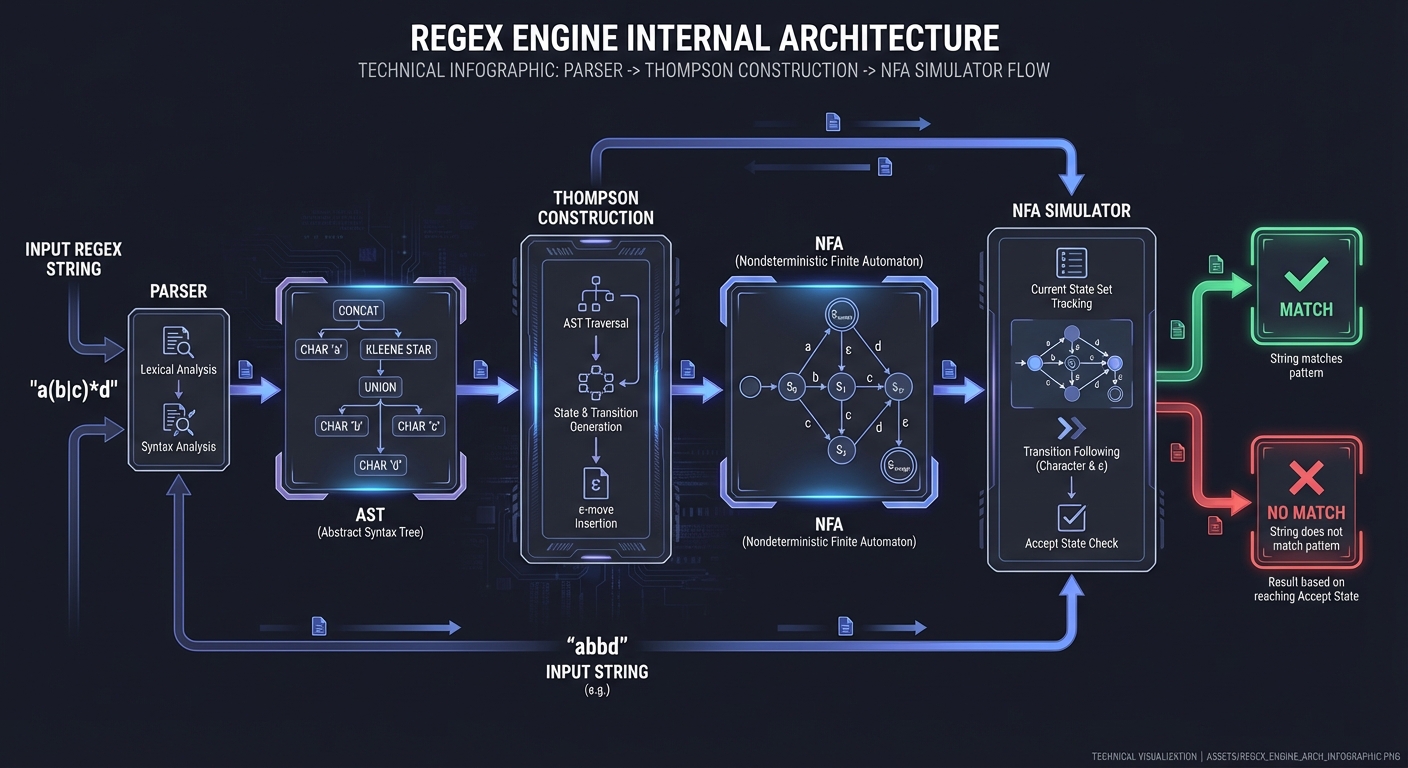
Step 1: Parse regex to AST:
# Regex: (a|b)*c
# AST:
#   Concat
#   ├── Star
#   │ └── Alternation
#   │ ├── Literal('a')
#   │ └── Literal('b')
#   └── Literal('c')

class Literal:
    def __init__(self, char): self.char = char

class Alternation:
    def __init__(self, left, right): self.left, self.right = left, right

class Concat:
    def __init__(self, left, right): self.left, self.right = left, right

class Star:
    def __init__(self, expr): self.expr = expr
Step 2: Thompson’s Construction (AST to NFA):
class State:
    def __init__(self):
        self.transitions = {}  # char -> [states]
        self.epsilon = []      # ε-transitions

class NFA:
    def __init__(self, start, accept):
        self.start = start
        self.accept = accept

def build_nfa(ast):
    if isinstance(ast, Literal):
        start = State()
        accept = State()
        start.transitions[ast.char] = [accept]
        return NFA(start, accept)

    elif isinstance(ast, Concat):
        left = build_nfa(ast.left)
        right = build_nfa(ast.right)
        left.accept.epsilon.append(right.start)
        return NFA(left.start, right.accept)

    elif isinstance(ast, Alternation):
        left = build_nfa(ast.left)
        right = build_nfa(ast.right)
        start = State()
        accept = State()
        start.epsilon = [left.start, right.start]
        left.accept.epsilon.append(accept)
        right.accept.epsilon.append(accept)
        return NFA(start, accept)

    elif isinstance(ast, Star):
        inner = build_nfa(ast.expr)
        start = State()
        accept = State()
        start.epsilon = [inner.start, accept]
        inner.accept.epsilon = [inner.start, accept]
        return NFA(start, accept)
Step 3: NFA Simulation:
def match(nfa, text):
    # Start with all states reachable from start via ε
    current = epsilon_closure({nfa.start})

    for char in text:
        next_states = set()
        for state in current:
            if char in state.transitions:
                next_states.update(state.transitions[char])
        current = epsilon_closure(next_states)

    return nfa.accept in current

def epsilon_closure(states):
    """Find all states reachable via ε-transitions"""
    closure = set(states)
    stack = list(states)
    while stack:
        state = stack.pop()
        for next_state in state.epsilon:
            if next_state not in closure:
                closure.add(next_state)
                stack.append(next_state)
    return closure
Learning milestones:
- Parser produces AST → You understand regex syntax
- NFA is constructed → You understand Thompson’s construction
- Matching works → You understand NFA simulation
- All operators work → You understand the full algorithm
The Core Question You’re Answering
“What is a regular expression, really, at its deepest level?”
This is THE ultimate way to understand regex. When you build a regex engine, you discover that a regex is not a string of cryptic symbols - it is a specification for a state machine. The pattern /ab*c/ describes a machine with states connected by transitions. When you match a string, you are simulating that machine, following transitions as you consume characters.
The profound insight: Regular expressions are equivalent to finite automata. This is not just theory - it is the actual implementation strategy used by grep, awk, and many other tools. Ken Thompson invented this in 1968, and his algorithm is still the gold standard. After building this, you will never look at regex the same way again.
Concepts You Must Understand First
Thompson’s Construction Algorithm:
- Converting regex to NFA (Non-deterministic Finite Automata)
- Each operator (concat, alternation, Kleene star) has a construction rule
- The algorithm is recursive and elegant
- Reference: “Introduction to Automata Theory” by Hopcroft, Motwani, Ullman, Chapter 3
Non-deterministic Finite Automata (NFA):
- States, transitions, start state, accept states
- Non-determinism: multiple possible transitions from one state
- Epsilon transitions: transitions that consume no input
- Reference: “Introduction to the Theory of Computation” by Sipser, Chapter 1
Epsilon Closure:
- All states reachable from a state via epsilon transitions only
- Critical for NFA simulation: before checking input, compute epsilon closure
- Reference: “Compilers: Principles, Techniques, and Tools” (Dragon Book), Section 3.7
Recursive Descent Parsing:
- Parsing the regex syntax itself (before you can compile it)
- Operator precedence:
*binds tighter than concatenation, which binds tighter than| - Reference: “Crafting Interpreters” by Nystrom, Chapter 6
Why NFA instead of DFA?:
- NFA construction is O(n) where n is pattern length
- DFA can have exponentially many states
- NFA simulation is O(nm) where m is input length - still linear in pattern size
- Reference: Russ Cox’s article “Regular Expression Matching Can Be Simple And Fast”
Questions to Guide Your Design
-
How do you represent an NFA in code? States as objects? Transitions as dictionaries? Adjacency list?
-
How do you parse the regex into an AST first? What is the grammar for regex?
expr -> term ('|' term)* | term term*? - What does Thompson’s construction look like for each operator?
- Literal
a: Two states, one transition labeled ‘a’ - Concatenation
ab: Connect a’s accept to b’s start - Alternation
a|b: New start with epsilon to both, both accept to new accept - Kleene star
a*: Epsilon to a’s start, a’s accept epsilon to new accept and back to a’s start
- Literal
-
How do you simulate the NFA? Track the set of current states. For each input character, compute next states. At end, check if any current state is accepting.
-
How do you handle epsilon transitions efficiently? Compute epsilon closure once per step, not recursively during transition.
-
What about anchors like
^and$? These match positions, not characters. How do you encode position-matching in your NFA? - How do you handle character classes like
[a-z]? One transition with a predicate, or multiple transitions?
Thinking Exercise
Before coding, work through Thompson’s construction by hand:
Pattern: a(b|c)*d
- Draw the NFA for just
a: Start -> (a) -> Accept - Draw the NFA for
b: Start -> (b) -> Accept - Draw the NFA for
c: Start -> (c) -> Accept - Draw the NFA for
b|c: Use alternation construction - Draw the NFA for
(b|c)*: Use Kleene star construction - Draw the NFA for
a(b|c)*d: Concatenate all pieces
Trace the match of string “abcd”:
- Start in initial state
- Read ‘a’: transition to next state
- Compute epsilon closure
- Read ‘b’: transition via ‘b’
- Compute epsilon closure (note: can loop back due to star)
- Read ‘c’: transition via ‘c’
- Compute epsilon closure
- Read ‘d’: transition to final state
- Check: are we in an accepting state?
The Interview Questions They’ll Ask
-
“Explain the difference between NFA and DFA.” (Non-determinism, epsilon transitions, state explosion in DFA conversion)
-
“Why does Thompson’s construction produce an NFA with O(n) states?” (Each operator adds at most 2 states)
-
“What is epsilon closure and why is it important?” (States reachable without consuming input, needed for NFA simulation)
-
“How would you extend your engine to support backreferences?” (Requires backtracking, no longer regular - this is where theory meets practice)
-
“Why are some regex implementations slow on certain patterns?” (Backtracking implementations can be exponential, NFA simulation is polynomial)
-
“How does your parser handle operator precedence?” (Recursive descent with different functions for each precedence level)
-
“What is the pumping lemma and what does it tell us about regex limitations?” (Proves regex cannot match balanced parentheses, palindromes, etc.)
-
“How would you add capture groups to your engine?” (Tag transitions with group markers, track during simulation)
Hints in Layers
Layer 1 - Direction: Start by defining your data structures: State, Transition, NFA. Then implement a parser that converts regex string to AST. Finally, implement Thompson’s construction to convert AST to NFA.
Layer 2 - Approach:
class State:
    def __init__(self, is_end=False):
        self.is_end = is_end
        self.epsilon = []  # List of states reachable via epsilon
        self.transitions = {}  # char -> list of states

class NFA:
    def __init__(self, start, end):
        self.start = start
        self.end = end
For parsing, use recursive descent with three levels: parse_expr (handles |), parse_term (handles concatenation), parse_factor (handles *, +, ?, and atoms).
Layer 3 - Structure: Thompson’s construction rules:
def literal(char):
    start, end = State(), State(is_end=True)
    start.transitions[char] = [end]
    return NFA(start, end)

def concatenate(nfa1, nfa2):
    nfa1.end.is_end = False
    nfa1.end.epsilon.append(nfa2.start)
    return NFA(nfa1.start, nfa2.end)

def alternate(nfa1, nfa2):
    start, end = State(), State(is_end=True)
    start.epsilon = [nfa1.start, nfa2.start]
    nfa1.end.is_end = False
    nfa1.end.epsilon.append(end)
    nfa2.end.is_end = False
    nfa2.end.epsilon.append(end)
    return NFA(start, end)

def kleene_star(nfa):
    start, end = State(), State(is_end=True)
    start.epsilon = [nfa.start, end]
    nfa.end.is_end = False
    nfa.end.epsilon = [nfa.start, end]
    return NFA(start, end)
Layer 4 - Full Algorithm:
def epsilon_closure(states):
    closure = set(states)
    stack = list(states)
    while stack:
        state = stack.pop()
        for next_state in state.epsilon:
            if next_state not in closure:
                closure.add(next_state)
                stack.append(next_state)
    return closure

def match(nfa, text):
    current_states = epsilon_closure({nfa.start})

    for char in text:
        next_states = set()
        for state in current_states:
            if char in state.transitions:
                next_states.update(state.transitions[char])
        current_states = epsilon_closure(next_states)

        if not current_states:
            return False

    return any(state.is_end for state in current_states)
Books That Will Help
| Topic | Book | Chapter/Section |
|---|---|---|
| Automata theory foundations | “Introduction to Automata Theory” by Hopcroft et al. | Chapters 2-3: FA, Regular Expressions |
| Thompson’s algorithm explained | “Compilers: Principles, Techniques, and Tools” | Section 3.7: From Regular Expressions to Automata |
| Practical NFA implementation | “Crafting Interpreters” by Nystrom | Chapters 16-17: Scanning, Compiling |
| Theory of computation | “Introduction to the Theory of Computation” by Sipser | Chapter 1: Regular Languages |
| Why NFA beats backtracking | Russ Cox’s “Regular Expression Matching” article | (Online resource) |
| Regex engine internals | “Mastering Regular Expressions” by Friedl | Chapter 6: Crafting an Efficient Expression |
Common Pitfalls & Debugging
Problem 1: “Incorrect precedence”
- Why: Parser does not bind quantifiers tighter than alternation.
- Fix: Implement a proper parser (shunting-yard or recursive descent).
- Quick test:
ab|cdshould parse as(ab)|(cd).
Problem 2: “Infinite loops in NFA simulation”
- Why: Epsilon-closures are not tracked or deduplicated.
- Fix: Use a visited set for epsilon transitions.
- Quick test: Pattern
a*on empty input should terminate.
Problem 3: “Captures are wrong”
- Why: Group boundaries are not recorded consistently.
- Fix: Record enter/exit positions in the match state.
- Quick test:
^(a)(b)$returns groups 1 and 2 correctly.
Problem 4: “Performance collapses on long input”
- Why: Backtracking implementation without pruning.
- Fix: Use Thompson NFA simulation or add memoization.
- Quick test:
(a+)+$on long input should not freeze.
Definition of Done
- Supports literals, concatenation, alternation, and quantifiers
- Parses regex with correct precedence
- Matches empty string cases correctly
- Provides basic capture group support
- Includes a conformance test suite
Project 12: Regex Debugger & Visualizer
- File: LEARN_REGEX_DEEP_DIVE.md
- Main Programming Language: JavaScript
- Alternative Programming Languages: Python, TypeScript
- Coolness Level: Level 4: Hardcore Tech Flex
- Business Potential: 3. The “Service & Support” Model
- Difficulty: Level 3: Advanced
- Knowledge Area: Debugging / Visualization
- Software or Tool: Regex Debugger (like regex101)
- Main Book: “Mastering Regular Expressions” by Jeffrey Friedl
What you’ll build: A regex debugger that shows step-by-step matching, explains why patterns fail, highlights matched groups, and visualizes the regex as a railroad diagram.
Why it teaches regex: Building a debugger requires you to understand exactly how regex engines work internally. You’ll learn backtracking, match states, and how to explain regex behavior to others.
Core challenges you’ll face:
- Step-by-step execution → maps to tracking match state
- Failure explanation → maps to understanding why matches fail
- Railroad diagrams → maps to regex AST visualization
- Performance analysis → maps to detecting catastrophic backtracking
Key Concepts:
- Regex Debugging: regex101.com internals
- Railroad Diagrams: Railroad diagram conventions
- Backtracking: “Mastering Regular Expressions” Chapter 4 - Friedl
Difficulty: Advanced Time estimate: 2-3 weeks Prerequisites: Project 11
Real World Outcome
const debug = require('regex-debugger');

// Step-by-step matching
const result = debug.trace(/a+b/, 'aaab');
// {
//   matched: true,
//   steps: [
//     { position: 0, pattern: 'a+', action: 'match a', state: 'continue' },
//     { position: 1, pattern: 'a+', action: 'match a', state: 'continue' },
//     { position: 2, pattern: 'a+', action: 'match a', state: 'continue' },
//     { position: 3, pattern: 'b', action: 'match b', state: 'success' }
//   ]
// }

// Failure analysis
const failure = debug.explain(/foo/, 'bar');
// {
//   matched: false,
//   reason: "Pattern 'foo' expected 'f' at position 0, but found 'b'",
//   suggestion: "The input doesn't contain the literal text 'foo'"
// }

// Backtracking visualization
const backtrack = debug.trace(/a+ab/, 'aaab');
// Shows backtracking:
//   - a+ matches 'aaa'
//   - tries to match 'a', fails (position 3 is 'b')
//   - backtracks: a+ gives up one 'a'
//   - a+ now matches 'aa'
//   - 'a' matches at position 2
//   - 'b' matches at position 3
//   - SUCCESS

// Group highlighting
const groups = debug.groups(/((\d+)-(\d+))/, '2024-12-25');
// {
//   fullMatch: '2024-12',
//   groups: [
//     { index: 1, name: null, value: '2024-12', range: [0, 7] },
//     { index: 2, name: null, value: '2024', range: [0, 4] },
//     { index: 3, name: null, value: '12', range: [5, 7] }
//   ]
// }

// Railroad diagram
const diagram = debug.visualize(/colou?r/);
// Returns SVG/HTML of railroad diagram

// Performance analysis
const perf = debug.analyze(/(a+)+$/);
// {
//   warning: 'CATASTROPHIC_BACKTRACKING',
//   message: 'This pattern can cause exponential backtracking on inputs like "aaaaaaaaaaaaaaaaX"',
//   suggestion: 'Use atomic groups or possessive quantifiers: (?>a+)+$'
// }

// Interactive mode (CLI)
debug.interactive();
// > pattern: \d{3}-\d{4}
// > test: 555-1234
// ✓ Match found: "555-1234"
//   Group 0: "555-1234" [0-8]
// > test: abc
// ✗ No match
//   Failed at position 0: expected digit, found 'a'
Implementation Hints:
Tracing regex execution:
class RegexDebugger {
  trace(pattern, input) {
    const steps = [];
    const regex = new RegExp(pattern, 'g');

    // Use a custom matcher that logs steps
    // This is simplified - real implementation needs engine access
    let lastIndex = 0;

    for (let i = 0; i < input.length; i++) {
      // Try to match at each position
      regex.lastIndex = i;
      const match = regex.exec(input);

      if (match && match.index === i) {
        steps.push({
          position: i,
          pattern: pattern.toString(),
          action: `matched "${match[0]}"`,
          state: 'success'
        });
        break;
      } else {
        steps.push({
          position: i,
          pattern: pattern.toString(),
          action: `no match at position ${i}`,
          state: 'backtrack'
        });
      }
    }

    return { matched: steps.some(s => s.state === 'success'), steps };
  }
}
Railroad diagram generation:
function toRailroad(ast) {
  switch (ast.type) {
    case 'literal':
      return `<rect class="terminal"><text>${ast.char}</text></rect>`;

    case 'sequence':
      return ast.elements.map(toRailroad).join('→');

    case 'alternation':
      return `
        <g class="choice">
          ${ast.alternatives.map(a => `<path>${toRailroad(a)}</path>`).join('')}
        </g>
      `;

    case 'quantifier':
      if (ast.min === 0 && ast.max === Infinity) {
        // *: loop with skip path
        return `<g class="loop">${toRailroad(ast.expr)}</g>`;
      }
      // ... handle other quantifiers
  }
}
Catastrophic backtracking detection:
function detectCatastrophic(pattern) {
  const warnings = [];

  // Nested quantifiers with overlap
  if (/\([^)]*[+*][^)]*\)[+*]/.test(pattern)) {
    warnings.push({
      type: 'NESTED_QUANTIFIERS',
      message: 'Nested quantifiers can cause exponential backtracking'
    });
  }

  // Overlapping alternatives
  // (a|ab)* - both alternatives start with 'a'
  // This is harder to detect accurately

  return warnings;
}
Learning milestones:
- Step tracing works → You understand match progression
- Failure explanation works → You understand why patterns fail
- Railroad diagrams generate → You understand regex structure
- Catastrophic patterns detected → You understand performance
The Core Question You’re Answering
“Why did this regex fail, and how can I see exactly what the engine was thinking?”
Regex debugging is notoriously difficult because matching happens invisibly inside the engine. When /a(b+)+c/ takes forever on “abbbbbbbbbbbx”, most developers stare in confusion. Your debugger will show exactly what is happening: the backtracking, the dead ends, the exponential exploration. When a pattern fails, it will explain why - not just “no match” but “the pattern expected ‘c’ at position 12, but found ‘x’.”
The deeper insight: Visualization transforms understanding. A railroad diagram shows the structure of a regex in a way that cryptic syntax never can. Step-by-step tracing reveals the matching algorithm. Catastrophic backtracking detection prevents production disasters. This project combines deep technical understanding with practical tooling.
Concepts You Must Understand First
Step-by-Step Execution Tracing:
- Recording each state transition during matching
- Capturing the current position in both pattern and input
- Showing which alternatives are being tried
- Reference: “Mastering Regular Expressions” by Friedl, Chapter 6
Backtracking Visualization:
- How backtracking-based engines work (Perl, Python, JavaScript)
- The difference between greedy and lazy quantifiers in terms of backtracking
- Why
(a+)+creates exponential backtracking - Reference: “Mastering Regular Expressions” by Friedl, Chapter 4
Railroad Diagrams (Syntax Diagrams):
- Visual representation of grammar/regex structure
- Converting AST to SVG graphics
- Layout algorithms for readable diagrams
- Reference: “The Definitive ANTLR 4 Reference” by Parr, Chapter 5
Catastrophic Backtracking Detection:
- Patterns that cause exponential time:
(a+)+,(a|a)+,(a+)* - Static analysis to detect nested quantifiers
- The regex
(a+)+on “aaaaaaaaaaaaaaaaax” tries 2^n paths - Reference: Russ Cox’s “Regular Expression Matching Can Be Simple And Fast”
Failure Explanation:
- Not just “no match” but “expected X at position Y, found Z”
- Showing the furthest the match got before failing
- Identifying which part of the pattern caused the failure
- Reference: Error reporting in parser design (any compiler textbook)
Questions to Guide Your Design
-
How do you instrument the matching engine for tracing? Hook into each transition, record state, position, and decision.
-
What data structure captures a match attempt? A tree of decisions? A flat log? Consider that backtracking creates a tree structure.
-
How do you generate railroad diagrams from AST? What are the SVG primitives you need? Rectangles for literals, rounded rectangles for character classes, arrows for flow.
-
How do you detect catastrophic backtracking statically? Look for nested quantifiers where inner pattern can match empty string or overlaps with outer.
-
How do you explain failure clearly? Show the pattern up to the failure point, show the input up to where it matched, show what was expected vs. found.
-
How do you handle very long traces? Thousands of steps can happen. Summarization? Collapsing repeated patterns?
-
How do you visualize alternation exploration? When
(cat|car)tries ‘cat’ then backtracks to ‘car’, how do you show this?
Thinking Exercise
Before coding, analyze this failure case by hand:
Pattern: /colou?r/
Input: “I like colors”
Trace the match attempt:
- Position 0 ‘I’: Does ‘c’ match ‘I’? No. Move to position 1.
- Position 1 ‘ ‘: Does ‘c’ match ‘ ‘? No. Move to position 2.
- … continue until position 7 ‘c’
- Position 7 ‘c’: Match! Advance pattern and input.
- Position 8 ‘o’: Match! Advance.
- Position 9 ‘l’: Match! Advance.
- Position 10 ‘o’: ‘u?’ is optional. Try matching ‘u’. ‘o’ != ‘u’. OK, skip ‘u?’.
- Position 10 ‘o’: ‘r’ expected. ‘o’ != ‘r’. Failure at position 10.
Now explain this failure in user-friendly terms: “Pattern failed at position 10. After matching ‘col’, expected ‘r’ (or optional ‘u’ followed by ‘r’), but found ‘o’. The word ‘colors’ has ‘or’ after ‘col’, not ‘r’.”
Draw the railroad diagram for /colou?r/:
-->[ c ]-->[ o ]-->[ l ]-->[ o ]--+--->[ u ]---+-->[ r ]-->
                                  |            |
                                  +------------+
The Interview Questions They’ll Ask
-
“How would you detect patterns that cause catastrophic backtracking?” (Look for nested quantifiers, analyze if inner can match what outer expects)
-
“Explain how you would generate SVG for a railroad diagram.” (Recursive descent over AST, compute bounding boxes, connect with arrows)
-
“What’s the difference between tracing NFA simulation vs. backtracking engines?” (NFA tracks set of states, no backtracking; backtracking tries one path, backtracks on failure)
-
“How would you make the step-by-step visualization interactive?” (Slider for step number, highlight current position, show current states)
-
“What makes a good failure explanation for end users?” (Position in input, what was expected, what was found, context around failure)
-
“How would you profile a regex for performance?” (Time matching on various inputs, count backtracking steps, identify hot spots)
-
“How does regex101.com implement their debugger?” (Understanding real-world implementation approaches)
-
“How would you explain lookahead/lookbehind failures?” (These are particularly confusing - need to show what the assertion expected)
Hints in Layers
Layer 1 - Direction: Start with a simple step tracer that records each state transition. Use your regex engine from Project 11 as a base, adding instrumentation. Then add failure explanation. Railroad diagrams and catastrophic detection can come later.
Layer 2 - Approach:
class MatchStep {
    constructor(patternPos, inputPos, state, action, success) {
        this.patternPos = patternPos;
        this.inputPos = inputPos;
        this.state = state;           // Current NFA states or backtrack position
        this.action = action;         // 'match', 'epsilon', 'backtrack', 'fail'
        this.success = success;
    }
}

class Tracer {
    constructor() {
        this.steps = [];
    }

    record(step) {
        this.steps.push(step);
    }

    getFailureExplanation() {
        const lastStep = this.steps[this.steps.length - 1];
        // Find the furthest we got in the input
        // Explain what was expected vs. found
    }
}
Layer 3 - Structure: For railroad diagrams:
function generateRailroad(ast) {
    switch (ast.type) {
        case 'literal':
            return `<rect x="0" y="0" width="30" height="20"/>
                    <text x="15" y="15">${ast.char}</text>`;
        case 'concat':
            // Layout children horizontally, connect with arrows
        case 'alt':
            // Layout children vertically, add branching arrows
        case 'star':
            // Add loop-back arrow
        case 'optional':
            // Add bypass arrow
    }
}
For catastrophic backtracking detection:
function detectCatastrophic(ast) {
    // Look for: quantifier containing another quantifier
    // where inner can match empty OR inner matches same as outer continuation
    if (ast.type === 'star' || ast.type === 'plus') {
        const inner = ast.child;
        if (hasQuantifier(inner)) {
            return {
                warning: 'Nested quantifiers detected',
                pattern: ast,
                explanation: 'Pattern like (a+)+ can cause exponential backtracking'
            };
        }
    }
}
Layer 4 - Full Algorithm:
function explainFailure(pattern, input, trace) {
    // Find the position where we got furthest in the input
    let maxInputPos = 0;
    let stateAtMax = null;

    for (const step of trace) {
        if (step.inputPos > maxInputPos) {
            maxInputPos = step.inputPos;
            stateAtMax = step;
        }
    }

    // Determine what was expected at that position
    const expected = getExpectedChars(stateAtMax.patternPos, pattern);
    const found = input[maxInputPos] || 'end of input';

    return {
        position: maxInputPos,
        matched: input.substring(0, maxInputPos),
        expected: expected,
        found: found,
        explanation: `After matching "${input.substring(0, maxInputPos)}", ` +
                     `expected ${expected.join(' or ')} but found '${found}'`
    };
}

function generateRailroadSVG(ast, x = 0, y = 0) {
    const padding = 10;
    const charWidth = 20;
    const charHeight = 30;

    let svg = '';
    let width = 0;

    switch (ast.type) {
        case 'literal':
            svg = `<g transform="translate(${x}, ${y})">
                     <rect x="0" y="0" width="${charWidth}" height="${charHeight}"
                           rx="3" fill="#ddf" stroke="#333"/>
                     <text x="${charWidth/2}" y="${charHeight/2 + 5}"
                           text-anchor="middle">${escapeHtml(ast.char)}</text>
                   </g>`;
            width = charWidth + padding;
            break;

        case 'concat':
            let currentX = x;
            for (const child of ast.children) {
                const result = generateRailroadSVG(child, currentX, y);
                svg += result.svg;
                currentX += result.width;
            }
            width = currentX - x;
            break;

        // ... handle other AST types
    }

    return { svg, width, height: charHeight };
}
Books That Will Help
| Topic | Book | Chapter/Section |
|---|---|---|
| Regex engine internals for debugging | “Mastering Regular Expressions” by Friedl | Chapters 4, 6: The Mechanics of Expression Processing |
| Backtracking behavior | “Mastering Regular Expressions” by Friedl | Chapter 4: Backtracking |
| Railroad diagram theory | “The Definitive ANTLR 4 Reference” by Parr | Chapter 5: Designing Grammars |
| SVG for diagrams | “SVG Essentials” by Eisenberg | Chapters 3-5: Basic Shapes, Paths, Text |
| Performance analysis | “High Performance JavaScript” by Zakas | Chapter 5: Strings and Regular Expressions |
| Parser error reporting | “Crafting Interpreters” by Nystrom | Chapter 16: Scanning (error handling) |
Common Pitfalls & Debugging
Problem 1: “Trace output is misleading”
- Why: Backtracking steps are not logged in order.
- Fix: Log each state transition and backtrack explicitly.
- Quick test: Visualize
(a+)+$and confirm backtrack steps.
Problem 2: “Graph rendering is unreadable”
- Why: No layout or too many nodes.
- Fix: Use clustering and collapse repeated subgraphs.
- Quick test: Render a moderate regex and verify clarity.
Problem 3: “Positions drift in visualization”
- Why: Character offsets not tracked against input.
- Fix: Store spans and annotate them clearly.
- Quick test: Highlight correct match spans for each step.
Problem 4: “Slow on complex patterns”
- Why: Visualization generates full graphs for large NFAs.
- Fix: Provide sampling or limits for graph size.
- Quick test: Patterns with many alternations should still render.
Definition of Done
- Shows step-by-step match trace with backtracking
- Outputs NFA/DFA diagrams in DOT or SVG
- Highlights matches and group spans accurately
- Provides a CLI or web UI for inspection
- Includes regression tests for tricky patterns
Project 13: Regex Optimizer
- File: LEARN_REGEX_DEEP_DIVE.md
- Main Programming Language: Python
- Alternative Programming Languages: Rust, Go
- Coolness Level: Level 4: Hardcore Tech Flex
- Business Potential: 4. The “Open Core” Infrastructure
- Difficulty: Level 4: Expert
- Knowledge Area: Optimization / Automata
- Software or Tool: Regex Optimizer
- Main Book: “Mastering Regular Expressions” by Jeffrey Friedl
What you’ll build: A regex optimizer that analyzes patterns, suggests improvements, converts NFA to DFA for faster matching, and identifies performance problems.
Why it teaches regex: Understanding optimization requires deep knowledge of how regex engines work, the difference between NFA and DFA, and what makes patterns slow.
Core challenges you’ll face:
- NFA to DFA conversion → maps to subset construction
- DFA minimization → maps to state equivalence
- Pattern simplification → maps to algebraic laws
- Anchoring optimization → maps to match start detection
Key Concepts:
- Subset Construction: “Introduction to Automata Theory” Chapter 2
- DFA Minimization: “Engineering a Compiler” Chapter 2
- Regex Optimization: “Mastering Regular Expressions” Chapter 6
Difficulty: Expert Time estimate: 1 month Prerequisites: Project 11
Real World Outcome
from regex_optimizer import optimize

# Simplify redundant patterns
optimize(r'(a|a)')
# Simplified: 'a'

optimize(r'a*a*')
# Simplified: 'a*'

optimize(r'[a-zA-Z0-9_]')
# Simplified: '\w' (if locale permits)

# Remove unnecessary groups
optimize(r'((a)(b))(c)')
# Simplified: 'abc' (if groups aren't captured)

# Factor common prefixes
optimize(r'foobar|foobaz')
# Optimized: 'fooba[rz]'

optimize(r'cat|car|cab')
# Optimized: 'ca[trb]'

# Anchor optimization
optimize(r'.*foo')
# Warning: "Starts with.* - will scan entire string. Consider anchoring or using specific start."

# NFA to DFA conversion
result = optimize(r'(a|b)*abb', convert_to_dfa=True)
# Returns optimized DFA with minimal states

# Performance analysis
analyze(r'(a+)+$')
# {
#   'complexity': 'exponential',
#   'reason': 'Nested quantifiers with overlapping matches',
#   'suggestion': 'Use possessive quantifier: (a+)++$ or atomic group: (?>a+)+$'
# }

# Equivalent simpler pattern
equivalent(r'^[0-9][0-9]*$')
# Simpler: '^\d+$'

equivalent(r'(foo|bar|baz){1,1}')
# Simpler: 'foo|bar|baz'

# Compile to DFA for repeated matching
dfa = compile_to_dfa(r'\b\w+@\w+\.\w+\b')
for line in huge_file:
    if dfa.match(line):  # O(n) guaranteed, no backtracking
        print(line)
Implementation Hints:
NFA to DFA (Subset Construction):
def nfa_to_dfa(nfa):
    """Convert NFA to DFA using subset construction"""
    # DFA state = set of NFA states
    start_state = frozenset(epsilon_closure({nfa.start}))

    dfa_states = {start_state}
    dfa_transitions = {}
    worklist = [start_state]

    while worklist:
        current = worklist.pop()

        for symbol in alphabet:
            # Find all NFA states reachable via this symbol
            next_nfa_states = set()
            for nfa_state in current:
                if symbol in nfa_state.transitions:
                    next_nfa_states.update(nfa_state.transitions[symbol])

            next_dfa_state = frozenset(epsilon_closure(next_nfa_states))

            if next_dfa_state and next_dfa_state not in dfa_states:
                dfa_states.add(next_dfa_state)
                worklist.append(next_dfa_state)

            if next_dfa_state:
                dfa_transitions[(current, symbol)] = next_dfa_state

    return DFA(start_state, dfa_states, dfa_transitions, nfa.accept)
DFA minimization:
def minimize_dfa(dfa):
    """Minimize DFA using partition refinement"""
    # Initial partition: accepting vs non-accepting
    accept = {s for s in dfa.states if dfa.is_accepting(s)}
    non_accept = dfa.states - accept
    partition = [accept, non_accept]

    # Refine until stable
    while True:
        new_partition = []
        changed = False

        for group in partition:
            # Split group based on transitions
            subgroups = split_by_transitions(group, partition, dfa)
            new_partition.extend(subgroups)
            if len(subgroups) > 1:
                changed = True

        if not changed:
            break
        partition = new_partition

    # Build minimized DFA from partition
    return build_minimized_dfa(partition, dfa)
Pattern simplification rules:
SIMPLIFICATION_RULES = [
    # a|a -> a
    (r'\(([^)]+)\|\1\)', r'\1'),

    # a*a* -> a*
    (r'([^*+?])\*\1\*', r'\1*'),

    # a?a? -> a{0,2}
    (r'([^*+?])\?\1\?', r'\1{0,2}'),

    # [a-za-z] -> [a-z] (overlapping ranges)
    # (more complex logic needed)

    # ^.*x -> x (if x is at start, .* is wasteful)
    # (context-dependent)
]
Learning milestones:
- NFA to DFA works → You understand subset construction
- DFA minimization works → You understand state equivalence
- Simplification rules apply → You understand regex algebra
- Performance warnings accurate → You understand complexity
The Core Question You’re Answering
“How do you transform a regex from a form that’s expressive and flexible into one that’s optimal for execution, and what trade-offs does this involve?”
This project forces you to confront the fundamental tension in regex engineering: NFAs are easy to construct but can be slow to execute; DFAs are fast but can explode in size. Your optimizer must navigate this landscape intelligently, knowing when to convert, when to simplify, and when to warn.
Concepts You Must Understand First
Before attempting this project, you need solid grounding in:
| Concept | Why It’s Essential | Book Reference |
|---|---|---|
| NFA Construction | You’re optimizing what Thompson’s construction produces | “Introduction to Automata Theory” Chapter 2.3 |
| NFA vs DFA Trade-offs | The exponential state blowup is real; you must understand when DFA conversion helps vs hurts | “Introduction to Automata Theory” Chapter 2.4 |
| Subset Construction Algorithm | This is the core algorithm for NFA-to-DFA conversion | “Engineering a Compiler” Chapter 2.4 |
| DFA Minimization (Hopcroft’s Algorithm) | Partition refinement to find minimal equivalent DFA | “Introduction to Automata Theory” Chapter 4.4 |
| Backtracking Complexity | Understanding why (a+)+$ is catastrophic requires NFA simulation knowledge |
“Mastering Regular Expressions” Chapter 6 |
| Possessive Quantifiers/Atomic Groups | These eliminate backtracking; you need to detect when they’re safe to suggest | “Mastering Regular Expressions” Chapter 4 |
| Regular Expression Algebra | Simplification rules like a*a* = a* come from formal language theory |
“Introduction to Automata Theory” Chapter 3 |
Russ Cox articles to read:
- “Regular Expression Matching Can Be Simple And Fast” - The foundation
- “Regular Expression Matching: the Virtual Machine Approach” - NFA simulation
- “Regular Expression Matching in the Wild” - Real-world RE2 optimizations
Questions to Guide Your Design
- Subset Construction:
- How will you compute epsilon-closure efficiently? (Hint: BFS or DFS with memoization)
- When the DFA has exponentially many states, do you give up or use lazy construction?
- How do you handle the resulting DFA that might be larger than available memory?
- DFA Minimization:
- Will you use Hopcroft’s algorithm (O(n log n)) or naive partition refinement (O(n^2))?
- How do you handle minimization of huge DFAs from complex regexes?
- Can you do incremental minimization as states are added?
- Pattern Simplification:
- What algebraic rules do you implement? (
a|a->a,a*a*->a*,[a-za-z]->[a-z]) - How do you detect semantically equivalent patterns? (This is undecidable in general!)
- Do you normalize patterns to a canonical form before comparison?
- What algebraic rules do you implement? (
- Common Prefix Factoring:
- How do you identify common prefixes in alternations (
foo|far->f(oo|ar))? - Is this a tree transformation on the AST or a trie-based approach?
- When does factoring hurt performance (cache locality, branch prediction)?
- How do you identify common prefixes in alternations (
- Catastrophic Backtracking Detection:
- What patterns indicate exponential backtracking? (Nested quantifiers, overlapping alternatives)
- Can you statically analyze the NFA to detect these without running it?
- How do you suggest fixes (possessive quantifiers, atomic groups, pattern rewriting)?
- Optimization Trade-offs:
- When is NFA simulation actually faster than DFA lookup? (Small regexes, one-time use)
- How do you measure “optimization benefit” to decide whether to apply a transformation?
- What’s your strategy for optimizing without changing match semantics?
Thinking Exercise
Before writing any code, work through this on paper:
Part 1: Subset Construction by Hand Convert this NFA to a DFA using subset construction:
Regex: (a|b)*abb

NFA (Thompson's):
   epsilon     a      epsilon
-> q0 -------> q1 --> q2 -------> q3
   |                   ^
   | epsilon   b      epsilon
   +---------> q4 --> q5 --------+
               ^                 |
               +-----------------+ (back to q0 via epsilon)

   Then: q3 -a-> q6 -b-> q7 -b-> q8 (accept)
Work through the algorithm:
- Start state = epsilon-closure({q0})
- For each DFA state and each symbol, compute next DFA state
- Mark accepting states (those containing q8)
- How many DFA states do you get? (Spoiler: 5)
Part 2: Minimization Now minimize this DFA by hand:
- Initial partition: {accepting states}, {non-accepting states}
- Refine based on transitions
- How many states in the minimal DFA? (Spoiler: still 5 - it’s already minimal!)
Part 3: Catastrophic Pattern Analysis
For the regex (a+)+$:
- Draw the NFA
- Trace what happens when matching “aaaaX” (X doesn’t match)
- Count the backtracking steps. See the exponential blowup?
- Now explain why
(?>a+)+$(atomic group) would fix it
The Interview Questions They’ll Ask
- “Explain the subset construction algorithm for NFA to DFA conversion.”
- Walk through the algorithm step by step
- Discuss the worst-case exponential blowup (2^n states)
- Explain when lazy construction helps
- “What causes catastrophic backtracking, and how would you detect it statically?”
- Nested quantifiers with overlapping matches
- NFAs with multiple paths that can match the same prefix
- Static analysis: look for loops in NFA with multiple epsilon paths back
- “Compare Hopcroft’s algorithm vs naive partition refinement for DFA minimization.”
- Naive: O(n^2) - compare all pairs, split on differences
- Hopcroft: O(n log n) - process splitters from a worklist
- Explain why Hopcroft’s refinement order matters
- “How would you optimize the regex
foob(ar|az)differently from(foobar|foobaz)?”- First is already optimized (common prefix factored)
- Second needs common prefix extraction:
fooba(r|z) - Discuss trie-based alternation optimization
- “What are possessive quantifiers and atomic groups? When would you suggest them?”
- Possessive:
a++- never gives back matched characters - Atomic:
(?>...)- group that can’t backtrack into - Suggest when the quantified element can’t appear after itself
- Possessive:
- “How do you decide whether to convert an NFA to a DFA for a given use case?”
- One-time match: NFA simulation is often faster
- Many matches on same pattern: DFA pays off
- Memory constraints: DFA might be too large
- Need for captures/backreferences: DFA can’t do this
- “Given unlimited resources, what would the ideal regex optimizer do?”
- Profile-guided optimization based on actual input distribution
- JIT compilation to native code
- SIMD-accelerated character class matching
- Hybrid engine selection based on pattern analysis
- “How would you test that your optimizer preserves regex semantics?”
- Property-based testing:
match(optimize(r), s) == match(r, s)for all s - Fuzzing with random regexes and strings
- Known equivalence pairs as regression tests
- Property-based testing:
Hints in Layers
Layer 1 - Getting Started:
- Start with subset construction only - get NFA to DFA working first
- Use frozensets to represent DFA states (sets of NFA states)
- Implement epsilon-closure as a helper function with memoization
- Test with simple regexes like
a*bbefore tackling(a|b)*abb
Layer 2 - Making It Work:
- For DFA minimization, start with the naive O(n^2) algorithm - it’s easier to understand
- Implement one simplification rule at a time (
a|a->afirst) - Use the AST for pattern simplification, not regex-on-regex transformation
- For catastrophic backtracking, look for nested quantifiers in the AST
Layer 3 - Production Quality:
- Switch to Hopcroft’s algorithm for O(n log n) minimization
- Implement lazy DFA construction for patterns that would explode
- Add a state limit: if DFA exceeds N states, fall back to NFA simulation
- Common prefix factoring is essentially building a trie from alternatives
Layer 4 - Expert Optimizations:
- Implement Boyer-Moore-like optimizations for literal prefixes
- Detect “regex is just a literal string” and bypass engine entirely
- Static analysis for backtracking: build an “ambiguity graph” of NFA
- Profile-guided optimization: track which states are hot paths
- Consider implementing JIT compilation for the DFA transition table
Books That Will Help
| Topic | Book | Chapter/Section |
|---|---|---|
| Subset Construction Algorithm | “Introduction to Automata Theory” (Hopcroft, Motwani, Ullman) | Chapter 2.3-2.4: Converting NFAs to DFAs |
| DFA Minimization (Hopcroft’s Algorithm) | “Introduction to Automata Theory” | Chapter 4.4: Minimization of DFAs |
| Partition Refinement | “Engineering a Compiler” (Cooper & Torczon) | Chapter 2.4: From NFA to DFA |
| Regex Engine Optimization | “Mastering Regular Expressions” (Friedl) | Chapter 6: Crafting an Efficient Expression |
| Catastrophic Backtracking | “Mastering Regular Expressions” | Chapter 6: Runaway Regular Expressions |
| Possessive Quantifiers | “Mastering Regular Expressions” | Chapter 4: Possessive Quantifiers |
| Atomic Groups | “Mastering Regular Expressions” | Chapter 4: Atomic Grouping |
| Regular Expression Algebra | “Introduction to Automata Theory” | Chapter 3: Regular Expressions and Languages |
| Real-World Optimization | Russ Cox articles | “Regular Expression Matching in the Wild” |
| Lexer Optimization Techniques | “Engineering a Compiler” | Chapter 2.5: Implementing Scanners |
Common Pitfalls & Debugging
Problem 1: “Optimization changes semantics”
- Why: Algebraic rewrites are applied without equivalence checks.
- Fix: Add property-based tests comparing original vs optimized.
- Quick test:
match(opt(r), s) == match(r, s)for random s.
Problem 2: “DFA blows up”
- Why: Subset construction is applied without state limits.
- Fix: Add thresholds and fallback to NFA.
- Quick test: Pattern
(a|b|c|d)*should not explode memory.
Problem 3: “Simplification misses cases”
- Why: Rewrite rules are incomplete or applied out of order.
- Fix: Normalize patterns before applying rules.
- Quick test:
a|ashould simplify toa.
Problem 4: “Performance claims are unverified”
- Why: No benchmarks on real inputs.
- Fix: Benchmark before/after on sample corpora.
- Quick test: Use
hyperfineon regex workloads.
Definition of Done
- Implements NFA->DFA conversion with limits
- Provides at least 5 safe simplification rules
- Detects catastrophic backtracking patterns
- Produces optimization report with metrics
- Verified equivalence on randomized tests
Project 14: Full Regex Suite (Capstone)
- File: LEARN_REGEX_DEEP_DIVE.md
- Main Programming Language: Rust (for performance) or Python (for clarity)
- Alternative Programming Languages: Go, C
- Coolness Level: Level 5: Pure Magic (Super Cool)
- Business Potential: 5. The “Industry Disruptor”
- Difficulty: Level 5: Master
- Knowledge Area: Regex Engine Implementation
- Software or Tool: Complete Regex Library
- Main Book: “Introduction to Automata Theory” + “Mastering Regular Expressions”
What you’ll build: A complete regex library with:
- Full regex syntax support (PCRE-like)
- Both NFA (backtracking) and DFA (linear time) engines
- Unicode support
- Named groups, lookahead, lookbehind
- Debugging and visualization tools
- Performance analysis
Components to integrate:
- Parser for full regex syntax
- NFA construction (Thompson’s)
- NFA simulation with backtracking
- DFA construction for linear-time matching
- Optimization passes
- Debug/visualization output
Real World Outcome
from myregex import Regex, RegexBuilder

# Full syntax support
r = Regex(r'(?P<year>\d{4})-(?P<month>\d{2})-(?P<day>\d{2})')
match = r.match('2024-12-25')
print(match.group('year'))   # '2024'
print(match.group('month'))  # '12'

# Lookahead/lookbehind
r = Regex(r'(?<=\$)\d+(?=\.)')
r.findall('$100.00 and $200.50')  # ['100', '200']

# Engine selection
r = Regex(r'simple-pattern', engine='dfa')  # O(n) guaranteed
r = Regex(r'complex(?=pattern)', engine='nfa')  # Backtracking for lookahead

# Performance mode
r = Regex(r'pattern', optimize=True)  # Run optimization passes

# Debug mode
r = Regex(r'(a+)+$', debug=True)
# Warning: Potential catastrophic backtracking detected

# Visualization
r.to_railroad()  # SVG railroad diagram
r.to_nfa_graph()  # DOT format NFA
r.to_dfa_graph()  # DOT format DFA
Time estimate: 3-4 months Prerequisites: Complete at least 8 of the earlier projects
Learning milestones:
- Full syntax parses → You understand regex grammar
- Both engines work → You understand NFA vs DFA trade-offs
- Unicode works → You understand character encoding
- Lookahead works → You understand advanced features
- Performance is competitive → You understand optimization
Common Pitfalls & Debugging
Problem 1: “Engines disagree on semantics”
- Why: NFA and DFA paths return different capture behavior.
- Fix: Define one canonical semantics and enforce it across engines.
- Quick test: Compare capture groups for the same input.
Problem 2: “Unicode support is partial”
- Why: Character classes are ASCII-only or normalization is missing.
- Fix: Integrate Unicode tables and test across scripts.
- Quick test: Match identifiers with non-Latin letters.
Problem 3: “Performance regressions”
- Why: Optimization pipeline changes without profiling.
- Fix: Add regression benchmarks and enforce budgets.
- Quick test: Benchmark standard patterns and alert on slowdown.
Problem 4: “Debug tools are inconsistent”
- Why: Different output formats or incomplete trace data.
- Fix: Standardize debug output across components.
- Quick test: Generate NFA/DFA/trace for the same pattern.
Definition of Done
- Supports a documented regex syntax (PCRE-like subset)
- Provides both backtracking and automata engines
- Includes Unicode-aware character classes
- Exposes debugging and visualization tools
- Includes a conformance test suite and benchmarks
Additional Resources
Books
- “Mastering Regular Expressions” by Jeffrey Friedl - THE regex bible
- “Regular Expressions Cookbook” by Goyvaerts & Levithan - Practical patterns
- “Introduction to Automata Theory” by Hopcroft, Motwani, Ullman - Theory
Online Resources
- regex101.com - Interactive regex tester with explanation
- Russ Cox’s articles - “Regular Expression Matching Can Be Simple And Fast”
- Debuggex - Visual regex debugger
Tools to Study
- RE2 - Google’s linear-time regex engine (no backtracking)
- PCRE - Perl-compatible regex (full features)
- Hyperscan - Intel’s high-performance regex engine
Practice
- Regex Golf - Write shortest regex for given matches
- Regex Crossword - Puzzles using regex
- HackerRank Regex Challenges
Cheat Sheet
Metacharacters
.       Any character (except newline)
^       Start of string/line
$       End of string/line
*       0 or more
+       1 or more
?       0 or 1 (optional)
|       Alternation (or)
()      Grouping
[]      Character class
{}      Quantifier range
\       Escape
Character Classes
[abc]   a, b, or c
[^abc]  Not a, b, or c
[a-z]   a through z
\d      Digit [0-9]
\D      Non-digit
\w      Word char [a-zA-Z0-9_]
\W      Non-word char
\s      Whitespace
\S      Non-whitespace
Quantifiers
*       0 or more (greedy)
+       1 or more (greedy)
?       0 or 1 (greedy)
{n}     Exactly n
{n,}    n or more
{n,m}   n to m
*?      0 or more (lazy)
+?      1 or more (lazy)
??      0 or 1 (lazy)
Groups & References
(...)       Capture group
(?:...)     Non-capturing group
(?P<n>...)  Named group (Python)
(?<n>...)   Named group (other)
\1, \2      Backreference
\g<name>    Named backreference
Lookaround
(?=...)     Positive lookahead
(?!...)     Negative lookahead
(?<=...)    Positive lookbehind
(?<!...)    Negative lookbehind
Flags
i   Case-insensitive
g   Global (find all)
m   Multiline (^ and $ match line boundaries)
s   Dotall (. matches newline)
x   Verbose (allow whitespace and comments)
u   Unicode
Regular expressions are the closest thing programmers have to magic spells. Master them, and you’ll see patterns everywhere.