Learn Procedural Roguelike Development: From Zero to Infinite Worlds
Goal: Deeply understand the fusion of procedural generation, game mechanics, and emergent AI. You will learn how to build “engines of infinite content” by mastering PRNG seeds, spatial partitioning algorithms, and autonomous agent behaviors. By the end, you won’t just be making a game; you’ll be building a self-generating universe where every playthrough is a unique, verifiable adventure.
Why Procedural Roguelikes Matter
In 1972, C gave programmers direct access to memory. In 1980, Rogue gave them a way to generate infinite universes using that memory. Procedural generation isn’t just a technical shortcut—it’s a fundamental shift in game design from “crafting experiences” to “crafting rules that create experiences.”
That decision shaped some of the most successful titles in history:
- Minecraft (300M+ copies sold) uses procedural generation to create a world roughly 9 million times the surface area of Earth.
- Dwarf Fortress simulates thousands of years of history, geology, and individual character psychology before the player even takes their first step.
- No Man’s Sky was built by a core team of only ~15 people, yet it contains 18 quintillion planets. They didn’t build planets; they built the math that builds planets.
The Power of Rule-Based Design
Why does this approach dominate replayable genres? Because understanding procedurality is understanding the limits of human content creation:
Static Design (Traditional)     Procedural Design (Roguelike)
        ↓                                ↓
Manual level design             Design the "Dungeon Rules"
        ↓                                ↓
Fixed player experience         Infinite varied experiences
        ↓                                ↓
Linear replay value             Emergent replay value
In a traditional game, a player memorizes the level. In a roguelike, a player must master the systems. This knowledge—how to manage PRNG seeds, spatial partitioning, and autonomous agent behaviors—is the foundation of modern technical game development and high-performance simulation.
The Content Hierarchy: From Noise to Narrative
┌─────────────────────────────────────────────────────────────────┐
│                       The Universe                              │
│  ┌─────────┐                                                    │
│  │ Seeds   │  ← The foundation (4-8 bytes of entropy)           │
│  └────┬────┘                                                    │
│       │                                                          │
│  ┌────┴────┐                                                    │
│  │ Noise   │  ← The terrain (Perlin/Simplex gradients)           │
│  └────┬────┘                                                    │
│       │                                                          │
│  ┌────┴────┐                                                    │
│  │ Space   │  ← The structure (BSP/Cellular Automata)            │
│  └────┬────┘                                                    │
│       │                                                          │
│  ┌────┴────┐                                                    │
│  │ Agents  │  ← The life (A*, Behavior Trees, Ecosystems)        │
│  └────┬────┘                                                    │
└───────┼─────────────────────────────────────────────────────────┘
        │
┌───────┴─────────────────────────────────────────────────────────┐
│       The Narrative (Quests, History, Lore)                     │
└─────────────────────────────────────────────────────────────────┘
When you write Random rnd = new Random(seed);, you’re not just “picking a number”—you’re initializing an entire hierarchy of content. Understanding this is why procedural developers can create more content with fewer resources.
Core Concept Analysis
1. The Seed of Infinity: Pseudorandomness and Determinism
In a procedural game, “randomness” is an illusion. Most games use a Pseudorandom Number Generator (PRNG). A PRNG is a mathematical function that takes a starting value—the Seed—and produces a long, complicated, but entirely predictable sequence of numbers.
[Seed: 12345] -> [PRNG Machine (e.g. LCG or Xoshiro)] -> [Seq: 0.2, 0.8, 0.1, 0.5...]
                                                              |    |    |    |
                                                              V    V    V    V
                                                           [Room][Trap][Gold][Orc]
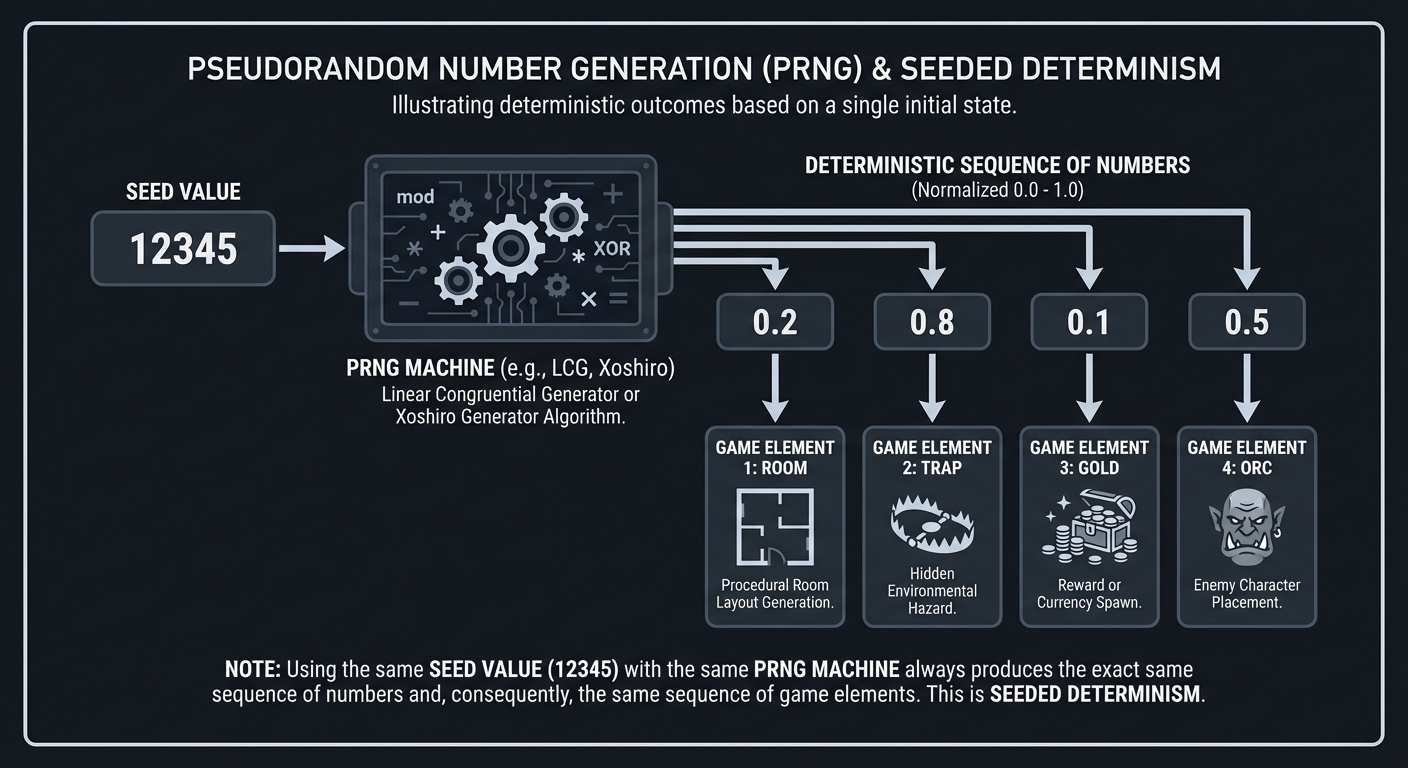
Key Insight: If you know the seed, you know the future. This allows for:
- Verifiable Worlds: Players can share a 4-byte string to play in the exact same world.
- Bug Reproducibility: If a crash happens on Level 4, saving the seed allows developers to recreate the exact level state for debugging.
- Data Compression: Instead of storing a 50MB level file, you store a single integer. The world is “re-calculated” rather than loaded.
Further Reading: The Nature of Code by Daniel Shiffman — Ch. 0: “Randomness”
2. Spatial Partitioning: Binary Space Partitioning (BSP)
Dungeons aren’t just a mess of rooms; they are organized spaces. Binary Space Partitioning (BSP) is the technique of recursively dividing a space into smaller and smaller pieces, usually to place rooms within those pieces.
Step 1: Parent           Step 2: Split            Step 3: Rooms
┌───────────────┐       ┌───────┬───────┐       ┌───────┬───────┐
│               │       │       │       │       │ ┌───┐ │ ┌───┐ │
│               │       │   A   │   B   │       │ │ R1│ │ │ R2│ │
│               │  -->  │       │       │  -->  │ └───┘ │ └───┘ │
│               │       │       │       │       │       │       │
└───────────────┘       └───────┴───────┘       └───────┴───────┘
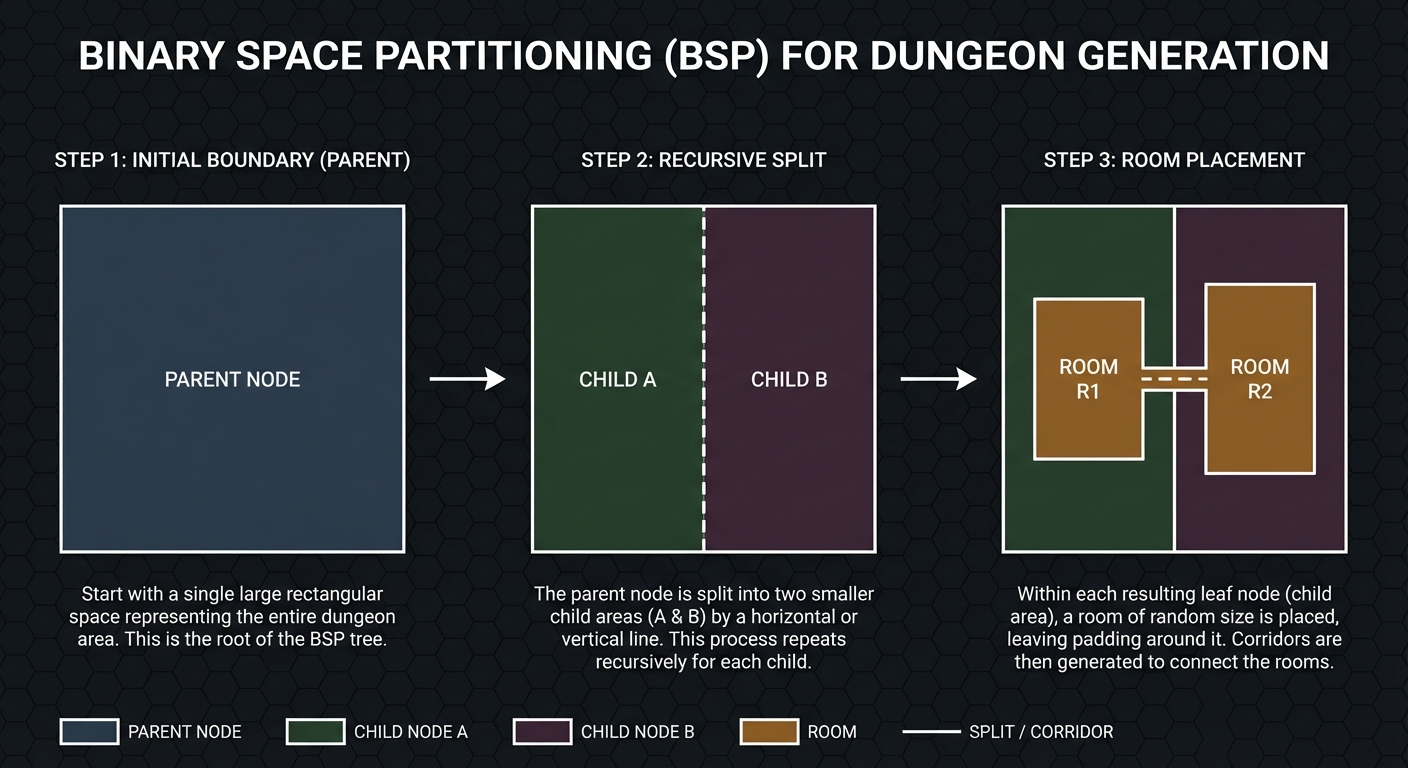
This hierarchical approach ensures:
- No Overlaps: By splitting the area first, you guarantee that rooms in different branches of the BSP tree can never overlap.
- Guaranteed Connectivity: By connecting “sibling” nodes in the tree, you can ensure a path exists between every room in the dungeon.
- Structural Variety: Different split ratios (e.g., 30/70 vs 50/50) create different architectural “feels”—from tight corridors to grand halls.
Further Reading: Data Structures for Game Developers by Allen Sherrod — Ch. 5: “Trees”
3. Organic Growth: Cellular Automata
For natural environments like caves, we use Cellular Automata (CA). This is a model where the state of a “cell” (a tile) is determined by its neighbors. In dungeon generation, we often use the “4-5 Rule”: if a tile has 5 or more wall neighbors, it becomes a wall; otherwise, it becomes floor.
Random Noise             Iteration 1              Iteration 5 (Cave)
###.##..#              ###.###..#              ##########
#..#...##              ##...####               ##......##
.#..#..#.      -->     .##...###       -->     #........#
#...#..##              ##....###               #........#
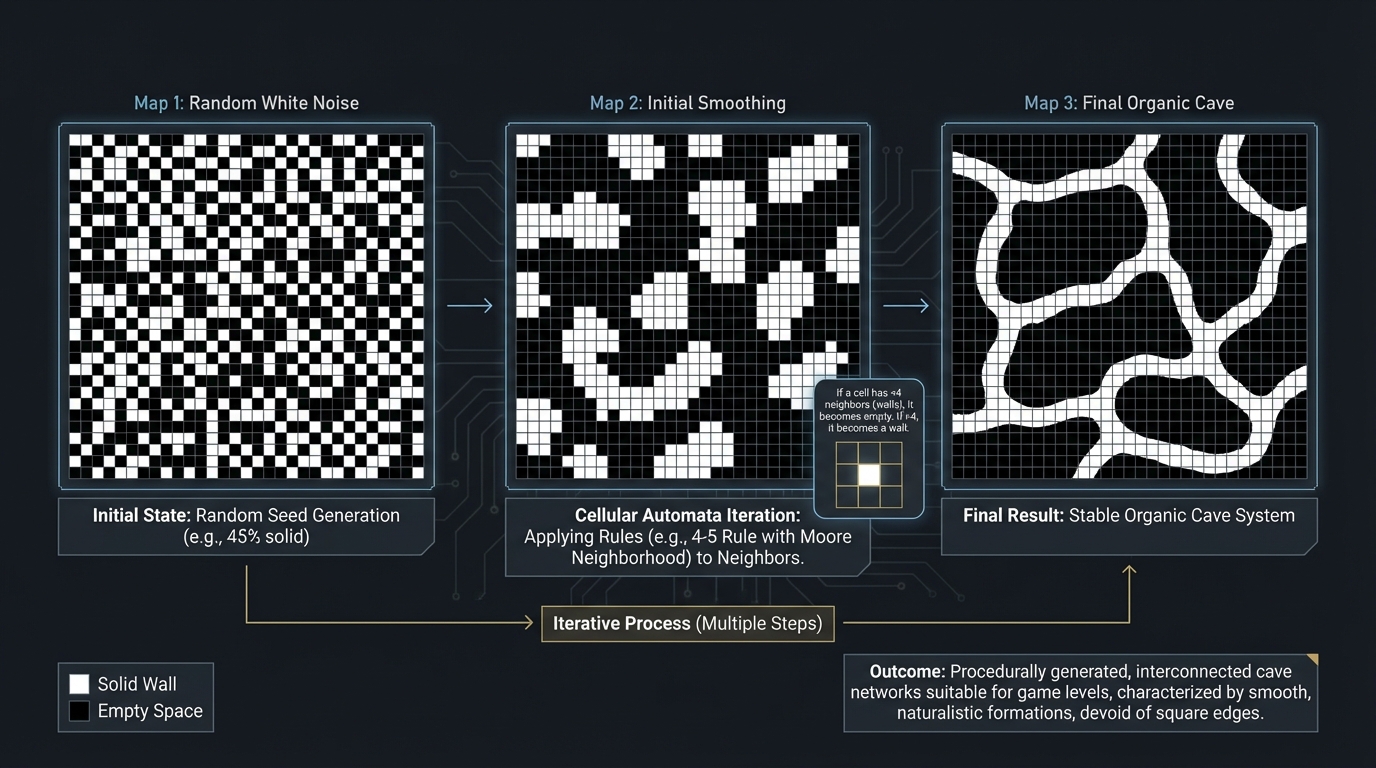
Key Insight: CA mimics natural erosion and growth. By running several “iterations” of these simple rules over a grid of random noise, the “noise” smoothens into organic, winding cavern structures.
Further Reading: Procedural Content Generation in Games by Shaker et al. — Ch. 3: “Dungeon Generation”
4. Coherent Noise: Perlin & Simplex
While CA is great for discrete grids, Perlin Noise is used for continuous, smooth terrain. Unlike “white noise” (where every pixel is independent), Perlin noise ensures that neighboring points have similar values.
Value 1.0 (Mountain)  ^
                     / \
Value 0.5 (Plains)  /   \_____
                   /          \
Value 0.0 (Sea)   /            \_____
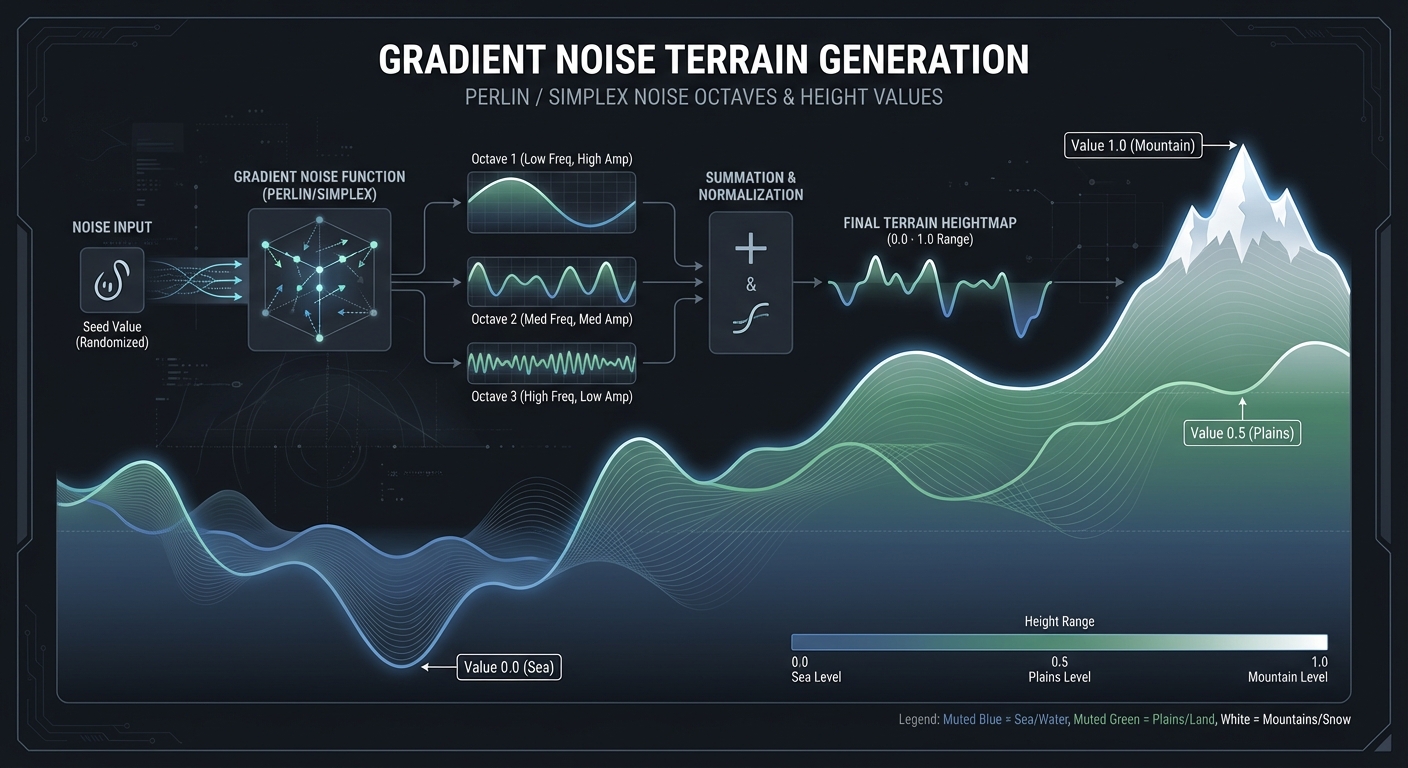
By layering multiple “octaves” of noise—combining large, slow waves for continents with small, fast waves for pebbles—you create realistic heightmaps that can represent anything from mountain ranges to cloud patterns.
Further Reading: The Nature of Code by Daniel Shiffman — Ch. 0: “Noise”
5. Intelligence in Chaos: A* Pathfinding
A procedural world is useless if the player or enemies can’t navigate it. A* (A-Star) is the algorithm that finds the shortest path by combining the distance traveled from the start (g-cost) with an estimated distance to the goal (h-cost, or heuristic).
[S] . . . [X]        [S] = Start
 .  # # .  .         [G] = Goal
 .  . # . [G]        [#] = Wall
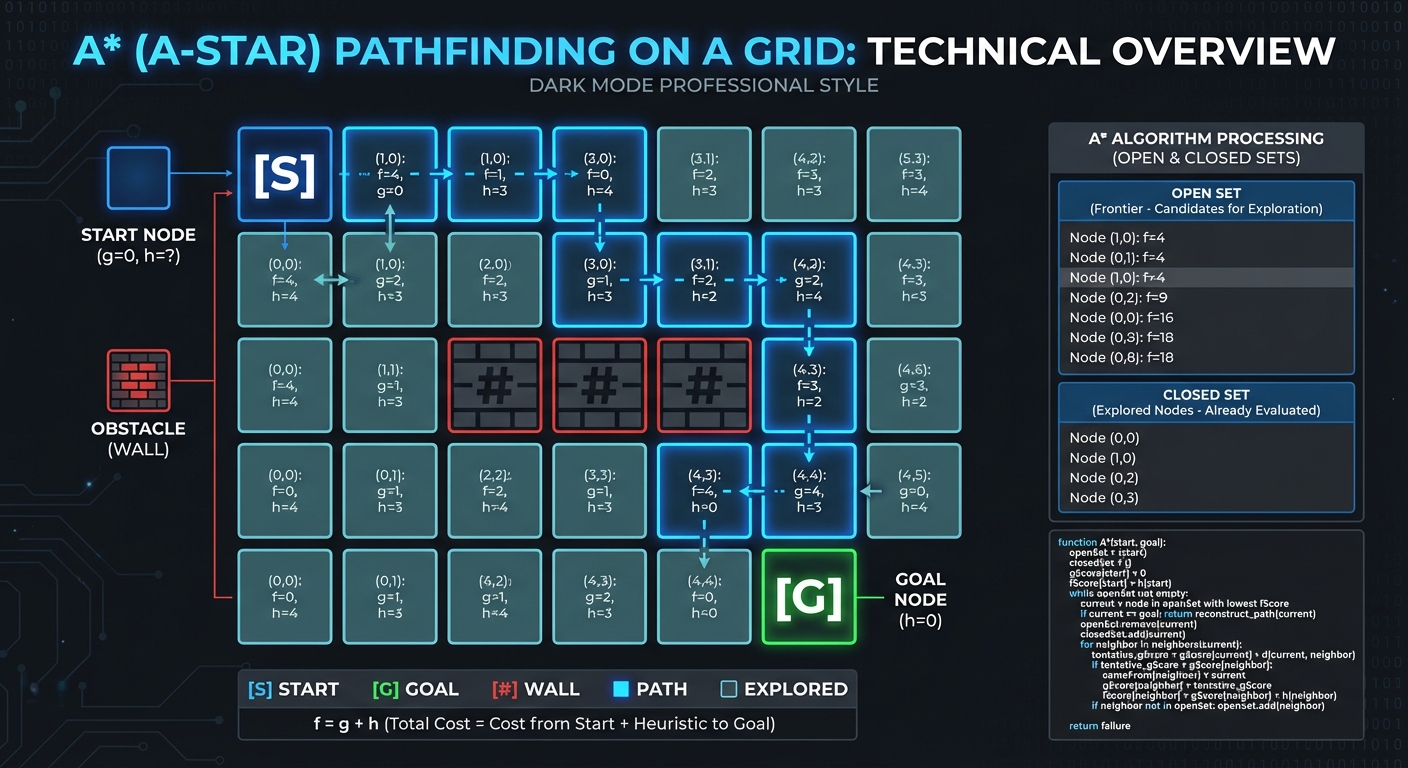
Key Insight: The “Heuristic” (usually Manhattan Distance on a grid) allows the search to prioritize tiles that are “closer” to the goal, making it vastly more efficient than a blind search like BFS.
Further Reading: Artificial Intelligence for Games by Millington — Ch. 4: “Pathfinding”
6. The Entity-Component-System (ECS)
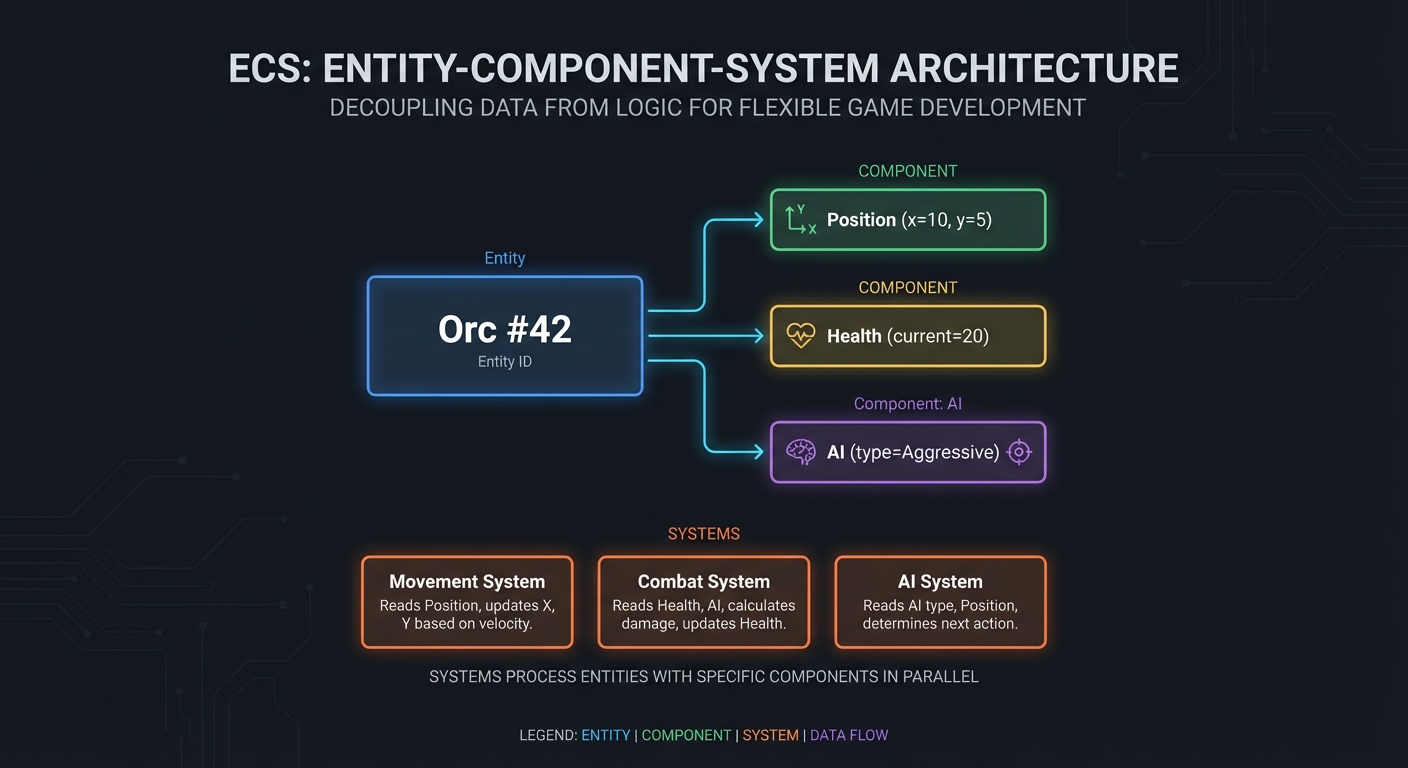
Roguelikes often feature thousands of items, enemies, and interactive objects. Traditional Object-Oriented Programming (OOP) can become a bottleneck due to deep inheritance trees and poor cache locality. ECS decouples data from logic:
- Entities: Just a unique ID.
- Components: Pure data structures (e.g.,
Position,Health). - Systems: Logic that operates on entities having specific components.
Entity [Orc #42]
   ├─ Component: Position (x=10, y=5)
   ├─ Component: Health (current=20)
   └─ Component: AI (type="Aggressive")
Further Reading: Game Programming Patterns by Robert Nystrom — Ch. 14: “Component”
7. Logic Composition: Behavior Trees
Simple “if/else” logic fails when an NPC needs to decide between attacking, fleeing, or healing. Behavior Trees (BT) provide a hierarchical way to compose complex intelligence.
Root (Selector)
  ├── Sequence (Survival)
  │     ├── Condition: IsHP_Low?
  │     └── Action: Retreat_to_Safety
  ├── Sequence (Attack)
  │     ├── Condition: IsPlayerInRange?
  │     └── Action: AttackPlayer
  └── Action: Idle_Patrol
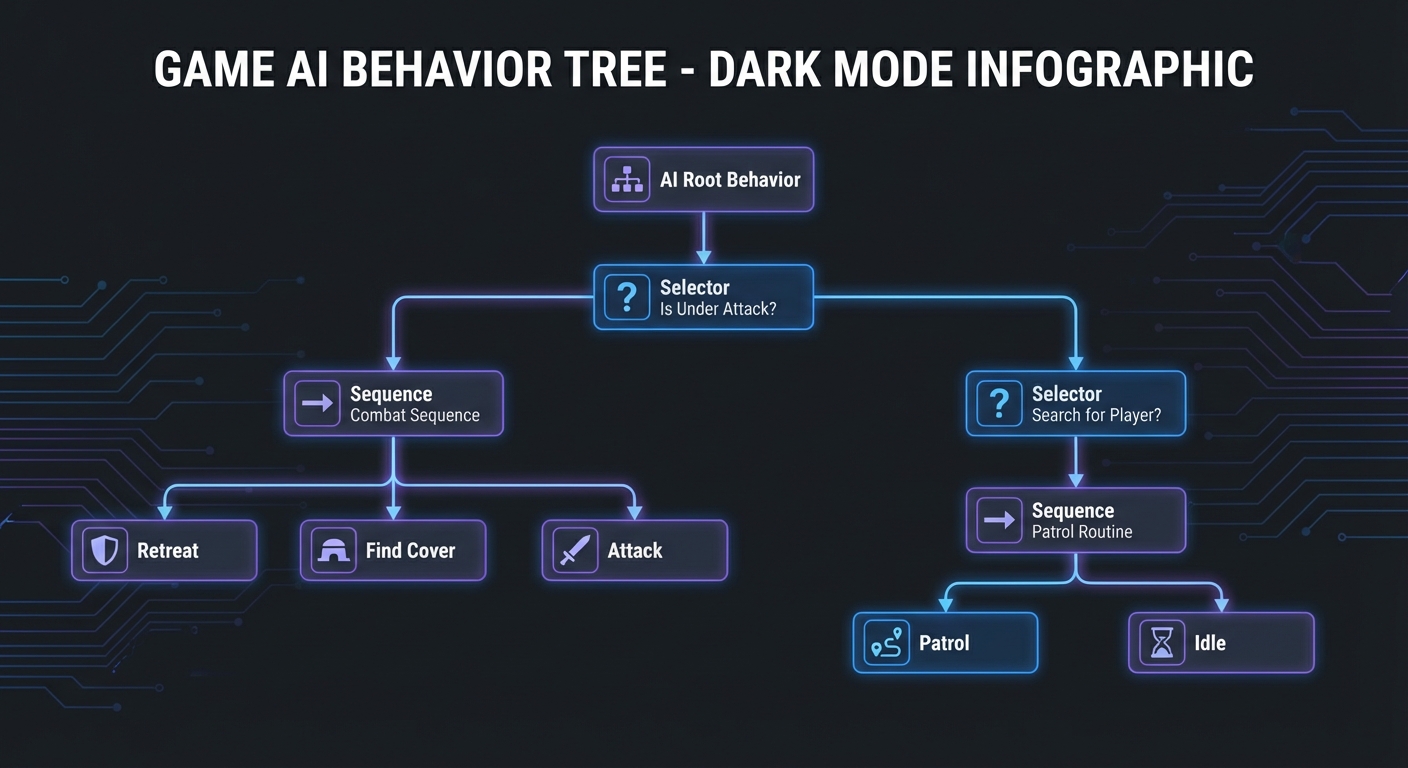
Key Insight: BTs are reactive. Every turn, the tree is “ticked” from the root, allowing the NPC to instantly switch from “Patrolling” to “Survival” if their health drops.
Further Reading: Artificial Intelligence for Games by Millington — Ch. 5.4
8. Data Persistence: Serialization and the Delta Pattern
Saving an infinite world is impossible if you try to save every tile. Instead, we save the Seed and a Delta—a list of only the tiles or entities that have changed from their generated state.
Storage Strategy:
- world_seed: 84920
- player_pos: (120, 450)
- modified_tiles: {(120, 451): "BrokenWall"}
Key Insight: This separates the “Engine” (which generates the world) from the “State” (which records the player’s impact).
Further Reading: C# 12 in a Nutshell by Joseph Albahari — Ch. 15: “Serialization”
9. Narrative Generation: Grammars and Simulation
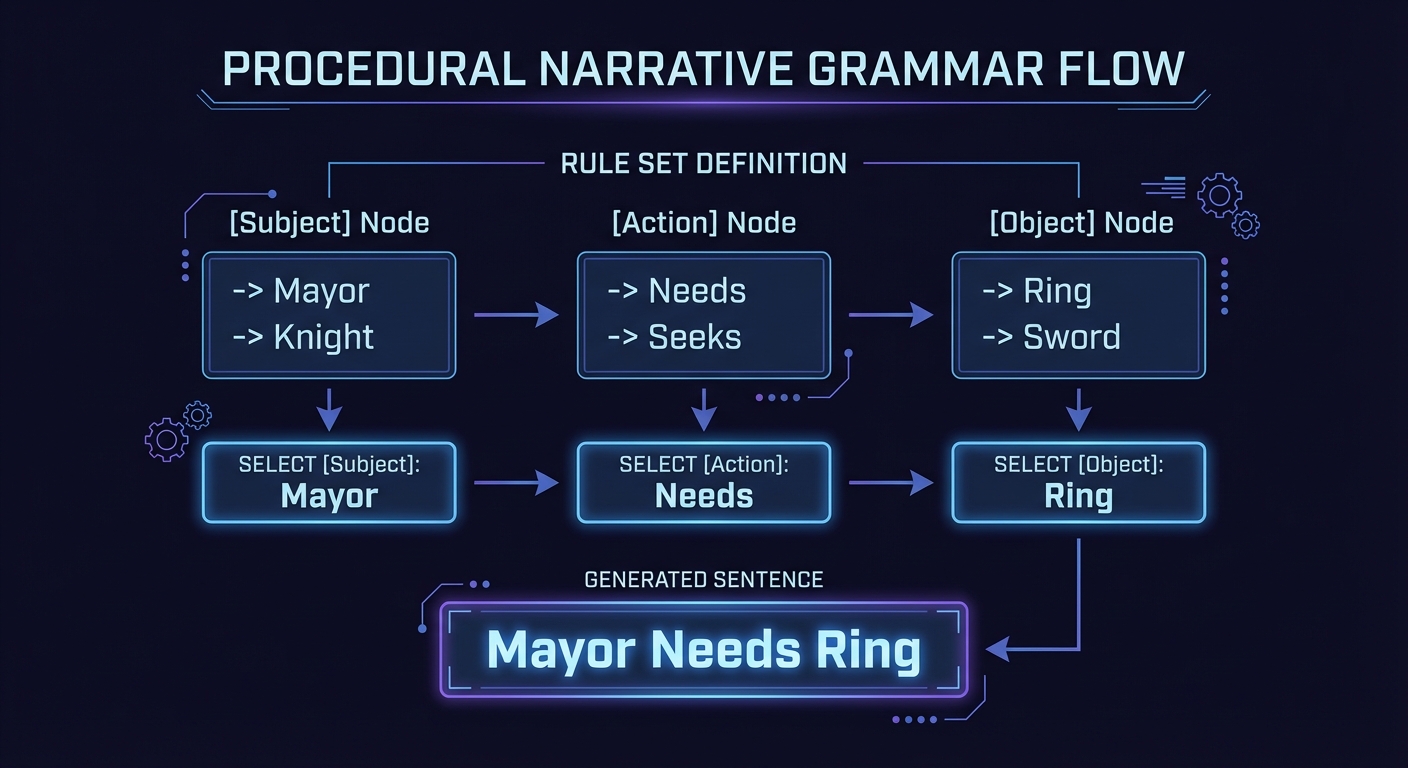
Modern roguelikes like Dwarf Fortress don’t just generate maps; they generate history. Using Context-Free Grammars (CFG), we can create infinite, logically consistent quests and lore.
[Subject] needs [Object] from [Location] because [Motivation]
Further Reading: Procedural Generation in Game Design by Tanya Short — Ch. 8: “Narrative PCG”
Concept Summary Table
| Concept Cluster | What You Need to Internalize |
|---|---|
| Determinism | Same seed = Same world. Crucial for bugs, sharing, and multiplayer. |
| Grid Logic | How to map 1D memory to 2D/3D space. Coordinate translation. |
| Recursive Partitioning | Breaking large problems into smaller ones (BSP/Quadtrees). |
| Smoothing & Erosion | Using neighborhood checks (CA) to refine raw randomness. |
| Gradient Noise | Understanding frequency and amplitude (Octaves) in Perlin noise. |
| Heuristic Search | How A* prioritizes paths based on “Distance to Goal.” |
| Data Decoupling | Composition over Inheritance (ECS/Components). |
| State Persistence | Distinguishing between “constant” world data and “variable” player changes. |
Deep Dive Reading by Concept
Foundational Theory & Genre
| Concept | Book & Chapter |
|---|---|
| The Roguelike Genre | Game Design Deep Dive: Roguelikes by Joshua Bycer — Ch. 1-2 |
| Why Procedurality? | Procedural Generation in Game Design by Tanya Short — Ch. 1: “When and Why” |
| The History of Rogue | Dungeon Hacks by David L. Craddock — Ch. 1: “The Most Dangerous Dungeon” |
Algorithmic Deep Dives
| Concept | Book & Chapter |
|---|---|
| Cellular Automata | Procedural Content Generation in Games by Shaker et al. — Ch. 3 |
| BSP Trees | Data Structures for Game Developers by Allen Sherrod — Ch. 5 |
| Perlin Noise Masterclass | The Nature of Code by Daniel Shiffman — Ch. 0: “Randomness” |
| A* Pathfinding | Artificial Intelligence for Games by Millington — Ch. 4: “Pathfinding” |
| Map Generation Patterns | Game Programming Patterns by Robert Nystrom — Ch. 21: “Spatial Partition” |
Advanced Simulation & AI
| Concept | Book & Chapter |
|---|---|
| Behavior Trees | Artificial Intelligence for Games by Millington — Ch. 5.4 |
| Procedural Narrative | Procedural Generation in Game Design by Short — Ch. 8: “Narrative PCG” |
| Voxel Meshing | Computer Graphics from Scratch by Gabriel Gambetta — Ch. 1: “Intro” |
| Deterministic Logic | Clean Code by Robert C. Martin — Ch. 3: “Functions” (Side Effects) |
Essential Reading Order
- The Vision (Week 1):
- Procedural Generation in Game Design Ch. 1
- Game Design Deep Dive Ch. 1
- The Nature of Code (Ch. 0: Randomness)
- The Grid & The World (Week 2):
- Game Programming Patterns Ch. 21 (Spatial Partition)
- Procedural Content Generation in Games Ch. 3 (CA)
- Intelligence & Depth (Week 3):
- Artificial Intelligence for Games Ch. 4 (A*)
- Procedural Generation in Game Design Ch. 8 (Narrative)
Project List
Projects are ordered from fundamental logic to advanced “Infinite World” systems.
Project 1: The Seeded Log (The Soul of Determinism)
- Main Programming Language: C#
- Alternative Programming Languages: GDScript, C++, Python
- Coolness Level: Level 2: Practical but Forgettable
- Business Potential: 1. The “Resume Gold”
- Difficulty: Level 1: Beginner
- Knowledge Area: PRNG / Logic
- Software or Tool: Unity or Godot (Console/Terminal output only)
- Main Book: “The Nature of Code” by Daniel Shiffman
What you’ll build: A non-visual tool that generates a sequence of “events” (loot, monster spawns, weather) based on a string seed. You must prove that the same seed always produces the same sequence.
Why it teaches procedurality: This is the foundation. You’ll learn that randomness in games isn’t “random”—it’s a math sequence. If you can’t control the seed, you can’t debug a procedurally generated level.
Core challenges you’ll face:
- Seed Hashing → Converting a string like “MySecretLevel” into an integer seed.
- State Leakage → Ensuring that checking a “random” loot drop doesn’t accidentally advance the sequence for the next monster spawn.
- Serialization → Saving the state of the sequence so you can resume it.
Real World Outcome
You will have a command-line tool or a console logger where entering the same text string always results in the same sequence of game events. This proves your game is deterministic.
Example Output:
$ dotnet run --seed "GoblinsCave123"
[Generation Started with Seed: 14829384]
[1] Event: Spawn Skeleton (HP: 12, Weapon: Rusty Sword)
[2] Event: Find Loot (Gold: 45, Item: Health Potion)
[3] Event: Weather Change (Rain, Visibility: -2)
[4] Event: Ambush (3 Bats)

$ dotnet run --seed "GoblinsCave123"
[Generation Started with Seed: 14829384]
[1] Event: Spawn Skeleton (HP: 12, Weapon: Rusty Sword)
[2] Event: Find Loot (Gold: 45, Item: Health Potion)
[3] Event: Weather Change (Rain, Visibility: -2)
[4] Event: Ambush (3 Bats)
# THE OUTPUT IS IDENTICAL. MISSION ACCOMPLISHED.
The Core Question You’re Answering
“How can I create a billion different worlds without storing a single one on my hard drive?”
Before you write any code, sit with this question. If you understand that the Seed is the world, you understand how No Man’s Sky works.
Concepts You Must Understand First
- Pseudorandom Number Generators (PRNG)
- What is the difference between
System.Randomand a truly random source? - What happens when you provide a “Seed” to a constructor?
- Book Reference: “The Nature of Code” Ch. 0 - Daniel Shiffman
- What is the difference between
- Seed Hashing
- How do you turn the string “Apple” into the number 52?
- What is a collision and why does it (rarely) happen?
- Book Reference: “Algorithms, 4th Ed” Ch. 3.4 - Sedgewick
- Determinism in Logic
- Why must the order of operations be identical every time?
- If you call
rnd.Next()10 times, why does the 11th call always return the same value for the same seed?
Questions to Guide Your Design
- Random Instance Management
- Should you have one global
Randomobject, or one per system (e.g.,LootRandom,MonsterRandom)? - What happens if the player skips a loot chest? Does the monster encounter change? How do you prevent this (decoupling)?
- Should you have one global
- Event Sequencing
- How do you map a random number (0.0 to 1.0) to a specific event? (e.g., 0.0-0.5 is Spawn, 0.5-0.8 is Loot).
Thinking Exercise
The Deterministic Trace
Look at this logic:
Random rnd = new Random(seed);
int gold = rnd.Next(1, 100);
int enemyType = rnd.Next(1, 5);
Questions:
- If I add a line
int luck = rnd.Next(1, 10);betweengoldandenemyType, willenemyTypestay the same? - Why is this a problem for “modding” or “updating” your game later?
- How would you structure your code so adding a new feature doesn’t break old seeds?
The Interview Questions They’ll Ask
- “Explain the difference between Random and Pseudorandom.”
- “How would you allow two players to play the exact same procedurally generated level?”
- “What is a ‘Seed’ in the context of a PRNG?”
- “How do you prevent ‘Save Scumming’ in a seeded roguelike?”
- “What happens to your generation if you change the order of calls in your code?”
Hints in Layers
Hint 1: The Setup
Use System.Random(int seed) in C#. If you don’t provide a seed, it uses the current clock time—which is NOT what you want for a roguelike.
Hint 2: String to Int
Don’t write your own hash. Use myString.GetHashCode() or a simple foreach(char c in str) seed += (int)c;.
Hint 3: Decoupling Randoms
If you want the loot to stay the same even if the number of enemies changes, give the Loot System its OWN Random object with a seed derived from the main seed (e.g., mainSeed + 1).
Books That Will Help
| Topic | Book | Chapter |
|---|---|---|
| Randomness Fundamentals | “The Nature of Code” | Ch. 0 |
| C# Standard Library | “C# 12 in a Nutshell” | Ch. 25 |
| Hashing Algorithms | “Algorithms, 4th Ed” | Ch. 3.4 |
Project 2: The Grid Walker (Mapping the Void)
- Main Programming Language: C#
- Alternative Programming Languages: GDScript, C++
- Coolness Level: Level 2: Practical but Forgettable
- Business Potential: 1. The “Resume Gold”
- Difficulty: Level 2: Intermediate
- Knowledge Area: Tilemaps / Grid Logic
- Software or Tool: Unity (Tilemap) or Godot (TileMapLayer)
- Main Book: “Game Programming Patterns” by Robert Nystrom
What you’ll build: A 2D grid system where a “player” (@) can move between tiles. You will implement a “Fog of War” system where tiles are only visible if the player has visited them.
Why it teaches roguelikes: Roguelikes are spatially discrete. Understanding how to map a 1D array or a Dictionary to a 2D coordinate system (x, y) is the first step to building a world.
Core challenges you’ll face:
- Coordinate Mapping → Converting screen clicks to grid indices.
- Tile Data → Storing more than just an image (e.g., is this tile walkable? does it block sight?).
- Visibility State → Managing “Unexplored”, “Visible”, and “Hidden” states.
Real World Outcome
A playable screen where you move a character (the @ symbol or a sprite). As you move, the “Fog of War” clears, revealing the floor and walls. You cannot walk through walls.
Visual Representation:
[Initial State]      [After Moving Right]
# # # # # # # # # #
# @?? # #. @? #
# ??? # --> #??? #
# ??? # #??? #
# # # # # # # # # #
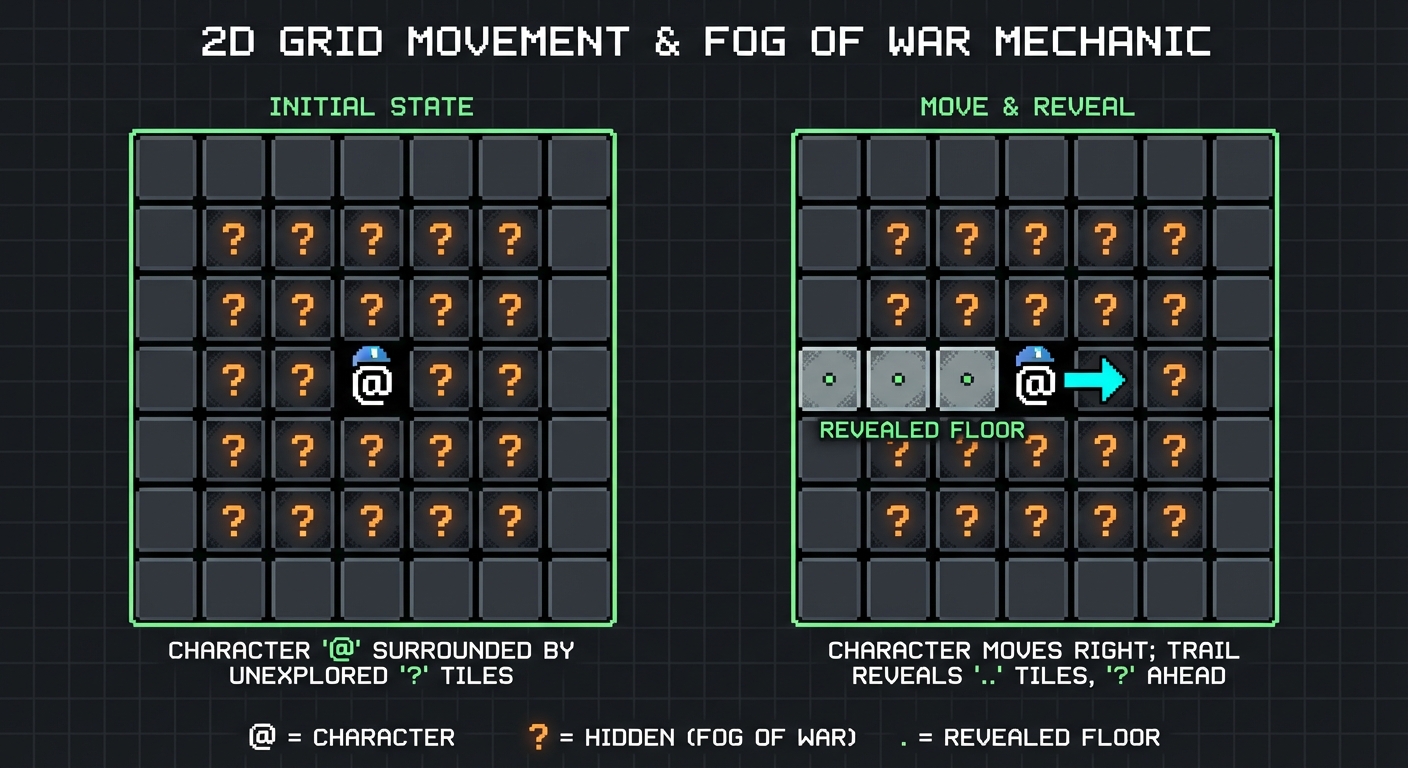 (
(? is hidden, . is revealed floor, # is revealed wall)
The Core Question You’re Answering
“How do I represent a physical world as a mathematical data structure?”
Most beginners try to use GameObjects/Nodes for every tile. This will crash your computer when the map gets large. You need to learn how to store a map as pure data.
Concepts You Must Understand First
- 2D Arrays vs. Dictionaries
- When is it better to use
Tile[width, height](fixed size, fast) vsDictionary<Vector2Int, Tile>(infinite size, flexible)? - Book Reference: “Data Structures the Fun Way” Ch. 4 - Jeremy Kubica
- When is it better to use
- The Flyweight Pattern
- If you have 1,000,000 “Grass” tiles, should they all have their own image data? (No, they should reference one “Grass” type).
- Book Reference: “Game Programming Patterns” Ch. 3 - Robert Nystrom
- Coordinate Systems
- The difference between World Space (pixels) and Grid Space (indices).
- How to translate a click at
(256.5, 12.0)to grid tile(10, 0).
Questions to Guide Your Design
- Movement Logic
- Does the player move instantly, or is there an animation?
- How do you check the “IsWalkable” property of the target tile before the player moves there?
- Data Separation
- Where is the “IsWalkable” property stored? In the visual Tilemap or in a separate
Mapclass? (Hint: Separate them).
- Where is the “IsWalkable” property stored? In the visual Tilemap or in a separate
Thinking Exercise
The Bound Check
Imagine your grid is 10x10. The player is at (9, 9). They move Right (+1, 0). What happens in your code?
- Does it return null?
- Does it crash with an
IndexOutOfRangeException? - How do you “wrap” or “block” this movement efficiently?
The Interview Questions They’ll Ask
- “How would you efficiently store a 1,000,000 x 1,000,000 tile map?”
- “What is the complexity of looking up a tile by coordinate in an array vs a hash map?”
- “How do you handle layers (e.g., ground vs. decoration) in your data structure?”
Hints in Layers
Hint 1: The Data
Start with an enum TileType { Wall, Floor }. Create a simple 2D array: TileType[,] map.
Hint 2: Rendering
Use Unity’s Tilemap.SetTile or Godot’s set_cell. Loop through your data array and update the visual tilemap whenever the data changes.
Hint 3: Input Handling
Intercept WASD or Arrow keys. Calculate Vector2Int targetPos = playerPos + inputDirection. Use an if statement to check if map[targetPos.x, targetPos.y] is a Floor before updating playerPos.
Books That Will Help
| Topic | Book | Chapter |
|---|---|---|
| Memory Efficiency | “Game Programming Patterns” | Ch. 3 (Flyweight) |
| Grid Data Structures | “Data Structures the Fun Way” | Ch. 4 |
| Unity Tilemaps | “Unity Game Development Cookbook” | Ch. 5 |
Project 3: The Drunken Cave (Cellular Automata)
- Main Programming Language: C#
- Alternative Programming Languages: GDScript, Python
- Coolness Level: Level 3: Genuinely Clever
- Business Potential: 1. The “Resume Gold”
- Difficulty: Level 3: Advanced
- Knowledge Area: Algorithms / CA
- Software or Tool: Unity/Godot
- Main Book: “Procedural Content Generation in Games” by Shaker et al.
What you’ll build: A cave generator. You start with a grid of random noise and “evolve” it into smooth, organic caverns using Cellular Automata rules (The “4-5 Rule”).
Why it teaches PCG: This is your first “Generative” project. You aren’t placing tiles; you’re setting rules for how tiles place themselves.
Core challenges you’ll face:
- The “Border” Problem → Handling neighbors for tiles on the edge of the map.
- Island Detection → What happens if the generator creates a small cave that isn’t connected to the main one? (Flood Fill).
- Iteration Count → Finding the “sweet spot” between messy noise and a single empty room.
Real World Outcome
A “Generate” button that, when clicked, transforms a static grid of random wall/floor noise into a beautiful, winding cave system. You can watch the “evolution” step-by-step.
Visual Evolution:
[Step 0: Random]    [Step 2: Smoothing]    [Step 5: Final Cave]
# . # #. # # # #. # # # # #
. # . . #    -->    # . . . #     -->      # . . . #
# #. #. #... # #... #
. . # . .           . . . . #              . . . . #
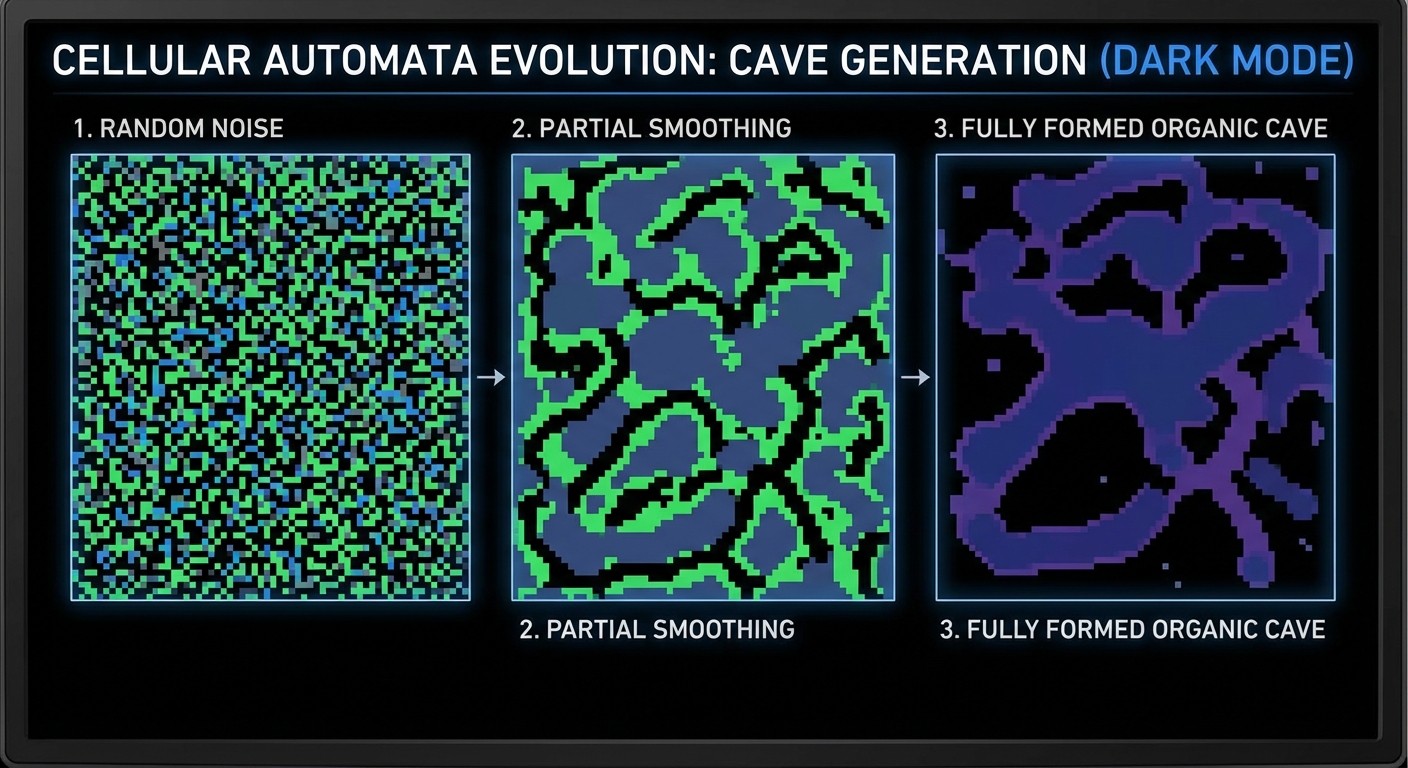
The Core Question You’re Answering
“How can simple local rules create complex global patterns?”
This is the secret of nature. A snowflake doesn’t have a blueprint; it has rules. You are learning “Emergent Design.”
Concepts You Must Understand First
- Neighborhoods (Moore vs. Von Neumann)
- Do diagonal tiles count as neighbors? (Moore) or only adjacent? (Von Neumann).
- Book Reference: “Procedural Content Generation in Games” Ch. 3
- Double Buffering
- Why you can’t modify the map while you are reading from it.
- Book Reference: “Game Programming Patterns” Ch. 7 - Robert Nystrom
- Flood Fill Algorithm
- How to detect “islands” of walkable tiles that are trapped by walls.
- Book Reference: “Algorithms” - Sedgewick
Questions to Guide Your Design
- Rule Tuning
- What happens if the rule is 3 neighbors instead of 4? Does the cave become too empty?
- How many iterations are enough? (Usually 4-7).
- Border Security
- How do you handle a tile at
(0,0)? Does it have “phantom” neighbors outside the map? (Hint: Treating the border as “Wall” usually creates nice closed caves).
- How do you handle a tile at
Thinking Exercise
The 4-5 Rule
Rule: “If a tile has 5 or more Wall neighbors, it becomes a Wall. Otherwise, it becomes a Floor.” Trace this on a 3x3 grid where 6 neighbors are Walls. What happens? Now imagine a grid of pure random 50/50 noise. Will this rule make it “cleaner” or “messier”?
The Interview Questions They’ll Ask
- “What is Cellular Automata and how does it apply to game levels?”
- “Explain the ‘Border Problem’ in grid-based algorithms.”
- “How do you ensure a cave generated by CA is fully traversable?”
Hints in Layers
Hint 1: Double Buffering
When calculating the next iteration, don’t modify the current map. Read from mapA, write to mapB. Then swap them (mapA = mapB). Otherwise, your changes will cascade through the same iteration!
Hint 2: Neighborhood Counting
Use a nested loop from -1 to 1 around your target tile:
for(int x = -1; x <= 1; x++)
  for(int y = -1; y <= 1; y++)
    if(x == 0 && y == 0) continue; // Skip self
    if(map[tx+x, ty+y] == Wall) count++;
Hint 3: Connectivity Perform a Flood Fill starting from a random Floor tile. If any floor tiles remain “unmarked”, they are isolated. Fill them with Walls to ensure the player never spawns in a tiny box.
Books That Will Help
| Topic | Book | Chapter |
|---|---|---|
| Generative Algorithms | “Procedural Content Generation in Games” | Ch. 3 |
| State Swapping | “Game Programming Patterns” | Ch. 7 (Double Buffer) |
| Search Algorithms | “Algorithms” | Ch. 4 (Flood Fill/BFS) |
Project 4: The Sliced Dungeon (BSP Rooms)
- Main Programming Language: C#
- Alternative Programming Languages: GDScript, C++
- Coolness Level: Level 3: Genuinely Clever
- Business Potential: 2. The “Micro-SaaS / Pro Tool”
- Difficulty: Level 3: Advanced
- Knowledge Area: Tree Structures / BSP
- Software or Tool: Unity/Godot
- Main Book: “Data Structures for Game Developers” by Allen Sherrod
What you’ll build: A classic “Rooms and Corridors” dungeon. You’ll use a Binary Space Partitioning (BSP) tree to divide the map into rectangles, place a room in each “leaf” rectangle, and connect them with hallways.
Why it teaches PCG: You’ll learn about hierarchical data structures. A dungeon isn’t just a grid; it’s a tree of “Areas” that contain “Rooms”.
Core challenges you’ll face:
- Recursive Splitting → Knowing when to stop splitting (Min Room Size).
- Corridor Logic → Connecting “sibling” nodes in the tree to ensure the dungeon is fully connected.
- Tree Traversal → Walking the tree from the bottom up to draw the corridors.
Real World Outcome
A dungeon layout that looks like a structured floor plan. Rooms of varying sizes are connected by straight hallways, ensuring there are no unreachable areas.
Visual Representation:
┌───────────┐       ┌───────────┐
│           │       │   Room B  │
│  Room A   │───────┤           │
│           │       └─────┬─────┘
└─────┬─────┘             │
      │             ┌─────┴─────┐
      └─────────────┤   Room C  │
                    └───────────┘
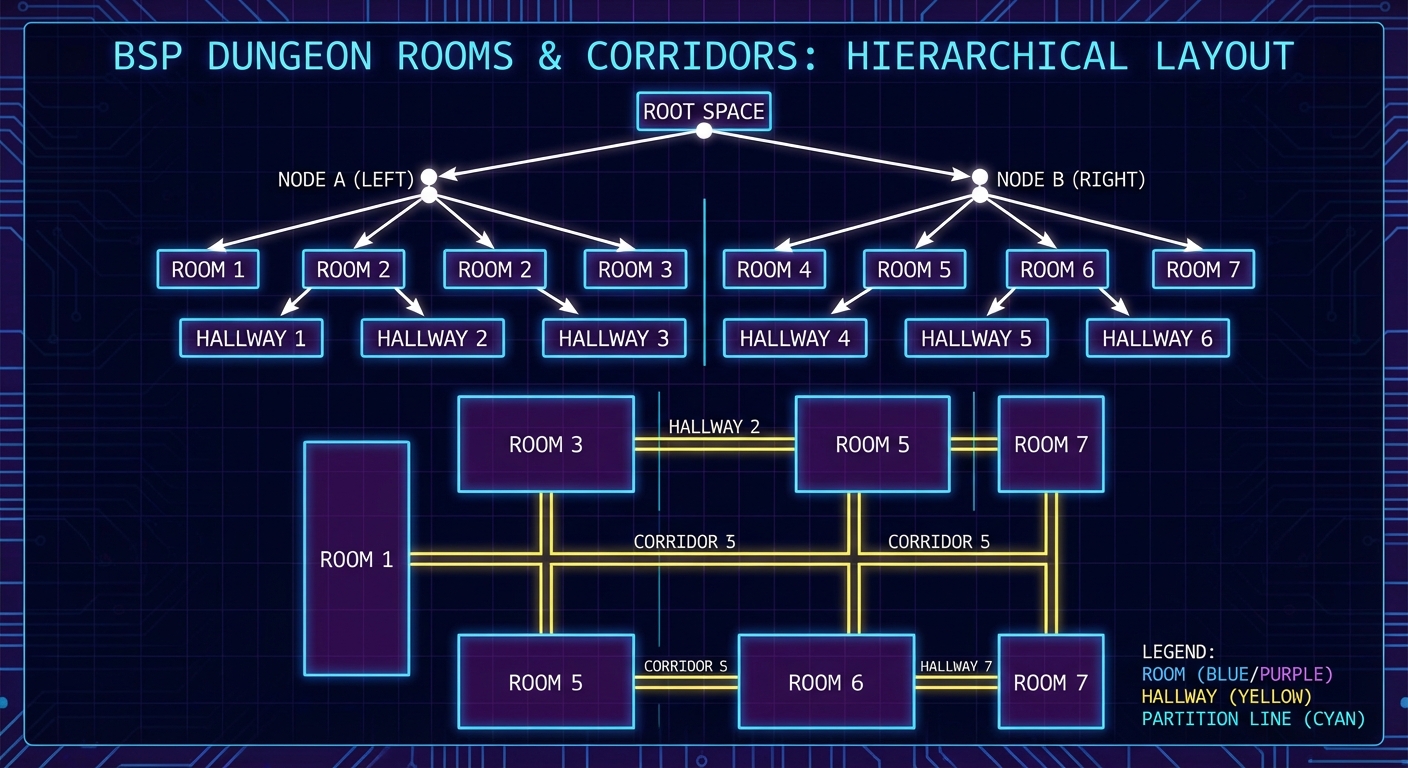
The Core Question You’re Answering
“How do I balance randomness with architectural constraints?”
Cellular Automata (Project 3) is too wild for a mansion, a castle, or a laboratory. BSP provides the “structure” that humans build with. You are learning to control chaos.
Concepts You Must Understand First
- Binary Trees
- What are “Nodes,” “Leaves,” and “Parents”?
- How do you store a tree in memory?
- Book Reference: “Algorithms” Ch. 3 - Sedgewick
- Recursion
- Writing a function that calls itself to slice the world into smaller and smaller pieces.
- Book Reference: “The Recursive Book of Recursion” - Al Sweigart
- Spatial Partitioning
- Why dividing space makes searching and placement faster.
- Book Reference: “Game Programming Patterns” Ch. 19
Questions to Guide Your Design
- The Stop Condition
- If you keep splitting forever, your rooms will be 1x1 tiles. What is the “Minimum Room Size” constant?
- Split Orientation
- How do you decide whether to split a rectangle Horizontally or Vertically? (Hint: Split along the longer axis to keep rooms square-ish).
- Connectivity
- When do you draw the hallway? (Hint: As you go back up the tree, connect the centers of the two child rectangles).
Thinking Exercise
The Split Ratio
Imagine a rectangle 100 tiles wide. If you split it exactly at 50, every dungeon looks identical. If you split it anywhere between 1 and 99, you get “sliver” rooms. What is the ideal “Random Split Range”? (e.g., between 30% and 70% of the width).
The Interview Questions They’ll Ask
- “What is a Binary Space Partitioning tree?”
- “How do you ensure a BSP-generated dungeon is fully traversable?”
- “What are the trade-offs between BSP and Cellular Automata for level design?”
- “How do you handle ‘Dead Ends’ in a dungeon generator?”
Hints in Layers
Hint 1: The Leaf Class
Create a Leaf class that has Rect (x, y, w, h). It should have two properties: leftChild and rightChild of type Leaf.
Hint 2: Recursive Splitting
void Split() {
  if (width > max_size || height > max_size) {
    // Choose H or V
    // Split into leftChild and rightChild
    // Call leftChild.Split() and rightChild.Split()
  }
}
Hint 3: Corridor Strategy The most reliable way to connect the dungeon is to iterate through your leaf nodes and draw a path to their “sibling” leaf. Since they share a parent, they are physically adjacent!
Books That Will Help
| Topic | Book | Chapter |
|---|---|---|
| Hierarchical Structures | “Data Structures for Game Developers” | Ch. 5 |
| Recursion Mastery | “The Recursive Book of Recursion” | All |
| Spatial Patterns | “Game Programming Patterns” | Ch. 19 |
Project 5: The Infinite Noise (Perlin Terrain)
- Main Programming Language: C#
- Alternative Programming Languages: GDScript, C++
- Coolness Level: Level 3: Genuinely Clever
- Business Potential: 1. The “Resume Gold”
- Difficulty: Level 3: Advanced
- Knowledge Area: Math / Perlin Noise
- Software or Tool: Unity/Godot
- Main Book: “The Nature of Code” by Daniel Shiffman
What you’ll build: A terrain generator that allows for infinite scrolling. As the player moves, new chunks of terrain are generated using Perlin Noise. You will implement “Biomes” based on height thresholds.
Why it teaches PCG: This introduces Continuity. Unlike the discrete dungeons of Projects 3 and 4, this world is a mathematical function: Height = f(x, y, seed).
Core challenges you’ll face:
- Chunk Management → How to generate and “unload” pieces of the world so you don’t run out of memory.
- Octaves and Persistence → Layering noise to make it look like real mountains rather than smooth blobs.
- Seams → Ensuring that Chunk (0,0) and Chunk (1,0) align perfectly at the edges.
Real World Outcome
A window where you can “fly” or walk over an endless landscape. The terrain looks natural, with clusters of islands, continents, and mountains. As you move, the world generates ahead of you and disappears behind you.
Height Mapping (Biomes):
Height < 0.3: Deep Water (Blue)0.3 < Height < 0.4: Sand (Yellow)0.4 < Height < 0.7: Grass/Forest (Green)0.7 < Height < 0.9: Rock (Grey)Height > 0.9: Snow (White)
The Core Question You’re Answering
“How can I calculate the terrain at (1,000,000, 1,000,000) without calculating everything in between?”
This is the “Lazy Evaluation” of worlds. If the math is consistent, the world exists even if it hasn’t been generated yet.
Concepts You Must Understand First
- Gradient Noise (Perlin vs. Simplex)
- Why simple
Random.Next()creates “White Noise” and why Perlin creates “Coherent Noise.” - Book Reference: “The Nature of Code” Ch. 0 - Daniel Shiffman
- Why simple
- Fractal Brownian Motion (fBm)
- The concept of “Octaves.” High frequency (small details) layered over low frequency (large shapes).
- Book Reference: “The Nature of Code” (Noise section)
- Floating Point Precision
- What happens when your
xcoordinate gets so large that the math becomes “choppy”? (The Far Lands).
- What happens when your
Questions to Guide Your Design
- The Scale Variable
- How does the “zoom level” affect the terrain? (Hint:
Noise(x / scale, y / scale)).
- How does the “zoom level” affect the terrain? (Hint:
- Seam Management
- How do you ensure that two different “Chunks” (e.g. 16x16 grids) share the same values at their borders? (Hint: Use global coordinates in your noise function).
Thinking Exercise
The Octave Layering
Imagine a wave with a height of 100 meters. Now add a wave with a height of 10 meters on top of it. Now add a wave with a height of 1 meter on top of that. Draw the resulting profile. This is how you make a “mountain” look jagged rather than like a smooth hill.
The Interview Questions They’ll Ask
- “What is the difference between Perlin Noise and White Noise?”
- “How do you achieve ‘Infinite’ generation without storing the whole map?”
- “What are ‘Octaves’ in the context of noise functions?”
- “How do you handle biomes using noise?”
Hints in Layers
Hint 1: The Function
In Unity, use Mathf.PerlinNoise(x, y). In Godot, use FastNoiseLite. Note that these functions return a value between 0.0 and 1.0.
Hint 2: Using the Seed
To use your seed, simply offset your coordinates: Noise((x + seedOffset), (y + seedOffset)). As long as the offset is the same, the world is the same.
Hint 3: Chunking Logic
Create a Dictionary<Vector2Int, Chunk>. Every frame, check which chunk the player is in. If the neighboring chunks (N, S, E, W) don’t exist in the dictionary, create them. If a chunk is too far away, Destroy() or Disable() it.
Books That Will Help
| Topic | Book | Chapter |
|---|---|---|
| Noise and Randomness | “The Nature of Code” | Ch. 0 |
| Procedural Environments | “Procedural Content Generation in Games” | Ch. 4 |
| Optimization | “Game Programming Patterns” | Ch. 15 (Service Locator) |
Project 6: The Intelligent Stalker (A* Pathfinding)
- Main Programming Language: C#
- Alternative Programming Languages: GDScript, C++
- Coolness Level: Level 3: Genuinely Clever
- Business Potential: 1. The “Resume Gold”
- Difficulty: Level 3: Advanced
- Knowledge Area: AI / Algorithms
- Software or Tool: Unity/Godot
- Main Book: “Artificial Intelligence for Games” by Millington
What you’ll build: An enemy that follows the player through your procedurally generated cave (Project 3). The enemy must navigate around walls and find the most efficient path.
Why it teaches AI: PCG creates unpredictable layouts. Your AI cannot be hard-coded; it must “think” about the current grid state.
Core challenges you’ll face:
- Priority Queues → Implementing the “Open List” efficiently so the game doesn’t lag when many enemies move.
- Heuristics → Understanding why “Manhattan Distance” is better than “Euclidean” for grid-based roguelikes.
- Dynamic Obstacles → What happens if the player drops a wall or another enemy blocks the path?
Real World Outcome
An enemy (@) that intelligently snakes through a complex maze or cavern to reach the player, never getting stuck on corners or moving into dead ends unless necessary.
Example Output (Console):
[A* Path Calculated]
Start: (2, 2) | Goal: (8, 9)
Path: (2,2) -> (2,3) -> (3,3) -> (4,3) -> (4,4) ... -> (8,9)
Nodes Explored: 42
Time: 0.01ms
Visual Output:
. . . # .
. E ->. .
. # # # .
. . . @ .
# E doesn't just walk into the wall; it calculates the route around it.
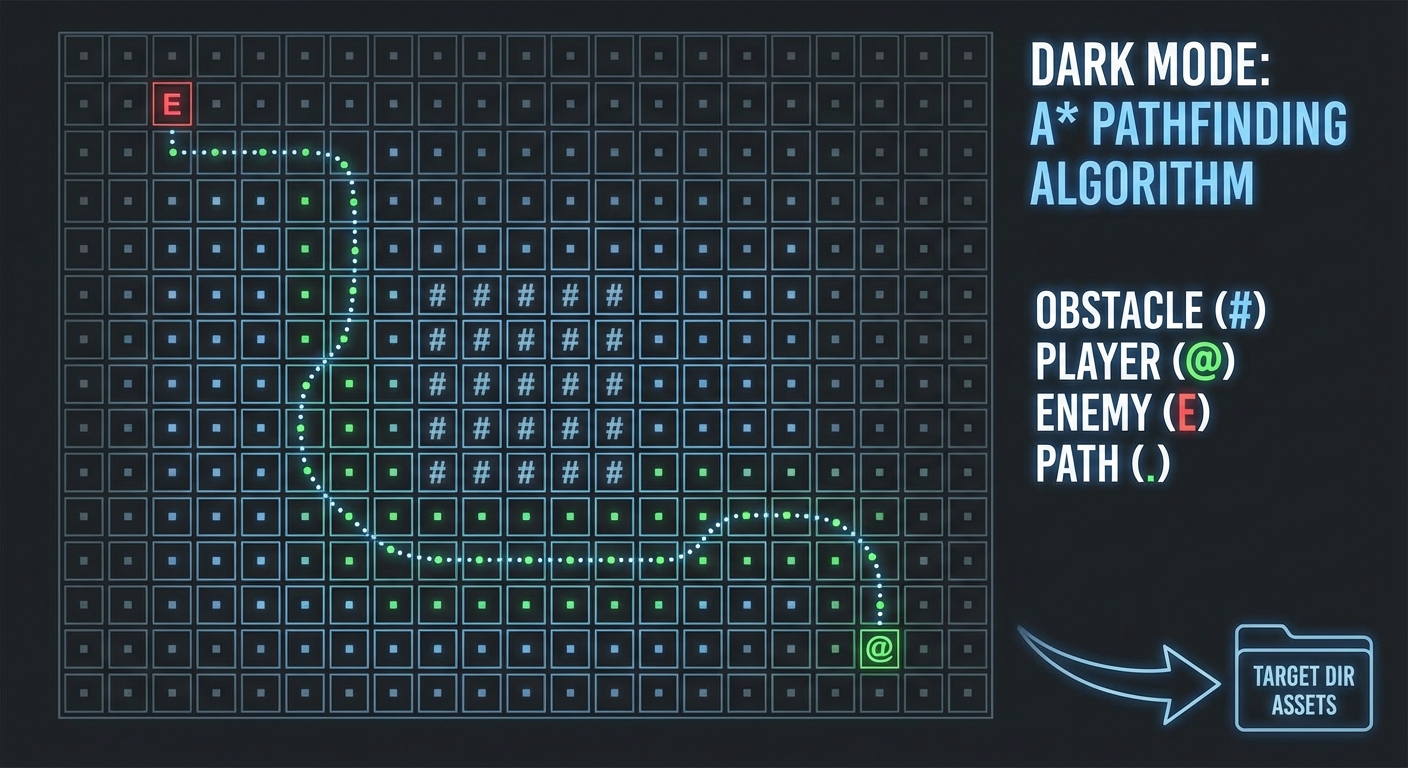
The Core Question You’re Answering
“How do I make an agent ‘see’ the world data I’ve generated?”
AI is just a search problem over the data structure you built in Project 2. You are teaching a computer to “solve” your generated levels.
Concepts You Must Understand First
- Dijkstra vs. A*
- Why adding a “Heuristic” makes the algorithm significantly faster for games.
- Book Reference: “Algorithms” Ch. 4 - Sedgewick
- Heuristics (Manhattan vs. Euclidean)
- Why simple
abs(x1-x2) + abs(y1-y2)is the gold standard for grid-based movement.
- Why simple
- Priority Queues (Min-Heaps)
- How to always pick the “cheapest” node to explore next without sorting the list every time.
- Book Reference: “Data Structures the Fun Way” Ch. 8
Questions to Guide Your Design
- The Cost Function
- What if “Mud” tiles cost 2 to enter and “Grass” costs 1? How does A* handle that? (Hint:
g_cost).
- What if “Mud” tiles cost 2 to enter and “Grass” costs 1? How does A* handle that? (Hint:
- Path Refresh Rate
- Does the enemy calculate the path every frame, or only when the player moves? (Hint: Re-calculating only on player movement saves 99% of CPU).
Thinking Exercise
The Obstacle Course
Draw a 5x5 grid. Place a wall in the middle.
Calculate the “Manhattan Distance” from (0,0) to (4,4).
Now, trace the path manually as A* would, calculating f = g + h for each neighbor.
Why does A* explore toward the goal instead of away from it?
The Interview Questions They’ll Ask
- “What is the difference between BFS, Dijkstra, and A*?”
- “Why is A* usually preferred for games?”
- “What happens if your heuristic is ‘over-optimistic’ (admissible)?”
- “How would you optimize pathfinding for 100 simultaneous enemies?”
Hints in Layers
Hint 1: The Node Struct
Create a PathNode class that stores its worldPos, gCost (distance from start), hCost (distance to goal), and a parent pointer.
Hint 2: The Open List
Use a List<PathNode> for your “Open List” (nodes to check) and a HashSet<Vector2Int> for your “Closed List” (nodes already checked).
Hint 3: Reconstructing the Path
Once the current node == Goal, follow the parent pointers back to the Start. This gives you the path in reverse!
Books That Will Help
| Topic | Book | Chapter |
|---|---|---|
| Pathfinding Theory | “Artificial Intelligence for Games” | Ch. 4 |
| Heap Implementation | “Data Structures the Fun Way” | Ch. 8 |
| Graph Search | “Algorithms” | Ch. 4 |
Project 7: The Loot Roller (Procedural Items)
- Main Programming Language: C#
- Alternative Programming Languages: GDScript, Python
- Coolness Level: Level 3: Genuinely Clever
- Business Potential: 2. The “Micro-SaaS / Pro Tool”
- Difficulty: Level 2: Intermediate
- Knowledge Area: Data Structures / Design Patterns
- Software or Tool: Unity/Godot
- Main Book: “Game Programming Patterns” by Robert Nystrom
What you’ll build: A “Diablo-style” loot generator. Items have a base type (Sword), a prefix (Flaming), and a suffix (of the Whale). Each adds specific stats.
Why it teaches procedurality: PCG isn’t just for maps; it’s for content. This teaches you about Combinatorial Explosion—how 10 prefixes, 10 bases, and 10 suffixes create 1,000 unique items with zero hand-authoring.
Core challenges you’ll face:
- Weighted Randomness → Ensuring “Legendary” items are rarer than “Common” ones.
- Stat Calculation → Applying modifiers correctly (e.g., +10 Damage vs +10% Damage).
- Tooltips → Dynamically generating text based on the item’s hidden data.
Real World Outcome
A “Chest” or “Enemy” that, when triggered, generates a random item with a unique name, randomized stats, and a colored rarity label.
Example Output:
> You opened the Ancient Chest!
> Found: "Flaming Dagger of Agility" (Rare)
- Base Damage: 5
- Modifiers: +2 Fire Damage, +10% Attack Speed
- Level Req: 12

> Found: "Rusty Spoon" (Common)
- Base Damage: 1
- Modifiers: -1 Hygiene
- Level Req: 1
The Core Question You’re Answering
“How can I generate 1,000,000 unique items using only 30 lines of configuration?”
This is the power of “Templates.” You are learning to build systems that multiply your creative effort.
Concepts You Must Understand First
- Weighted Randomness
- How to make common items appear 90% of the time and epic items 1% of the time.
- Book Reference: “The Nature of Code” Ch. 0 (Probability)
- Data-Driven Design
- Storing your item names and stats in JSON or ScriptableObjects instead of hard-coding them.
- Book Reference: “Game Programming Patterns” Ch. 15 (Data Locality)
- Decorator or Component Pattern
- How to “attach” extra stats to a base item.
- Book Reference: “Game Programming Patterns” Ch. 14 (Component)
Questions to Guide Your Design
- Stacking Modifiers
- If an item has two speed boosts, do they add (+10% + 10% = +20%) or multiply (1.1 * 1.1 = +21%)?
- The “Rarity” Threshold
- How do you decide if an item is “Epic”? Is it based on the number of modifiers, or a separate random roll?
Thinking Exercise
The Multiplier Trap
If an item has “Double Damage” and “Triple Damage”, should it do 5x damage (Additive) or 6x damage (Multiplicative)? Which is easier to balance as a game designer? Why do most modern RPGs (like Path of Exile) prefer Additive stacking for large percentages?
The Interview Questions They’ll Ask
- “How do you implement weighted random selection efficiently?”
- “How would you handle localized names (different languages) for procedural items?”
- “Explain the difference between additive and multiplicative stat stacking.”
Hints in Layers
Hint 1: The Data Tables
Create three lists: Prefixes (Flaming, Icy), Bases (Sword, Dagger), and Suffixes (of the Bear, of Agility).
Hint 2: Weighting Logic Assign a “Weight” to each item (Common=100, Rare=10, Legendary=1). To pick one, sum the weights (111), pick a random number between 1 and 111, and see which “bucket” it falls into.
Hint 3: String Formatting
Use string.Format("{0} {1} {2}", prefix.Name, baseItem.Name, suffix.Name) to generate the final title.
Books That Will Help
| Topic | Book | Chapter |
|---|---|---|
| Procedural Content | “Procedural Generation in Game Design” | Ch. 14 |
| Design Patterns | “Game Programming Patterns” | Ch. 14 (Component) |
| C# Strings/JSON | “C# 12 in a Nutshell” | Ch. 6 |
Project 8: The Turn Keeper (State Machines)
- Main Programming Language: C#
- Alternative Programming Languages: GDScript, C++
- Coolness Level: Level 2: Practical but Forgettable
- Business Potential: 1. The “Resume Gold”
- Difficulty: Level 2: Intermediate
- Knowledge Area: Architecture / Game Loop
- Software or Tool: Unity/Godot
- Main Book: “Game Programming Patterns” by Robert Nystrom
What you’ll build: A robust Turn-Based System. The player moves, then all enemies move, then environmental effects happen. The game must “wait” for the player’s input before continuing.
Why it teaches roguelikes: This is the “Boring but Vital” part. Without a clean state machine, your roguelike will have bugs where enemies move twice, players act during animations, or events trigger out of order.
Core challenges you’ll face:
- State Transitions → Moving from
PLAYER_TURNtoENEMY_TURNonly after all animations have finished. - Input Blocking → Ensuring the player can’t spam keys to move 10 times in a single frame.
- Action Queuing → Handling simultaneous events (e.g., two enemies attacking at the same time).
Real World Outcome
A game that feels “crisp.” You press a key, your character moves, the enemy takes a step toward you, and the game waits for your next move. No overlapping turns or “frozen” states.
Turn Cycle Logic:
- Awaiting Input: Game waits for player to press a key.
- Player Action: Player moves/attacks.
- Enemy Turn: All enemies calculate and execute their move.
- Environment Phase: Poison ticks, fires spread, etc.
- Back to 1.
The Core Question You’re Answering
“How do I control the flow of time in a discrete, step-by-step world?”
Most games run at 60 FPS. A turn-based game runs at the “Speed of Choice.” You are learning to decouple the game logic from the frame rate.
Concepts You Must Understand First
- Finite State Machines (FSM)
- What are States, Transitions, and Commands?
- Book Reference: “Game Programming Patterns” Ch. 7
- The Command Pattern
- Encapsulating an action (like “MoveNorth”) as an object so it can be delayed or undone.
- Book Reference: “Game Programming Patterns” Ch. 1
- Asynchronous Execution (Coroutines/Tasks)
- How to “wait” for a walk animation to finish before starting the next turn.
Questions to Guide Your Design
- The Turn Order
- Who goes first? Is it always the player? Or is there an “Initiative” or “Speed” stat?
- Animation vs. Logic
- If a fireball takes 1 second to travel, when does the damage happen? At the start of the turn or when the fireball “hits”?
Thinking Exercise
The Simultaneous Move
Two characters are 1 tile apart. They both decide to move into the SAME tile at the same time. How does your state machine handle this?
- Does the faster one get it?
- Do they both fail?
- Does the game crash? Design a “Conflict Resolution” rule.
The Interview Questions They’ll Ask
- “What is a State Machine and why is it useful in game development?”
- “How do you handle animations in a turn-based system?”
- “How would you implement ‘Speed’ (where some actors act faster than others)?”
- “Explain the ‘Command Pattern’ in the context of player actions.”
Hints in Layers
Hint 1: The Enum
Define your states: enum GameState { PlayerTurn, EnemyTurn, Processing, Waiting }.
Hint 2: Transition Logic
Only allow input if the state is PlayerTurn. Once a valid move is made, switch the state to Processing.
Hint 3: The Enemy Loop
Don’t use a foreach loop that executes instantly. Use a system that triggers each enemy’s AI one by one, waiting for their “Action Finished” signal before moving to the next one.
Books That Will Help
| Topic | Book | Chapter |
|---|---|---|
| State Machines | “Game Programming Patterns” | Ch. 7 |
| Command Pattern | “Game Programming Patterns” | Ch. 1 |
| Architecture | “Clean Code” | Ch. 3 (Functions) |
Project 9: The Shadow Caster (Field of View)
- Main Programming Language: C#
- Alternative Programming Languages: GDScript, C++
- Coolness Level: Level 4: Hardcore Tech Flex
- Business Potential: 1. The “Resume Gold”
- Difficulty: Level 3: Advanced
- Knowledge Area: Geometry / Raycasting
- Software or Tool: Unity/Godot
- Main Book: “Roguelike Development with Python” (Tutorial Concept)
What you’ll build: A “Field of View” (FOV) system. The player can only see tiles that have a clear line-of-sight. If a wall is in the way, the area behind it is shadowed.
Why it teaches roguelikes: FOV creates tension and mystery. You’ll learn about the intersection of geometry and grid-based data. This is where math meets atmosphere.
Core challenges you’ll face:
- Symmetry → If I can see the Orc, can the Orc see me? (Symmetric Shadowcasting).
- Efficiency → Re-calculating FOV every move without dropping the frame rate.
- Corner Cases → Can you see “through” the crack where two walls meet at a diagonal?
Real World Outcome
A circle of “light” centered on the player that updates dynamically as you move. Areas outside the line-of-sight are hidden (black) or dimmed (remembered).
Visual Logic:
. . # ? ?
. . # ? ?
. @ # X ?
# Areas marked with '?' are hidden because the wall '#' blocks the ray from '@'.
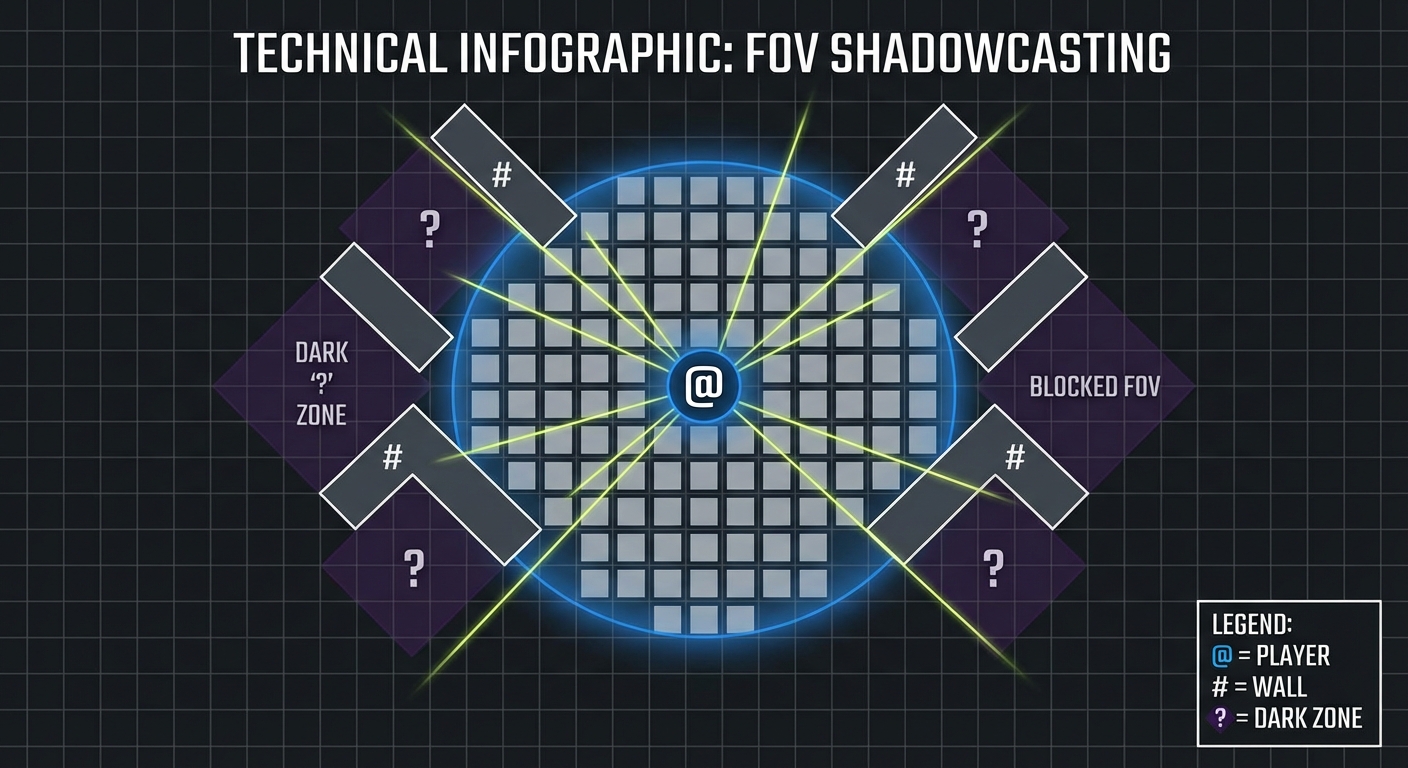
The Core Question You’re Answering
“How do I simulate the physics of light using discrete grid tiles?”
Light travels in straight lines, but your world is made of squares. You need to reconcile these two realities.
Concepts You Must Understand First
- Raycasting Fundamentals
- How to draw a line between two points on a grid and identify every tile the line crosses.
- Book Reference: “Bresenham’s Algorithm” - Wikipedia / “Computer Graphics from Scratch”
- Recursive Shadowcasting
- Dividing the world into 8 octants and “scanning” them to find visible slopes.
- Book Reference: “Procedural Content Generation in Games” Ch. 4 (Visibility)
- Slope Calculations
- Understanding how to block ranges of angles (slopes) as the algorithm scans outward.
Questions to Guide Your Design
- The Radius
- How far should the player see? Is there a “Falloff” where things get darker at the edge?
- Persistence
- Should tiles that were once visible stay “Explored” (grayed out) or go back to pitch black?
Thinking Exercise
Bresenham vs. Recursive Shadowcasting
Bresenham: Draw a line to every tile on the edge of the screen. If it hits a wall, stop. Recursive Shadowcasting: Treat the world as “Octants” (pie slices) and scan outward. Which one is “leakier” at the corners? Which one handles large distances better? (Hint: Bresenham is easier to code but often leaves “holes” or “blind spots”).
The Interview Questions They’ll Ask
- “Explain the difference between Raycasting and Shadowcasting.”
- “Why is FOV performance-critical in a roguelike with many entities?”
- “How do you handle ‘peek-around’ corners in a grid system?”
- “What is Symmetric Shadowcasting?”
Hints in Layers
Hint 1: Start with Bresenham
The easiest way to start is to loop through all tiles within a Radius and use Bresenham’s line algorithm to check if there is a wall between the player and that tile.
Hint 2: Recursive Octants If you want to be professional, research “Recursive Shadowcasting.” It only visits each visible tile once, making it much faster. It works by processing one octant at a time (0° to 45°).
Hint 3: The Visibility Flag
In your Tile class, add a bool isVisible and a bool isExplored. Update these every time the player moves.
Books That Will Help
| Topic | Book | Chapter |
|---|---|---|
| Visibility Algorithms | “Procedural Content Generation in Games” | Ch. 4 |
| Geometry and Grids | “Computer Graphics from Scratch” | Ch. 1-2 |
| Algorithm Performance | “Algorithms” | Ch. 1 |
Project 10: The Brain Tree (Behavior Trees)
- Main Programming Language: C#
- Alternative Programming Languages: GDScript, C++
- Coolness Level: Level 3: Genuinely Clever
- Business Potential: 1. The “Resume Gold”
- Difficulty: Level 3: Advanced
- Knowledge Area: AI Architecture
- Software or Tool: Unity/Godot
- Main Book: “Artificial Intelligence for Games” by Millington
What you’ll build: A complex AI using a Behavior Tree. The entity shouldn’t just chase you. It should have priorities: If HP < 20% -> Heal; Else If Player Close -> Attack; Else -> Patrol.
Why it teaches AI: Simple State Machines (Project 8) get messy when you have dozens of states. Behavior Trees are composable, hierarchical, and reactive, allowing for complex, readable AI that is easy to debug and expand.
Core challenges you’ll face:
- Selector vs. Sequence → Understanding the difference between “Do the first thing that works” and “Do all these things in order.”
- Conditionals → Building nodes that check game state (e.g.,
IsPlayerInRange,IsHealthy). - Tick Rate → Running the tree logic efficiently within your turn-based system.
Real World Outcome
An enemy that feels “alive” and tactical. Instead of walking into your sword, it might retreat to find a health potion, call for reinforcements if it sees you, or use a defensive stance when its shield is low.
Behavior Tree Visual Logic:
Root (Selector)
  ├── Sequence (Survival)
  │     ├── Condition: IsHP_Low?
  │     └── Action: Retreat_to_Safety
  ├── Sequence (Attack)
  │     ├── Condition: IsPlayerInRange?
  │     └── Action: AttackPlayer
  └── Action: Idle_Patrol
The Core Question You’re Answering
“How do I create complex behavior that is still easy for a human to read and modify?”
If you use if/else for everything, your AI will eventually break. Behavior Trees provide a “visual language” for intelligence.
Concepts You Must Understand First
- Tree Traversal (Tick)
- How a signal “pulses” through the tree to find the current active action.
- Book Reference: “Artificial Intelligence for Games” Ch. 5.4
- Node Status (Success, Failure, Running)
- Why every node must report back its status to the parent.
- Book Reference: “Behavior Trees in Robotics and AI” - Colledani
- Composite Nodes (Selectors/Sequences)
- Selector: The “OR” gate. It tries children until one succeeds.
- Sequence: The “AND” gate. It tries children until one fails.
Questions to Guide Your Design
- Interruption
- If the AI is “Patrolling” and the player appears, how does the tree switch to “Attack” instantly? (Hint: The tree re-ticks from the root every turn).
- Shared State (Blackboards)
- Where do nodes store data like
targetEnemy? (Hint: Use a “Blackboard” object shared by all nodes).
- Where do nodes store data like
Thinking Exercise
The Healer’s Choice
Imagine a Healer AI. Goal 1: Heal self if low HP. Goal 2: Heal ally if ally low HP. Goal 3: Attack enemy. Draw the Behavior Tree for this. Where do you place the “Heal self” node? At the far left (highest priority) or far right? Why?
The Interview Questions They’ll Ask
- “What is the difference between a Finite State Machine and a Behavior Tree?”
- “Explain what a ‘Decorator’ node does in a Behavior Tree.”
- “How do you handle ‘Running’ states for actions that take multiple turns?”
- “Why are Behavior Trees better for large-scale games like Halo or Spore?”
Hints in Layers
Hint 1: The Node Interface
Create an abstract class BTNode with a public abstract NodeStatus Tick();.
Hint 2: The Selector Node
A Selector loops through children. If a child returns SUCCESS, the Selector immediately returns SUCCESS. If it returns FAILURE, it moves to the next child.
Hint 3: The Blackboard
Create a Dictionary<string, object> class called Blackboard. Pass this into the Tick() method so nodes can read and write game data (like PlayerPosition).
Books That Will Help
| Topic | Book | Chapter |
|---|---|---|
| AI Architectures | “Artificial Intelligence for Games” | Ch. 5.4 |
| Advanced BTs | “Behavior Trees in Robotics and AI” | Ch. 1-3 |
| Logic Composition | “Clean Code” | Ch. 10 (Classes) |
Project 11: The Endless Save (Serialization)
- Main Programming Language: C#
- Alternative Programming Languages: GDScript, C++, Python
- Coolness Level: Level 2: Practical but Forgettable
- Business Potential: 3. The “Service & Support” Model
- Difficulty: Level 3: Advanced
- Knowledge Area: Data Persistence
- Software or Tool: JSON, Protobuf, or Binary Serialization
- Main Book: “Code Complete, 2nd Edition” - Steve McConnell
What you’ll build: A system that saves the entire state of your procedural world. Because the world is generated, you only need to save the Seed and any Changes the player made (the “Delta”).
Why it teaches PCG: This forces you to distinguish between “Generated Data” (calculable) and “Modified Data” (unique). Saving every tile in an infinite world is impossible; saving the differences is engineering mastery.
Core challenges you’ll face:
- Deterministic Drift → If you save the seed but change your code, the world will load differently. How do you version your generator?
- Entity Identification → How do you uniquely identify a procedural monster so you can save its current HP?
- File Size → Using binary formats instead of JSON for large maps.
Real World Outcome
A “Save & Load” system where a player can exit an infinite world and return to the exact same spot with the same inventory, the same dead monsters, and the same opened chests.
Storage Strategy:
world_seed: 84920generator_version: 1.2player_pos: (120, 450)modified_tiles: {(120, 451): “BrokenWall”, (10, 10): “Hole”}entities: { “Orc_72”: { “HP”: 5, “Pos”: (12, 5) } }
The Core Question You’re Answering
“If a tree falls in a procedural forest and I’m not there to see it, does it stay fallen when I come back?”
This is the challenge of “Permanence” in an infinite world. You are learning to separate “Function” from “State.”
Concepts You Must Understand First
- Serialization vs. Deserialization
- Turning a complex object in RAM into a string of bytes on a disk.
- Book Reference: “C# 12 in a Nutshell” Ch. 15
- The Delta Pattern
- Only saving what has changed from the default generated state.
- Book Reference: “Clean Code” Ch. 6 (Data Structures)
- UIDs (Unique Identifiers)
- Giving every procedural monster a persistent ID based on its spawn coordinates.
Questions to Guide Your Design
- Versioning
- If you update your BSP algorithm (Project 4), how do you prevent old save files from “exploding” or loading rooms into solid walls?
- Large Scale Data
- If a player explores 1,000,000 chunks, your “Delta” file might get huge. How do you compress it? (Hint: Use binary writer instead of text).
Thinking Exercise
The Seed + Delta Strategy
You have an infinite world (Seed: 42).
The player digs a hole at (10, 10).
The player moves 10 miles away. The hole is unloaded from RAM.
The player comes back.
How does the game know there is a hole at (10, 10) if the generator says there is solid ground?
(Design the lookup logic: GetTile(pos) => DeltaMap.Contains(pos) ? DeltaMap[pos] : Generator.Generate(pos)).
The Interview Questions They’ll Ask
- “Why is it inefficient to save every tile in a procedural world?”
- “How do you handle breaking changes in your procedural generator between game updates?”
- “What is the difference between shallow and deep serialization?”
Hints in Layers
Hint 1: The Delta Dictionary
Create a Dictionary<Vector2Int, TileType> modifiedTiles. When a tile is changed, add its coordinate and new type to this dictionary.
Hint 2: The ID Generator
For enemies, generate an ID using their starting coordinate: ID = string.Format("Mob_{0}_{1}", startX, startY). This ID will be the same every time the seed is loaded.
Hint 3: BinaryFormatter (or similar)
Avoid JSON for large maps. Use BinaryWriter to write raw integers and floats to a .dat file. It’s 10x smaller and 100x faster.
Books That Will Help
| Topic | Book | Chapter |
|---|---|---|
| Data Persistence | “C# 12 in a Nutshell” | Ch. 15 |
| Reliable Systems | “Code Complete, 2nd Edition” | Ch. 8 |
| Architectural Design | “Clean Code” | Ch. 6 |
Project 12: The Voxel World (3D Procedurality)
- Main Programming Language: C#
- Alternative Programming Languages: C++, Rust
- Coolness Level: Level 4: Hardcore Tech Flex
- Business Potential: 5. The “Industry Disruptor”
- Difficulty: Level 4: Expert
- Knowledge Area: 3D Graphics / Voxel Data
- Software or Tool: Unity/Godot (Mesh Generation)
- Main Book: “Computer Graphics from Scratch” by Gabriel Gambetta
What you’ll build: A basic 3D “Minecraft-style” chunk. Instead of a 2D grid, you’ll use a 3D array of bytes. You’ll use 3D Perlin Noise to generate hills, caves, and overhangs.
Why it teaches PCG: This is the leap from 2D to 3D. You’ll learn about Mesh Generation—creating triangles and vertices via code rather than importing models.
Core challenges you’ll face:
- Greedy Meshing → Optimizing the mesh so you don’t draw the “internal” faces of cubes that no one sees.
- 3D Noise →
Noise(x, y, z)allows for tunnels and floating islands, which 2D heightmaps cannot do. - Performance → Managing 16x16x16 blocks (4,096 blocks) per chunk efficiently.
Real World Outcome
A 3D environment you can walk around in (First Person), with rolling hills, deep vertical caves, and floating islands—all generated from a single seed and rendered as a single optimized mesh.
Voxel Metrics:
- Chunk Size: 16x16x16
- Triangles per Block: 2 per face (12 total if isolated)
- Optimized Triangles: ~50% reduction by hiding internal faces.
The Core Question You’re Answering
“How do I turn raw volume data into a visual 3D mesh?”
A voxel world isn’t made of thousands of Cube objects; that would kill the GPU. It is one single “shape” that is calculated on the fly. You are learning the math of 3D rendering.
Concepts You Must Understand First
- The 3D Coordinate System
- Understanding
(x, y, z)and how to map a 3D index to a 1D array:index = x + (y * width) + (z * width * height). - Book Reference: “Computer Graphics from Scratch” Ch. 1
- Understanding
- Mesh Anatomy
- Vertices (points), Triangles (indices), and Normals (direction).
- Book Reference: “Computer Graphics from Scratch” Ch. 2
- Face Culling
- The logic of “If there is a block to my left, don’t draw my left face.”
Questions to Guide Your Design
- 3D Noise Threshold
- In 2D, noise = height. In 3D, noise = density. If
Noise(x,y,z) > 0.5, is there a block there? - How do you make the density decrease as
yincreases (to prevent infinite floating islands)?
- In 2D, noise = height. In 3D, noise = density. If
- Greedy Meshing
- Can you combine 4 small squares into one large rectangle to save on vertex count?
Thinking Exercise
The Invisible Face
Draw two cubes side-by-side. List all 12 faces. Now, identify which faces are “touching.” Why is it critical for performance to NOT send those touching faces to the Graphics Card? (Think about overdraw and vertex buffers).
The Interview Questions They’ll Ask
- “What is the difference between a 2D Heightmap and 3D Voxel noise?”
- “How do you optimize 3D mesh generation for millions of voxels?”
- “Explain the ‘Marching Cubes’ algorithm (at a high level).”
- “How do you handle lighting in a voxel world (Vertex Colors vs. Textures)?”
Hints in Layers
Hint 1: The Data Structure
Use byte[,,] blocks = new byte[16, 16, 16]. 0 = Air, 1 = Stone.
Hint 2: Mesh Generation
Create a List<Vector3> vertices and List<int> triangles. Loop through every block. For each block, check its 6 neighbors. If a neighbor is “Air”, add the 4 vertices of that face to your list.
Hint 3: 3D Perlin
Most libraries only have 2D Perlin. You can simulate 3D by “layering” 2D noise or finding a dedicated library like FastNoiseLite.
Books That Will Help
| Topic | Book | Chapter |
|---|---|---|
| 3D Fundamentals | “Computer Graphics from Scratch” | Ch. 1-3 |
| Voxel Optimization | “Game Programming Patterns” | Ch. 21 (Spatial Partition) |
| C++ Performance | “Write Great Code, Vol 2” | Ch. 11 |
Project 13: The Dynamic Ecosystem (Agent Interaction)
- Main Programming Language: C#
- Alternative Programming Languages: GDScript, Python
- Coolness Level: Level 3: Genuinely Clever
- Business Potential: 1. The “Resume Gold”
- Difficulty: Level 3: Advanced
- Knowledge Area: Systems Design / Emergence
- Software or Tool: Unity/Godot
- Main Book: “Procedural Generation in Game Design” by Short — Ch. 18
What you’ll build: A world where enemies interact with each other, not just the player. Goblins attack Wolves; Wolves hunt Rabbits; Rabbits eat procedurally generated grass.
Why it teaches PCG: This is Emergent Gameplay. You don’t script a fight; you give agents goals, and a fight “happens” because their goals conflict. You are building a simulation, not just a level.
Core challenges you’ll face:
- Faction Systems → Managing relationships (Friend/Neutral/Foe) between 10+ species.
- Sensory Systems → “Sight” and “Smell” for animals so they can find food or avoid predators.
- Resource Depletion → If wolves eat all the rabbits, what happens to the wolves? (Population dynamics).
Real World Outcome
A “Living World” log or visual debug view where you can watch a goblin camp clear out a nearby wolf den without any player intervention. The map changes as resources are consumed and species migrate.
Ecosystem Log:
[Day 1, 12:00] Rabbit_A ate Grass at (10, 5).
[Day 1, 14:30] Wolf_B spotted Rabbit_A. Entering 'Hunt' mode.
[Day 1, 14:32] Wolf_B killed Rabbit_A.
[Day 2, 08:00] Goblin Patrol spotted Wolf_B. Entering 'Combat' mode.
The Core Question You’re Answering
“How do I make a world feel alive even when the player isn’t looking?”
Most games are static “museums” waiting for the player to walk through. A roguelike ecosystem is a “simulation” that exists for its own sake. You are learning “Systemic Design.”
Concepts You Must Understand First
- Utility AI
- Scoring different actions based on needs (e.g., Hunger=90, Danger=10 -> Priority: Eat).
- Book Reference: “Artificial Intelligence for Games” Ch. 5.3
- Emergence
- How simple behaviors (Chase, Flee, Eat) create complex, unscripted stories.
- Book Reference: “Procedural Generation in Game Design” Ch. 18
- Spatial Hashing
- How an entity quickly finds the “closest rabbit” without checking every object in the world.
- Book Reference: “Game Programming Patterns” Ch. 19
Questions to Guide Your Design
- The Hunger Clock
- If you don’t eat for 100 turns, do you die? If so, does your body become “Meat” (a resource) for others?
- Perception Radius
- How do you simulate “Smell”? (Hint: A search that ignores walls/obstacles but has a larger radius than Sight).
Thinking Exercise
The Wolf-Rabbit Balance
If Rabbits reproduce every 50 turns and Wolves need to eat every 20 turns, will the population be stable? Trace a 100-turn simulation on paper. What happens if you introduce a “Hunter” (the player) into this balance?
The Interview Questions They’ll Ask
- “What is Emergent Gameplay and how do you design for it?”
- “How do you handle AI performance for 1,000+ interacting agents?”
- “Explain the difference between scripted behavior and systemic behavior.”
Hints in Layers
Hint 1: The Goal Enum
Each agent should have a currentGoal (Idle, Hunt, Eat, Sleep, Flee).
Hint 2: Simple Utility
Every turn, calculate a “Desire Score” for each goal. HungerScore = currentHunger / maxHunger. The AI picks the goal with the highest score.
Hint 3: Faction Matrix
Use a 2D array or a Dictionary<Species, Dictionary<Species, float>> to store “Friendship” levels. If Relation[Goblin, Wolf] < -0.5, they attack on sight.
Books That Will Help
| Topic | Book | Chapter |
|---|---|---|
| Emergent Systems | “Procedural Generation in Game Design” | Ch. 18 |
| Decision Making | “Artificial Intelligence for Games” | Ch. 5 |
| Systemic Optimization | “Game Programming Patterns” | Ch. 19 |
Project 14: The Rule-based Quest (Grammar Narrative)
- Main Programming Language: C#
- Alternative Programming Languages: Python, GDScript
- Coolness Level: Level 3: Genuinely Clever
- Business Potential: 2. The “Micro-SaaS / Pro Tool”
- Difficulty: Level 3: Advanced
- Knowledge Area: NLP / Generative Text
- Software or Tool: Tracery or custom Grammar Engine
- Main Book: “Procedural Generation in Game Design” by Short — Ch. 8
What you’ll build: A procedural quest generator. It uses a formal grammar to build logical objectives: [Subject] needs [Object] from [Location] because [Motivation].
Why it teaches PCG: It moves procedurality into the realm of Narrative. You’ll learn about Context-Free Grammars (CFG) and how to ensure quests are not just random text but are logically tied to the game world.
Core challenges you’ll face:
- Logic Constraints → Ensuring the “Lost Cave” actually exists in your generated map before assigning a quest there.
- Recursive Substitution → Building complex sentences from simple rules.
- Quest Chaining → One quest leading to another (e.g., getting the Ring requires a Key from a different quest).
Real World Outcome
A “Quest Board” in your game that generates unique, logical tasks every time you visit town. Each quest includes a title, a description, and a set of trackable objectives.
Example Quests:
- “The Mayor needs a Golden Ring from the Spider Cave because he wants to propose to the Blacksmith.”
- “A local Farmer needs a Magic Scythe from the Ruined Tower because his crops are possessed.”
- “The Guard Captain needs 10 Orc Ears from the Northern Woods to prove the threat is real.”
The Core Question You’re Answering
“How do I turn ‘random strings’ into ‘meaningful stories’?”
A quest is just a data structure. You are learning to use “Generative Grammars” to create infinite writing.
Concepts You Must Understand First
- Context-Free Grammars (CFG)
- Understanding non-terminal vs. terminal symbols.
- Book Reference: “Procedural Generation in Game Design” Ch. 8
- Graph-based Quests
- Visualizing a quest as a flow:
Unlock Door -> Kill Boss -> Get Loot. - Book Reference: “Procedural Content Generation in Games” Ch. 9 (Narrative)
- Visualizing a quest as a flow:
- Substitution Engines
- How libraries like Tracery work.
Questions to Guide Your Design
- World Consistency
- How do you prevent the generator from saying “Kill the Dragon” if the game only has Goblins?
- Motivation vs. Action
- Does the “Motivation” (e.g., “to pay off a debt”) change the “Action” (e.g., “Steal” vs “Kill”)?
Thinking Exercise
The Recursive Quest
Start with: [Objective].
Rule 1: [Objective] -> [Action] the [Target].
Rule 2: [Action] -> Retrieve, Destroy, or Protect.
Rule 3: [Target] -> [Item] or [Person].
Follow these rules 3 times. How many unique “Objective” strings can you create?
The Interview Questions They’ll Ask
- “What is a Context-Free Grammar?”
- “How do you ensure a procedurally generated quest is actually completable?”
- “How would you integrate a quest generator with a procedural map generator?”
Hints in Layers
Hint 1: The Dictionary of Lists
Create a Dictionary<string, List<string>> where the key is the category (e.g., “hero”) and the list contains options (e.g., “Knight”, “Mage”).
Hint 2: Recursive Replacement
Write a function Expand(string input) that finds any text inside {braces}, looks it up in your dictionary, picks a random value, and calls Expand() on that value.
Hint 3: Data Integrity
When picking a [Location], don’t pick a random string. Pick a random Room object from your BSP tree (Project 4) and use its name property. This guarantees the place exists.
Books That Will Help
| Topic | Book | Chapter |
|---|---|---|
| Narrative Generation | “Procedural Generation in Game Design” | Ch. 8 |
| Formal Grammars | “Introduction to the Theory of Computation” | Ch. 2 |
| Logic in Games | “Game Programming Patterns” | Ch. 15 |
Project 15: The Procedural Soundscape (Generative Audio)
- Main Programming Language: C#
- Alternative Programming Languages: C++ (SuperCollider/PureData)
- Coolness Level: Level 4: Hardcore Tech Flex
- Business Potential: 2. The “Micro-SaaS / Pro Tool”
- Difficulty: Level 4: Expert
- Knowledge Area: Digital Signal Processing (DSP)
- Software or Tool: Unity (OnAudioFilterRead) or Godot (AudioStreamGenerator)
- Main Book: “The Theory and Technique of Electronic Music” by Miller Puckette
What you’ll build: Music and ambience that changes based on the game state. If you are in a “Cave”, the music is low and echoey. If you find “Gold”, a bright chord plays.
Why it teaches PCG: Audio is just another data stream. This teaches you how to map game state (HP, Location, Danger Level) to audio parameters (Pitch, Tempo, Reverb, Oscillators). You are learning “Algorithmic Composition.”
Core challenges you’ll face:
- Buffer Management → Writing raw sine/square wave data to the audio card without “popping” noises.
- Musical Theory → Ensuring that procedural notes stay within a specific scale (e.g., C-Minor) so it doesn’t sound like random noise.
- Dynamic Mixing → Fading between a “Safe” track and a “Combat” track seamlessly.
Real World Outcome
A game where the music literally “reacts” to your gameplay in real-time. Running low on health makes the music more frantic (higher tempo); entering a boss room makes it deeper (lower octave); picking up a legendary item triggers a harmonized fanfare.
Audio Mapping:
- Biome: Cave -> High Reverb, Low-frequency drone.
- Danger Level: High -> 140 BPM, Minor Scale.
- Danger Level: Low -> 80 BPM, Major Scale.
The Core Question You’re Answering
“How do I turn game data into sound waves?”
Most games use static .wav files. You are learning to build a “Synthesizer” that lives inside your game engine.
Concepts You Must Understand First
- Sine Waves & Oscillators
- How a mathematical function
sin(time * frequency)creates a pitch. - Book Reference: “The Theory and Technique of Electronic Music” Ch. 1
- How a mathematical function
- The Audio Buffer
- Why sound must be calculated in small “chunks” (usually 512 or 1024 samples).
- Book Reference: “Real-Time Audio Programming” - Digital Signal Processing (DSP)
- Music Theory for Programmers
- Mapping an integer (0-11) to a scale so your “Random” notes always sound musical.
Questions to Guide Your Design
- Synthesis vs. Sample Logic
- Will you generate raw waves from scratch, or “re-pitch” existing recordings?
- The “Hitch” Problem
- If your audio calculation takes too long, the sound will “crackle.” How do you optimize your math?
Thinking Exercise
The Frequency Double
If a note is 440Hz (A4), what is the frequency of the same note one octave higher?
Why does the human ear hear “Doubling the Frequency” as “The same note, but higher”?
(Hint: This logarithmic relationship is why log2(freq) is so common in audio code).
The Interview Questions They’ll Ask
- “What is an Audio Buffer and why do we need one?”
- “How do you prevent ‘audio clipping’ when playing multiple sounds at once?”
- “Explain how you would map a ‘Fear’ level to a procedural melody.”
Hints in Layers
Hint 1: The Basic Oscillator
In Unity’s OnAudioFilterRead(float[] data, int channels), fill the data array with a simple sine wave: Mathf.Sin(phase). Increment the phase every sample based on your desired frequency.
Hint 2: Scales as Arrays
Create an array int[] cMinor = { 0, 2, 3, 5, 7, 8, 10 };. To pick a random “good” note, pick a random index from this array and add it to a base MIDI note (e.g., 60).
Hint 3: Smoothing Transitions
Don’t jump from 80 BPM to 140 BPM instantly. Use Mathf.Lerp to gradually change the tempo over several seconds.
Books That Will Help
| Topic | Book | Chapter |
|---|---|---|
| Audio Theory | “The Theory and Technique of Electronic Music” | Ch. 1-2 |
| DSP Programming | “Designing Sound” by Andy Farnell | Part II |
| Sound Design | “Procedural Generation in Game Design” | Ch. 22 |
Project 16: The Infinite UI (Dynamic Menus)
- Main Programming Language: C#
- Alternative Programming Languages: GDScript
- Coolness Level: Level 2: Practical but Forgettable
- Business Potential: 1. The “Resume Gold”
- Difficulty: Level 2: Intermediate
- Knowledge Area: UI/UX Architecture
- Software or Tool: Unity (UI Toolkit) / Godot (Control Nodes)
- Main Book: “Code Complete, 2nd Edition” - Steve McConnell
What you’ll build: A dynamic inventory and character sheet. Because items are procedural (Project 7), your UI cannot be static. It must resize, create new text fields, and handle 100+ different possible item stats and names of varying lengths.
Why it teaches PCG: The “Final Mile” of PCG is presentation. If your UI can’t handle the variety of procedural data, the data doesn’t exist to the player. You are learning “Data-Driven UI.”
Core challenges you’ll face:
- Layout Engines → Using “Flexbox” or “Vertical Layout Groups” so buttons don’t overlap when text is long.
- Object Pooling → Reusing UI elements so opening a large inventory doesn’t cause a frame-rate hitch.
- Data Binding → Connecting your “Item” class to the “UI Text” without writing “spaghetti” code.
Real World Outcome
A robust inventory screen that automatically adjusts to show a 2-word name or a 10-word name. It dynamically adds icons based on the item’s prefixes (e.g., a small “fire” icon for “Flaming”). Hovering over an item shows a tooltip that lists all generated stats.
UI Behavior:
- Scrollable List: Handles 5 or 500 items.
- Dynamic Tooltips: Resizes based on the number of modifiers.
- Responsive Layout: Works on different screen resolutions.
The Core Question You’re Answering
“How do I build a UI that I haven’t designed every single pixel of?”
Standard UI is fixed. Procedural UI is a “Template” that is filled by your data. You are learning the “View” part of the Model-View-Controller (MVC) pattern.
Concepts You Must Understand First
- Flexbox / Layout Groups
- How elements “push” each other based on their content size.
- Book Reference: “Unity Game Development Cookbook” Ch. 11 (UI)
- Object Pooling
- Instead of
Instantiate()andDestroy()for every UI row, you “recycle” them from a hidden list. - Book Reference: “Game Programming Patterns” Ch. 16
- Instead of
- Data Binding
- The UI “watches” the Item object and updates when the object changes.
Questions to Guide Your Design
- The Tooltip Trap
- If an item has 20 modifiers, does the tooltip go off the screen? How do you implement “Max Height” or “Scaling”?
- User Experience
- Does a procedurally generated name like “Flaming Rusty Dagger of the Cold Moon” fit in the UI slot? (Hint: Use ellipsis
...or auto-font-scaling).
- Does a procedurally generated name like “Flaming Rusty Dagger of the Cold Moon” fit in the UI slot? (Hint: Use ellipsis
Thinking Exercise
The Grid vs. List
Draw an inventory for 100 items. Option A: A 10x10 Grid of icons. Option B: A single vertical list with names and stats. Which one is easier to build for “Procedural Content”? Which one gives the player more information quickly?
The Interview Questions They’ll Ask
- “Why is Object Pooling important for UI in games?”
- “How do you handle UI scaling for different screen ratios?”
- “Explain how you would bind a procedural ‘Item’ object to a UI ‘View’ element.”
Hints in Layers
Hint 1: Layout Groups
In Unity, use VerticalLayoutGroup and ContentSizeFitter. In Godot, use VBoxContainer. These do 90% of the math for you.
Hint 2: The UI Row Prefab
Create a single “Row” prefab with Text for Name and Text for Stats. When you open the inventory, loop through items and “activate” one prefab for each.
Hint 3: Data Binding
Create a method itemUI.SetData(Item item). This method should take all the data from the item and push it into the text fields. Never let the UI “pull” data on its own.
Books That Will Help
| Topic | Book | Chapter |
|---|---|---|
| Performance | “Game Programming Patterns” | Ch. 16 (Object Pool) |
| UI Architecture | “Clean Code” | Ch. 10 |
| Robust Software | “Code Complete, 2nd Edition” | Ch. 34 |
Project 17: The Lore Sim (World History)
- Main Programming Language: C#
- Alternative Programming Languages: Python
- Coolness Level: Level 5: Pure Magic
- Business Potential: 1. The “Resume Gold”
- Difficulty: Level 4: Expert
- Knowledge Area: Simulation / Narrative
- Software or Tool: Unity/Godot
- Main Book: “Procedural Generation in Game Design” by Short — Ch. 20
What you’ll build: A “History Generator.” Before the game starts, you simulate 100 years of “History.” Factions rise, capture cities, and fall. When the player starts, the world is littered with “Ruins” from these simulated events.
Why it teaches PCG: This is the peak of Contextual Procedurality. The world isn’t random; it’s the result of a simulated past. This is how Dwarf Fortress generates its depth. You are learning to build “Simulation-driven Narrative.”
Core challenges you’ll face:
- Chronological Logic → Ensuring a King doesn’t die before his son is born.
- Artifact Tracking → If a legendary sword was lost in “The Battle of Iron”, the player should actually find it at that coordinate.
- Abstraction → Simulating years in seconds without calculating every single day.
Real World Outcome
A game world that feels ancient and lived-in. You might find a statue of “King Erik” in a moss-covered ruin. When you check your “History Log,” you see that King Erik actually lived 80 years ago, founded this city, and died in a siege by the Orcs. All of this was calculated before you pressed “Start.”
Lore Fragment:
> Found: "Tattered Banner"
> History: This banner belonged to the 'Blue Lions' who fell during the 'Great Fire of Year 42'. The fire was started by a Dragon attack that destroyed 30% of the world's cities.
The Core Question You’re Answering
“How do I make a world feel like it has a soul and a past?”
Most games use “Flavor Text” written by humans. You are learning to make the computer “Write the backstory” based on rules of cause and effect.
Concepts You Must Understand First
- Markov Chains / State Transitions
- How one event (War) increases the probability of another (Famine).
- Book Reference: “The Nature of Code” Ch. 0 (Markov section)
- Entity Persistence
- Keeping track of “Historical Figures” even after they die so they can be referenced in lore.
- Cause and Effect Simulation
- Understanding how
Event AmodifiesWorld State B.
- Understanding how
Questions to Guide Your Design
- The Grain of Time
- Should you simulate year-by-year or century-by-century? (Hint: Year-by-year is better for family trees and specific battles).
- Artifact Generation
- If a Hero dies, does their weapon stay in that location forever? How does that weapon become a “Legendary Artifact” in the player’s time?
Thinking Exercise
The Faction War
Faction A starts with 10 soldiers. Faction B starts with 10. Every year, they have a 50% chance of fighting. If they fight, 1-3 soldiers die on each side. If a faction reaches 0, it is “Extinct.” Simulate this on paper for 10 years. Now, write the “Lore” for Year 11. (e.g., “The ruins of Faction B still stand as a reminder…”)
The Interview Questions They’ll Ask
- “How do you simulate hundreds of years of history in a few seconds?”
- “How do you ensure historical events don’t contradict each other?”
- “What are the benefits of ‘Simulated History’ over ‘Randomly Generated Lore’?”
Hints in Layers
Hint 1: The Event Loop
Create a function SimulateYear(). Inside, loop through all factions/cities and roll for an event: (Peace, War, Natural Disaster, Discovery).
Hint 2: The Family Tree
Use a Person class with Father and Mother pointers. Every year, people age. If age > randomThreshold, they die. If age > 20, they have a chance to produce a child.
Hint 3: Recording “Legends”
Every time a Faction is destroyed or a King dies, save a string to a List<string> historyLog. Use this list to generate “Books” or “Statues” in your game.
Books That Will Help
| Topic | Book | Chapter |
|---|---|---|
| Simulation Design | “Procedural Generation in Game Design” | Ch. 20 |
| Narrative Causality | “Dungeon Hacks” | Ch. 4 (Dwarf Fortress) |
| Probability | “The Nature of Code” | Ch. 0 |
Project 18: The Modder’s Gate (Data-Driven PCG)
- Main Programming Language: C#
- Alternative Programming Languages: JSON/YAML
- Coolness Level: Level 3: Genuinely Clever
- Business Potential: 4. The “Open Core” Model
- Difficulty: Level 3: Advanced
- Knowledge Area: Software Engineering / Extensibility
- Software or Tool: JSON / ScriptableObjects
- Main Book: “Clean Code” by Robert C. Martin
What you’ll build: A system where the generation rules are stored in an external JSON file. A player can change the JSON to add new biomes, new enemies, or change room sizes without re-compiling the game.
Why it teaches PCG: It forces you to decouple your Code (the engine) from your Data (the world rules). You’ll realize that a good generator is just an interpreter for a set of rules. You are learning “Extensible Architecture.”
Core challenges you’ll face:
- Reflection/Parsing → Reading a string from JSON (e.g., “StandardRoomGenerator”) and turning it into a running class or function.
- Error Handling → What happens if the JSON says “Spawn Dragon” but there is no Dragon asset in the game?
- Hot Reloading → Changing the JSON while the game is running and seeing the world update instantly.
Real World Outcome
A “Mods” folder where players can create their own versions of your game. By editing a simple text file, they can make the dungeon 10x larger, increase the spawn rate of legendary loot, or create a “Lava Biome” that wasn’t in the original game.
Mod Config (JSON):
{
  "biome_name": "Hellscape",
  "min_room_size": 10,
  "max_enemies": 25,
  "loot_table": "FireGear",
  "wall_color": "#FF4500"
}
The Core Question You’re Answering
“How do I build a game that lives forever through its community?”
The most successful roguelikes (Caves of Qud, Rimworld) are successful because they are easy to mod. You are learning to build a “Platform,” not just a “Program.”
Concepts You Must Understand First
- Reflection (C#)
- How to find a class or method by its string name at runtime.
- Book Reference: “C# 12 in a Nutshell” Ch. 18
- Serialization (JSON/YAML)
- Mapping external text files to internal data classes.
- Book Reference: “C# 12 in a Nutshell” Ch. 15
- The Strategy Pattern
- Swapping out different generation algorithms based on a configuration.
- Book Reference: “Game Programming Patterns” Ch. 14
Questions to Guide Your Design
- Safety
- How do you prevent a modder from typing
-1forroom_sizeand crashing your engine? (Hint: Implement a “Validator” class).
- How do you prevent a modder from typing
- Hot Reloading
- How does the game “watch” the file for changes? (Hint: Use
FileSystemWatcher).
- How does the game “watch” the file for changes? (Hint: Use
Thinking Exercise
The Modder’s Balance
Imagine you have a variable EnemyHealthMultiplier in your JSON.
If a modder sets it to 0, what happens?
If they set it to 1,000,000, what happens?
Design a “Boundary Check” that allows for modding freedom while preventing game-breaking crashes.
The Interview Questions They’ll Ask
- “Why is data-driven design preferred for procedural games?”
- “Explain how you would implement ‘Hot Reloading’ of assets.”
- “What are the security risks of allowing users to load external scripts or data?”
Hints in Layers
Hint 1: The Config Class
Create a GenerationSettings class that matches your JSON structure. Use JsonUtility (Unity) or JSON.parse (Godot) to load it.
Hint 2: The Factory Pattern
Instead of new RoomGenerator(), use a GeneratorFactory. Pass in the string from the JSON, and the factory returns the correct object.
Hint 3: Default Fallbacks Always have a “Hardcoded Default” config. If the mod file is missing or corrupted, load the defaults so the game still runs.
Books That Will Help
| Topic | Book | Chapter |
|---|---|---|
| Extensible Code | “Clean Code” | Ch. 10 |
| Dynamic Loading | “C# 12 in a Nutshell” | Ch. 18 (Reflection) |
| Architecture Patterns | “Game Programming Patterns” | Ch. 14 |
Project 19: The Metaprogression Loop (Roguelite)
- Main Programming Language: C#
- Alternative Programming Languages: GDScript
- Coolness Level: Level 2: Practical but Forgettable
- Business Potential: 2. The “Micro-SaaS / Pro Tool”
- Difficulty: Level 2: Intermediate
- Knowledge Area: Game Design / Economy
- Software or Tool: Unity/Godot
- Main Book: “Game Design Deep Dive: Roguelikes” by Joshua Bycer
What you’ll build: A “Meta-shop.” When the player dies, they earn “Gems” based on their progress. They can spend these gems on permanent upgrades (e.g., +10 HP, Faster Movement). These upgrades must persist across new runs and new seeds.
Why it teaches Roguelikes: This is the difference between a “Roguelike” (Pure Reset) and a “Roguelite” (Hades, Rogue Legacy). You’ll learn how to bridge the gap between “Seeded/Temporary” data and “Account/Permanent” data. You are learning “Persistence and Loop Design.”
Core challenges you’ll face:
- Economy Balancing → Ensuring the upgrades feel rewarding but don’t make the game too easy too quickly.
- Save Conflict → Making sure your permanent “Save File” doesn’t get corrupted when the game crashes mid-run.
- UI Feedback → Clearly showing the player how much they’ve improved (e.g., “Max HP: 100 -> 110”).
Real World Outcome
A main menu “Upgrade Tree” or “Shop” that allows the player to become stronger over multiple deaths. This creates a “Hook” that keeps players coming back even after a frustrating loss.
Upgrade Example:
- Cost: 50 Gems
- Effect: “Starting Weapon” upgraded from ‘Rusty Knife’ to ‘Shortsword’.
- Persistence: Stays unlocked even if you start a new seed.
The Core Question You’re Answering
“How do I turn ‘Failure’ into ‘Progress’?”
Roguelikes can be punishing. Metaprogression adds a “Safety Net” that rewards time spent, not just skill. You are learning the psychology of the “Just One More Run” loop.
Concepts You Must Understand First
- Persistent Data (Save States)
- How to save data that survives a “Game Over.”
- Book Reference: “Unity Game Development Cookbook” Ch. 12 (Saving Data)
- Game Loops (Core vs. Meta)
- The Core Loop (In-run movement/combat) vs. the Meta Loop (Death/Upgrade/Repeat).
- Book Reference: “Game Design Deep Dive: Roguelikes” Ch. 3
- Additive Modifiers
- How to apply permanent bonuses to your procedural character generator.
Questions to Guide Your Design
- Grind vs. Skill
- Should a player be able to “Grind” their way to victory even if they are bad at the game? Or should upgrades only be minor?
- Unlocking Content
- Can you use gems to unlock new “Biomes” or “Enemy Types” instead of just stats? (Hint: This keeps the game fresh for longer).
Thinking Exercise
The Power Creep
If every upgrade gives +10% Damage, and there are 50 upgrades. In Year 1, the player does 10 damage. In Year 50, they do 10 * (1.1^50) = 1,173 damage. Is your enemy health scaling to match this? How do you prevent the player from becoming “God” and losing interest?
The Interview Questions They’ll Ask
- “What is the difference between a Roguelike and a Roguelite?”
- “How do you handle character state persistence across sessions?”
- “Explain the ‘Core Loop’ of a game you enjoy.”
Hints in Layers
Hint 1: The PlayerProfile Class
Create a class PlayerProfile that is separate from PlayerController. This class only holds things that survive death (TotalGems, UnlockedUpgrades).
Hint 2: Static Access
Save your PlayerProfile to a file (e.g., profile.json). When the game starts, load this file into a Global/Singleton object so all systems can access your permanent stats.
Hint 3: Modifier Application
When you spawn the player in a new dungeon, check the profile: player.MaxHP = base_hp + profile.healthUpgrades * 10;.
Books That Will Help
| Topic | Book | Chapter |
|---|---|---|
| Roguelike Design | “Game Design Deep Dive: Roguelikes” | Ch. 1-3 |
| Game Economy | “The Art of Game Design” by Jesse Schell | Ch. 11 |
| Data Persistence | “C# 12 in a Nutshell” | Ch. 15 |
Project 20: The Infinite Sprawl (The Final Convergence)
- Main Programming Language: C#
- Alternative Programming Languages: GDScript, C++
- Coolness Level: Level 5: Pure Magic (Super Cool)
- Business Potential: 5. The “Industry Disruptor”
- Difficulty: Level 5: Master
- Knowledge Area: Full Systems Integration
- Software or Tool: Unity/Godot
- Main Book: All of the above
What you’ll build: The ultimate “Infinite World” demo. You will orchestrate 20 different systems (Voxels, Seeds, BSP, A*, Lore, Quests, Chunks) into a single, seamless, playable universe.
Why it teaches everything: This is the “God Move.” You are moving from “Building a feature” to “Engineering a Universe.” You must solve the complex problem of system-to-system communication and resource management.
Core components to integrate:
- 3D Voxel Terrain (Project 12)
- Seeded Generation (Project 1)
- BSP-based Cities (Project 4)
- A* Pathfinding AI (Project 6)
- Procedural Lore and Quests (Project 14/17)
- Infinite Scrolling Chunks (Project 5)
Real World Outcome
A “Capstone” project that looks like a professional commercial game. A player can start at any seed, explore an infinite landscape of 3D mountains and cities, encounter intelligent NPCs with procedural backstories, and complete complex, logically consistent quests.
Outcome Metrics:
- Zero Disk Footprint: The world generates on the fly.
- Persistent Changes: Player actions are saved via Delta-Serialization.
- Unified Logic: The Lore generator knows about the BSP layout; the AI knows about the Voxel terrain.
The Core Question You’re Answering
“How do I manage the extreme complexity of a self-generating world?”
One system is easy. Twenty systems interacting is a masterpiece of software engineering. You are learning “Architectural Orchestration.”
Concepts You Must Understand First
- System Integration (Composition)
- How to make the Quest generator “talk” to the Map generator without creating a circular dependency.
- Performance Budgeting
- Managing CPU spikes when a new chunk needs to generate terrain, pathfinding data, and quest logic simultaneously.
- Global Coordination
- Using a “World Manager” or “Game Manager” to synchronize the 20 sub-systems.
Questions to Guide Your Design
- Initialization Order
- Does the Lore generate before the Map? (Hint: Yes, so the Map can place ruins based on the Lore).
- Memory Management
- At what distance do you stop “Simulating” NPCs? (Hint: Use “Level of Detail” (LOD) for AI logic).
Thinking Exercise
The Butterfly Effect
If the Lore Generator (Project 17) decides that a “Great Flood” happened in Year 50. How does that affect the Noise Function (Project 5)? How does it affect the Item Generator (Project 7)? Design the “Global Variable” that flows through all your systems.
The Interview Questions They’ll Ask
- “What was the biggest technical challenge in integrating multiple procedural systems?”
- “How did you optimize your world generation to maintain a playable frame rate?”
- “Explain your ‘Initialization Pipeline’ for a new world seed.”
- “How do you test for bugs in a world with infinite permutations?”
Hints in Layers
Hint 1: The Bootstrapper
Create a WorldInitializer script. It should call each system in a specific order: PRNG -> Lore -> Geography -> AI -> Quests.
Hint 2: Interfaces
Use interfaces like ILoreAware or ISpatialData. This allows systems to share data without knowing about each other’s internal code.
Hint 3: Asynchronous Chunks
Run the terrain generation on a background thread (or use IJobParallelFor in Unity) so the game doesn’t stutter when the player moves.
Books That Will Help
| Topic | Book | Chapter |
|---|---|---|
| Systems Integration | “Clean Architecture” | Ch. 1-5 |
| PCG Capstone | “Procedural Generation in Game Design” | Ch. 29 |
| Optimization | “Game Programming Patterns” | Ch. 15 |
Project Comparison Table
| Project | Difficulty | Time | Depth of Understanding | Fun Factor |
|———|————|——|————————|————|
| 1: Seeded Log | Level 1 | Weekend | Fundamental | Low |
| 3: Drunken Cave | Level 3 | 1 week | Algorithmic | High |
| 4: Sliced Dungeon | Level 3 | 1 week | Structural | High |
| 6: A* Stalker | Level 3 | 1-2 weeks | Tactical AI | Medium |
| 12: Voxel World | Level 4 | 2-4 weeks | 3D Graphics | Extreme |
| 17: Lore Sim | Level 4 | 1 month | Narrative Systems | High |
| 20: Infinite Sprawl | Level 5 | 2 months+ | Master Architect | God-like |
Recommendation
If you are a beginner: Start with Project 1 (Seeded Log) and Project 2 (Grid Walker). You must master the coordinate system and determinism before you try to draw a single room.
If you want to be a Technical Artist: Focus on Project 3 (Caves), Project 5 (Perlin), and Project 12 (Voxels). This is where the visual magic happens.
If you love Systems/AI: Focus on Project 6 (A*), Project 10 (Behavior Trees), and Project 13 (Ecosystems).
Final Overall Project: “The Echoes of Eternity”
The Vision: A first-person survival roguelike set in an infinite, procedurally generated megastructure (The “Backrooms” meets Minecraft).
Requirements:
-
Infinite Geometry: Use Chunks to allow the player to walk forever.
-
Procedural Architecture: Use BSP to generate rooms, but use CA to add “decay” and “cracks” to the walls.
-
Ghost AI: Use Behavior Trees and A* to create stalkers that only move when you aren’t looking.
-
Seed Sharing: A UI that lets you type in a seed to play a “known” floor with friends.
-
The Final Meta: A save system that records every monster you killed as “lore” for the next player who enters that seed.
Summary
This learning path covers Procedural Roguelike development through 20 hands-on projects.
| # | Project Name | Main Language | Difficulty | Time Estimate |
|—|————–|—————|————|—————|
| 1 | The Seeded Log | C# | Beginner | Weekend |
| 2 | The Grid Walker | C# | Intermediate | 1 Week |
| 3 | The Drunken Cave | C# | Advanced | 1 Week |
| 4 | The Sliced Dungeon | C# | Advanced | 1 Week |
| 5 | The Infinite Noise | C# | Advanced | 1 Week |
| 6 | The Intelligent Stalker | C# | Advanced | 2 Weeks |
| 7 | The Loot Roller | C# | Intermediate | 3 Days |
| 8 | The Turn Keeper | C# | Intermediate | 1 Week |
| 9 | The Shadow Caster | C# | Advanced | 1 Week |
| 10 | The Brain Tree | C# | Advanced | 1-2 Weeks |
| 11 | The Endless Save | C# | Advanced | 1 Week |
| 12 | The Voxel World | C# | Expert | 1 Month |
| 13 | The Dynamic Ecosystem | C# | Advanced | 2 Weeks |
| 14 | The Rule-based Quest | C# | Advanced | 1 Week |
| 15 | The Procedural Audio | C# | Expert | 2 Weeks |
| 16 | The Infinite UI | C# | Intermediate | 1 Week |
| 17 | The Lore Sim | C# | Expert | 1 Month |
| 18 | The Modder’s Gate | C# | Advanced | 1 Week |
| 19 | The Metaprogression | C# | Intermediate | 1 Week |
| 20 | The Infinite Sprawl | C# | Master | 2 Months+ |
Expected Outcomes
After completing these projects, you will:
-
Master PRNG determinism and how to use it for compression.
-
Implement Cellular Automata, BSP, and Perlin Noise from first principles.
-
Build high-performance A* pathfinding and Behavior Tree AI.
-
Understand Game Architecture for turn-based and infinite systems.
-
Own a portfolio of 20 working tools that prove you are a Systems Engineer.
You’ve built 20 working projects that demonstrate deep understanding of procedural generation from the ground up.