Multimodal AI Systems Engineering - Real World Projects
Goal: Deeply understand the engineering behind Multi-Modal AI—moving beyond single-modality models to systems that can see, hear, read, and code simultaneously. You will master unified tokenization, cross-modal alignment (CLIP/ALIGN), multi-modal fusion architectures (Early vs. Late fusion), and the infrastructure required to fine-tune and serve models that bridge the gap between human senses and machine logic.
Why Multimodal Systems Matter
In 2021, OpenAI released CLIP, and the AI world realized something profound: you don’t need a single label to teach a model what a “golden retriever” is if you have millions of images with captions. This was the birth of the Unified Latent Space.
Before this, we spent decades building silos: Computer Vision for pixels, NLP for text, and Signal Processing for audio. But the human brain doesn’t work in silos. When you see a “Caution: Wet Floor” sign, your brain processes the yellow color, the symbol of a person slipping, and the English text simultaneously to form a single high-level concept: Danger.
The current revolution in AI is about breaking these silos:
- The GPT-4o and Gemini 1.5 Pro Era: Foundation models are no longer “text-in, text-out.” They are “Anything-in, Anything-out” (Omni models). They don’t translate text to images; they understand both in the same “language.”
- The Grounding Problem: A model that learns from video + transcript learns faster than a model that learns from text alone because it understands “grounded” concepts. It knows that “apple” refers to that specific red round object, not just a token that frequently follows “eat.”
- Enterprise Dark Data: ~80% of enterprise data is unstructured (videos, PDFs with diagrams, call recordings). Multimodal systems are the only way to unlock this trillions of dollars worth of untapped information.
The Multimodal Information Hierarchy
Abstract Reasoning         "Should I buy this car?"
        ↓
High-level Semantics      [Car] [Reliable] [Expensive]
        ↓
Mid-level Features        [Engine Sound] [Chrome Grille] [Sales Pitch]
        ↓
Raw Sensory Data          [Spectrogram] [Pixels] [Tokens]
The Multi-Modal Pipeline: From Raw Bytes to Shared Latents
RAW INPUTS                PRE-PROCESSING              SHARED EMBEDDING SPACE
┌──────────┐            ┌──────────────────┐          ┌───────────────────────┐
│ [IMAGE]  │ ──Patches─▶│ Vision Transf.   │ ──Proj──▶│                       │
└──────────┘            └──────────────────┘          │                       │
                                                      │                       │
┌──────────┐            ┌──────────────────┐          │    Latent Vectors     │
│ [AUDIO]  │ ──Spectro─▶│ Whisper/HuBERT   │ ──Proj──▶│    (Dim: 512-4096)    │
└──────────┘            └──────────────────┘          │                       │
                                                      │                       │
┌──────────┐            ┌──────────────────┐          │                       │
│ [TEXT]   │ ──Tokens──▶│ BERT/Llama/Mistr │ ──Proj──▶│                       │
└──────────┘            └──────────────────┘          └───────────────────────┘
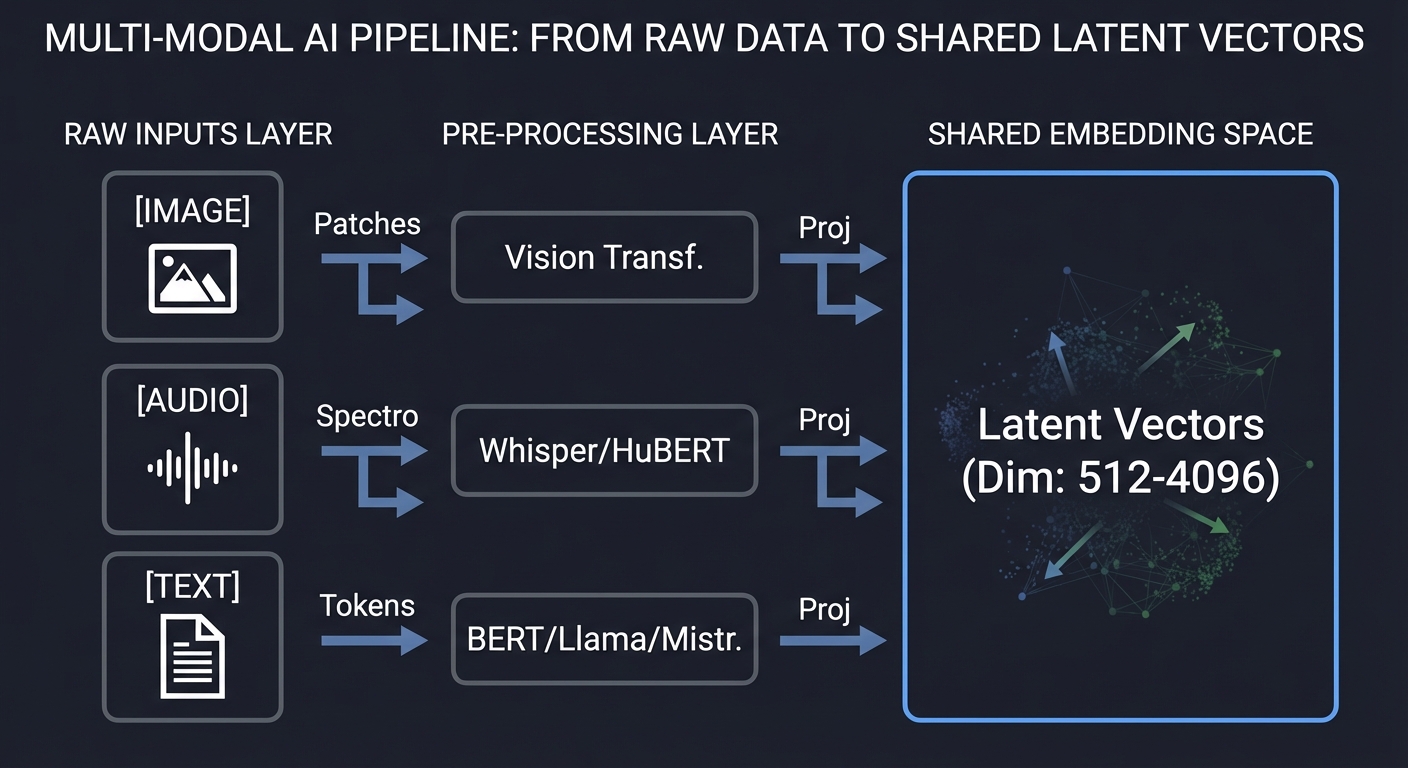
Core Concept Analysis
1. The Unified Embedding Space
The “Secret Sauce” of Multimodal AI is the projection. Every encoder (Vision, Audio, Text) produces a vector in its own high-dimensional space. A “Projection Layer” (usually a simple linear layer or MLP) maps these disparate vectors into a common dimension (e.g., 1024) where they can be compared using vector math.
Text Vector (T): [0.1, 0.8, -0.2]  ---┐
                                     ├─▶ Do they point in the same direction?
Image Vector (I): [0.12, 0.78, -0.19] ─┘   (High Cosine Similarity)
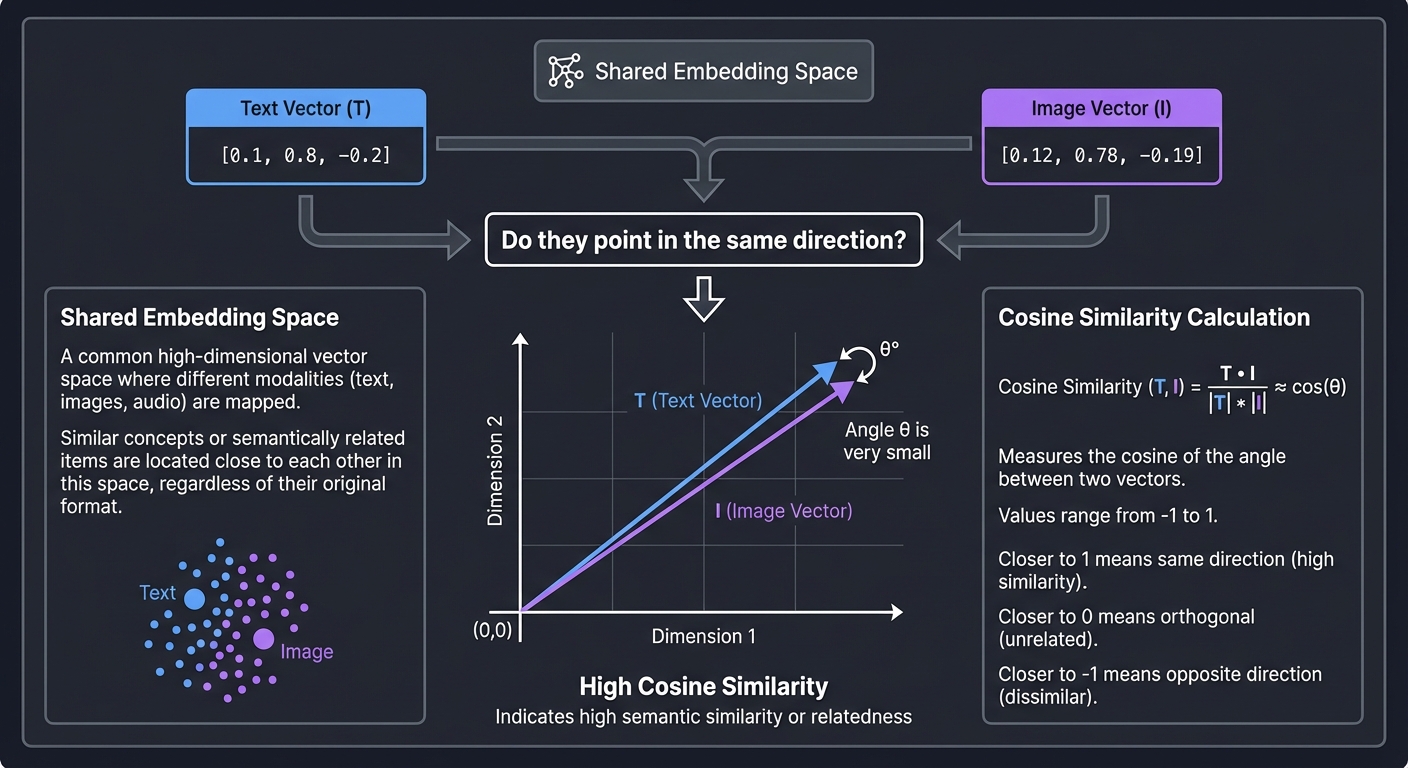
Key insight: In this space, the vector for the word “sunset” and the vector for the pixels of a sunset are neighbors. This allows us to “calculate” semantic meaning across modalities.
2. Cross-Modal Alignment (Contrastive Learning)
How do we teach the model that the word “Dog” matches a picture of a dog? We use the CLIP (Contrastive Language-Image Pre-training) approach. We take a batch of images and their corresponding captions and force the model to maximize the similarity for the correct pairs (the diagonal) and minimize it for every other pair (the distractors).
        Image Batch (I1, I2, I3)
          ┌───┐ ┌───┐ ┌───┐
          │   │ │   │ │   │
          └───┘ └───┘ └───┘
            │     │     │
            ▼     ▼     ▼
Text Batch  [I1]  [I2]  [I3]
  ┌────┐  ┌─────┬─────┬─────┐
  │ T1 │  │  +  │  -  │  -  │  (+) Match: Pull together
  ├────┤  ├─────┼─────┼─────┤
  │ T2 │  │  -  │  +  │  -  │  (-) Distractor: Push apart
  ├────┤  ├─────┼─────┼─────┤
  │ T3 │  │  -  │  -  │  +  │
  └────┘  └─────┴─────┴─────┘
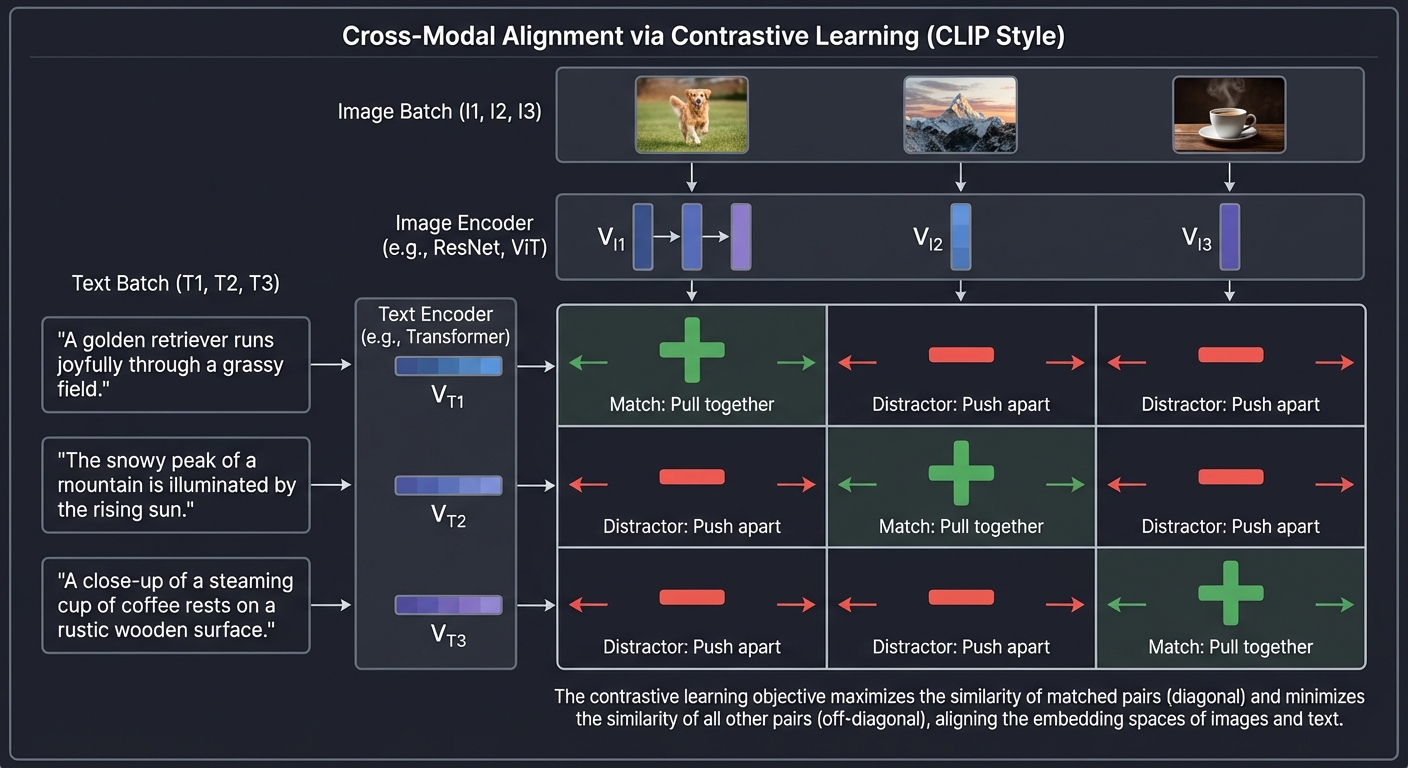
Key insight: Contrastive learning doesn’t need humans to label everything. We can just scrape 400 million images with their alt-text from the web. The “ground truth” is already there in the pairings.
3. Fusion Architectures: How Modalities “Talk”
How do you combine these vectors once they are in the same space?
| Strategy | Logic | When to use? |
|---|---|---|
| Early Fusion | Concatenate features at the start. | When modalities are highly correlated (e.g., RGB and Depth). |
| Late Fusion | Train separate models and average their scores. | When you have pre-trained experts and little data. |
| Mid-level (Cross-Attention) | Use the Transformer’s attention to let Text “look” at Image patches. | State-of-the-art VLMs (LLaVA, Gemini). |
4. Vector Quantization (VQ)
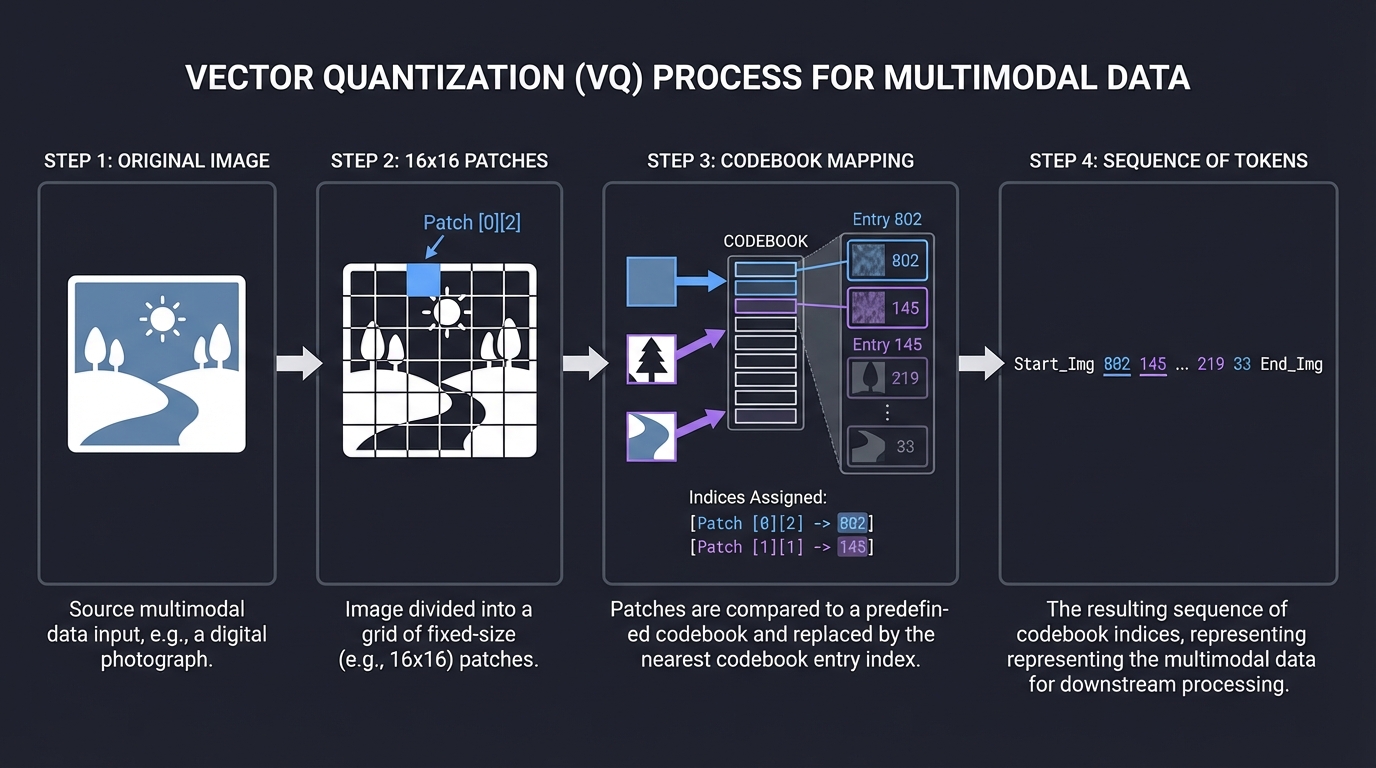
To treat an image like text, we divide it into patches and map each patch to a “Visual Word” from a codebook. This discretizes the continuous visual world into a sequence of integers that a standard Transformer can process just like a sentence.
Original Image      16x16 Patches        Codebook Mapping        Sequence of Tokens
   [  🌄  ]    -->    [P1][P2]    -->    [802][145]        -->    "Start_Img 802 145 End_Img"
                      [P3][P4]           [219][33]
Concept Summary Table
| Concept Cluster | What You Need to Internalize |
|---|---|
| Modality Projection | Mapping different dimensions (e.g., 768 to 1024) into a shared space. |
| Cosine Similarity | Using the angle between vectors to measure “semantic meaning.” |
| Contrastive Loss (InfoNCE) | The math that forces positive pairs together and negative pairs apart. |
| Cross-Attention | The mechanism where one modality’s “Query” looks at another’s “Keys.” |
| Visual Connectors | Linear layers or ResNets that bridge a frozen Vision model to an LLM. |
| Vector DBs | Why SQL isn’t enough for searching billions of 512D vectors. |
Deep Dive Reading by Concept
Multimodal Foundations & Alignment
| Concept | Book & Chapter |
|---|---|
| Mathematical Foundations of Vectors | Math for Programmers by Paul Orland — Ch. 3: “Processing Images with Vector Math” |
| Understanding Embeddings | AI Engineering by Chip Huyen — Ch. 4: “Training and Fine-Tuning” |
| CLIP & Contrastive Learning | Multimodal AI Engineering (2025) — Ch. 2: “Cross-Modal Alignment Patterns” |
| Feature Extraction | Hands-On Machine Learning by Aurélien Géron — Ch. 14: “Deep Computer Vision Using CNNs” |
Systems & Infrastructure
| Concept | Book & Chapter |
|---|---|
| Scaling Vector Search | Designing Data-Intensive Applications by Martin Kleppmann — Ch. 3: “Storage and Retrieval” |
| Efficient Inference | AI Engineering by Chip Huyen — Ch. 9: “Model Deployment” |
| Data Pipelines for MMAI | AI Engineering by Chip Huyen — Ch. 3: “Data Engineering” |
| Low-level Hardware Acceleration | Dive Into Systems by Matthews et al. — Ch. 15: “High-Performance Computing” |
Essential Reading Order
- Phase 1: The Vector Foundation (Week 1):
- Math for Programmers Ch. 3 (Vectors)
- AI Engineering Ch. 4 (Embeddings)
- Phase 2: The Alignment Era (Week 2):
- Read the CLIP Paper (OpenAI)
- Hands-On Machine Learning Ch. 16 (Attention mechanisms)
- Phase 3: Production Systems (Week 3+):
- Designing Data-Intensive Applications Ch. 3 (Indexing)
- AI Engineering Ch. 9 (Optimization)
Project List
Projects are ordered from fundamental understanding to advanced architectural implementation.
Project 1: Semantic Image Search (The CLIP Explorer)
- Main Programming Language: Python
- Alternative Programming Languages: Rust (using Candle), Go (using ONNX runtime)
- Coolness Level: Level 3: Genuinely Clever
- Business Potential: 2. Micro-SaaS / Pro Tool
- Difficulty: Level 1: Beginner (The Tinkerer)
- Knowledge Area: Multi-modal Retrieval / Embeddings
- Software or Tool: PyTorch, OpenAI CLIP, ChromaDB / FAISS
- Main Book: AI Engineering by Chip Huyen
What you’ll build: A “Google Images” for your local computer. You point it at a folder of 10,000 photos, and it allows you to search using natural language (e.g., “a cat wearing a birthday hat”) without any pre-existing tags or labels.
Why it teaches Multi-Modal AI: This project introduces the Shared Embedding Space. You’ll see that “image vectors” and “text vectors” from the same model live in the same neighborhood if they share meaning.
Real World Outcome
You’ll have a blazing fast CLI tool or a sleek Streamlit Web UI where you can search your local media library using abstract concepts. Unlike standard file search which looks at filenames, this tool “looks” at the pixels.
Example Session:
$ python search.py --index ./my_photos
Indexing 1,420 images... [████████████████████] 100%

$ python search.py --query "feeling of loneliness in a city"
Top Results:
1. IMG_882.jpg [Score: 0.84] -> (Photo of a single empty bench in Tokyo at night)
2. rain_window.png [Score: 0.79] -> (Blurry raindrops on glass with city lights)
3. subway_walking.jpg [Score: 0.72] -> (Motion blur of people in a station)

# You just searched for an EMOTION across raw pixels!
The Core Question You’re Answering
“How can two completely different data types (pixels vs. strings) be compared mathematically?”
Before you write any code, sit with this question. A string of ASCII characters and a grid of RGB values have zero overlap in their raw form. The magic lies in the projection into a hidden (latent) space. You are answering how alignment bridges the gap between human language and computer vision.
Concepts You Must Understand First
Stop and research these before coding:
- The CLIP Architecture
- What is the “Dual Encoder” design?
- Why are the Image Encoder and Text Encoder trained together?
- Book Reference: Multimodal AI Engineering Ch. 2.
- Embedding Normalization (L2)
- Why must vectors be “unit length” before calculating similarity?
- What happens to the dot product when vectors are normalized?
- Book Reference: Math for Programmers Ch. 3.
- Vector Indices (HNSW / Flat)
- Why is a linear scan (
O(n)) too slow for 1 million images? - How does a “Graph-based” index like HNSW speed up search?
- Book Reference: Designing Data-Intensive Applications Ch. 3.
- Why is a linear scan (
- Batch Processing
- Why is it 10x faster to send 32 images to the GPU at once instead of one-by-one?
- What is the “DataLoader” pattern?
Questions to Guide Your Design
- Preprocessing
- Images come in all sizes. Should you pad them with black bars or stretch them to fit the model’s 224x224 input?
- Does color matter? What happens if you convert images to grayscale?
- Persistence
- Storing 10,000 vectors (512 dimensions each) takes ~20MB. Should you use a
.jsonfile, a.npyfile, or a proper Vector Database like ChromaDB?
- Storing 10,000 vectors (512 dimensions each) takes ~20MB. Should you use a
- Handling Scale
- If the user points the tool at a 1TB external drive, how do you handle memory? Can you process images in a stream without loading them all into RAM?
Thinking Exercise
Trace the Similarity
Before coding, imagine three vectors in a 2D space:
- Text Query:
[1.0, 0.0](“A beach”) - Image A (Forest):
[0.1, 0.9] - Image B (Ocean):
[0.9, 0.2]
Questions:
- Calculate the dot product of (Text, Image A) and (Text, Image B).
- Which image is the “winner”?
- If you change the query to “Green trees” (
[0.0, 1.0]), who wins now? - This is exactly what the CLIP model does, just in 512 dimensions instead of 2!
The Interview Questions They’ll Ask
- “What is the difference between a dense vector and a sparse vector?”
- “Why do we use Cosine Similarity instead of Euclidean Distance for high-dimensional embeddings?”
- “Explain the ‘Zero-Shot’ capability of CLIP. How can it recognize a ‘Cyberpunk City’ if it was never explicitly trained on that label?”
- “How would you handle a ‘Multi-Modal Query’ (searching for an image using BOTH text and another image)?”
- “Where is the bottleneck in your system: Disk I/O, CPU Preprocessing, or GPU Inference?”
Hints in Layers
Hint 1: Start with the Encoder
Don’t write the model. Use sentence-transformers library:
from sentence_transformers import SentenceTransformer
model = SentenceTransformer('clip-ViT-B-32')
Hint 2: Efficient Indexing
Use numpy for the first 100 images. When you hit 1,000, switch to FAISS or ChromaDB.
Hint 3: The “Cold Start” Problem
The first time you run the tool, it will be slow (indexing). Use pickle or joblib to save your embeddings dictionary to disk so the second run is instant.
Hint 4: UI
Use Streamlit. It allows you to display a grid of images in 5 lines of code: st.image(image_paths, width=200).
Books That Will Help
| Topic | Book | Chapter |
|---|---|---|
| Vectors and Dot Products | Math for Programmers | Ch. 3 |
| CLIP Architecture | Multimodal AI Engineering | Ch. 2 |
| Data Loading & PyTorch | Hands-On Machine Learning | Ch. 12 |
| Similarity Search Systems | Designing Data-Intensive Applications | Ch. 3 |
| Vector Databases in Production | AI Engineering (Chip Huyen) | Ch. 6 |
Project 2: Multi-Modal Chat (Visual Question Answering)
- Main Programming Language: Python
- Alternative Programming Languages: JavaScript (Node.js with LangChain)
- Coolness Level: Level 3: Genuinely Clever
- Business Potential: 2. Micro-SaaS
- Difficulty: Level 2: Intermediate
- Knowledge Area: VLM (Vision Language Models)
- Software or Tool: LLaVA, Ollama, or HuggingFace Transformers
- Main Book: AI Engineering by Chip Huyen
What you’ll build: A chatbot that doesn’t just talk, but “sees.” You upload a photo of a receipt, and it calculates the tip. You upload a photo of your fridge, and it suggests recipes based on the ingredients it identifies.
Why it teaches Multi-Modal AI: This moves from retrieval (finding an image) to reasoning (understanding and generating based on an image). You’ll learn how visual tokens are interleaved with text tokens to create a “unified sequence” for the LLM.
Real World Outcome
You will have a local web application where you can drag-and-drop images and engage in a deep, contextual conversation about their contents. This is essentially building your own private “GPT-4o” assistant.
Example Interaction:
[User uploads photo of a broken pipe] User: “Is this a serious leak? What tools do I need?” AI: “Yes, that is a hairline crack in a PVC joint. You’ll need a pipe cutter, PVC primer, and cement. I also see a nearby electrical outlet—please turn off the breaker before starting.”
The Core Question You’re Answering
“How can a text-based brain (LLM) understand a visual world?”
You are exploring the Projection Layer. Since LLMs only speak “Tokens,” you must answer how a Vision Encoder’s output (raw features) can be mapped into the exact same vector space that the LLM’s text embeddings use.
Concepts You Must Understand First
Stop and research these before coding:
- The Visual Connector (Projection)
- What is a “linear projection layer”?
- Why do we “freeze” the LLM and the Vision Encoder but only train the connector?
- Book Reference: Multimodal AI Engineering Ch. 4.
- Image Patching
- How does a Vision Transformer (ViT) turn an image into a sequence of “Visual Words”?
- Why is an image usually represented as 256 or 576 tokens?
- Multimodal Instruction Tuning
- How do you format a prompt that contains both image and text? (e.g.,
USER: <image>\nWhat is this? ASSISTANT: ...)
- How do you format a prompt that contains both image and text? (e.g.,
- Quantization (4-bit/8-bit)
- VLMs are massive. How do you run an 8-billion parameter model on a laptop with only 8GB of VRAM?
- Book Reference: AI Engineering Ch. 9.
Questions to Guide Your Design
- Model Selection
- Should you use LLaVA (based on Vicuna/Llama) or PaliGemma (Google)?
- What is the trade-off between a 7B model and a 1.6B “Mobile” VLM?
- Inference Speed
- Images take a long time to “encode.” Can you cache the visual features if the user asks multiple questions about the same image?
- Context Management
- If one image takes 576 tokens, how many images can you fit in the chat history before the model “forgets” the beginning of the conversation?
Thinking Exercise
Interleaving Modalities
Imagine the transformer’s input as a long train of cars.
- Text:
[Hello] [world] - Image: A 2x2 grid of patches
[P1] [P2] [P3] [P4]
Task:
- Write out the sequence of tokens if the user asks “What is in this
?" - If each
Pis a 4096-dimensional vector, and each word is also 4096, why does the model treat them the same? - What happens if the text query comes before the image tokens vs after?
The Interview Questions They’ll Ask
- “What is a ‘Visual Token’ compared to a ‘Text Token’?”
- “Explain why we don’t just use a standard image captioning model and feed the text to an LLM.” (Hint: Spatial reasoning loss).
- “What is LLaVA? How does it differ from a standard CLIP + GPT-4 chain?”
- “How do you handle high-resolution images that are larger than the model’s 224x224 or 336x336 input window?”
- “What is ‘Hallucination’ in a VLM context, and how do you reduce it?”
Hints in Layers
Hint 1: Use Ollama
For the fastest start, use Ollama to run llava locally. It handles all the C++ bindings for you.
ollama run llava
Hint 2: The API
Use langchain or the ollama-python library to build the wrapper. You’ll need to encode the image as Base64 to send it to the model.
Hint 3: Pre-processing If the image is too large, the model might fail. Always resize your image to the model’s native resolution (usually 336x336 for LLaVA-1.5) before encoding.
Hint 4: UI
Use Gradio. It has a built-in “Chatbot” component that supports image uploads:
import gradio as gr
def chat(image, text): ...
gr.Interface(fn=chat, inputs=["image", "text"], outputs="text").launch()
Books That Will Help
| Topic | Book | Chapter |
|---|---|---|
| VLM Architecture Basics | Multimodal AI Engineering | Ch. 4 |
| Scaling and Quantization | AI Engineering | Ch. 9 |
| Attention Mechanisms | Hands-On Machine Learning | Ch. 16 |
| Prompt Engineering Patterns | Prompt Engineering for Generative AI | Ch. 5 |
| Vector Spaces | Math for Programmers | Ch. 4 |
Project 3: Audio-Visual Storyteller (Fusion in Action)
- Main Programming Language: Python
- Alternative Programming Languages: C++ (for real-time processing), Rust
- Coolness Level: Level 4: Hardcore Tech Flex
- Business Potential: 5. Industry Disruptor (Content Creation)
- Difficulty: Level 3: Advanced
- Knowledge Area: Cross-Modal Generation
- Software or Tool: Whisper (Audio), Stable Diffusion (Vision), GPT-4/Llama (Text)
- Main Book: The Secret Life of Programs (for understanding data streams)
What you’ll build: A system that listens to a live microphone, understands the “vibe” and keywords of what you’re saying, and generates a real-time evolving image (or “storyboard”) that matches your speech.
Why it teaches Multi-Modal AI: This is Multi-Stage Fusion. You are chaining Speech-to-Text (STT), then Text-to-Text (Summarization/Prompt Expansion), then Text-to-Image (Diffusion). You’ll understand the “latency stack” and how to maintain consistency across modalities.
Real World Outcome
A dashboard where as you speak, images fade in and out, visually representing your narrative in real-time. This can be used for live role-playing games (D&D), children’s storytelling, or visual brainstorming.
Example Session:
[00:01] Audio: "Deep in the dark forest..."
[00:02] Whisper Output: "Deep in the dark forest"
[00:03] GPT-4 expansion: "A hyper-realistic, cinematic view of a misty pine forest at twilight, ancient trees, mossy floor."
[00:05] Vision Output: (Generates misty pine trees)

[00:08] Audio: "...a small cabin glowed."
[00:10] Whisper Output: "...a small cabin glowed."
[00:11] GPT-4 expansion: "A hyper-realistic, cinematic view of a misty pine forest, a small wooden cabin in the distance with warm yellow light glowing from the window."
[00:13] Vision Output: (Updates scene with a warm light in the distance)
The Core Question You’re Answering
“How do we maintain ‘contextual continuity’ when converting between audio, text, and pixels in real-time?”
You are tackling the problem of Latency and State. You must answer how to process a continuous audio stream into discrete visual snapshots without making the user wait 30 seconds for each frame, and how to ensure the “dark forest” doesn’t suddenly become a “sunny beach” just because you paused for a breath.
Concepts You Must Understand First
Stop and research these before coding:
- Streaming Speech-to-Text (VAD)
- What is Voice Activity Detection (VAD)?
- How does a “Circular Buffer” work for processing live audio?
- Book Reference: The Secret Life of Programs Ch. 11.
- Diffusion In-painting and Img2Img
- How can you use the previous frame as a starting point for the next frame to maintain visual consistency?
- What is “Denoising Strength”?
- Prompt Engineering for Generative Models
- How do you convert conversational speech (“Uhh, then a dragon appears”) into a descriptive prompt (“Epic red dragon swooping over a forest”)?
- Async Pipelines
- Why must you run the audio listener, the summarizer, and the image generator in separate threads or processes?
Questions to Guide Your Design
- Segmenting Speech
- Should you generate a new image every 5 words, every 5 seconds, or only when the “scene description” changes significantly?
- Latency vs Quality
- Will you use a smaller, faster model (SDXL Turbo / LCM) to get 1-second generations, or a larger model (Flux) and accept a 10-second lag?
- Temporal Coherence
- If the user says “The blue dragon flies left,” how do you ensure the dragon stays blue in the next frame? (Hint: ControlNet or IP-Adapter).
Thinking Exercise
The Pipeline Lag
Trace the journey of a single word: “Dragon”
- T=0: User says “Dragon”.
- T=0.5s: Audio buffer fills.
- T=0.8s: Whisper transcribes “Dragon”.
- T=1.2s: LLM expands prompt.
- T=1.5s: Diffusion model starts.
- T=3.5s: Image finishes.
Task:
- If the user talks at 150 words per minute, how many images will be “queued” by the time the first one finishes?
- How do you handle the “backlog”? Do you skip frames or slow down the audio?
The Interview Questions They’ll Ask
- “Explain the ‘bottleneck’ in a multi-modal generation pipeline.”
- “How do you achieve temporal consistency in Diffusion models without re-training?”
- “What is the difference between a ‘Sequence-to-Sequence’ model and a ‘Chained Pipeline’?”
- “How would you implement ‘Global Context’ so the model remembers the character’s outfit from 5 minutes ago?”
- “What are the trade-offs of using local Whisper (Tiny) vs Cloud Whisper (Large) for real-time applications?”
Hints in Layers
Hint 1: Use faster-whisper
Standard Whisper is slow. Use faster-whisper with CTranslate2 for near-instant transcription on CPU.
Hint 2: SDXL Turbo
Use StableDiffusionXLPipeline with SDXL Turbo. It can generate decent images in just 1-4 steps (less than 1 second on a good GPU).
Hint 3: Use a Prompt Queue Don’t send every transcription to the image generator. Use an LLM (like Llama-3-8B) to “watch” the transcript and only output a new prompt when the scene changes.
Hint 4: UI
Use PyQt or Streamlit. Streamlit has st.empty() which allows you to replace an image in-place as soon as the new one is ready.
Books That Will Help
| Topic | Book | Chapter |
|---|---|---|
| Data Streams & Buffers | The Secret Life of Programs | Ch. 11 |
| Diffusion Models | Hands-On Machine Learning | Ch. 17 |
| Audio Processing | AI Engineering (Chip Huyen) | Ch. 3 |
| Concurrent Programming | Dive Into Systems | Ch. 14 |
| Designing AI Pipelines | Multimodal AI Engineering | Ch. 6 |
Project 4: Automated Video Deep-Search (The Frame Explorer)
- Main Programming Language: Python
- Alternative Programming Languages: C++ (with OpenCV), Rust (with ffmpeg-next)
- Coolness Level: Level 3: Genuinely Clever
- Business Potential: 3. Service & Support Model (Media Archiving)
- Difficulty: Level 2: Intermediate
- Knowledge Area: Video Processing / Temporal Analysis
- Software or Tool: ffmpeg, PyTorch, CLIP, Whisper
- Main Book: Multimodal AI Engineering
What you’ll build: A tool that “watches” a 1-hour video and indexes it so you can search for moments by text. Example: “Show me the part where the speaker talks about climate change while showing a map of the Arctic.”
Why it teaches Multi-Modal AI: Video is just a sequence of images + a sequence of audio. You’ll learn Temporal Aggregation—how to summarize multiple frames into a single concept and align them with the transcript.
Real World Outcome
You will have a search engine for video content. Instead of scrubbing through a timeline manually, you can jump to specific events based on visual or auditory descriptions.
Example Output:
$ python query_video.py --query "people cheering in a stadium"
[00:12:45] Score: 0.92 (Audio: [CHEERING] detected | Visual: Large crowd with raised arms)
[00:45:10] Score: 0.88 (Visual: Crowd waving flags)
[01:02:15] Score: 0.45 (False positive - rhythmic noise from machinery)

# Clicking the timestamp opens the video at exactly that second!
The Core Question You’re Answering
“How do we compress a continuous stream of visual/audio data into discrete searchable events?”
Before you write any code, sit with this question. Human memory doesn’t remember every pixel; it remembers “key events.” Your system must replicate this “event-based” compression. You are answering how to handle the Temporal Dimension of Multimodal AI.
Concepts You Must Understand First
Stop and research these before coding:
- Keyframe Extraction (I-frames vs P-frames)
- Why shouldn’t you process every single frame?
- How can you use
ffmpegto extract only the frames where a “scene change” occurs? - Book Reference: The Secret Life of Programs Ch. 7.
- Temporal Pooling
- If you have 5 images per second, how do you combine their vectors into one “moment” vector? (Mean pooling vs Max pooling).
- Audio-Visual Sync (Time-aligning)
- Transcripts from Whisper give you start/end times. CLIP vectors have frame indices. How do you merge these two data streams?
- Book Reference: Multimodal AI Engineering Ch. 5.
- Strided Sampling
- If a video is 2 hours long, how do you balance search accuracy vs processing time?
Questions to Guide Your Design
- Data Pipeline
- Video files are huge. How do you stream the frames through the GPU without loading the whole
.mp4into RAM?
- Video files are huge. How do you stream the frames through the GPU without loading the whole
- Multimodal Weighting
- If the user searches for “loud explosion,” should the Audio vector or the Visual vector have a higher weight in the final score?
- Storage
- For a 1-hour video, you might have 3,600 vectors. How do you store these alongside the video file for instant retrieval later?
Thinking Exercise
Event Compression
Imagine a video of a ball being thrown.
- Frame 1: Hand holding ball.
- Frame 2: Hand releasing.
- Frame 3: Ball in air.
- Frame 4: Ball hitting window.
Questions:
- If you average the vectors of all 4 frames, does the resulting vector represent “A ball breaking a window”?
- Is it better to store individual frame vectors or a single “segment” vector?
- How does the addition of the sound of glass breaking change the searchability?
The Interview Questions They’ll Ask
- “What is the computational cost of indexing 1,000 hours of video? How would you optimize it?”
- “How do you handle ‘long-range dependencies’ (e.g., finding a person who appeared at the 5-minute mark and again at the 50-minute mark)?”
- “Explain why CLIP (an image model) works for video. What are its limitations?”
- “What is a ‘Scene Change Detection’ algorithm, and why is it useful for MMAI?”
- “How would you handle a query that spans both audio and visual (e.g., ‘someone laughing during a wedding’)?”
Hints in Layers
Hint 1: Extract Frames First
Don’t use Python for video decoding. Use a subprocess to run ffmpeg:
ffmpeg -i video.mp4 -vf "select=gt(scene\,0.4)" -vsync vfr frames/%04d.jpg
This only extracts frames where the visual scene actually changes.
Hint 2: Transcribe in Parallel
Run OpenAI’s Whisper on the audio track separately. Save the result as a .json with timestamps.
Hint 3: Use a Vector DB with Metadata
Store each frame’s embedding in ChromaDB. In the metadata, include the timestamp and the closest_transcript_text.
Hint 4: The Search UI
Use cv2.imshow or Streamlit to show the matching frame. If you use Streamlit, use the start_time parameter in the video player.
Books That Will Help
| Topic | Book | Chapter |
|---|---|---|
| Video Compression & Formats | The Secret Life of Programs | Ch. 7 |
| Multimodal Video Analysis | Multimodal AI Engineering | Ch. 5 |
| Vector Retrieval | Designing Data-Intensive Applications | Ch. 3 |
| Python Media Processing | Hands-On Machine Learning | Ch. 14 |
| Hardware Accelerated Video | Dive Into Systems | Ch. 15 |
Project 5: Multimodal Code Explainer (UI -> Logic Bridge)
- Main Programming Language: Python
- Alternative Programming Languages: TypeScript (for VS Code Extension)
- Coolness Level: Level 4: Hardcore Tech Flex
- Business Potential: 2. Micro-SaaS (Developer Tools)
- Difficulty: Level 3: Advanced
- Knowledge Area: Vision + Code Models
- Software or Tool: GPT-4o or Claude 3.5 Sonnet, Playwright/Puppeteer
- Main Book: Code: The Hidden Language of Computer Hardware and Software
What you’ll build: A tool where you provide a screenshot of a website and its source code. The AI then explains exactly which line of code is responsible for which visual element on the screen.
Why it teaches Multi-Modal AI: This is Structured Multi-Modal Alignment. You are mapping a 2D visual layout to a 1D text structure (code). It requires the model to understand the spatial meaning of CSS/HTML.
Real World Outcome
A VS Code extension or a standalone web tool where you can upload a screenshot of a UI component. The tool will highlight the exact CSS class or React component in your codebase that renders that UI.
Example Session:
[User uploads screenshot of a “Buy Now” button] AI: “That button is defined in
src/components/Button.tsxon line 42. It uses thebtn-primaryclass, which has a background color of#007bffdefined inglobals.css.”
The Core Question You’re Answering
“How does a model bridge the gap between abstract code and visual reality?”
You are exploring Spatial Reasoning. You must answer how a model can ‘read’ an image to find coordinates and then ‘search’ code to find matching logic. This is the foundation of AI-driven front-end development and automated UI testing.
Concepts You Must Understand First
Stop and research these before coding:
- DOM to Image Mapping
- How can you use Playwright to get the exact bounding box (x, y, width, height) of every element on a page?
- Resource: Playwright
boundingBox()API.
- Visual Grounding
- How do modern VLMs (like Claude 3.5) represent coordinates? (Usually as percentages 0-1000).
- Book Reference: Multimodal AI Engineering Ch. 6.
- OCR and Layout Analysis
- How can you combine the text found in the image with the text found in the code to improve accuracy?
- Tree-Sitter / AST
- How can you parse code into a “Tree” so the AI can reason about components rather than just raw lines of text?
- Book Reference: Compilers: Principles and Practice.
Questions to Guide Your Design
- Input Representation
- Should you send the whole screenshot, or “crop” the image into small segments for better resolution?
- Context Management
- If a React project has 500 files, which ones do you send to the AI? How do you use “RAG for Code” to find the relevant snippets?
- Coordinate Systems
- Code doesn’t have coordinates. How do you “annotate” the image with IDs that match the code (e.g., drawing red boxes with numbers on the screenshot before sending it to the AI)?
Thinking Exercise
Mapping the 2D to 1D
Imagine a simple HTML file:
<div style="padding: 20px;">
  <button>Click Me</button>
</div>
- In the browser, this button appears at
x: 20, y: 20. - In the code, it’s at
line 2.
Task:
- If you change padding to
50px, the button moves tox: 50, y: 50. - How would the AI know that the
paddingline in the code is what caused the movement in the image? - What happens if there are TWO identical buttons? How does the AI distinguish between them?
The Interview Questions They’ll Ask
- “What is ‘Visual Grounding’ and how does it differ from ‘Image Captioning’?”
- “How do you handle ‘Dynamic Content’ (e.g., a button that only appears after a user clicks something)?”
- “Explain the ‘Hallucination’ risk when an AI maps UI to code. How do you verify its answer?”
- “Why is HTML/CSS a particularly difficult ‘language’ for spatial reasoning compared to something like SVG?”
- “How would you optimize this for a codebase with 1 million lines of code?”
Hints in Layers
Hint 1: Use Playwright
Use Playwright to take the screenshot and simultaneously export a labels.json containing the coordinates of every <a>, <button>, and <input>.
Hint 2: Visual Prompting Don’t just send the raw image. Draw numbers on each element in the image (like a heatmap) so the AI can say “Button #4 matches Line 12.”
Hint 3: Code Chunking Only send the CSS and the HTML/JSX. Skip the business logic (APIs/State) to save tokens.
Hint 4: System Prompt Give the AI a role: “You are an expert Frontend Engineer. Your task is to map visual elements to their source code implementation.”
Books That Will Help
| Topic | Book | Chapter |
|---|---|---|
| Hardware/Software interface | Code (Petzold) | Ch. 20 (Graphic Displays) |
| Layout Engines | Learn Browser Internals | Ch. 4 (Rendering) |
| Multimodal Prompting | Multimodal AI Engineering | Ch. 6 |
| Parsing Code | Writing a C Compiler (Sandler) | Ch. 1 (Lexing/Parsing) |
| Web Automation | DevOps for the Desperate | Ch. 5 |
Project 6: Unified Multi-Modal Tokenizer (The Byte-Level Master)
- Main Programming Language: Python / C++
- Alternative Programming Languages: Rust
- Coolness Level: Level 5: Pure Magic
- Business Potential: 1. Resume Gold / VC-Backable
- Difficulty: Level 4: Expert
- Knowledge Area: Tokenization / Architecture
- Software or Tool: Tiktoken (base), NumPy, Protobuf
- Main Book: Low-Level Programming by Igor Zhirkov
What you’ll build: A custom tokenizer that can take an image, an audio clip, and a text string, and convert them all into a single, unified sequence of integers (tokens) from a shared vocabulary. This is the architectural foundation of models like Gemini and Chameleon.
Why it teaches Multi-Modal AI: This is the “Holy Grail” of AI engineering. You move away from having separate “encoders” and move toward a Unified Modality approach. You’ll learn about Vector Quantization (VQ)—turning continuous signals into discrete “visual words” or “audio words.”
Real World Outcome
You will have a single binary file (a tokenizer) that can serialize a scene (Video + Audio + Text) into a stream of numbers that looks exactly like a standard text document to a transformer.
Example Input Data Structure:
{
  "sequence": [102, 44, 8001, 8005, 9500, 31],
  "meanings": ["The", "car", "[VIS_WHEEL]", "[VIS_ROAD]", "[AUD_ENGINE_IDLE]", "."]
}
The Core Question You’re Answering
“How do we bridge the gap between continuous signals (sound/light) and discrete logic (text)?”
Before you write any code, sit with this question. Transformers are discrete—they process tokens. The world is continuous. You are answering how to discretize the universe without losing its essence.
Concepts You Must Understand First
Stop and research these before coding:
- Vector Quantization (VQ-VAE)
- What is a “Codebook”?
- How do you map a high-dimensional vector to the index of the nearest vector in the codebook?
- Book Reference: Hands-On Machine Learning Ch. 17.
- Byte-Pair Encoding (BPE) Extension
- How do you reserve “special ranges” in a vocabulary for different modalities? (e.g., 0-32k for text, 32k-34k for visual).
- Book Reference: Natural Language Processing with Transformers Ch. 2.
- Bit-depth and Sampling
- How many bits are needed to represent a “visual word” vs a “text word”?
- Book Reference: The Secret Life of Programs Ch. 1.
- Protobuf and Binary Serialization
- When you have a billion tokens, JSON is too slow. How do you store mixed-modality sequences efficiently?
- Book Reference: Low-Level Programming Ch. 1.
Questions to Guide Your Design
- Vocabulary Distribution
- If you have a 100k token vocabulary, how many slots should you give to “visual patches” vs “text characters”?
- What happens if the model sees a visual token but the context is text?
- Quantization Precision
- Does a 16x16 patch of an image really need a 1024-dimensional vector? Can you compress it to 8-bit integers without the image becoming “garbage”?
- Interleaving Logic
- How do you tell the transformer that the next 256 tokens are pixels and not words? Do you use “Start-of-Image” and “End-of-Image” tokens?
Thinking Exercise
The Unified Dictionary
Imagine you are creating a language for a robot.
- It has 10 words for “Objects” (Dog, Cat, etc.)
- It has 10 “Visual IDs” for colors.
- It has 10 “Audio IDs” for pitch.
Task:
- If the robot sees a Red Dog barking at a High Pitch, write out the sequence of IDs.
- Now, imagine the robot wants to say “I saw a Red Dog.”
- How can the robot’s brain tell the difference between the concept of Red and the visual token of Red?
- This is why we need a Unified Embedding Space behind the tokenizer.
The Interview Questions They’ll Ask
- “What is Vector Quantization and why is it essential for multimodal LLMs?”
- “How does the ‘straight-through estimator’ work in VQ-VAE training?”
- “Why are unified tokenizers more efficient for the KV-cache than separate encoders?”
- “How do you handle different ‘clock rates’ for audio (100 tokens/sec) and video (1 token/sec)?”
- “If I want to add a NEW modality (e.g., Temperature), how would you update the tokenizer?”
Hints in Layers
Hint 1: Use a Pre-trained Codebook
Don’t train the VQ-VAE from scratch (it’s hard!). Download the codebook from the VQGAN or DALL-E repository.
Hint 2: Range-based Vocab Define your vocabulary constants clearly:
TEXT_RANGE = range(0, 32000)
IMAGE_RANGE = range(32000, 32000 + 1024)
AUDIO_RANGE = range(33024, 33024 + 512)
Hint 3: Serialization
Use the struct module in Python or serde in Rust to pack these IDs into a compact binary format. A 4-byte uint32 is much smaller than a string "32001".
Hint 4: Testing
Write a “Round Trip” test: Data -> Tokens -> Reconstruction -> Data. If the reconstructed image looks like the original (even if blurry), your tokenizer works.
Books That Will Help
| Topic | Book | Chapter |
|---|---|---|
| Binary Representation | The Secret Life of Programs | Ch. 1 |
| VQ-VAE & Discretization | Hands-On Machine Learning | Ch. 17 |
| Low-level Data Structures | Low-Level Programming | Ch. 1 |
| High-Performance Serialization | Designing Data-Intensive Applications | Ch. 4 |
| Architecture of Unified Models | Multimodal AI Engineering | Ch. 8 |
Project 7: Contrastive Learner from Scratch (Mini-CLIP)
- Main Programming Language: Python (PyTorch/JAX)
- Alternative Programming Languages: Rust (using Burn)
- Coolness Level: Level 4: Hardcore Tech Flex
- Business Potential: 1. Resume Gold
- Difficulty: Level 4: Expert
- Knowledge Area: Contrastive Learning / Training Loops
- Software or Tool: PyTorch, Torchvision, Weights & Biases
- Main Book: Math for Programmers by Paul Orland
What you’ll build: A training pipeline that takes a small dataset (like Flickr8k or COCO) and trains a miniature CLIP model from scratch. You’ll write the loss function, the alignment logic, and the evaluation suite.
Why it teaches Multi-Modal AI: You stop being a “user” of models and become a “builder.” You will grapple with the Contrastive Loss (InfoNCE), which is the mathematical glue of the entire field.
Real World Outcome
A training log (using Weights & Biases) showing the “Diagonal Convergence”—where the model slowly learns to associate images with their correct captions. You’ll also have a model checkpoint that can perform Zero-Shot classification on a held-out set of images.
Example Log Output:
Epoch 5/50: Loss 4.2, Top-1 Acc: 12%
Epoch 25/50: Loss 1.8, Top-1 Acc: 45%
Epoch 50/50: Loss 0.9, Top-1 Acc: 78%

Validation:
- Query: "A photo of a sunset" -> Top Match: image_092.jpg (Correct)
- Query: "A person riding a bike" -> Top Match: image_114.jpg (Correct)
The Core Question You’re Answering
“How do we teach a machine to ‘agree’ that two completely different bit-streams (light and text) represent the same concept?”
You are implementing the math of Alignment. You must answer how to create a loss function that doesn’t just minimize error, but maximizes relationship across a batch of data.
Concepts You Must Understand First
Stop and research these before coding:
- InfoNCE Loss (Contrastive Cross-Entropy)
- What is the “Temperature” parameter and why is it crucial for convergence?
- How do you use Matrix Multiplication (
matmul) to calculate all pairs in a batch simultaneously? - Resource: Lilian Weng’s Blog on “Contrastive Representation Learning.”
- Symmetric Loss
- Why do we calculate loss from
Image -> TextANDText -> Image?
- Why do we calculate loss from
- Data Augmentation (Vision)
- Why must you randomly crop or flip images during training to prevent the model from overfitting to specific pixels?
- Book Reference: Hands-On Machine Learning Ch. 14.
- Linear Projections
- If your Vision model outputs 2048D and your Text model outputs 768D, how do you get them both to 512D for the comparison?
Questions to Guide Your Design
- Batch Size
- Contrastive learning loves large batches. What happens to the model’s accuracy if you use a batch size of 2 vs 1024?
- The “Cheat” Problem
- If your dataset has very similar captions (e.g., “A dog”, “A brown dog”), how will the model distinguish them?
- Evaluation
- How do you calculate “Top-1 Accuracy” and “Top-5 Accuracy” for a retrieval model?
Thinking Exercise
The Similarity Matrix
Imagine a batch of 2:
- I1: Image of a Cat
- I2: Image of a Sun
- T1: Caption “Cat”
- T2: Caption “Sun”
Task:
- Write out the 2x2 similarity matrix.
- What values should be in the diagonal (I1-T1, I2-T2)?
- What values should be in the off-diagonal (I1-T2, I2-T1)?
- If the model thinks I1 matches T2 with 90% probability, what will the loss function do?
The Interview Questions They’ll Ask
- “Why is Contrastive Learning considered ‘Self-Supervised’?”
- “Explain the ‘Straight-Through Estimator’ or why we normalize vectors before the dot product.”
- “How does CLIP achieve Zero-Shot performance on datasets it has never seen?”
- “What are ‘Hard Negatives’ and why are they important for training?”
- “If you have limited GPU memory, how can you simulate a large batch size? (Hint: Gradient Accumulation).”
Hints in Layers
Hint 1: The Backbone
Don’t write the encoders. Use ResNet-50 for vision and DistilBERT for text. They are lightweight and fast to train.
Hint 2: The Loss Function
logits = (text_embeddings @ image_embeddings.T) / temperature
labels = torch.arange(batch_size)
loss_i = F.cross_entropy(logits, labels)
loss_t = F.cross_entropy(logits.T, labels)
loss = (loss_i + loss_t) / 2
Hint 3: Weighting
Set the initial temperature to 0.07. This is the standard “magic number” from the CLIP paper.
Hint 4: Dataset
Start with Flickr8k. It’s small enough to train on a single consumer GPU in a few hours.
Books That Will Help
| Topic | Book | Chapter |
|---|---|---|
| Vector Alignment Math | Math for Programmers | Ch. 3 |
| Cross-Entropy Loss | Hands-On Machine Learning | Ch. 4 |
| Training Loops in PyTorch | Deep Learning with PyTorch | Ch. 5 |
| CLIP Philosophy | Multimodal AI Engineering | Ch. 2 |
| Data Augmentation | AI Engineering | Ch. 3 |
Project 8: Multimodal Emotion Analyzer (Audio + Vision + Text)
- Main Programming Language: Python
- Alternative Programming Languages: C++ (for edge deployment), Swift
- Coolness Level: Level 3: Genuinely Clever
- Business Potential: 3. Service & Support (Call Centers/Health)
- Difficulty: Level 3: Advanced
- Knowledge Area: Late Fusion / Sentiment Analysis
- Software or Tool: MediaPipe (Face), Librosa (Audio), BERT (Text)
- Main Book: Hands-On Machine Learning by Aurélien Géron
What you’ll build: A system that analyzes a person in a video call. It looks at their facial expression, listens to the tone of their voice, and reads the transcript of their words to determine their emotional state.
Why it teaches Multi-Modal AI: This is a classic Fusion problem. Sometimes the text is “I’m fine,” but the voice is shaky and the face is sad. You’ll learn how to weigh conflicting modalities.
Real World Outcome
A real-time dashboard that plots an “Emotion Vector” (Happy, Sad, Angry, Neutral) during a video stream. It can alert a manager in a customer support scenario if a call is becoming “High Tension.”
Example Interaction:
Visual: User is frowning (90% Sad/Angry) Audio: Voice pitch is high and loud (80% Stressed) Text: “I’ve been waiting for three hours!” (100% Angry) Fused Output: Critical Alert: High Frustration Detected
The Core Question You’re Answering
“How do we resolve conflict when different senses tell us different stories?”
You are exploring Fusion Strategies. You must answer how to combine discrete “expert” models into a single “judging” head that can decide which modality is most trustworthy at any given second.
Concepts You Must Understand First
Stop and research these before coding:
- Facial Landmark Detection
- How do you convert 478 points on a face into an “expression vector”?
- Resource: Google MediaPipe Face Mesh.
- Audio Feature Extraction (MFCCs)
- How do you capture “tone” and “emotion” from audio without looking at the words?
- Book Reference: AI Engineering Ch. 3.
- Late Fusion (Decision Fusion)
- What is the difference between averaging scores vs training a “Gating Network” to choose a winner?
- Sentiment Analysis
- How does a Transformer understand sarcasm in text?
Questions to Guide Your Design
- Temporal Alignment
- The face model runs at 30fps, but the text sentiment only updates once per sentence. How do you “sync” these different speeds in your data structure?
- Weighted Fusion
- If the user is wearing a mask (obscuring the face), how does the model know to “trust” the audio more?
- Privacy
- How can you perform this analysis without storing the raw video or audio? (Hint: Analyze features and discard raw data immediately).
Thinking Exercise
The Sarcasm Test
User says: “Oh, great. Another 20 minute wait.”
- Text Sentiment: “Great” (Positive)
- Audio Pitch: Flat, monotone (Negative/Bored)
- Facial Expression: Eye roll (Negative)
Task:
- If you use Late Fusion (Average), what is the result?
- If you use Early Fusion (Concatenate), can the model learn that “Great + Monotone = Sarcasm”?
- Why is it harder to detect sarcasm with separate models?
The Interview Questions They’ll Ask
- “Explain the trade-offs between Early, Mid, and Late fusion.”
- “How do you handle ‘missing modalities’ (e.g., the camera is turned off)?”
- “What are MFCCs and why are they used for audio classification?”
- “How do you evaluate an emotion model? What is the ‘Ground Truth’ for a feeling?”
- “How would you deploy this to run on a smartphone without draining the battery?”
Hints in Layers
Hint 1: Use Pre-trained Experts
Don’t train an emotion model from scratch. Use FER for faces, DeepFace for gender/age, and VADER or RoBERTa for text.
Hint 2: Librosa for Audio
Use librosa.feature.mfcc to get the “spectral fingerprint” of the voice.
Hint 3: The Fusion Head Create a small MLP in PyTorch that takes the outputs of your three experts and predicts the final emotion:
class FusionModel(nn.Module):
    def __init__(self):
        super().__init__()
        self.fc = nn.Linear(face_dim + audio_dim + text_dim, 4) # 4 Emotions
Hint 4: Visualization
Use OpenCV to draw the emotion label directly on the user’s forehead in the video feed.
Books That Will Help
| Topic | Book | Chapter |
|---|---|---|
| CNNs for Face Recognition | Hands-On Machine Learning | Ch. 14 |
| Audio Engineering for AI | AI Engineering | Ch. 3 |
| Sentiment Analysis with BERT | NLP with Transformers | Ch. 4 |
| Multi-Modal Fusion | Multimodal AI Engineering | Ch. 3 |
| Real-time Video Processing | Computer Vision from Scratch | Ch. 1 |
Project 9: Multimodal RAG (The Image-Aware Knowledge Base)
- Main Programming Language: Python
- Alternative Programming Languages: TypeScript (Node.js)
- Coolness Level: Level 4: Hardcore Tech Flex
- Business Potential: 4. Open Core Infrastructure
- Difficulty: Level 3: Advanced
- Knowledge Area: Retrieval Augmented Generation (RAG)
- Software or Tool: LangChain, ChromaDB, GPT-4o-mini
- Main Book: Designing Data-Intensive Applications by Martin Kleppmann
What you’ll build: A knowledge base for a complex manual (like a car repair guide or IKEA instructions) that contains text and diagrams. When a user asks a question, the system retrieves the relevant text AND the relevant diagrams to formulate an answer.
Why it teaches Multi-Modal AI: Standard RAG only searches text. You’ll learn Multi-Vector Retrieval—where a single “chunk” of knowledge has both a text embedding and an image embedding.
Real World Outcome
A specialized “AI Technician” bot or web app. When you ask “How do I fix the alternator?”, it doesn’t just give you text; it displays the specific technical diagram from the manual and points to the part you need to turn.
Example Interaction:
User: “How do I assemble the legs of this table?” AI: “According to the manual (page 4), you must use the M8 bolts. [Displays Diagram 4.2]. Note the orientation of the bracket highlighted in red.”
The Core Question You’re Answering
“How do we bridge the gap between ‘knowing’ (text) and ‘showing’ (images) in a retrieval system?”
You are exploring Multi-Vector Retrieval. You must answer how to index a document so that a text-based query can find an image-based answer, and how to present that combined information to a VLM for final reasoning.
Concepts You Must Understand First
Stop and research these before coding:
- Document Parsing (LayoutPDF)
- How do you extract images from a PDF while keeping track of which text was next to them?
- Resource:
Unstructured.ioorPyMuPDF.
- Cross-Modal Retrieval
- If a user asks “Show me the red wire,” how can you find an image if the text only says “Figure 2”? (Hint: You must embed the image itself using CLIP).
- Vector Database Metadata
- How do you link a text vector and an image vector in a database like ChromaDB so they are retrieved together?
- Book Reference: Designing Data-Intensive Applications Ch. 3.
- Re-ranking
- Why is it better to retrieve 20 chunks and then use a more expensive model to pick the best 3?
Questions to Guide Your Design
- Chunking Strategy
- Should a “chunk” be a single page, a single paragraph, or a paragraph + its nearest image?
- Query Expansion
- If the user’s query is “leaking pipe,” should you search for that text, or should you generate a visual description of a leaking pipe and search for that in the image index?
- Visual Context
- When you send the retrieved image to GPT-4o, how do you describe its relationship to the retrieved text?
Thinking Exercise
The IKEA Problem
Imagine a manual with a picture of a screw and the text “Part A”.
- A user asks: “Where does the long thin screw go?”
Task:
- If you only search text for “long thin screw,” will you find “Part A”? Probably not.
- If you search the images using CLIP for “long thin screw,” will it find the picture of Part A? Yes.
- How do you then find the text that tells the user where Part A goes?
- Draw a diagram of the pointers needed in your database to solve this.
The Interview Questions They’ll Ask
- “What is the difference between ‘Dense Retrieval’ and ‘Sparse Retrieval’?”
- “How do you handle high-resolution technical drawings in a VLM prompt?”
- “Explain the ‘Multi-Vector’ approach to RAG. Why not just caption every image and store the text?”
- “What is a ‘ColBERT’ style retriever and how could it help with multimodal data?”
- “How do you measure the ‘Accuracy’ of a multimodal RAG system?”
Hints in Layers
Hint 1: Use LangChain’s MultiVectorRetriever LangChain has a built-in class for this. It allows you to store multiple vectors (e.g., a summary, the raw text, and an image embedding) for a single document “summary.”
Hint 2: Image Captioning as a Bridge For every image in the manual, use a cheap VLM (like LLaVA) to generate a detailed description. Store this description in the text index. This allows text-to-image search.
Hint 3: PDF Processing
Use pdf2image to convert pages to images, then use Unstructured to find the bounding boxes of text vs images.
Hint 4: UI
Use Streamlit. Use st.chat_message to show the AI’s text and st.image to show the retrieved diagrams side-by-side.
Books That Will Help
| Topic | Book | Chapter |
|---|---|---|
| Storage Engines & Indexing | Designing Data-Intensive Applications | Ch. 3 |
| Vector Databases | AI Engineering | Ch. 6 |
| PDF Internals | The Secret Life of Programs | Ch. 7 |
| RAG Architecture | Prompt Engineering for Generative AI | Ch. 7 |
| Embedding Strategies | Multimodal AI Engineering | Ch. 4 |
Project 10: Medical VLM Fine-Tuning (Specialized Alignment)
- Main Programming Language: Python (PyTorch)
- Alternative Programming Languages: Julia (for high-performance medical imaging)
- Coolness Level: Level 4: Hardcore Tech Flex
- Business Potential: 3. Service & Support Model (Healthcare)
- Difficulty: Level 4: Expert
- Knowledge Area: Fine-Tuning / PEFT
- Software or Tool: LoRA/QLoRA, HuggingFace PEFT, X-Ray dataset (MIMIC-CXR)
- Main Book: AI Engineering by Chip Huyen
What you’ll build: You’ll take a general-purpose VLM (like LLaVA or PaliGemma) and fine-tune it using LoRA (Low-Rank Adaptation) on medical imagery (X-rays, MRIs) and their corresponding radiology reports.
Why it teaches Multi-Modal AI: General models are bad at niche domains. They might see an X-ray and say “This is a ribcage,” but they won’t see the “pleural effusion.” You’ll learn Domain Adaptation and Parameter-Efficient Fine-Tuning (PEFT).
Real World Outcome
A specialized medical AI assistant that can generate draft radiology reports from raw images. While not for diagnostic use without a doctor, it serves as a “Co-pilot” that highlights areas of concern.
Example Output:
Input: [Chest X-Ray Image] AI (Pre-tune): “An X-ray of a human chest with ribs and lungs.” AI (Post-tune): “Frontal view of the chest shows a 2cm nodule in the left upper lobe. Heart size is within normal limits. No evidence of pneumothorax.”
The Core Question You’re Answering
“How do we teach a generalist model to see with the eyes of a specialist?”
You are exploring Fine-Tuning. You must answer how to update a massive model’s knowledge without destroying its ability to communicate, and how to handle data where “accuracy” is a matter of life and death.
Concepts You Must Understand First
Stop and research these before coding:
- LoRA (Low-Rank Adaptation)
- Why do we only train small “adapter” matrices instead of the whole model?
- What are $A$ and $B$ matrices in the context of a linear layer?
- Resource: “LoRA: Low-Rank Adaptation of Large Language Models” paper.
- Medical Imaging Formats (DICOM)
- How is a medical image different from a
.jpg? (Hint: Bit-depth and metadata).
- How is a medical image different from a
- Catastrophic Forgetting
- How do you ensure the model doesn’t “forget” how to format a sentence while it’s learning to recognize pneumonia?
- Instruction Dataset Formatting
- How do you convert a raw spreadsheet of “Image + Report” into a “User/Assistant” conversation format?
Questions to Guide Your Design
- Frozen vs Tunable
- Should you fine-tune the Vision Encoder, the LLM, or both? (Hint: Usually just the LLM and the Connector).
- Evaluation Metrics
- How do you measure success? (BLEU/ROUGE for text similarity, or domain-specific F1 scores for finding pathologies?).
- Data Bias
- If your training set only has images of “Healthy” lungs, what will the model say when it sees a “Sick” lung?
Thinking Exercise
The Adapter Math
Imagine a weight matrix $W$ of size $4096 \times 4096$.
- Training this requires updating 16 million parameters.
- With LoRA, you use two matrices $A$ ($4096 \times 8$) and $B$ ($8 \times 4096$).
Task:
- Calculate how many parameters are in $A$ and $B$ combined.
- What is the compression ratio compared to $W$?
- Why does this allow you to fine-tune a model on a single consumer GPU?
The Interview Questions They’ll Ask
- “What is PEFT and why is it the industry standard for LLM adaptation?”
- “Explain the difference between Fine-Tuning and RAG. When would you use each?”
- “How do you handle ‘Imbalanced Datasets’ in medical AI (where 99% of images are healthy)?”
- “What is QLoRA? How does 4-bit quantization affect fine-tuning quality?”
- “What are the ethical implications of using a VLM for medical triage?”
Hints in Layers
Hint 1: Use HuggingFace TRL
The SFTTrainer (Supervised Fine-Tuning Trainer) from the trl library handles most of the boilerplate for LoRA and multi-modal data.
Hint 2: Quantization
Use bitsandbytes to load the base model in 4-bit. This reduces the VRAM requirement from 40GB to ~10GB.
Hint 3: Data Preparation
Use the MIMIC-CXR or ChestX-ray14 dataset from Kaggle. Make sure to preprocess the reports to remove identifying information (PII).
Hint 4: Monitoring
Use Weights & Biases to track the “Validation Loss.” If it starts going up while “Training Loss” goes down, you are overfitting!
Books That Will Help
| Topic | Book | Chapter |
|---|---|---|
| Fine-Tuning Theory | AI Engineering | Ch. 4 |
| Parameter-Efficient Tuning | Multimodal AI Engineering | Ch. 7 |
| Deep Learning for Medicine | Deep Learning with PyTorch | Ch. 9 |
| Quantization & Performance | AI Engineering | Ch. 9 |
| Medical Ethics in AI | Foundations of Information Security | Ch. 12 |
Project 11: Billion-Scale Multimodal Retrieval (Quantization Master)
- Main Programming Language: C++ / Rust (for the engine) / Python (for the model)
- Alternative Programming Languages: CUDA (for GPU acceleration)
- Coolness Level: Level 5: Pure Magic
- Business Potential: 4. Open Core Infrastructure
- Difficulty: Level 4: Expert
- Knowledge Area: Performance / Systems Engineering
- Software or Tool: FAISS (Product Quantization), SIMD instructions, gRPC
- Main Book: Dive Into Systems by Matthews et al.
What you’ll build: A high-performance retrieval engine designed to handle 100 million to 1 billion images. You’ll implement Product Quantization (PQ)—which compresses 512-float vectors into tiny 8-byte codes—enabling a search engine that fits in RAM.
Why it teaches Multi-Modal AI: You’ll understand the Physics of Large-Scale AI. Multi-modal vectors are massive. Without quantization, you cannot scale. This project bridges AI with High-Performance Computing (HPC).
Real World Outcome
A lightning-fast search API that can find the most semantically similar images in a dataset of 100 million items in under 50ms. You will be able to search for “a person playing a guitar in the style of Picasso” across a planet-scale archive.
Example Benchmark:
$ ./search_engine --query "sunset over martian mountains"
Loaded 100,000,000 vectors in 12GB RAM (PQ-8 compression)
Search time: 14.2ms
Results:
1. IMG_09231.jpg (Score: 0.91)
2. IMG_88231.jpg (Score: 0.88)
The Core Question You’re Answering
“How do we search for meaning at the speed of light without going bankrupt on RAM costs?”
You are exploring Vector Compression. You must answer how to preserve the “essence” of a 2048-bit vector while throwing away 99% of its raw data, and how to use CPU/GPU hardware to compare billions of these compressed codes per second.
Concepts You Must Understand First
Stop and research these before coding:
- Product Quantization (PQ)
- How do you “slice” a large vector into sub-vectors and quantize each sub-vector independently?
- What is an “Asymmetric Distance” table?
- Book Reference: AI Engineering Ch. 6.
- SIMD (Single Instruction, Multiple Data)
- How can the
AVX2orNEONinstructions in your CPU calculate 8 distances in a single clock cycle? - Book Reference: Dive Into Systems Ch. 15.
- How can the
- Inverted File Index (IVF)
- Why do we use K-Means to cluster vectors into “Voronoi cells” before searching?
- How does this allow us to only search 1% of the database for any given query?
- mmap and Disk-based Indices
- How do you handle a dataset that is 1TB in size? (Hint: Memory-mapped files).
- Book Reference: The Secret Life of Programs Ch. 5.
Questions to Guide Your Design
- Compression Trade-offs
- If you compress a vector from 2048 bytes to 8 bytes, how much “Recall@10” (accuracy) do you lose? Is it 1% or 50%?
- Memory Alignment
- Why does the layout of your data in RAM (Struct of Arrays vs Array of Structs) change the search speed by 4x?
- Indexing Speed
- It takes a long time to cluster 100 million vectors. How do you parallelize the indexing process using all CPU cores?
Thinking Exercise
The PQ Slicing
Imagine a vector of 4 numbers: [0.1, 0.9, -0.4, 0.5]
- Slice 1:
[0.1, 0.9] - Slice 2:
[-0.4, 0.5]
Task:
- If you have a codebook for 2D vectors, you can replace Slice 1 with the ID of its nearest neighbor (e.g.,
42). - Now your vector is just
[42, 107]. - If each ID is 1 byte, you’ve compressed 4 floats (16 bytes) into 2 bytes.
- How do you calculate the distance between a new query and this
[42, 107]without decompressing it?
The Interview Questions They’ll Ask
- “What is the ‘Curse of Dimensionality’ and how does it affect nearest neighbor search?”
- “Explain the difference between HNSW (graph-based) and IVF-PQ (cluster-based) indexing.”
- “How would you implement a ‘Vector Search’ engine using only standard SQL?” (Hint: You can’t, easily).
- “What is SIMD and how does it benefit machine learning inference?”
- “If you have 1 billion vectors, how do you handle ‘Re-ranking’ of the top 100 candidates?”
Hints in Layers
Hint 1: Start with FAISS
Use the faiss library (from Meta) to understand the high-level API. Then try to implement the IndexFlatL2 in pure C++.
Hint 2: K-Means
You need to implement K-Means to build the IVF centroids. Use OpenMP to parallelize the distance calculations during training.
Hint 3: Distance Tables Pre-calculate the distance between your query and every vector in your codebook. Then, searching the database becomes a simple “Look-up and Add” operation.
Hint 4: Profiling
Use perf (Linux) or Instruments (macOS) to find the bottleneck. 90% of the time will be spent in the inner loop of the distance calculation.
Books That Will Help
| Topic | Book | Chapter |
|---|---|---|
| Systems Optimization | Dive Into Systems | Ch. 15 |
| Vector Search Algorithms | AI Engineering | Ch. 6 |
| Parallel Programming | Modern Parallel Programming with C++ | Ch. 2 |
| Data Structures for Scale | Designing Data-Intensive Applications | Ch. 3 |
| Large Scale Retrieval | Multimodal AI Engineering | Ch. 8 |
Project 12: Multimodal World Model (Robotic Reasoning)
- Main Programming Language: Python (PyTorch)
- Alternative Programming Languages: JAX
- Coolness Level: Level 5: Pure Magic
- Business Potential: 5. Industry Disruptor (Robotics/Self-Driving)
- Difficulty: Level 5: Master
- Knowledge Area: Sequence Modeling / World Models
- Software or Tool: JAX, MuJoCo (Physics Sim), Vision Transformers
- Main Book: Algorithms by Sedgewick (for complex graph/state logic)
What you’ll build: A “World Model” that takes a sequence of images (video) and actions (text/commands) and predicts the next frame and the next state. This is the core logic behind autonomous agents and robots that “understand” physics.
Why it teaches Multi-Modal AI: This is Temporal-Visual-Action Fusion. You are predicting the future based on multi-modal history. You’ll understand how models like Sora or Tesla FSD reason about the physical world.
Real World Outcome
A simulation where an AI “dreams” of what will happen next. You give it a picture of a ball on a table and the command “push,” and it generates a video sequence of the ball rolling and falling off the edge.
The Core Question You’re Answering
“How can a model learn the ‘laws of physics’ through observation alone?”
You are exploring Predictive Coding. You must answer how to represent the state of the world so that a model can forecast future visual frames based on abstract actions. This is the path to AGI (Artificial General Intelligence).
Concepts You Must Understand First
Stop and research these before coding:
- State-Space Models (SSM)
- What is a “Latent State”?
- How does a model keep track of things it can’t see (e.g., an object behind a wall)?
- Video Generation (Diffusion/Auto-regressive)
- How do you ensure “Temporal Consistency” so that objects don’t disappear between frames?
- Action-Conditioning
- How do you “inject” an action vector into a transformer sequence?
- Variational Auto-Encoders (VAE)
- Why do we need a “probabilistic” representation of the world? (Hint: The future is uncertain).
Questions to Guide Your Design
- Observation Space
- Should the model see the raw pixels, or should it see a “compressed latent” from a VQ-VAE? (Hint: Always use latents for speed).
- Horizon
- How many frames into the future can the model predict before the “dream” becomes total noise?
- Multi-Modality
- How do you incorporate sound into the world model? (e.g., predicting the sound of the ball hitting the floor).
Thinking Exercise
The Occlusion Problem
A car drives behind a tree.
- Frame 1: Car visible.
- Frame 2: Car half-hidden.
- Frame 3: Car gone (behind tree).
- Frame 4: ???
Task:
- If a model only looks at the “current” frame, what will it predict for Frame 4?
- If the model has a “Memory” (Hidden State), how does it know the car should reappear on the other side?
- Draw the flow of information from Frame 1 to Frame 4.
The Interview Questions They’ll Ask
- “What is a ‘World Model’ and how does it differ from a ‘Policy Network’?”
- “Explain the ‘JEPA’ (Joint-Embedding Predictive Architecture) approach by Yann LeCun.”
- “Why are Auto-regressive models (like GPT) difficult to use for high-resolution video prediction?”
- “How do you handle ‘Epistemic Uncertainty’ in a world model?”
- “What role does ‘Reinforcement Learning’ play in training a world model?”
Hints in Layers
Hint 1: Use MuJoCo
Use the Gymnasium library with MuJoCo to get a steady stream of “Image + Action + Reward” data. It’s much easier than using real-world video.
Hint 2: The Architecture
Use a “Recurrent State-Space Model” (RSSM). It has a transition model that predicts State_t -> State_t+1 and a decoder that predicts State_t -> Image_t.
Hint 3: Training Train the model to “reconstruct” the next frame. The loss is simply the difference between the predicted image and the actual image from the simulator.
Hint 4: Dreaming Once trained, let the model run in “Open Loop.” Feed its own predictions back as the next input and see how long it can “hallucinate” a consistent physics simulation.
Books That Will Help
| Topic | Book | Chapter |
|---|---|---|
| Graph & State Logic | Algorithms (Sedgewick) | Ch. 4 |
| Sequence Modeling | NLP with Transformers | Ch. 6 |
| Variational Inference | Hands-On Machine Learning | Ch. 17 |
| Control Theory | Feedback Systems (Åström) | Ch. 1 |
| AGI Foundations | Multimodal AI Engineering | Ch. 12 |
Project Comparison Table
| Project | Difficulty | Time | Depth of Understanding | Fun Factor |
|---|---|---|---|---|
| 1. Semantic Search | Beginner | Weekend | Embedding Basics | 🤩🤩🤩 |
| 2. Visual Chat | Intermediate | 1 Week | VLM Architectures | 🤩🤩🤩🤩 |
| 4. Video Search | Intermediate | 2 Weeks | Temporal Fusion | 🤩🤩🤩 |
| 6. Unified Tokenizer | Expert | 3 Weeks+ | Data representation | 🤩🤩🤩🤩 |
| 7. CLIP from Scratch | Expert | 1 Month | Training/Math | 🤩🤩🤩🤩🤩 |
| 9. Multimodal RAG | Advanced | 2 Weeks | Retrieval Systems | 🤩🤩🤩🤩 |
| 12. World Model | Master | 2 Months+ | AGI Foundations | 🤩🤩🤩🤩🤩 |
Recommendation
- If you are a Backend Engineer: Start with Project 1 (Semantic Search) and Project 9 (Multimodal RAG). This focuses on retrieval and infrastructure.
- If you are a Machine Learning Scientist: Jump to Project 7 (CLIP from scratch). Understanding the loss function is your priority.
- If you want to build a startup: Focus on Project 2 (Visual Chat) and Project 5 (Code Explainer). These have the highest immediate product-market fit.
Final Overall Project: The “Omni-Assistant”
What you’ll build: A unified system that takes a live video stream, audio stream, and a codebase as input. It functions as a “Universal Teacher.” You can show it a math problem on a piece of paper, ask a question out loud, and it will draw the solution on a virtual whiteboard while explaining the code behind the calculation.
This project integrates:
- Real-time VLM for scene understanding.
- Unified Tokenization for low-latency processing.
- Cross-modal RAG to look up relevant educational content.
- Fusion Head to synchronize audio explanation with visual drawing.
Summary
This learning path covers Multi-Modal AI Systems Engineering through 12 hands-on projects.
| # | Project Name | Main Language | Difficulty | Time Estimate |
|---|---|---|---|---|
| 1 | Semantic Image Search | Python | Beginner | Weekend |
| 2 | Visual Question Answering | Python | Intermediate | 1 Week |
| 3 | Audio-Visual Storyteller | Python | Advanced | 2 Weeks |
| 4 | Automated Video Deep-Search | Python | Intermediate | 2 Weeks |
| 5 | Multimodal Code Explainer | Python | Advanced | 2 Weeks |
| 6 | Unified Multi-Modal Tokenizer | Python/C++ | Expert | 1 Month |
| 7 | CLIP from Scratch | Python | Expert | 1 Month |
| 8 | Multimodal Emotion Analyzer | Python | Advanced | 1 Week |
| 9 | Multimodal RAG | Python | Advanced | 2 Weeks |
| 10 | Medical VLM Fine-Tuning | Python | Expert | 2 Weeks |
| 11 | Billion-Scale Retrieval | Rust/C++ | Expert | 1 Month |
| 12 | Multimodal World Model | Python | Master | 2 Months+ |
Recommended Learning Path
For beginners: Start with projects #1, #2, and #4. For intermediate/engineers: Focus on #5, #8, and #9. For researchers/systems masters: Tackle #6, #7, #11, and #12.
Expected Outcomes
After completing these projects, you will:
- Understand the binary and mathematical alignment of different data types.
- Be able to fine-tune massive VLMs for specific industrial use cases.
- Build high-performance retrieval systems for billion-scale multimodal datasets.
- Master the design of unified tokenization and quantization strategies.
- Design world-models that reason across time, space, and sound.
You’ll have built 12 working projects that demonstrate deep understanding of Multi-Modal AI from first principles.
How to update this file
Since this roadmap is extensive, you should spawn multiple parallel sub-agents to update specific project sections. Each sub-agent should be responsible for a cluster of projects (e.g., #3-#5, #7-#9, #10-#12) to ensure the detailed sections (Real World Outcome, Interview Questions, etc.) are consistently high-quality.
Books for the Multimodal Journey
| Topic | Book | Chapter/Role |
|---|---|---|
| Practical Alignment | Multimodal AI Engineering (2025) | Core Technical Guide |
| AI Systems Design | AI Engineering (Chip Huyen) | Systems & Evaluation |
| Deep Learning Basics | Hands-On Machine Learning | CNNs & Transformers |
| Vector Math | Math for Programmers | Linear Algebra |
| Storage & Scale | Designing Data-Intensive Applications | Vector Search |
| Bit-level Mastery | Low-Level Programming | Serialization |
| Data Encoding | The Secret Life of Programs | Encoding Foundations |
“The eyes are useless when the mind is blind. Multimodal AI is the quest to give the mind its eyes.”