Learn Kiro CLI: From Zero to Agentic Terminal Master
Goal: Deeply understand Kiro CLI—the next-generation agentic terminal environment from AWS. You will master context management, custom agent creation, MCP integrations, type-safe automation hooks, headless CI/CD pipelines, and complex multi-agent workflows. By the end, you will transform your terminal from a passive command executor into an intelligent development partner that understands your codebase, enforces your standards, and automates your workflows with minimal human intervention.
Why Kiro CLI Matters
In 1972, Dennis Ritchie gave us C and direct memory access. In 2025, AWS gives us Kiro CLI and direct cognitive access. The terminal has remained fundamentally unchanged for decades: you type a command, it returns output. This synchronous, transactional model places the entire cognitive load on the operator.
Kiro CLI represents a paradigm shift—transforming the terminal from a passive execution environment into an active, intelligent workspace. It’s not a text-completion engine; it’s a comprehensive agentic runtime that integrates:
- Deep Context Awareness: Unlike tools that only see the current command, Kiro maintains persistent understanding of project structure, file contents, git history, and user intent across long sessions
- Autonomous Agency: Kiro spawns subagents, breaks down complex directives, researches codebases, and executes changes with minimal human intervention
- Human Steering: Teams inject persistent architectural guidelines via markdown files that constrain and guide AI output
The Evolution from Amazon Q to Kiro
The transition from Amazon Q Developer CLI to Kiro CLI marks a significant evolution:
| Aspect | Amazon Q CLI | Kiro CLI |
|---|---|---|
| Licensing | Apache License | Proprietary (Free tier available) |
| Focus | AI Assistant | AI Partner/Agent |
| Features | Basic chat, AWS integration | Subagents, Powers, Hooks, MCP |
| Authentication | Builder ID, IAM | Builder ID, IAM, Device Flow |
What This Knowledge Unlocks
After mastering Kiro CLI, you will be able to:
- Automate complex development workflows without writing shell scripts
- Create specialized AI agents for security auditing, code review, and deployment
- Build type-safe automation hooks that enforce code quality at commit time
- Integrate external tools (databases, APIs, GitHub) via MCP
- Run headless AI pipelines in CI/CD environments
- Share configurations across teams for consistent development practices
Core Architecture: The Three Pillars
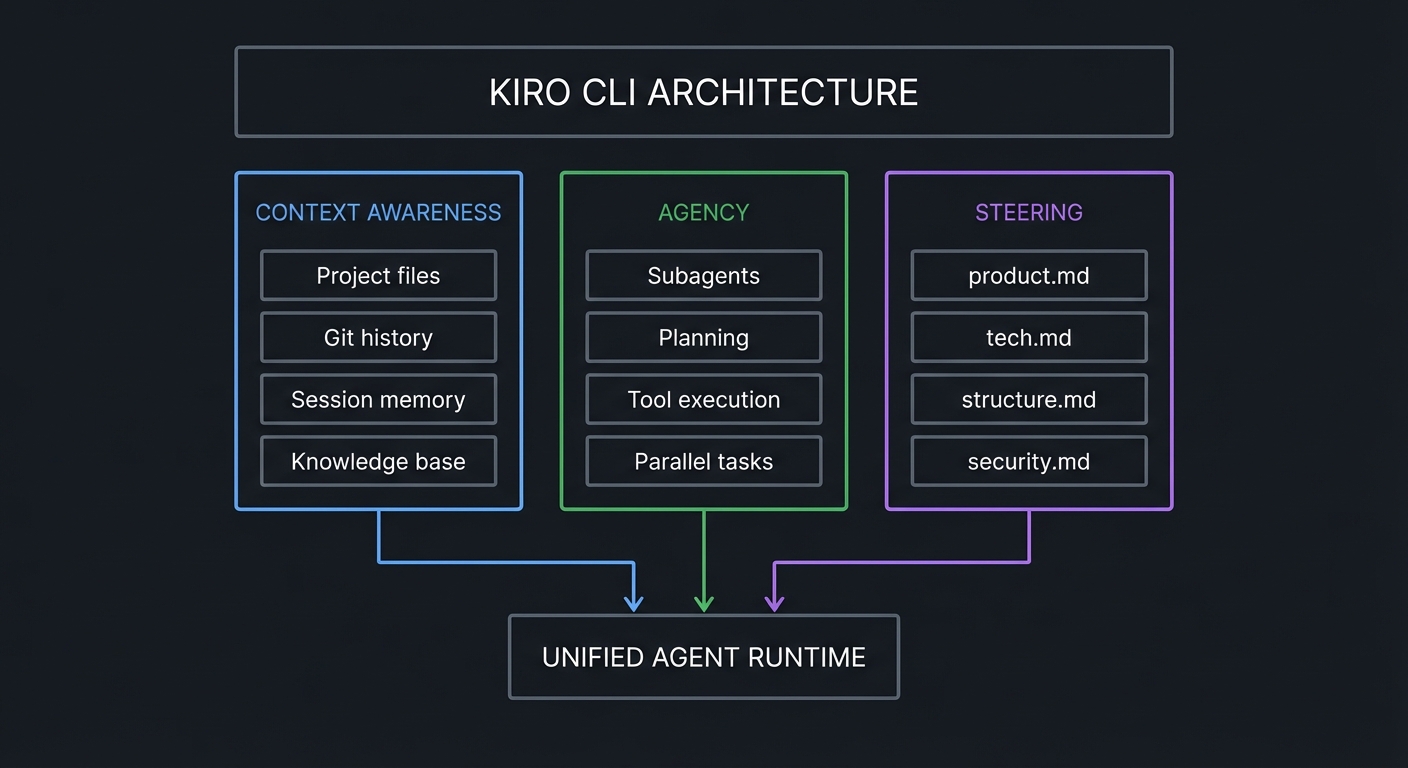
Kiro CLI operates on three foundational pillars:
┌─────────────────────────────────────────────────────────────────┐
│                    KIRO CLI ARCHITECTURE                        │
├─────────────────────────────────────────────────────────────────┤
│                                                                 │
│  ┌─────────────────┐  ┌─────────────────┐  ┌─────────────────┐  │
│  │   CONTEXT       │  │    AGENCY       │  │   STEERING      │  │
│  │   AWARENESS     │  │                 │  │                 │  │
│  ├─────────────────┤  ├─────────────────┤  ├─────────────────┤  │
│  │ • Project files │  │ • Subagents     │  │ • product.md    │  │
│  │ • Git history   │  │ • Planning      │  │ • tech.md       │  │
│  │ • Session memory│  │ • Tool execution│  │ • structure.md  │  │
│  │ • Knowledge base│  │ • Parallel tasks│  │ • security.md   │  │
│  └────────┬────────┘  └────────┬────────┘  └────────┬────────┘  │
│           │                    │                    │           │
│           └────────────────────┼────────────────────┘           │
│                                │                                │
│                    ┌───────────▼───────────┐                    │
│                    │    UNIFIED AGENT      │                    │
│                    │    RUNTIME            │                    │
│                    └───────────────────────┘                    │
│                                                                 │
└─────────────────────────────────────────────────────────────────┘
The Model Hierarchy
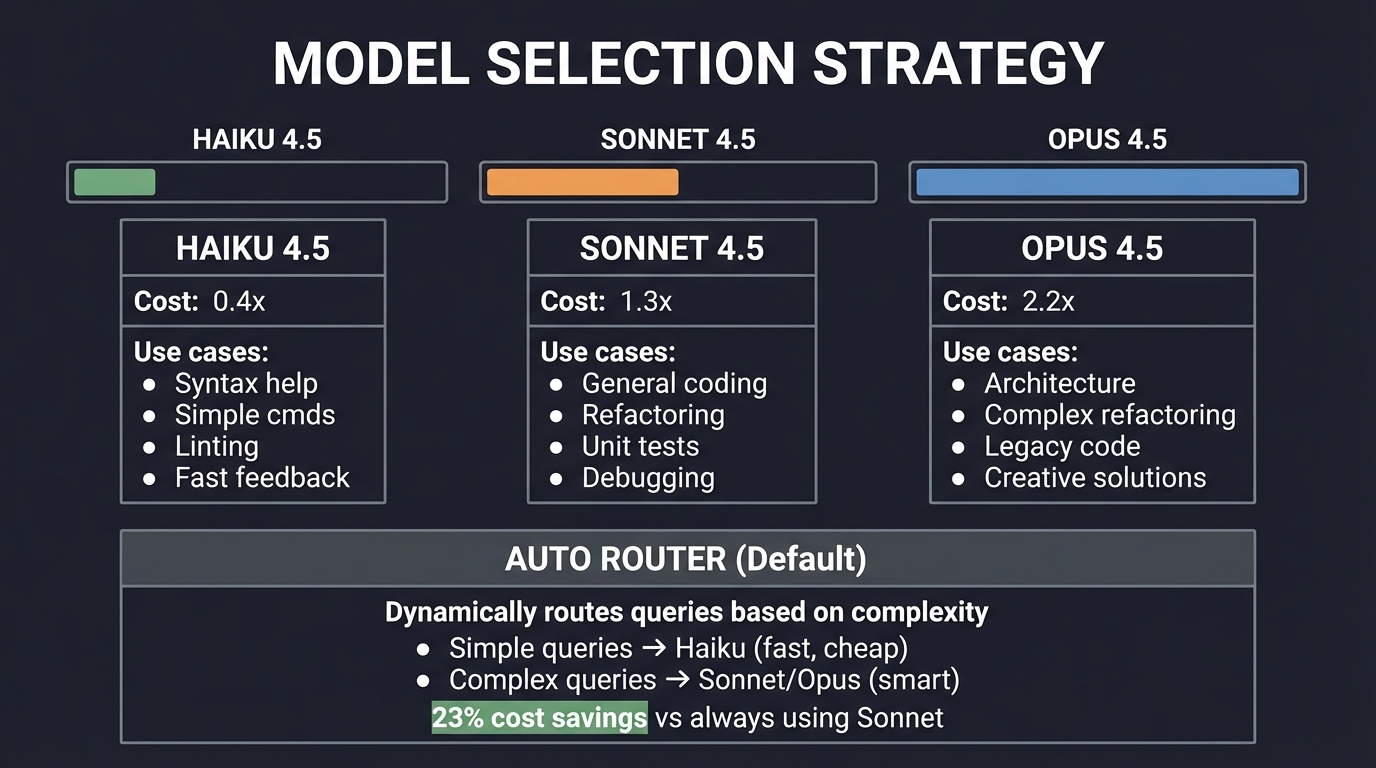
Kiro leverages Claude models from Anthropic via AWS Bedrock:
┌────────────────────────────────────────────────────────────────┐
│                    MODEL SELECTION STRATEGY                     │
├────────────────────────────────────────────────────────────────┤
│                                                                │
│   HAIKU 4.5        SONNET 4.5         OPUS 4.5                 │
│   ┌────────┐       ┌────────┐         ┌────────┐               │
│   │ ▓▓░░░░ │       │ ▓▓▓▓░░ │         │ ▓▓▓▓▓▓ │               │
│   │  0.4x  │       │  1.3x  │         │  2.2x  │  Cost         │
│   └────────┘       └────────┘         └────────┘               │
│                                                                │
│   Use for:         Use for:           Use for:                 │
│   • Syntax help    • General coding   • Architecture           │
│   • Simple cmds    • Refactoring      • Complex refactoring    │
│   • Linting        • Unit tests       • Legacy code            │
│   • Fast feedback  • Debugging        • Creative solutions     │
│                                                                │
│   ┌─────────────────────────────────────────────────────────┐  │
│   │  AUTO ROUTER (Default)                                   │  │
│   │  ───────────────────                                     │  │
│   │  Dynamically routes queries based on complexity          │  │
│   │  • Simple queries → Haiku (fast, cheap)                  │  │
│   │  • Complex queries → Sonnet/Opus (smart)                 │  │
│   │  • 23% cost savings vs always using Sonnet               │  │
│   └─────────────────────────────────────────────────────────┘  │
│                                                                │
└────────────────────────────────────────────────────────────────┘
Context Management: The Tiered Architecture
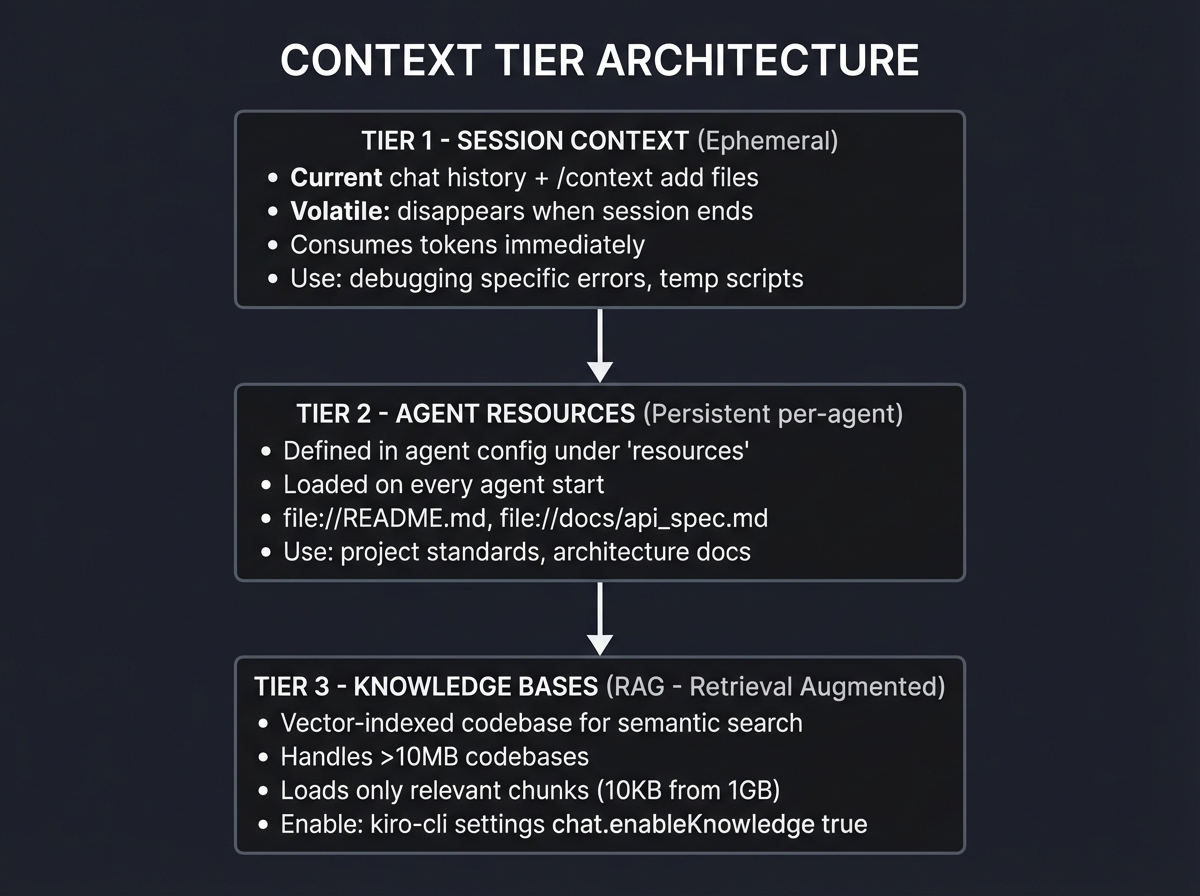
Context is the scarcest resource in AI. Kiro implements sophisticated tiered management:
┌────────────────────────────────────────────────────────────────┐
│                   CONTEXT TIER ARCHITECTURE                     │
├────────────────────────────────────────────────────────────────┤
│                                                                │
│  TIER 1: SESSION CONTEXT (Ephemeral)                           │
│  ┌──────────────────────────────────────────────────────────┐  │
│  │  Current chat history + /context add files               │  │
│  │  • Volatile: disappears when session ends                │  │
│  │  • Consumes tokens immediately                           │  │
│  │  • Use: debugging specific errors, temp scripts          │  │
│  └──────────────────────────────────────────────────────────┘  │
│                           │                                    │
│                           ▼                                    │
│  TIER 2: AGENT RESOURCES (Persistent per-agent)                │
│  ┌──────────────────────────────────────────────────────────┐  │
│  │  Defined in agent config under "resources"               │  │
│  │  • Loaded on every agent start                           │  │
│  │  • file://README.md, file://docs/api_spec.md             │  │
│  │  • Use: project standards, architecture docs             │  │
│  └──────────────────────────────────────────────────────────┘  │
│                           │                                    │
│                           ▼                                    │
│  TIER 3: KNOWLEDGE BASES (RAG - Retrieval Augmented)           │
│  ┌──────────────────────────────────────────────────────────┐  │
│  │  Vector-indexed codebase for semantic search             │  │
│  │  • Handles >10MB codebases                               │  │
│  │  • Loads only relevant chunks (10KB from 1GB)            │  │
│  │  • Enable: kiro-cli settings chat.enableKnowledge true   │  │
│  └──────────────────────────────────────────────────────────┘  │
│                                                                │
└────────────────────────────────────────────────────────────────┘
The Hook Lifecycle
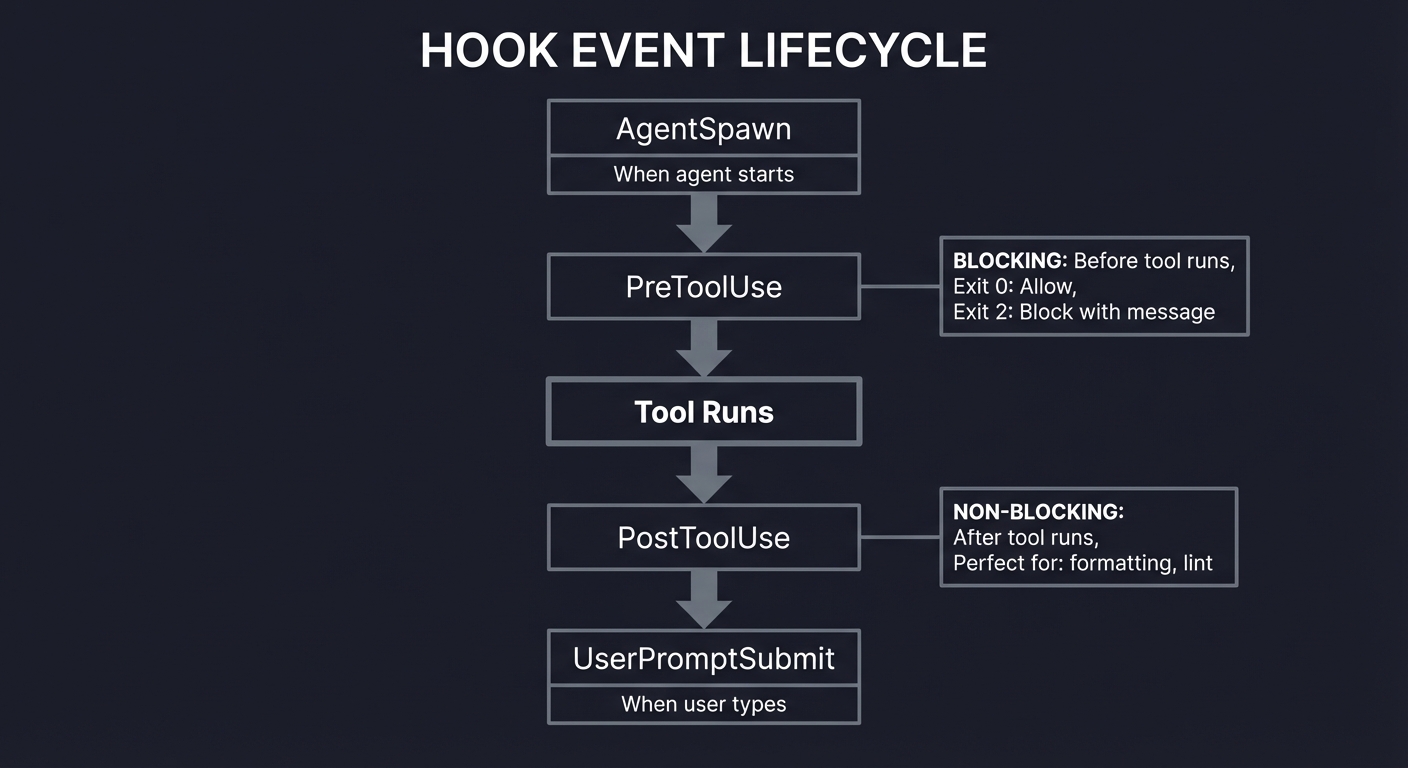
Hooks are the nervous system of Kiro CLI automation:
┌────────────────────────────────────────────────────────────────┐
│                    HOOK EVENT LIFECYCLE                         │
├────────────────────────────────────────────────────────────────┤
│                                                                │
│  ┌──────────────┐                                              │
│  │ AgentSpawn   │ ──▶ When agent starts                        │
│  └──────────────┘                                              │
│         │                                                      │
│         ▼                                                      │
│  ┌──────────────┐    ┌────────────────────────────────┐        │
│  │ PreToolUse   │ ──▶│ BLOCKING: Before tool runs     │        │
│  └──────────────┘    │ Exit 0: Allow                  │        │
│         │            │ Exit 2: Block with message     │        │
│         ▼            └────────────────────────────────┘        │
│  ┌──────────────┐                                              │
│  │  Tool Runs   │                                              │
│  └──────────────┘                                              │
│         │                                                      │
│         ▼                                                      │
│  ┌──────────────┐    ┌────────────────────────────────┐        │
│  │ PostToolUse  │ ──▶│ NON-BLOCKING: After tool runs  │        │
│  └──────────────┘    │ Perfect for: formatting, lint  │        │
│         │            └────────────────────────────────┘        │
│         ▼                                                      │
│  ┌───────────────────┐                                         │
│  │ UserPromptSubmit  │ ──▶ When user types                     │
│  └───────────────────┘                                         │
│                                                                │
└────────────────────────────────────────────────────────────────┘
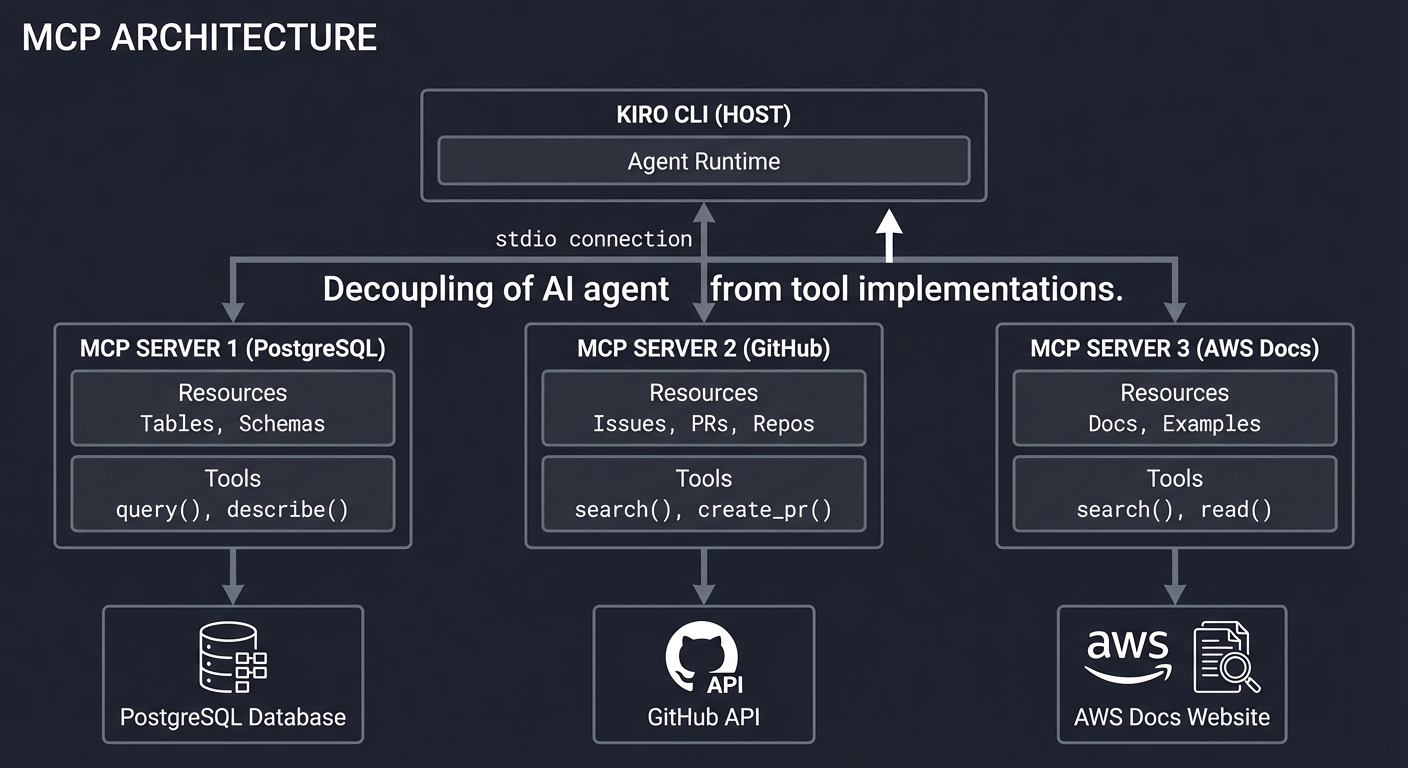
MCP (Model Context Protocol) Architecture
MCP decouples the AI agent from tool implementations:
┌────────────────────────────────────────────────────────────────┐
│                    MCP ARCHITECTURE                             │
├────────────────────────────────────────────────────────────────┤
│                                                                │
│  ┌─────────────────────────────────────────────────────────┐   │
│  │                    KIRO CLI (HOST)                       │   │
│  │  ┌─────────────────────────────────────────────────────┐│   │
│  │  │                   Agent Runtime                     ││   │
│  │  └──────────────────────┬──────────────────────────────┘│   │
│  └─────────────────────────┼───────────────────────────────┘   │
│                            │ stdio                             │
│              ┌─────────────┼─────────────┐                     │
│              │             │             │                     │
│              ▼             ▼             ▼                     │
│  ┌───────────────┐ ┌───────────────┐ ┌───────────────┐         │
│  │ MCP SERVER    │ │ MCP SERVER    │ │ MCP SERVER    │         │
│  │ (PostgreSQL)  │ │ (GitHub)      │ │ (AWS Docs)    │         │
│  ├───────────────┤ ├───────────────┤ ├───────────────┤         │
│  │ Resources:    │ │ Resources:    │ │ Resources:    │         │
│  │ • Tables      │ │ • Issues      │ │ • Docs        │         │
│  │ • Schemas     │ │ • PRs         │ │ • Examples    │         │
│  │               │ │ • Repos       │ │               │         │
│  │ Tools:        │ │ Tools:        │ │ Tools:        │         │
│  │ • query()     │ │ • search()    │ │ • search()    │         │
│  │ • describe()  │ │ • create_pr() │ │ • read()      │         │
│  └───────┬───────┘ └───────┬───────┘ └───────┬───────┘         │
│          │                 │                 │                 │
│          ▼                 ▼                 ▼                 │
│  ┌───────────────┐ ┌───────────────┐ ┌───────────────┐         │
│  │   PostgreSQL  │ │    GitHub     │ │   AWS Docs    │         │
│  │   Database    │ │    API        │ │   Website     │         │
│  └───────────────┘ └───────────────┘ └───────────────┘         │
│                                                                │
└────────────────────────────────────────────────────────────────┘
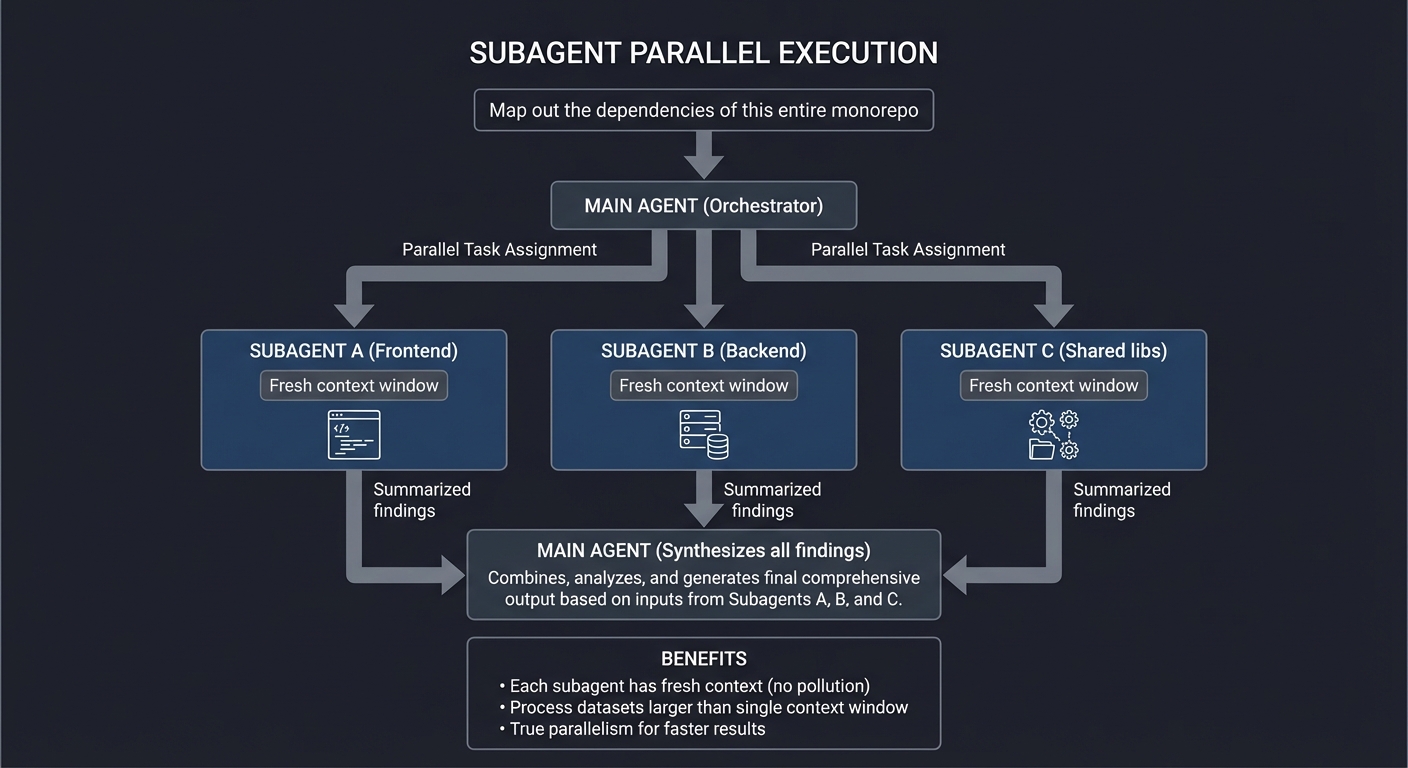
Subagents and Parallel Processing
┌────────────────────────────────────────────────────────────────┐
│                 SUBAGENT PARALLEL EXECUTION                     │
├────────────────────────────────────────────────────────────────┤
│                                                                │
│  User: "Map out the dependencies of this entire monorepo"      │
│                                                                │
│                    ┌───────────────────┐                       │
│                    │   MAIN AGENT      │                       │
│                    │   (Orchestrator)  │                       │
│                    └─────────┬─────────┘                       │
│                              │                                 │
│            ┌─────────────────┼─────────────────┐               │
│            │                 │                 │               │
│            ▼                 ▼                 ▼               │
│  ┌─────────────────┐ ┌─────────────────┐ ┌─────────────────┐   │
│  │  SUBAGENT A     │ │  SUBAGENT B     │ │  SUBAGENT C     │   │
│  │  (Frontend)     │ │  (Backend)      │ │  (Shared libs)  │   │
│  │                 │ │                 │ │                 │   │
│  │  Fresh context  │ │  Fresh context  │ │  Fresh context  │   │
│  │  window         │ │  window         │ │  window         │   │
│  └────────┬────────┘ └────────┬────────┘ └────────┬────────┘   │
│           │                   │                   │            │
│           │  Summarized       │  Summarized       │  Summarized│
│           │  findings         │  findings         │  findings  │
│           │                   │                   │            │
│           └───────────────────┼───────────────────┘            │
│                               │                                │
│                               ▼                                │
│                    ┌───────────────────┐                       │
│                    │   MAIN AGENT      │                       │
│                    │   Synthesizes     │                       │
│                    │   all findings    │                       │
│                    └───────────────────┘                       │
│                                                                │
│  BENEFITS:                                                     │
│  • Each subagent has fresh context (no pollution)              │
│  • Process datasets larger than single context window          │
│  • True parallelism for faster results                         │
│                                                                │
└────────────────────────────────────────────────────────────────┘
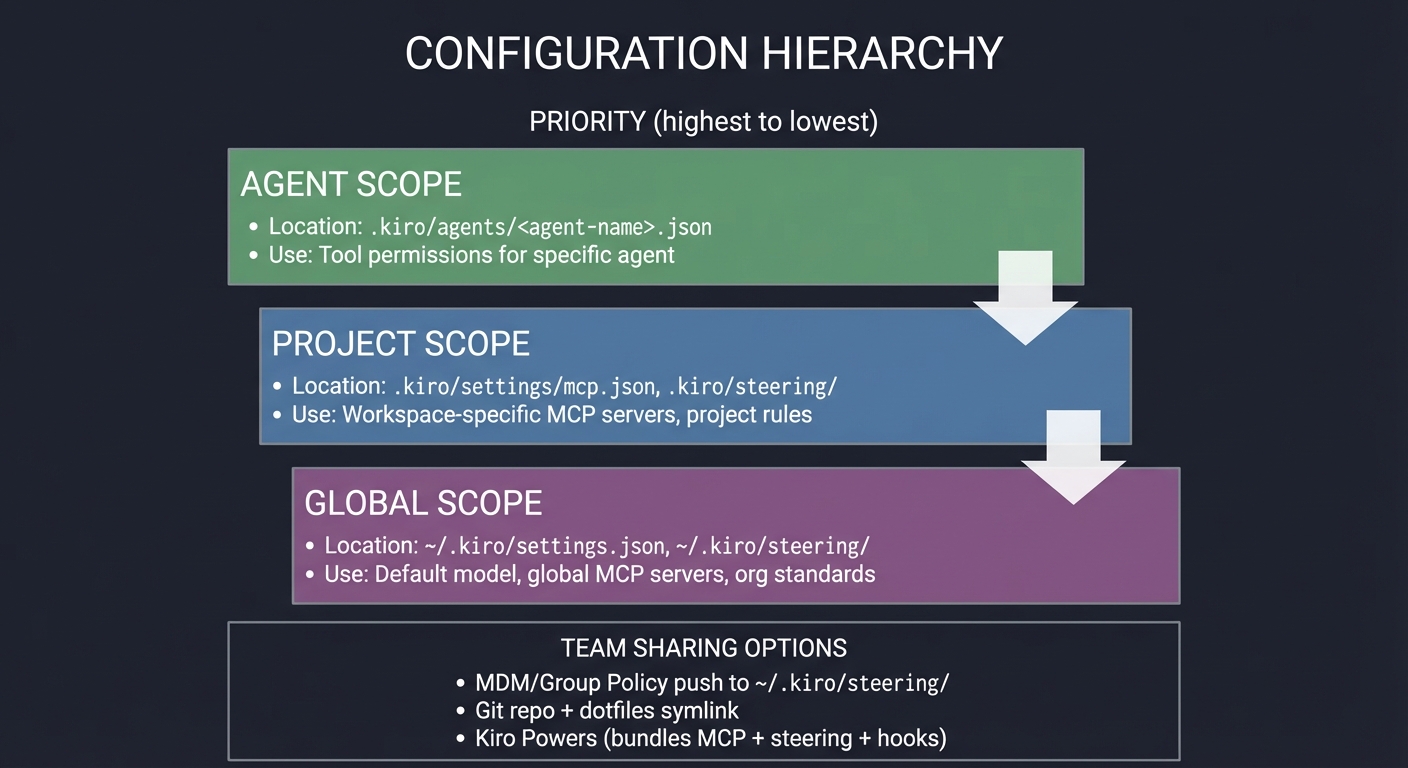
Configuration Scopes and Sharing
┌────────────────────────────────────────────────────────────────┐
│                  CONFIGURATION HIERARCHY                        │
├────────────────────────────────────────────────────────────────┤
│                                                                │
│  PRIORITY (highest to lowest):                                 │
│                                                                │
│  ┌──────────────────────────────────────────────────────────┐  │
│  │  AGENT SCOPE (Highest Priority)                          │  │
│  │  Location: .kiro/agents/<agent-name>.json                │  │
│  │  Use: Tool permissions for specific agent                │  │
│  └──────────────────────────────────────────────────────────┘  │
│                           │                                    │
│                           ▼                                    │
│  ┌──────────────────────────────────────────────────────────┐  │
│  │  PROJECT SCOPE (Medium Priority)                         │  │
│  │  Location: .kiro/settings/mcp.json, .kiro/steering/      │  │
│  │  Use: Workspace-specific MCP servers, project rules      │  │
│  └──────────────────────────────────────────────────────────┘  │
│                           │                                    │
│                           ▼                                    │
│  ┌──────────────────────────────────────────────────────────┐  │
│  │  GLOBAL SCOPE (Lowest Priority)                          │  │
│  │  Location: ~/.kiro/settings.json, ~/.kiro/steering/      │  │
│  │  Use: Default model, global MCP servers, org standards   │  │
│  └──────────────────────────────────────────────────────────┘  │
│                                                                │
│  TEAM SHARING OPTIONS:                                         │
│  • MDM/Group Policy push to ~/.kiro/steering/                  │
│  • Git repo + dotfiles symlink                                 │
│  • Kiro Powers (bundles MCP + steering + hooks)                │
│                                                                │
└────────────────────────────────────────────────────────────────┘
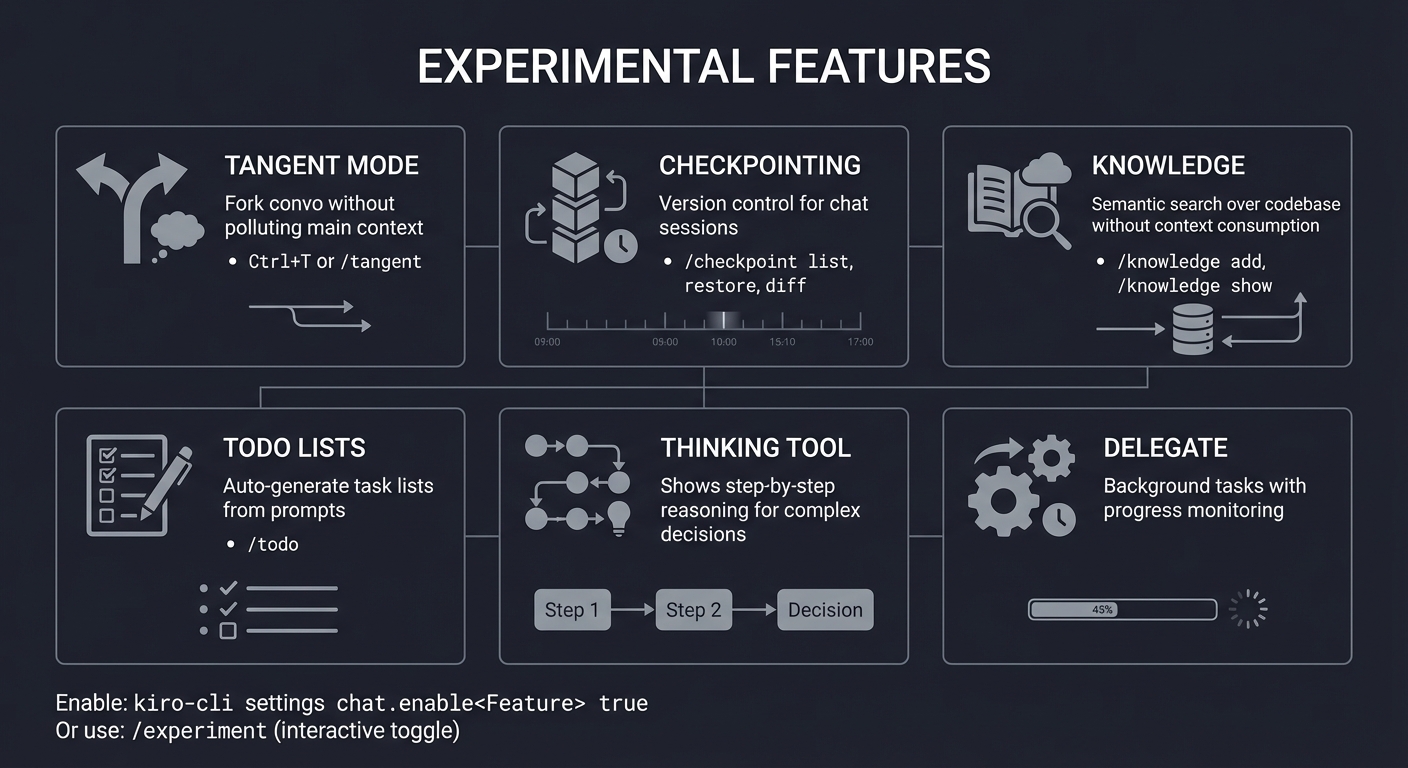
Experimental Features Overview
┌────────────────────────────────────────────────────────────────┐
│                  EXPERIMENTAL FEATURES                          │
├────────────────────────────────────────────────────────────────┤
│                                                                │
│  ┌─────────────────┐  ┌─────────────────┐  ┌─────────────────┐ │
│  │  TANGENT MODE   │  │  CHECKPOINTING  │  │  KNOWLEDGE      │ │
│  ├─────────────────┤  ├─────────────────┤  ├─────────────────┤ │
│  │ Fork convo      │  │ Version control │  │ Semantic search │ │
│  │ without         │  │ for chat        │  │ over codebase   │ │
│  │ polluting       │  │ sessions        │  │ without context │ │
│  │ main context    │  │                 │  │ consumption     │ │
│  │                 │  │ /checkpoint     │  │                 │ │
│  │ Ctrl+T or       │  │   list          │  │ /knowledge add  │ │
│  │ /tangent        │  │   restore       │  │ /knowledge show │ │
│  │                 │  │   diff          │  │                 │ │
│  └─────────────────┘  └─────────────────┘  └─────────────────┘ │
│                                                                │
│  ┌─────────────────┐  ┌─────────────────┐  ┌─────────────────┐ │
│  │  TODO LISTS     │  │  THINKING TOOL  │  │  DELEGATE       │ │
│  ├─────────────────┤  ├─────────────────┤  ├─────────────────┤ │
│  │ Auto-generate   │  │ Shows step-by-  │  │ Background      │ │
│  │ task lists      │  │ step reasoning  │  │ tasks with      │ │
│  │ from prompts    │  │ for complex     │  │ progress        │ │
│  │                 │  │ decisions       │  │ monitoring      │ │
│  │ /todo           │  │                 │  │                 │ │
│  └─────────────────┘  └─────────────────┘  └─────────────────┘ │
│                                                                │
│  Enable: kiro-cli settings chat.enable<Feature> true           │
│  Or use: /experiment (interactive toggle)                      │
│                                                                │
└────────────────────────────────────────────────────────────────┘
Concept Summary Table
| Concept Cluster | What You Need to Internalize |
|---|---|
| Context Tiers | Session (ephemeral), Agent Resources (persistent), Knowledge Base (RAG). Use the right tier for the right data. |
| Model Selection | Auto router handles 90% of cases. Force Opus only for architecture. Force Haiku only for speed-critical loops. |
| Custom Agents | JSON configs that define tools, permissions, prompts, and resources. Read-only agents for audits. |
| Steering Files | Markdown in .kiro/steering/ that enforces project standards. Global vs. workspace scope. |
| MCP Servers | External tool integrations via stdio. Configure in mcp.json. Enable database, API, and doc access. |
| Hooks | Event-driven automation. PreToolUse (blocking), PostToolUse (non-blocking). The “nervous system.” |
| Subagents | Parallel task execution with isolated contexts. Orchestrator pattern. |
| Experimental | Tangent mode (context isolation), Checkpoints (session versioning), Knowledge (semantic search). |
Deep Dive Reading by Concept
Context & Memory Management
| Concept | Book & Chapter |
|---|---|
| Context window limits | “AI Engineering” by Chip Huyen — Ch. 4: “Model Serving” |
| RAG fundamentals | “Designing Data-Intensive Applications” by Martin Kleppmann — Ch. 12: “The Future of Data Systems” |
| Vector search | “Fundamentals of Software Architecture” by Richards & Ford — Ch. 8: “Component-Based Thinking” |
Agent Design & Automation
| Concept | Book & Chapter |
|---|---|
| Tool design patterns | “Clean Architecture” by Robert C. Martin — Ch. 22: “Clean Architecture” |
| Event-driven systems | “Enterprise Integration Patterns” by Hohpe & Woolf — Ch. 3: “Messaging Systems” |
| Permission models | “Foundations of Information Security” by Jason Andress — Ch. 5: “Access Control” |
Shell & System Integration
| Concept | Book & Chapter |
|---|---|
| Process management | “The Linux Programming Interface” by Michael Kerrisk — Ch. 24-26: “Process Creation” |
| Shell scripting | “Effective Shell” by Dave Kerr — Ch. 10-12: “Advanced Scripting” |
| Git internals | “How Linux Works” by Brian Ward — Ch. 8: “Git” |
Essential Reading Order
- Foundation (Week 1):
- Kiro CLI official docs: https://kiro.dev/docs/cli/
- MCP specification: https://modelcontextprotocol.io/
- Agent Design (Week 2):
- Custom agents docs: https://kiro.dev/docs/cli/custom-agents/
- Steering docs: https://kiro.dev/docs/cli/steering/
- Advanced Automation (Week 3):
- Hooks docs: https://kiro.dev/docs/cli/hooks/
- Experimental features: https://kiro.dev/docs/cli/experimental/
PROJECT LIST
Projects are organized from fundamental understanding to advanced implementations. Complete them in order for maximum learning.
Project 1: “Kiro CLI Session Explorer” — Understanding the Chat Runtime
| Attribute | Value |
|---|---|
| File | LEARN_KIRO_CLI_MASTERY.md |
| Main Programming Language | Shell/Bash |
| Alternative Programming Languages | Python, TypeScript |
| Coolness Level | Level 2: Practical but Forgettable |
| Business Potential | 1. The “Resume Gold” |
| Difficulty | Level 1: Beginner |
| Knowledge Area | CLI Fundamentals / Context Management |
| Software or Tool | Kiro CLI, jq |
| Main Book | “Effective Shell” by Dave Kerr |
What you’ll build: A session management toolkit that saves, resumes, exports, and analyzes Kiro CLI chat sessions—tracking token usage, model switches, and tool invocations over time.
Why it teaches Kiro CLI: Before building complex automations, you must understand the session lifecycle. This project forces you to interact with /chat, /context, and /model commands while building muscle memory for the core workflow.
Core challenges you’ll face:
- Managing session persistence → maps to understanding /chat save and /chat resume
- Tracking context consumption → maps to /context show and token budgets
- Exporting session data → maps to settings output formats (JSON, plain)
- Analyzing model usage patterns → maps to /model and Auto router behavior
Key Concepts:
- Session Lifecycle: Kiro CLI Docs - https://kiro.dev/docs/cli/chat/
- Context Management: “AI Engineering” Ch. 4 - Chip Huyen
- JSON Processing: “Effective Shell” Ch. 8 - Dave Kerr
Difficulty: Beginner Time estimate: Weekend Prerequisites: Basic terminal usage, familiarity with shell commands
Real World Outcome
You’ll have a set of shell scripts and aliases that let you:
- Save any session with metadata (project name, date, summary)
- Resume sessions by project name
- Export session history as JSON or markdown
- Generate reports on token usage per session
Example Output:
$ ./kiro-session save --name "auth-refactor" --summary "Working on OAuth integration"
Session saved: ~/.kiro-sessions/auth-refactor-2025-12-22.json
Tokens used: 12,450 / 200,000 (6.2%)
Model distribution: Auto (85%), Opus (15%)

$ ./kiro-session list
┌─────────────────────┬────────────┬───────────┬─────────────┐
│ Session Name        │ Date       │ Tokens    │ Duration    │
├─────────────────────┼────────────┼───────────┼─────────────┤
│ auth-refactor       │ 2025-12-22 │ 12,450    │ 2h 15m      │
│ api-optimization    │ 2025-12-21 │ 45,200    │ 5h 30m      │
│ bug-fix-payments    │ 2025-12-20 │ 8,300     │ 1h 10m      │
└─────────────────────┴────────────┴───────────┴─────────────┘

$ ./kiro-session resume auth-refactor
Resuming session: auth-refactor (12,450 tokens)
Context restored: 3 files, 2 steering rules
Starting Kiro CLI...
The Core Question You’re Answering
“How does Kiro CLI maintain state between sessions, and how can I leverage this for productivity?”
Before you write any code, sit with this question. Understanding session persistence unlocks the ability to work on long-running projects without losing context.
Concepts You Must Understand First
Stop and research these before coding:
- Kiro CLI Session Model
- What happens when you close a terminal mid-session?
- Where does Kiro store chat history by default?
- How does
/chat resumediffer from starting fresh? - Reference: Kiro CLI Docs - Chat Sessions
- Context Window Management
- What is the token limit for each model?
- What does
/context showreveal? - How does
/compactaffect context? - Reference: Kiro CLI Docs - Context Management
- Output Formatting
- How do you get JSON output from settings?
- What is
--format json-pretty? - Reference: Kiro CLI Docs - Settings
Questions to Guide Your Design
Before implementing, think through these:
- Session Storage
- Where should session metadata be stored?
- What format (JSON, SQLite, plain files)?
- How to handle session naming collisions?
- Integration Points
- How to hook into Kiro CLI’s native session system?
- Should you wrap
kiro-clior extend it? - How to capture token usage programmatically?
Thinking Exercise
Trace a Session Lifecycle
Before coding, walk through this sequence mentally:
$ kiro-cli chat
> /context add src/auth/*.ts
> "Explain the OAuth flow in this codebase"
# ... AI responds...
> /context show
> /chat save --name oauth-analysis
> exit
Questions while tracing:
- What data exists after
/chat save? - How would you find this session tomorrow?
- What token information is preserved?
The Interview Questions They’ll Ask
Prepare to answer these:
- “How does context management work in modern AI CLIs?”
- “What strategies exist for managing long-running AI conversations?”
- “How would you design session persistence for an AI tool?”
- “What are the tradeoffs between ephemeral and persistent context?”
- “How do token budgets affect AI application design?”
Hints in Layers
Hint 1: Starting Point
Begin by exploring what files Kiro creates in ~/.kiro/ after a session.
Hint 2: Next Level
The /chat commands have built-in save/resume. Study their output format.
Hint 3: Technical Details
Use kiro-cli settings list --format json to understand configuration structure.
Hint 4: Tools/Debugging
jq is essential for parsing JSON session data. Use jq '.sessions | keys' patterns.
Books That Will Help
| Topic | Book | Chapter |
|---|---|---|
| Shell scripting | “Effective Shell” by Dave Kerr | Ch. 8-12 |
| JSON processing | “The Linux Command Line” by Shotts | Ch. 20 |
| CLI design | “The Pragmatic Programmer” by Hunt & Thomas | Ch. 7 |
Implementation Hints:
The session management pattern follows:
- Wrapper Script: Create a
kiro-sessionscript that wrapskiro-cli - Metadata Layer: Store additional metadata (summary, tags) alongside native sessions
- Query Interface: Build a simple CLI for listing and filtering sessions
- Export Pipeline: Transform session data into markdown for documentation
Pseudo-structure:
~/.kiro-sessions/
├── metadata.json          # Index of all sessions
├── auth-refactor-2025-12-22.json
└── api-optimization-2025-12-21.json
The key insight: Kiro already saves sessions. Your job is to add a semantic layer on top.
Learning milestones:
- You can save and resume sessions reliably → You understand the chat lifecycle
- You track token usage per session → You understand context budgets
- You export sessions as documentation → You can share AI workflows with teams
Project 2: “Model Router Analyzer” — Understanding the Auto Router
| Attribute | Value |
|---|---|
| File | LEARN_KIRO_CLI_MASTERY.md |
| Main Programming Language | Python |
| Alternative Programming Languages | TypeScript, Go |
| Coolness Level | Level 3: Genuinely Clever |
| Business Potential | 2. The “Micro-SaaS / Pro Tool” |
| Difficulty | Level 2: Intermediate |
| Knowledge Area | AI Model Selection / Cost Optimization |
| Software or Tool | Kiro CLI, matplotlib |
| Main Book | “AI Engineering” by Chip Huyen |
What you’ll build: A tool that analyzes your Kiro CLI usage patterns to optimize model selection—identifying when Auto router decisions are suboptimal and recommending manual overrides.
Why it teaches Kiro CLI: Understanding when to use Haiku vs. Sonnet vs. Opus is crucial for both cost and quality. This project forces you to study model selection patterns and their outcomes.
Core challenges you’ll face:
- Logging model usage → maps to understanding /model and Auto behavior
- Correlating model with task complexity → maps to prompt engineering
- Calculating cost savings → maps to model pricing tiers (0.4x, 1.3x, 2.2x)
- Recommending overrides → maps to /model set-current-as-default
Key Concepts:
- Model Selection: Kiro CLI Docs - Model Selection
- LLM Routing: “AI Engineering” Ch. 6 - Chip Huyen
- Cost Optimization: AWS Bedrock Pricing Documentation
Difficulty: Intermediate Time estimate: 1 week Prerequisites: Project 1, basic Python, familiarity with data analysis
Real World Outcome
You’ll have a dashboard that shows model usage patterns and recommendations:
Example Output:
$ ./model-analyzer report --last-week

╔════════════════════════════════════════════════════════════════╗
║              KIRO CLI MODEL USAGE REPORT                       ║
║              Week of December 15-22, 2025                      ║
╠════════════════════════════════════════════════════════════════╣
║                                                                ║
║  MODEL DISTRIBUTION                                            ║
║  ┌────────────────────────────────────────────────────────┐    ║
║  │ Haiku:  ████████████░░░░░░░░░░░░░░░░░░░░  35%  (fast)  │    ║
║  │ Sonnet: ████████████████████░░░░░░░░░░░░  55%  (main)  │    ║
║  │ Opus:   ████░░░░░░░░░░░░░░░░░░░░░░░░░░░░  10%  (deep)  │    ║
║  └────────────────────────────────────────────────────────┘    ║
║                                                                ║
║  COST ANALYSIS                                                 ║
║  • Actual cost (Auto router): $12.45                          ║
║  • If always Sonnet: $16.20                                   ║
║  • Savings from Auto: 23% ($3.75)                             ║
║                                                                ║
║  OPTIMIZATION RECOMMENDATIONS                                  ║
║  ┌────────────────────────────────────────────────────────┐    ║
║  │ ⚠ 15 queries used Sonnet but could use Haiku:          │    ║
║  │   • "What's the syntax for..."                         │    ║
║  │   • "How do I import..."                               │    ║
║  │   Potential savings: $1.20/week                        │    ║
║  │                                                        │    ║
║  │ ⚠ 3 queries used Sonnet but needed Opus:               │    ║
║  │   • "Redesign the auth architecture..."                │    ║
║  │   Quality improvement expected                          │    ║
║  └────────────────────────────────────────────────────────┘    ║
╚════════════════════════════════════════════════════════════════╝
The Core Question You’re Answering
“How does the Auto router decide which model to use, and when should I override it?”
The Auto router is a black box. By analyzing your usage, you develop intuition for model selection.
Concepts You Must Understand First
Stop and research these before coding:
- Model Capabilities
- What tasks is Haiku best for? Sonnet? Opus?
- What is the latency difference between models?
- How does cost scale with token usage?
- Reference: Kiro CLI Model Selection Docs
- Prompt Complexity
- How do you measure “complexity” of a prompt?
- What signals indicate a task needs deeper reasoning?
- Reference: “AI Engineering” Ch. 6
Questions to Guide Your Design
- Data Collection
- How to log model selections without modifying Kiro?
- What metadata should you capture per query?
- Classification
- How to categorize queries (syntax, debugging, architecture)?
- Can you use Kiro itself to classify old queries?
Thinking Exercise
Classify These Prompts
Before coding, mentally classify which model each prompt should use:
1. "What's the TypeScript syntax for optional chaining?"
2. "Debug this segfault in my C memory allocator"
3. "Design a microservices architecture for a fintech app"
4. "Add a console.log to line 45"
5. "Refactor this 500-line function into smaller units"
Answers to consider:
- Which are Haiku-appropriate (simple recall)?
- Which need Sonnet (multi-step reasoning)?
- Which demand Opus (creative architecture)?
The Interview Questions They’ll Ask
- “How would you design a model routing system for an AI application?”
- “What metrics would you track to optimize LLM costs?”
- “How do you balance cost vs. quality in AI deployments?”
- “What’s the difference between model capability and model performance?”
- “How would you A/B test different models for the same task?”
Hints in Layers
Hint 1: Starting Point
Kiro logs might be in $TMPDIR/kiro-log/. Explore what’s there.
Hint 2: Next Level
The /usage command shows credit consumption. Correlate this with session data.
Hint 3: Technical Details Build a simple classifier: prompts with “syntax”, “import”, “how to” → likely Haiku candidates.
Hint 4: Tools/Debugging Use matplotlib or rich to create terminal visualizations.
Books That Will Help
| Topic | Book | Chapter |
|---|---|---|
| LLM engineering | “AI Engineering” by Chip Huyen | Ch. 4-6 |
| Cost optimization | AWS Well-Architected Framework | Cost Pillar |
| Data analysis | “Python for Data Analysis” by McKinney | Ch. 8 |
Implementation Hints:
The analysis pipeline:
- Log Parser: Extract model selection events from Kiro logs
- Prompt Classifier: Categorize queries by complexity indicators
- Cost Calculator: Apply pricing multipliers to usage
- Recommendation Engine: Flag mismatches between complexity and model
Key insight: The Auto router already does well. You’re looking for edge cases where manual override helps.
Learning milestones:
- You understand model pricing tiers → You can estimate costs
- You classify prompt complexity → You understand when to force models
- You generate actionable recommendations → You optimize real workflows
Project 3: “Context Window Visualizer” — Understanding Token Budgets
| Attribute | Value |
|---|---|
| File | LEARN_KIRO_CLI_MASTERY.md |
| Main Programming Language | TypeScript |
| Alternative Programming Languages | Python, Rust |
| Coolness Level | Level 3: Genuinely Clever |
| Business Potential | 2. The “Micro-SaaS / Pro Tool” |
| Difficulty | Level 2: Intermediate |
| Knowledge Area | Context Management / Token Economics |
| Software or Tool | Kiro CLI, blessed/ink (terminal UI) |
| Main Book | “AI Engineering” by Chip Huyen |
What you’ll build: A real-time terminal UI that visualizes context window usage as you work—showing what’s consuming tokens, warning before overflow, and suggesting compaction.
Why it teaches Kiro CLI: Context is the scarcest resource. Watching it fill in real-time builds intuition for what consumes tokens and when to clear context.
Core challenges you’ll face:
- Real-time context monitoring → maps to /context show
- Token attribution → maps to understanding what consumes context
- Compaction triggers → maps to /compact
- Visualization in terminal → maps to TUI design
Key Concepts:
- Context Window: Kiro CLI Context Docs
- Tokenization: “AI Engineering” Ch. 3 - Chip Huyen
- Terminal UI: Ink/Blessed documentation
Difficulty: Intermediate Time estimate: 1-2 weeks Prerequisites: Project 1-2, TypeScript, terminal UI familiarity
Real World Outcome
A live dashboard that runs alongside your Kiro session:
Example Output:
╔════════════════════════════════════════════════════════════════╗
║           KIRO CONTEXT MONITOR (Real-time)                     ║
╠════════════════════════════════════════════════════════════════╣
║                                                                ║
║  CONTEXT USAGE: 45,200 / 200,000 tokens (22.6%)               ║
║  ┌────────────────────────────────────────────────────────┐    ║
║  │████████████░░░░░░░░░░░░░░░░░░░░░░░░░░░░░░░░░░░░░░░░░░░│    ║
║  └────────────────────────────────────────────────────────┘    ║
║                                                                ║
║  BREAKDOWN BY SOURCE:                                          ║
║  ┌────────────────────────────────────────────────────────┐    ║
║  │ Chat History:      ████████████████  32,000 (71%)      │    ║
║  │ Context Files:     ████              8,500 (19%)       │    ║
║  │ Steering Rules:    ██                4,200 (9%)        │    ║
║  │ System Prompt:     ░                   500 (1%)        │    ║
║  └────────────────────────────────────────────────────────┘    ║
║                                                                ║
║  ACTIVE CONTEXT FILES:                                         ║
║  • src/auth/oauth.ts            (3,200 tokens)                │
║  • src/auth/session.ts          (2,800 tokens)                │
║  • README.md                    (2,500 tokens)                │
║                                                                ║
║  ⚠ WARNING: Chat history is 71% of context!                  ║
║  → Consider: /compact or /context clear                       ║
║                                                                ║
╚════════════════════════════════════════════════════════════════╝
The Core Question You’re Answering
“What exactly is consuming my context window, and how can I manage it strategically?”
Most developers treat context as a black box. Visualizing it demystifies token economics.
Concepts You Must Understand First
- Tokenization
- How are characters converted to tokens?
- Why do some files consume more tokens than expected?
- Reference: “AI Engineering” Ch. 3
- Context Tiers
- What’s in session vs. agent vs. knowledge context?
- How does steering affect token budget?
- Reference: Kiro Context Docs
Questions to Guide Your Design
- Data Source
- How to poll context usage without interrupting work?
- Can you hook into Kiro’s internal state?
- Visualization
- What thresholds trigger warnings (75%, 90%)?
- How to show historical context growth?
The Interview Questions They’ll Ask
- “How would you design context management for an AI application?”
- “What strategies exist for working with limited context windows?”
- “How do you prioritize what goes into context vs. what’s retrieved dynamically?”
- “What’s the relationship between context size and inference cost?”
Hints in Layers
Hint 1: /context show gives you structured output. Parse it regularly.
Hint 2: Use a watch loop or file system watcher to trigger updates.
Hint 3: Ink (React for terminals) makes building TUIs in TypeScript elegant.
Hint 4: The tiktoken library can estimate token counts for files.
Learning milestones:
- You parse context usage in real-time → You understand the data model
- You attribute tokens to sources → You know what consumes context
- You trigger smart warnings → You prevent context overflow
Project 4: “Custom Agent Factory” — Creating Specialized Personas
| Attribute | Value |
|---|---|
| File | LEARN_KIRO_CLI_MASTERY.md |
| Main Programming Language | JSON/TypeScript |
| Alternative Programming Languages | Python |
| Coolness Level | Level 4: Hardcore Tech Flex |
| Business Potential | 3. The “Service & Support” Model |
| Difficulty | Level 2: Intermediate |
| Knowledge Area | Agent Design / Permissions |
| Software or Tool | Kiro CLI |
| Main Book | “Clean Architecture” by Robert C. Martin |
What you’ll build: A toolkit for rapidly creating, testing, and iterating on custom Kiro agents—including a library of pre-built agents (Security Auditor, Code Reviewer, DevOps Engineer).
Why it teaches Kiro CLI: Custom agents are the core of Kiro’s power. This project forces you to master agent configuration, tool permissions, and persona design.
Core challenges you’ll face:
- Agent configuration structure → maps to .kiro/agents/.json*
- Tool permission design → maps to allowedTools, deniedCommands
- Resource loading → maps to file:// URIs
- Agent switching → maps to /agent swap
Key Concepts:
- Agent Configuration: Kiro Custom Agents Docs
- Permission Models: “Foundations of Information Security” Ch. 5 - Andress
- Persona Design: Claude’s Constitutional AI research
Difficulty: Intermediate Time estimate: 1-2 weeks Prerequisites: Projects 1-3, JSON, basic security concepts
Real World Outcome
A collection of reusable agents and a generator tool:
Example Output:
$ ./agent-factory create --type security-auditor

Creating agent: sec-auditor
┌─────────────────────────────────────────────────────────────┐
│ AGENT CONFIGURATION                                         │
├─────────────────────────────────────────────────────────────┤
│ Name:        sec-auditor                                    │
│ Model:       claude-opus-4.5 (forced for deep analysis)     │
│ Tools:       read, grep, glob, report (READ-ONLY)           │
│ Denied:      write, shell, aws                              │
│ Resources:   file://docs/security_standards.md              │
│ MCP Servers: sonarqube-connector                            │
└─────────────────────────────────────────────────────────────┘

Agent created: .kiro/agents/sec-auditor.json

$ kiro-cli --agent sec-auditor
[sec-auditor] Ready. I will audit code for security issues.
I cannot modify files or run shell commands.
What would you like me to review?
The Core Question You’re Answering
“How do I create AI agents with precisely scoped capabilities and restrictions?”
Agents with unlimited access are dangerous. Learning to constrain them is essential for production use.
Concepts You Must Understand First
- Agent JSON Schema
- What fields are required vs. optional?
- How do
allowedToolsandtoolsSettingsinteract? - Reference: Kiro Agent Configuration Reference
- Permission Patterns
- What is the principle of least privilege?
- How to allow read but deny write?
- Reference: “Foundations of Information Security” Ch. 5
Questions to Guide Your Design
- Agent Types
- What specialized agents would be useful? (Security, DevOps, API, Testing)
- What restrictions make sense for each?
- Testing
- How to verify an agent can’t use denied tools?
- How to test agent behavior?
The Interview Questions They’ll Ask
- “How would you design a permission system for AI agents?”
- “What’s the principle of least privilege and how does it apply to AI?”
- “How do you prevent AI from executing destructive commands?”
- “How would you audit AI agent actions?”
Hints in Layers
Hint 1: Start by reading .kiro/agents/default.json (if it exists).
Hint 2: Use /agent generate to scaffold, then customize.
Hint 3: Test denied tools by explicitly asking the agent to use them.
Hint 4: The toolsSettings.shell.deniedCommands array is powerful for safety.
Implementation Hints:
Agent factory structure:
.kiro/agents/
├── sec-auditor.json        # Read-only security agent
├── code-reviewer.json      # Can read, can suggest (not write)
├── devops-engineer.json    # Shell access to approved commands
└── api-designer.json       # Reads specs, writes OpenAPI
Key configuration patterns:
- Read-only agent:
"allowedTools": ["read", "grep", "glob"] - Scoped shell:
"toolsSettings": { "shell": { "allowedCommands": ["npm test", "npm run lint"] } }
Learning milestones:
- You create agents with scoped permissions → You understand access control
- You test permission boundaries → You verify safety
- You build reusable agent library → You scale expertise
Project 5: “Steering Rules Engine” — Enforcing Project Standards
| Attribute | Value |
|---|---|
| File | LEARN_KIRO_CLI_MASTERY.md |
| Main Programming Language | Markdown/JSON |
| Alternative Programming Languages | YAML, TypeScript |
| Coolness Level | Level 3: Genuinely Clever |
| Business Potential | 3. The “Service & Support” Model |
| Difficulty | Level 2: Intermediate |
| Knowledge Area | Steering / Configuration Management |
| Software or Tool | Kiro CLI |
| Main Book | “Clean Code” by Robert C. Martin |
What you’ll build: A comprehensive set of steering files for a real project—covering tech stack, API standards, testing requirements, and deployment procedures—plus a validation tool.
Why it teaches Kiro CLI: Steering is how you teach Kiro your project’s conventions. Building a complete steering setup forces you to articulate and codify your standards.
Core challenges you’ll face:
- Steering file structure → maps to .kiro/steering/
- Global vs. workspace scope → maps to priority resolution
- Positive constraint language → maps to effective prompting
- Conditional loading → maps to front matter configuration
Key Concepts:
- Steering Files: Kiro Steering Docs
- Coding Standards: “Clean Code” Ch. 1-5 - Martin
- Configuration Management: “The Pragmatic Programmer” Ch. 4
Difficulty: Intermediate Time estimate: 1 week Prerequisites: Projects 1-4, understanding of coding standards
Real World Outcome
A complete steering setup for a TypeScript project:
Example Directory:
.kiro/steering/
├── product.md              # Product vision and priorities
├── tech.md                 # Technology stack constraints
├── api-standards.md        # REST API conventions
├── testing.md              # Testing requirements
├── security.md             # Security policies
└── deployment.md           # CI/CD procedures
Example tech.md:
---
inclusion: always
---

# Technology Stack

## Languages & Frameworks
- **Language**: TypeScript 5.x in strict mode
- **Runtime**: Node.js 20+ or Bun 1.0+
- **Framework**: Express.js for APIs
- **Testing**: Vitest for unit tests, Playwright for E2E

## Coding Standards
- All async functions MUST use try/catch with structured logging
- All functions MUST have JSDoc comments
- Use `zod` for runtime validation, never `any` type
- Prefer `const` over `let`, never use `var`

## Forbidden Patterns
- Do NOT use callbacks; use async/await
- Do NOT use `console.log` in production code; use logger
- Do NOT commit `.env` files
The Core Question You’re Answering
“How do I encode my team’s standards so the AI follows them automatically?”
Steering transforms generic AI into your team’s AI.
Concepts You Must Understand First
- Steering File Types
- What goes in product.md vs. tech.md vs. structure.md?
- How do you write effective positive constraints?
- Reference: Kiro Steering Docs
- Scope Resolution
- How does global (~/.kiro/steering/) interact with workspace?
- What happens with conflicting rules?
- Reference: Kiro Steering Docs
The Interview Questions They’ll Ask
- “How would you encode coding standards for an AI assistant?”
- “What’s the difference between positive and negative constraints?”
- “How do you balance flexibility with enforcement?”
- “How would you share coding standards across a team?”
Hints in Layers
Hint 1: Start by documenting what you already tell the AI repeatedly.
Hint 2: Use the --- front matter for conditional loading.
Hint 3: Test steering by asking the AI to violate rules.
Hint 4: Include code examples in steering files—AI learns from examples.
Learning milestones:
- You articulate standards as steering files → You codify knowledge
- You test constraint enforcement → You verify the AI follows rules
- You share steering across projects → You scale best practices
Project 6: “MCP Server Connector” — Database Integration
| Attribute | Value |
|---|---|
| File | LEARN_KIRO_CLI_MASTERY.md |
| Main Programming Language | TypeScript/Python |
| Alternative Programming Languages | Go, Rust |
| Coolness Level | Level 4: Hardcore Tech Flex |
| Business Potential | 4. The “Open Core” Infrastructure |
| Difficulty | Level 3: Advanced |
| Knowledge Area | MCP / Database Integration |
| Software or Tool | Kiro CLI, PostgreSQL, Docker |
| Main Book | “Designing Data-Intensive Applications” by Martin Kleppmann |
What you’ll build: A complete MCP integration that connects Kiro CLI to a PostgreSQL database—enabling natural language database queries, schema exploration, and data analysis.
Why it teaches Kiro CLI: MCP is how Kiro talks to external systems. Building a database integration forces you to understand the MCP protocol and configuration.
Core challenges you’ll face:
- MCP configuration → maps to mcp.json structure
- Server process management → maps to stdio transport
- Tool exposure → maps to MCP Resources and Tools
- Security considerations → maps to credential handling
Key Concepts:
- MCP Protocol: Model Context Protocol Spec
- Database Design: “Designing Data-Intensive Applications” Ch. 2-3
- PostgreSQL: PostgreSQL Documentation
Difficulty: Advanced Time estimate: 2 weeks Prerequisites: Projects 1-5, PostgreSQL, MCP basics
Real World Outcome
You’ll be able to query databases with natural language:
Example Output:
$ kiro-cli chat
[Kiro] MCP servers loaded: postgres-local

> "Show me all tables in the database"
[postgres-local] Querying: SELECT table_name FROM information_schema.tables...

Tables in database 'myapp':
┌───────────────────┬─────────┬───────────────┐
│ Table Name        │ Rows    │ Size          │
├───────────────────┼─────────┼───────────────┤
│ users             │ 15,234  │ 2.1 MB        │
│ orders            │ 892,103 │ 45.6 MB       │
│ products          │ 3,421   │ 512 KB        │
│ order_items       │ 2.1M    │ 89.2 MB       │
└───────────────────┴─────────┴───────────────┘

> "Find users who haven't ordered in the last 30 days"
[postgres-local] Building query...
Query: SELECT u.email, u.last_order_date
       FROM users u
       LEFT JOIN orders o ON u.id = o.user_id
         AND o.created_at > NOW() - INTERVAL '30 days'
       WHERE o.id IS NULL...

Found 342 inactive users. Would you like me to:
1. Export as CSV?
2. Generate a re-engagement campaign?
The Core Question You’re Answering
“How does Kiro communicate with external systems, and how do I build these bridges?”
MCP is the universal connector. Mastering it unlocks infinite integrations.
Concepts You Must Understand First
- MCP Architecture
- What is the stdio transport model?
- How do Resources differ from Tools?
- Reference: MCP Specification
- Database Integration Patterns
- How to safely expose database queries to AI?
- What queries should be blocked?
- Reference: “Designing Data-Intensive Applications” Ch. 2
Questions to Guide Your Design
- Security
- How to prevent DROP TABLE or DELETE queries?
- How to handle credentials securely?
- Functionality
- What database operations should be exposed?
- How to present schema information to the AI?
The Interview Questions They’ll Ask
- “How would you design an AI-to-database interface?”
- “What security considerations exist for AI database access?”
- “How would you prevent SQL injection in AI-generated queries?”
- “What’s the MCP protocol and why does it matter?”
Hints in Layers
Hint 1: Start with the official @modelcontextprotocol/server-postgres package.
Hint 2: Configure in .kiro/settings/mcp.json with connection string.
Hint 3: Use env block for credentials, never hardcode.
Hint 4: Test with read-only database user first.
Implementation Hints:
MCP configuration example:
{
  "mcpServers": {
    "postgres-local": {
      "command": "npx",
      "args": ["-y", "@modelcontextprotocol/server-postgres", "postgresql://user:pass@localhost:5432/mydb"],
      "env": {
        "PGSSLMODE": "disable"
      }
    }
  }
}
Security pattern: Create a read-only PostgreSQL user for MCP connections.
Learning milestones:
- You configure MCP servers → You understand the protocol
- You query databases via natural language → You’ve built a useful integration
- You implement security constraints → You’re production-ready
Project 7: “GitHub Integration Agent” — Repository Automation
| Attribute | Value |
|---|---|
| File | LEARN_KIRO_CLI_MASTERY.md |
| Main Programming Language | TypeScript |
| Alternative Programming Languages | Python, Go |
| Coolness Level | Level 4: Hardcore Tech Flex |
| Business Potential | 4. The “Open Core” Infrastructure |
| Difficulty | Level 3: Advanced |
| Knowledge Area | MCP / GitHub API |
| Software or Tool | Kiro CLI, GitHub CLI, Docker |
| Main Book | “GitHub Actions in Action” by Michael Kaufmann |
What you’ll build: A Kiro agent that integrates with GitHub—managing issues, creating PRs, reviewing code, and automating repository workflows.
Why it teaches Kiro CLI: GitHub integration combines MCP, custom agents, and steering. It’s a complete workflow automation project.
Core challenges you’ll face:
- GitHub MCP server setup → maps to Docker-based MCP
- Token management → maps to environment variables
- PR workflow automation → maps to agent tool permissions
- Code review integration → maps to combining read + GitHub tools
Key Concepts:
- GitHub API: GitHub REST API Docs
- MCP GitHub Server: MCP Server Directory
- Code Review: “Working Effectively with Legacy Code” - Feathers
Difficulty: Advanced Time estimate: 2 weeks Prerequisites: Projects 1-6, GitHub API familiarity
Real World Outcome
An agent that manages your GitHub workflow:
Example Output:
$ kiro-cli --agent github-manager
[github-manager] Connected to repos: myorg/myapp, myorg/infra

> "Show open PRs that need my review"
Fetching PRs where you are requested reviewer...

Open PRs requiring review:
┌─────────────────────────────────────────────────────────────┐
│ #123 - Add OAuth integration (by @alice)                   │
│        Created: 2 days ago | Changes: +450/-120            │
│        Status: 2/3 checks passed, waiting for review       │
│                                                            │
│ #145 - Fix memory leak in cache (by @bob)                  │
│        Created: 5 hours ago | Changes: +23/-45             │
│        Status: All checks passed                           │
└─────────────────────────────────────────────────────────────┘

> "Review PR #123 focusing on security"
Reading PR #123 changes...
Analyzing auth flow for security issues...

[Code Review - Security Focus]
┌─────────────────────────────────────────────────────────────┐
│ ⚠ MEDIUM: Token stored in localStorage (src/auth.ts:45)    │
│   Recommendation: Use httpOnly cookies instead             │
│                                                            │
│ ⚠ LOW: Missing rate limiting on /oauth/callback            │
│   Recommendation: Add express-rate-limit middleware        │
│                                                            │
│ ✓ PASS: PKCE flow correctly implemented                    │
│ ✓ PASS: Tokens correctly validated with issuer             │
└─────────────────────────────────────────────────────────────┘

Would you like me to post this review to GitHub?
The Core Question You’re Answering
“How can I automate my GitHub workflow with an AI agent?”
GitHub is central to modern development. Automating it with AI is transformative.
Concepts You Must Understand First
- GitHub Personal Access Tokens
- What scopes are needed for PRs, issues, code?
- How to store tokens securely?
- Reference: GitHub Token Docs
- MCP Docker Servers
- How do Docker-based MCP servers work?
- What’s the difference from npx-based?
- Reference: GitHub’s official MCP server docs
The Interview Questions They’ll Ask
- “How would you automate code review with AI?”
- “What permissions should an AI have on a repository?”
- “How would you prevent AI from merging dangerous PRs?”
- “How do you integrate AI into CI/CD pipelines?”
Hints in Layers
Hint 1: GitHub now recommends their official Docker-based MCP server.
Hint 2: Create a fine-grained PAT with minimal scopes.
Hint 3: Use GITHUB_TOKEN environment variable in mcp.json.
Hint 4: Test on a personal repo before using on team repos.
Learning milestones:
- You connect Kiro to GitHub → You understand MCP with Docker
- You automate PR reviews → You’ve built a useful workflow
- You enforce review policies → You’ve improved team quality
Project 8: “Pre-Commit Hook System (TypeScript with Bun)” — Type-Safe Automation
| Attribute | Value |
|---|---|
| File | LEARN_KIRO_CLI_MASTERY.md |
| Main Programming Language | TypeScript |
| Alternative Programming Languages | Python, Go |
| Coolness Level | Level 4: Hardcore Tech Flex |
| Business Potential | 3. The “Service & Support” Model |
| Difficulty | Level 3: Advanced |
| Knowledge Area | Hooks / Type-Safe Automation |
| Software or Tool | Kiro CLI, Bun, Zod |
| Main Book | “Programming TypeScript” by Boris Cherny |
What you’ll build: A type-safe hook system using Bun and TypeScript that runs pre-commit checks, auto-formats code, validates schemas, and blocks dangerous commands—all with full type safety.
Why it teaches Kiro CLI: Hooks are the nervous system of Kiro automation. Building type-safe hooks with Bun teaches you event-driven automation with modern tooling.
Core challenges you’ll face:
- Hook event types → maps to PreToolUse, PostToolUse
- Stdin/stdout protocol → maps to hook input/output format
- Type-safe parsing → maps to Zod schemas
- Blocking vs. non-blocking → maps to exit codes
Key Concepts:
- Kiro Hooks: Kiro Hooks Documentation
- TypeScript Validation: Zod Documentation
- Bun Runtime: Bun Documentation
Difficulty: Advanced Time estimate: 2 weeks Prerequisites: Projects 1-7, TypeScript, schema validation
Real World Outcome
A complete type-safe hook system:
Example Structure:
.kiro/hooks/
├── pre-tool-use/
│   ├── command-sanitizer.ts    # Block dangerous commands
│   ├── secret-scanner.ts       # Detect secrets in writes
│   └── path-validator.ts       # Restrict file access
├── post-tool-use/
│   ├── auto-format.ts          # Run prettier on writes
│   ├── auto-lint.ts            # Run eslint --fix
│   └── test-runner.ts          # Run affected tests
└── types/
    └── hook-events.ts          # Zod schemas for events
Example Output:
# Kiro tries to run: rm -rf /
[PreToolUse Hook: command-sanitizer]
┌─────────────────────────────────────────────────────────────┐
│ ⛔ BLOCKED: Destructive command detected                    │
│                                                             │
│ Command: rm -rf /                                           │
│ Reason: Matches pattern: rm.*-rf.*/                         │
│                                                             │
│ This command has been blocked by security policy.           │
│ The agent will be notified and asked to use a safer         │
│ alternative.                                                │
└─────────────────────────────────────────────────────────────┘

# Kiro writes a file
[PostToolUse Hook: auto-format]
Formatted: src/components/Button.tsx (prettier)
[PostToolUse Hook: auto-lint]
Fixed: 3 eslint warnings
The Core Question You’re Answering
“How can I create type-safe, testable automation that enforces policies on AI behavior?”
Hooks are the security boundary. Type safety ensures they work correctly.
Concepts You Must Understand First
- Hook Event Protocol
- What data does PreToolUse receive?
- What exit codes mean what?
- Reference: Kiro Hooks Docs
- Type-Safe Validation
- How does Zod validate unknown input?
- How to handle parse failures gracefully?
- Reference: Zod Documentation
- Bun Runtime
- How does Bun differ from Node?
- How to use Bun for scripts?
- Reference: Bun Documentation
Questions to Guide Your Design
- Schema Design
- What’s the shape of hook input for each event type?
- How to handle unknown/new fields gracefully?
- Error Handling
- What happens if a hook crashes?
- How to log hook failures for debugging?
The Interview Questions They’ll Ask
- “How would you design a plugin/hook system?”
- “What’s the value of type safety in automation scripts?”
- “How do you test event-driven automation?”
- “What’s the difference between blocking and non-blocking hooks?”
Hints in Layers
Hint 1: Hooks receive JSON on stdin. Use Bun’s stdin API.
Hint 2: Exit code 0 = allow, exit code 2 = block with message.
Hint 3: Write Zod schemas that match the Kiro hook event documentation.
Hint 4: Use bun run in the hook command configuration.
Implementation Hints:
Zod schema for PreToolUse:
import { z } from "zod";

const PreToolUseEvent = z.object({
  event: z.literal("PreToolUse"),
  tool: z.string(),
  input: z.record(z.unknown()),
});

type PreToolUseEvent = z.infer<typeof PreToolUseEvent>;

// Parse stdin
const input = await Bun.stdin.text();
const event = PreToolUseEvent.parse(JSON.parse(input));

if (event.tool === "shell" && isDangerous(event.input.command)) {
  console.error("Blocked: dangerous command");
  process.exit(2);
}
process.exit(0);
Learning milestones:
- You parse hook events with Zod → You understand the protocol
- You block dangerous commands → You’ve built security boundaries
- You auto-format on writes → You’ve automated code quality
Project 9: “AWS Documentation Searcher” — Cloud Integration
| Attribute | Value |
|---|---|
| File | LEARN_KIRO_CLI_MASTERY.md |
| Main Programming Language | TypeScript |
| Alternative Programming Languages | Python |
| Coolness Level | Level 3: Genuinely Clever |
| Business Potential | 3. The “Service & Support” Model |
| Difficulty | Level 2: Intermediate |
| Knowledge Area | MCP / AWS Integration |
| Software or Tool | Kiro CLI, AWS Docs MCP |
| Main Book | “AWS Well-Architected Framework” |
What you’ll build: An MCP integration that enables Kiro to search and cite AWS documentation directly—getting accurate, up-to-date information on AWS services.
Why it teaches Kiro CLI: AWS is the native home of Kiro. Understanding AWS MCP integration is essential for cloud-native development workflows.
Core challenges you’ll face:
- AWS MCP server configuration → maps to official AWS docs MCP
- Search query optimization → maps to getting relevant results
- Citation handling → maps to trustworthy AI responses
- Rate limiting → maps to responsible API usage
Difficulty: Intermediate Time estimate: Weekend Prerequisites: Projects 1-6, AWS familiarity
Real World Outcome
$ kiro-cli chat
[Kiro] MCP servers loaded: aws-docs

> "What's the best practice for Lambda cold starts?"
[aws-docs] Searching AWS documentation...

From AWS Lambda Best Practices (https://docs.aws.amazon.com/...):
┌─────────────────────────────────────────────────────────────┐
│ LAMBDA COLD START OPTIMIZATION                              │
├─────────────────────────────────────────────────────────────┤
│ 1. Use provisioned concurrency for latency-critical         │
│    functions                                                │
│ 2. Keep deployment packages small (<50MB)                   │
│ 3. Initialize SDK clients outside handler                   │
│ 4. Use Lambda SnapStart for Java                            │
│                                                             │
│ Source: docs.aws.amazon.com/lambda/latest/dg/best-practices │
└─────────────────────────────────────────────────────────────┘
The Core Question You’re Answering
“How do I get accurate, current AWS information without leaving the terminal?”
AI models have knowledge cutoffs. MCP to AWS docs gives you live information.
Hints in Layers
Hint 1: The AWS Docs MCP server is available via @anthropic/mcp-server-aws-docs.
Hint 2: Configure in mcp.json similar to other MCP servers.
Hint 3: Use steering to tell Kiro to prefer AWS docs over general knowledge.
Learning milestones:
- You search AWS docs from terminal → You’ve integrated cloud documentation
- You get citations → You trust the AI’s answers
- You combine with code generation → You build with current best practices
Project 10: “Subagent Orchestrator” — Parallel Task Processing
| Attribute | Value |
|---|---|
| File | LEARN_KIRO_CLI_MASTERY.md |
| Main Programming Language | TypeScript |
| Alternative Programming Languages | Python |
| Coolness Level | Level 4: Hardcore Tech Flex |
| Business Potential | 4. The “Open Core” Infrastructure |
| Difficulty | Level 3: Advanced |
| Knowledge Area | Subagents / Parallel Processing |
| Software or Tool | Kiro CLI |
| Main Book | “Designing Distributed Systems” by Brendan Burns |
What you’ll build: A workflow system that orchestrates multiple Kiro subagents to analyze a monorepo in parallel—frontend, backend, and infrastructure simultaneously.
Why it teaches Kiro CLI: Subagents are Kiro’s killer feature for scale. Learning to orchestrate them unlocks enterprise-grade automation.
Core challenges you’ll face:
- Subagent spawning → maps to subagent architecture
- Context isolation → maps to fresh context windows
- Result synthesis → maps to summarized findings
- Progress tracking → maps to live progress updates
Difficulty: Advanced Time estimate: 2 weeks Prerequisites: Projects 1-8
Real World Outcome
$ kiro-cli chat
> "Analyze this monorepo for security vulnerabilities across all services"

[Orchestrator] Spawning subagents for parallel analysis...

┌─────────────────────────────────────────────────────────────┐
│ PARALLEL ANALYSIS IN PROGRESS                                │
├─────────────────────────────────────────────────────────────┤
│                                                             │
│ Subagent: frontend-analyzer                                 │
│ Status: ████████████████████░░░░░  80% (analyzing React)   │
│ Found: 2 XSS vulnerabilities                                │
│                                                             │
│ Subagent: backend-analyzer                                  │
│ Status: ██████████████████████████ 100% COMPLETE           │
│ Found: 1 SQL injection, 3 missing auth checks               │
│                                                             │
│ Subagent: infra-analyzer                                    │
│ Status: ████████░░░░░░░░░░░░░░░░  35% (Terraform scan)     │
│ Found: 2 overly permissive IAM policies                     │
│                                                             │
└─────────────────────────────────────────────────────────────┘

[Orchestrator] Synthesizing findings...

SECURITY REPORT SUMMARY:
• Critical: 1 SQL injection (backend/src/api/users.ts:45)
• High: 2 XSS vulnerabilities (frontend)
• Medium: 3 missing auth checks
• Low: 2 IAM policy improvements
The Core Question You’re Answering
“How do I scale AI analysis across large codebases without hitting context limits?”
Subagents enable you to process datasets larger than any single context window.
Concepts You Must Understand First
- Subagent Architecture
- How do subagents get fresh context?
- How are results passed back to main agent?
- Reference: Kiro Changelog - Subagents
- Orchestration Patterns
- Fan-out / fan-in pattern
- Progress tracking and timeouts
- Reference: “Designing Distributed Systems” Ch. 4
Hints in Layers
Hint 1: Subagents are spawned implicitly when Kiro needs parallel analysis.
Hint 2: Large tasks trigger subagent creation automatically.
Hint 3: You can prompt for explicit parallelism: “Analyze frontend and backend in parallel.”
Learning milestones:
- You spawn parallel subagents → You understand the architecture
- You synthesize results → You aggregate findings
- You handle large codebases → You’re enterprise-ready
Project 11: “Planning Agent Workflow” — Structured Development
| Attribute | Value |
|---|---|
| File | LEARN_KIRO_CLI_MASTERY.md |
| Main Programming Language | Markdown/Natural Language |
| Alternative Programming Languages | N/A |
| Coolness Level | Level 3: Genuinely Clever |
| Business Potential | 3. The “Service & Support” Model |
| Difficulty | Level 2: Intermediate |
| Knowledge Area | Planning Agents / Spec-Driven Development |
| Software or Tool | Kiro CLI |
| Main Book | “The Pragmatic Programmer” by Hunt & Thomas |
What you’ll build: A complete spec-driven development workflow using Kiro’s Planning Agent—from requirements gathering through implementation handoff.
Why it teaches Kiro CLI: The Planning Agent separates “thinking” from “doing.” Mastering this workflow reduces errors in complex coding tasks.
Core challenges you’ll face:
- Entering plan mode → maps to /plan and Shift+Tab
- Requirements gathering → maps to interactive questioning
- Plan generation → maps to structured task breakdown
- Execution handoff → maps to plan approval workflow
Difficulty: Intermediate Time estimate: 1 week Prerequisites: Projects 1-5
Real World Outcome
$ kiro-cli chat
> /plan

[Planning Agent] Entering plan mode. I will:
1. Gather requirements through questions
2. Research the codebase
3. Generate an implementation plan
4. Wait for your approval before executing

What would you like to build?

> "Add OAuth2 login with Google"

[Planning Agent] I have some questions:

1. Authentication Strategy:
   ○ Session-based (cookies)
   ● Token-based (JWT) [Recommended]
   ○ Hybrid

2. User Data Storage:
   ● Existing users table
   ○ New OAuth-only table
   ○ Let me decide

3. Scopes Required:
   [x] email
   [x] profile
   [ ] calendar

[Planning Agent] Researching codebase...
Found: src/auth/local.ts, src/middleware/auth.ts

IMPLEMENTATION PLAN:
┌─────────────────────────────────────────────────────────────┐
│ Task 1: Install dependencies                                │
│   • Add google-auth-library and @types/*                    │
│   • Update package.json                                     │
│                                                             │
│ Task 2: Create OAuth routes                                 │
│   • GET /auth/google → redirect to Google                   │
│   • GET /auth/google/callback → handle response             │
│                                                             │
│ Task 3: Implement token handling                            │
│   • Verify Google ID token                                  │
│   • Create/update user in database                          │
│   • Issue JWT for session                                   │
│                                                             │
│ Task 4: Update frontend                                     │
│   • Add "Sign in with Google" button                        │
│   • Handle OAuth redirect                                   │
└─────────────────────────────────────────────────────────────┘

Approve this plan? (y/n/modify)
The Core Question You’re Answering
“How do I use AI to plan before coding, reducing errors and rework?”
Planning agents force structured thinking before implementation.
Hints in Layers
Hint 1: Use /plan or press Shift+Tab to enter planning mode.
Hint 2: The Planning Agent is read-only—it researches but doesn’t modify.
Hint 3: Plans are saved as task lists that the Execution Agent follows.
Learning milestones:
- You enter and use planning mode → You understand the workflow
- You approve/modify plans → You control the process
- You execute from plans → You reduce implementation errors
Project 12: “Kiro Powers Creator” — Bundled Capabilities
| Attribute | Value |
|---|---|
| File | LEARN_KIRO_CLI_MASTERY.md |
| Main Programming Language | JSON/Markdown |
| Alternative Programming Languages | TypeScript |
| Coolness Level | Level 4: Hardcore Tech Flex |
| Business Potential | 4. The “Open Core” Infrastructure |
| Difficulty | Level 3: Advanced |
| Knowledge Area | Powers / Plugin System |
| Software or Tool | Kiro CLI, GitHub |
| Main Book | “Designing Distributed Systems” by Brendan Burns |
What you’ll build: A shareable Kiro Power that bundles MCP servers, steering files, and hooks for a specific framework (e.g., “Next.js Power” or “Django Power”).
Why it teaches Kiro CLI: Powers are the distribution mechanism for Kiro expertise. Building one teaches you to package and share knowledge.
Core challenges you’ll face:
- Power structure → maps to bundling MCP + steering + hooks
- Dynamic loading → maps to keyword-triggered activation
- Publishing → maps to GitHub distribution
- Version management → maps to power updates
Difficulty: Advanced Time estimate: 2 weeks Prerequisites: Projects 1-11
Real World Outcome
A published Kiro Power for Next.js development:
$ kiro-cli
> /powers add https://github.com/yourname/nextjs-power

Installing power: nextjs-power
• MCP: nextjs-docs, vercel-api
• Steering: nextjs-conventions.md
• Hooks: app-router-validator

Power installed! Triggers: "next", "nextjs", "vercel", "app router"

> "How do I use the new App Router?"
[Power: nextjs-power activated]
[nextjs-docs] Searching Next.js documentation...

From Next.js 14 App Router Guide:
The App Router uses a file-system based router...
The Core Question You’re Answering
“How do I package and share Kiro expertise with my team or the community?”
Powers are the unit of distribution for AI capabilities.
Hints in Layers
Hint 1: Powers are GitHub repositories with a specific structure.
Hint 2: They bundle: mcp.json, steering files, and hooks configurations.
Hint 3: Activation triggers are keywords in user prompts.
Learning milestones:
- You create a power structure → You understand the format
- You publish to GitHub → You can share with others
- You test dynamic activation → You verify the power works
Project 13: “Tangent Mode Explorer” — Context Isolation
| Attribute | Value |
|---|---|
| File | LEARN_KIRO_CLI_MASTERY.md |
| Main Programming Language | Natural Language |
| Alternative Programming Languages | N/A |
| Coolness Level | Level 3: Genuinely Clever |
| Business Potential | 2. The “Micro-SaaS / Pro Tool” |
| Difficulty | Level 2: Intermediate |
| Knowledge Area | Experimental Features / Context |
| Software or Tool | Kiro CLI |
| Main Book | “AI Engineering” by Chip Huyen |
What you’ll build: A workflow that leverages Tangent Mode for isolated side-conversations—asking clarifying questions, exploring alternatives, and researching without polluting main context.
Why it teaches Kiro CLI: Tangent mode is a context preservation superpower. Learning to use it effectively maximizes your context budget.
Core challenges you’ll face:
- Entering/exiting tangent mode → maps to Ctrl+T or /tangent
- Context isolation → maps to main stack unaffected
- Return to main context → maps to exit tangent
- Combining with checkpoints → maps to limitations
Difficulty: Intermediate Time estimate: Weekend Prerequisites: Projects 1-5
Real World Outcome
$ kiro-cli chat
# Deep in a complex refactoring...
> "Now refactor the middleware to use the new pattern"

# Wait, I need to remember async/await syntax...
> [Ctrl+T]
[Tangent Mode] Context saved. Isolated conversation started.

> "What's the syntax for async/await error handling in TypeScript?"

try {
  const result = await someAsyncFunction();
} catch (error) {
  if (error instanceof SpecificError) {
    // handle specific error
  }
  throw error;
}

> /tangent exit
[Tangent Mode] Returning to main context.
Context restored: refactoring discussion intact.

> "Apply that error handling to the auth middleware"
# Continues with full refactoring context preserved
The Core Question You’re Answering
“How do I ask side questions without consuming precious main context?”
Tangent mode lets you detour without losing your place.
Hints in Layers
Hint 1: Enable with kiro-cli settings chat.enableTangentMode true.
Hint 2: Ctrl+T enters tangent mode instantly.
Hint 3: Tangent and checkpoints are mutually exclusive—exit tangent to checkpoint.
Learning milestones:
- You enter tangent mode smoothly → You preserve context
- You return without pollution → You understand isolation
- You maximize context lifetime → You work on longer tasks
Project 14: “Checkpoint System” — Session Versioning
| Attribute | Value |
|---|---|
| File | LEARN_KIRO_CLI_MASTERY.md |
| Main Programming Language | Shell/TypeScript |
| Alternative Programming Languages | Python |
| Coolness Level | Level 3: Genuinely Clever |
| Business Potential | 2. The “Micro-SaaS / Pro Tool” |
| Difficulty | Level 2: Intermediate |
| Knowledge Area | Experimental Features / Versioning |
| Software or Tool | Kiro CLI |
| Main Book | “Git Internals” by Scott Chacon |
What you’ll build: A workflow using Kiro’s checkpoint system for safe experimentation—creating, comparing, and restoring checkpoints during risky refactors.
Why it teaches Kiro CLI: Checkpoints are version control for AI sessions. Learning to use them enables fearless experimentation.
Core challenges you’ll face:
- Creating checkpoints → maps to /checkpoint create
- Listing and diffing → maps to /checkpoint list, diff
- Restoring state → maps to /checkpoint restore
- Understanding scope → maps to files + conversation
Difficulty: Intermediate Time estimate: Weekend Prerequisites: Projects 1-5, Git familiarity
Real World Outcome
$ kiro-cli chat
> /checkpoint create --tag "before-refactor"
Checkpoint created: before-refactor
Files: 12 tracked | Conversation: 45 turns

> "Refactor the entire auth module to use dependency injection"
[Kiro modifies 8 files...]

# Something's wrong...
> /checkpoint diff before-refactor

CHECKPOINT DIFF: before-refactor → current
┌─────────────────────────────────────────────────────────────┐
│ Modified Files:                                             │
│  M src/auth/service.ts     (+45 -120)                       │
│  M src/auth/controller.ts  (+12 -8)                         │
│  M src/container.ts        (+25 -0)                         │
│  ...5 more files                                            │
│                                                             │
│ Conversation: +12 turns since checkpoint                    │
└─────────────────────────────────────────────────────────────┘

> /checkpoint restore before-refactor
Restoring checkpoint: before-refactor
Files reverted: 8
Conversation rewound: 12 turns

[Kiro] Back to before the refactor. What would you like to try instead?
The Core Question You’re Answering
“How do I experiment with risky changes safely?”
Checkpoints let you try things without fear of permanent damage.
Hints in Layers
Hint 1: Enable with kiro-cli settings chat.enableCheckpoint true.
Hint 2: Checkpoints capture both files AND conversation.
Hint 3: Restoring a checkpoint rewinds the entire state.
Learning milestones:
- You create checkpoints before risky changes → You experiment safely
- You diff to understand changes → You see what happened
- You restore when things go wrong → You recover instantly
Project 15: “Knowledge Base Builder” — Semantic Search
| Attribute | Value |
|---|---|
| File | LEARN_KIRO_CLI_MASTERY.md |
| Main Programming Language | TypeScript |
| Alternative Programming Languages | Python |
| Coolness Level | Level 4: Hardcore Tech Flex |
| Business Potential | 4. The “Open Core” Infrastructure |
| Difficulty | Level 3: Advanced |
| Knowledge Area | Experimental Features / RAG |
| Software or Tool | Kiro CLI, Vector DB |
| Main Book | “Designing Data-Intensive Applications” by Kleppmann |
What you’ll build: A workflow using Kiro’s Knowledge Management feature to index large codebases and PDFs for semantic search without consuming context.
Why it teaches Kiro CLI: Knowledge bases are how Kiro handles scale. Understanding RAG integration is essential for enterprise use.
Core challenges you’ll face:
- Indexing content → maps to /knowledge add
- Semantic search → maps to vector similarity
- Context injection → maps to on-demand retrieval
- Index management → maps to /knowledge show, remove
Difficulty: Advanced Time estimate: 2 weeks Prerequisites: Projects 1-14
Real World Outcome
$ kiro-cli settings chat.enableKnowledge true

$ kiro-cli chat
> /knowledge add ./src
Indexing: src/
├── Scanned: 245 files
├── Tokens: 1.2M (would exceed context)
├── Indexed: 245 documents
└── Status: Ready for semantic search

> /knowledge add ./docs/architecture.pdf
Indexing PDF: docs/architecture.pdf
├── Pages: 45
├── Extracted: 32,000 tokens
└── Status: Indexed

> /knowledge show
Knowledge Base:
┌─────────────────────────────────────────────────────────────┐
│ Source              │ Documents │ Created     │ Status     │
├─────────────────────┼───────────┼─────────────┼────────────┤
│ ./src               │ 245       │ 5 mins ago  │ Persistent │
│ ./docs/architecture │ 45 pages  │ 2 mins ago  │ Persistent │
└─────────────────────┴───────────┴─────────────┴────────────┘

> "How does the payment service handle refunds?"
[Knowledge] Retrieving relevant context...
Found 3 relevant documents:
• src/services/payment.ts (relevance: 0.92)
• src/models/refund.ts (relevance: 0.87)
• docs/architecture.pdf pg. 23 (relevance: 0.85)

Based on the indexed codebase, refunds are processed...
The Core Question You’re Answering
“How do I give AI knowledge of a codebase larger than its context window?”
Knowledge bases use semantic search to retrieve relevant chunks on-demand.
Hints in Layers
Hint 1: Enable with kiro-cli settings chat.enableKnowledge true.
Hint 2: Index directories and PDFs with /knowledge add <path>.
Hint 3: Knowledge is searched automatically when you ask questions.
Learning milestones:
- You index large codebases → You understand the process
- You query indexed knowledge → You see RAG in action
- You manage knowledge lifecycle → You’re production-ready
Project 16: “Configuration Sync System” — Cross-Machine Sharing
| Attribute | Value |
|---|---|
| File | LEARN_KIRO_CLI_MASTERY.md |
| Main Programming Language | Shell/TypeScript |
| Alternative Programming Languages | Python |
| Coolness Level | Level 3: Genuinely Clever |
| Business Potential | 3. The “Service & Support” Model |
| Difficulty | Level 2: Intermediate |
| Knowledge Area | Configuration / Team Sharing |
| Software or Tool | Kiro CLI, Git, dotfiles |
| Main Book | “The Pragmatic Programmer” by Hunt & Thomas |
What you’ll build: A system for syncing Kiro CLI configurations across machines and teams—using Git, dotfiles, and symbolic links.
Why it teaches Kiro CLI: Configuration sharing is essential for teams. Building a sync system teaches you the full configuration architecture.
Core challenges you’ll face:
- Identifying shareable configs → maps to steering, agents, mcp.json
- Git integration → maps to dotfiles patterns
- Machine-specific overrides → maps to scope resolution
- Team distribution → maps to MDM, group policy
Difficulty: Intermediate Time estimate: 1 week Prerequisites: Projects 1-5, Git, dotfiles familiarity
Real World Outcome
$ ./kiro-sync init
Initializing Kiro Config Sync...

Detected shareable configurations:
┌─────────────────────────────────────────────────────────────┐
│ Type            │ Location           │ Scope    │ Share?   │
├─────────────────┼────────────────────┼──────────┼──────────┤
│ Global Settings │ ~/.kiro/settings   │ User     │ [ ]      │
│ Global Steering │ ~/.kiro/steering/  │ User     │ [x]      │
│ MCP Servers     │ ~/.kiro/mcp.json   │ User     │ [x]      │
│ Custom Agents   │ ~/.kiro/agents/    │ User     │ [x]      │
└─────────────────┴────────────────────┴──────────┴──────────┘

$ ./kiro-sync export --to ~/dotfiles/kiro/
Exported:
• ~/.kiro/steering/ → ~/dotfiles/kiro/steering/
• ~/.kiro/agents/   → ~/dotfiles/kiro/agents/
• ~/.kiro/mcp.json  → ~/dotfiles/kiro/mcp.json

$ ./kiro-sync import --from ~/dotfiles/kiro/
Symlinked configurations from dotfiles repo.
Kiro CLI will use synced configurations.
The Core Question You’re Answering
“How do I maintain consistent Kiro configurations across my machines and team?”
Syncing configurations ensures everyone uses the same AI standards.
Hints in Layers
Hint 1: The key directories are ~/.kiro/steering/, ~/.kiro/agents/, ~/.kiro/settings/mcp.json.
Hint 2: Use symbolic links from a Git-tracked dotfiles repo.
Hint 3: Machine-specific settings go in ~/.kiro/settings.json (don’t sync this).
Learning milestones:
- You identify shareable configs → You understand the architecture
- You sync via Git → You can share across machines
- You distribute to teams → You scale best practices
Project 17: “Headless CI/CD Pipeline” — Non-Interactive Automation
| Attribute | Value |
|---|---|
| File | LEARN_KIRO_CLI_MASTERY.md |
| Main Programming Language | YAML/Shell |
| Alternative Programming Languages | TypeScript |
| Coolness Level | Level 4: Hardcore Tech Flex |
| Business Potential | 4. The “Open Core” Infrastructure |
| Difficulty | Level 3: Advanced |
| Knowledge Area | CI/CD / Headless Mode |
| Software or Tool | Kiro CLI, GitHub Actions |
| Main Book | “Continuous Delivery” by Humble & Farley |
What you’ll build: A GitHub Actions workflow that uses Kiro CLI in headless mode for automated code review, documentation generation, and commit message validation.
Why it teaches Kiro CLI: Headless mode transforms Kiro from interactive tool to automation component. This is essential for scaling AI across your development pipeline.
Core challenges you’ll face:
- Non-interactive mode → maps to –no-interactive flag
- Authentication in CI → maps to SIGV4 / IAM credentials
- Tool trust in automation → maps to –trust-all-tools
- Output parsing → maps to JSON format for CI
Difficulty: Advanced Time estimate: 2 weeks Prerequisites: Projects 1-8, GitHub Actions
Real World Outcome
A GitHub Actions workflow:
# .github/workflows/kiro-review.yml
name: AI Code Review

on:
  pull_request:
    types: [opened, synchronize]

jobs:
  ai-review:
    runs-on: ubuntu-latest
    steps:
      - uses: actions/checkout@v4

      - name: Setup Kiro CLI
        uses: aws/setup-kiro-cli@v1

      - name: Run AI Review
        env:
          AWS_ACCESS_KEY_ID: ${{ secrets.AWS_ACCESS_KEY_ID }}
          AWS_SECRET_ACCESS_KEY: ${{ secrets.AWS_SECRET_ACCESS_KEY }}
        run: |
          kiro-cli chat --no-interactive --trust-all-tools \
            "Review the changes in this PR for security issues.
             Output in JSON format." > review.json

      - name: Post Review Comment
        uses: actions/github-script@v6
        with:
          script: |
            const review = require('./review.json');
            // Post findings as PR comment...
Output:
Pull Request #42: Add payment processing
┌─────────────────────────────────────────────────────────────┐
│ AI CODE REVIEW                                              │
├─────────────────────────────────────────────────────────────┤
│ ✓ PASS: No SQL injection vulnerabilities                   │
│ ⚠ WARN: Missing input validation (src/payments.ts:23)      │
│ ⚠ WARN: Hardcoded timeout value (src/api.ts:45)            │
│ ✓ PASS: Proper error handling                              │
└─────────────────────────────────────────────────────────────┘
The Core Question You’re Answering
“How do I run Kiro CLI in automated pipelines without human interaction?”
Headless mode enables AI-powered CI/CD pipelines.
Concepts You Must Understand First
- Non-Interactive Mode
- What does
--no-interactivedisable? - How does tool trust work in headless mode?
- Reference: Kiro CLI Commands Docs
- What does
- CI Authentication
- How does SIGV4 work for headless auth?
- What IAM permissions are needed?
- Reference: Setup Kiro CLI GitHub Action
Hints in Layers
Hint 1: Use kiro-cli chat --no-interactive --trust-all-tools "prompt".
Hint 2: For GitHub Actions, use the official setup-kiro-cli action.
Hint 3: AWS credentials can authenticate via environment variables.
Learning milestones:
- You run Kiro in CI → You understand headless mode
- You handle authentication → You’re production-ready
- You parse AI output in pipelines → You’ve automated code review
Project 18: “Docker MCP Server” — Container Integration
| Attribute | Value |
|---|---|
| File | LEARN_KIRO_CLI_MASTERY.md |
| Main Programming Language | TypeScript |
| Alternative Programming Languages | Go, Python |
| Coolness Level | Level 4: Hardcore Tech Flex |
| Business Potential | 4. The “Open Core” Infrastructure |
| Difficulty | Level 3: Advanced |
| Knowledge Area | MCP / Docker |
| Software or Tool | Kiro CLI, Docker |
| Main Book | “Docker Deep Dive” by Nigel Poulton |
What you’ll build: An MCP server that enables Kiro to manage Docker containers—listing, starting, stopping, and inspecting containers via natural language.
Why it teaches Kiro CLI: Docker is infrastructure. Teaching Kiro to control containers demonstrates MCP’s power for ops automation.
Core challenges you’ll face:
- Docker API integration → maps to Docker SDK
- MCP server protocol → maps to stdin/stdout JSON
- Tool design → maps to what operations to expose
- Security boundaries → maps to preventing destructive ops
Difficulty: Advanced Time estimate: 2-3 weeks Prerequisites: Projects 1-8, Docker familiarity
Real World Outcome
$ kiro-cli chat
[Kiro] MCP servers loaded: docker-manager

> "Show me running containers"
[docker-manager] Listing containers...

Running Containers:
┌─────────────────┬───────────────────┬─────────────┬─────────────┐
│ Name            │ Image             │ Status      │ Ports       │
├─────────────────┼───────────────────┼─────────────┼─────────────┤
│ postgres-dev    │ postgres:15       │ Up 2 hours  │ 5432:5432   │
│ redis-cache     │ redis:7           │ Up 2 hours  │ 6379:6379   │
│ app-backend     │ myapp/api:latest  │ Up 5 mins   │ 3000:3000   │
└─────────────────┴───────────────────┴─────────────┴─────────────┘

> "What's using the most memory?"
[docker-manager] Fetching container stats...

Memory Usage:
1. postgres-dev    256 MB (24%)
2. app-backend     128 MB (12%)
3. redis-cache      48 MB (5%)

> "Restart the backend container"
[docker-manager] Restarting app-backend...
Container restarted successfully.
The Core Question You’re Answering
“How do I build MCP servers that control infrastructure?”
MCP servers can wrap any API or CLI tool, extending Kiro’s reach.
Hints in Layers
Hint 1: Use the official @modelcontextprotocol/server-docker as a reference.
Hint 2: The Docker SDK for your language provides programmatic control.
Hint 3: Expose read operations freely; write operations need careful design.
Learning milestones:
- You build an MCP server → You understand the protocol deeply
- You integrate Docker → You’ve connected infrastructure
- You design safe tool interfaces → You’re production-ready
Project 19: “Kubernetes Agent” — Cloud-Native Operations
| Attribute | Value |
|---|---|
| File | LEARN_KIRO_CLI_MASTERY.md |
| Main Programming Language | TypeScript |
| Alternative Programming Languages | Go |
| Coolness Level | Level 5: Pure Magic |
| Business Potential | 5. The “Industry Disruptor” |
| Difficulty | Level 4: Expert |
| Knowledge Area | MCP / Kubernetes |
| Software or Tool | Kiro CLI, kubectl, Kubernetes |
| Main Book | “Kubernetes in Action” by Marko Lukša |
What you’ll build: A Kiro agent with MCP integration for managing Kubernetes clusters—viewing pods, reading logs, scaling deployments, and troubleshooting issues.
Why it teaches Kiro CLI: Kubernetes is complex. An AI agent that can navigate it demonstrates enterprise-grade MCP integration.
Core challenges you’ll face:
- K8s API integration → maps to kubectl or K8s client
- Multi-cluster support → maps to kubeconfig handling
- Log streaming → maps to real-time output
- Safe scaling operations → maps to permission design
Difficulty: Expert Time estimate: 1 month Prerequisites: Projects 1-18, Kubernetes experience
Real World Outcome
$ kiro-cli --agent k8s-ops
[k8s-ops] Connected to clusters: prod-us-east, staging-eu

> "Show pods in the payments namespace that are crashing"
[k8s] Querying cluster: prod-us-east

Crashing Pods in 'payments':
┌────────────────────────────────────────────────────────────┐
│ Pod: payment-processor-7f8d9-abc12                         │
│ Status: CrashLoopBackOff (3 restarts in 10 mins)          │
│ Last Reason: OOMKilled                                     │
│                                                            │
│ Recent Logs:                                               │
│ 2025-12-22 14:32:01 ERROR: Memory limit exceeded          │
│ 2025-12-22 14:32:01 ERROR: Heap allocation failed         │
└────────────────────────────────────────────────────────────┘

> "What's the memory limit for that pod?"
[k8s] Fetching resource limits...

Container: payment-processor
• Memory Request: 256Mi
• Memory Limit: 512Mi
• Current Usage: 489Mi (95%)

> "Increase the memory limit to 1Gi"
[k8s] ⚠ This will restart the pod. Proceed? (y/n)
The Core Question You’re Answering
“Can AI truly help operate complex infrastructure like Kubernetes?”
Yes—with proper MCP integration and safety boundaries.
Hints in Layers
Hint 1: Use the MCP Kubernetes server or build on the Kubernetes JS client.
Hint 2: Start with read-only operations (get, describe, logs).
Hint 3: Require confirmation for mutations (scale, delete, restart).
Learning milestones:
- You query K8s clusters → You’ve integrated cloud infrastructure
- You read logs and diagnose → You’ve built DevOps AI
- You safely mutate state → You’re enterprise-ready
Project 20: “Web Scraper with Browser MCP” — Chrome Integration
| Attribute | Value |
|---|---|
| File | LEARN_KIRO_CLI_MASTERY.md |
| Main Programming Language | TypeScript |
| Alternative Programming Languages | Python |
| Coolness Level | Level 4: Hardcore Tech Flex |
| Business Potential | 3. The “Service & Support” Model |
| Difficulty | Level 3: Advanced |
| Knowledge Area | MCP / Browser Automation |
| Software or Tool | Kiro CLI, Playwright, Chrome |
| Main Book | “Web Scraping with Python” by Ryan Mitchell |
What you’ll build: An MCP server that gives Kiro browser automation capabilities via Playwright—navigating pages, extracting data, and filling forms.
Why it teaches Kiro CLI: Browser automation extends AI from code to the web. This project bridges CLI and graphical interfaces.
Core challenges you’ll face:
- Playwright integration → maps to browser automation
- Page content extraction → maps to DOM parsing
- Form filling → maps to interactive automation
- Screenshot capture → maps to visual debugging
Difficulty: Advanced Time estimate: 2 weeks Prerequisites: Projects 1-10, Playwright basics
Real World Outcome
$ kiro-cli chat
[Kiro] MCP servers loaded: browser-automation

> "Go to GitHub and find the top TypeScript projects this week"
[browser] Navigating to github.com/trending/typescript...
[browser] Page loaded. Extracting data...

Top TypeScript Projects (This Week):
┌─────────────────────────────────────────────────────────────┐
│ 1. microsoft/typescript (⭐ 2,341 this week)                │
│    The TypeScript programming language                      │
│                                                             │
│ 2. vercel/next.js (⭐ 1,892 this week)                      │
│    The React Framework                                      │
│                                                             │
│ 3. shadcn/ui (⭐ 1,654 this week)                           │
│    Beautifully designed components                          │
└─────────────────────────────────────────────────────────────┘

> "Take a screenshot of the page"
[browser] Screenshot saved: /tmp/github-trending.png
The Core Question You’re Answering
“How do I extend Kiro’s reach beyond files and APIs to the web?”
Browser automation via MCP makes the entire web accessible to AI.
Hints in Layers
Hint 1: Use the Playwright MCP server from the MCP registry.
Hint 2: Playwright handles browser lifecycle automatically.
Hint 3: Extract structured data by querying DOM selectors.
Learning milestones:
- You navigate web pages → You’ve extended AI to browsers
- You extract structured data → You’ve built a scraper
- You automate forms → You’ve enabled web workflows
Project 21: “Slack Integration Agent” — Team Communication
| Attribute | Value |
|---|---|
| File | LEARN_KIRO_CLI_MASTERY.md |
| Main Programming Language | TypeScript |
| Alternative Programming Languages | Python |
| Coolness Level | Level 3: Genuinely Clever |
| Business Potential | 4. The “Open Core” Infrastructure |
| Difficulty | Level 3: Advanced |
| Knowledge Area | MCP / Communication |
| Software or Tool | Kiro CLI, Slack API |
| Main Book | “Building Bots with Node.js” by Eduardo Freitas |
What you’ll build: An MCP integration that connects Kiro to Slack—reading messages, posting updates, and searching channel history.
Why it teaches Kiro CLI: Team communication is central to development. Integrating Slack enables AI-assisted team workflows.
Core challenges you’ll face:
- Slack API integration → maps to OAuth, tokens
- Message formatting → maps to Block Kit
- Channel permissions → maps to Slack app scopes
- Rate limiting → maps to API best practices
Difficulty: Advanced Time estimate: 2 weeks Prerequisites: Projects 1-10, Slack API basics
Real World Outcome
$ kiro-cli chat
[Kiro] MCP servers loaded: slack

> "Summarize what happened in #engineering today"
[slack] Fetching messages from #engineering...
[slack] Found 47 messages from 12 users

Summary of #engineering (Today):
┌─────────────────────────────────────────────────────────────┐
│ MAIN DISCUSSIONS:                                           │
│ • Deployment freeze lifted at 2pm                          │
│ • PR #234 needs security review (Alice mentioned)          │
│ • Redis cache issues resolved by Bob                       │
│                                                             │
│ ACTION ITEMS:                                               │
│ • @charlie to update runbooks                              │
│ • Team standup moved to 10am tomorrow                      │
│                                                             │
│ SENTIMENT: Productive, minor stress about deadline         │
└─────────────────────────────────────────────────────────────┘

> "Post a message to #engineering: 'PR #234 review complete, all clear'"
[slack] Message posted to #engineering
The Core Question You’re Answering
“How do I connect AI to team communication channels?”
Slack integration enables AI to participate in team workflows.
Hints in Layers
Hint 1: Use the official MCP Slack server or build with the Slack Web API.
Hint 2: Create a Slack app with minimal scopes.
Hint 3: Use Block Kit for formatted messages.
Learning milestones:
- You read Slack messages → You’ve integrated communication
- You post as an app → You’ve enabled team automation
- You summarize conversations → You’ve added AI value
Project 22: “Test Generator Hook” — Auto-Test on Write
| Attribute | Value |
|---|---|
| File | LEARN_KIRO_CLI_MASTERY.md |
| Main Programming Language | TypeScript |
| Alternative Programming Languages | Python |
| Coolness Level | Level 4: Hardcore Tech Flex |
| Business Potential | 3. The “Service & Support” Model |
| Difficulty | Level 3: Advanced |
| Knowledge Area | Hooks / Testing |
| Software or Tool | Kiro CLI, Vitest/Jest, Bun |
| Main Book | “Test Driven Development” by Kent Beck |
What you’ll build: A PostToolUse hook that automatically generates or updates tests when Kiro writes production code.
Why it teaches Kiro CLI: Automated test generation is a killer use case for AI. Building this hook teaches deep integration with the development workflow.
Core challenges you’ll face:
- Detecting code changes → maps to PostToolUse on write
- Test file mapping → maps to naming conventions
- AI test generation → maps to calling Kiro from hook
- Test validation → maps to running generated tests
Difficulty: Advanced Time estimate: 2 weeks Prerequisites: Projects 1-8, testing frameworks
Real World Outcome
# Kiro writes production code
[Kiro] Created: src/services/user.ts

[PostToolUse Hook: test-generator]
Detected new production file: src/services/user.ts
Generating tests...

┌─────────────────────────────────────────────────────────────┐
│ TEST GENERATION                                             │
├─────────────────────────────────────────────────────────────┤
│ Source: src/services/user.ts                                │
│ Target: src/services/__tests__/user.test.ts                 │
│                                                             │
│ Generated tests:                                            │
│ ✓ createUser() - should create user with valid data        │
│ ✓ createUser() - should throw on duplicate email           │
│ ✓ getUser() - should return user by id                     │
│ ✓ getUser() - should return null for missing user          │
│                                                             │
│ Running tests...                                            │
│ ✓ 4 passed                                                  │
└─────────────────────────────────────────────────────────────┘
The Core Question You’re Answering
“Can AI automatically maintain test coverage as I write code?”
Yes—with PostToolUse hooks that trigger on file writes.
Hints in Layers
Hint 1: Use PostToolUse hook triggered by the write tool.
Hint 2: Map source files to test files by naming convention.
Hint 3: Call Kiro again (in subprocess) to generate tests.
Learning milestones:
- You detect code writes → You understand hook events
- You generate tests automatically → You’ve built test AI
- You validate generated tests → You ensure quality
Project 23: “Documentation Generator” — Auto-Docs on Commit
| Attribute | Value |
|---|---|
| File | LEARN_KIRO_CLI_MASTERY.md |
| Main Programming Language | TypeScript |
| Alternative Programming Languages | Python |
| Coolness Level | Level 3: Genuinely Clever |
| Business Potential | 3. The “Service & Support” Model |
| Difficulty | Level 2: Intermediate |
| Knowledge Area | Hooks / Documentation |
| Software or Tool | Kiro CLI, JSDoc, TypeDoc |
| Main Book | “Docs Like Code” by Anne Gentle |
What you’ll build: A hook system that automatically generates or updates documentation when code changes—keeping docs in sync with implementation.
Why it teaches Kiro CLI: Documentation debt is a universal problem. AI-generated docs demonstrate practical hook value.
Core challenges you’ll face:
- Change detection → maps to git diff analysis
- Doc generation → maps to AI summarization
- Format consistency → maps to steering rules
- Doc placement → maps to project conventions
Difficulty: Intermediate Time estimate: 1 week Prerequisites: Projects 1-8, documentation tools
Real World Outcome
# After Kiro modifies src/api/users.ts
[PostToolUse Hook: doc-generator]
Detecting documentation updates needed...

┌─────────────────────────────────────────────────────────────┐
│ DOCUMENTATION UPDATES                                       │
├─────────────────────────────────────────────────────────────┤
│ Changed: src/api/users.ts                                   │
│                                                             │
│ Updates generated:                                          │
│ ✓ Updated JSDoc for createUser()                           │
│ ✓ Updated README.md API section                            │
│ ✓ Generated CHANGELOG entry                                 │
│                                                             │
│ Would you like to apply these updates? (y/n)               │
└─────────────────────────────────────────────────────────────┘
The Core Question You’re Answering
“How do I keep documentation automatically in sync with code?”
Hooks that run on code changes can maintain documentation freshness.
Hints in Layers
Hint 1: Trigger on PostToolUse for write tool to code files.
Hint 2: Use git diff to understand what changed.
Hint 3: Generate documentation deltas, not full rewrites.
Learning milestones:
- You detect code changes → You understand file monitoring
- You generate doc updates → You’ve automated documentation
- You maintain doc quality → You eliminate doc debt
Project 24: “Secret Scanner Hook” — Security on Write
| Attribute | Value |
|---|---|
| File | LEARN_KIRO_CLI_MASTERY.md |
| Main Programming Language | TypeScript |
| Alternative Programming Languages | Python, Go |
| Coolness Level | Level 4: Hardcore Tech Flex |
| Business Potential | 3. The “Service & Support” Model |
| Difficulty | Level 3: Advanced |
| Knowledge Area | Hooks / Security |
| Software or Tool | Kiro CLI, gitleaks, trufflehog |
| Main Book | “Practical Security Automation” by Tony UcedaVélez |
What you’ll build: A PreToolUse hook that scans for secrets (API keys, passwords, tokens) before Kiro writes files—blocking commits of sensitive data.
Why it teaches Kiro CLI: Security is paramount. A blocking hook that prevents secret leaks demonstrates production-grade automation.
Core challenges you’ll face:
- Pattern detection → maps to regex for secrets
- Blocking mechanism → maps to PreToolUse exit codes
- False positive handling → maps to allowlists
- User feedback → maps to clear error messages
Difficulty: Advanced Time estimate: 1-2 weeks Prerequisites: Projects 1-8, security basics
Real World Outcome
# Kiro tries to write a file with an API key
[PreToolUse Hook: secret-scanner]
Scanning file content for secrets...

┌─────────────────────────────────────────────────────────────┐
│ ⛔ BLOCKED: Potential secrets detected                      │
├─────────────────────────────────────────────────────────────┤
│ File: src/config.ts                                         │
│                                                             │
│ Found:                                                      │
│ • Line 12: AWS Access Key (AKIA...)                        │
│ • Line 13: AWS Secret Key (matches pattern)                │
│ • Line 25: Generic API Key (api_key=sk-...)                │
│                                                             │
│ Recommendation:                                             │
│ Use environment variables instead of hardcoded secrets.    │
│ Example: process.env.AWS_ACCESS_KEY_ID                     │
│                                                             │
│ To bypass (NOT RECOMMENDED):                               │
│ Add to .kiro/secrets-allowlist.json                        │
└─────────────────────────────────────────────────────────────┘

[Kiro] I was blocked from writing the file. Let me refactor
to use environment variables instead...
The Core Question You’re Answering
“How do I prevent AI from accidentally committing secrets?”
PreToolUse hooks can block dangerous operations before they happen.
Concepts You Must Understand First
- Secret Patterns
- What regex patterns match common secrets?
- How do tools like gitleaks work?
- Reference: OWASP Secrets Management
- Blocking Hooks
- How does exit code 2 block with message?
- How to communicate clearly to the AI?
- Reference: Kiro Hooks Docs
Hints in Layers
Hint 1: Exit code 2 blocks the operation and sends message to AI.
Hint 2: Use regex patterns from gitleaks or trufflehog.
Hint 3: Provide clear remediation guidance in block message.
Learning milestones:
- You detect secrets in content → You understand pattern matching
- You block dangerous writes → You’ve built security automation
- You guide AI to fix issues → You enable secure development
Project 25: “Code Review Workflow” — Multi-Agent Review
| Attribute | Value |
|---|---|
| File | LEARN_KIRO_CLI_MASTERY.md |
| Main Programming Language | TypeScript |
| Alternative Programming Languages | Python |
| Coolness Level | Level 4: Hardcore Tech Flex |
| Business Potential | 4. The “Open Core” Infrastructure |
| Difficulty | Level 3: Advanced |
| Knowledge Area | Multi-Agent / Code Review |
| Software or Tool | Kiro CLI, GitHub |
| Main Book | “Working Effectively with Legacy Code” by Michael Feathers |
What you’ll build: A multi-agent code review system where different specialized agents (security, performance, style) review code in parallel and synthesize findings.
Why it teaches Kiro CLI: Multi-agent coordination demonstrates the orchestration patterns needed for complex AI workflows.
Core challenges you’ll face:
- Agent specialization → maps to custom agent configs
- Parallel execution → maps to subagent spawning
- Result synthesis → maps to combining findings
- Priority ranking → maps to severity classification
Difficulty: Advanced Time estimate: 2 weeks Prerequisites: Projects 1-24
Real World Outcome
$ kiro-cli --agent review-coordinator
> "Review PR #42 with all review agents"

[Coordinator] Spawning specialized review agents...

┌─────────────────────────────────────────────────────────────┐
│ MULTI-AGENT CODE REVIEW - PR #42                            │
├─────────────────────────────────────────────────────────────┤
│                                                             │
│ 🔒 Security Agent:                                          │
│    • CRITICAL: SQL injection in getUserById()              │
│    • HIGH: Missing rate limiting on /api/login             │
│    • LOW: Verbose error messages                           │
│                                                             │
│ ⚡ Performance Agent:                                       │
│    • HIGH: N+1 query in getOrdersWithItems()               │
│    • MEDIUM: Missing index on orders.user_id              │
│    • LOW: Unnecessary JSON serialization                   │
│                                                             │
│ 🎨 Style Agent:                                             │
│    • 12 files need formatting                              │
│    • 3 functions missing JSDoc                             │
│    • 5 uses of 'any' type                                  │
│                                                             │
│ SYNTHESIZED PRIORITY:                                       │
│ 1. Fix SQL injection (Security - Critical)                 │
│ 2. Fix N+1 query (Performance - High)                      │
│ 3. Add rate limiting (Security - High)                     │
└─────────────────────────────────────────────────────────────┘
The Core Question You’re Answering
“How do I combine multiple AI specialists for comprehensive code review?”
Multi-agent systems provide deeper analysis than single-agent approaches.
Hints in Layers
Hint 1: Create separate agents for security, performance, and style.
Hint 2: Use subagents for parallel execution.
Hint 3: The coordinator agent synthesizes and prioritizes findings.
Learning milestones:
- You create specialized agents → You understand agent design
- You coordinate parallel reviews → You’ve built multi-agent systems
- You synthesize findings → You provide actionable feedback
Project 26: “MDFlow Workflow Engine” — Executable Markdown
| Attribute | Value |
|---|---|
| File | LEARN_KIRO_CLI_MASTERY.md |
| Main Programming Language | TypeScript |
| Alternative Programming Languages | Python |
| Coolness Level | Level 4: Hardcore Tech Flex |
| Business Potential | 4. The “Open Core” Infrastructure |
| Difficulty | Level 3: Advanced |
| Knowledge Area | Workflow Automation / Markdown |
| Software or Tool | Kiro CLI, mdflow |
| Main Book | “The Art of Readable Code” by Boswell & Foucher |
What you’ll build: An integration between Kiro CLI and MDFlow that allows you to write automation workflows in markdown and execute them with AI assistance.
Why it teaches Kiro CLI: Combining markdown workflows with AI creates a powerful literate programming environment for automation.
Core challenges you’ll face:
- MDFlow syntax → maps to executable markdown
- Kiro integration → maps to MCP or hooks
- Variable handling → maps to context passing
- Error recovery → maps to workflow resilience
Difficulty: Advanced Time estimate: 2 weeks Prerequisites: Projects 1-10
Real World Outcome
# Deploy to Production

## Pre-flight Checks
```bash
npm test
Build Application
"Build the application for production.
 Use the build config from package.json."
Deploy to AWS
"Deploy the built application to AWS Lambda.
 Use the staging environment configuration.
 Verify the deployment succeeded."
Notify Team
"Post to #deployments Slack channel:
 'Production deployment complete for v{{version}}'"
**Execution:**
```bash
$ mdflow run deploy.md --var version=2.1.0
[mdflow] Running: Deploy to Production

Step 1: Pre-flight Checks
> npm test
✓ All tests passed

Step 2: Build Application
[kiro] Building application...
✓ Build complete: dist/app.js (245KB)

Step 3: Deploy to AWS
[kiro] Deploying to Lambda...
✓ Function updated: prod-api-handler

Step 4: Notify Team
[kiro] Posting to Slack...
✓ Message sent to #deployments

[mdflow] Workflow complete!
The Core Question You’re Answering
“How do I create readable, executable automation workflows?”
MDFlow + Kiro makes automation documentation executable.
Hints in Layers
Hint 1: MDFlow uses code blocks with language tags for execution.
Hint 2: Create a kiro language handler that calls Kiro CLI.
Hint 3: Variables use {{variable}} syntax in prompts.
Learning milestones:
- You write executable markdown → You understand MDFlow
- You integrate Kiro execution → You’ve combined tools
- You create reusable workflows → You’ve built documentation-as-code
Project 27: “SSH Remote Development Agent” — Headless Server
| Attribute | Value |
|---|---|
| File | LEARN_KIRO_CLI_MASTERY.md |
| Main Programming Language | Shell/TypeScript |
| Alternative Programming Languages | Python |
| Coolness Level | Level 4: Hardcore Tech Flex |
| Business Potential | 3. The “Service & Support” Model |
| Difficulty | Level 3: Advanced |
| Knowledge Area | Remote Development / SSH |
| Software or Tool | Kiro CLI, SSH |
| Main Book | “SSH Mastery” by Michael W. Lucas |
What you’ll build: A workflow for using Kiro CLI on remote headless servers—handling device flow authentication, SSH tunneling, and remote file editing.
Why it teaches Kiro CLI: Remote development is a common use case. Mastering headless authentication and remote workflows is essential.
Core challenges you’ll face:
- Device flow auth → maps to OAuth without browser
- SSH configuration → maps to AllowStreamLocalForwarding
- Remote context → maps to server-side steering
- Latency handling → maps to async workflows
Difficulty: Advanced Time estimate: 1-2 weeks Prerequisites: Projects 1-17, SSH familiarity
Real World Outcome
# On remote server (no browser)
$ kiro-cli login --use-device-flow
Please visit: https://device.auth.kiro.dev
Enter code: ABC-123

Waiting for authentication...
✓ Authenticated successfully!

$ kiro-cli chat
[Kiro] Connected to remote server: prod-api-1

> "Show me the nginx access logs from the last hour"
[Kiro] Reading /var/log/nginx/access.log...

Last hour summary:
• 12,456 requests
• 99.2% success rate
• Top endpoints: /api/users (45%), /api/orders (32%)
• 3 unique 500 errors

> "Find and explain those 500 errors"
[Kiro] Searching logs for 500 status...
Found 3 errors, all from payment service:

1. 14:32:01 - Timeout connecting to Stripe API
2. 14:45:23 - Timeout connecting to Stripe API
3. 14:52:11 - Timeout connecting to Stripe API

Pattern: All Stripe API timeouts. Checking Stripe status...
The Core Question You’re Answering
“How do I use Kiro CLI effectively on remote servers?”
Device flow authentication enables AI-assisted development anywhere.
Hints in Layers
Hint 1: Use kiro-cli login --use-device-flow for headless auth.
Hint 2: Configure SSH with AllowStreamLocalForwarding yes.
Hint 3: Remote Kiro has full access to server files and commands.
Learning milestones:
- You authenticate without browser → You understand device flow
- You run Kiro remotely → You’ve enabled server-side AI
- You diagnose production issues → You’ve built practical workflows
Project 28: “Terraform Infrastructure Agent” — IaC Automation
| Attribute | Value |
|---|---|
| File | LEARN_KIRO_CLI_MASTERY.md |
| Main Programming Language | HCL/TypeScript |
| Alternative Programming Languages | Python |
| Coolness Level | Level 5: Pure Magic |
| Business Potential | 5. The “Industry Disruptor” |
| Difficulty | Level 4: Expert |
| Knowledge Area | Infrastructure as Code / MCP |
| Software or Tool | Kiro CLI, Terraform |
| Main Book | “Terraform: Up & Running” by Yevgeniy Brikman |
What you’ll build: A Kiro agent with MCP integration for Terraform—planning, validating, and applying infrastructure changes with AI assistance.
Why it teaches Kiro CLI: Infrastructure as Code is critical. An AI that can safely manage Terraform demonstrates enterprise-grade automation.
Core challenges you’ll face:
- Terraform state → maps to understanding state files
- Plan analysis → maps to interpreting plan output
- Safe applies → maps to approval workflows
- Drift detection → maps to comparing state to config
Difficulty: Expert Time estimate: 1 month Prerequisites: Projects 1-19, Terraform experience
Real World Outcome
$ kiro-cli --agent terraform-ops
[terraform-ops] Workspaces: production, staging

> "What changes would be made if we increase the RDS instance size?"
[terraform] Running plan for staging...

Terraform Plan Analysis:
┌─────────────────────────────────────────────────────────────┐
│ PROPOSED CHANGES                                            │
├─────────────────────────────────────────────────────────────┤
│                                                             │
│ ~ aws_db_instance.main                                      │
│   instance_class: db.t3.medium → db.t3.large               │
│                                                             │
│ IMPACT ANALYSIS:                                            │
│ • Estimated downtime: 5-10 minutes                         │
│ • Monthly cost change: +$45.00                             │
│ • Performance improvement: ~2x CPU, ~2x memory             │
│                                                             │
│ RECOMMENDATIONS:                                            │
│ • Schedule during low-traffic window                       │
│ • Notify #on-call before applying                          │
│ • Consider read replica for zero-downtime migration        │
└─────────────────────────────────────────────────────────────┘

> "Apply this change to staging"
[terraform] ⚠ This will modify infrastructure.
Proceed with apply? (y/n)
The Core Question You’re Answering
“Can AI safely manage infrastructure changes?”
Yes—with proper planning, analysis, and approval workflows.
Hints in Layers
Hint 1: Use MCP to wrap Terraform CLI operations.
Hint 2: Always run terraform plan before apply.
Hint 3: Require confirmation for any mutation.
Learning milestones:
- You analyze Terraform plans → You understand IaC
- You safely apply changes → You’ve built infra automation
- You detect and explain drift → You’re enterprise-ready
Project 29: API Contract Tester (OpenAPI Validation)
- File: LEARN_KIRO_CLI_MASTERY.md
- Main Programming Language: TypeScript
- Alternative Programming Languages: Python
- Coolness Level: Level 3: Genuinely Clever
- Business Potential: 3. The “Service & Support” Model
- Difficulty: Level 2: Intermediate
- Knowledge Area: API Testing / Contracts
- Software or Tool: Kiro CLI, OpenAPI
- Main Book: “Design and Build Great Web APIs” by Mike Amundsen
What you’ll build: A Kiro workflow that validates API implementations against OpenAPI specifications—detecting contract violations and suggesting fixes.
Why it teaches Kiro CLI: API contract testing is valuable and underutilized. AI can automate this tedious but important task.
Core challenges you’ll face:
- OpenAPI parsing → maps to spec understanding
- Request generation → maps to test case creation
- Response validation → maps to schema matching
- Violation reporting → maps to actionable feedback
Difficulty: Intermediate Time estimate: 1 week Prerequisites: Projects 1-10, OpenAPI basics
Real World Outcome
$ kiro-cli chat
> "Validate our API against the OpenAPI spec"
[Kiro] Loading: api/openapi.yaml
[Kiro] Found 24 endpoints, 156 test cases to generate

Running API Contract Tests:
┌─────────────────────────────────────────────────────────────┐
│ ENDPOINT                    │ STATUS  │ ISSUES              │
├─────────────────────────────┼─────────┼─────────────────────┤
│ GET /users                  │ ✓ PASS  │ -                   │
│ GET /users/:id              │ ✓ PASS  │ -                   │
│ POST /users                 │ ⚠ WARN  │ Extra field: 'role' │
│ PUT /users/:id              │ ✗ FAIL  │ Missing 'updatedAt' │
│ DELETE /users/:id           │ ✓ PASS  │ -                   │
│ GET /orders                 │ ✓ PASS  │ -                   │
│ ...                         │         │                     │
└─────────────────────────────┴─────────┴─────────────────────┘

SUMMARY:
• 22 endpoints passing
• 1 warning (non-breaking)
• 1 failure (contract violation)

> "Fix the PUT /users/:id contract violation"
[Kiro] The response is missing 'updatedAt' timestamp.
Adding to UserController.update()...
The Core Question You’re Answering
“How do I ensure my API implementation matches its specification?”
AI can generate test cases from specs and detect violations.
Hints in Layers
Hint 1: Parse OpenAPI spec to understand expected behavior.
Hint 2: Generate test requests for each endpoint + method.
Hint 3: Compare actual responses against expected schemas.
Learning milestones:
- You parse OpenAPI specs → You understand API contracts
- You generate test cases → You’ve automated testing
- You detect violations → You ensure API quality
Project 30: Property-Based Test Generator (Fuzzing with AI)
- File: LEARN_KIRO_CLI_MASTERY.md
- Main Programming Language: TypeScript
- Alternative Programming Languages: Python
- Coolness Level: Level 5: Pure Magic
- Business Potential: 4. The “Open Core” Infrastructure
- Difficulty: Level 4: Expert
- Knowledge Area: Testing / Fuzzing
- Software or Tool: Kiro CLI, fast-check/Hypothesis
- Main Book: “Property-Based Testing with PropEr” by Fred Hebert
What you’ll build: A system where Kiro generates property-based tests from code—defining invariants and letting the fuzzer find edge cases.
Why it teaches Kiro CLI: Property-based testing finds bugs humans miss. AI can help define properties and understand shrunk counterexamples.
Core challenges you’ll face:
- Property identification → maps to invariant discovery
- Generator design → maps to input space coverage
- Shrinking analysis → maps to minimal failing cases
- Bug interpretation → maps to root cause analysis
Difficulty: Expert Time estimate: 2-3 weeks Prerequisites: Projects 1-22, property-based testing
Real World Outcome
$ kiro-cli chat
> "Write property-based tests for the PriorityQueue class"

[Kiro] Analyzing src/data-structures/priority-queue.ts...

Identified properties:
┌─────────────────────────────────────────────────────────────┐
│ PROPERTY-BASED TESTS                                        │
├─────────────────────────────────────────────────────────────┤
│                                                             │
│ 1. Ordering: pop() always returns highest priority         │
│ 2. Size: size equals insert count minus pop count          │
│ 3. Stability: equal priorities maintain insertion order    │
│ 4. Completeness: all inserted items eventually pop         │
│                                                             │
│ Generated: src/__tests__/priority-queue.property.test.ts   │
└─────────────────────────────────────────────────────────────┘

Running property tests (1000 iterations each)...

Property 1: ✓ PASS (1000/1000)
Property 2: ✓ PASS (1000/1000)
Property 3: ✗ FAIL at iteration 847

SHRUNK COUNTEREXAMPLE:
• Insert: [{ value: 'a', priority: 5 }, { value: 'b', priority: 5 }]
• Pop order: ['b', 'a'] (expected: ['a', 'b'])

[Kiro] The stability property fails. The heap implementation
doesn't maintain insertion order for equal priorities.
Would you like me to fix this?
The Core Question You’re Answering
“How do I find edge-case bugs that unit tests miss?”
Property-based tests explore the input space systematically.
Hints in Layers
Hint 1: Properties are invariants that should always hold.
Hint 2: Use fast-check (JS) or Hypothesis (Python) for generation.
Hint 3: Shrunk counterexamples are minimal failing cases.
Learning milestones:
- You identify properties → You understand invariants
- You generate fuzz tests → You’ve automated edge-case discovery
- You interpret counterexamples → You find root causes
Project 31: Codebase Migration Assistant (Language Conversion)
- File: LEARN_KIRO_CLI_MASTERY.md
- Main Programming Language: TypeScript
- Alternative Programming Languages: Python
- Coolness Level: Level 5: Pure Magic
- Business Potential: 4. The “Open Core” Infrastructure
- Difficulty: Level 4: Expert
- Knowledge Area: Code Migration / Refactoring
- Software or Tool: Kiro CLI
- Main Book: “Working Effectively with Legacy Code” by Michael Feathers
What you’ll build: A Kiro workflow for migrating codebases between languages or frameworks—converting JavaScript to TypeScript, or React Class components to Hooks.
Why it teaches Kiro CLI: Code migration is time-consuming and error-prone. AI can automate the mechanical parts while preserving semantics.
Core challenges you’ll face:
- Semantic preservation → maps to behavior equivalence
- Type inference → maps to adding TypeScript types
- Incremental migration → maps to partial conversions
- Test validation → maps to ensuring correctness
Difficulty: Expert Time estimate: 1 month Prerequisites: Projects 1-25
Real World Outcome
$ kiro-cli --agent migration-assistant
> "Migrate this codebase from JavaScript to TypeScript"

[Migration] Analyzing codebase...
┌─────────────────────────────────────────────────────────────┐
│ MIGRATION PLAN: JavaScript → TypeScript                     │
├─────────────────────────────────────────────────────────────┤
│                                                             │
│ Files to migrate: 156 (.js → .ts)                          │
│ Estimated type annotations: 423                            │
│ External dependencies: 12 (need @types/)                   │
│                                                             │
│ PHASES:                                                     │
│ 1. Add tsconfig.json and dependencies                      │
│ 2. Rename files (.js → .ts)                                │
│ 3. Add explicit types to exports                           │
│ 4. Add types to function parameters                        │
│ 5. Fix type errors iteratively                             │
│                                                             │
│ Estimated effort: 45 files/hour with AI assistance         │
└─────────────────────────────────────────────────────────────┘

> "Start with src/utils/"
[Migration] Processing src/utils/ (12 files)...

File 1/12: helpers.js → helpers.ts
• Added 8 type annotations
• Inferred types for 3 functions
• Fixed 2 implicit 'any' uses

[Test] Running test suite...
✓ All 24 tests passing

File 2/12: validators.js → validators.ts...
The Core Question You’re Answering
“Can AI help migrate codebases between languages or frameworks?”
Yes—AI can handle the mechanical work while humans verify semantics.
Hints in Layers
Hint 1: Start with leaf modules (no dependencies).
Hint 2: Run tests after each file conversion.
Hint 3: Use checkpoints for rollback on failures.
Learning milestones:
- You plan migrations → You understand the scope
- You convert incrementally → You manage risk
- You validate with tests → You ensure correctness
Project 32: TODO List Automator (Thinking Tool Integration)
- File: LEARN_KIRO_CLI_MASTERY.md
- Main Programming Language: Natural Language
- Alternative Programming Languages: N/A
- Coolness Level: Level 3: Genuinely Clever
- Business Potential: 2. The “Micro-SaaS / Pro Tool”
- Difficulty: Level 2: Intermediate
- Knowledge Area: Experimental Features / TODO
- Software or Tool: Kiro CLI
- Main Book: “Getting Things Done” by David Allen
What you’ll build: A workflow using Kiro’s TODO list and Thinking Tool features to break down complex tasks and track progress.
Why it teaches Kiro CLI: The TODO and Thinking features help manage complex work. Learning to use them improves your productivity.
Core challenges you’ll face:
- Task decomposition → maps to /todo
- Reasoning visualization → maps to Thinking Tool
- Progress tracking → maps to TODO state management
- Task dependencies → maps to ordering and blocking
Difficulty: Intermediate Time estimate: Weekend Prerequisites: Projects 1-5
Real World Outcome
$ kiro-cli chat
> /todo

[TODO] No active tasks. Describe what you'd like to accomplish.

> "Build a user authentication system with OAuth"

[Thinking Tool] Breaking down task...
├── Understanding scope
├── Identifying components
├── Ordering by dependencies
└── Creating task list

[TODO] Generated tasks:
┌─────────────────────────────────────────────────────────────┐
│ # │ Task                                      │ Status      │
├───┼───────────────────────────────────────────┼─────────────┤
│ 1 │ Set up OAuth provider configuration      │ [ ] Pending │
│ 2 │ Create user database schema              │ [ ] Pending │
│ 3 │ Implement OAuth callback handler         │ [ ] Pending │
│ 4 │ Add session management                   │ [ ] Pending │
│ 5 │ Create login/logout UI components        │ [ ] Pending │
│ 6 │ Add route protection middleware          │ [ ] Pending │
│ 7 │ Write integration tests                  │ [ ] Pending │
└───┴───────────────────────────────────────────┴─────────────┘

> "Start task 1"
[Kiro] Working on: Set up OAuth provider configuration

[Thinking Tool] Reasoning through implementation...
├── Need Google OAuth credentials
├── Environment variables for secrets
├── OAuth client configuration file
└── Documentation for team setup

Creating: src/config/oauth.ts...
The Core Question You’re Answering
“How do I use AI to manage complex multi-step tasks?”
The TODO and Thinking tools provide structured task management.
Hints in Layers
Hint 1: Enable with kiro-cli settings chat.enableTodo true.
Hint 2: Use /todo to view and manage tasks.
Hint 3: Thinking Tool shows AI’s reasoning process.
Learning milestones:
- You decompose tasks automatically → You understand AI planning
- You track progress → You manage complexity
- You see AI reasoning → You understand decisions
Project 33: Multi-Repository Refactoring Agent
- File: LEARN_KIRO_CLI_MASTERY.md
- Main Programming Language: TypeScript
- Alternative Programming Languages: Python, Go
- Coolness Level: Level 4: Hardcore Tech Flex
- Business Potential: 4. The “Open Core” Infrastructure
- Difficulty: Level 4: Expert
- Knowledge Area: Multi-Repo Management / Git
- Software or Tool: Kiro CLI, GitHub, Git
- Main Book: “Monorepo Development” by Ben Awad
What you’ll build: An agent that coordinates refactoring across multiple repositories—renaming interfaces, updating imports, and ensuring consistency across your entire organization’s codebase.
Why it teaches Kiro CLI: Multi-repo work requires coordinating git operations, parallel processing with subagents, and maintaining consistency. This project combines GitHub MCP, subagents, and hooks.
Core challenges you’ll face:
- Cross-repo dependency mapping → maps to GitHub MCP analysis
- Parallel repository processing → maps to subagent orchestration
- Atomic changes across repos → maps to checkpoint management
- PR coordination → maps to GitHub MCP operations
- Rollback on failures → maps to checkpoint restoration
Key Concepts:
- Subagent Patterns: Kiro CLI docs - Subagent Architecture
- GitHub API: “Building GitHub Apps” by Kyle Daigle
- Distributed Refactoring: “Working Effectively with Legacy Code” Ch. 25
Difficulty: Expert Time estimate: 1 month+ Prerequisites: Projects 7, 10, 14, 25
Real World Outcome
$ kiro-cli chat
> "Rename the 'UserService' interface to 'AccountService' across all repos"

[Agent] Analyzing organization structure...
├── Found 12 repositories with TypeScript
├── Identified 8 repos importing UserService
└── Dependency graph mapped

[Agent] Creating coordinated refactoring plan...
┌────────────────────────────────────────────────────────────────────────┐
│ Repository              │ Files Affected │ Dependencies              │
├─────────────────────────┼────────────────┼───────────────────────────┤
│ @org/core-types         │ 3              │ None (source)             │
│ @org/user-api           │ 7              │ @org/core-types           │
│ @org/auth-service       │ 4              │ @org/core-types           │
│ @org/admin-dashboard    │ 12             │ @org/user-api             │
│ @org/mobile-app         │ 9              │ @org/user-api             │
│ @org/web-client         │ 15             │ @org/user-api             │
│ @org/analytics          │ 2              │ @org/core-types           │
│ @org/notification-svc   │ 3              │ @org/user-api             │
└─────────────────────────┴────────────────┴───────────────────────────┘

[Agent] Creating checkpoint: multi-repo-refactor-2024-12-22

[Subagent: core-types] Processing @org/core-types...
✓ Renamed interface in types/user.ts
✓ Updated exports in index.ts
✓ Tests passing

[Subagent: user-api] Processing @org/user-api...
✓ Updated 7 imports
✓ Renamed 3 type references
✓ Tests passing

[Subagent: auth-service] Processing @org/auth-service...
✓ Updated 4 files
✓ Tests passing

[Parallel] Processing dependent repositories...
├── [web-client] 15 files updated ✓
├── [mobile-app] 9 files updated ✓
├── [admin-dashboard] 12 files updated ✓
└── [notification-svc] 3 files updated ✓

[Agent] Creating coordinated PRs...
✓ PR #234 in @org/core-types (base change)
✓ PR #567 in @org/user-api (depends on #234)
✓ PR #890 in @org/auth-service (depends on #234)
✓ PR #123 in @org/web-client (depends on #567)
✓ PR #456 in @org/mobile-app (depends on #567)
✓ PR #789 in @org/admin-dashboard (depends on #567)
✓ PR #101 in @org/analytics (depends on #234)
✓ PR #102 in @org/notification-svc (depends on #567)

[Summary]
├── 8 repositories updated
├── 55 files modified
├── 8 PRs created with proper dependencies
└── All tests passing
The Core Question You’re Answering
“How do you coordinate large-scale changes across an entire organization’s codebase?”
This is the holy grail of enterprise refactoring—atomic changes across repos with proper dependency ordering.
Concepts You Must Understand First
Stop and research these before coding:
- Dependency Graphs
- How do package dependencies form a DAG?
- What is topological sorting?
- How do you handle circular dependencies?
- Book Reference: “Algorithms” Ch. 4 - Sedgewick
- Git Branching Strategies
- How do you coordinate branches across repos?
- What is the diamond dependency problem?
- How do you handle merge conflicts at scale?
- Book Reference: “Pro Git” Ch. 3 - Chacon
- Subagent Coordination
- How do you synchronize parallel agents?
- What happens when one agent fails?
- How do you aggregate results?
- Reference: Kiro CLI Subagent Documentation
Questions to Guide Your Design
Before implementing, think through these:
- Ordering Strategy
- In what order must repositories be updated?
- How do you detect circular dependencies?
- What if a dependency hasn’t published yet?
- Failure Handling
- What if tests fail in one repo?
- How do you rollback across repos?
- Should you continue with other repos?
- PR Coordination
- How do you express PR dependencies?
- What merge order is required?
- How do you handle review cycles?
Thinking Exercise
Trace the Dependency Resolution
Given this dependency graph:
core-types → user-api → web-client
           ↘ auth-svc → notification-svc
           → analytics
Questions:
- What’s the topological sort order?
- Which repos can be processed in parallel?
- If
auth-svctests fail, which PRs should be closed?
The Interview Questions They’ll Ask
- “How do you handle breaking changes across microservices?”
- “What’s your strategy for large-scale refactoring?”
- “How do you ensure consistency in a polyrepo architecture?”
- “What rollback strategies exist for multi-repo changes?”
- “How do you coordinate CI/CD across dependent repos?”
Hints in Layers
Hint 1: Build the dependency graph first using package.json analysis.
Hint 2: Use topological sort to determine processing order.
Hint 3: Create checkpoints before each repository change.
Hint 4: Use GitHub’s draft PRs for coordination.
Learning milestones:
- You map cross-repo dependencies → You understand enterprise architecture
- You coordinate parallel agents → You master distributed processing
- You handle failures gracefully → You build resilient systems
Project 34: Full-Stack Application Generator
- File: LEARN_KIRO_CLI_MASTERY.md
- Main Programming Language: TypeScript
- Alternative Programming Languages: Python, Go
- Coolness Level: Level 5: Pure Magic
- Business Potential: 5. The “Industry Disruptor”
- Difficulty: Level 5: Master
- Knowledge Area: Code Generation / Architecture
- Software or Tool: Kiro CLI, PostgreSQL MCP, Docker
- Main Book: “Domain-Driven Design” by Eric Evans
What you’ll build: A comprehensive agent that generates entire full-stack applications from a natural language spec—database schema, API endpoints, frontend components, tests, and deployment configuration.
Why it teaches Kiro CLI: This combines every Kiro capability: custom agents, MCP integrations, steering, hooks, subagents, and experimental features. It’s the ultimate test of mastery.
Core challenges you’ll face:
- Spec parsing and understanding → maps to custom agent prompts
- Schema-first design → maps to PostgreSQL MCP
- API generation → maps to code generation patterns
- Frontend scaffolding → maps to file system operations
- Test generation → maps to hook integration
- Deployment setup → maps to Docker/Kubernetes MCP
Key Concepts:
- Domain-Driven Design: “DDD” Ch. 1-4 - Eric Evans
- API-First Design: “Design and Build Great Web APIs” - Mike Amundsen
- Full-Stack Architecture: “Fundamentals of Software Architecture” Ch. 15
Difficulty: Master Time estimate: 1 month+ Prerequisites: Projects 1-20
Real World Outcome
$ kiro-cli chat
> "Generate a SaaS application for project management with teams,
   projects, tasks, comments, and file attachments. Use PostgreSQL,
   Next.js, and Tailwind. Include OAuth login."

[Agent] Analyzing requirements...
├── Domain entities identified: User, Team, Project, Task, Comment, Attachment
├── Relationships mapped
├── Authentication: OAuth (Google, GitHub)
└── Tech stack validated

[Phase 1: Database Schema]
┌────────────────────────────────────────────────────────────────────────┐
│ Entity      │ Fields                                │ Relationships    │
├─────────────┼───────────────────────────────────────┼──────────────────┤
│ User        │ id, email, name, avatar, oauth_id     │ → Teams, Tasks   │
│ Team        │ id, name, created_at                  │ → Users, Projects│
│ Project     │ id, name, description, team_id        │ → Tasks, Team    │
│ Task        │ id, title, status, assignee_id, ...   │ → Comments, ...  │
│ Comment     │ id, content, task_id, author_id       │ → Task, User     │
│ Attachment  │ id, filename, url, task_id            │ → Task           │
└─────────────┴───────────────────────────────────────┴──────────────────┘

[PostgreSQL MCP] Creating schema...
✓ migrations/001_create_users.sql
✓ migrations/002_create_teams.sql
✓ migrations/003_create_projects.sql
✓ migrations/004_create_tasks.sql
✓ migrations/005_create_comments.sql
✓ migrations/006_create_attachments.sql

[Phase 2: API Layer]
[Subagent: api-generator] Generating REST endpoints...
✓ src/api/users/route.ts (CRUD)
✓ src/api/teams/route.ts (CRUD + members)
✓ src/api/projects/route.ts (CRUD)
✓ src/api/tasks/route.ts (CRUD + comments)
✓ src/api/auth/[...nextauth]/route.ts

[Phase 3: Frontend]
[Subagent: ui-generator] Generating components...
✓ src/components/Dashboard.tsx
✓ src/components/ProjectBoard.tsx
✓ src/components/TaskCard.tsx
✓ src/components/TeamSelector.tsx
✓ src/app/(auth)/login/page.tsx
✓ src/app/(dashboard)/projects/page.tsx
✓ src/app/(dashboard)/projects/[id]/page.tsx

[Phase 4: Testing]
[Hook: test-generator] Generating tests...
✓ __tests__/api/users.test.ts
✓ __tests__/api/projects.test.ts
✓ __tests__/components/Dashboard.test.tsx
✓ e2e/project-workflow.spec.ts

[Phase 5: Deployment]
✓ Dockerfile
✓ docker-compose.yml
✓ .github/workflows/ci.yml
✓ .github/workflows/deploy.yml

[Summary]
├── 6 database tables with migrations
├── 12 API endpoints with validation
├── 15 React components with Tailwind
├── 8 test files (unit + e2e)
├── Docker + GitHub Actions configured
└── Ready to deploy!

$ npm run dev
# Application running at http://localhost:3000
The Core Question You’re Answering
“Can AI generate production-ready applications from natural language specifications?”
With proper orchestration, yes—AI can scaffold complete applications while humans refine the details.
Concepts You Must Understand First
Stop and research these before coding:
- Domain Modeling
- What is an aggregate root?
- How do you identify bounded contexts?
- What are entity vs. value objects?
- Book Reference: “DDD” Ch. 5-6 - Eric Evans
- API Design
- REST resource naming conventions
- Authentication patterns (OAuth, JWT)
- Error handling standards
- Book Reference: “Design and Build Great Web APIs” Ch. 4-7
- Component Architecture
- Container vs. presentational components
- State management patterns
- Form handling and validation
- Book Reference: “Learning React” Ch. 6-8
Questions to Guide Your Design
Before implementing, think through these:
- Spec Interpretation
- How do you extract entities from prose?
- How do you infer relationships?
- What validation rules can be assumed?
- Code Quality
- How do you ensure generated code is maintainable?
- What patterns should be enforced?
- How do you handle edge cases?
- Customization
- How can users modify generated code?
- How do you regenerate without losing changes?
- What should be configurable vs. fixed?
Thinking Exercise
Design the Generation Pipeline
Trace how this spec becomes code:
"A blog with posts, categories, and comments"
Questions:
- What entities are implied?
- What relationships exist?
- What API endpoints are needed?
- What UI components are required?
The Interview Questions They’ll Ask
- “How do you approach code generation at scale?”
- “What’s the balance between automation and customization?”
- “How do you ensure generated code is maintainable?”
- “What’s your approach to domain-driven design?”
- “How do you handle the 80/20 rule in scaffolding?”
Hints in Layers
Hint 1: Start with a DSL for spec parsing.
Hint 2: Use templates for consistent code patterns.
Hint 3: Leverage steering files for framework conventions.
Hint 4: Generate tests alongside code for instant validation.
Learning milestones:
- You parse natural language specs → You understand NLP applications
- You generate consistent code → You master templates and patterns
- You orchestrate full-stack generation → You’ve achieved Kiro mastery
Project 35: Chrome Browser Testing Automation
- File: LEARN_KIRO_CLI_MASTERY.md
- Main Programming Language: TypeScript
- Alternative Programming Languages: Python, JavaScript
- Coolness Level: Level 4: Hardcore Tech Flex
- Business Potential: 3. The “Service & Support” Model
- Difficulty: Level 3: Advanced
- Knowledge Area: Browser Automation / E2E Testing
- Software or Tool: Kiro CLI, Chrome MCP, Playwright
- Main Book: “Web Application Testing with Puppeteer” by Jay Huang
What you’ll build: An agent that uses Chrome browser integration to perform visual regression testing, accessibility audits, and end-to-end user flow testing with AI-powered assertions.
Why it teaches Kiro CLI: Chrome integration opens browser automation capabilities. Combined with AI assertions, you can build intelligent testing systems.
Core challenges you’ll face:
- Browser session management → maps to Chrome MCP connection
- Visual regression detection → maps to screenshot comparison
- Accessibility auditing → maps to DOM analysis
- AI-powered assertions → maps to natural language expectations
- Test report generation → maps to file operations
Key Concepts:
- Browser Automation: Kiro CLI Chrome Integration docs
- Visual Testing: “The Art of Unit Testing” Ch. 11
- Accessibility: WCAG 2.1 Guidelines
Difficulty: Advanced Time estimate: 1-2 weeks Prerequisites: Projects 1-5, 20
Real World Outcome
$ kiro-cli chat
> "Test the checkout flow on staging.example.com and verify accessibility"

[Chrome MCP] Connecting to browser...
✓ Chrome session established
✓ Navigating to staging.example.com

[Agent] Running test suite: Checkout Flow
┌────────────────────────────────────────────────────────────────────────┐
│ Step │ Action                        │ Assertion                │ ✓/✗  │
├──────┼───────────────────────────────┼──────────────────────────┼──────┤
│ 1    │ Navigate to /products         │ Products page loads      │ ✓    │
│ 2    │ Click "Add to Cart"           │ Cart icon shows (1)      │ ✓    │
│ 3    │ Navigate to /cart             │ Product in cart          │ ✓    │
│ 4    │ Click "Checkout"              │ Checkout form visible    │ ✓    │
│ 5    │ Fill shipping address         │ Form accepts input       │ ✓    │
│ 6    │ Select payment method         │ Payment options shown    │ ✓    │
│ 7    │ Click "Place Order"           │ Confirmation displayed   │ ✓    │
└──────┴───────────────────────────────┴──────────────────────────┴──────┘

[Agent] Running accessibility audit...
┌────────────────────────────────────────────────────────────────────────┐
│ Page          │ Score │ Issues                                        │
├───────────────┼───────┼───────────────────────────────────────────────┤
│ /products     │ 94    │ 2 minor: missing alt text on 2 images        │
│ /cart         │ 98    │ 1 minor: low contrast on "Remove" link       │
│ /checkout     │ 87    │ 3 issues: form labels, focus order           │
│ /confirmation │ 100   │ No issues                                     │
└───────────────┴───────┴───────────────────────────────────────────────┘

[Agent] Visual regression check...
├── /products: No changes from baseline ✓
├── /cart: Minor layout shift detected (5px) ⚠️
├── /checkout: New "Apple Pay" button added ℹ️
└── /confirmation: No changes ✓

[Report] Generated: test-report-2024-12-22.html
├── 7/7 functional tests passed
├── 6 accessibility issues found (4 pages audited)
├── 1 visual regression warning
└── Screenshots saved to ./test-screenshots/
The Core Question You’re Answering
“Can AI perform intelligent browser testing with human-like understanding?”
Yes—AI can understand pages semantically, not just programmatically.
Concepts You Must Understand First
Stop and research these before coding:
- Browser Automation APIs
- How does Chrome DevTools Protocol work?
- What are selectors and locators?
- How do you handle async page loads?
- Reference: Chrome DevTools Protocol docs
- Visual Regression Testing
- What is pixel-perfect comparison?
- How do you handle dynamic content?
- What tolerance thresholds are appropriate?
- Book Reference: “Web Testing with Puppeteer” Ch. 7
- Accessibility Standards
- What is WCAG 2.1?
- What are A, AA, AAA compliance levels?
- How do you audit programmatically?
- Reference: WCAG 2.1 Quick Reference
Questions to Guide Your Design
Before implementing, think through these:
- Test Strategy
- How do you define test steps in natural language?
- How do you handle flaky tests?
- What’s the balance between speed and reliability?
- AI Assertions
- How can AI verify “looks correct”?
- What should trigger human review?
- How do you handle subjective assertions?
- Baseline Management
- How do you establish visual baselines?
- How do you update baselines safely?
- How do you handle environment differences?
Thinking Exercise
Design the Assertion System
Given this natural language test:
"The checkout button should be prominently displayed and enabled
when items are in the cart"
Questions:
- What DOM properties verify “prominently displayed”?
- What accessibility attributes indicate “enabled”?
- How would AI interpret “items are in the cart”?
The Interview Questions They’ll Ask
- “How do you handle flaky browser tests?”
- “What’s your approach to visual regression testing?”
- “How do you ensure tests don’t break with UI changes?”
- “What accessibility testing tools do you use?”
- “How do you balance test coverage with maintenance?”
Hints in Layers
Hint 1: Start with simple navigation and assertion tests.
Hint 2: Use AI to interpret screenshots semantically.
Hint 3: Implement baseline comparison with tolerance.
Hint 4: Generate human-readable reports with screenshots.
Learning milestones:
- You automate browser flows → You understand browser automation
- You use AI for assertions → You innovate on traditional testing
- You audit accessibility → You build inclusive applications
Project 36: Skills and Slash Commands Creator
- File: LEARN_KIRO_CLI_MASTERY.md
- Main Programming Language: Markdown/YAML
- Alternative Programming Languages: N/A
- Coolness Level: Level 3: Genuinely Clever
- Business Potential: 2. The “Micro-SaaS / Pro Tool”
- Difficulty: Level 2: Intermediate
- Knowledge Area: Kiro Extensibility / Skills
- Software or Tool: Kiro CLI
- Main Book: “The Pragmatic Programmer” Ch. 3 - Shell Games
What you’ll build: A comprehensive collection of custom skills (slash commands) for common development workflows—deployment, database operations, git workflows, and code analysis.
Why it teaches Kiro CLI: Skills extend Kiro with reusable commands. Creating them teaches you prompt engineering, tool composition, and workflow automation.
Core challenges you’ll face:
- Skill definition syntax → maps to skills.md format
- Prompt engineering → maps to clear instructions
- Tool composition → maps to allowed tools
- Context management → maps to resource files
- Error handling → maps to graceful degradation
Key Concepts:
- Skills Format: Kiro CLI Skills Documentation
- Prompt Engineering: “Prompt Engineering Guide” - Anthropic
- CLI Design: “The UNIX Philosophy”
Difficulty: Intermediate Time estimate: 1-2 weeks Prerequisites: Projects 1-5, 12
Real World Outcome
After creating your skills collection:
$ kiro-cli chat
> /deploy staging

[Skill: deploy] Running deployment to staging...
├── Checking branch: feature/new-api ✓
├── Running tests: All 47 tests passed ✓
├── Building: Production build complete ✓
├── Deploying to staging.example.com...
└── ✓ Deployed! URL: https://staging.example.com

> /db migrate

[Skill: db] Running database migration...
├── Current version: 023
├── Pending migrations: 024, 025
├── Applying 024_add_user_preferences...
├── Applying 025_create_audit_log...
└── ✓ Database at version 025

> /git standup

[Skill: git] Yesterday's work summary:
┌────────────────────────────────────────────────────────────────────────┐
│ Commits (last 24h)                                                     │
├────────────────────────────────────────────────────────────────────────┤
│ feat: Add user preferences API       │ +234/-45  │ 3 files │
│ fix: Resolve race condition in auth  │ +12/-8    │ 1 file  │
│ test: Add preference API tests       │ +156/-0   │ 2 files │
└────────────────────────────────────────────────────────────────────────┘

Files touched: 6
Lines changed: +402/-53
PRs opened: 1 (#234)

> /analyze security

[Skill: analyze] Running security analysis...
├── Dependency audit: 0 vulnerabilities ✓
├── Secret scanning: No secrets detected ✓
├── SAST scan: 2 potential issues found ⚠️
│   ├── src/api/upload.ts:45 - Unsanitized file path
│   └── src/utils/shell.ts:12 - Command injection risk
└── Recommendations generated → security-report.md
The Core Question You’re Answering
“How do I create reusable, shareable development commands?”
Skills let you package complex workflows into simple slash commands.
Concepts You Must Understand First
Stop and research these before coding:
- Skills Syntax
- What is the skills.md format?
- How do you define allowed tools?
- How do you pass arguments?
- Reference: Kiro CLI Skills Documentation
- Prompt Engineering
- How do you write clear instructions?
- How do you handle edge cases?
- What context should be included?
- Reference: Anthropic Prompt Guide
- Workflow Design
- What operations are commonly repeated?
- How do you compose atomic operations?
- How do you handle failures?
- Book Reference: “The Pragmatic Programmer” Ch. 3
Questions to Guide Your Design
Before implementing, think through these:
- Skill Scope
- What’s the right granularity for a skill?
- Should skills be composable?
- How do you avoid duplication?
- Arguments
- What arguments should each skill accept?
- How do you provide defaults?
- How do you validate input?
- Error Handling
- What if a tool fails?
- Should skills be idempotent?
- How do you provide useful error messages?
Thinking Exercise
Design a Skill
Design a /release skill that:
- Checks all tests pass
- Bumps version number
- Creates changelog entry
- Creates git tag
- Publishes to npm
Questions:
- What arguments does it need?
- What tools are required?
- What could go wrong at each step?
The Interview Questions They’ll Ask
- “How do you standardize development workflows across a team?”
- “What’s your approach to developer tooling?”
- “How do you balance automation with control?”
- “How do you document CLI tools?”
- “How do you handle team-specific customizations?”
Hints in Layers
Hint 1: Start with skills for your most repeated tasks.
Hint 2: Use descriptive names that match your mental model.
Hint 3: Include helpful error messages and suggestions.
Hint 4: Document skills in your team’s README.
Learning milestones:
- You create basic skills → You understand the format
- You compose complex workflows → You master tool integration
- You share skills with your team → You improve team productivity
Project 37: Configuration Sharing System
- File: LEARN_KIRO_CLI_MASTERY.md
- Main Programming Language: YAML/JSON
- Alternative Programming Languages: TypeScript (for tooling)
- Coolness Level: Level 3: Genuinely Clever
- Business Potential: 2. The “Micro-SaaS / Pro Tool”
- Difficulty: Level 2: Intermediate
- Knowledge Area: Configuration Management / DevOps
- Software or Tool: Kiro CLI, Git, Dotfiles
- Main Book: “The Practice of System and Network Administration” Ch. 11
What you’ll build: A system for managing and sharing Kiro CLI configurations across machines—syncing settings, MCP configs, steering files, and skills through git or cloud storage.
Why it teaches Kiro CLI: Understanding configuration scopes (user, project, workspace) and how to manage them is essential for consistent development environments.
Core challenges you’ll face:
- Configuration scope hierarchy → maps to user vs project settings
- Secret management → maps to separating sensitive data
- Cross-platform compatibility → maps to path handling
- Version control integration → maps to git + ignore patterns
- Conflict resolution → maps to merge strategies
Key Concepts:
- Configuration Hierarchy: Kiro CLI Settings Documentation
- Dotfiles Management: “Managing Your Dotfiles” - thoughtbot
- Secret Management: “12-Factor App” - Config
Difficulty: Intermediate Time estimate: 1-2 weeks Prerequisites: Projects 1-5, 16
Real World Outcome
# Initial setup on your primary machine
$ kiro-cli config export --output ~/dotfiles/kiro/

[Export] Exporting Kiro configuration...
├── ~/.kiro/settings.json → ~/dotfiles/kiro/settings.json
├── ~/.kiro/mcp.json (sanitized) → ~/dotfiles/kiro/mcp.json
├── ~/.kiro/steering/ → ~/dotfiles/kiro/steering/
├── ~/.kiro/skills/ → ~/dotfiles/kiro/skills/
└── ~/.kiro/agents/ → ~/dotfiles/kiro/agents/

[Warning] The following contain secrets and were NOT exported:
├── MCP server credentials (use environment variables)
└── API keys (set up on each machine)

[Export] Created setup script: ~/dotfiles/kiro/install.sh

# On a new machine
$ git clone git@github.com:you/dotfiles.git ~/dotfiles
$ ~/dotfiles/kiro/install.sh

[Install] Installing Kiro configuration...
├── Linking settings.json ✓
├── Linking mcp.json ✓
├── Linking steering/ ✓
├── Linking skills/ ✓
├── Linking agents/ ✓
└── ✓ Configuration installed!

[Setup] Required environment variables:
┌────────────────────────────────────────────────────────────────────────┐
│ Variable              │ Purpose                    │ Status            │
├───────────────────────┼────────────────────────────┼───────────────────┤
│ POSTGRES_MCP_URL      │ PostgreSQL MCP server      │ ✗ Not set         │
│ GITHUB_TOKEN          │ GitHub MCP authentication  │ ✓ Set             │
│ ANTHROPIC_API_KEY     │ Kiro CLI API access        │ ✓ Set             │
└───────────────────────┴────────────────────────────┴───────────────────┘

Run: export POSTGRES_MCP_URL="postgres://..."

# Sync changes between machines
$ kiro-cli config sync

[Sync] Checking for configuration changes...
├── Local changes: 2 files modified
├── Remote changes: 1 file modified
├── Merging steering/tech.md...
│   └── Auto-merged (no conflicts)
├── Pushing changes...
└── ✓ Configuration synchronized!
The Core Question You’re Answering
“How do I maintain consistent development environments across all my machines?”
Configuration as code, versioned and synced.
Concepts You Must Understand First
Stop and research these before coding:
- Configuration Scopes
- What is user-level vs project-level config?
- How do configs cascade and override?
- What should be shared vs. machine-specific?
- Reference: Kiro CLI Configuration docs
- Secret Management
- How do you separate secrets from config?
- What are environment variable patterns?
- How do you handle different secrets per environment?
- Reference: “12-Factor App” - Config section
- Dotfiles Patterns
- What are common dotfiles management tools?
- How do you handle symlinks?
- How do you bootstrap a new machine?
- Reference: GitHub dotfiles guide
Questions to Guide Your Design
Before implementing, think through these:
- What to Share
- Which configs are universal?
- Which are machine-specific?
- Which are project-specific?
- Secret Handling
- How do you template secrets?
- Where do secrets live?
- How do you rotate credentials?
- Conflict Resolution
- What if two machines diverge?
- How do you merge changes?
- What’s the source of truth?
Thinking Exercise
Design Your Config Structure
Map out what goes where:
~/.kiro/
├── settings.json      # Share? Machine-specific?
├── mcp.json           # Contains secrets?
├── steering/          # Share?
├── skills/            # Share?
└── agents/            # Share?
Questions:
- What would you symlink from a dotfiles repo?
- What would you template with environment variables?
- What would you .gitignore?
The Interview Questions They’ll Ask
- “How do you manage configuration across environments?”
- “What’s your approach to secret management?”
- “How do you onboard developers to a consistent setup?”
- “How do you handle configuration drift?”
- “What’s your dotfiles strategy?”
Hints in Layers
Hint 1: Use symlinks to point to your dotfiles repo.
Hint 2: Use environment variables for secrets.
Hint 3: Create a bootstrap script for new machines.
Hint 4: Consider using chezmoi or dotbot for management.
Learning milestones:
- You export and import configs → You understand the structure
- You separate secrets from config → You follow security best practices
- You sync across machines → You maintain consistency
Project 38: Output Style Designer
- File: LEARN_KIRO_CLI_MASTERY.md
- Main Programming Language: Markdown
- Alternative Programming Languages: N/A
- Coolness Level: Level 3: Genuinely Clever
- Business Potential: 2. The “Micro-SaaS / Pro Tool”
- Difficulty: Level 2: Intermediate
- Knowledge Area: Prompt Engineering / Output Formatting
- Software or Tool: Kiro CLI
- Main Book: “Prompt Engineering Guide” - Anthropic
What you’ll build: A collection of custom output styles that transform how Kiro responds—technical docs style, tutorial style, code review style, and more—with reusable templates.
Why it teaches Kiro CLI: Output styles customize Kiro’s communication. Understanding how to craft them teaches prompt engineering and response shaping.
Core challenges you’ll face:
- Style definition → maps to output style format
- Tone calibration → maps to prompt engineering
- Format specification → maps to structure requirements
- Consistency → maps to stable behavior
- Context awareness → maps to adaptive responses
Key Concepts:
- Output Styles: Kiro CLI Output Style Documentation
- Prompt Engineering: Anthropic Prompt Engineering Guide
- Technical Writing: “Docs for Developers” by Jared Bhatti
Difficulty: Intermediate Time estimate: 1-2 weeks Prerequisites: Projects 1-5
Real World Outcome
# Using different output styles for different tasks

$ kiro-cli chat --style technical-docs
> "Explain how JWT authentication works"

[Response in Technical Documentation Style]

## JWT Authentication

### Overview
JSON Web Tokens (JWTs) provide stateless authentication...

### Architecture
┌─────────────────────────────────────────────────────────────┐ │ JWT Authentication Flow │ ├─────────────────────────────────────────────────────────────┤ │ Client │ Server │ Auth Server │ │ │ │ │ │ │ │ │ ├─ Login ────┼──────►│ │ │ │ │ │ │ ├─ Validate ──┼────────►│ │ │ │ │ │◄─ JWT ──────┼─────────┤ │ │ │◄─ JWT ─────┼───────┤ │ │ │ │ │ │ │ │ │ │ │ ├─ Request ──┼──────►│ │ │ │ │ │ + JWT │ ├─ Verify ────┼────────►│ │ │ │ │ │◄─ Valid ────┼─────────┤ │ │ │◄─ Response─┼───────┤ │ │ │ └─────────────────────────────────────────────────────────────┘
### Implementation
...

---

$ kiro-cli chat --style code-review
> "Review my authentication middleware"

[Response in Code Review Style]

## Code Review: auth/middleware.ts

### Summary
Good implementation with some security improvements needed.

### Issues

🔴 **Critical (1)**
- Line 23: Token stored in localStorage is vulnerable to XSS

🟡 **Warning (2)**
- Line 45: Missing rate limiting on token refresh
- Line 67: Error message leaks implementation details

🟢 **Suggestions (3)**
- Consider using httpOnly cookies for token storage
- Add token rotation on sensitive operations
- Implement token revocation list

### Files Changed
| File | Grade |
|------|-------|
| auth/middleware.ts | B+ |
| auth/jwt.ts | A |

---

$ kiro-cli chat --style tutorial
> "Help me implement JWT in my Express app"

[Response in Tutorial Style]

# 🎓 Adding JWT Authentication to Express

Hey there! Let's add secure JWT authentication to your Express app.
By the end of this tutorial, you'll have a fully working auth system!

## What We're Building

We'll create:
✅ User login endpoint
✅ JWT token generation
✅ Protected route middleware
✅ Token refresh mechanism

## Prerequisites

Before we start, make sure you have:
- Node.js 18+
- An Express app set up
- Basic understanding of async/await

## Step 1: Install Dependencies

First, let's install what we need:

```bash
npm install jsonwebtoken bcrypt
Why these packages?
- jsonwebtoken: Creates and verifies our JWTs
- bcrypt: Hashes passwords securely
Ready? Let’s go! 🚀
Step 2: …
---

## The Core Question You're Answering

> "How do I customize AI responses for different contexts and audiences?"

Output styles let you shape communication for any purpose.

---

## Concepts You Must Understand First

**Stop and research these before coding:**

1. **Output Style Format**
   - How are output styles defined?
   - What sections can you customize?
   - How do you activate a style?
   - *Reference:* Kiro CLI Output Style docs

2. **Prompt Engineering**
   - How do you specify tone?
   - How do you request specific formats?
   - How do you ensure consistency?
   - *Reference:* Anthropic Prompt Guide

3. **Technical Writing Styles**
   - What makes good documentation?
   - What makes good tutorials?
   - What makes good code reviews?
   - *Book Reference:* "Docs for Developers" Ch. 3-6

---

## Questions to Guide Your Design

**Before implementing, think through these:**

1. **Style Selection**
   - What contexts need different styles?
   - How do users choose styles?
   - Can styles be composed?

2. **Consistency**
   - How do you ensure stable output?
   - What if the AI ignores formatting?
   - How do you handle edge cases?

3. **Customization**
   - How do teams customize styles?
   - What should be configurable?
   - How do you version styles?

---

## Thinking Exercise

### Design a Style

Create a "Socratic Teacher" style that:
1. Answers questions with questions
2. Guides rather than gives answers
3. Encourages experimentation

*Questions:*
- What tone instructions would you give?
- What format requirements would you specify?
- How would you handle "just tell me the answer"?

---

## The Interview Questions They'll Ask

1. "How do you tailor AI responses for different audiences?"
2. "What's your approach to prompt engineering?"
3. "How do you ensure consistent AI behavior?"
4. "How do you handle different communication styles in a team?"
5. "What makes effective technical documentation?"

---

## Hints in Layers

**Hint 1:** Start by analyzing what makes each style distinct.

**Hint 2:** Use markdown examples in your style definition.

**Hint 3:** Test styles with edge cases.

**Hint 4:** Collect feedback and iterate.

---

**Learning milestones**:
1. **You create basic styles** → You understand the format
2. **You calibrate tone and format** → You master prompt engineering
3. **You build a style library** → You enable team productivity

---

## Project 39: Multi-Agent Pipeline Orchestrator

- **File**: LEARN_KIRO_CLI_MASTERY.md
- **Main Programming Language**: TypeScript
- **Alternative Programming Languages**: Python, Go
- **Coolness Level**: Level 5: Pure Magic
- **Business Potential**: 5. The "Industry Disruptor"
- **Difficulty**: Level 5: Master
- **Knowledge Area**: Agent Orchestration / Distributed Systems
- **Software or Tool**: Kiro CLI, Multiple MCP Servers
- **Main Book**: "Designing Distributed Systems" by Brendan Burns

**What you'll build**: A sophisticated orchestration system that coordinates multiple specialized agents working together on complex tasks—with dependencies, parallel execution, failure handling, and aggregated results.

**Why it teaches Kiro CLI**: This is the pinnacle of agent design—understanding how to decompose problems, coordinate specialists, and aggregate results into coherent outcomes.

**Core challenges you'll face**:
- **Task decomposition** → maps to *breaking complex problems*
- **Agent specialization** → maps to *custom agents per domain*
- **Dependency management** → maps to *execution ordering*
- **Parallel coordination** → maps to *subagent orchestration*
- **Result aggregation** → maps to *combining agent outputs*
- **Failure handling** → maps to *graceful degradation*

**Key Concepts**:
- **Agent Patterns**: Kiro CLI Agent Documentation
- **Distributed Systems**: "Designing Distributed Systems" Ch. 8-10
- **Orchestration**: "Building Microservices" Ch. 4 - Sam Newman

**Difficulty**: Master
**Time estimate**: 1 month+
**Prerequisites**: Projects 1-20, 25, 33, 34

---

## Real World Outcome

```bash
$ kiro-cli chat
> "Analyze this PR for security, performance, and code quality, then
   generate a comprehensive review"

[Orchestrator] Decomposing task...
├── Security Analysis → Security Agent
├── Performance Analysis → Performance Agent
├── Code Quality Analysis → Quality Agent
├── Documentation Check → Docs Agent
└── Test Coverage → Testing Agent

[Orchestrator] Execution plan:
┌────────────────────────────────────────────────────────────────────────┐
│ Phase 1 (Parallel)                                                     │
├────────────────────────────────────────────────────────────────────────┤
│  ┌─────────────────┐  ┌─────────────────┐  ┌─────────────────┐        │
│  │ Security Agent  │  │ Perf Agent      │  │ Quality Agent   │        │
│  │ - SAST scan     │  │ - Complexity    │  │ - Lint rules    │        │
│  │ - Deps audit    │  │ - N+1 queries   │  │ - Best practices│        │
│  │ - Secrets scan  │  │ - Memory leaks  │  │ - Type safety   │        │
│  └─────────────────┘  └─────────────────┘  └─────────────────┘        │
│                                                                        │
│ Phase 2 (Parallel, depends on Phase 1)                                │
├────────────────────────────────────────────────────────────────────────┤
│  ┌─────────────────┐  ┌─────────────────┐                              │
│  │ Docs Agent      │  │ Testing Agent   │                              │
│  │ - API docs      │  │ - Coverage      │                              │
│  │ - Changelog     │  │ - Missing tests │                              │
│  └─────────────────┘  └─────────────────┘                              │
│                                                                        │
│ Phase 3 (Aggregation)                                                  │
├────────────────────────────────────────────────────────────────────────┤
│  ┌─────────────────────────────────────────────────────────────┐      │
│  │ Review Synthesizer                                           │      │
│  │ - Combine findings                                           │      │
│  │ - Prioritize issues                                          │      │
│  │ - Generate summary                                           │      │
│  └─────────────────────────────────────────────────────────────┘      │
└────────────────────────────────────────────────────────────────────────┘

[Phase 1] Running parallel analysis...
├── [Security] Analyzing 12 files... ✓
│   └── Found: 1 critical, 2 medium, 3 low
├── [Performance] Analyzing 12 files... ✓
│   └── Found: 0 critical, 1 medium, 2 suggestions
└── [Quality] Analyzing 12 files... ✓
    └── Found: 15 linting issues, 3 best practice violations

[Phase 2] Running secondary analysis...
├── [Docs] Checking documentation... ✓
│   └── Missing: API docs for 2 new endpoints
└── [Testing] Analyzing coverage... ✓
    └── Coverage: 78% (target: 80%), 3 uncovered functions

[Phase 3] Synthesizing review...

# Pull Request Review: #234

## Summary
This PR introduces user preferences functionality. Overall quality is good
with some security and testing improvements needed.

## Priority Issues

🔴 **Critical (1)**
1. **SQL Injection Risk** - `src/api/preferences.ts:45`
   - Raw query with unsanitized input
   - Fix: Use parameterized queries

🟡 **Medium (3)**
2. **Missing Rate Limiting** - `src/api/preferences.ts:12`
3. **N+1 Query Pattern** - `src/services/user.ts:78`
4. **Insufficient Test Coverage** - 78% (target: 80%)

🟢 **Suggestions (8)**
...

## Test Coverage Report
| File | Coverage | Missing |
|------|----------|---------|
| src/api/preferences.ts | 72% | Lines 45-52 |
| src/services/user.ts | 85% | Lines 78-82 |

## Documentation Status
- ✗ POST /api/preferences - Missing docs
- ✗ GET /api/preferences/:id - Missing docs

## Recommendation
**Request Changes** - Critical security issue must be addressed.
The Core Question You’re Answering
“How do you build AI systems that think like teams of experts?”
By orchestrating specialized agents that collaborate on complex problems.
Concepts You Must Understand First
Stop and research these before coding:
- Task Decomposition
- How do you break complex problems?
- What makes a good subtask boundary?
- How do you identify dependencies?
- Book Reference: “Designing Distributed Systems” Ch. 8
- Agent Specialization
- What makes an agent effective at one thing?
- How do you avoid overlap?
- How do you handle gaps?
- Reference: Kiro CLI Agent Documentation
- Orchestration Patterns
- What is the scatter-gather pattern?
- How do you handle partial failures?
- How do you aggregate diverse outputs?
- Book Reference: “Building Microservices” Ch. 4
Questions to Guide Your Design
Before implementing, think through these:
- Decomposition Strategy
- How do you know when to split?
- What granularity is right?
- How do you handle overlapping concerns?
- Coordination
- How do agents share context?
- What if agents disagree?
- How do you handle timeouts?
- Aggregation
- How do you combine outputs?
- How do you resolve conflicts?
- How do you prioritize findings?
Thinking Exercise
Design the Orchestration
For this request:
"Modernize this legacy codebase: update dependencies, fix security
issues, add types, improve tests, and update documentation"
Questions:
- What agents would you create?
- What are the dependencies between them?
- What can run in parallel?
- How would you aggregate results?
The Interview Questions They’ll Ask
- “How do you design multi-agent systems?”
- “What’s your approach to task decomposition?”
- “How do you handle failures in distributed systems?”
- “How do you ensure consistency across parallel processes?”
- “What patterns do you use for orchestration?”
Hints in Layers
Hint 1: Define clear interfaces between agents.
Hint 2: Use a DAG to model dependencies.
Hint 3: Implement timeouts and fallbacks.
Hint 4: Create an aggregator agent for synthesis.
Learning milestones:
- You decompose complex tasks → You understand problem structure
- You orchestrate parallel agents → You master coordination
- You aggregate diverse outputs → You achieve emergent intelligence
Project 40: Complete Development Workflow Platform (Final Capstone)
- File: LEARN_KIRO_CLI_MASTERY.md
- Main Programming Language: TypeScript
- Alternative Programming Languages: Python, Go
- Coolness Level: Level 5: Pure Magic
- Business Potential: 5. The “Industry Disruptor”
- Difficulty: Level 5: Master
- Knowledge Area: Full Platform / Complete Mastery
- Software or Tool: Every Kiro CLI feature
- Main Book: “Software Architecture in Practice” by Bass et al.
What you’ll build: A complete development workflow platform that integrates EVERY Kiro CLI capability—custom agents, all MCP servers, hooks, skills, steering, headless automation, Chrome integration, experimental features—into a unified system that manages the entire software development lifecycle.
Why it teaches Kiro CLI: This is the ultimate demonstration of mastery. You’ll use every feature together to create something greater than the sum of its parts.
Core challenges you’ll face:
- Architecture design → maps to agent composition
- Feature integration → maps to combining all capabilities
- Workflow automation → maps to hooks + skills + agents
- Multi-system coordination → maps to all MCP servers
- Developer experience → maps to output styles + commands
- Production deployment → maps to headless + CI/CD
Key Concepts:
- Every concept from Projects 1-39
- System Design: “Software Architecture in Practice” Ch. 1-5
- Platform Thinking: “Platform Revolution” by Parker et al.
Difficulty: Master Time estimate: 2-3 months Prerequisites: All previous projects (1-39)
Real World Outcome
The complete platform in action:
# Morning: Start your day
$ kiro-cli /standup

[Standup Agent] Good morning! Here's your development summary:

📊 **Yesterday's Progress**
├── Commits: 5 (+324/-89 lines)
├── PRs merged: 2 (#234, #235)
├── Issues closed: 3
└── Code review: 4 PRs reviewed

📋 **Today's Focus**
├── PR #236 needs your review (security critical)
├── Issue #89 is blocking the sprint
├── Meeting: Architecture review at 2pm
└── Reminder: Release v2.3 scheduled for Friday

🔔 **Notifications**
├── CI failed on main (test timeout)
├── New comment on PR #234 from @alice
└── Security advisory: Update lodash

---

# Start working on a feature
$ kiro-cli /feature "Add user preferences API"

[Feature Agent] Starting feature development...

[Planning Phase]
├── Analyzing requirements...
├── Checking existing code patterns...
├── Identifying affected files...
└── Creating development plan...

[Feature Plan]
┌────────────────────────────────────────────────────────────────────────┐
│ # │ Task                                      │ Est.    │ Status      │
├───┼───────────────────────────────────────────┼─────────┼─────────────┤
│ 1 │ Create database migration                 │ 10 min  │ ⏳ Pending  │
│ 2 │ Implement API endpoints                   │ 30 min  │ ⏳ Pending  │
│ 3 │ Add validation and error handling         │ 15 min  │ ⏳ Pending  │
│ 4 │ Write unit tests                          │ 20 min  │ ⏳ Pending  │
│ 5 │ Update API documentation                  │ 10 min  │ ⏳ Pending  │
│ 6 │ Create integration tests                  │ 20 min  │ ⏳ Pending  │
└───┴───────────────────────────────────────────┴─────────┴─────────────┘

Proceed with implementation? [Y/n] y

[Checkpoint] Created: feature-preferences-start

[Task 1/6] Creating database migration...
├── [PostgreSQL MCP] Analyzing schema...
├── [Generation] Creating migration file...
├── [Validation] Migration syntax valid ✓
└── ✓ migrations/026_user_preferences.sql created

[Task 2/6] Implementing API endpoints...
├── [Code Gen] Creating route handlers...
├── [Steering] Following REST conventions...
├── [Hook: lint] Running ESLint... ✓
└── ✓ src/api/preferences.ts created

[Task 3/6] Adding validation...
├── [Code Gen] Creating validators...
├── [Hook: types] TypeScript check... ✓
└── ✓ src/validators/preferences.ts created

[Task 4/6] Writing unit tests...
├── [Test Gen] Analyzing code paths...
├── [Generation] Creating test cases...
├── [Hook: test] Running tests... ✓ (12/12)
└── ✓ __tests__/preferences.test.ts created

[Task 5/6] Updating documentation...
├── [Docs Gen] Generating OpenAPI spec...
├── [Markdown] Creating endpoint docs...
└── ✓ docs/api/preferences.md created

[Task 6/6] Integration tests...
├── [Test Gen] Creating E2E scenarios...
├── [Chrome MCP] Running browser tests... ✓
└── ✓ e2e/preferences.spec.ts created

[Summary]
├── 6 tasks completed
├── 8 files created
├── All tests passing (18 tests)
├── 94% code coverage
├── Documentation generated
└── Ready for review!

[Checkpoint] Created: feature-preferences-complete

---

# Code review with AI
$ kiro-cli /review

[Review Orchestrator] Running comprehensive review...

[Parallel Analysis]
├── [Security Agent] Scanning... ✓ No issues
├── [Performance Agent] Analyzing... ✓ 1 suggestion
├── [Quality Agent] Linting... ✓ Code clean
├── [Docs Agent] Checking... ✓ All documented
└── [Test Agent] Coverage... ✓ 94% (exceeds 80%)

[Review Summary]
🟢 **Approved** - Ready to merge

Suggestions:
1. Consider caching preferences (Performance Agent)

---

# Create PR automatically
$ kiro-cli /pr

[PR Agent] Creating pull request...
├── Branch: feature/user-preferences
├── Commits: 6
├── Files changed: 8
├── Tests: All passing ✓

[GitHub MCP] Creating PR...
✓ PR #237 created: "feat: Add user preferences API"

[Auto-assigned]
├── Reviewers: @alice, @bob (based on CODEOWNERS)
├── Labels: feature, api, needs-review
└── Milestone: v2.3

PR URL: https://github.com/org/repo/pull/237

---

# After PR is approved, deploy
$ kiro-cli /deploy staging

[Deploy Agent] Starting deployment pipeline...

[Pre-deploy Checks]
├── All tests passing ✓
├── Security scan clean ✓
├── No pending migrations... wait, found 1!
└── Running migration on staging DB...
    [PostgreSQL MCP] Applying 026_user_preferences... ✓

[Build]
├── [Headless] Building production bundle...
├── Build complete (2m 34s)
└── Bundle size: 1.2MB (within budget ✓)

[Deploy]
├── Deploying to staging.example.com...
├── Health check passed ✓
├── Smoke tests passed ✓
└── ✓ Deployed to staging!

[Post-deploy]
├── [Slack MCP] Notified #deployments
├── [Monitoring] Watching for errors...
└── Status: Healthy

---

# Friday: Release to production
$ kiro-cli /release v2.3

[Release Agent] Preparing release v2.3...

[Pre-release Checklist]
├── All PRs merged ✓
├── Changelog generated ✓
├── Version bumped ✓
├── Staging tested ✓
├── Security audit passed ✓
└── Team approval... waiting...

[Slack MCP] Posted approval request to #releases
[Waiting for approval from @alice or @bob...]

@alice approved ✓

[Release Process]
├── Creating git tag v2.3...
├── Building production bundle...
├── Running full test suite...
├── Deploying to production...
│   ├── Rolling update (0% → 25% → 50% → 75% → 100%)
│   └── ✓ All instances healthy
├── Updating CDN cache...
└── ✓ Release v2.3 complete!

[Post-release]
├── [GitHub MCP] Created release notes
├── [Slack MCP] Announced in #general
├── [Docs] Updated version in docs
└── [Monitoring] 15-minute watch period active

🎉 v2.3 successfully released to production!
The Core Question You’re Answering
“Can AI truly augment the entire software development lifecycle?”
With proper orchestration of specialized agents and integrations, yes.
Concepts You Must Understand First
Stop and research these before coding:
- Every Previous Concept
- Review all 39 previous projects
- Understand how each feature works
- Know when to use each capability
- System Architecture
- How do you compose multiple agents?
- How do you manage state across workflows?
- How do you handle failures?
- Book Reference: “Software Architecture in Practice” Ch. 1-5
- Developer Experience
- What makes workflows intuitive?
- How do you minimize friction?
- How do you handle edge cases gracefully?
- Book Reference: “The Pragmatic Programmer” Ch. 1
Questions to Guide Your Design
Before implementing, think through these:
- Architecture
- How do all the pieces fit together?
- What’s the orchestration layer?
- How do you handle configuration?
- User Experience
- What commands do developers use daily?
- How do you make complex things simple?
- How do you provide escape hatches?
- Extensibility
- How do teams customize the platform?
- How do you add new capabilities?
- How do you version the platform?
Thinking Exercise
Design Your Platform
Map out the complete architecture:
┌─────────────────────────────────────────────────────────────────┐
│                     Development Platform                         │
├─────────────────────────────────────────────────────────────────┤
│ Commands Layer                                                   │
│ ┌─────────┐ ┌─────────┐ ┌─────────┐ ┌─────────┐ ┌─────────┐    │
│ │/standup │ │/feature │ │/review  │ │/pr      │ │/deploy  │    │
│ └────┬────┘ └────┬────┘ └────┬────┘ └────┬────┘ └────┬────┘    │
├──────┼──────────┼──────────┼──────────┼──────────┼─────────────┤
│ Agent Layer                                                      │
│ ┌─────────────────────────────────────────────────────────────┐ │
│ │ Orchestrator                                                 │ │
│ ├──────────┬──────────┬──────────┬──────────┬────────────────┤ │
│ │ Planning │ Security │ Quality  │ Docs     │ Deploy         │ │
│ │ Agent    │ Agent    │ Agent    │ Agent    │ Agent          │ │
│ └──────────┴──────────┴──────────┴──────────┴────────────────┘ │
├─────────────────────────────────────────────────────────────────┤
│ Integration Layer (MCP)                                          │
│ ┌────────┐ ┌────────┐ ┌────────┐ ┌────────┐ ┌────────┐         │
│ │ GitHub │ │Postgres│ │ Docker │ │ Slack  │ │ Chrome │         │
│ └────────┘ └────────┘ └────────┘ └────────┘ └────────┘         │
├─────────────────────────────────────────────────────────────────┤
│ Automation Layer                                                 │
│ ┌────────────────────────────────────────────────────────────┐  │
│ │ Hooks (lint, test, security) │ Steering │ Skills           │  │
│ └────────────────────────────────────────────────────────────┘  │
└─────────────────────────────────────────────────────────────────┘
Questions:
- How do commands map to agents?
- How do agents use MCP servers?
- How does automation integrate?
The Interview Questions They’ll Ask
- “How do you design developer platforms?”
- “What’s your vision for AI-augmented development?”
- “How do you balance automation with control?”
- “How do you ensure reliability in AI systems?”
- “What’s the future of software development?”
Hints in Layers
Hint 1: Start with the most common daily commands.
Hint 2: Build incrementally—add capabilities one at a time.
Hint 3: Focus on reliability before features.
Hint 4: Get feedback from real developers early and often.
Learning milestones:
- You integrate all capabilities → You’ve achieved complete understanding
- You create intuitive workflows → You’ve mastered developer experience
- You build a production platform → You are a Kiro CLI master
Project Comparison Table
| # | Project | Difficulty | Time | Depth | Fun |
|---|---|---|---|---|---|
| 1 | Session Explorer | Beginner | Weekend | ⭐⭐ | ⭐⭐⭐ |
| 2 | Model Router Analyzer | Beginner | Weekend | ⭐⭐ | ⭐⭐ |
| 3 | Context Window Visualizer | Beginner | Weekend | ⭐⭐⭐ | ⭐⭐⭐ |
| 4 | Custom Agent Factory | Intermediate | 1-2 weeks | ⭐⭐⭐ | ⭐⭐⭐⭐ |
| 5 | Steering Rules Engine | Intermediate | 1-2 weeks | ⭐⭐⭐ | ⭐⭐⭐ |
| 6 | MCP Server Connector (PostgreSQL) | Intermediate | 1-2 weeks | ⭐⭐⭐⭐ | ⭐⭐⭐ |
| 7 | GitHub Integration Agent | Intermediate | 1-2 weeks | ⭐⭐⭐ | ⭐⭐⭐⭐ |
| 8 | Pre-Commit Hook System | Advanced | 1-2 weeks | ⭐⭐⭐⭐ | ⭐⭐⭐⭐ |
| 9 | AWS Documentation Searcher | Intermediate | 1-2 weeks | ⭐⭐⭐ | ⭐⭐⭐ |
| 10 | Subagent Orchestrator | Advanced | 1-2 weeks | ⭐⭐⭐⭐ | ⭐⭐⭐⭐ |
| 11 | Planning Agent Workflow | Intermediate | 1-2 weeks | ⭐⭐⭐ | ⭐⭐⭐ |
| 12 | Kiro Powers Creator | Intermediate | 1-2 weeks | ⭐⭐⭐ | ⭐⭐⭐⭐ |
| 13 | Tangent Mode Explorer | Intermediate | Weekend | ⭐⭐⭐ | ⭐⭐⭐⭐⭐ |
| 14 | Checkpoint System | Intermediate | 1-2 weeks | ⭐⭐⭐⭐ | ⭐⭐⭐ |
| 15 | Knowledge Base Builder | Advanced | 1-2 weeks | ⭐⭐⭐⭐ | ⭐⭐⭐ |
| 16 | Configuration Sync System | Intermediate | 1-2 weeks | ⭐⭐⭐ | ⭐⭐⭐ |
| 17 | Headless CI/CD Pipeline | Advanced | 1-2 weeks | ⭐⭐⭐⭐ | ⭐⭐⭐⭐ |
| 18 | Docker MCP Server | Advanced | 1-2 weeks | ⭐⭐⭐⭐ | ⭐⭐⭐⭐ |
| 19 | Kubernetes Agent | Expert | 1 month+ | ⭐⭐⭐⭐⭐ | ⭐⭐⭐⭐ |
| 20 | Web Scraper with Browser MCP | Advanced | 1-2 weeks | ⭐⭐⭐⭐ | ⭐⭐⭐⭐⭐ |
| 21 | Slack Integration Agent | Intermediate | 1-2 weeks | ⭐⭐⭐ | ⭐⭐⭐⭐ |
| 22 | Test Generator Hook | Advanced | 1-2 weeks | ⭐⭐⭐⭐ | ⭐⭐⭐⭐ |
| 23 | Documentation Generator | Intermediate | 1-2 weeks | ⭐⭐⭐ | ⭐⭐⭐ |
| 24 | Secret Scanner Hook | Advanced | 1-2 weeks | ⭐⭐⭐⭐ | ⭐⭐⭐ |
| 25 | Code Review Workflow | Expert | 1 month+ | ⭐⭐⭐⭐⭐ | ⭐⭐⭐⭐ |
| 26 | MDFlow Workflow Engine | Advanced | 1-2 weeks | ⭐⭐⭐⭐ | ⭐⭐⭐⭐ |
| 27 | SSH Remote Development Agent | Expert | 1 month+ | ⭐⭐⭐⭐⭐ | ⭐⭐⭐⭐ |
| 28 | Terraform Infrastructure Agent | Expert | 1 month+ | ⭐⭐⭐⭐⭐ | ⭐⭐⭐⭐ |
| 29 | API Contract Tester | Advanced | 1-2 weeks | ⭐⭐⭐⭐ | ⭐⭐⭐ |
| 30 | Property-Based Test Generator | Expert | 1 month+ | ⭐⭐⭐⭐⭐ | ⭐⭐⭐ |
| 31 | Codebase Migration Assistant | Expert | 1 month+ | ⭐⭐⭐⭐⭐ | ⭐⭐⭐⭐ |
| 32 | TODO List Automator | Intermediate | Weekend | ⭐⭐⭐ | ⭐⭐⭐ |
| 33 | Multi-Repository Refactoring Agent | Expert | 1 month+ | ⭐⭐⭐⭐⭐ | ⭐⭐⭐⭐ |
| 34 | Full-Stack Application Generator | Master | 1 month+ | ⭐⭐⭐⭐⭐ | ⭐⭐⭐⭐⭐ |
| 35 | Chrome Browser Testing Automation | Advanced | 1-2 weeks | ⭐⭐⭐⭐ | ⭐⭐⭐⭐⭐ |
| 36 | Skills and Slash Commands Creator | Intermediate | 1-2 weeks | ⭐⭐⭐ | ⭐⭐⭐⭐ |
| 37 | Configuration Sharing System | Intermediate | 1-2 weeks | ⭐⭐⭐ | ⭐⭐⭐ |
| 38 | Output Style Designer | Intermediate | 1-2 weeks | ⭐⭐⭐ | ⭐⭐⭐⭐ |
| 39 | Multi-Agent Pipeline Orchestrator | Master | 1 month+ | ⭐⭐⭐⭐⭐ | ⭐⭐⭐⭐⭐ |
| 40 | Complete Development Workflow Platform | Master | 2-3 months | ⭐⭐⭐⭐⭐ | ⭐⭐⭐⭐⭐ |
Recommendation
For Beginners (New to Kiro CLI)
Start with Projects 1-5 in order:
- Session Explorer → Understand how conversations work
- Model Router Analyzer → Learn model selection
- Context Window Visualizer → Master context management
- Custom Agent Factory → Create your first agent
- Steering Rules Engine → Guide AI behavior
For Intermediate Users (Familiar with AI tools)
Jump to these practical projects:
- Project 6: PostgreSQL MCP → Database integration
- Project 7: GitHub Integration → Code workflow
- Project 8: Pre-Commit Hooks → Automation
- Project 17: Headless CI/CD → Production use
For Advanced Users (Building production systems)
Focus on orchestration and scale:
- Project 25: Code Review Workflow
- Project 33: Multi-Repository Refactoring
- Project 39: Multi-Agent Pipeline Orchestrator
For the Ambitious (Complete mastery)
Complete the capstone:
- Project 40: Complete Development Workflow Platform
Summary
This learning path covers Kiro CLI through 40 hands-on projects. Here’s the complete list:
| # | Project Name | Main Language | Difficulty | Time |
|---|---|---|---|---|
| 1 | Session Explorer | TypeScript | Beginner | Weekend |
| 2 | Model Router Analyzer | Python | Beginner | Weekend |
| 3 | Context Window Visualizer | TypeScript | Beginner | Weekend |
| 4 | Custom Agent Factory | JSON/YAML | Intermediate | 1-2 weeks |
| 5 | Steering Rules Engine | Markdown | Intermediate | 1-2 weeks |
| 6 | MCP Server Connector (PostgreSQL) | TypeScript | Intermediate | 1-2 weeks |
| 7 | GitHub Integration Agent | TypeScript | Intermediate | 1-2 weeks |
| 8 | Pre-Commit Hook System (Bun/TypeScript) | TypeScript | Advanced | 1-2 weeks |
| 9 | AWS Documentation Searcher | TypeScript | Intermediate | 1-2 weeks |
| 10 | Subagent Orchestrator | TypeScript | Advanced | 1-2 weeks |
| 11 | Planning Agent Workflow | Markdown | Intermediate | 1-2 weeks |
| 12 | Kiro Powers Creator | JSON/Markdown | Intermediate | 1-2 weeks |
| 13 | Tangent Mode Explorer | Natural Language | Intermediate | Weekend |
| 14 | Checkpoint System | TypeScript | Intermediate | 1-2 weeks |
| 15 | Knowledge Base Builder | Markdown/TypeScript | Advanced | 1-2 weeks |
| 16 | Configuration Sync System | YAML/JSON | Intermediate | 1-2 weeks |
| 17 | Headless CI/CD Pipeline | TypeScript | Advanced | 1-2 weeks |
| 18 | Docker MCP Server | TypeScript | Advanced | 1-2 weeks |
| 19 | Kubernetes Agent | TypeScript | Expert | 1 month+ |
| 20 | Web Scraper with Browser MCP | TypeScript | Advanced | 1-2 weeks |
| 21 | Slack Integration Agent | TypeScript | Intermediate | 1-2 weeks |
| 22 | Test Generator Hook | TypeScript | Advanced | 1-2 weeks |
| 23 | Documentation Generator | TypeScript | Intermediate | 1-2 weeks |
| 24 | Secret Scanner Hook | TypeScript | Advanced | 1-2 weeks |
| 25 | Code Review Workflow (Multi-Agent) | TypeScript | Expert | 1 month+ |
| 26 | MDFlow Workflow Engine | Markdown | Advanced | 1-2 weeks |
| 27 | SSH Remote Development Agent | TypeScript | Expert | 1 month+ |
| 28 | Terraform Infrastructure Agent | TypeScript | Expert | 1 month+ |
| 29 | API Contract Tester | TypeScript | Advanced | 1-2 weeks |
| 30 | Property-Based Test Generator | TypeScript | Expert | 1 month+ |
| 31 | Codebase Migration Assistant | TypeScript | Expert | 1 month+ |
| 32 | TODO List Automator | Natural Language | Intermediate | Weekend |
| 33 | Multi-Repository Refactoring Agent | TypeScript | Expert | 1 month+ |
| 34 | Full-Stack Application Generator | TypeScript | Master | 1 month+ |
| 35 | Chrome Browser Testing Automation | TypeScript | Advanced | 1-2 weeks |
| 36 | Skills and Slash Commands Creator | Markdown/YAML | Intermediate | 1-2 weeks |
| 37 | Configuration Sharing System | YAML/JSON | Intermediate | 1-2 weeks |
| 38 | Output Style Designer | Markdown | Intermediate | 1-2 weeks |
| 39 | Multi-Agent Pipeline Orchestrator | TypeScript | Master | 1 month+ |
| 40 | Complete Development Workflow Platform | TypeScript | Master | 2-3 months |
Recommended Learning Paths
Path A: Fundamentals First (3-4 weeks)
Projects 1 → 2 → 3 → 4 → 5
Path B: Quick Productivity (2-3 weeks)
Projects 1 → 4 → 7 → 8 → 36
Path C: DevOps Focus (4-6 weeks)
Projects 1 → 6 → 17 → 18 → 19 → 28
Path D: Full Mastery (3-6 months)
All 40 projects in order
Expected Outcomes
After completing these projects, you will:
- Understand Kiro CLI Architecture - Sessions, models, context tiers, and how they interact
- Create Custom Agents - Build specialized agents for any task
- Configure Steering - Guide AI behavior with rules and constraints
- Integrate External Systems - Connect databases, APIs, and services via MCP
- Automate Workflows - Use hooks for quality gates and automation
- Build Production Systems - Deploy headless agents in CI/CD pipelines
- Orchestrate Multi-Agent Systems - Coordinate specialized agents on complex tasks
- Design Developer Platforms - Create comprehensive development workflows
- Master Experimental Features - Use tangent mode, checkpoints, and knowledge
- Share Configurations - Maintain consistent environments across machines
You’ll have built 40 working projects that demonstrate deep understanding of Kiro CLI from first principles to production mastery.
“The best way to learn a tool is to build something real with it.”