Learn Alpine Linux: What Makes It Different
Goal: Understand the key differences between Alpine Linux and mainstream distributions (Ubuntu, Debian, RHEL, Fedora). Focus on the practical implications of Alpine’s unique design choices.
Why Alpine Is Different
Alpine Linux was designed with a specific philosophy: minimal, secure, and simple. This led to four major divergences from mainstream Linux:
┌─────────────────────────────────────────────────────────────────────┐
│                    ALPINE vs MAINSTREAM DISTROS                     │
├─────────────────────────────────────────────────────────────────────┤
│                                                                     │
│  COMPONENT        ALPINE              MAINSTREAM (Debian/Ubuntu)    │
│  ─────────────    ─────────────────   ─────────────────────────     │
│  C Library        musl                glibc                         │
│  Core Utils       BusyBox             GNU Coreutils                 │
│  Init System      OpenRC              systemd                       │
│  Package Mgr      apk                 apt/dnf/yum                   │
│  Shell            ash (busybox)       bash                          │
│  Base Image       ~5 MB               ~70-120 MB                    │
│                                                                     │
└─────────────────────────────────────────────────────────────────────┘
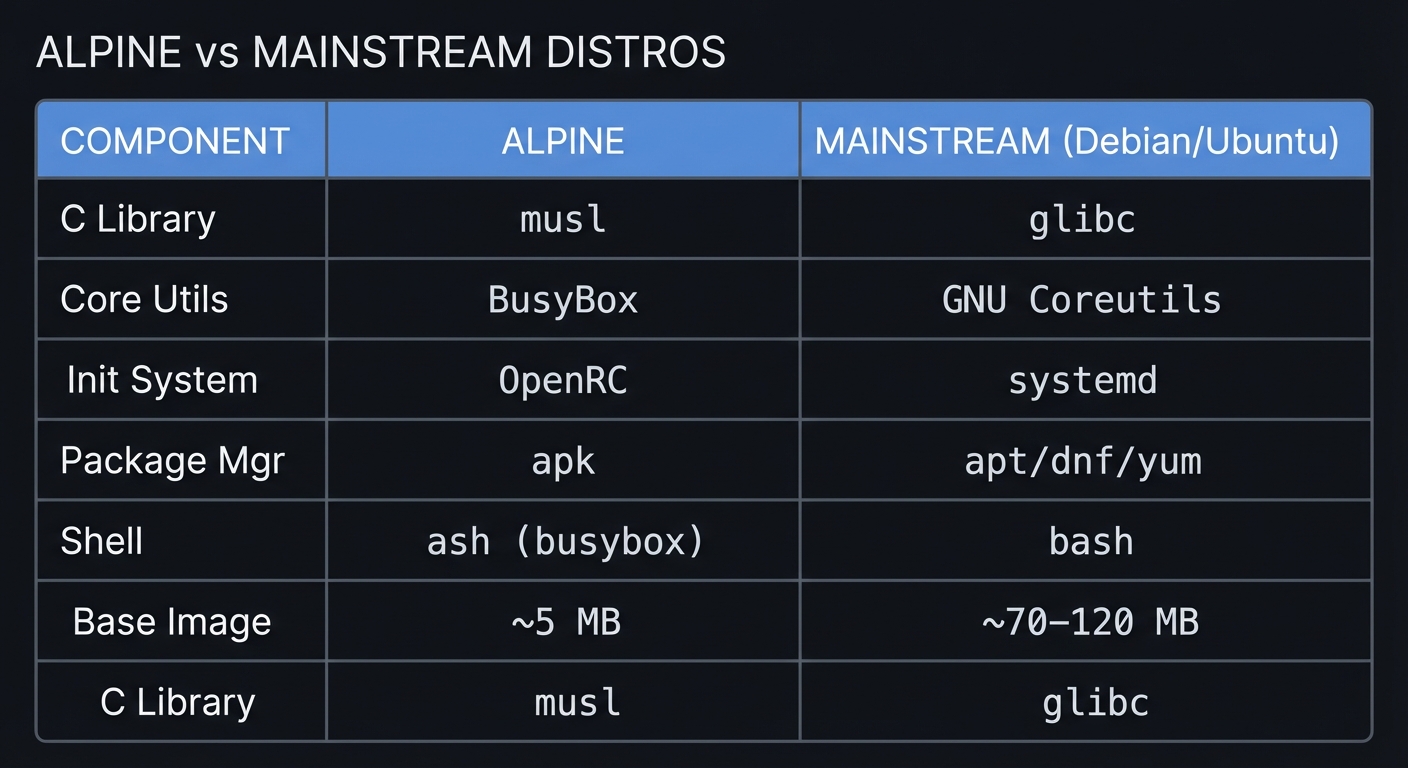
These aren’t minor variations—they fundamentally change how you develop for and operate Alpine.
The Four Major Differences
1. musl libc Instead of glibc
What it is: The C standard library that EVERY compiled program uses.
Why it matters: If you’ve ever seen “not found” errors for binaries that clearly exist, or random crashes in threaded applications, musl vs glibc is probably why.
2. BusyBox Instead of GNU Coreutils
What it is: A single binary providing ~400 Unix commands (ls, grep, awk, etc.)
Why it matters: Shell scripts that work on Ubuntu may fail on Alpine due to missing options.
3. OpenRC Instead of systemd
What it is: A simpler, dependency-based init system using shell scripts.
Why it matters: Commands like systemctl don’t exist. Service management is different.
4. APK Instead of apt/dnf/yum
What it is: Alpine’s own package manager—extremely fast but different syntax.
Why it matters: Different commands, different package names, different behaviors.
Difference 1: musl libc vs glibc (The Big One)
What Is a C Library?
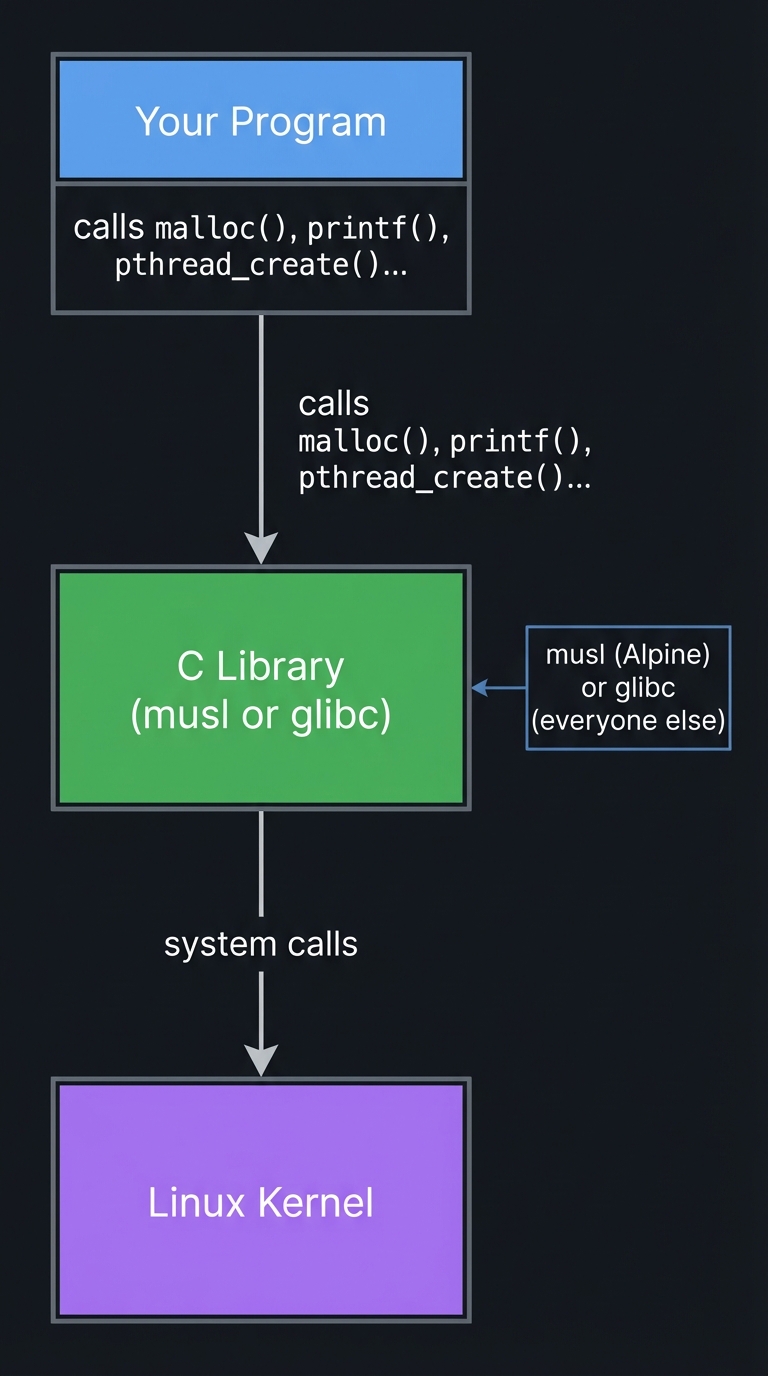
Every compiled program (C, C++, Go, Rust, etc.) needs to talk to the operating system. The C library provides this interface:
┌─────────────────┐
│  Your Program   │
└────────┬────────┘
         │ calls malloc(), printf(), pthread_create()...
         ▼
┌─────────────────┐
│   C Library     │  ← musl (Alpine) or glibc (everyone else)
│ (musl or glibc) │
└────────┬────────┘
         │ system calls
         ▼
┌─────────────────┐
│   Linux Kernel  │
└─────────────────┘
Key Differences
| Aspect | musl | glibc |
|---|---|---|
| Size | ~1 MB | ~8 MB |
| Design | Minimal, standards-compliant | Feature-rich, many extensions |
| Thread Stack | 128 KB default | 2-8 MB default |
| DNS Resolver | Simple, single-threaded | Complex, caching, parallel |
| Locale Support | Limited (UTF-8 focused) | Full (all locales) |
| Compatibility | Strict POSIX | Many GNU extensions |
Common Compatibility Issues
1. Binary Incompatibility (The #1 Issue)
Problem: Binaries compiled on Ubuntu don’t run on Alpine.
# On Ubuntu: compile a program
gcc -o hello hello.c

# Copy to Alpine and run:
./hello
# Error: /lib/x86_64-linux-gnu/libc.so.6: No such file or directory
Why: The binary looks for glibc at a specific path. Alpine has musl.
Solutions:
# Solution 1: Static linking (best for Go, Rust)
CGO_ENABLED=0 go build -o myapp         # Go
rustup target add x86_64-unknown-linux-musl
cargo build --target x86_64-unknown-linux-musl  # Rust

# Solution 2: Recompile on Alpine
apk add build-base
gcc -o hello hello.c

# Solution 3: Use gcompat (compatibility layer)
apk add gcompat
./glibc-binary  # May work now

# Solution 4: Install glibc (not recommended)
# See: https://wiki.alpinelinux.org/wiki/Running_glibc_programs
2. Thread Stack Size Crashes
Problem: Multi-threaded programs crash with “stack overflow” or segfaults.
// This code may crash on Alpine but work on Ubuntu
void* thread_func(void* arg) {
    char big_buffer[1024 * 1024];  // 1 MB local variable
    // ... use buffer
    return NULL;
}
Why: musl’s default thread stack is 128 KB vs glibc’s 2-8 MB.
Solution:
// Explicitly set stack size
pthread_attr_t attr;
pthread_attr_init(&attr);
pthread_attr_setstacksize(&attr, 2 * 1024 * 1024);  // 2 MB
pthread_create(&thread, &attr, thread_func, NULL);
3. DNS Resolution Differences
Problem: DNS lookups fail or behave differently.
Why: musl’s resolver is simpler—single-threaded, no caching, different timeout behavior.
Symptoms:
- Slow DNS lookups under high concurrency
- Different handling of
/etc/hostsvs DNS - Issues with
searchdomains in/etc/resolv.conf
Solutions:
- Use Alpine 3.18+ (many DNS fixes)
- Consider adding a local DNS cache (dnsmasq)
4. Locale and Unicode Issues
Problem: Locale-dependent code behaves differently.
# On Ubuntu:
locale -a
# Shows: C, C.UTF-8, en_US.UTF-8, fr_FR.UTF-8,...

# On Alpine:
locale -a
# Shows: C, C.UTF-8, POSIX
Why: musl has minimal locale support. It’s UTF-8 focused.
Solution: Ensure your code handles UTF-8 correctly and doesn’t rely on locale-specific sorting.
When musl Is Actually Better
- Security: Smaller codebase = smaller attack surface
- Size: 5 MB Docker images vs 70+ MB
- Memory: Less overhead per process
- Standards: Stricter POSIX compliance can find bugs
Difference 2: BusyBox vs GNU Coreutils
What Is BusyBox?
BusyBox is a single ~1 MB binary that provides stripped-down versions of ~400 Unix commands:
# On Alpine, 'ls' is actually:
ls -la /bin/ls
# /bin/ls -> /bin/busybox

# All these are the same binary:
ls, grep, awk, sed, find, tar, gzip, vi, sh, ...
Commands With Different Options
| Command | GNU Option | BusyBox | Alternative |
|---|---|---|---|
ls -G |
Hide group | ❌ Missing | Use ls -l \| awk |
grep -P |
Perl regex | ❌ Missing | apk add grep |
sed -i'' |
In-place (no backup) | ❌ Different | sed -i (no quotes) |
find -printf |
Custom format | ❌ Missing | apk add findutils |
cp --parents |
Preserve path | ❌ Missing | apk add coreutils |
date -d |
Parse date string | ⚠️ Different syntax | apk add coreutils |
stat -c |
Custom format | ⚠️ Different | stat -c works but limited |
readlink -f |
Canonicalize | ✅ Works | N/A |
xargs -r |
No run if empty | ⚠️ Different | BusyBox uses -r differently |
Shell Script Gotchas
Bash-isms That Fail
#!/bin/bash                    # ❌ Bash not installed by default
#!/bin/sh                      # ✅ Use ash (BusyBox shell)

# Bash arrays
arr=(one two three)            # ❌ ash doesn't support arrays
set -- one two three           # ✅ Use positional parameters

# Bash [[ ]] syntax
[[ $var == "test" ]]           # ❌ ash uses [ ]
[ "$var" = "test" ]            # ✅ POSIX syntax

# Bash brace expansion
echo {1..5}                    # ❌ Outputs: {1..5}
seq 1 5                        # ✅ Use seq

# Bash here-strings
cat <<< "hello"                # ❌ Not supported
echo "hello" | cat             # ✅ Use pipe

# Bash process substitution
diff <(cmd1) <(cmd2)           # ❌ Not supported
cmd1 > /tmp/a; cmd2 > /tmp/b; diff /tmp/a /tmp/b  # ✅ Use temp files

# Bash substring
${var:0:5}                     # ⚠️ Works in some versions
echo "$var" | cut -c1-5        # ✅ More portable
Installing GNU Tools When Needed
# Install individual GNU tools
apk add grep          # GNU grep (supports -P, -E fully)
apk add sed           # GNU sed (full features)
apk add gawk          # GNU awk (full features)
apk add findutils     # GNU find, xargs
apk add coreutils     # GNU cp, ls, date, stat, etc.
apk add bash          # Full bash shell
apk add util-linux    # More utilities

# After installation, GNU versions are available:
# Some replace BusyBox, others have different names
gawk '{print $1}' file.txt   # Explicitly use GNU awk
Practical Script Example
#!/bin/sh
# Script that works on BOTH Alpine and Ubuntu

# Avoid bash-isms
MYVAR="hello"
if [ "$MYVAR" = "hello" ]; then  # Use = not ==
    echo "Match"
fi

# Avoid GNU-specific options
grep "pattern" file.txt          # Works everywhere
# grep -P "pattern" file.txt # ❌ Fails on BusyBox

# Date handling (different syntax)
# GNU: date -d "2024-01-01" +%s
# BusyBox: date -D "%Y-%m-%d" -d "2024-01-01" +%s

# Or just use epoch directly
date +%s

# Find without GNU extensions
find /path -name "*.txt" -type f
# find /path -name "*.txt" -printf "%f\n" # ❌ Fails on BusyBox
find /path -name "*.txt" -exec basename {} \;  # ✅ Works
Difference 3: OpenRC vs systemd
Fundamental Philosophy Difference
systemd                          OpenRC
───────                          ──────
Monolithic                       Modular
Binary configuration             Shell scripts
socket activation                Classic daemon model
journald (binary logs)           syslog (text logs)
systemctl                        rc-service, rc-update
/lib/systemd/system/*.service    /etc/init.d/* scripts
Command Comparison
| Action | systemd | OpenRC (Alpine) |
|---|---|---|
| Start service | systemctl start nginx |
rc-service nginx start |
| Stop service | systemctl stop nginx |
rc-service nginx stop |
| Restart | systemctl restart nginx |
rc-service nginx restart |
| Status | systemctl status nginx |
rc-service nginx status |
| Enable at boot | systemctl enable nginx |
rc-update add nginx default |
| Disable at boot | systemctl disable nginx |
rc-update del nginx default |
| List services | systemctl list-units |
rc-status |
| Check if enabled | systemctl is-enabled nginx |
rc-update show \| grep nginx |
| View logs | journalctl -u nginx |
cat /var/log/nginx/* or dmesg |
| Reload config | systemctl daemon-reload |
Not needed (scripts, not units) |
OpenRC Directory Structure
/etc/
├── init.d/              # Service scripts (the actual daemons)
│   ├── nginx
│   ├── sshd
│   ├── crond
│   └── ...
├── conf.d/              # Configuration for each service
│   ├── nginx            # Variables used by /etc/init.d/nginx
│   ├── sshd
│   └── ...
├── runlevels/           # Which services run at which level
│   ├── default/         # Normal runlevel (symlinks to init.d)
│   │   ├── nginx -> /etc/init.d/nginx
│   │   └── sshd -> /etc/init.d/sshd
│   ├── boot/            # Early boot services
│   │   └── networking -> /etc/init.d/networking
│   ├── sysinit/         # System initialization
│   └── shutdown/        # Shutdown scripts
└── rc.conf              # Global OpenRC configuration
Writing OpenRC Service Scripts
#!/sbin/openrc-run
# /etc/init.d/myapp

description="My Application"

# Dependencies
depend() {
    need net             # Requires networking
    after firewall       # Start after firewall (if present)
    use logger           # Use syslog if available
}

# Configuration (can be overridden in /etc/conf.d/myapp)
command="/usr/bin/myapp"
command_args="--config /etc/myapp.conf"
command_user="myapp"
command_group="myapp"
pidfile="/run/myapp.pid"
command_background=true

# Optional hooks
start_pre() {
    # Run before starting
    checkpath --directory --owner myapp:myapp /var/lib/myapp
}

start_post() {
    # Run after starting
    einfo "myapp started successfully"
}

stop_pre() {
    # Run before stopping
    ewarn "Stopping myapp..."
}
Runlevels in OpenRC
# List all runlevels
ls /etc/runlevels/

# sysinit - System initialization (mount filesystems, etc.)
# boot - Boot-time services (networking, hostname)
# default - Normal operation (most services)
# shutdown - Shutdown sequence

# Add service to default runlevel
rc-update add nginx default

# Show all services and their runlevels
rc-update show

# Show status of current runlevel
rc-status

# Change runlevel (rarely needed)
openrc default
Key Differences to Remember
- No socket activation: Services must be explicitly started
- No journald: Use syslog or application-specific logs
- No
systemctl: Userc-serviceandrc-update - Scripts, not units: Service definitions are shell scripts
- No cgroups management: (Though cgroups v2 is supported since 3.19)
Difference 4: APK Package Manager
Quick Command Reference
| Action | apt (Debian/Ubuntu) | apk (Alpine) |
|---|---|---|
| Update index | apt update |
apk update |
| Upgrade all | apt upgrade |
apk upgrade |
| Install package | apt install nginx |
apk add nginx |
| Remove package | apt remove nginx |
apk del nginx |
| Remove + config | apt purge nginx |
apk del --purge nginx |
| Search | apt search nginx |
apk search nginx |
| Show info | apt show nginx |
apk info nginx |
| List installed | dpkg -l |
apk list --installed |
| List files | dpkg -L nginx |
apk info -L nginx |
| Find owner | dpkg -S /path/file |
apk info --who-owns /path/file |
| Clean cache | apt clean |
apk cache clean |
| Fix broken | apt --fix-broken install |
apk fix |
APK-Specific Features
Virtual Packages (Unique to APK)
Group packages for easy removal later:
# Install build dependencies as a virtual package
apk add --virtual .build-deps gcc musl-dev make

# ... build your software...

# Remove all build dependencies at once
apk del .build-deps

# Useful in Dockerfiles:
RUN apk add --no-cache --virtual .build-deps \
        gcc musl-dev python3-dev \
    && pip install some-package \
    && apk del .build-deps
No-Cache Option (Great for Docker)
# Don't store the package index (smaller images)
apk add --no-cache nginx

# Equivalent to:
apk update && apk add nginx && rm -rf /var/cache/apk/*
The World File
# /etc/apk/world contains explicitly installed packages
cat /etc/apk/world
# nginx
# vim
# openssh

# You can edit it directly!
echo "htop" >> /etc/apk/world
apk fix  # Installs htop

# Dependencies are auto-managed, not listed in world
Repository Configuration
# Repository file
cat /etc/apk/repositories
# https://dl-cdn.alpinelinux.org/alpine/v3.19/main
# https://dl-cdn.alpinelinux.org/alpine/v3.19/community

# Repositories:
# main - Core packages, officially supported
# community - Community-maintained packages
# edge - Bleeding edge (unstable)
# testing - New packages being tested

# Enable edge repository (careful!)
echo "https://dl-cdn.alpinelinux.org/alpine/edge/main" >> /etc/apk/repositories
echo "https://dl-cdn.alpinelinux.org/alpine/edge/community" >> /etc/apk/repositories
apk update
Package Naming Conventions
# Development headers
# Debian: libssl-dev
# Alpine: openssl-dev

# Documentation
# Debian: nginx-doc
# Alpine: nginx-doc

# Static libraries
# Alpine often has: package-static

# Common mappings:
# build-essential → build-base
# linux-headers-* → linux-headers
# python3-pip → py3-pip
# libcurl4-openssl-dev → curl-dev
Difference 5: Installation Modes (Unique to Alpine)
Alpine has three installation modes not found in most distros:
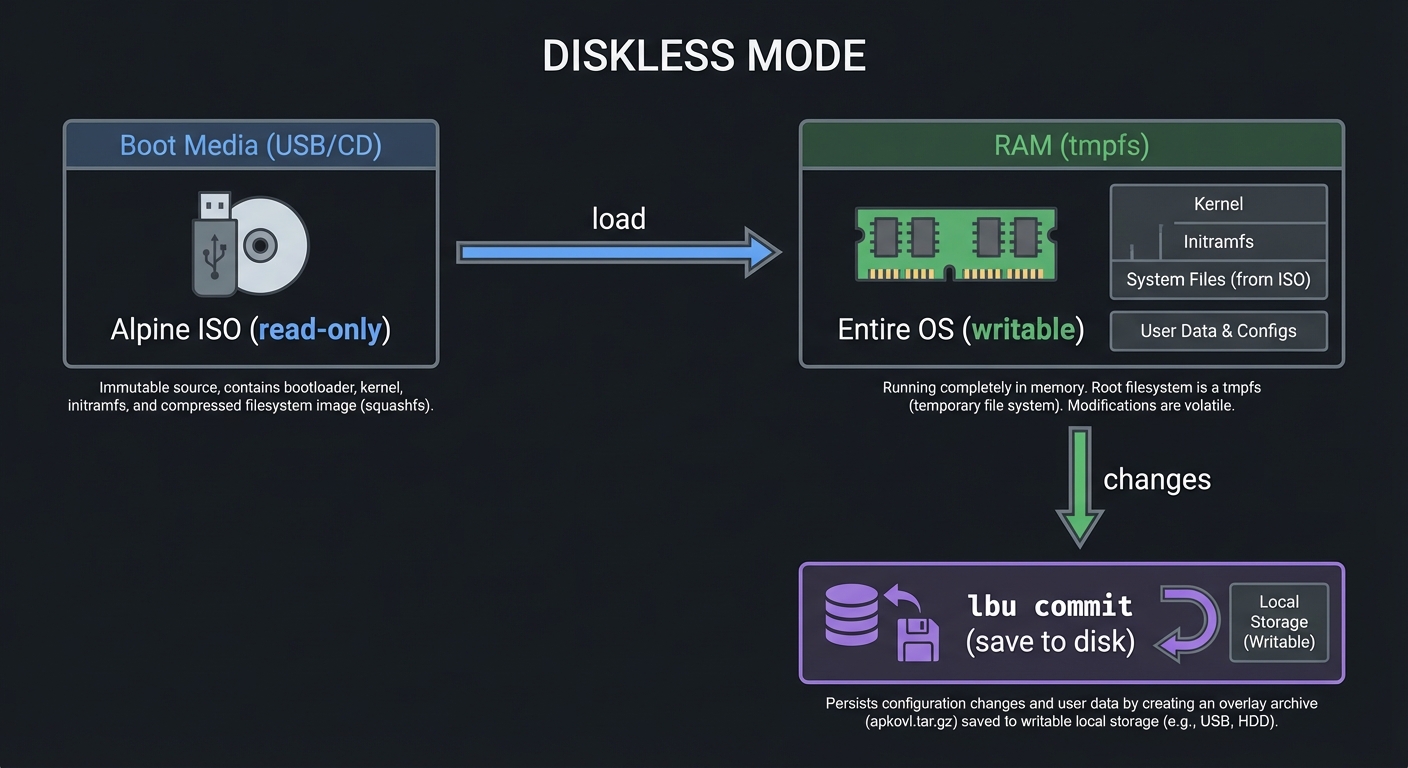
Diskless Mode (Run Entirely from RAM)
┌──────────────────────────────────────────────────────────────┐
│                     DISKLESS MODE                            │
├──────────────────────────────────────────────────────────────┤
│                                                              │
│   Boot Media (USB/CD)          RAM (tmpfs)                   │
│   ┌─────────────────┐          ┌─────────────────┐           │
│   │  Alpine ISO     │ ──────►  │  Entire OS      │           │
│   │  (read-only)    │  load    │  (writable)     │           │
│   └─────────────────┘          └─────────────────┘           │
│                                        │                     │
│                                        │ changes             │
│                                        ▼                     │
│                                ┌─────────────────┐           │
│                                │   lbu commit    │           │
│                                │  (save to disk) │           │
│                                └─────────────────┘           │
│                                                              │
└──────────────────────────────────────────────────────────────┘
Use cases:
- Embedded systems
- Routers/firewalls
- Kiosk systems
- Raspberry Pi with SD card wear concerns
Key commands:
# Save configuration changes
lbu commit

# Specify save location
setup-lbu /media/usb

# List what will be saved
lbu status

# Include additional paths
lbu include /home/user/data

# Package cache (so packages survive reboot)
setup-apkcache /media/usb/cache
Data Disk Mode
OS runs from RAM, but /var is on persistent storage:
- Faster than sys mode
- Logs, databases persist
- Still boots from RAM
Sys Mode (Traditional)
Like other distros—full installation to disk.
Difference 6: Security Design
Historical Context: grsecurity/PaX
Alpine was known for shipping a grsecurity/PaX hardened kernel until 2018 when the patches became private. Key protections included:
- ASLR: Randomized memory layout
- Non-executable memory: Prevent code execution in data areas
- RBAC: Role-based access control
Current Security Features
# Hardened compiler flags (still active)
# All packages compiled with:
-fstack-protector-strong     # Stack smashing protection
-D_FORTIFY_SOURCE=2          # Buffer overflow detection
-Wl,-z,relro,-z,now          # Full RELRO
-fPIE -pie                   # Position Independent Executables

# Check a binary
apk add pax-utils
scanelf -e /bin/busybox
# Shows: PaX flags, RELRO, PIE status

# Kernel hardening checker
apk add kernel-hardening-checker
kernel-hardening-checker -c /boot/config-*
Security Advantages of Alpine’s Design
- Smaller attack surface: 5 MB vs 70+ MB = fewer vulnerabilities
- musl security: Simpler code, fewer historic CVEs than glibc
- No systemd: Simpler init = fewer attack vectors
- Package verification: All packages signed
Project 1: musl Compatibility Lab
- File: LEARN_ALPINE_LINUX_DIFFERENCES.md
- Main Programming Language: C
- Alternative Programming Languages: Go, Rust, Python (with C extensions)
- Coolness Level: Level 3: Genuinely Clever
- Business Potential: 1. The “Resume Gold”
- Difficulty: Level 2: Intermediate
- Knowledge Area: C Library / Binary Compatibility
- Software or Tool: Alpine Linux, Docker
- Main Book: “The Linux Programming Interface” by Michael Kerrisk
What you’ll build: A test suite that demonstrates musl vs glibc differences—thread stack size, DNS resolution, locale handling, and binary compatibility.
Why it teaches Alpine differences: You’ll experience firsthand why binaries crash, why DNS behaves differently, and how to write portable code.
Core challenges you’ll face:
- Running glibc binaries on Alpine → maps to understanding dynamic linking
- Thread stack exhaustion → maps to musl’s 128K default
- DNS resolution differences → maps to resolver behavior
- Locale handling → maps to musl’s UTF-8 focus
Difficulty: Intermediate Time estimate: 1 week Prerequisites: Basic C programming, Docker
Real world outcome:
# Test 1: Binary compatibility
$ ./glibc-binary-on-alpine
# See the actual error and understand why

# Test 2: Thread stack
$ ./thread-stack-test
# Ubuntu: Works fine
# Alpine: Crashes (or works after fix)

# Test 3: DNS behavior
$ ./dns-test
# Observe timing and behavior differences
Implementation Hints:
Setup:
# Create test environment
docker run -it --rm alpine:latest sh
docker run -it --rm ubuntu:latest bash
Test 1: Binary compatibility
// Compile on Ubuntu
// hello.c
#include <stdio.h>
int main() {
    printf("Hello from glibc!\n");
    return 0;
}

// Ubuntu:
gcc -o hello hello.c

// Copy to Alpine and run:
./hello
# Error: /lib/x86_64-linux-gnu/libc.so.6: No such file or directory
Test 2: Thread stack size
// thread_stack.c
#include <pthread.h>
#include <stdio.h>

void* thread_func(void* arg) {
    char buffer[256 * 1024];  // 256 KB - larger than musl's 128K default
    buffer[0] = 'x';
    printf("Thread succeeded\n");
    return NULL;
}

int main() {
    pthread_t thread;
    pthread_create(&thread, NULL, thread_func, NULL);
    pthread_join(thread, NULL);
    return 0;
}
Test 3: DNS timing
// dns_test.c
#include <netdb.h>
#include <stdio.h>
#include <time.h>

int main() {
    struct timespec start, end;
    for (int i = 0; i < 10; i++) {
        clock_gettime(CLOCK_MONOTONIC, &start);
        struct hostent *host = gethostbyname("google.com");
        clock_gettime(CLOCK_MONOTONIC, &end);

        double elapsed = (end.tv_sec - start.tv_sec) * 1000.0 +
                        (end.tv_nsec - start.tv_nsec) / 1000000.0;
        printf("Lookup %d: %.2f ms\n", i, elapsed);
    }
    return 0;
}
Learning milestones:
- Understand why glibc binaries fail → Dynamic linking comprehension
- Fix thread stack crashes → pthread_attr_setstacksize()
- Observe DNS differences → Understand resolver behavior
- Create portable code → Avoid glibc-specific features
Project 2: BusyBox Script Compatibility Checker
- File: LEARN_ALPINE_LINUX_DIFFERENCES.md
- Main Programming Language: Shell (sh/bash)
- Alternative Programming Languages: Python (for the checker tool)
- Coolness Level: Level 2: Practical but Forgettable
- Business Potential: 2. The “Micro-SaaS / Pro Tool”
- Difficulty: Level 1: Beginner
- Knowledge Area: Shell Scripting / POSIX Compatibility
- Software or Tool: ShellCheck, BusyBox
- Main Book: “Effective Shell” by Dave Kerr
What you’ll build: A tool that analyzes shell scripts for BusyBox/Alpine compatibility issues, flagging bash-isms and GNU-specific options.
Why it teaches Alpine differences: You’ll learn exactly which features are GNU extensions vs POSIX standard, essential for writing portable scripts.
Core challenges you’ll face:
- Identifying bash-isms → maps to POSIX vs GNU extensions
- Detecting unsupported options → maps to BusyBox limitations
- Suggesting alternatives → maps to portable solutions
Difficulty: Beginner Time estimate: Weekend Prerequisites: Basic shell scripting
Real world outcome:
$ ./alpine-check.sh myscript.sh
Line 5: [[ $var == "test" ]]
  ⚠️  Bash-ism: Use [ "$var" = "test" ] for POSIX compatibility

Line 12: grep -P "pattern" file
  ❌ Not supported: BusyBox grep lacks -P (Perl regex)
  💡 Fix: apk add grep, or use grep -E for extended regex

Line 18: arr=(one two three)
  ❌ Not supported: Arrays require bash
  💡 Fix: Use positional parameters: set -- one two three
Implementation Hints:
#!/bin/sh
# alpine-check.sh - Check scripts for Alpine compatibility

check_file() {
    file="$1"
    lineno=0

    while IFS= read -r line; do
        lineno=$((lineno + 1))

        # Check for bash shebang
        case "$line" in
            "#!/bin/bash"*|"#!/usr/bin/env bash"*)
                echo "Line $lineno: $line"
                echo "  ⚠️  Consider #!/bin/sh for Alpine compatibility"
                ;;
        esac

        # Check for [[ ]]
        case "$line" in
            *"[["*"]]"*)
                echo "Line $lineno: $line"
                echo "  ⚠️  Bash-ism: [[ ]] not available in ash"
                ;;
        esac

        # Check for arrays
        case "$line" in
            *"=("*")"*)
                echo "Line $lineno: $line"
                echo "  ❌ Bash arrays not supported in ash"
                ;;
        esac

        # Check for grep -P
        case "$line" in
            *"grep -P"*|*"grep --perl"*)
                echo "Line $lineno: $line"
                echo "  ❌ BusyBox grep lacks Perl regex (-P)"
                echo "  💡 Install grep: apk add grep"
                ;;
        esac

        # Check for process substitution
        case "$line" in
            *"<("*")"*|*">-("*")"*)
                echo "Line $lineno: $line"
                echo "  ❌ Process substitution not supported"
                ;;
        esac

    done < "$file"
}

for script in "$@"; do
    echo "=== Checking: $script ==="
    check_file "$script"
    echo ""
done
Project 3: OpenRC Service Migration
- File: LEARN_ALPINE_LINUX_DIFFERENCES.md
- Main Programming Language: Shell
- Alternative Programming Languages: N/A
- Coolness Level: Level 3: Genuinely Clever
- Business Potential: 2. The “Micro-SaaS / Pro Tool”
- Difficulty: Level 2: Intermediate
- Knowledge Area: Init Systems / Service Management
- Software or Tool: Alpine Linux, OpenRC
- Main Book: N/A (Alpine Wiki)
What you’ll build: Convert systemd service files to OpenRC init scripts, learning both systems in the process.
Why it teaches Alpine differences: Service management is one of the biggest operational differences. Converting services teaches you both systems deeply.
Core challenges you’ll face:
- Understanding systemd unit files → maps to systemd concepts
- Writing OpenRC scripts → maps to shell-based init
- Handling dependencies → maps to both systems’ dependency models
Difficulty: Intermediate Time estimate: 1 week Prerequisites: Basic service management knowledge
Real world outcome:
Input (systemd unit file):
# /lib/systemd/system/myapp.service
[Unit]
Description=My Application
After=network.target
Requires=postgresql.service

[Service]
Type=simple
User=myapp
Group=myapp
ExecStart=/usr/bin/myapp --config /etc/myapp.conf
ExecReload=/bin/kill -HUP $MAINPID
Restart=always
RestartSec=5

[Install]
WantedBy=multi-user.target
Output (OpenRC init script):
#!/sbin/openrc-run
# /etc/init.d/myapp

description="My Application"

depend() {
    need net
    need postgresql
}

command="/usr/bin/myapp"
command_args="--config /etc/myapp.conf"
command_user="myapp"
command_group="myapp"
pidfile="/run/myapp.pid"
command_background=true

reload() {
    ebegin "Reloading ${RC_SVCNAME}"
    start-stop-daemon --signal HUP --pidfile "${pidfile}"
    eend $?
}

# Enable automatic restart via supervise-daemon (Alpine 3.9+)
supervisor=supervise-daemon
respawn_delay=5
Project 4: Alpine Docker Optimization
- File: LEARN_ALPINE_LINUX_DIFFERENCES.md
- Main Programming Language: Dockerfile
- Alternative Programming Languages: N/A
- Coolness Level: Level 3: Genuinely Clever
- Business Potential: 3. The “Service & Support” Model
- Difficulty: Level 2: Intermediate
- Knowledge Area: Containers / Docker
- Software or Tool: Docker
- Main Book: N/A
What you’ll build: Optimize Docker images by leveraging Alpine’s unique features—virtual packages, no-cache, multi-stage builds with musl.
Why it teaches Alpine differences: Docker is Alpine’s killer use case. Understanding how to build minimal, secure images uses all of Alpine’s strengths.
Core challenges you’ll face:
- Minimizing image size → maps to Alpine’s minimalism
- Handling musl compatibility → maps to static linking
- Virtual packages → maps to APK’s unique feature
Difficulty: Intermediate Time estimate: Weekend Prerequisites: Basic Docker knowledge
Real world outcome:
Before (typical Ubuntu-based):
FROM ubuntu:22.04
RUN apt-get update && apt-get install -y python3 python3-pip
COPY requirements.txt .
RUN pip install -r requirements.txt
COPY . .
CMD ["python3", "app.py"]
# Image size: ~450 MB
After (optimized Alpine):
FROM python:3.11-alpine
RUN apk add --no-cache --virtual .build-deps \
        gcc musl-dev python3-dev libffi-dev \
    && pip install --no-cache-dir -r requirements.txt \
    && apk del .build-deps
COPY . .
CMD ["python3", "app.py"]
# Image size: ~50 MB
Go application (static linking):
# Build stage
FROM golang:alpine AS builder
RUN apk add --no-cache git
WORKDIR /app
COPY . .
RUN CGO_ENABLED=0 GOOS=linux go build -a -installsuffix cgo -o myapp .

# Final stage
FROM alpine:latest
RUN apk add --no-cache ca-certificates
COPY --from=builder /app/myapp /myapp
CMD ["/myapp"]
# Image size: ~10 MB
Project 5: Alpine Diskless Kiosk System
- File: LEARN_ALPINE_LINUX_DIFFERENCES.md
- Main Programming Language: Shell
- Alternative Programming Languages: N/A
- Coolness Level: Level 4: Hardcore Tech Flex
- Business Potential: 3. The “Service & Support” Model
- Difficulty: Level 3: Advanced
- Knowledge Area: Embedded Systems / Diskless Boot
- Software or Tool: Alpine Linux, Raspberry Pi (optional)
- Main Book: N/A
What you’ll build: A read-only, diskless Alpine system that runs entirely from RAM—perfect for kiosks, firewalls, or embedded systems.
Why it teaches Alpine differences: Diskless mode is unique to Alpine. Building a working diskless system teaches you LBU, apkovl, and Alpine’s boot process.
Difficulty: Advanced Time estimate: 2 weeks Prerequisites: Linux system administration
Real world outcome:
- System boots from USB/SD to RAM in seconds
- Root filesystem is read-only (tamper-proof)
- Configuration persists via LBU commits
- Perfect for: kiosks, digital signage, firewalls, IoT
Comparison Table
| Project | Difficulty | Time | Primary Learning |
|---|---|---|---|
| 1. musl Compatibility Lab | ⭐⭐ | 1 week | C library differences |
| 2. BusyBox Script Checker | ⭐ | Weekend | Shell compatibility |
| 3. OpenRC Migration | ⭐⭐ | 1 week | Init system differences |
| 4. Docker Optimization | ⭐⭐ | Weekend | Alpine in containers |
| 5. Diskless Kiosk | ⭐⭐⭐ | 2 weeks | Diskless mode |
Quick Reference: When Things Go Wrong
“Binary not found” (but it exists)
# Usually musl vs glibc
ldd ./mybinary
# If it shows /lib/x86_64-linux-gnu/libc.so.6 → glibc binary

# Solutions:
apk add gcompat            # Compatibility layer
# OR recompile for musl
# OR use static linking
“Command option not recognized”
# Usually BusyBox vs GNU
grep --version
# BusyBox v1.36.1 → limited options

# Solution:
apk add grep  # Install GNU grep
“systemctl: not found”
# Alpine uses OpenRC, not systemd
rc-service nginx start     # Instead of systemctl start nginx
rc-update add nginx        # Instead of systemctl enable nginx
“apt: not found”
# Alpine uses apk
apk add nginx              # Instead of apt install nginx
apk del nginx              # Instead of apt remove nginx
apk update && apk upgrade  # Instead of apt update && apt upgrade
“bash: not found” in scripts
# Either install bash
apk add bash

# Or change shebang
#!/bin/sh                  # Instead of #!/bin/bash
Summary
| Difference | Alpine | Mainstream | Impact |
|---|---|---|---|
| C Library | musl | glibc | Binary compatibility, threading, DNS |
| Core Utils | BusyBox | GNU | Shell scripts, command options |
| Init System | OpenRC | systemd | Service management commands |
| Package Mgr | apk | apt/dnf | Different syntax, virtual packages |
| Install Mode | Diskless/Sys | Sys only | RAM-based operation possible |
| Base Size | ~5 MB | ~70+ MB | Ideal for containers |
| Security | Hardened toolchain | Varies | Smaller attack surface |
Resources
- Alpine Wiki
- musl libc - Functional differences
- BusyBox Commands
- OpenRC Guide
- APK Package Manager
- Diskless Mode
Summary of Projects
| # | Project | Main Focus |
|---|---|---|
| 1 | musl Compatibility Lab | C library differences (threads, DNS, binaries) |
| 2 | BusyBox Script Checker | Shell script portability |
| 3 | OpenRC Migration | Init system conversion |
| 4 | Docker Optimization | Alpine in containers |
| 5 | Diskless Kiosk | Unique Alpine installation mode |
Alpine Linux’s differences aren’t bugs—they’re features. Once you understand them, you can leverage Alpine’s minimalism, security, and speed to build systems that mainstream distros simply can’t match. 🏔️