Project 3: Build a Reactive Spreadsheet Engine
Project Overview
| Attribute | Value |
|---|---|
| Difficulty | Intermediate |
| Time Estimate | 1-2 weeks |
| Main Language | TypeScript |
| Alternatives | Rust, Haskell, Elm |
| Prerequisites | Graph concepts, expression parsing |
| Key FP Concepts | Declarative programming, dataflow, memoization, dependency graphs |
Learning Objectives
By completing this project, you will:
- Master declarative programming - Define relationships, not procedures
- Understand reactive dataflow - See how changes propagate through systems
- Build dependency graphs - Track which values depend on which
- Implement memoization - Cache results based on immutable inputs
- Detect cycles - Understand why pure functions can’t have circular dependencies
- Apply topological sort - Order updates correctly in a dependency graph
The Core Question
“Why did Excel become the world’s most successful programming environment? What makes declarative dataflow so powerful that billions of people use it daily?”
Spreadsheets are secretly functional programming’s greatest success story. Every cell is a pure function of its dependencies. When you type =A1+B1, you’re not writing a procedure—you’re declaring a relationship. The system figures out how and when to compute it.
This is the essence of declarative programming: you describe what you want, not how to compute it.
Deep Theoretical Foundation
1. Declarative vs. Imperative: A Fundamental Shift
Imperative (how to do it):
// "Here's the procedure to follow"
let result = 0;
for (let i = 0; i < prices.length; i++) {
  result += prices[i] * quantities[i];
}
return result;
Declarative (what to compute):
// "Here's what I want"
const result = sum(zip(prices, quantities).map(([p, q]) => p * q));
Spreadsheet-style (relationships):
A1: 10        // price
B1: 5         // quantity
C1: =A1*B1    // total (automatically updates when A1 or B1 changes)
In the spreadsheet model, you never say “when A1 changes, recalculate C1.” You declare the relationship, and the system maintains it.
2. The Dependency Graph
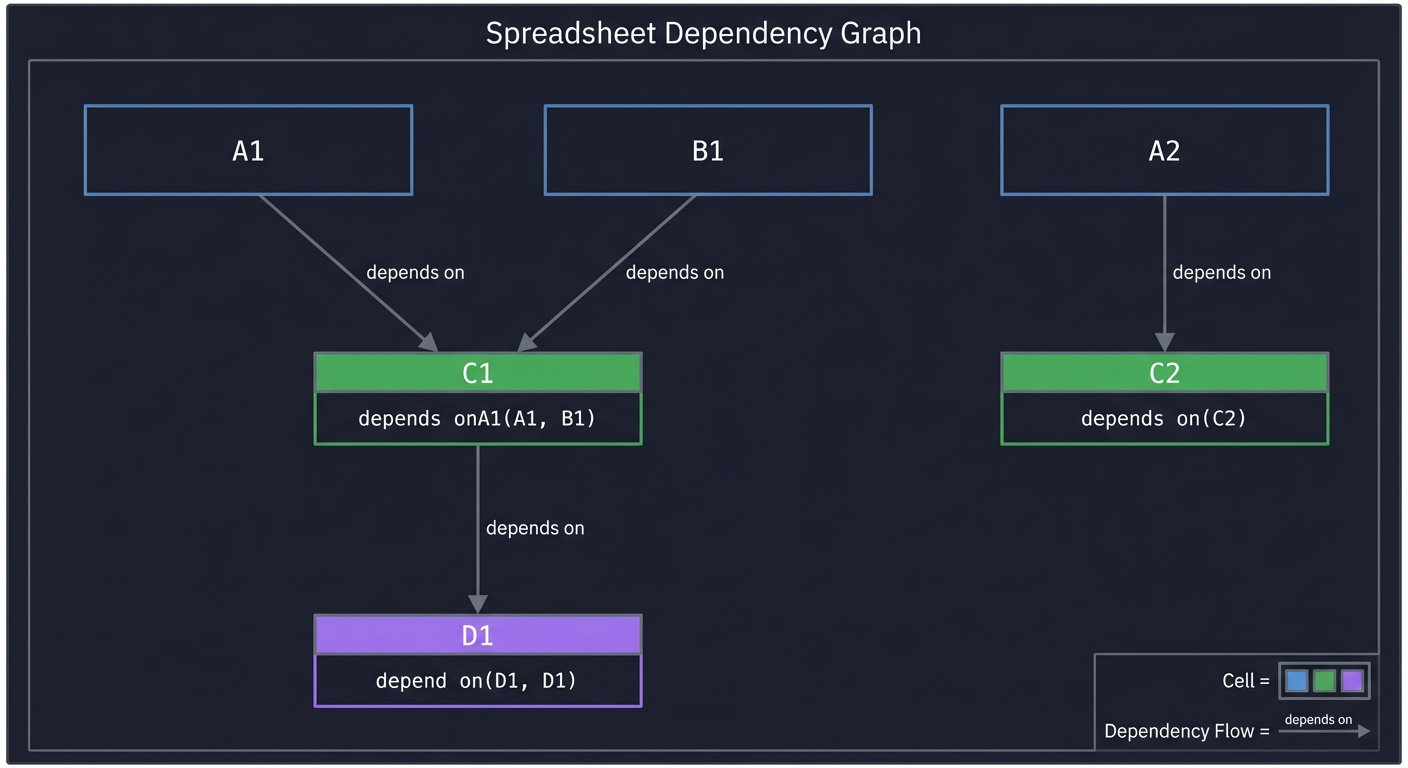
Every spreadsheet is secretly a directed acyclic graph (DAG):
    A1 ─────┐
            ├──▶ C1 ──▶ D1
    B1 ─────┘

    A2 ──────────▶ C2
- Nodes: Cells
- Edges: “depends on” relationships
- Direction: From dependency to dependent
When A1 changes:
- Find all cells that depend on
A1(directly or transitively) - Recalculate them in the right order
3. Topological Sort: The Right Order
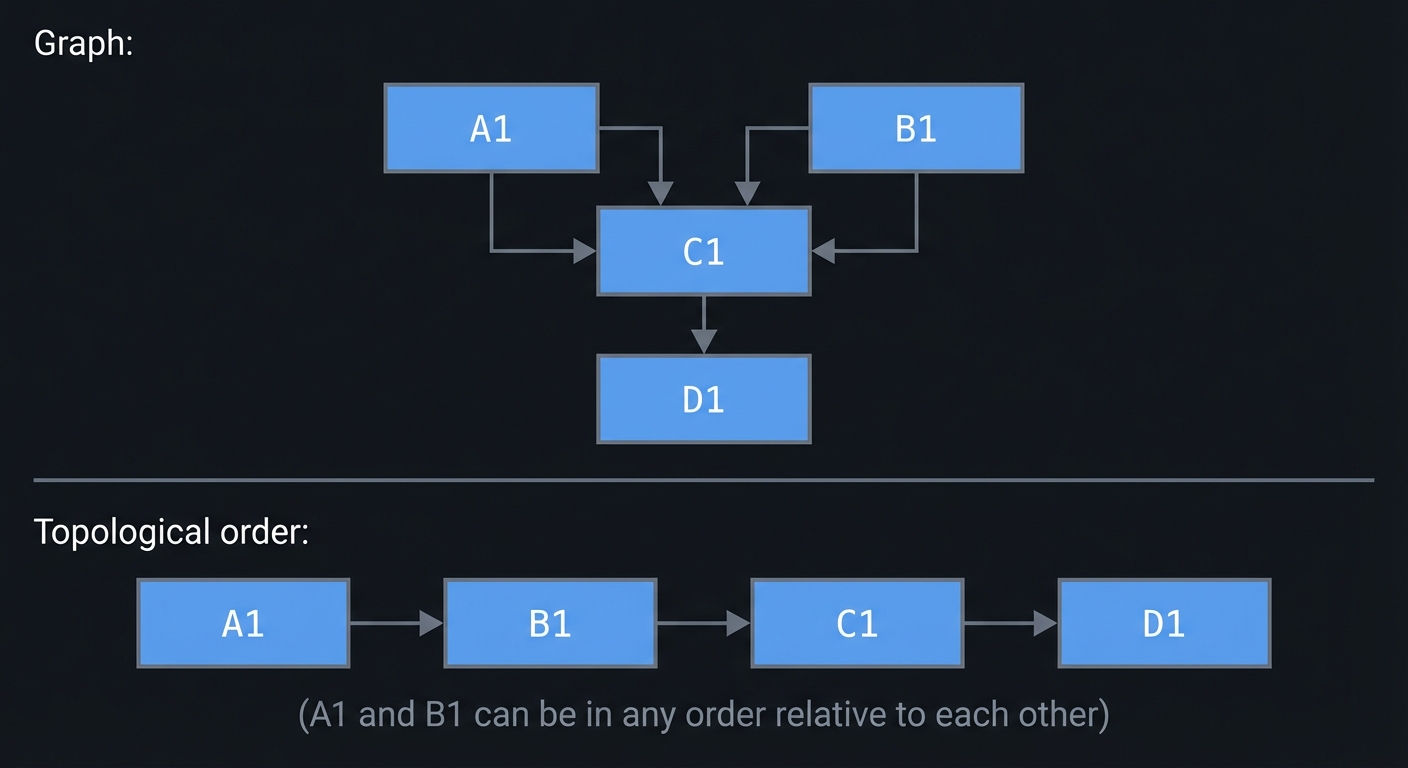
You can’t compute D1 before C1 if D1 = C1 * 2. Topological sort gives you an order where every node comes after its dependencies.
Graph: A1 → C1 → D1
       B1 → C1

Topological order: [A1, B1, C1, D1]
(A1 and B1 can be in any order relative to each other)
Kahn’s Algorithm:
- Find all nodes with no incoming edges (no dependencies)
- Remove them, add to result
- Repeat until graph is empty
- If nodes remain, there’s a cycle (error!)
4. Why Cycles Are Forbidden
A1 = B1 + 1
B1 = A1 + 1
This is a cycle: A1 depends on B1, B1 depends on A1. There’s no consistent value for either cell—they would infinitely increase.
In FP terms: pure functions can’t have circular dependencies because there’s no starting value to compute from.
A1 = B1 + 1  →  needs B1
B1 = A1 + 1  →  needs A1 (but we're computing A1!)
5. Memoization: The Power of Immutability
Memoization: Cache function results so you don’t recompute if inputs haven’t changed.
// Without memoization: recalculates every time
function expensive(x) {
  return complexComputation(x);
}

// With memoization: caches based on input
const memoized = memoize((x) => complexComputation(x));
This only works with pure functions! If the function has side effects or depends on external state, caching is unsafe.
In a spreadsheet:
C1 = A1 + B1- If
A1andB1haven’t changed since last calculation,C1’s cached value is still valid - This is why spreadsheets can handle thousands of formulas efficiently
6. Reactive Programming Patterns
The spreadsheet model is a form of reactive programming: values that automatically update in response to changes.
Modern frameworks use the same pattern:
// React (similar model)
function Total({ price, quantity }) {
  const total = price * quantity;  // Declarative relationship
  return <div>{total}</div>;       // Automatically re-renders when props change
}

// Vue (explicit reactive)
const price = ref(10);
const quantity = ref(5);
const total = computed(() => price.value * quantity.value);

// Spreadsheet
// A1: 10
// B1: 5
// C1: =A1*B1
7. Push vs. Pull Evaluation
Two strategies for updating values:
Pull (Lazy): Compute values when they’re read
function getValue(cell) {
  if (cell.isDirty) {
    cell.value = evaluate(cell.formula);
    cell.isDirty = false;
  }
  return cell.value;
}
Push (Eager): Compute immediately when dependencies change
function setValue(cell, value) {
  cell.value = value;
  for (const dependent of cell.dependents) {
    dependent.value = evaluate(dependent.formula);
    // Recursively update dependents of dependents
  }
}
Most spreadsheets use push (immediate recalculation) for responsiveness.
Project Specification
What You’re Building
A spreadsheet engine where cells can contain values or formulas:
> set A1 10
A1 = 10

> set B1 5
B1 = 5

> set C1 =A1*B1
C1 = 50

> set D1 =C1+A1
D1 = 60

> set A1 20
A1 = 20
C1 = 100  (automatically updated)
D1 = 120  (automatically updated)

> show
    A       B       C       D
1   20      5       100     120
Core Features
| Feature | Description |
|---|---|
| Cell references | A1, B2, Z99 |
| Arithmetic | +, -, *, / |
| Comparisons | =, <>, <, >, <=, >= |
| Functions | SUM(A1:A10), AVG(B1:B5), IF(A1>0, B1, C1) |
| Automatic updates | Changes propagate to all dependent cells |
| Cycle detection | Error on circular dependencies |
Formula Grammar
formula     = "=" expression
expression  = term (("+"|"-") term)*
term        = factor (("*"|"/") factor)*
factor      = number | cell_ref | func_call | "(" expression ")" | "-" factor
cell_ref    = letter digits
range       = cell_ref ":" cell_ref
func_call   = identifier "(" (expression ("," expression)*)? ")"
Solution Architecture
Data Types
// Cell value types
type CellValue = number | string | boolean | null;

// Cell reference (e.g., "A1" → { col: 0, row: 0 })
interface CellRef {
  col: number;
  row: number;
}

// Formula AST
type Formula =
  | { type: 'literal'; value: CellValue }
  | { type: 'ref'; ref: CellRef }
  | { type: 'range'; start: CellRef; end: CellRef }
  | { type: 'binary'; op: '+' | '-' | '*' | '/'; left: Formula; right: Formula }
  | { type: 'function'; name: string; args: Formula[] };

// Cell content
interface Cell {
  raw: string;              // What the user typed
  formula: Formula | null;  // Parsed formula (if any)
  value: CellValue;         // Computed value
  dependencies: Set<string>; // Cells this cell depends on
  dependents: Set<string>;   // Cells that depend on this cell
}

// The spreadsheet
interface Spreadsheet {
  cells: Map<string, Cell>;
  updateOrder: string[];     // Topological order for updates
}
Dependency Graph
// When parsing =A1+B1, extract dependencies
function extractDependencies(formula: Formula): Set<string> {
  switch (formula.type) {
    case 'literal':
      return new Set();
    case 'ref':
      return new Set([cellRefToString(formula.ref)]);
    case 'range':
      return expandRange(formula.start, formula.end);
    case 'binary':
      return union(
        extractDependencies(formula.left),
        extractDependencies(formula.right)
      );
    case 'function':
      return formula.args.reduce(
        (deps, arg) => union(deps, extractDependencies(arg)),
        new Set<string>()
      );
  }
}
Update Propagation
// When a cell changes, update all dependents
function setCellValue(
  spreadsheet: Spreadsheet,
  cellId: string,
  input: string
): Spreadsheet {
  // 1. Parse the input
  const formula = input.startsWith('=')
    ? parseFormula(input.slice(1))
    : null;

  // 2. Extract dependencies
  const dependencies = formula
    ? extractDependencies(formula)
    : new Set<string>();

  // 3. Check for cycles
  if (wouldCreateCycle(spreadsheet, cellId, dependencies)) {
    throw new Error(`Circular reference detected: ${cellId}`);
  }

  // 4. Update dependency graph
  const newSpreadsheet = updateDependencyGraph(
    spreadsheet,
    cellId,
    dependencies
  );

  // 5. Recompute affected cells in topological order
  return recomputeAffectedCells(newSpreadsheet, cellId);
}
Module Structure
src/
├── index.ts           # Entry point / REPL
├── types.ts           # Type definitions
├── parser.ts          # Formula parser
├── evaluator.ts       # Formula evaluator
├── graph.ts           # Dependency graph operations
├── topological.ts     # Topological sort
├── spreadsheet.ts     # Main spreadsheet logic
└── display.ts         # Grid display
Implementation Guide
Phase 1: Cell Storage (Day 1)
Goal: Store and retrieve cell values.
type Spreadsheet = Map<string, CellValue>;

function getCell(sheet: Spreadsheet, ref: string): CellValue {
  return sheet.get(ref) ?? null;
}

function setCell(sheet: Spreadsheet, ref: string, value: CellValue): Spreadsheet {
  const newSheet = new Map(sheet);  // Immutable update
  newSheet.set(ref, value);
  return newSheet;
}
Test: Set A1 to 10, retrieve it, verify it’s 10.
Phase 2: Formula Parser (Days 2-4)
Goal: Parse formulas into AST.
Start simple:
// Parse "A1" into { type: 'ref', ref: { col: 0, row: 0 } }
function parseCellRef(input: string): Formula {
  const col = input.charCodeAt(0) - 'A'.charCodeAt(0);
  const row = parseInt(input.slice(1)) - 1;
  return { type: 'ref', ref: { col, row } };
}

// Parse "10" into { type: 'literal', value: 10 }
function parseLiteral(input: string): Formula {
  const num = parseFloat(input);
  return { type: 'literal', value: num };
}
Build up to full expressions with operator precedence.
Phase 3: Formula Evaluator (Days 5-6)
Goal: Evaluate AST against spreadsheet.
function evaluate(sheet: Spreadsheet, formula: Formula): CellValue {
  switch (formula.type) {
    case 'literal':
      return formula.value;

    case 'ref':
      return getCell(sheet, cellRefToString(formula.ref));

    case 'binary':
      const left = evaluate(sheet, formula.left);
      const right = evaluate(sheet, formula.right);
      if (typeof left !== 'number' || typeof right !== 'number') {
        return '#TYPE!';
      }
      switch (formula.op) {
        case '+': return left + right;
        case '-': return left - right;
        case '*': return left * right;
        case '/': return right === 0 ? '#DIV/0!' : left / right;
      }

    case 'function':
      return evaluateFunction(sheet, formula.name, formula.args);
  }
}
Phase 4: Dependency Tracking (Days 7-8)
Goal: Track which cells depend on which.
interface CellData {
  formula: Formula | null;
  value: CellValue;
  dependencies: Set<string>;  // Cells this depends ON
  dependents: Set<string>;    // Cells that depend ON THIS
}

function updateDependencies(
  cells: Map<string, CellData>,
  cellId: string,
  newDeps: Set<string>
): Map<string, CellData> {
  const cell = cells.get(cellId);
  const oldDeps = cell?.dependencies ?? new Set();

  // Remove this cell from old dependencies' dependent lists
  for (const dep of oldDeps) {
    const depCell = cells.get(dep);
    if (depCell) {
      depCell.dependents.delete(cellId);
    }
  }

  // Add this cell to new dependencies' dependent lists
  for (const dep of newDeps) {
    let depCell = cells.get(dep);
    if (!depCell) {
      depCell = createEmptyCell();
      cells.set(dep, depCell);
    }
    depCell.dependents.add(cellId);
  }

  return cells;
}
Phase 5: Cycle Detection (Days 9-10)
Goal: Prevent circular references.
function wouldCreateCycle(
  cells: Map<string, CellData>,
  cellId: string,
  newDeps: Set<string>
): boolean {
  // DFS from each dependency to see if we can reach cellId
  const visited = new Set<string>();

  function canReach(from: string): boolean {
    if (from === cellId) return true;
    if (visited.has(from)) return false;
    visited.add(from);

    const cell = cells.get(from);
    if (!cell) return false;

    for (const dep of cell.dependencies) {
      if (canReach(dep)) return true;
    }
    return false;
  }

  for (const dep of newDeps) {
    if (canReach(dep)) return true;
  }
  return false;
}
Phase 6: Topological Update Order (Days 11-12)
Goal: Update cells in the correct order.
function getUpdateOrder(
  cells: Map<string, CellData>,
  changedCell: string
): string[] {
  // Get all cells that need updating (transitively depend on changedCell)
  const affected = new Set<string>();

  function collectAffected(cellId: string): void {
    if (affected.has(cellId)) return;
    affected.add(cellId);
    const cell = cells.get(cellId);
    if (cell) {
      for (const dep of cell.dependents) {
        collectAffected(dep);
      }
    }
  }

  collectAffected(changedCell);

  // Topological sort of affected cells
  return topologicalSort(cells, affected);
}

function topologicalSort(
  cells: Map<string, CellData>,
  subset: Set<string>
): string[] {
  const result: string[] = [];
  const visited = new Set<string>();
  const visiting = new Set<string>();  // For cycle detection during sort

  function visit(cellId: string): void {
    if (visited.has(cellId)) return;
    if (visiting.has(cellId)) {
      throw new Error('Cycle detected during sort');
    }

    visiting.add(cellId);
    const cell = cells.get(cellId);
    if (cell) {
      for (const dep of cell.dependencies) {
        if (subset.has(dep)) {
          visit(dep);
        }
      }
    }
    visiting.delete(cellId);
    visited.add(cellId);
    result.push(cellId);
  }

  for (const cellId of subset) {
    visit(cellId);
  }

  return result;
}
Phase 7: Reactive Updates (Days 13-14)
Goal: Propagate changes automatically.
function setCellFormula(
  spreadsheet: Spreadsheet,
  cellId: string,
  input: string
): Spreadsheet {
  // 1. Parse
  const formula = input.startsWith('=')
    ? parseFormula(input.slice(1))
    : { type: 'literal', value: parseValue(input) };

  // 2. Extract dependencies
  const deps = extractDependencies(formula);

  // 3. Check for cycles
  if (wouldCreateCycle(spreadsheet.cells, cellId, deps)) {
    throw new Error(`Circular reference: setting ${cellId} would create a cycle`);
  }

  // 4. Update cell and dependency graph
  let newCells = new Map(spreadsheet.cells);
  newCells = updateDependencies(newCells, cellId, deps);

  const cell = newCells.get(cellId) ?? createEmptyCell();
  cell.formula = formula;
  cell.dependencies = deps;
  newCells.set(cellId, cell);

  // 5. Get update order and recompute
  const updateOrder = getUpdateOrder(newCells, cellId);

  for (const id of updateOrder) {
    const c = newCells.get(id);
    if (c && c.formula) {
      c.value = evaluate(newCells, c.formula);
    }
  }

  return { ...spreadsheet, cells: newCells };
}
Testing Strategy
Unit Tests
describe('Formula Parser', () => {
  test('parses cell reference', () => {
    expect(parseFormula('A1')).toEqual({
      type: 'ref',
      ref: { col: 0, row: 0 }
    });
  });

  test('parses arithmetic', () => {
    expect(parseFormula('A1+B1')).toEqual({
      type: 'binary',
      op: '+',
      left: { type: 'ref', ref: { col: 0, row: 0 } },
      right: { type: 'ref', ref: { col: 1, row: 0 } }
    });
  });

  test('respects precedence', () => {
    // 1+2*3 should be 1+(2*3), not (1+2)*3
    const ast = parseFormula('1+2*3');
    expect(ast.type).toBe('binary');
    expect(ast.op).toBe('+');
    expect(ast.right.type).toBe('binary');
    expect(ast.right.op).toBe('*');
  });
});
Integration Tests
describe('Reactive Updates', () => {
  test('simple dependency', () => {
    let sheet = createSpreadsheet();
    sheet = setCellFormula(sheet, 'A1', '10');
    sheet = setCellFormula(sheet, 'B1', '=A1*2');

    expect(getCellValue(sheet, 'B1')).toBe(20);

    sheet = setCellFormula(sheet, 'A1', '5');
    expect(getCellValue(sheet, 'B1')).toBe(10);  // Auto-updated!
  });

  test('chain of dependencies', () => {
    let sheet = createSpreadsheet();
    sheet = setCellFormula(sheet, 'A1', '10');
    sheet = setCellFormula(sheet, 'B1', '=A1*2');   // 20
    sheet = setCellFormula(sheet, 'C1', '=B1+A1'); // 30

    sheet = setCellFormula(sheet, 'A1', '5');
    expect(getCellValue(sheet, 'B1')).toBe(10);
    expect(getCellValue(sheet, 'C1')).toBe(15);  // Both updated
  });

  test('diamond dependency', () => {
    // A1 → B1 → D1
    // A1 → C1 → D1
    let sheet = createSpreadsheet();
    sheet = setCellFormula(sheet, 'A1', '10');
    sheet = setCellFormula(sheet, 'B1', '=A1*2');  // 20
    sheet = setCellFormula(sheet, 'C1', '=A1*3');  // 30
    sheet = setCellFormula(sheet, 'D1', '=B1+C1'); // 50

    sheet = setCellFormula(sheet, 'A1', '5');
    expect(getCellValue(sheet, 'D1')).toBe(25);  // 10+15
  });
});
Cycle Detection Tests
describe('Cycle Detection', () => {
  test('direct cycle', () => {
    let sheet = createSpreadsheet();
    sheet = setCellFormula(sheet, 'A1', '=B1');

    expect(() => {
      setCellFormula(sheet, 'B1', '=A1');
    }).toThrow(/circular/i);
  });

  test('indirect cycle', () => {
    let sheet = createSpreadsheet();
    sheet = setCellFormula(sheet, 'A1', '=B1');
    sheet = setCellFormula(sheet, 'B1', '=C1');

    expect(() => {
      setCellFormula(sheet, 'C1', '=A1');
    }).toThrow(/circular/i);
  });

  test('self-reference', () => {
    let sheet = createSpreadsheet();

    expect(() => {
      setCellFormula(sheet, 'A1', '=A1+1');
    }).toThrow(/circular/i);
  });
});
Common Pitfalls and Debugging
Pitfall 1: Wrong Update Order
Symptom: Dependent cells compute with stale values
A1 = 10
B1 = =A1*2  (should be 20)
C1 = =B1+1  (should be 21)

Set A1 = 5
If C1 updates before B1: C1 = 20+1 = 21 (wrong!)
Solution: Use topological sort to ensure B1 updates before C1.
Pitfall 2: Missing Indirect Dependencies
Symptom: Some cells don’t update when they should
A1 = 10
B1 = =A1
C1 = =B1  (indirectly depends on A1)

Set A1 = 5
C1 doesn't update because you only look at direct dependents
Solution: Collect all transitively affected cells, not just direct dependents.
Pitfall 3: Not Cleaning Up Old Dependencies
Symptom: Cells update when they shouldn’t
B1 = =A1  (B1 depends on A1)
B1 = 10   (B1 no longer depends on A1)

Set A1 = 5
B1 incorrectly updates because old dependency wasn't removed
Solution: Remove cell from old dependencies’ dependent lists before adding new ones.
Pitfall 4: Mutating Data Structures
Symptom: Weird bugs, old state appearing
// WRONG: Mutating in place
function updateCell(sheet: Spreadsheet, ...): Spreadsheet {
  sheet.cells.get(cellId).value = newValue;  // Mutates!
  return sheet;
}

// RIGHT: Creating new objects
function updateCell(sheet: Spreadsheet, ...): Spreadsheet {
  const newCells = new Map(sheet.cells);
  const newCell = { ...newCells.get(cellId), value: newValue };
  newCells.set(cellId, newCell);
  return { ...sheet, cells: newCells };
}
Extensions and Challenges
Challenge 1: Range References
Support SUM(A1:A10):
function expandRange(start: CellRef, end: CellRef): Set<string> {
  const cells = new Set<string>();
  for (let col = start.col; col <= end.col; col++) {
    for (let row = start.row; row <= end.row; row++) {
      cells.add(cellRefToString({ col, row }));
    }
  }
  return cells;
}
Challenge 2: More Functions
Add IF, MAX, MIN, AVERAGE, COUNT:
function evaluateFunction(
  sheet: Spreadsheet,
  name: string,
  args: Formula[]
): CellValue {
  const values = args.map(arg => evaluate(sheet, arg));

  switch (name.toUpperCase()) {
    case 'SUM':
      return values.flat().reduce((a, b) => (a as number) + (b as number), 0);

    case 'IF':
      return values[0] ? values[1] : values[2];

    case 'MAX':
      return Math.max(...values.flat() as number[]);

    // ... more functions
  }
}
Challenge 3: Web UI
Build a React/Vue frontend:
// React component
function SpreadsheetCell({ cellId, value, onChange }) {
  const [editing, setEditing] = useState(false);
  const [input, setInput] = useState('');

  if (editing) {
    return (
      <input
        value={input}
        onChange={e => setInput(e.target.value)}
        onBlur={() => {
          onChange(cellId, input);
          setEditing(false);
        }}
        onKeyDown={e => e.key === 'Enter' && e.target.blur()}
      />
    );
  }

  return (
    <div onClick={() => { setInput(value); setEditing(true); }}>
      {value}
    </div>
  );
}
Challenge 4: Lazy Evaluation
Only recompute cells when their values are read:
interface LazyCell {
  formula: Formula | null;
  cachedValue: CellValue | undefined;
  dirty: boolean;  // True if needs recomputation
}

function getValue(sheet: Spreadsheet, cellId: string): CellValue {
  const cell = sheet.cells.get(cellId);
  if (!cell) return null;

  if (cell.dirty) {
    cell.cachedValue = evaluate(sheet, cell.formula);
    cell.dirty = false;
  }

  return cell.cachedValue;
}

function markDirty(sheet: Spreadsheet, cellId: string): void {
  const cell = sheet.cells.get(cellId);
  if (!cell || cell.dirty) return;

  cell.dirty = true;
  for (const dep of cell.dependents) {
    markDirty(sheet, dep);  // Propagate dirtiness
  }
}
Real-World Connections
Spreadsheets as Programming
Excel has 750+ million users. It’s arguably the most successful programming environment ever created, because:
- Declarative: Define relationships, not procedures
- Reactive: Changes propagate automatically
- Visual: See the data and formulas together
- Immediate: Results appear instantly
Modern Reactive Frameworks
| Framework | Spreadsheet Concept |
|---|---|
| React | useState/useMemo = cell values, re-render = propagation |
| Vue | ref/computed = cells with formulas |
| Svelte | $: reactive statements = formula declarations |
| MobX | observable/computed = explicit dependency tracking |
| Excel | The original reactive system |
Dataflow Programming
The spreadsheet model generalizes to:
- Stream processing: Kafka, Flink (cells = topics, formulas = transformations)
- Database views: Materialized views update when base tables change
- Build systems: Make, Bazel (files = cells, rules = formulas)
- Reactive databases: Materialize, Datomic
Resources
Essential Reading
| Topic | Resource |
|---|---|
| Declarative programming | Domain Modeling Made Functional Ch. 1-2 |
| Dependency graphs | Grokking Algorithms Ch. 6 |
| Memoization | Fluent Python 2nd Ed. Ch. 9 |
| Reactive programming | “The introduction to Reactive Programming you’ve been missing” |
Implementations to Study
- Luckysheet - Full-featured web spreadsheet
- HyperFormula - Spreadsheet calculation engine
- Observable - Reactive notebooks (similar model)
Self-Assessment Checklist
Core Functionality
- Can store literal values in cells
- Can parse simple formulas (
=A1+B1) - Can evaluate formulas against cell values
- Formula syntax supports
+,-,*,/ - Operator precedence is correct
Dependency Tracking
- Dependencies are extracted from formulas
- Dependency graph is maintained when formulas change
- Old dependencies are cleaned up on formula change
Reactive Updates
- Changing a cell updates its direct dependents
- Changing a cell updates its indirect (transitive) dependents
- Updates happen in correct topological order
- Diamond dependencies work correctly
Error Handling
- Cycle detection prevents circular references
- Division by zero returns error value
- Type errors return error value
- Missing cell references return null/0
Quality
- Immutable data structures throughout
- Tests cover all major scenarios
- CLI or web interface works
Interview Questions
- “What is declarative programming?”
- Expected: Describing what you want, not how to compute it
- “How does a spreadsheet know what order to update cells?”
- Expected: Topological sort of the dependency graph
- “Why can’t spreadsheets have circular references?”
- Expected: No consistent starting value, would compute forever
- “How does memoization relate to pure functions?”
- Expected: Only works with pure functions because same inputs = same output
- “What’s the difference between push and pull evaluation?”
- Expected: Push = update immediately on change, pull = compute on read
- “How would you implement change tracking for undo/redo?”
- Expected: Store previous states (immutability makes this easy)
- “How does React’s rendering model relate to spreadsheets?”
- Expected: Both are reactive—declare relationships, framework handles updates