Project 1: Build a JSON Query Tool (like jq)
Project Overview
| Attribute | Value |
|---|---|
| Difficulty | Intermediate |
| Time Estimate | 1-2 weeks |
| Main Language | Rust |
| Alternatives | Haskell, OCaml, TypeScript |
| Prerequisites | Basic parsing concepts, comfortable with one language |
| Key FP Concepts | Function composition, pipelines, immutability, algebraic data types |
Learning Objectives
By completing this project, you will:
- Understand function composition - Build complex behavior by combining simple, pure functions
- Master pipeline architecture - Design systems where data flows through transformation chains
- Internalize immutability - Experience why never mutating data simplifies debugging and testing
- Apply algebraic data types - Use
Option/MaybeandResult/Eitherfor principled error handling - Implement higher-order functions - Build your own
map,filter, andreduceoperations - Parse structured languages - Convert query strings into abstract syntax trees
The Core Question
“Why do functional programmers say ‘composition is everything’? What does it mean to build complex behavior by combining simple functions?”
In imperative programming, you build complexity by accumulating state through loops and mutations. In functional programming, you build complexity by composing functions—feeding the output of one into the input of another.
When you write .users | filter(.age > 21) | map(.name), you’re not writing a loop that mutates an array. You’re composing three pure functions into a pipeline:
users → filter(age > 21) → map(name) → result
Each function is simple. The power comes from combining them.
Deep Theoretical Foundation
1. Pure Functions: The Foundation of FP
A pure function has two properties:
- Deterministic: Given the same inputs, it always returns the same output
- No side effects: It doesn’t modify any external state, perform I/O, or interact with the outside world
// PURE: Only depends on input, only produces output
fn add(a: i32, b: i32) -> i32 {
    a + b
}

// IMPURE: Modifies external state
static mut COUNTER: i32 = 0;
fn add_and_count(a: i32, b: i32) -> i32 {
    unsafe { COUNTER += 1; }  // Side effect!
    a + b
}

// IMPURE: Output depends on external state
fn add_with_time(a: i32, b: i32) -> i64 {
    let now = std::time::SystemTime::now();  // Non-deterministic!
    a as i64 + b as i64 + now.elapsed().unwrap().as_secs() as i64
}
Why purity matters for JSON queries:
filter(users, age > 21)always returns the same filtered array for the same input- You can test it with just
assert_eq!(filter(input), expected_output) - You can cache results: if input hasn’t changed, output hasn’t changed
- You can parallelize: no shared state means no race conditions
2. Immutability: Data That Never Changes
Immutability means once data is created, it cannot be modified. To “change” data, you create a new version.
// MUTABLE approach (imperative)
let mut users = vec!["Alice", "Bob"];
users.push("Charlie");  // Modifies users in place

// IMMUTABLE approach (functional)
let users = vec!["Alice", "Bob"];
let new_users = [&users[..], &["Charlie"]].concat();  // Creates new vector
// `users` is unchanged
The mental model shift:
- Imperative: “I have a box. I put things in it and take things out.”
- Functional: “I have data. I create new data derived from it.”
Why immutability matters:
- No “spooky action at a distance”: If you pass data to a function, you know it won’t be modified
- Thread safety: No locks needed when data can’t change
- Time-travel debugging: Keep all previous states, step backward
- Easier reasoning: At any point, data is what it was when created
3. Higher-Order Functions: Functions as Values
A higher-order function is a function that either:
- Takes one or more functions as arguments, or
- Returns a function as its result
The three fundamental HOFs:
map: Transform every element
// map applies a function to each element, returning a new collection
fn map<T, U, F>(items: Vec<T>, f: F) -> Vec<U>
where
    F: Fn(T) -> U
{
    items.into_iter().map(f).collect()
}

// Usage: transform each user to just their name
let names = map(users, |user| user.name);
What map does conceptually:
[a, b, c] → map(f) → [f(a), f(b), f(c)]
filter: Keep elements that pass a test
// filter keeps elements where the predicate returns true
fn filter<T, F>(items: Vec<T>, predicate: F) -> Vec<T>
where
    F: Fn(&T) -> bool
{
    items.into_iter().filter(predicate).collect()
}

// Usage: keep only adults
let adults = filter(users, |user| user.age >= 21);
What filter does conceptually:
[a, b, c, d] → filter(p) → [elements where p(element) is true]
reduce (fold): Accumulate into a single value
// reduce combines all elements into a single value
fn reduce<T, U, F>(items: Vec<T>, initial: U, f: F) -> U
where
    F: Fn(U, T) -> U
{
    items.into_iter().fold(initial, f)
}

// Usage: sum all ages
let total_age = reduce(users, 0, |acc, user| acc + user.age);
What reduce does conceptually:
[a, b, c] → reduce(f, init) → f(f(f(init, a), b), c)
4. Function Composition: Building Pipelines
Composition is combining two functions to create a new function:
compose(f, g)(x) = f(g(x))
In a pipeline, data flows left-to-right:
x |> g |> f ≡ f(g(x))
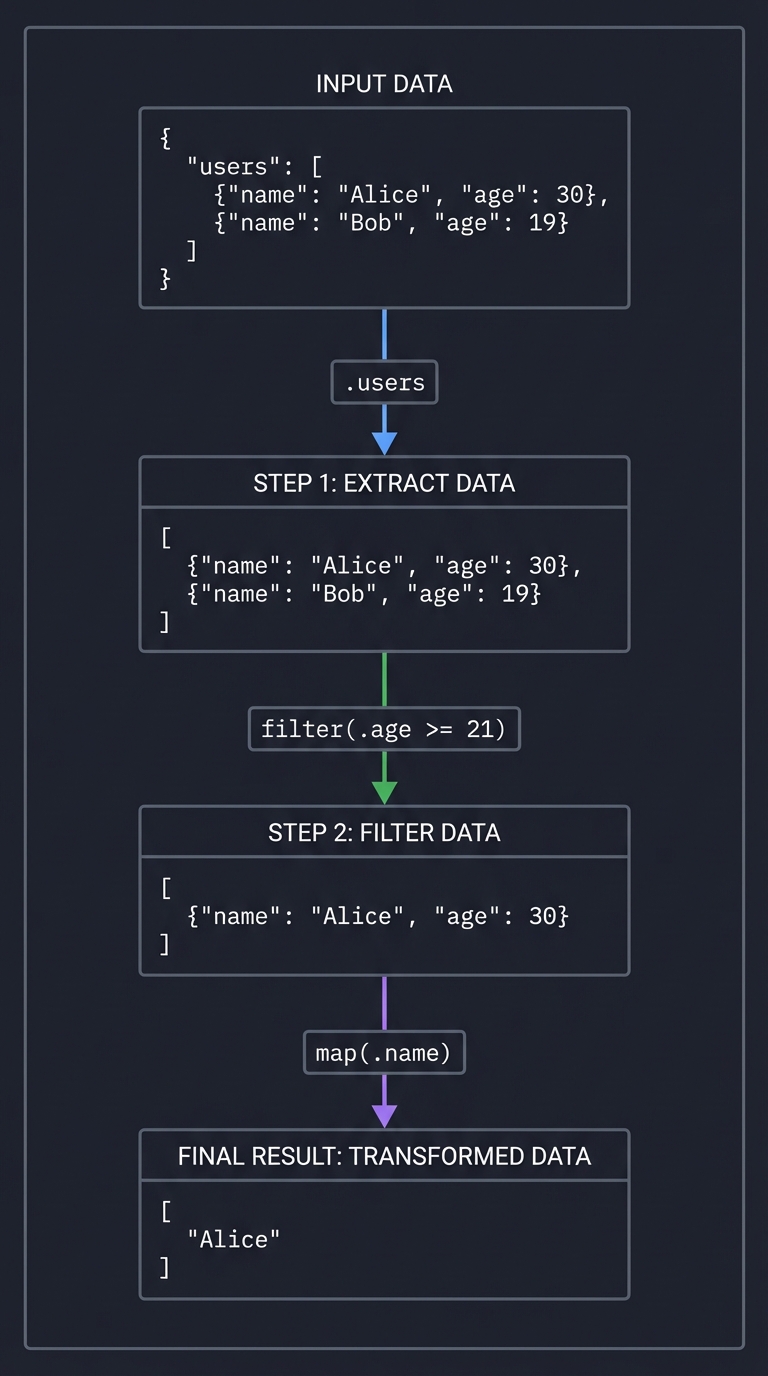
Visual representation:
Input: {"users": [{"name": "Alice", "age": 30}, {"name": "Bob", "age": 19}]}

Pipeline: .users | filter(.age >= 21) | map(.name)

Step 1: .users
        ↓
        [{"name": "Alice", "age": 30}, {"name": "Bob", "age": 19}]

Step 2: filter(.age >= 21)
        ↓
        [{"name": "Alice", "age": 30}]

Step 3: map(.name)
        ↓
        ["Alice"]
5. Algebraic Data Types: Making Illegal States Unrepresentable
Sum types (Either/Result) represent “one of these things”:
enum Result<T, E> {
    Ok(T),    // Success with value
    Err(E),   // Failure with error
}

enum Option<T> {
    Some(T),  // Value present
    None,     // Value absent
}
Why this matters for JSON queries:
.nonexistent_fieldshould returnNone, not crashfilter(.age > "text")should returnErr(TypeError), not panic- Errors compose through the pipeline
// Without Result: exceptions, nulls, magic values
fn get_field(json: Json, field: &str) -> Json {
    // What if field doesn't exist? Return null? Throw? Crash?
}

// With Result: errors are explicit in the type
fn get_field(json: Json, field: &str) -> Result<Json, Error> {
    match json {
        Json::Object(map) => map.get(field)
            .cloned()
            .ok_or(Error::FieldNotFound(field.to_string())),
        _ => Err(Error::NotAnObject),
    }
}
Project Specification
What You’re Building
A command-line tool that queries and transforms JSON using a pipeline syntax:
# Basic field access
$ echo '{"name":"Alice","age":30}' | jql '.name'
"Alice"

# Array operations
$ echo '[1,2,3,4,5]' | jql '. | map(. * 2)'
[2,4,6,8,10]

# Complex pipelines
$ cat users.json | jql '.users | filter(.age >= 21) | map(.name) | sort'
["Alice", "Charlie"]
Query Language Grammar
query       = expression ("|" expression)*
expression  = field_access | operation | literal
field_access = "." identifier ("." identifier)*
operation   = "map" "(" query ")"
            | "filter" "(" predicate ")"
            | "sort"
            | "reverse"
            | "length"
            | "keys"
            | "values"
predicate   = query comparator query
comparator  = "==" | "!=" | ">" | "<" | ">=" | "<="
literal     = number | string | "true" | "false" | "null"
identifier  = [a-zA-Z_][a-zA-Z0-9_]*
Core Operations to Implement
| Operation | Input Type | Output Type | Description |
|---|---|---|---|
.field |
Object | Any | Extract field from object |
map(expr) |
Array | Array | Apply expression to each element |
filter(pred) |
Array | Array | Keep elements where predicate is true |
sort |
Array | Array | Sort elements (numbers/strings) |
reverse |
Array | Array | Reverse element order |
length |
Array/String/Object | Number | Count elements |
keys |
Object | Array | Extract object keys |
values |
Object | Array | Extract object values |
Solution Architecture
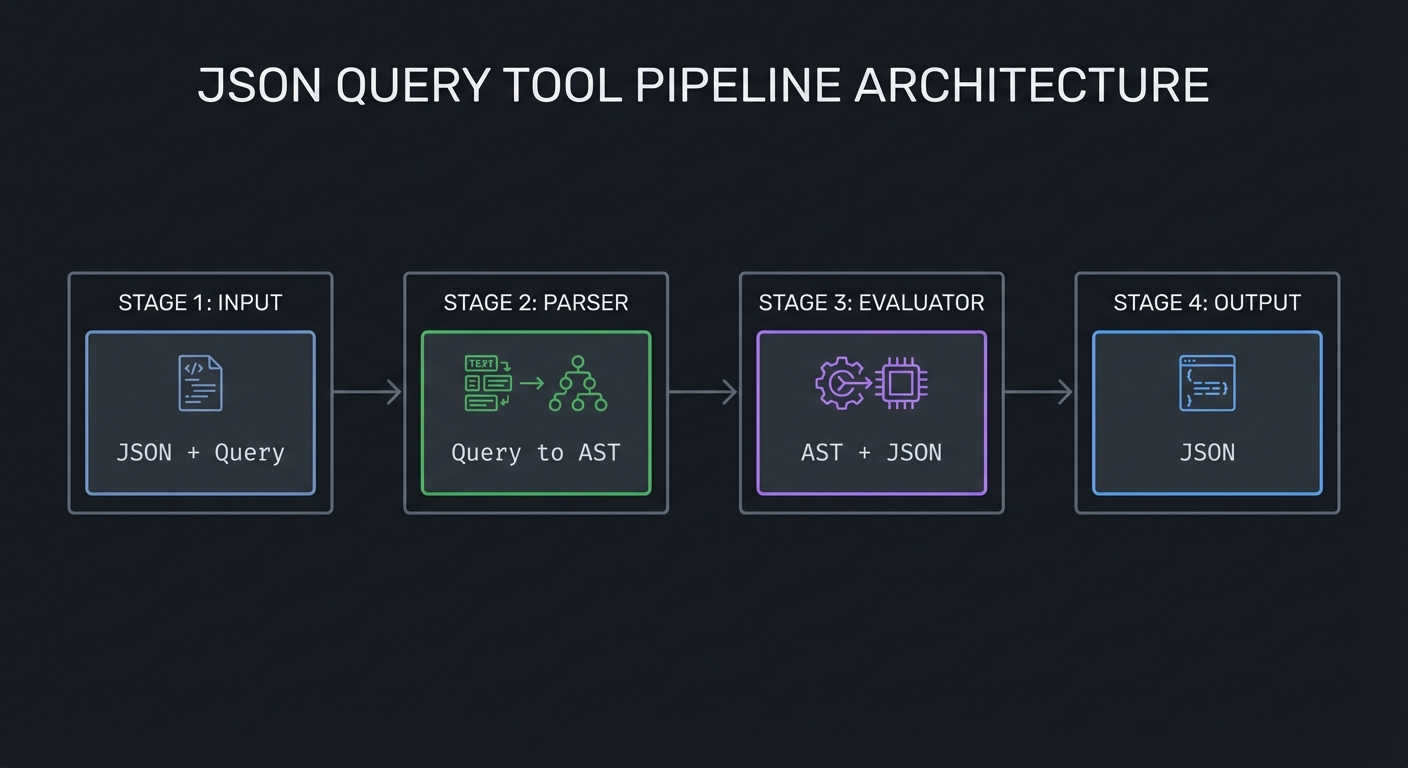
High-Level Design
┌─────────────┐    ┌─────────────┐    ┌─────────────┐    ┌─────────────┐
│   Input     │    │   Parser    │    │  Evaluator  │    │   Output    │
│   (JSON +   │───▶│  (Query to  │───▶│  (AST +     │───▶│   (JSON)    │
│   Query)    │    │   AST)      │    │   JSON)     │    │             │
└─────────────┘    └─────────────┘    └─────────────┘    └─────────────┘
Data Types
// JSON representation
enum Json {
    Null,
    Bool(bool),
    Number(f64),
    String(String),
    Array(Vec<Json>),
    Object(HashMap<String, Json>),
}

// Query AST
enum Query {
    Identity,                        // .
    Field(String),                   // .name
    Pipe(Box<Query>, Box<Query>),    // query | query
    Map(Box<Query>),                 // map(query)
    Filter(Box<Predicate>),          // filter(predicate)
    Sort,
    Reverse,
    Length,
    Keys,
    Values,
}

enum Predicate {
    Comparison(Box<Query>, Comparator, Box<Query>),
    And(Box<Predicate>, Box<Predicate>),
    Or(Box<Predicate>, Box<Predicate>),
    Not(Box<Predicate>),
}

enum Comparator {
    Eq, Ne, Lt, Le, Gt, Ge,
}

// Errors
enum Error {
    ParseError { position: usize, message: String },
    TypeError { expected: String, got: String, path: String },
    FieldNotFound { field: String, path: String },
    IndexOutOfBounds { index: usize, length: usize },
}
Module Structure
src/
├── main.rs           # CLI entry point
├── lib.rs            # Public API
├── json.rs           # JSON type and operations
├── ast.rs            # Query AST types
├── parser.rs         # Query string → AST
├── eval.rs           # AST + JSON → Result<JSON>
└── error.rs          # Error types and formatting
Key Function Signatures
// Parser: Query string → AST
fn parse(query: &str) -> Result<Query, ParseError>;

// Evaluator: AST + JSON → Result
fn evaluate(query: &Query, json: &Json) -> Result<Json, EvalError>;

// Pipeline execution (the core insight: it's just a fold!)
fn execute_pipeline(ops: Vec<Query>, input: Json) -> Result<Json, Error> {
    ops.into_iter().try_fold(input, |acc, op| evaluate(&op, &acc))
}

// Individual operations (all pure functions!)
fn get_field(json: &Json, field: &str) -> Result<Json, Error>;
fn map_array(json: &Json, query: &Query) -> Result<Json, Error>;
fn filter_array(json: &Json, pred: &Predicate) -> Result<Json, Error>;
Implementation Guide
Phase 1: JSON Representation (Day 1)
Goal: Define your JSON type and basic operations.
- Create the
Jsonenum with all JSON types - Implement
Displayfor pretty printing - Implement
FromStror useserde_jsonfor parsing - Write tests for JSON equality and display
Self-check questions:
- Can you represent
{"nested": {"deeply": [1, 2, 3]}}? - Does your equality check handle floating-point edge cases?
Phase 2: Query AST (Day 2)
Goal: Define the abstract syntax tree for queries.
- Create the
Queryenum with basic operations - Create the
Predicateenum for filter conditions - Create the
Comparatorenum for comparisons - Implement
Displayfor debugging ASTs
Self-check questions:
- Can you represent
.users | filter(.age > 21) | map(.name)as an AST? - Is your AST recursive? (It needs to be for nested queries)
Phase 3: Basic Parser (Days 3-4)
Goal: Parse query strings into ASTs.
Start simple—just handle:
- Identity (
.) - Field access (
.field) - Pipes (
|)
fn parse_query(input: &str) -> Result<Query, ParseError> {
    let segments: Vec<&str> = input.split('|').collect();
    let queries: Result<Vec<Query>, _> = segments
        .iter()
        .map(|s| parse_expression(s.trim()))
        .collect();

    // Chain them with Pipe
    queries?.into_iter()
        .reduce(|a, b| Query::Pipe(Box::new(a), Box::new(b)))
        .ok_or(ParseError::EmptyQuery)
}
Self-check questions:
- Does
.users.nameparse correctly as nested field access? - What happens with malformed input like
.|.|.?
Phase 4: Basic Evaluator (Days 5-6)
Goal: Execute ASTs against JSON.
- Implement
evaluateforIdentityandField - Implement
evaluateforPipe - Add proper error handling with
Result
fn evaluate(query: &Query, json: &Json) -> Result<Json, EvalError> {
    match query {
        Query::Identity => Ok(json.clone()),
        Query::Field(name) => get_field(json, name),
        Query::Pipe(left, right) => {
            let intermediate = evaluate(left, json)?;
            evaluate(right, &intermediate)
        }
        // ... more cases
    }
}
Self-check questions:
- Does
.userson{"users": []}return[]? - Does
.missingreturn an appropriate error?
Phase 5: Array Operations (Days 7-8)
Goal: Implement map and filter.
This is where FP shines. Each operation is a pure function:
fn map_array(json: &Json, inner: &Query) -> Result<Json, EvalError> {
    match json {
        Json::Array(arr) => {
            let results: Result<Vec<Json>, _> = arr
                .iter()
                .map(|item| evaluate(inner, item))
                .collect();
            Ok(Json::Array(results?))
        }
        _ => Err(EvalError::TypeError {
            expected: "array".to_string(),
            got: json.type_name(),
        }),
    }
}
Self-check questions:
- Does
map(.name)on[{"name": "a"}, {"name": "b"}]return["a", "b"]? - Does
filter(.age > 21)correctly evaluate the predicate for each element?
Phase 6: Predicate Parsing and Evaluation (Days 9-10)
Goal: Parse and evaluate filter conditions.
- Parse comparison expressions:
.age > 21,.name == "Alice" - Evaluate predicates against JSON values
- Handle type coercion or type errors
Self-check questions:
- Can you compare numbers, strings, booleans?
- What’s the behavior of
.age > "text"? Error or false?
Phase 7: CLI Polish (Days 11-12)
Goal: Make it usable as a real tool.
- Read JSON from stdin
- Accept query as command-line argument
- Pretty-print output
- Provide helpful error messages with context
$ echo '{"users":[{"name":"Alice"}]}' | jql '.users | map(.name)'
["Alice"]
Phase 8: Extensions (Days 13-14)
Add more operations as you see fit:
sort,reverse,uniquelength,keys,valuesfirst,last,nth(n)- Arithmetic:
+ - * / - String operations:
contains,startswith
Testing Strategy
Unit Tests
Test each component in isolation:
#[cfg(test)]
mod tests {
    #[test]
    fn test_field_access() {
        let json = json!({"name": "Alice"});
        let result = evaluate(&Query::Field("name".into()), &json);
        assert_eq!(result.unwrap(), json!("Alice"));
    }

    #[test]
    fn test_map() {
        let json = json!([1, 2, 3]);
        let query = Query::Map(Box::new(Query::Identity));
        let result = evaluate(&query, &json);
        assert_eq!(result.unwrap(), json!([1, 2, 3]));
    }

    #[test]
    fn test_filter() {
        let json = json!([1, 2, 3, 4, 5]);
        // filter(. > 3)
        let pred = Predicate::Comparison(
            Box::new(Query::Identity),
            Comparator::Gt,
            Box::new(Query::Literal(Json::Number(3.0))),
        );
        let query = Query::Filter(Box::new(pred));
        let result = evaluate(&query, &json);
        assert_eq!(result.unwrap(), json!([4, 5]));
    }
}
Integration Tests
Test full pipelines:
#[test]
fn test_full_pipeline() {
    let json = json!({
        "users": [
            {"name": "Alice", "age": 30},
            {"name": "Bob", "age": 19},
            {"name": "Charlie", "age": 25}
        ]
    });

    let query = ".users | filter(.age >= 21) | map(.name)";
    let result = execute(query, &json);
    assert_eq!(result.unwrap(), json!(["Alice", "Charlie"]));
}
Property-Based Tests
Use proptest or quickcheck:
proptest! {
    #[test]
    fn map_preserves_length(arr: Vec<i32>) {
        let json = Json::Array(arr.iter().map(|&n| Json::Number(n as f64)).collect());
        let result = evaluate(&Query::Map(Box::new(Query::Identity)), &json).unwrap();
        if let Json::Array(result_arr) = result {
            assert_eq!(result_arr.len(), arr.len());
        }
    }

    #[test]
    fn filter_never_increases_length(arr: Vec<i32>) {
        let json = Json::Array(arr.iter().map(|&n| Json::Number(n as f64)).collect());
        // filter(. > 0)
        let pred = /* ... */;
        let result = evaluate(&Query::Filter(Box::new(pred)), &json).unwrap();
        if let Json::Array(result_arr) = result {
            assert!(result_arr.len() <= arr.len());
        }
    }
}
Common Pitfalls and Debugging
Pitfall 1: Forgetting to Clone
Symptom: Borrow checker errors, or unexpected data reuse
Solution: JSON operations should return new data, not modify in place
// WRONG: Trying to reuse json
fn get_field(json: Json, field: &str) -> Result<Json, Error> {
    // json is moved, can't be used again!
}

// RIGHT: Take reference, return owned
fn get_field(json: &Json, field: &str) -> Result<Json, Error> {
    // Clone the result, original unchanged
}
Pitfall 2: Stack Overflow on Deep Recursion
Symptom: Stack overflow with deeply nested JSON
Solution: Use iteration or explicit stack for very deep structures
// Recursive (may overflow)
fn depth(json: &Json) -> usize {
    match json {
        Json::Array(arr) => 1 + arr.iter().map(depth).max().unwrap_or(0),
        Json::Object(obj) => 1 + obj.values().map(depth).max().unwrap_or(0),
        _ => 1,
    }
}

// Iterative (safe)
fn depth_safe(json: &Json) -> usize {
    let mut stack = vec![(json, 1)];
    let mut max_depth = 0;
    while let Some((node, d)) = stack.pop() {
        max_depth = max_depth.max(d);
        match node {
            Json::Array(arr) => stack.extend(arr.iter().map(|v| (v, d + 1))),
            Json::Object(obj) => stack.extend(obj.values().map(|v| (v, d + 1))),
            _ => {}
        }
    }
    max_depth
}
Pitfall 3: Poor Error Messages
Symptom: “Error: type mismatch” with no context
Solution: Include path information in errors
// BAD
Err(Error::TypeError)

// GOOD
Err(Error::TypeError {
    expected: "array",
    got: "object",
    path: ".users[0].addresses",
    context: "while evaluating filter(.city == \"NYC\")",
})
Pitfall 4: Incorrect Predicate Evaluation
Symptom: filter(.age > 21) returns empty or wrong results
Debug: Print the predicate result for each element
fn filter_array(json: &Json, pred: &Predicate) -> Result<Json, Error> {
    match json {
        Json::Array(arr) => {
            let results: Vec<Json> = arr
                .iter()
                .filter(|item| {
                    let result = evaluate_predicate(pred, item);
                    eprintln!("Predicate for {:?}: {:?}", item, result); // Debug!
                    result.unwrap_or(false)
                })
                .cloned()
                .collect();
            Ok(Json::Array(results))
        }
        _ => Err(/* ... */),
    }
}
Extensions and Challenges
Challenge 1: Lazy Evaluation
Make operations lazy so they can handle infinite streams or very large files:
// Instead of Vec<Json>, use an iterator
fn filter_lazy<'a>(
    iter: impl Iterator<Item = &'a Json> + 'a,
    pred: &'a Predicate,
) -> impl Iterator<Item = &'a Json> + 'a {
    iter.filter(move |item| evaluate_predicate(pred, item).unwrap_or(false))
}
Challenge 2: Parallel Execution
Since operations are pure, parallelize them with Rayon:
use rayon::prelude::*;

fn map_parallel(json: &Json, inner: &Query) -> Result<Json, Error> {
    match json {
        Json::Array(arr) => {
            let results: Result<Vec<Json>, _> = arr
                .par_iter()  // Parallel iterator!
                .map(|item| evaluate(inner, item))
                .collect();
            Ok(Json::Array(results?))
        }
        _ => Err(/* ... */),
    }
}
Challenge 3: User-Defined Functions
Allow users to define and reuse transformations:
$ jql 'def adult = .age >= 21; .users | filter(adult) | map(.name)'
Challenge 4: Streaming JSON Parser
Handle newline-delimited JSON (NDJSON) for log processing:
$ cat logs.ndjson | jql 'filter(.level == "error") | map(.message)'
Real-World Connections
jq - The Inspiration
Your tool is a simplified version of jq, one of the most beloved Unix tools. Study its manual to see how a mature implementation handles edge cases.
Unix Philosophy
This project embodies Unix philosophy:
- Do one thing well: Query JSON, nothing else
- Compose with others: Works with
curl,cat,grep, etc. - Text streams as interface: stdin/stdout, JSON as universal format
Modern Dataflow Systems
The pipeline model scales to distributed systems:
- Apache Spark:
df.filter(col("age") > 21).select("name") - Pandas:
df[df.age > 21]["name"] - SQL:
SELECT name FROM users WHERE age > 21
All express the same functional idea: declarative transformations on data.
Resources
Essential Reading
| Topic | Resource |
|---|---|
| Pure functions, pipelines | Domain Modeling Made Functional Ch. 4, 6 |
| Higher-order functions | Learn You a Haskell Ch. 6 |
| Error handling with Result | Programming Rust 2nd Ed. Ch. 7 |
| Immutability | Fluent Python 2nd Ed. Ch. 6 |
| Parsing | Language Implementation Patterns Ch. 2 |
Tools and Libraries
| Tool | Purpose |
|---|---|
serde_json (Rust) |
JSON parsing (don’t reinvent this) |
clap (Rust) |
CLI argument parsing |
nom (Rust) |
Parser combinators (optional) |
proptest (Rust) |
Property-based testing |
Reference Implementations
- jq source code - The real thing (C)
- gojq - Go implementation
- jaq - Rust implementation
Self-Assessment Checklist
Before considering this project complete, verify:
Core Functionality
- Can parse
.fieldexpressions - Can parse
.nested.field.access - Can parse
query | querypipelines - Can parse
map(query)andfilter(predicate) - Can parse comparison predicates:
>, <, ==, !=, >=, <=
Evaluation
- Field access works on objects
- Field access on non-objects returns appropriate error
mapapplies query to each array elementfilterkeeps elements where predicate is true- Pipes chain operations correctly
Error Handling
- Parse errors include position information
- Type errors include expected vs. got
- Missing field errors include the path
- All errors implement
Displaywith helpful messages
Quality
- All operations are pure functions
- No mutation of input JSON
- Tests cover happy paths and error cases
- CLI reads from stdin and accepts query argument
Extensions (optional)
sort,reverse,uniquelength,keys,values- Lazy evaluation for large files
- Parallel execution with Rayon
Interview Questions
Prepare to discuss these after completing the project:
- “What’s the difference between
mapand aforloop?” - “Why are pure functions easier to test?”
- “How does immutability help with debugging?”
- “What is function composition? Give an example.”
- “How would you make your JSON query tool lazy?”
- “What’s the difference between
OptionandResult?” - “Why is functional programming popular for data pipelines?”
- “How would you parallelize the
mapoperation?”
See the main file for detailed expected answers.