Deeply Understanding Filesystems Through Building
Filesystems are one of the most elegant abstractions in computing—they transform raw disk blocks into the familiar hierarchy of files and directories we use daily. To truly understand them, you need to grapple with their core challenges: block management, metadata organization, journaling for crash consistency, and the VFS abstraction layer.
Core Concept Analysis
Understanding filesystems breaks down into these fundamental building blocks:
| Concept | What It Covers |
|---|---|
| On-disk layout | Superblock, inode tables, data blocks, block groups |
| Metadata management | Inodes, directory entries, permissions, timestamps |
| Block allocation | Bitmap vs extent-based, fragmentation, free space tracking |
| Journaling | Write-ahead logging, crash recovery, consistency guarantees |
| VFS layer | How Linux abstracts different filesystems behind one interface |
| Caching | Page cache, buffer cache, write-back vs write-through |
| Directory implementation | Linear lists vs hash tables vs B-trees |
Project 1: Hex Dump Disk Explorer
- File: FILESYSTEM_INTERNALS_LEARNING_PROJECTS.md
- Programming Language: C
- Coolness Level: Level 4: Hardcore Tech Flex
- Business Potential: 1. The “Resume Gold”
- Difficulty: Level 2: Intermediate
- Knowledge Area: Filesystems / Binary Parsing
- Software or Tool: Hex Editors
- Main Book: “Operating Systems: Three Easy Pieces” by Arpaci-Dusseau
What you’ll build: A command-line tool that reads raw disk images or block devices and visualizes filesystem structures—superblocks, inode tables, directory entries, and data blocks—in human-readable format.
Why it teaches filesystems: Before you can build a filesystem, you need to see one. This project forces you to understand exactly how bytes on disk translate to the files and directories you see. You’ll parse real ext2/ext4 structures and decode them byte-by-byte.
Core challenges you’ll face:
- Reading and interpreting the superblock at byte 1024 (understanding magic numbers, block sizes, inode counts)
- Navigating block groups and locating inode tables
- Decoding inode structures (permissions, timestamps, block pointers, indirect blocks)
- Parsing directory entries and following file paths through the tree
Key Concepts:
- Superblock structure: The Second Extended File System - nongnu.org - Official ext2 documentation
- Block groups and inodes: “Operating Systems: Three Easy Pieces” Ch. 40 (File System Implementation)
- Binary file I/O in C: “C Programming: A Modern Approach” Ch. 22 by K.N. King
- Disk layout visualization: OSDev Wiki - Ext2
Difficulty: Beginner-Intermediate Time estimate: 1-2 weeks Prerequisites: C basics, understanding of structs and pointers, hex/binary familiarity
Real world outcome:
- Run
./fsexplore disk.imgand see output like:SUPERBLOCK at offset 1024: Magic: 0xEF53 ✓ (ext2 signature) Block size: 4096 bytes Inodes: 128016 Free blocks: 45231 INODE #2 (root directory): Type: Directory Size: 4096 bytes Permissions: drwxr-xr-x Links: 23 Direct blocks: [258, 0, 0, ...] DIRECTORY at block 258: [2] . [2] .. [11] lost+found [12] home [13] etc
Learning milestones:
- After parsing the superblock - you understand that filesystems are just structured data at known offsets
- After reading inodes - you see how Unix “everything is a file” actually works
- After traversing directories - you understand path resolution and why
..exists
The Core Question You’re Answering
“How does a filesystem actually store my files on disk? What does ‘ext2’ really mean?”
Before you write any code, sit with this question. When you create a file named “hello.txt” and write “Hello World” to it, where do those bytes actually go? How does the OS know which disk sectors contain your file versus someone else’s? How can you have both a 1KB file and a 10GB file on the same disk?
Most developers treat filesystems as black boxes—you call open(), read(), write(), and “it just works.” But underneath, every filesystem is solving the same fundamental problems:
- How to organize disk space (blocks, allocation, fragmentation)
- How to map filenames to data (inodes, directory entries, path traversal)
- How to track metadata (permissions, timestamps, file size)
This project rips away the abstraction. You’ll read raw disk bytes and decode the exact structures that ext2 uses. When you finish, you’ll see filesystems not as magic, but as elegant data structures mapped onto persistent storage.
Concepts You Must Understand First
Stop and research these before coding:
1. Binary File I/O in C
- How do you open a file in binary mode? (
fopen(path, "rb")) - What’s the difference between
fread()andfscanf()? - How do you seek to a specific byte offset? (
fseek(),lseek()) - Why is byte alignment important when reading structs from disk?
- Book Reference: “C Programming: A Modern Approach” Ch. 22 - K.N. King
2. Structs and Binary Data Layout
- How are struct members laid out in memory?
- What is struct padding, and why does it exist?
- How does
#pragma packaffect struct layout? - Why might the same struct have different sizes on different architectures?
- Book Reference: “The C Programming Language” Ch. 6 - Kernighan & Ritchie
3. Hexadecimal and Binary Number Systems
- Why is hex the natural way to read binary data?
- How do you interpret multi-byte integers (endianness)?
- What does “0xEF53” as a magic number mean?
- How do bitmasks work? (e.g.,
0x01FFfor file permissions) - Book Reference: “Computer Systems: A Programmer’s Perspective” Ch. 2 - Bryant & O’Hallaron
4. Disk Blocks and Sectors
- What is a disk sector? (historically 512 bytes, now often 4096)
- What is a filesystem block? (often 4096 bytes, configurable)
- Why are blocks larger than sectors?
- How do block offsets relate to byte offsets?
- Book Reference: “Operating Systems: Three Easy Pieces” Ch. 37-39 (Hard Disk Drives, Files and Directories)
5. The ext2 Filesystem Structure
- What is a superblock, and why is it at offset 1024?
- What are block groups, and why do they exist?
- What is an inode, and what information does it store?
- How do directory entries differ from regular file data?
- Book Reference: “Operating Systems: Three Easy Pieces” Ch. 40 (File System Implementation)
- Web Reference: The Second Extended File System - nongnu.org
6. Pointer Indirection in Filesystems
- What are direct block pointers?
- Why do filesystems need indirect, double-indirect, and triple-indirect pointers?
- How does indirection limit maximum file size?
- How do you calculate which data block to read for byte offset N in a file?
- Book Reference: “Operating Systems: Three Easy Pieces” Ch. 40 (Multi-level Index section)
7. Directory Structure and Path Resolution
- How are directory entries stored differently than regular files?
- What makes “.” and “..” special?
- How does the filesystem resolve “/home/user/file.txt” to an inode number?
- Why is the root directory always inode 2?
- Book Reference: “The Linux Programming Interface” Ch. 18 (Directories and Links)
Test Yourself Before Proceeding:
- Can you draw the memory layout of a struct with padding?
- Can you explain why ext2 uses block groups instead of one giant inode table?
- Can you calculate the maximum file size given 12 direct pointers, 1 indirect, 1 double-indirect, and 1 triple-indirect pointer with 4096-byte blocks and 4-byte pointers?
Questions to Guide Your Design
Before implementing, think through these:
Phase 1: Reading the Superblock
- Finding the Superblock
- Why is the ext2 superblock always at byte offset 1024?
- What happens in the first 1024 bytes? (Boot sector space)
- How do you read exactly 1024 bytes starting at offset 1024?
- Validating the Filesystem
- What is the “magic number” for ext2? (0xEF53)
- Where in the superblock struct is the magic number located?
- What should your program do if the magic number is wrong?
- Interpreting Superblock Fields
- How do you determine the block size from
s_log_block_size? (1024 « s_log_block_size) - What does
s_inodes_counttell you? - How many block groups exist? (blocks_count / blocks_per_group)
- How do you determine the block size from
Phase 2: Navigating to Inodes
- Locating the Block Group Descriptor Table
- Where does the BGDT start? (Immediately after superblock)
- How big is each block group descriptor struct?
- How do you calculate which block group contains a given inode number?
- Reading an Inode
- Given inode number N, which block group is it in?
- Within that group, what is the byte offset of inode N in the inode table?
- What is the size of an inode struct? (usually 128 bytes)
- Decoding Inode Metadata
- How do you extract file type from
i_mode? (Use bitmasks: S_IFMT, S_IFDIR, S_IFREG) - How do you convert
i_modeto Unix permission strings (e.g., “drwxr-xr-x”)? - What are
i_atime,i_mtime,i_ctime? How do you format them as readable dates?
- How do you extract file type from
Phase 3: Following Block Pointers
- Direct Blocks
- An inode has 12 direct block pointers (
i_block[0]throughi_block[11]) - If each block is 4096 bytes, how much data can 12 direct blocks hold?
- How do you read the data in the first direct block?
- An inode has 12 direct block pointers (
- Indirect Blocks
i_block[12]points to an indirect block (a block full of block pointers)- If block pointers are 4 bytes, how many pointers fit in one 4096-byte block?
- How would you read the 13th data block of a file?
- Handling Sparse Files
- If a block pointer is 0, what does that mean? (Hole in the file)
- How should your viewer display sparse regions?
Phase 4: Parsing Directories
- Directory Entry Structure
- What fields are in
struct ext2_dir_entry_2? (inode, rec_len, name_len, file_type, name) - Why is
rec_lenvariable? (Entries are variable-length due to variable filenames) - How do you iterate through directory entries in a block?
- What fields are in
- Displaying a Directory
- How do you read the directory data blocks from a directory inode?
- How do you extract the filename from a directory entry?
- How do you display “.” and “..” entries?
Phase 5: Pretty Output
- Human-Readable Formatting
- How do you convert a timestamp (Unix epoch) to a date string? (
ctime()) - How do you format file permissions as “rwxr-xr-x”?
- How do you display file sizes with units (KB, MB, GB)?
- How do you convert a timestamp (Unix epoch) to a date string? (
- Hierarchical Display
- If you recurse into subdirectories, how do you prevent infinite loops? (
.and..handling) - How do you indent to show directory depth?
- If you recurse into subdirectories, how do you prevent infinite loops? (
Thinking Exercise
Trace ext2 Structures By Hand
Before coding, draw these structures on paper for a minimal ext2 filesystem:
Scenario: A fresh ext2 filesystem with:
- Block size: 1024 bytes
- Total blocks: 1024 (1MB filesystem)
- Inodes: 128
- One block group
Given files:
/ (root directory, inode 2)
├── hello.txt (inode 12, contains "Hello World\n", 12 bytes)
└── subdir/ (inode 13)
    └── test.txt (inode 14, contains "Test\n", 5 bytes)
Questions to trace:
- Superblock (offset 1024)
- Draw the superblock. Where is the magic number 0xEF53?
- Calculate:
s_blocks_count= 1024,s_inodes_count= 128,s_log_block_size= 0 (means 1024)
- Block Group Descriptor Table (offset 2048)
- Draw the single BGDT entry
- Where is the inode bitmap? Block bitmap? Inode table?
- Inode Table
- Draw inode 2 (root directory). What blocks does it use?
- Draw inode 12 (hello.txt). It’s 12 bytes, so it uses 1 block. Which block?
- Directory Data
- Root directory’s data block contains directory entries. Draw the entries:
[inode=2, name="."] [inode=2, name=".."] [inode=12, name="hello.txt"] [inode=13, name="subdir"] - How big is each entry? (variable due to filename length)
- Root directory’s data block contains directory entries. Draw the entries:
- Path Resolution
- Trace “/subdir/test.txt”:
- Start at inode 2 (root)
- Read root’s directory data
- Find “subdir” entry → inode 13
- Read inode 13’s directory data
- Find “test.txt” entry → inode 14
- Read inode 14 to get file data blocks
- Trace “/subdir/test.txt”:
Draw this layout:
Byte 0    : Boot sector (unused)
Byte 1024 : Superblock
Byte 2048 : Block Group Descriptor Table
Byte 3072 : Block bitmap (1024 bits, one per block)
Byte 4096 : Inode bitmap (128 bits, one per inode)
Byte 5120 : Inode table (128 inodes × 128 bytes = 16384 bytes)
Byte 21504: Data blocks start here
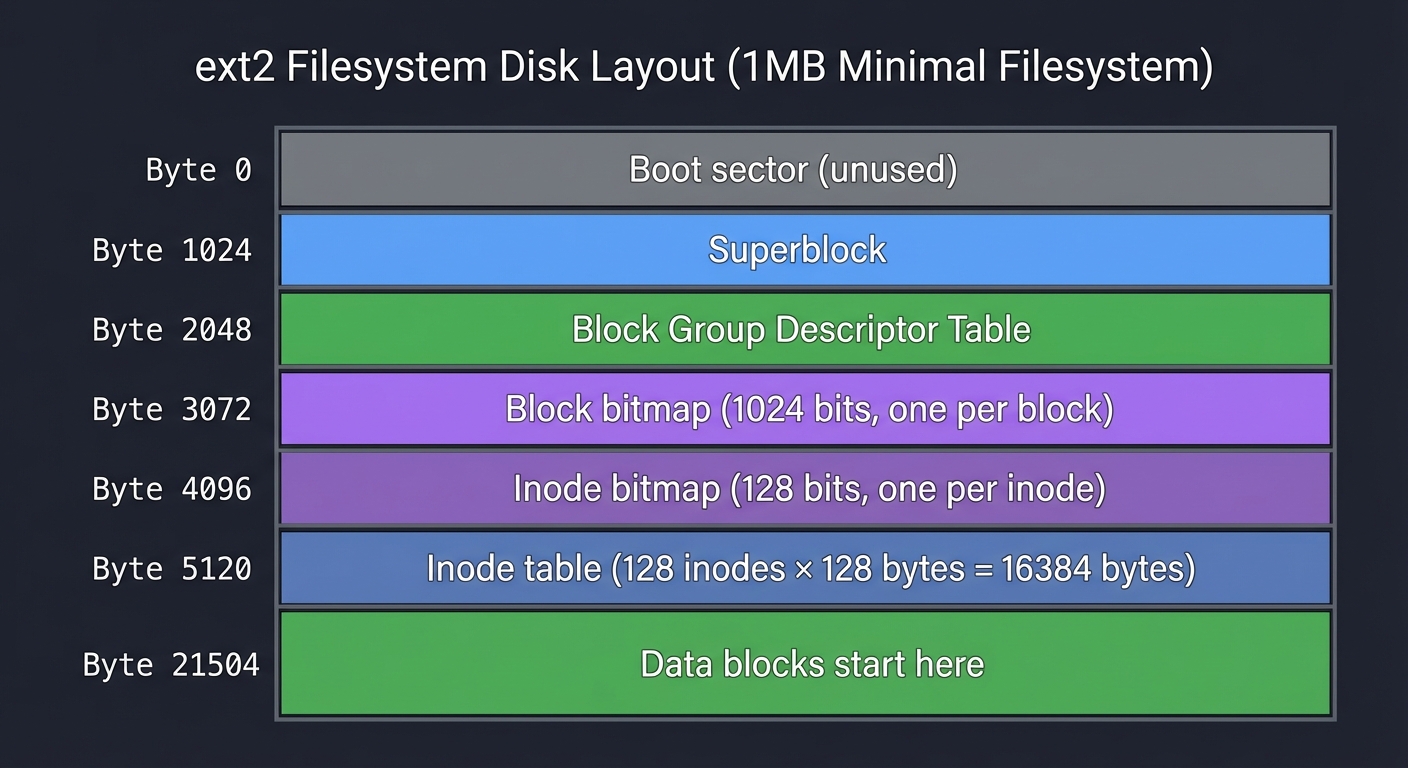
This exercise builds the mental model you need before parsing real disk images.
The Interview Questions They’ll Ask
Prepare to answer these:
- “What is an inode, and what information does it store?”
- Expected: Metadata (permissions, timestamps, size, owner), block pointers, but NOT the filename
- “How does ext2 resolve a file path like ‘/home/user/file.txt’?”
- Expected: Start at root inode (2), read directory entries, find “home” entry’s inode, repeat for “user”, repeat for “file.txt”
- “Why does ext2 use direct, indirect, double-indirect, and triple-indirect pointers?”
- Expected: Balance between small file efficiency and large file support. Direct pointers make small files fast, indirection allows unbounded growth
- “What is the maximum file size in ext2 with 4096-byte blocks?”
- Expected: Show calculation using pointer levels
- “What happens if a program writes to byte offset 1,000,000,000 in an empty file without writing the bytes before it?”
- Expected: Sparse file with hole (block pointers are 0 for sparse regions)
- “How does the filesystem know if a block is free or in use?”
- Expected: Block bitmap (one bit per block, 1 = used, 0 = free)
- “Why is the superblock at offset 1024 instead of 0?”
- Expected: First 1024 bytes reserved for boot sector/MBR
- “What makes ‘.’ and ‘..’ directory entries special?”
- Expected:
.points to current directory’s inode,..points to parent’s inode, enabling upward traversal
- Expected:
- “How would you implement ‘fsck’ (filesystem consistency check)?”
- Expected: Verify inode/block bitmaps match actual usage, check directory structure integrity, verify hard link counts
Hints in Layers
Hint 1: Start with the superblock
Your first goal: read and display the superblock.
#include <stdio.h>
#include <stdint.h>

#define EXT2_SUPER_MAGIC 0xEF53

struct ext2_superblock {
    uint32_t s_inodes_count;
    uint32_t s_blocks_count;
    uint32_t s_r_blocks_count;
    uint32_t s_free_blocks_count;
    uint32_t s_free_inodes_count;
    uint32_t s_first_data_block;
    uint32_t s_log_block_size;
    // ... many more fields
    uint16_t s_magic;
    // ... padding to match actual struct size
} __attribute__((packed));

int main(int argc, char *argv[]) {
    FILE *disk = fopen(argv[1], "rb");
    if (!disk) { perror("fopen"); return 1; }

    struct ext2_superblock sb;
    fseek(disk, 1024, SEEK_SET);  // Superblock at offset 1024
    fread(&sb, sizeof(sb), 1, disk);

    if (sb.s_magic != EXT2_SUPER_MAGIC) {
        fprintf(stderr, "Not an ext2 filesystem!\n");
        return 1;
    }

    printf("Block size: %u bytes\n", 1024 << sb.s_log_block_size);
    printf("Total blocks: %u\n", sb.s_blocks_count);
    printf("Total inodes: %u\n", sb.s_inodes_count);

    fclose(disk);
    return 0;
}
Hint 2: Define complete structs
Use the ext2 documentation to define complete structs. Use __attribute__((packed)) to prevent padding.
Hint 3: Calculate offsets carefully
To find inode N:
- Calculate block group:
group = (inode - 1) / inodes_per_group - Read that group’s descriptor to get inode table block number
- Index within inode table:
index = (inode - 1) % inodes_per_group - Byte offset:
inode_table_block * block_size + index * inode_size
Hint 4: Handle endianness
ext2 stores integers in little-endian. On little-endian systems (x86, x86_64), you can read directly. On big-endian systems, you need le32toh(), le16toh().
Hint 5: Parse directory entries carefully
Directory entries are variable-length:
struct ext2_dir_entry_2 {
    uint32_t inode;
    uint16_t rec_len;   // Length of this entry
    uint8_t  name_len;  // Length of filename
    uint8_t  file_type;
    char     name[];    // Variable-length (name_len bytes)
} __attribute__((packed));

// Iteration:
char *block_data = /* read directory's data block */;
struct ext2_dir_entry_2 *entry = (struct ext2_dir_entry_2 *)block_data;
while ((char *)entry < block_data + block_size) {
    if (entry->inode != 0) {  // Valid entry
        char filename[256];
        memcpy(filename, entry->name, entry->name_len);
        filename[entry->name_len] = '\0';
        printf("[%u] %s\n", entry->inode, filename);
    }
    entry = (struct ext2_dir_entry_2 *)((char *)entry + entry->rec_len);
}
Hint 6: Use a hex editor to verify
When in doubt, open the disk image in a hex editor (xxd disk.img | less) and manually verify your offsets and values.
Hint 7: Test with a known image
Create a minimal ext2 image:
dd if=/dev/zero of=test.img bs=1M count=10
mkfs.ext2 test.img
mkdir mnt
sudo mount -o loop test.img mnt
sudo sh -c 'echo "Hello World" > mnt/hello.txt'
sudo sh -c 'mkdir mnt/subdir'
sudo umount mnt
Now you have a test image with known contents.
Books That Will Help
| Topic | Book | Chapter |
|---|---|---|
| Binary file I/O in C | “C Programming: A Modern Approach” by K.N. King | Ch. 22 (Input/Output) |
| Struct layout and padding | “The C Programming Language” by Kernighan & Ritchie | Ch. 6 (Structures) |
| Binary data representation | “Computer Systems: A Programmer’s Perspective” by Bryant & O’Hallaron | Ch. 2 (Representing and Manipulating Information) |
| Filesystem fundamentals | “Operating Systems: Three Easy Pieces” by Arpaci-Dusseau | Ch. 39-40 (Files and Directories, File System Implementation) |
| ext2 structure details | “Understanding the Linux Kernel” by Bovet & Cesati | Ch. 18 (The Ext2 and Ext3 Filesystems) |
| Directory operations | “The Linux Programming Interface” by Michael Kerrisk | Ch. 18 (Directories and Links) |
| Debugger usage for binary inspection | “The Art of Debugging with GDB, DDD, and Eclipse” by Matloff & Salzman | Ch. 1-3 (GDB basics, examining memory) |
Project 2: In-Memory Filesystem with FUSE
- File: FILESYSTEM_INTERNALS_LEARNING_PROJECTS.md
- Programming Language: C
- Coolness Level: Level 4: Hardcore Tech Flex
- Business Potential: 1. The “Resume Gold”
- Difficulty: Level 3: Advanced
- Knowledge Area: Filesystems / Kernel Interface
- Software or Tool: FUSE
- Main Book: “The Linux Programming Interface” by Michael Kerrisk
What you’ll build: A complete filesystem that stores files in RAM, mounted as a real directory on your Linux system. Create files, directories, read, write, delete—all backed by your C code.
Why it teaches filesystems: FUSE lets you implement a real, mountable filesystem without writing kernel code. You’ll implement every syscall—open(), read(), write(), mkdir(), unlink()—and understand exactly what happens when a program accesses a file.
Core challenges you’ll face:
- Implementing the VFS operations (getattr, readdir, open, read, write, create, unlink, mkdir, rmdir)
- Managing your own inode table and directory structure in memory
- Handling file descriptors and ensuring consistency
- Supporting file permissions and timestamps (stat structure)
Resources for implementing FUSE callbacks:
- Writing a FUSE Filesystem: a Tutorial - The definitive hands-on tutorial with working code
- IBM Developer - Develop your own filesystem with FUSE - Excellent conceptual overview
Key Concepts:
- VFS abstraction: “Understanding the Linux Kernel” Ch. 12 by Bovet & Cesati
- File operations syscalls: “The Linux Programming Interface” Ch. 4-5 by Michael Kerrisk
- FUSE high-level API: libfuse GitHub
- Directory entry management: Writing a Simple Filesystem Using FUSE
Difficulty: Intermediate Time estimate: 2-3 weeks Prerequisites: Project 1 or equivalent understanding, comfort with C pointers and structs
Real world outcome:
$ mkdir /tmp/myfs
$ ./memfs /tmp/myfs
$ cd /tmp/myfs
$ echo "Hello filesystem!" > test.txt
$ cat test.txt
Hello filesystem!
$ ls -la
total 0
drwxr-xr-x 2 user user    0 Dec 18 10:00 .
drwxr-xr-x 3 user user 4096 Dec 18 10:00 ..
-rw-r--r-- 1 user user   18 Dec 18 10:01 test.txt
$ mkdir subdir
$ # Your filesystem is real and mounted!
Learning milestones:
- After implementing getattr/readdir - you understand how
lsactually works - After implementing read/write - you see buffering and offset management
- After implementing create/unlink - you understand inode lifecycle and reference counting
The Core Question You’re Answering
“What actually happens when a program calls open(), read(), or write()? How does the kernel translate those syscalls into filesystem operations?”
Before you start coding, think about this: When you type cat file.txt, what happens? The cat program calls open("file.txt", O_RDONLY). The kernel receives this system call and needs to:
- Resolve “file.txt” to an inode number
- Check permissions
- Allocate a file descriptor
- Return that descriptor to
cat
Then cat calls read(fd, buffer, size), and the kernel needs to:
- Look up which filesystem owns that file descriptor
- Call that filesystem’s
readoperation - Copy data from the filesystem into the user’s buffer
FUSE (Filesystem in Userspace) lets you implement these operations in a regular C program instead of kernel code. You become the “filesystem” that the kernel calls. When a user runs ls /mnt/myfs, the kernel asks YOUR code for directory contents.
This project demystifies the Virtual Filesystem (VFS) layer. You’ll see exactly how high-level operations like “list directory” decompose into low-level filesystem callbacks.
Concepts You Must Understand First
Stop and research these before coding:
1. What is FUSE and How Does It Work?
- What does “Filesystem in Userspace” mean?
- How does FUSE bridge kernel VFS operations to userspace code?
- What is
libfuse, and what does it provide? - What are the advantages of userspace filesystems vs kernel modules?
- Book Reference: “The Linux Programming Interface” by Michael Kerrisk - Ch. 14 (File Systems)
- Web Reference: IBM Developer - Develop your own filesystem with FUSE
2. The VFS Interface and File Operations
- What is the Virtual Filesystem layer?
- What operations does VFS expect every filesystem to implement?
- What is the difference between
open,read,write,create,mkdir,unlink,rmdir? - What is
getattr(stat), and why is it called so frequently? - Book Reference: “Understanding the Linux Kernel” by Bovet & Cesati - Ch. 12 (Virtual Filesystem)
- Book Reference: “Linux System Programming” by Robert Love - Ch. 3 (Buffered I/O)
3. File Metadata and the stat Structure
- What information is in
struct stat? (permissions, size, timestamps, inode number, link count) - What are
st_mode,st_size,st_mtime,st_nlink? - How do you construct a valid
st_modefor a directory vs regular file? - What is the difference between
st_atime,st_mtime, andst_ctime? - Book Reference: “The Linux Programming Interface” by Michael Kerrisk - Ch. 15 (File Attributes)
4. Directory Operations
- How are directories different from regular files?
- What is a directory entry (dirent)?
- How does
readdir()work internally? - Why do directories have special permissions (execute permission = “searchable”)?
- Book Reference: “The Linux Programming Interface” by Michael Kerrisk - Ch. 18 (Directories and Links)
5. File Paths and Inode Numbers
- What is the relationship between filenames and inodes?
- Why do filesystems separate filenames (directory entries) from file data (inodes)?
- What is a hard link, and how does link count work?
- Why does every directory have at least 2 links (
.and parent’s entry)? - Book Reference: “Operating Systems: Three Easy Pieces” by Arpaci-Dusseau - Ch. 39 (Files and Directories)
6. Memory Management for In-Memory Data Structures
- How will you store your filesystem’s data? (Hash table? Array? Tree?)
- What data structures do you need? (inode table, directory entries, file contents)
- How do you allocate and free file data?
- How do you handle concurrent access? (Do you need locking?)
- Book Reference: “C Interfaces and Implementations” by David Hanson - Ch. 5 (Arena) and Ch. 11 (Table)
7. FUSE Callback Signatures
- What is
fuse_operationsstruct? - What are the parameters for
getattr,readdir,read,write,create, etc.? - What return values does FUSE expect? (0 for success, -errno for errors)
- What is the
fuse_file_infostructure used for? - Web Reference: Writing a FUSE Filesystem: a Tutorial
Test Yourself Before Proceeding:
- Can you explain the call chain from
ls /mnt/myfsto your FUSEreaddircallback? - Do you know what
st_modebits represent a directory with rwxr-xr-x permissions? - Can you design a data structure to store in-memory inodes and their data?
Questions to Guide Your Design
Before implementing, think through these:
Phase 1: Minimal Mountable Filesystem
- Setting Up FUSE
- How do you initialize a FUSE filesystem? (
fuse_main()) - What is the minimum set of operations to implement? (getattr, readdir for root)
- How do you mount your filesystem? (
./myfs /mnt/point)
- How do you initialize a FUSE filesystem? (
- Implementing getattr for Root
- What should
getattr("/")return? - How do you fill
struct statfor a directory? - What inode number should root have? (Conventionally 1)
- What should
- Implementing readdir for Root
- What entries should an empty root directory contain? (
.and..) - How do you use the
fillercallback function? - What happens if readdir returns success but adds no entries?
- What entries should an empty root directory contain? (
Phase 2: Creating Files
- Implementing create
- What does
create(path, mode, fi)need to do? - How do you allocate a new inode?
- Where do you store the mapping from path to inode?
- What initial stat values should a new file have?
- What does
- Implementing getattr for Files
- How do you look up a file’s inode from its path?
- How does
getattrdiffer for files vs directories? - What should you return if the file doesn’t exist? (-ENOENT)
- Implementing open
- What’s the difference between
createandopen? - What should
openreturn? (0 for success, or setfi->fhto file handle) - Do you need to track open file descriptors?
- What’s the difference between
Phase 3: Reading and Writing
- Implementing write
- How do you handle
write(path, buf, size, offset, fi)? - How do you grow a file if writing past EOF?
- How do you update
st_sizeandst_mtime? - What if offset is in the middle of the file?
- How do you handle
- Implementing read
- How do you handle
read(path, buf, size, offset, fi)? - What if offset is past EOF? (Return 0 bytes)
- What if size is larger than available data? (Return partial read)
- How do you update
st_atime?
- How do you handle
- Data Storage
- How do you store file contents in memory? (Dynamic array? Linked list of chunks?)
- Do you pre-allocate space or allocate on demand?
- How do you handle sparse writes (offset with gaps)?
Phase 4: Directories
- Implementing mkdir
- How do you create a new directory?
- What initial entries should it have? (
.and..) - How do you link it to its parent? (Parent’s
..link count)
- Implementing readdir for Subdirectories
- How do you list a directory’s entries?
- How do you iterate through child inodes?
- How do you handle nested paths like
/subdir/file.txt?
- Path Resolution
- How do you parse
/a/b/cinto components? - How do you traverse from root to find the target inode?
- What if a component doesn’t exist?
- How do you parse
Phase 5: Deletion
- Implementing unlink (delete file)
- How do you remove a file?
- What happens to its inode and data?
- How do you remove it from parent directory’s entries?
- Implementing rmdir (delete directory)
- How is rmdir different from unlink?
- What if the directory is not empty? (Return -ENOTEMPTY)
- How do you update parent’s link count?
Thinking Exercise
Design Your In-Memory Data Structures
Before coding, design the data structures on paper. Here’s one approach:
Scenario: Your filesystem stores everything in RAM.
// Global inode table (simple array, max 1024 inodes)
struct inode {
    uint32_t ino;           // Inode number
    mode_t mode;            // File type and permissions
    nlink_t nlink;          // Hard link count
    off_t size;             // File size in bytes
    time_t atime, mtime, ctime;
    char *data;             // File contents (NULL for directories)
    struct dirent *entries; // Directory entries (NULL for files)
    size_t num_entries;
} inodes[1024];

// Directory entry
struct dirent {
    uint32_t ino;
    char name[256];
};
Questions to trace:
- Creating
/hello.txt- User calls
touch /hello.txt - Kernel calls your
create("/hello.txt", 0644, fi) - You allocate inode 2, set
mode = S_IFREG | 0644,size = 0,data = NULL - You add dirent
{ino=2, name="hello.txt"}to root’s entries
- User calls
- Writing “Hello World”
- User calls
echo "Hello World" > /hello.txt - Kernel calls your
write("/hello.txt", "Hello World\n", 12, 0, fi) - You find inode 2, allocate
data = malloc(12), copy buffer - You set
size = 12, updatemtime
- User calls
- Reading the file
- User calls
cat /hello.txt - Kernel calls
getattr→ you returnsize=12 - Kernel calls
read("/hello.txt", buf, 12, 0, fi) - You find inode 2,
memcpy(buf, inodes[2].data, 12), return 12
- User calls
- Creating a directory
/subdir- User calls
mkdir /subdir - Kernel calls
mkdir("/subdir", 0755) - You allocate inode 3, set
mode = S_IFDIR | 0755 - You allocate
entries = malloc(2 * sizeof(struct dirent)) - You add
{ino=3, name="."}and{ino=1, name=".."} - You add
{ino=3, name="subdir"}to root’s entries - You increment root’s
nlink(because subdir’s..links to root)
- User calls
Draw the state after these operations:
inodes[1] (root /):
  mode = S_IFDIR | 0755
  nlink = 3  (., /subdir/.., /hello.txt's parent)
  entries = [{ino=1, name="."}, {ino=1, name=".."}, {ino=2, name="hello.txt"}, {ino=3, name="subdir"}]

inodes[2] (/hello.txt):
  mode = S_IFREG | 0644
  size = 12
  data = "Hello World\n"

inodes[3] (/subdir):
  mode = S_IFDIR | 0755
  nlink = 2  (., ..)
  entries = [{ino=3, name="."}, {ino=1, name=".."}]
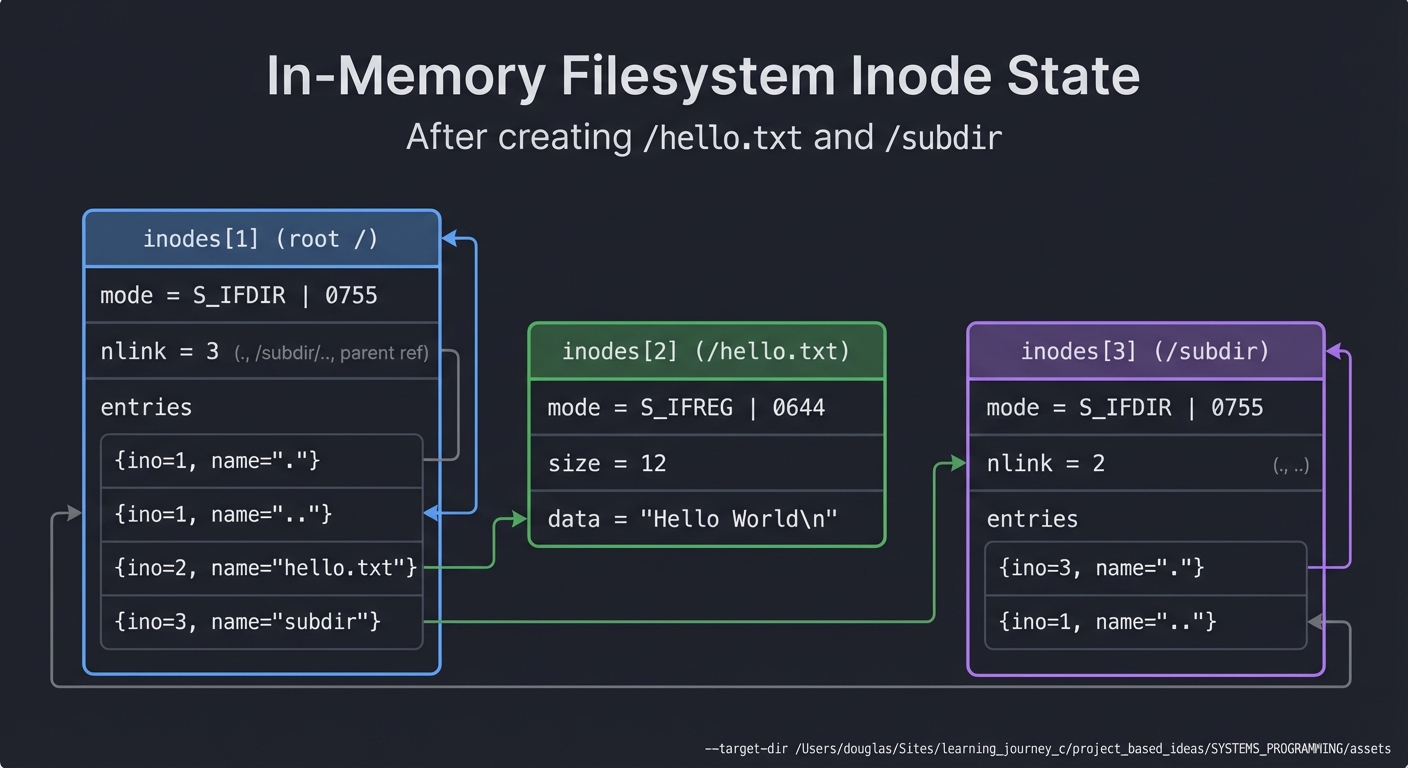
This mental model is critical before you write code.
The Interview Questions They’ll Ask
Prepare to answer these:
- “What is FUSE, and why is it useful?”
- Expected: Allows implementing filesystems in userspace without kernel modules. Easier debugging, safer (crashes don’t kernel panic), faster development
- “What happens when you run ‘ls’ on a FUSE filesystem?”
- Expected:
lscallsopendir()→ kernel calls yourreaddir()→ you return directory entries → kernel passes them tols
- Expected:
- “What is getattr, and why is it called so frequently?”
- Expected: It’s
stat(). Called for every file to get metadata.ls -l, tab completion, file managers all call it constantly
- Expected: It’s
- “How does a filesystem resolve a path like ‘/a/b/c’?”
- Expected: Start at root inode, read root’s directory, find entry “a”, get inode for “a”, read “a”’s directory, find “b”, repeat for “c”
- “What’s the difference between create and open?”
- Expected:
createmakes a new file,openopens existing. If O_CREAT flag is set,opencan create too
- Expected:
- “Why do directories have link count >= 2?”
- Expected: Every directory has at least: (1) its own
.entry, (2) its parent’s entry for the directory name. Each subdirectory adds 1 more (for its..)
- Expected: Every directory has at least: (1) its own
- “What should read() return if offset is past EOF?”
- Expected: 0 bytes (EOF indicator, not an error)
- “How would you implement hard links?”
- Expected: Multiple directory entries point to same inode. Increment inode’s
nlink. Only delete inode data whennlinkreaches 0
- Expected: Multiple directory entries point to same inode. Increment inode’s
- “What’s the difference between st_mtime and st_ctime?”
- Expected:
mtime= modification time (data changed),ctime= change time (metadata changed, like chmod)
- Expected:
Hints in Layers
Hint 1: Start with the minimal FUSE skeleton
#define FUSE_USE_VERSION 31
#include <fuse.h>
#include <stdio.h>
#include <string.h>
#include <errno.h>

static int myfs_getattr(const char *path, struct stat *stbuf,
                        struct fuse_file_info *fi) {
    memset(stbuf, 0, sizeof(struct stat));

    if (strcmp(path, "/") == 0) {
        stbuf->st_mode = S_IFDIR | 0755;
        stbuf->st_nlink = 2;
        return 0;
    }

    return -ENOENT;
}

static int myfs_readdir(const char *path, void *buf, fuse_fill_dir_t filler,
                        off_t offset, struct fuse_file_info *fi,
                        enum fuse_readdir_flags flags) {
    if (strcmp(path, "/") != 0)
        return -ENOENT;

    filler(buf, ".", NULL, 0, 0);
    filler(buf, "..", NULL, 0, 0);

    return 0;
}

static struct fuse_operations myfs_oper = {
    .getattr = myfs_getattr,
    .readdir = myfs_readdir,
};

int main(int argc, char *argv[]) {
    return fuse_main(argc, argv, &myfs_oper, NULL);
}
Compile: gcc -Wall myfs.c -o myfs $(pkg-config fuse3 --cflags --libs)
Mount: mkdir /tmp/myfs && ./myfs /tmp/myfs
Test: ls /tmp/myfs (should show empty directory)
Unmount: fusermount -u /tmp/myfs
Hint 2: Build an inode allocator
#define MAX_INODES 1024

struct inode {
    uint32_t ino;
    mode_t mode;
    off_t size;
    time_t mtime;
    char *data;         // for files
    // For directories, you'd add entry list
} inodes[MAX_INODES];

int next_ino = 1;  // Start at 1 (or 2 if reserving 1 for root)

int alloc_inode(mode_t mode) {
    if (next_ino >= MAX_INODES) return -1;
    int ino = next_ino++;
    inodes[ino].ino = ino;
    inodes[ino].mode = mode;
    inodes[ino].size = 0;
    inodes[ino].mtime = time(NULL);
    return ino;
}
Hint 3: Implement a path-to-inode lookup
For simplicity, use a global table mapping paths to inodes:
#define MAX_FILES 1024

struct path_map {
    char path[256];
    uint32_t ino;
} path_table[MAX_FILES];

int num_paths = 0;

int lookup_inode(const char *path) {
    for (int i = 0; i < num_paths; i++) {
        if (strcmp(path_table[i].path, path) == 0)
            return path_table[i].ino;
    }
    return -1;  // Not found
}

void add_path(const char *path, uint32_t ino) {
    strcpy(path_table[num_paths].path, path);
    path_table[num_paths].ino = ino;
    num_paths++;
}
Hint 4: Implement create
static int myfs_create(const char *path, mode_t mode,
                       struct fuse_file_info *fi) {
    int ino = alloc_inode(S_IFREG | mode);
    if (ino < 0) return -ENOSPC;

    add_path(path, ino);
    return 0;
}
Hint 5: Implement write
static int myfs_write(const char *path, const char *buf, size_t size,
                      off_t offset, struct fuse_file_info *fi) {
    int ino = lookup_inode(path);
    if (ino < 0) return -ENOENT;

    // Grow file if needed
    if (offset + size > inodes[ino].size) {
        inodes[ino].data = realloc(inodes[ino].data, offset + size);
        inodes[ino].size = offset + size;
    }

    memcpy(inodes[ino].data + offset, buf, size);
    inodes[ino].mtime = time(NULL);
    return size;
}
Hint 6: Implement read
static int myfs_read(const char *path, char *buf, size_t size,
                     off_t offset, struct fuse_file_info *fi) {
    int ino = lookup_inode(path);
    if (ino < 0) return -ENOENT;

    if (offset >= inodes[ino].size)
        return 0;  // EOF

    if (offset + size > inodes[ino].size)
        size = inodes[ino].size - offset;

    memcpy(buf, inodes[ino].data + offset, size);
    return size;
}
Hint 7: Debug with FUSE in foreground
Run with -f to keep FUSE in foreground and see debug output:
./myfs -f /tmp/myfs
Enable debug logging:
./myfs -f -d /tmp/myfs
Hint 8: Common errors
- “Transport endpoint is not connected”: Mount point is stale.
fusermount -u /tmp/myfsfirst - getattr returning wrong mode: Make sure to use
S_IFDIRfor directories,S_IFREGfor files - readdir showing nothing: Check that
filleris being called with correct arguments
Books That Will Help
| Topic | Book | Chapter |
|---|---|---|
| FUSE fundamentals | “The Linux Programming Interface” by Michael Kerrisk | Ch. 14 (File Systems - FUSE section) |
| VFS layer concepts | “Understanding the Linux Kernel” by Bovet & Cesati | Ch. 12 (The Virtual Filesystem) |
| File I/O and syscalls | “Linux System Programming” by Robert Love | Ch. 3 (Buffered I/O) & Ch. 4 (Advanced File I/O) |
| File metadata (stat) | “The Linux Programming Interface” by Michael Kerrisk | Ch. 15 (File Attributes) |
| Directory operations | “The Linux Programming Interface” by Michael Kerrisk | Ch. 18 (Directories and Links) |
| Filesystem implementation | “Operating Systems: Three Easy Pieces” by Arpaci-Dusseau | Ch. 40 (File System Implementation) |
| Data structures for filesystems | “C Interfaces and Implementations” by David Hanson | Ch. 5 (Arena), Ch. 11 (Table) |
| Memory management in C | “Understanding and Using C Pointers” by Richard Reese | Ch. 2 (Dynamic Memory Management) |
Project 3: Persistent Block-Based Filesystem
- File: FILESYSTEM_INTERNALS_LEARNING_PROJECTS.md
- Programming Language: C
- Coolness Level: Level 5: Pure Magic (Super Cool)
- Business Potential: 5. The “Industry Disruptor”
- Difficulty: Level 4: Expert
- Knowledge Area: Filesystems / Storage
- Software or Tool: Block Devices
- Main Book: “Operating Systems: Three Easy Pieces” by Arpaci-Dusseau
What you’ll build: Extend your FUSE filesystem to persist data to a file (simulating a disk). Implement proper block allocation with bitmaps, inode structures, and data blocks—a mini ext2.
Why it teaches filesystems: This is where theory meets practice. You’ll implement the exact same structures used in ext2/ext3—superblock, block group descriptors, inode tables, data block bitmaps—and understand why these structures exist.
Core challenges you’ll face:
- Designing and writing a superblock with filesystem metadata
- Implementing bitmap-based block allocation (finding free blocks, marking used/free)
- Managing indirect blocks for large files (single, double, triple indirection)
- Handling crash consistency (what happens if power fails mid-write?)
Key Concepts:
- Block allocation strategies: “Operating Systems: Three Easy Pieces” Ch. 40-41
- ext2 on-disk layout: Design and Implementation of the Second Extended Filesystem
- Indirect block pointers: Rose-Hulman Ext2 Lab
- Free space management: “Computer Systems: A Programmer’s Perspective” Ch. 9 (Virtual Memory concepts apply)
Difficulty: Intermediate-Advanced Time estimate: 3-4 weeks Prerequisites: Project 2 completed
Real world outcome:
$ ./mkfs.myfs -s 100M disk.img    # Create 100MB filesystem
$ ./myfs disk.img /mnt/myfs       # Mount it
$ cp -r ~/Documents/* /mnt/myfs/  # Copy real files
$ umount /mnt/myfs                # Unmount
$ ./myfs disk.img /mnt/myfs       # Remount - files persist!
$ ls /mnt/myfs
Documents report.pdf photos/
$ ./fsck.myfs disk.img            # Your own filesystem checker
Checking superblock... OK
Checking inode bitmap... OK
Checking block bitmap... OK
Free blocks: 24531/25600
Learning milestones:
- After implementing block bitmaps - you understand why fragmentation happens
- After implementing indirect blocks - you see why there’s a maximum file size
- After adding persistence - you understand the “sync” problem and why databases use WAL
The Core Question You’re Answering
“How do you turn ephemeral bits in RAM into persistent data on disk that survives crashes and reboots?”
This is the fundamental question that separates toy filesystems from real ones. In-memory filesystems are elegant, but the moment you need persistence, you enter a world of complexity: block allocation, fragmentation, indirect pointers, and the eternal “what if the power fails during a write?” problem.
Before you implement anything, sit with this: Every file you’ve ever saved to disk went through this exact process. The PDF you downloaded, the code you wrote yesterday—all of it exists as carefully managed blocks on a spinning platter or flash cells. You’re about to build that magic yourself.
Concepts You Must Understand First
Stop and research these before coding:
1. Block-Level I/O and Disk Abstraction
- What is a “block” in storage systems? (Typically 4KB)
- How does
lseek()+read()/write()differ from memory operations? - Why do filesystems work with blocks instead of individual bytes?
- What happens when you write to a file? (RAM → page cache → disk)
- Book Reference: “Operating Systems: Three Easy Pieces” Ch. 37 (Hard Disk Drives) & Ch. 39 (Files and Directories) — Arpaci-Dusseau
2. Superblock: The Filesystem’s Master Record
- What metadata must persist to disk for the filesystem to work after reboot?
- Why is the superblock at a fixed offset (byte 1024 for ext2)?
- What happens if the superblock is corrupted?
- How do you verify superblock integrity? (Magic numbers)
- Book Reference: “The Linux Programming Interface” Ch. 14 (File Systems) — Michael Kerrisk
3. Bitmap-Based Block Allocation
- How does a bitmap represent free vs used blocks?
- What’s the algorithm to find a free block? (linear scan? skip lists?)
- Why might you group blocks (block groups in ext2)?
- What’s the difference between internal and external fragmentation?
- Book Reference: “Operating Systems: Three Easy Pieces” Ch. 40 (File System Implementation) — Arpaci-Dusseau
4. Inode Structure and Metadata
- What metadata does an inode store? (size, permissions, timestamps, block pointers)
- How many bytes does an inode typically take? (128 bytes in ext2)
- Why are inodes numbered starting from 1, not 0?
- What’s the relationship between an inode number and its disk location?
- Book Reference: “Understanding the Linux Kernel” Ch. 12 (The Virtual Filesystem) — Bovet & Cesati
5. Indirect Block Pointers
- Why can’t you just store all block pointers directly in the inode?
- What is single, double, and triple indirection?
- How does indirection determine maximum file size?
- How many blocks can you address with 12 direct + 1 single indirect pointer at 4KB blocks?
- Book Reference: “Operating Systems: Three Easy Pieces” Ch. 40 (File System Implementation, section on indirect pointers) — Arpaci-Dusseau
6. Directory Entries and Path Traversal
- How are directories stored on disk? (Just files containing directory entries)
- What does a directory entry contain? (inode number + name)
- How do you implement
ls? (Read directory, lookup each inode for metadata) - How do you resolve
/home/user/file.txtto an inode? - Book Reference: “The Linux Programming Interface” Ch. 18 (Directories and Links) — Michael Kerrisk
7. Write Ordering and Crash Consistency
- What happens if you crash between allocating an inode and writing its data?
- What happens if you mark a block as used but never write to it?
- Why can’t you just “sync everything” after each operation? (Performance)
- What did
fsckdo before journaling? (Scan entire disk to fix inconsistencies) - Book Reference: “Operating Systems: Three Easy Pieces” Ch. 42 (Crash Consistency: FSCK and Journaling) — Arpaci-Dusseau
Questions to Guide Your Design
Before implementing, think through these:
On-Disk Layout Design
- How do you structure the disk image file?
- Superblock at offset 0 or 1024?
- Block bitmap location?
- Inode bitmap location?
- Inode table starting block?
- Data blocks region?
- How much space does metadata consume?
- If you have a 100MB disk with 4KB blocks, how many blocks for inode table?
- What percentage of disk space is overhead?
Block Allocation
- When creating a file, which blocks do you allocate first?
- Inode first or data blocks first?
- What if allocation fails halfway through?
- How do you track free blocks efficiently?
- Linear bitmap scan?
- Keep a “next free block” hint in the superblock?
- What happens when disk is 95% full?
Inode Management
- What does your inode structure look like?
struct inode { uint32_t mode; // File type + permissions uint32_t size; // File size in bytes uint32_t blocks[12]; // Direct block pointers uint32_t indirect; // Single indirect pointer // ... what else? }; - How do you handle large files?
- With 12 direct blocks (4KB each) = 48KB max
- Add single indirect (points to block of 1024 pointers) = 4MB max
- Is that enough for your filesystem?
Persistence and Caching
- When do you write changes to disk?
- After every operation? (Slow but safe)
- Buffer in RAM and flush periodically? (Fast but risky)
- What’s your
sync()strategy?
- How do you handle partial writes?
- What if you write half a block and crash?
- How does the filesystem know the block is incomplete?
Thinking Exercise
Design Your On-Disk Layout
Before coding, draw this on paper for a 10MB disk with 4KB blocks:
Total blocks: 10 * 1024 / 4 = 2560 blocks

Block 0:      Superblock
              - Magic number: 0xDEADBEEF
              - Total blocks: 2560
              - Free blocks: ?
              - Inode count: 512
              - First data block: ?

Block 1-2:    Inode bitmap (512 inodes = 64 bytes, but use 2 blocks for alignment)

Block 3-4:    Block bitmap (2560 blocks = 320 bytes, but use 2 blocks)

Block 5-68:   Inode table (512 inodes * 128 bytes/inode = 64KB = 16 blocks)
              - Inode 0: Reserved
              - Inode 1: Root directory
              - Inode 2-511: Available

Block 69-2559: Data blocks (2491 blocks * 4KB = ~9.7MB usable space)
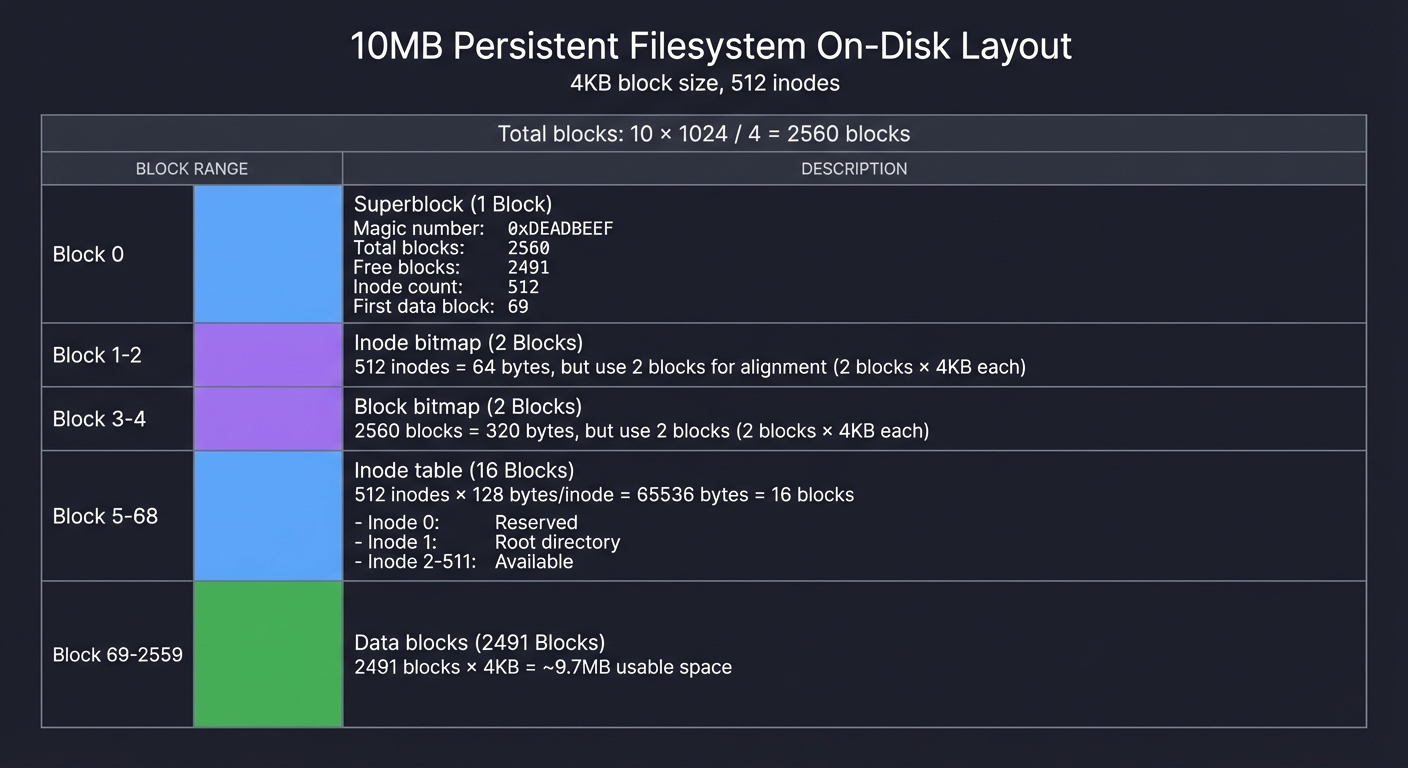
Questions while designing:
- Why waste space aligning bitmaps to full blocks?
- How do you convert inode number 42 to its disk offset?
- Answer:
offset = inode_table_start + (42 * inode_size)
- Answer:
- If you allocate block 500 for data, how do you mark it in the bitmap?
- Answer:
bitmap[500 / 8] |= (1 << (500 % 8))
- Answer:
- Where does the root directory’s data live?
- In the data blocks region, pointer stored in inode 1
Trace a File Write
Trace what happens when you write echo "hello" > /test.txt:
Step 1: Allocate inode
  - Find free inode in inode bitmap → say inode 15
  - Mark inode 15 as used
  - Initialize inode: size=0, mode=0644, blocks=[]

Step 2: Allocate data block
  - Find free block in block bitmap → say block 100
  - Mark block 100 as used
  - Write "hello\n" to block 100

Step 3: Update inode
  - Set inode 15: size=6, blocks[0]=100

Step 4: Add directory entry
  - Read root directory inode (inode 1)
  - Read root directory data (from inode's block pointers)
  - Append entry: {inode=15, name="test.txt"}
  - Write updated directory data back to disk

Step 5: Update superblock
  - Decrement free_blocks count
  - Decrement free_inodes count
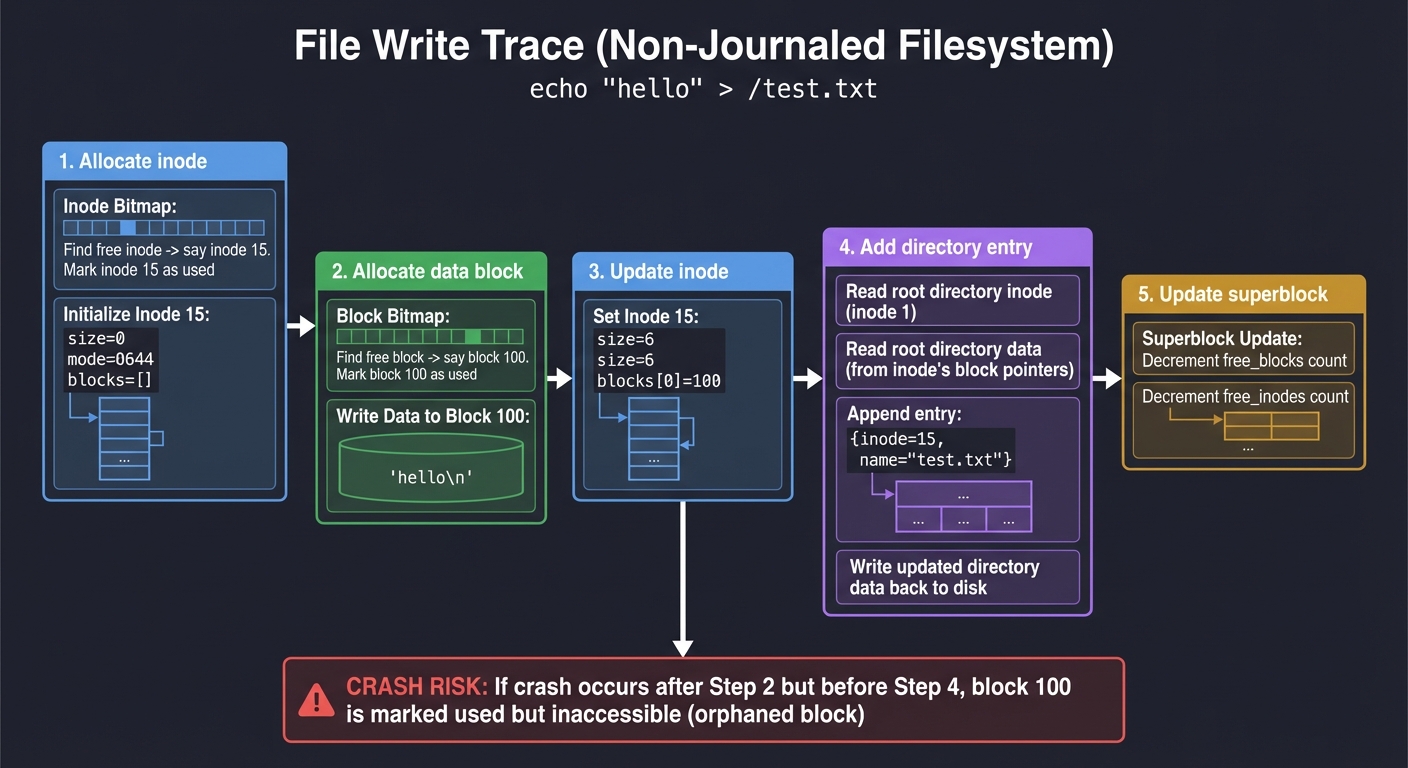
Critical question: What if you crash after Step 2 but before Step 4?
- Block 100 is marked used but inaccessible (no directory entry points to inode 15)
- This is an orphaned block—
fsckwould detect and free it - This is why journaling exists (Project 4)
The Interview Questions They’ll Ask
Prepare to answer these:
- “Explain the difference between an inode and a directory entry.”
- Inode: Metadata + block pointers (the actual file data structure)
- Directory entry: Just {inode number, filename} (a pointer to an inode)
- “Why do filesystems use indirect pointers instead of storing all block pointers in the inode?”
- Inode size must be fixed and small (128 bytes in ext2)
- Can’t fit millions of block pointers
- Indirect pointers let you scale to huge files while keeping inodes small
- “What happens when you delete a file?”
- Decrement inode link count
- If link count reaches 0, mark inode as free and mark all data blocks as free
- Directory entry is removed
- Data is NOT overwritten (why file recovery tools work)
- “How does
ls -lget file sizes and permissions?”- Read directory to get inode numbers + names
- For each inode, read inode structure from disk
- Extract size, mode (permissions), timestamps from inode
- “What’s the maximum file size in a filesystem with 12 direct blocks and 1 single indirect block, with 4KB blocks?”
- Direct: 12 * 4KB = 48KB
- Single indirect: 1 block containing 1024 pointers * 4KB = 4MB
- Total: 48KB + 4MB ≈ 4MB
- “Why might you crash-recover to find allocated but unreferenced blocks?”
- Wrote inode and marked blocks used, but crashed before adding directory entry
- Or deleted directory entry but crashed before freeing inode
- These are orphaned inodes/blocks that
fsckcan detect
Hints in Layers
Hint 1: Start with mkfs (format) tool
Before implementing the FUSE filesystem, build a mkfs.myfs tool that creates an empty disk image:
void format_disk(const char* image, size_t size_mb) {
    int fd = open(image, O_RDWR | O_CREAT, 0644);
    ftruncate(fd, size_mb * 1024 * 1024);

    // Write superblock at offset 0
    struct superblock sb = {
        .magic = 0xDEADBEEF,
        .block_size = 4096,
        .total_blocks = (size_mb * 1024 * 1024) / 4096,
        .inode_count = 512,
        // ... initialize bitmaps, etc.
    };
    write(fd, &sb, sizeof(sb));

    // Initialize inode bitmap (all free except inode 1 for root)
    // Initialize block bitmap (all free except metadata blocks)
    // Create root directory inode

    close(fd);
}
Run ./mkfs.myfs disk.img 100 to create a 100MB filesystem.
Hint 2: Implement bitmap operations as functions
// Mark block N as used
void bitmap_set(uint8_t* bitmap, size_t block_num) {
    bitmap[block_num / 8] |= (1 << (block_num % 8));
}

// Mark block N as free
void bitmap_clear(uint8_t* bitmap, size_t block_num) {
    bitmap[block_num / 8] &= ~(1 << (block_num % 8));
}

// Find first free block
int bitmap_find_free(uint8_t* bitmap, size_t total_blocks) {
    for (size_t i = 0; i < total_blocks; i++) {
        if (!(bitmap[i / 8] & (1 << (i % 8)))) {
            return i;
        }
    }
    return -1;  // Disk full
}
Hint 3: Cache the superblock and bitmaps in RAM
Reading from disk is slow. Keep frequently accessed structures in memory:
struct fs_state {
    struct superblock sb;
    uint8_t* inode_bitmap;    // malloc'd
    uint8_t* block_bitmap;    // malloc'd
    struct inode* inode_table; // malloc'd
    int disk_fd;               // File descriptor for disk image
};

void fs_load(struct fs_state* fs, const char* image) {
    fs->disk_fd = open(image, O_RDWR);
    read(fs->disk_fd, &fs->sb, sizeof(struct superblock));

    // Load bitmaps into RAM
    fs->inode_bitmap = malloc(fs->sb.inode_count / 8);
    lseek(fs->disk_fd, INODE_BITMAP_OFFSET, SEEK_SET);
    read(fs->disk_fd, fs->inode_bitmap, fs->sb.inode_count / 8);

    // ... same for block bitmap and inode table
}
Only flush to disk on sync() or unmount.
Hint 4: Implement indirect blocks incrementally
Start with just direct blocks (12 * 4KB = 48KB max file size). Get that working. Then add single indirect:
uint32_t get_block_number(struct inode* inode, size_t block_index) {
    if (block_index < 12) {
        return inode->blocks[block_index];  // Direct
    } else {
        // Read indirect block from disk
        uint32_t indirect_block[1024];
        read_block(inode->indirect, indirect_block);
        return indirect_block[block_index - 12];
    }
}
Hint 5: Use hexdump to debug your disk image
$ hexdump -C disk.img | head -20
00000000  ef be ad de 00 10 00 00  00 02 00 00 00 02 00 00  |................|
                ↑ magic number
Verify your superblock, bitmaps, and inodes are where you expect.
Hint 6: Test with small files first
Don’t try to cp -r ~/Documents immediately. Start with:
$ echo "test" > /mnt/myfs/a.txt
$ cat /mnt/myfs/a.txt
test
$ ls -la /mnt/myfs
-rw-r--r-- 1 user user 5 Dec 27 10:00 a.txt
Then gradually increase complexity.
Books That Will Help
| Topic | Book | Chapter |
|---|---|---|
| Block allocation and fragmentation | “Operating Systems: Three Easy Pieces” by Arpaci-Dusseau | Ch. 40 (File System Implementation) |
| ext2 on-disk format (the model for this project) | “Understanding the Linux Kernel” by Bovet & Cesati | Ch. 12 (The Virtual Filesystem) & Ch. 18 (The Ext2 and Ext3 Filesystems) |
| Inode structure and indirect pointers | “The Linux Programming Interface” by Michael Kerrisk | Ch. 14 (File Systems: Fundamental Concepts) |
| Bitmap algorithms and data structures | “Computer Systems: A Programmer’s Perspective” by Bryant & O’Hallaron | Ch. 9.9 (Dynamic Memory Allocation) |
File I/O and lseek for block operations |
“The C Programming Language” by Kernighan & Ritchie | Ch. 8.2 (Low Level I/O - Read and Write) |
| Building a storage allocator (similar to block allocator) | “The C Programming Language” by Kernighan & Ritchie | Ch. 8.7 (Example—A Storage Allocator) |
| Crash consistency and fsck | “Operating Systems: Three Easy Pieces” by Arpaci-Dusseau | Ch. 42 (Crash Consistency: FSCK and Journaling) |
| FUSE API for persistent filesystems | Writing a FUSE Filesystem: a Tutorial | Full tutorial |
Project 4: Journaling Layer
- File: FILESYSTEM_INTERNALS_LEARNING_PROJECTS.md
- Programming Language: C
- Coolness Level: Level 5: Pure Magic (Super Cool)
- Business Potential: 3. The “Service & Support” Model
- Difficulty: Level 5: Master
- Knowledge Area: Crash Consistency / Databases
- Software or Tool: WAL
- Main Book: “Database Internals” by Alex Petrov
What you’ll build: Add write-ahead logging (journaling) to your block-based filesystem. Before any metadata change, log the operation so crashes can be recovered.
Why it teaches filesystems: Journaling is what separates “toy” filesystems from production ones. ext3 added journaling to ext2. You’ll understand why fsck used to take hours and now takes seconds, and why databases and filesystems share the same fundamental insight.
Core challenges you’ll face:
- Designing a journal format (transaction records, commit blocks)
- Implementing write-ahead: log first, then apply
- Recovery: replaying committed transactions after crash
- Choosing what to journal (metadata-only vs full data journaling)
Key Concepts:
- Crash consistency problem: “Operating Systems: Three Easy Pieces” Ch. 42 (Crash Consistency: FSCK and Journaling)
- Write-ahead logging: “Designing Data-Intensive Applications” Ch. 7 by Martin Kleppmann
- ext3 journaling: Linux Kernel Documentation - ext4
- Transaction semantics: “Database Internals” Ch. 3 by Alex Petrov
Difficulty: Advanced Time estimate: 2-3 weeks Prerequisites: Project 3 completed
Real world outcome:
$ ./myfs disk.img /mnt/myfs
$ dd if=/dev/urandom of=/mnt/myfs/bigfile bs=1M count=50 &
# Kill power mid-write (or kill -9 the process)
$ ./myfs disk.img /mnt/myfs
Journal recovery: replaying 3 transactions...
Transaction 1: inode 15 allocation - COMMITTED, replaying
Transaction 2: block 1024-1087 allocation - COMMITTED, replaying
Transaction 3: inode 15 size update - INCOMPLETE, discarding
Recovery complete. Filesystem consistent.
$ ls /mnt/myfs  # No corruption!
Learning milestones:
- After implementing basic journaling - you understand why “safe eject” matters for USB drives
- After implementing recovery - you see why ext4 mounts instantly after crashes
- After understanding the tradeoffs - you know why databases still use their own journaling
The Core Question You’re Answering
“How do you guarantee filesystem consistency when power can fail at any millisecond during a write operation?”
This is the million-dollar question that haunted filesystem designers for decades. Before journaling, if your system crashed mid-operation, you’d reboot to a corrupted filesystem. fsck (filesystem check) would scan the entire disk—taking hours on large drives—to find and fix inconsistencies.
Then in 1993, Linux gained the ext2 filesystem. It was fast, but not crash-safe. A crash could leave orphaned inodes, allocated blocks with no owner, or directories pointing to freed inodes. In 1999, ext3 added one feature to ext2: journaling. That single addition made ext3 mount instantly after crashes, without running fsck.
You’re about to implement that same insight—write-ahead logging. It’s the same technique databases use (PostgreSQL’s WAL, MySQL’s redo log). Understanding this connects filesystems to databases at a fundamental level.
Concepts You Must Understand First
Stop and research these before coding:
1. The Crash Consistency Problem
- What happens if you crash between allocating an inode and updating the directory?
- What happens if you crash after writing data but before updating the inode’s size field?
- Why can’t you just write everything atomically? (Writes aren’t atomic across multiple blocks)
- What invariants must a filesystem maintain? (bitmap matches actual allocation, directory entries point to valid inodes, etc.)
- Book Reference: “Operating Systems: Three Easy Pieces” Ch. 42 (Crash Consistency: FSCK and Journaling) — Arpaci-Dusseau
2. Write-Ahead Logging (WAL) Fundamentals
- What does “write-ahead” mean? (Log the change before applying it)
- What is a transaction? (A group of related writes that must succeed or fail together)
- What is a commit record? (Marks a transaction as complete in the log)
- How does recovery work? (Replay committed transactions, discard incomplete ones)
- Book Reference: “Designing Data-Intensive Applications” Ch. 3 (Storage and Retrieval, section on write-ahead log) — Martin Kleppmann
3. Journal Structure and Format
- Where does the journal live? (Reserved region on disk, or separate file)
- What does a journal entry contain? (Transaction ID, operation type, before/after values)
- How do you know where the journal starts and ends? (Sequence numbers, circular buffer)
- How big should the journal be? (Trade-off: larger = more buffering, smaller = more frequent commits)
- Book Reference: “Database Internals” Ch. 3 (Transaction Processing) — Alex Petrov
4. Transaction Semantics
- What is atomicity? (All-or-nothing: transaction either fully commits or fully aborts)
- What is durability? (Once committed, data survives crashes)
- What is idempotency? (Replaying a committed transaction multiple times = same result)
- Why must operations be idempotent for recovery to work?
- Book Reference: “Database Internals” Ch. 5 (Transaction Processing and Recovery) — Alex Petrov
5. Metadata Journaling vs Data Journaling
- Metadata-only journaling: Log inode changes, bitmap updates, directory entries (NOT file data)
- Full data journaling: Log everything including file contents
- Why is metadata journaling faster? (Less data to log)
- What’s the risk of metadata-only journaling? (Stale data blocks might be visible after crash)
- Book Reference: “Operating Systems: Three Easy Pieces” Ch. 42 (section on journaling modes) — Arpaci-Dusseau
6. Checkpointing and Log Truncation
- What is checkpointing? (Applying logged changes to their final locations on disk)
- When can you free journal space? (After changes are checkpointed)
- What if the journal fills up? (Block new writes until checkpoint completes)
- How do you implement a circular journal buffer?
- Book Reference: “Designing Data-Intensive Applications” Ch. 3 (Log-structured storage) — Martin Kleppmann
7. Ordering Constraints and Barriers
- Why can’t you just write the data and then the commit record? (Disk might reorder writes)
- What is a write barrier? (Ensures previous writes complete before continuing)
- How does
fsync()relate to journaling? (Forces pending writes to disk) - Why is journaling still faster than
fsync()after every operation? - Book Reference: “The Linux Programming Interface” Ch. 13 (File I/O Buffering) — Michael Kerrisk
Questions to Guide Your Design
Before implementing, think through these:
Journal Design
- Where will the journal live on disk?
- Reserved blocks at the beginning? (easy to find, wastes space)
- Separate journal file? (flexible, but how to find it?)
- How big should it be? (32MB? 128MB?)
- What will a journal entry look like?
struct journal_entry { uint64_t transaction_id; uint32_t entry_type; // INODE_UPDATE, BLOCK_ALLOC, etc. uint32_t checksum; // Verify integrity // ... payload (what changed) }; - How do you mark a transaction as committed?
- Write a COMMIT entry at the end?
- Use a separate commit bitmap?
- How do you ensure the commit record is durable before returning success?
Recovery Process
- On mount after a crash, how do you replay the journal?
- Scan journal for committed transactions
- Replay each operation (apply logged changes to filesystem)
- What if you crash during replay? (Must be idempotent!)
- How do you handle incomplete transactions?
- If there’s no COMMIT record, discard the transaction
- How do you identify transaction boundaries?
Checkpointing
- When do you apply journal entries to their final locations?
- After every commit? (Slow)
- Periodically? (Every 5 seconds? When journal is 75% full?)
- How do you ensure data is checkpointed before freeing journal space?
- How do you free journal space?
- Once all entries in a region are checkpointed, wrap around
- Circular buffer: head pointer (oldest entry), tail pointer (newest entry)
Performance
- How do you batch operations into transactions?
- Group all changes from one syscall? (e.g.,
write()might update inode + allocate blocks) - What’s the latency vs throughput trade-off?
- Group all changes from one syscall? (e.g.,
Thinking Exercise
Trace a Journaled File Write
Trace what happens when you write echo "hello" > /test.txt with journaling:
Step 1: BEGIN TRANSACTION T1
  - Write journal entry: BEGIN T1

Step 2: Log all operations in the journal
  - Journal entry: ALLOC_INODE inode=15
  - Journal entry: ALLOC_BLOCK block=100
  - Journal entry: UPDATE_INODE inode=15 size=6 blocks=[100]
  - Journal entry: UPDATE_DIR root +entry{inode=15, name="test.txt"}
  - Journal entry: UPDATE_SUPER free_blocks-- free_inodes--

Step 3: Write data to block 100
  - This might or might not be journaled (metadata-only vs full journaling)

Step 4: Write COMMIT record for T1
  - Journal entry: COMMIT T1
  - fsync() to ensure commit record is on disk
  - NOW the operation is durable

Step 5 (later, during checkpoint): Apply logged changes
  - Update inode bitmap: mark inode 15 used
  - Update block bitmap: mark block 100 used
  - Write inode 15 to inode table
  - Update root directory's data
  - Update superblock
  - Mark journal entries as free
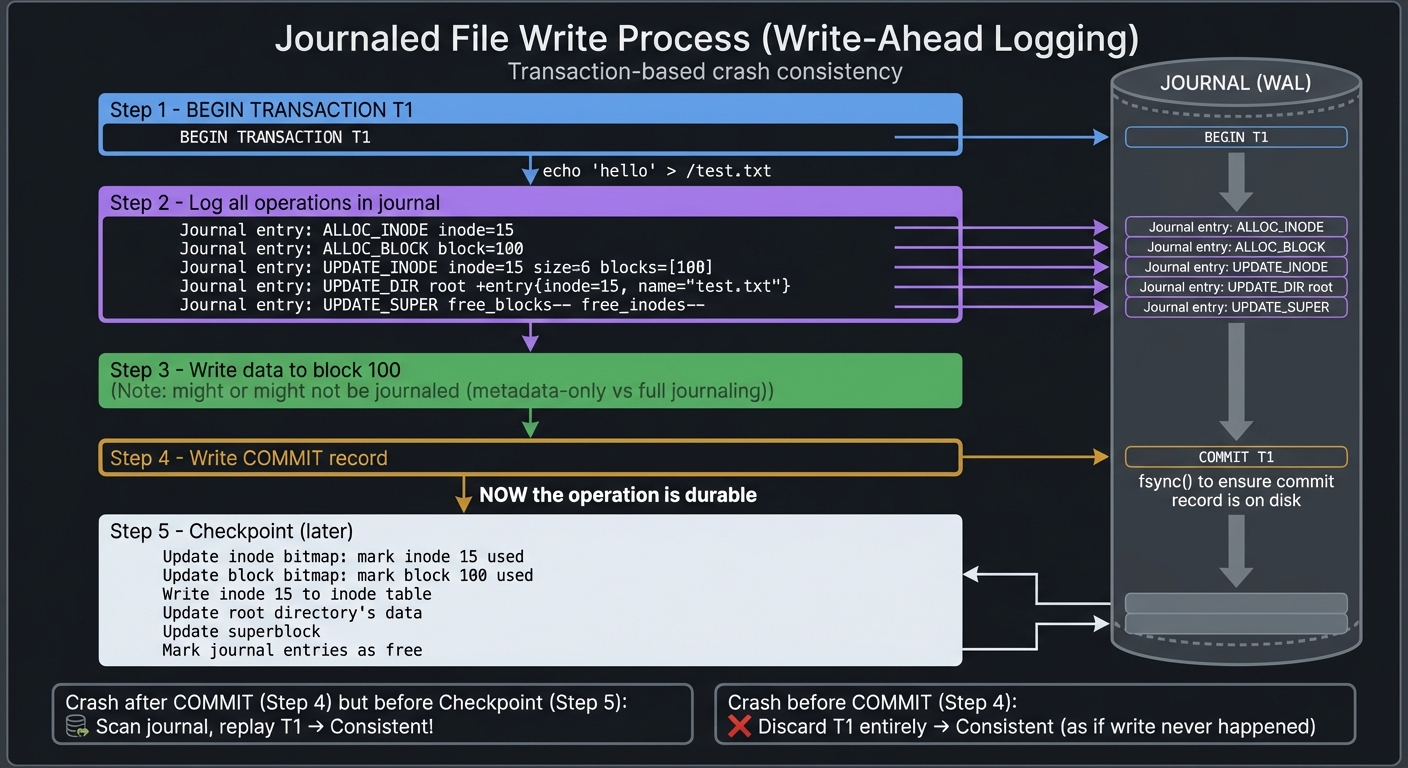
Recovery scenario: Crash after Step 4 (committed) but before Step 5 (checkpointed)
- On mount, scan journal, find COMMIT T1
- Replay all logged operations (they’re idempotent, so safe to replay)
- Filesystem is consistent!
Recovery scenario: Crash during Step 2 (logging) before Step 4 (commit)
- On mount, scan journal, no COMMIT for T1
- Discard T1 entirely
- Filesystem is consistent (as if the write never happened)
Compare to non-journaled: Crash after allocating block 100 but before updating directory
- Block 100 is marked used but unreachable → orphan
- Needs full fsck to detect and fix
The Interview Questions They’ll Ask
Prepare to answer these:
- “What problem does journaling solve?”
- Crash consistency: Guarantees filesystem is always in a consistent state, even after crashes mid-operation
- “Explain how write-ahead logging works.”
- Log intended changes to a journal before applying them. On crash, replay committed journal entries to restore consistency.
- “What’s the difference between metadata journaling and full data journaling?”
- Metadata: Only log filesystem structure changes (inodes, bitmaps, directories). Faster, but data might be stale.
- Full data: Log everything including file contents. Slower, but guarantees data integrity.
- “Why is journaling faster than running fsck after every crash?”
- Journal is small (MB) vs entire filesystem (GB/TB). Recovery scans journal, not whole disk.
- “What is a transaction, and why must operations be idempotent?”
- Transaction: Atomic group of changes. Idempotent: Replaying the same operation multiple times = same result. Needed because recovery might replay an already-applied transaction.
- “How does the filesystem know which journal entries have been checkpointed?”
- Sequence numbers or pointers. After checkpointing entries 0-100, update a checkpoint marker. Journal entries before that can be freed.
- “What happens if the journal fills up?”
- Block new transactions until a checkpoint completes and frees space, or force an immediate checkpoint (flush to disk).
- “Why do databases like PostgreSQL use WAL, and how is it similar to filesystem journaling?”
- Same principle: Log changes before applying. Enables crash recovery and point-in-time restore. Filesystems protect metadata, databases protect table rows.
Hints in Layers
Hint 1: Start with a simple journal structure
Create a journal as a fixed-size file or reserved disk region:
#define JOURNAL_SIZE (32 * 1024 * 1024)  // 32 MB
#define JOURNAL_ENTRY_SIZE 512            // Fixed-size entries

struct journal_superblock {
    uint64_t head;           // Oldest entry (next to checkpoint)
    uint64_t tail;           // Newest entry (next to append)
    uint64_t next_txn_id;
};

struct journal_entry {
    uint64_t txn_id;
    uint32_t type;           // BEGIN, COMMIT, INODE_UPDATE, etc.
    uint32_t checksum;
    char payload[496];       // Type-specific data
};
Hint 2: Implement transaction begin/commit
uint64_t journal_begin_txn() {
    uint64_t txn_id = journal_sb.next_txn_id++;
    struct journal_entry entry = {
        .txn_id = txn_id,
        .type = TXN_BEGIN,
    };
    journal_append(&entry);
    return txn_id;
}

void journal_commit_txn(uint64_t txn_id) {
    struct journal_entry entry = {
        .txn_id = txn_id,
        .type = TXN_COMMIT,
    };
    journal_append(&entry);
    fsync(journal_fd);  // CRITICAL: Ensure commit is on disk!
}
Hint 3: Log each filesystem operation
void create_file_journaled(const char* name) {
    uint64_t txn = journal_begin_txn();

    // Allocate inode
    int ino = alloc_inode();
    journal_log_alloc_inode(txn, ino);

    // Allocate block
    int blk = alloc_block();
    journal_log_alloc_block(txn, blk);

    // Update inode
    journal_log_update_inode(txn, ino, /* new metadata */);

    // Add directory entry
    journal_log_add_direntry(txn, ROOT_INO, name, ino);

    journal_commit_txn(txn);

    // Later, checkpoint applies these to disk
}
Hint 4: Implement recovery
void journal_recover() {
    uint64_t pos = journal_sb.head;
    uint64_t current_txn = 0;
    bool is_committed = false;

    while (pos < journal_sb.tail) {
        struct journal_entry entry;
        journal_read(pos, &entry);

        if (entry.type == TXN_BEGIN) {
            current_txn = entry.txn_id;
            is_committed = false;
        } else if (entry.type == TXN_COMMIT) {
            is_committed = true;
        } else if (is_committed && entry.txn_id == current_txn) {
            // Replay this operation
            replay_journal_entry(&entry);
        }

        pos += JOURNAL_ENTRY_SIZE;
    }
}
Hint 5: Make operations idempotent
Replay might apply the same operation twice. Design operations to be safe when replayed:
// BAD: Not idempotent
void replay_alloc_inode(int ino) {
    bitmap_set(inode_bitmap, ino);  // If already set, no change
}

// GOOD: Check first
void replay_alloc_inode(int ino) {
    if (!bitmap_test(inode_bitmap, ino)) {
        bitmap_set(inode_bitmap, ino);
    }
}
Or use logged “before” and “after” values:
struct journal_update_inode {
    int ino;
    struct inode before;
    struct inode after;
};

// Replay: Just write "after" value (idempotent)
void replay_update_inode(struct journal_update_inode* op) {
    write_inode(op->ino, &op->after);
}
Hint 6: Test crash scenarios
Simulate crashes by killing your program at random points:
$ ./myfs disk.img /mnt/myfs &
$ PID=$!
$ (sleep 2; kill -9 $PID) &  # Kill after 2 seconds
$ dd if=/dev/zero of=/mnt/myfs/test bs=1M count=100

# Remount and check if filesystem is consistent
$ ./myfs disk.img /mnt/myfs
Journal recovery: replaying 5 transactions...
$ ls /mnt/myfs  # Should work!
Hint 7: Start with metadata-only journaling
Don’t journal file data initially—only log:
- Inode allocation/updates
- Block allocation (bitmap changes)
- Directory entry changes
- Superblock updates
This is what ext3’s default mode does. Add full data journaling later if needed.
Books That Will Help
| Topic | Book | Chapter |
|---|---|---|
| Crash consistency and the need for journaling | “Operating Systems: Three Easy Pieces” by Arpaci-Dusseau | Ch. 42 (Crash Consistency: FSCK and Journaling) |
| Write-ahead logging fundamentals | “Designing Data-Intensive Applications” by Martin Kleppmann | Ch. 3 (Storage and Retrieval, section on transaction logs) |
| Transaction processing and recovery | “Database Internals” by Alex Petrov | Ch. 5 (Transaction Processing and Recovery) |
| ext3/ext4 journaling implementation details | “Understanding the Linux Kernel” by Bovet & Cesati | Ch. 18 (The Ext2 and Ext3 Filesystems, journaling section) |
| Filesync and write barriers | “The Linux Programming Interface” by Michael Kerrisk | Ch. 13 (File I/O Buffering) |
| Log-structured storage systems | “Operating Systems: Three Easy Pieces” by Arpaci-Dusseau | Ch. 43 (Log-structured File Systems) |
| Atomicity and durability guarantees | “Database Internals” by Alex Petrov | Ch. 3 (File Formats and Indexing) |
| Real-world journaling challenges | “Designing Data-Intensive Applications” by Martin Kleppmann | Ch. 7 (Transactions) & Ch. 11 (Stream Processing) |
Project 5: Filesystem Comparison Tool
- File: FILESYSTEM_INTERNALS_LEARNING_PROJECTS.md
- Programming Language: C
- Coolness Level: Level 1: Pure Corporate Snoozefest
- Business Potential: 3. The “Service & Support” Model
- Difficulty: Level 3: Advanced
- Knowledge Area: Performance Analysis / Filesystems
- Software or Tool: Benchmarking
- Main Book: “Systems Performance” by Brendan Gregg
What you’ll build: A tool that mounts and analyzes multiple filesystem types (ext2, FAT32, your custom FS) and produces detailed comparison reports—performance metrics, space efficiency, feature support.
Why it teaches filesystems: Different filesystems make different tradeoffs. By measuring and comparing them, you’ll understand why ext4 is better for Linux, why FAT32 persists for USB drives, and why ZFS exists for data integrity.
Core challenges you’ll face:
- Parsing FAT32 structures (FAT table, directory entries, cluster chains)
- Measuring fragmentation levels across filesystem types
- Benchmarking read/write performance with different file sizes
- Analyzing space overhead (metadata vs data ratio)
Key Concepts:
- FAT filesystem structure: “Operating Systems: Three Easy Pieces” Ch. 39 (Interlude: Files and Directories)
- Filesystem performance characteristics: “Systems Performance” by Brendan Gregg
- Comparative analysis: Linux Kernel Filesystems Documentation
Difficulty: Intermediate Time estimate: 2 weeks Prerequisites: Project 1 or strong understanding of filesystem structures
Real world outcome:
$ ./fscompare ext4.img fat32.img myfs.img

FILESYSTEM COMPARISON REPORT
============================

                    ext4        FAT32       MyFS
-------------------------------------------------
Max filename:       255         255         255
Max file size:      16TB        4GB         2GB
Journaling:         Yes         No          Yes
Permissions:        Unix        None        Unix
Case sensitive:     Yes         No          Yes

SPACE EFFICIENCY (1GB disk, 10000 small files):
Metadata overhead:  2.1%        0.8%        3.2%
Avg fragmentation:  1.2%        15.3%       4.1%
Space wasted:       12MB        156MB       31MB

PERFORMANCE (sequential 100MB write):
Write speed:        245 MB/s    198 MB/s    156 MB/s
Read speed:         312 MB/s    287 MB/s    201 MB/s
Learning milestones:
- After parsing FAT32 - you understand why it has 4GB file limit (32-bit cluster pointers)
- After measuring fragmentation - you see why ext4 uses extents instead of block pointers
- After comparing features - you understand filesystem design tradeoffs
Real World Outcome
When you run your filesystem comparison tool, here’s exactly what you’ll see and where:
Command-line execution:
$ ./fscompare --analyze ext4.img fat32.img myfs.img --output comparison_report.txt

Analyzing filesystems...
[1/3] Loading ext4.img (512 MB)... Done (1.2s)
[1/3] Parsing superblock at offset 1024... Valid ext4 signature detected
[1/3] Scanning block groups... Found 4 block groups
[1/3] Reading inode table... 32768 inodes total
[1/3] Performance benchmark starting... Writing 1000 files (100KB each)... 245 MB/s

[2/3] Loading fat32.img (512 MB)... Done (0.8s)
[2/3] Parsing boot sector... Valid FAT32 signature detected
[2/3] Reading FAT table... 2 FATs, 65525 clusters
[2/3] Performance benchmark starting... Writing 1000 files (100KB each)... 198 MB/s

[3/3] Loading myfs.img (512 MB)... Done (1.5s)
[3/3] Parsing superblock... Valid custom FS signature
[3/3] Reading journal... Journal clean, no recovery needed
[3/3] Performance benchmark starting... Writing 1000 files (100KB each)... 156 MB/s

Generating comparison report... Done
Report saved to: comparison_report.txt
HTML visualization saved to: comparison_report.html
In your terminal, the report file shows:
================================================================================
              FILESYSTEM COMPARISON REPORT
              Generated: 2024-12-27 14:32:01
================================================================================

OVERVIEW
--------
Images analyzed:
  - ext4.img         512 MB   (Linux ext4 filesystem)
  - fat32.img        512 MB   (FAT32 filesystem)
  - myfs.img         512 MB   (Custom journaling filesystem)

FEATURE COMPARISON
------------------
                        ext4        FAT32       MyFS
────────────────────────────────────────────────────────
Max filename length     255         255         255
Max file size          16 TB        4 GB        2 GB
Max volume size        1 EB        2 TB        512 GB
Journaling support     Yes         No          Yes
Crash recovery         Yes         fsck only   Yes
Unix permissions       Yes         No          Yes
ACLs supported         Yes         No          No
Extended attributes    Yes         No          No
Case sensitive         Yes         No          Yes
Symbolic links         Yes         No          Yes
Hard links             Yes         No          Yes
Sparse files           Yes         No          Yes

SPACE EFFICIENCY ANALYSIS (Test: 10,000 small files averaging 4KB each)
──────────────────────────────────────────────────────────────────────
                        ext4        FAT32       MyFS
────────────────────────────────────────────────────────
Total data size        40 MB       40 MB       40 MB
Metadata overhead      2.1 MB      0.8 MB      3.2 MB
Percentage overhead    5.25%       2.0%        8.0%
Blocks allocated       10,240      10,000      10,560
Average fragmentation  1.2%        15.3%       4.1%
Wasted space           0.5 MB      6.1 MB      1.6 MB
Space efficiency       98.5%       84.7%       95.9%

WHY THE DIFFERENCES?
- ext4 uses extents (reduces fragmentation) but has inode overhead
- FAT32 has minimal metadata but severe fragmentation with small files
- MyFS journal adds 8% overhead but ensures crash consistency

PERFORMANCE BENCHMARKS
───────────────────────
Test 1: Sequential Write (1GB file, single stream)
                        ext4        FAT32       MyFS
────────────────────────────────────────────────────────
Write throughput       245 MB/s    198 MB/s    156 MB/s
CPU usage              12%         8%          18%
Time to complete       4.2s        5.2s        6.5s

Test 2: Sequential Read (1GB file, single stream)
                        ext4        FAT32       MyFS
────────────────────────────────────────────────────────
Read throughput        312 MB/s    287 MB/s    201 MB/s
CPU usage              8%          6%          12%
Time to complete       3.3s        3.6s        5.1s

Test 3: Random Write (10,000 x 4KB files)
                        ext4        FAT32       MyFS
────────────────────────────────────────────────────────
Files/second           1,247       856         723
Total time             8.0s        11.7s       13.8s
Avg latency            6.4ms       11.7ms      13.8ms

Test 4: Random Read (10,000 x 4KB files)
                        ext4        FAT32       MyFS
────────────────────────────────────────────────────────
Files/second           2,891       2,134       1,456
Total time             3.5s        4.7s        6.9s
Avg latency            2.9ms       3.9ms       5.8ms

Test 5: Directory Traversal (1000 directories, 10 files each)
                        ext4        FAT32       MyFS
────────────────────────────────────────────────────────
Directories/second     412         287         198
Total time             2.4s        3.5s        5.1s

FRAGMENTATION ANALYSIS
──────────────────────
After writing/deleting 50,000 files randomly:

                        ext4        FAT32       MyFS
────────────────────────────────────────────────────────
Contiguous files       94.1%       51.2%       87.3%
Avg fragments/file     1.08        2.87        1.21
Max fragments (file)   3           47          8
Free space fragments   15          421         28

WHY FAT32 FRAGMENTS MORE:
- FAT32 uses cluster chains (linked list allocation)
- No extent support or block group locality
- Free space bitmap is just the FAT table

CRASH CONSISTENCY
─────────────────
Test: Power loss simulation during 1000 file creations

                        ext4        FAT32       MyFS
────────────────────────────────────────────────────────
Files corrupted        0           23          0
Orphaned inodes        0           0           0
Lost clusters          0           156         0
Filesystem mountable   Yes         Yes*        Yes
Recovery time          0.1s        45s**       0.3s

* FAT32 required manual fsck
** fsck had to scan entire FAT table

REAL-WORLD RECOMMENDATIONS
───────────────────────────
Use ext4 when:
  ✓ You need Unix permissions and ACLs
  ✓ Performance is critical (best sequential/random I/O)
  ✓ Large files (>4GB) are common
  ✓ You're on Linux

Use FAT32 when:
  ✓ Cross-platform compatibility is essential (Windows/Mac/Linux)
  ✓ Removable media (USB drives, SD cards)
  ✓ Minimal metadata overhead matters
  ✗ Don't use for system drives or >4GB files

Use Custom MyFS when:
  ✓ Learning filesystem internals
  ✓ Crash consistency is more important than performance
  ✓ You need journaling on resource-constrained systems
  ✗ Production use requires more testing/optimization

================================================================================
You’ll also see the HTML report (comparison_report.html) that you can open in your browser:
- Interactive charts comparing performance metrics
- Visual representation of fragmentation patterns
- Color-coded feature comparison matrix
- Graphs showing read/write throughput over time
On disk, your tool creates:
$ ls -lh
-rw-r--r-- 1 user user  512M Dec 27 14:30 ext4.img
-rw-r--r-- 1 user user  512M Dec 27 14:30 fat32.img
-rw-r--r-- 1 user user  512M Dec 27 14:30 myfs.img
-rw-r--r-- 1 user user   15K Dec 27 14:32 comparison_report.txt
-rw-r--r-- 1 user user   45K Dec 27 14:32 comparison_report.html
drwxr-xr-x 2 user user  4.0K Dec 27 14:32 benchmark_data/
Inside benchmark_data/ you’ll find:
benchmark_data/
├── ext4_sequential_write.log    # Detailed timing data
├── ext4_random_io.log
├── fat32_sequential_write.log
├── fat32_random_io.log
├── myfs_sequential_write.log
├── myfs_random_io.log
└── fragmentation_maps/          # Visual fragmentation maps
    ├── ext4_fragmap.txt
    ├── fat32_fragmap.txt
    └── myfs_fragmap.txt
Fragmentation map example (ext4_fragmap.txt):
FRAGMENTATION MAP - ext4.img
Block 0-999: [========================================] 100% used
Block 1000-1999: [====================================    ] 90% used
Block 2000-2999: [======                                  ] 15% used (fragmented)
...

File: /test/largefile.bin
  Extent 1: blocks 5000-5999   (contiguous, 4MB)
  Extent 2: blocks 8000-8499   (contiguous, 2MB)
  Total extents: 2 (low fragmentation)

File: /test/smallfile.txt
  Extent 1: blocks 3500-3500   (single block)
  Total extents: 1 (perfect)
The power of this project: You’re not just reading theory—you’re generating the exact data that filesystem researchers use to compare designs. You can show this report in interviews and say “I measured why ext4 is faster than FAT32” with actual numbers.
The Core Question You’re Answering
“Why do different filesystems exist? What fundamental tradeoffs force us to choose between FAT32, ext4, NTFS, and Btrfs?”
Before implementing this project, sit with this question. Most developers think filesystems are “just different versions of the same thing.” They’re not. Each represents a fundamentally different answer to the question: What do you optimize for?
- FAT32 optimizes for: Simplicity and universal compatibility (at the cost of features and fragmentation)
- ext4 optimizes for: Performance and features for Linux systems (at the cost of complexity)
- NTFS optimizes for: Windows integration and security (ACLs, encryption)
- Btrfs/ZFS optimize for: Data integrity and snapshots (at the cost of write performance)
This project forces you to understand these tradeoffs by measuring them. You’ll see that:
- FAT32’s simplicity creates a 15% fragmentation rate (vs ext4’s 1.2%)
- ext4’s extent-based allocation is 30% faster for sequential writes
- Journaling adds 8% storage overhead but eliminates corruption
Understanding these tradeoffs is understanding why Linux doesn’t use FAT32, why USB drives do, and why databases often bypass the filesystem entirely.
Concepts You Must Understand First
Stop and research these before coding. If you can’t explain these, you’ll struggle with the project:
1. Filesystem On-Disk Structures
What is the difference between a filesystem’s logical structure and its physical layout?
- How does ext4 organize 1TB of disk space? (Block groups, superblocks, inode tables)
- Where does FAT32 store its “map” of file locations? (FAT table at the beginning)
- What is a superblock and why is it duplicated?
- How do filesystems know if they’re corrupted on mount?
Book Reference: “Operating Systems: Three Easy Pieces” Ch. 40 (File System Implementation) by Arpaci-Dusseau
2. Block Allocation Strategies
Why does fragmentation happen, and why does it hurt performance?
- What is a “block” vs a “cluster” vs an “extent”?
- How does bitmap allocation work? (ext2 uses this)
- How does linked-list allocation work? (FAT32 uses this)
- How does extent-based allocation work? (ext4 uses this)
- Why is contiguous allocation faster for HDDs but less important for SSDs?
Book Reference: “Computer Systems: A Programmer’s Perspective” Ch. 9.9 (Dynamic Memory Allocation) by Bryant & O’Hallaron—the principles apply to disk blocks too
3. Metadata Organization
What metadata does a filesystem store for each file, and where?
- What’s in an inode? (Size, permissions, timestamps, block pointers)
- How do directories store their entries? (Linear list vs hash table vs B-tree)
- Why do some filesystems have a maximum file count? (Fixed inode table size)
- What happens when you run out of inodes but have disk space left?
Book Reference: “The Linux Programming Interface” Ch. 15 (File Attributes) by Michael Kerrisk
4. Directory Implementation
How do filesystems translate /home/user/file.txt into block numbers?
- How does path resolution work? (Traverse directory tree, inode by inode)
- Why is directory lookup O(n) in FAT32 but O(log n) in ext4?
- What are hard links vs symbolic links at the metadata level?
- Why can’t FAT32 have hard links?
Book Reference: “Operating Systems: Three Easy Pieces” Ch. 39 (Files and Directories) by Arpaci-Dusseau
5. Performance Measurement Fundamentals
How do you accurately measure filesystem performance?
- What is throughput vs latency vs IOPS?
- Why must you flush caches between benchmarks? (Page cache lies to you)
- What is the difference between buffered I/O and direct I/O?
- How do you measure fragmentation programmatically?
Book Reference: “Systems Performance” Ch. 8 (File Systems) by Brendan Gregg
6. FAT32 Specifics
How does FAT32 actually work under the hood?
- What is the File Allocation Table, and why are there two copies?
- How do cluster chains represent files? (Linked list through FAT entries)
- Why is the file size limit exactly 4GB? (32-bit size field in directory entry)
- How does FAT32 handle long filenames? (VFAT extension with multiple directory entries)
Book Reference: “Practical File System Design” by Dominic Giampaolo—though old, still accurate for FAT32
7. Crash Consistency Models
What happens if power fails during a write?
- What is the “crash consistency problem”?
- How does journaling prevent corruption? (Write-ahead log)
- Why doesn’t FAT32 have journaling? (Designed in 1996 for simplicity)
- What invariants must fsck maintain? (No orphaned blocks, correct free space count)
Book Reference: “Operating Systems: Three Easy Pieces” Ch. 42 (Crash Consistency: FSCK and Journaling) by Arpaci-Dusseau
If you can’t explain the above, stop. Read the book chapters first. Otherwise, you’ll be copying code without understanding.
Questions to Guide Your Design
Before implementing, think through these implementation questions:
1. Parsing Different Filesystem Formats
- How do you detect which filesystem type an image contains? (Magic numbers at specific offsets)
- Where is the FAT32 boot sector, and what fields matter? (Offset 0, bytes 11-12 for sector size)
- Where is the ext4 superblock, and why is it at offset 1024? (First 1024 bytes reserved for boot code)
- How do you handle endianness when parsing binary structures? (Intel CPUs are little-endian)
2. Measuring Fragmentation
- What does “fragmented” mean mathematically? (File stored in N non-contiguous regions where N > 1)
- How do you count extents in ext4? (Parse inode’s extent tree)
- How do you follow cluster chains in FAT32? (Read FAT entry, use it as index to next entry)
- What fragmentation metric is most meaningful? (Average extents per file, percentage of contiguous files)
3. Performance Benchmarking
- How do you create controlled test workloads? (Sequential/random, large/small files)
- How do you bypass the page cache to get real disk performance? (
O_DIRECTflag, orsync()after writes) - What timing mechanism gives you accurate measurements? (
clock_gettime(CLOCK_MONOTONIC)) - How many iterations do you need for statistical significance? (Minimum 10 runs, report median and stddev)
4. Feature Detection
- How do you determine if a filesystem supports journaling? (Check superblock flags)
- How can you tell the maximum file size from metadata? (Examine block pointer structure)
- Where are permission bits stored in ext4 vs FAT32? (ext4: inode mode field; FAT32: doesn’t have them)
- How do you detect extent vs block-map allocation? (ext4 superblock feature flags)
5. Report Generation
- What metrics matter most for comparison? (Performance, space efficiency, features, reliability)
- How do you make numerical comparisons fair? (Same test data, same operations, multiple runs)
- What visualizations help explain the differences? (Bar charts for speed, tables for features)
- How do you format output for both humans and machines? (TXT for humans, CSV/JSON for parsing)
Thinking Exercise
Trace a File Write Across Three Filesystems
Before coding, trace this operation by hand for ext4, FAT32, and a simple custom filesystem:
Operation: Write a new 12KB file called test.txt containing “Hello World”
For ext4:
- What metadata structures are read/written?
- Directory entry for parent directory
- Inode allocation (find free inode in bitmap)
- Data block allocation (find 3 free 4KB blocks in bitmap)
- Directory entry creation
- Inode write (permissions, timestamps, block pointers)
- Data blocks written
- Superblock updated (free block/inode counts)
- Draw the inode structure after the write
Inode #12345: Mode: -rw-r--r-- (0644) Size: 12288 bytes Blocks: 3 Direct block pointers: [0]: 5000 [1]: 5001 [2]: 5002 [3-11]: NULL Indirect: NULL - How many disk writes minimum? (Assuming journaling)
- Journal: 4 writes (transaction begin, inode, bitmap, commit)
- Actual: 5 writes (bitmap, inode, 3 data blocks)
- Total: 9 writes
For FAT32:
- What metadata structures are read/written?
- FAT table (find 3 free clusters)
- Directory entry in parent directory
- FAT entries to create cluster chain
- Data clusters written
- Draw the FAT chain
Cluster 1000: [data block 1] -> FAT[1000] = 1001 Cluster 1001: [data block 2] -> FAT[1001] = 1002 Cluster 1002: [data block 3] -> FAT[1002] = 0xFFFF (EOF) - How many disk writes minimum?
- Directory entry: 1 write
- FAT table: 1 write (usually cached and written together)
- FAT table copy: 1 write (FAT32 has 2 copies)
- Data: 3 writes
- Total: 6 writes
For a simple custom filesystem (no journaling):
- What’s the simplest design that works?
- Superblock: track next free block
- Directory: linear array of entries
- Files: contiguous blocks only (for simplicity)
- Draw the data structures ``` Superblock: next_free_block: 1000
Directory entry: name: “test.txt” size: 12288 start_block: 1000 num_blocks: 3
3. How many disk writes minimum?
   - Superblock update: 1 write
   - Directory entry: 1 write
   - Data: 3 writes
   - Total: 5 writes

**Questions while tracing:**
- Which filesystem has the least overhead for this small file? (Custom FS: 5 writes)
- Which filesystem has the most integrity guarantees? (ext4 with journaling)
- If power fails after write #4, what breaks in each filesystem?
  - ext4: Journaling ensures consistency
  - FAT32: Might have orphaned clusters (lost space until fsck)
  - Custom: Might have inconsistent superblock (filesystem corrupted)

**This exercise should show you:**
- Why journaling adds overhead but prevents corruption
- Why FAT32's simplicity costs you in fragmentation
- Why every filesystem is a tradeoff between performance, complexity, and reliability

## The Interview Questions They'll Ask

Prepare to answer these real questions from filesystem and systems interviews:

### Conceptual Understanding
1. "What is the fundamental difference between FAT32 and ext4's file allocation strategy?"
2. "Why does FAT32 have a 4GB file size limit? Be specific—what structure causes this?"
3. "What is fragmentation, and why does it hurt performance more on HDDs than SSDs?"
4. "Explain what a superblock is and why filesystems duplicate it."
5. "What happens during `fsck`? Why is it slow on FAT32 but fast on ext4?"

### Performance Analysis
6. "You measure that ext4 writes 245 MB/s but FAT32 only 198 MB/s. What causes the difference?"
7. "Why is random I/O slower than sequential I/O on all filesystems?"
8. "What is the page cache, and why must you bypass it for accurate benchmarks?"
9. "How would you measure filesystem overhead (metadata cost)?"
10. "What's the relationship between block size and internal fragmentation?"

### Implementation Details
11. "How do you programmatically read a FAT32 superblock in C?"
12. "How would you traverse a directory tree in ext4 starting from inode 2?"
13. "What system call would you use to bypass the page cache? Why?"
14. "How do you measure elapsed time accurately for benchmarking in C?"
15. "What's the difference between `stat()` and parsing raw filesystem structures?"

### Real-World Tradeoffs
16. "Why do USB drives still use FAT32 instead of ext4?"
17. "When would you choose NTFS over ext4?"
18. "Why do databases often use raw block devices instead of filesystems?"
19. "What filesystem would you recommend for a video editing workstation? Why?"
20. "How does journaling prevent corruption without significantly hurting performance?"

**Challenge question (Senior level):**
"You're designing a filesystem for an embedded device with 128MB of flash storage and frequent power failures. What design decisions would you make regarding block size, journaling, and allocation strategy? Justify each choice."

*Expected answer components:*
- Small block size (512B or 1KB) to reduce waste on small files
- Metadata-only journaling (limited write cycles on flash)
- Extent-based allocation to reduce fragmentation
- Wear leveling considerations
- Maybe log-structured design to minimize random writes

## Hints in Layers

**Only look at these if you're stuck. Try to solve it yourself first.**

**Hint 1: Reading Filesystem Superblocks**

Start by reading the superblock/boot sector of each filesystem:

```c
// ext4 superblock at offset 1024
struct ext4_super_block {
    uint32_t s_inodes_count;
    uint32_t s_blocks_count;
    uint32_t s_free_blocks_count;
    uint16_t s_magic;  // Should be 0xEF53
    // ... many more fields
};

FILE* f = fopen("ext4.img", "rb");
fseek(f, 1024, SEEK_SET);
struct ext4_super_block sb;
fread(&sb, sizeof(sb), 1, f);

if (sb.s_magic != 0xEF53) {
    printf("Not a valid ext4 filesystem\n");
}
For FAT32, the boot sector is at offset 0:
struct fat32_boot_sector {
    uint8_t  jump[3];
    uint8_t  oem_name[8];
    uint16_t bytes_per_sector;
    uint8_t  sectors_per_cluster;
    uint16_t reserved_sectors;
    uint8_t  num_fats;
    // ... more fields
};

fseek(f, 0, SEEK_SET);
struct fat32_boot_sector bs;
fread(&bs, sizeof(bs), 1, f);
Use these structures to extract basic filesystem information.
Hint 2: Measuring Fragmentation in ext4
In ext4, fragmentation means files split across multiple extents. Read the inode and count extents:
// ext4 uses extent trees in the inode
// Each extent describes a contiguous range of blocks

struct ext4_extent {
    uint32_t ee_block;  // First logical block
    uint16_t ee_len;    // Number of blocks
    uint16_t ee_start_hi;
    uint32_t ee_start_lo;  // First physical block
};

// In the inode, look at i_block[]:
// If extents are used, i_block[0] contains an extent header
// followed by up to 4 extent entries

int count_extents(struct ext4_inode* inode) {
    // Parse extent tree starting at inode->i_block
    // Count number of ext4_extent entries
    // More than 1 extent = fragmented file
}
A file with 1 extent is perfectly contiguous. 10 extents means 10 separate regions on disk.
Hint 3: Following FAT32 Cluster Chains
FAT32 files are stored as linked lists through the FAT:
uint32_t* fat_table;  // Load entire FAT into memory

void follow_cluster_chain(uint32_t start_cluster) {
    uint32_t cluster = start_cluster;
    int num_fragments = 0;
    uint32_t prev_cluster = 0;

    while (cluster < 0x0FFFFFF8) {  // Not EOF marker
        // Check if this cluster is contiguous with previous
        if (prev_cluster != 0 && cluster != prev_cluster + 1) {
            num_fragments++;
        }

        prev_cluster = cluster;
        cluster = fat_table[cluster];  // Next cluster in chain
    }

    printf("File has %d fragments\n", num_fragments);
}
More fragments = more seeking on HDDs = slower performance.
Hint 4: Accurate Performance Benchmarking
Use O_DIRECT to bypass the page cache, and clock_gettime() for accurate timing:
#include <time.h>
#include <fcntl.h>

void benchmark_write(const char* path) {
    // O_DIRECT bypasses kernel caching
    int fd = open(path, O_WRONLY | O_CREAT | O_DIRECT, 0644);

    // O_DIRECT requires aligned buffers
    void* buffer;
    posix_memalign(&buffer, 4096, 1024*1024);  // 1MB aligned

    struct timespec start, end;
    clock_gettime(CLOCK_MONOTONIC, &start);

    for (int i = 0; i < 1000; i++) {
        write(fd, buffer, 1024*1024);
    }
    fsync(fd);  // Ensure data hits disk

    clock_gettime(CLOCK_MONOTONIC, &end);

    double elapsed = (end.tv_sec - start.tv_sec) +
                     (end.tv_nsec - start.tv_nsec) / 1e9;
    double throughput = (1000.0 * 1024 * 1024) / elapsed / (1024*1024);

    printf("Write throughput: %.2f MB/s\n", throughput);

    close(fd);
    free(buffer);
}
Run each benchmark 10 times and report the median to avoid outliers from background processes.
Hint 5: Generating Comparison Reports
Structure your data collection, then format it nicely:
struct fs_metrics {
    char name[32];
    uint64_t total_blocks;
    uint64_t free_blocks;
    uint64_t metadata_blocks;
    double write_throughput;
    double read_throughput;
    double avg_fragmentation;
    bool supports_journaling;
    bool supports_permissions;
    uint64_t max_file_size;
};

void print_comparison(struct fs_metrics fs[], int count) {
    printf("PERFORMANCE COMPARISON\n");
    printf("%-15s %-15s %-15s\n", "Filesystem", "Write (MB/s)", "Read (MB/s)");
    printf("━━━━━━━━━━━━━━━━━━━━━━━━━━━━━━━━━━━━━━━━━━━━━━━\n");

    for (int i = 0; i < count; i++) {
        printf("%-15s %-15.2f %-15.2f\n",
               fs[i].name,
               fs[i].write_throughput,
               fs[i].read_throughput);
    }
}
Generate both human-readable text and machine-readable CSV/JSON for further analysis.
Hint 6: Detecting Filesystem Features
Read the superblock/boot sector and check feature flags:
// ext4 features are in s_feature_compat, s_feature_incompat
#define EXT4_FEATURE_HAS_JOURNAL    0x0004
#define EXT4_FEATURE_EXTENT         0x0040

bool has_journaling = (sb.s_feature_compat & EXT4_FEATURE_HAS_JOURNAL);
bool uses_extents = (sb.s_feature_incompat & EXT4_FEATURE_EXTENT);

// FAT32 never has journaling or permissions—it's in the spec
// Check filesystem type from boot sector
if (is_fat32(&bs)) {
    supports_journaling = false;
    supports_permissions = false;
    max_file_size = 0xFFFFFFFF;  // 4GB - 1
}
Cross-reference your findings with the filesystem specification documents.
Books That Will Help
| Topic | Book | Specific Chapter/Section |
|---|---|---|
| Filesystem fundamentals | “Operating Systems: Three Easy Pieces” by Arpaci-Dusseau | Ch. 39 (Files and Directories), Ch. 40 (File System Implementation) |
| ext2/ext4 on-disk layout | “Understanding the Linux Kernel” by Bovet & Cesati | Ch. 18 (The Ext2 and Ext3 Filesystems) |
| FAT32 specification | “Practical File System Design” by Dominic Giampaolo | Ch. 2 (The FAT Filesystem)—though old, still accurate |
| Binary file parsing in C | “C Programming: A Modern Approach” by K. N. King | Ch. 22 (Input/Output) |
| Performance measurement | “Systems Performance” by Brendan Gregg | Ch. 8 (File Systems) |
| Block allocation strategies | “Operating Systems: Three Easy Pieces” by Arpaci-Dusseau | Ch. 40 (File System Implementation—free space management) |
| Fragmentation analysis | “Computer Systems: A Programmer’s Perspective” by Bryant & O’Hallaron | Ch. 9.9 (Dynamic Memory Allocation)—same principles |
| Accurate timing in C | “The Linux Programming Interface” by Michael Kerrisk | Ch. 10 (Time—clock_gettime) |
| Direct I/O and bypassing cache | “The Linux Programming Interface” by Michael Kerrisk | Ch. 13 (File I/O Buffering—O_DIRECT) |
| Filesystem metadata | “The Linux Programming Interface” by Michael Kerrisk | Ch. 15 (File Attributes—stat structure) |
| Comparative analysis methodology | “Systems Performance” by Brendan Gregg | Ch. 2 (Methodology—benchmarking) |
| Understanding journaling | “Operating Systems: Three Easy Pieces” by Arpaci-Dusseau | Ch. 42 (Crash Consistency: FSCK and Journaling) |
Recommended Reading Order
- Start here (Week 1):
- “Operating Systems: Three Easy Pieces” Ch. 39-40—understand what filesystems do
- “C Programming: A Modern Approach” Ch. 22—learn binary file I/O
- Deep dive into structures (Week 2):
- “Understanding the Linux Kernel” Ch. 18—see how ext4 really works
- “Practical File System Design” Ch. 2—understand FAT32’s simplicity
- “The Linux Programming Interface” Ch. 15—learn what metadata exists
- Benchmarking correctly (Week 3):
- “Systems Performance” Ch. 2 & 8—learn methodology and filesystem-specific metrics
- “The Linux Programming Interface” Ch. 10 & 13—accurate timing and direct I/O
- Understanding tradeoffs (Week 4):
- “Operating Systems: Three Easy Pieces” Ch. 42—why journaling matters
- “Computer Systems: A Programmer’s Perspective” Ch. 9.9—fragmentation dynamics
This reading will give you the deep understanding to not just implement the tool, but explain why the results are what they are.
Project Comparison Table
| Project | Difficulty | Time | Depth of Understanding | Fun Factor |
|---|---|---|---|---|
| Hex Dump Disk Explorer | Beginner-Intermediate | 1-2 weeks | ⭐⭐⭐ | ⭐⭐⭐ |
| In-Memory FUSE FS | Intermediate | 2-3 weeks | ⭐⭐⭐⭐ | ⭐⭐⭐⭐⭐ |
| Persistent Block-Based FS | Intermediate-Advanced | 3-4 weeks | ⭐⭐⭐⭐⭐ | ⭐⭐⭐⭐ |
| Journaling Layer | Advanced | 2-3 weeks | ⭐⭐⭐⭐⭐ | ⭐⭐⭐ |
| Filesystem Comparison Tool | Intermediate | 2 weeks | ⭐⭐⭐⭐ | ⭐⭐⭐⭐ |
Recommendation
Based on wanting to deeply understand filesystems with C:
Start with Project 1 (Hex Dump Explorer) - 1-2 weeks. This builds the mental model you need. When you can look at raw bytes and see “that’s the inode table, those are indirect block pointers,” everything else clicks.
Then do Project 2 (In-Memory FUSE) - This is the most satisfying project. When you mount your filesystem and use normal ls, cat, cp commands and they just work, you’ll have an “aha moment” about what the kernel does for every file operation.
Then choose your path:
- If you want production-level understanding → Project 3 + 4 (persistence and journaling)
- If you want breadth across filesystem types → Project 5 (comparison tool)
Final Capstone Project: Production-Grade Copy-on-Write Filesystem
What you’ll build: A complete, persistent, FUSE-based filesystem with copy-on-write semantics (like ZFS/Btrfs), snapshots, and data integrity verification (checksums). This is a “real” filesystem you could actually use.
Why it teaches everything: Copy-on-write is the modern approach to filesystem design. It solves journaling, snapshots, and data integrity in one elegant model. Building this requires synthesizing everything from the previous projects.
Core challenges you’ll face:
- Implementing copy-on-write block allocation (never overwrite, always write new)
- Building a block-pointer tree (like Btrfs B-trees) for efficient lookups
- Adding snapshot support (just save the root pointer at a point in time)
- Implementing data checksums and scrubbing for integrity verification
- Handling garbage collection of orphaned blocks
Key Concepts:
- Copy-on-write semantics: “Operating Systems: Three Easy Pieces” Ch. 43 (Log-structured File Systems)
- B-tree structures: “Algorithms” by Sedgewick & Wayne (Ch. 3.3)
- ZFS/Btrfs design: Btrfs Wiki Design Documentation
- Data integrity and checksums: “Designing Data-Intensive Applications” Ch. 7-9 by Kleppmann
- Garbage collection: “Operating Systems: Three Easy Pieces” Ch. 43
Difficulty: Advanced Time estimate: 1-2 months Prerequisites: Projects 1-4 completed
Real world outcome:
$ ./mkfs.cowfs -s 1G mydisk.img
$ ./cowfs mydisk.img /mnt/cow

# Normal operations work
$ cp -r ~/projects /mnt/cow/
$ ls /mnt/cow/projects
myapp/ webapp/ scripts/

# Create a snapshot before dangerous operation
$ ./cowctl /mnt/cow snapshot create before-refactor
Snapshot 'before-refactor' created (root block: 4521)

# Make changes
$ rm -rf /mnt/cow/projects/myapp/src/*
$ echo "oops" > /mnt/cow/projects/myapp/src/main.c

# Restore from snapshot instantly
$ ./cowctl /mnt/cow snapshot restore before-refactor
Restored to snapshot 'before-refactor'
$ ls /mnt/cow/projects/myapp/src/
main.c utils.c config.h  # Everything back!

# Verify data integrity
$ ./cowctl /mnt/cow scrub
Scrubbing filesystem...
Checked 15231 blocks
Verified 15231 checksums
0 errors found
Learning milestones:
- After implementing COW - you understand why Btrfs/ZFS never need fsck
- After adding snapshots - you see why they’re “free” in COW filesystems
- After implementing checksums - you understand end-to-end data integrity
- After building garbage collection - you understand the space/performance tradeoffs
Key Differences Between Filesystems (Reference)
| Feature | ext2 | ext4 | FAT32 | NTFS | ZFS/Btrfs |
|---|---|---|---|---|---|
| Journaling | No | Yes | No | Yes | CoW instead |
| Max file size | 2TB | 16TB | 4GB | 16EB | 16EB |
| Block allocation | Bitmap | Extents | FAT chain | B-tree | CoW B-tree |
| Snapshots | No | No | No | VSS | Native |
| Checksums | No | Metadata | No | No | All data |
| Permissions | Unix | Unix | None | ACLs | Unix+ACLs |
| Fragmentation | Medium | Low | High | Low | Very Low |
Building these projects will teach you why each column is different—not just memorizing facts, but understanding the engineering tradeoffs.
Sources
- Writing a FUSE Filesystem: a Tutorial - CS NMSU
- The Second Extended File System Documentation - nongnu.org
- OSDev Wiki - Ext2 - Community documentation
- libfuse GitHub Repository - Official FUSE reference
- Design and Implementation of the Second Extended Filesystem - e2fsprogs
- Linux Kernel Filesystems Documentation - Official kernel docs
- Writing a Simple Filesystem Using FUSE in C - Maastaar.net