Ethical Hacking & Penetration Testing: Learning Through Building
Goal: Build a complete offensive security toolkit by implementing reconnaissance, exploitation, and reporting workflows in safe, reproducible lab environments.
To truly understand ethical hacking and penetration testing, you need to move beyond running pre-built tools and actually build the tools yourself while practicing in legal environments. This forces you to understand the underlying protocols, vulnerabilities, and exploitation techniques at a fundamental level.
Goal
After completing all projects in this guide, you will deeply understand:
- The anatomy of a cyberattack: How attackers think, plan, and execute attacks from initial reconnaissance to achieving their objectives
- Network protocols at the packet level: Not just what HTTP or TCP is, but exactly what bytes travel over the wire and why
- Web application security architecture: The OWASP Top 10 2025, why these vulnerabilities exist, and how to exploit and defend against them
- Post-exploitation techniques: What happens after initial compromise—privilege escalation, lateral movement, persistence, and data exfiltration
- The defender’s perspective: By building offensive tools, you’ll understand exactly what defenders need to detect and prevent
- Professional penetration testing methodology: The complete lifecycle from scoping an engagement to delivering a professional report
You won’t just know how to use tools like Nmap or Burp Suite—you’ll understand why they work, what makes them effective, and when to build your own custom solutions. This is the difference between a script kiddie and a security professional.
Why Ethical Hacking Matters in 2025
The cybersecurity landscape has evolved dramatically:
- Cloud-first infrastructure: Traditional network perimeters have dissolved. Attacks now target APIs, microservices, and cloud misconfigurations
- Supply chain attacks: The OWASP Top 10 2025 introduces “Software Supply Chain Failures” as a critical new category (A03), reflecting real-world attacks like SolarWinds and Log4Shell
- AI-powered defense and offense: Both attackers and defenders now leverage machine learning for predictive analytics, anomaly detection, and automated exploitation
- Zero Trust architecture: Organizations assume breach and verify every request, making lateral movement harder but initial access vectors more valuable
According to Cybersecurity Ventures, global cybercrime costs are predicted to reach $10.5 trillion annually by 2025. The demand for skilled penetration testers who understand systems at a fundamental level has never been higher.
The Penetration Testing Kill Chain
Understanding attacks requires understanding their lifecycle. The Cyber Kill Chain, developed by Lockheed Martin, maps the stages of a modern cyberattack:
┌─────────────────────────────────────────────────────────────────────────┐
│                    THE CYBER KILL CHAIN (2025)                          │
└─────────────────────────────────────────────────────────────────────────┘

Phase 1: RECONNAISSANCE
┌────────────────────────────────────────┐
│  Attacker researches the target        │
│  • OSINT gathering (LinkedIn, GitHub)  │
│  • DNS enumeration (subdomains)        │
│  • WHOIS lookups (ownership info)      │
│  • Network mapping (IP ranges)         │
│                                        │
│  Tool You'll Build: DNS Recon Toolkit │
└───────────────┬────────────────────────┘
                │
                ▼
Phase 2: WEAPONIZATION
┌────────────────────────────────────────┐
│  Attacker creates exploit + payload    │
│  • Craft malicious payload             │
│  • Combine with exploit code           │
│  • Package as deliverable              │
│                                        │
│  Tool You'll Build: Custom Payloads   │
└───────────────┬────────────────────────┘
                │
                ▼
Phase 3: DELIVERY
┌────────────────────────────────────────┐
│  Attacker delivers payload to victim   │
│  • Phishing emails (with attachments)  │
│  • Watering hole attacks (compromised  │
│    websites that victims visit)        │
│  • USB drops (physical access)         │
│  • Exploit kits (drive-by downloads)   │
└───────────────┬────────────────────────┘
                │
                ▼
Phase 4: EXPLOITATION
┌────────────────────────────────────────┐
│  Payload executes, exploiting vuln     │
│  • Buffer overflow triggers            │
│  • SQL injection executes              │
│  • Web shell uploads                   │
│  • RCE (Remote Code Execution)         │
│                                        │
│  Tool You'll Build: Vuln Scanner      │
└───────────────┬────────────────────────┘
                │
                ▼
Phase 5: INSTALLATION
┌────────────────────────────────────────┐
│  Attacker installs persistence         │
│  • Create backdoor accounts            │
│  • Install trojans/rootkits            │
│  • Modify startup scripts              │
│  • Schedule tasks for callbacks        │
│                                        │
│  Tool You'll Build: Basic Backdoor    │
└───────────────┬────────────────────────┘
                │
                ▼
Phase 6: COMMAND & CONTROL (C2)
┌────────────────────────────────────────┐
│  Establish encrypted command channel   │
│  • Beacon callbacks to C2 server       │
│  • Receive commands from attacker      │
│  • Exfiltrate data covertly            │
│  • Download additional tools           │
│                                        │
│  Tool You'll Build: C2 Framework      │
└───────────────┬────────────────────────┘
                │
                ▼
Phase 7: ACTIONS ON OBJECTIVES
┌────────────────────────────────────────┐
│  Attacker achieves their goal          │
│  • Steal sensitive data                │
│  • Deploy ransomware                   │
│  • Destroy evidence                    │
│  • Pivot to other systems              │
│  • Maintain long-term access           │
└────────────────────────────────────────┘
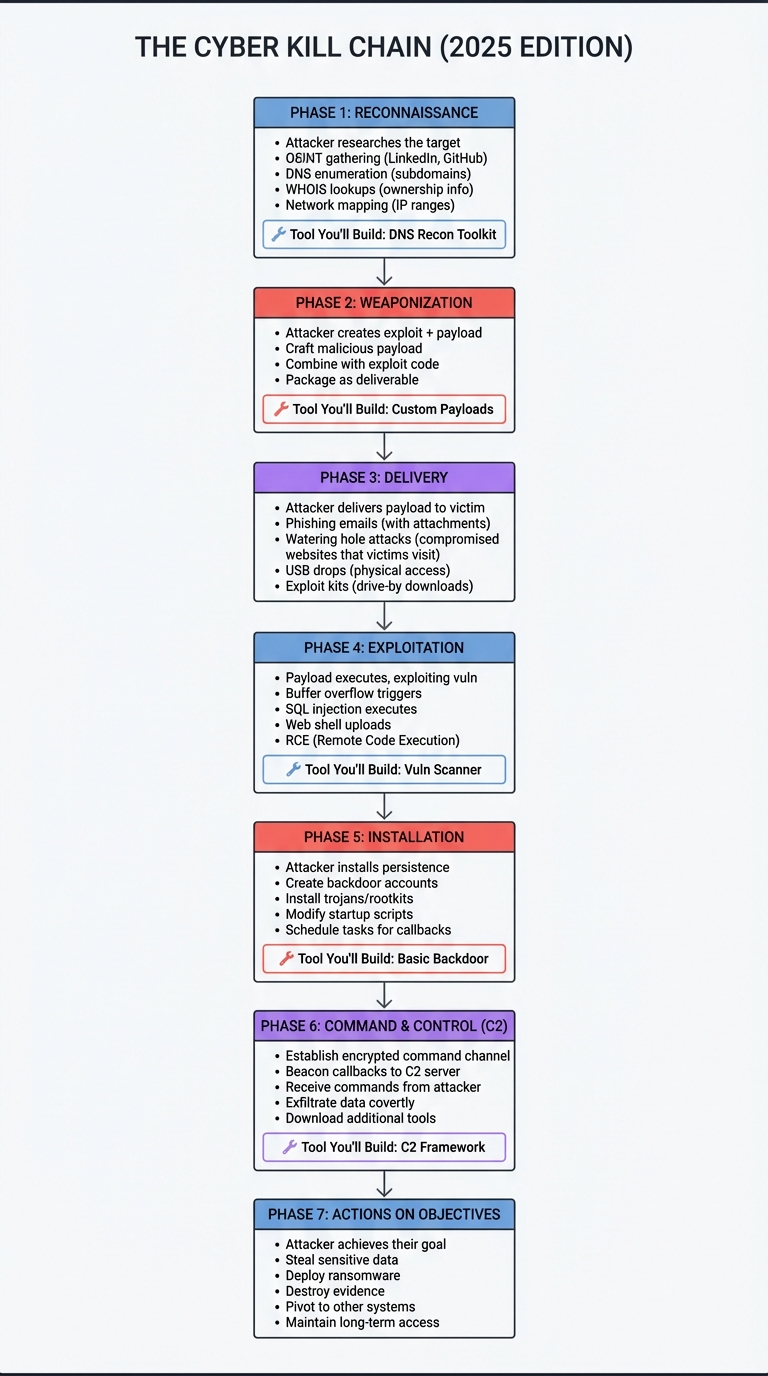
Critical insight: Defenders can break the chain at any stage. Your job as a penetration tester is to identify which stages are weakly defended and demonstrate realistic attack paths. In 2025, SOC teams integrate the Kill Chain with MITRE ATT&CK for comprehensive threat modeling.
The TCP/IP Stack: How Network Scanning Works
Before you can scan networks, you must understand the fundamental architecture of network communication:
┌─────────────────────────────────────────────────────────────────────┐
│                      THE TCP/IP STACK (OSI MODEL)                   │
└─────────────────────────────────────────────────────────────────────┘

APPLICATION LAYER (Layer 7)
┌──────────────────────────────────────────────────────────┐
│  HTTP, HTTPS, SSH, FTP, DNS, SMTP                        │
│  "What the user sees and interacts with"                 │
│                                                          │
│  Example: HTTP GET /admin → Request web page            │
└─────────────────────┬────────────────────────────────────┘
                      │
TRANSPORT LAYER (Layer 4)
┌─────────────────────▼────────────────────────────────────┐
│  TCP (reliable) / UDP (fast but unreliable)              │
│  "How data is broken into segments and delivered"        │
│                                                          │
│  TCP Header: [Source Port][Dest Port][Seq][Ack][Flags]  │
│              [SYN][ACK][FIN][RST] ← Port scanning uses!  │
└─────────────────────┬────────────────────────────────────┘
                      │
NETWORK LAYER (Layer 3)
┌─────────────────────▼────────────────────────────────────┐
│  IP (IPv4/IPv6), ICMP, Routing                           │
│  "How packets find their way across networks"            │
│                                                          │
│  IP Header: [Source IP][Dest IP][TTL][Protocol]         │
│             192.168.1.10 → 93.184.216.34                 │
└─────────────────────┬────────────────────────────────────┘
                      │
DATA LINK LAYER (Layer 2)
┌─────────────────────▼────────────────────────────────────┐
│  Ethernet, WiFi, ARP                                     │
│  "How devices on the same network talk to each other"   │
│                                                          │
│  Ethernet Frame: [MAC Source][MAC Dest][Type][Data]     │
└─────────────────────┬────────────────────────────────────┘
                      │
PHYSICAL LAYER (Layer 1)
┌─────────────────────▼────────────────────────────────────┐
│  Bits on the wire (electrical signals, radio waves)      │
│  "The actual 1s and 0s transmitted physically"           │
└──────────────────────────────────────────────────────────┘
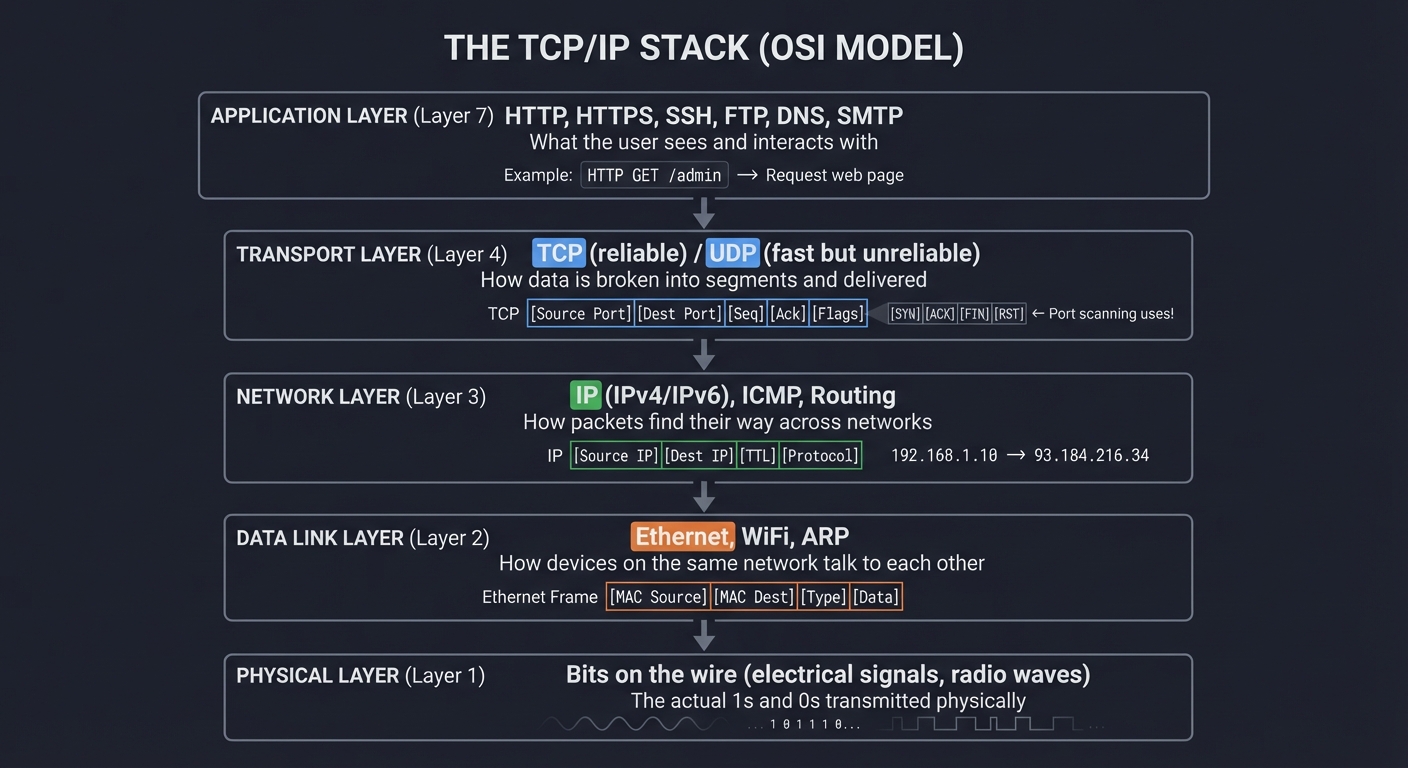
How Port Scanning Exploits TCP
A port is just a number (0-65535) that identifies which application should receive data. When you build a port scanner, you’re exploiting the TCP three-way handshake:
TCP THREE-WAY HANDSHAKE (Normal Connection)
─────────────────────────────────────────────────

Client (You)                            Server (Target)
     │                                       │
     │  SYN (Synchronize)                    │
     ├──────────────────────────────────────>│
     │  "Can I connect to port 80?"          │
     │                                       │
     │            SYN-ACK (Acknowledge)      │
     │<──────────────────────────────────────┤
     │  "Yes, port 80 is open!"              │
     │                                       │
     │  ACK (Acknowledge)                    │
     ├──────────────────────────────────────>│
     │  "Great, connection established"      │
     │                                       │
     │  [Data transmission begins]           │
     │<─────────────────────────────────────>│


SYN SCAN (Stealth Scan - What Nmap Does)
─────────────────────────────────────────

Client (You)                            Server (Target)
     │                                       │
     │  SYN                                  │
     ├──────────────────────────────────────>│
     │                                       │
     │            SYN-ACK                    │
     │<──────────────────────────────────────┤
     │  "Port is OPEN!"                      │
     │                                       │
     │  RST (Reset - abort connection)       │
     ├──────────────────────────────────────>│
     │  "Never mind, I'm leaving"            │
     │                                       │
     └───────────────────────────────────────┘
         No connection logged!


CLOSED PORT RESPONSE
────────────────────

Client (You)                            Server (Target)
     │                                       │
     │  SYN                                  │
     ├──────────────────────────────────────>│
     │  "Can I connect to port 12345?"       │
     │                                       │
     │            RST (Reset)                │
     │<──────────────────────────────────────┤
     │  "Port is CLOSED - go away"           │


FILTERED PORT (Firewall Blocking)
──────────────────────────────────

Client (You)                            Server (Target)
     │                                       │
     │  SYN                                  │
     ├──────────────────────────────────────>│
     │  "Can I connect to port 22?"          │
     │                                       │
     │                                  [Firewall]
     │                                       X
     │  ... silence ...                      │
     │  (timeout after 2-3 seconds)          │
     │  "Port is FILTERED (firewalled)"      │
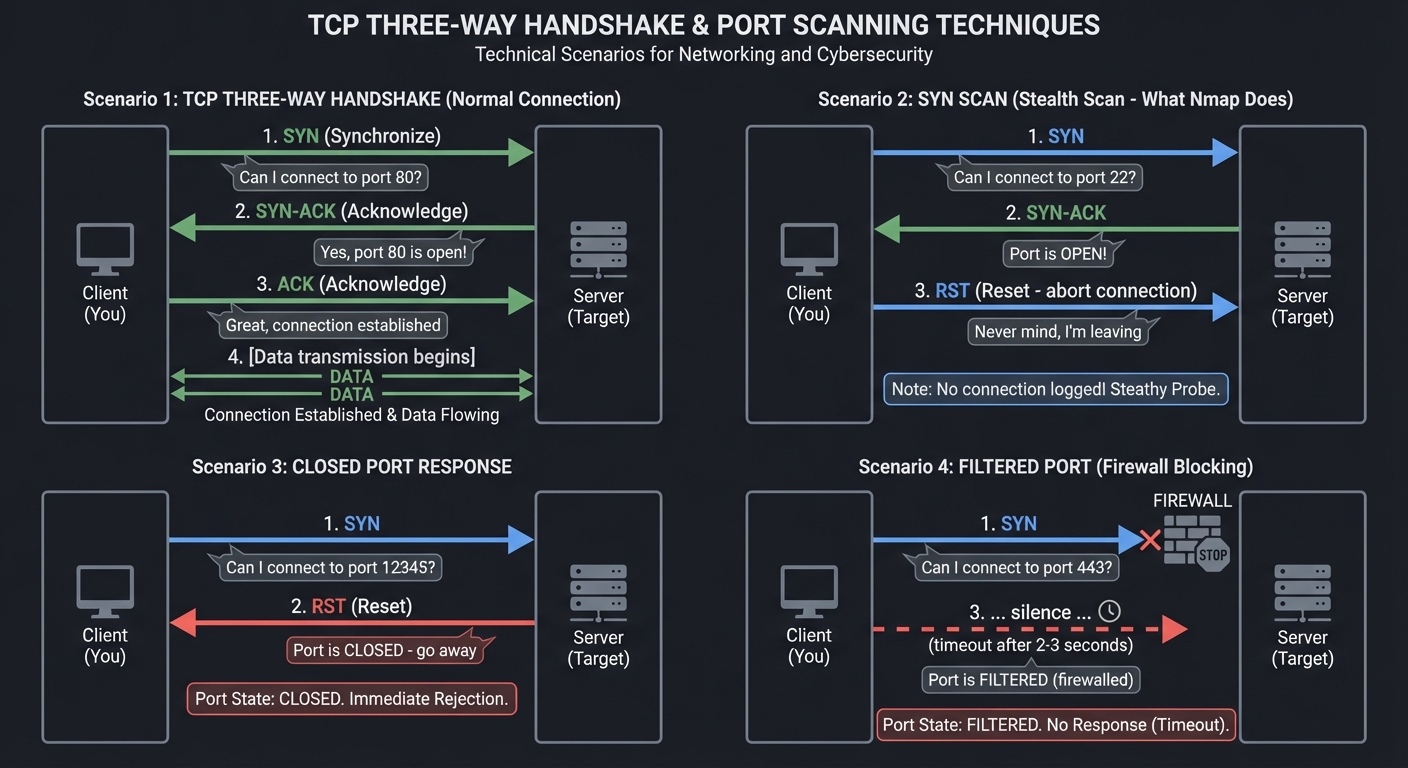
Key insight: Different responses reveal different states. This is why Nmap has dozens of scan types—each exploits a different quirk of the TCP/IP stack implementation.
Web Application Attack Surface
Modern web applications are complex distributed systems. Understanding the attack surface is critical:
┌─────────────────────────────────────────────────────────────────────┐
│                  WEB APPLICATION ARCHITECTURE                       │
│                    (Where Vulnerabilities Hide)                     │
└─────────────────────────────────────────────────────────────────────┘

                        USER'S BROWSER
                    ┌──────────────────┐
                    │   JavaScript     │  ← XSS attacks inject here
                    │   Local Storage  │  ← Sensitive data exposure
                    │   Cookies        │  ← Session hijacking
                    └────────┬─────────┘
                             │
                    HTTP/HTTPS Request
                             │
                             ▼
                    ┌─────────────────┐
                    │   WEB SERVER    │
                    │  (nginx/Apache) │
                    └────────┬────────┘
                             │
         ┌───────────────────┼───────────────────┐
         │                   │                   │
         ▼                   ▼                   ▼
┌────────────────┐  ┌────────────────┐  ┌────────────────┐
│ Static Files   │  │  Application   │  │   API Layer    │
│ (HTML/CSS/JS)  │  │  Logic Layer   │  │  (REST/GraphQL)│
│                │  │                │  │                │
│ ↓ Path         │  │ ↓ Auth bypass  │  │ ↓ Broken auth  │
│   Traversal    │  │ ↓ Business     │  │ ↓ IDOR (access │
│ ↓ File         │  │   logic flaws  │  │   other users' │
│   Upload       │  │ ↓ SSRF         │  │   data)        │
│   (web shells) │  │                │  │ ↓ Rate limiting│
└────────────────┘  └────────┬───────┘  └────────┬───────┘
                             │                   │
                             └──────────┬────────┘
                                        │
                                        ▼
                            ┌────────────────────┐
                            │     DATABASE       │
                            │  (MySQL/Postgres)  │
                            │                    │
                            │ ↓ SQL Injection    │
                            │ ↓ NoSQL Injection  │
                            │ ↓ Weak credentials │
                            │ ↓ Exposed backups  │
                            └────────────────────┘

COMMON ATTACK VECTORS BY LAYER:
═══════════════════════════════════════════════════════════════

Client-Side (Browser):
  • Cross-Site Scripting (XSS) - Inject malicious JS
  • CSRF - Force user to perform unintended actions
  • Clickjacking - Trick user into clicking hidden elements
  • DOM-based attacks - Manipulate client-side JavaScript

Server-Side (Application):
  • Authentication bypass - Access without credentials
  • Authorization flaws - Access resources you shouldn't
  • SSRF - Make server request internal resources
  • File upload - Upload web shells for RCE
  • Directory traversal - Access files outside web root

API Layer:
  • Broken Object Level Authorization (BOLA/IDOR)
  • Mass Assignment - Modify unintended object properties
  • Excessive Data Exposure - API returns too much data
  • Lack of rate limiting - Brute force attacks

Database Layer:
  • SQL Injection - Manipulate database queries
  • NoSQL Injection - MongoDB, Redis exploitation
  • Data exposure - Misconfigured permissions
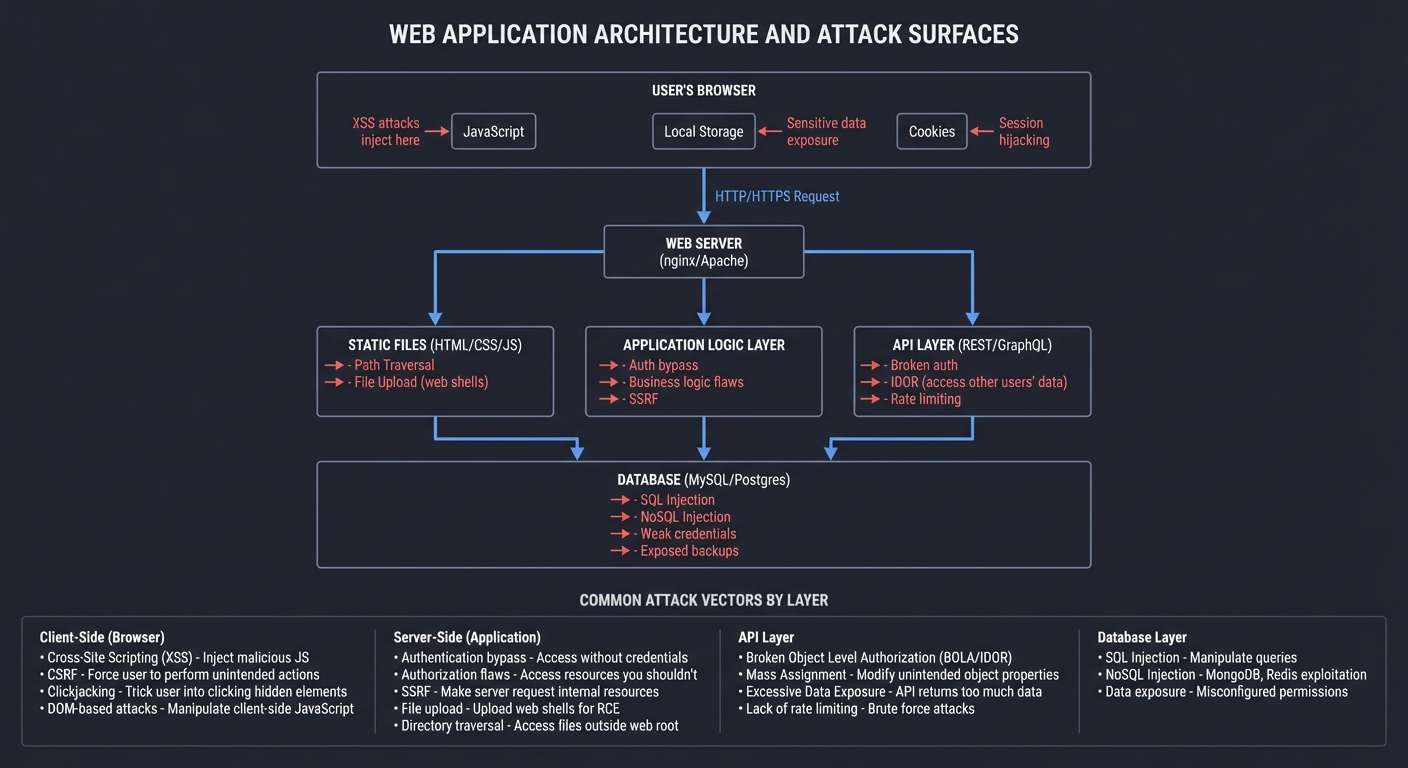
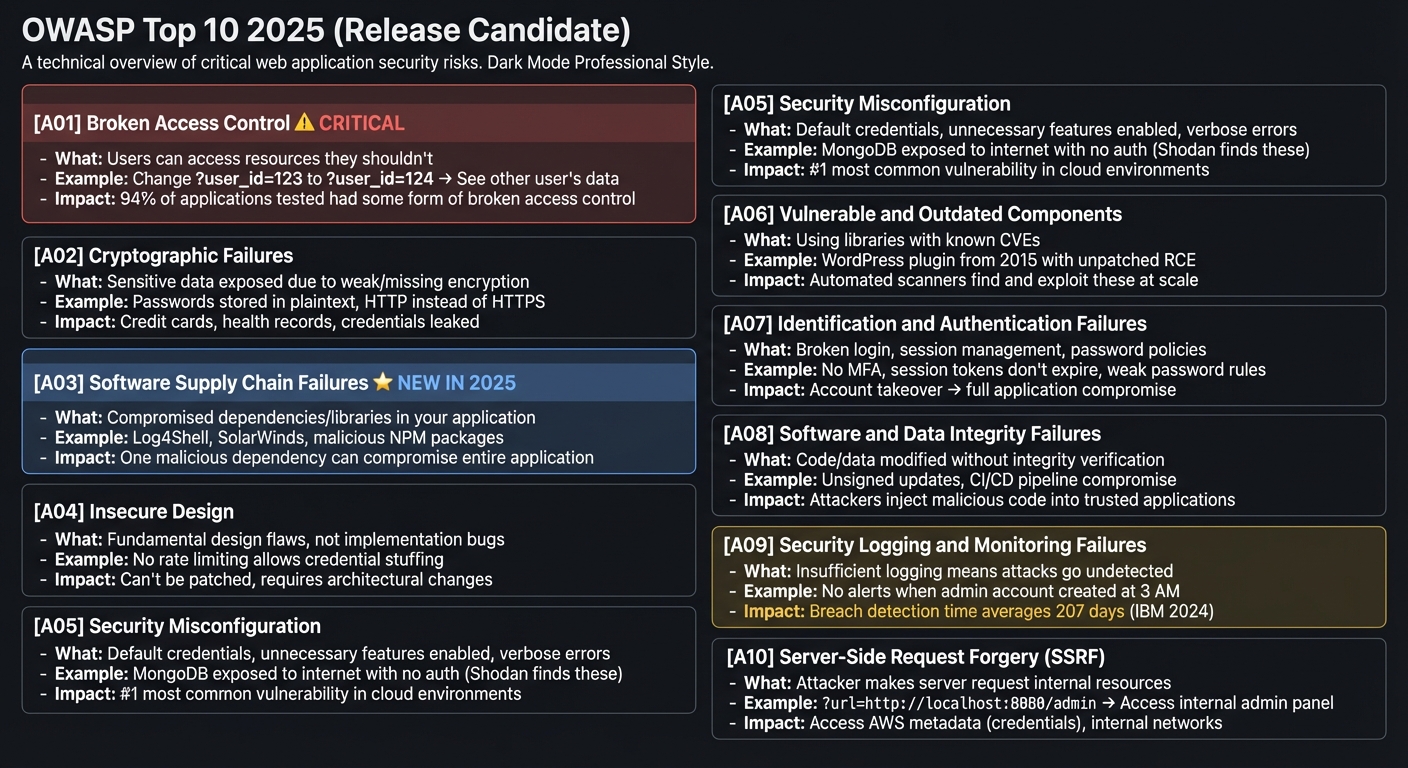
OWASP Top 10 2025: The Critical Vulnerabilities
The OWASP Top 10 2025 has been updated with new categories reflecting modern threats:
┌────────────────────────────────────────────────────────────────────┐
│              OWASP TOP 10 2025 (Release Candidate)                 │
└────────────────────────────────────────────────────────────────────┘

[A01] Broken Access Control ⚠️ CRITICAL
├─ What: Users can access resources they shouldn't
├─ Example: Change ?user_id=123 to ?user_id=124 → See other user's data
└─ Impact: 94% of applications tested had some form of broken access control

[A02] Cryptographic Failures
├─ What: Sensitive data exposed due to weak/missing encryption
├─ Example: Passwords stored in plaintext, HTTP instead of HTTPS
└─ Impact: Credit cards, health records, credentials leaked

[A03] Software Supply Chain Failures ⭐ NEW IN 2025
├─ What: Compromised dependencies/libraries in your application
├─ Example: Log4Shell, SolarWinds, malicious NPM packages
└─ Impact: One malicious dependency can compromise entire application

[A04] Insecure Design
├─ What: Fundamental design flaws, not implementation bugs
├─ Example: No rate limiting allows credential stuffing
└─ Impact: Can't be patched, requires architectural changes

[A05] Security Misconfiguration
├─ What: Default credentials, unnecessary features enabled, verbose errors
├─ Example: MongoDB exposed to internet with no auth (Shodan finds these)
└─ Impact: #1 most common vulnerability in cloud environments

[A06] Vulnerable and Outdated Components
├─ What: Using libraries with known CVEs
├─ Example: WordPress plugin from 2015 with unpatched RCE
└─ Impact: Automated scanners find and exploit these at scale

[A07] Identification and Authentication Failures
├─ What: Broken login, session management, password policies
├─ Example: No MFA, session tokens don't expire, weak password rules
└─ Impact: Account takeover → full application compromise

[A08] Software and Data Integrity Failures
├─ What: Code/data modified without integrity verification
├─ Example: Unsigned updates, CI/CD pipeline compromise
└─ Impact: Attackers inject malicious code into trusted applications

[A09] Security Logging and Monitoring Failures
├─ What: Insufficient logging means attacks go undetected
├─ Example: No alerts when admin account created at 3 AM
└─ Impact: Breach detection time averages 207 days (IBM 2024)

[A10] Server-Side Request Forgery (SSRF)
├─ What: Attacker makes server request internal resources
├─ Example: ?url=http://localhost:8080/admin → Access internal admin panel
└─ Impact: Access AWS metadata (credentials), internal networks
Detailed Breakdown: SQL Injection (Still Pervasive)
NORMAL QUERY (No Attack)
────────────────────────
Login form:
  username: alice
  password: secret123

SQL query executed:
  SELECT * FROM users WHERE username='alice' AND password='secret123'

Result: Returns Alice's account if password matches


SQL INJECTION ATTACK
────────────────────
Login form:
  username: admin' --
  password: [anything]

SQL query executed:
  SELECT * FROM users WHERE username='admin' --' AND password='[anything]'
                                             ↑
                                             Comment symbol!
                                             Everything after is ignored

Result: Returns admin account WITHOUT checking password!


UNION-BASED SQL INJECTION (Data Exfiltration)
─────────────────────────────────────────────
Product search:
  ?id=5' UNION SELECT username,password,email FROM users --

SQL query executed:
  SELECT name,price FROM products WHERE id='5'
  UNION
  SELECT username,password,email FROM users --'

Result: Returns product data + ALL usernames and passwords!
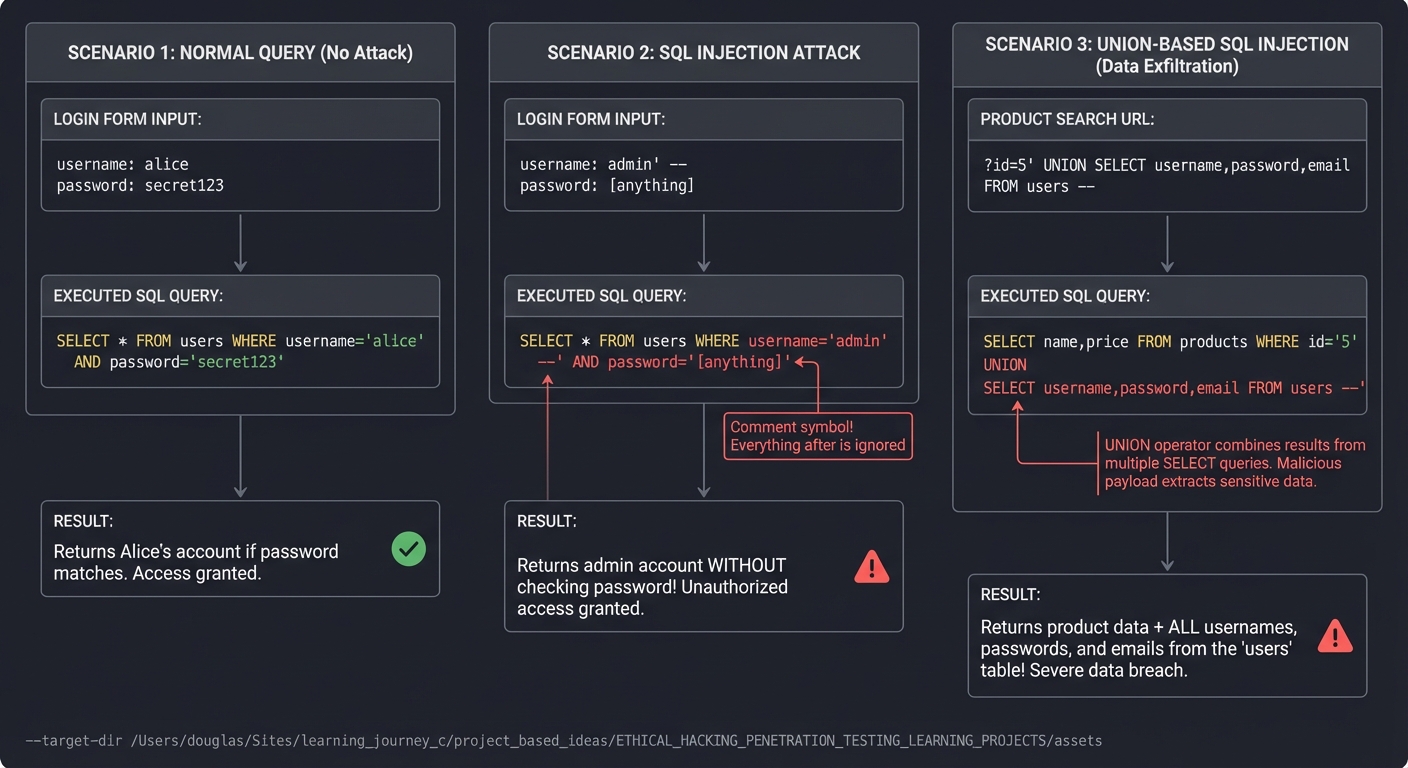
Why it still works in 2025: Many legacy applications, ORMs with raw query execution, and complex database interactions still allow injection. Your scanner will detect these by fuzzing inputs with SQL payloads.
Network Architecture: Attack Phases
Understanding how networks are structured helps you plan attacks:
┌────────────────────────────────────────────────────────────────────┐
│            ENTERPRISE NETWORK (Typical Pentest Target)             │
└────────────────────────────────────────────────────────────────────┘

INTERNET
    │
    ▼
┌────────────────────────────────────────────────────────────────────┐
│  PERIMETER (DMZ - Demilitarized Zone)                              │
│  ┌──────────────┐  ┌──────────────┐  ┌──────────────┐             │
│  │  Firewall    │  │  Web Server  │  │  Mail Server │             │
│  │  (WAF)       │  │  (Exposed)   │  │  (Exposed)   │             │
│  └──────────────┘  └──────────────┘  └──────────────┘             │
│                                                                     │
│  Phase 1: INITIAL ACCESS → Exploit exposed web server              │
└──────────────────────────────┬─────────────────────────────────────┘
                               │
                               ▼
┌────────────────────────────────────────────────────────────────────┐
│  INTERNAL NETWORK (172.16.0.0/16)                                  │
│  ┌────────────────┐  ┌────────────────┐  ┌────────────────┐       │
│  │ Workstations   │  │  File Server   │  │  Database      │       │
│  │ (Win 10/11)    │  │  (SMB shares)  │  │  (Internal)    │       │
│  └────────────────┘  └────────────────┘  └────────────────┘       │
│                                                                     │
│  Phase 2: LATERAL MOVEMENT → Pivot from web server to internal net │
│  • Credential harvesting (passwords in web app config)             │
│  • Network scanning from compromised host                          │
│  • Exploit trust relationships (SMB, SSH keys)                     │
└──────────────────────────────┬─────────────────────────────────────┘
                               │
                               ▼
┌────────────────────────────────────────────────────────────────────┐
│  DOMAIN CONTROLLERS & CRITICAL ASSETS                              │
│  ┌──────────────────┐  ┌──────────────────┐                        │
│  │  Active Directory│  │  Backup Server   │                        │
│  │  Domain Admin    │  │  (Crown Jewels)  │                        │
│  └──────────────────┘  └──────────────────┘                        │
│                                                                     │
│  Phase 3: PRIVILEGE ESCALATION → Become Domain Admin               │
│  • Kerberoasting (crack service account passwords)                 │
│  • Pass-the-Hash (reuse NTLM hashes)                               │
│  • Exploit AD misconfigurations                                    │
│                                                                     │
│  Phase 4: ACTIONS ON OBJECTIVES → Extract sensitive data           │
└────────────────────────────────────────────────────────────────────┘

ATTACKER'S PERSPECTIVE (Your Projects Teach This):
═══════════════════════════════════════════════════

Project 1 (Recon Toolkit):
  Discover: External IPs, subdomains, open ports, service versions

Project 2 (Web Vuln Scanner):
  Gain Initial Access: SQLi, XSS, file upload → web shell

Project 3 (CTF Challenges):
  Practice: All phases in isolated challenges

Project 4 (C2 Framework):
  Maintain Access: Establish persistent backdoor, command channel

Project 5 (Lab Network):
  Full Attack Chain: Recon → Initial Access → Lateral Movement →
                     Privilege Escalation → Data Exfiltration → Report

Post-Exploitation: What Happens After Compromise
Getting initial access is just the beginning. Here’s what happens next:
┌────────────────────────────────────────────────────────────────────┐
│                    POST-EXPLOITATION WORKFLOW                      │
└────────────────────────────────────────────────────────────────────┘

INITIAL FOOTHOLD (Low-Privilege Shell)
┌────────────────────────────────────────┐
│  $ id                                  │
│  uid=33(www-data) gid=33(www-data)     │
│  groups=33(www-data)                   │
│                                        │
│  You have: Web shell as www-data user  │
│  You need: Root/Admin access           │
└───────────────┬────────────────────────┘
                │
                ▼
PRIVILEGE ESCALATION (Become Root/Admin)
┌────────────────────────────────────────┐
│  1. Enumerate system                   │
│     • Linux: sudo -l, /etc/passwd,     │
│       SUID binaries, kernel version    │
│     • Windows: whoami /priv, services, │
│       scheduled tasks                  │
│                                        │
│  2. Find vulnerability                 │
│     • Kernel exploit (CVE)             │
│     • Misconfigured sudo               │
│     • Writable service binaries        │
│     • Credential reuse                 │
│                                        │
│  3. Exploit → Gain root/admin          │
└───────────────┬────────────────────────┘
                │
                ▼
PERSISTENCE (Survive Reboots/Detection)
┌────────────────────────────────────────┐
│  • Create backdoor user                │
│  • Add SSH key to authorized_keys      │
│  • Install rootkit                     │
│  • Modify startup scripts              │
│  • Schedule cron job for callback      │
└───────────────┬────────────────────────┘
                │
                ▼
CREDENTIAL HARVESTING
┌────────────────────────────────────────┐
│  • Dump password hashes                │
│    - Linux: /etc/shadow                │
│    - Windows: SAM database, LSASS      │
│  • Search config files                 │
│    - Database credentials              │
│    - API keys in .env files            │
│  • Browser saved passwords             │
│  • SSH private keys                    │
└───────────────┬────────────────────────┘
                │
                ▼
LATERAL MOVEMENT (Pivot to Other Systems)
┌────────────────────────────────────────┐
│  • Use harvested credentials           │
│  • Pass-the-Hash (Windows)             │
│  • SSH key reuse                       │
│  • Exploit trust relationships         │
│  • Port forwarding / tunneling         │
│    (access internal services)          │
└───────────────┬────────────────────────┘
                │
                ▼
DATA EXFILTRATION
┌────────────────────────────────────────┐
│  • Locate sensitive data               │
│    - Customer databases                │
│    - Intellectual property             │
│    - Financial records                 │
│  • Exfiltrate covertly                 │
│    - DNS tunneling                     │
│    - HTTPS POST to attacker server     │
│    - Steganography in images           │
└───────────────┬────────────────────────┘
                │
                ▼
COVERING TRACKS
┌────────────────────────────────────────┐
│  • Clear logs (carefully)              │
│  • Modify timestamps                   │
│  • Remove artifacts                    │
│  • But... ethical pentest = document   │
│    everything for the report!          │
└────────────────────────────────────────┘
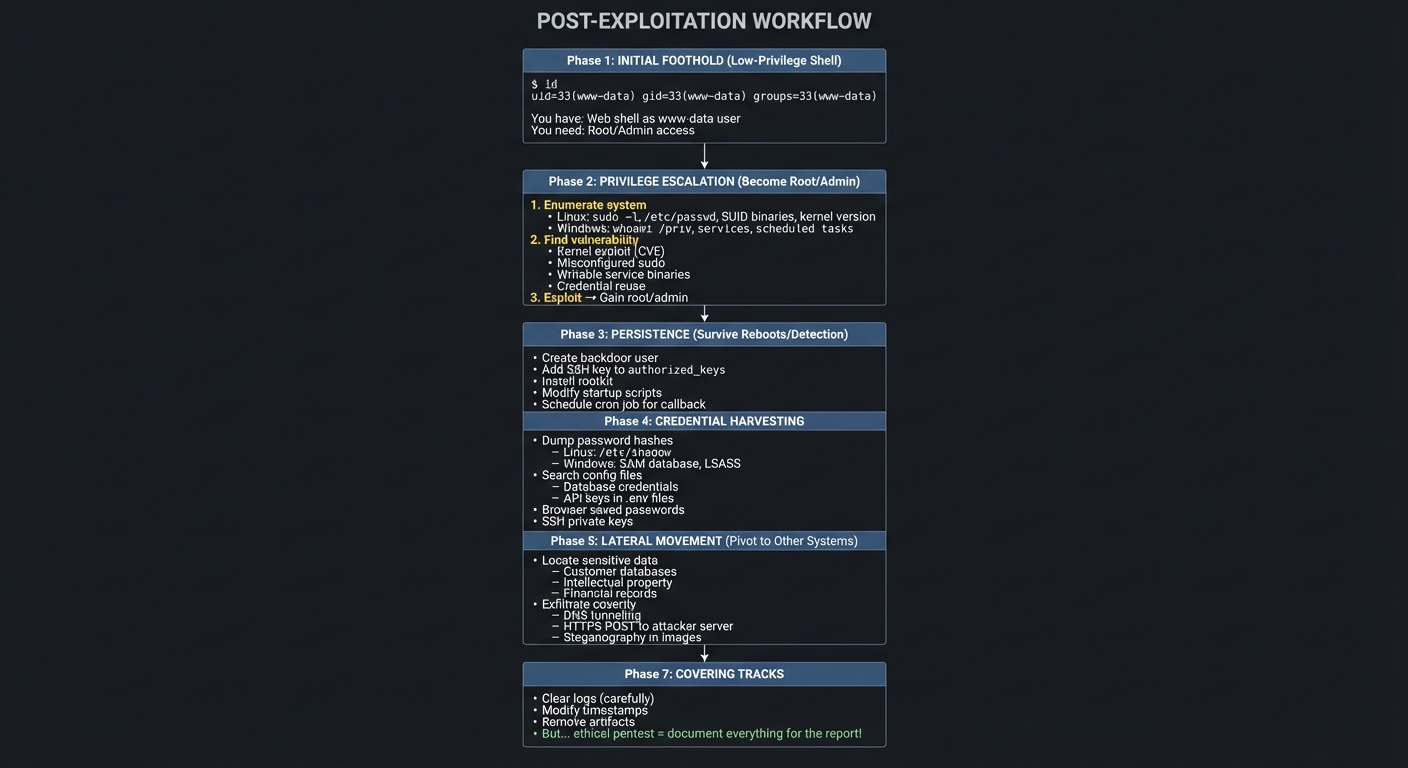
Your C2 framework (Project 4) will implement many of these capabilities. Understanding post-exploitation is critical for both attackers and defenders.
Core Concept Analysis
Penetration testing breaks down into these fundamental building blocks:
| Phase | What You Must Understand | Project That Teaches It |
|---|---|---|
| Reconnaissance | DNS, WHOIS, network protocols, OSINT techniques | Project 1: Network Recon Toolkit |
| Scanning | TCP/IP stack, port states, service fingerprinting | Project 1: Network Recon Toolkit |
| Vulnerability Assessment | Common vulnerability classes, CVE ecosystem, OWASP Top 10 | Project 2: Web Vuln Scanner |
| Exploitation | Buffer overflows, injection attacks, misconfigurations | Projects 2, 3: Scanner + CTFs |
| Post-Exploitation | Privilege escalation, lateral movement, persistence | Projects 3, 4, 5: CTFs + C2 + Lab |
| Web App Security | HTTP protocol, OWASP Top 10 2025, session management | Project 2: Web Vuln Scanner |
| C2 Infrastructure | Beaconing, encrypted channels, evasion techniques | Project 4: C2 Framework |
| Network Pivoting | Lateral movement, trust exploitation, AD attacks | Project 5: Vulnerable Lab Network |
| Reporting | Risk scoring (CVSS), remediation recommendations, business impact | Final Capstone: Full Pentest |
Deep Dive Reading By Concept
This section maps each concept from above to specific book chapters for deeper understanding. Read these before or alongside the projects to build strong mental models.
Network Fundamentals & Reconnaissance
| Concept | Book & Chapter |
|---|---|
| TCP/IP stack architecture | TCP/IP Illustrated, Volume 1 by W. Richard Stevens — Ch. 1-2: “Introduction” & “The Internet Protocol” |
| How DNS works (enumeration targets) | TCP/IP Guide by Charles M. Kozierok — DNS section (Part VI) |
| Socket programming for scanners | The Linux Programming Interface by Michael Kerrisk — Ch. 56-61: Sockets |
| Network packet analysis | The Practice of Network Security Monitoring by Richard Bejtlich — Part II: “Network Security Monitoring” |
| ICMP and its exploitation | TCP/IP Illustrated, Volume 1 by W. Richard Stevens — Ch. 6: “ICMP: Internet Control Message Protocol” |
Port Scanning & Service Fingerprinting
| Concept | Book & Chapter |
|---|---|
| TCP three-way handshake (how SYN scans work) | TCP/IP Illustrated, Volume 1 by W. Richard Stevens — Ch. 18: “TCP Connection Establishment and Termination” |
| Different scan types (SYN, ACK, FIN, XMAS) | Network Security Assessment, 2nd Edition by Chris McNab — Ch. 4: “IP Network Scanning” |
| OS fingerprinting via TCP/IP stack quirks | Black Hat Python by Justin Seitz — Ch. 3: “Sniffing” |
| Service version detection | The Practice of Network Security Monitoring by Richard Bejtlich — Ch. 5: “Traffic Analysis” |
Web Application Security
| Concept | Book & Chapter |
|---|---|
| HTTP protocol deep dive | HTTP: The Definitive Guide by David Gourley — Ch. 1-7: Fundamentals |
| SQL Injection mechanics | Bug Bounty Bootcamp by Vickie Li — Ch. 9: “SQL Injection” |
| Cross-Site Scripting (XSS) | Bug Bounty Bootcamp by Vickie Li — Ch. 6: “Cross-Site Scripting” |
| OWASP Top 10 2025 vulnerabilities | Ethical Hacking by Daniel G. Graham — Ch. 5-8: Web application attacks |
| Web session management flaws | Bug Bounty Bootcamp by Vickie Li — Ch. 12: “Session Hijacking” |
| API security testing | Ethical Hacking by Daniel G. Graham — Ch. 13: “Hacking APIs” |
Exploitation Techniques
| Concept | Book & Chapter |
|---|---|
| Buffer overflow fundamentals | Hacking: The Art of Exploitation by Jon Erickson — Ch. 3: “Exploitation” (0x300 sections) |
| Shellcode development | Hacking: The Art of Exploitation by Jon Erickson — Ch. 4: “Networking” (0x400: Shellcode) |
| Web shell upload attacks | Bug Bounty Bootcamp by Vickie Li — Ch. 11: “Insecure File Uploads” |
| Remote Code Execution (RCE) | Practical Malware Analysis by Michael Sikorski — Ch. 7: “Analyzing Malicious Windows Programs” |
| SSRF (Server-Side Request Forgery) | Bug Bounty Bootcamp by Vickie Li — Ch. 15: “Server-Side Request Forgery” |
Post-Exploitation & Privilege Escalation
| Concept | Book & Chapter |
|---|---|
| Linux privilege escalation | Linux Basics for Hackers by OccupyTheWeb — Ch. 13-15: Privilege escalation techniques |
| Windows privilege escalation | Penetration Testing by Georgia Weidman — Ch. 10: “Post Exploitation in Windows” |
| Credential harvesting | Penetration Testing by Georgia Weidman — Ch. 12: “Post-Exploitation” |
| Active Directory attacks | Windows Security Internals by James Forshaw — Part III: “Windows Security” |
| Lateral movement techniques | Penetration Testing by Georgia Weidman — Ch. 11: “Exploiting Windows” |
Command & Control (C2) Infrastructure
| Concept | Book & Chapter |
|---|---|
| Building network backdoors | Black Hat Python by Justin Seitz — Ch. 2: “The Network: Basics” & Ch. 3 |
| Encrypted communication channels | Serious Cryptography, 2nd Edition by Jean-Philippe Aumasson — Ch. 4-5: Symmetric encryption |
| Beaconing and callback mechanisms | Practical Malware Analysis by Michael Sikorski — Ch. 14: “Malware-Focused Network Signatures” |
| Evasion techniques | Practical Malware Analysis by Michael Sikorski — Ch. 15: “Anti-Disassembly” & Ch. 16: “Anti-Debugging” |
Cryptography & Secure Communications
| Concept | Book & Chapter |
|---|---|
| TLS/SSL and why HTTPS matters | Serious Cryptography, 2nd Edition by Jean-Philippe Aumasson — Ch. 12: “TLS” |
| Password hashing (bcrypt, Argon2) | Serious Cryptography, 2nd Edition by Jean-Philippe Aumasson — Ch. 6: “Hash Functions” |
| Breaking weak crypto | Serious Cryptography, 2nd Edition by Jean-Philippe Aumasson — Ch. 3: “Block Ciphers” |
Professional Pentest Methodology
| Concept | Book & Chapter |
|---|---|
| Complete pentest lifecycle | Penetration Testing by Georgia Weidman — Ch. 1-4: Planning and methodology |
| Risk scoring with CVSS | Foundations of Information Security by Jason Andress — Ch. 8: “Risk Management” |
| Professional report writing | Penetration Testing by Georgia Weidman — Ch. 16: “Reporting” |
| Scoping and rules of engagement | Ethical Hacking by Daniel G. Graham — Ch. 2: “Setting Up Your Hacking Environment” |
| Legal and ethical considerations | Foundations of Information Security by Jason Andress — Ch. 10: “Ethics” |
Binary Analysis & Reverse Engineering
| Concept | Book & Chapter |
|---|---|
| Understanding compiled binaries | Practical Binary Analysis by Dennis Andriesse — Ch. 2: “The ELF Format” |
| Reverse engineering malware | Practical Malware Analysis by Michael Sikorski — Ch. 1-5: Basic analysis techniques |
| Buffer overflow exploitation | Practical Binary Analysis by Dennis Andriesse — Ch. 5-7: Exploitation |
Essential Reading Order
For maximum comprehension, read in this order:
- Foundation (Week 1-2):
- TCP/IP Illustrated Ch. 1-2, 18 (networking fundamentals)
- Bug Bounty Bootcamp Ch. 1-2 (web security intro)
- The Linux Programming Interface Ch. 56-58 (socket programming)
- Offensive Techniques (Week 3-4):
- Bug Bounty Bootcamp Ch. 6, 9, 11 (XSS, SQLi, File Upload)
- Black Hat Python Ch. 2-3 (building tools)
- Hacking: The Art of Exploitation Ch. 3 (exploitation basics)
- Post-Exploitation (Week 5-6):
- Linux Basics for Hackers Ch. 13-15 (privilege escalation)
- Penetration Testing Ch. 10-12 (post-exploitation)
- Practical Malware Analysis Ch. 7, 14 (malware techniques)
- Professional Practice (Week 7+):
- Penetration Testing Ch. 1-4, 16 (methodology and reporting)
- Ethical Hacking Ch. 2, 13 (scoping, APIs)
- Foundations of Information Security Ch. 8, 10 (risk and ethics)
Concept Summary Table
This table maps the fundamental concept clusters you’ll encounter across all penetration testing projects to what you must deeply internalize to become proficient.
| Concept Cluster | What You Need to Internalize |
|---|---|
| Network protocols as attack surface | Networks aren’t abstract—every protocol (TCP, UDP, ICMP, DNS) has a wire format you can manipulate. Understanding packet structure is understanding how to craft exploits. |
| The TCP/IP stack | Applications don’t “just work”—data flows through 7 layers. Each layer adds headers. Attackers exploit quirks in how these layers are implemented (SYN scanning exploits TCP state machine). |
| DNS as reconnaissance goldmine | DNS isn’t just “looking up websites”—it’s a database of subdomains, mail servers, and infrastructure. Enumerating it reveals the attack surface before you even touch the target. |
| Port states reveal intentions | OPEN vs CLOSED vs FILTERED isn’t just trivia—it tells you what’s running, what’s protected, and what firewalls are configured. Different responses guide different attacks. |
| HTTP is a stateless request/response protocol | Web apps bolt state onto HTTP (cookies, tokens). Understanding how state is maintained reveals where session hijacking, CSRF, and auth bypass vulnerabilities hide. |
| Injection attacks exploit trust boundaries | SQL injection, XSS, command injection—all exploit the same flaw: user input is trusted and executed. The root cause is failing to distinguish code from data. |
| OWASP Top 10 is a checklist, not a guarantee | The Top 10 represents 80% of vulnerabilities, but real targets have unique flaws. You must understand why each vulnerability exists, not just scan for it. |
| Web application architecture has layers | Client → Web Server → Application Logic → Database. Each layer is a potential attack vector. Understanding data flow reveals where to inject payloads. |
| Authentication vs Authorization | Authentication = “Who are you?” (login). Authorization = “What can you do?” (permissions). Most bugs are in the latter—broken access control is #1 on OWASP 2025. |
| Privilege escalation is inevitable | Initial access is rarely as root/admin. Post-exploitation is finding misconfigurations (SUID binaries, sudo rules, service permissions) to elevate privileges. |
| Lateral movement uses trust | Networks have trust relationships (SSH keys, shared passwords, domain trusts). Attackers pivot from one compromised host to others using harvested credentials. |
| Command & Control is persistent communication | A backdoor isn’t a one-time shell—it’s a reliable, encrypted channel for receiving commands and exfiltrating data. Beaconing, callbacks, and evasion are key. |
| Cryptography protects confidentiality and integrity | Weak crypto (MD5, ECB mode, hardcoded keys) creates vulnerabilities. Understanding TLS, password hashing, and encryption modes reveals what’s breakable. |
| Active Directory is Windows’ central nervous system | In enterprise networks, AD manages authentication, authorization, and trust. Compromising AD (Kerberoasting, Pass-the-Hash) = domain-wide access. |
| Pentest methodology is a structured process | Recon → Scanning → Exploitation → Post-Exploitation → Reporting. It’s not random hacking—it’s a repeatable, documentable workflow with business impact analysis. |
| Legal and ethical boundaries are non-negotiable | Unauthorized access is a crime. Scope agreements, rules of engagement, and data handling are what separate professionals from criminals. |
| Defensive thinking enhances offensive skill | Understanding what defenders monitor (logs, IDS, EDR) makes you a better attacker and a better security professional. Every attack leaves traces. |
| Reporting translates technical findings to business risk | A pentest report isn’t a list of vulnerabilities—it’s executive summaries, CVSS scores, remediation priorities, and business impact. Communication is as critical as exploitation. |
Project 1: Build Your Own Network Reconnaissance Toolkit
- File: ETHICAL_HACKING_PENETRATION_TESTING_LEARNING_PROJECTS.md
- Programming Language: Python
- Coolness Level: Level 3: Genuinely Clever
- Business Potential: 3. The “Service & Support” Model
- Difficulty: Level 2: Intermediate
- Knowledge Area: Networking / Security
- Software or Tool: Scapy / Raw Sockets
- Main Book: “Black Hat Python” by Justin Seitz
What you’ll build: A collection of Python tools that perform DNS enumeration, port scanning, service fingerprinting, and banner grabbing—the fundamental reconnaissance phase of any pentest.
Why it teaches penetration testing: Reconnaissance is the foundation of every engagement. By building these tools from raw sockets, you’ll understand why Nmap works the way it does, how TCP handshakes reveal open ports, and what service banners actually tell you about a target.
Core challenges you’ll face:
- Understanding TCP/IP three-way handshake (maps to how port states work)
- Implementing SYN scanning vs full connect scanning (maps to stealth vs reliability tradeoffs)
- Parsing DNS responses and understanding record types (maps to information gathering)
- Handling timeouts and threading for performance (maps to real-world tool design)
- Service fingerprinting from banner responses (maps to target identification)
Resources for key challenges:
- “TCP/IP Illustrated, Volume 1” by W. Richard Stevens - Chapter 18 (TCP Connection) explains exactly what happens during port scanning at the packet level
- The Python Code - Port Scanner Tutorial - Practical Python implementation walkthrough
Key Concepts:
- TCP/IP Fundamentals: “TCP/IP Illustrated, Volume 1” by W. Richard Stevens - Chapters 17-18
- Socket Programming: “The Linux Programming Interface” by Michael Kerrisk - Chapter 56-61
- DNS Protocol: “TCP/IP Guide” by Charles M. Kozierok - DNS section
- Threading in Python: “Fluent Python” by Luciano Ramalho - Chapter 19
Difficulty: Beginner-Intermediate Time estimate: 1-2 weeks Prerequisites: Basic Python, understanding of what IP addresses and ports are
Real world outcome:
Deliverables:
- Tool or lab artifact with reproducible output
- Evidence report with steps and results
Validation checklist:
- Runs only in authorized lab scope
- Captures proof without damage
- Cleanup restores lab state
- Run your scanner against your own network and see a formatted table showing:
Host | Port | State | Service | Banner - Compare your results against Nmap’s output to validate accuracy
- Generate a JSON/HTML report of discovered services
Learning milestones:
- Port scanner works - You understand TCP states (OPEN, CLOSED, FILTERED) and can explain why firewalls return different responses
- DNS enumeration complete - You can extract subdomains, mail servers, and understand zone transfers
- Service detection working - You know how to fingerprint services and understand what information disclosure means
Project 2: Web Application Vulnerability Scanner
- File: ETHICAL_HACKING_PENETRATION_TESTING_LEARNING_PROJECTS.md
- Programming Language: Python
- Coolness Level: Level 3: Genuinely Clever
- Business Potential: 3. The “Service & Support” Model
- Difficulty: Level 2: Intermediate
- Knowledge Area: Web Security
- Software or Tool: OWASP Top 10
- Main Book: “Bug Bounty Bootcamp” by Vickie Li
What you’ll build: A tool that crawls web applications and automatically tests for common vulnerabilities: SQL injection, XSS, directory traversal, and security misconfigurations.
Why it teaches penetration testing: Web apps are the #1 attack surface. Building your own scanner forces you to understand how HTTP works, what makes inputs vulnerable, and why WAFs exist. You’ll learn to think like both attacker and defender.
Core challenges you’ll face:
- Parsing HTML and extracting forms/inputs (maps to attack surface discovery)
- Crafting malicious payloads for different injection types (maps to exploitation techniques)
- Understanding HTTP headers and cookies (maps to session security)
- Detecting successful exploitation vs false positives (maps to validation skills)
- Respecting robots.txt and rate limiting (maps to ethical considerations)
Resources for key challenges:
- “Bug Bounty Bootcamp” by Vickie Li - Chapters 6-12 cover each vulnerability class with practical exploitation
- PortSwigger Web Security Academy - Free, comprehensive web security labs from the Burp Suite creators
Key Concepts:
- SQL Injection: “Bug Bounty Bootcamp” by Vickie Li - Chapter 9
- Cross-Site Scripting (XSS): “Bug Bounty Bootcamp” by Vickie Li - Chapter 6
- HTTP Protocol Deep Dive: “HTTP: The Definitive Guide” by David Gourley - Chapters 1-7
- OWASP Top 10: OWASP Official Documentation
Difficulty: Intermediate Time estimate: 2-3 weeks Prerequisites: Project 1 completed, basic web development understanding
Real world outcome:
Deliverables:
- Tool or lab artifact with reproducible output
- Evidence report with steps and results
Validation checklist:
- Runs only in authorized lab scope
- Captures proof without damage
- Cleanup restores lab state
- Scan DVWA (Damn Vulnerable Web Application) or OWASP WebGoat and generate a vulnerability report
- Successfully detect and demonstrate SQL injection with extracted database contents
- Export findings in a format similar to professional tools (severity, evidence, remediation)
Learning milestones:
- Crawler working - You understand how web apps expose their attack surface
- First SQLi detected - You truly understand why parameterized queries matter
- Full OWASP Top 10 coverage - You can explain each vulnerability class and identify them manually
Project 3: Complete CTF Challenges on Multiple Platforms
- File: ctf_challenges_pentest.md
- Main Programming Language: Python
- Alternative Programming Languages: Bash, C, Go
- Coolness Level: Level 4: Hardcore Tech Flex
- Business Potential: Level 1: The “Resume Gold”
- Difficulty: Level 2: Intermediate (The Developer)
- Knowledge Area: Security, Binary Exploitation, Forensics, Reverse Engineering
- Software or Tool: TryHackMe, Hack The Box, Kali Linux
- Main Book: Linux Basics for Hackers by OccupyTheWeb
What you’ll build: Not code, but documented solutions for 30+ CTF challenges across different categories—this is active learning through structured problem-solving.
Why it teaches penetration testing: CTFs compress years of real-world vulnerability patterns into digestible challenges. Each flag you capture represents a concept you’ve internalized. You’ll encounter vulnerabilities you’d never think to look for otherwise.
Core challenges you’ll face:
- Binary exploitation (buffer overflows, format strings) - (maps to low-level security)
- Cryptography challenges (weak implementations) - (maps to crypto failures)
- Forensics (memory dumps, network captures) - (maps to incident response)
- Reverse engineering (malware analysis basics) - (maps to understanding adversary tools)
- Web exploitation (real vulnerable apps) - (maps to practical hacking)
Resources for key challenges:
- TryHackMe - Guided rooms with hints, perfect for beginners
- Hack The Box - More challenging, real-world scenarios
- PicoCTF - Beginner-friendly with excellent learning progression
- OverTheWire Bandit - Linux fundamentals through hacking
Key Concepts:
- Linux Privilege Escalation: “Linux Basics for Hackers” by OccupyTheWeb - Chapters 10-15
- Buffer Overflows: “Practical Binary Analysis” by Dennis Andriesse - Chapters 5-7
- Network Analysis: “The Practice of Network Security Monitoring” by Richard Bejtlich - Part II
Difficulty: Beginner to Advanced (progressive) Time estimate: 1 month+ (ongoing) Prerequisites: Basic Linux command line
Real world outcome:
Deliverables:
- Tool or lab artifact with reproducible output
- Evidence report with steps and results
Validation checklist:
- Runs only in authorized lab scope
- Captures proof without damage
- Cleanup restores lab state
- Complete TryHackMe’s “Complete Beginner” path (40+ rooms)
- Solve 10 Hack The Box machines (5 easy, 5 medium)
- Document each solution in a personal writeup blog or markdown files
- Earn certificates/badges you can show employers
Learning milestones:
- First 10 flags - You understand the CTF mindset and basic enumeration
- First medium box rooted - You can chain vulnerabilities and think laterally
- 30+ challenges complete - You have a mental library of vulnerability patterns
Project 4: Build a Simple C2 (Command & Control) Framework
- File: ETHICAL_HACKING_PENETRATION_TESTING_LEARNING_PROJECTS.md
- Programming Language: Python
- Coolness Level: Level 4: Hardcore Tech Flex
- Business Potential: 1. The “Resume Gold”
- Difficulty: Level 3: Advanced
- Knowledge Area: Malware Analysis / Networking
- Software or Tool: C2 Architecture
- Main Book: “Black Hat Python” by Justin Seitz
What you’ll build: A basic client-server system where a “beacon” (running on a test machine you own) communicates with your server, receives commands, and returns output—the core of how real adversaries operate.
Why it teaches penetration testing: Understanding C2 infrastructure is essential for both red team operations and defending against real attacks. Building one teaches you about network evasion, persistence mechanisms, and why certain defensive controls exist.
Core challenges you’ll face:
- Encrypted communication channels (maps to avoiding detection)
- Beacon/callback mechanisms (maps to persistence)
- Command execution and output capture (maps to post-exploitation)
- Avoiding common detection signatures (maps to understanding defenders)
- Cross-platform considerations (maps to real-world adaptability)
Resources for key challenges:
- “Black Hat Python” by Justin Seitz - Chapters 1-4 cover networking and trojans
- “Penetration Testing” by Georgia Weidman - Chapter 12 (Post-Exploitation)
Key Concepts:
- Network Programming: “Black Hat Python” by Justin Seitz - Chapters 2-3
- Encryption Basics: “Serious Cryptography, 2nd Edition” by Jean-Philippe Aumasson - Chapters 4-5
- Process Execution: “The Linux Programming Interface” by Michael Kerrisk - Chapters 24-28
Difficulty: Intermediate-Advanced Time estimate: 2-3 weeks Prerequisites: Projects 1-2 completed, solid Python skills
Real world outcome:
Deliverables:
- Tool or lab artifact with reproducible output
- Evidence report with steps and results
Validation checklist:
- Runs only in authorized lab scope
- Captures proof without damage
- Cleanup restores lab state
- Deploy beacon on a VM you control, execute commands remotely from your server
- Demonstrate file upload/download between C2 and beacon
- Show encrypted traffic in Wireshark (proving your communications aren’t plaintext)
- Build a simple web dashboard showing connected beacons
Learning milestones:
- Basic callback working - You understand how malware “phones home”
- Encrypted channel established - You know why TLS inspection matters for defenders
- Full C2 operational - You can explain the entire attack chain from initial access to data exfiltration
Project 5: Set Up and Attack Your Own Vulnerable Lab Network
- File: vulnerable_lab_network_pentest.md
- Main Programming Language: Python
- Alternative Programming Languages: Bash, PowerShell, C
- Coolness Level: Level 4: Hardcore Tech Flex
- Business Potential: Level 1: The “Resume Gold”
- Difficulty: Level 3: Advanced (The Engineer)
- Knowledge Area: Network Security, Active Directory, Privilege Escalation
- Software or Tool: VulnHub, VirtualBox, Kali Linux, Metasploit
- Main Book: Penetration Testing by Georgia Weidman
What you’ll build: A complete home lab with multiple vulnerable VMs (web servers, databases, Active Directory) that you systematically compromise using your custom tools and learned techniques.
Why it teaches penetration testing: Real pentests involve networks, not single machines. You’ll learn how attackers pivot between systems, escalate privileges, and achieve their objectives. This is where everything comes together.
Core challenges you’ll face:
- Network segmentation and pivoting (maps to lateral movement)
- Active Directory attacks (maps to enterprise environments)
- Credential harvesting and reuse (maps to real attack chains)
- Writing a professional pentest report (maps to deliverables)
- Setting up realistic defense layers (maps to understanding blue team)
Resources for key challenges:
- VulnHub - Download vulnerable VMs for offline practice
- “Ethical Hacking” by Daniel G. Graham - Full methodology coverage
- “Penetration Testing” by Georgia Weidman - End-to-end pentest methodology
Key Concepts:
- Active Directory Attacks: “Windows Security Internals” by James Forshaw - Part III
- Privilege Escalation: “Linux Basics for Hackers” by OccupyTheWeb - Chapters 13-15
- Professional Reporting: “Penetration Testing” by Georgia Weidman - Chapter 16
Difficulty: Advanced Time estimate: 1 month+ Prerequisites: Projects 1-4, comfortable with virtualization
Real world outcome:
Deliverables:
- Tool or lab artifact with reproducible output
- Evidence report with steps and results
Validation checklist:
- Runs only in authorized lab scope
- Captures proof without damage
- Cleanup restores lab state
- Full network diagram of your lab showing attack paths
- Professional pentest report documenting findings with CVSS scores
- Demonstrate complete attack chain: initial access → privilege escalation → lateral movement → objective achieved
- Video walkthrough of your attack (portfolio piece)
Learning milestones:
- Lab operational - You understand network architecture and can spin up realistic environments
- First pivot completed - You’ve moved from one compromised machine to another
- Full engagement simulated - You’ve conducted a complete pentest methodology and documented it professionally
Real World Outcome
Deliverables:
- Tool or lab artifact with reproducible output
- Evidence report with steps and results
Validation checklist:
- Runs only in authorized lab scope
- Captures proof without damage
- Cleanup restores lab state
When you complete this project, you’ll have tangible deliverables that demonstrate professional-level penetration testing capabilities:
Network Documentation
- Complete Network Topology Diagram: Create a detailed diagram showing:
- All VMs and their IP addresses (both external and internal networks)
- Network segmentation zones (DMZ, internal network, management network)
- Firewall rules and access control lists between zones
- Services running on each host (web server, database, domain controller, etc.)
- Trust relationships and authentication flows
- Attack paths identified during testing (shown in red)
- Example format: Use draw.io or similar, with clear legend showing asset types, network boundaries, and compromise indicators
Technical Attack Documentation
- Attack Chain Narrative: A detailed markdown or PDF document containing:
- Timeline of attack activities with timestamps
- Every command executed during the engagement
- Screenshots of successful exploitation
- Proof-of-concept code or scripts used
- Credentials harvested and where they were reused
- Data exfiltration demonstrations
- Minimum 15-20 pages with code snippets and terminal outputs
Penetration Test Report Structure
Your report should follow this professional format:
1. Executive Summary (2-3 pages)
   - Business impact in non-technical language
   - Risk summary: Critical (X), High (Y), Medium (Z), Low (W)
   - Key recommendations prioritized
   - Compliance implications (if applicable)

2. Methodology (1-2 pages)
   - Scope definition (IP ranges, systems, allowed techniques)
   - Testing approach (black box vs gray box)
   - Tools and techniques used
   - Testing timeline

3. Technical Findings (10-15 pages)
   For each vulnerability:
   - Title and CVSS score
   - Affected systems
   - Description of vulnerability
   - Steps to reproduce (with commands/screenshots)
   - Proof of exploitation
   - Business impact
   - Remediation recommendations (specific and actionable)

4. Attack Narrative (3-5 pages)
   - Story of the complete attack chain
   - How you moved from initial access to domain admin
   - Diagram showing lateral movement

5. Appendices
   - Full tool output
   - Additional screenshots
   - Code snippets
Video Walkthrough Requirements
- 15-25 minute recorded demonstration showing:
- Lab environment overview (network diagram walkthrough)
- Initial reconnaissance and enumeration
- Exploitation of web application vulnerability
- Privilege escalation demonstration
- Pivoting to internal network
- Active Directory attack (if applicable)
- Data exfiltration proof
- Clear narration explaining each step
- Use OBS Studio or similar for professional recording
- Upload to YouTube (unlisted) or Vimeo for portfolio
Success Metrics - You Know You’ve Succeeded When:
- Your report could be delivered to a real client (professional quality, no typos, clear recommendations)
- You can explain every step of your attack without looking at notes
- Your network diagram accurately represents the attack surface and all pivot points
- You’ve documented at least 5 distinct vulnerabilities with different CVSS scores
- Your video demonstration is clear enough that a beginner could follow along
- You can rebuild the entire lab from scratch in under 2 hours
- Your remediation recommendations are specific (not just “update software”)
The Core Question You’re Answering
“How do attackers move from external reconnaissance to complete network compromise in enterprise environments, and how do I communicate these risks to both technical and business stakeholders?”
This project answers the fundamental gap between isolated vulnerability exploitation and real-world penetration testing methodology. You’re learning:
- Why network segmentation matters (and how it fails)
- How attackers chain multiple low-severity vulnerabilities into critical compromise
- The difference between finding a vulnerability and demonstrating business impact
- How to communicate security risks to audiences with different technical levels
Concepts You Must Understand First
Before building this lab, you need solid foundations in these areas:
1. Networking Fundamentals
What you need to know:
- TCP/IP model and common protocols (HTTP, SMB, LDAP, Kerberos)
- Subnetting and network segmentation concepts
- How routing works between network segments
- NAT and port forwarding
Where to learn it:
- “TCP/IP Illustrated, Volume 1” by W. Richard Stevens - Chapters 1-3, 17-20
- “Computer Networking: A Top-Down Approach” by Kurose & Ross - Chapters 1, 3, 4
- CompTIA Network+ study materials (free on YouTube - Professor Messer series)
2. Virtualization and Hypervisors
What you need to know:
- How to create and manage VMs in VirtualBox or VMware
- Virtual network configuration (NAT, bridged, host-only networks)
- Snapshot management for lab restoration
- Resource allocation (CPU, RAM, disk)
Where to learn it:
- VirtualBox documentation - VirtualBox Networking Modes
- “Mastering VirtualBox” - Udemy or YouTube tutorials
- Practical: Set up 3 VMs that can ping each other before this project
3. Linux System Administration
What you need to know:
- User and permission management
- Service management (systemctl, service)
- Log file locations and analysis (/var/log/)
- Package management (apt, yum)
- Common privilege escalation vectors (SUID binaries, sudo misconfigurations, kernel exploits)
Where to learn it:
- “Linux Basics for Hackers” by OccupyTheWeb - Chapters 1-9, 13-15
- “The Linux Command Line” by William Shotts - Complete read
- OverTheWire Bandit - All 34 levels
4. Windows Active Directory Basics
What you need to know:
- Domain controller role and domain membership
- Kerberos authentication flow (TGT, TGS, service tickets)
- Common AD objects (users, groups, computers, GPOs)
- SMB protocol and file shares
- PowerShell basics
Where to learn it:
- “Active Directory: Designing, Deploying, and Running Active Directory” by Brian Desmond et al. - Chapters 1-5
- “Windows Security Internals” by James Forshaw - Part III (Authentication)
- Microsoft Learn: AD DS Getting Started
5. Web Application Architecture
What you need to know:
- HTTP request/response cycle
- Session management and cookies
- SQL database basics (SELECT, UNION, authentication bypass)
- Common web vulnerabilities (OWASP Top 10)
Where to learn it:
- “Bug Bounty Bootcamp” by Vickie Li - Chapters 1-5 (foundations), 6-12 (vulnerabilities)
- PortSwigger Web Security Academy - Complete SQL Injection and Authentication modules
- Build Projects 1-2 from this guide first
6. Metasploit Framework
What you need to know:
- How to search for and use exploit modules
- Payload generation with msfvenom
- Post-exploitation modules
- Using auxiliary scanners
- Pivoting with routes and port forwarding
Where to learn it:
- “Penetration Testing” by Georgia Weidman - Chapters 5-7, 11-12
- “Metasploit: The Penetration Tester’s Guide” by David Kennedy et al. - Chapters 1-4, 9-11
- TryHackMe’s Metasploit Room
Prerequisites Checklist
Before starting this project, you should be able to:
- Explain what happens when you type a URL and press Enter (full stack)
- Set up a Linux VM and install a web server (Apache/Nginx)
- Read tcpdump/Wireshark output and identify protocols
- Manually exploit SQL injection without automated tools
- Explain how Kerberos authentication works at a high level
- Use Burp Suite to intercept and modify HTTP requests
- Complete at least 10 Hack The Box or TryHackMe machines
Questions to Guide Your Design
Use these questions to think through your lab design and attack strategy:
Lab Architecture Design
- Network Segmentation: How would a real company separate their public-facing web servers from internal databases? What firewall rules would exist?
- Attack Surface: If you were a real attacker, what would be visible from the internet vs what’s hidden behind firewalls?
- Realistic Vulnerabilities: What misconfigurations are common enough to be believable but serious enough to enable compromise? (Hint: default credentials, unpatched software, overprivileged service accounts)
- Defense Layers: What defensive controls should exist that you’ll need to bypass? (WAF, antivirus, logging)
Attack Planning
- Initial Access: What are the typical entry points in modern networks? (Web apps, phishing, exposed services, VPN vulnerabilities)
- Privilege Escalation: Once you have low-privilege access on a web server, what are common paths to root/SYSTEM?
- Lateral Movement: How do attackers discover other machines on internal networks they can’t see from the outside?
- Credential Reuse: Why is password reuse across systems so dangerous in a networked environment?
- Persistence: If your initial access method gets patched, how would you maintain access?
Active Directory Specific
- Domain Reconnaissance: What information can you gather about an AD environment from a domain-joined machine?
- Kerberoasting: Why are service accounts with SPNs valuable targets?
- Pass-the-Hash: How can NTLM hashes be used without cracking them?
- GPO Abuse: How might Group Policy be misconfigured to grant unintended privileges?
Reporting and Communication
- Risk Prioritization: If you find 15 vulnerabilities, how do you decide which to report first?
- Business Impact: How do you translate “I got domain admin” into language a CEO understands?
- Remediation: For each vulnerability, what’s the difference between a temporary fix and a permanent solution?
Methodology Questions
- Scope Management: What’s the difference between a web application pentest and a full network penetration test?
- Rules of Engagement: What actions should require client approval before attempting? (DoS testing, social engineering, physical access)
- Note-Taking: How do you document your actions in real-time so you can reproduce them for the report?
- Ethics: When do you stop testing after achieving domain admin? What’s the line between thorough testing and wasting client resources?
Thinking Exercise
Before writing any code or setting up VMs, complete these exercises:
Exercise 1: Design Your Target Network (30-45 minutes)
On paper or in a diagramming tool, design a realistic small business network:
- Draw 5-7 systems (web server, database, file server, workstation, domain controller)
- Define what services each runs (ports open)
- Show network boundaries (DMZ vs internal)
- Mark what’s accessible from the internet
- Add 3-5 realistic misconfigurations or vulnerabilities
Then answer: If you were an attacker with no inside knowledge, what would be your attack path from the internet to the database server? Write it out step-by-step.
Exercise 2: Vulnerability Research (45-60 minutes)
Choose one vulnerability from each category:
- A web application vulnerability (e.g., SQL injection in login form)
- A Linux privilege escalation technique (e.g., SUID binary exploitation)
- An Active Directory attack (e.g., Kerberoasting)
For each vulnerability:
- Research how it works at a technical level (not just how to exploit it)
- Find a CVE or real-world example
- Write a paragraph explaining it to a non-technical person
- List 3 specific remediation steps
Exercise 3: Attack Chain Mapping (20-30 minutes)
Study this real-world attack scenario:
1. Attacker finds web application with SQL injection
2. Uses SQLi to extract database credentials
3. Database credentials work for SSH on database server (password reuse)
4. On database server, finds misconfigured sudo allowing password-less execution
5. Gains root on database server
6. Discovers database server can reach internal network
7. Runs network scan, finds Windows domain controller
8. Uses credentials from database to authenticate to domain
9. Runs Kerberoasting, extracts service account hash
10. Cracks hash offline, gains service account credentials
11. Service account has domain admin privileges due to misconfiguration
12. Full domain compromise
Your task: Identify the top 3 defensive controls that would have stopped this attack chain if implemented correctly. Explain why each would be effective.
Exercise 4: Report Writing Practice (30-40 minutes)
Write an executive summary for a fictional penetration test with these findings:
- Critical: SQL injection allows database access
- High: Default credentials on admin panel
- Medium: Outdated Apache version with known vulnerabilities
- Low: Information disclosure in HTTP headers
Your summary should:
- Be 1 page or less
- Use no technical jargon
- Explain business risk (not technical details)
- Provide clear, prioritized recommendations
- Be understandable by a non-technical CEO
Exercise 5: Defensive Thinking (20-30 minutes)
You’re now the defender. Given these common attack techniques, list specific detective or preventive controls:
- Port scanning during reconnaissance
- SQL injection attempts
- Brute force attacks against SSH
- Lateral movement after initial compromise
- Data exfiltration
For each, specify:
- What log sources would show this activity
- What the log entry would look like
- How to alert on it (SIEM rule logic)
- How to prevent it (configuration change, architectural control)
Why these exercises matter: Penetration testing isn’t just about running tools. It’s about thinking like both attacker and defender, understanding business risk, and communicating effectively. These exercises build that mindset before you touch a keyboard.
The Interview Questions They’ll Ask
Prepare for these questions by actually doing the project, not just reading about it:
Technical Methodology Questions
Q1: “Walk me through how you conduct a penetration test from start to finish.”
- Expected answer: Scoping → Reconnaissance → Scanning & Enumeration → Vulnerability Assessment → Exploitation → Post-Exploitation → Reporting
- They’re testing: Do you understand professional methodology, not just hacking?
- Source: “Penetration Testing” by Georgia Weidman - Chapter 2 (The Pentest Lifecycle)
Q2: “You’ve gained access to a web server. What’s your next step and why?”
- Expected answer: Situational awareness (whoami, hostname, network interfaces), privilege escalation vectors, local enumeration, establish persistence, lateral movement opportunities
- They’re testing: Do you understand post-exploitation methodology?
- Source: “Penetration Testing” by Georgia Weidman - Chapter 12 (Post-Exploitation)
Q3: “How do you differentiate between testing a production environment versus a lab?”
- Expected answer: Change management, backup verification, DoS risk, business hours considerations, rollback plans, monitoring alerting
- They’re testing: Professional maturity and risk awareness
- Source: “Penetration Testing” by Georgia Weidman - Chapter 4 (Rules of Engagement)
Active Directory Attack Questions
Q4: “Explain Kerberoasting and how to defend against it.”
- Expected answer:
- Attack: Request service tickets (TGS) for accounts with SPNs, extract encrypted portion, offline brute force
- Defense: Strong passwords for service accounts (25+ characters), managed service accounts (gMSA), monitor for TGS-REQ anomalies
- They’re testing: Understanding of AD attack primitives
- Source: “Windows Security Internals” by James Forshaw - Chapter 8 (Kerberos Authentication)
Q5: “What’s the difference between Pass-the-Hash and Pass-the-Ticket?”
- Expected answer:
- PtH: Using NTLM hash directly for authentication without cracking (mimikatz sekurlsa::pth)
- PtT: Using Kerberos tickets (TGT/TGS) for authentication (mimikatz kerberos::ptt)
- PtH requires NTLM to be enabled, PtT works even if NTLM is disabled
- They’re testing: Depth of AD attack knowledge
- Source: “Windows Security Internals” by James Forshaw - Chapters 7-8
Q6: “You’ve compromised a domain-joined workstation but don’t have domain admin yet. How do you escalate?”
- Expected answers: Kerberoasting, AS-REP roasting, credential harvesting (mimikatz), GPO abuse, ACL exploitation, LAPS password extraction, token manipulation
- They’re testing: Lateral movement and privilege escalation creativity
- Source: “Penetration Testing” by Georgia Weidman - Chapter 13 (Post-Exploitation: Windows)
Web Application Security Questions
Q7: “How would you test for SQL injection in a modern web application?”
- Expected answer: Manual testing (single quote, comment sequences, boolean logic, time-based blind), automated scanning, understanding of WAF bypass, polyglot payloads
- They’re testing: Beyond running SQLMap - do you understand the vulnerability?
- Source: “Bug Bounty Bootcamp” by Vickie Li - Chapter 9 (SQL Injection)
Q8: “The web application uses prepared statements. Can SQL injection still occur?”
- Expected answer: Yes - if dynamic SQL is built before parameterization, second-order SQLi, NoSQL injection, ORM injection
- They’re testing: Understanding of defense mechanisms and their limitations
- Source: “Bug Bounty Bootcamp” by Vickie Li - Chapter 9, advanced techniques
Network & Infrastructure Questions
Q9: “How do you discover hosts on an internal network you’ve pivoted into?”
- Expected answer: ARP scanning (reliable for local subnet), ping sweeps (ICMP may be filtered), port scanning common ports, passive traffic analysis, reading /etc/hosts or DNS cache, AD enumeration
- They’re testing: Post-exploitation enumeration skills
- Source: “Penetration Testing” by Georgia Weidman - Chapter 11 (Exploitation via Metasploit)
Q10: “What’s the difference between a vulnerability scan and a penetration test?”
- Expected answer:
- Vuln scan: Automated tool identifying potential vulnerabilities, no exploitation
- Pentest: Manual testing with exploitation, chaining vulnerabilities, demonstrating business impact
- Vuln scan is breadth, pentest is depth
- They’re testing: Do you understand service offerings?
- Source: “Penetration Testing” by Georgia Weidman - Chapter 1 (Introduction)
Reporting & Communication Questions
Q11: “How do you calculate CVSS scores and why do they matter?”
- Expected answer: CVSS has Base (exploitability + impact), Temporal, Environmental metrics. Matters for prioritization and compliance (PCI-DSS requires tracking). Demonstrate understanding of attack vector, complexity, privileges required, user interaction
- They’re testing: Can you communicate risk quantitatively?
- Source: FIRST CVSS v3.1 Specification
Q12: “A client asks you to pentest their production e-commerce site during Black Friday. What do you say?”
- Expected answer: Recommend testing in staging environment or off-peak hours, discuss DoS risks, require backout plan, potentially staged approach starting with passive reconnaissance only
- They’re testing: Business awareness and professional judgment
- Source: “Penetration Testing” by Georgia Weidman - Chapter 4 (Scoping and Planning)
Tool-Specific Questions
Q13: “Walk me through creating a reverse shell payload that bypasses antivirus.”
- Expected answer: msfvenom encoding (shikata_ga_nai), encryption, custom shellcode, process injection, AMSI bypass on Windows, payload obfuscation, staged vs stageless considerations
- They’re testing: Practical exploitation skills and AV evasion understanding
- Source: “Black Hat Python” by Justin Seitz - Chapters 2-4
Q14: “How would you use Metasploit to pivot through a compromised machine?”
- Expected answer: autoroute module to add routes, portfwd for port forwarding, SOCKS proxy setup, or native SSH tunneling
- They’re testing: Post-exploitation and lateral movement mechanics
- Source: “Metasploit: The Penetration Tester’s Guide” by David Kennedy - Chapter 9
Ethics & Legal Questions
Q15: “You discover a critical vulnerability during testing but it’s out of scope. What do you do?”
- Expected answer: Document it separately, inform client verbally but note it’s out of scope, do NOT exploit it, recommend expanding scope or separate engagement
- They’re testing: Professional ethics and boundaries
- Source: “Penetration Testing” by Georgia Weidman - Chapter 3 (Legality and Ethics)
Hints in Layers
When you get stuck, reveal these hints progressively. Try to solve problems before moving to the next layer.
Lab Setup Challenges
Challenge: “I can’t get my VMs to talk to each other”
Layer 1 Hint: Check your virtual network adapter settings. Are the VMs on the same network type?
Layer 2 Hint: Use ip addr (Linux) or ipconfig (Windows) to verify IPs are in the same subnet. Can you ping the gateway?
Layer 3 Hint: VirtualBox NAT networks isolate VMs. Use “Internal Network” or “NAT Network” (not just “NAT”) for VM-to-VM communication. Or use “Host-only Adapter” for lab networks.
Layer 4 Hint: Firewall rules! Linux: sudo ufw status, Windows: Check Windows Firewall. Temporarily disable to test connectivity, then configure rules properly.
Solution: Create a NAT Network in VirtualBox (File → Preferences → Network → NAT Networks → Add). Configure all VMs to use this NAT Network. This gives them internet access AND allows inter-VM communication.
Challenge: “I set up Active Directory but can’t join machines to the domain”
Layer 1 Hint: DNS is critical for AD. What DNS server are client machines using?
Layer 2 Hint: Client machines must use the Domain Controller’s IP as their DNS server, not public DNS like 8.8.8.8
Layer 3 Hint: Verify DNS is working: nslookup yourdomain.local from the client. It should resolve to the DC’s IP.
Layer 4 Hint: Check the DC’s firewall allows DNS (53), Kerberos (88), LDAP (389), SMB (445)
Solution:
# On client machine (Ubuntu example)
sudo nano /etc/netplan/00-installer-config.yaml
# Set nameservers to DC IP
# Apply: sudo netplan apply

# On Windows client
# Network adapter → Properties → IPv4 → Preferred DNS server: DC_IP
Exploitation Challenges
Challenge: “SQL injection isn’t working on the login form”
Layer 1 Hint: Are you testing in the right place? Try both username AND password fields.
Layer 2 Hint: Look at the error messages. Is the database error visible or generic?
Layer 3 Hint: Try different SQL comment styles: ' OR '1'='1' -- (SQL Server/MySQL with space after –), ' OR '1'='1'-- (without space), ' OR '1'='1'# (MySQL)
Layer 4 Hint: Check if magic quotes or escaping is enabled. Try encoded payloads or second-order injection.
Solution: Many login forms use POST requests. Use Burp Suite to intercept and modify the request. Common working payload for MySQL: admin' OR '1'='1'# in username field, anything in password.
Challenge: “I have a shell on the web server but can’t escalate privileges”
Layer 1 Hint: What privilege escalation vectors have you checked? Start with sudo -l
Layer 2 Hint: Run an enumeration script: LinPEAS or LinEnum. Look for SUID binaries, writable files in PATH, kernel version
Layer 3 Hint: Check find / -perm -4000 2>/dev/null for SUID binaries. GTFOBins has exploitation techniques.
Layer 4 Hint: Are there any writable scripts run by cron jobs? Check /etc/crontab and /var/spool/cron/crontabs/
Solution Example: If you find /usr/bin/python with SUID bit (unrealistic but educational): python -c 'import os; os.setuid(0); os.system("/bin/bash")'
Challenge: “I can’t pivot from the web server to the internal network”
Layer 1 Hint: Can the compromised web server even reach the internal network? Check ip route and ifconfig
Layer 2 Hint: Does the web server have a second network interface on the internal network? It should if it’s a DMZ setup.
Layer 3 Hint: Use Metasploit’s autoroute: run post/multi/manage/autoroute or manually: route add 192.168.X.0 255.255.255.0 SESSION_ID
Layer 4 Hint: For non-Metasploit shells, use SSH tunneling: ssh -D 1080 user@compromised_server creates SOCKS proxy. Configure proxychains to use it.
Solution:
# In Metasploit with meterpreter session
meterpreter> run autoroute -s 192.168.1.0/24
meterpreter> background
msf> use auxiliary/scanner/portscan/tcp
msf> set RHOSTS 192.168.1.0/24
msf> set PROXIES socks4:127.0.0.1:1080  # if using socks proxy
msf> run
Active Directory Attack Challenges
Challenge: “Kerberoasting returns no results”
Layer 1 Hint: Are there actually service accounts with SPNs in your AD environment?
Layer 2 Hint: Verify with PowerShell: Get-ADUser -Filter {ServicePrincipalName -ne "$null"} -Properties ServicePrincipalName
Layer 3 Hint: Make sure you’re running the attack from a domain-authenticated context. Plain reverse shell might not have proper Kerberos tickets.
Layer 4 Hint: Use Rubeus: Rubeus.exe kerberoast /outfile:hashes.txt or Impacket: GetUserSPNs.py domain/user:password -dc-ip DC_IP -request
Solution: You need to create a service account with an SPN in your lab. On DC:
New-ADUser -Name "sqlservice" -AccountPassword (ConvertTo-SecureString "P@ssw0rd123!" -AsPlainText -Force) -Enabled $true
setspn -A MSSQLSvc/server.domain.local:1433 sqlservice
Challenge: “I have NTLM hashes but can’t crack them”
Layer 1 Hint: Cracking might not be necessary. Can you use pass-the-hash?
Layer 2 Hint: For cracking: Are you using a good wordlist? rockyou.txt is standard. Use rules: hashcat -m 1000 hashes.txt rockyou.txt -r best64.rule
Layer 3 Hint: If cracking fails, focus on hash-based attacks: mimikatz sekurlsa::pth or Impacket’s psexec.py with -hashes flag
Layer 4 Hint: NTLM hashes from Kerberoasting are different (TGS-REP encryption). Mode 13100 or 18200 in hashcat depending on encryption type.
Solution - Pass-the-Hash:
# Using Impacket
python3 psexec.py -hashes :NTLMHASH domain/user@target_ip

# Using CrackMapExec
crackmapexec smb 192.168.1.0/24 -u user -H NTLMHASH -d domain
Reporting Challenges
Challenge: “I don’t know how to calculate CVSS scores”
Layer 1 Hint: Use the CVSS calculator: https://www.first.org/cvss/calculator/3.1
Layer 2 Hint: For SQL injection: Attack Vector=Network, Attack Complexity=Low, Privileges=None, User Interaction=None, Confidentiality/Integrity/Availability=High → Typically 9.8 (Critical)
Layer 3 Hint: Context matters. Same vulnerability on an internal-only system: Attack Vector=Adjacent → Lower score
Layer 4 Hint: Read the CVSS specification document to understand each metric. Don’t just guess.
Solution: Example CVSS calculation for SQLi on public web app:
- AV:N (Network - accessible over network)
- AC:L (Low - no special conditions)
- PR:N (None - no authentication needed)
- UI:N (None - no user interaction)
- S:U (Unchanged - scope doesn’t change)
- C:H (High - can read entire database)
- I:H (High - can modify database)
- A:H (High - can delete database) = CVSS:3.1/AV:N/AC:L/PR:N/UI:N/S:U/C:H/I:H/A:H = 9.8 Critical
Challenge: “My report sounds too technical for executives”
Layer 1 Hint: Remove all technical jargon. Never use words like “payload”, “exploit”, “hash” in the executive summary.
Layer 2 Hint: Focus on business impact: “An attacker could access all customer credit card data” not “SQL injection vulnerability exists in login form”
Layer 3 Hint: Use analogies: “Like leaving your bank vault unlocked at night” for missing authentication
Layer 4 Hint: Include dollar figures if possible: “Based on GDPR fines of up to 4% of annual revenue, this vulnerability could result in penalties of $X million”
Solution - Before/After Example:
❌ Technical: “A SQL injection vulnerability (CVSS 9.8) was identified in the authentication mechanism, allowing unauthenticated attackers to bypass authentication controls via Boolean-based blind injection techniques.”
✅ Executive: “Attackers could access your entire customer database, including names, addresses, and payment information, without needing a password. This could result in regulatory fines, lawsuits, and severe reputational damage.”
Books That Will Help
Here’s a detailed mapping of which book chapters to read for specific topics in this project:
| Topic | Book & Chapter | Why This Section | Page Count | Key Takeaways |
|---|---|---|---|---|
| Lab Environment Setup | ||||
| VirtualBox Networking | VirtualBox Manual - Chapter 6: Virtual Networking | Only definitive guide to VirtualBox network modes | ~30 pages | NAT vs NAT Network vs Internal Network differences, when to use each |
| Linux Server Hardening | “Linux Basics for Hackers” - Chapters 10-12 | Understanding what you’re trying to break | 40 pages | User management, permissions, service configuration |
| Active Directory Fundamentals | ||||
| AD Architecture | “Windows Security Internals” - Part III: Authentication (Chapters 7-9) | Deep dive into how Kerberos works | 120 pages | Why AD attacks work the way they do, not just how to run tools |
| AD Initial Setup | “Active Directory” by Brian Desmond - Chapters 1-5 | How to properly configure a lab domain | 200 pages | Forest/domain structure, trust relationships, DNS integration |
| Network Reconnaissance | ||||
| Port Scanning Theory | “TCP/IP Illustrated, Volume 1” - Chapter 18 | What actually happens during TCP handshake | 50 pages | Why SYN scans are stealth, how OS fingerprinting works |
| Service Enumeration | “Penetration Testing” by Georgia Weidman - Chapter 5 | Practical enumeration methodology | 30 pages | What to look for, how to interpret banners |
| Web Application Attacks | ||||
| SQL Injection Deep Dive | “Bug Bounty Bootcamp” - Chapter 9 | Complete SQLi taxonomy with examples | 40 pages | Blind vs error-based, UNION attacks, database fingerprinting |
| XSS Exploitation | “Bug Bounty Bootcamp” - Chapter 6 | Reflected vs Stored vs DOM XSS | 35 pages | Context-aware payloads, filter bypasses |
| Authentication Attacks | “Bug Bounty Bootcamp” - Chapter 8 | Session management vulnerabilities | 30 pages | Token analysis, brute force techniques |
| Linux Privilege Escalation | ||||
| File Permissions | “Linux Basics for Hackers” - Chapter 13 | SUID/SGID exploitation | 25 pages | How to find and exploit misconfigured binaries |
| Kernel Exploits | “Penetration Testing” by Georgia Weidman - Chapter 10 | When and how to use kernel exploits | 20 pages | Risk vs reward, compilation for target architecture |
| Windows Privilege Escalation | ||||
| Token Manipulation | “Windows Security Internals” - Chapter 6: Access Tokens | How Windows privileges actually work | 60 pages | Understanding SeImpersonatePrivilege and token stealing |
| Service Exploits | “Penetration Testing” by Georgia Weidman - Chapter 13 | Unquoted service paths, weak permissions | 35 pages | Finding and exploiting Windows service misconfigurations |
| Active Directory Attacks | ||||
| Kerberoasting | “Windows Security Internals” - Chapter 8 (Kerberos section) | Why service tickets are vulnerable | 40 pages | Technical details of RC4/AES encryption in tickets |
| Pass-the-Hash | “Penetration Testing” by Georgia Weidman - Chapter 13 | Practical PtH techniques | 20 pages | When NTLM is used vs Kerberos, exploitation tools |
| Lateral Movement | “Penetration Testing” by Georgia Weidman - Chapter 12 | Moving through networks post-compromise | 45 pages | PsExec, WMI, PowerShell remoting, RDP |
| Post-Exploitation | ||||
| Persistence Mechanisms | “Black Hat Python” - Chapter 4 | Creating backdoors that survive reboots | 30 pages | Registry keys, scheduled tasks, service creation |
| Credential Harvesting | “Penetration Testing” by Georgia Weidman - Chapter 12 | Extracting passwords from memory/disk | 25 pages | Mimikatz, password dumping from various sources |
| Data Exfiltration | “The Practice of Network Security Monitoring” - Chapter 10 | Understanding what defenders see | 35 pages | Avoiding detection during data theft |
| Pivoting & Tunneling | ||||
| SSH Tunneling | “TCP/IP Illustrated, Volume 1” - Chapter 17 (SSH section) | How port forwarding actually works | 20 pages | Local vs remote forwarding, dynamic tunnels |
| Metasploit Pivoting | “Metasploit: The Penetration Tester’s Guide” - Chapter 9 | Practical pivot techniques in framework | 30 pages | autoroute, portfwd, socks proxy setup |
| Professional Reporting | ||||
| Report Structure | “Penetration Testing” by Georgia Weidman - Chapter 16 | Professional deliverables format | 40 pages | Executive summary, technical findings, remediation |
| Risk Scoring | CVSS v3.1 Specification | Authoritative CVSS calculation guide | 30 pages | Each metric explained with examples |
| Remediation Writing | “Ethical Hacking” by Daniel G. Graham - Chapter 12 | Actionable vs vague recommendations | 25 pages | How to write fixes that developers can actually implement |
Reading Priority
If you’re short on time, read these sections first:
- Start here: “Penetration Testing” by Georgia Weidman - Chapters 1-4 (methodology foundation)
- Before building AD environment: “Windows Security Internals” - Chapter 7 (authentication basics)
- For web vulnerabilities: “Bug Bounty Bootcamp” - Chapters 6, 8, 9 (XSS, Auth, SQLi)
- Before reporting: “Penetration Testing” - Chapter 16 + CVSS specification
Additional Free Resources
| Resource | What It Covers | Link |
|---|---|---|
| PTES Technical Guidelines | Complete pentest methodology | pentest-standard.org |
| PayloadsAllTheThings | Attack payloads and methodology | GitHub |
| HackTricks | Privilege escalation techniques | book.hacktricks.xyz |
| OWASP Testing Guide | Web application testing methodology | OWASP |
| Active Directory Security | AD attack techniques | adsecurity.org |
Project Comparison Table
| Project | Difficulty | Time | Depth of Understanding | Fun Factor |
|---|---|---|---|---|
| Network Recon Toolkit | Beginner-Intermediate | 1-2 weeks | ⭐⭐⭐ Deep TCP/IP knowledge | ⭐⭐⭐ See your tools work |
| Web Vuln Scanner | Intermediate | 2-3 weeks | ⭐⭐⭐⭐ Web security mastery | ⭐⭐⭐⭐ Find real vulns |
| CTF Challenges | Progressive | 1 month+ | ⭐⭐⭐⭐⭐ Broadest coverage | ⭐⭐⭐⭐⭐ Gamified learning |
| C2 Framework | Intermediate-Advanced | 2-3 weeks | ⭐⭐⭐⭐ Adversary mindset | ⭐⭐⭐⭐ Feel like a movie hacker |
| Vulnerable Lab | Advanced | 1 month+ | ⭐⭐⭐⭐⭐ Real-world simulation | ⭐⭐⭐⭐⭐ Complete experience |
Recommendation
Based on learning penetration testing from zero:
Start with: Project 3 (CTF Challenges) in parallel with Project 1 (Network Recon Toolkit)
Here’s why:
- CTFs give you immediate wins and gamified learning—you’ll stay motivated
- Building tools while solving challenges creates powerful reinforcement
- TryHackMe’s “Complete Beginner” path + your own port scanner = solid foundation in 2-3 weeks
Progression path:
Week 1-2: TryHackMe beginner rooms + build port scanner
Week 3-4: Web security rooms + build web vuln scanner
Week 5-6: Hack The Box easy machines + CTF competitions
Week 7-8: Build C2 framework + medium HTB machines
Month 2+: Full lab environment + professional methodology
Final Capstone Project: End-to-End Penetration Test Simulation
What you’ll build: Conduct a complete, professional-grade penetration test against a realistic target environment, producing deliverables indistinguishable from a real engagement.
Why it teaches the complete skill: This combines everything: reconnaissance with your custom tools, vulnerability discovery, exploitation, post-exploitation, pivoting, and professional reporting. You’ll work against a multi-tier application with web servers, databases, and internal networks.
The scenario: You’re hired to pentest “MegaCorp” (a deliberately vulnerable environment you build). You have a signed statement of work (mock), defined scope, and rules of engagement. You must:
- Perform external reconnaissance using your custom toolkit
- Identify and exploit web application vulnerabilities to gain initial access
- Escalate privileges on the compromised web server
- Pivot to internal network and compromise the database server
- Extract sensitive data and demonstrate business impact
- Detect and document at least 3 additional vulnerabilities
- Produce a professional pentest report with executive summary
Core challenges you’ll face:
- Scoping and methodology discipline (maps to professional practice)
- Chaining multiple vulnerabilities (maps to real-world attacks)
- Time management during engagements (maps to consultant skills)
- Technical writing for different audiences (maps to client communication)
- Providing actionable remediation guidance (maps to adding value)
Resources for key challenges:
- “Penetration Testing” by Georgia Weidman - The complete methodology reference
- PTES (Penetration Testing Execution Standard) - ptes.org
- “The Practice of Network Security Monitoring” by Richard Bejtlich - Understanding the defender’s perspective
Key Concepts:
- Pentest Methodology: “Penetration Testing” by Georgia Weidman - Chapters 1-4 (Planning), 16 (Reporting)
- Risk Scoring (CVSS): FIRST CVSS Calculator
- Professional Ethics: “Foundations of Information Security” by Jason Andress - Chapter 10
Difficulty: Advanced Time estimate: 2-4 weeks Prerequisites: All previous projects completed
Real world outcome:
Deliverables:
- Tool or lab artifact with reproducible output
- Evidence report with steps and results
Validation checklist:
- Runs only in authorized lab scope
- Captures proof without damage
- Cleanup restores lab state
- 30+ page professional pentest report with:
- Executive summary (non-technical stakeholders)
- Technical findings with proof-of-concept code
- Risk ratings (CVSS scores)
- Remediation recommendations
- Attack narrative with timeline
- Video demonstration of complete attack chain
- Portfolio-ready work sample for job applications
- Potential blog series documenting your methodology
Learning milestones:
- Environment built and scoped - You understand engagement planning
- Initial access achieved - You can identify and exploit entry points
- Full compromise documented - You’ve demonstrated business impact
- Report delivered - You can communicate findings to technical and non-technical audiences
Real World Outcome
Deliverables:
- Tool or lab artifact with reproducible output
- Evidence report with steps and results
Validation checklist:
- Runs only in authorized lab scope
- Captures proof without damage
- Cleanup restores lab state
This capstone project produces deliverables that directly mirror what professional penetration testers deliver to clients. Your portfolio will include:
Professional Penetration Test Report (30-40 pages)
A complete, client-ready document containing:
1. Executive Summary (2-3 pages)
What it must include:
- Opening statement of engagement scope and dates
- High-level summary of findings in business language
- Risk heat map/chart showing vulnerability distribution
- Top 3 critical findings explained without technical jargon
- Business impact assessment (regulatory, financial, reputational)
- Prioritized remediation roadmap with timeline estimates
Example structure:
Executive Summary

[Company Name] engaged [Your Name] to conduct a comprehensive penetration test
of their production e-commerce environment from [Start Date] to [End Date].

KEY FINDINGS:
- CRITICAL: Customer payment data accessible without authentication
- HIGH: Administrative access obtainable through credential theft
- MEDIUM: Internal systems vulnerable to lateral movement

BUSINESS IMPACT:
Without remediation, [Company] faces:
- $2.4M in potential PCI-DSS fines for non-compliance
- Legal liability from data breach affecting 50,000+ customers
- Average $4.24M total cost per data breach (IBM Security 2023)
- Reputational damage requiring 12-18 months to recover

RECOMMENDATIONS: [Prioritized list with estimated effort]
2. Scope and Methodology (2 pages)
- Statement of Work reference
- In-scope IP addresses, domains, applications
- Out-of-scope systems explicitly listed
- Testing approach (black box, gray box, assumed breach)
- Timeframe and testing windows
- Tools and techniques used (listed transparently)
- PTES or OWASP methodology reference
3. Technical Findings Section (15-20 pages)
For EACH vulnerability, include:
FINDING: SQL Injection in Customer Portal Login

CVSS Score: 9.8 (Critical)
CVSS Vector: CVSS:3.1/AV:N/AC:L/PR:N/UI:N/S:U/C:H/I:H/A:H

Affected Systems:
- web01.megacorp.local (192.168.1.10)
- Database: mysql-prod.megacorp.local (192.168.1.20)

Description:
The customer portal login form does not properly sanitize user input,
allowing SQL code injection through the username parameter. This enables
unauthenticated attackers to bypass authentication, extract database
contents, and potentially execute operating system commands.

Steps to Reproduce:
1. Navigate to https://portal.megacorp.local/login
2. Enter the following in username field: admin' OR '1'='1'#
3. Enter any value in password field
4. Click "Login"
5. Observe successful authentication as administrator

[SCREENSHOT: Burp Suite request showing injection payload]
[SCREENSHOT: Successful admin panel access]

Proof of Concept Code:
```python
import requests

payload = "admin' OR '1'='1'#"
data = {'username': payload, 'password': 'anything'}
r = requests.post('https://portal.megacorp.local/login', data=data)
if "Welcome, Administrator" in r.text:
    print("[+] SQL Injection successful!")
Evidence: [SCREENSHOT: Database extraction showing customer table] Successfully extracted 52,431 customer records including:
- Full names, addresses, phone numbers
- Hashed passwords (bcrypt)
- Payment history (last 4 digits of credit cards)
Business Impact:
- CRITICAL confidentiality breach: entire customer database accessible
- Regulatory violation: PCI-DSS Requirement 6.5.1 (injection flaws)
- GDPR Article 32 violation (inadequate security measures)
- Potential class-action lawsuit from affected customers
- Complete compromise of authentication system
Remediation Recommendations: SHORT-TERM (Immediate - 24-48 hours):
- Implement prepared statements with parameterized queries
Example (Python/MySQL):
cursor.execute("SELECT * FROM users WHERE username = %s", (username,)) - Deploy Web Application Firewall (WAF) with SQLi rules as temporary mitigation
LONG-TERM (1-2 weeks):
- Code review all database queries across application
- Implement input validation with allowlist approach
- Apply principle of least privilege to database account
- Enable database query logging and monitoring
- Implement rate limiting on authentication endpoints
VALIDATION: After remediation, re-test with:
- Original payload (should fail)
- Alternative payloads: ‘ OR 1=1–, ‘; DROP TABLE users–
- Time-based blind injection: ‘ AND SLEEP(5)–
- Union-based injection: ‘ UNION SELECT NULL,NULL,NULL–
References:
- OWASP SQL Injection Prevention Cheat Sheet
- CWE-89: Improper Neutralization of Special Elements
- PCI-DSS v4.0 Requirement 6.5.1 ```
Repeat this format for all findings (minimum 5 vulnerabilities across different categories)
4. Attack Narrative (4-6 pages)
Tell the story of your complete attack chain:
ATTACK NARRATIVE: From External Reconnaissance to Domain Compromise

Day 1 - External Reconnaissance (2 hours)
14:00 - Began passive reconnaissance using OSINT techniques
       - Discovered 3 subdomains via certificate transparency logs
       - Identified 5 employee email addresses from LinkedIn
       - Found network architecture diagram in public GitHub repository

15:30 - Active scanning of in-scope IP addresses
       - Nmap scan revealed 4 open ports on web server
       - Identified Apache 2.4.41 with OpenSSL 1.1.1
       - Discovered admin panel at /admin-console (robots.txt disclosure)

[Network diagram showing initial attack surface]

Day 2 - Initial Access (3 hours)
09:00 - Web application testing on customer portal
       - Identified SQL injection in login form (see Finding #1)
       - Successfully bypassed authentication
       - Gained administrative access to web application

10:30 - Database credential extraction
       - Used SQL injection to read application configuration
       - Extracted database credentials: dbuser:P@ssw0rd123
       - Credentials stored in plaintext in config file

[Screenshot: Database credentials in config.php]

Day 2 - Lateral Movement (4 hours)
11:00 - Tested credential reuse
       - Database credentials valid for SSH access to web server
       - Gained shell access as 'dbuser' account (low privilege)

[Screenshot: SSH login successful]

12:00 - Privilege escalation on web server
       - Enumeration revealed sudo misconfiguration
       - User 'dbuser' can execute /usr/bin/python3 as root without password
       - Escalated to root using: sudo python3 -c 'import os;os.system("/bin/bash")'

[Screenshot: Root shell on web server]

13:00 - Internal network reconnaissance
       - Web server dual-homed (DMZ and internal network)
       - Discovered internal network 192.168.10.0/24
       - ARP scan revealed 12 active hosts
       - Identified domain controller: dc01.megacorp.local (192.168.10.5)

[Network diagram showing pivot to internal network]

Day 3 - Active Directory Compromise (5 hours)
09:00 - Domain enumeration
       - Used credentials from web server database
       - 'dbuser' is domain account with weak password
       - Authenticated to domain, began Kerberoasting

10:30 - Service account compromise
       - Kerberoasting revealed 2 accounts with SPNs
       - Cracked hash for 'sqlservice' account (password: Spring2023!)
       - sqlservice has local admin on 8 workstations

12:00 - Lateral movement discovery
       - Used CrackMapExec to check access across domain
       - sqlservice has admin on FILESERVER01
       - Dumped credentials from FILESERVER01 using mimikatz

[Screenshot: Credential dump showing 15 unique NTLM hashes]

14:00 - Domain Admin compromise
       - Discovered 'backup_admin' account hash in memory
       - Pass-the-hash attack to domain controller
       - backup_admin is member of Domain Admins group
       - Full domain compromise achieved

[Screenshot: Domain Admin token in mimikatz]

COMPLETE ATTACK PATH:
Internet → SQL Injection → Database Credentials → SSH Access →
Privilege Escalation → Internal Network → Kerberoasting →
Service Account → Credential Dumping → Domain Admin

TOTAL TIME TO DOMAIN ADMIN: 14 hours across 3 days
5. Appendices (8-10 pages)
- Appendix A: Full Nmap scan results
- Appendix B: Complete list of harvested credentials
- Appendix C: Tool versions and configurations used
- Appendix D: Additional screenshots
- Appendix E: Log excerpts showing attack indicators
Video Demonstration (20-30 minutes)
Create a professional screen recording showing:
Introduction (2 minutes):
- Your name and the engagement scope
- Network diagram walkthrough
- Statement: “This is a simulated environment created for educational purposes”
Phase 1: Reconnaissance (3 minutes):
- Nmap scan execution and interpretation
- Service enumeration
- Initial attack surface identification
Phase 2: Initial Exploitation (5 minutes):
- SQL injection demonstration (live, not screenshots)
- Burp Suite usage showing the actual request/response
- Database credential extraction
- Authentication bypass
Phase 3: Privilege Escalation (4 minutes):
- SSH access with stolen credentials
- Enumeration script execution (LinPEAS output highlights)
- Sudo exploitation to root
- Proof with
idandwhoamicommands
Phase 4: Lateral Movement (5 minutes):
- Network scanning from compromised host
- Setting up pivot (Metasploit autoroute or SSH tunnel)
- Accessing internal systems
- Kerberoasting demonstration
Phase 5: Domain Compromise (4 minutes):
- Cracking service account hash
- Credential reuse testing with CrackMapExec
- Pass-the-hash to domain controller
- Proof of domain admin access (creating domain admin account)
Conclusion (2 minutes):
- Summary of attack path
- Key vulnerabilities that enabled compromise
- High-level remediation recommendations
Technical requirements:
- Use OBS Studio or Camtasia for recording
- 1080p resolution minimum
- Clear audio narration (use good microphone)
- Edited to remove dead time/mistakes
- Professional transitions between phases
- Subtitles/captions for accessibility
- Upload to YouTube (unlisted) or host on portfolio site
Network Diagrams (Minimum 2)
Diagram 1: Initial Network Architecture
- All systems in scope
- Network zones (DMZ, Internal, Management)
- Firewall rules between zones
- Services and ports on each system
- Legend showing system types
Diagram 2: Attack Path Visualization
- Same network diagram
- Red arrows showing attack progression
- Numbered steps matching attack narrative
- Compromised systems highlighted in red
- Credentials obtained noted at each step
Tools: draw.io, Lucidchart, Microsoft Visio, or Python (diagrams library)
Success Metrics - You Know You’ve Mastered This When:
Technical Mastery:
- You can explain every command in your report without reference materials
- You’ve successfully pivoted through at least 3 different networks
- You’ve compromised systems using 5+ different techniques
- Your attack chain uses both custom tools (from earlier projects) and commercial tools
- You can demonstrate both Linux and Windows post-exploitation
Professional Deliverables:
- Your report has zero spelling/grammar errors
- A non-technical friend can understand your executive summary
- Your CVSS scores are justified and consistent
- Each finding has specific, actionable remediation steps
- Your video is watchable at 1.5x speed without losing clarity
Methodology Understanding:
- You can map your activities to PTES phases
- You know which activities required scoping approval
- You documented everything in real-time (not recreated after)
- You can explain why you chose each technique over alternatives
- You understand the defensive controls that should have stopped you
Portfolio Ready:
- You’re comfortable showing this to potential employers
- The video demonstrates both technical skill and communication ability
- Your report demonstrates attention to detail and professionalism
- You can answer questions about any part of the engagement
- This demonstrates end-to-end penetration testing capability
The Core Question You’re Answering
“Can I conduct a professional penetration test from scoping through reporting that demonstrates business value, technical depth, and ethical responsibility?”
This capstone synthesizes everything:
- Technical skills: Exploitation across multiple vulnerability classes
- Methodology: Following a recognized framework (PTES, OWASP)
- Communication: Translating technical findings into business risk
- Professionalism: Staying in scope, documenting thoroughly, respecting rules of engagement
- Ethics: Understanding the line between testing and malicious activity
The deeper question: “How do I prove I’m ready for a professional penetration testing role?”
Concepts You Must Understand First
This is a capstone—it assumes mastery of concepts from all previous projects. You should have:
1. Complete Penetration Testing Methodology
What you need to know:
- PTES (Penetration Testing Execution Standard) 7 phases
- OWASP Testing Guide methodology
- Difference between vulnerability assessment, pentest, and red team engagement
- Scoping and rules of engagement negotiation
- Report writing for different audiences
Where to learn it:
- “Penetration Testing” by Georgia Weidman - Complete book (all 16 chapters)
- PTES Technical Guidelines - Full document
- “Ethical Hacking” by Daniel G. Graham - Chapters 1-3, 12-13
Prerequisites:
- Completed Projects 1-5 from this guide
- Read at minimum: Georgia Weidman’s book Chapters 1-4, 16
- Understand the difference between white box, gray box, black box testing
2. Advanced Web Application Security
What you need to know:
- Full OWASP Top 10 (not just SQLi and XSS)
- Authentication and session management attacks
- Business logic vulnerabilities
- API security testing
- Client-side vulnerabilities
Where to learn it:
- “Bug Bounty Bootcamp” by Vickie Li - Chapters 1-15 (complete coverage)
- PortSwigger Web Security Academy - Complete all labs in SQL Injection, Authentication, XSS, CSRF, XXE, SSRF
- “The Web Application Hacker’s Handbook” by Dafydd Stuttard - Chapters 1-12
Prerequisites:
- Manually exploited SQLi to extract full database (not just bypass login)
- Found and exploited XSS in 3+ different contexts
- Successfully attacked session management mechanisms
- Completed PortSwigger Academy apprentice-level labs
3. Network Penetration Testing
What you need to know:
- Advanced Nmap techniques (script scanning, OS detection, evasion)
- Service-specific exploitation (SMB, RDP, SSH, FTP)
- Protocol analysis and manipulation
- VPN and remote access testing
- Network segmentation bypass techniques
Where to learn it:
- “Penetration Testing” by Georgia Weidman - Chapters 5-7 (Information Gathering, Exploitation)
- “Nmap Network Scanning” by Gordon Lyon (Fyodor) - Chapters 1-5, 15
- “The Practice of Network Security Monitoring” by Richard Bejtlich - Part II
Prerequisites:
- Built custom port scanner (Project 1)
- Can read and interpret Nmap NSE script output
- Understand TCP/IP thoroughly (read Stevens’ TCP/IP Illustrated Vol 1)
- Successfully pivoted through networks in Project 5
4. Active Directory Security (Deep Dive)
What you need to know:
- Kerberos protocol internals (TGT, TGS, PAC, delegation)
- NTLM authentication and relay attacks
- BloodHound for attack path analysis
- Constrained vs unconstrained delegation exploitation
- GPO abuse and ACL exploitation
- Forest and domain trust attacks
Where to learn it:
- “Windows Security Internals” by James Forshaw - Part III completely (Chapters 6-9)
- “Active Directory” by Brian Desmond - Chapters 8-10 (Security)
- adsecurity.org - Read all attack technique articles
- “Penetration Testing” by Georgia Weidman - Chapter 13 (Windows Post-Exploitation)
Prerequisites:
- Set up functional AD lab with multiple machines
- Successfully performed Kerberoasting and AS-REP roasting
- Understand Kerberos ticket structure and encryption
- Can explain token impersonation and why it works
- Used BloodHound to map AD relationships
5. Post-Exploitation and Persistence
What you need to know:
- Living off the land (LOLBins, GTFOBins)
- Memory-only execution and fileless malware concepts
- Data exfiltration techniques and detection evasion
- Covering tracks and anti-forensics
- Persistence mechanisms on Linux and Windows
Where to learn it:
- “Black Hat Python” by Justin Seitz - Chapters 2-4, 7-8
- “Penetration Testing” by Georgia Weidman - Chapters 10-13
- “The Hacker Playbook 3” by Peter Kim - Chapters on Post-Exploitation
Prerequisites:
- Built a C2 framework (Project 4)
- Know at least 5 persistence techniques for each OS
- Can extract credentials from memory using mimikatz
- Understand process injection and DLL hijacking
6. Risk Assessment and Business Communication
What you need to know:
- CVSS v3.1 scoring methodology
- Risk = Likelihood × Impact calculation
- Compliance frameworks (PCI-DSS, HIPAA, GDPR) and their security requirements
- Writing for executive vs technical audiences
- Remediation prioritization frameworks
Where to learn it:
- FIRST CVSS v3.1 Specification - Read completely
- “Foundations of Information Security” by Jason Andress - Chapters 4-6
- “Effective Threat Intelligence” by Steve Armstrong - Chapter 5 (Communicating Risk)
- “Penetration Testing” by Georgia Weidman - Chapter 16 (Reporting)
Prerequisites:
- Calculated CVSS scores for 10+ vulnerabilities
- Written executive summary that non-technical person understood
- Know at least 3 compliance frameworks and their key requirements
- Can articulate business impact beyond “system compromise”
7. Professional Ethics and Legal Boundaries
What you need to know:
- Computer Fraud and Abuse Act (CFAA) and international equivalents
- Scope adherence and change management
- Handling sensitive data during testing
- Disclosure responsibilities
- Professional certifications and their ethical guidelines (OSCP Code of Conduct, EC-Council Code of Ethics)
Where to learn it:
- “Penetration Testing” by Georgia Weidman - Chapter 3 (Legality and Ethics)
- OSCP Exam Guide - Code of Conduct
- Legal resources at EFF.org (Electronic Frontier Foundation)
Prerequisites:
- Read and understand CFAA implications
- Know when to stop testing and ask for approval
- Understand PII handling requirements
- Have template for out-of-scope finding reporting
Complete Prerequisites Checklist
Before starting the capstone, ensure you can answer “YES” to all:
Technical Skills:
- Exploited 20+ different systems (HTB, TryHackMe, VulnHub)
- Comfortable with Metasploit, Burp Suite, BloodHound, Nmap, Impacket
- Can write exploitation scripts in Python without reference
- Successfully compromised Active Directory domain at least 3 times
- Performed privilege escalation on Linux and Windows 10+ times each
Methodology:
- Read Georgia Weidman’s “Penetration Testing” cover-to-cover
- Familiar with PTES and can map activities to its phases
- Completed end-to-end pentest in Project 5 (Vulnerable Lab)
- Documented an attack from start to finish with screenshots
Communication:
- Written at least 3 vulnerability reports with findings, impact, remediation
- Calculated CVSS scores correctly (verified against examples)
- Created network diagrams showing attack paths
- Practiced explaining technical concepts to non-technical audience
Tools Proficiency:
- Nmap (all scan types, NSE scripts, output formats)
- Burp Suite (proxy, repeater, intruder, scanner)
- Metasploit (exploits, post-exploitation, pivoting)
- BloodHound (data collection, query language, attack paths)
- Impacket scripts (psexec, secretsdump, GetUserSPNs, etc.)
- Custom tools from Projects 1-4
Questions to Guide Your Design
Environment Design
- Realism: What makes a lab environment feel like a real business network vs obviously artificial?
- Complexity: How many systems create challenge without becoming unmanageable?
- Vulnerabilities: Which vulnerabilities teach the most while being realistic enough to include in a portfolio?
- Documentation: What level of documentation makes the environment rebuildable by someone else?
Scoping and Planning
- Scope Definition: If this were a real engagement, what would be in-scope vs out-of-scope and why?
- Rules of Engagement: What actions would require client approval before attempting?
- Timeline: How do you estimate how long each phase should take?
- Success Criteria: How do you define “complete” for a penetration test?
Execution Questions
- Enumeration Depth: How do you know when you’ve enumerated enough vs missing critical information?
- Exploitation Decisions: When do you exploit a vulnerability vs document and move on?
- Stealth vs Noise: In a real engagement, which of your techniques would trigger alerts?
- Verification: How do you verify that exploitation truly succeeded (not false positive)?
Attack Chain Questions
- Alternative Paths: If your primary attack path fails, what’s your backup approach?
- Credential Management: How do you organize and track harvested credentials during engagement?
- Lateral Movement: What criteria determine which internal systems to target next?
- Objective Achievement: What constitutes “game over” - Domain Admin? Data exfil? Persistence?
Reporting Questions
- Finding Deduplication: If the same vulnerability exists on 10 systems, how do you report it?
- Risk Calculation: Two high CVSS vulnerabilities - how do you prioritize if one is harder to exploit?
- Remediation Feasibility: How do you balance “most secure” with “what the client can actually implement”?
- Evidence Selection: You have 500 screenshots - which 30 make it into the report?
Professional Development Questions
- Learning Gaps: After completing this, what skills do you still need for junior pentest role?
- Certification Path: Should you pursue OSCP, PNPT, or CEH next?
- Portfolio Presentation: How do you showcase this work in job interviews?
- Continuous Learning: How do you stay current with new vulnerabilities and techniques?
Thinking Exercise
Complete these exercises before building your capstone environment:
Exercise 1: Design Your Engagement (2-3 hours)
Create a complete engagement plan document including:
1. Mock Statement of Work
PENETRATION TESTING SERVICES AGREEMENT

Client: MegaCorp Industries
Tester: [Your Name]
Engagement Type: External Network Penetration Test with Pivot to Internal
Dates: [Start] to [End]

SCOPE:
In-Scope Assets:
- External IP range: 203.0.113.0/28
- Domain: megacorp.local
- Web applications: portal.megacorp.local, admin.megacorp.local
- Internal network: 192.168.10.0/24 (after successful pivot)

Out-of-Scope:
- Production database servers (megacorp-prod-db-01)
- Payment processing systems
- Physical security testing
- Social engineering of employees
- Denial of Service testing

APPROVED TECHNIQUES:
[X] Network scanning
[X] Web application testing
[X] Exploitation of discovered vulnerabilities
[X] Privilege escalation
[X] Lateral movement
[ ] Social engineering (REQUIRES SEPARATE APPROVAL)
[ ] Physical access testing (NOT AUTHORIZED)

OBJECTIVES:
1. Identify and exploit external attack surface
2. Gain access to internal network
3. Demonstrate business impact through data access
4. Document attack path and provide remediation recommendations

DELIVERABLES:
- Detailed penetration test report
- Executive presentation (slides)
- Video walkthrough of key findings

TIMELINE:
Week 1: Reconnaissance and scanning
Week 2: Exploitation and lateral movement
Week 3: Post-exploitation and documentation
Week 4: Report delivery and debrief
2. Testing Checklist Create a checklist of all activities you’ll perform, organized by phase:
- Pre-engagement: Scope confirmation, tool preparation, lab snapshots
- Reconnaissance: DNS, WHOIS, subdomain enum, OSINT
- Scanning: Port scans, service enumeration, vulnerability identification
- Exploitation: Web apps, network services, privilege escalation
- Post-exploitation: Credential harvesting, lateral movement, persistence
- Reporting: Note organization, screenshot curation, report writing
3. Risk Assessment For your lab environment, identify:
- What could go wrong during testing (VM crashes, losing access, forensic evidence deleted)
- How you’ll maintain documentation if tools fail
- Backup and recovery procedures
- How you’ll timebox activities (don’t spend 3 days on one rabbit hole)
Exercise 2: Report Template Creation (1-2 hours)
Before testing, create your report template with:
Section Headers and Subsections:
- Cover page with confidentiality notice
- Table of contents with page numbers
- All major sections (Executive Summary, Methodology, Findings, etc.)
- Blank templates for vulnerability findings
- Appendix structure
Finding Template: Create a reusable template for documenting findings:
## FINDING [NUMBER]: [VULNERABILITY NAME]

**CVSS Score**: X.X ([Severity])
**CVSS Vector**: CVSS:3.1/AV:X/AC:X/PR:X/UI:X/S:X/C:X/I:X/A:X

**Affected Systems**:
- [Hostname] ([IP Address])

**Description**:
[3-4 sentences explaining what the vulnerability is]

**Steps to Reproduce**:
1. [Step 1]
2. [Step 2]
...

**Evidence**:
[Screenshot 1: Description]
[Screenshot 2: Description]

**Proof of Concept**:
[Code or commands]
**Business Impact**:
- [Impact on confidentiality]
- [Impact on integrity]
- [Impact on availability]
- [Compliance implications]
- [Financial/reputational risk]

**Remediation**:
**Immediate (24-48 hours)**:
1. [Quick fix]

**Short-term (1-2 weeks)**:
1. [Proper fix]

**Long-term (1-3 months)**:
1. [Architectural improvements]

**Validation**:
After remediation, verify by:
- [Specific retest step 1]
- [Specific retest step 2]

**References**:
- [CWE/CVE if applicable]
- [OWASP reference]
- [Compliance requirement]
Exercise 3: Practice CVSS Scoring (30-45 minutes)
Calculate CVSS scores for these scenarios (use https://www.first.org/cvss/calculator/3.1):
Scenario 1: SQL injection in public-facing web app that allows authentication bypass
- Answer: Typically 9.8 (Critical)
- Vector: CVSS:3.1/AV:N/AC:L/PR:N/UI:N/S:U/C:H/I:H/A:H
Scenario 2: Same SQLi, but application only accessible from internal network
- Answer: Lower due to AV:A (Adjacent) instead of AV:N
- Calculate and explain the difference
Scenario 3: Stored XSS in admin panel (requires admin authentication to exploit and to be victim)
- Answer: Lower due to PR:H (High privileges required)
- Vector: CVSS:3.1/AV:N/AC:L/PR:H/UI:R/S:C/C:L/I:L/A:N
Scenario 4: Weak password on service account in Active Directory
- Answer: Context-dependent - what can the account do?
- Practice: Write two scores - one if account is Domain Admin, one if account has no privileges
Scenario 5: Information disclosure - web server reveals full file paths in error messages
- Answer: Low severity
- Vector: CVSS:3.1/AV:N/AC:L/PR:N/UI:N/S:U/C:L/I:N/A:N
Exercise: For each score, write one paragraph explaining it in business terms for executives
Exercise 4: Attack Path Brainstorming (45-60 minutes)
Given this network description, map out 3 different attack paths:
Network:
- Web server (Ubuntu 20.04, Apache, MySQL) in DMZ - 203.0.113.10
- Database server (Ubuntu 20.04, MySQL only) in internal - 192.168.10.20
- File server (Windows Server 2019, SMB shares) in internal - 192.168.10.30
- Domain Controller (Windows Server 2019, AD DS) in internal - 192.168.10.5
- 3 Workstations (Windows 10) in internal - 192.168.10.101-103

Known vulnerabilities:
- Web app has SQL injection
- Database credentials in web app config file
- SMB signing not required
- Service account 'backupsvc' has domain admin (mistake)
Path 1: Web-focused path
- Start: SQL injection → ? → ? → Domain Admin
- Map out each step
Path 2: Credential-focused path
- Start: SQL injection → ? → ? → Domain Admin
- Use different techniques than Path 1
Path 3: Network-focused path
- Start: SQL injection → ? → ? → Domain Admin
- Emphasis on lateral movement techniques
Then: Identify which path you’d actually take in a time-boxed engagement and why
Exercise 5: Executive Summary Writing (1 hour)
Write two versions of an executive summary for this scenario:
Scenario: You tested a healthcare company’s patient portal. You found:
- Critical: SQLi allowing patient record access (100,000 patients)
- High: Weak password policy (8 chars, no MFA)
- High: Unpatched web server (Apache 2.4.29, CVE-2019-0211)
- Medium: Missing security headers
- Low: Directory listing enabled
Version 1: For CEO (non-technical, business focused)
- No technical jargon
- Focus on business impact
- Mention compliance (HIPAA)
- Provide clear recommendations
Version 2: For CTO (technical, but still strategic)
- Can use some technical terms
- Focus on systemic issues
- Provide architectural recommendations
- Address technical debt
Compare your two versions - they should tell the same story but in very different language.
Exercise 6: Tool Preparation Checklist (30 minutes)
Create a comprehensive list of:
Tools you’ll use:
- Reconnaissance: [List 5 tools with specific use case]
- Scanning: [List 5 tools]
- Exploitation: [List 8 tools]
- Post-exploitation: [List 8 tools]
- Reporting: [List 3 tools]
For each tool, document:
- Version you’ll use
- Installation/configuration notes
- Common commands/usage
- Output format and how to export
Custom tools from previous projects:
- Where they’re located
- Dependencies required
- When you’ll use them in the engagement
This prep work prevents mid-engagement troubleshooting and demonstrates professionalism.
The Interview Questions They’ll Ask
These questions assume you’re interviewing for a junior penetration tester or security consultant role:
Methodology and Process Questions
Q1: “Walk me through your typical penetration testing process from initial scoping to report delivery.”
- Expected answer: Detailed walkthrough of PTES phases with specific examples from your capstone
- They’re testing: Do you understand the full lifecycle, not just exploitation?
- Your response should reference: Scoping meetings, rules of engagement, reconnaissance methodology, exploitation decision-making, note-taking practices, report creation timeline
- Source: “Penetration Testing” by Georgia Weidman - Chapters 1-4, 16
Q2: “How do you handle a situation where you gain Domain Admin access on day 2 of a 2-week engagement?”
- Expected answer: Don’t stop testing. Document thoroughly, look for additional attack paths, test defensive controls, focus on findings that weren’t obvious, help client understand full attack surface
- They’re testing: Professional maturity and value delivery beyond just “getting in”
- Source: Professional pentesting experience, “Penetration Testing” - Chapter 4 (Scoping)
Q3: “Describe a time when you had to explain a complex technical finding to a non-technical stakeholder.”
- Use example from your capstone: How you explained SQL injection or Kerberoasting to an “executive”
- They’re testing: Communication skills and business acumen
- Your answer should: Use analogy, focus on impact, avoid jargon, show empathy for audience
Q4: “How do you prioritize vulnerabilities when you’ve found 20+ issues?”
- Expected answer: CVSS provides baseline, but consider: exploitability, business impact, attack chain dependencies, remediation effort, compliance requirements
- They’re testing: Risk assessment skills
- Example: “I prioritize issues that are in active attack chains over isolated vulnerabilities, even if CVSS is similar”
- Source: CVSS Specification, “Penetration Testing” - Chapter 16
Q5: “What’s your approach to staying in scope during an engagement?”
- Expected answer: Document scope clearly before starting, maintain a scope reference list, when in doubt stop and ask, document out-of-scope findings separately, never assume implied permission
- They’re testing: Professional ethics and risk management
- Example from capstone: “When I discovered credentials that worked on out-of-scope systems, I documented the finding but did not access those systems”
- Source: “Penetration Testing” - Chapter 3 (Ethics and Legality)
Technical Depth Questions
Q6: “Explain the difference between Kerberoasting and AS-REP Roasting.”
- Expected answer:
- Kerberoasting: Targets accounts WITH SPNs, requests TGS ticket, extracts encrypted portion, offline crack
- AS-REP Roasting: Targets accounts WITHOUT Kerberos pre-authentication, requests AS-REP, cracks response
- Different configurations exploited, both result in password hash
- They’re testing: Depth of AD attack knowledge
- Follow-up they might ask: “How do you defend against each?”
- Source: “Windows Security Internals” - Chapter 8
Q7: “You’ve identified SQL injection. Walk me through your complete exploitation process.”
- Expected answer:
- Confirm injection (boolean-based, error-based, time-based)
- Identify database type (MySQL, MSSQL, PostgreSQL)
- Enumerate database structure (database names, tables, columns)
- Extract sensitive data
- Attempt command execution if supported (xp_cmdshell, INTO OUTFILE)
- Document at each step for report
- They’re testing: Systematic approach, not just “run SQLMap”
- Source: “Bug Bounty Bootcamp” - Chapter 9
Q8: “How would you pivot through a compromised Linux web server to access an internal Windows network?”
- Expected answer: Multiple techniques - SSH tunneling (dynamic SOCKS proxy), Metasploit autoroute, static tunneling with socat/chisel, VPN deployment
- Specific example:
ssh -D 8080 user@webserverthenproxychains nmap 192.168.10.0/24 - They’re testing: Lateral movement capabilities
- Follow-up: “What if you only have a non-interactive shell?”
- Source: “Penetration Testing” - Chapters 11-12
Q9: “Describe your privilege escalation process on Windows.”
- Expected answer: Systematic enumeration approach:
- Current user privileges and groups
- System information and patch level
- Running services and processes
- Installed applications
- Scheduled tasks and startup programs
- Weak service permissions
- AlwaysInstallElevated policy
- Stored credentials
- Token impersonation (SeImpersonatePrivilege)
- Tools: winPEAS, PowerUp, Sherlock
- They’re testing: Windows security understanding
- Source: “Penetration Testing” - Chapter 13
Q10: “Explain how you would test for and exploit SSRF (Server-Side Request Forgery).”
- Expected answer:
- Testing: Look for parameters that fetch external resources (URL, IP), try accessing localhost:port, internal IP ranges, metadata endpoints (169.254.169.254 for cloud)
- Exploitation: Port scanning internal network, accessing internal APIs, credential theft from metadata, potential RCE through protocols (gopher://, file://)
- They’re testing: Modern web app attack knowledge
- Source: “Bug Bounty Bootcamp” - Chapter 13
Scenario-Based Questions
Q11: “During a test, you discover evidence of a real breach - what do you do?”
- Expected answer: Immediately stop testing, document what you found WITHOUT touching it, inform client contact per incident response plan in ROE, do not investigate further unless explicitly authorized
- They’re testing: Professional judgment and ethical boundaries
- Red flags in answer: “I would investigate to see how bad it is” - NO, not your role
- Source: Professional ethics, “Penetration Testing” - Chapter 3
Q12: “The client says ‘test everything, I don’t care if things break.’ How do you respond?”
- Expected answer: Still require formal scope definition, discuss and document specific DoS testing if needed, get written approval for destructive tests, recommend staging environment for dangerous tests, maintain professional standards even with permissive client
- They’re testing: Professional standards and CYA practices
- Source: “Penetration Testing” - Chapter 4
Q13: “You’ve spent 2 days trying to exploit a vulnerability with no success. What do you do?”
- Expected answer: Document the attempt and move on, time-boxing is critical, note it as a finding if it’s confirmed but unexploited, return to it if time permits after covering other areas
- They’re testing: Time management and client value focus
- Professional pentesting reality: Clients pay for comprehensive coverage, not perfectionism on one issue
Reporting and Communication Questions
Q14: “How do you write an actionable remediation recommendation?”
- Bad example: “Fix the SQL injection vulnerability”
- Good example: “Implement prepared statements for all database queries. Example: cursor.execute(‘SELECT * FROM users WHERE id = ?’, (user_id,)). Review codebase for additional instances using grep ‘execute(‘ and refactor.”
- They’re testing: Can you help clients fix issues, not just find them?
- Source: “Penetration Testing” - Chapter 16
Q15: “A client disputes your CVSS score, saying a critical finding is actually low risk. How do you handle it?”
- Expected answer: Listen to their reasoning (might have compensating controls you didn’t know about), explain CVSS methodology and how you calculated, offer to adjust Environmental score based on their environment, document disagreement professionally if it persists, but stick to base score accuracy
- They’re testing: Conflict resolution and technical confidence
- Example: “CVSS base score remains 9.8, but environmental score adjusts to 7.5 due to network segmentation in production”
Tool and Technique Questions
Q16: “What’s your go-to tool for each phase of testing, and why?”
- Recon: Nmap (ubiquity, NSE scripts), amass (subdomain enum)
- Web: Burp Suite Professional (intercepting proxy, comprehensive)
- Exploitation: Metasploit (reliability), custom Python scripts (flexibility)
- Post-exploitation: BloodHound (AD visualization), mimikatz (credential access)
- Reporting: Markdown → Pandoc → PDF (version control, automation)
- They’re testing: Tool familiarity and justified choices
- Red flag: Saying you rely on one tool for everything
Q17: “When would you use a manual testing approach versus automated scanning?”
- Expected answer: Automated for coverage and known issues, manual for business logic, complex auth flows, chained vulnerabilities, zero-days, bypassing WAF
- Example: “Burp Scanner finds the SQLi, but I manually determine it can lead to RCE via INTO OUTFILE”
- They’re testing: Understanding tool limitations
Q18: “Walk me through how you would use BloodHound in an Active Directory engagement.”
- Expected answer:
- Collection: SharpHound.exe or BloodHound.py from compromised machine
- Import JSON into BloodHound UI
- Pre-built queries: Shortest path to Domain Admin, Kerberoastable users, AS-REP Roastable
- Custom queries: Find specific privilege escalation paths
- Document interesting relationships for report
- They’re testing: AD enumeration methodology
- Source: BloodHound documentation, “Windows Security Internals”
Learning and Growth Questions
Q19: “What’s a technique or technology you don’t know well but want to learn next?”
- Good answers: Cloud security (AWS/Azure pentesting), container security (Docker/Kubernetes), mobile app security, hardware hacking, advanced malware analysis
- They’re testing: Continuous learning mindset and self-awareness
- Bad answer: “Nothing, I know everything” or too vague “I want to get better at hacking”
Q20: “Tell me about a time you failed during a penetration test. What did you learn?”
- Use real example from your capstone or CTF: Maybe you got stuck and wasted time, or overlooked an obvious finding
- They’re testing: Humility, learning from mistakes, problem-solving
- Good answer includes: What went wrong, how you recovered, what you now do differently
- Example: “I spent hours trying to exploit a service when I should have pivoted to web testing. I learned to time-box and enumerate broadly before going deep.”
Portfolio Specific Questions
Q21: “Walk me through this capstone project in your portfolio.”
- They’re testing: Did you actually do this or just copy someone’s writeup?
- Be prepared to: Explain any technical decision, show alternative approaches you considered, discuss what you’d do differently now
- Can you live-demo part of it if asked?
Q22: “What was the most interesting finding in your capstone and why?”
- Choose one that shows: Technical depth, business impact, or creative thinking
- Explain it clearly and what made it interesting
- They’re testing: Passion for the field, communication skills
Hints in Layers
Progressive hints for common capstone challenges:
Environment Design Challenges
Challenge: “I don’t know how to make my lab realistic enough”
Layer 1 Hint: Study real company architectures. What do small businesses actually deploy?
Layer 2 Hint: Think: Web presence (public) → Application tier (DMZ) → Database (internal) → Directory Services (internal) → Workstations (internal)
Layer 3 Hint: Add realistic misconfigurations, not intentionally broken systems. Examples: Default credentials, password reuse, unpatched software (1-2 years old, not 10), overprivileged service accounts
Layer 4 Hint: Include defensive controls that you bypass: Firewall rules (configure iptables/Windows Firewall), basic AV (Windows Defender enabled), logging (even if you don’t analyze it, show it exists)
Solution - Sample Architecture:
DMZ (203.0.113.0/28):
- Web Server: Ubuntu 20.04, Apache 2.4.41, PHP 7.4
  Vuln: SQL injection in custom app, credentials in config file
  Defense: UFW firewall (22, 80, 443 open to internet)

Internal (192.168.10.0/24):
- Database: Ubuntu 20.04, MySQL 8.0
  Vuln: Same credentials as web server user, sudo misconfiguration
  Defense: Firewall rules (only web server can reach 3306)

- Domain Controller: Windows Server 2019
  Vuln: Service account with SPN has weak password
  Defense: Windows Firewall default rules

- File Server: Windows Server 2019
  Vuln: SMB signing not required
  Defense: Standard hardening except SMB signing

- Workstation: Windows 10 Enterprise
  Vuln: Local admin password same across workstations
  Defense: Windows Defender enabled, standard user operation

Misconfigurations (realistic):
- Password reuse between systems
- Service account in Domain Admins (convenience over security)
- Unpatched web server (patch management failure)
- Weak password policy (8 chars minimum, no complexity)
Report Writing Challenges
Challenge: “My executive summary sounds too technical”
Layer 1 Hint: Remove every instance of: vulnerability, exploit, payload, hash, injection, privilege escalation
Layer 2 Hint: Replace with: security weakness, took advantage of, malicious code, password, unauthorized access, increased access level
Layer 3 Hint: Focus on OUTCOMES not METHODS: “Accessed 50,000 customer records” not “Exploited SQL injection to dump database”
Layer 4 Hint: Use the “New York Times Test” - could this be published in a newspaper and make sense to readers?
Solution - Before/After:
❌ Too Technical: “Our assessment identified multiple critical vulnerabilities including SQL injection (CVSS 9.8), privilege escalation via sudo misconfiguration, and Kerberoasting leading to domain compromise. We successfully achieved Domain Admin rights and extracted the NTDS.dit database containing all domain credential hashes.”
✅ Executive Appropriate: “Our testing revealed serious security weaknesses that allowed us to access your entire customer database and gain complete control of your internal network without being detected. This level of access would allow criminals to:
- Steal customer payment information and personal data (50,000+ records)
- Modify financial records and email systems
- Install ransomware across all company computers
- Remain hidden in your network indefinitely
These weaknesses violate PCI-DSS requirements and create significant liability under GDPR, potentially resulting in fines up to $2.4 million and litigation from affected customers.”
Challenge: “I have too many findings - how do I organize the report?”
Layer 1 Hint: Group by system, then by severity within each system
Layer 2 Hint: Alternative: Group by attack chain. “Findings that led to initial access”, “Findings that enabled privilege escalation”, “Findings that allowed lateral movement”
Layer 3 Hint: Consider: If there are 10 instances of same vulnerability, document once with “Affected Systems: [list]” rather than 10 separate findings
Layer 4 Hint: Appendix is your friend. Put minor findings and repetitive content there, keep main body focused on critical path
Solution - Report Structure:
3. TECHNICAL FINDINGS

3.1 Critical Findings
    3.1.1 SQL Injection in Customer Portal [CVSS 9.8]
    3.1.2 Weak Service Account Leads to Domain Compromise [CVSS 8.8]

3.2 High Findings
    3.2.1 Default Credentials on Administrative Interface [CVSS 8.1]
    3.2.2 Privilege Escalation via Sudo Misconfiguration [CVSS 7.8]

3.3 Medium Findings
    3.3.1 SMB Signing Not Required [CVSS 6.5]
    3.3.2 Outdated Apache Version [CVSS 5.9]
    [List additional medium findings briefly]

3.4 Low Findings
    [Table summarizing all low findings]

3.5 Attack Chain Analysis
    [Narrative showing how findings chain together]

APPENDIX B: Additional Findings
    [Full details of findings summarized in main body]
Exploitation Challenges
Challenge: “I can’t get my exploit to work reliably”
Layer 1 Hint: Are you targeting the right version? Check exact software versions.
Layer 2 Hint: For web vulnerabilities: Check encoding (URL encoding, double encoding), try different injection points, verify request actually hits server (check logs)
Layer 3 Hint: For network exploits: Check firewall rules, AV interference, payload compatibility, architecture mismatch (x86 vs x64)
Layer 4 Hint: Sometimes manual exploitation is better than Metasploit for reliability. Can you craft the attack manually?
Solution - Debugging Workflow:
1. Verify vulnerability exists (proof of concept only)
2. Check tool versions match target (Metasploit module, exploit-db version)
3. Enable verbose output (Metasploit: set VERBOSE true)
4. Check target logs for error messages
5. Simplify (remove encoders, use staged payload, try different payload)
6. Manual approach (understand exploit code, replicate manually)
7. Consult exploit-db comments, GitHub issues for known problems
8. If all else fails: Document the finding without full exploitation
Example - SQL Injection Not Working:
# Test 1: Does any injection character cause different behavior?
' → Error
" → Error (different from ')
\ → Error

# Test 2: What's the backend database?
' AND '1'='1 → Success (MySQL/MSSQL)
' || '1'='1 → (Oracle/PostgreSQL)

# Test 3: Comment styles
-- (space required for MySQL)
# (MySQL)
/* */ (multi-line)

# Test 4: Encoding
URL encode: %27%20OR%20%31%3D%31--
Double encode: %2527%20OR...

# Test 5: WAF bypass
' OR 1=1-- → Blocked
' OR 1=1%23 → Success (# encoded)
' /*!OR*/ 1=1-- → Success (inline comment)
Time Management Challenges
Challenge: “My capstone is taking way longer than expected”
Layer 1 Hint: Set time boxes for each phase. If reconnaissance hits 8 hours, move to scanning even if you “feel” like there’s more to find.
Layer 2 Hint: Focus on the attack chain, not exhaustive testing. You need one path to domain admin, not five.
Layer 3 Hint: Report writing takes longer than you think. Budget 40% of total time for documentation.
Layer 4 Hint: Use project management - create a task list with estimates, track actual time, adjust
Solution - Time Budget for 2-week Capstone:
Total: 80 hours over 2 weeks

Week 1 (40 hours):
- Environment setup: 8 hours
- Reconnaissance: 6 hours
- Scanning and enumeration: 6 hours
- Initial exploitation: 8 hours
- Privilege escalation: 6 hours
- Daily note-taking: 6 hours (1 hour/day)

Week 2 (40 hours):
- Lateral movement: 6 hours
- Domain compromise: 4 hours
- Additional findings: 4 hours
- Evidence collection: 4 hours
- Report writing: 16 hours
- Video recording and editing: 6 hours

If behind schedule after Week 1:
- Cut additional findings hunting
- Focus on primary attack chain
- Simplify video (less editing)
- Good enough > perfect
Challenge: “I’m stuck on one vulnerability and losing time”
Layer 1 Hint: Set a 2-hour maximum on any single issue before moving on
Layer 2 Hint: Document what you tried, mark it as “attempted exploitation, unsuccessful”, return to it later if time permits
Layer 3 Hint: Ask yourself: “Will spending more time here improve my report/learning significantly?” If no, move on
Layer 4 Hint: Remember the goal is demonstrating complete methodology, not 100% exploitation rate
Solution - Decision Matrix:
When stuck, ask:
1. Is this in my primary attack chain? (Yes = give it more time, No = document and move on)
2. Have I spent > 2 hours on it? (Yes = time to pivot)
3. Can I demonstrate business impact another way? (Yes = take that approach)
4. Will I learn significantly from continuing? (No = move on)

Example:
Stuck on: Exploiting Apache CVE-2019-0211 for privilege escalation
Time spent: 3 hours
Primary chain: Yes, need root on web server
Alternative: Look for sudo misconfigurations, SUID binaries, kernel exploits
Decision: Try alternative for 1 hour, if nothing → intentionally misconfigure sudo for the lab
Justification: Learning goal is privilege escalation methodology, not this specific CVE
Books That Will Help
Comprehensive reading map for capstone preparation:
| Topic | Book & Chapters | Why Critical for Capstone | Est. Reading Time | What You’ll Learn |
|---|---|---|---|---|
| Complete Methodology | ||||
| Full Pentest Lifecycle | “Penetration Testing” by Georgia Weidman - ALL 16 chapters | This is THE reference book. Read cover-to-cover before capstone. | 30-40 hours | Complete methodology from scoping through reporting, real-world examples, professional standards |
| Alternative Methodology | “Ethical Hacking” by Daniel G. Graham - Chapters 1-3, 10-13 | Different perspective on same concepts, fills gaps | 8 hours | Risk-based approach, modern cloud considerations |
| Web Application Security | ||||
| Complete OWASP Coverage | “Bug Bounty Bootcamp” by Vickie Li - Chapters 1-15 (complete) | Every web vulnerability class you’ll encounter | 25 hours | SQLi, XSS, CSRF, XXE, SSRF, IDOR, Auth issues with practical examples |
| Advanced Web Attacks | “The Web Application Hacker’s Handbook” by Stuttard & Pinto - Chapters 8-12 | Deeper technical detail on exploitation | 15 hours | Attack automation, logic flaws, bypassing defenses |
| Active Directory Deep Dive | ||||
| Kerberos & Authentication | “Windows Security Internals” by James Forshaw - Chapters 6-9 (Part III) | Understanding WHY AD attacks work | 20 hours | Token architecture, Kerberos protocol internals, NTLM details |
| AD Attack Techniques | adsecurity.org - All attack articles | Real-world AD attack encyclopedia | 10 hours | Kerberoasting, Golden Tickets, DCSync, Delegation attacks |
| BloodHound Usage | BloodHound Documentation + SpecterOps Blog | AD attack path visualization | 4 hours | Graph theory for AD, finding attack paths |
| Network & Infrastructure | ||||
| TCP/IP Fundamentals | “TCP/IP Illustrated, Vol 1” by Stevens - Chapters 17-20 | Understanding packet-level attacks | 12 hours | TCP handshake, scanning techniques, protocol analysis |
| Nmap Mastery | “Nmap Network Scanning” by Fyodor - Chapters 1-5, 15 | Comprehensive Nmap usage | 10 hours | NSE scripts, evasion techniques, optimization |
| Post-Exploitation | ||||
| Windows Post-Exploitation | “Penetration Testing” by Georgia Weidman - Chapter 13 | Credential dumping, token manipulation, persistence | 4 hours | Mimikatz usage, Windows privilege escalation |
| Linux Post-Exploitation | “Penetration Testing” by Georgia Weidman - Chapter 10 | Kernel exploits, SUID exploitation | 3 hours | Linux privilege escalation methodology |
| Python for Hacking | “Black Hat Python” by Justin Seitz - Chapters 2-4 | Building custom exploitation tools | 8 hours | Raw sockets, payload crafting, automation |
| Professional Reporting | ||||
| Report Writing | “Penetration Testing” by Georgia Weidman - Chapter 16 | Report structure, finding documentation | 3 hours | Professional deliverables, executive communication |
| CVSS Scoring | CVSS v3.1 Specification | Authoritative scoring guide | 4 hours | Each metric explained, environmental scores, worked examples |
| Risk Communication | “Effective Threat Intelligence” by Armstrong - Chapter 5 | Translating technical to business risk | 3 hours | Stakeholder communication, risk quantification |
| Legal & Ethics | ||||
| Legal Boundaries | “Penetration Testing” by Georgia Weidman - Chapter 3 | CFAA, authorization, scope adherence | 2 hours | Legal implications, professional ethics |
| Professional Standards | OSCP Exam Guide - Code of Conduct | Industry ethical standards | 1 hour | What professional pentesters do/don’t do |
Minimum Reading Before Starting Capstone
If you read nothing else, read these (60-70 hours total):
- “Penetration Testing” by Georgia Weidman - Complete book (40 hours)
- This covers everything: methodology, exploitation, reporting
- Can’t emphasize enough: READ THE WHOLE BOOK
- “Bug Bounty Bootcamp” by Vickie Li - Chapters 6-12 (12 hours)
- Web vulnerabilities you must understand
- Practical exploitation examples
- “Windows Security Internals” by James Forshaw - Chapters 7-8 (10 hours)
- Kerberos and NTLM authentication
- Critical for AD attacks
- CVSS v3.1 Specification - Complete document (4 hours)
- https://www.first.org/cvss/v3.1/specification-document
- Authoritative scoring guide
- PTES Technical Guidelines - Skim for structure (4 hours)
- http://www.pentest-standard.org/index.php/PTES_Technical_Guidelines
- Professional methodology framework
Just-In-Time Reading (Read as Needed During Capstone)
| When You’re Working On… | Read This |
|---|---|
| Report structure | “Penetration Testing” Ch. 16 + real pentest report samples |
| SQL injection specifics | “Bug Bounty Bootcamp” Ch. 9 |
| Kerberoasting | “Windows Security Internals” Ch. 8, adsecurity.org/2014/09/kerberoasting |
| Privilege escalation (Linux) | “Linux Basics for Hackers” Ch. 13-15, hacktricks.xyz |
| Privilege escalation (Windows) | “Penetration Testing” Ch. 13, PayloadsAllTheThings Windows-Privesc |
| Pivoting techniques | “Metasploit: The Penetration Tester’s Guide” Ch. 9 |
| BloodHound | SpecterOps blog posts on BloodHound + tool documentation |
Free Online Resources (High Quality)
| Resource | Type | Best For | Link |
|---|---|---|---|
| PTES Technical Guidelines | Methodology | Complete pentest framework | pentest-standard.org |
| OWASP Testing Guide | Web Security | Web app methodology | OWASP |
| HackTricks | Reference | Quick privilege escalation techniques | book.hacktricks.xyz |
| PayloadsAllTheThings | Reference | Attack payloads and techniques | GitHub |
| adsecurity.org | AD Security | AD attack techniques | adsecurity.org |
| PortSwigger Academy | Interactive Labs | Web vulnerability practice | portswigger.net/web-security |
| IppSec YouTube | Video Walkthroughs | HTB machine walkthroughs | YouTube |
Reading Schedule Recommendation
4 weeks before capstone:
- Week 1-2: Georgia Weidman’s book (20 hours/week)
- Week 3: Bug Bounty Bootcamp web chapters (12 hours)
- Week 4: Windows Security Internals AD chapters + CVSS spec (14 hours)
During capstone (just-in-time):
- Reference PTES for methodology structure
- Deep-dive specific chapters as you encounter those techniques
- Keep HackTricks and PayloadsAllTheThings open for quick reference
After capstone:
- Read pentesting war stories: “Tribe of Hackers” interviews
- Study real pentest reports (find samples on GitHub)
- Follow security researchers on Twitter/Mastodon for new techniques
Essential Practice Platforms
| Platform | Best For | Cost |
|---|---|---|
| TryHackMe | Guided learning, beginners | Free tier / $10/mo |
| Hack The Box | Challenge-based, realistic | Free tier / $14/mo |
| PicoCTF | Absolute beginners | Free |
| OverTheWire | Linux fundamentals | Free |
| PortSwigger Academy | Web security deep dive | Free |
| VulnHub | Offline practice VMs | Free |
Important Legal & Ethical Notes
⚠️ Critical: Only practice on systems you own or have explicit written permission to test. Unauthorized access to computer systems is a federal crime (CFAA in the US, similar laws elsewhere).
Safe practice options:
- Your own VMs and home lab
- CTF platforms (designed for this)
- Bug bounty programs with defined scope
- Employer-authorized security testing
Building these skills ethically makes you valuable to organizations defending against the same techniques.