Learn C Programming: From Zero to Professional Mastery
Goal: Deeply understand C programming from first principles to professional-level expertise—mastering memory management, pointers, data structures, system programming, and the patterns that make C code robust, secure, and maintainable. You’ll understand not just how to write C, but why C works the way it does, how to debug at the lowest levels, and how to write code that would pass review at organizations like the Linux kernel team or embedded systems companies.
Introduction
C is a systems programming language designed for explicit control over memory, data layout, and execution cost. This guide treats C as both a language and a machine model: you will learn the syntax, but more importantly you will learn how code maps to memory, CPU instructions, system calls, and hardware boundaries.
- What is C? A small language with a large execution model, used where predictability and low-level access matter.
- What problem does it solve? It gives you direct control over layout, lifetime, ABI compatibility, and performance-critical paths.
- What you will build: 15 progressive projects plus one capstone kernel path, from memory introspection to concurrency, networking, parsing, and embedded systems.
- Scope: core C, systems interfaces, debugging, and architecture-level reasoning.
- Out of scope: GUI frameworks, heavy metaprogramming, and language-specific runtime abstractions.
Big-picture view:
Source C -> Compiler/Linker -> Process Image -> Syscalls -> Kernel -> Hardware
      ^            |                |              |          |
      |            v                v              v          v
  Data structures  ABI         Memory model     IPC/IO      Devices
How to Use This Guide
- Read the theory primer before implementing projects that depend on it.
- Build projects in order unless a recommended path says otherwise.
- Keep a debugging journal: bug symptom, root cause, fix, and verification command.
- After each project, run its Definition of Done checklist before moving on.
- Revisit the Concept Summary and Project-to-Concept Map whenever you get stuck.
Prerequisites & Background Knowledge
Essential Prerequisites (Must Have)
- Basic C syntax (
if, loops, functions, arrays, structs, pointers) - Command-line usage (
gcc/clang,make, shell basics) - Basic Linux process model (process IDs, files, standard streams)
- Recommended reading: C Programming: A Modern Approach (K. N. King), chapters 1-13
Helpful But Not Required
- Assembly reading basics for x86-64 or ARM
- Familiarity with
gdb,strace, andperf - Intro operating systems concepts (virtual memory, scheduling)
Self-Assessment Questions
- Can you explain the difference between stack and heap without hand-waving?
- Can you write and debug a function that takes and returns pointers?
- Can you compile, link, and run a multi-file C project from the terminal?
Development Environment Setup Required Tools:
clangorgcc(C17/C23-capable)makegdborlldbvalgrindor sanitizers (-fsanitize=address,undefined)
Recommended Tools:
strace/dtrussperfor equivalent profilerclang-tidy/cppcheck
Testing Your Setup:
$ cc --version
$ make --version
$ gdb --version
Expected output: each command prints an installed version and exits successfully.
Time Investment
- Simple projects: 4-8 hours
- Moderate projects: 10-20 hours
- Complex projects: 20-40 hours
- Full sprint including capstone: ~4-8 months part-time
Important Reality Check C rewards precision and punishes assumptions. Expect to spend significant time debugging memory, lifetime, and concurrency issues. That difficulty is the learning value.
Big Picture / Mental Model
The learning flow is intentionally cumulative: memory model first, then abstractions, then systems integration.
[Memory + Pointers]
        |
        v
[Data Structures + APIs]
        |
        v
[Toolchain + Build + Debug]
        |
        v
[OS Interfaces: files/processes/sockets/threads]
        |
        v
[Production-style Systems Projects]
Why C Matters
C remains foundational for systems software where latency control, memory layout, and ABI stability matter.
- TIOBE Index (January 2026): C is ranked #2 with 10.99% share (TIOBE Index).
- Stack Overflow Developer Survey 2025: C is used by 22.0% of all respondents and 19.1% of professional developers (Stack Overflow Survey 2025).
- Memory-safety pressure in critical software (2024): A joint cybersecurity review of critical open-source projects found that memory-unsafe languages still dominate large portions of critical codebases (Cyber.gov.au report).
- Language evolution is active: ISO published ISO/IEC 9899:2024 (C23), proving C is still actively standardized (ISO catalog entry).
Context & Evolution
In 1972, Dennis Ritchie created C at Bell Labs to rewrite Unix with portability and predictable performance. That design choice still defines C today: direct memory access, minimal runtime assumptions, and explicit programmer responsibility.
Modern systems still depend on this model:
- OS kernels and low-level runtime libraries
- database, networking, and storage engines
- compilers, interpreters, and embedded firmware
C is still one of the clearest paths for learning how computers actually execute programs. It teaches constraints and tradeoffs that transfer to every higher-level language.
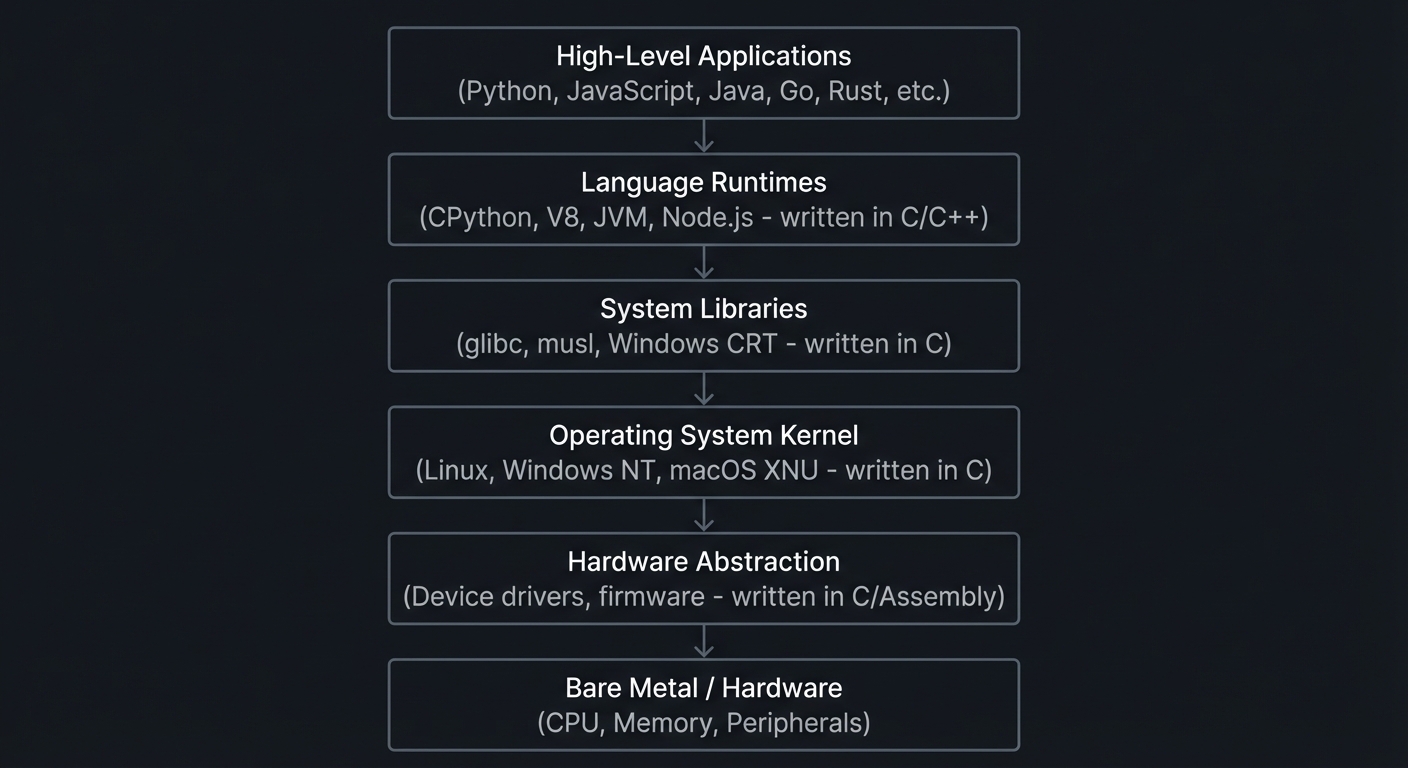
C’s Position in the Software Stack
┌─────────────────────────────────────────────────────────────────┐
│                    High-Level Applications                       │
│         (Python, JavaScript, Java, Go, Rust, etc.)               │
├─────────────────────────────────────────────────────────────────┤
│                    Language Runtimes                             │
│         (CPython, V8, JVM, Node.js - written in C/C++)           │
├─────────────────────────────────────────────────────────────────┤
│                    System Libraries                              │
│         (glibc, musl, Windows CRT - written in C)                │
├─────────────────────────────────────────────────────────────────┤
│                    Operating System Kernel                       │
│         (Linux, Windows NT, macOS XNU - written in C)            │
├─────────────────────────────────────────────────────────────────┤
│                    Hardware Abstraction                          │
│         (Device drivers, firmware - written in C/Assembly)       │
├─────────────────────────────────────────────────────────────────┤
│                    Bare Metal / Hardware                         │
│         (CPU, Memory, Peripherals)                               │
└─────────────────────────────────────────────────────────────────┘
C23 (ISO/IEC 9899:2024)
The latest C standard formalizes modern capabilities while preserving compatibility.
- Standard publication: ISO/IEC 9899:2024 (ISO catalog)
- Practical feature reference: cppreference C23 overview
Notable updates include modern keywords and library improvements, plus safer primitives (for example explicit secure memory operations). The practical lesson is not “new syntax first”; it is learning how standards evolve while old code and ABIs remain in production.
Understanding C means understanding how computers actually work, and that knowledge transfers to every language and runtime you use later.
Theory Primer
The Memory Model: What You’re Really Working With
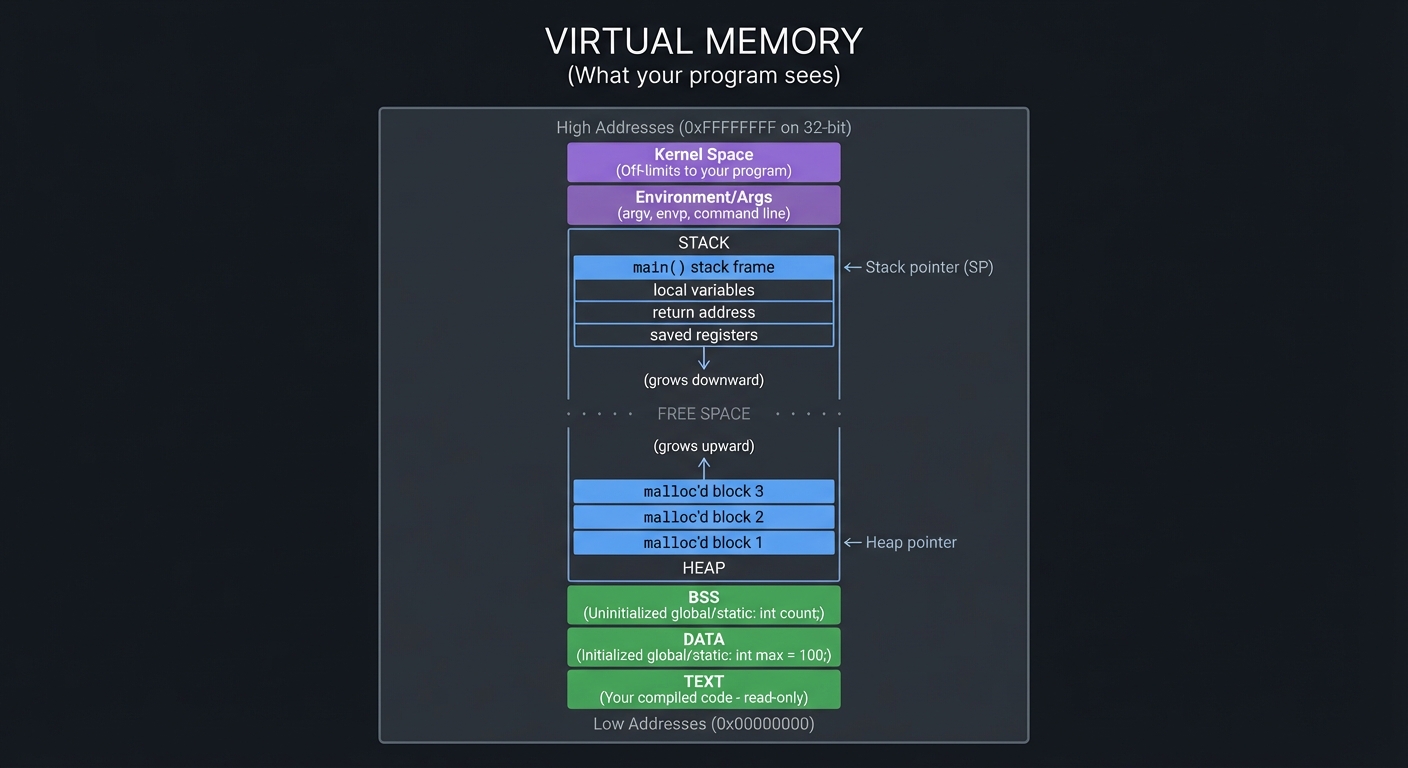
Everything in C comes down to memory. Every variable, every function, every data structure is just bytes at addresses. Understanding this is the key to mastering C.
┌────────────────────────────────────────────────────────────────────┐
│                          VIRTUAL MEMORY                            │
│                    (What your program sees)                        │
├────────────────────────────────────────────────────────────────────┤
│                                                                    │
│   High Addresses (0xFFFFFFFF on 32-bit)                            │
│   ┌──────────────────────────────────────────────────────────────┐ │
│   │                    Kernel Space                               │ │
│   │              (Off-limits to your program)                     │ │
│   ├──────────────────────────────────────────────────────────────┤ │
│   │                    Environment/Args                           │ │
│   │              (argv, envp, command line)                       │ │
│   ├──────────────────────────────────────────────────────────────┤ │
│   │                                                               │ │
│   │                        STACK                                  │ │
│   │              ┌─────────────────────┐                          │ │
│   │              │ main() stack frame  │ ← Stack pointer (SP)     │ │
│   │              ├─────────────────────┤                          │ │
│   │              │ local variables     │                          │ │
│   │              │ return address      │                          │ │
│   │              │ saved registers     │                          │ │
│   │              └─────────────────────┘                          │ │
│   │                       ↓                                       │ │
│   │               (grows downward)                                │ │
│   │                                                               │ │
│   │   ·  ·  ·  ·  ·  ·  FREE SPACE  ·  ·  ·  ·  ·  ·              │ │
│   │                                                               │ │
│   │               (grows upward)                                  │ │
│   │                       ↑                                       │ │
│   │              ┌─────────────────────┐                          │ │
│   │              │ malloc'd block 3    │                          │ │
│   │              ├─────────────────────┤                          │ │
│   │              │ malloc'd block 2    │                          │ │
│   │              ├─────────────────────┤                          │ │
│   │              │ malloc'd block 1    │ ← Heap pointer           │ │
│   │              └─────────────────────┘                          │ │
│   │                        HEAP                                   │ │
│   │                                                               │ │
│   ├──────────────────────────────────────────────────────────────┤ │
│   │                        BSS                                    │ │
│   │        (Uninitialized global/static: int count;)              │ │
│   ├──────────────────────────────────────────────────────────────┤ │
│   │                        DATA                                   │ │
│   │        (Initialized global/static: int max = 100;)            │ │
│   ├──────────────────────────────────────────────────────────────┤ │
│   │                        TEXT                                   │ │
│   │        (Your compiled code - read-only)                       │ │
│   └──────────────────────────────────────────────────────────────┘ │
│   Low Addresses (0x00000000)                                       │
│                                                                    │
└────────────────────────────────────────────────────────────────────┘
Pointers: The Heart of C
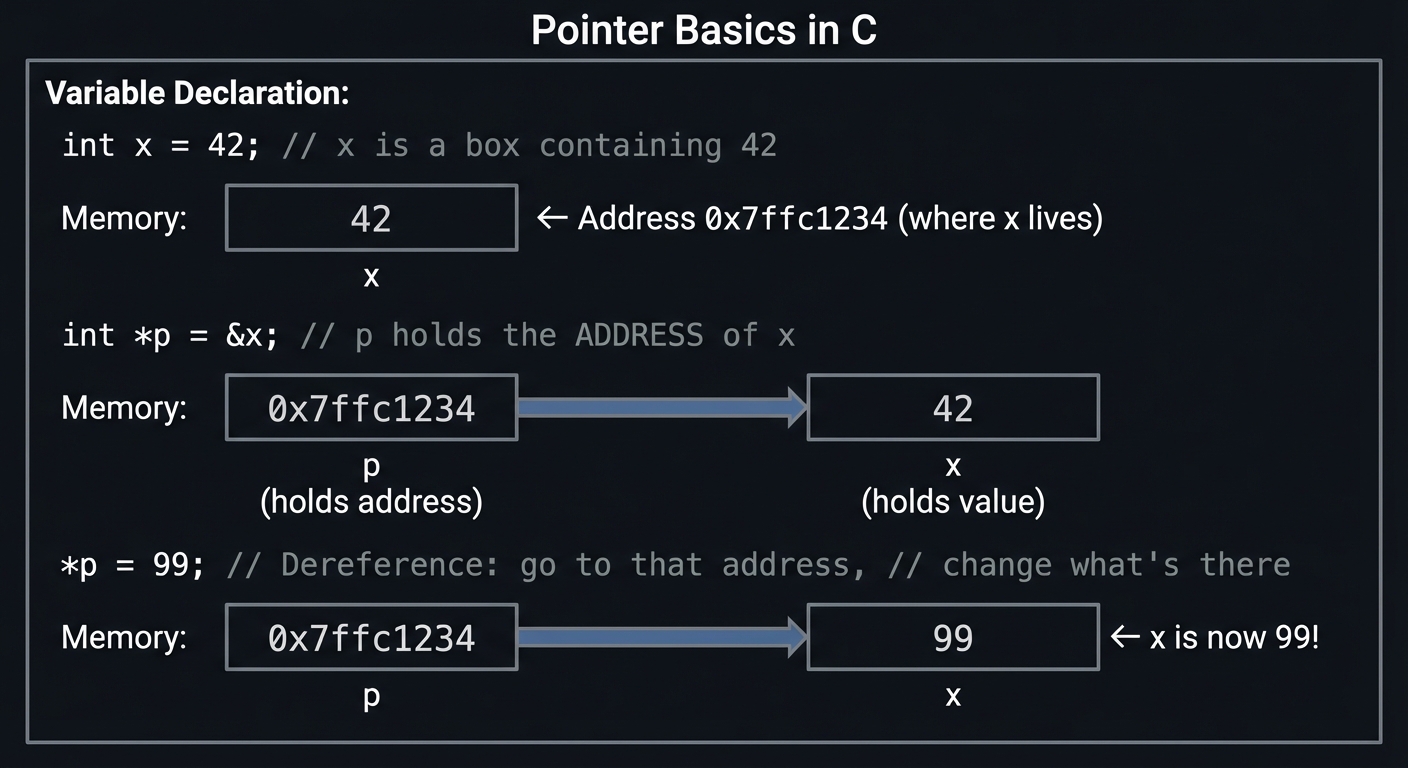
A pointer is just a variable that holds a memory address. That’s it. But this simple concept unlocks everything:
Variable Declaration:
┌─────────────────────────────────────────────────────────────────┐
│                                                                 │
│   int x = 42;        // x is a box containing 42                │
│                                                                 │
│   Memory:                                                       │
│   ┌──────────┐                                                  │
│   │    42    │ ← Address 0x7ffc1234 (where x lives)             │
│   └──────────┘                                                  │
│       x                                                         │
│                                                                 │
│   int *p = &x;       // p holds the ADDRESS of x                │
│                                                                 │
│   Memory:                                                       │
│   ┌──────────────┐      ┌──────────┐                            │
│   │ 0x7ffc1234   │ ───► │    42    │                            │
│   └──────────────┘      └──────────┘                            │
│         p                    x                                  │
│    (holds address)     (holds value)                            │
│                                                                 │
│   *p = 99;           // Dereference: go to that address,        │
│                      // change what's there                     │
│                                                                 │
│   ┌──────────────┐      ┌──────────┐                            │
│   │ 0x7ffc1234   │ ───► │    99    │  ← x is now 99!            │
│   └──────────────┘      └──────────┘                            │
│         p                    x                                  │
│                                                                 │
└─────────────────────────────────────────────────────────────────┘
Arrays and Pointer Arithmetic
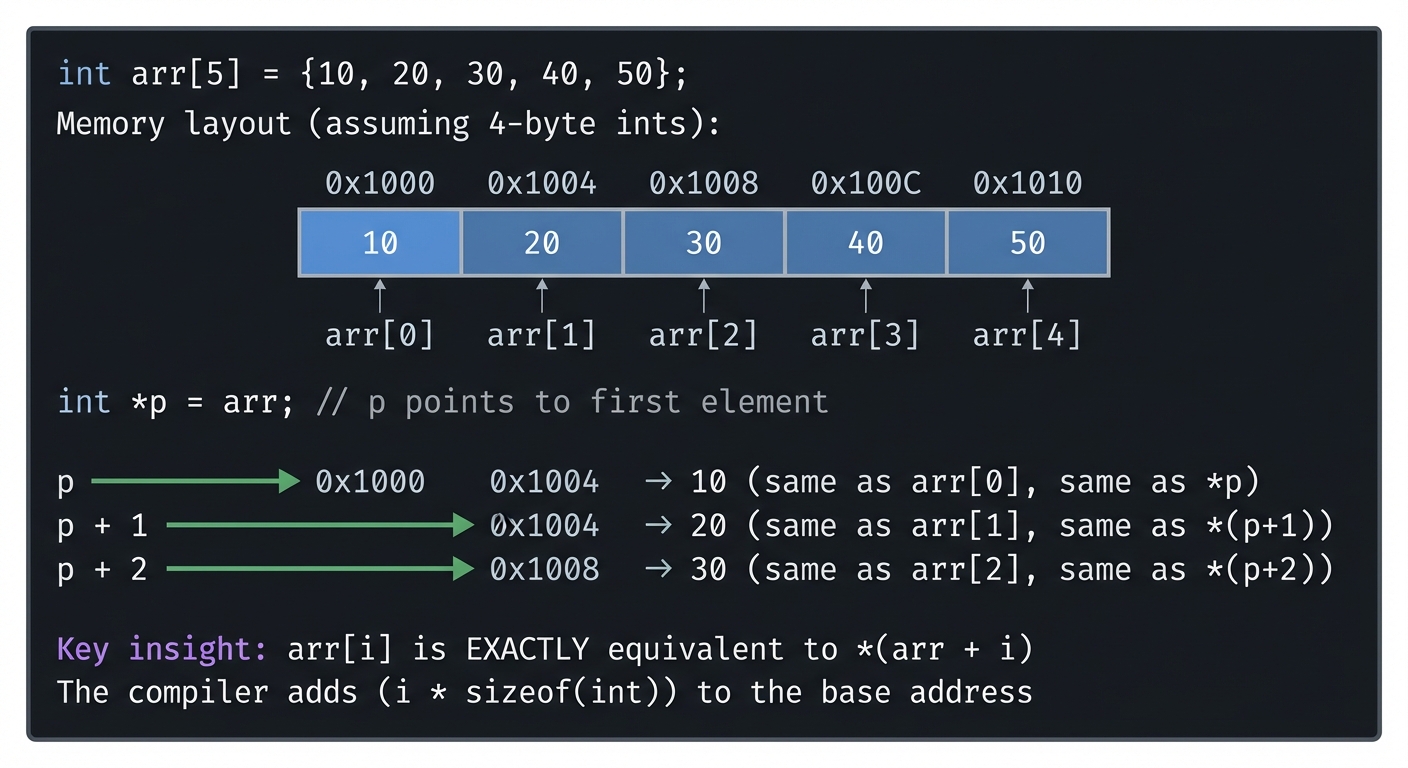
In C, arrays and pointers are intimately connected:
Array in Memory:
┌─────────────────────────────────────────────────────────────────┐
│                                                                 │
│   int arr[5] = {10, 20, 30, 40, 50};                            │
│                                                                 │
│   Memory layout (assuming 4-byte ints):                         │
│                                                                 │
│   Address:    0x1000   0x1004   0x1008   0x100C   0x1010        │
│              ┌───────┬───────┬───────┬───────┬───────┐          │
│   Value:     │  10   │  20   │  30   │  40   │  50   │          │
│              └───────┴───────┴───────┴───────┴───────┘          │
│   Index:     arr[0]  arr[1]  arr[2]  arr[3]  arr[4]             │
│                                                                 │
│   int *p = arr;      // p points to first element               │
│                                                                 │
│   p       → 10   (same as arr[0], same as *p)                   │
│   p + 1   → 20   (same as arr[1], same as *(p+1))               │
│   p + 2   → 30   (same as arr[2], same as *(p+2))               │
│                                                                 │
│   Key insight: arr[i] is EXACTLY equivalent to *(arr + i)       │
│   The compiler adds (i * sizeof(int)) to the base address       │
│                                                                 │
└─────────────────────────────────────────────────────────────────┘
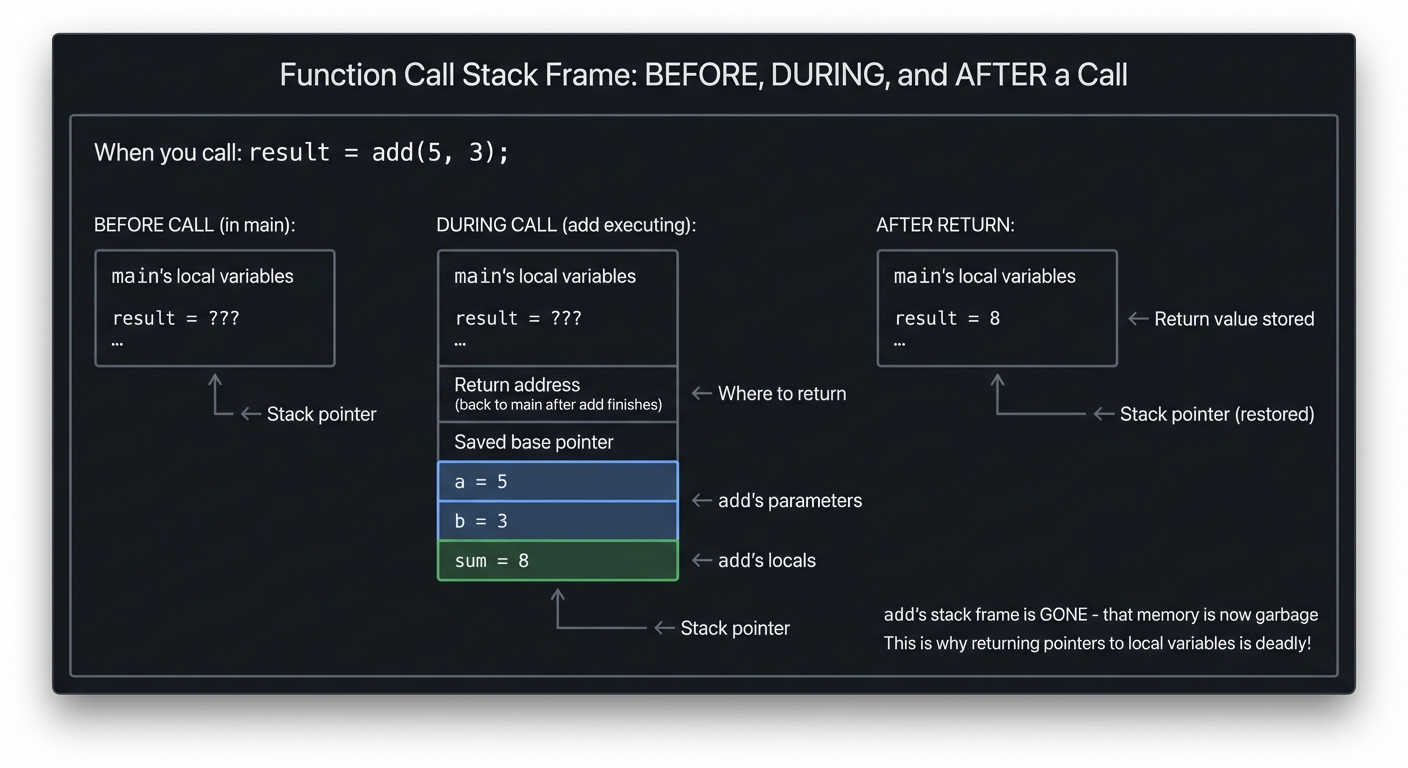
The Stack Frame: Function Calls Demystified
When you call: result = add(5, 3);

┌─────────────────────────────────────────────────────────────────┐
│                                                                 │
│   BEFORE CALL (in main):                                        │
│   ┌─────────────────────────────┐                               │
│   │ main's local variables      │                               │
│   │ result = ???                │                               │
│   │ ...                         │                               │
│   └─────────────────────────────┘ ← Stack pointer               │
│                                                                 │
│   DURING CALL (add executing):                                  │
│   ┌─────────────────────────────┐                               │
│   │ main's local variables      │                               │
│   │ result = ???                │                               │
│   │ ...                         │                               │
│   ├─────────────────────────────┤                               │
│   │ Return address (back to     │ ← Where to return             │
│   │ main after add finishes)    │                               │
│   ├─────────────────────────────┤                               │
│   │ Saved base pointer          │                               │
│   ├─────────────────────────────┤                               │
│   │ a = 5                       │ ← add's parameters            │
│   │ b = 3                       │                               │
│   ├─────────────────────────────┤                               │
│   │ sum = 8                     │ ← add's locals                │
│   └─────────────────────────────┘ ← Stack pointer               │
│                                                                 │
│   AFTER RETURN:                                                 │
│   ┌─────────────────────────────┐                               │
│   │ main's local variables      │                               │
│   │ result = 8                  │ ← Return value stored         │
│   │ ...                         │                               │
│   └─────────────────────────────┘ ← Stack pointer (restored)    │
│                                                                 │
│   add's stack frame is GONE - that memory is now garbage        │
│   This is why returning pointers to local variables is deadly!  │
│                                                                 │
└─────────────────────────────────────────────────────────────────┘
The Compilation Pipeline
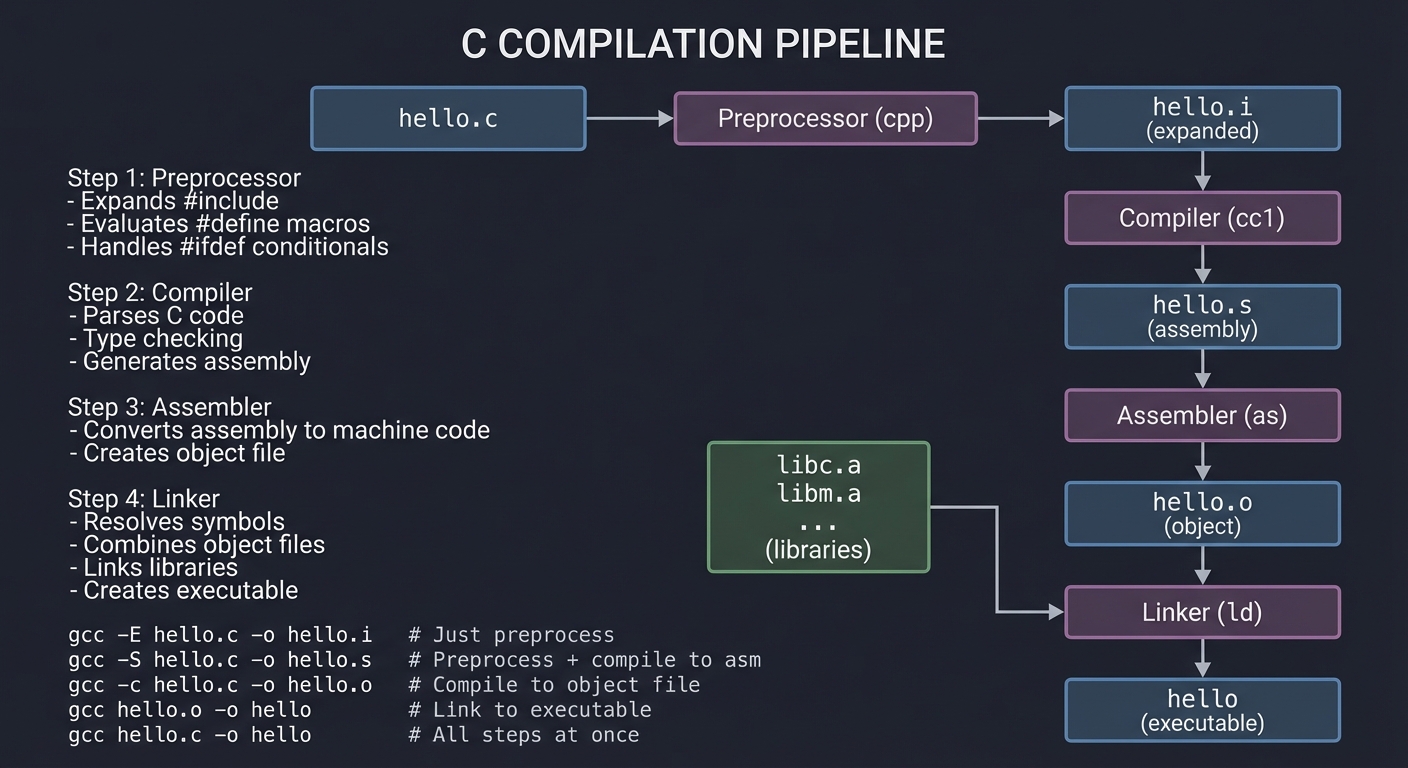
Understanding how C code becomes an executable is crucial for debugging and optimization:
┌─────────────────────────────────────────────────────────────────┐
│                    C COMPILATION PIPELINE                       │
├─────────────────────────────────────────────────────────────────┤
│                                                                 │
│  ┌─────────┐     ┌─────────────┐     ┌─────────────┐            │
│  │ hello.c │ ──► │ Preprocessor │ ──► │ hello.i     │           │
│  └─────────┘     │    (cpp)     │     │ (expanded)  │           │
│                  └─────────────┘     └──────┬──────┘            │
│                                              │                  │
│  Step 1: Preprocessor                        ▼                  │
│  - Expands #include                 ┌─────────────┐             │
│  - Evaluates #define macros         │  Compiler   │             │
│  - Handles #ifdef conditionals      │   (cc1)     │             │
│                                     └──────┬──────┘             │
│                                              │                  │
│  Step 2: Compiler                            ▼                  │
│  - Parses C code                    ┌─────────────┐             │
│  - Type checking                    │ hello.s     │             │
│  - Generates assembly               │ (assembly)  │             │
│                                     └──────┬──────┘             │
│                                              │                  │
│  Step 3: Assembler                           ▼                  │
│  - Converts assembly to             ┌─────────────┐             │
│    machine code                     │ Assembler   │             │
│  - Creates object file              │   (as)      │             │
│                                     └──────┬──────┘             │
│                                              │                  │
│                                              ▼                  │
│                                     ┌─────────────┐             │
│                                     │ hello.o     │             │
│                                     │ (object)    │             │
│  ┌─────────┐                        └──────┬──────┘             │
│  │ libc.a  │ ─────────────────────────────►│                    │
│  │ libm.a  │ (libraries)                   │                    │
│  │ ...     │                               ▼                    │
│  └─────────┘                        ┌─────────────┐             │
│                                     │   Linker    │             │
│  Step 4: Linker                     │    (ld)     │             │
│  - Resolves symbols                 └──────┬──────┘             │
│  - Combines object files                    │                   │
│  - Links libraries                          ▼                   │
│  - Creates executable               ┌─────────────┐             │
│                                     │   hello     │             │
│                                     │ (executable)│             │
│                                     └─────────────┘             │
│                                                                 │
│  gcc -E hello.c -o hello.i   # Just preprocess                  │
│  gcc -S hello.c -o hello.s   # Preprocess + compile to asm      │
│  gcc -c hello.c -o hello.o   # Compile to object file           │
│  gcc hello.o -o hello        # Link to executable               │
│  gcc hello.c -o hello        # All steps at once                │
│                                                                 │
└─────────────────────────────────────────────────────────────────┘
Data Types and Their Sizes
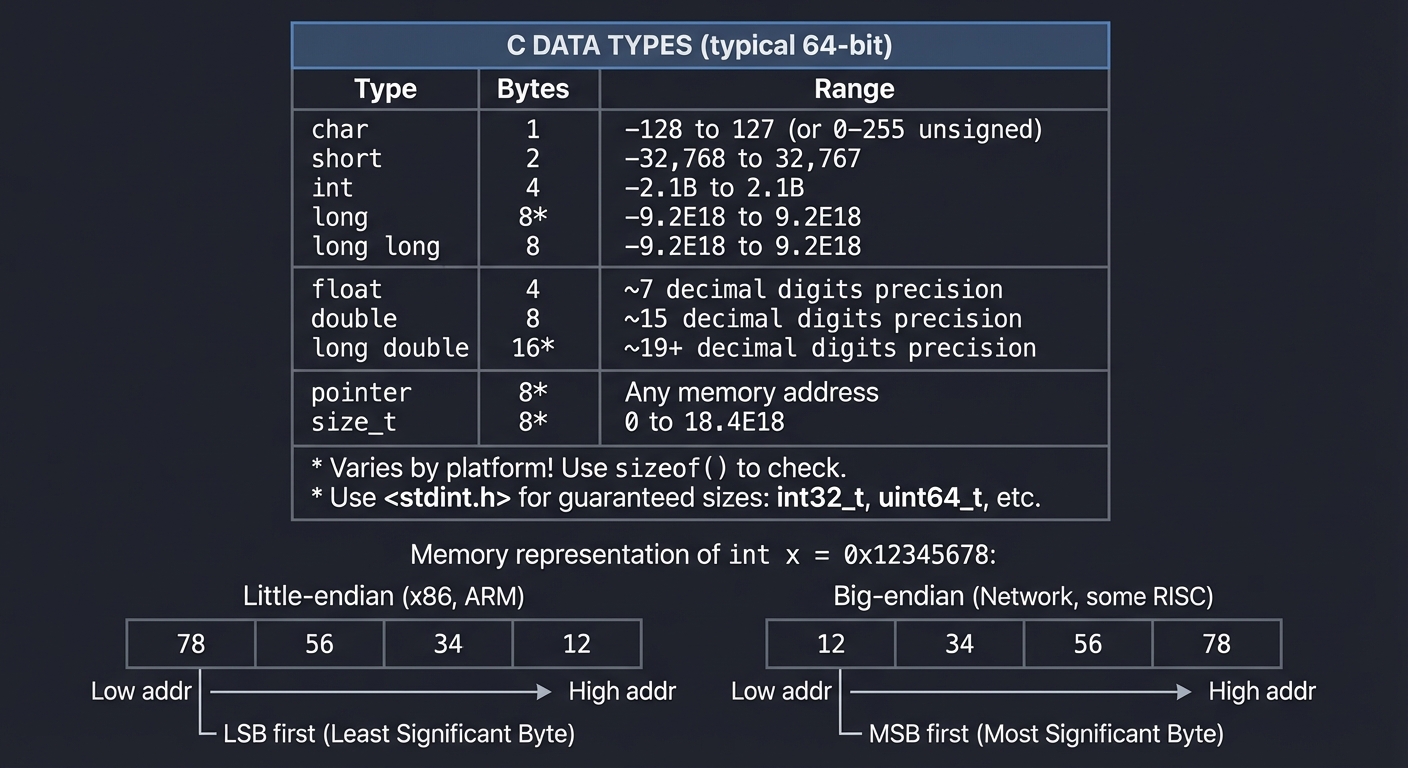
┌─────────────────────────────────────────────────────────────────┐
│                    C DATA TYPES (typical 64-bit)                │
├───────────────┬──────────┬──────────────────────────────────────┤
│ Type          │ Bytes    │ Range                                │
├───────────────┼──────────┼──────────────────────────────────────┤
│ char          │ 1        │ -128 to 127 (or 0-255 unsigned)      │
│ short         │ 2        │ -32,768 to 32,767                    │
│ int           │ 4        │ -2.1B to 2.1B                        │
│ long          │ 8*       │ -9.2E18 to 9.2E18                    │
│ long long     │ 8        │ -9.2E18 to 9.2E18                    │
├───────────────┼──────────┼──────────────────────────────────────┤
│ float         │ 4        │ ~7 decimal digits precision          │
│ double        │ 8        │ ~15 decimal digits precision         │
│ long double   │ 16*      │ ~19+ decimal digits precision        │
├───────────────┼──────────┼──────────────────────────────────────┤
│ pointer       │ 8*       │ Any memory address                   │
│ size_t        │ 8*       │ 0 to 18.4E18                         │
├───────────────┴──────────┴──────────────────────────────────────┤
│ * Varies by platform! Use sizeof() to check.                    │
│ * Use <stdint.h> for guaranteed sizes: int32_t, uint64_t, etc.  │
└─────────────────────────────────────────────────────────────────┘

Memory representation of int x = 0x12345678:

Little-endian (x86, ARM):     Big-endian (Network, some RISC):
┌────┬────┬────┬────┐         ┌────┬────┬────┬────┐
│ 78 │ 56 │ 34 │ 12 │         │ 12 │ 34 │ 56 │ 78 │
└────┴────┴────┴────┘         └────┴────┴────┴────┘
 Low          High             Low          High
 addr         addr             addr         addr

LSB first (Least             MSB first (Most
Significant Byte)            Significant Byte)
Strings in C: Arrays of Characters
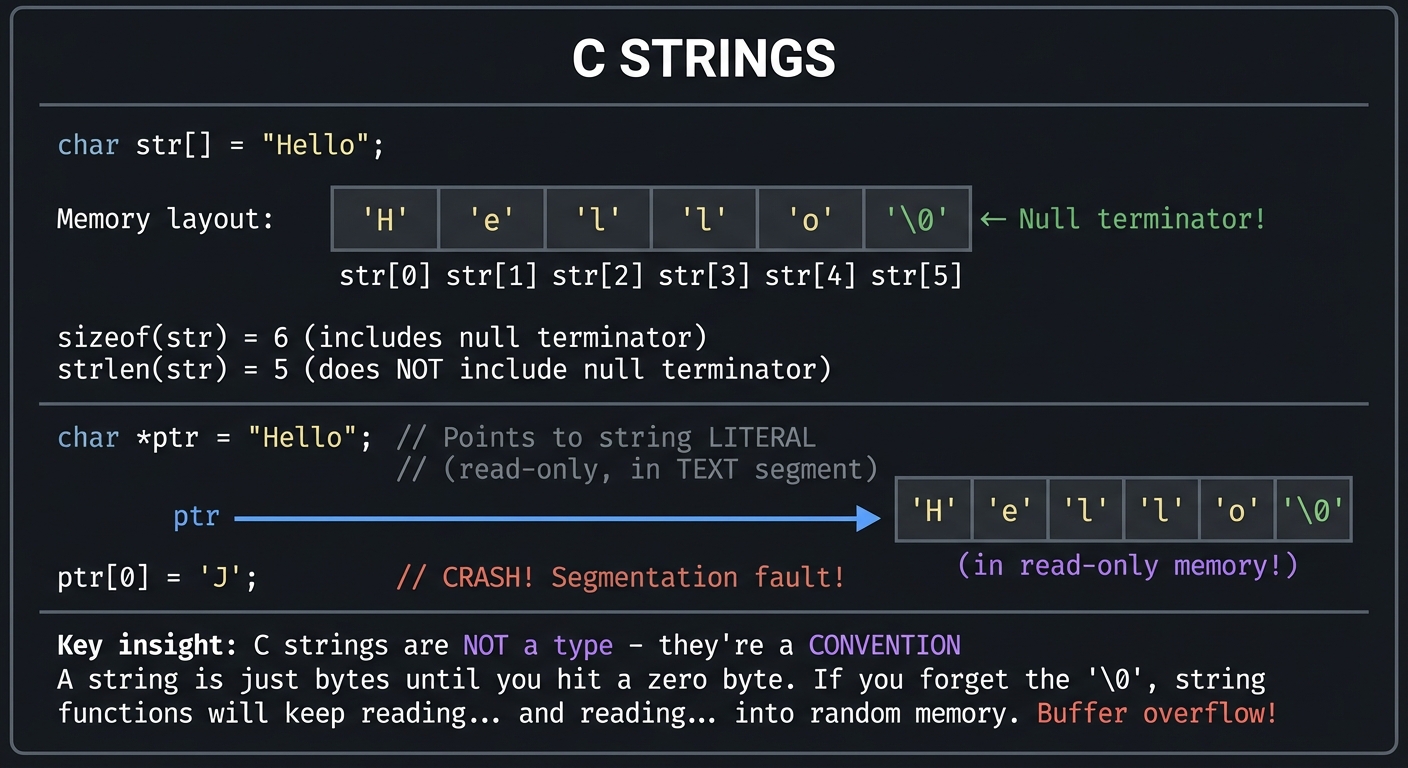
┌─────────────────────────────────────────────────────────────────┐
│                    C STRINGS                                    │
├─────────────────────────────────────────────────────────────────┤
│                                                                 │
│   char str[] = "Hello";                                         │
│                                                                 │
│   Memory layout:                                                │
│   ┌─────┬─────┬─────┬─────┬─────┬─────┐                         │
│   │ 'H' │ 'e' │ 'l' │ 'l' │ 'o' │ '\0'│  ← Null terminator!     │
│   └─────┴─────┴─────┴─────┴─────┴─────┘                         │
│   str[0] str[1] str[2] str[3] str[4] str[5]                     │
│                                                                 │
│   sizeof(str) = 6  (includes null terminator)                   │
│   strlen(str) = 5  (does NOT include null terminator)           │
│                                                                 │
│   ─────────────────────────────────────────────────────────     │
│                                                                 │
│   char *ptr = "Hello";  // Points to string LITERAL             │
│                         // (read-only, in TEXT segment)         │
│                                                                 │
│   ptr ──────► ┌─────┬─────┬─────┬─────┬─────┬─────┐             │
│               │ 'H' │ 'e' │ 'l' │ 'l' │ 'o' │ '\0'│             │
│               └─────┴─────┴─────┴─────┴─────┴─────┘             │
│               (in read-only memory!)                            │
│                                                                 │
│   ptr[0] = 'J';  // CRASH! Segmentation fault!                  │
│                                                                 │
│   ─────────────────────────────────────────────────────────     │
│                                                                 │
│   Key insight: C strings are NOT a type - they're a CONVENTION  │
│   A string is just bytes until you hit a zero byte.             │
│   If you forget the '\0', string functions will keep reading... │
│   and reading... into random memory. Buffer overflow!           │
│                                                                 │
└─────────────────────────────────────────────────────────────────┘
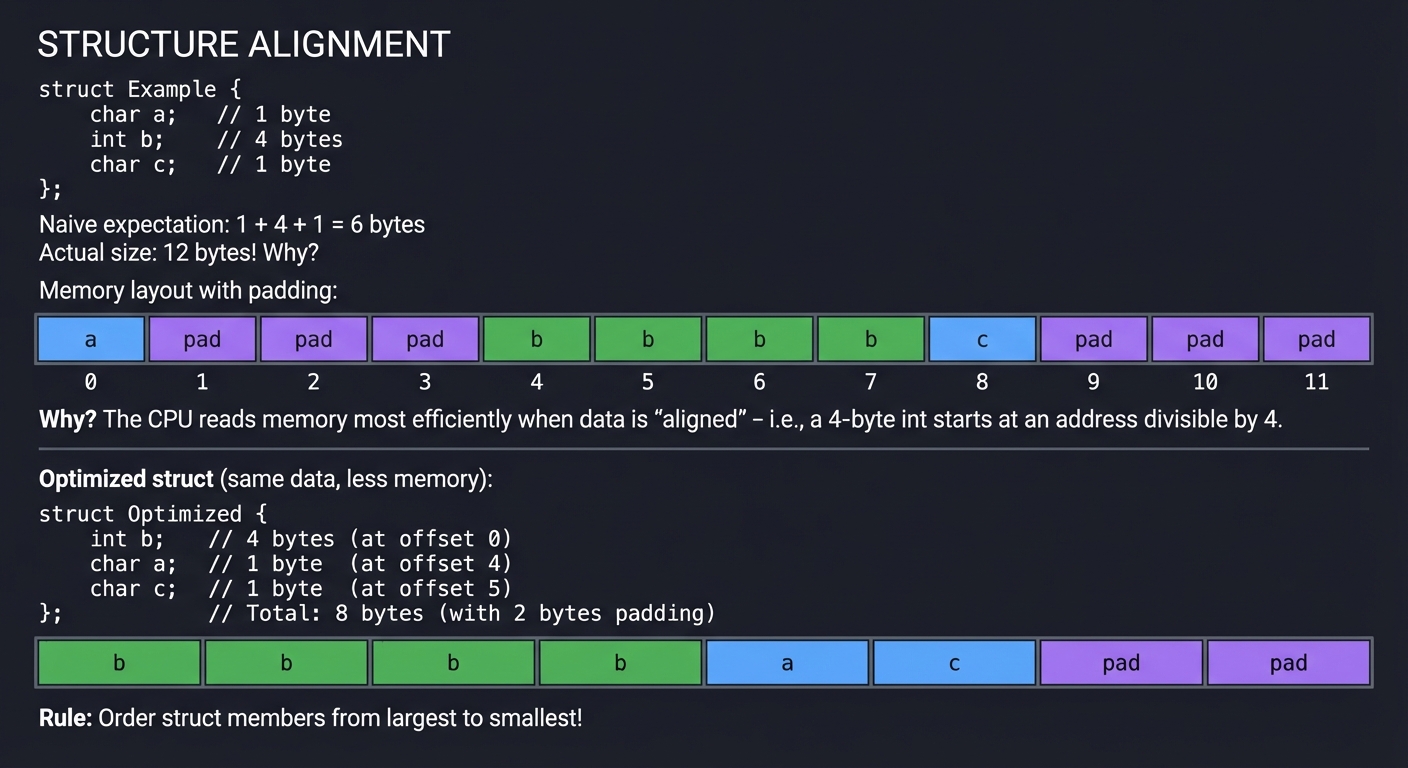
Structures and Memory Alignment
┌─────────────────────────────────────────────────────────────────┐
│                    STRUCTURE ALIGNMENT                          │
├─────────────────────────────────────────────────────────────────┤
│                                                                 │
│   struct Example {                                              │
│       char a;      // 1 byte                                    │
│       int b;       // 4 bytes                                   │
│       char c;      // 1 byte                                    │
│   };                                                            │
│                                                                 │
│   Naive expectation: 1 + 4 + 1 = 6 bytes                        │
│   Actual size: 12 bytes! Why?                                   │
│                                                                 │
│   Memory layout with padding:                                   │
│   ┌────┬────┬────┬────┬────┬────┬────┬────┬────┬────┬────┬────┐ │
│   │ a  │pad │pad │pad │ b  │ b  │ b  │ b  │ c  │pad │pad │pad │ │
│   └────┴────┴────┴────┴────┴────┴────┴────┴────┴────┴────┴────┘ │
│   0    1    2    3    4    5    6    7    8    9   10   11      │
│                                                                 │
│   Why? The CPU reads memory most efficiently when data is       │
│   "aligned" - i.e., a 4-byte int starts at an address           │
│   divisible by 4.                                               │
│                                                                 │
│   ─────────────────────────────────────────────────────────     │
│                                                                 │
│   Optimized struct (same data, less memory):                    │
│                                                                 │
│   struct Optimized {                                            │
│       int b;       // 4 bytes (at offset 0)                     │
│       char a;      // 1 byte  (at offset 4)                     │
│       char c;      // 1 byte  (at offset 5)                     │
│   };               // Total: 8 bytes (with 2 bytes padding)     │
│                                                                 │
│   ┌────┬────┬────┬────┬────┬────┬────┬────┐                     │
│   │ b  │ b  │ b  │ b  │ a  │ c  │pad │pad │                     │
│   └────┴────┴────┴────┴────┴────┴────┴────┘                     │
│                                                                 │
│   Rule: Order struct members from largest to smallest!          │
│                                                                 │
└─────────────────────────────────────────────────────────────────┘
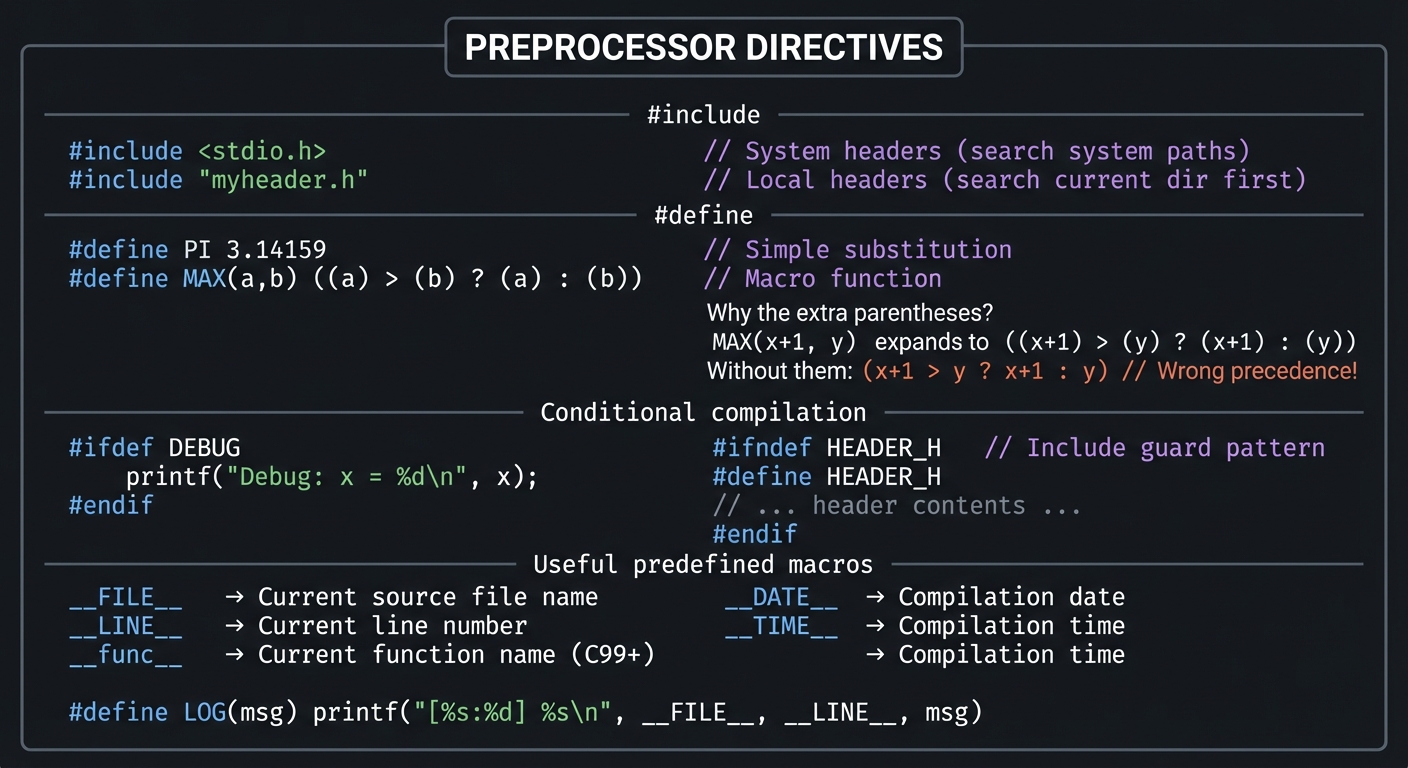
The Preprocessor: Metaprogramming in C
┌─────────────────────────────────────────────────────────────────┐
│                    PREPROCESSOR DIRECTIVES                      │
├─────────────────────────────────────────────────────────────────┤
│                                                                 │
│   #include <stdio.h>      // System headers (search system      │
│   #include "myheader.h"   // paths) Local headers (search       │
│                           // current dir first)                 │
│                                                                 │
│   ─────────────────────────────────────────────────────────     │
│                                                                 │
│   #define PI 3.14159      // Simple substitution                │
│   #define MAX(a,b) ((a) > (b) ? (a) : (b))  // Macro function   │
│                                                                 │
│   Why the extra parentheses?                                    │
│   MAX(x+1, y)  expands to  ((x+1) > (y) ? (x+1) : (y))         │
│   Without them: (x+1 > y ? x+1 : y)  // Wrong precedence!      │
│                                                                 │
│   ─────────────────────────────────────────────────────────     │
│                                                                 │
│   Conditional compilation:                                      │
│                                                                 │
│   #ifdef DEBUG                                                  │
│       printf("Debug: x = %d\n", x);                             │
│   #endif                                                        │
│                                                                 │
│   #ifndef HEADER_H        // Include guard pattern              │
│   #define HEADER_H                                              │
│   // ... header contents ...                                    │
│   #endif                                                        │
│                                                                 │
│   ─────────────────────────────────────────────────────────     │
│                                                                 │
│   Useful predefined macros:                                     │
│   __FILE__    → Current source file name                        │
│   __LINE__    → Current line number                             │
│   __func__    → Current function name (C99+)                    │
│   __DATE__    → Compilation date                                │
│   __TIME__    → Compilation time                                │
│                                                                 │
│   #define LOG(msg) printf("[%s:%d] %s\n", __FILE__, __LINE__, msg)│
│                                                                 │
└─────────────────────────────────────────────────────────────────┘
Professional C Patterns
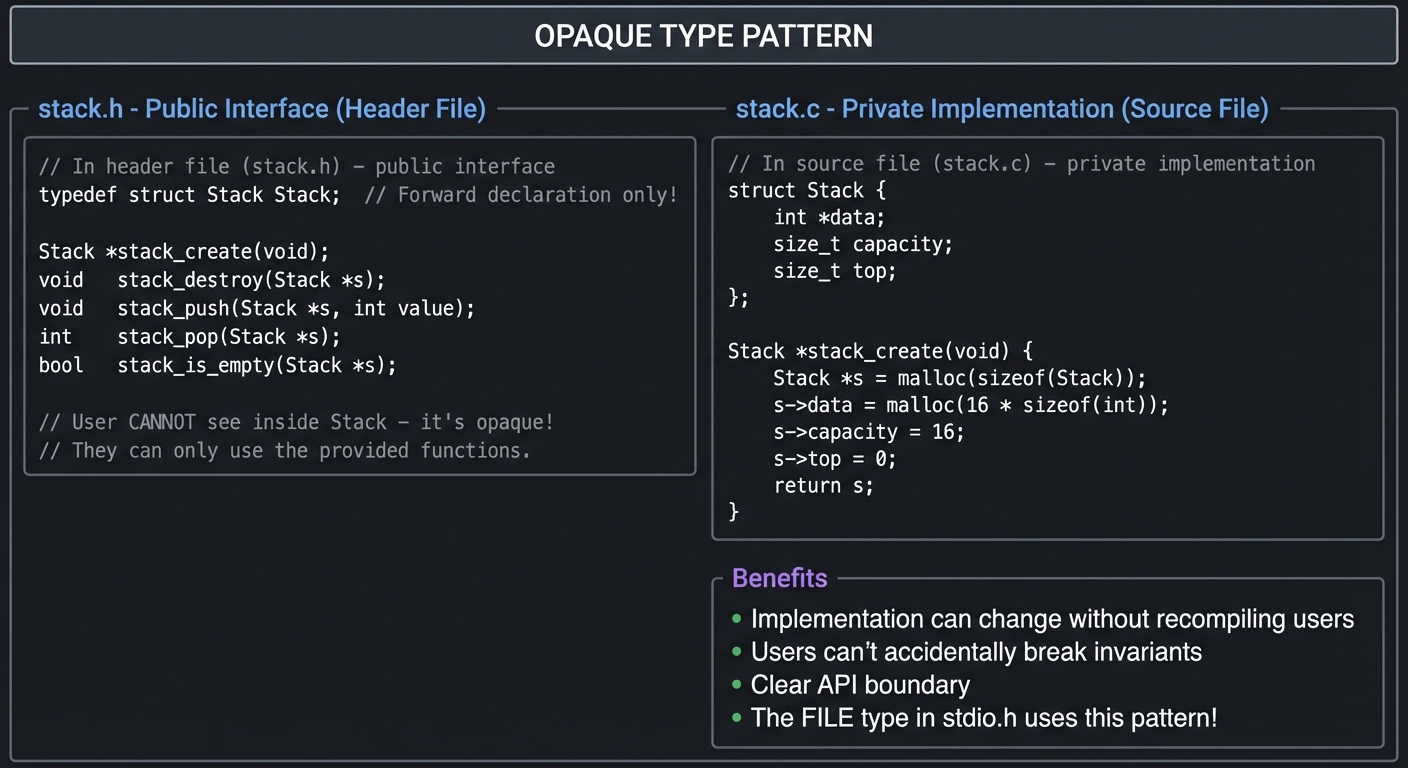
Pattern 1: Opaque Types (Information Hiding)
The opaque pointer pattern is one of the most important patterns in C for creating maintainable, modular code:
┌─────────────────────────────────────────────────────────────────┐
│                    OPAQUE TYPE PATTERN                          │
├─────────────────────────────────────────────────────────────────┤
│                                                                 │
│   // In header file (stack.h) - public interface                │
│   typedef struct Stack Stack;  // Forward declaration only!     │
│                                                                 │
│   Stack *stack_create(void);                                    │
│   void   stack_destroy(Stack *s);                               │
│   void   stack_push(Stack *s, int value);                       │
│   int    stack_pop(Stack *s);                                   │
│   bool   stack_is_empty(Stack *s);                              │
│                                                                 │
│   // User CANNOT see inside Stack - it's opaque!                │
│   // They can only use the provided functions.                  │
│                                                                 │
│   ─────────────────────────────────────────────────────────     │
│                                                                 │
│   // In source file (stack.c) - private implementation          │
│   struct Stack {                                                │
│       int *data;                                                │
│       size_t capacity;                                          │
│       size_t top;                                               │
│   };                                                            │
│                                                                 │
│   Stack *stack_create(void) {                                   │
│       Stack *s = malloc(sizeof(Stack));                         │
│       s->data = malloc(16 * sizeof(int));                       │
│       s->capacity = 16;                                         │
│       s->top = 0;                                               │
│       return s;                                                 │
│   }                                                             │
│                                                                 │
│   ─────────────────────────────────────────────────────────     │
│                                                                 │
│   Benefits:                                                     │
│   • Implementation can change without recompiling users         │
│   • Users can't accidentally break invariants                   │
│   • Clear API boundary                                          │
│   • The FILE type in stdio.h uses this pattern!                 │
│                                                                 │
└─────────────────────────────────────────────────────────────────┘
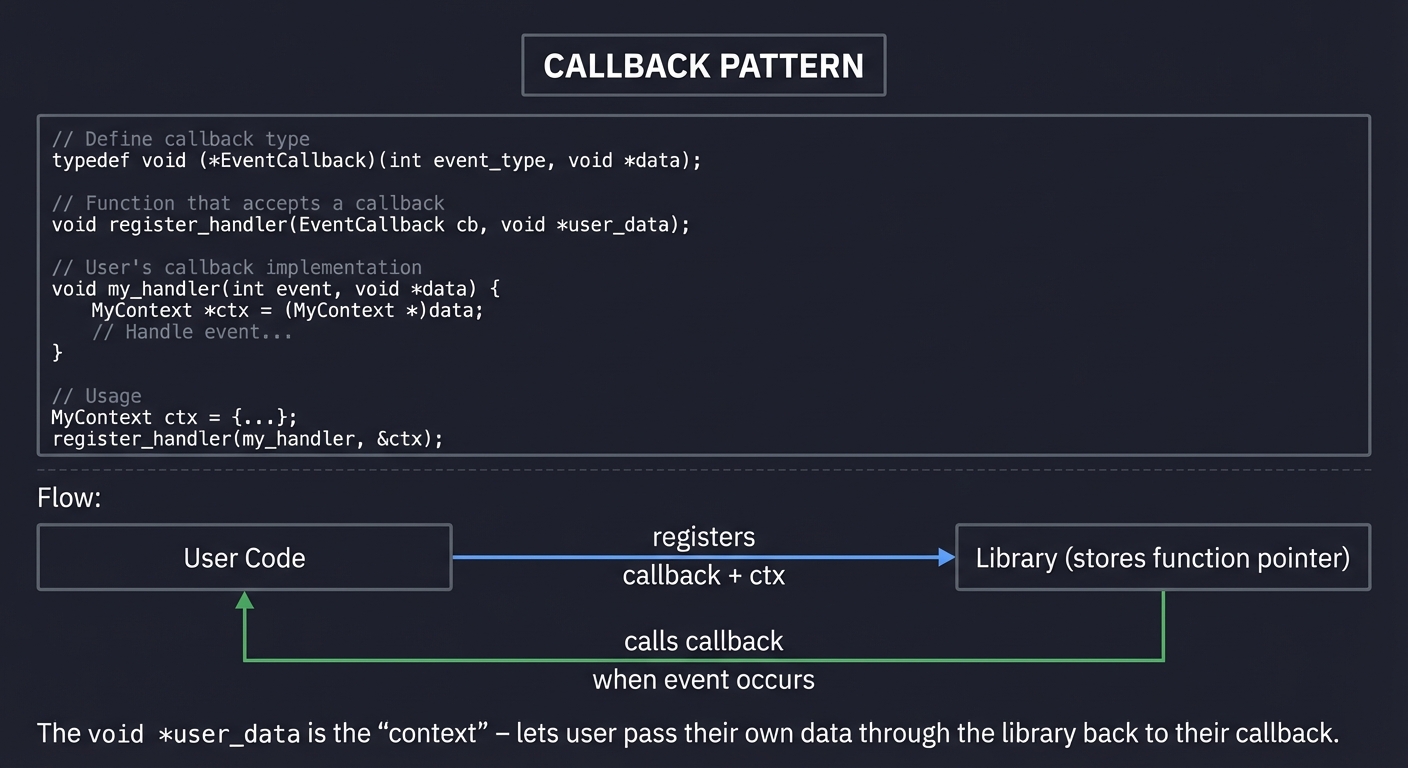
Pattern 2: Callback Functions
┌─────────────────────────────────────────────────────────────────┐
│                    CALLBACK PATTERN                             │
├─────────────────────────────────────────────────────────────────┤
│                                                                 │
│   // Define callback type                                       │
│   typedef void (*EventCallback)(int event_type, void *data);    │
│                                                                 │
│   // Function that accepts a callback                           │
│   void register_handler(EventCallback cb, void *user_data);     │
│                                                                 │
│   // User's callback implementation                             │
│   void my_handler(int event, void *data) {                      │
│       MyContext *ctx = (MyContext *)data;                       │
│       // Handle event...                                        │
│   }                                                             │
│                                                                 │
│   // Usage                                                      │
│   MyContext ctx = {...};                                        │
│   register_handler(my_handler, &ctx);                           │
│                                                                 │
│   ─────────────────────────────────────────────────────────     │
│                                                                 │
│   Flow:                                                         │
│                                                                 │
│   ┌──────────┐     registers      ┌──────────────┐              │
│   │  User    │ ─────────────────► │   Library    │              │
│   │  Code    │   callback + ctx   │   (stores    │              │
│   └──────────┘                    │   function   │              │
│        ▲                          │   pointer)   │              │
│        │                          └──────┬───────┘              │
│        │                                 │                      │
│        │         calls callback          │                      │
│        └─────────────────────────────────┘                      │
│             when event occurs                                   │
│                                                                 │
│   The void *user_data is the "context" - lets user pass         │
│   their own data through the library back to their callback.    │
│                                                                 │
└─────────────────────────────────────────────────────────────────┘
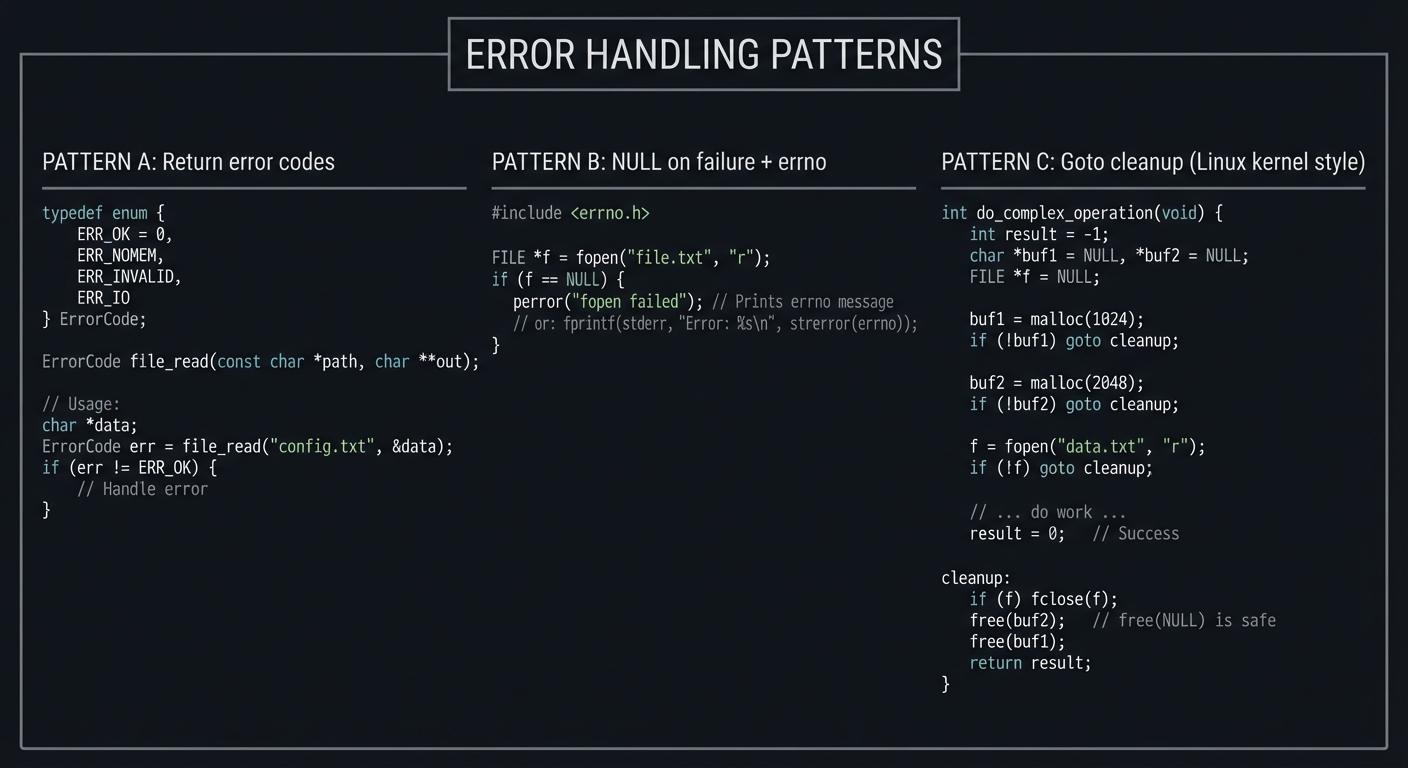
Pattern 3: Error Handling
┌─────────────────────────────────────────────────────────────────┐
│                    ERROR HANDLING PATTERNS                      │
├─────────────────────────────────────────────────────────────────┤
│                                                                 │
│   PATTERN A: Return error codes                                 │
│   ─────────────────────────────────                             │
│   typedef enum {                                                │
│       ERR_OK = 0,                                               │
│       ERR_NOMEM,                                                │
│       ERR_INVALID,                                              │
│       ERR_IO                                                    │
│   } ErrorCode;                                                  │
│                                                                 │
│   ErrorCode file_read(const char *path, char **out);            │
│                                                                 │
│   // Usage:                                                     │
│   char *data;                                                   │
│   ErrorCode err = file_read("config.txt", &data);               │
│   if (err != ERR_OK) {                                          │
│       // Handle error                                           │
│   }                                                             │
│                                                                 │
│   ─────────────────────────────────────────────────────────     │
│                                                                 │
│   PATTERN B: NULL on failure + errno                            │
│   ─────────────────────────────────                             │
│   #include <errno.h>                                            │
│                                                                 │
│   FILE *f = fopen("file.txt", "r");                             │
│   if (f == NULL) {                                              │
│       perror("fopen failed");  // Prints errno message          │
│       // or: fprintf(stderr, "Error: %s\n", strerror(errno));   │
│   }                                                             │
│                                                                 │
│   ─────────────────────────────────────────────────────────     │
│                                                                 │
│   PATTERN C: Goto cleanup (Linux kernel style)                  │
│   ─────────────────────────────────                             │
│   int do_complex_operation(void) {                              │
│       int result = -1;                                          │
│       char *buf1 = NULL, *buf2 = NULL;                          │
│       FILE *f = NULL;                                           │
│                                                                 │
│       buf1 = malloc(1024);                                      │
│       if (!buf1) goto cleanup;                                  │
│                                                                 │
│       buf2 = malloc(2048);                                      │
│       if (!buf2) goto cleanup;                                  │
│                                                                 │
│       f = fopen("data.txt", "r");                               │
│       if (!f) goto cleanup;                                     │
│                                                                 │
│       // ... do work ...                                        │
│       result = 0;  // Success                                   │
│                                                                 │
│   cleanup:                                                      │
│       if (f) fclose(f);                                         │
│       free(buf2);  // free(NULL) is safe                        │
│       free(buf1);                                               │
│       return result;                                            │
│   }                                                             │
│                                                                 │
└─────────────────────────────────────────────────────────────────┘
Glossary
- ABI (Application Binary Interface): Contract for calling conventions, symbol names, type layout, and linking compatibility between compiled units.
- ASLR: Address Space Layout Randomization; randomizes memory regions per process launch to increase exploit difficulty.
- BSS: Memory segment for zero-initialized or uninitialized globals/statics.
- Heap: Dynamically managed process memory typically allocated via
malloc/free. - Pointer provenance: The validity relationship between a pointer value and the object it is allowed to access.
- Undefined Behavior (UB): Program behavior for which the C standard imposes no requirements.
- Strict aliasing: Optimization rule that assumes different pointer types usually do not alias the same object.
- Translation unit: One source file after preprocessing, compiled independently.
- Linker: Tool that resolves symbols and combines object files into final binaries.
- Memory-mapped I/O: Hardware register access by reading/writing specific memory addresses.
- Data race: Unsynchronized concurrent access where at least one access is a write.
- Invariant: Condition that must remain true for program correctness.
Concept Summary Table
| Concept Cluster | What You Need to Internalize |
|---|---|
| Memory Model & Virtual Address Space | C objects are bytes in process virtual memory, partitioned by segment and lifetime. |
| Pointers, Arrays, and Indirection | Pointer arithmetic is type-scaled address math; array syntax is pointer syntax sugar. |
| Call Stack, ABI, and Function Boundaries | Stack frames, calling convention, and object lifetime rules determine correctness. |
| Compilation Pipeline & Toolchain | Preprocess, compile, assemble, link, and load are distinct stages with different failure modes. |
| Data Representation & Layout | Types, alignment, padding, and endianness directly affect portability and performance. |
| Strings and Buffer Safety | C strings are conventions over bytes; safety requires explicit bounds and termination discipline. |
| Preprocessor and Build Abstractions | Macros, includes, and build graphs shape maintainability as much as code does. |
| Defensive Error Handling Patterns | Resource cleanup and explicit error propagation are mandatory in real systems code. |
| Concurrency and Synchronization | Correctness under parallel execution requires ownership rules and synchronization invariants. |
| Systems Interface Literacy | Files, processes, sockets, and hardware interaction are the practical surface area of C in production. |
Deep Dive Reading by Concept
This section maps each concept to specific book chapters for deeper understanding. Read these before or alongside the projects.
Fundamentals and Syntax
| Concept | Book & Chapter |
|---|---|
| C syntax and basics | C Programming: A Modern Approach by K.N. King — Ch. 1-5 |
| Data types | C Programming: A Modern Approach by K.N. King — Ch. 7: “Basic Types” |
| Control flow | Effective C, 2nd Ed by Robert Seacord — Ch. 5: “Control Flow” |
| Functions | C Programming: A Modern Approach by K.N. King — Ch. 9-10 |
Pointers and Memory
| Concept | Book & Chapter |
|---|---|
| Pointer fundamentals | C Programming: A Modern Approach by K.N. King — Ch. 11: “Pointers” |
| Pointers and arrays | C Programming: A Modern Approach by K.N. King — Ch. 12: “Pointers and Arrays” |
| Dynamic memory | Effective C, 2nd Ed by Robert Seacord — Ch. 6: “Dynamically Allocated Memory” |
| Memory errors | Computer Systems: A Programmer’s Perspective by Bryant & O’Hallaron — Ch. 9: “Virtual Memory” |
Data Structures
| Concept | Book & Chapter |
|---|---|
| Strings | C Programming: A Modern Approach by K.N. King — Ch. 13: “Strings” |
| Structures and unions | C Programming: A Modern Approach by K.N. King — Ch. 16-17 |
| Linked structures | Mastering Algorithms with C by Kyle Loudon — Ch. 5: “Linked Lists” |
| Trees and graphs | Algorithms in C by Robert Sedgewick — Parts 4-5 |
Systems Programming
| Concept | Book & Chapter |
|---|---|
| File I/O | The Linux Programming Interface by Michael Kerrisk — Ch. 4-5 |
| Process memory | Computer Systems: A Programmer’s Perspective by Bryant & O’Hallaron — Ch. 9 |
| System calls | Advanced Programming in the UNIX Environment by Stevens & Rago — Ch. 1-3 |
| Signals | The Linux Programming Interface by Michael Kerrisk — Ch. 20-22 |
Professional Practices
| Concept | Book & Chapter |
|---|---|
| Secure coding | Effective C, 2nd Ed by Robert Seacord — All chapters |
| Debugging | The Art of Debugging by Matloff & Salzman — Ch. 1-4 |
| Build systems | The GNU Make Book by John Graham-Cumming — Ch. 1-4 |
| Testing | Effective C, 2nd Ed by Robert Seacord — Ch. 11: “Debugging, Testing, and Analysis” |
Essential Reading Order
For maximum comprehension, read in this order:
- Foundation (Weeks 1-2):
- C Programming: A Modern Approach Ch. 1-10 (fundamentals)
- Effective C Ch. 1-5 (modern practices)
- Memory Mastery (Weeks 3-4):
- C Programming: A Modern Approach Ch. 11-13 (pointers, strings)
- Effective C Ch. 6 (dynamic memory)
- CS:APP Ch. 9 (virtual memory concepts)
- Data Structures (Weeks 5-6):
- C Programming: A Modern Approach Ch. 16-17 (structs)
- Mastering Algorithms with C Ch. 5-8 (data structures)
- Systems (Weeks 7-8):
- The Linux Programming Interface Ch. 4-5, 20-22
- Advanced Programming in the UNIX Environment Ch. 1-8
Project-to-Concept Map
| Project | Concepts Applied |
|---|---|
| Project 1: Memory Visualizer | Memory model, segments, pointers, ASLR |
| Project 2: String Library | Pointer arithmetic, buffer boundaries, UB |
| Project 3: Dynamic Array | Heap growth strategy, ownership, API design |
| Project 4: Linked Lists | Indirection, lifetime, mutation invariants |
| Project 5: Hash Table | Hashing, collision policy, load factor tradeoffs |
| Project 6: Memory Allocator | Free lists, fragmentation, coalescing invariants |
| Project 7: Config Parser | Tokenization, parsing state machines, error recovery |
| Project 8: Mini-Make | DAGs, timestamps, incremental rebuild rules |
| Project 9: Unix Shell | fork/exec, pipes, signals, process control |
| Project 10: HTTP Server | Sockets, protocol framing, concurrency model |
| Project 11: Database Engine | Storage layout, indexing, durability tradeoffs |
| Project 12: Debugger | ptrace model, breakpoints, symbol inspection |
| Project 13: Compiler Frontend | Lexing, parsing, ASTs, semantic checks |
| Project 14: Thread Pool | Work queues, synchronization, shutdown semantics |
| Project 15: Bare-Metal Blinker | Memory-mapped I/O, linker scripts, startup runtime |
| Project 16: Operating System Kernel | Integration of memory, processes, interrupts, storage |
Quick Start
Day 1:
- Read the memory, pointers, and compilation chapters in the Theory Primer.
- Build Project 1 and verify address output under
gdb. - Set up sanitizer-enabled compile flags.
Day 2:
- Build Project 2 and write failure-case tests.
- Complete the first thinking exercise for Project 3.
- Fill a one-page learning log: bug, root cause, verification command.
Recommended Learning Paths
Path 1: Foundations First
- Project 1 -> 2 -> 3 -> 4 -> 5 -> 6
Path 2: Systems Practitioner
- Project 1 -> 6 -> 8 -> 9 -> 10 -> 14
Path 3: Toolchain + Language Internals
- Project 1 -> 2 -> 8 -> 12 -> 13
Path 4: Embedded + Low-Level Control
- Project 1 -> 6 -> 15 -> Final OS project
Success Metrics
- You can explain and debug a memory bug from raw addresses and bytes.
- You can design C APIs with explicit ownership and cleanup contracts.
- You can trace build/link/runtime failures to the correct pipeline stage.
- You can ship at least three projects with reproducible tests and stress cases.
- You can defend synchronization and error-handling choices in interview-style discussion.
Project Overview Table
| # | Project | Core Topics | Difficulty |
|---|---|---|---|
| 1 | Memory Visualizer | Memory layout, pointers | Beginner |
| 2 | String Library | Null-termination, bounds | Intermediate |
| 3 | Dynamic Array | Resizing, amortized growth | Intermediate |
| 4 | Linked List Library | Node ownership, traversal | Intermediate |
| 5 | Hash Table | Hashing, collisions | Advanced |
| 6 | Memory Allocator | Heap internals, free lists | Expert |
| 7 | Configuration Parser | Parsing, validation | Intermediate |
| 8 | Build System (Mini-Make) | DAGs, rebuild logic | Advanced |
| 9 | Unix Shell | Processes, pipes, signals | Expert |
| 10 | HTTP Server | Sockets, protocol handling | Advanced |
| 11 | Database Engine | Storage/indexing basics | Expert |
| 12 | Debugger | ptrace, breakpoints | Master |
| 13 | Compiler Frontend | Lexing/parsing/AST | Expert |
| 14 | Thread Pool | Concurrency, synchronization | Expert |
| 15 | Bare Metal LED Blinker | Registers, startup code | Expert |
| 16 | Operating System Kernel | Full-stack systems integration | Master |
Project List
Projects are ordered from fundamental understanding to professional mastery. Each project builds on previous knowledge.
Project 1: Memory Visualizer — See Where Your Variables Live
- File: C_PROGRAMMING_COMPLETE_MASTERY.md
- Main Programming Language: C
- Alternative Programming Languages: Rust, Go, Zig
- Coolness Level: Level 4: Hardcore Tech Flex
- Business Potential: 1. The “Resume Gold”
- Difficulty: Level 1: Beginner
- Knowledge Area: Memory Layout / Pointers
- Software or Tool: GDB, Address Sanitizer
- Main Book: Computer Systems: A Programmer’s Perspective by Bryant & O’Hallaron
What you’ll build: A program that prints the exact memory addresses of different variable types—locals, globals, heap allocations, function pointers—showing you the actual memory layout of a running C program.
Why it teaches C: Before you can master pointers and memory management, you need to see memory. This project forces you to print addresses, observe where different variables live, and understand that memory is just a big array of numbered boxes.
Core challenges you’ll face:
- Printing addresses with
%p→ maps to understanding pointer format specifiers - Distinguishing stack vs heap vs data → maps to process memory layout
- Watching addresses change across runs (ASLR) → maps to security features
- Understanding why some addresses are close and others far → maps to memory segments
Key Concepts:
- Process memory layout: CS:APP Ch. 9.9 — Bryant & O’Hallaron
- Pointer basics: C Programming: A Modern Approach Ch. 11 — K.N. King
- Virtual memory: Operating Systems: Three Easy Pieces Ch. 13-15 — Arpaci-Dusseau
Difficulty: Beginner Time estimate: Weekend Prerequisites: Basic C syntax (variables, functions, printf)
Real World Outcome
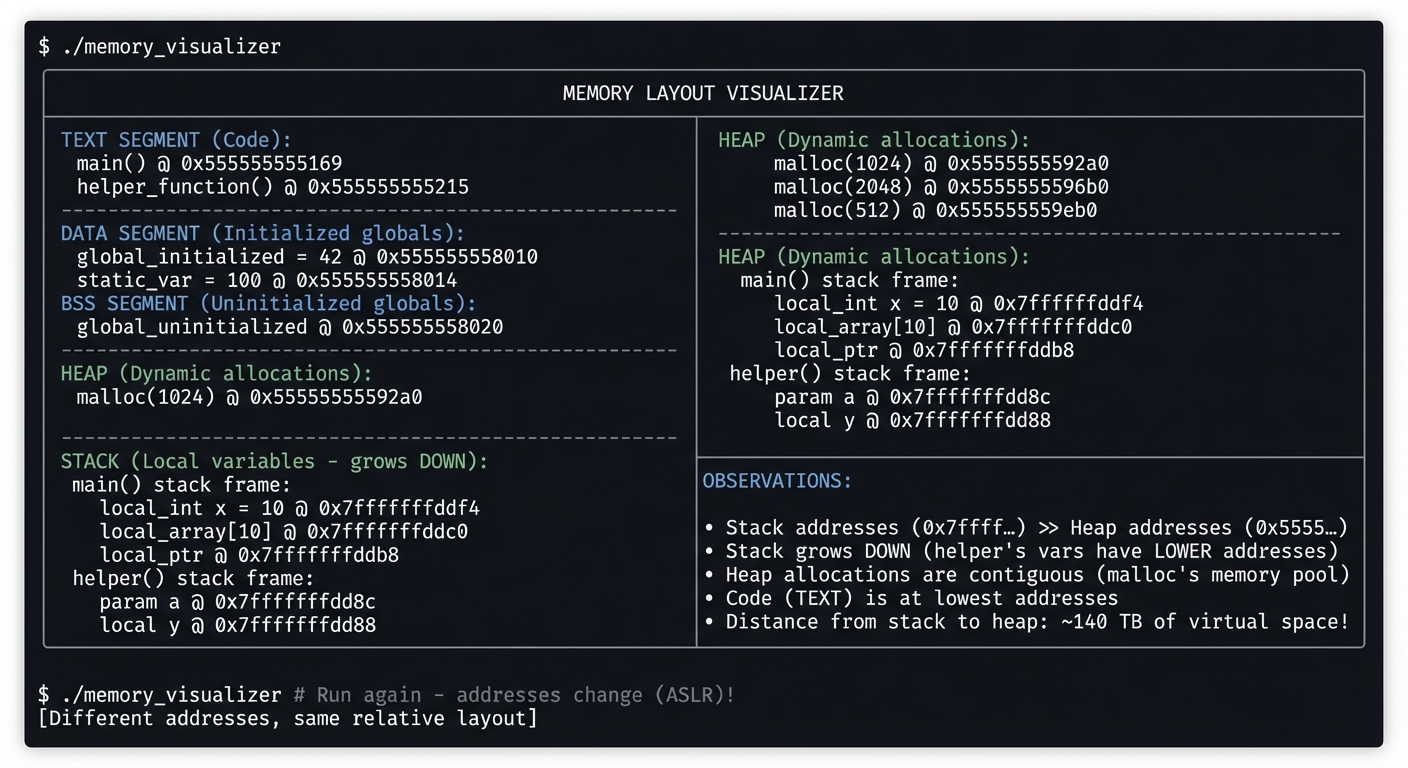
You’ll have a program that when run, displays a complete map of where everything lives in memory:
Example Output:
$ ./memory_visualizer

╔════════════════════════════════════════════════════════════════╗
║                    MEMORY LAYOUT VISUALIZER                    ║
╠════════════════════════════════════════════════════════════════╣
║                                                                ║
║  TEXT SEGMENT (Code):                                          ║
║  ─────────────────────                                         ║
║    main()             @ 0x555555555169                         ║
║    helper_function()  @ 0x555555555215                         ║
║                                                                ║
║  DATA SEGMENT (Initialized globals):                           ║
║  ─────────────────────────────────────                         ║
║    global_initialized = 42      @ 0x555555558010               ║
║    static_var = 100             @ 0x555555558014               ║
║                                                                ║
║  BSS SEGMENT (Uninitialized globals):                          ║
║  ────────────────────────────────────                          ║
║    global_uninitialized         @ 0x555555558020               ║
║                                                                ║
║  HEAP (Dynamic allocations):                                   ║
║  ──────────────────────────                                    ║
║    malloc(1024)                 @ 0x5555555592a0               ║
║    malloc(2048)                 @ 0x5555555596b0               ║
║    malloc(512)                  @ 0x555555559eb0               ║
║                                                                ║
║  STACK (Local variables - grows DOWN):                         ║
║  ─────────────────────────────────────                         ║
║    main() stack frame:                                         ║
║      local_int x = 10           @ 0x7fffffffddf4               ║
║      local_array[10]            @ 0x7fffffffddc0               ║
║      local_ptr                  @ 0x7fffffffddb8               ║
║    helper() stack frame:                                       ║
║      param a                    @ 0x7fffffffdd8c               ║
║      local y                    @ 0x7fffffffdd88               ║
║                                                                ║
╠════════════════════════════════════════════════════════════════╣
║  OBSERVATIONS:                                                 ║
║  • Stack addresses (0x7fff...) >> Heap addresses (0x5555...)   ║
║  • Stack grows DOWN (helper's vars have LOWER addresses)       ║
║  • Heap allocations are contiguous (malloc's memory pool)      ║
║  • Code (TEXT) is at lowest addresses                          ║
║  • Distance from stack to heap: ~140 TB of virtual space!      ║
╚════════════════════════════════════════════════════════════════╝

$ ./memory_visualizer  # Run again - addresses change (ASLR)!
[Different addresses, same relative layout]
The Core Question You’re Answering
“What IS memory? Where do my variables actually live, and why does it matter?”
Before you write any code, sit with this question. Most programmers have a vague sense of “variables” but can’t explain where they actually are. A variable is just a label for a location in a giant array of bytes. Understanding this transforms how you think about C.
Concepts You Must Understand First
Stop and research these before coding:
- Virtual Memory
- What’s the difference between virtual and physical addresses?
- Why does your program see addresses like 0x7fff… when you only have 16GB RAM?
- What is ASLR and why do addresses change between runs?
- Book Reference: CS:APP Ch. 9.1-9.4 — Bryant & O’Hallaron
- Process Memory Segments
- What’s stored in TEXT, DATA, BSS, HEAP, and STACK?
- Why are they in that order?
- What happens when stack meets heap?
- Book Reference: The Linux Programming Interface Ch. 6 — Kerrisk
- Pointer Basics
- What does
&xactually return? - What’s the difference between
int *pandint p? - How do you print an address?
- Book Reference: C Programming: A Modern Approach Ch. 11 — K.N. King
- What does
Questions to Guide Your Design
Before implementing, think through these:
- Variable Categories
- What types of variables should you include? (global, static, local, dynamic)
- How will you demonstrate the difference between initialized and uninitialized globals?
- How will you show function addresses?
- Output Design
- How will you organize the output to clearly show the memory layout?
- How will you make the addresses comparable (sorting, grouping)?
- Should you calculate and display the distance between segments?
- Demonstration
- How will you show that the stack grows downward?
- How will you demonstrate heap allocation patterns?
- Can you show what happens with nested function calls?
Thinking Exercise
Trace the Addresses
Before coding, predict what you’ll see:
#include <stdio.h>
#include <stdlib.h>
int global = 42;
int uninitialized;
void func(int param) {
int local = 10;
printf("param: %p\n", (void*)¶m);
printf("local: %p\n", (void*)&local);
}
int main() {
int x = 5;
int *heap = malloc(100);
printf("global: %p\n", (void*)&global);
printf("uninit: %p\n", (void*)&uninitialized);
printf("x: %p\n", (void*)&x);
printf("heap: %p\n", (void*)heap);
printf("main: %p\n", (void*)main);
printf("func: %p\n", (void*)func);
func(99);
free(heap);
return 0;
}
Questions while tracing:
- Which address will be highest? Which lowest?
- Will
paramandlocalinfunchave higher or lower addresses thanxinmain? - Will
globalanduninitializedhave similar addresses? - Will
mainandfunchave similar addresses?
The Interview Questions They’ll Ask
Prepare to answer these:
- “Explain the memory layout of a C program.”
- “What’s the difference between stack and heap memory?”
- “Why would you choose stack allocation vs heap allocation?”
- “What is a memory leak? How does it happen?”
- “What is ASLR and why is it used?”
- “What happens when you return a pointer to a local variable?”
- “How does the operating system prevent stack overflow into heap?”
Hints in Layers
Hint 1: Start Simple Just print the address of one local variable and one global variable. See the difference.
Hint 2: Add Categories Create separate sections: one for printing text/code addresses, one for data, one for heap allocations, one for stack.
Hint 3: Helper Functions Create a function that gets called from main. Print addresses of its local variables. Notice they’re LOWER than main’s locals (stack grows down).
Hint 4: Use GDB to Verify
Compile with -g, run in GDB, use info proc mappings to see the actual memory layout. Compare with your program’s output.
Books That Will Help
| Topic | Book | Chapter |
|---|---|---|
| Process memory layout | CS:APP by Bryant & O’Hallaron | Ch. 9 |
| Pointer fundamentals | C Programming: A Modern Approach by K.N. King | Ch. 11 |
| Virtual memory concepts | Operating Systems: Three Easy Pieces by Arpaci-Dusseau | Ch. 13-15 |
| Linux memory management | The Linux Programming Interface by Kerrisk | Ch. 6 |
Common Pitfalls and Debugging
Problem 1: “Works for simple inputs, fails on edge cases”
- Why: Invariants are implicit and not enforced at boundaries.
- Fix: Add explicit precondition checks and assertion-backed invariants.
- Quick test: Run dedicated edge-case tests under sanitizers.
Problem 2: “Intermittent or non-deterministic crashes”
- Why: Undefined behavior, uninitialized state, or races.
- Fix: Reproduce deterministically, isolate state transitions, then patch the root cause.
- Quick test: Use
-fsanitize=address,undefined(and thread sanitizer for concurrent projects).
Problem 3: “Performance collapses as input grows”
- Why: Hidden O(n^2) paths or excessive allocation/copying.
- Fix: Profile hot paths and redesign data movement strategy.
- Quick test: Benchmark with 10x and 100x workload sizes.
Definition of Done
- Core functionality for Memory Visualizer — See Where Your Variables Live works on reference inputs.
- Edge cases and failure paths are tested and documented.
- Reproducible test command exists and passes on a clean run.
- Sanitizer/static-analysis pass is clean for project scope.
Implementation Hints
The key insight is using the & operator to get addresses and %p to print them:
Print address: printf("%p\n", (void *)&variable);
Print value at pointer: printf("%d\n", *pointer);
Cast to void* for portability with %p
For the stack growth demonstration:
- Create a recursive function
- In each call, print the address of a local variable
- Watch addresses decrease (stack growing down)
For heap demonstration:
- Multiple malloc calls
- Print each returned address
- Notice they tend to be sequential
To observe segments:
- Compare addresses of: functions (TEXT), initialized globals (DATA), uninitialized globals (BSS), malloc’d memory (HEAP), local variables (STACK)
- The relative ordering reveals the memory layout
Learning milestones:
- You print addresses correctly → You understand pointer basics
- You identify which segment each variable is in → You understand memory layout
- You demonstrate stack growth direction → You understand function call mechanics
Project 2: String Library — Implement strlen, strcpy, strcmp from Scratch
- File: C_PROGRAMMING_COMPLETE_MASTERY.md
- Main Programming Language: C
- Alternative Programming Languages: Assembly (x86-64), Rust, Zig
- Coolness Level: Level 3: Genuinely Clever
- Business Potential: 1. The “Resume Gold”
- Difficulty: Level 2: Intermediate
- Knowledge Area: Strings / Pointers / Buffer Safety
- Software or Tool: Valgrind, AddressSanitizer
- Main Book: C Programming: A Modern Approach by K.N. King
What you’ll build: Your own implementation of the core C string functions—strlen, strcpy, strncpy, strcmp, strncmp, strcat, strchr, strstr—that handle edge cases correctly and match the behavior of the standard library.
Why it teaches C: Strings in C are the source of countless bugs and security vulnerabilities. By implementing these functions yourself, you’ll deeply understand null termination, buffer management, and why functions like strcpy are dangerous.
Core challenges you’ll face:
- Walking memory until null terminator → maps to pointer arithmetic
- Preventing buffer overflows → maps to bounds checking discipline
- Handling edge cases (empty strings, NULL pointers) → maps to defensive programming
- Making your implementations as fast as the originals → maps to optimization
Key Concepts:
- String internals: C Programming: A Modern Approach Ch. 13 — K.N. King
- Secure string handling: Effective C Ch. 7 — Robert Seacord
- Buffer overflow vulnerabilities: Hacking: The Art of Exploitation Ch. 2 — Jon Erickson
Difficulty: Intermediate Time estimate: 1-2 weeks Prerequisites: Project 1 (Memory Visualizer), pointer arithmetic basics
Real World Outcome
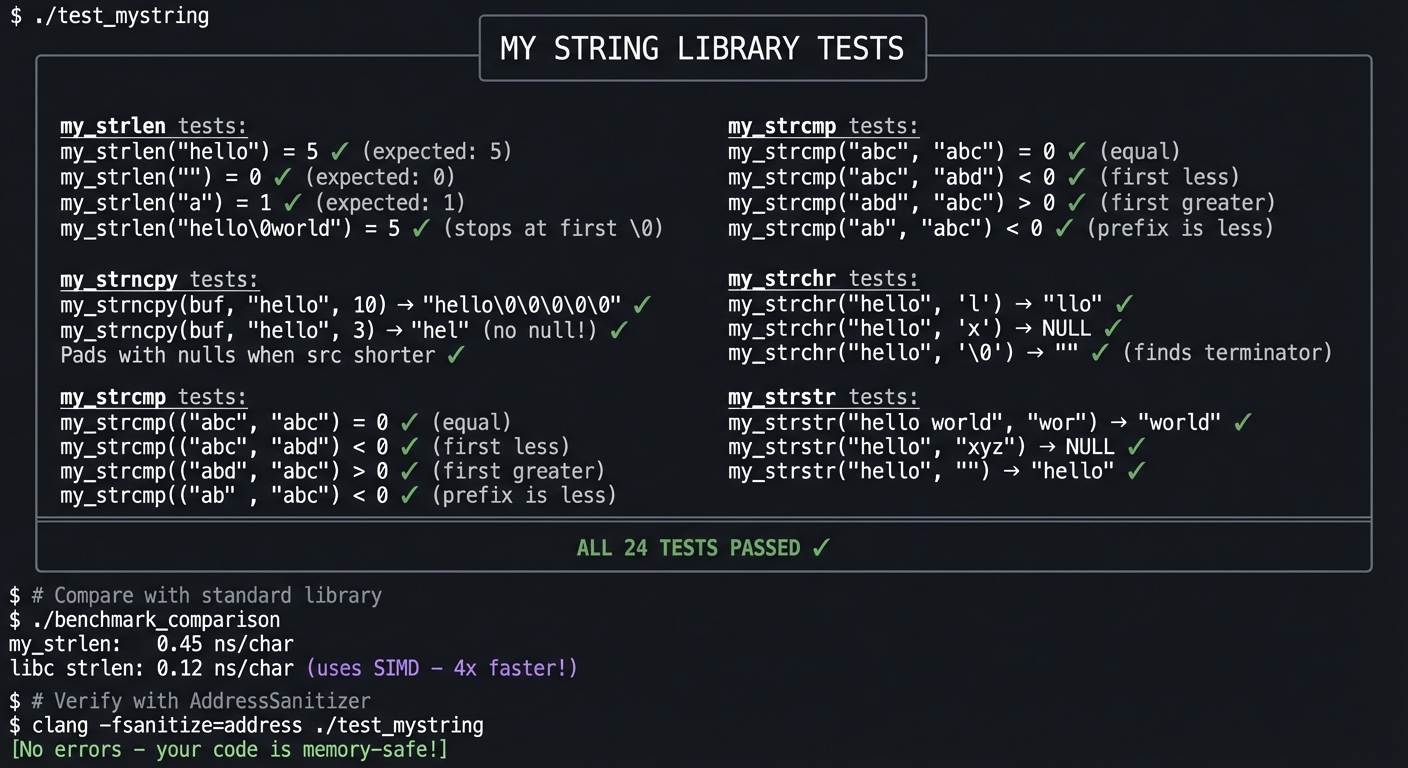
You’ll have a complete string library that you can compile and link instead of using libc’s string functions:
Example Output:
$ ./test_mystring

╔════════════════════════════════════════════════════════════════╗
║                    MY STRING LIBRARY TESTS                     ║
╠════════════════════════════════════════════════════════════════╣
║                                                                ║
║  my_strlen tests:                                              ║
║  ─────────────────                                             ║
║    my_strlen("hello")     = 5    ✓ (expected: 5)               ║
║    my_strlen("")          = 0    ✓ (expected: 0)               ║
║    my_strlen("a")         = 1    ✓ (expected: 1)               ║
║    my_strlen("hello\0world") = 5 ✓ (stops at first \0)         ║
║                                                                ║
║  my_strcpy tests:                                              ║
║  ─────────────────                                             ║
║    my_strcpy(buf, "test") → "test" ✓                           ║
║    Returns pointer to dest ✓                                   ║
║    Copies null terminator ✓                                    ║
║                                                                ║
║  my_strncpy tests:                                             ║
║  ─────────────────                                             ║
║    my_strncpy(buf, "hello", 10) → "hello\0\0\0\0\0" ✓          ║
║    my_strncpy(buf, "hello", 3)  → "hel" (no null!) ✓           ║
║    Pads with nulls when src shorter ✓                          ║
║                                                                ║
║  my_strcmp tests:                                              ║
║  ─────────────────                                             ║
║    my_strcmp("abc", "abc")  = 0  ✓ (equal)                     ║
║    my_strcmp("abc", "abd")  < 0  ✓ (first less)                ║
║    my_strcmp("abd", "abc")  > 0  ✓ (first greater)             ║
║    my_strcmp("ab", "abc")   < 0  ✓ (prefix is less)            ║
║                                                                ║
║  my_strchr tests:                                              ║
║  ─────────────────                                             ║
║    my_strchr("hello", 'l')  → "llo" ✓                          ║
║    my_strchr("hello", 'x')  → NULL ✓                           ║
║    my_strchr("hello", '\0') → "" ✓ (finds terminator)          ║
║                                                                ║
║  my_strstr tests:                                              ║
║  ─────────────────                                             ║
║    my_strstr("hello world", "wor") → "world" ✓                 ║
║    my_strstr("hello", "xyz")       → NULL ✓                    ║
║    my_strstr("hello", "")          → "hello" ✓                 ║
║                                                                ║
╠════════════════════════════════════════════════════════════════╣
║  ALL 24 TESTS PASSED ✓                                         ║
╚════════════════════════════════════════════════════════════════╝

$ # Compare with standard library
$ ./benchmark_comparison
my_strlen:  0.45 ns/char
libc strlen: 0.12 ns/char  (uses SIMD - 4x faster!)

$ # Verify with AddressSanitizer
$ clang -fsanitize=address ./test_mystring
[No errors - your code is memory-safe!]
The Core Question You’re Answering
“Why are C strings the source of so many bugs, and what does ‘null-terminated’ really mean for safety?”
Before you write any code, sit with this question. A C “string” isn’t really a type—it’s a convention. It’s just bytes in memory until you hit a zero byte. If that zero is missing, string functions keep reading… and reading… into memory they shouldn’t touch.
Concepts You Must Understand First
Stop and research these before coding:
- Null Termination Convention
- What byte value is the null terminator?
- Why doesn’t C store string length?
- What happens if a string isn’t null-terminated?
- Book Reference: C Programming: A Modern Approach Ch. 13.1 — K.N. King
- Pointer Arithmetic
- What does
p++do whenpis achar *? - What about when
pis anint *? - How do you walk through a string character by character?
- Book Reference: C Programming: A Modern Approach Ch. 12 — K.N. King
- What does
- Buffer Overflow
- What happens when you copy a 20-byte string into a 10-byte buffer?
- Why is
strcpyconsidered dangerous? - How does
strncpyattempt to solve this (and why does it fail)? - Book Reference: Effective C Ch. 7.4 — Robert Seacord
Questions to Guide Your Design
Before implementing, think through these:
- Edge Cases
- What should
strlen(NULL)do? (crash? return 0?) - What should
strcmp("", "")return? - What should
strchr("test", '\0')find?
- What should
- Return Values
- Why does
strcpyreturn the destination pointer? - Why does
strcmpreturn an int instead of just -1, 0, 1? - What should
strchrreturn if the character isn’t found?
- Why does
- The strncpy Problem
- When is
strncpy’s output NOT null-terminated? - Why does
strncpypad with nulls when src is shorter? - What’s a safer alternative you could design?
- When is
Thinking Exercise
Trace the Memory
Before coding, trace what happens with this code:
char dest[10];
strcpy(dest, "Hello, World!");  // 14 chars including \0
Questions while tracing:
- Draw the memory layout of
dest(10 boxes) - What gets written to positions 0-9?
- What gets written to positions 10-13?
- What memory did we just corrupt?
- Why might the program seem to work despite this bug?
The Interview Questions They’ll Ask
Prepare to answer these:
- “Implement
strlenfrom scratch.” - “Why is
strcpydangerous? What would you use instead?” - “What’s the difference between
strncpyandstrlcpy?” - “How would you implement
strstrefficiently?” - “What’s a buffer overflow and how do string functions cause them?”
- “Why do we need
memcpywhen we havestrcpy?” - “Implement
strcmp- what should it return for different inputs?”
Hints in Layers
Hint 1: strlen First
Start with strlen. It’s just counting: walk the pointer forward until you hit '\0', counting steps.
Hint 2: Use Pointer Walking
Instead of indexing str[i], try *str++. It’s more idiomatic C and forces you to think in pointers.
Hint 3: strcpy is strlen + memcpy
Once you understand walking to the null terminator, strcpy is just: copy each byte, including the final '\0'.
Hint 4: Test Edge Cases Early Write tests for empty strings, single characters, NULL pointers BEFORE you think you’re done. The edge cases reveal your bugs.
Books That Will Help
| Topic | Book | Chapter |
|---|---|---|
| String fundamentals | C Programming: A Modern Approach by K.N. King | Ch. 13 |
| Secure string handling | Effective C by Robert Seacord | Ch. 7 |
| Buffer overflow exploits | Hacking: Art of Exploitation by Erickson | Ch. 2-3 |
| String algorithms | Algorithms in C by Sedgewick | Ch. 19 |
Common Pitfalls and Debugging
Problem 1: “Works for simple inputs, fails on edge cases”
- Why: Invariants are implicit and not enforced at boundaries.
- Fix: Add explicit precondition checks and assertion-backed invariants.
- Quick test: Run dedicated edge-case tests under sanitizers.
Problem 2: “Intermittent or non-deterministic crashes”
- Why: Undefined behavior, uninitialized state, or races.
- Fix: Reproduce deterministically, isolate state transitions, then patch the root cause.
- Quick test: Use
-fsanitize=address,undefined(and thread sanitizer for concurrent projects).
Problem 3: “Performance collapses as input grows”
- Why: Hidden O(n^2) paths or excessive allocation/copying.
- Fix: Profile hot paths and redesign data movement strategy.
- Quick test: Benchmark with 10x and 100x workload sizes.
Definition of Done
- Core functionality for String Library — Implement strlen, strcpy, strcmp from Scratch works on reference inputs.
- Edge cases and failure paths are tested and documented.
- Reproducible test command exists and passes on a clean run.
- Sanitizer/static-analysis pass is clean for project scope.
Implementation Hints
The core pattern for walking a string:
// Pattern 1: Index-based
while (str[i] != '\0') {
    // process str[i]
    i++;
}

// Pattern 2: Pointer-based (more idiomatic C)
while (*str) {      // *str is '\0' == 0 == false
    // process *str
    str++;
}

// Pattern 3: Compact pointer walking
while (*str++)
    ;   // Just find the end
For strcmp, remember:
- Returns negative if s1 < s2
- Returns positive if s1 > s2
- Returns 0 if equal
- Compare character by character until mismatch or both reach ‘\0’
For strstr (find substring):
- Naive: O(n*m) - check every position
- Can mention KMP or Boyer-Moore for optimization (but implement naive first)
Learning milestones:
- strlen and strcpy work → You understand null termination
- strncpy handles all edge cases → You understand bounds checking
- strstr finds substrings correctly → You understand nested string traversal
Project 3: Dynamic Array — Build a Vector/ArrayList in C
- File: C_PROGRAMMING_COMPLETE_MASTERY.md
- Main Programming Language: C
- Alternative Programming Languages: Rust, Zig, Go
- Coolness Level: Level 3: Genuinely Clever
- Business Potential: 2. The “Micro-SaaS / Pro Tool”
- Difficulty: Level 2: Intermediate
- Knowledge Area: Data Structures / Memory Management
- Software or Tool: Valgrind, GDB
- Main Book: Mastering Algorithms with C by Kyle Loudon
What you’ll build: A generic, resizable array (like C++’s std::vector or Java’s ArrayList) that automatically grows when full, with proper memory management and a clean API.
Why it teaches C: This is your first serious data structure in C. You’ll wrestle with malloc, realloc, and free. You’ll implement the growth strategy (typically 2x). You’ll feel the pain of manual memory management—and understand why it matters.
Core challenges you’ll face:
- Growing the array when capacity is reached → maps to realloc behavior
- Maintaining size vs capacity → maps to data structure invariants
- Proper cleanup on destroy → maps to ownership and lifetime
- Making it generic (void pointers or macros) → maps to C’s approach to generics
Key Concepts:
- Dynamic memory: Effective C Ch. 6 — Robert Seacord
- Amortized analysis: Introduction to Algorithms Ch. 17 — CLRS
- C generics patterns: C Interfaces and Implementations Ch. 3 — Hanson
Difficulty: Intermediate Time estimate: 1 week Prerequisites: Projects 1-2 (Memory Visualizer, String Library), malloc/free basics
Real World Outcome
You’ll have a production-quality dynamic array that you can use in your own C projects:
Example Output:
$ ./test_vector

╔════════════════════════════════════════════════════════════════╗
║                    DYNAMIC ARRAY TESTS                         ║
╠════════════════════════════════════════════════════════════════╣
║                                                                ║
║  Basic operations:                                             ║
║  ─────────────────                                             ║
║    vec_create(sizeof(int))     → capacity: 8, size: 0  ✓       ║
║    vec_push(v, &42)            → [42], size: 1          ✓      ║
║    vec_push(v, &17)            → [42, 17], size: 2      ✓      ║
║    vec_get(v, 0)               → 42                     ✓      ║
║    vec_get(v, 1)               → 17                     ✓      ║
║                                                                ║
║  Growth behavior:                                              ║
║  ─────────────────                                             ║
║    Initial capacity: 8                                         ║
║    After 8 pushes:  capacity stays 8                           ║
║    After 9 pushes:  capacity grows to 16 (2x)                  ║
║    After 17 pushes: capacity grows to 32 (2x)                  ║
║                                                                ║
║  Memory growth visualization:                                  ║
║    [████████░░░░░░░░] 8/16 (50% used)                          ║
║    [████████████████] 16/16 → realloc!                         ║
║    [████████████████░░░░░░░░░░░░░░░░] 17/32 (53% used)         ║
║                                                                ║
║  Removal operations:                                           ║
║  ─────────────────                                             ║
║    vec_pop(v)        → removed last, size: 16           ✓      ║
║    vec_remove(v, 5)  → removed index 5, size: 15        ✓      ║
║    Shift behavior verified (elements moved)             ✓      ║
║                                                                ║
║  Edge cases:                                                   ║
║  ─────────────────                                             ║
║    vec_get(v, -1)    → NULL (bounds check)              ✓      ║
║    vec_get(v, 999)   → NULL (bounds check)              ✓      ║
║    vec_pop(empty)    → NULL (empty check)               ✓      ║
║                                                                ║
║  Generic usage (strings):                                      ║
║  ─────────────────                                             ║
║    Vector *sv = vec_create(sizeof(char*));                     ║
║    vec_push(sv, &"hello")      → ["hello"]              ✓      ║
║    vec_push(sv, &"world")      → ["hello", "world"]     ✓      ║
║                                                                ║
║  Memory validation (Valgrind):                                 ║
║  ─────────────────                                             ║
║    Allocations: 47                                             ║
║    Frees: 47                                                   ║
║    Leaks: 0 bytes                                       ✓      ║
║                                                                ║
╠════════════════════════════════════════════════════════════════╣
║  ALL 32 TESTS PASSED ✓                                         ║
╚════════════════════════════════════════════════════════════════╝
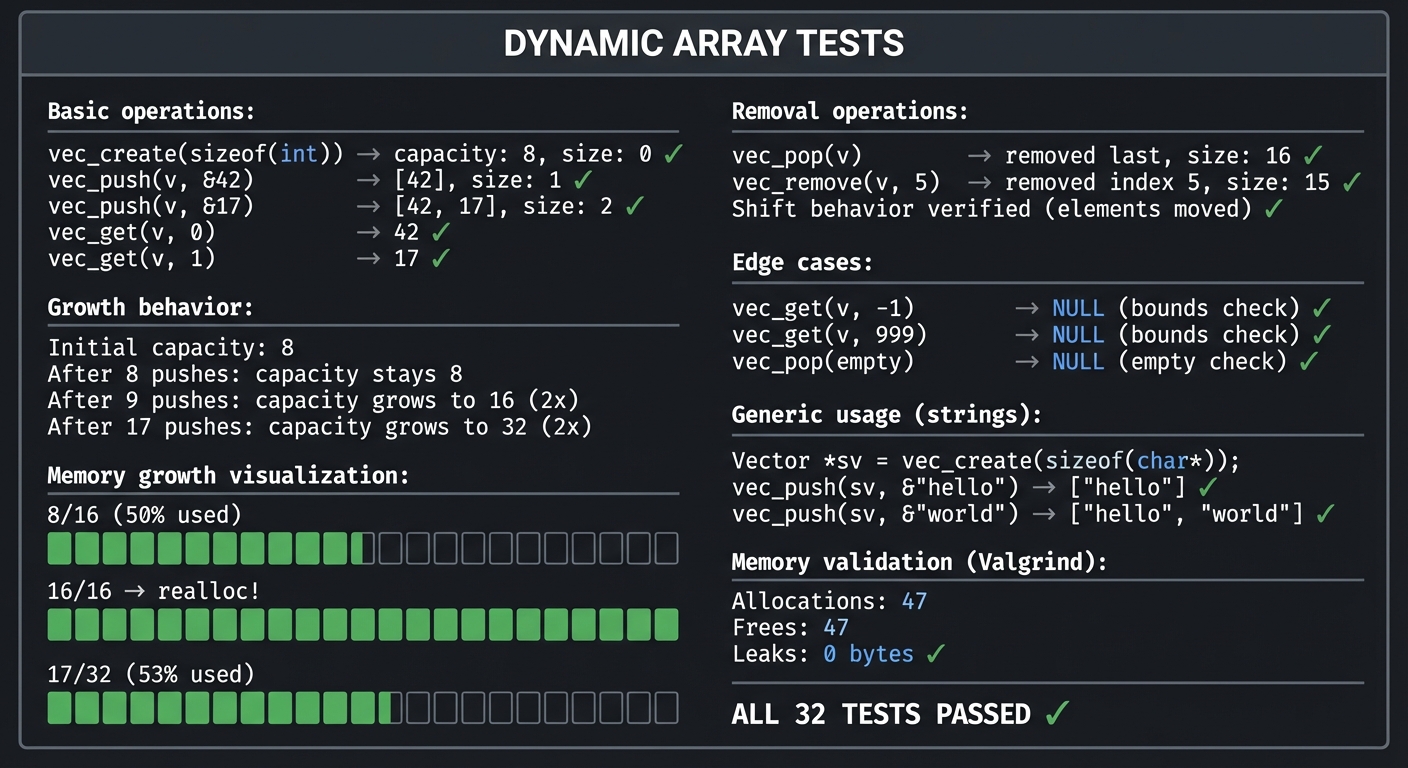
The Core Question You’re Answering
“How do I create a data structure that grows dynamically when I don’t know the size upfront, without leaking memory?”
Before you write any code, sit with this question. Fixed-size arrays are limiting. But dynamic growth means reallocating memory, copying data, and tracking ownership. This is where C gets real.
Concepts You Must Understand First
Stop and research these before coding:
- malloc, realloc, free
- What does
malloc(n)return? - What does
realloc(ptr, newsize)do to the old memory? - What happens if you
free()twice? - Book Reference: Effective C Ch. 6 — Robert Seacord
- What does
- Amortized Complexity
- Why grow by 2x instead of by 1?
- What’s the amortized cost of n push operations?
- What’s the worst case for a single push?
- Book Reference: Introduction to Algorithms Ch. 17 — CLRS
- Generics in C
- How do you store “any type” when C has no generics?
- What is
void *and how do you use it? - What’s the memcpy approach vs the macro approach?
- Book Reference: C Interfaces and Implementations Ch. 3 — Hanson
Questions to Guide Your Design
Before implementing, think through these:
- Data Structure Design
- What fields does your vector struct need? (data, size, capacity, element_size?)
- Should the struct be opaque (hide internals)?
- How do you handle different element sizes?
- Growth Policy
- When exactly do you grow? (at capacity? when push would overflow?)
- By how much? (2x? 1.5x? add constant?)
- Should you ever shrink?
- API Design
- What should
vec_getreturn? (value? pointer?) - How do you handle out-of-bounds access?
- Should push take a pointer or a value?
- What should
Thinking Exercise
Trace the Growth
Before coding, trace these operations:
vec_create()      → capacity=8, size=0
push 10 elements  → ???
Questions while tracing:
- After push 1-8, what are capacity and size?
- When does the first realloc happen?
- Where does realloc put the new memory?
- What happens to the old memory?
The Interview Questions They’ll Ask
Prepare to answer these:
- “Implement a dynamic array in C.”
- “Why grow by 2x? What’s the amortized complexity?”
- “What happens if realloc fails?”
- “How do you make a vector generic in C?”
- “What’s the difference between size and capacity?”
- “How would you implement shrinking?”
- “What memory errors could occur with a dynamic array?”
Hints in Layers
Hint 1: Start Fixed
First, build a vector that works with int only. Don’t try to make it generic yet.
Hint 2: Growth First
Implement push and get first. Don’t worry about remove or pop until growth works perfectly.
Hint 3: Check realloc Return
realloc can fail and return NULL. If you do v->data = realloc(v->data, ...) and it fails, you’ve lost your data!
Hint 4: Make Generic Last
Once int version works, change int *data to void *data, add elem_size, and use memcpy for moving elements.
Books That Will Help
| Topic | Book | Chapter |
|---|---|---|
| Dynamic memory | Effective C by Seacord | Ch. 6 |
| Data structure design | Mastering Algorithms with C by Loudon | Ch. 4 |
| Generic ADTs in C | C Interfaces and Implementations by Hanson | Ch. 3 |
| Amortized analysis | Introduction to Algorithms by CLRS | Ch. 17 |
Common Pitfalls and Debugging
Problem 1: “Works for simple inputs, fails on edge cases”
- Why: Invariants are implicit and not enforced at boundaries.
- Fix: Add explicit precondition checks and assertion-backed invariants.
- Quick test: Run dedicated edge-case tests under sanitizers.
Problem 2: “Intermittent or non-deterministic crashes”
- Why: Undefined behavior, uninitialized state, or races.
- Fix: Reproduce deterministically, isolate state transitions, then patch the root cause.
- Quick test: Use
-fsanitize=address,undefined(and thread sanitizer for concurrent projects).
Problem 3: “Performance collapses as input grows”
- Why: Hidden O(n^2) paths or excessive allocation/copying.
- Fix: Profile hot paths and redesign data movement strategy.
- Quick test: Benchmark with 10x and 100x workload sizes.
Definition of Done
- Core functionality for Dynamic Array — Build a Vector/ArrayList in C works on reference inputs.
- Edge cases and failure paths are tested and documented.
- Reproducible test command exists and passes on a clean run.
- Sanitizer/static-analysis pass is clean for project scope.
Implementation Hints
The struct needs at minimum:
- void *data     // pointer to the actual array
- size_t size    // number of elements currently stored
- size_t capacity // total slots available
- size_t elem_size // sizeof each element (for generics)
Key operation - growing:
1. Check if size == capacity
2. If so, new_capacity = capacity * 2
3. temp = realloc(data, new_capacity * elem_size)
4. If temp is NULL, return error (don't lose data!)
5. data = temp
6. capacity = new_capacity
For generic element access:
// Get pointer to element at index i
void *elem = (char *)v->data + (i * v->elem_size);
Learning milestones:
- Basic int vector works → You understand dynamic allocation
- Growth works without leaks → You understand realloc
- Generic version works → You understand void* and memcpy
Project 4: Linked List Library — Singly and Doubly Linked Lists
- File: C_PROGRAMMING_COMPLETE_MASTERY.md
- Main Programming Language: C
- Alternative Programming Languages: Rust, Go, Zig
- Coolness Level: Level 2: Practical but Forgettable
- Business Potential: 1. The “Resume Gold”
- Difficulty: Level 2: Intermediate
- Knowledge Area: Data Structures / Pointers / Memory
- Software or Tool: Valgrind, GDB
- Main Book: Mastering Algorithms with C by Kyle Loudon
What you’ll build: A complete linked list library supporting both singly and doubly linked lists with operations like insert, delete, search, reverse, and merge—all with proper memory management and iterator patterns.
Why it teaches C: Linked lists are the purest expression of pointer manipulation. Every operation involves pointer rewiring. You’ll face dangling pointers, memory leaks, and the classic “lost node” bug. Mastering linked lists means mastering pointers.
Core challenges you’ll face:
- Inserting at head, tail, and middle → maps to pointer rewiring
- Deleting without losing references → maps to maintaining invariants
- Reversing without extra memory → maps to in-place algorithms
- Not leaking memory on any operation → maps to ownership discipline
Key Concepts:
- Linked data structures: Mastering Algorithms with C Ch. 5 — Kyle Loudon
- Pointer manipulation: C Programming: A Modern Approach Ch. 17.5 — K.N. King
- Iterator pattern in C: C Interfaces and Implementations Ch. 6 — Hanson
Difficulty: Intermediate Time estimate: 1 week Prerequisites: Projects 1-3, confident with malloc/free
Real World Outcome
You’ll have a linked list library that handles all common operations:
Example Output:
$ ./test_linkedlist

╔════════════════════════════════════════════════════════════════╗
║                    LINKED LIST TESTS                           ║
╠════════════════════════════════════════════════════════════════╣
║                                                                ║
║  Singly Linked List:                                           ║
║  ───────────────────                                           ║
║    list_create()        → [] (empty)                    ✓      ║
║    list_push_front(10)  → [10]                          ✓      ║
║    list_push_front(20)  → [20] → [10]                   ✓      ║
║    list_push_back(5)    → [20] → [10] → [5]             ✓      ║
║                                                                ║
║    Visual:                                                     ║
║    ┌────┐    ┌────┐    ┌────┐                                  ║
║    │ 20 │───►│ 10 │───►│  5 │───► NULL                         ║
║    └────┘    └────┘    └────┘                                  ║
║                                                                ║
║    list_pop_front()     → returns 20, list: [10] → [5]  ✓      ║
║    list_find(5)         → found at position 1           ✓      ║
║    list_find(99)        → not found (returns NULL)      ✓      ║
║                                                                ║
║  Doubly Linked List:                                           ║
║  ───────────────────                                           ║
║    dlist_create()       → [] (empty)                    ✓      ║
║    dlist_push_back(1,2,3,4,5)                           ✓      ║
║                                                                ║
║    Visual:                                                     ║
║    NULL ◄──┌────┐◄──►┌────┐◄──►┌────┐◄──►┌────┐◄──►┌────┐──► NULL
║            │  1 │    │  2 │    │  3 │    │  4 │    │  5 │
║            └────┘    └────┘    └────┘    └────┘    └────┘
║                                                                ║
║    dlist_reverse()      → [5] ◄──► [4] ◄──► [3] ◄──► [2] ◄──► [1]
║    dlist_pop_back()     → returns 1, list: [5,4,3,2]    ✓      ║
║                                                                ║
║  Advanced operations:                                          ║
║  ───────────────────                                           ║
║    list_reverse(in-place) → [5] → [10] → [20]           ✓      ║
║    list_merge_sorted([1,3,5], [2,4,6])                  ✓      ║
║    Result: [1] → [2] → [3] → [4] → [5] → [6]                   ║
║                                                                ║
║  Memory validation (Valgrind):                                 ║
║  ─────────────────────────────                                 ║
║    Total allocations: 156                                      ║
║    Total frees: 156                                            ║
║    Memory leaks: 0 bytes                                ✓      ║
║                                                                ║
╠════════════════════════════════════════════════════════════════╣
║  ALL 28 TESTS PASSED ✓                                         ║
╚════════════════════════════════════════════════════════════════╝
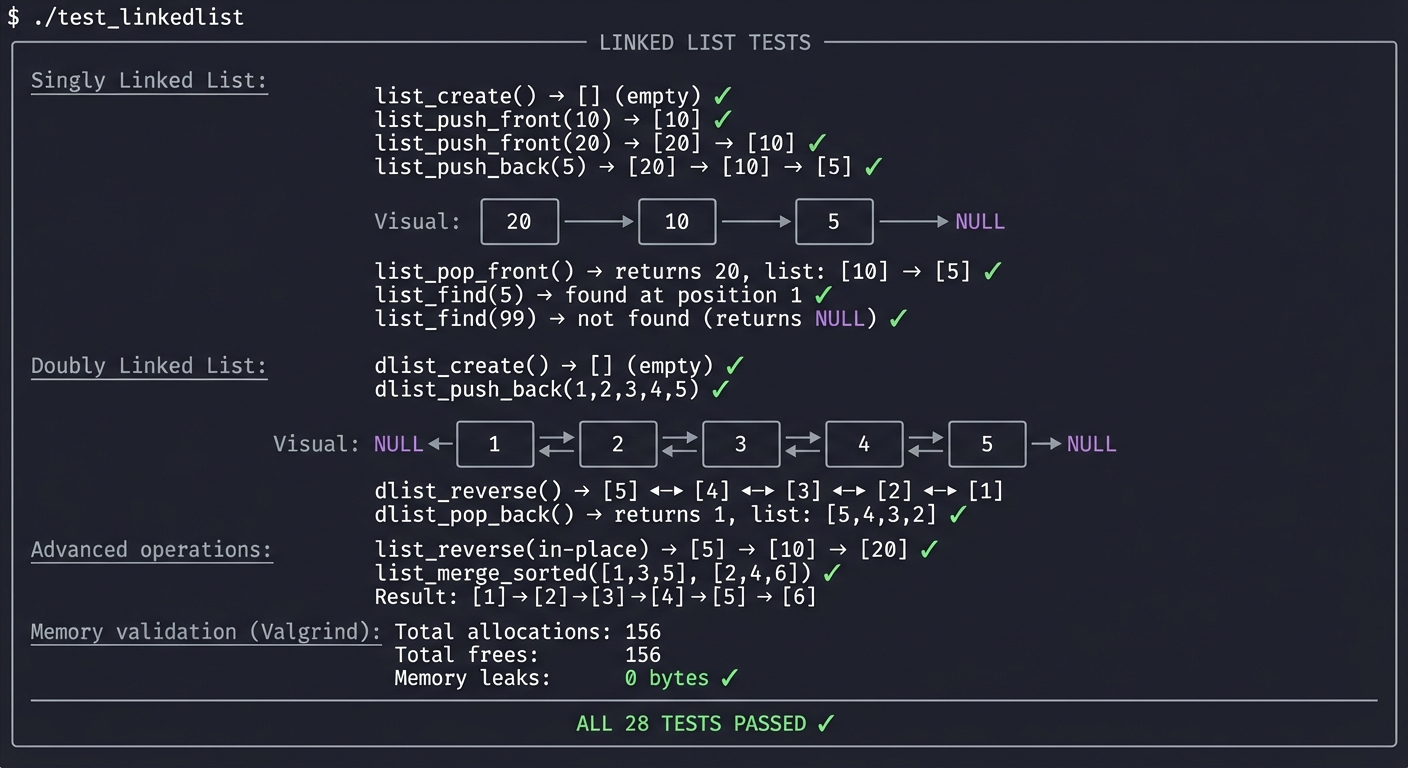
The Core Question You’re Answering
“How do you manipulate memory at the pointer level, rewiring references without losing data or leaking memory?”
Before you write any code, sit with this question. Linked lists are pointer surgery. Every insert and delete requires carefully updating multiple pointers in the right order—one mistake and you either lose nodes or corrupt memory.
Concepts You Must Understand First
Stop and research these before coding:
- Node Structure
- What fields does a linked list node need?
- Why does a doubly linked list node need two pointers?
- When would you embed data vs. point to it?
- Book Reference: Mastering Algorithms with C Ch. 5 — Loudon
- Pointer Rewiring
- When inserting after node A, what pointers must change?
- When deleting node B, how do you preserve the list?
- What’s the order of operations to avoid losing references?
- Book Reference: C Programming: A Modern Approach Ch. 17.5 — King
- Edge Cases
- What’s special about inserting at the head?
- What’s special about inserting at the tail?
- What if the list is empty?
- Book Reference: Mastering Algorithms with C Ch. 5.2-5.3 — Loudon
Questions to Guide Your Design
Before implementing, think through these:
- API Design
- Do you need a separate “List” struct, or just pass around the head node?
- Should you track the tail for O(1) push_back?
- Should you track the size?
- Deletion Challenges
- When deleting a node, how do you get the previous node in a singly linked list?
- Would a “delete this node” function work differently than “delete value X”?
- How do you handle deleting the head?
- Generic Support
- Will your list store ints, void*, or use macros?
- How will the user provide a comparison function for find/delete?
Thinking Exercise
Trace the Insertion
Before coding, draw what happens step by step:
// Inserting 15 after the node containing 10
// List: [5] → [10] → [20] → NULL

Node *new = malloc(sizeof(Node));
new->data = 15;
new->next = ???;  // What goes here?
??? = new;        // What pointer needs to change?
Questions while tracing:
- Draw the list before insertion
- Draw the list with the new node “floating” (not connected)
- Show which pointer gets set first
- Show the final connected state
- What if you set them in the wrong order?
The Interview Questions They’ll Ask
Prepare to answer these:
- “Implement a linked list from scratch.”
- “Reverse a linked list in place.”
- “Detect a cycle in a linked list.” (Floyd’s algorithm)
- “Find the middle element in one pass.”
- “Merge two sorted linked lists.”
- “What’s the time complexity of insert/delete/search?”
- “When would you use a linked list over an array?”
Hints in Layers
Hint 1: Draw Everything Draw the list before and after every operation. Circle the pointers that change. This visualization prevents 90% of bugs.
Hint 2: Handle Empty/Single First Before implementing general insert, handle the edge cases: insert into empty list, insert into single-node list.
Hint 3: Deletion Order When deleting: (1) save pointer to node-to-delete, (2) rewire previous->next, (3) THEN free the deleted node.
Hint 4: Use a Dummy Head For simpler code, some implementations use a dummy/sentinel head node. The first real element is dummy->next. This eliminates head-special-case code.
Books That Will Help
| Topic | Book | Chapter |
|---|---|---|
| Linked list fundamentals | Mastering Algorithms with C by Loudon | Ch. 5 |
| Pointer manipulation | C Programming: A Modern Approach by King | Ch. 17 |
| Classic problems | Cracking the Coding Interview by McDowell | Ch. 2 |
| Iterator pattern | C Interfaces and Implementations by Hanson | Ch. 6 |
Common Pitfalls and Debugging
Problem 1: “Works for simple inputs, fails on edge cases”
- Why: Invariants are implicit and not enforced at boundaries.
- Fix: Add explicit precondition checks and assertion-backed invariants.
- Quick test: Run dedicated edge-case tests under sanitizers.
Problem 2: “Intermittent or non-deterministic crashes”
- Why: Undefined behavior, uninitialized state, or races.
- Fix: Reproduce deterministically, isolate state transitions, then patch the root cause.
- Quick test: Use
-fsanitize=address,undefined(and thread sanitizer for concurrent projects).
Problem 3: “Performance collapses as input grows”
- Why: Hidden O(n^2) paths or excessive allocation/copying.
- Fix: Profile hot paths and redesign data movement strategy.
- Quick test: Benchmark with 10x and 100x workload sizes.
Definition of Done
- Core functionality for Linked List Library — Singly and Doubly Linked Lists works on reference inputs.
- Edge cases and failure paths are tested and documented.
- Reproducible test command exists and passes on a clean run.
- Sanitizer/static-analysis pass is clean for project scope.
Implementation Hints
Singly linked list node:
struct Node {
    void *data;       // or int data for simple version
    struct Node *next;
};
Doubly linked list node:
struct DNode {
    void *data;
    struct DNode *prev;
    struct DNode *next;
};
Insert after node (singly linked):
1. new_node->next = current->next
2. current->next = new_node
// Order matters! Reverse these and you lose the rest of the list
Delete node (singly linked):
1. Find prev such that prev->next == target
2. prev->next = target->next
3. free(target)
// Finding prev requires traversal - O(n)!
Reverse in place (singly linked):
prev = NULL
curr = head
while curr:
    next = curr->next  // Save next before we lose it
    curr->next = prev  // Reverse the link
    prev = curr        // Move prev forward
    curr = next        // Move curr forward
head = prev            // New head is old tail
Learning milestones:
- Insert/delete at head works → You understand basic pointer manipulation
- Insert/delete anywhere works → You understand traversal and rewiring
- Reverse in place works → You understand in-place pointer algorithms
Project 5: Hash Table — Build Your Own Dictionary
- File: C_PROGRAMMING_COMPLETE_MASTERY.md
- Main Programming Language: C
- Alternative Programming Languages: Rust, Go, Zig
- Coolness Level: Level 3: Genuinely Clever
- Business Potential: 2. The “Micro-SaaS / Pro Tool”
- Difficulty: Level 3: Advanced
- Knowledge Area: Data Structures / Hashing / Collision Resolution
- Software or Tool: Valgrind, Performance profiler
- Main Book: Mastering Algorithms with C by Kyle Loudon
What you’ll build: A hash table (dictionary/map) supporting string keys and arbitrary values, with a good hash function, collision resolution via chaining, dynamic resizing, and proper memory management.
Why it teaches C: Hash tables combine everything: dynamic memory, linked lists (for chaining), pointer manipulation, and algorithm design. You’ll implement a hash function, understand load factors, and see why resizing is expensive but necessary.
Core challenges you’ll face:
- Implementing a good hash function → maps to bit manipulation and math
- Collision resolution (chaining vs. open addressing) → maps to data structure tradeoffs
- Resizing when load factor exceeds threshold → maps to amortized complexity
- Handling string keys with proper ownership → maps to memory ownership patterns
Key Concepts:
- Hash table internals: Mastering Algorithms with C Ch. 8 — Kyle Loudon
- Hash functions: Introduction to Algorithms Ch. 11 — CLRS
- Load factor and resizing: Algorithms by Sedgewick & Wayne — Ch. 3.4
Difficulty: Advanced Time estimate: 1-2 weeks Prerequisites: Projects 1-4, linked list implementation
Real World Outcome
You’ll have a production-quality hash table you can use in any C project:
Example Output:
$ ./test_hashtable

╔════════════════════════════════════════════════════════════════╗
║                    HASH TABLE TESTS                            ║
╠════════════════════════════════════════════════════════════════╣
║                                                                ║
║  Basic operations:                                             ║
║  ─────────────────                                             ║
║    ht_create(16)      → capacity: 16, size: 0, load: 0.00  ✓   ║
║    ht_set("name", "Alice") → size: 1                       ✓   ║
║    ht_set("age", "30")     → size: 2                       ✓   ║
║    ht_get("name")          → "Alice"                       ✓   ║
║    ht_get("age")           → "30"                          ✓   ║
║    ht_get("missing")       → NULL                          ✓   ║
║                                                                ║
║  Hash distribution (16 buckets, 8 entries):                    ║
║  ──────────────────────────────────────────                    ║
║    Bucket 0:  ████ (2 entries)                                 ║
║    Bucket 1:  ██ (1 entry)                                     ║
║    Bucket 2:  (empty)                                          ║
║    Bucket 3:  ██ (1 entry)                                     ║
║    Bucket 4:  (empty)                                          ║
║    Bucket 5:  ████ (2 entries)                                 ║
║    Bucket 6:  ██ (1 entry)                                     ║
║    Bucket 7:  ██ (1 entry)                                     ║
║    ...                                                         ║
║    Load factor: 0.50                                           ║
║                                                                ║
║  Collision handling:                                           ║
║  ──────────────────                                            ║
║    ht_set("abc", "value1")  → hash: 7                      ✓   ║
║    ht_set("bca", "value2")  → hash: 7 (collision!)         ✓   ║
║    ht_get("abc")            → "value1" (found via chain)   ✓   ║
║    ht_get("bca")            → "value2" (found via chain)   ✓   ║
║                                                                ║
║  Auto-resize (load factor > 0.75):                             ║
║  ──────────────────────────────────                            ║
║    Before: capacity=16, size=12, load=0.75                     ║
║    ht_set("trigger", "resize")                                 ║
║    After:  capacity=32, size=13, load=0.41                 ✓   ║
║    All entries still accessible after resize               ✓   ║
║                                                                ║
║  Update and delete:                                            ║
║  ────────────────────                                          ║
║    ht_set("name", "Bob")    → updates existing             ✓   ║
║    ht_get("name")           → "Bob" (not "Alice")          ✓   ║
║    ht_delete("name")        → removes entry                ✓   ║
║    ht_get("name")           → NULL                         ✓   ║
║                                                                ║
║  Iteration:                                                    ║
║  ────────────────────                                          ║
║    ht_foreach(ht, print_entry) → prints all key-value      ✓   ║
║                                                                ║
║  Memory validation (Valgrind):                                 ║
║  ─────────────────────────────                                 ║
║    No leaks after ht_destroy()                             ✓   ║
║                                                                ║
╠════════════════════════════════════════════════════════════════╣
║  ALL 35 TESTS PASSED ✓                                         ║
╚════════════════════════════════════════════════════════════════╝
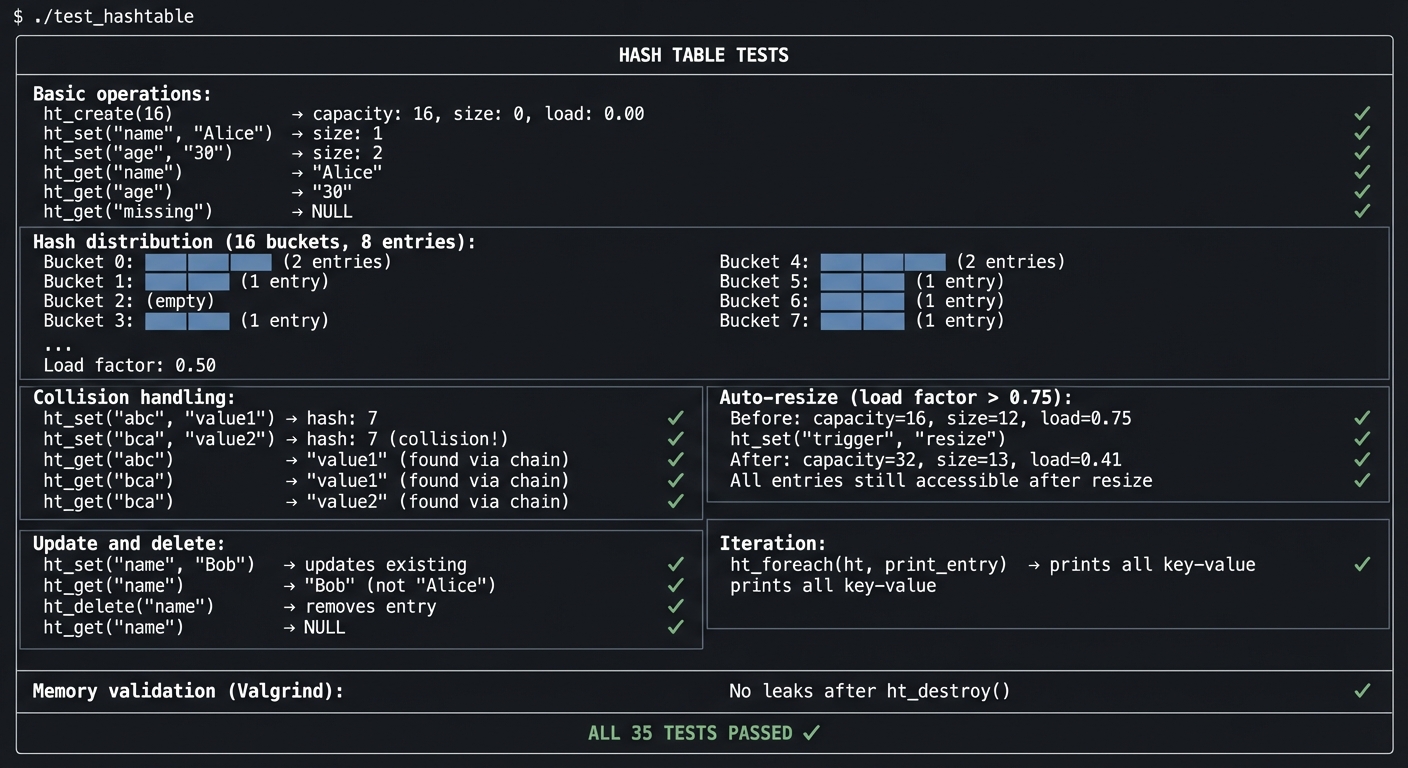
The Core Question You’re Answering
“How do you achieve O(1) average-case lookup when you have arbitrary string keys?”
Before you write any code, sit with this question. The magic of hash tables is converting any key into an array index—but collisions happen, and handling them elegantly is the art.
Concepts You Must Understand First
Stop and research these before coding:
- Hash Functions
- What makes a good hash function? (uniform distribution, deterministic)
- What is djb2? FNV-1a? Why are they popular for strings?
- What happens with a bad hash function?
- Book Reference: Introduction to Algorithms Ch. 11.3 — CLRS
- Collision Resolution
- What is chaining? (linked list at each bucket)
- What is open addressing? (probing for next empty slot)
- Tradeoffs between the two approaches?
- Book Reference: Mastering Algorithms with C Ch. 8 — Loudon
- Load Factor and Resizing
- What is load factor? (n / capacity)
- Why resize at 0.75 load factor?
- What’s the cost of resizing?
- Book Reference: Algorithms by Sedgewick — Ch. 3.4
Questions to Guide Your Design
Before implementing, think through these:
- Hash Function Choice
- Will you use djb2, FNV-1a, or something else?
- How will you reduce the hash to fit your bucket count?
- Should bucket count be a power of 2? A prime?
- Key Ownership
- Does the hash table copy the key, or just store a pointer?
- Who’s responsible for freeing keys?
- What happens if the caller modifies a key after insertion?
- Value Handling
- Will values be void* (user manages memory)?
- Should you provide a destructor callback for values?
Thinking Exercise
Trace the Insertion
Before coding, trace these operations:
ht_create(4)  // 4 buckets
ht_set("apple", "red")    // hash("apple") % 4 = 2
ht_set("banana", "yellow") // hash("banana") % 4 = 0
ht_set("cherry", "red")   // hash("cherry") % 4 = 2  <- collision!
ht_get("cherry")          // Find it despite collision
Questions while tracing:
- Draw the 4 buckets
- Show where “apple” goes
- Show where “banana” goes
- Show the chain at bucket 2 after “cherry” is added
- Trace the lookup for “cherry”
The Interview Questions They’ll Ask
Prepare to answer these:
- “Implement a hash table from scratch.”
- “What makes a good hash function?”
- “Explain chaining vs. open addressing.”
- “What’s the time complexity of insert/lookup/delete?”
- “When and why do you resize a hash table?”
- “What’s the worst-case for a hash table lookup?”
- “How would you implement a hash table that supports iteration?”
Hints in Layers
Hint 1: Use djb2
The djb2 hash function is simple and effective for strings:
hash = ((hash << 5) + hash) + c for each character c.
Hint 2: Chaining is Easier Start with chaining (linked list per bucket). Open addressing is more complex and can wait for optimization.
Hint 3: Resize at 0.75 When load factor exceeds 0.75, double the capacity. This keeps lookup O(1) on average.
Hint 4: Copy Keys For safety, copy the key strings when inserting. This avoids bugs if the caller modifies or frees the original string.
Books That Will Help
| Topic | Book | Chapter |
|---|---|---|
| Hash table fundamentals | Mastering Algorithms with C by Loudon | Ch. 8 |
| Hash functions | Introduction to Algorithms by CLRS | Ch. 11 |
| Practical implementation | Algorithms by Sedgewick & Wayne | Ch. 3.4 |
| The Joys of Hashing | The Joys of Hashing by Thomas Mailund | All |
Common Pitfalls and Debugging
Problem 1: “Works for simple inputs, fails on edge cases”
- Why: Invariants are implicit and not enforced at boundaries.
- Fix: Add explicit precondition checks and assertion-backed invariants.
- Quick test: Run dedicated edge-case tests under sanitizers.
Problem 2: “Intermittent or non-deterministic crashes”
- Why: Undefined behavior, uninitialized state, or races.
- Fix: Reproduce deterministically, isolate state transitions, then patch the root cause.
- Quick test: Use
-fsanitize=address,undefined(and thread sanitizer for concurrent projects).
Problem 3: “Performance collapses as input grows”
- Why: Hidden O(n^2) paths or excessive allocation/copying.
- Fix: Profile hot paths and redesign data movement strategy.
- Quick test: Benchmark with 10x and 100x workload sizes.
Definition of Done
- Core functionality for Hash Table — Build Your Own Dictionary works on reference inputs.
- Edge cases and failure paths are tested and documented.
- Reproducible test command exists and passes on a clean run.
- Sanitizer/static-analysis pass is clean for project scope.
Implementation Hints
Hash table structure:
struct HashTable {
    Entry **buckets;   // Array of pointers to chains
    size_t capacity;   // Number of buckets
    size_t size;       // Number of entries
};

struct Entry {
    char *key;         // Copied key
    void *value;       // User's value
    struct Entry *next; // Chain link
};
djb2 hash function:
unsigned long hash = 5381;
while (*str) {
    hash = ((hash << 5) + hash) + *str;  // hash * 33 + c
    str++;
}
return hash;
Bucket index from hash:
size_t index = hash % ht->capacity;
// Or if capacity is power of 2:
size_t index = hash & (ht->capacity - 1);  // Faster!
Learning milestones:
- Insert and get work without collisions → You understand hashing basics
- Collision handling works → You understand chaining
- Resize works correctly → You understand dynamic data structures
Project 6: Memory Allocator — Build Your Own malloc
- File: C_PROGRAMMING_COMPLETE_MASTERY.md
- Main Programming Language: C
- Alternative Programming Languages: Rust, Zig, Assembly
- Coolness Level: Level 5: Pure Magic (Super Cool)
- Business Potential: 1. The “Resume Gold”
- Difficulty: Level 4: Expert
- Knowledge Area: Systems Programming / Memory Management
- Software or Tool: sbrk/mmap, GDB, Valgrind
- Main Book: Computer Systems: A Programmer’s Perspective by Bryant & O’Hallaron
What you’ll build: Your own implementation of malloc, free, calloc, and realloc that can replace the system allocator. You’ll manage a heap, track free blocks, coalesce freed memory, and handle fragmentation.
Why it teaches C: This is peak C programming. You’re managing memory at the lowest level—the thing that all other C code depends on. You’ll understand how malloc works internally, why memory fragmentation happens, and what “memory overhead” really means.
Core challenges you’ll face:
- Getting memory from the OS (sbrk or mmap) → maps to system calls
- Tracking allocated vs free blocks → maps to metadata management
- Finding a free block quickly → maps to allocation strategies (first-fit, best-fit)
- Coalescing adjacent free blocks → maps to fragmentation prevention
- Alignment requirements → maps to hardware constraints
Key Concepts:
- Dynamic memory allocation: CS:APP Ch. 9.9 — Bryant & O’Hallaron
- Allocator design: The Art of Unix Programming Ch. 12 — Eric Raymond
- Fragmentation: Operating Systems: Three Easy Pieces Ch. 17 — Arpaci-Dusseau
Difficulty: Expert Time estimate: 2-4 weeks Prerequisites: Projects 1-5, understanding of system calls
Real World Outcome
You’ll have a working memory allocator that can replace malloc:
Example Output:
$ LD_PRELOAD=./mymalloc.so ./test_program
Running with custom allocator...
All allocations successful!

$ ./test_allocator

╔════════════════════════════════════════════════════════════════╗
║                    MEMORY ALLOCATOR TESTS                      ║
╠════════════════════════════════════════════════════════════════╣
║                                                                ║
║  Basic allocation:                                             ║
║  ─────────────────                                             ║
║    my_malloc(100)   → 0x10000010 (aligned to 16)         ✓    ║
║    my_malloc(50)    → 0x10000080 (aligned to 16)         ✓    ║
║    my_malloc(200)   → 0x100000c0 (aligned to 16)         ✓    ║
║                                                                ║
║  Heap visualization:                                           ║
║  ────────────────────                                          ║
║    [HDR|████████████|HDR|██████|HDR|████████████████|FREE...] ║
║     ↑     100 bytes   ↑  50 bytes  ↑    200 bytes             ║
║     Block headers (8 bytes each)                              ║
║                                                                ║
║  Free and reuse:                                               ║
║  ────────────────────                                          ║
║    my_free(ptr2)    → Block marked free                  ✓    ║
║    my_malloc(30)    → 0x10000080 (reused freed block!)   ✓    ║
║                                                                ║
║  Heap after free+realloc:                                      ║
║    [HDR|████████████|HDR|████|░░░|HDR|████████████████|FREE]  ║
║         100 bytes      30 + 20 free    200 bytes              ║
║                                                                ║
║  Coalescing test:                                              ║
║  ────────────────────                                          ║
║    Allocate 3 adjacent blocks (A, B, C)                        ║
║    Free B, then A → Should coalesce into one free block  ✓    ║
║    Free C         → Should coalesce all three            ✓    ║
║    Heap: [HDR|░░░░░░░░░░░░░░░░░░░░░░░░░░░░░░░░░░░|FREE...]    ║
║          One big free block!                                   ║
║                                                                ║
║  Fragmentation test:                                           ║
║  ────────────────────                                          ║
║    Allocate 100 small blocks, free every other one            ║
║    Try to allocate one large block...                          ║
║    Without coalescing: FAILED (fragmented)                     ║
║    With coalescing: SUCCESS (merged free blocks)         ✓    ║
║                                                                ║
║  Alignment test:                                               ║
║  ────────────────────                                          ║
║    All returned pointers aligned to 16 bytes             ✓    ║
║    (address & 0xF) == 0 for all allocations                   ║
║                                                                ║
║  Calloc test:                                                  ║
║  ────────────────────                                          ║
║    my_calloc(10, sizeof(int)) → 40 bytes, zeroed         ✓    ║
║                                                                ║
║  Realloc test:                                                 ║
║  ────────────────────                                          ║
║    my_realloc(ptr, 200) → Expanded in place              ✓    ║
║    my_realloc(ptr, 50)  → Shrunk, returned same ptr      ✓    ║
║    Data preserved after realloc                          ✓    ║
║                                                                ║
║  Statistics:                                                   ║
║  ────────────────────                                          ║
║    Total heap size:     1,048,576 bytes (1 MB)                 ║
║    Allocated:           12,456 bytes                           ║
║    Free:                1,036,120 bytes                        ║
║    Overhead (headers):  384 bytes                              ║
║    Fragmentation:       2.3%                                   ║
║                                                                ║
╠════════════════════════════════════════════════════════════════╣
║  ALL 28 TESTS PASSED ✓                                         ║
╚════════════════════════════════════════════════════════════════╝
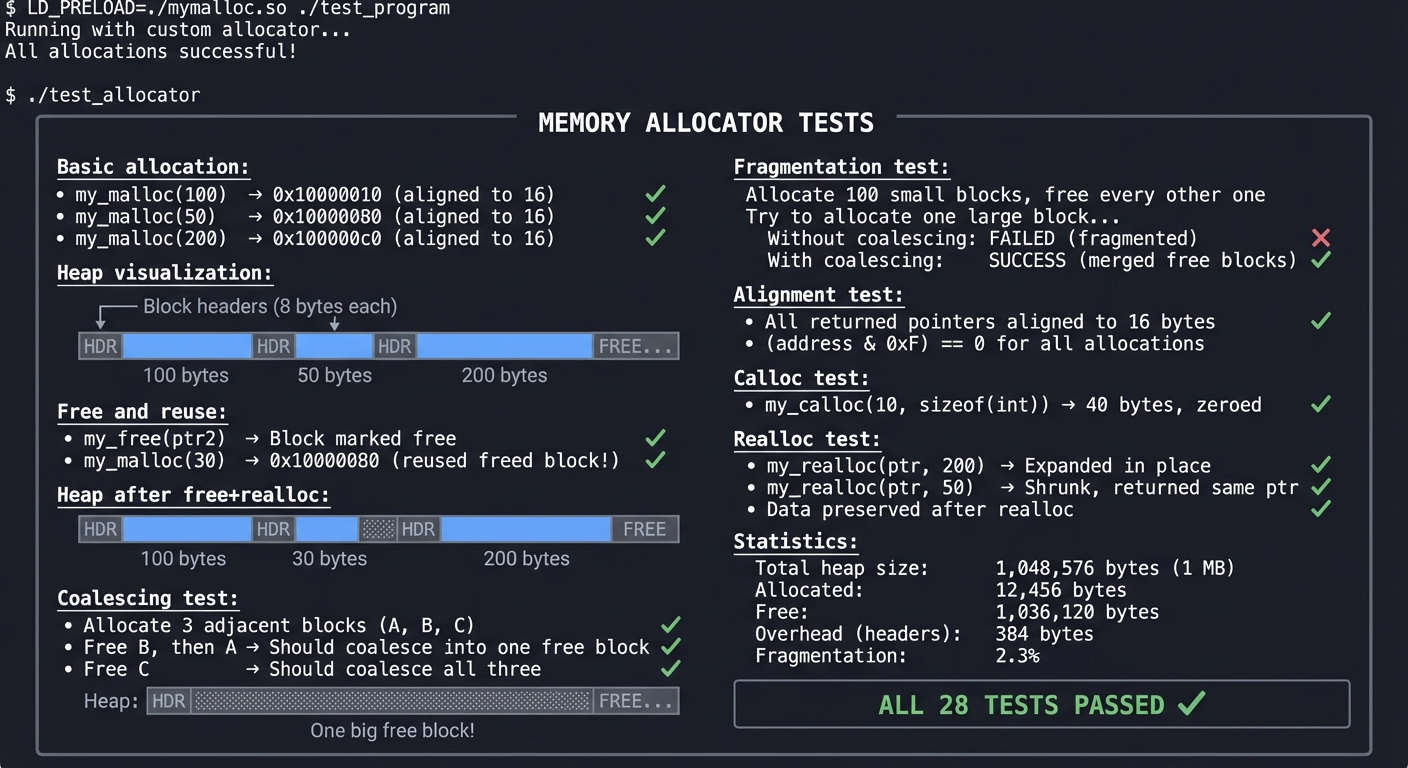
The Core Question You’re Answering
“How does malloc actually work? Where does the memory come from, and how is it tracked?”
Before you write any code, sit with this question. When you call malloc, you get a pointer—but that pointer came from somewhere, and something has to remember how big the block is for free() to work.
Concepts You Must Understand First
Stop and research these before coding:
- Heap Memory Source
- What does sbrk() do?
- What does mmap() do?
- Which is used for large allocations?
- Book Reference: The Linux Programming Interface Ch. 7 — Kerrisk
- Block Headers
- How does free() know how much to free?
- What information is stored before each allocated block?
- What’s the overhead of this metadata?
- Book Reference: CS:APP Ch. 9.9 — Bryant & O’Hallaron
- Free List Management
- How do you track which blocks are free?
- What’s an implicit free list?
- What’s an explicit free list?
- Book Reference: CS:APP Ch. 9.9.6-9.9.12 — Bryant & O’Hallaron
- Coalescing
- What happens when you free two adjacent blocks?
- Immediate vs. deferred coalescing?
- Boundary tags for efficient coalescing?
- Book Reference: CS:APP Ch. 9.9.11 — Bryant & O’Hallaron
Questions to Guide Your Design
Before implementing, think through these:
- Block Structure
- How much metadata per block? (size, free/allocated flag)
- Where is the metadata stored? (before the user pointer)
- How do you handle alignment?
- Allocation Strategy
- First-fit, best-fit, or next-fit?
- What are the tradeoffs?
- How do you split a large free block?
- Freeing Strategy
- How do you find the block header from the user’s pointer?
- When do you coalesce?
- Do you ever return memory to the OS?
Thinking Exercise
Trace the Heap
Before coding, trace these operations:
ptr1 = malloc(16)   // Allocate 16 bytes
ptr2 = malloc(32)   // Allocate 32 bytes
ptr3 = malloc(16)   // Allocate 16 bytes
free(ptr2)          // Free middle block
ptr4 = malloc(24)   // Allocate 24 bytes - where does it go?
free(ptr1)          // Free first block
free(ptr3)          // Free last block - coalesce?
Questions while tracing:
- Draw the heap after each operation
- Show headers with size and status
- What’s the total heap size needed?
- After all frees, what does the heap look like?
The Interview Questions They’ll Ask
Prepare to answer these:
- “Explain how malloc works internally.”
- “What is memory fragmentation? How do you prevent it?”
- “What is coalescing in memory allocation?”
- “Compare first-fit, best-fit, and worst-fit strategies.”
- “What’s the overhead of your allocator per allocation?”
- “How would you implement thread-safe malloc?”
- “What happens when you free() memory that wasn’t malloc’d?”
Hints in Layers
Hint 1: Start Stupid Simple First version: allocate by bumping a pointer (no free at all). This helps you understand sbrk.
Hint 2: Add Headers Store size before each block. malloc returns pointer AFTER the header. free reads the header to know the size.
Hint 3: Implicit Free List Simplest free list: walk all blocks from heap start, checking each header’s status. Slow but simple.
Hint 4: First-Fit First Implement first-fit allocation before optimizing. Walk the free list, return the first block that’s big enough.
Books That Will Help
| Topic | Book | Chapter |
|---|---|---|
| Allocator design | CS:APP by Bryant & O’Hallaron | Ch. 9.9 |
| Virtual memory | Operating Systems: Three Easy Pieces by Arpaci-Dusseau | Ch. 17-18 |
| System calls | The Linux Programming Interface by Kerrisk | Ch. 7 |
| Advanced allocators | The Art of Unix Programming by Raymond | Ch. 12 |
Common Pitfalls and Debugging
Problem 1: “Works for simple inputs, fails on edge cases”
- Why: Invariants are implicit and not enforced at boundaries.
- Fix: Add explicit precondition checks and assertion-backed invariants.
- Quick test: Run dedicated edge-case tests under sanitizers.
Problem 2: “Intermittent or non-deterministic crashes”
- Why: Undefined behavior, uninitialized state, or races.
- Fix: Reproduce deterministically, isolate state transitions, then patch the root cause.
- Quick test: Use
-fsanitize=address,undefined(and thread sanitizer for concurrent projects).
Problem 3: “Performance collapses as input grows”
- Why: Hidden O(n^2) paths or excessive allocation/copying.
- Fix: Profile hot paths and redesign data movement strategy.
- Quick test: Benchmark with 10x and 100x workload sizes.
Definition of Done
- Core functionality for Memory Allocator — Build Your Own malloc works on reference inputs.
- Edge cases and failure paths are tested and documented.
- Reproducible test command exists and passes on a clean run.
- Sanitizer/static-analysis pass is clean for project scope.
Implementation Hints
Block header structure (implicit free list):
typedef struct {
    size_t size;      // Block size including header
    int is_free;      // 1 if free, 0 if allocated
} BlockHeader;

// Or pack into one word:
// Lower bits store size (aligned, so low bits are 0)
// Lowest bit stores free flag
Getting memory from OS:
void *sbrk(intptr_t increment);
// Increases heap by 'increment' bytes
// Returns pointer to OLD break (start of new memory)
malloc skeleton:
void *my_malloc(size_t size) {
    size_t total = size + HEADER_SIZE;
    total = ALIGN(total);  // Round up to alignment

    // Search free list for big enough block
    Block *block = find_free_block(total);

    if (block) {
        mark_allocated(block);
        split_if_worthwhile(block, total);
        return block->data;
    }

    // No free block found, get more memory
    block = request_memory(total);
    return block ? block->data : NULL;
}
Learning milestones:
- Basic malloc/free work → You understand heap management
- Coalescing works → You understand fragmentation prevention
- Realloc works → You understand memory copying and optimization
Project 7: Configuration Parser — Parse INI and JSON Files
- File: C_PROGRAMMING_COMPLETE_MASTERY.md
- Main Programming Language: C
- Alternative Programming Languages: Rust, Go, Zig
- Coolness Level: Level 3: Genuinely Clever
- Business Potential: 3. The “Service & Support” Model
- Difficulty: Level 2: Intermediate
- Knowledge Area: Parsing / File I/O / String Processing
- Software or Tool: Text editors, diff tools
- Main Book: C Programming: A Modern Approach by K.N. King
What you’ll build: A robust configuration file parser that reads INI files (sections, keys, values) and optionally JSON, handling comments, whitespace, escape sequences, and error reporting with line numbers.
Why it teaches C: Parsing is string manipulation on hard mode. You’ll implement a state machine, handle edge cases, manage string ownership, and learn why proper error messages (with line numbers!) are crucial for debugging.
Core challenges you’ll face:
- Tokenizing input line by line → maps to string splitting
- Handling quoted strings and escape sequences → maps to state machine design
- Building a data structure to hold config values → maps to hash table usage
- Error handling with context (line numbers) → maps to user-friendly diagnostics
Key Concepts:
- File I/O: C Programming: A Modern Approach Ch. 22 — K.N. King
- String processing: C Programming: A Modern Approach Ch. 13 — K.N. King
- State machines: Compilers: Principles and Practice Ch. 2 — Dave & Dave
Difficulty: Intermediate Time estimate: 1 week Prerequisites: Projects 1-5 (especially hash table for storage)
Real World Outcome
You’ll have a configuration parser that your other C programs can use:
Example Output:
$ cat config.ini
# Server configuration
[server]
host = localhost
port = 8080
debug = true

[database]
connection_string = "postgres://user:pass@localhost/db"
pool_size = 10

$ ./config_parser config.ini

╔════════════════════════════════════════════════════════════════╗
║                    CONFIG PARSER OUTPUT                        ║
╠════════════════════════════════════════════════════════════════╣
║                                                                ║
║  Parsed file: config.ini                                       ║
║  Sections found: 2                                             ║
║                                                                ║
║  [server]                                                      ║
║    host = "localhost"                                          ║
║    port = "8080"                                               ║
║    debug = "true"                                              ║
║                                                                ║
║  [database]                                                    ║
║    connection_string = "postgres://user:pass@localhost/db"     ║
║    pool_size = "10"                                            ║
║                                                                ║
╚════════════════════════════════════════════════════════════════╝

$ # Test the API
$ ./test_config_api
config_get("server", "port") → "8080"                         ✓
config_get_int("server", "port") → 8080                       ✓
config_get_bool("database", "debug") → false                  ✓
config_get("missing", "key") → NULL                           ✓

$ # Error handling test
$ ./config_parser bad_config.ini
Parse error at line 7: Expected '=' after key 'timeout'
Parse error at line 12: Unterminated string literal
Parse error at line 15: Invalid section name (contains ']')
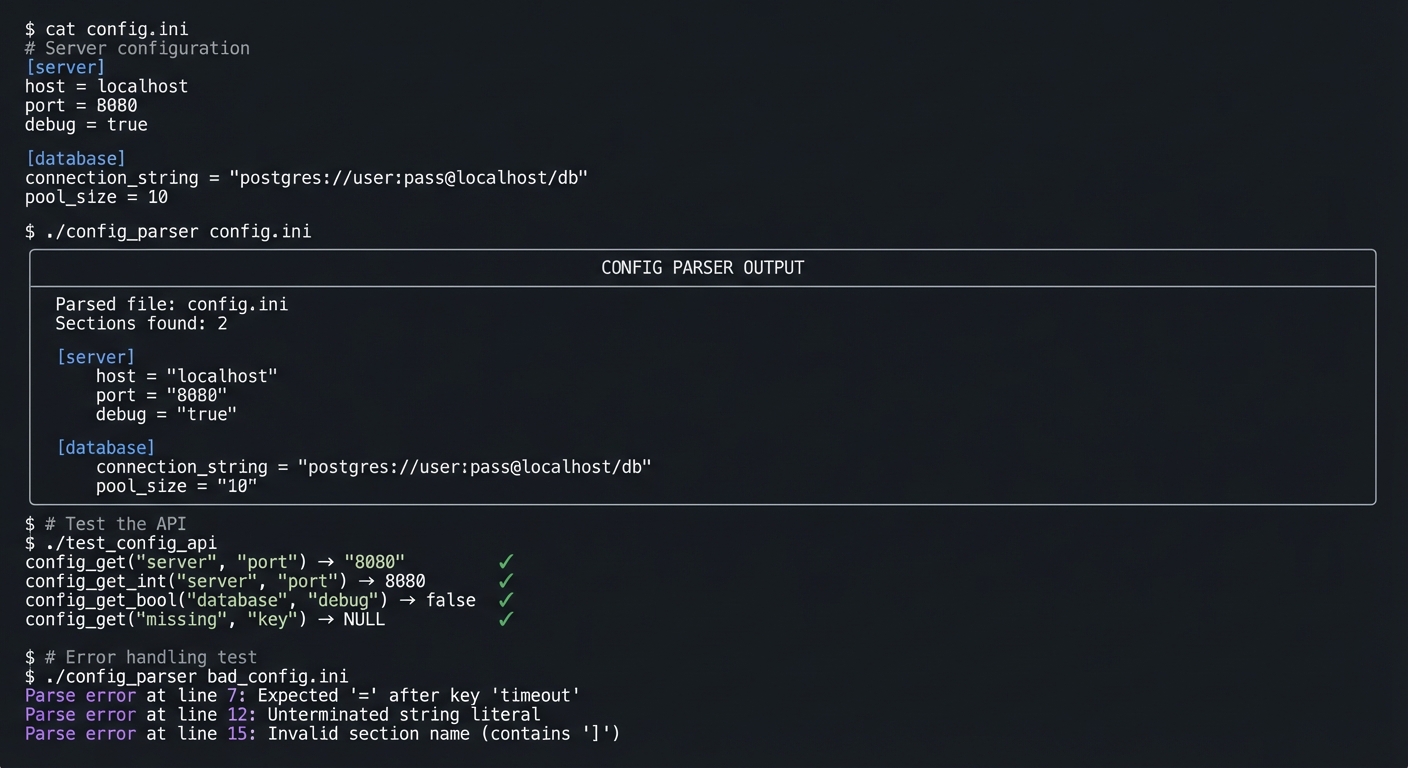
The Core Question You’re Answering
“How do you read structured text and convert it into a data structure your program can query?”
Before you write any code, sit with this question. Parsing is about recognizing patterns—sections, keys, values, comments—and building a mental model (and data structure) that represents the input.
Concepts You Must Understand First
Stop and research these before coding:
- File I/O in C
- How do you read a file line by line?
- What’s the difference between fgets and getline?
- When do you use fopen vs open?
- Book Reference: C Programming: A Modern Approach Ch. 22 — King
- Lexical Analysis
- What is a token?
- How do you handle whitespace (ignore? preserve?)
- How do you handle comments?
- Book Reference: Compilers: Principles and Practice Ch. 2 — Dave
- State Machines
- What states does parsing a quoted string require?
- How do you handle escape sequences like
\nor\"? - What’s the “error state” and how do you recover?
- Book Reference: Engineering a Compiler Ch. 2 — Cooper & Torczon
Questions to Guide Your Design
Before implementing, think through these:
- Data Structure
- How will you store sections? (nested hash tables?)
- Should values be strings, or typed (int, bool, string)?
- How do you handle duplicate keys?
- Parsing Strategy
- Line-by-line or character-by-character?
- Regex or hand-written parser?
- How do you handle multi-line values?
- Error Handling
- Do you stop at first error or collect all errors?
- What context do you include? (line number, column?)
- How do you recover from errors to continue parsing?
Thinking Exercise
Parse This INI
Before coding, trace how you’d parse:
[section1]
key1 = value1
key2 = "value with spaces"
# This is a comment
key3 = "value with \"quotes\""
Questions while tracing:
- What state are you in at the start of each line?
- How do you know when you’ve entered a section header?
- How do you handle the comment line?
- Trace the parsing of the escaped quote.
The Interview Questions They’ll Ask
Prepare to answer these:
- “How would you design a configuration file parser?”
- “What’s a state machine and how is it useful in parsing?”
- “How do you handle errors gracefully in a parser?”
- “What’s the difference between lexing and parsing?”
- “How would you handle nested configuration structures?”
- “What are escape sequences and how do you process them?”
Hints in Layers
Hint 1: Line by Line Read one line at a time with fgets. This simplifies error reporting (“error at line N”).
Hint 2: Trim First Strip leading/trailing whitespace from each line before parsing. This handles indentation and trailing spaces.
Hint 3: Classify Lines Each line is one of: empty, comment, section header, key-value pair, or error. Classify first, then process.
Hint 4: Use Your Hash Table Use the hash table from Project 5 to store key-value pairs. Nest hash tables for sections.
Books That Will Help
| Topic | Book | Chapter |
|---|---|---|
| File I/O | C Programming: A Modern Approach by King | Ch. 22 |
| String processing | C Programming: A Modern Approach by King | Ch. 13 |
| Lexical analysis | Compilers: Principles and Practice by Dave | Ch. 2 |
| State machines | Engineering a Compiler by Cooper | Ch. 2 |
Common Pitfalls and Debugging
Problem 1: “Works for simple inputs, fails on edge cases”
- Why: Invariants are implicit and not enforced at boundaries.
- Fix: Add explicit precondition checks and assertion-backed invariants.
- Quick test: Run dedicated edge-case tests under sanitizers.
Problem 2: “Intermittent or non-deterministic crashes”
- Why: Undefined behavior, uninitialized state, or races.
- Fix: Reproduce deterministically, isolate state transitions, then patch the root cause.
- Quick test: Use
-fsanitize=address,undefined(and thread sanitizer for concurrent projects).
Problem 3: “Performance collapses as input grows”
- Why: Hidden O(n^2) paths or excessive allocation/copying.
- Fix: Profile hot paths and redesign data movement strategy.
- Quick test: Benchmark with 10x and 100x workload sizes.
Definition of Done
- Core functionality for Configuration Parser — Parse INI and JSON Files works on reference inputs.
- Edge cases and failure paths are tested and documented.
- Reproducible test command exists and passes on a clean run.
- Sanitizer/static-analysis pass is clean for project scope.
Implementation Hints
Line classification:
// Check what type of line this is
if (line is empty or whitespace only) → skip
if (line starts with '#' or ';') → comment, skip
if (line matches "[...]") → section header
if (line contains '=') → key-value pair
else → syntax error
Parsing a key-value pair:
1. Find the '=' position
2. Extract key (everything before '=', trimmed)
3. Extract value (everything after '=', trimmed)
4. If value starts with '"', parse as quoted string
   - Handle escape sequences: \n, \t, \", \\
5. Store in current section's hash table
Section management:
// Top-level hash table: section_name → section_hash_table
current_section = NULL;

on_section_header("[name]"):
    section_name = extract "name"
    if section_name not in sections:
        sections[section_name] = new_hash_table()
    current_section = section_name

on_key_value(key, value):
    if current_section is NULL:
        error: "Key outside of section"
    sections[current_section][key] = value
Learning milestones:
- Can parse simple INI files → You understand basic parsing
- Quoted strings with escapes work → You understand state machines
- Error messages show line numbers → You understand user-friendly tooling
Project 8: Build System — Create a Mini-Make
- File: C_PROGRAMMING_COMPLETE_MASTERY.md
- Main Programming Language: C
- Alternative Programming Languages: Rust, Go, Python
- Coolness Level: Level 4: Hardcore Tech Flex
- Business Potential: 4. The “Open Core” Infrastructure
- Difficulty: Level 3: Advanced
- Knowledge Area: Build Systems / Dependency Graphs / Process Execution
- Software or Tool: Make, file system APIs
- Main Book: The GNU Make Book by John Graham-Cumming
What you’ll build: A simplified Make-like build system that reads a Makefile, builds a dependency graph, checks file timestamps, and executes only the necessary commands to rebuild targets.
Why it teaches C: Build systems require graph algorithms (dependency resolution), process execution (fork/exec), file system operations (stat for timestamps), and text parsing (Makefile syntax). It’s systems programming with real-world utility.
Core challenges you’ll face:
- Parsing Makefile syntax (targets, dependencies, recipes) → maps to parsing skills
- Building and traversing dependency graphs → maps to graph algorithms
- Checking file modification times → maps to file system APIs
- Executing shell commands → maps to process creation (fork/exec)
Key Concepts:
- Make fundamentals: The GNU Make Book Ch. 1-3 — Graham-Cumming
- Dependency graphs: Introduction to Algorithms Ch. 22 — CLRS
- Process execution: The Linux Programming Interface Ch. 24-27 — Kerrisk
Difficulty: Advanced Time estimate: 2-3 weeks Prerequisites: Projects 1-7, understanding of fork/exec
Real World Outcome
You’ll have a working build tool that can compile multi-file C projects:
Example Output:
$ cat Makefile
CC = gcc
CFLAGS = -Wall -g

all: myprogram

myprogram: main.o utils.o math.o
	$(CC) -o myprogram main.o utils.o math.o

main.o: main.c utils.h math.h
	$(CC) $(CFLAGS) -c main.c

utils.o: utils.c utils.h
	$(CC) $(CFLAGS) -c utils.c

math.o: math.c math.h
	$(CC) $(CFLAGS) -c math.c

clean:
	rm -f *.o myprogram

$ ./minimake
Building dependency graph...
Dependency tree:
  myprogram
  ├── main.o
  │   ├── main.c
  │   ├── utils.h
  │   └── math.h
  ├── utils.o
  │   ├── utils.c
  │   └── utils.h
  └── math.o
      ├── math.c
      └── math.h

Checking timestamps...
  main.c:   2024-12-28 10:00:00 (newer than main.o)
  utils.c:  2024-12-28 09:00:00 (older than utils.o)
  math.c:   2024-12-28 09:00:00 (older than math.o)

Targets to rebuild: main.o, myprogram

Executing:
  [1/2] gcc -Wall -g -c main.c
  [2/2] gcc -o myprogram main.o utils.o math.o

Build complete! (2 targets rebuilt)

$ # Modify utils.c and rebuild
$ touch utils.c
$ ./minimake
  [1/2] gcc -Wall -g -c utils.c
  [2/2] gcc -o myprogram main.o utils.o math.o
Build complete!

$ ./minimake
Nothing to do - all targets up to date.
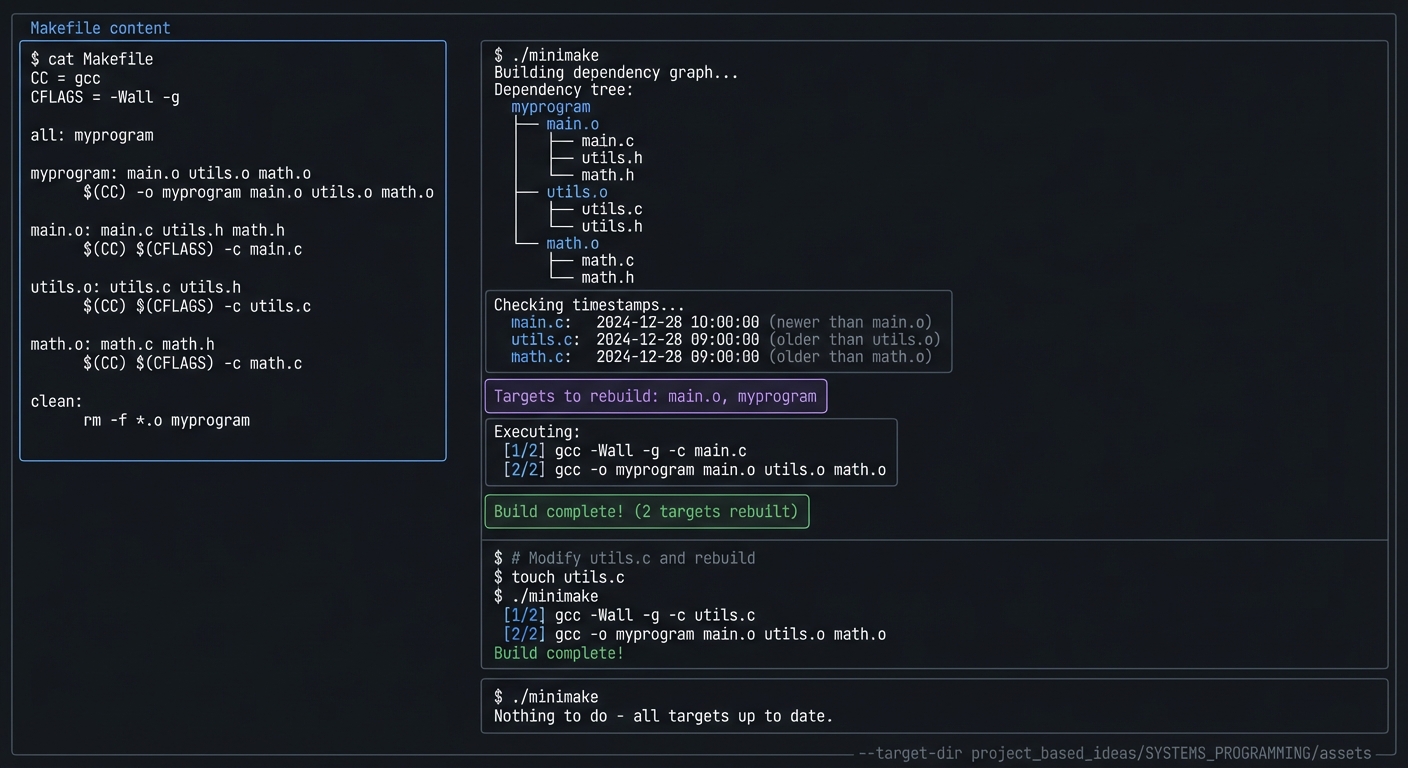
The Core Question You’re Answering
“How do you efficiently rebuild only what’s changed, and in the right order?”
Before you write any code, sit with this question. The magic of Make is understanding dependencies—what needs what, and what’s changed—to avoid redundant work.
Concepts You Must Understand First
Stop and research these before coding:
- Makefile Syntax
- What’s a target, dependency, and recipe?
- How are variables defined and expanded?
- What’s the significance of tab vs spaces?
- Book Reference: The GNU Make Book Ch. 1-2 — Graham-Cumming
- Dependency Graphs
- How do you represent “A depends on B and C”?
- What’s a topological sort and why is it needed?
- How do you detect cycles?
- Book Reference: Introduction to Algorithms Ch. 22 — CLRS
- File Timestamps
- How do you get a file’s modification time in C?
- What does
stat()return? - How do you compare timestamps?
- Book Reference: The Linux Programming Interface Ch. 15 — Kerrisk
- Process Execution
- What does
fork()do? - What does
exec()do? - How do you wait for a child process?
- Book Reference: The Linux Programming Interface Ch. 24-27 — Kerrisk
- What does
Questions to Guide Your Design
Before implementing, think through these:
- Data Structures
- How do you represent a target and its dependencies?
- How do you store the command(s) to execute?
- Graph structure: adjacency list or matrix?
- Build Algorithm
- How do you determine what needs rebuilding?
- Bottom-up (leaves first) or top-down (target first)?
- How do you handle targets without dependencies?
- Execution
- Serial or parallel execution?
- How do you pass the recipe to the shell?
- How do you handle recipe failures?
Thinking Exercise
Trace the Build
Before coding, trace this scenario:
app: main.o lib.o
	gcc -o app main.o lib.o

main.o: main.c common.h
	gcc -c main.c

lib.o: lib.c common.h
	gcc -c lib.c
Given: main.c was modified, lib.c was not.
Questions while tracing:
- Draw the dependency graph
- What’s the topological order?
- Which targets need rebuilding?
- What order are commands executed?
The Interview Questions They’ll Ask
Prepare to answer these:
- “How does Make know what to rebuild?”
- “Explain topological sort and why build systems use it.”
- “What happens if there’s a circular dependency?”
- “How would you parallelize the build?”
- “What is fork/exec and how do you use it?”
- “How do you handle build failures?”
Hints in Layers
Hint 1: Parse First Get Makefile parsing working completely before tackling dependency resolution. Store targets, deps, and recipes.
Hint 2: Simple Rebuild Logic Start simple: if ANY dependency is newer than the target, rebuild. Don’t optimize yet.
Hint 3: Topological Sort Use depth-first search to determine build order. If you hit a cycle, that’s an error.
Hint 4: Use system() First
Before implementing fork/exec, use system("command") to execute recipes. Replace with fork/exec later.
Books That Will Help
| Topic | Book | Chapter |
|---|---|---|
| Make fundamentals | The GNU Make Book by Graham-Cumming | Ch. 1-4 |
| Dependency graphs | Introduction to Algorithms by CLRS | Ch. 22 |
| File timestamps | The Linux Programming Interface by Kerrisk | Ch. 15 |
| Process execution | The Linux Programming Interface by Kerrisk | Ch. 24-27 |
Common Pitfalls and Debugging
Problem 1: “Works for simple inputs, fails on edge cases”
- Why: Invariants are implicit and not enforced at boundaries.
- Fix: Add explicit precondition checks and assertion-backed invariants.
- Quick test: Run dedicated edge-case tests under sanitizers.
Problem 2: “Intermittent or non-deterministic crashes”
- Why: Undefined behavior, uninitialized state, or races.
- Fix: Reproduce deterministically, isolate state transitions, then patch the root cause.
- Quick test: Use
-fsanitize=address,undefined(and thread sanitizer for concurrent projects).
Problem 3: “Performance collapses as input grows”
- Why: Hidden O(n^2) paths or excessive allocation/copying.
- Fix: Profile hot paths and redesign data movement strategy.
- Quick test: Benchmark with 10x and 100x workload sizes.
Definition of Done
- Core functionality for Build System — Create a Mini-Make works on reference inputs.
- Edge cases and failure paths are tested and documented.
- Reproducible test command exists and passes on a clean run.
- Sanitizer/static-analysis pass is clean for project scope.
Implementation Hints
Target data structure:
struct Target {
    char *name;
    char **dependencies;  // Array of dependency names
    size_t dep_count;
    char **recipe;        // Array of command lines
    size_t recipe_count;
    time_t mtime;         // Modification time (0 if doesn't exist)
    bool needs_rebuild;
};
Checking if rebuild needed:
bool needs_rebuild(Target *target) {
    if (target->mtime == 0) return true;  // Doesn't exist

    for each dependency dep:
        time_t dep_time = get_mtime(dep);
        if (dep_time > target->mtime)
            return true;  // Dependency is newer

    return false;
}
Topological sort for build order:
// DFS-based topological sort
void visit(Target *t, List *order) {
    if (t->visited) return;
    if (t->visiting) ERROR("Cycle detected!");

    t->visiting = true;
    for each dependency dep:
        visit(find_target(dep), order);
    t->visiting = false;
    t->visited = true;

    list_append(order, t);
}
// Build order is 'order' in reverse (or just process in order)
Learning milestones:
- Parses simple Makefile → You understand text parsing
- Detects what needs rebuilding → You understand timestamps
- Executes in correct order → You understand dependency graphs
Project 9: Unix Shell — Build Your Own Bash
- File: C_PROGRAMMING_COMPLETE_MASTERY.md
- Main Programming Language: C
- Alternative Programming Languages: Rust, Zig
- Coolness Level: Level 5: Pure Magic (Super Cool)
- Business Potential: 1. The “Resume Gold”
- Difficulty: Level 4: Expert
- Knowledge Area: Systems Programming / Process Management / Signals
- Software or Tool: Terminal emulator, strace
- Main Book: Advanced Programming in the UNIX Environment by Stevens & Rago
What you’ll build: A functional Unix shell that can parse commands, handle pipes, manage background processes, implement builtins (cd, export, exit), and handle signals properly.
Why it teaches C: A shell is the ultimate systems programming project. You’ll use fork, exec, pipe, dup2, waitpid, signal handlers—the core Unix APIs. You’ll understand how programs run, how the terminal works, and how processes communicate.
Core challenges you’ll face:
- Parsing command lines with pipes and redirections → maps to lexing and parsing
- Creating child processes with fork/exec → maps to process management
-
**Implementing pipes (cmd1 cmd2 cmd3)** → maps to inter-process communication - Signal handling (Ctrl+C, Ctrl+Z) → maps to signal management
- Job control (background processes) → maps to process groups
Key Concepts:
- Process creation: APUE Ch. 8 — Stevens & Rago
- Process control: APUE Ch. 8.6-8.8 — Stevens & Rago
- Signals: The Linux Programming Interface Ch. 20-22 — Kerrisk
- Pipes and IPC: APUE Ch. 15 — Stevens & Rago
Difficulty: Expert Time estimate: 3-4 weeks Prerequisites: Projects 1-8, fork/exec understanding
Real World Outcome
You’ll have a working shell you can actually use:
Example Output:
$ ./myshell
myshell> echo "Hello, World!"
Hello, World!

myshell> ls -la | grep ".c" | wc -l
12

myshell> cat file.txt > output.txt
myshell> cat < input.txt >> output.txt

myshell> gcc -c main.c &
[1] 12345
myshell> gcc -c utils.c &
[2] 12346
myshell> jobs
[1] Running    gcc -c main.c
[2] Running    gcc -c utils.c

[1] Done       gcc -c main.c
[2] Done       gcc -c utils.c

myshell> cd /tmp
myshell> pwd
/tmp

myshell> export PATH=$PATH:/custom/bin
myshell> echo $PATH
/usr/bin:/bin:/custom/bin

myshell> sleep 10
^C
Interrupted

myshell> sleep 100 &
[1] 12350
myshell> kill %1
[1] Terminated  sleep 100

myshell> exit
Goodbye!
The Core Question You’re Answering
“What actually happens when you type a command in the terminal?”
Before you write any code, sit with this question. The shell is the user’s interface to the operating system. Understanding how it works illuminates how all programs execute.
Concepts You Must Understand First
Stop and research these before coding:
- fork() and exec()
- What does fork() return in parent vs child?
- What happens to memory after fork?
- What does exec() replace?
- Book Reference: APUE Ch. 8.3-8.10 — Stevens & Rago
- Pipes
- What does pipe() create?
- How do you connect stdout of one process to stdin of another?
- What is dup2() and why is it needed?
- Book Reference: APUE Ch. 15.2 — Stevens & Rago
- File Descriptor Redirection
- What are stdin, stdout, stderr file descriptors?
- How do you redirect to/from files?
- What does dup2(fd, STDOUT_FILENO) do?
- Book Reference: APUE Ch. 3 — Stevens & Rago
- Signals
- What happens when you press Ctrl+C?
- How do you install a signal handler?
- Why must the shell ignore SIGINT differently than children?
- Book Reference: The Linux Programming Interface Ch. 20-22 — Kerrisk
Questions to Guide Your Design
Before implementing, think through these:
- Parsing
-
How do you split “ls -la grep foo” into commands? - How do you handle quoted strings?
- How do you detect redirection operators (>, <, »)?
-
- Execution Model
- Does the shell fork for builtins?
- How do you execute a pipeline of N commands?
- What happens to file descriptors after dup2?
- Job Control
- How do you track background jobs?
- When do you check if background jobs have finished?
- How do you implement fg and bg?
Thinking Exercise
Trace the Pipeline
Before coding, trace what happens for:
myshell> cat file.txt | grep error | wc -l
Questions while tracing:
- How many processes are created?
- What pipes are created?
- What does each process’s stdin/stdout connect to?
- Who waits for whom?
- Draw the process/pipe diagram
The Interview Questions They’ll Ask
Prepare to answer these:
- “Explain how fork() and exec() work together.”
- “Implement a basic shell in C.”
- “How do pipes work at the system level?”
- “What happens when you press Ctrl+C?”
- “How would you implement background process execution?”
- “What’s the difference between a process group and a session?”
- “How does the shell handle zombie processes?”
Hints in Layers
Hint 1: Simple Commands First Get basic command execution working (parse, fork, exec, wait) before adding pipes or redirection.
Hint 2: Builtins Are Special cd, export, exit MUST run in the shell process itself. They can’t be forked.
Hint 3: Pipes Need Planning
For A | B, create the pipe BEFORE forking. Child A writes to pipe[1], Child B reads from pipe[0].
Hint 4: Close Unused FDs After dup2, close the original pipe file descriptors. Failure to close them causes hangs.
Books That Will Help
| Topic | Book | Chapter |
|---|---|---|
| Process control | APUE by Stevens & Rago | Ch. 8 |
| Signals | The Linux Programming Interface by Kerrisk | Ch. 20-22 |
| Pipes | APUE by Stevens & Rago | Ch. 15 |
| Terminal I/O | APUE by Stevens & Rago | Ch. 18 |
Common Pitfalls and Debugging
Problem 1: “Works for simple inputs, fails on edge cases”
- Why: Invariants are implicit and not enforced at boundaries.
- Fix: Add explicit precondition checks and assertion-backed invariants.
- Quick test: Run dedicated edge-case tests under sanitizers.
Problem 2: “Intermittent or non-deterministic crashes”
- Why: Undefined behavior, uninitialized state, or races.
- Fix: Reproduce deterministically, isolate state transitions, then patch the root cause.
- Quick test: Use
-fsanitize=address,undefined(and thread sanitizer for concurrent projects).
Problem 3: “Performance collapses as input grows”
- Why: Hidden O(n^2) paths or excessive allocation/copying.
- Fix: Profile hot paths and redesign data movement strategy.
- Quick test: Benchmark with 10x and 100x workload sizes.
Definition of Done
- Core functionality for Unix Shell — Build Your Own Bash works on reference inputs.
- Edge cases and failure paths are tested and documented.
- Reproducible test command exists and passes on a clean run.
- Sanitizer/static-analysis pass is clean for project scope.
Implementation Hints
Basic execution loop:
while (1) {
    print_prompt();
    line = read_line();
    commands = parse_line(line);

    if (is_builtin(commands[0]))
        execute_builtin(commands[0]);
    else
        execute_external(commands);
}
Fork/exec pattern:
pid_t pid = fork();
if (pid == 0) {
    // Child process
    execvp(args[0], args);
    perror("exec failed");
    exit(1);
} else if (pid > 0) {
    // Parent process
    waitpid(pid, &status, 0);
} else {
    perror("fork failed");
}
Pipe setup for A | B:
int pipefd[2];
pipe(pipefd);  // pipefd[0] = read end, pipefd[1] = write end

pid_t pid_a = fork();
if (pid_a == 0) {
    // Child A: writes to pipe
    close(pipefd[0]);           // Close unused read end
    dup2(pipefd[1], STDOUT_FILENO);  // stdout → pipe
    close(pipefd[1]);           // Close original write end
    execvp(A_args[0], A_args);
}

pid_t pid_b = fork();
if (pid_b == 0) {
    // Child B: reads from pipe
    close(pipefd[1]);           // Close unused write end
    dup2(pipefd[0], STDIN_FILENO);   // stdin ← pipe
    close(pipefd[0]);           // Close original read end
    execvp(B_args[0], B_args);
}

// Parent: close both ends and wait
close(pipefd[0]);
close(pipefd[1]);
waitpid(pid_a, NULL, 0);
waitpid(pid_b, NULL, 0);
Learning milestones:
- Basic commands execute → You understand fork/exec
- Pipes work → You understand IPC
- Background jobs work → You understand job control
Project 10: HTTP Server — Build a Web Server from Scratch
- File: C_PROGRAMMING_COMPLETE_MASTERY.md
- Main Programming Language: C
- Alternative Programming Languages: Rust, Go, Zig
- Coolness Level: Level 4: Hardcore Tech Flex
- Business Potential: 4. The “Open Core” Infrastructure
- Difficulty: Level 3: Advanced
- Knowledge Area: Networking / HTTP Protocol / Concurrency
- Software or Tool: curl, telnet, browser, Wireshark
- Main Book: TCP/IP Sockets in C by Donahoo & Calvert
What you’ll build: A functional HTTP/1.1 server that handles GET/POST requests, serves static files, supports multiple concurrent connections, and implements proper HTTP headers and status codes.
Why it teaches C: Network programming in C means working directly with sockets, the BSD socket API, and the TCP protocol. You’ll parse raw HTTP text, manage connections, and learn why web frameworks exist (they hide all this complexity!).
Core challenges you’ll face:
- Socket programming (socket, bind, listen, accept) → maps to network APIs
- Parsing HTTP requests → maps to protocol parsing
- Handling multiple clients → maps to concurrency (fork, select, or threads)
- Sending proper HTTP responses → maps to protocol compliance
Key Concepts:
- Socket programming: TCP/IP Sockets in C Ch. 1-4 — Donahoo & Calvert
- HTTP protocol: HTTP: The Definitive Guide Ch. 1-4 — Gourley
- Concurrency models: The Linux Programming Interface Ch. 63 — Kerrisk
Difficulty: Advanced Time estimate: 2-3 weeks Prerequisites: Projects 1-9, basic networking understanding
Real World Outcome
You’ll have a working web server that serves actual web pages:
Example Output:
$ ./myserver 8080 ./public
Starting HTTP server on port 8080...
Serving files from: ./public/

# In another terminal:
$ curl -v http://localhost:8080/
> GET / HTTP/1.1
> Host: localhost:8080
>
< HTTP/1.1 200 OK
< Content-Type: text/html
< Content-Length: 1234
< Connection: keep-alive
<
<!DOCTYPE html>
<html>...

# Server log:
[2024-12-28 10:00:01] 127.0.0.1 GET / 200 1234 bytes
[2024-12-28 10:00:02] 127.0.0.1 GET /style.css 200 567 bytes
[2024-12-28 10:00:02] 127.0.0.1 GET /favicon.ico 404 0 bytes
[2024-12-28 10:00:05] 127.0.0.1 POST /api/data 201 45 bytes

# Concurrent connections test:
$ ab -n 1000 -c 10 http://localhost:8080/
Requests per second:    2500
Time per request:       4.0 ms
The Core Question You’re Answering
“What happens at the network level when you visit a website?”
Before you write any code, sit with this question. Every web page load involves creating a TCP connection, sending an HTTP request, receiving an HTTP response—all as raw bytes over the network.
Concepts You Must Understand First
Stop and research these before coding:
- Socket API
- What does each call do: socket(), bind(), listen(), accept()?
- What’s the difference between server and client sockets?
- What is a file descriptor and why are sockets FDs?
- Book Reference: TCP/IP Sockets in C Ch. 2 — Donahoo & Calvert
- HTTP Protocol
- What’s the format of an HTTP request?
- What’s the format of an HTTP response?
- What are the important headers (Content-Type, Content-Length)?
- Book Reference: HTTP: The Definitive Guide Ch. 1-3 — Gourley
- Concurrency
- How do you handle multiple clients at once?
- What are the tradeoffs between fork(), threads, and select()?
- What is the C10K problem?
- Book Reference: The Linux Programming Interface Ch. 63 — Kerrisk
Questions to Guide Your Design
Before implementing, think through these:
- Request Parsing
- How do you know when the request headers end?
- How do you handle requests that arrive in multiple recv() calls?
- How do you parse the request line (method, path, version)?
- Response Generation
- How do you determine Content-Type from file extension?
- How do you handle file not found?
- How do you send large files efficiently?
- Concurrency Model
- Start with fork per connection (simple but expensive)
- Consider thread pool or event-driven (select/epoll) later
Thinking Exercise
Trace the Connection
Before coding, trace what happens when you type http://localhost:8080/index.html:
Questions while tracing:
- What system calls does the browser make?
- What does the HTTP request look like (exact bytes)?
- What does the server do to handle this?
- What does the HTTP response look like?
- When does the connection close?
The Interview Questions They’ll Ask
Prepare to answer these:
- “Explain the socket API for a TCP server.”
- “What are the differences between TCP and UDP?”
- “How does HTTP work at the protocol level?”
- “How would you handle 10,000 concurrent connections?”
- “What is the select() system call used for?”
- “Explain the C10K problem and solutions.”
Hints in Layers
Hint 1: Echo Server First Before HTTP, build a simple echo server: accept connection, read data, write it back. This verifies your socket code.
Hint 2: One Client at a Time Get the server working with single clients before adding concurrency. Use fork() first.
Hint 3: Request Ends with \r\n\r\n HTTP headers end with a blank line (\r\n\r\n). Keep reading until you see this.
Hint 4: Use sendfile() for Large Files For efficiency, use sendfile() to transfer files directly from disk to socket.
Books That Will Help
| Topic | Book | Chapter |
|---|---|---|
| Socket programming | TCP/IP Sockets in C by Donahoo & Calvert | Ch. 1-4 |
| HTTP protocol | HTTP: The Definitive Guide by Gourley | Ch. 1-4 |
| Concurrent servers | The Linux Programming Interface by Kerrisk | Ch. 60, 63 |
| Network internals | Computer Networking by Kurose & Ross | Ch. 2 |
Common Pitfalls and Debugging
Problem 1: “Works for simple inputs, fails on edge cases”
- Why: Invariants are implicit and not enforced at boundaries.
- Fix: Add explicit precondition checks and assertion-backed invariants.
- Quick test: Run dedicated edge-case tests under sanitizers.
Problem 2: “Intermittent or non-deterministic crashes”
- Why: Undefined behavior, uninitialized state, or races.
- Fix: Reproduce deterministically, isolate state transitions, then patch the root cause.
- Quick test: Use
-fsanitize=address,undefined(and thread sanitizer for concurrent projects).
Problem 3: “Performance collapses as input grows”
- Why: Hidden O(n^2) paths or excessive allocation/copying.
- Fix: Profile hot paths and redesign data movement strategy.
- Quick test: Benchmark with 10x and 100x workload sizes.
Definition of Done
- Core functionality for HTTP Server — Build a Web Server from Scratch works on reference inputs.
- Edge cases and failure paths are tested and documented.
- Reproducible test command exists and passes on a clean run.
- Sanitizer/static-analysis pass is clean for project scope.
Implementation Hints
Server socket setup:
int server_fd = socket(AF_INET, SOCK_STREAM, 0);

struct sockaddr_in addr = {
    .sin_family = AF_INET,
    .sin_port = htons(8080),
    .sin_addr.s_addr = INADDR_ANY
};

bind(server_fd, (struct sockaddr *)&addr, sizeof(addr));
listen(server_fd, 10);  // Backlog of 10

while (1) {
    int client_fd = accept(server_fd, NULL, NULL);
    handle_client(client_fd);  // Process request
    close(client_fd);
}
HTTP request format:
GET /path/to/file HTTP/1.1\r\n
Host: localhost:8080\r\n
Accept: */*\r\n
\r\n
HTTP response format:
HTTP/1.1 200 OK\r\n
Content-Type: text/html\r\n
Content-Length: 1234\r\n
\r\n
<html>...
Learning milestones:
- Echo server works → You understand sockets
- Serves static files → You understand HTTP
- Handles multiple clients → You understand concurrency
Project 11: Database Engine — Build a Simple Key-Value Store
- File: C_PROGRAMMING_COMPLETE_MASTERY.md
- Main Programming Language: C
- Alternative Programming Languages: Rust, Go, Zig
- Coolness Level: Level 5: Pure Magic (Super Cool)
- Business Potential: 4. The “Open Core” Infrastructure
- Difficulty: Level 4: Expert
- Knowledge Area: Databases / File I/O / Data Structures
- Software or Tool: hexdump, strace, filesystem
- Main Book: Database Internals by Alex Petrov
What you’ll build: A persistent key-value store with an append-only log, indexing (hash or B-tree), compaction, and crash recovery. Think a simple Redis or LevelDB.
Why it teaches C: Databases require mastery of file I/O, data serialization, memory mapping, and data structure design. You’ll learn why databases are complex by building one.
Core challenges you’ll face:
- Persisting data to disk reliably → maps to file I/O and fsync
- Building an index for fast lookups → maps to hash tables or B-trees
- Handling crashes without data loss → maps to write-ahead logging
- Compacting old data → maps to garbage collection
Key Concepts:
- Storage engines: Database Internals Ch. 1-3 — Alex Petrov
- Write-ahead logging: Database Internals Ch. 6 — Alex Petrov
- B-tree indexing: Introduction to Algorithms Ch. 18 — CLRS
Difficulty: Expert Time estimate: 3-4 weeks Prerequisites: Projects 1-10, file I/O mastery
Real World Outcome
You’ll have a persistent key-value store:
Example Output:
$ ./mydb
mydb> SET user:1 '{"name": "Alice", "age": 30}'
OK

mydb> GET user:1
{"name": "Alice", "age": 30}

mydb> SET user:2 '{"name": "Bob", "age": 25}'
OK

mydb> KEYS user:*
1) user:1
2) user:2

mydb> DEL user:1
OK

mydb> GET user:1
(nil)

mydb> exit

$ # Data persists across restarts!
$ ./mydb
mydb> GET user:2
{"name": "Bob", "age": 25}

$ # Check the data file
$ hexdump -C data.db | head
00000000  53 45 54 00 07 75 73 65  72 3a 32 00 1a 7b 22 6e  |SET..user:2..{"n|
00000010  61 6d 65 22 3a 20 22 42  6f 62 22 2c 20 22 61 67  |ame": "Bob", "ag|
00000020  65 22 3a 20 32 35 7d 0a                           |e": 25}.|

$ # Stats
mydb> STATS
Keys: 1
Data file size: 2.3 KB
Index entries: 1
Compactions: 0
The Core Question You’re Answering
“How do databases store data reliably, even if the power goes out mid-write?”
Before you write any code, sit with this question. The challenge isn’t just storing data—it’s ensuring data isn’t corrupted by crashes, and can be recovered.
Concepts You Must Understand First
Stop and research these before coding:
- Append-Only Logs
- Why is appending safer than in-place updates?
- How do you find a key if you only append?
- What is compaction?
- Book Reference: Database Internals Ch. 3 — Petrov
- Durability Guarantees
- What does fsync() do?
- What’s the difference between write() and fsync()?
- What is write-ahead logging (WAL)?
- Book Reference: Database Internals Ch. 6 — Petrov
- Indexing
- How does an in-memory hash index work?
- What is a B-tree and why do databases use it?
- Memory-mapped files vs explicit I/O?
- Book Reference: Introduction to Algorithms Ch. 18 — CLRS
Questions to Guide Your Design
Before implementing, think through these:
- Data Format
- How do you serialize keys and values?
- Fixed-size records or variable-length?
- How do you mark a record as deleted?
- Index Design
- In-memory or on-disk index?
- How do you rebuild the index on startup?
- How do you handle hash collisions?
- Recovery
- What happens if crash occurs mid-write?
- How do you detect and handle corruption?
- Should you use checksums?
Thinking Exercise
Design the File Format
Before coding, design how you’ll store this:
SET foo "bar"
SET hello "world"
DEL foo
SET count "42"
Questions while designing:
- What bytes go into the file for each operation?
- How do you read back and replay?
- How does the index get built?
- What if there’s a crash after writing “SET count” but before the value?
The Interview Questions They’ll Ask
Prepare to answer these:
- “Design a key-value store.”
- “What is write-ahead logging and why is it needed?”
- “How do you ensure durability in a database?”
- “What is a B-tree and why do databases use them?”
- “How would you implement compaction?”
- “What’s the difference between fsync() and write()?”
Hints in Layers
Hint 1: Append-Only First Start with just appending to a file. Don’t worry about compaction or indexing yet.
Hint 2: In-Memory Index Build a hash table that maps keys to file offsets. Rebuild on startup by scanning the file.
Hint 3: Record Format Each record: [type:1][key_len:4][key:N][val_len:4][val:M][checksum:4]
Hint 4: Use mmap Later Start with read()/write(). Consider mmap() for performance after correctness is proven.
Books That Will Help
| Topic | Book | Chapter |
|---|---|---|
| Storage engine design | Database Internals by Petrov | Ch. 1-3 |
| Durability | Database Internals by Petrov | Ch. 6 |
| B-trees | Introduction to Algorithms by CLRS | Ch. 18 |
| File I/O | The Linux Programming Interface by Kerrisk | Ch. 4-5 |
Common Pitfalls and Debugging
Problem 1: “Works for simple inputs, fails on edge cases”
- Why: Invariants are implicit and not enforced at boundaries.
- Fix: Add explicit precondition checks and assertion-backed invariants.
- Quick test: Run dedicated edge-case tests under sanitizers.
Problem 2: “Intermittent or non-deterministic crashes”
- Why: Undefined behavior, uninitialized state, or races.
- Fix: Reproduce deterministically, isolate state transitions, then patch the root cause.
- Quick test: Use
-fsanitize=address,undefined(and thread sanitizer for concurrent projects).
Problem 3: “Performance collapses as input grows”
- Why: Hidden O(n^2) paths or excessive allocation/copying.
- Fix: Profile hot paths and redesign data movement strategy.
- Quick test: Benchmark with 10x and 100x workload sizes.
Definition of Done
- Core functionality for Database Engine — Build a Simple Key-Value Store works on reference inputs.
- Edge cases and failure paths are tested and documented.
- Reproducible test command exists and passes on a clean run.
- Sanitizer/static-analysis pass is clean for project scope.
Implementation Hints
Record format (append-only log):
struct Record {
    uint8_t type;       // SET=1, DEL=2
    uint32_t key_len;
    char *key;
    uint32_t val_len;
    char *value;        // NULL for DEL
    uint32_t checksum;  // CRC32 of above fields
};
Index (in-memory hash table):
struct IndexEntry {
    char *key;
    off_t file_offset;  // Where in data file
    size_t value_len;
};
Startup recovery:
1. Open data file
2. Read records from start to end
3. For each SET: add/update hash table entry
4. For each DEL: remove hash table entry
5. Handle incomplete final record (crash recovery)
GET operation:
1. Look up key in hash table → get offset
2. Seek to offset in file
3. Read and return value
Learning milestones:
- Basic SET/GET works (no persistence) → You understand the API
- Data survives restart → You understand file I/O
- Recovery from crash works → You understand durability
Project 12: Debugger — Build a Mini-GDB
- File: C_PROGRAMMING_COMPLETE_MASTERY.md
- Main Programming Language: C
- Alternative Programming Languages: Rust, C++
- Coolness Level: Level 5: Pure Magic (Super Cool)
- Business Potential: 1. The “Resume Gold”
- Difficulty: Level 5: Master
- Knowledge Area: Systems Programming / Debugging / Process Control
- Software or Tool: ptrace, ELF, DWARF, GDB
- Main Book: Building a Debugger by Sy Brand
What you’ll build: A debugger that can attach to processes, set breakpoints, single-step through code, inspect registers and memory, and print stack traces—the core functionality of GDB.
Why it teaches C: Debuggers are the deepest systems programming project. You’ll use ptrace to control another process, understand CPU registers and instruction pointers, parse ELF binaries to find symbols, and manipulate raw memory.
Core challenges you’ll face:
- Using ptrace to control another process → maps to process debugging APIs
- Setting breakpoints (INT 3 instruction) → maps to CPU architecture
- Single-stepping through instructions → maps to instruction execution
- Reading symbols from ELF binaries → maps to binary format parsing
Key Concepts:
- ptrace system call: The Linux Programming Interface Ch. 26 — Kerrisk
- ELF format: Practical Binary Analysis Ch. 2 — Andriesse
- DWARF debugging info: Building a Debugger Ch. 5-7 — Sy Brand
- x86 architecture: Computer Systems: A Programmer’s Perspective Ch. 3 — Bryant
Difficulty: Master Time estimate: 4-6 weeks Prerequisites: All previous projects, assembly understanding
Real World Outcome
You’ll have a working debugger that can debug other C programs:
Example Output:
$ cat test.c
#include <stdio.h>

int add(int a, int b) {
    int sum = a + b;
    return sum;
}

int main() {
    int x = 5, y = 10;
    int result = add(x, y);
    printf("Result: %d\n", result);
    return 0;
}

$ gcc -g test.c -o test
$ ./mydb ./test

mydb> break main
Breakpoint 1 at 0x401136 (main+0)

mydb> run
Starting program: ./test
Hit breakpoint 1 at main

mydb> step
Stepped to 0x401140 (main+10)

mydb> print x
x = 5

mydb> print y
y = 10

mydb> break add
Breakpoint 2 at 0x401106 (add+0)

mydb> continue
Hit breakpoint 2 at add

mydb> backtrace
#0 add(a=5, b=10) at test.c:4
#1 main() at test.c:10

mydb> regs
rax: 0x0
rbx: 0x0
rcx: 0x5
rdx: 0xa
rsp: 0x7fffffffddf0
rbp: 0x7fffffffddf0
rip: 0x401106

mydb> continue
Result: 15
Program exited with code 0
The Core Question You’re Answering
“How does GDB actually stop a program at a breakpoint?”
Before you write any code, sit with this question. Breakpoints seem like magic, but they’re just replacing an instruction with INT 3 (0xCC), catching the resulting SIGTRAP, and restoring the original instruction.
Concepts You Must Understand First
Stop and research these before coding:
- ptrace System Call
- What does PTRACE_ATTACH do?
- What does PTRACE_SINGLESTEP do?
- How do you read registers with PTRACE_GETREGS?
- Book Reference: The Linux Programming Interface Ch. 26 — Kerrisk
- Breakpoint Mechanism
- What is the INT 3 instruction (0xCC)?
- How do you replace an instruction and restore it?
- What signal does a breakpoint generate?
- Book Reference: Building a Debugger Ch. 3-4 — Sy Brand
- ELF Binary Format
- Where are symbol names stored?
- How do you find a function’s address?
- What is DWARF debug info?
- Book Reference: Practical Binary Analysis Ch. 2 — Andriesse
Questions to Guide Your Design
Before implementing, think through these:
- Process Control
- How do you start a program under debugger control?
- How do you attach to an already running process?
- How do you resume execution?
- Breakpoint Implementation
- How do you save the original instruction?
- How do you restore it to continue past the breakpoint?
- What happens if you set two breakpoints on the same instruction?
- Symbol Resolution
- How do you map “main” to an address?
- How do you map an address to a source line?
- What if there’s no debug info?
Thinking Exercise
Trace the Breakpoint
Before coding, trace what happens when you type break main:
Questions while tracing:
- How do you find the address of main?
- What bytes are at that address originally?
- What bytes do you write there?
- What happens when the CPU executes 0xCC?
- How do you resume execution?
The Interview Questions They’ll Ask
Prepare to answer these:
- “How does a debugger set a breakpoint?”
- “What is the ptrace system call?”
- “How do you single-step through code?”
- “What is the ELF file format?”
- “How do you read another process’s memory?”
- “What is DWARF debug information?”
Hints in Layers
Hint 1: Fork-Exec Pattern To run a program under debugger control: fork(), child calls PTRACE_TRACEME, then exec().
Hint 2: waitpid Loop After each ptrace operation, call waitpid() to wait for the child to stop.
Hint 3: INT 3 is One Byte The breakpoint instruction 0xCC is only one byte. Save the original byte, write 0xCC, and reverse to continue.
Hint 4: Use libelf Don’t parse ELF manually at first. Use libelf/libdwarf to read symbols and debug info.
Books That Will Help
| Topic | Book | Chapter |
|---|---|---|
| Debugger implementation | Building a Debugger by Sy Brand | All |
| ptrace | The Linux Programming Interface by Kerrisk | Ch. 26 |
| ELF format | Practical Binary Analysis by Andriesse | Ch. 2 |
| x86 architecture | CS:APP by Bryant & O’Hallaron | Ch. 3 |
Common Pitfalls and Debugging
Problem 1: “Works for simple inputs, fails on edge cases”
- Why: Invariants are implicit and not enforced at boundaries.
- Fix: Add explicit precondition checks and assertion-backed invariants.
- Quick test: Run dedicated edge-case tests under sanitizers.
Problem 2: “Intermittent or non-deterministic crashes”
- Why: Undefined behavior, uninitialized state, or races.
- Fix: Reproduce deterministically, isolate state transitions, then patch the root cause.
- Quick test: Use
-fsanitize=address,undefined(and thread sanitizer for concurrent projects).
Problem 3: “Performance collapses as input grows”
- Why: Hidden O(n^2) paths or excessive allocation/copying.
- Fix: Profile hot paths and redesign data movement strategy.
- Quick test: Benchmark with 10x and 100x workload sizes.
Definition of Done
- Core functionality for Debugger — Build a Mini-GDB works on reference inputs.
- Edge cases and failure paths are tested and documented.
- Reproducible test command exists and passes on a clean run.
- Sanitizer/static-analysis pass is clean for project scope.
Implementation Hints
Starting the debugee:
pid_t pid = fork();
if (pid == 0) {
    // Child: become debugee
    ptrace(PTRACE_TRACEME, 0, NULL, NULL);
    execvp(program, args);
}
// Parent: debugger
waitpid(pid, &status, 0);  // Wait for child to stop
Setting a breakpoint:
// Save original instruction
long orig = ptrace(PTRACE_PEEKTEXT, pid, addr, NULL);
orig_byte = orig & 0xFF;

// Write INT 3 (0xCC)
long trap = (orig & ~0xFF) | 0xCC;
ptrace(PTRACE_POKETEXT, pid, addr, trap);
Handling breakpoint hit:
waitpid(pid, &status, 0);
if (WIFSTOPPED(status) && WSTOPSIG(status) == SIGTRAP) {
// We hit a breakpoint!
// 1. Get current RIP
struct user_regs_struct regs;
ptrace(PTRACE_GETREGS, pid, NULL, ®s);
// 2. RIP points AFTER the INT 3, back it up
regs.rip -= 1;
// 3. Restore original instruction
ptrace(PTRACE_POKETEXT, pid, regs.rip, orig_instruction);
// 4. Set RIP back
ptrace(PTRACE_SETREGS, pid, NULL, ®s);
}
Learning milestones:
- Can run program under control → You understand ptrace basics
- Breakpoints work → You understand instruction replacement
- Can print variables → You understand debug info
Project 13: Compiler Frontend — Build a Lexer and Parser
- File: C_PROGRAMMING_COMPLETE_MASTERY.md
- Main Programming Language: C
- Alternative Programming Languages: Rust, OCaml, Haskell
- Coolness Level: Level 5: Pure Magic (Super Cool)
- Business Potential: 5. The “Industry Disruptor”
- Difficulty: Level 4: Expert
- Knowledge Area: Compilers / Parsing / Language Theory
- Software or Tool: Flex, Bison (for reference), custom implementation
- Main Book: Writing a C Compiler by Nora Sandler
What you’ll build: A lexer and parser for a subset of C (or a custom language) that tokenizes source code, builds an Abstract Syntax Tree (AST), and performs basic semantic analysis.
Why it teaches C: Compilers are the ultimate test of algorithmic and data structure skills. You’ll implement finite automata (lexer), recursive descent parsing, tree data structures (AST), and symbol tables—all in C.
Core challenges you’ll face:
- Tokenizing source code → maps to finite automata
- Parsing expressions with correct precedence → maps to recursive descent or Pratt parsing
- Building an AST → maps to tree data structures
- Implementing a symbol table → maps to scoping and hash tables
Key Concepts:
- Lexical analysis: Compilers: Principles and Practice Ch. 2 — Dave
- Parsing: Writing a C Compiler Ch. 1-5 — Sandler
- AST design: Engineering a Compiler Ch. 4-5 — Cooper
Difficulty: Expert Time estimate: 4-6 weeks Prerequisites: Projects 1-12, understanding of grammars
Real World Outcome
You’ll have a compiler frontend that parses C-like code:
Example Output:
$ cat test.c
int factorial(int n) {
    if (n <= 1) {
        return 1;
    }
    return n * factorial(n - 1);
}

int main() {
    int result = factorial(5);
    return result;
}

$ ./mycc --tokens test.c
INT int
IDENT factorial
LPAREN (
INT int
IDENT n
RPAREN )
LBRACE {
IF if
LPAREN (
...

$ ./mycc --ast test.c
Program
├── Function: factorial(n: int) -> int
│   └── Block
│       ├── If
│       │   ├── Condition: BinOp(<=)
│       │   │   ├── Var(n)
│       │   │   └── Literal(1)
│       │   └── Then: Return(Literal(1))
│       └── Return
│           └── BinOp(*)
│               ├── Var(n)
│               └── Call: factorial
│                   └── BinOp(-)
│                       ├── Var(n)
│                       └── Literal(1)
└── Function: main() -> int
    └── Block
        ├── VarDecl: result = Call(factorial, Literal(5))
        └── Return(Var(result))

$ ./mycc --check test.c
Semantic analysis passed:
  - All variables declared before use ✓
  - Type checking passed ✓
  - All functions have return statements ✓
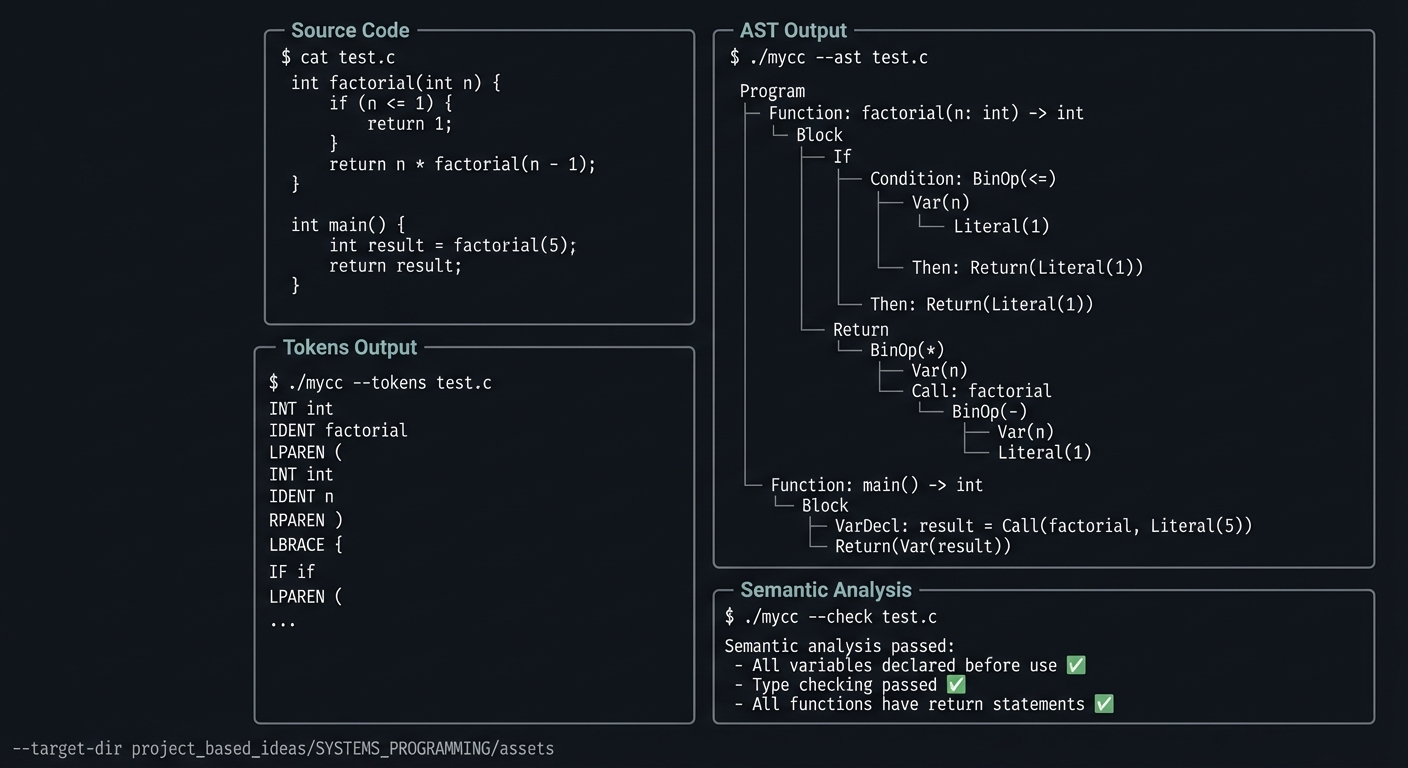
The Core Question You’re Answering
“How does a compiler turn source code text into structured data it can analyze?”
Before you write any code, sit with this question. The transition from “text” to “meaning” is what the frontend accomplishes—lexing recognizes words, parsing recognizes structure.
Concepts You Must Understand First
Stop and research these before coding:
- Lexical Analysis
- What is a token?
- How do you handle keywords vs identifiers?
- How do you track line/column for error messages?
- Book Reference: Compilers: Principles and Practice Ch. 2 — Dave
- Parsing
- What is a context-free grammar?
- What is recursive descent parsing?
- How do you handle operator precedence?
- Book Reference: Writing a C Compiler Ch. 2-3 — Sandler
- Abstract Syntax Trees
- How do you represent different node types?
- How do you traverse an AST?
- What’s the difference between AST and parse tree?
- Book Reference: Engineering a Compiler Ch. 4-5 — Cooper
Questions to Guide Your Design
- Correctness Boundaries
- What invariants must remain true throughout compiler frontend — build a lexer and parser?
- Which invalid inputs are rejected immediately, and where?
- Failure Handling
- What are the highest-probability failure modes?
- How will you preserve diagnostic detail when errors occur?
- Verification Strategy
- Which tests prove invariants and edge behavior?
- Which stress case is most likely to expose design flaws?
Thinking Exercise
Parse This Expression
Before coding, parse a + b * c - d:
Questions while parsing:
- What is the token sequence?
- Draw the AST (respecting precedence)
- What would left-to-right parsing give (wrong)?
- How does precedence climbing/Pratt parsing help?
The Interview Questions They’ll Ask
- “What invariants does your implementation enforce, and how?”
- “Which edge case failed first, and what was the fix?”
- “What tradeoff did you make between performance and maintainability?”
- “How would you harden this for untrusted input?”
- “What observability would you add for production use?”
Hints in Layers
Hint 1: Lexer First Get the lexer completely working before starting the parser. Test it on various inputs.
Hint 2: Start with Expressions Parse simple expressions (literals and operators) before statements. Expression parsing is the hardest part.
Hint 3: Pratt Parsing For expression parsing, Pratt parsing (operator precedence parsing) is simpler than recursive descent for expressions.
Hint 4: Tagged Union for AST Use a tagged union (struct with enum type + union of variants) for AST nodes.
Books That Will Help
| Topic | Book | Chapter |
|---|---|---|
| Primary project reference | Writing a C Compiler by Nora Sandler | Project-relevant chapters |
| Toolchain and debugging | Computer Systems: A Programmer’s Perspective by Bryant & O’Hallaron | Ch. 2-3, Ch. 9 |
| Robust C engineering | Effective C by Robert C. Seacord | Ch. 6, Ch. 11 |
Common Pitfalls and Debugging
Problem 1: “Works for simple inputs, fails on edge cases”
- Why: Invariants are implicit and not enforced at boundaries.
- Fix: Add explicit precondition checks and assertion-backed invariants.
- Quick test: Run dedicated edge-case tests under sanitizers.
Problem 2: “Intermittent or non-deterministic crashes”
- Why: Undefined behavior, uninitialized state, or races.
- Fix: Reproduce deterministically, isolate state transitions, then patch the root cause.
- Quick test: Use
-fsanitize=address,undefined(and thread sanitizer for concurrent projects).
Problem 3: “Performance collapses as input grows”
- Why: Hidden O(n^2) paths or excessive allocation/copying.
- Fix: Profile hot paths and redesign data movement strategy.
- Quick test: Benchmark with 10x and 100x workload sizes.
Definition of Done
- Core functionality for Compiler Frontend — Build a Lexer and Parser works on reference inputs.
- Edge cases and failure paths are tested and documented.
- Reproducible test command exists and passes on a clean run.
- Sanitizer/static-analysis pass is clean for project scope.
Implementation Hints
Token structure:
typedef enum {
    TOK_INT, TOK_RETURN, TOK_IF, TOK_ELSE,
    TOK_IDENT, TOK_NUMBER, TOK_STRING,
    TOK_PLUS, TOK_MINUS, TOK_STAR, TOK_SLASH,
    TOK_LPAREN, TOK_RPAREN, TOK_LBRACE, TOK_RBRACE,
    TOK_SEMICOLON, TOK_EOF
} TokenType;

typedef struct {
    TokenType type;
    char *lexeme;
    int line, column;
} Token;
AST node (tagged union):
typedef enum {
    NODE_LITERAL, NODE_VAR, NODE_BINOP,
    NODE_CALL, NODE_IF, NODE_RETURN, NODE_BLOCK,
    NODE_FUNC, NODE_PROGRAM
} NodeType;

typedef struct ASTNode {
    NodeType type;
    int line;
    union {
        int literal_value;
        char *var_name;
        struct { int op; struct ASTNode *left, *right; } binop;
        struct { char *name; struct ASTNode **args; } call;
        // ... other variants
    };
} ASTNode;
Learning milestones:
- Lexer tokenizes correctly → You understand lexical analysis
- Expressions parse with correct precedence → You understand parsing
- Full programs parse to AST → You understand syntax trees
Project 14: Thread Pool — Build Concurrent C Programs
- File: C_PROGRAMMING_COMPLETE_MASTERY.md
- Main Programming Language: C
- Alternative Programming Languages: Rust, Go
- Coolness Level: Level 4: Hardcore Tech Flex
- Business Potential: 4. The “Open Core” Infrastructure
- Difficulty: Level 4: Expert
- Knowledge Area: Concurrency / Pthreads / Synchronization
- Software or Tool: Valgrind (Helgrind), ThreadSanitizer
- Main Book: The Linux Programming Interface by Michael Kerrisk
What you’ll build: A thread pool that manages worker threads, accepts tasks via a thread-safe queue, and executes them concurrently—the foundation of concurrent servers and parallel programs.
Why it teaches C: Multithreading in C is notoriously difficult. You’ll wrestle with race conditions, deadlocks, and the pthreads API. You’ll learn why concurrent programming is hard—and how to do it correctly.
Core challenges you’ll face:
- Creating and managing threads → maps to pthreads API
- Building a thread-safe queue → maps to mutexes and condition variables
- Avoiding race conditions and deadlocks → maps to synchronization
- Graceful shutdown → maps to thread lifecycle management
Key Concepts:
- Pthreads: The Linux Programming Interface Ch. 29-33 — Kerrisk
- Synchronization: Operating Systems: Three Easy Pieces Ch. 28-32 — Arpaci-Dusseau
- Thread safety: C++ Concurrency in Action Ch. 1-4 — Anthony Williams
Difficulty: Expert Time estimate: 2-3 weeks Prerequisites: Projects 1-10, understanding of race conditions
Real World Outcome
You’ll have a reusable thread pool:
Example Output:
$ ./test_threadpool

╔════════════════════════════════════════════════════════════════╗
║                    THREAD POOL TESTS                           ║
╠════════════════════════════════════════════════════════════════╣
║                                                                ║
║  Creating thread pool with 4 workers...                        ║
║  Workers created: [Thread 1] [Thread 2] [Thread 3] [Thread 4]  ║
║                                                                ║
║  Submitting 20 tasks...                                        ║
║  [Thread 2] Processing task 1 (compute fibonacci(35))          ║
║  [Thread 1] Processing task 2 (compute fibonacci(35))          ║
║  [Thread 4] Processing task 3 (compute fibonacci(35))          ║
║  [Thread 3] Processing task 4 (compute fibonacci(35))          ║
║  [Thread 2] Completed task 1 in 45ms                           ║
║  [Thread 2] Processing task 5...                               ║
║  ...                                                           ║
║                                                                ║
║  All 20 tasks completed in 234ms                               ║
║  Sequential time would be: 900ms                               ║
║  Speedup: 3.84x (with 4 threads)                               ║
║                                                                ║
║  Shutdown test:                                                ║
║  ─────────────────                                             ║
║  Initiating graceful shutdown...                               ║
║  [Thread 1] Finished, exiting                                  ║
║  [Thread 3] Finished, exiting                                  ║
║  [Thread 2] Finished, exiting                                  ║
║  [Thread 4] Finished, exiting                                  ║
║  All workers joined successfully                          ✓    ║
║                                                                ║
║  ThreadSanitizer: No race conditions detected             ✓    ║
║                                                                ║
╠════════════════════════════════════════════════════════════════╣
║  ALL TESTS PASSED ✓                                            ║
╚════════════════════════════════════════════════════════════════╝
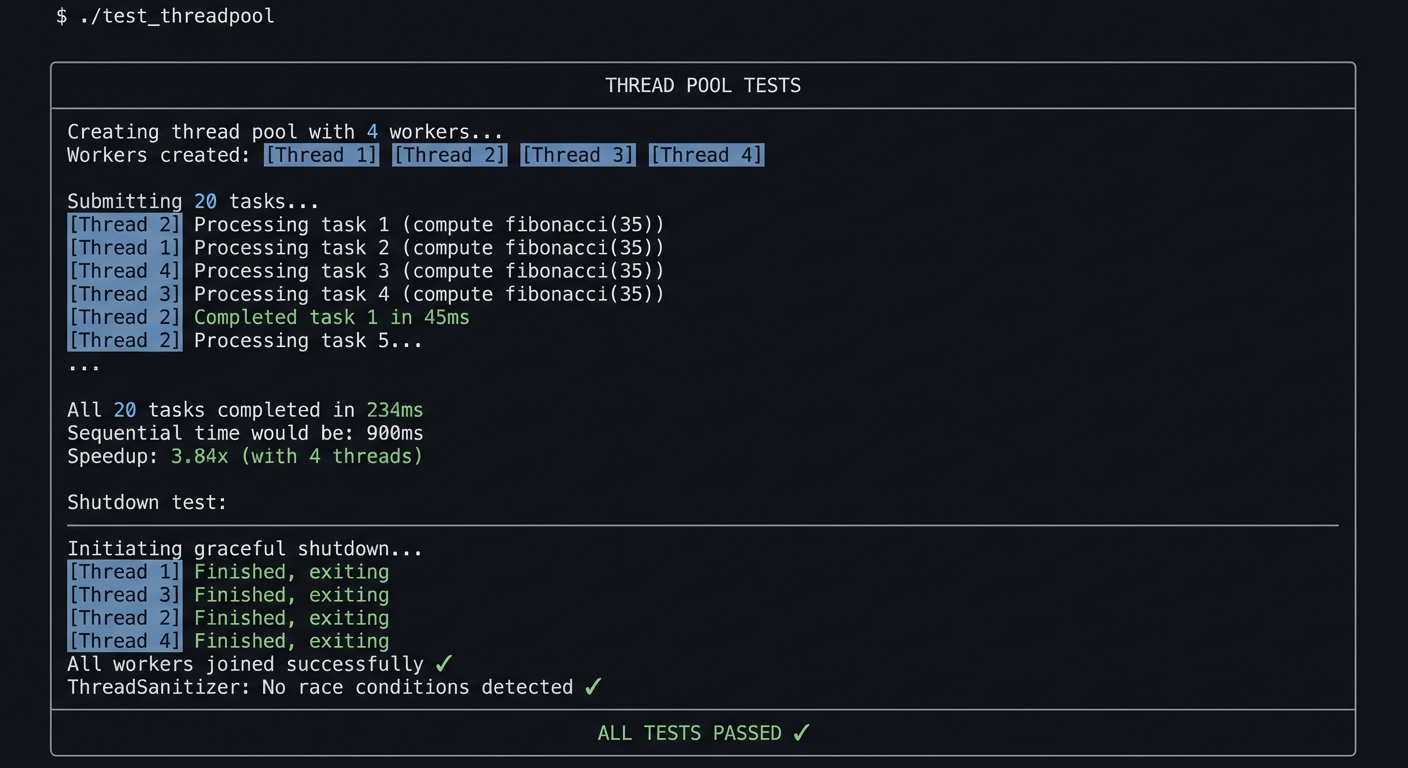
The Core Question You’re Answering
“How do you safely share data between threads, and coordinate their work?”
Before you write any code, sit with this question. The challenge of concurrent programming is that multiple threads can read and write shared data simultaneously—without proper synchronization, chaos ensues.
Concepts You Must Understand First
Stop and research these before coding:
- Thread Creation
- What does pthread_create() do?
- What is a thread function signature?
- How do you pass data to a thread?
- Book Reference: The Linux Programming Interface Ch. 29 — Kerrisk
- Mutexes
- What is a mutex?
- When do you lock/unlock?
- What is a deadlock?
- Book Reference: The Linux Programming Interface Ch. 30 — Kerrisk
- Condition Variables
- Why can’t you just use a mutex for waiting?
- What is spurious wakeup?
- Why use while() instead of if() for condition checks?
- Book Reference: The Linux Programming Interface Ch. 30 — Kerrisk
Questions to Guide Your Design
- Correctness Boundaries
- What invariants must remain true throughout thread pool — build concurrent c programs?
- Which invalid inputs are rejected immediately, and where?
- Failure Handling
- What are the highest-probability failure modes?
- How will you preserve diagnostic detail when errors occur?
- Verification Strategy
- Which tests prove invariants and edge behavior?
- Which stress case is most likely to expose design flaws?
Thinking Exercise
Design the Queue
Before coding, design a thread-safe task queue:
Questions while designing:
- What operations does it need? (enqueue, dequeue)
- When does a worker thread need to wait?
- How do you signal workers when a task is available?
- What happens during shutdown?
The Interview Questions They’ll Ask
- “What invariants does your implementation enforce, and how?”
- “Which edge case failed first, and what was the fix?”
- “What tradeoff did you make between performance and maintainability?”
- “How would you harden this for untrusted input?”
- “What observability would you add for production use?”
Hints in Layers
Hint 1: Single-Threaded First Build and test the task queue without threads first. Then add synchronization.
Hint 2: Lock Before Access Every access to shared data must be protected by a mutex. No exceptions.
Hint 3: Condition Variable Pattern
pthread_mutex_lock(&mutex);
while (condition_not_met) {
    pthread_cond_wait(&cond, &mutex);
}
// Do work
pthread_mutex_unlock(&mutex);
Hint 4: Use ThreadSanitizer
Compile with -fsanitize=thread to catch race conditions automatically.
Books That Will Help
| Topic | Book | Chapter |
|---|---|---|
| Primary project reference | The Linux Programming Interface by Michael Kerrisk | Project-relevant chapters |
| Toolchain and debugging | Computer Systems: A Programmer’s Perspective by Bryant & O’Hallaron | Ch. 2-3, Ch. 9 |
| Robust C engineering | Effective C by Robert C. Seacord | Ch. 6, Ch. 11 |
Common Pitfalls and Debugging
Problem 1: “Works for simple inputs, fails on edge cases”
- Why: Invariants are implicit and not enforced at boundaries.
- Fix: Add explicit precondition checks and assertion-backed invariants.
- Quick test: Run dedicated edge-case tests under sanitizers.
Problem 2: “Intermittent or non-deterministic crashes”
- Why: Undefined behavior, uninitialized state, or races.
- Fix: Reproduce deterministically, isolate state transitions, then patch the root cause.
- Quick test: Use
-fsanitize=address,undefined(and thread sanitizer for concurrent projects).
Problem 3: “Performance collapses as input grows”
- Why: Hidden O(n^2) paths or excessive allocation/copying.
- Fix: Profile hot paths and redesign data movement strategy.
- Quick test: Benchmark with 10x and 100x workload sizes.
Definition of Done
- Core functionality for Thread Pool — Build Concurrent C Programs works on reference inputs.
- Edge cases and failure paths are tested and documented.
- Reproducible test command exists and passes on a clean run.
- Sanitizer/static-analysis pass is clean for project scope.
Implementation Hints
Thread pool structure:
typedef struct {
    pthread_t *threads;
    size_t num_threads;
    Task *task_queue;
    pthread_mutex_t queue_mutex;
    pthread_cond_t task_available;
    bool shutdown;
} ThreadPool;
Worker thread function:
void *worker(void *arg) {
    ThreadPool *pool = (ThreadPool *)arg;

    while (1) {
        pthread_mutex_lock(&pool->queue_mutex);

        while (queue_empty(pool) && !pool->shutdown) {
            pthread_cond_wait(&pool->task_available, &pool->queue_mutex);
        }

        if (pool->shutdown && queue_empty(pool)) {
            pthread_mutex_unlock(&pool->queue_mutex);
            break;
        }

        Task task = dequeue(pool);
        pthread_mutex_unlock(&pool->queue_mutex);

        task.function(task.arg);
    }

    return NULL;
}
Learning milestones:
- Single thread processes tasks → You understand the queue
- Multiple threads work correctly → You understand synchronization
- Shutdown works cleanly → You understand thread lifecycle
Project 15: Embedded Project — Bare Metal LED Blinker
- File: C_PROGRAMMING_COMPLETE_MASTERY.md
- Main Programming Language: C
- Alternative Programming Languages: Assembly, Rust
- Coolness Level: Level 5: Pure Magic (Super Cool)
- Business Potential: 3. The “Service & Support” Model
- Difficulty: Level 4: Expert
- Knowledge Area: Embedded Systems / Hardware / Bare Metal
- Software or Tool: ARM Cortex-M (STM32 or similar), OpenOCD, GDB
- Main Book: Making Embedded Systems by Elecia White
What you’ll build: A bare metal program (no OS, no libraries) that blinks an LED on a microcontroller by directly manipulating hardware registers. Pure C talking to hardware.
Why it teaches C: This is C in its purest form—no malloc, no printf, just registers and memory addresses. You’ll understand why C was created (for systems programming) and how it directly controls hardware.
Core challenges you’ll face:
- Understanding memory-mapped I/O → maps to hardware registers
- Writing a linker script → maps to memory layout
- Implementing startup code → maps to reset vectors and initialization
- Timing without an OS → maps to hardware timers or busy-wait
Key Concepts:
- Embedded fundamentals: Making Embedded Systems Ch. 1-4 — Elecia White
- ARM Cortex-M: The Definitive Guide to ARM Cortex-M3/M4 — Yiu
- Bare metal programming: Bare Metal C by Steve Oualline
Difficulty: Expert Time estimate: 2-4 weeks (plus hardware setup) Prerequisites: Projects 1-8, understanding of memory-mapped I/O
Real World Outcome
You’ll have an LED blinking with zero dependencies:
Example Output:
$ arm-none-eabi-gcc -mcpu=cortex-m4 -mthumb -nostdlib \
    -T linker.ld -o blink.elf startup.c main.c

$ arm-none-eabi-objdump -h blink.elf
Sections:
Idx Name          Size      VMA       LMA       File off  Algn
  0 .text         00000120  08000000  08000000  00001000  2**2
  1 .rodata       00000010  08000120  08000120  00001120  2**2
  2 .data         00000004  20000000  08000130  00002000  2**2
  3 .bss          00000010  20000004  20000004  00002004  2**0

$ # Flash to microcontroller
$ openocd -f interface/stlink.cfg -f target/stm32f4x.cfg \
    -c "program blink.elf verify reset exit"

Open On-Chip Debugger 0.12.0
...
** Programming Started **
** Programming Finished **
** Verify Started **
** Verified OK **
** Resetting Target **

# Physical result: LED blinks at 1Hz!
The Core Question You’re Answering
“How does C code control physical hardware without an OS?”
Before you write any code, sit with this question. When there’s no OS, your code IS the entire system. You’re writing directly to memory addresses that control real hardware.
Concepts You Must Understand First
Stop and research these before coding:
- Memory-Mapped I/O
- What are hardware registers?
- How do you read/write to a specific address?
- What is volatile and why is it crucial?
- Book Reference: Making Embedded Systems Ch. 4 — White
- Startup Code
- What happens when the microcontroller powers on?
- What is the reset vector?
- How do you set up the stack?
- Book Reference: Bare Metal C Ch. 2-3 — Oualline
- Linker Scripts
- What is a linker script?
- How do you specify where code and data go?
- What are .text, .data, .bss, .rodata?
- Book Reference: Making Embedded Systems Ch. 6 — White
Questions to Guide Your Design
- Correctness Boundaries
- What invariants must remain true throughout embedded project — bare metal led blinker?
- Which invalid inputs are rejected immediately, and where?
- Failure Handling
- What are the highest-probability failure modes?
- How will you preserve diagnostic detail when errors occur?
- Verification Strategy
- Which tests prove invariants and edge behavior?
- Which stress case is most likely to expose design flaws?
Thinking Exercise
Trace the Boot
Before coding, trace what happens at power-on:
Questions while tracing:
- What address does the CPU fetch first?
- What’s in that address?
- How does your code start running?
- When is the stack pointer set?
- When is .data initialized?
The Interview Questions They’ll Ask
- “What invariants does your implementation enforce, and how?”
- “Which edge case failed first, and what was the fix?”
- “What tradeoff did you make between performance and maintainability?”
- “How would you harden this for untrusted input?”
- “What observability would you add for production use?”
Hints in Layers
Hint 1: Get the Reference Manual Download your microcontroller’s reference manual. GPIO register addresses are documented there.
Hint 2: volatile is Mandatory All register accesses MUST use volatile. Otherwise, the compiler will optimize them away.
Hint 3: Start with Existing Linker Script Don’t write a linker script from scratch. Start with one from a tutorial or vendor SDK.
Hint 4: Use OpenOCD for Debugging OpenOCD + GDB lets you debug bare metal code with breakpoints and register inspection.
Books That Will Help
| Topic | Book | Chapter |
|---|---|---|
| Primary project reference | Making Embedded Systems by Elecia White | Project-relevant chapters |
| Toolchain and debugging | Computer Systems: A Programmer’s Perspective by Bryant & O’Hallaron | Ch. 2-3, Ch. 9 |
| Robust C engineering | Effective C by Robert C. Seacord | Ch. 6, Ch. 11 |
Common Pitfalls and Debugging
Problem 1: “Works for simple inputs, fails on edge cases”
- Why: Invariants are implicit and not enforced at boundaries.
- Fix: Add explicit precondition checks and assertion-backed invariants.
- Quick test: Run dedicated edge-case tests under sanitizers.
Problem 2: “Intermittent or non-deterministic crashes”
- Why: Undefined behavior, uninitialized state, or races.
- Fix: Reproduce deterministically, isolate state transitions, then patch the root cause.
- Quick test: Use
-fsanitize=address,undefined(and thread sanitizer for concurrent projects).
Problem 3: “Performance collapses as input grows”
- Why: Hidden O(n^2) paths or excessive allocation/copying.
- Fix: Profile hot paths and redesign data movement strategy.
- Quick test: Benchmark with 10x and 100x workload sizes.
Definition of Done
- Core functionality for Embedded Project — Bare Metal LED Blinker works on reference inputs.
- Edge cases and failure paths are tested and documented.
- Reproducible test command exists and passes on a clean run.
- Sanitizer/static-analysis pass is clean for project scope.
Implementation Hints
GPIO register access:
// Memory-mapped registers for GPIO port
#define GPIOA_BASE  0x40020000
#define GPIOA_MODER (*(volatile uint32_t *)(GPIOA_BASE + 0x00))
#define GPIOA_ODR   (*(volatile uint32_t *)(GPIOA_BASE + 0x14))

void gpio_init(void) {
    // Set pin 5 as output
    GPIOA_MODER |= (1 << (5 * 2));
}

void led_on(void) {
    GPIOA_ODR |= (1 << 5);
}

void led_off(void) {
    GPIOA_ODR &= ~(1 << 5);
}
Simple delay (busy-wait):
void delay(volatile uint32_t count) {
    while (count--) {
        // Do nothing
    }
}
Main loop:
int main(void) {
    gpio_init();

    while (1) {
        led_on();
        delay(1000000);
        led_off();
        delay(1000000);
    }
}
Learning milestones:
- Program runs (LED does anything) → You understand boot process
- LED blinks at intended rate → You understand timing
- Use hardware timer instead of busy-wait → You understand peripherals
Project 16: Operating System Kernel — Capstone Integration
- File: C_PROGRAMMING_COMPLETE_MASTERY.md
- Main Programming Language: C
- Alternative Programming Languages: Assembly (required for bootstrap), Rust
- Coolness Level: Level 5: Pure Magic (Super Cool)
- Business Potential: 1. The “Resume Gold”
- Difficulty: Level 5: Master
- Knowledge Area: Operating Systems / Kernel Architecture
- Software or Tool: QEMU, GDB, cross-compiler toolchain
- Main Book: Operating Systems: Three Easy Pieces by Arpaci-Dusseau
What you’ll build: A bootable minimal kernel that initializes memory, handles interrupts, schedules tasks, and runs a tiny shell in QEMU.
Why it teaches C: This is where every prior concept becomes mandatory, not optional. You combine memory management, low-level data structures, ABI awareness, debugging discipline, and hardware-facing code in one integrated system.
Core challenges you’ll face:
- Bootstrapping execution → maps to linker scripts, startup/runtime initialization
- Memory management internals → maps to allocators, page tables, frame tracking
- Interrupt-safe control flow → maps to CPU privilege levels, IDT/GDT reasoning
- Task scheduling and synchronization → maps to concurrency invariants and race avoidance
Key Concepts:
- Kernel memory model: Operating Systems: Three Easy Pieces Ch. 13-24 — Arpaci-Dusseau
- x86/ARM bootstrap mechanics: Operating Systems: From 0 to 1 — Wang
- Systems interface and process model: The Linux Programming Interface Ch. 24-28 — Kerrisk
Difficulty: Master Time estimate: 3-6 months Prerequisites: Projects 1-15
Real World Outcome
You boot a custom kernel image in QEMU and interact with a working shell:
$ make kernel
[CC] boot/startup.c
[CC] kernel/mm.c
[CC] kernel/sched.c
[LD] kernel.elf
[OBJCOPY] kernel.bin

$ qemu-system-x86_64 -kernel kernel.bin -serial stdio
Booting LearningJourneyC Kernel...
[init] paging enabled
[init] interrupt handlers registered
[init] scheduler online (2 tasks)
[init] shell ready

ljc-kernel> help
commands: help, ps, mem, ticks, reboot

ljc-kernel> ps
pid=1  name=idle    state=RUNNING
pid=2  name=shell   state=RUNNABLE

ljc-kernel> mem
frames_total=8192 frames_free=7440 heap_used=128KB
You can set breakpoints in early boot with GDB and trace faults to specific subsystems.
The Core Question You’re Answering
“How do isolated low-level components become a coherent operating system?”
A kernel is not one algorithm; it is a set of invariants across memory, interrupts, scheduling, and interfaces. This project forces you to reason across boundaries.
Concepts You Must Understand First
- Boot and Initialization Pipeline
- How does control transfer from firmware/bootloader to kernel entry?
- What must be initialized before enabling interrupts?
- Book Reference: Operating Systems: From 0 to 1 — early chapters
- Virtual Memory and Page Management
- How are physical frames tracked and mapped?
- Which invariants prevent double allocation and leaks?
- Book Reference: OSTEP Ch. 18-24 — Arpaci-Dusseau
- Interrupts and Exception Handling
- What is the contract for trap handlers?
- How do you avoid re-entrancy corruption?
- Book Reference: OSTEP Ch. 6, Ch. 32 — Arpaci-Dusseau
- Scheduling Basics
- How does context switch preserve machine state?
- What fairness and starvation tradeoffs are acceptable?
- Book Reference: OSTEP Ch. 7-10 — Arpaci-Dusseau
Questions to Guide Your Design
- Kernel Boundaries
- Which components run before the allocator is available?
- Which APIs are safe to call from interrupt context?
- Failure Containment
- How does each subsystem report fatal vs recoverable errors?
- What diagnostics are available when early boot fails?
- Verification Strategy
- Which subsystem-level tests run in CI/emulation?
- Which invariants are checked on every boot path?
Thinking Exercise
Trace a Timer Interrupt
Draw the complete state transition from timer IRQ firing to scheduler decision and return to user/kernel task.
Questions to answer:
- Where is register state saved and restored?
- Which locks are legal during interrupt handling?
- What state must remain consistent if preemption happens mid-kernel routine?
The Interview Questions They’ll Ask
- “Walk through your boot path from reset vector to first shell prompt.”
- “How does your allocator interact with page management?”
- “What happens on a page fault in your kernel?”
- “How do you guarantee scheduler and interrupt safety?”
- “What is the first thing you check when the kernel triple-faults?”
Hints in Layers
Hint 1: Stabilize Boot First Bring up deterministic text/serial output before adding complex subsystems.
Hint 2: Add One Subsystem at a Time Memory manager first, then interrupt handling, then scheduler, then shell.
Hint 3: Keep Invariants Written Down Track ownership/lifetime for every kernel object and enforce in debug builds.
Hint 4: Automate Emulator Workflows Use scripted QEMU + GDB launches so regressions are easy to reproduce.
Books That Will Help
| Topic | Book | Chapter |
|---|---|---|
| Core OS mechanics | Operating Systems: Three Easy Pieces | Ch. 6-24 |
| Systems internals reference | The Linux Programming Interface | Ch. 24-28 |
| Practical low-level architecture | Computer Systems: A Programmer’s Perspective | Ch. 3, Ch. 8, Ch. 9 |
Common Pitfalls and Debugging
Problem 1: “Kernel boots intermittently or hangs early”
- Why: Initialization order or undefined hardware state assumptions.
- Fix: Force deterministic init ordering and log each boundary step.
- Quick test: Boot in QEMU with serial logs and compare trace checkpoints.
Problem 2: “Random crashes after enabling interrupts”
- Why: Corrupted stack/register state in interrupt path.
- Fix: Audit save/restore discipline and interrupt masking windows.
- Quick test: Single-step entry/exit stubs in GDB and validate register symmetry.
Problem 3: “Scheduler appears to work but tasks starve”
- Why: Queue invariants or wakeup policy bugs.
- Fix: Add runnable-queue instrumentation and fairness counters.
- Quick test: Run deterministic workload and validate per-task runtime distribution.
Definition of Done
- Kernel boots reliably in QEMU and reaches shell prompt.
- Memory manager, interrupt handling, and scheduler pass scripted smoke tests.
- Fault conditions (invalid access, bad syscall, timer IRQ) are observable and diagnosable.
- Build + run + debug workflow is reproducible from clean checkout.
Implementation Hints
Use subsystem milestones and explicit interfaces:
milestone_1_boot -> milestone_2_memory -> milestone_3_interrupts
                  -> milestone_4_scheduler -> milestone_5_shell
Keep kernel interfaces narrow:
mm_alloc_page()/mm_free_page()irq_register(vector, handler)sched_enqueue(task)/sched_pick_next()
Treat every subsystem boundary as a test point; do not integrate two unstable subsystems at once.
Project Comparison Table
| # | Project | Difficulty | Time | Depth of Understanding | Fun Factor |
|---|---|---|---|---|---|
| 1 | Memory Visualizer | Beginner | Weekend | ★★★★☆ | ★★★☆☆ |
| 2 | String Library | Intermediate | 1-2 weeks | ★★★★★ | ★★★☆☆ |
| 3 | Dynamic Array | Intermediate | 1 week | ★★★★☆ | ★★★☆☆ |
| 4 | Linked List | Intermediate | 1 week | ★★★★☆ | ★★★☆☆ |
| 5 | Hash Table | Advanced | 1-2 weeks | ★★★★★ | ★★★★☆ |
| 6 | Memory Allocator | Expert | 2-4 weeks | ★★★★★ | ★★★★★ |
| 7 | Config Parser | Intermediate | 1 week | ★★★☆☆ | ★★★☆☆ |
| 8 | Build System | Advanced | 2-3 weeks | ★★★★☆ | ★★★★☆ |
| 9 | Unix Shell | Expert | 3-4 weeks | ★★★★★ | ★★★★★ |
| 10 | HTTP Server | Advanced | 2-3 weeks | ★★★★☆ | ★★★★★ |
| 11 | Database Engine | Expert | 3-4 weeks | ★★★★★ | ★★★★★ |
| 12 | Debugger | Master | 4-6 weeks | ★★★★★ | ★★★★★ |
| 13 | Compiler Frontend | Expert | 4-6 weeks | ★★★★★ | ★★★★★ |
| 14 | Thread Pool | Expert | 2-3 weeks | ★★★★★ | ★★★★☆ |
| 15 | Bare Metal LED | Expert | 2-4 weeks | ★★★★★ | ★★★★★ |
| 16 | Operating System Kernel | Master | 3-6 months | ★★★★★ | ★★★★★ |
Recommendation
Start Here Based on Your Level:
Complete Beginner to C
Start with Project 1 (Memory Visualizer). It requires almost no C knowledge but teaches the most important concept: memory. Then proceed sequentially through Projects 2-5.
Know Basic C, Want to Go Deep
Start with Project 5 (Hash Table). It combines everything you know (pointers, memory, data structures) and is foundational for later projects. Then jump to Project 6 (Memory Allocator).
Experienced, Want Systems Programming
Start with Project 9 (Unix Shell). It’s the canonical systems programming project and uses fork, exec, pipes, signals. Then choose between Project 11 (Database) or Project 12 (Debugger).
Want Maximum Resume Impact
Do Projects 6 (Memory Allocator), 9 (Shell), 11 (Database), and 12 (Debugger). These are “you built WHAT?” projects that prove deep understanding.
Final Overall Project: Operating System Kernel
After completing the projects above, you’re ready for the ultimate C project:
- File: C_PROGRAMMING_COMPLETE_MASTERY.md
- Main Programming Language: C
- Alternative Programming Languages: Assembly (required), Rust
- Coolness Level: Level 5: Pure Magic (Super Cool)
- Business Potential: 1. The “Resume Gold”
- Difficulty: Level 5: Master
- Knowledge Area: Operating Systems / Everything
- Software or Tool: QEMU, GDB, cross-compiler
- Main Book: Operating Systems: Three Easy Pieces by Arpaci-Dusseau
What you’ll build: A minimal operating system kernel that boots, manages memory, schedules processes, handles interrupts, and implements a simple file system. The synthesis of everything you’ve learned.
Why it’s the ultimate project: An OS kernel requires EVERY skill from the previous projects:
- Memory management (from Project 6)
- Process management (from Project 9)
- File systems (from Project 11)
- Hardware interaction (from Project 15)
- Debugging skills (from Project 12)
- Data structures (from Projects 3-5)
- Concurrency (from Project 14)
What you’ll implement:
- Bootloader - Get the CPU into protected mode and load your kernel
- Memory manager - Physical and virtual memory allocation
- Process scheduler - Create, run, and switch between processes
- Interrupt handlers - Handle timer, keyboard, and system calls
- File system - Simple FAT or custom filesystem
- Shell - A basic command-line interface running in userspace
Resources:
- Operating Systems: Three Easy Pieces by Arpaci-Dusseau (free online)
- xv6 (MIT’s teaching operating system - study the code)
- OSDev Wiki (osdev.org)
- Writing a Simple Operating System from Scratch by Nick Blundell
Time estimate: 3-6 months
The journey: This project is measured in months, not weeks. But completing even a basic bootable kernel with process switching puts you in the top 0.1% of programmers. You’ll truly understand how computers work from the metal up.
From Learning to Production: What Is Next
| Your Project | Production Equivalent | Gap to Fill |
|---|---|---|
| Memory Allocator | jemalloc, tcmalloc, mimalloc |
Fragmentation metrics, thread-local arenas, hardened metadata |
| Unix Shell | bash, zsh, fish |
Full POSIX edge cases, scripting language depth, plugin ecosystem |
| HTTP Server | nginx, haproxy, Caddy |
TLS termination, request routing policies, zero-downtime reloads |
| Database Engine | SQLite, PostgreSQL, RocksDB |
Recovery protocol rigor, planner/optimizer depth, durability guarantees |
| Thread Pool | Production executors/runtime schedulers | Backpressure, workload isolation, observability hooks |
| Operating System Kernel | Linux/BSD kernels | Driver ecosystem, hardware matrix coverage, long-term security maintenance |
Productionizing these projects means adding observability, reliability testing, threat modeling, and backward-compatible interfaces.
Summary
This learning path covers C programming through 16 hands-on projects. Here’s the complete list:
| # | Project Name | Main Language | Difficulty | Time Estimate |
|---|---|---|---|---|
| 1 | Memory Visualizer | C | Beginner | Weekend |
| 2 | String Library | C | Intermediate | 1-2 weeks |
| 3 | Dynamic Array | C | Intermediate | 1 week |
| 4 | Linked List Library | C | Intermediate | 1 week |
| 5 | Hash Table | C | Advanced | 1-2 weeks |
| 6 | Memory Allocator | C | Expert | 2-4 weeks |
| 7 | Configuration Parser | C | Intermediate | 1 week |
| 8 | Build System (Mini-Make) | C | Advanced | 2-3 weeks |
| 9 | Unix Shell | C | Expert | 3-4 weeks |
| 10 | HTTP Server | C | Advanced | 2-3 weeks |
| 11 | Database Engine | C | Expert | 3-4 weeks |
| 12 | Debugger | C | Master | 4-6 weeks |
| 13 | Compiler Frontend | C | Expert | 4-6 weeks |
| 14 | Thread Pool | C | Expert | 2-3 weeks |
| 15 | Bare Metal LED Blinker | C | Expert | 2-4 weeks |
| 16 | Operating System Kernel | C/ASM | Master | 3-6 months |
Recommended Learning Path
For beginners: Start with projects #1, #2, #3, #4, #5 (foundation)
For intermediate: Jump to projects #5, #6, #7, #8, #9 (systems programming)
For advanced: Focus on projects #9, #10, #11, #12, #13 (deep systems)
For embedded interest: Do projects #1, #6, #15, then OS kernel
Expected Outcomes
After completing these projects, you will:
- Understand memory at the byte level - stack, heap, pointers, alignment
- Master data structures in C - arrays, lists, hash tables, trees
- Know how programs execute - compilation, linking, loading, process creation
- Understand operating systems - processes, memory management, file systems
- Be comfortable with systems programming - sockets, signals, threads
- Know how to debug anything - GDB, Valgrind, strace, ptrace
- Appreciate why C remains relevant - it’s the foundation of modern computing
- Be able to read and contribute to - Linux kernel, databases, compilers, embedded systems
You’ll have built 16 working projects that demonstrate deep understanding of C from first principles—the kind of knowledge that separates senior engineers from everyone else.
Additional Resources and References
Standards and Specifications
- ISO/IEC 9899:2024 (C23): https://www.iso.org/standard/82075.html
- C23 language reference overview: https://en.cppreference.com/w/c/23
- POSIX Base Specifications (Issue 8 drafts and references): https://pubs.opengroup.org/onlinepubs/
- HTTP Semantics (RFC 9110): https://www.rfc-editor.org/rfc/rfc9110
- HTTP/1.1 Messaging (RFC 9112): https://www.rfc-editor.org/rfc/rfc9112
Industry Data and Analysis
- TIOBE Index (January 2026): https://www.tiobe.com/tiobe-index/
- Stack Overflow Developer Survey 2025 (Technology): https://survey.stackoverflow.co/2025/technology
- Memory safety in critical open source software (2024): https://www.cyber.gov.au/about-us/view-all-content/reports-and-statistics/identifying-and-reducing-memory-safety-issues-critical-open-source-software
Books
- C Programming: A Modern Approach by K. N. King
- Effective C by Robert C. Seacord
- Computer Systems: A Programmer’s Perspective by Bryant & O’Hallaron
- The Linux Programming Interface by Michael Kerrisk
- Mastering Algorithms with C by Kyle Loudon
“C is quirky, flawed, and an enormous success.” — Dennis Ritchie
Now go build something.