CS:APP (3rd Edition) — Expanded Project Guides
Generated from:
CSAPP_3E_DEEP_LEARNING_PROJECTS.mdThis folder contains deep-dive guides for each project in the CS:APP learning path.
Overview
These expanded project guides transform the project summaries from Computer Systems: A Programmer’s Perspective (3rd Edition) into comprehensive implementation guides. Each guide provides:
- Deep theoretical foundations — Learn the concepts before building
- Solution architecture — Understand what the solution looks like without being given the code
- Phased implementation — Step-by-step guidance to keep you on track
- Testing strategies — Know how to verify your work
- Common pitfalls — Avoid the mistakes others have made
- Real-world connections — See how this applies beyond the classroom
Project Index
| # | Project | Difficulty | Time | Key Focus |
|---|---|---|---|---|
| 1 | Hello, Toolchain — Build Pipeline Explorer | Intermediate | 1-2 weeks | Compilation pipeline, ELF, linking |
| 2 | Bitwise Data Inspector | Intermediate | 1-2 weeks | Data representations, IEEE-754 |
| 3 | Data Lab Clone | Advanced | 1-2 weeks | Bit manipulation, operator constraints |
| 4 | x86-64 Calling Convention Crash Cart | Advanced | 1-2 weeks | Stack frames, ABI, debugging |
| 5 | Bomb Lab Workflow | Advanced | 1-2 weeks | Binary reverse engineering |
| 6 | Attack Lab Workflow | Expert | 2-3 weeks | Exploitation, buffer overflows |
| 7 | Y86-64 CPU Simulator | Expert | 1 month+ | CPU architecture, pipelining |
| 8 | Performance Clinic | Advanced | 1-2 weeks | Optimization, ILP, branch prediction |
| 9 | Cache Lab++ Simulator | Advanced | 2-3 weeks | Cache organization, locality |
| 10 | ELF Link Map & Interposition | Advanced | 2-3 weeks | Dynamic linking, symbols |
| 11 | Signals + Processes Sandbox | Advanced | 1-2 weeks | Exceptional control flow |
| 12 | Unix Shell with Job Control | Advanced | 2-3 weeks | Job control, signals, race avoidance |
| 13 | Virtual Memory Map Visualizer | Advanced | 1-2 weeks | Virtual memory, page tables |
| 14 | Build Your Own Malloc | Expert | 1 month | Memory allocation, heap management |
| 15 | Robust Unix I/O Toolkit | Advanced | 2-3 weeks | System I/O, buffering |
| 16 | Concurrency Workbench | Expert | 2-3 weeks | Threads, synchronization, producer-consumer |
| 17 | CS:APP Capstone Proxy Server | Expert | 2-3 months | Everything combined |
| 18 | ELF Linker and Loader | Expert | 2-3 weeks | Symbol resolution, relocation, ELF generation |
| 19 | Virtual Memory Simulator | Advanced | 2 weeks | TLB, page tables, page replacement |
| 20 | HTTP Web Server | Intermediate | 1-2 weeks | Sockets, HTTP parsing, CGI |
| 21 | Thread Pool Implementation | Advanced | 1-2 weeks | Work queues, condition variables, shutdown |
| 22 | Signal-Safe Printf | Advanced | Weekend | Async-signal-safety, low-level I/O |
| 23 | Performance Profiler | Advanced | 1-2 weeks | Sampling, SIGPROF, stack unwinding |
| 24 | Memory Leak Detector | Advanced | 1-2 weeks | Interposition, allocation tracking, reports |
| 25 | Debugger (ptrace-based) | Master | 1 month+ | Breakpoints, single-step, registers, DWARF |
| 26 | Operating System Kernel Capstone | Master+ | 3-6 months | Boot, paging, interrupts, processes |
Status: 26 project guides are now available with expanded content including:
- Deep theoretical foundations
- Solution architecture
- Implementation guides
- Testing strategies
- Interview preparation questions
- Progressive hints for when you’re stuck
Learning Paths
Choose a path based on your goals:
Core Path (Essential CS:APP Understanding)
P1 → P2 → P4 → P11 → P12
Best for: Building solid systems programming foundation
Security Path (Exploitation & Defense)
P1 → P2 → P4 → P5 → P6
Best for: Security research, CTF preparation
Architecture Path (CPU Internals)
P1 → P2 → P3 → P7
Best for: Hardware/architecture understanding
Performance Path (Optimization Mastery)
P1 → P2 → P8 → P9
Best for: Performance engineering roles
Full Systems Path
P1 → P2 → P4 → P11 → P12 → P15 → P16
Best for: Complete systems programmer training
Complete Path (Everything)
P1 through P17
Best for: Maximum depth, preparation for OS/compiler work
Dependency Graph
                                    ┌─────────────────────────┐
                                    │  PROJECT 17: CAPSTONE   │
                                    │   Secure Proxy Server   │
                                    └───────────┬─────────────┘
                                                │
              ┌─────────────────────────────────┼─────────────────────────────────┐
              │                                 │                                 │
              ▼                                 ▼                                 ▼
    ┌─────────────────┐               ┌─────────────────┐               ┌─────────────────┐
    │   P16: Conc.    │               │   P15: Unix     │               │   P14: Malloc   │
    │   Workbench     │               │   I/O Toolkit   │               │   Allocator     │
    └────────┬────────┘               └────────┬────────┘               └────────┬────────┘
             │                                 │                                 │
             └─────────────────────────────────┤                 ┌───────────────┤
                                               │                 │               │
                                               ▼                 ▼               ▼
    ┌─────────────────┐               ┌─────────────────┐    ┌──────────┐  ┌──────────┐
    │   P12: Shell    │               │   P11: Signals  │    │ P13: VM  │  │ P9:Cache │
    │   Job Control   │               │   + Processes   │    │ Visualiz │  │ Simulator│
    └────────┬────────┘               └────────┬────────┘    └────┬─────┘  └────┬─────┘
             │                                 │                  │             │
             └─────────────┬───────────────────┘                  │             │
                           │                                      │             │
                           ▼                                      ▼             ▼
              ┌─────────────────────────────────────────────────────────────────────┐
              │                          P10: ELF Link Map                          │
              └────────────────────────────────────┬────────────────────────────────┘
                                                   │
       ┌───────────────────────────────────────────┼───────────────────────────────────────────┐
       │                                           │                                           │
       ▼                                           ▼                                           ▼
┌─────────────────┐                      ┌─────────────────┐                         ┌─────────────────┐
│   P8: Perf      │                      │   P7: Y86-64    │                         │   P6: Attack    │
│   Clinic        │                      │   CPU Simulator │                         │   Lab Workflow  │
└────────┬────────┘                      └────────┬────────┘                         └────────┬────────┘
         │                                        │                                           │
         │                                        │                                           ▼
         │                                        │                                  ┌─────────────────┐
         │                                        │                                  │   P5: Bomb Lab  │
         │                                        │                                  │   Workflow      │
         │                                        │                                  └────────┬────────┘
         │                                        │                                           │
         └────────────────────────────────────────┼───────────────────────────────────────────┤
                                                  │                                           │
                                                  ▼                                           ▼
                                         ┌─────────────────┐                         ┌─────────────────┐
                                         │   P3: Data Lab  │                         │   P4: Calling   │
                                         │   Clone         │                         │   Convention    │
                                         └────────┬────────┘                         └────────┬────────┘
                                                  │                                           │
                                                  └─────────────────┬─────────────────────────┘
                                                                    │
                                                                    ▼
                                                           ┌─────────────────┐
                                                           │   P2: Bitwise   │
                                                           │   Data Inspector│
                                                           └────────┬────────┘
                                                                    │
                                                                    ▼
                                                           ┌─────────────────┐
                                                           │   P1: Toolchain │
                                                           │   Explorer      │
                                                           └─────────────────┘
                                                                 START
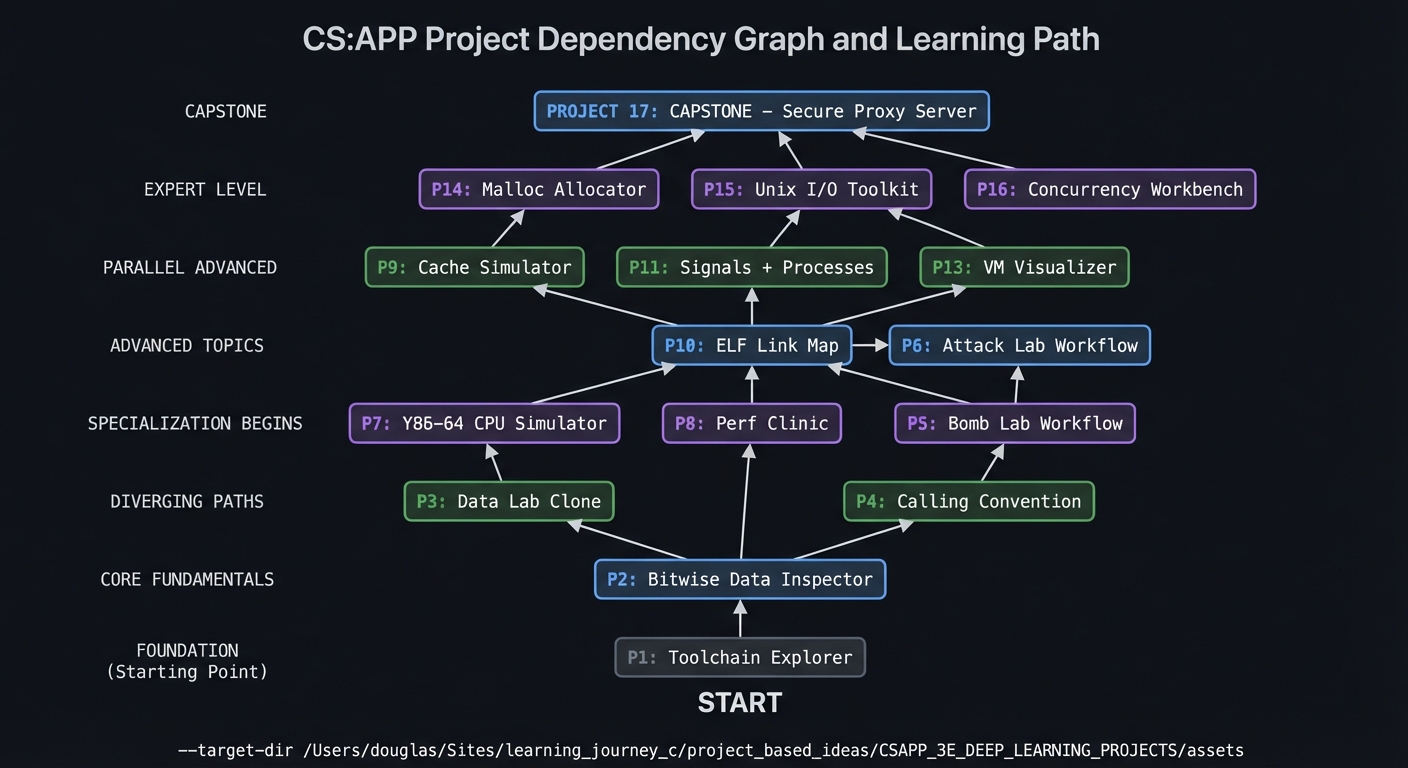
Prerequisites for the Learning Journey
Before starting Project 1, you should have:
- C Programming: Comfortable writing, compiling, and debugging C programs
- Command Line: Familiar with Linux/Unix shell, basic navigation
- Git: Able to clone, commit, and manage a repository
- Text Editor/IDE: Proficient with your development environment
- Debugging Basics: Used gdb or lldb at least once
Recommended but not required:
- Some exposure to assembly language
- Understanding of binary/hexadecimal notation
- Basic data structures knowledge (arrays, pointers, structs)
How to Use These Guides
- Read the theory first — Don’t jump to implementation
- Study the solution architecture — Understand the “shape” of the solution
- Follow the phased approach — Complete checkpoints before moving on
- Use the testing strategy — Verify as you go
- Check your understanding — Complete the self-assessment checklist
- Try the extensions — Push yourself further
Contributing
If you find errors or have improvements:
- Open an issue describing the problem
- Submit a PR with fixes
- Suggest additional content or extensions
For the original project summaries, see CSAPP_3E_DEEP_LEARNING_PROJECTS.md